Claude Haiku 5.5 Explained: Benchmarks, the 100K Pricing Cliff, and When It Beats Sonnet 5.5 for Subagents

Written by
Aerin Kim

Claude Haiku 5.5 lists at $0.10 and $0.50 per million tokens, but a 100K prompt cliff and a new tokenizer change the real math. Here are benchmarks, code, and routing advice.
If you run an agent system that fans out dozens of small jobs per user request, such as summarizing search results, classifying tickets, extracting fields from invoices, or compacting a long transcript, you already know that the orchestrator is rarely the expensive part of the bill. The expensive part is the crowd of workers underneath it, and on October 7, 2026 Anthropic released a model aimed squarely at that crowd: Claude Haiku 5.5, listed at $0.10 per million input tokens and $0.50 per million output tokens for prompts up to 100,000 tokens [1][3]. That is one tenth of Haiku 4.5's $1 and $5, and it comes with a 1M token context window, 128K output tokens, and a first for the Haiku line, an adjustable effort setting [1][2].
This post is the engineering version of that launch. It separates what Anthropic measured from what independent evaluators measured, works through the pricing with real arithmetic (including a cliff at 100,000 prompt tokens that can multiply your cost by five overnight), shows how to pick an effort level with an actual sweep rather than a guess, and gives you runnable Python for a cost calculator, a Sonnet-orchestrated subagent pipeline, and a router that keeps requests below the cliff. It also spends real time on when you should not use Haiku 5.5, because the same sources that celebrate it are unusually candid about where it falls short.
Quick summary before the depth:
- Price: $0.10 / $0.50 per 1M tokens up to 100K prompt tokens, $0.50 / $2.50 above, cache reads $0.01 (or $0.05 above 100K), Batch API at half price [3].
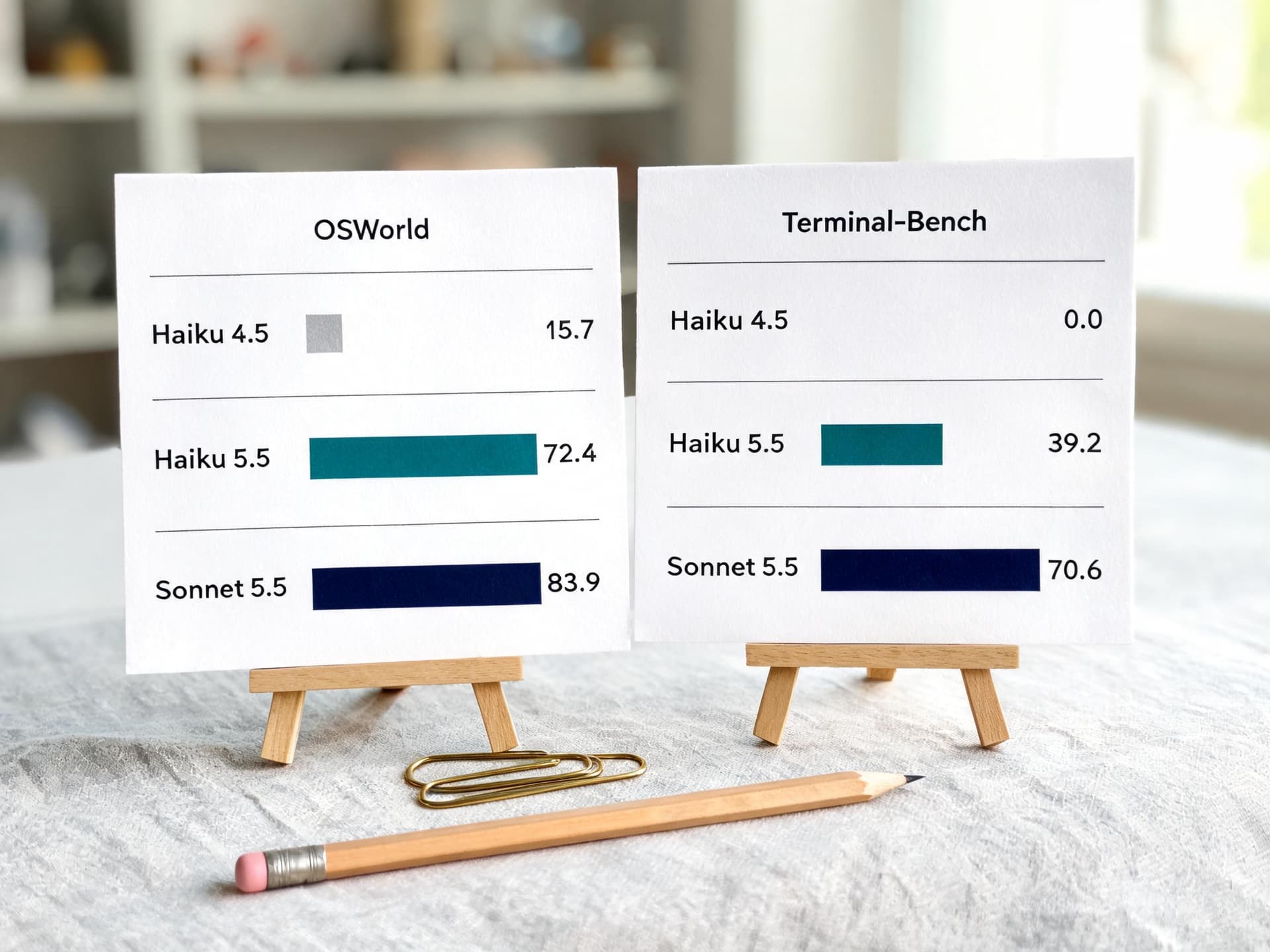
- Capability jump: OSWorld 2.1 (offline subset) 15.7% to 72.4%, Terminal-Bench 4.0 0.0% to 39.2%, all vendor-reported [1].
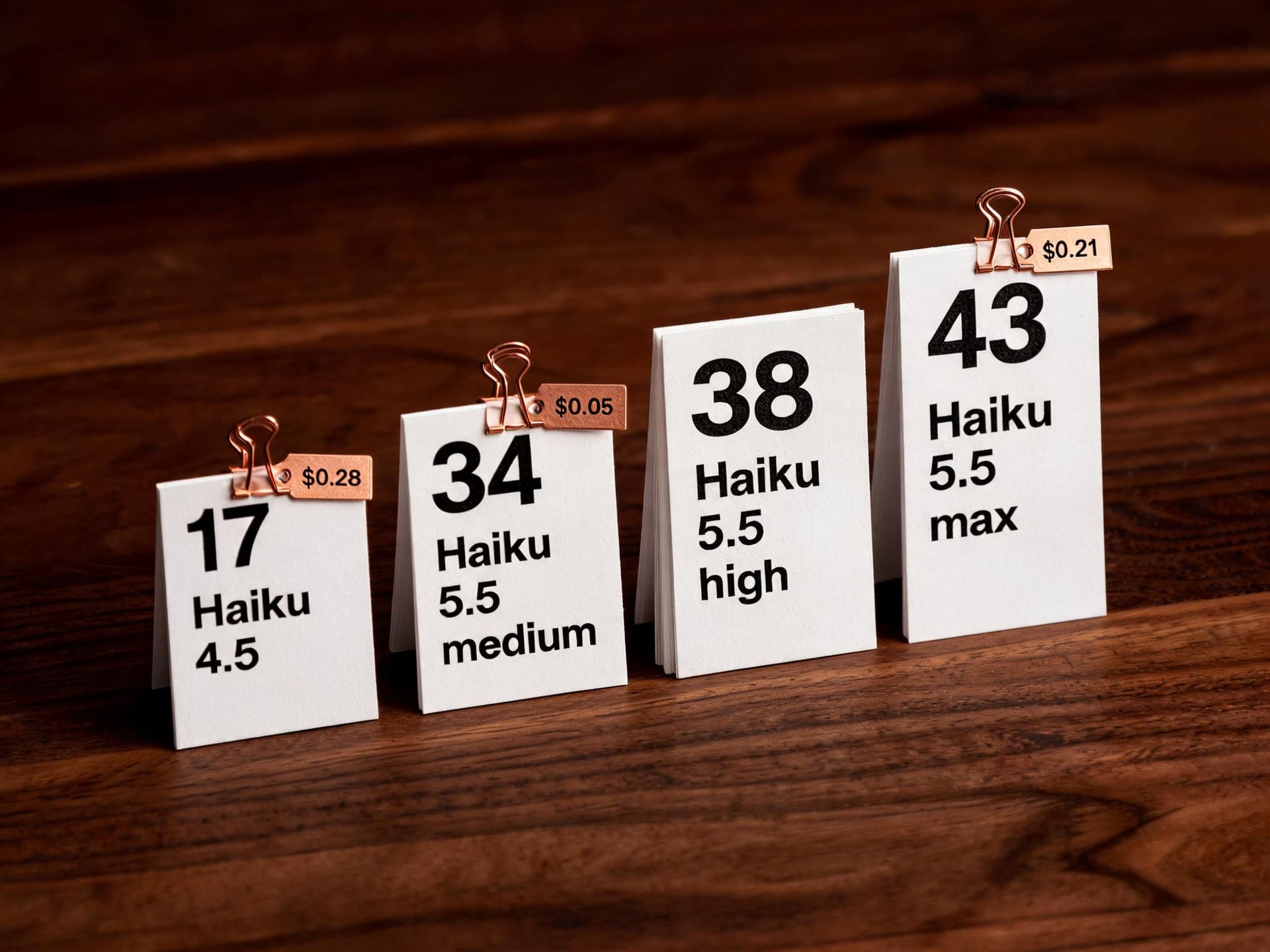
- Independent score: Artificial Analysis Intelligence Index 43 at max effort and 34 at medium, against 17 for Haiku 4.5 [6][8][10].
- Real saving: Anthropic says roughly 75% cheaper per task on average, not 90%, because the tokenizer counts about 30% more tokens for the same text [1][2].
- Best role: a worker under a Sonnet 5.5 or Opus 5.5 orchestrator, as covered in our guides to Claude Sonnet 5.5 and Claude Opus 5.5.
What Anthropic Actually Shipped on October 7, 2026
Anthropic describes Haiku 5.5 as its cheapest, fastest, and most capable small model, and the stated target workloads are high-volume, cost-sensitive jobs: summarization, compaction, database queries, classification, live customer support, and browser use [1]. The announcement also says it works well as a subagent alongside Opus 5.5 and Sonnet 5.5 on coding work, while stating plainly that Sonnet 5.5 and Opus 5.5 remain the better choices for complex agentic coding [1]. The Decoder repeats that framing and adds the useful interpretation that Haiku 5.5 fits narrowly scoped tasks such as compaction, summarization, or sub-agent work [5].
The spec sheet below collects the facts you need for planning, with the source for each.
| Spec | Claude Haiku 5.5 | Claude Haiku 4.5 | Source |
|---|---|---|---|
| API model ID | claude-haiku-5-5 | claude-haiku-4-5 | Anthropic announcement |
| Context window | 1M tokens | 200K tokens | Platform docs, what's new |
| Max output | 128K tokens | 64K tokens | Platform docs, what's new |
| Thinking | Adaptive thinking plus effort (low, medium, high, xhigh, max), default medium | Fixed thinking-token budget | Effort docs, DataCamp |
| Minimum cacheable prompt | 512 tokens | 4,096 tokens | Platform docs, what's new |
| Tokenizer | Newer tokenizer, about 30% more tokens for the same text | Older tokenizer | Platform docs, what's new |
| Platforms | Claude API, Amazon Bedrock, Google Cloud, Microsoft Foundry, Claude Platform on AWS | Not applicable | DataCamp |
Two rows in that table deserve a second look. The first is the tokenizer: Haiku 5.5 uses the same newer tokenizer as Claude 4.7 and later models, so identical text counts as approximately 30% more tokens than it did on Haiku 4.5, with the exact figure depending on content [2]. Every per-token price comparison you will read this week quietly depends on that number. The second is the 512 token minimum for prompt caching, down from 4,096 on Haiku 4.5, which means short system prompts that were never cacheable before now qualify [2]. That single change matters more for subagent fleets than most benchmark gains, and we will return to it in the caching section.
The launch also carried several adjacent changes. Anthropic halved Sonnet 5.5's cache-read price from $0.20 to $0.10 per million tokens, which it says cuts Sonnet's cost on most agentic tasks by around 20%, and it added monthly API credits for Max and Team subscribers plus beta SDK support for computer use and browser use [1]. Those are worth knowing because they change the Haiku-versus-Sonnet comparison, as the cost math later in this post shows.
The Pricing Model: Two Tiers and a Cliff at 100,000 Tokens
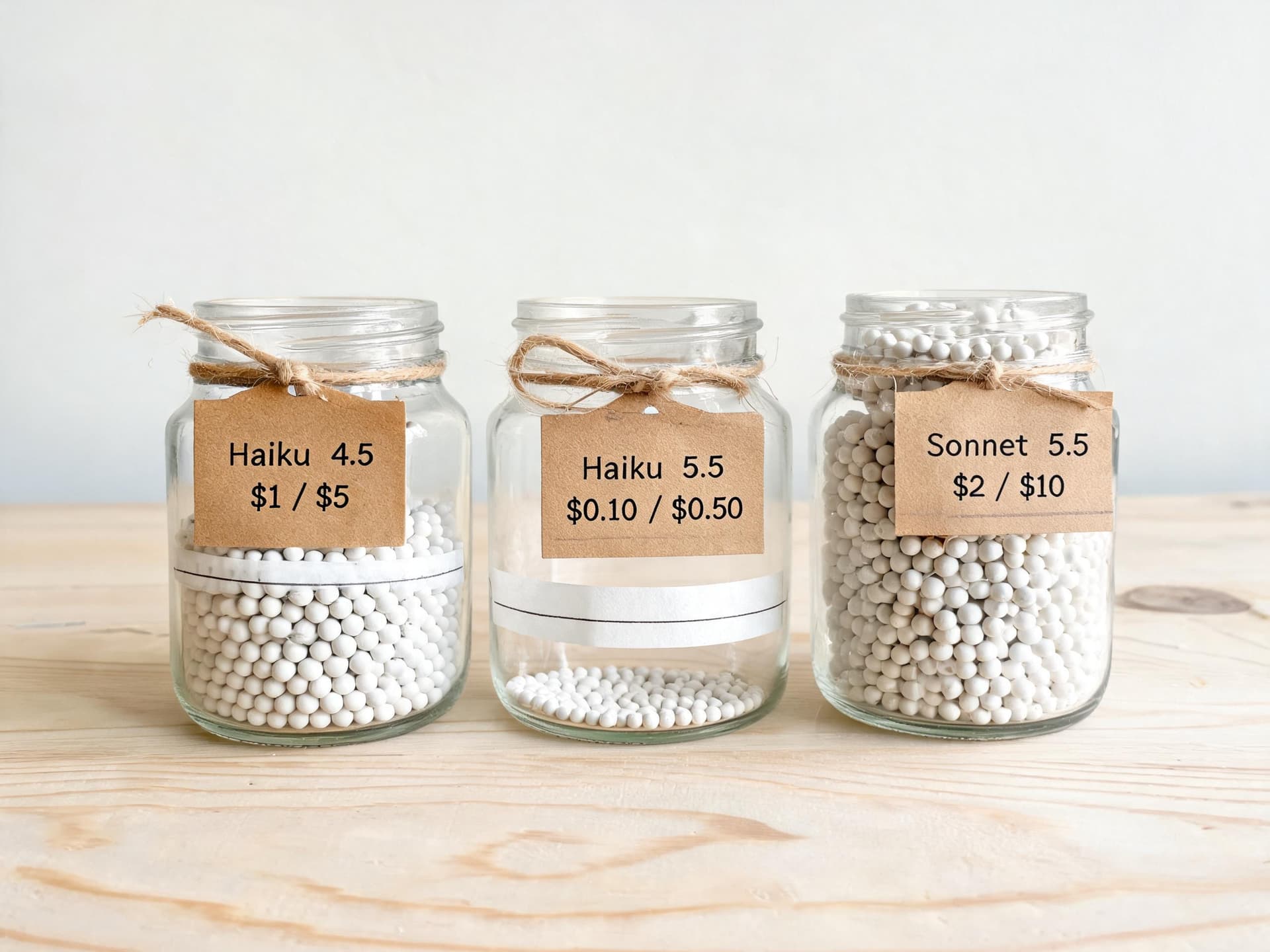
Haiku 5.5 is the first Haiku-class model priced by prompt length. A request whose prompt is 100,000 tokens or shorter pays $0.10 per million input tokens and $0.50 per million output tokens; a request over 100,000 tokens pays $0.50 and $2.50, exactly five times as much [3]. The rule that trips people up is how "prompt length" is counted. Anthropic's pricing page states that a request's prompt length includes all of its input tokens, cache reads and cache writes among them, and that each request is priced on its own, so a request over the threshold pays the higher prices even when part of its prompt is a cache hit [3].
By contrast, Sonnet 5.5, Opus 5.5, and most other Claude 4.6 and later models bill the full 1M context at a flat per-token rate [3]. Haiku 5.5 is the exception. Here is the full price grid, including the Batch API, which takes 50% off both input and output [3].
| Per 1M tokens | Input | Output | Cache read | 5-min cache write | Batch input / output |
|---|---|---|---|---|---|
| Haiku 5.5, prompt up to 100K | $0.10 | $0.50 | $0.01 | $0.125 | $0.05 / $0.25 |
| Haiku 5.5, prompt over 100K | $0.50 | $2.50 | $0.05 | $0.625 | $0.25 / $1.25 |
| Haiku 4.5 | $1.00 | $5.00 | $0.10 | $1.25 | $0.50 / $2.50 |
| Sonnet 5.5 (flat across 1M) | $2.00 | $10.00 | $0.10 | $2.50 | $1.00 / $5.00 |
Why Anthropic Says 75% and Not 90%
The headline per-token cut is 90% for prompts up to 100K tokens, yet Anthropic's own claim is that Haiku 5.5 costs around 75% less to run on average. The announcement's footnote explains the gap: Haiku 5.5 is priced 90% lower than Haiku 4.5 for requests up to 100,000 tokens and 50% lower above that, about 90% of Haiku 4.5 requests fell into the first bucket, and the calculation also accounts for changes in token usage [1]. DataCamp repeats the 75% figure, and The Decoder adds that real-world savings are likely smaller than the sticker price suggests [9][5].
There is also a circulating analysis claiming the saving is about 87% under 100K and about 35% above it. I could not find that exact pair in Anthropic's materials, The Decoder, DataCamp, or Artificial Analysis, so treat it as a third-party derivation rather than a published number. The arithmetic behind it is easy to reproduce, though, and it is a useful sanity check. If the same text becomes 1.3 times as many tokens and every token price is a tenth of the old one, then the cost of the same text is 1.3 x 0.10 = 0.13 of the old cost, an 87% saving. Above the cliff the price is half of Haiku 4.5's, so the same logic gives 1.3 x 0.50 = 0.65 of the old cost, a 35% saving. These figures assume equal output length per unit of text and no change in how much the model thinks, which is why Anthropic's blended number comes out lower: thinking tokens bill as output, and they vary by effort level [9].
A Worked Example of the Cliff
Take a job that sends 100,000 input tokens and gets 1,500 tokens back. At the lower tier it costs about 1.1 cents. Add a single token and the whole request reprices at the upper tier, landing near 5.4 cents. Nothing about the model's behavior changed; the invoice grew fivefold because of one token. The calculator later in this post prints exactly those two numbers so you can verify them yourself.

The cliff bites hardest in three situations. Retrieval pipelines that stuff "as many chunks as fit" will drift past the threshold whenever a document runs long. Multi-turn agents accumulate history, and Haiku 5.5 keeps thinking blocks from all earlier assistant turns in context, which count as input tokens, so conversations grow faster than the tokenizer change alone predicts [2]. And cached prefixes count toward the threshold, so a 95K cached prefix plus 6K of fresh text is a 101K request [3].
Even above the cliff, Haiku 5.5 stays cheaper per token than Sonnet 5.5's flat $2 / $10: $0.50 versus $2 on input, $2.50 versus $10 on output. A 120,000 token request with 1,500 tokens out costs about 6.4 cents on Haiku 5.5 and 25.5 cents on Sonnet 5.5, a 4x gap instead of 20x. Above the cliff Haiku 5.5 is still the cheaper model, but the saving shrinks and your cost curve becomes discontinuous, which is what breaks budgets.
The Cost Calculator
The snippet below encodes every price from the table and the cliff rule, then prints the cliff example, the cached-prefix trap, a caching comparison, and a monthly classification bill. Paste it into pricing.py and keep it next to your code, because the later snippets import from it.
python/code
from dataclasses import dataclass

CLIFF = 100_000  # prompt tokens: cache reads and writes count toward this

@dataclass(frozen=True)
class Rates:
    inp: float          # USD per 1M input tokens
    out: float          # USD per 1M output tokens (thinking tokens bill as output)
    cache_read: float
    cache_write_5m: float

# Source: platform.claude.com/docs/en/about-claude/pricing (verify before you rely on it)
HAIKU_55_LOW  = Rates(0.10, 0.50, 0.01, 0.125)   # prompt <= 100K tokens
HAIKU_55_HIGH = Rates(0.50, 2.50, 0.05, 0.625)   # prompt  > 100K tokens
HAIKU_45      = Rates(1.00, 5.00, 0.10, 1.25)
SONNET_55     = Rates(2.00, 10.00, 0.10, 2.50)

def haiku_55_rates(prompt_tokens: int) -> Rates:
    return HAIKU_55_HIGH if prompt_tokens > CLIFF else HAIKU_55_LOW

def request_cost(rates: Rates, fresh_in: int, out: int,
                 cached_in: int = 0, cache_write: int = 0, batch: bool = False) -> float:
    usd = (fresh_in * rates.inp + out * rates.out
           + cached_in * rates.cache_read + cache_write * rates.cache_write_5m) / 1e6
    return usd * (0.5 if batch else 1.0)

def haiku_55_cost(fresh_in: int, out: int, cached_in: int = 0,
                  cache_write: int = 0, batch: bool = False) -> float:
    prompt = fresh_in + cached_in + cache_write      # whole request is priced by this
    return request_cost(haiku_55_rates(prompt), fresh_in, out, cached_in, cache_write, batch)

if __name__ == "__main__":
    # 1) The cliff: same job, one extra token
    for n in (100_000, 100_001):
        print(f"{n:>7} in / 1,500 out -> ${haiku_55_cost(n, 1_500):.4f}")

    # 2) Cached prefix that quietly crosses the cliff (95K cached + 6K fresh)
    print("95K cached + 6K fresh :", f"${haiku_55_cost(6_000, 500, cached_in=95_000):.5f}")
    print("90K cached + 5K fresh :", f"${haiku_55_cost(5_000, 500, cached_in=90_000):.5f}")

    # 3) 30K-token shared prefix, 1,000 calls inside the cache window
    no_cache = 1_000 * haiku_55_cost(30_500, 300)
    cached = (haiku_55_cost(500, 300, cache_write=30_000)
              + 999 * haiku_55_cost(500, 300, cached_in=30_000))
    print(f"1,000 calls, no cache: ${no_cache:.2f} | cached: ${cached:.2f}")

    # 4) Monthly classification job: 2M tickets, 1,500 in / 200 out each
    for name, r in (("Haiku 5.5", HAIKU_55_LOW), ("Sonnet 5.5", SONNET_55)):
        print(name, f"${2_000_000 * request_cost(r, 1_500, 200):,.0f}")
    print("Haiku 5.5 batch", f"${2_000_000 * haiku_55_cost(1_500, 200, batch=True):,.0f}")
Running it produces these results, which the rest of the post uses:
| Scenario | Haiku 5.5 | Comparison |
|---|---|---|
| 100,000 input / 1,500 output tokens | $0.0107 | Same job |
| 100,001 input / 1,500 output tokens | $0.0538 | About 5x, one token later |
| 95K cached + 6K fresh (101K request) | $0.00900 | Trimmed to 90K cached + 5K fresh: $0.00165 |
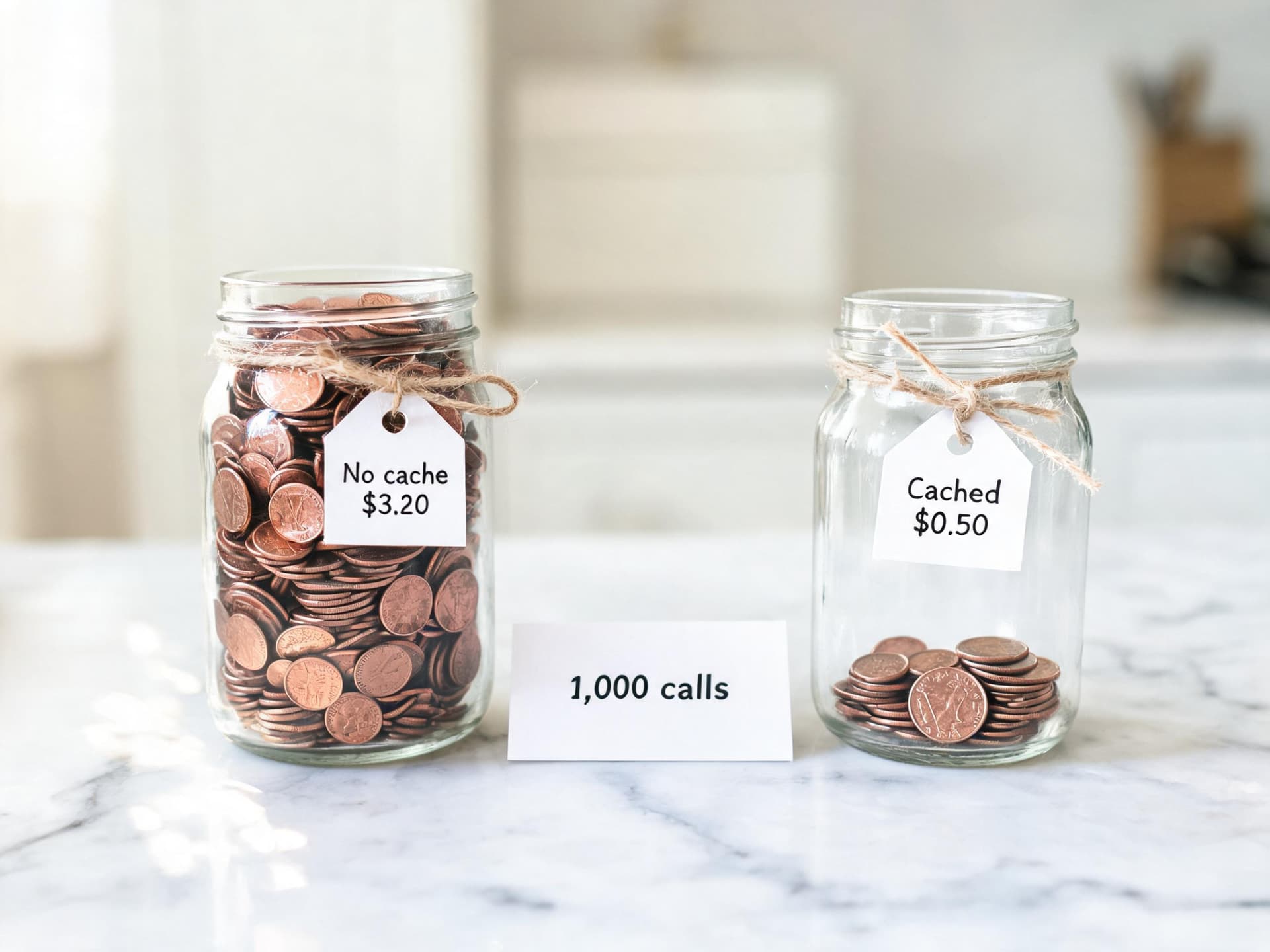
| 1,000 calls, 30K shared prefix, 300 out | $0.50 cached | $3.20 without caching |
| 2M tickets a month, 1,500 in / 200 out | $500 | Sonnet 5.5: $10,000. Haiku 5.5 on Batch API: $250 |
Read the classification row carefully. At 2 million tickets a month with 1,500 input and 200 output tokens each, Haiku 5.5 costs $500 against $10,000 on Sonnet 5.5 and, with the Batch API, $250. The 20x gap is purely list price; whether Haiku 5.5 is accurate enough for your tickets is an eval question that this arithmetic cannot answer, which is the point of the effort sweep later on.
The Benchmarks: What Anthropic Reports
Anthropic published a benchmark table comparing Haiku 5.5 with Haiku 4.5, GPT-6 Luna, and Sonnet 5.5. Everything in it is vendor-run, so read it as the best case for the model, and note that Anthropic itself labels the OSWorld number as an offline subset [1].
| Benchmark (vendor-reported) | Haiku 5.5 | Haiku 4.5 | GPT-6 Luna | Sonnet 5.5 |
|---|---|---|---|---|
| GDPval-AA v2.1 (Elo) | 1620 | 735 | 1437 | 1840 |
| AA-Briefcase v1.1 (Elo) | 1578 | 614 | 1336 | 1824 |
| OSWorld 2.1 (offline subset) | 72.4% | 15.7% | 48.9% | 83.9% |
| Terminal-Bench 4.0 | 39.2% | 0.0% | 16.4% | 70.6% |
| FrontierCode 1.1 (Main) | 46.4% | Not reported | 42.4% | 52.1% (Xhigh) |
| Humanity's Last Exam, no tools | 45.9% | 10.2% | Not reported | 56.9% |
| Humanity's Last Exam, with tools | 57.4% | 18.7% | Not reported | 64.5% |
| Chartography, no tools | 46.4% | 6.4% | 29.1% | 61.6% |
Reading the Jumps
The two headline numbers are real jumps. On OSWorld 2.1 (offline subset), which tests operating a desktop through screenshots and actions, Haiku 5.5 reaches 72.4% against 15.7% for Haiku 4.5 [1]. DataCamp notes that Haiku 4.5 posted 50.7% on the older OSWorld-Verified benchmark at its own launch, so the two figures sit on different test versions and the 15.7% is best read as a statement about difficulty of the newer benchmark rather than a regression [9]. For background on why OSWorld 2.x numbers are lower across the board, see our breakdown of OSWorld 2.0.
On Terminal-Bench 4.0, which scores agentic work inside a real terminal, Haiku 5.5 moves from 0.0% to 39.2% [1]. A zero for the previous model means the older Haiku essentially could not finish those tasks at all, so the jump says more about crossing a competence threshold than about a gradual improvement. Our Terminal-Bench 4.0 explainer covers how the harness scores tasks and why scores on it are volatile.
Haiku 5.5 as a Fraction of Sonnet 5.5
The more decision-relevant way to read the table is column to column. Taking Anthropic's figures, Haiku 5.5 reaches about 86% of Sonnet 5.5's OSWorld score (72.4 of 83.9), about 81% of its Humanity's Last Exam score without tools (45.9 of 56.9), about 89% of its FrontierCode 1.1 Main score (46.4 of 52.1, with the Sonnet figure run at Xhigh), but only about 56% of its Terminal-Bench 4.0 score (39.2 of 70.6) [1]. Those ratios are my own division of Anthropic's published numbers. They show the pattern that matters for routing: the gap is smallest on knowledge work and computer operation and largest on long-horizon terminal coding, which lines up with Anthropic's advice to keep complex agentic coding on the larger models [1].
On the Elo-style knowledge-work evaluations, Haiku 5.5 posts 1620 on GDPval-AA v2.1 and 1578 on AA-Briefcase v1.1, compared with 735 and 614 for Haiku 4.5 and 1840 and 1824 for Sonnet 5.5 [1]. Elo gaps are not linear in usefulness, but a roughly 220 to 250 point deficit to Sonnet 5.5 sits alongside a 20x price advantage, which is the trade that makes subagents attractive. For the Sonnet side of that comparison, including how it beat Opus 5.5 on Terminal-Bench, see our Sonnet 5.5 deep dive.
Haiku 5.5 Versus GPT-6 Luna
Anthropic reports Haiku 5.5 ahead of GPT-6 Luna on every benchmark where both appear: 72.4% versus 48.9% on OSWorld, 39.2% versus 16.4% on Terminal-Bench 4.0, 46.4% versus 42.4% on FrontierCode, and 46.4% versus 29.1% on Chartography [1]. Luna lists at the same $0.10 / $0.50 per million tokens, which both Artificial Analysis and DataCamp confirm [6][9]. Because this is Anthropic's own table, the Luna numbers deserve independent confirmation, and the next section provides some. Our GPT-6 Sol and Luna guide covers Luna's side of the story.
Customer Evidence
Anthropic's launch post includes partner results, all of which are self-reported by the partners and none of which I could independently reproduce. Asana cited over a 30% reduction in task-completion latency against its current model; HubSpot reported a 92.8% CRM-suite score averaged over three runs; AlphaSense measured 0.84 against Haiku 4.5's 0.76 across 400 queries and called the difference statistically significant; Box saw an 11 point improvement at about half the latency; and Cognition described Haiku 5.5 as an excellent sidekick in Devin Fusion, where it holds a FrontierCode score of 66.2 [1]. The pattern across these is consistent with the target role: fast, scoped, repeated work next to a stronger planner. None of them is a claim that Haiku 5.5 replaces the planner.
What Independent Testing Says
Artificial Analysis (AA) runs its own evaluations, which makes it the best available check on a vendor table. At max effort Haiku 5.5 scores 43 on the AA Intelligence Index, the highest of any small-class model it lists, ahead of GLM-5.3 Flash at 42, Gemini 3.8 Flash at 41, and GPT-6 Luna at 38, and 13 points below Claude Sonnet 5.5 [6][5]. AA's model page puts the max-effort variant at rank 2 of 180 models in its comparison set, with output speed of 233.6 tokens per second and a cost of $0.21 per Intelligence Index task [7]. At medium effort, the default, the score is 34, at $0.05 per task, with 168.7 tokens per second [8]. Haiku 4.5 with reasoning scored 17 at $0.28 per task, a figure reported by a third-party analysis rather than on the AA pages I could read, so I treat it as likely but less firmly sourced [10].
| Model and setting | AA Intelligence Index | Cost per index task | Notes |
|---|---|---|---|
| Haiku 4.5 (reasoning) | 17 | $0.28 | Third-party report of AA data |
| Haiku 5.5 medium (default) | 34 | $0.05 | About 54M output tokens across the index, 168.7 tokens/sec |
| Haiku 5.5 high | 38 | Not published | About 55K output tokens per task |
| Haiku 5.5 max | 43 | $0.21 | About 440M output tokens across the index, about 162K per task, 233.6 tokens/sec |
| GPT-6 Luna max | 38 | $0.07 | About 50K output tokens per task, same $0.10 / $0.50 list price |
| Claude Sonnet 5.5 | 56 | Not published | 13 points above Haiku 5.5 max |
The Token Appetite Caveat
The most important sentence in the independent coverage is about tokens, not intelligence. AA reports that Haiku 5.5 at max effort uses about 162,000 output tokens per Intelligence Index task, roughly three times GPT-6 Luna at max effort (about 50,000), and that at similar scores the gap persists: Haiku 5.5 at high effort scores 38 using about 55,000 tokens, while Luna at max reaches 38 with about 50,000 [6]. Across the whole index AA measures about 440 million output tokens at max effort versus about 54 million at medium [7][8], roughly an 8x difference in output volume for a 9 point score gain, which in cost-per-task terms is $0.05 versus $0.21.
The Decoder draws the practical conclusion: the real-world saving is likely smaller than the sticker price implies, and Luna at max effort reaches a similar score at roughly a third of Haiku 5.5's per-task cost [5]. In other words, Haiku 5.5 does not win on cost efficiency at equal intelligence against Luna in AA's data, but it wins on absolute capability, and AA's own comparison shows 40% hallucination for Haiku 5.5 against 77% for Luna on its AA-Omniscience test, although Haiku 5.5's raw factual accuracy is lower, 36% versus 44% [5][6]. The lower hallucination rate means that when Haiku 5.5 does not know something it is more likely to say so, which is exactly the behavior you want in a worker whose output a stronger model will consume. A model that abstains is easier to orchestrate than one that confidently invents.
One more data point is worth carrying forward. AA's page cautions that its cost figures do not yet include the tiered step-up above 100K tokens, and that its AutomationBench-AA score of 35% is likely understated because of a safety over-refusal issue [6]. Both caveats echo the practical advice later in this post: measure on your own prompts, and handle refusals explicitly.
Choosing an Effort Level With an Actual Sweep
Haiku 5.5 is the first Haiku with adaptive thinking and an effort parameter, and Anthropic documents the syntax precisely: you set output_config.effort on the request, with five levels, low, medium, high, xhigh, and max, where medium is the default for Haiku 5.5 and omitting the parameter behaves identically to setting medium [4]. Effort applies to all output tokens, including text, tool calls, and thinking, so it matters even when thinking is off [4].
Anthropic's own guidance for this model is specific. Start with medium for most work, including agentic coding. Use low, the cheapest and fastest level, for chat, short tool tasks, and simple high-volume requests, with the warning that in long agent prompts the model is more likely to skip a search, stop early, or skip a check at low. Use high for knowledge work, longer agent tasks, and strict instruction following. Reserve xhigh and max for cases where your evals show a quality gain, and compare them against Sonnet 5.5 on performance, cost, and speed [4]. That last instruction is the quiet punchline: at xhigh or max, Haiku 5.5's token appetite can erase the price advantage that justified choosing it.
Here is the minimal request in cURL, using the exact field names from Anthropic's effort documentation:
bash/code
# Haiku 5.5 at low effort. output_config.effort is the documented field.
# max_tokens is generous because thinking tokens count toward it.
curl https://api.anthropic.com/v1/messages \
  -H "x-api-key: $ANTHROPIC_API_KEY" \
  -H "anthropic-version: 2023-06-01" \
  -H "content-type: application/json" \
  -d '{
    "model": "claude-haiku-5-5",
    "max_tokens": 4096,
    "output_config": { "effort": "low" },
    "messages": [{
      "role": "user",
      "content": "Classify this ticket as billing, bug, or feature request, and answer with one word: My invoice shows two charges for September."
    }]
  }'
A Practical Sweep
Because effort is a behavioral signal and not a strict token budget [4], the only reliable way to pick a level is to run your own cases at each level and record both quality and billed tokens. The harness below runs a list of cases at every effort level, applies a grader you supply, and reports accuracy, average output tokens, and cost per correct answer. It uses the calculator from earlier and reads usage directly from the API response, so thinking tokens are counted as the output they bill as.
python/code
import statistics
import anthropic
from pricing import haiku_55_cost  # the calculator from earlier in this post

client = anthropic.Anthropic()
MODEL = "claude-haiku-5-5"
EFFORTS = ["low", "medium", "high", "xhigh", "max"]

def run_case(prompt: str, effort: str):
    resp = client.messages.create(
        model=MODEL,
        max_tokens=16_000,                      # thinking counts toward this limit
        output_config={"effort": effort},
        messages=[{"role": "user", "content": prompt}],
    )
    if resp.stop_reason == "refusal":
        return None, resp.usage
    # Select by block type: responses can begin with thinking blocks.
    text = "".join(b.text for b in resp.content if b.type == "text")
    return text, resp.usage

def sweep(cases, grade):
    """cases: list of (prompt, expected). grade(output, expected) -> bool."""
    rows = []
    for effort in EFFORTS:
        correct, costs, out_tokens = 0, [], []
        for prompt, expected in cases:
            text, u = run_case(prompt, effort)
            ok = text is not None and grade(text, expected)
            correct += ok
            costs.append(haiku_55_cost(
                fresh_in=u.input_tokens,
                out=u.output_tokens,                       # includes thinking tokens
                cached_in=getattr(u, "cache_read_input_tokens", 0) or 0,
                cache_write=getattr(u, "cache_creation_input_tokens", 0) or 0,
            ))
            out_tokens.append(u.output_tokens)
        total = sum(costs)
        rows.append({
            "effort": effort,
            "accuracy": correct / len(cases),
            "avg_out_tokens": round(statistics.mean(out_tokens)),
            "total_usd": round(total, 4),
            "usd_per_correct": round(total / max(correct, 1), 5),
        })
    return rows

if __name__ == "__main__":
    demo = [("Is 91 prime? Answer yes or no.", "no"), ("Is 97 prime? Answer yes or no.", "yes")]
    for row in sweep(demo, lambda out, exp: exp in out.lower()):
        print(row)
Three habits make the sweep trustworthy. First, use at least 100 real cases per task type, because a difference between 94% and 96% on twenty examples is noise. Second, rank by cost per correct answer rather than raw accuracy, since a level that is 3 points better but 4x more expensive per success is rarely the right production setting. Third, include a handful of long, messy inputs, because Anthropic notes that low effort tends to combine operations into fewer tool calls and proceed without preamble, which is what you want for clean inputs and exactly what causes skipped checks on hard ones [4].
Changing Effort Mid-Conversation Without Wrecking the Cache
Top-level effort is part of the rendered prompt, so changing it between requests invalidates cached prefixes. Anthropic documents a beta alternative for Haiku 5.5 on the Claude API and Google Cloud: a per-message effort change, sent as a system role message with empty content and an output_config, using the beta header mid-conversation-output-config-2026-07-01, which keeps the prompt cache intact [4]. It does not work when you set thinking: {"type": "disabled"}, where a differing effort returns a 400 error, so vary effort per turn only with adaptive thinking [4]. For a subagent that handles one self-contained task per call, none of this matters; for a long-running Haiku conversation that starts hard and ends routine, it can save real money.
The Subagent Architecture: Haiku 5.5 Under a Sonnet 5.5 Orchestrator
The cleanest use of a cheap, fast model is as a worker that does a bounded job and returns a compact result. The orchestrator, a stronger and more expensive model, plans, delegates, and synthesizes. Anthropic's effort documentation even names the pattern directly, listing "simpler tasks that need the best speed and lowest costs, such as subagents" as the use case for low effort [4]. If you want the design theory behind orchestrators that route to cheaper workers, our write-up on Sakana's Fugu Ultra v2 orchestrator and the guide to harness engineering are good companions, and the fundamentals of tool calling are in LLM agents and tool use.
Reference Implementation
The code below implements the pattern with the official Python SDK. Sonnet 5.5 receives a single delegate tool whose input is a list of independent briefs. Each brief is dispatched to Haiku 5.5 in parallel with output_config={"effort": "low"}, the worker reply is trimmed to its text blocks, and the results go back to the orchestrator as a tool result. Details that follow Anthropic's migration notes: no temperature, top_p, or top_k (they can return an error), no assistant prefill, the message list always ends with a user turn, response blocks are selected by type instead of position because adaptive thinking can put thinking blocks first, and stop_reason == "refusal" is handled explicitly [2].
python/code
import json
from concurrent.futures import ThreadPoolExecutor
import anthropic

client = anthropic.Anthropic()
ORCHESTRATOR = "claude-sonnet-5-5"
WORKER = "claude-haiku-5-5"

# Keep this over 512 tokens in production so the cache breakpoint is honored.
WORKER_SYSTEM = [{
    "type": "text",
    "text": ("You are a focused research subagent. Read the document and answer the brief. "
             "Return at most 150 words. If the document does not contain the answer, "
             "reply exactly: NOT_FOUND. Never guess."),
    "cache_control": {"type": "ephemeral"},
}]

DELEGATE_TOOL = {
    "name": "delegate",
    "description": "Run independent sub-tasks in parallel on a fast, cheap worker model.",
    "input_schema": {
        "type": "object",
        "properties": {
            "tasks": {
                "type": "array",
                "items": {
                    "type": "object",
                    "properties": {
                        "brief": {"type": "string", "description": "One specific question, under 60 words."},
                        "doc_id": {"type": "string"},
                    },
                    "required": ["brief", "doc_id"],
                },
            }
        },
        "required": ["tasks"],
    },
}

DOCS = {}  # doc_id -> text; load your corpus here

def run_worker(task: dict) -> str:
    doc = DOCS.get(task["doc_id"], "")
    resp = client.messages.create(
        model=WORKER,
        max_tokens=4096,                        # thinking tokens count toward this
        output_config={"effort": "low"},        # no temperature/top_p/top_k, no prefill
        system=WORKER_SYSTEM,
        messages=[{"role": "user",
                   "content": f"{task['brief']}\n\n<document>\n{doc}\n</document>"}],
    )
    if resp.stop_reason == "refusal":
        return "REFUSED"
    return "".join(b.text for b in resp.content if b.type == "text").strip()

def orchestrate(question: str) -> str:
    messages = [{"role": "user", "content": question}]
    while True:
        resp = client.messages.create(
            model=ORCHESTRATOR,
            max_tokens=8192,
            tools=[DELEGATE_TOOL],
            output_config={"effort": "medium"},
            messages=messages,
        )
        messages.append({"role": "assistant", "content": resp.content})  # keep append-only
        if resp.stop_reason != "tool_use":
            return "".join(b.text for b in resp.content if b.type == "text")

        results = []
        for block in resp.content:
            if block.type == "tool_use" and block.name == "delegate":
                tasks = block.input["tasks"]
                with ThreadPoolExecutor(max_workers=16) as pool:
                    answers = list(pool.map(run_worker, tasks))
                results.append({
                    "type": "tool_result",
                    "tool_use_id": block.id,
                    "content": json.dumps(answers),
                })
        messages.append({"role": "user", "content": results})
Where the Money Actually Goes
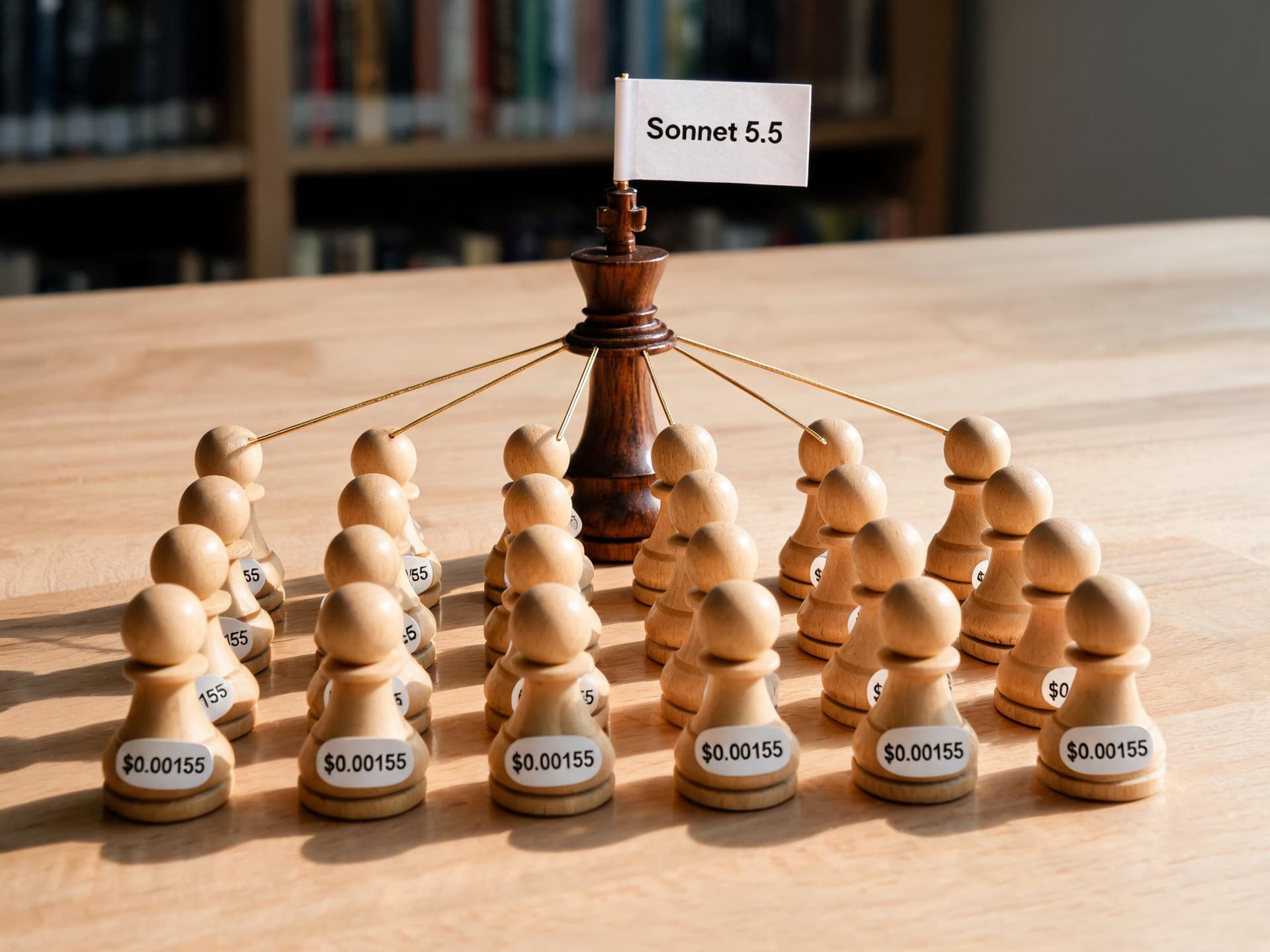
The first instinct is to assume the savings come from the workers, and it is only half right. Beam's illustrative model of a research run makes the point with concrete numbers: an Opus 5.5 orchestrator reads a task, writes 20 briefs of about 250 tokens, and delegates to 20 Haiku 5.5 subagents that each read 8,000 tokens and write 1,500; the orchestrator then reads 20 answers of about 600 tokens and writes a 4,000 token synthesis. In that model each subagent call costs about $0.00155, and the total run costs $0.445, of which the subagents are only about 7% ($0.031), the orchestrator's planning and synthesis about $0.266, and hand-offs (writing briefs and reading answers) about $0.148. Running everything on Opus costs $1.65, and a Sonnet 5.5 orchestrator brings the Haiku-worker version to $0.238 [10]. These are Beam's scenario figures, not measurements, but the per-call number is easy to verify: 8,000 input tokens at $0.10 per million plus 1,500 output tokens at $0.50 per million is $0.0008 plus $0.00075, or $0.00155 [3].
| 20-subagent research run (Beam's illustrative scenario) | Cost |
|---|---|
| One Haiku 5.5 subagent call (8K in, 1.5K out) | $0.00155 |
| 20 Haiku 5.5 subagent calls | $0.031 (about 7% of the run) |
| Opus 5.5 orchestrator planning and synthesis | $0.266 |
| Hand-offs (writing 20 briefs, reading 20 answers) | $0.148 |
| Total, Opus 5.5 orchestrator with Haiku 5.5 workers | $0.445 |
| Total, everything on Opus 5.5 | $1.65 |
| Total, Sonnet 5.5 orchestrator with Haiku 5.5 workers | $0.238 |
The lesson is that once workers cost a fraction of a cent, the dominant cost is the orchestrator's tokens, so the optimizations that matter are on the orchestrator side. Keep briefs short and specific. Ask workers to return structured, terse answers (a JSON object or a 150-word summary) so the orchestrator reads less. Keep the orchestrator's system prompt cached; Sonnet 5.5's cache reads are now $0.10 per million after the price cut, which is half of the previous $0.20 [1]. And resist the urge to spawn a verifier for every answer by default; Beam's model puts a second Haiku check on every answer at about 7% extra, whereas re-running one job in twenty on Opus adds about $0.062 in that scenario, which is a cheaper way to buy confidence on the answers that matter [10].
Haiku 5.5, Sonnet 5.5, or Luna for the Worker Seat?
Choosing the worker model is a three-way trade. Haiku 5.5 is 20x cheaper per token than Sonnet 5.5 under the cliff, scores in the same neighborhood on knowledge work, and trails sharply on long terminal-style coding [1]. Sonnet 5.5 is the right worker when the subtask is itself an agentic coding loop, as covered in our Opus 5 versus Sonnet 5 comparison, which explains the effort toggle in the larger models. GPT-6 Luna matches Haiku 5.5's list price and, per AA's numbers, is cheaper per task at an equal score, but it scores lower on the Intelligence Index at max effort (38 versus 43) and hallucinates more on AA's test [6]. If your stack is already on Anthropic's API, caching, and tool-use conventions, the integration cost favors Haiku 5.5; if you are cost-minimizing on short, easy tasks and can tolerate the hallucination profile, Luna deserves a real A/B in your own eval.
Prompt Caching Math for Subagent Fleets
Prompt caching is where Haiku 5.5's pricing becomes almost silly. Cache reads cost $0.01 per million tokens (a tenth of the base input price), 5-minute cache writes cost $0.125 (1.25x base), and 1-hour writes cost $0.20 (2x base) [3]. Anthropic's pricing page notes that a cache hit costs 10% of the standard input price, so caching pays off after a single read for the 5-minute duration [3]. The relevant structure for a fleet is a long, stable prefix (instructions, schema, few-shot examples, tool definitions) followed by a short variable suffix (this particular document).
The Numbers
Consider a 30,000 token shared prefix and 1,000 calls inside the cache window, each adding 500 fresh input tokens and getting 300 tokens back. Without caching, every call pays full input price on 30,500 tokens: about $3.20 in total. With caching, the first call pays the 1.25x write premium and the remaining 999 read the prefix at $0.01 per million, for about $0.50 in total, a saving of roughly 84%. The calculator's third scenario prints exactly these figures. The remaining $0.50 is dominated by the output tokens ($0.15 for 300,000 output tokens) and the write and fresh suffix costs, so further savings must come from shorter outputs and lower effort rather than more caching.
The 512 Token Minimum Changes Which Prompts Qualify
Haiku 4.5 required a 4,096 token minimum before a prompt could be cached; Haiku 5.5 lowers it to 512, and a prompt in between that sets cache_control now gets cached [2]. Many classification and extraction prompts are 800 to 3,000 tokens and sat below the old threshold, so they were silently uncached before. If you are migrating from Haiku 4.5, a quick win is to add a cache breakpoint to the system prompt of every worker and check cache_read_input_tokens in the usage object to confirm hits.
Two Traps
First, the cliff counts cached tokens. A 95K cached prefix with 6K of fresh text is a 101K request, billed at the upper tier: about 0.9 cents against 0.17 cents for the same job trimmed to 90K cached plus 5K fresh. That is a 5x difference from a few thousand tokens of retrieved text, which is why the router in the next section budgets against the threshold explicitly. Second, effort is part of the cache key. Changing top-level effort between requests invalidates cached prefixes, so pick one effort per workload, or use the beta per-message effort change described above [4].
Staying Under the Cliff: A Token-Aware Router
The simplest way to avoid cliff surprises is to count tokens before you send. The Anthropic SDK includes a token counting endpoint, and because Haiku 5.5's tokenizer differs from earlier models you should count against the model you will actually call. The router below takes a long document, measures it, and chooses among three strategies: send it whole if it is comfortably under the threshold, chunk it map-reduce style if it is over, or escalate to Sonnet 5.5 if the task is flagged as needing deeper reasoning over the whole text. It leaves headroom for the instructions, the output, and the thinking blocks that accumulate over multi-turn use [2].
python/code
import anthropic
from pricing import CLIFF

client = anthropic.Anthropic()
HAIKU, SONNET = "claude-haiku-5-5", "claude-sonnet-5-5"
SAFE_PROMPT_TOKENS = 90_000      # headroom under the 100K cliff
CHUNK_TOKENS = 80_000

def count_tokens(model: str, text: str) -> int:
    # Count against the model you will call: Haiku 5.5 uses the newer tokenizer.
    r = client.messages.count_tokens(
        model=model, messages=[{"role": "user", "content": text}]
    )
    return r.input_tokens

def ask(model: str, instruction: str, text: str, effort: str = "low") -> str:
    resp = client.messages.create(
        model=model, max_tokens=4096, output_config={"effort": effort},
        messages=[{"role": "user", "content": f"{instruction}\n\n<document>\n{text}\n</document>"}],
    )
    if resp.stop_reason == "refusal":
        return "REFUSED"
    return "".join(b.text for b in resp.content if b.type == "text")

def split_by_tokens(text: str, total_tokens: int, chunk_tokens: int):
    chars_per_token = len(text) / total_tokens
    step = int(chunk_tokens * chars_per_token)
    return [text[i:i + step] for i in range(0, len(text), step)]

def route(instruction: str, text: str, needs_whole_document: bool = False) -> str:
    n = count_tokens(HAIKU, text)
    if n <= SAFE_PROMPT_TOKENS:
        return ask(HAIKU, instruction, text)                       # lower price tier
    if needs_whole_document:
        return ask(SONNET, instruction, text, effort="medium")     # flat 1M pricing
    partials = [ask(HAIKU, instruction, c)
                for c in split_by_tokens(text, n, CHUNK_TOKENS)]   # each chunk stays under the cliff
    merged = "\n\n".join(f"[Part {i+1}]\n{p}" for i, p in enumerate(partials))
    return ask(HAIKU, f"Merge these partial answers into one. {instruction}", merged)
The chunking strategy shows why the cliff is a design constraint as well as a billing quirk. A 250,000 token document sent to Haiku 5.5 in one request costs about 13 cents at the upper tier (250,000 x $0.50 per million, plus output). Split into three chunks of roughly 83,000 tokens, each summarized at the lower tier and then merged in a final small call, the same document costs under 3 cents in my arithmetic. The chunked version loses cross-chunk context, so it is wrong for tasks like contradiction detection across a whole contract, and right for summarization, extraction, and classification by section. When the task does need the whole 250K text at once, Sonnet 5.5 at flat pricing is the honest alternative to compare against, at about $0.50 for the input alone.
Batch Processing: Another 50% for Work That Can Wait
The Batch API takes 50% off both input and output for asynchronous jobs, so Haiku 5.5 batch rates are $0.05 and $0.25 per million tokens under the cliff, and $0.25 and $1.25 above it [3]. Anthropic's pricing documentation says the Batch API and prompt caching discounts can be combined, and that the multipliers stack with the other pricing modifiers [3]. For overnight enrichment, backfills, offline evaluation, and bulk classification, this is the default; the monthly classification example above drops from $500 to $250 when moved to batch.
A single batch request line looks like the following. Keep output_config and the model fields identical to what you validated in your sweep, since the batch path does not change model behavior, only turnaround time and price.
json/code
{
  "requests": [
    {
      "custom_id": "ticket-000123",
      "params": {
        "model": "claude-haiku-5-5",
        "max_tokens": 2048,
        "output_config": { "effort": "low" },
        "messages": [
          { "role": "user", "content": "Classify this ticket as billing, bug, or feature request. One word.\n\nMy invoice shows two charges for September." }
        ]
      }
    }
  ]
}
Two practical notes. Priority Tier is not supported on Haiku 5.5, according to one third-party summary of the docs, so latency-critical paths should be validated on the standard tier rather than assumed [10]. And batch is the wrong tool for interactive subagents inside a live user request; it belongs to the offline half of your system.
Migration Notes: What Breaks When You Swap the Model ID
Changing claude-haiku-4-5 to claude-haiku-5-5 is not a pure string replacement. Anthropic's what's-new page lists several breaking changes [2]:
- Manual extended thinking with
budget_tokensreturns an error; use adaptive thinking and the effort parameter instead. - Non-default
temperature,top_p, andtop_kcan return an error, so remove them from your request builders. - Assistant message prefill returns an error; end the
messagesarray with a user turn. - The older
computer_20250124tool returns an error on the Claude API, Google Cloud, and Amazon Bedrock, withcomputer_toolset_20260801as the replacement on the Claude API and Google Cloud. - Structured outputs are not available on Amazon Bedrock for this model, so describe the format in the prompt or use a tool without
strictand validate in code. - Changing earlier turns invalidates thinking blocks, so keep conversations append-only if you send thinking blocks back.
- Safety classifiers can decline a request, so handle
stop_reason: "refusal"; server-side fallback is not available.
Behavior changes matter as much as breaking ones. Responses can start with thinking blocks even when your request never mentioned thinking, so code that reads content[0].text will fail; select blocks by type. Thinking text is omitted by default, and you receive summarized thinking only if you set thinking.display to "summarized". Thinking counts toward max_tokens, so a small limit can stop the response after a thinking block and before any text, which is the most common cause of mysterious empty outputs after migration [2]. Finally, recount your prompts: anything you budget in tokens, from max_tokens to chunk sizes, shifts by roughly 30% [2].
When NOT to Use Claude Haiku 5.5
A cheap model is only cheap if it succeeds. These are the cases where the evidence says to look elsewhere.
Complex agentic coding. Anthropic says so directly, and the benchmark ratio explains why: Haiku 5.5 reaches 39.2% on Terminal-Bench 4.0 against Sonnet 5.5's 70.6% [1]. A failed coding subtask that forces a retry on a larger model costs more than running the larger model first. A sensible compromise is to use Haiku 5.5 for the cheap parts of a coding pipeline (file summarization, grep-and-triage, log compaction, test-failure classification) and keep patch generation on Sonnet 5.5 or Opus 5.5. The coding-agent side of this tradeoff is covered in our Opus 5.5 guide.
Single requests that exceed 100K tokens. You pay five times the lower rate on the entire request, and you may be better served by chunking (as above) or by Sonnet 5.5, where a 900K request bills at the same per-token rate as a 9K one [3].
Closed-book factual question answering. AA's AA-Omniscience result is 36% accuracy for Haiku 5.5 against 44% for Luna, even though Haiku hallucinates less often [6]. Pair Haiku with retrieval, or route knowledge-heavy questions to a larger model.
Latency-sensitive paths at higher effort. AA measured a time to first token of 14.68 seconds for the medium-effort reasoning variant, compared with a median of 2.19 seconds for comparable models [8]. Throughput is good at 168.7 tokens per second, but a reasoning model that thinks before the first visible token is not a drop-in for sub-second UX. Test low effort, or disabled thinking at high or below, on your own latency budget.
Security research and penetration testing. Anthropic states that Haiku 5.5's cybersecurity safeguards are stricter than Haiku 4.5's but less restrictive than on other recent models; they allow more defensive tasks than Sonnet 5.5's safeguards, yet still block penetration testing and similar attacker techniques. Organizations doing broader cyber or biology work can apply to verification programs [1].
Maximum-effort bulk jobs priced on the sticker. If you plan to run at max across millions of calls, remember AA's 162K output tokens per task and the 4x cost-per-task jump between medium and max; at that point a larger model at lower effort, or Luna, may be cheaper for the same quality [5].
Common Mistakes Engineers Make With Haiku 5.5
Budgeting from the per-token headline. The advertised 90% cut is a per-token price for a single prompt-size bucket; the supported real-world claim is about 75% on average [1]. Build forecasts from your own billed tokens per task.
Leaving effort at its default for everything. medium is a reasonable start, but a classification worker may do identically well at low for a fraction of the thinking tokens, and a document-reasoning worker may need high. Sweep per task type [4].
Setting a small max_tokens. Because thinking tokens count toward the limit, max_tokens=500 can return nothing but a thinking block [2]. Give workers generous limits and control verbosity through the prompt instead.
Letting retrieved context float. A retriever that returns "up to N chunks" has a variable prompt size, and a fraction of requests will cross 100K. Budget tokens, not chunks.
Forgetting that thinking blocks accumulate. In multi-turn use, earlier thinking blocks stay in context and bill as input; use thinking block clearing for long sessions [2].
Treating vendor benchmarks as your benchmark. Every score in Anthropic's table is vendor-run, and AA's index covers its own task mix. Build a 100 to 300 case eval from your production traffic and make the routing decision on that.
A Production Checklist
Before moving a worker fleet to Haiku 5.5, work through this list:
- Replace the model ID with
claude-haiku-5-5(oranthropic.claude-haiku-5-5on Amazon Bedrock) [9], and removetemperature,top_p,top_k, prefill, andbudget_tokens. - Select response blocks by
type, handlestop_reason == "refusal", and raisemax_tokensto leave room for thinking. - Recount prompts with the token counting endpoint on the new model and set a hard prompt budget around 90K tokens.
- Add
cache_controlto every worker system prompt longer than 512 tokens, then confirmcache_read_input_tokensis nonzero in production usage. - Run an effort sweep per task type and choose the level with the lowest cost per correct answer.
- Route offline and bulk work through the Batch API.
- Log billed input, output, cache read, and cache write tokens per request, and alert on any request over 100K so cliff crossings are visible the day they happen.
- Keep an escalation path: if a worker returns low confidence, a refusal, or fails validation, rerun that one subtask on Sonnet 5.5.
Where This Fits in a Content Pipeline
If you run creative or marketing workflows, the same worker pattern applies. Cheap, fast models are well suited to the high-volume, low-stakes steps around content: tagging and scoring clips, drafting title variants, summarizing transcripts into brief outlines, or checking captions for length and tone. The visual and video generation steps themselves belong to dedicated generators, and in Miraflow those include the AI Image Generator, the YouTube Thumbnail Maker, Text2Shorts, and AI Clipping, which turns a long video into scored vertical shorts with captions. A small model feeding briefs into those tools is a realistic division of labor: language work upstream, generation downstream.
Frequently Asked Questions
What is the Claude Haiku 5.5 API model ID?
The Claude API model ID is claude-haiku-5-5. On Amazon Bedrock it is anthropic.claude-haiku-5-5, and Google Cloud, Microsoft Foundry, and Claude Platform on AWS use claude-haiku-5-5 [9].
How much does Claude Haiku 5.5 cost?
For prompts up to 100,000 tokens it costs $0.10 per million input tokens and $0.50 per million output tokens; above 100,000 tokens it costs $0.50 and $2.50. Cache reads are $0.01 (or $0.05 above 100K) and the Batch API takes 50% off [3].
Is Haiku 5.5 really 75% or 90% cheaper than Haiku 4.5?
Per token it is 90% cheaper for prompts up to 100K tokens and 50% cheaper above that. Anthropic's blended figure of about 75% reflects the request mix, in which about 90% of Haiku 4.5 requests were under 100K, and changes in token usage [1]. The 87% and 35% figures that circulate are a plausible derivation using the roughly 30% tokenizer inflation, but I did not find them in a primary source.
How does Haiku 5.5 compare with Sonnet 5.5?
Sonnet 5.5 is stronger on every benchmark in Anthropic's table, by a small margin on knowledge work and computer use and a large one on Terminal-Bench 4.0 (70.6% versus 39.2%), and costs 20x more per token under the cliff ($2 and $10 per million) [1]. See our Sonnet 5.5 guide for its side of the comparison.
Does Haiku 5.5 beat GPT-6 Luna?
Anthropic reports it ahead on every benchmark where both appear, and Artificial Analysis scores it 43 against Luna's 38 at max effort. Luna, however, uses far fewer tokens and costs about a third as much per task at max effort in AA's data, so the answer depends on whether you optimize for capability or cost per task [5][6].
What effort level should I use?
Start at medium, the default. Move to low for simple, high-volume tasks and to high for knowledge work and strict instruction following, and use xhigh or max only when your own evals show a quality gain [4].
Does Haiku 5.5 support computer use?
Yes. Anthropic added beta SDK support for computer use and browser use with the launch, and the OSWorld 2.1 offline-subset score is 72.4% [1]. Note that the older computer_20250124 tool returns an error on this model [2].
Will Anthropic keep Haiku 5.5 available?
DataCamp reports Anthropic's commitment not to retire the model before October 7, 2027 [9]. Check Anthropic's deprecation page before you plan around a date.
Conclusion
Claude Haiku 5.5 is a real step change for the small-model tier: a one-tenth list price, a 1M context window, adaptive thinking with five effort levels, and benchmark gains large enough that the previous Haiku looks like a different class of tool. Independent testing backs the capability claim, with an Artificial Analysis Intelligence Index of 43 at max effort and 34 at medium against 17 for Haiku 4.5, and also supplies the necessary correction: the model is hungry for tokens at high effort, and the 100,000 token pricing cliff turns a 20x advantage over Sonnet 5.5 into 4x for any request that crosses it.
The engineering takeaway is to use Haiku 5.5 where its profile fits. Put it in the worker seat under a Sonnet 5.5 or Opus 5.5 orchestrator, cache every worker prompt, keep requests under about 90K tokens with a router, pick effort by sweep and not by habit, push bulk work through the Batch API, and escalate failures to a larger model. Keep complex agentic coding, whole-document reasoning over huge contexts, and closed-book knowledge questions on stronger models. For the rest of the Claude 5.5 family and its main rival, read our guides to Claude Opus 5.5, Claude Sonnet 5.5, and GPT-6 Sol and Luna.
References
- [1] Introducing Claude Haiku 5.5, Anthropic
- [2] What's new in Claude Haiku 5.5, Claude Platform Docs
- [3] Pricing, Claude Platform Docs
- [4] Effort, Claude Platform Docs
- [5] Claude Haiku 5.5 arrives with massive price cuts proving the AI pricing arms race is far from over, The Decoder
- [6] Anthropic has released Claude Haiku 5.5, Artificial Analysis
- [7] Claude Haiku 5.5 (max) model page, Artificial Analysis
- [8] Claude Haiku 5.5 (medium) model page, Artificial Analysis
- [9] Claude Haiku 5.5: Features, Benchmarks, and Pricing, DataCamp
- [10] Claude Haiku 5.5: Price, Benchmarks and Subagent Costs, Beam