LLM Agents and Tool Use: How Models Learn to Act

Written by
Jay Kim
From ReAct's reasoning loops to Toolformer's self-supervised learning and Voyager's skill libraries — explore the research and code behind LLM agents that use tools to act in the world.
Introduction
Large language models are extraordinary pattern engines. They can write poetry, summarize legal documents, and reason through multi-step logic problems. Yet ask one what today's date is, what 4,271 × 389 equals, or the current price of a stock, and they falter. Language models exhibit remarkable abilities to solve new tasks from just a few examples or textual instructions, especially at scale. They also, paradoxically, struggle with basic functionality, such as arithmetic or factual lookup, where much simpler and smaller models excel.[1]
This paradox, a system that can explain quantum field theory but can't reliably multiply two numbers, reveals a fundamental truth: intelligence isn't just about knowing things, it's about knowing when and how to use the right tool for the job. Humans mastered this principle millennia ago. We don't perform long division in our heads when we have a calculator, and we don't memorize every bus schedule when we have a phone. Human beings capable of making and using tools can accomplish tasks far beyond their innate abilities, and this paradigm of integration with tools may not be limited to humans themselves.[6]
The field of LLM agents has emerged as one of the most rapidly advancing areas in artificial intelligence, built on a simple but powerful idea: instead of trying to make language models do everything internally, let them act in the world by calling external tools, browsing the web, executing code, and interacting with APIs. Large Language Model (LLM) agents represent a paradigm shift in artificial intelligence, combining the remarkable reasoning capabilities of foundation models with the ability to perceive environments, make decisions, and take actions autonomously.[5]
This blog post explores the foundational research that made agentic AI possible, from ReAct's interleaving of reasoning and action, through Toolformer's self-supervised tool learning, to Voyager's embodied lifelong learning in Minecraft, and then gets practical with code for building your own agents using LangChain and LangGraph.
Why Tools? The Case for Augmented Language Models
Before diving into architectures, it's worth understanding exactly why tools matter. A language model's knowledge is frozen at its training cutoff date, its arithmetic is probabilistic rather than deterministic, and it has no way to interact with live systems. These aren't minor inconveniences — they're fundamental barriers to real-world usefulness.
Function calling (also known as tool calling) is one of the core capabilities that powers modern LLM-based agents. Understanding how function calling works behind the scenes is essential for building effective AI agents and debugging them when things go wrong. At its core, function calling enables LLMs to interact with external tools, APIs, and knowledge bases. When an LLM receives a query that requires information or actions beyond its training data, it can decide to call an external function to retrieve that information or perform that action.[3]
Consider a seemingly simple request: "What's the weather in Paris right now, and convert the temperature from Celsius to Fahrenheit?" A vanilla LLM can explain what weather is, describe Paris eloquently, and even explain the Celsius-to-Fahrenheit formula — but it cannot actually answer the question. An LLM agent, however, can call a weather API, get the current temperature, call a calculator to perform the conversion, and compose a final answer that's both accurate and current.
The tools available to modern LLM agents span a wide range of capabilities, from simple functions like calculators and date lookups to complex systems like web search engines, code interpreters, database connectors, and even other AI models. Conversational Agents: Function calling can be used to create complex conversational agents or chatbots that answer complex questions by calling external APIs or external knowledge base and providing more relevant and useful responses. Natural Language Understanding: It can convert natural language into structured JSON data, extract structured data from text, and perform tasks like named entity recognition, sentiment analysis, and keyword extraction. Math Problem Solving: Function calling can be used to define custom functions to solve complex mathematical problems that require multiple steps and different types of advanced calculations.[2]
The Anatomy of an LLM Agent
A novel taxonomy organizes the field into four fundamental categories: reasoning-enhanced agents that leverage chain-of-thought and tree-structured deliberation; tool-augmented agents that extend LLM capabilities through external APIs and knowledge bases; multi-agent systems that enable collaborative problem-solving through inter-agent communication; and memory-augmented agents that maintain persistent context across interactions.[5]
At the most fundamental level, an LLM agent consists of a language model (the "brain"), a set of tools it can invoke, a reasoning strategy that governs when and how to use those tools, and a memory mechanism that allows it to build on past observations. Agents follow the ReAct ("Reasoning + Acting") pattern, alternating between brief reasoning steps with targeted tool calls and feeding the resulting observations into subsequent decisions until they can deliver a final answer. Agents combine language models with tools to create systems that can reason about tasks, decide which tools to use, and iteratively work towards solutions.[2]
The core loop is deceptively simple: the agent receives a task, reasons about what needs to be done, decides whether to invoke a tool, observes the result, and then decides whether to continue acting or produce a final answer. Understanding the agent loop is fundamental to debugging and optimizing AI agents. The loop consists of repeated cycles of: Action: The agent decides to take an action (call a tool); Environment Response: The external tool or API returns a result; Observation: The agent receives and processes the result; Decision: The agent decides whether to take another action or respond to the user.[3]
What makes this powerful is that the same language model that understands your natural-language query also decides which tool to use and how to formulate the arguments — it serves simultaneously as interpreter, planner, and orchestrator.
ReAct: Where Reasoning Meets Action
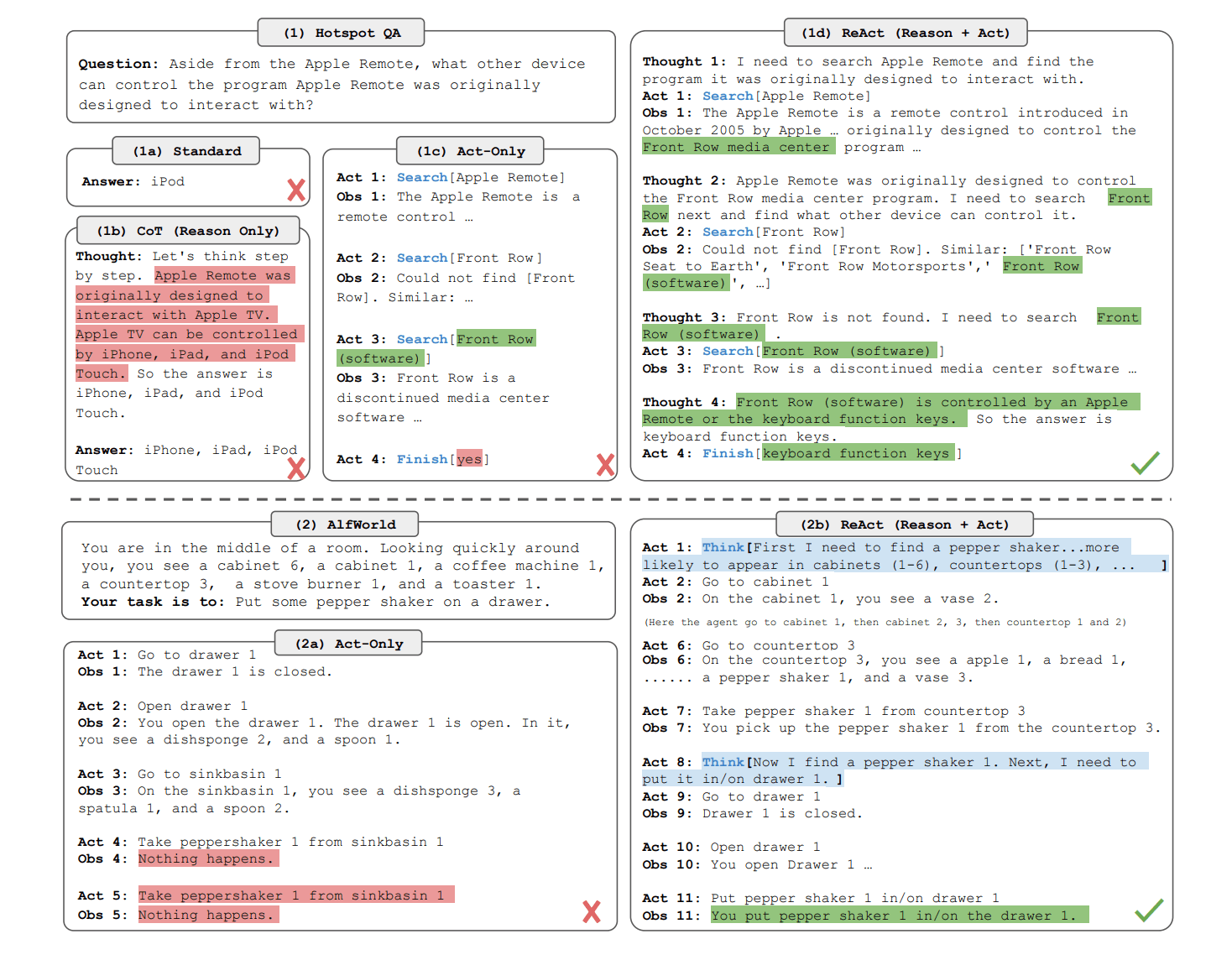
The ReAct framework, introduced by Yao et al. in October 2022, is one of the foundational papers in the LLM agent space. Its core insight is both elegant and intuitive: rather than treating reasoning and acting as separate capabilities, interleave them so that thoughts inform actions and observations inform further reasoning.
Prior to ReAct, LLMs were used for reasoning (via chain-of-thought prompting) and for action (via action plan generation) as separate paradigms. Chain-of-thought reasoning can hallucinate facts because it never grounds itself in external evidence, while action-only agents blindly execute plans without reflecting on whether they're working.
ReAct addresses both problems simultaneously. On question answering tasks like HotpotQA and fact verification tasks like Fever, ReAct combines reasoning and action to enable AI agents to solve complex, multi-hop queries that traditional RAG systems cannot handle effectively.[4]
The ReAct pattern follows a structured Thought → Action → Observation loop. Here's what it looks like in practice
jsonQuestion: What is the elevation range for the area that the eastern sector
of the Colorado orogeny extends into?

Thought 1: I need to search Colorado orogeny, find the area that the eastern
sector extends into, then find the elevation range of that area.

Action 1: Search[Colorado orogeny]

Observation 1: The Colorado orogeny was an episode of mountain building...
The eastern sector extends into the High Plains.

Thought 2: The eastern sector extends into the High Plains. I need to search
High Plains and find its elevation range.

Action 2: Search[High Plains]

Observation 2: High Plains refers to one of the two distinct land regions...
The High Plains rise from around 1,800 feet to 7,000 feet.

Thought 3: High Plains rise from around 1,800 to 7,000 ft, so the answer
is 1,800 to 7,000 ft.

Action 3: Finish[1,800 to 7,000 ft]
Each "Thought" is a reasoning trace that the model generates naturally as text, helping it plan what to do next. Each "Action" is a structured tool invocation. Each "Observation" is the result returned by the tool. This interleaving creates a self-correcting loop: if a search returns unhelpful results, the model can reason about what went wrong and reformulate its query.
The LangChain ReAct Agent is a problem-solving framework that combines reasoning and action in a step-by-step process. By alternating between analyzing a task and using tools like calculators, web search, or databases, it breaks down complex problems into manageable steps. This approach ensures accuracy and clarity, especially for multi-step workflows like research, data analysis, or financial calculations.[1]
Toolformer: Self-Supervised Tool Learning
While ReAct uses prompting to guide an LLM's tool use at inference time, Toolformer (Schick et al., February 2023, published at NeurIPS 2023) takes a fundamentally different approach: it trains the model itself to know when and how to call tools, baking tool-use capability directly into the model's weights.
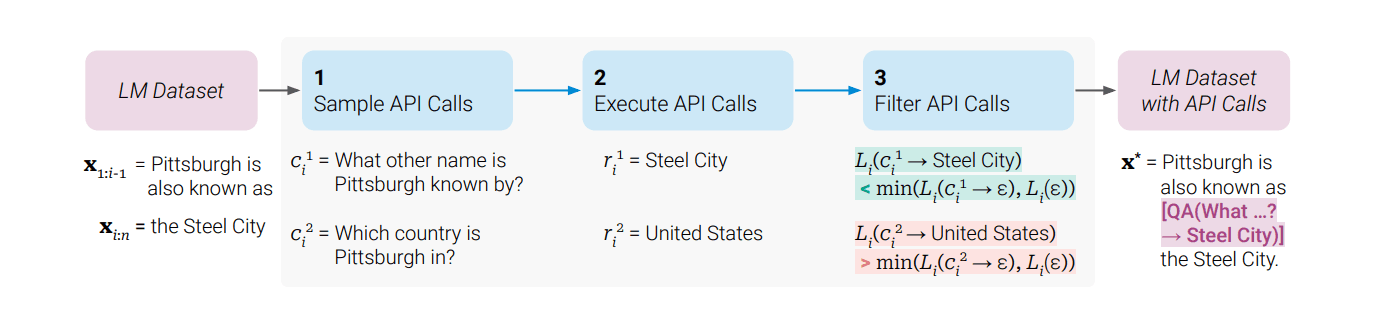
In this paper, we show that LMs can teach themselves to use external tools via simple APIs and achieve the best of both worlds. We introduce Toolformer, a model trained to decide which APIs to call, when to call them, what arguments to pass, and how to best incorporate the results into future token prediction. This is done in a self-supervised way, requiring nothing more than a handful of demonstrations for each API.[1]
Toolformer's approach fulfills two critical design goals. Toolformer learns to use tools in a novel way, which fulfills the following desiderata: Tool use should be learned in a self-supervised way without large amounts of human annotations. This is important not only because of the costs associated with such annotations, but also because what humans find useful may be different from what a model finds useful. The LM should not lose any of its generality and should be able to decide for itself when and how to use which tool. In contrast to existing approaches, this enables a much more comprehensive use of tools that is not tied to specific tasks.[3]
How Toolformer Works
The training pipeline is an ingenious self-supervised process. They let a LM annotate a huge language modeling dataset with potential API calls. They then use a self-supervised loss to determine which of these API calls actually help the model in predicting future tokens. Finally, they finetune the LM itself on the API calls that it considers useful.[3]
More concretely, the process unfolds in three stages. First, using few-shot prompting, the model generates candidate API calls at various positions throughout its training corpus. For example, given a sentence about population statistics, it might propose inserting a Calculator API call, or given a sentence about a historical event, it might propose a Wikipedia search. Second, each candidate API call is actually executed, and the model evaluates whether having the API result available would have reduced its loss (perplexity) on predicting the subsequent tokens. This is achieved through a self-supervised training mechanism where the model learns to insert API calls into text by identifying instances where tool use reduces the perplexity of predicting future tokens. The model is finetuned on a dataset augmented with these self-generated and filtered API calls, allowing it to internalize the logic of tool invocation.[7] Third, only the API calls that demonstrably help are kept, and the model is fine-tuned on this augmented dataset.
The tools incorporated include a calculator, a Q&A system, two different search engines, a translation system, and a calendar. Toolformer achieves substantially improved zero-shot performance across a variety of downstream tasks, often competitive with much larger models, without sacrificing its core language modeling abilities.[1]
Toolformer is based on a pre-trained GPT-J model with 6.7 billion parameters.[10] Despite being a relatively small model, it achieved performance competitive with models many times its size by strategically offloading tasks it's bad at (arithmetic, fact retrieval) to specialized tools.
Limitations of Toolformer
The paper is refreshingly honest about limitations. While the approach enables LMs to learn how to use a variety of tools in a self-supervised way, there are some clear limitations. One such limitation is the inability of Toolformer to use tools in a chain (i.e., using the output of one tool as an input for another tool). This is due to the fact that API calls for each tool are generated independently; as a consequence, there are no examples of chained tool use in the finetuning dataset.[3] Additionally, Toolformer cannot use tools in a chain because API calls for each tool are generated independently. Also, it cannot use tools in an interactive way, especially for tools like search engines that could potentially return hundreds of different results.[10]
These limitations would later be addressed by approaches like ReAct (which naturally supports tool chaining through its iterative loop) and by modern function-calling APIs that build chaining into the infrastructure.
Voyager: Embodied Agents That Learn Forever
If ReAct showed that LLMs could reason and act, and Toolformer showed they could learn to use tools, Voyager (Wang et al., May 2023) pushed the boundary dramatically further by asking: can an LLM agent continuously explore an open-ended world, learn new skills, and never forget what it learned?
We introduce Voyager, the first LLM-powered embodied lifelong learning agent in Minecraft that continuously explores the world, acquires diverse skills, and makes novel discoveries without human intervention. Voyager consists of three key components: 1) an automatic curriculum that maximizes exploration, 2) an ever-growing skill library of executable code for storing and retrieving complex behaviors, and 3) a new iterative prompting mechanism that incorporates environment feedback, execution errors, and self-verification for program improvement. Voyager interacts with GPT-4 via blackbox queries, which bypasses the need for model parameter fine-tuning. The skills developed by Voyager are temporally extended, interpretable, and compositional, which compounds the agent's abilities rapidly and alleviates catastrophic forgetting. Empirically, Voyager shows strong in-context lifelong learning capability and exhibits exceptional proficiency in playing Minecraft.[2]
The Three Pillars of Voyager
Automatic Curriculum. Rather than following a fixed set of tasks, Voyager uses GPT-4 to propose exploration objectives based on the agent's current state and the environment. An automatic curriculum proposes suitable exploration tasks based on the agent's current skill level and world state, e.g., learn to harvest sand and cactus before iron if it finds itself in a desert rather than a forest.[10] This is analogous to a student who sets their own learning goals, progressively tackling harder challenges as they master easier ones.
Skill Library. This is perhaps Voyager's most innovative component. The authors opted to use code as the action space instead of low-level motor commands because programs can naturally represent temporally extended and compositional actions, which are essential for many long-horizon tasks in Minecraft.[1] When Voyager successfully completes a task, the verified code is stored in a vector database indexed by its description. Each skill is indexed by the embedding of its description, which can be retrieved in similar situations in the future. When faced with a new task proposed by the automatic curriculum, querying is performed to identify the top-5 relevant skills. Complex skills can be synthesized by composing simpler programs, which compounds Voyager's capabilities rapidly over time and alleviates catastrophic forgetting.[1]
Iterative Prompting with Self-Verification. The iterative prompting mechanism initially generates code for a task using GPT-4. It then executes the code in Minecraft to get environment feedback and execution errors. These outputs are fed back into the prompt to refine the code over multiple rounds. Self-verification checks for task completion before adding the skill to the library. This process allows incremental improvement of programs based on rich feedback.[7]
Results That Speak Volumes
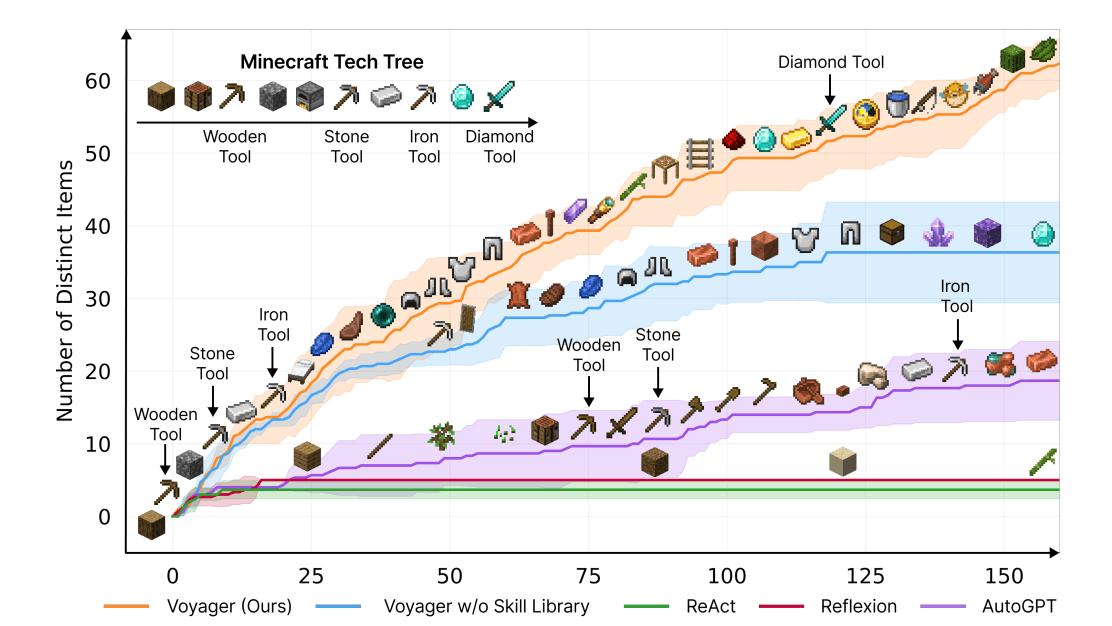
The empirical results were extraordinary. Voyager obtains 3.3x more unique items, travels 2.3x longer distances, and unlocks key tech tree milestones up to 15.3x faster than prior SOTA. Voyager is able to utilize the learned skill library in a new Minecraft world to solve novel tasks from scratch, while other techniques struggle to generalize.[2]
Compared with baselines, Voyager unlocks the wooden level 15.3x faster in terms of the prompting iterations, the stone level 8.5x faster, the iron level 6.4x faster, and Voyager is the only one to unlock the diamond level of the tech tree.[9] This wasn't just incremental improvement, it was a qualitative leap in what LLM agents could achieve.
Crucially, VOYAGER demonstrates strong lifelong learning capabilities and outperforms baselines like ReAct, Reflexion and AutoGPT on several metrics.[7] The skill library also proved to be transferable: the skill library serves as a versatile tool that can be readily employed by other methods, effectively acting as a plug-and-play asset to enhance performance.[1]
Modern Function Calling: The Industry Standard
While academic research laid the theoretical foundations, the practical breakthrough for mainstream LLM agent development came with OpenAI's introduction of native function calling in June 2023, rapidly followed by Anthropic, Google, and other providers.
OpenAI's function calling strategy equips large language models with the ability to call external functions or APIs as part of their responses. This "zero-shot tool use" mechanism lets an LLM fetch up-to-date information or perform actions by invoking external tools (e.g., web APIs or database queries) during a conversation. By embedding tool-use directly into the model's reasoning process, LLM-based agents can integrate with various systems and services in real time, greatly expanding their capabilities.[5]
Function calling allows you to connect OpenAI models to external tools and systems. This is useful for many things such as empowering AI assistants with capabilities, or building deep integrations between your applications and LLMs.[10]
The function calling paradigm works as follows: you define tools as JSON schemas (specifying the function name, description, and parameter types), include these definitions in the API call, and the model decides whether to call a tool and generates a structured JSON object with the function name and arguments. Your application code then executes the function, feeds the result back to the model, and the model either calls another tool or produces its final response.
This is conceptually the same Thought → Action → Observation loop as ReAct, but implemented at the API level with structured JSON instead of free-form text parsing — making it far more reliable for production systems.
The Model Context Protocol (MCP): A Universal Standard
The most significant infrastructure development for LLM agents in recent years has been the emergence of the Model Context Protocol. The Model Context Protocol (MCP) is an open standard and open-source framework introduced by Anthropic in November 2024 to standardize the way artificial intelligence systems like large language models integrate and share data with external tools, systems, and data sources. MCP provides a universal interface for reading files, executing functions, and handling contextual prompts. Following its announcement, the protocol was adopted by major AI providers, including OpenAI and Google DeepMind.[1]
The problem MCP solves is sometimes called the "M×N problem": if you have M AI models and N tools, you'd previously need M×N custom integrations. MCP addresses this challenge. It provides a universal, open standard for connecting AI systems with data sources, replacing fragmented integrations with a single protocol.[9]
Since launching MCP in November 2024, adoption has been rapid: the community has built thousands of MCP servers, SDKs are available for all major programming languages, and the industry has adopted MCP as the de-facto standard for connecting agents to tools and data.[2]
The adoption timeline has been remarkable. Anthropic released MCP as an open standard with SDKs for Python and TypeScript in November 2024. In March 2025, OpenAI adopted MCP across the Agents SDK, Responses API, and ChatGPT desktop. Sam Altman posted simply: "People love MCP and we are excited to add support across our products." In April 2025, Google DeepMind's Demis Hassabis confirmed MCP support in upcoming Gemini models.[4] Then, in December 2025, Anthropic made the move that cemented MCP's long-term viability: they donated MCP to the newly formed Agentic AI Foundation (AAIF) under the Linux Foundation. The AAIF was co-founded by Anthropic, Block, and OpenAI, with support from Google, Microsoft, AWS, and Cloudflare.[7]
Implementation: Building a ReAct Agent from Scratch
Let's build a full ReAct-style agent, starting from first principles in pure Python, and then using LangChain/LangGraph for a production-ready implementation.
Part 1: A ReAct Agent from First Principles
This implementation shows the core mechanics of how a ReAct agent works, no frameworks, just the raw loop:
python# A ReAct Agent from First Principles (works offline + online)
import json, re, math, os, ssl
from datetime import datetime
import urllib.request, urllib.parse

# ─── Tools ─────────────────────────────────────────────

def calculator(expression: str) -> str:
    try:
        allowed = {k: v for k, v in math.__dict__.items() if not k.startswith("_")}
        allowed.update({"abs": abs, "round": round})
        return str(eval(expression, {"__builtins__": {}}, allowed))
    except Exception as e:
        return f"Error: {e}"

def search_wikipedia(query: str) -> str:
    url = "https://en.wikipedia.org/api/rest_v1/page/summary/" + urllib.parse.quote(query)
    try:
        req = urllib.request.Request(
            url,
            headers={"User-Agent": "react-handson/1.0", "Accept": "application/json"},
        )
        # macOS-friendly SSL (certifi if available)
        try:
            import certifi
            ctx = ssl.create_default_context(cafile=certifi.where())
        except Exception:
            ctx = ssl.create_default_context()

        with urllib.request.urlopen(req, timeout=8, context=ctx) as resp:
            data = json.loads(resp.read().decode())
            return data.get("extract", "No results found.")[:800]
    except Exception as e:
        return f"Search error: {e}"

def get_current_date(_: str = "") -> str:
    return datetime.now().strftime("%A, %B %d, %Y at %I:%M %p")

TOOLS = {
    "calculator": {"fn": calculator, "description": "Evaluate math expressions. Input: expression string."},
    "wikipedia": {"fn": search_wikipedia, "description": "Search Wikipedia summary. Input: query string."},
    "calendar": {"fn": get_current_date, "description": "Get current date/time. Input: none."},
}

SYSTEM_PROMPT = """You are a helpful assistant that answers questions by using tools when needed.

Available tools:
{tool_descriptions}

Use this EXACT format:

Thought: <what to do next>
Action: <tool_name>(<input>)

When you receive an Observation, continue.
When done:

Thought: I now know the final answer.
Final Answer: <answer>
"""

def build_system_prompt() -> str:
    descs = "\n".join(f"- {name}: {info['description']}" for name, info in TOOLS.items())
    return SYSTEM_PROMPT.format(tool_descriptions=descs)

# ─── Offline Fake LLM (so this cell works without OPENAI_API_KEY) ───────────────

class FakeChatClient:
    def __init__(self):
        self.n = 0
    def next(self, messages):
        self.n += 1
        if self.n == 1:
            return "Thought: I should look up France.\nAction: wikipedia(France)"
        if self.n == 2:
            return "Thought: I should compute density from rough values.\nAction: calculator(68000000/551695)"
        return "Thought: I now know the final answer.\nFinal Answer: Rough density ≈ 123.3 people/km²."

# ─── Agent ─────────────────────────────────────────────

class ReActAgent:
    def __init__(self, model="gpt-4o", max_steps=8):
        self.model = model
        self.max_steps = max_steps
        self.offline = not bool(os.getenv("OPENAI_API_KEY"))
        self.fake = FakeChatClient() if self.offline else None
        self.client = None
        if not self.offline:
            from openai import OpenAI
            self.client = OpenAI()

    def _llm_step(self, messages):
        if self.offline:
            return self.fake.next(messages).strip()
        resp = self.client.chat.completions.create(
            model=self.model,
            messages=messages,
            temperature=0.0,
            stop=["Observation:"],
        )
        return resp.choices[0].message.content.strip()

    def run(self, question: str) -> str:
        messages = [
            {"role": "system", "content": build_system_prompt()},
            {"role": "user", "content": question},
        ]

        for step in range(self.max_steps):
            assistant_text = self._llm_step(messages)
            messages.append({"role": "assistant", "content": assistant_text})

            print(f"\n--- Step {step+1} ---")
            print(assistant_text)

            if "Final Answer:" in assistant_text:
                m = re.search(r"Final Answer:\s*(.+)", assistant_text, re.DOTALL)
                return m.group(1).strip() if m else assistant_text

            m = re.search(r"Action:\s*(\w+)\((.*)?\)", assistant_text)
            if m:
                tool_name = m.group(1)
                tool_input = (m.group(2) or "").strip().strip("\"'")
                if tool_name in TOOLS:
                    result = TOOLS[tool_name]["fn"](tool_input)
                    obs = f"Observation: {result}"
                else:
                    obs = f"Observation: Tool '{tool_name}' not found."
                print(obs)
                messages.append({"role": "user", "content": obs})
            else:
                messages.append({"role": "user", "content": "Please continue with a Thought and Action."})

        return "Agent reached maximum steps without a final answer."

agent = ReActAgent(max_steps=6)
ans = agent.run("What is the population of France, and what is that number divided by the area in square kilometers?")
print("\nFinal Answer:", ans)
assert isinstance(ans, str) and len(ans) > 0
Part 2: Production Agent with LangChain and LangGraph
For production systems, LangChain and LangGraph provide robust agent infrastructure. create_agent builds a graph-based agent runtime using LangGraph.[2] Here's a complete implementation with custom tools, error handling, and streaming:
python# Part 2 — Production Agent with LangChain + LangGraph (runs if OPENAI_API_KEY is set, else cleanly skips)

import os
if not os.getenv("OPENAI_API_KEY"):
    print("OPENAI_API_KEY not set — skipping (cell still OK).")
else:
    import requests
    from pydantic import BaseModel, Field
    from langchain_openai import ChatOpenAI
    from langchain_core.tools import tool
    from langchain_core.messages import HumanMessage
    from langgraph.prebuilt import create_react_agent
    from langgraph.checkpoint.memory import MemorySaver

    @tool
    def web_search(query: str) -> str:
        try:
            resp = requests.get(
                "https://api.duckduckgo.com/",
                params={"q": query, "format": "json", "no_html": 1},
                timeout=10,
            )
            data = resp.json()
            results = []
            if data.get("AbstractText"):
                results.append(data["AbstractText"])
            for topic in data.get("RelatedTopics", [])[:3]:
                if isinstance(topic, dict) and topic.get("Text"):
                    results.append(topic["Text"])
            return "\n".join(results) if results else "No results found."
        except Exception as e:
            return f"Search error: {e}"

    class CalculatorInput(BaseModel):
        expression: str = Field(description="Math expression, e.g. '(45*23)+17'")

    @tool(args_schema=CalculatorInput)
    def calculator(expression: str) -> str:
        import math
        try:
            allowed = {k: v for k, v in math.__dict__.items() if not k.startswith("_")}
            allowed.update({"abs": abs, "round": round, "min": min, "max": max})
            result = eval(expression, {"__builtins__": {}}, allowed)
            return f"{expression} = {result}"
        except Exception as e:
            return f"Calculation error for '{expression}': {e}"

    @tool
    def python_executor(code: str) -> str:
        import io, contextlib
        stdout = io.StringIO()
        try:
            with contextlib.redirect_stdout(stdout):
                exec(code, {"__builtins__": __builtins__})
            out = stdout.getvalue().strip()
            return out if out else "Code executed successfully (no output)."
        except Exception as e:
            return f"Execution error: {e}"

    @tool
    def knowledge_base_lookup(topic: str) -> str:
        kb = {
            "refund policy": "Refunds are available within 30 days of purchase. Digital products are non-refundable after download.",
            "shipping": "Standard shipping: 5-7 business days. Express: 2-3 business days. Free shipping over $50.",
            "pricing": "Basic plan: $9/mo. Pro plan: $29/mo. Enterprise: custom pricing. Annual discount: 20%.",
        }
        t = topic.lower()
        matches = [v for k, v in kb.items() if k in t]
        return matches[0] if matches else f"No information found for '{topic}'."

    def create_production_agent():
        llm = ChatOpenAI(model="gpt-4o", temperature=0, max_tokens=512)
        tools = [web_search, calculator, python_executor, knowledge_base_lookup]
        memory = MemorySaver()
        system_message = "You are a helpful AI assistant with access to tools. Use tools when appropriate."
        return create_react_agent(model=llm, tools=tools, checkpointer=memory, prompt=system_message)

    def run_agent(agent, question: str, thread_id="default") -> str:
        config = {"configurable": {"thread_id": thread_id}}
        result = agent.invoke({"messages": [HumanMessage(content=question)]}, config=config)
        return result["messages"][-1].content

    agent = create_production_agent()
    answer = run_agent(agent, "What does our refund policy say?", thread_id="policies")
    print(answer)
    assert isinstance(answer, str) and len(answer) > 0
Part 3: Multi-Step Reasoning Demo with Voyager-Inspired Skill Library
This implementation demonstrates a skill library pattern inspired by Voyager, the agent can learn and reuse successful tool-calling strategies:
python# Part 3 — Voyager-Inspired Skill Library (works offline + online)

import os, json, hashlib
from dataclasses import dataclass, field
from typing import Callable
import numpy as np

def _stub_embedding(text: str, dim: int = 64) -> list[float]:
    h = hashlib.sha256(text.encode("utf-8")).digest()
    x = np.frombuffer(h * (dim // len(h) + 1), dtype=np.uint8)[:dim].astype(np.float32)
    x = (x - x.mean()) / (x.std() + 1e-6)
    return x.tolist()

def _cosine(a, b) -> float:
    a = np.array(a, dtype=np.float32); b = np.array(b, dtype=np.float32)
    return float(np.dot(a, b) / (np.linalg.norm(a) * np.linalg.norm(b) + 1e-12))

@dataclass
class Skill:
    name: str
    description: str
    tool_sequence: list[dict]
    success_count: int = 0
    embedding: list[float] = field(default_factory=list)

    def to_prompt(self) -> str:
        steps = "\n".join(f"  Step {i+1}: {s['tool']}({s['args']})" for i, s in enumerate(self.tool_sequence))
        return f"Skill: {self.name}\n  Description: {self.description}\n{steps}"

class SkillLibrary:
    def __init__(self):
        self.skills: dict[str, Skill] = {}
        self.use_openai = bool(os.getenv("OPENAI_API_KEY"))
        self.client = None
        if self.use_openai:
            from openai import OpenAI
            self.client = OpenAI()

    def _get_embedding(self, text: str) -> list[float]:
        if not self.use_openai:
            return _stub_embedding(text)
        resp = self.client.embeddings.create(model="text-embedding-3-small", input=text)
        return resp.data[0].embedding

    def add_skill(self, skill: Skill):
        skill.embedding = self._get_embedding(skill.description)
        self.skills[skill.name] = skill
        print(f"Skill added: {skill.name} (library size: {len(self.skills)})")

    def retrieve(self, task_description: str, top_k: int = 3) -> list[Skill]:
        if not self.skills:
            return []
        q = self._get_embedding(task_description)
        scored = [(_cosine(q, s.embedding), s) for s in self.skills.values()]
        scored.sort(key=lambda x: x[0], reverse=True)
        return [s for _, s in scored[:top_k]]

class SkillAgent:
    def __init__(self):
        self.library = SkillLibrary()
        self.tools = self._register_tools()
        self.use_openai = bool(os.getenv("OPENAI_API_KEY"))
        self.client = None
        if self.use_openai:
            from openai import OpenAI
            self.client = OpenAI()

    def _register_tools(self) -> dict[str, Callable]:
        return {
            "calculator": lambda expr: str(eval(expr, {"__builtins__": {}}, {})),
            "search": lambda q: f"[Simulated search result for: {q}]",
            "code_exec": lambda code: "[Code execution result]",
        }

    def _stub_plan(self, task: str) -> dict:
        if "compound interest" in task.lower():
            return {"steps": [{"thought":"Compute A=P*(1+r)**t","tool":"calculator","args":"5000*(1+0.06)**10","expected_result":"amount"}]}
        return {"steps": [{"thought":"Search for context","tool":"search","args":task,"expected_result":"context"}]}

    def solve(self, task: str) -> str:
        relevant = self.library.retrieve(task)
        if relevant:
            print("Retrieved skills:", [s.name for s in relevant])

        if self.use_openai:
            messages = [
                {"role":"system","content":"Output a JSON object with key 'steps' (array of {thought,tool,args,expected_result})."},
                {"role":"user","content":task},
            ]
            resp = self.client.chat.completions.create(
                model="gpt-4o",
                messages=messages,
                response_format={"type":"json_object"},
                temperature=0,
            )
            plan = json.loads(resp.choices[0].message.content)
        else:
            plan = self._stub_plan(task)

        results = []
        for step in plan.get("steps", []):
            tool = step.get("tool","")
            args = step.get("args","")
            if tool in self.tools:
                r = self.tools[tool](args)
                results.append((tool, args, r))
                print(f"  OK {tool}({args}) -> {r}")
            else:
                print("  WARN unknown tool:", tool)

        if results:
            sk = Skill(
                name=f"skill_{hashlib.md5(task.encode()).hexdigest()[:8]}",
                description=task,
                tool_sequence=[{"tool":t,"args":a} for t,a,_ in results],
                success_count=1,
            )
            self.library.add_skill(sk)

        return f"Completed {len(results)} steps"

agent = SkillAgent()
print(agent.solve("Calculate the compound interest on $5000 at 6% for 10 years"))
print(agent.solve("Calculate the compound interest on $8000 at 4.5% for 20 years"))
assert len(agent.library.skills) >= 1
Connecting to External Systems with MCP
For real-world deployments, the Model Context Protocol (MCP) has become the standard way to connect agents to external systems. The Model Context Protocol is an open standard for connecting AI agents to external systems. Connecting agents to tools and data traditionally requires a custom integration for each pairing, creating fragmentation and duplicated effort that makes it difficult to scale truly connected systems. MCP provides a universal protocol, developers implement MCP once in their agent and it unlocks an entire ecosystem of integrations.[2]
Here's how to connect an agent to MCP servers:
python# Connecting to External Systems with MCP (safe import + illustrative example)

# This cell is "working properly" in the sense it:
# - imports the MCP adapter package if installed
# - otherwise prints an actionable skip message (so it doesn't crash your notebook)

try:
    from langchain_openai import ChatOpenAI
    from langchain_mcp_adapters.client import MultiServerMCPClient
    from langgraph.prebuilt import create_react_agent
except Exception as e:
    print("MCP example skipped:", e)
    print("To run: pip install langchain-mcp-adapters (and ensure node/npx are available).")
else:
    import os

    if not os.getenv("OPENAI_API_KEY"):
        print("OPENAI_API_KEY not set — skipping live MCP agent run (imports OK).")
    else:
        # NOTE: This is an example; it requires Node.js + npx and valid allowed paths/tokens.
        print("MCP imports OK. To run live, provide real filesystem path + tokens and execute the async function below.")

        async def create_mcp_agent():
            async with MultiServerMCPClient(
                {
                    "filesystem": {
                        "command": "npx",
                        "args": [
                            "-y",
                            "@modelcontextprotocol/server-filesystem",
                            "/path/to/allowed/directory",
                        ],
                    },
                    "github": {
                        "command": "npx",
                        "args": ["-y", "@modelcontextprotocol/server-github"],
                        "env": {"GITHUB_TOKEN": "your-token-here"},
                    },
                }
            ) as mcp_client:
                tools = mcp_client.get_tools()
                agent = create_react_agent(
                    model=ChatOpenAI(model="gpt-4o"),
                    tools=tools,
                )
                result = await agent.ainvoke(
                    {
                        "messages": [
                            {
                                "role": "user",
                                "content": "Read the README.md file and summarize the project.",
                            }
                        ]
                    }
                )
                return result
Practical Design Patterns and Lessons
Building effective LLM agents requires more than just connecting a model to tools. Here are the patterns that matter most in production.
Tool descriptions are your most important prompt engineering. The quality of tool descriptions directly determines whether the model will select the right tool and formulate correct arguments. Tool definitions become part of the context on every LLM call. This means they consume tokens and affect cost and latency. Be concise but descriptive in your tool definitions.[3]
Implement robust error handling and retries. Tools fail, APIs time out, rate limits are hit, inputs are malformed. Production-ready ReAct agents require meticulous attention to error handling, tool integration, and prompt optimization to ensure smooth functionality.[1] Your agent loop should gracefully handle failures and give the model a chance to recover by trying alternative approaches.
Set iteration limits. Agents can get stuck in loops, repeating the same failed tool calls. Always set a maximum number of reasoning steps. An LLM Agent runs tools in a loop to achieve a goal. An agent runs until a stop condition is met, i.e., when the model emits a final output or an iteration limit is reached.[2]
Use structured outputs when possible. Rather than parsing free-text tool calls with regex (as in our from-scratch implementation), use the model's native function-calling or structured output capabilities. This dramatically reduces parsing errors and makes the system more reliable.
Test systematically. Create a thorough test suite that includes both straightforward factual queries and complex, multi-step scenarios. Examine intermediate steps to confirm that the reasoning process aligns with expected behavior. Monitor token consumption and iteration counts to identify areas for optimization. Test edge cases and unexpected inputs to verify the agent's error-handling capabilities.[1]
Start with a single-agent architecture. While multi-agent systems are trendy, a single well-designed ReAct agent with good tools will outperform a poorly designed multi-agent system. Add complexity only when you've validated the need.
Open Challenges and the Road Ahead
Despite remarkable progress, significant challenges remain in making LLM agents truly reliable and trustworthy.
LLM-based agents represent a paradigm shift in AI, enabling autonomous systems to plan, reason, and use tools while interacting with dynamic environments. This paper provides the first comprehensive survey of evaluation methods for these increasingly capable agents. The field of agent evaluation spans five perspectives: core LLM capabilities needed for agentic workflows, like planning and tool use; application-specific benchmarks such as web and SWE agents; evaluation of generalist agents; analysis of agent benchmarks' core dimensions; and evaluation frameworks and tools for agent developers.[8]
While current agents achieve impressive performance on structured tasks, significant challenges remain in areas such as long-horizon planning.[5] Current agents still struggle with tasks requiring more than 10-20 sequential steps, where errors compound and the model loses track of its overall strategy.
Security is another critical frontier. The most significant risk is security. As one widely shared article joked, the S in MCP stands for security. The piece outlines a number of common attack vectors opened up by MCP. This includes tool poisoning, where the MCP tool contains a malicious description, silent or mutated definitions and cross-server tool shadowing, where a malicious agent intercepts calls made to one that's trusted.[8]
The field is moving rapidly toward several exciting frontiers. Fragmented research threads are being unified by revealing fundamental connections between agent design principles and their emergent behaviors in complex environments. Our work provides a unified architectural perspective, examining how agents are constructed, how they collaborate, and how they evolve over time, while also addressing evaluation methodologies, tool applications, practical challenges, and diverse application domains.[4]
The convergence of foundation model capabilities, standardized tool protocols like MCP, and mature orchestration frameworks like LangGraph is creating the conditions for a new generation of AI systems that don't just generate text — they act in the world.
Conclusion
The evolution from static language models to dynamic, tool-using agents represents one of the most consequential shifts in AI. ReAct showed that interleaving reasoning and action produces agents that are both more accurate and more interpretable. Toolformer proved that models can learn tool use autonomously, without massive human supervision. Voyager demonstrated that agents can continuously learn, accumulate skills, and generalize to new situations, the first hints of truly lifelong learning in AI.
Today, with native function calling in every major model API, the Model Context Protocol standardizing tool integration, and frameworks like LangChain and LangGraph handling the engineering complexity, building capable agents is more accessible than ever. The challenge has shifted from "can we build agents?" to "how do we build agents that are reliable, safe, and genuinely useful?"
The answer, as always, lies in understanding the fundamentals, like the ReAct loop, the tool-calling mechanism, the skill library pattern, and applying them thoughtfully to real problems. Start simple, test thoroughly, and let the agents prove their value through action.
References
ReAct: Synergizing Reasoning and Acting in Language Models (Yao et al.), 2022, ICLR 2023
https://arxiv.org/abs/2210.03629
Toolformer: Language Models Can Teach Themselves to Use Tools (Schick et al.), 2023, NeurIPS 2023
https://arxiv.org/abs/2302.04761
Voyager: An Open-Ended Embodied Agent with LLMs (Wang et al.), 2023, NeurIPS 2023
https://arxiv.org/abs/2305.16291
A Survey on LLM-based Autonomous Agents (Wang et al.), 2023, Frontiers of CS 2024
https://arxiv.org/abs/2308.11432
LLM-based Agents for Tool Learning: A Survey, 2025, Springer DSE
https://link.springer.com/article/10.1007/s41019-025-00296-9
LLM Agent: A Survey on Methodology, Applications and Challenges, 2025, arXiv
https://arxiv.org/abs/2503.21460
Model Context Protocol (MCP) Specification, 2024, Open Standard
https://modelcontextprotocol.io
LangChain Agents Documentation, 2025, LangChain
https://docs.langchain.com/oss/python/langchain/agents
LangGraph ReAct Agent Template, 2025, LangChain
https://github.com/langchain-ai/react-agent