Nemotron 3.5 Super VL Explained: NVIDIA's Open 120B Vision Agent Model

Written by
Aerin Kim

NVIDIA's Nemotron 3.5 Super VL is an open 120B vision-language model with 12B active parameters. Here are its architecture, verified benchmarks, runnable vLLM and OpenRouter code, and what it means for agents.
If you are building an agent that has to read a dashboard screenshot, a scanned contract, a chart in a PDF, or a web page it just rendered, you have probably hit the same wall: the strong open models are text-first with a vision adapter bolted on, and the strong vision models are either closed or too slow to sit inside a loop that makes dozens of calls per task. On October 15, 2026, NVIDIA released Nemotron 3.5 Super VL, an open-weight vision-language model with 120 billion total parameters and 12 billion active per token, built specifically for long-running agents that work over text, images, charts, documents, web pages, and short video [1] [2].
The launch is timely for three concrete reasons. First, the weights are genuinely open (BF16 and NVFP4 checkpoints on Hugging Face, plus OpenRouter, ModelScope, and NVIDIA NIM) under the OpenMDW License 1.1, which the model card says permits commercial use [2] [1]. Second, Artificial Analysis measured it at 26 on its Intelligence Index (26.5 in the write-up's takeaways), which it calls the highest score among US open-weights models, and reported roughly 630 output tokens per second on a pre-release endpoint with 100,000-token prompts [5]. Third, NVIDIA shipped a companion pair of local models called Bolt, including a 74B-A9B model quantized natively to 2 bits so it fits in 24GB of memory [1] [8].
This post goes through the model the way an engineer evaluating it would: what the architecture actually is according to the model card, what the vendor-reported and independent numbers say (including the rows where it loses), the exact commands and code to run it through vLLM, Transformers, and OpenRouter, how it changes document, chart, and screenshot agents, and a practical creator workflow for auditing thumbnails and analytics screenshots. If you want the text-only flagship of the same family, the earlier Nemotron 3 Ultra explainer covers the 550B model in depth, and this article deliberately avoids repeating it.
Step 1: What Was Actually Released on October 15
The release is a small family rather than a single checkpoint, and mixing the pieces up is the most common error in early coverage. Here is the verified lineup, cross-checked against NVIDIA's announcement, the Hugging Face model card, Artificial Analysis, and OpenRouter's model listing [1] [2] [5] [24].
| Model | Size | Context | Status (Oct 17, 2026) |
|---|---|---|---|
| Nemotron 3.5 Super VL | 120B total / 12B active, MoE | 1M tokens | Available: Hugging Face (BF16, NVFP4), OpenRouter, ModelScope, NVIDIA NIM |
| Nemotron 3.5 Bolt 74B-A9B | 74B total / 9B active, native 2-bit, fits 24GB | 256k tokens (Artificial Analysis) | Available: Hugging Face, llama.cpp, Ollama, LM Studio, Unsloth, vLLM |
| Nemotron 3.5 Bolt E4B | 4GB footprint | Not published | Scheduled for October 23, 2026 |
A few details in that table deserve unpacking. The Hugging Face repository name encodes the shape of the model: NVIDIA-Nemotron-3.5-Super-VL-120B-A12B-BF16 means 120B total parameters, 12B active, in BF16 precision [2]. The active fraction is therefore 10 percent, the same sparsity ratio as Nemotron 3 Ultra, which activates around 55B of 550B. NVIDIA's own framing is that Super VL reaches accuracy comparable to its largest reasoning model at roughly one-fifth the parameter count, which lines up with 120B versus 550B [1].
The Bolt line is a different product category. Bolt 74B-A9B is built for local use on RTX Spark laptops (arriving October 16), GeForce RTX PCs, DGX Spark, DGX Station, and RTX PRO workstations, with runtime support in llama.cpp, Ollama, LM Studio, Unsloth, and vLLM [1] [8]. Bolt E4B, a 4GB model aimed at voice assistants, interactive characters, and embedded interfaces, is scheduled for October 23, so as of this writing it is announced but not yet downloadable [8].
One correction worth making up front: some early write-ups describe the roughly 630 tokens per second figure as if it were a general property of the model. Artificial Analysis states it was measured with 100,000-token prompts on a pre-release DeepInfra endpoint serving the NVFP4 weights, and its live model page, which aggregates real provider endpoints, currently lists 388 output tokens per second [5] [6]. Both numbers are real, they simply answer different questions, and we will come back to how to read them in the benchmarks step.
Step 2: The Architecture, According to the Model Card
The model card describes Nemotron 3.5 Super VL as a Mamba-2 and Transformer hybrid Mixture-of-Experts model with Multi-Token Prediction, 120B total and 12B active parameters, 512 routed experts per MoE layer, a C-RADIO vision encoder, and a vision-language connector [2]. The technical report is where layer-by-layer details live, and NVIDIA publishes it as a joint report covering Super and Lightning [4]. I am describing only what the card states and what the underlying papers establish, and where a number is not in the sources I read, I say so rather than guess.
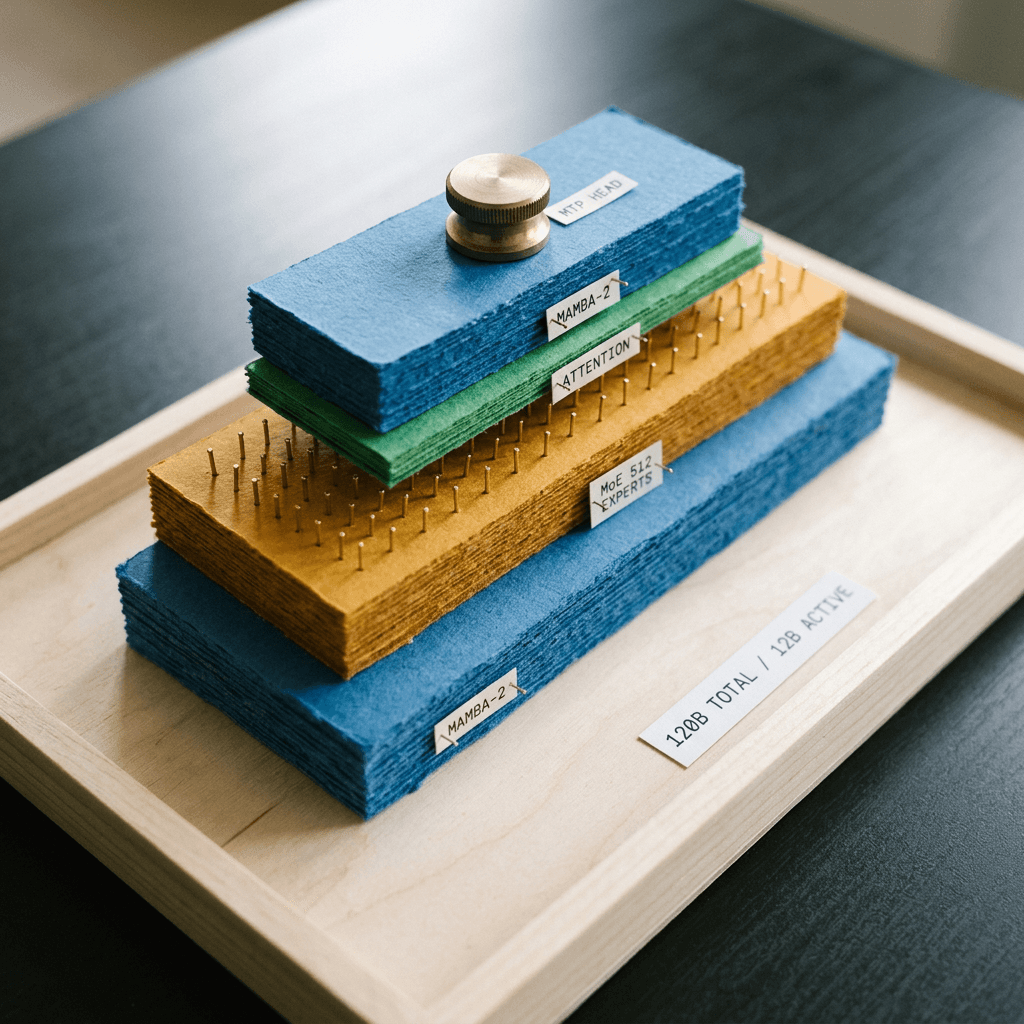
Hybrid Mamba-2, MoE, and Attention Layers
Mamba is a selective state-space model: instead of comparing every token with every earlier token the way self-attention does, it carries a fixed-size recurrent state forward, so compute per token stays constant as context grows [11]. Mamba-2 reformulates that idea through a state-space duality with attention, which makes it considerably faster to train and run on modern accelerators [12]. The cost is that pure state-space stacks tend to be weaker at precise recall of specific earlier tokens, which is why hybrids keep some attention layers for exactly that job.
Nemotron 3.5 Super VL interleaves three layer types: Mamba-2 layers for cheap long-range sequence mixing, attention layers for exact retrieval, and MoE layers for capacity [2]. The practical payoff for agents is easy to state. An agent loop re-reads a growing trace, tool outputs, and now images on every step, and a model whose per-token cost does not balloon with context length is cheaper to keep running for hours. That is also what the 1M-token context claim depends on: the card lists up to 1M tokens, while noting that some deployment recipes use smaller windows to fit GPU memory [2].
For the sparsity side, each MoE layer holds 512 routed experts, and a router picks a small subset per token, which is how 120B parameters of knowledge cost only 12B parameters of compute per token. The full mechanics of expert routing and the load-balancing problems it creates are covered in the Nemotron 3 Ultra post, and the same family of ideas applies here.
Multi-Token Prediction as Built-In Speculative Decoding
The card lists a Multi-Token Prediction (MTP) head: a shared head predicts several future tokens at once, and the serving recipes use it for native speculative decoding without a separate draft model [2]. The research lineage is the multi-token prediction work by Gloeckle and colleagues, which showed that training a model to predict multiple future tokens improves sample efficiency and enables faster inference [15], combined with the speculative decoding idea from Leviathan and colleagues, where cheap proposals are verified by the full model so the output distribution is unchanged [14].
The serve commands on the card set the speculative method to mtp with 3 speculative tokens for the standard recipe, and 5 for the 1M-context recipes [2]. Independent evidence on the benefit is thin so far: NVIDIA's own partner data cites up to 2.3x faster token generation on DGX Spark with speculation versus without, reported for a different setup from the data-center recipe [8]. The card itself recommends comparing against standard decoding by removing the speculative configuration, which is the right way to treat it: measure on your own prompts [2].
The Vision Side: C-RADIO Plus a Connector
For images and video, the model uses a C-RADIO vision encoder feeding a vision-language connector that maps visual features into the language model's token space [2]. RADIO is NVIDIA research's family of vision foundation models trained by distilling several teacher models into one encoder, introduced in the AM-RADIO paper [13]. I could not verify from the sources I read the exact C-RADIO version or its patch size, so check the technical report before you do token-budget math for high-resolution images [4].
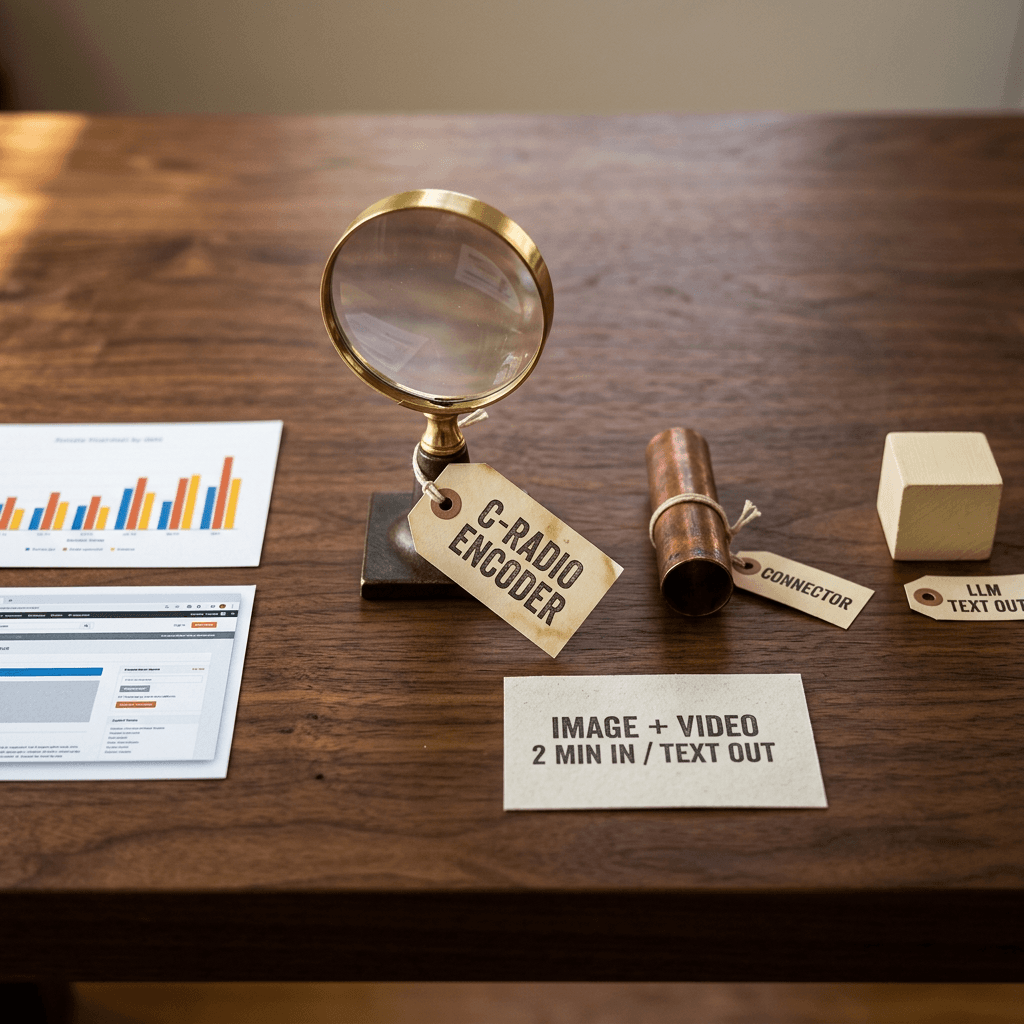
The supported inputs matter more than the encoder name for planning. The card lists text, images (JPEG and PNG), and video (MP4 up to 2 minutes); documents are supplied as page images with text, and the output is text only [2]. The recommended serving flags cap each request at one image and one video, and the card suggests 1 FPS with up to 128 frames for 1080p video, or 2 FPS with up to 256 frames for 720p, starting with 1 to 2 minute clips [2]. If your documents run to dozens of pages, plan on multiple calls or on rendering pages into a contact sheet rather than expecting a single request to hold them all with the stock settings.
Training in One Paragraph
The card describes six training stages, from text foundation and MTP training through continued pretraining with a 1M-context extension, vision-language training, a two-stage SFT, RL with multi-teacher distillation, and an MTP boosting stage [2]. The text corpus exceeds 20 trillion tokens across English, 19 other spoken languages, and 43 programming languages, while NVIDIA's blog cites about 26 trillion tokens across pretraining and continued pretraining and roughly 3.8 million post-training samples plus RL across dozens of environments [1]. Those two token counts are not contradictory (one describes the foundation text corpus, the other the whole pretraining budget), but they are a good reminder to cite the specific document rather than a rounded figure. NVIDIA also released open datasets, training recipes, and reinforcement-learning environments in NeMo Gym [1].
Step 3: Benchmarks Against the Open Field
The honest summary is that Nemotron 3.5 Super VL is a strong open model for its active size and a very fast one, but it does not win most rows. The model card compares it against Qwen3.5-122B-A10B, Qwen3.8-Flash-Next, DeepSeek-V4-Flash, Nemotron 3 Ultra, Inkling-Small, and GLM-5.3-Flash. These are NVIDIA-reported numbers, and the card notes that several were run with official open-source implementations or internal scaffolding rather than NeMo Gym, so treat the exact decimals as indicative [2].
Vision and Document Benchmarks
| Vision benchmark | Nemotron 3.5 Super VL | Qwen3.5-122B | Qwen3.8-Flash-Next | Inkling-Small | GLM-5.3-Flash |
|---|---|---|---|---|---|
| OCRBench v2 (EN) | 68.12 | 68.3 | 67.9 | 54.2 | 61.8 |
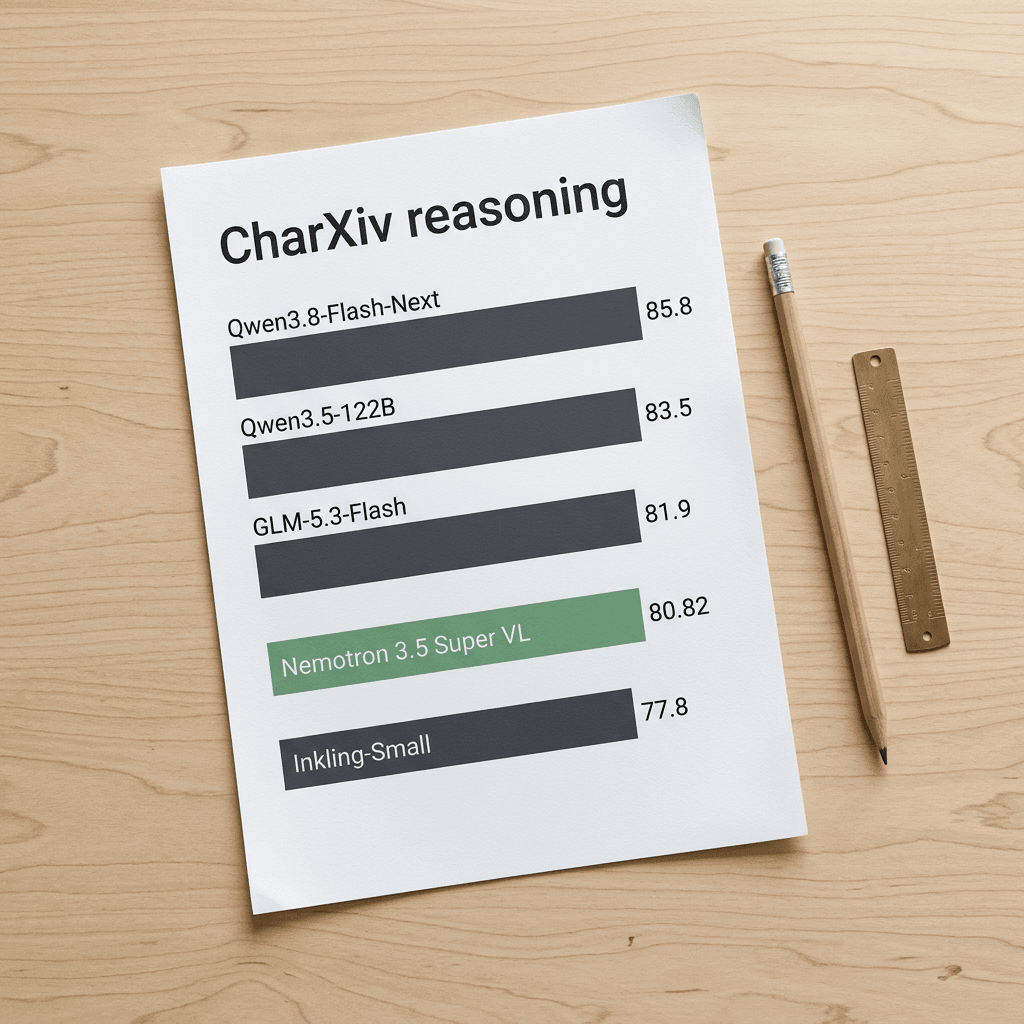
| CharXiv reasoning | 80.82 | 83.5 | 85.8 | 77.8 | 81.9 |
| MMLongBench-Doc | 62.82 | 63.7 | 67.9 | 49.06 | 65.8 |
| MathVision | 78.16 | 83.3 | 87.5 | 78.8 | 82.5 |
| V* | 85.60 | 91.1 | 93.0 | 70.5 | 88.1 |
| OSWorld-Verified | 51.14 | 51.5 | 55.8 | n/a | 14.78 |
| Video-MME v2 | 32.85 | 32.0 | 45.1 | n/a | 14.8 |
Reading the vision table carefully is more useful than the headline. On OCRBench v2 (English), a benchmark for text recognition and document parsing [17], Super VL scores 68.12 against 68.3 for Qwen3.5-122B and 67.9 for Qwen3.8-Flash-Next, which is effectively a three-way tie at the top. On CharXiv reasoning, which tests reasoning over scientific charts from real papers [16], it scores 80.82, ahead of Inkling-Small (77.8) and just behind GLM-5.3-Flash (81.9), Qwen3.5-122B (83.5), and Qwen3.8-Flash-Next (85.8). NVIDIA also reports 80.8 on CharXiv versus 63 for Nemotron 3 Nano Omni, and 84 when the model is allowed to use a Python code interpreter [8]. That last number is the more practical one for chart agents, because it says a code tool recovers several points on exactly the task where a model has to read bar heights and axis ticks precisely.
On MMLongBench-Doc, a long multi-page document understanding benchmark [18], Super VL scores 62.82 versus 67.9 for Qwen3.8-Flash-Next. On OSWorld-Verified, the computer-use benchmark where an agent operates real desktop applications [19], it scores 51.14, essentially level with Qwen3.5-122B (51.5) and four points behind Qwen3.8-Flash-Next (55.8), while GLM-5.3-Flash is listed at 14.78. For the harder successor benchmark and how computer-use tasks are scored, see our OSWorld 2.0 breakdown.
Text, Coding, and Agentic Benchmarks
| Text and agentic benchmark | Nemotron 3.5 Super VL | Nemotron 3 Ultra | DeepSeek-V4-Flash | Qwen3.8-Flash-Next | GLM-5.3-Flash |
|---|---|---|---|---|---|
| GPQA-Diamond | 89.52 | 87.0 | 89.6 | 92.7 | 91.2 |
| LiveCodeBench v6 | 88.22 | 89.2 | 94.6 | 94.1 | 80.6 |
| SWE-bench Verified | 71.10 | 73.9 | 75.4 | 78.7 | 79.10 |
| SWE-bench Pro | 51.78 | 49.66 | 56.91 | 60.37 | 59.70 |
| Terminal-Bench 2.1 | 60.67 | 54.80 | 76.80 | 85.80 | 82.70 |
| IFBench | 70.86 | 82.9 | 76.2 | 75.6 | 57.7 |
| tau2-bench telecom | 73.19 | 83.0 | 98.2 | 90.4 | 98.5 |
| BrowseComp | 78 | 67.85 | 84.2 | 89.0 | 86.6 |
The text side is more mixed. Super VL is competitive on GPQA-Diamond, a graduate-level science question set [21], scoring 89.52 against 89.6 for DeepSeek-V4-Flash and 87.0 for Nemotron 3 Ultra. It also beats its larger sibling Nemotron 3 Ultra on SWE-bench Pro (51.78 versus 49.66) and Terminal-Bench 2.1 (60.67 versus 54.80), but trails it on SWE-bench Verified (71.10 versus 73.9), a benchmark built from real GitHub issues [20], and on IFBench (70.86 versus 82.9). The clear weak spots in the card's own table are tau2-bench telecom (73.19, against 98.2 for DeepSeek-V4-Flash and 98.5 for GLM-5.3-Flash) and Terminal-Bench 2.1, where Qwen3.8-Flash-Next reaches 85.80 [2].
BrowseComp, a benchmark of hard-to-find web information [22], is the other row worth noting: 78 for Super VL against 67.85 for Ultra, 58.1 for Qwen3.5-122B, and 89.0 for Qwen3.8-Flash-Next. NVIDIA's blog adds that the Bolt 74B-A9B ranks second among open models on BrowseComp, without publishing the score [1]. For a web-browsing vision agent, the combination of a solid BrowseComp and solid OSWorld result is the profile that matters, more than any single leaderboard rank.
NVIDIA also reports Super VL beating Nemotron 3 Ultra on its Hermes Bench evaluation (63.44 percent versus 56.33 percent) and on LangChain behavioral evaluations (87.05 percent versus 84.3 percent), and says an EXO Labs evaluation placed it on the Pareto frontier for accuracy and task completion time on DGX Spark [8]. These are vendor or partner-reported and I have not seen them independently reproduced.
What Artificial Analysis Measured
Artificial Analysis is the main independent source here. Its write-up gives Super VL an Intelligence Index of 26 (26.5 in its takeaways), ahead of Nemotron 3 Ultra at 23 and Meta's Muse Glimmer at 17, and roughly double Nemotron 3 Super's 13 [5]. It lists Inkling Small at 25.7 or 26 depending on the page, which is a useful reminder that the top of this open-weights tier is separated by fractions of a point. Higher-scoring open models exist: K2 Horizon 375B A23B at 31 and MiMo-V2.6-Pro at 46 [5]. For a model with only 12B active parameters, 26 is a strong result, but it is not the top of the open-weights field.
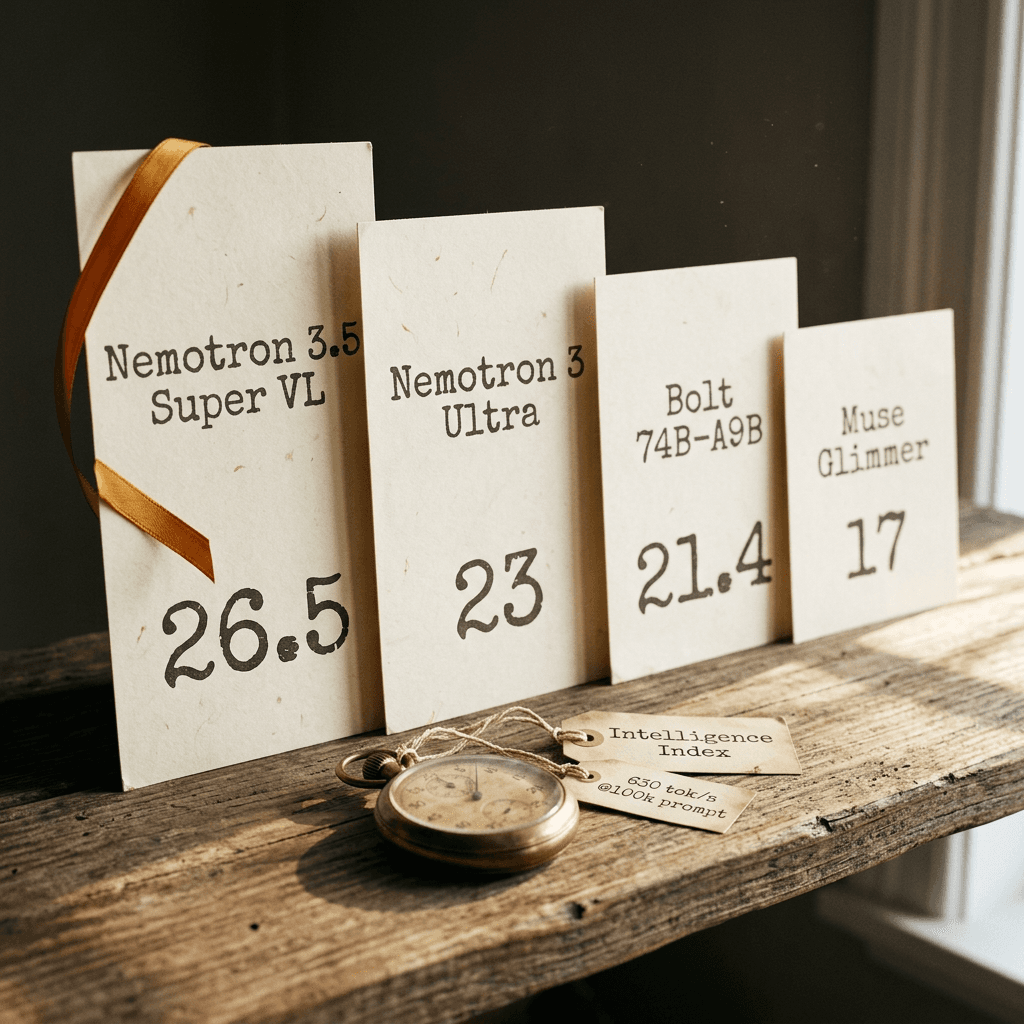
Three efficiency details from the same write-up are worth keeping. First, the NVFP4 weights score within 0.1 points of BF16 on the Index, with no component moving by more than 2.6 points, so the 4-bit checkpoint is a safe default for deployment [5]. Second, it used about 46k output tokens per Index task, roughly 60 percent fewer than Nemotron 3 Super (114k) and fewer than K2 Horizon (52k) and MiMo-V2.6-Pro (64k), though the page says it still trails the efficiency frontier. Third, the speed: about 630 tokens per second at 100k-token prompts on a pre-release endpoint, versus 124 for Inkling Small, 235 for Nemotron 3 Ultra, and 140 for Nemotron 3 Super, with a 1.8 second time to first token [5].
The live model page, built from actual provider endpoints, reports 388 output tokens per second (first among 28 compared models, with an open-weights median of 102), 0.75 seconds to first token, $0.23 per million input tokens and $0.57 per million output tokens, and availability through 8 API providers [6]. It also flags the main drawback: the model is more verbose than typical open peers on the Index. OpenRouter's own listing is cheaper, at $0.10 per million input tokens and $0.40 per million output tokens, plus a free variant [24]. Prices vary by provider and change quickly, so the right habit is to read the current listing before you budget.
Step 4: Running It With vLLM
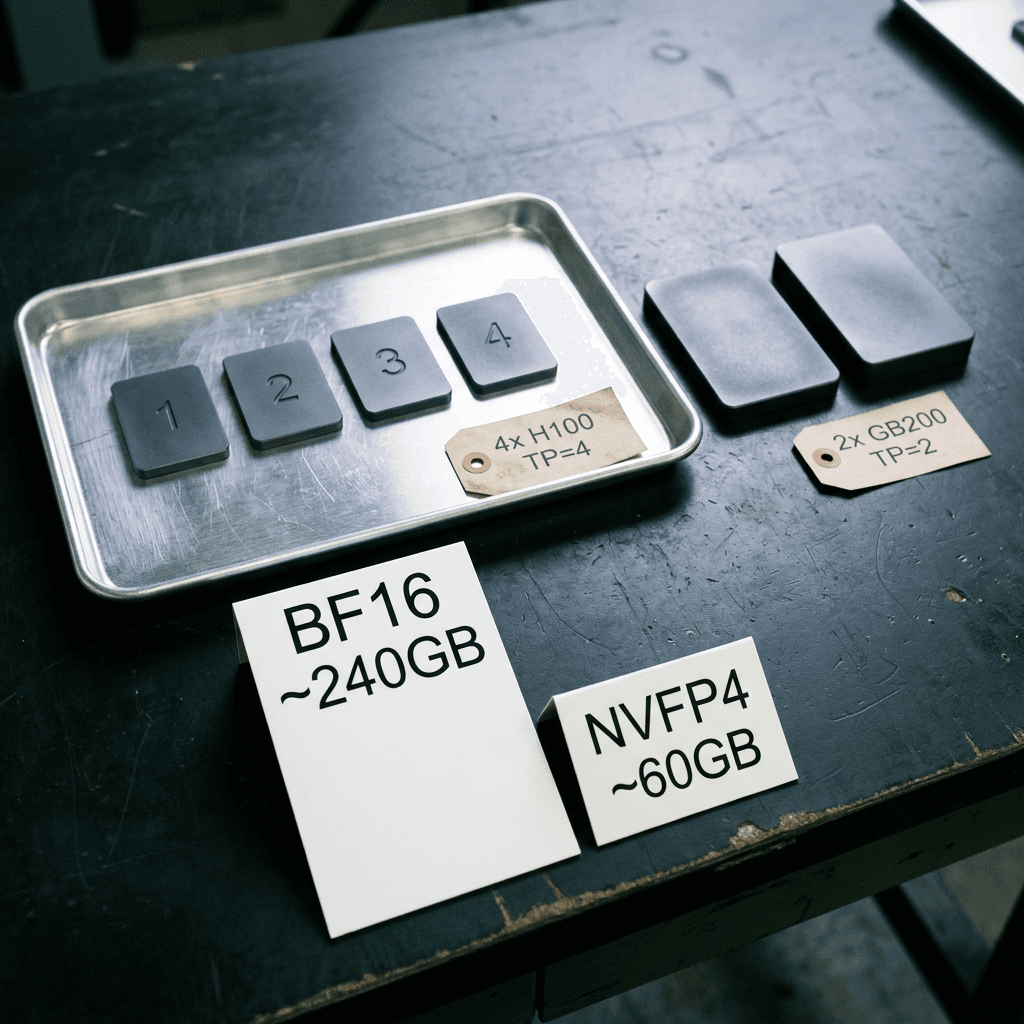
The model card's recommended deployments are 4x H100 with tensor parallel 4, or 2x GB200 with tensor parallel 2, on Linux with vLLM or SGLang [2]. The weights arithmetic explains why: 120B parameters in BF16 is about 240GB just for weights, which fits in the 320GB of four 80GB H100s with room left for KV cache and Mamba state, whereas the NVFP4 checkpoint cuts weight storage to roughly a quarter of that (my arithmetic, ignoring scales and overhead) [3].
python/code
# Rough weight-memory arithmetic for the Nemotron 3.5 family.
# Weights only: ignores quantization scales, embeddings kept at higher precision,
# KV cache, Mamba state and activations, so treat results as lower bounds.
def weight_gb(params_billion: float, bits: int) -> float:
    return params_billion * 1e9 * bits / 8 / 1e9

setups = {
    "Super VL BF16 (16-bit)": (120, 16),
    "Super VL NVFP4 (4-bit)": (120, 4),
    "Bolt 74B-A9B native 2-bit": (74, 2),
}
gpu_budgets = {"4x H100 80GB": 320, "2x GB200": None, "single 24GB card": 24}

for name, (params, bits) in setups.items():
    print(f"{name:28s} ~{weight_gb(params, bits):6.1f} GB of weights")

print()
print("Headroom on 4x H100 (320 GB), BF16 weights:", 320 - weight_gb(120, 16), "GB")
print("Headroom on a 24 GB device, Bolt 2-bit weights:", round(24 - weight_gb(74, 2), 1), "GB")
Here is the serve command from the model card, which sets the API model name to nemotron-3.5-super-vl and turns on the tool-call parser, the reasoning parser, and MTP speculative decoding [2] [23].
bash/code
# Serve Nemotron 3.5 Super VL (BF16) on 4x H100 with vLLM, as listed on the model card.
export MODEL=nvidia/NVIDIA-Nemotron-3.5-Super-VL-120B-A12B-BF16

vllm serve $MODEL \
  --served-model-name nemotron-3.5-super-vl \
  --tensor-parallel-size 4 \
  --trust-remote-code \
  --gpu-memory-utilization=0.85 \
  --allowed-local-media-path=/ \
  --max-num-seqs=32 \
  --limit-mm-per-prompt '{"video": 1, "image": 1}' \
  --video-pruning-rate 0.5 \
  --media-io-kwargs '{"video": {"fps": 2, "num_frames": 256}}' \
  --enable-auto-tool-choice \
  --tool-call-parser qwen3_coder \
  --reasoning-parser nemotron_v3 \
  --speculative_config.method mtp \
  --speculative_config.num_speculative_tokens 3

# In another shell, confirm the server is up:
curl --fail http://localhost:8000/v1/models
A few flags deserve explanation because they change behavior. The tool-call parser is qwen3_coder and the reasoning parser is nemotron_v3, so reasoning text is separated from the final answer in the API response. The limit-mm-per-prompt flag caps each request at one image and one video, and video-pruning-rate 0.5 together with the media-io-kwargs entry (2 FPS, up to 256 frames) controls how many visual tokens a clip costs. The card's 1M-context recipes add async scheduling, Mamba shared-prefix checkpointing, and 5 speculative tokens, and they drop the GPU memory utilization flag, so do not copy the standard recipe and simply raise the context length [2].
The vLLM container tags the card names are vllm/vllm-openai:v0.32.0 and a pinned nightly build. After the server starts, confirm it with the models endpoint on port 8000 before sending traffic. If you serve SGLang instead, the card gives a separate recipe with the nemotron3-5-super image, an EAGLE speculative configuration, and a flashinfer Mamba backend [2].
Sampling Settings Differ for Text and Vision
NVIDIA recommends temperature 1.0 and top_p 0.95 for text, and temperature 0.6 with top_p 0.95 for vision tasks [2]. The lower vision temperature is sensible for extraction work: reading a number off a chart is a task with one right answer, and sampling noise only hurts. For OCR-style and chart-reading calls, start at 0.6 or lower and only raise it if you see repetitive loops.
Step 5: Calling It From Python (Local Server, Transformers, OpenRouter)
Image Input Through the OpenAI-Compatible API
Once vLLM is up, any OpenAI-compatible client works. This is the card's own image example, which base64-encodes a local PNG, sends it with a text instruction, and checks whether generation stopped because it ran out of tokens [2].
python/code
# pip install openai
# Image input against the local vLLM server above (pattern from the model card).
import base64
from pathlib import Path
from openai import OpenAI

client = OpenAI(base_url="http://localhost:8000/v1", api_key="EMPTY")
image_bytes = Path("image.png").read_bytes()
image_url = "data:image/png;base64," + base64.b64encode(image_bytes).decode()

response = client.chat.completions.create(
    model="nemotron-3.5-super-vl",
    messages=[{"role": "user", "content": [
        {"type": "text", "text": "Describe the image and any visible text."},
        {"type": "image_url", "image_url": {"url": image_url}},
    ]}],
    temperature=0.6,   # card recommends 0.6 for vision, 1.0 for text
    top_p=0.95,
    max_tokens=16384,  # reasoning and the final answer share this budget
)
if response.choices[0].finish_reason == "length":
    raise RuntimeError("The response reached max_tokens; increase the output budget.")
print(response.choices[0].message.content)
The finish_reason check is not decoration. Reasoning tokens and the final answer share one max_tokens budget, so a model that thinks for a long time can hit the cap and return a truncated or empty answer; the card is explicit that the budget is shared [2]. That connects to a known complaint: Artificial Analysis marks the model as more verbose than its peers, so size your budget generously for hard tasks and cap it deliberately for easy ones.
Controlling Reasoning Effort
Reasoning is configured through the chat template. Per the card, passing enable_thinking as True turns reasoning on, False turns it off, and adding medium_effort as True selects medium reasoning effort, all through chat_template_kwargs [2]. For a document pipeline, the pattern that usually pays off is to run simple field extraction with thinking off, run table or chart reasoning with medium effort, and reserve full reasoning for cross-document questions.
python/code
# pip install openai
# Per-request reasoning control through chat_template_kwargs (names from the model card).
from openai import OpenAI

client = OpenAI(base_url="http://localhost:8000/v1", api_key="EMPTY")

def ask(question: str, thinking: bool, medium: bool = False):
    kwargs = {"enable_thinking": thinking}
    if thinking and medium:
        kwargs["medium_effort"] = True
    r = client.chat.completions.create(
        model="nemotron-3.5-super-vl",
        messages=[{"role": "user", "content": question}],
        temperature=1.0,
        top_p=0.95,
        max_tokens=8192,
        extra_body={"chat_template_kwargs": kwargs},
    )
    return r.choices[0].message.content

print(ask("Extract the invoice number from: INV-20481, due 2026-11-02.", thinking=False))
print(ask("A chart shows 12, 18 and 30 units. What is the percent change from first to last?",
          thinking=True, medium=True))
Loading the Weights With Transformers
For research and fine-tuning, the card shows two loading paths: a pipeline for image-text-to-text and the AutoModelForMultimodalLM class, both requiring trust_remote_code and a recent transformers and accelerate install [2]. A 120B model will not load on a single consumer GPU in BF16, so device_map auto spreads the weights across whatever accelerators you have, and for anything beyond experiments you should serve it with vLLM instead.
python/code
# pip install -U transformers accelerate
# Two loading paths listed on the model card. A 120B BF16 model needs multiple large GPUs.
from transformers import pipeline, AutoModelForMultimodalLM

MODEL_ID = "nvidia/NVIDIA-Nemotron-3.5-Super-VL-120B-A12B-BF16"

# Option 1: high-level pipeline
pipe = pipeline("image-text-to-text", model=MODEL_ID, trust_remote_code=True)

# Option 2: load the model directly and spread it across available devices
model = AutoModelForMultimodalLM.from_pretrained(
    MODEL_ID, trust_remote_code=True, device_map="auto"
)
Using OpenRouter When You Do Not Have 4 GPUs
OpenRouter lists the model under the id nvidia/nemotron-3.5-super-vl, with a 1,048,576-token context window, text, image, and video input, and support for tools, structured outputs, and reasoning parameters [24] [7]. The following script sends a chart screenshot and asks for strict JSON using a schema, which is the shape most agents need. It reads your key from an environment variable, so no credentials live in the code.
python/code
# pip install requests
# Chart image -> strict JSON through OpenRouter. Set OPENROUTER_API_KEY in your environment.
import base64, json, os
from pathlib import Path
import requests

image_b64 = base64.b64encode(Path("chart.png").read_bytes()).decode()

schema = {
    "name": "chart_extraction",
    "strict": True,
    "schema": {
        "type": "object",
        "properties": {
            "title": {"type": "string"},
            "unit": {"type": "string"},
            "series": {
                "type": "array",
                "items": {
                    "type": "object",
                    "properties": {
                        "label": {"type": "string"},
                        "value": {"type": "number"},
                    },
                    "required": ["label", "value"],
                    "additionalProperties": False,
                },
            },
        },
        "required": ["title", "unit", "series"],
        "additionalProperties": False,
    },
}

resp = requests.post(
    "https://openrouter.ai/api/v1/chat/completions",
    headers={"Authorization": f"Bearer {os.environ['OPENROUTER_API_KEY']}"},
    json={
        "model": "nvidia/nemotron-3.5-super-vl",
        "temperature": 0.6,
        "max_tokens": 8000,
        "response_format": {"type": "json_schema", "json_schema": schema},
        "messages": [{
            "role": "user",
            "content": [
                {"type": "text", "text": "Read every bar or point in this chart and return the values."},
                {"type": "image_url", "image_url": {"url": f"data:image/png;base64,{image_b64}"}},
            ],
        }],
    },
    timeout=180,
)
resp.raise_for_status()
data = json.loads(resp.json()["choices"][0]["message"]["content"])  # validate before use
for point in data["series"]:
    print(f'{point["label"]}: {point["value"]} {data["unit"]}')
Notice that the schema forces the model to return numbers as numbers, not prose, so the next step in your pipeline can validate them. Structured output support is listed for the OpenRouter endpoint, but behavior can vary by provider, so keep a validation step and a retry in production [24].
Step 6: What It Means for Document, Chart, and Screenshot Agents
Why a Vision Model With Agent Training Is Different
A general vision-language model answers questions about a picture. An agent model has to decide what to do next with what it sees: click a button in a screenshot, call a tool with a number it read off a chart, or notice that a table spans two pages. NVIDIA positions Super VL for exactly this, and its partner list gives concrete examples: Scale AI post-trained it for a vendor credit finance agent and an M&A due diligence agent, AfterQuery customized it for credit agreement analysis, and Atlassian, CrowdStrike, Dassault Systemes, Perplexity, Salesforce, and Synopsys are named software integrations [1]. Those are NVIDIA-announced collaborations, not independent audits, but they show the intended workload: long documents, structured extraction, and tool use.
Four Agent Patterns That Fit the Numbers
Document extraction. Render each PDF page to an image, send it with the extracted text layer, and ask for fields in a JSON schema. The OCRBench v2 parity with the best open models makes this a reasonable default, and the card's note that documents are supplied as page images with text matches the pattern [2].
Chart question answering with a code tool. The jump from 80.8 to 84 on CharXiv when a Python interpreter is available says the best architecture is vision plus a calculator: let the model read the chart, then let code do the arithmetic on the values it read [8].
Screenshot-driven GUI agents. OpenRouter's description lists GUI screenshots among the inputs, and the OSWorld-Verified score of 51.14 puts it level with Qwen3.5-122B [7] [2]. That is good enough for supervised automation of repetitive interfaces, not for unattended work on anything with irreversible consequences.
Web research agents. BrowseComp at 78 plus visual page understanding means an agent can read a rendered page, including charts and tables that never appear in the HTML text. Pair it with sandboxing, because a browsing agent that reads untrusted pages is exposed to injected instructions, a risk we cover in the ToolHazard indirect prompt injection breakdown.
Where It Is the Wrong Choice
Be selective. If your workload is pure text agents with heavy tool use, the card's own tau2-bench telecom score of 73.19 and Terminal-Bench of 60.67 suggest that DeepSeek-V4-Flash or GLM-5.3-Flash may serve you better on those specific tasks [2]. If you need the strongest vision score and do not care about throughput, Qwen3.8-Flash-Next leads most vision rows in the table. Super VL's case is the combination: open weights, solid vision, 1M context, and the highest measured speed in its intelligence tier. If you are comparing multimodal open models, our write-up on DeepSeek-V4-Flash-Vision-Exp covers a different approach to the same problem, and Meta Muse Glimmer is the small-model alternative that Artificial Analysis places lower on its Index.
Routing Between Models
A pragmatic production design is to route by task rather than pick a single winner. Send chart and document extraction to Super VL, send pure text tool-calling to whichever model your own evals favor, and send easy classification to a small model. The mechanics of that pattern are in our guide to routing AI requests like NVIDIA NeMo Switchyard.
Step 7: Bolt, the 24GB Local Companion
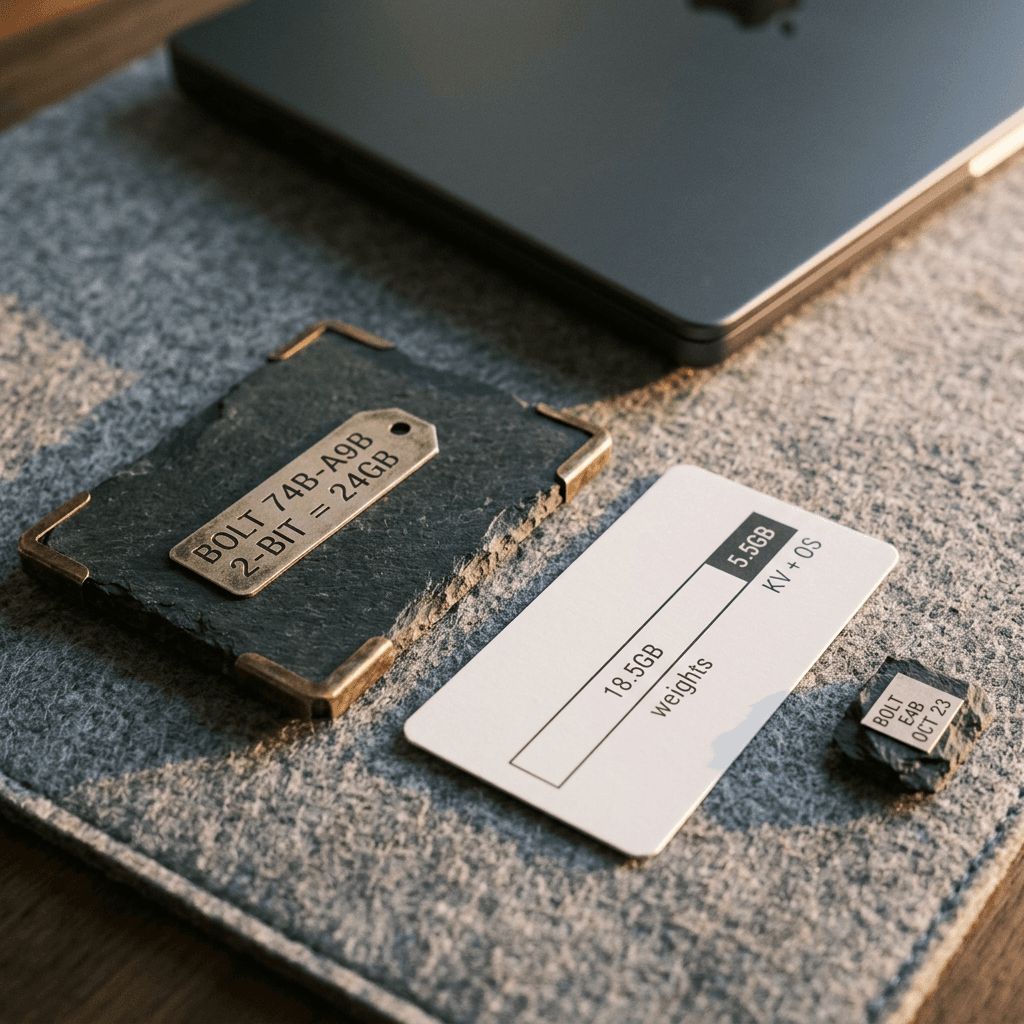
Bolt 74B-A9B deserves its own section because it changes what fits on a desk. NVIDIA says it uses native 2-bit quantization to fit in 24GB of memory, which means the model was designed for low-bit weights rather than squeezed down afterward [1] [8]. The back-of-envelope check: 74 billion parameters at 2 bits is about 18.5GB for weights alone, leaving around 5GB of a 24GB budget for KV cache, activations, and the operating system, which explains the tight but workable fit. Treat that as my arithmetic, since embeddings and some layers may be stored at higher precision.
Artificial Analysis gives Bolt 74B-A9B an Intelligence Index of 21.4, fourth among models under 100B parameters and first among US models in that class, 8.6 points above Nemotron 3 Super (12.8) with 39 percent fewer total parameters [5]. Its context is 256k tokens, and it accepts vision and text input. Against Nemotron 3 Ultra (23), it leads on AutomationBench-AA (15.5 percent versus 3.0 percent) and AA-Briefcase (912 versus 874 Elo) but trails on AA-LCR (70 percent versus 79 percent) and Humanity's Last Exam (25 percent versus 28 percent) [5]. The cost is verbosity: about 82k output tokens per Index task, 1.8 times Super VL.
The trade-off is clear. Bolt is the model for private, local, offline work such as drafting, coding assistance, and screenshot triage on your own machine, while Super VL is the server-side workhorse. Bolt E4B at 4GB, due October 23, is aimed at always-on voice and embedded interfaces. Compare this to the single-GPU approach of Qwen3.8-27B, a dense model that runs on one consumer GPU, if you want to see how an MoE with 9B active differs from a dense alternative on the same desk.
Step 8: A Practical Creator Workflow, Auditing Thumbnails and Analytics Screenshots
This is where a vision-language agent stops being an enterprise story. Creators produce a steady stream of exactly the inputs this model reads well: thumbnails, analytics screenshots, competitor channel pages, and chart exports. A model that can look at two thumbnails and describe differences in contrast, face size, text legibility, and focal point turns a subjective A/B debate into a checklist.

Here is a workable loop. Export your last ten thumbnails and your CTR figures from YouTube Studio, send each thumbnail to the model with a rubric (single focal point, readable text at phone size, face visible and expressive, color contrast against the feed), and ask for a JSON score plus the one change most likely to help. Then compare the scores with your actual numbers. If the rubric does not correlate with your CTR, adjust the rubric; if it does, you have a cheap pre-publish check. Remember that the model sees a static frame, so it cannot judge how a thumbnail performs against a specific audience, and CTR is also shaped by title, topic, and channel history. Treat the output as a design review, not a prediction.
python/code
# pip install requests
# Score a thumbnail against a rubric and get one concrete fix. Key comes from the environment.
import base64, json, os, sys
from pathlib import Path
import requests

RUBRIC = """Score this YouTube thumbnail from 1 to 10 on each item:
focal_point (one clear subject), text_legibility (readable at phone size),
contrast (stands out in a busy feed), clutter (10 means clean).
Then give the single change most likely to improve click-through rate."""

schema = {
    "name": "thumbnail_audit",
    "strict": True,
    "schema": {
        "type": "object",
        "properties": {
            "focal_point": {"type": "integer"},
            "text_legibility": {"type": "integer"},
            "contrast": {"type": "integer"},
            "clutter": {"type": "integer"},
            "top_fix": {"type": "string"},
        },
        "required": ["focal_point", "text_legibility", "contrast", "clutter", "top_fix"],
        "additionalProperties": False,
    },
}

def audit(path: str) -> dict:
    b64 = base64.b64encode(Path(path).read_bytes()).decode()
    r = requests.post(
        "https://openrouter.ai/api/v1/chat/completions",
        headers={"Authorization": f"Bearer {os.environ['OPENROUTER_API_KEY']}"},
        json={
            "model": "nvidia/nemotron-3.5-super-vl",
            "temperature": 0.6,
            "max_tokens": 6000,
            "response_format": {"type": "json_schema", "json_schema": schema},
            "messages": [{"role": "user", "content": [
                {"type": "text", "text": RUBRIC},
                {"type": "image_url", "image_url": {"url": f"data:image/jpeg;base64,{b64}"}},
            ]}],
        },
        timeout=180,
    )
    r.raise_for_status()
    return json.loads(r.json()["choices"][0]["message"]["content"])

if __name__ == "__main__":
    for thumb in sys.argv[1:]:
        print(thumb, audit(thumb))
Once the audit tells you what to change, the production step is separate. A weak thumbnail with a cluttered background and tiny text can be rebuilt in the YouTube Thumbnail Maker on Miraflow, where you can paste a YouTube link to edit an existing thumbnail, add text, and generate variants to test, and our guide to YouTube Title A/B Testing covers how to run the test fairly. For the studio-side numbers, see how the YouTube Studio Insights redesign changed where those charts live, and the new YouTube Dynamic Thumbnails and AI draft feedback post for what the platform itself now offers.
The same pattern extends to other parts of a creator pipeline. Feed a screenshot of your retention graph and ask which segment dropped; then use Miraflow's AI Clipping to turn the strongest long-video moments into captioned vertical clips, or script a fresh Short from the insight in Text2Shorts. For new visuals that match a style the audit recommended, the AI image generator turns the written fix into a generated asset. To be clear about the boundary, Miraflow does not run Nemotron: the model here is an analysis layer you can call yourself through OpenRouter, and the Miraflow tools are where you make the result. Start from Miraflow if you want the whole pipeline in the browser.
A Worked Cost Example
At OpenRouter's listed $0.10 per million input tokens and $0.40 per million output tokens, auditing 100 thumbnails with, say, 1,500 input tokens (image plus rubric) and 1,200 output tokens each would use 150,000 input and 120,000 output tokens, roughly $0.015 plus $0.048, or about 6 cents in total (illustrative token counts, so measure your own) [24]. Even at Artificial Analysis's higher $0.23 and $0.57 aggregate prices, the same job stays under 11 cents [6]. The point of the arithmetic is that vision audits are cheap enough to run on every upload, so the real cost is your attention, not the API bill.
python/code
# Estimate a batch job on OpenRouter using the listed per-million-token prices.
# Prices change; read the current listing before budgeting.
INPUT_PER_M = 0.10    # USD per 1M input tokens (OpenRouter listing, Oct 2026)
OUTPUT_PER_M = 0.40   # USD per 1M output tokens

def batch_cost(items: int, in_tokens: int, out_tokens: int) -> float:
    return items * (in_tokens * INPUT_PER_M + out_tokens * OUTPUT_PER_M) / 1_000_000

# 100 thumbnails, ~1,500 input tokens (image + rubric), ~1,200 output tokens each
print(f"OpenRouter listing:  ${batch_cost(100, 1500, 1200):.3f}")

# Same job at Artificial Analysis aggregate prices ($0.23 in / $0.57 out)
INPUT_PER_M, OUTPUT_PER_M = 0.23, 0.57
print(f"AA aggregate prices: ${batch_cost(100, 1500, 1200):.3f}")
Common Mistakes to Avoid
Treating 630 tokens per second as your throughput. That figure came from 100k-token prompts on a pre-release NVFP4 endpoint, while the live Artificial Analysis page shows 388, and your own numbers depend on batch size, context length, and provider [5] [6]. Benchmark with your own traffic shape.
Reusing the text sampling settings for vision. The card recommends temperature 0.6 for vision and 1.0 for text. Extraction at 1.0 invites small digit errors on charts [2].
Starving the reasoning budget. Because reasoning and the answer share max_tokens, a low cap truncates answers on hard tasks. Always check finish_reason, and log how often you hit length.
Copying the standard serve recipe for 1M context. The long-context recipes use different flags (async scheduling, Mamba prefix checkpointing, 5 speculative tokens) and omit the memory utilization flag [2].
Assuming one request holds a whole document. The recommended settings cap a request at one image and one video, so a 40-page PDF needs a page-by-page or batched plan.
Quoting vendor benchmarks as independent results. The card and blog numbers are NVIDIA-reported, and Artificial Analysis is the independent source. Say which one you are citing.
Skipping validation on structured output. Provider behavior varies, so parse and validate every JSON response, and retry on failure.
Trusting the model with untrusted pages and real permissions at once. A vision agent reading web content can be steered by text embedded in an image or page. Sandbox it and require approval for irreversible actions.
Production Best Practices
Pick the checkpoint deliberately. Use BF16 for fine-tuning and evaluation, and NVFP4 for serving, since Artificial Analysis found it within 0.1 index points of BF16 [5] [3].
Build your own eval first. Collect 50 to 200 real documents or screenshots from your workload with ground-truth answers, then run Super VL and two alternatives on them. The public tables will not tell you how your invoices or dashboards behave, and the launch coverage itself cautions that benchmarks do not replace testing against your own workflows [9].
Layer thinking by task. Thinking off for field extraction, medium effort for tables and charts, full reasoning for multi-document questions. This controls both latency and cost.
Pair vision with code. For charts and tables, let the model extract values and let a code tool compute. The CharXiv gain from 80.8 to 84 with an interpreter is the evidence [8].
Cache and budget. OpenRouter lists a cache-read price, and repeated system prompts and rubrics benefit from it [24]. Set per-request token caps and alert on truncation.
Isolate and log. Run agents in a sandbox, log every tool call and image hash, and keep a human approval step for payments, deletions, and external messages.
Watch the license and data terms. The model is under OpenMDW-1.1, which the card says allows commercial use, but read the terms against your use case and check each hosting provider's data policy [2].
Re-measure after provider changes. The Artificial Analysis note that the 630 figure came from a pre-release endpoint is exactly the kind of number that moves once real providers go live, so rerun your latency tests monthly.
Frequently Asked Questions
What is Nemotron 3.5 Super VL?
It is NVIDIA's open-weight vision-language model released October 15, 2026, with 120B total and 12B active parameters, a hybrid Mamba-2, MoE, and attention architecture, a C-RADIO vision encoder, and up to 1M tokens of context [2].
Is Nemotron 3.5 Super VL open source?
The weights are open under the OpenMDW License 1.1, and NVIDIA also released datasets, training recipes, and RL environments [1]. Whether that matches your definition of open source depends on the license terms, so read them.
What is the Hugging Face model id and the OpenRouter id?
The BF16 repository is nvidia/NVIDIA-Nemotron-3.5-Super-VL-120B-A12B-BF16, an NVFP4 repository also exists, and OpenRouter uses nvidia/nemotron-3.5-super-vl [2] [24].
What hardware do I need?
The card recommends 4x H100 or 2x GB200 for self-hosting. For a smaller footprint, use the NVFP4 checkpoint, a hosted provider, or the Bolt 74B-A9B model, which NVIDIA says fits in 24GB [2] [1].
Can it process video?
Yes, MP4 up to 2 minutes, with the card recommending 1 to 2 FPS depending on resolution [2]. Output is text only, so it describes and analyzes video rather than generating it.
How does it compare with Nemotron 3 Ultra?
Super VL is smaller (120B versus 550B), adds vision, scores higher on Artificial Analysis's Index (26 versus 23), and is faster, but Ultra is stronger on some text benchmarks such as IFBench and SWE-bench Verified [5] [2].
Is 630 tokens per second real?
It is Artificial Analysis's measurement on a pre-release endpoint with 100k-token prompts, while the live page lists 388 tokens per second [5] [6].
When does Bolt E4B come out?
NVIDIA says October 23, 2026 [1].
Can creators use it for thumbnails?
Yes, as an analysis layer through OpenRouter or a hosted provider, using a rubric and structured output as shown above. Generation and editing happen in tools such as the Miraflow YouTube Thumbnail Maker.
Conclusion
Nemotron 3.5 Super VL is best understood as a fast, open, agent-oriented vision model rather than a benchmark champion. It ties for the top on OCR-style document reading, holds a respectable chart-reasoning score that improves with a code tool, leads its intelligence tier on measured speed, and ships with open weights, a 1M-token context, and a practical set of serving recipes [2] [5]. It trails rivals on several text and agentic rows, it is verbose, and the headline speed number needs its context attached.
For builders, the decision is simple to state: if your agents spend their time reading screenshots, charts, and documents, test it against your own data this week, using OpenRouter for a quick start and vLLM when you need control. For creators, the more immediate win is a cheap, repeatable review of thumbnails and analytics screenshots, followed by rebuilding the weak ones in Miraflow. Bolt 74B-A9B widens the same story to a laptop-class machine, and Bolt E4B arrives on October 23.
References and Sources
- NVIDIA Blog: Open From Data Center to Desktop, Nemotron 3.5 Super VL and Bolt [1]
- Hugging Face model card: NVIDIA-Nemotron-3.5-Super-VL-120B-A12B-BF16 [2]
- Hugging Face model card: NVIDIA-Nemotron-3.5-Super-VL-120B-A12B-NVFP4 [3]
- NVIDIA Nemotron 3.5 Super and Lightning Technical Report [4]
- Artificial Analysis: Nemotron 3.5 Super and Bolt (October 15, 2026) [5]
- Artificial Analysis: Nemotron 3.5 Super VL Intelligence, Performance and Price Analysis [6]
- OpenRouter: NVIDIA Nemotron 3.5 Super VL [7]
- Unite.AI: NVIDIA Releases Open Nemotron 3.5 Super VL and Bolt Edge Models [8]
- Let's Data Science: NVIDIA Expands Nemotron 3.5 With Super VL and Bolt [9]
- MarkTechPost: NVIDIA Releases Nemotron 3.5 Super VL, a 120B Open Multimodal Agent Model [10]
- Gu and Dao, Mamba: Linear-Time Sequence Modeling with Selective State Spaces [11]
- Dao and Gu, Transformers are SSMs (Mamba-2) [12]
- Ranzinger et al., AM-RADIO: Agglomerative Vision Foundation Model [13]
- Leviathan et al., Fast Inference from Transformers via Speculative Decoding [14]
- Gloeckle et al., Better and Faster Large Language Models via Multi-token Prediction [15]
- CharXiv: Charting Gaps in Realistic Chart Understanding [16]
- OCRBench v2 [17]
- MMLongBench-Doc [18]
- OSWorld [19]
- SWE-bench [20]
- GPQA: A Graduate-Level Google-Proof Q&A Benchmark [21]
- BrowseComp [22]
- vLLM documentation [23]
- OpenRouter models API [24]