20 AI Floating Product Prompts for Viral Ecommerce Content (Copy & Paste)

Written by
Aerin Kim
Floating product shots are taking over Shopify ads and TikTok Shop feeds in 2026. Here are 20 copy-paste AI prompts plus the Miraflow workflow to make them.
If you have scrolled a Shopify ad feed, an Instagram Shop tab, or a TikTok Shop listing anytime in the last few months, you have probably seen it: a product that is not sitting on a table or a model's hand at all, it is just hanging there in mid-air, slowly turning under a soft studio light, with a gentle shadow pooling beneath it like gravity briefly stopped applying to that one object. That is the floating product effect, sometimes called a zero-gravity product shot or a levitation reveal, and it has quietly become one of the most used formats in AI-generated ecommerce video right now.
The reason it caught on is not just that it looks cool. Video listings are outperforming static image listings across social commerce in a way that is hard to ignore if you sell anything online. Shoppers who watch a product video convert noticeably more often than shoppers who only see a still photo, short-form product video now drives the majority of TikTok Shop's US sales volume rather than the static online store catalog, and product pages with an embedded video convert at meaningfully higher rates than pages without one. A floating product clip is one of the easiest ways to turn a plain catalog photo into something that earns that video-format lift, without actually booking a studio, a rig, or a motion designer.
This post is a practical, copy-paste prompt pack built for exactly that. You will find 20 distinct floating product prompts grouped across six common ecommerce product categories, each written around the specific lighting and material challenge that category actually presents, plus a final group of pure video-animation prompts for turning a still into the hover-and-rotate clip itself. The workflow behind all of it uses two Miraflow tools together: Miraflow's AI Image Generator to prepare a clean, isolated starting photo of your product, and Miraflow's Cinematic AI Video Generator to actually animate that still into the slow hover-and-rotate clip. Neither step requires a studio, a lighting rig, or an editing timeline, the entire thing runs in the browser.
Why the Floating Product Look Works Right Now
The floating product effect borrows its visual language from high-end commercial photography, the kind of studio work that normally needs a wire rig, a post-production team to paint out the rig, and a day rate most small sellers cannot justify for one hero shot. AI video generation collapses that entire process into a prompt. Upload a clean product photo, describe the hover, the rotation, and the lighting, and the model handles the part that used to require a physical rig and a retoucher.
There is also a real psychological reason it works as scroll-stopping content, not just a technical convenience. A static product photo reads as a catalog image, something the eye is trained to skip past in a feed full of similar flat-lays. A product that is visibly defying gravity, turning slowly under cinematic light, reads as something worth a second look, the same reflex that makes a genuinely unusual object in a feed get a longer glance before a thumb keeps scrolling. That extra half-second of attention is most of what separates a scroll-past from a tap-through on a crowded Shop tab or a Reels feed.
The format also solves a specific ecommerce problem: making a single product photo feel premium without reshooting it. A lot of small sellers are working from a handful of flat, evenly lit catalog photos, often shot quickly against a plain background for marketplace compliance. A floating product clip generated from that same photo gives the listing a second, more cinematic asset for ads, Shop tabs, and social teasers, without a second photoshoot. The underlying formula that makes this work consistently across categories is fairly stable: cinematic studio lighting with a clear direction, a mid-air hover position with a slow, controlled rotation, a true zero-gravity read rather than an obvious floating-sticker look, and a soft, correctly sized shadow beneath the product that keeps it visually grounded instead of looking cut out and pasted onto the frame. Every prompt below is built around that same formula, adapted to the specific material and lighting challenge each product category presents.
Sellers who already generate lifestyle and unboxing-style content with Miraflow's AI UGC ad prompts will recognize the same underlying logic here: the format changes, but a believable, physically consistent scene is what actually makes AI-generated commerce content convert instead of just looking synthetic.
1) Skincare and Beauty Bottles: Glass, Liquid and Pump Mechanisms
Beauty products are one of the hardest categories for this effect because glass refracts light unpredictably and liquid inside a bottle has to settle at a believable level and angle even while the bottle itself hovers. Get the glass and liquid behavior wrong and the whole shot reads as an obvious composite rather than a real object caught mid-float. Sellers already using Miraflow's AI prompts for skincare and beauty brand visuals for flat product shots will find these three prompts a natural next step for turning those same product types into floating hero content.
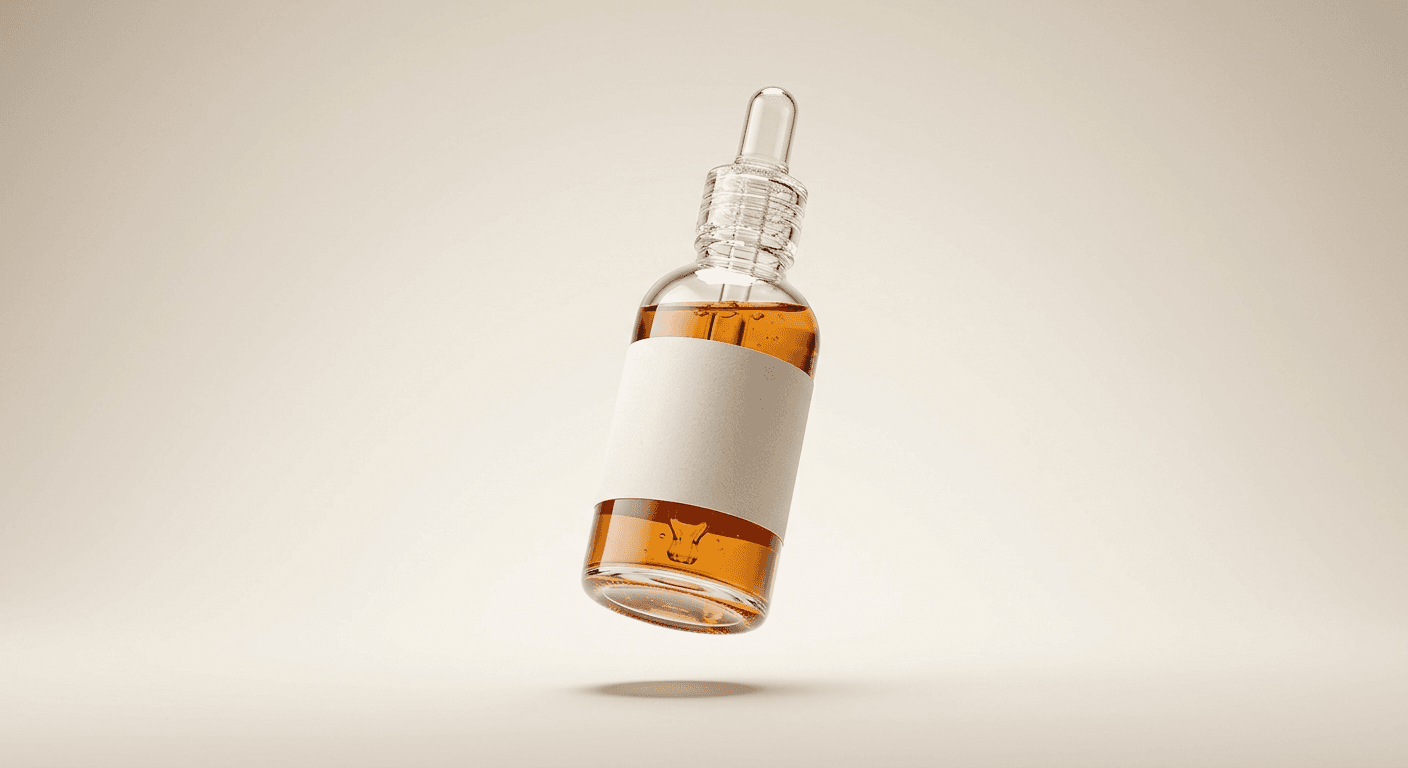
Prompt 1: Glass serum dropper bottle, three-quarter hover
A glass dropper bottle hovering at an angle that shows both the liquid inside and the dropper cap clearly, built to show correct light refraction through the glass walls.
A glass dropper serum bottle hovering in mid-air at a three-quarter angle, roughly a foot above a seamless pale gradient backdrop, the amber liquid inside settled naturally at the bottle's base with visible refraction bending the light through the glass walls, the glass dropper cap catching a sharp specular highlight from a softbox key light positioned upper left, a soft diffused fill light from the right keeping the shadow side readable, a tight, perfectly round soft shadow directly beneath the bottle on the backdrop to anchor the hover, medium product shot with a slightly compressed telephoto lens look and shallow depth of field keeping the label area tack sharp, no visible logos or brand text, no warped or stretched glass geometry, no harsh double shadow, no garbled label lettering.
Prompt 2: Frosted cream jar, lid removed mid-air
A two-piece floating composition with the jar and its lid caught at slightly different heights, as if both pieces are hovering in the same weightless moment.
A frosted glass cream jar hovering with its lid removed and placed just below it, both pieces frozen mid-air as if caught in the same weightless moment, the open jar tilted slightly toward camera to reveal the smooth cream surface inside, warm diffused studio light from directly above the frame softening the frosted glass texture without losing its subtle translucency, a soft blurred gradient shadow beneath each piece sized correctly to its distance from the surface below, clean studio backdrop transitioning from pale blush to white, close-up product framing with shallow depth of field, no visible logos or brand text, no plastic-looking cream texture, no mismatched shadow intensity between the jar and the lid.
Prompt 3: Pump bottle, straight-on hero angle
A centered, symmetrical pump bottle shot built for a hero product image, with a visible bead of product at the nozzle to suggest real use.
A frosted white pump bottle hovering dead-center against a soft sage-green gradient backdrop, the bottle angled so the pump nozzle points slightly toward the upper right, a single bead of product visible at the pump tip to suggest it was just used, bright even overhead studio light with a gentle rim light from behind separating the bottle's edge from the backdrop, a crisp, slightly elongated soft shadow directly below matching the bottle's height off the surface, straight-on hero product framing with everything in sharp focus, no visible logos or brand text, no distorted pump mechanism, no shadow that reads as a flat sticker instead of a real cast shadow.
2) Tech and Gadgets: Metal, Glass Screens and Precision Detail
Electronics bring a different material challenge entirely: brushed metal, glass screens, and hinge or button mechanisms all need to read as genuinely precise, not soft or approximated. A watch strap or earbuds hinge that looks slightly melted or imprecise breaks the premium feel this category depends on more than almost any other.
Prompt 4: Wireless earbuds case, lid open
A charging case hovering with its lid open and the earbuds still seated inside, built around a reflective surface below to add a second layer of realism.
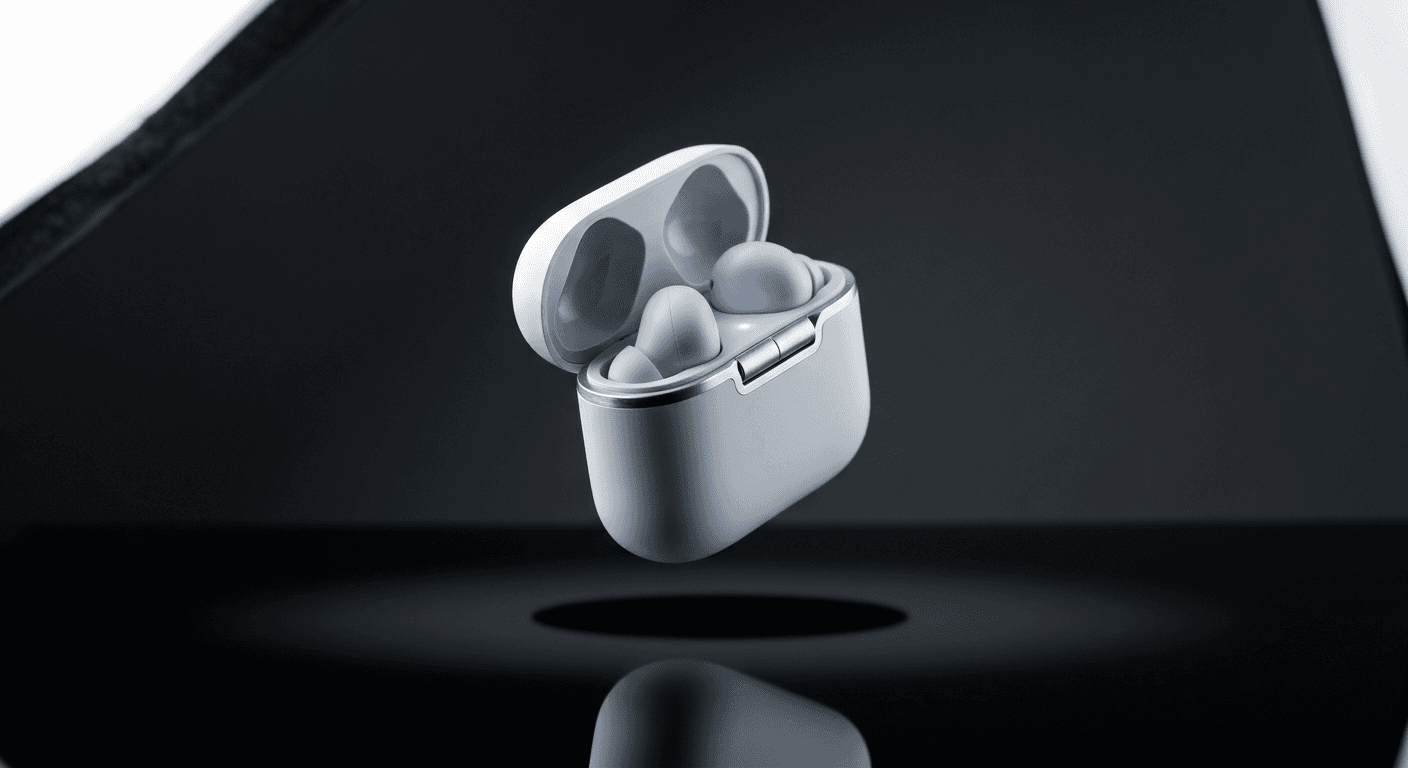
A matte white wireless earbuds charging case hovering with its lid open at a 45-degree angle, the two earbuds still seated inside their charging slots with a faint blue charging indicator glow, brushed aluminum hinge catching a sharp specular highlight from a focused key light above, soft fill light from the left revealing the case's rounded edge without flattening it, a tight circular soft shadow directly beneath the case anchoring it a few inches above a glossy black reflective surface that mirrors a faint blurred reflection of the case, close macro-leaning product shot with shallow depth of field, no visible logos or brand text, no warped hinge geometry, no overexposed glow from the charging light.
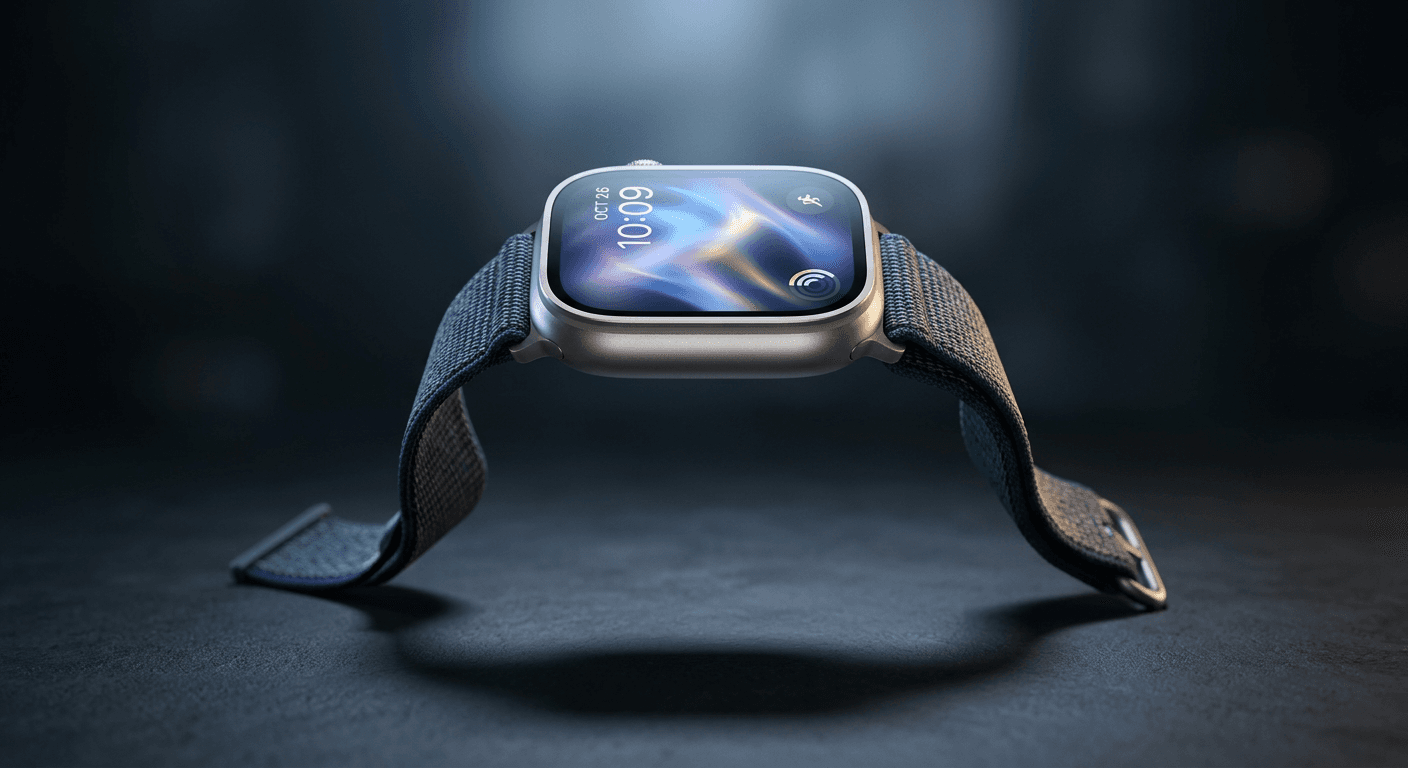
Prompt 5: Smartwatch, screen facing camera
A smartwatch hovering with its fabric strap draping naturally even while the watch body itself floats, the screen showing an abstract glow rather than a real interface.
A smartwatch hovering at a slight downward tilt so its screen faces the camera, the display showing a soft abstract glowing watch face rather than any real app or brand interface, a woven fabric strap draping naturally off both sides as if gravity still pulls on the strap even though the watch body itself hovers, cool blue-white studio lighting from above with a warm rim light from behind separating the strap from the dark backdrop, a soft oval shadow beneath the watch body sized to its height off the surface, close product framing with shallow depth of field keeping the screen sharp, no visible logos or brand text, no stiff or board-like strap, no screen glare that obscures the display.
Prompt 6: Smartphone, three-quarter camera module angle
A phone hovering at an angle built to show its camera module and frame edge clearly, with correct glass and aluminum reflections rather than flat black surfaces.
A smartphone hovering at a three-quarter angle with its camera module facing camera, matte black aluminum frame and a dark glass back panel catching a long soft reflection from an overhead studio light, a secondary rim light from behind tracing the phone's edge against a deep charcoal gradient backdrop, the camera lenses showing subtle correct reflections rather than flat black circles, a soft elongated shadow beneath the phone matching its tilt and height off the surface, medium product shot with shallow depth of field and the camera module held in sharp focus, no visible logos or brand text, no warped frame edges, no shadow that looks pasted on at the wrong angle.
3) Apparel and Accessories: Fabric, Leather and Soft Materials
Soft goods are where a lot of floating product attempts fall apart, because fabric and leather need to look like they are still responding to gravity even while the object they are attached to hovers. A sneaker's laces or a handbag's strap that looks frozen solid instead of naturally drifting is the fastest way to make the whole shot look like a rigid 3D render instead of a real floating object.
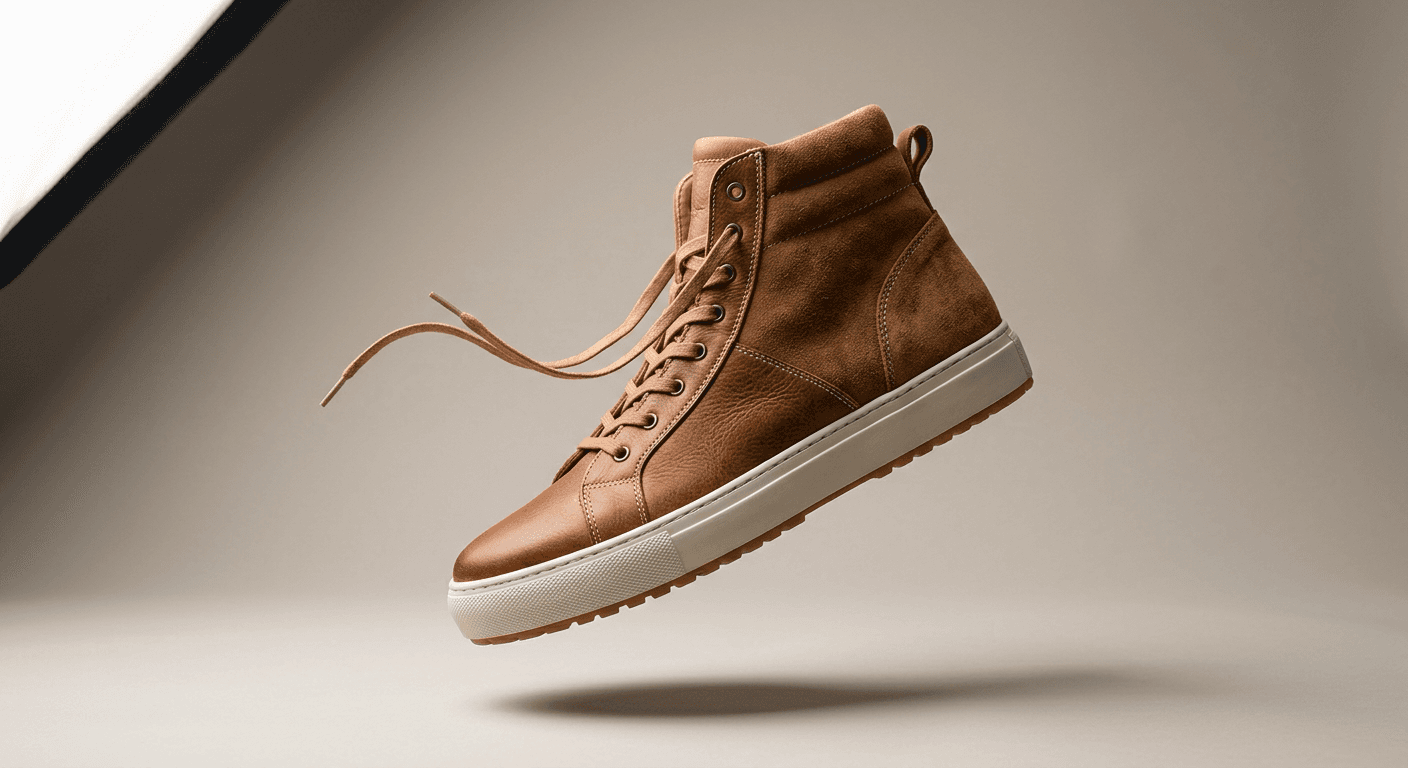
Prompt 7: Sneaker, mid-rotation with drifting laces
A single sneaker caught mid-rotation with its laces still settling from the motion, built to show both leather and suede texture under raking light.
A single high-top sneaker hovering mid-rotation, caught at a three-quarter angle with the laces drifting slightly as if still settling from the rotation, genuine leather texture on the toe cap with visible grain and a suede texture on the heel panel, directional studio light from the upper left raking across the material to show real texture contrast between the leather and suede sections, a soft fill light preventing the shadow side from going fully black, a soft rounded shadow beneath the sole anchoring the hover against a clean warm-gray backdrop, hero product framing with shallow depth of field, no visible logos or brand text, no stiff plastic-looking leather, no laces that look frozen or glued instead of naturally drifting.
Prompt 8: Structured handbag, swaying strap
A handbag hovering with its strap hanging and swaying as if caught mid-motion, with its own secondary shadow distinct from the bag's main shadow.
A structured leather handbag hovering with its strap hanging down and swaying slightly as if caught mid-motion, the bag's body rotated to a three-quarter angle showing both the front panel and one side gusset, soft window-style light from the right catching the leather's natural grain and a subtle sheen along the stitched seams, a gentle fill light keeping the shadowed side readable, a soft shadow beneath the bag's lowest point that also catches a faint secondary shadow from the hanging strap, clean pale backdrop with a soft gradient, medium product shot with shallow depth of field, no visible logos or hardware branding, no stiff or board-like strap, no shadow that ignores the strap's own position.
Prompt 9: Sunglasses, symmetrical straight-on shot
A pair of sunglasses shot straight-on with matched light reflections in both lenses, built for a clean, symmetrical hero product image.
A pair of sunglasses hovering straight-on with the lenses angled just enough to catch a visible reflection of a softbox light source in each lens, matte acetate frame with a slight color gradient from the temple to the front, a focused key light from above the camera creating clean catch-lights on both lenses without blowing out the reflection entirely, a soft fill light keeping the frame's underside visible, a tight symmetrical soft shadow directly beneath the frame against a warm sand-toned backdrop, close product framing with shallow depth of field, no visible logos or brand text, no mismatched reflections between the two lenses, no shadow offset to one side that breaks the symmetry.
4) Food and Beverage: Labels, Condensation and Readable Branding
Food and beverage products carry a constraint most other categories do not: the label or front panel usually has to stay readable, because that is where the actual product information lives. A rotation steep enough to turn a coffee bag's roast label or a cereal box's front panel illegible defeats the point of showing the product at all, even if the float itself looks convincing.
Prompt 10: Coffee bag, near-flat angle for legibility
A kraft-paper coffee bag hovering at a shallow angle that keeps the front label close to fully readable, with real paper texture under directional light.
A matte kraft-paper coffee bag hovering at a slight three-quarter angle with the resealable top folded down naturally, the bag's front face kept close to parallel with the camera so the roast information area stays fully legible, warm directional light from the upper left catching the paper's natural texture and a faint matte sheen on the printed area, a soft fill light preventing the far side from going too dark, a soft rectangular shadow beneath the bag matching its flat base shape, clean light-wood backdrop suggesting a cafe counter, medium product shot with shallow depth of field, no visible logos or brand text, no paper bag that looks stiff or board-like, no rotation steep enough to make the front face unreadable.
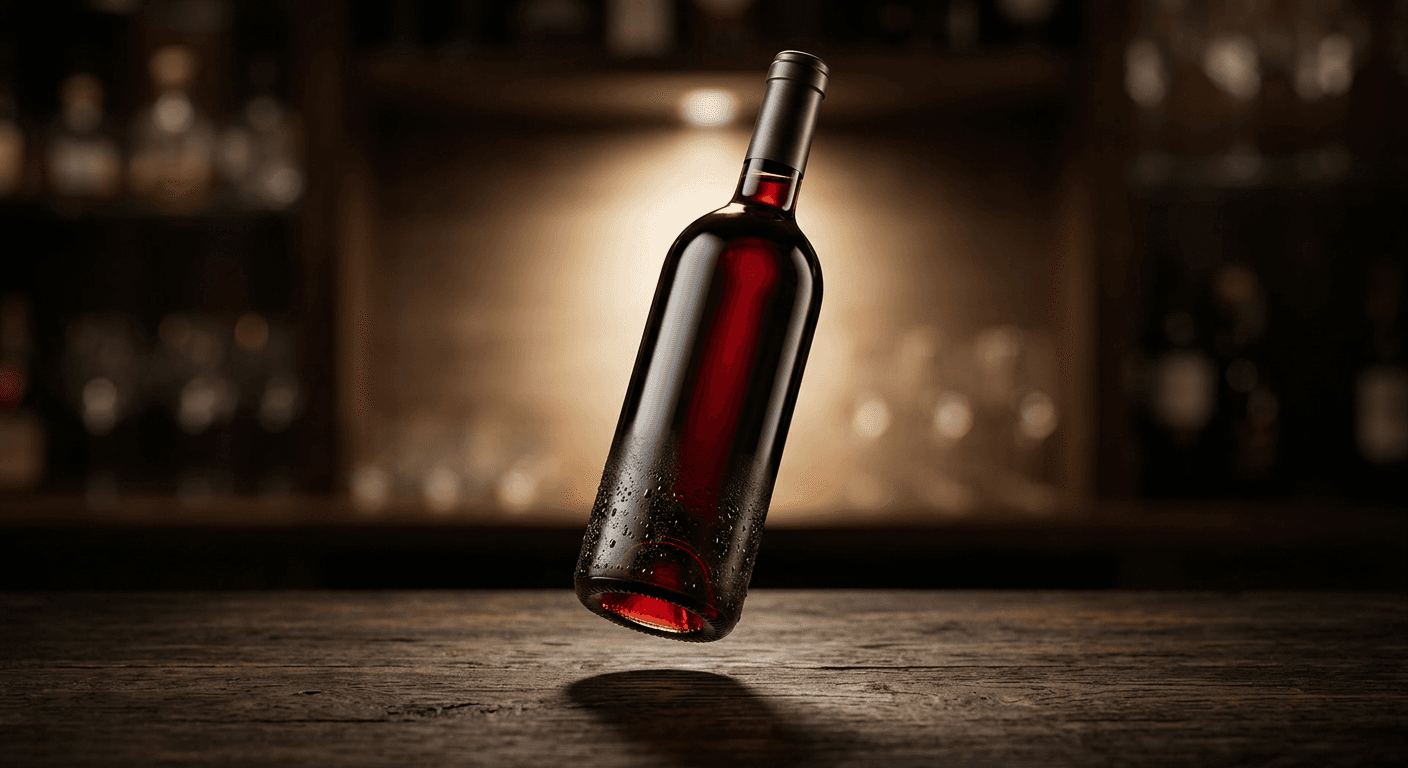
Prompt 11: Wine bottle, backlit with condensation
A dark glass bottle hovering upright with a warm backlight glowing through the liquid, plus realistic beaded condensation along the lower third.
A dark glass wine bottle hovering upright with a slight backward tilt, backlit by a soft warm light source behind the bottle that glows through the liquid and reveals its deep color at the shoulder and base, a secondary key light from the front-left catching the glass's curved surface without creating a distracting hot spot over the label area, condensation droplets beaded realistically along the lower third of the bottle as if just chilled, a soft elongated shadow beneath the bottle matching its height off a dark wood surface, hero product framing with shallow depth of field, no visible logos or brand text, no liquid that looks flat or opaque, no condensation that looks painted on rather than beaded.
Prompt 12: Cereal box, minimal rotation
A box product shot with only a few degrees of rotation, prioritizing a fully readable front panel over a dramatic floating angle.
A cereal box hovering with only a gentle few-degree rotation so the full front panel stays flat and readable to camera, the box's corrugated edge catching a soft rim light that separates it from a bright, airy kitchen-counter-style backdrop, even diffused studio light across the front face avoiding any harsh shadow that would hide printed detail, a soft rectangular shadow beneath the box sized to its flat base, medium product shot with everything in sharp focus, no visible logos or brand text, no box that looks warped or bent at the corners, no rotation steep enough to turn any front-panel text illegible.
5) Jewelry and Small Luxury Items: Macro Sparkle and Micro-Reflections
Jewelry works at a completely different scale than everything above it. A ring or a pair of earrings is small enough that even a few millimeters of hover reads clearly, and the shadow beneath it has to be calibrated just as precisely, too large and it looks like the piece is floating a full inch off the surface, too small or missing and it looks like it is simply resting there, unedited.
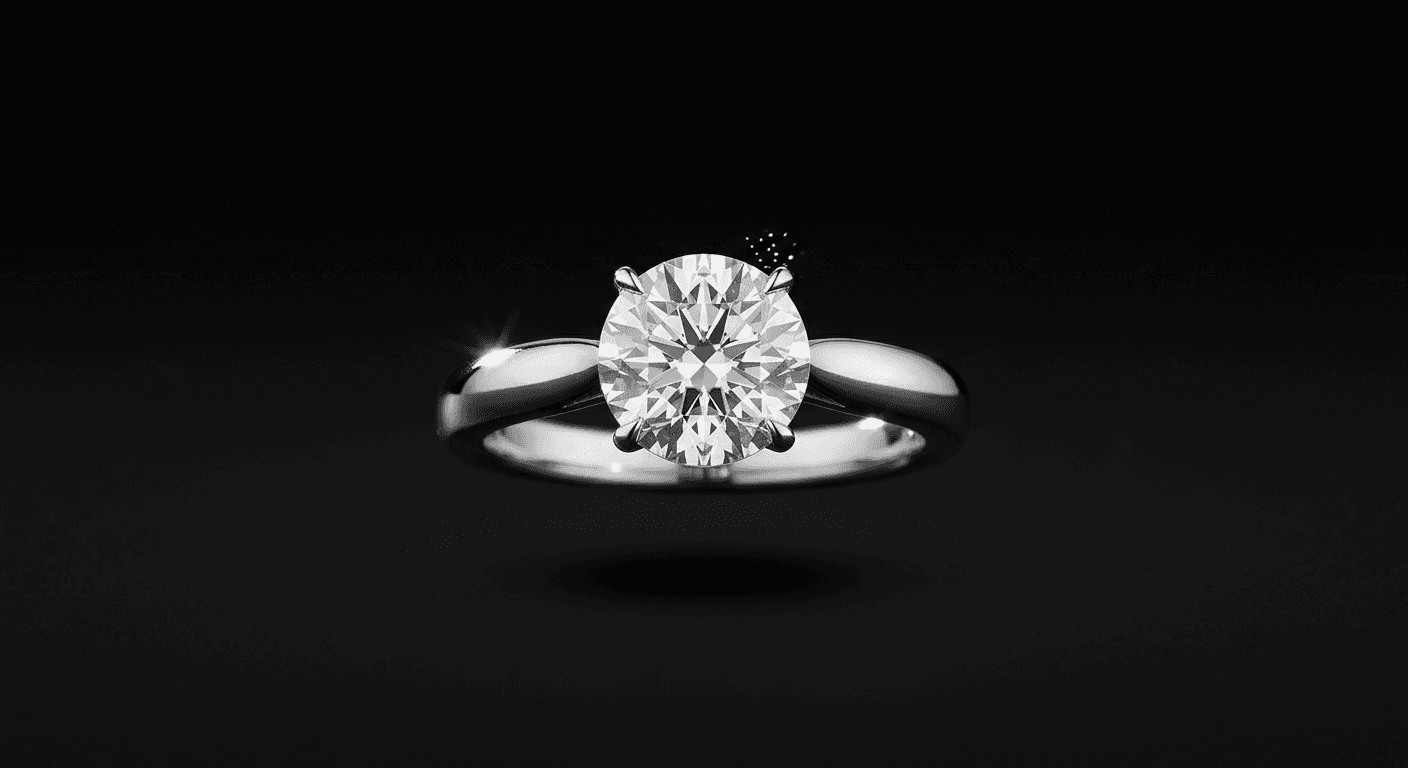
Prompt 13: Ring, extreme macro hover
An extreme close-up of a single ring hovering only a few millimeters above the surface, with facet-level light detail on the center stone.
An extreme macro shot of a single ring hovering at eye level against a seamless black backdrop, the metal band catching a sharp specular highlight from a small focused light source positioned just above and to the left, a faceted center stone throwing a tiny scattered rainbow of catch-lights from a secondary point light, every facet edge rendered with crisp, correct geometric precision, a small soft shadow directly beneath the ring anchoring it only a few millimeters above the surface since even a slight hover reads clearly at this macro scale, extremely shallow depth of field with only the stone and the nearest band edge in full focus, no visible engraving or brand marks, no blown-out highlight that erases facet detail, no shadow large enough to suggest the ring is floating higher than it visually should.
Prompt 14: Wristwatch, curved bracelet drape
A watch hovering with its metal link bracelet curved into a natural loop beneath the face, as if gravity still pulls on the unworn bracelet.
A wristwatch hovering with its metal link bracelet curved naturally into a soft loop beneath the watch face, as if gravity still pulls gently on the unworn bracelet even though the watch itself hovers, warm directional light catching individual polished links with distinct specular highlights rather than one flat metallic blur, the dial reflecting a soft abstract studio light rather than a real time display, a soft shadow beneath the lowest curve of the bracelet matching its drape, deep charcoal backdrop with a subtle vignette, close product framing with shallow depth of field keeping the dial and nearest links sharp, no visible brand text on the dial, no stiff or straight-hanging bracelet, no shadow that ignores the bracelet's curved shape.
Prompt 15: Drop earrings, mirrored pair
A symmetric pair of earrings hovering side by side at matched height, with two separate shadows rather than one merged shadow shape.
A symmetric pair of drop earrings hovering side by side at the same height, mirrored perfectly so both catch identical specular highlights from a soft overhead light source, each earring's metal chain segment hanging with a slight natural curve as if still settling, a pale blush gradient backdrop keeping focus on the metal and stone detail, two small soft shadows beneath each earring spaced to match their actual positions, extreme close-up framing with shallow depth of field keeping both earrings sharp while the backdrop softly falls away, no visible brand marks, no mismatched lighting between the two earrings, no shadows that merge into one blob instead of reading as two separate objects.
6) Home Goods: Ceramic, Wax and Matte Materials
Matte home goods, candles, ceramic vases, unglazed stoneware, are their own category of challenge for the opposite reason jewelry and glass are hard. There are no strong reflections to sell the realism, so the shadow beneath the object has to carry almost all of the weight in convincing a viewer the piece is actually hovering and not simply sitting there with the background erased around it.

Prompt 16: Glass jar candle, lit wick
A candle hovering with its wick lit, the small flame adding a secondary warm light source distinct from the main studio key light.
A glass jar candle hovering with its wick lit, the small flame casting a warm flicker of light upward onto the glass's lower interior while the main studio light source comes from the upper left, the wax surface inside showing a realistic slightly uneven melted pool around the wick, the glass jar itself clear enough to show the wax color and level through its walls, a soft warm shadow beneath the jar that reads slightly warmer in tone than the shadows elsewhere in the scene because of the candle's own light, clean matte backdrop in a warm neutral tone, medium product shot with shallow depth of field, no visible labels or brand text, no flame that looks pasted on top of the image, no wax surface that looks perfectly flat or artificial.
Prompt 17: Matte ceramic vase, raking side light
A matte stoneware vase hovering with a visible gap of backdrop between its base and the top of its shadow, the detail that sells a true hover on a non-reflective object.
A matte unglazed ceramic vase hovering upright at a slight angle, its rough stoneware texture catching a soft raking light from the side that reveals every small surface imperfection without looking dirty or damaged, since a matte object has no reflections to rely on, the shadow beneath it has to do more work to sell the hover convincingly, a crisp, well-defined soft shadow directly beneath the vase at a height clearly separated from the neutral linen-toned backdrop, a thin visible gap of backdrop between the vase's base and the top of its shadow, medium product shot with shallow depth of field, no visible logos or brand stamps, no shadow touching the vase's base directly, which would make it read as resting rather than floating.
7) Cinematic Hover and Rotation Prompts for Video
A still floating product image is a strong asset on its own, but the format that actually drives the conversion lift mentioned earlier is video. These four prompts are written for Miraflow's Cinematic AI Video Generator specifically, built to animate any of the stills from the groups above into an actual moving clip rather than describing a new static composition.
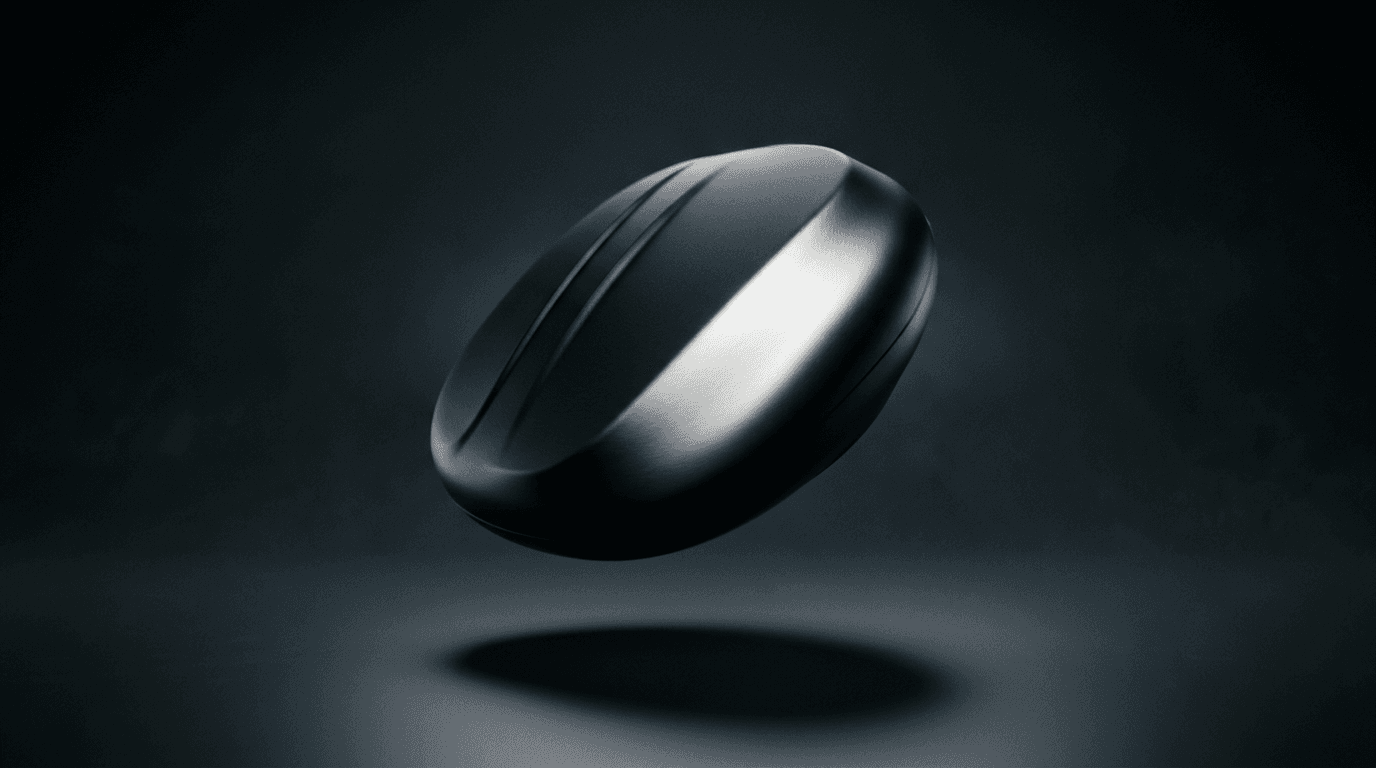
Prompt 18: Slow 360-degree rotation reveal
A continuous four-second rotation around the product's vertical axis, with the studio key light staying fixed so it visibly sweeps across each face as it turns into view.
Animate the uploaded product still with a slow, continuous 360-degree rotation around its vertical axis over roughly four seconds, studio key light staying fixed in place so it visibly sweeps across the product's different faces as the rotation reveals them, the soft shadow beneath the product subtly rotating in sync with any asymmetrical shape so it never looks static while the object above it moves, camera held in a fixed position matching the original still's framing and depth of field, smooth constant rotation speed with no easing jump at the start or end, no warped geometry mid-rotation, no shadow that stays perfectly static while an asymmetrical product rotates above it, no motion blur so heavy it obscures the product's surface detail.
Prompt 19: Rise-and-settle hero shot
A product that starts resting on a surface, lifts smoothly into a hover, holds with a slight drift, then lowers back down, with the shadow changing size to match each stage.
Animate the uploaded product still starting with the product resting on its surface, then lift it smoothly upward about six inches over one and a half seconds, hold it hovering with a very slight, slow bobbing drift for two seconds while the studio light glides gently across its surface, then lower it smoothly back down to rest on the surface over the final second, the shadow beneath the product growing softer and slightly larger as the product rises and sharpening again as it settles back down, fixed camera framing matching the original still, no sudden snap at the top of the rise, no shadow that stays a fixed size throughout the whole movement, no product that clips through or intersects the surface during the descent.
Prompt 20: Multi-product synchronized float
A small cluster of two or three related products hovering together at slightly different heights and rotation speeds, built for a bundle or set listing rather than a single hero item.
Animate a small set of two to three related products from the same uploaded still, each one hovering at a slightly different height and rotating at a slightly different speed so the group reads as a natural weightless cluster rather than a rigid grid, a shared studio light source sweeping consistently across all pieces at once so their highlights stay physically consistent with each other, each product's individual soft shadow beneath it sized correctly to its own height off the surface, camera holding a fixed wide framing that keeps the whole group in view with shallow depth of field on the nearest product, gentle four to five second loopable motion, no products that pass through or clip into each other, no shared single shadow blurring all the products together, no mismatched light direction between pieces.
How to Customize These Prompts
Start every prompt from a clean, well-isolated source photo. The entire floating illusion depends on the model accurately reading the product's real shape, material, and edges, and a cluttered background or inconsistent lighting in the source photo makes that job harder before the hover effect ever enters the picture. If your existing catalog photos were shot against a busy background or a marketplace-mandated white backdrop you want to swap out, the inpainting and masking tools inside Miraflow's AI Image Generator let you isolate the product or replace the background cleanly before applying any of the prompts above, the same way a seller prepping flat-lay beauty shots would use it to clean up a reference photo first.
The variables worth adjusting once you have a clean base are the light's color temperature, warmer for food, beauty, and home goods, cooler for tech, the rotation angle relative to any label or branding that needs to stay readable, and the backdrop tone, which is worth matching loosely to your brand's existing product photography so a floating hero shot does not look like it was generated in a completely different visual universe than the rest of your listing.
It is also worth mixing elements across groups rather than treating them as fixed templates. The macro hover distance from the jewelry group works well applied to a small tech accessory like an earbuds case. The backlit condensation approach from the wine bottle prompt translates directly to a cold brew can or a skincare mist bottle. The underlying formula, controlled light direction, a believable hover height, a shadow sized correctly to that height, and material behavior appropriate to the object, holds across almost any product you can photograph cleanly.
Common Mistakes That Break the Illusion
An unrealistic shadow is the single most common failure, and it shows up in three different ways. A shadow that is too dark and too sharp-edged reads as a product resting directly on the surface with the background simply painted white around it, not actually hovering. A shadow that is missing entirely, or far too faint, makes the product look like it is floating implausibly high, disconnected from any sense of gravity at all. And a shadow with the wrong shape, round beneath a rectangular box, or centered beneath an object that is clearly tilted, breaks the illusion the moment a viewer's eye catches the mismatch, even if they could not immediately say why the image feels off.
Over-rotating the product until its label or branding becomes unreadable is the second major mistake, and it is specifically a problem for the food, beverage, and packaged-goods categories above. A dramatic three-quarter or near-profile rotation looks more cinematic in isolation, but if a shopper cannot actually read what the product is or what makes it different from a competitor's, the shot has traded away its actual commercial job for a more impressive-looking render. Keep the rotation angle tied to how much of the label genuinely needs to stay legible for that specific product.
Mismatched lighting between the product and its background is the third common mistake. If the product is lit with a hard, directional studio light but the backdrop behind it looks like soft, diffuse ambient light with no clear source, or the shadow's direction does not match where the key light is supposedly coming from, the two halves of the image read as physically inconsistent even if each one looks fine on its own. Naming a specific light direction and keeping the backdrop's lighting logic consistent with it, the way every prompt above does, is what prevents this.
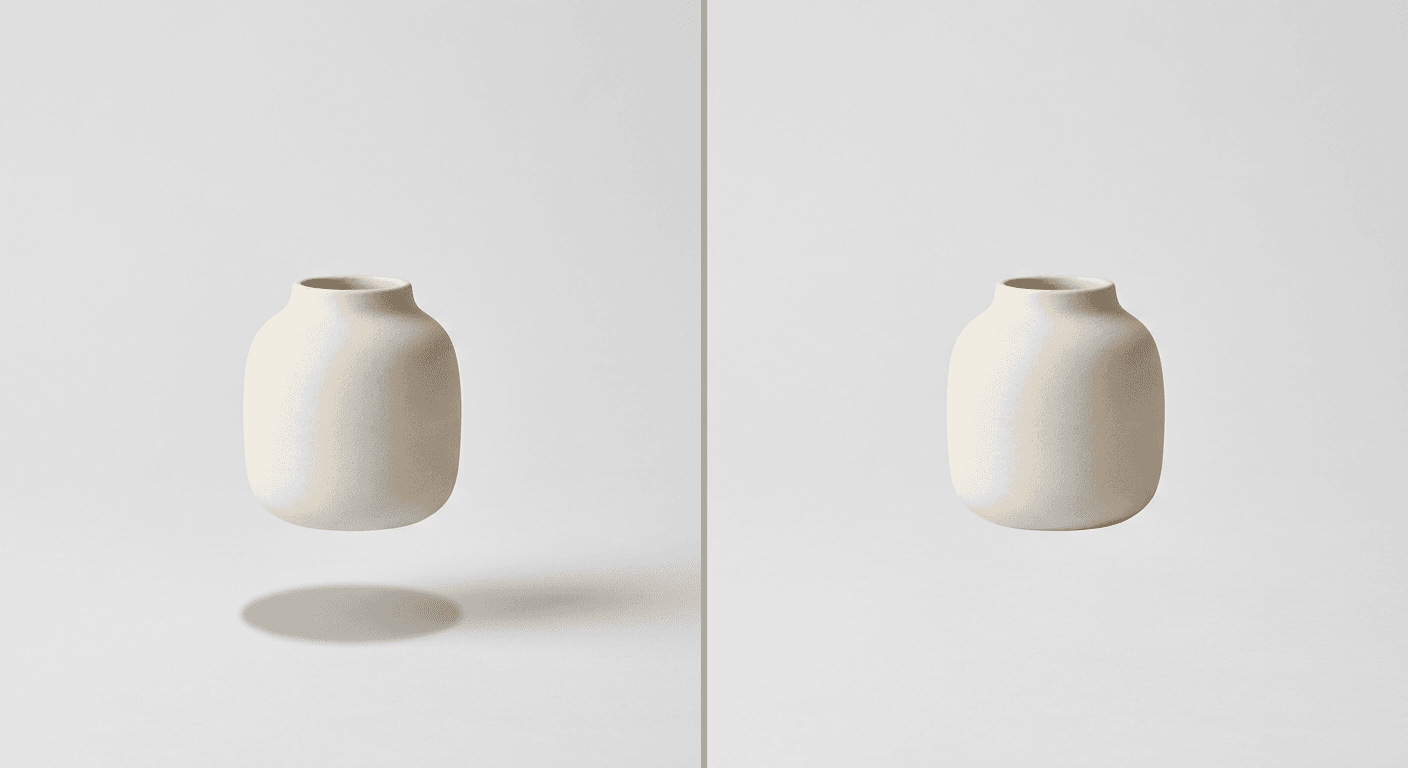
A fourth, subtler mistake is skipping the video step entirely and treating the floating still image as the finished deliverable. The static hover shot is a genuinely strong asset on its own, but it is the slow rotation and the light sweeping across the product's surface that give this format its premium, almost hypnotic quality, and that motion is exactly what the engagement and conversion data behind this trend is actually measuring. A floating product post that only shows the still misses most of the format's actual pull.
Generating Floating Product Content on Miraflow
The full workflow behind every prompt in this post runs on two tools inside Miraflow. Start with Miraflow's AI Image Generator to prepare a clean starting photo, its image-to-image mode works well when you already have a decent product photo and want to reset the lighting or backdrop, and its inpainting and masking tools are useful for isolating just the product when the original photo has a background you want gone, or for swapping a backdrop color without regenerating the whole shot from scratch. Once you have a still you like, bring it into Miraflow's Cinematic AI Video Generator and apply one of the four animation prompts from Group 7 to turn it into the actual hover-and-rotate clip.
Both tools run directly in the browser, so the path from an existing catalog photo to a finished floating product clip stays inside one workspace, without exporting files between a separate image generator and a separate video editor. Sellers building out a broader content library around a single product line often pair this format with the kind of listing-video thinking covered in Miraflow's AI prompts for TikTok's image-to-video and text-to-video transitions, since a floating hero clip and a quick transition-style teaser serve slightly different spots in the same product launch sequence. You can browse more prompt packs like this one on the Miraflow AI blog, and every tool named in this post lives at miraflow.ai.
Frequently Asked Questions
What exactly is the floating product effect? It is an AI image and video technique where a standard product photo is transformed so the item appears to hover in mid-air, usually with a slow rotation, cinematic studio lighting, and a soft shadow beneath it to keep the object visually grounded instead of looking cut out and pasted onto the frame. It is sometimes called a zero-gravity product shot or a levitation reveal.
Do I need professional product photography to start? No, but a clean, well-lit, unobstructed reference photo makes a real difference in how convincing the final hover looks, since the model is working from that photo's real shape and material detail. If your existing photos have a busy or inconsistent background, cleaning that up first with Miraflow's AI Image Generator before applying a floating prompt usually produces a noticeably better result than starting from a messy source image.
Why does my floating product look like a sticker pasted onto the background instead of a real hover? This is almost always a shadow problem, covered first in the common mistakes section above. A missing, mismatched, or wrong-shaped shadow is the single biggest giveaway that an image was composited rather than genuinely rendered as a hovering object, so naming the shadow's shape, softness, and position explicitly in the prompt is worth the extra sentence.
Should I generate a still image or go straight to video? Both have a role. The still image is useful as a standalone hero shot for a product page or a Pinterest-style pin, but the video is what actually earns the conversion lift this format is known for, since the motion, the rotation and the light sweeping across the surface, is the part viewers actually find compelling. If you only have time for one, the video version generally does more commercial work.
Can this work for a product that is not rigid, like clothing or a liquid-filled bottle? Yes, with adjustments. Soft goods like apparel need their fabric elements, straps, laces, fabric folds, described as still responding naturally to gravity even while the main object hovers, which the apparel group above covers directly. Liquid-filled products need the liquid level and any condensation described explicitly so it reads as physically settled rather than frozen in an impossible position.
How many floating product variations should I generate for one listing? A few is usually enough. One strong hero still for the main product image, one rotation-style video clip for ads and Shop tab teasers, and for a multi-item line, one synchronized multi-product clip like Prompt 20 covers most of what a small seller actually needs without overproducing a format that is meant to look effortless.
Does this effect work for every product category, or only certain ones? It works broadly, but the six groups in this post were chosen specifically because they cover genuinely different material and lighting challenges, glass and liquid, metal and glass screens, soft fabric and leather, labels that must stay legible, macro-scale jewelry, and matte non-reflective surfaces. A product that does not fit neatly into one of those categories can usually borrow the closest group's approach and adjust the material description accordingly.
Conclusion
The floating product effect works because it borrows the visual language of expensive commercial photography and makes it achievable from a single existing catalog photo. The 20 prompts above cover six distinct product categories, each built around the specific lighting and material challenge that category presents, plus a dedicated group of animation prompts for turning any of those stills into the actual hover-and-rotate clip. Prepare a clean starting photo with Miraflow's AI Image Generator, animate the float with Miraflow's Cinematic AI Video Generator, and keep the shadow, the lighting direction, and the material behavior specific to the real product rather than generic. Those are the details that separate a floating product shot that looks genuinely premium from one that reads as an obvious cutout, and they are worth the extra sentence in every prompt you adapt from this list.