
What Cursor AI Is Missing: A Software Quality Pipeline for Building Better Software

Written by
Aerin Kim
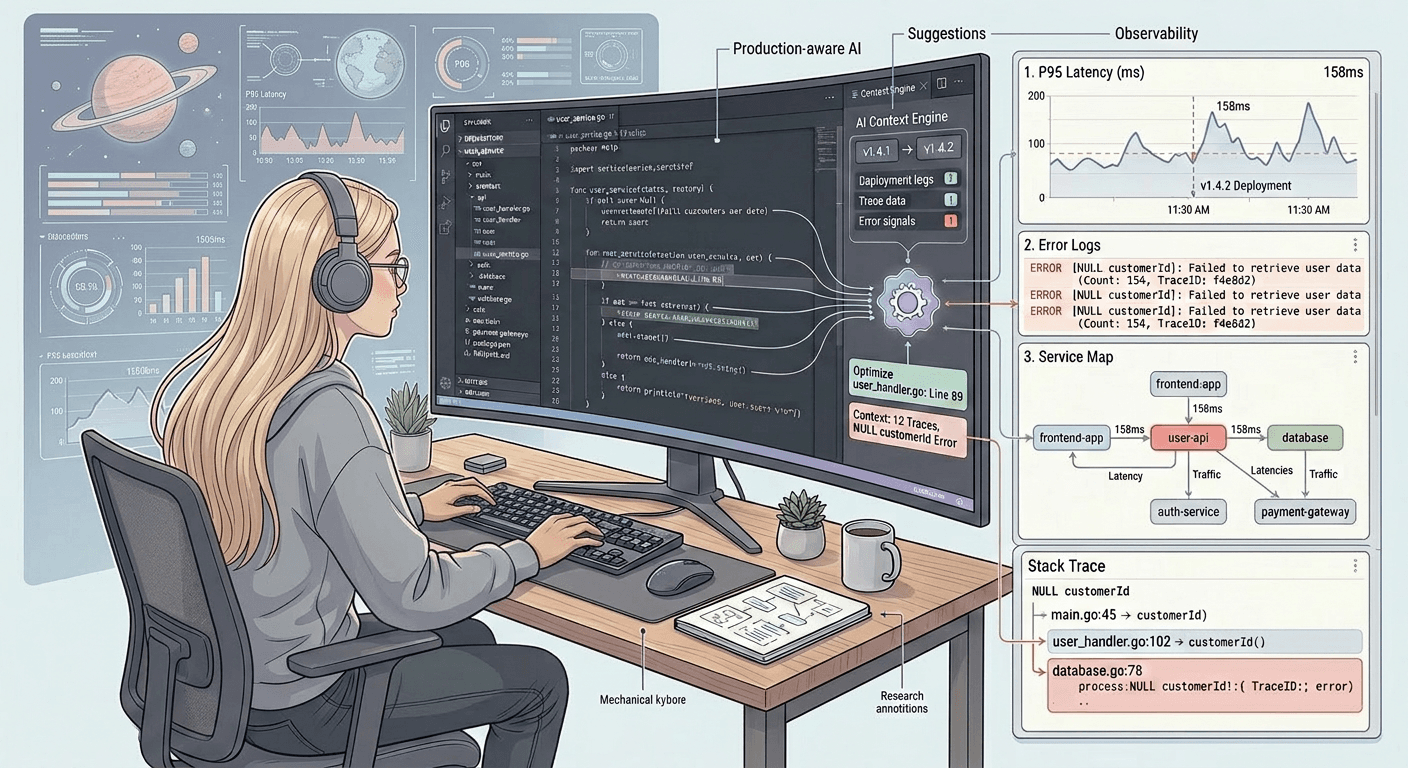
This writeup is about what I want to see in AI coding tools that current products still lack, and how I would design a data pipeline to measure what “good software” actually looks like.
The conjecture:
The opportunity isn't to build a lightweight safety layer on top of Cursor/VSCode. It's to create something deeply integrated with the entire development lifecycle. The goal is a product that combines the coding power of an AI agent with the real-time awareness of an observability platform.
Right now, when something breaks, it's caught outside of Cursor: after the fact, by developers. That's too late. To become truly embedded in the workflow, we need to merge these two capabilities directly inside the IDE: review, approval, risk detection, rollback points, version snapshots, test validation, and production feedback. This tight integration also enables far richer data collection, since every decision, change, and outcome is captured in one place.
Breakages should never be discovered downstream. They should be surfaced the moment they're introduced.
To quantify “good software,” we need a data pipeline that watches how code changes over time, connects those changes to quality signals, and turns them into actionable feedback for developers and AI coding tools like Cursor, Devin, Windsurf, GitHub Copilot, etc.
Today, most AI coding tools are great at writing code, but they are weaker at answering:
“Did this code make the product healthier or worse?”
They can generate a function, refactor a file, or fix a bug, but they often lack a continuous measurement system for maintainability, reliability, product impact, security, and developer velocity.
What they are missing is a software health radar.
1. What does “good software” mean?
“Good software” is not just code that compiles.
A useful definition:
Good software delivers the intended user value, safely and reliably, while remaining easy to understand, change, test, and operate.
That breaks into several dimensions.
A. Correctness
Does it do what it is supposed to do?
Signals:
- Test pass rate
- Bug count
- Regression rate
- Escaped defects
- Type errors
- Runtime exceptions
- Failed assertions
B. Reliability
Does it keep working in production?
Signals:
- Crash rate
- Error rate
- Uptime
- Latency
- Incident frequency
- Mean time to recovery
- Rollback frequency
C. Maintainability
Can engineers understand and change it easily?
Signals:
- Code complexity
- File size
- Function length
- Dependency tangles
- Duplicate code
- Churn in the same files
- Number of owners touching the same area
- Review comments about confusion
D. Testability
Can we confidently verify changes?
Signals:
- Test coverage
- Mutation test score
- Flaky test rate
- Time to run tests
- Ratio of changed code covered by tests
- Number of mocks/stubs needed
E. Security
Does it avoid obvious and non-obvious risk?
Signals:
- Dependency vulnerabilities
- Secret leaks
- Unsafe APIs
- Injection risks
- Permission issues
- Authentication/authorization mistakes
F. Performance
Does it use resources efficiently?
Signals:
- Latency
- Memory usage
- CPU usage
- Database query count
- Bundle size
- Cold-start time
- P95/P99 response times
G. Developer experience
Is it easy for developers to work with?
Signals:
- Build time
- CI time
- Time from PR open to merge
- Review turnaround time
- Onboarding time
- Number of failed local setup attempts
- Documentation freshness
H. Product impact
Does the software actually help users?
Signals:
- Feature adoption
- Conversion
- Retention
- Task success rate
- Support tickets
- User complaints
- Revenue impact
- Experiment results
The key point: good software is multi-dimensional. A data pipeline should not produce one naive “code quality score” unless that score is explainable.
2. The data pipeline architecture
Think of the pipeline as five layers:
- Collect data
- Normalize data
- Connect signals
- Compute metrics
- Feed insights back into the developer workflow
Layer 1: Data collection
We collect data from everywhere software quality appears.
Source 1: Git history
From GitHub, GitLab, Bitbucket, etc.
Collect:
- Commits
- Diffs
- Authors
- Timestamps
- Files changed
- Lines added/removed
- Code ownership
- Churn
- Reverts
- Branches
- Tags/releases
Git tells us where the code is changing, who changes it, and what areas are unstable.
Source 2: Pull requests
Collect:
- PR size
- Review comments
- Time to first review
- Time to merge
- Number of review iterations
- Requested changes
- Approvals
- Linked issues
- CI results
- Code owner approvals
PRs show friction. If a module always causes long reviews and many comments, it may be hard to understand.
Source 3: CI/CD
Collect:
- Build success/failure
- Test failures
- Flaky tests
- Deployment frequency
- Deployment duration
- Rollbacks
- Failed deployments
- Environment-specific failures
CI/CD shows whether code is shippable.
Source 4: Static analysis
Run tools like:
- ESLint
- Ruff
- Semgrep
- SonarQube
- CodeQL
- TypeScript compiler
- mypy
- PMD
- Checkstyle
- dependency scanners
Collect:
- Complexity
- Vulnerabilities
- Type errors
- Dead code
- Duplicates
- Lint issues
- Unsafe patterns
- Dependency risks
Static analysis gives fast signals before production.
Source 5: Runtime observability
From Datadog, New Relic, Sentry, OpenTelemetry, Grafana, Honeycomb, etc.
Collect:
- Exceptions
- Error rates
- Traces
- Logs
- Latency
- Resource usage
- Crash reports
- Slow queries
- Incident data
Production tells us the truth.
Source 6: Product analytics
From Amplitude, Segment, Mixpanel, PostHog, internal analytics, etc.
Collect:
- Feature usage
- Funnel conversion
- Retention
- Activation
- A/B test results
- User journeys
- Drop-off points
Good software should improve user outcomes, not just satisfy internal code metrics.
Source 7: Issue trackers and support
From Jira, Linear, GitHub Issues, Zendesk, Intercom, etc.
Collect:
- Bugs
- Feature requests
- Support tickets
- Incident reports
- Customer complaints
- Severity
- Labels
- Linked PRs
- Time to resolution
This connects code changes to user pain.
3. Normalize everything into a common model
Raw data from many systems is messy. We need a common schema.
Example entities:
Repository
Service
File
Function
Commit
PullRequest
Build
Test
Deployment
Incident
Issue
RuntimeError
Feature
Team
Developer
Dependency
UserImpactMetric
Then connect them.
Example relationships:
Commit modifies File
PR contains Commit
PR closes Issue
Deployment includes Commit
Incident occurs after Deployment
RuntimeError maps to Service
Service owns Feature
Feature affects UserMetric
Developer belongs to Team
File belongs to Component
Component depends on Component
The idea is to build a software knowledge graph.
Instead of treating code, bugs, tests, deployments, and incidents as separate worlds, connect them.
For example:
This PR changed
checkout/payment.ts, which belongs to the Payments service, which has had 3 incidents in the last 60 days, has low test coverage, high code churn, and is tied to a revenue-critical checkout funnel.
That is the kind of context Cursor and similar tools usually do not fully have.
4. Compute quality metrics
We can compute metrics at different levels:
- Function level
- File level
- Module level
- Service level
- Repository level
- Team level
- Product feature level
Example metric categories
Code health score
Possible inputs:
- Complexity
- Duplication
- File size
- Dependency count
- Type errors
- Lint errors
- Dead code
- Test coverage
- Code churn
Example:
Code Health Score =
25% maintainability
+ 20% test coverage
+ 20% defect history
+ 15% complexity
+ 10% dependency risk
+ 10% documentation freshness
But this should be explainable. We do not just say:
Score: 72
Say:
Score: 72 because complexity is high, test coverage is low, and this file has been edited 18 times in 30 days.
Change risk score
Before a PR is merged, estimate how risky it is.
Inputs:
- Size of PR
- Number of files touched
- Criticality of touched services
- Historical defect rate of those files
- Recent churn
- Test coverage of changed lines
- Whether migration/config/auth/payment code changed
- Whether similar changes caused incidents before
Example output:
Risk: High
Reasons:
- Changes payment authorization code
- Touched files have caused 4 production errors in the past quarter
- Only 42% of changed lines are covered by tests
- PR modifies both backend logic and database schema
This is useful for Cursor.
Maintainability index
Inputs:
- Cyclomatic complexity
- Cognitive complexity
- Function length
- Nesting depth
- Duplication
- Dependency fan-in/fan-out
- Number of concepts per module
Basically, how hard will this be for the next developer to understand?
Hotspot score
A hotspot is code that is both:
- Changed often
- Complex or error-prone
Example:
Hotspot = code churn × complexity × defect count
A file that is complex but never changes may not be urgent.
A file that changes daily but is simple may be okay.
A file that changes daily, is complicated, and causes bugs is a prime refactoring target.
Test adequacy score
Not just “coverage.”
Inputs:
- Coverage of changed lines
- Critical path coverage
- Mutation testing
- Flaky test rate
- Bug escapes despite tests
- Integration/e2e presence
- Contract tests for APIs
Do the tests actually catch mistakes, or do they just make the dashboard look green?
Production pain score
Inputs:
- Runtime exceptions
- Latency
- Incidents
- Support tickets
- User complaints
- Rollbacks
- SLO violations
How much pain is this code causing real users?
Product value score
Inputs:
- Feature usage
- Revenue impact
- Retention impact
- Conversion impact
- Customer importance
- Strategic priority
Is this code important to the business or users?
This helps avoid spending time polishing rarely used internal code while ignoring, say, fragile checkout code.
5. Use LLMs carefully
LLMs can help, but they should not be the only measurement system.
Good uses of LLMs:
- Summarize PR risk
- Explain complex code in plain English
- Cluster review comments
- Detect missing test scenarios
- Classify bug reports
- Map support tickets to code areas
- Generate refactoring plans
- Compare implementation to requirements
- Review code for readability
- Convert metrics into recommendations
Bad uses:
- Asking the LLM to invent a quality score with no data
- Ignoring production metrics
- Treating subjective code review as objective truth
- Letting the LLM approve its own generated code
The best architecture is:
deterministic metrics + runtime data + human feedback + LLM reasoning layer
6. What Cursor is missing today
Cursor, Windsurf, Devin, and similar tools generally focus on the coding loop:
Understand prompt → inspect code → generate/edit code → maybe run tests → iterate
They lack the broader software quality loop:
Code change → review → test → deploy → observe production → connect outcomes back to code → improve future changes
The full context should be:
- which files cause bugs,
- which modules are hardest to review,
- which services wake people up at 2 a.m.,
- which tests are flaky,
- which code paths matter most to users,
- which areas are risky to touch,
- and whether their previous generated code improved or worsened quality.
7. How I would improve Cursor specifically
Improvement 0: Add a superb Context Collector
Before Cursor writes code, it should gather the right context. From my experience, giving the model the right context dramatically improves the quality of its output. When the generated code is wrong, the cause is often not model performance. It is poorly passed context in the prompt.
Right now, especially for lazy developers like myself, much of AI coding still starts with a one-line request: “fix this bug,” “build this feature,” or “refactor this.” We ask the model to make changes while failing to provide the relevant and accurate context it needs: architecture, constraints, edge cases, related files, tests, product intent, and historical decisions. Sometimes we even pass irrelevant context. Then we hope it figures everything out.
When the output is bad, the issue is often not that the model is incapable. The issue is that we (or Cursor) pointed it in the wrong direction, and once an LLM is stuck there, it can be hard to recover. “Iterate until it’s done” works sometimes, but not always.
That is why Cursor should add a superb context collector: a step before code generation where Cursor gathers, organizes, and passes the right information to the coding agent.
A strong context collector would know what to pass such as:
- Task intent
- What the developer is trying to build or fix
- Example: “Add rate limiting to login attempts to prevent brute-force attacks.”
- Relevant files
- The files most likely involved in the change
- Example:
auth/login.ts,middleware/rateLimit.ts,user/session.ts,auth/login.test.ts
- Current architecture
- How the existing system is structured
- Example: “Authentication is handled through middleware before requests reach route handlers.”
- Existing patterns
- How similar problems are already solved in the codebase
- Example: “Password reset already uses a Redis-backed rate limiter. Reuse the same pattern. Do NOT introduce a new design pattern.”
- Constraints
- Rules the model should not violate
- Example: “Do not add a new database table. Do not introduce a new dependency. Keep the public API unchanged.”
- Edge cases
- Situations the implementation must handle
- Example: “Handle missing IP address, failed Redis connection, and users behind a proxy.”
- Relevant tests
- Existing tests that should be updated or used as references
- Example:
auth/login.test.ts,middleware/rateLimit.test.ts
- Expected behavior
- What success looks like
- Example: “After five failed login attempts within ten minutes, block further attempts and return HTTP 429.”
- Failure behavior
- How the system should behave when dependencies fail
- Example: “If Redis is unavailable, fail open and log a warning instead of blocking all logins.”
- Observability requirements
- Logs, metrics, or traces that should be added
- Example: “Emit
login_rate_limit_exceededwhen a user is blocked.”
- Security considerations
- Risks the model should account for
- Example: “Do not reveal whether an email exists in the system.”
- Review guidance
- What a human reviewer should pay attention to
- Example: “Reviewer should verify rate-limit bypass behavior and Redis failure handling.”
The mindset should be:
Ask not what Claude can do for you, but what you can do for Claude.
This also makes Cursor less dependent on “waiting for the next model.” If Cursor owns context collection, guidance, and harness data, it becomes more than an LLM wrapper. The short-term goal is to build a system that prepares each kind of LLM (Gemini, ChatGPT, Claude, etc.) to succeed.
The best version of Cursor is not:
Claude writes code.
It is:
Cursor prepares Claude to write the right code.
Improvement 1: Add production-aware coding
Cursor should connect to observability tools.
When editing code, it should surface:
This endpoint has a P95 latency of 1.8s.
Recent errors increased after the last deployment.
Most failures come from null `customerId`.
Then when generating code, it should take that context into account.
For example:
“I see this method often receives null
customerIdin production. I’ll add validation, logging, and a regression test.”
This is where current AI coding tools are still limited: they understand the repository better than before, but often not the live system.
Improvement 2: Add an AI-generated code feedback loop
Cursor should track outcomes of AI-generated changes.
For each AI-assisted change:
- Did tests pass?
- Did review require many corrections?
- Was the PR reverted?
- Did it cause a bug?
- Did it improve latency?
- Did it increase complexity?
- Did users adopt the feature?
Then Cursor can learn organization-specific patterns.
Example:
In this repo, AI-generated backend changes often fail because they miss permission checks.
Before suggesting backend code, always inspect authorization middleware and add access-control tests.
This would make Cursor better over time for each company.
Improvement 3: Add architecture drift detection
Cursor should understand intended architecture.
For example:
Frontend must not call database directly.
Payment service must not depend on marketing service.
Domain layer must not import infrastructure layer.
Then Cursor can warn:
This change violates the intended dependency direction.
You are importing `infra/db` into `domain/pricing`.
Suggested fix: pass a repository interface instead.
This is a missing piece. AI tools often produce code that works locally but slowly erodes architecture.
Improvement 4: Add a “software health graph”
Cursor should build a local and cloud-backed graph of the codebase.
It should understand:
File → Module → Service → Feature → Team → Runtime metrics → Bugs → Incidents → Tests
Then when a developer (or an agent) opens a file, Cursor could show:
We are editing a high-risk file.
Why:
- Changed 23 times in the last 60 days
- Related to 5 recent bugs
- Only 48% test coverage
- Used in checkout flow
- Has high cognitive complexity
- Owned by Payments team
This could move Cursor from “AI autocomplete” to “AI engineering intelligence.”
Improvement 5: Add a PR risk assistant
Before a PR is opened, Cursor should do a risk assessment.
Example:
PR Risk: Medium-high
Main risks:
1. Changes authentication middleware
2. Adds new database migration
3. No integration test for expired tokens
4. Similar file caused two production incidents recently
Suggested actions:
- Add test for invalid token
- Add rollback plan for migration
- Ask auth code owner for review
- Run load test for login endpoint
This would help developers/agents ship safer code.
Improvement 6: Add changed-line test intelligence
Cursor should know:
- which lines changed,
- which tests cover those lines,
- which important paths are uncovered,
- which tests are flaky,
- what production incidents occurred in this area.
Instead of:
“You should add tests.”
It should say:
“The new branch for
paymentMethod === 'ach'is not covered. Add an integration test for failed ACH authorization and retry behavior.”
That is far more useful.
Improvement 7: Add maintainability budgets
Teams could define budgets like:
No function over 80 lines
No file over 800 lines
No module with more than 15 dependencies
No PR over 500 changed lines without design review
No critical service change without integration tests
Cursor could warn before the PR:
This PR exceeds the complexity budget for the billing module.
Consider splitting the change into:
1. Database migration
2. API logic
3. UI update
4. Tests
Improvement 8: Add natural-language quality prompts for Agents
What are the riskiest files in this repo?
Which files changed most often and have low test coverage?
What code caused the most incidents this quarter?
Where should we refactor first?
Which tests are flaky but still blocking deploys?
Which generated changes from last month caused review problems?
8. Example end-to-end pipeline
Here is a concrete architecture.
┌─────────────────────┐
│ Git / GitHub / PRs │
└──────────┬──────────┘
│
┌──────────▼──────────┐
│ CI/CD + Test Results │
└──────────┬──────────┘
│
┌──────────▼──────────┐
│ Static Analysis │
└──────────┬──────────┘
│
┌──────────▼──────────┐
│ Observability │
│ Logs/Traces/Errors │
└──────────┬──────────┘
│
┌──────────▼──────────┐
│ Issues + Support │
└──────────┬──────────┘
│
┌──────────▼──────────┐
│ Product Analytics │
└──────────┬──────────┘
│
▼
┌────────────────────────────┐
│ Event Bus / Ingestion Layer │
│ Kafka / PubSub / Temporal │
└──────────────┬─────────────┘
▼
┌────────────────────────────┐
│ Normalization Layer │
│ Common schema + identity │
└──────────────┬─────────────┘
▼
┌────────────────────────────┐
│ Software Knowledge Graph │
│ Code ↔ tests ↔ bugs ↔ prod │
└──────────────┬─────────────┘
▼
┌────────────────────────────┐
│ Metrics + Risk Models │
│ health, risk, test gaps │
└──────────────┬─────────────┘
▼
┌────────────────────────────┐
│ LLM Reasoning Layer │
│ explanations + suggestions │
└──────────────┬─────────────┘
▼
┌────────────────────────────┐
│ Developer Workflow │
│ Cursor / PRs / Slack / CI │
└────────────────────────────┘
9. Example data model
A simplified schema:
CREATE TABLE files (
file_id TEXT PRIMARY KEY,
repo_id TEXT,
path TEXT,
language TEXT,
current_owner TEXT,
lines_of_code INT,
complexity_score FLOAT
);
CREATE TABLE commits (
commit_sha TEXT PRIMARY KEY,
repo_id TEXT,
author_id TEXT,
committed_at TIMESTAMP,
message TEXT
);
CREATE TABLE file_changes (
commit_sha TEXT,
file_id TEXT,
lines_added INT,
lines_deleted INT,
churn_score FLOAT
);
CREATE TABLE pull_requests (
pr_id TEXT PRIMARY KEY,
repo_id TEXT,
author_id TEXT,
opened_at TIMESTAMP,
merged_at TIMESTAMP,
changed_files INT,
lines_changed INT,
review_iterations INT
);
CREATE TABLE test_results (
test_id TEXT,
commit_sha TEXT,
status TEXT,
duration_ms INT,
flaky_probability FLOAT
);
CREATE TABLE incidents (
incident_id TEXT PRIMARY KEY,
service_id TEXT,
started_at TIMESTAMP,
severity TEXT,
root_cause_file_id TEXT
);
CREATE TABLE runtime_errors (
error_id TEXT PRIMARY KEY,
service_id TEXT,
file_id TEXT,
occurred_at TIMESTAMP,
error_type TEXT,
count INT
);
CREATE TABLE quality_scores (
entity_type TEXT,
entity_id TEXT,
score_name TEXT,
score_value FLOAT,
computed_at TIMESTAMP,
explanation TEXT
);
For bigger systems, I would add a graph database or graph layer.
Example:
(:File)-[:BELONGS_TO]->(:Service)
(:PR)-[:CHANGED]->(:File)
(:Deployment)-[:INCLUDES]->(:Commit)
(:Incident)-[:CAUSED_BY]->(:Deployment)
(:Test)-[:COVERS]->(:File)
(:Feature)-[:IMPLEMENTED_BY]->(:Service)
(:Feature)-[:AFFECTS]->(:Metric)
10. Example scoring approach
File risk score
File Risk =
0.25 × normalized_recent_churn
+ 0.20 × normalized_complexity
+ 0.20 × normalized_recent_bugs
+ 0.15 × inverse_test_coverage
+ 0.10 × production_error_rate
+ 0.10 × dependency_centrality
Output should not just be a number.
Better output:
File: src/payments/authorize.ts
Risk: 86 / 100
Why:
- High churn: changed 31 times in 90 days
- High complexity: top 5% in repo
- Low coverage: 43%
- Production errors: 12 recent Sentry issues
- Critical path: used during checkout
Recommended action:
- Add integration tests for failed authorization
- Split validation logic from provider-specific logic
- Add structured logging around provider response codes
11. What this enables inside Cursor
When you or agents are editing a file, Cursor could show a side panel:
Software Health
Current file:
src/billing/invoiceCalculator.ts
Health: Poor
Change risk: High
Business criticality: High
Main issues:
- Complex function: calculateInvoice has cognitive complexity 38
- Changed 14 times in 30 days
- 6 bugs linked to this file
- Only 52% changed-line coverage
- Used in enterprise billing flow
Cursor recommendations:
1. Add tests for prorated annual contracts
2. Split tax calculation into separate module
3. Avoid modifying discount logic in this PR
4. Ask billing owner for review
Then if you ask:
Refactor this safely.
Cursor should respond:
Suggested safe refactor plan:
Step 1: Add characterization tests around current behavior.
Step 2: Extract tax calculation with no behavior change.
Step 3: Run invoice regression suite.
Step 4: Compare generated invoice snapshots.
Step 5: Only then change discount behavior.
12. Current missing pieces
Missing piece 1: Memory of consequences
Current tools remember code context, but not enough about outcomes.
They often do not know:
- “Did the last change break production?”
- “Did this pattern cause bugs before?”
- “Do reviewers always reject this style?”
- “Did users actually use the feature?”
They can help write the recipe, but they do not know whether people got food poisoning last time.
Missing piece 2: Production awareness
They mostly work inside the code editor.
But real software quality is proven after deployment.
Missing piece 3: Business context
They may not know which code matters most.
A messy internal admin page may not be urgent. A messy payment flow may be extremely urgent.
Missing piece 4: Test intelligence
They can generate tests, but often not the right tests.
Missing piece 5: Architecture understanding
They may follow local code patterns but miss system-level boundaries.
Missing piece 6: Organizational learning
Every engineering organization has unique rules:
- “Never touch billing without finance tests.”
- “This service has flaky CI.”
- “This team prefers small PRs.”
- “This API must remain backward compatible.”
- “This customer has a custom workflow.”
Current tools often do not deeply learn these patterns.
They are smart visitors, not long-time employees.
13. MVP plan
Goal
Build a Cursor extension that connects code editing to production signals.
When a developer/agent opens or edits a file, the extension should surface relevant production context from observability tools (In the long term, we should own the observability layer!), then include that context when asking the LLM to generate or modify code.
The MVP should answer one question:
“What is happening in production around the code I am about to change?”
Phase 1: Pick One Integration
Do not integrate everything at first. Pick one observability source.
Options:
- Sentry
- Good for exceptions and stack traces
- Easy to map errors to files/functions
- Great for “this line is failing in production”
- Datadog
- Good for metrics, logs, traces
- Better for latency and endpoint performance
- More complex
- OpenTelemetry + local JSON export
- Best for demo
- No enterprise setup required
- You can fake/seed production data
For speed, support this first:
.production-context/events.json
Then later replace it with real Sentry/Datadog APIs.
Phase 2: Build the Cursor Extension
Since Cursor supports VS Code-style extensions, build a VS Code extension.
MVP extension features:
1. Sidebar: “Production Context”
A sidebar panel that updates based on the active file.
It should show:
- related endpoint or function
- P95 latency
- recent error trend
- top error message
- common bad input
- related traces/logs
- suggested guidance for the coding agent
2. Command: “Analyze Production Context”
A command that reads:
- current file path
- selected function name
- Git branch
- recent diff
- mapped production signals
Then displays a summary.
3. Command: “Generate With Production Context”
This command creates a prompt for Cursor/LLM containing:
- task request
- current code
- related production issues
- suggested constraints
- tests to add
For MVP, it can copy the prompt to clipboard.
Later, it can call the Cursor agent directly if possible.
Phase 3: Define the Data Format
Use a simple JSON file first.
Example:
{
"services": [
{
"name": "checkout-service",
"routes": [
{
"method": "POST",
"path": "/checkout",
"codeRefs": [
"src/routes/checkout.ts",
"src/services/payment.ts"
],
"metrics": {
"p95LatencyMs": 1800,
"errorRateChange": "+23%",
"requestsLast24h": 18342
},
"errors": [
{
"message": "Cannot read properties of null (reading 'customerId')",
"count": 482,
"firstSeen": "2026-05-01T10:12:00Z",
"lastSeen": "2026-05-05T08:31:00Z",
"stack": [
"src/routes/checkout.ts:42",
"src/services/customer.ts:18"
]
}
],
"commonInputs": {
"customerId": {
"nullRate": "7.4%",
"example": null
}
},
"lastDeployment": {
"version": "2026.05.04-3",
"time": "2026-05-04T19:22:00Z"
}
}
]
}
]
}
This lets us demo production-aware coding without needing real infrastructure.
Phase 4: Map Code to Production Signals
The hardest part is connecting code to runtime behavior.
For the MVP, we'll use simple matching:
Match by file path
If current file is:
src/routes/checkout.ts
Show all production context where codeRefs includes that file.
Match by endpoint
If the file contains:
router.post("/checkout", ...)
Match it to:
POST /checkout
Match by stack trace
If an error stack contains:
src/services/customer.ts:18
Show that error when the developer opens the file.
Phase 5: Generate Coding Guidance
The extension should convert raw production signals into coding guidance.
Example production signal:
Most failures come from null customerId.
Generated guidance:
When editing this code:
- Validate customerId before using it.
- Return a safe 400 error for invalid input.
- Add structured logging for missing customerId.
- Add a regression test for null customerId.
- Avoid changing the public API unless necessary.
This is the real product value.
We are not just showing dashboards inside Cursor. We are turning production data into instructions the coding agent can use.
Phase 6: Prompt Template
For MVP, generate a prompt like this:
You are modifying production-critical code.
User task:
Fix the checkout bug.
Current file:
src/routes/checkout.ts
Related production context:
- Endpoint: POST /checkout
- P95 latency: 1.8s
- Error rate increased 23% after deployment 2026.05.04-3
- Most common failure: Cannot read properties of null reading customerId
- customerId is null in 7.4% of failed requests
- Stack trace points to src/routes/checkout.ts:42 and src/services/customer.ts:18
Implementation guidance:
- Add validation for missing customerId.
- Return a clear 400 response for invalid requests.
- Add structured logging when customerId is missing.
- Add regression tests for null customerId.
- Avoid changing the public API.
- Keep the change minimal.
Before coding:
1. Explain the likely production cause.
2. Identify files to change.
3. Implement the fix.
4. Add or update tests.
5. Mention any operational risks.
Then Cursor can use this context when generating code.
Phase 7: MVP UX
Sidebar view
Production Context
Current file:
src/routes/checkout.ts
Matched endpoint:
POST /checkout
Signals:
⚠ P95 latency: 1.8s
⚠ Error rate: +23% after last deploy
⚠ Top failure: null customerId
Suggested fix:
Validate customerId before payment creation.
Buttons:
[Copy Production-Aware Prompt]
[Create Fix Plan]
[Open Related Test]
Inline annotation
Optional but powerful:
const customerId = req.body.customerId;
// Production note: customerId is null in 7.4% of failed checkout requests.
For MVP, sidebar is easier than inline annotations.
Phase 8: What to Build First
Day 1 MVP
Build:
- VS Code/Cursor extension
- sidebar webview
- reads
.production-context/events.json - matches current file to
codeRefs - shows production signals
- button to copy prompt
Day 2 MVP
Add:
- function/endpoint detection
- stack trace matching
- generated guidance
- “Create Fix Plan” command
Day 3 MVP
Add:
- Sentry import or fake Sentry adapter
- better UI
- demo project
- one realistic bug flow
Technical Architecture
Cursor Extension
|
| reads active editor file
v
Context Matcher
|
| matches file/function/endpoint
v
Production Context Store
|
| Sentry / Datadog / JSON mock
v
Guidance Generator
|
| turns signals into coding instructions
v
Prompt Builder
|
| sends/copies context to LLM
v
Cursor Agent
MVP Components
1. Extension host
Responsible for:
- detecting active file
- reading workspace files
- loading production context
- registering commands
- sending data to webview
2. Production context adapter
For MVP:
JsonProductionAdapter
Later:
SentryAdapter
DatadogAdapter
HoneycombAdapter
NewRelicAdapter
GrafanaAdapter
3. Context matcher
Inputs:
- current file path
- selected code
- route definitions
- stack traces
- production metadata
Outputs:
- matching endpoint
- related errors
- related latency metrics
- related logs/traces
4. Guidance generator
Turns this:
null customerId caused 482 failures
Into this:
Add validation for customerId, add structured logging, and add regression test.
5. Prompt builder
Creates LLM-ready context.
MVP Success Criteria
The MVP succeeds if a developer can:
- Open a file in Cursor
- See related production issues
- Understand what is failing in production
- Copy a production-aware prompt
- Generate a fix that includes:
- validation
- logging
- regression test
- awareness of real failure mode
Demo Scenario
Use a fake checkout service.
Bug:
const customerId = req.body.customerId;
const customer = await getCustomer(customerId);
Production context:
customerId is null in failed requests.
P95 latency is 1.8s.
Errors increased after last deployment.
Cursor guidance:
I see this endpoint often receives null customerId in production.
I will add validation before getCustomer, log missing customerId, return 400, and add a regression test.
Generated fix:
if (!customerId) {
logger.warn({ route: "/checkout" }, "Missing customerId");
return res.status(400).json({ error: "customerId is required" });
}
Test:
it("returns 400 when customerId is missing", async () => {
const response = await request(app)
.post("/checkout")
.send({ items: [{ id: "sku_123" }] });
expect(response.status).toBe(400);
});