24 AI Christmas Card Prompts for Holiday Cards That Look Hand-Designed (Copy & Paste 2026)

Written by
Aerin Kim
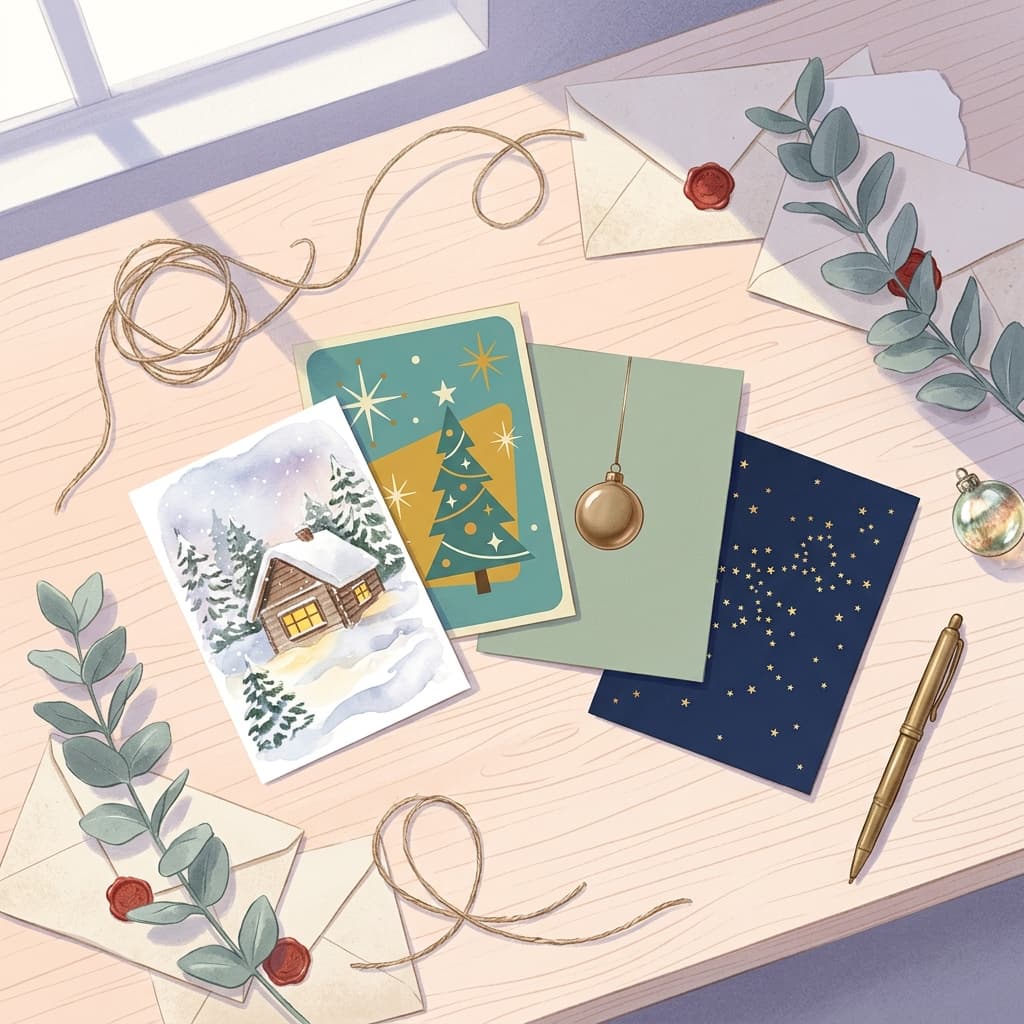
Get 24 copy-and-paste AI Christmas card prompts for 2026, from watercolor and vintage fronts to pet, family, funny, Hanukkah and business cards, plus print specs, bleed and Reel tips.
If you searched for Christmas card ideas and landed on the same dozen snowy cabins and red-and-green templates, there is a better way to get a card that looks hand-designed. Describe the card front you want, generate it as art, add your own message in an editor, and send it to print. This guide gives you 24 copy-and-paste AI Christmas card prompts for 2026, plus the print specs, layout habits and finishing steps that decide whether the card looks professional when it lands in a mailbox.
The timing matters. Card-printing services tend to start early-order deals in late October, and searches for Christmas card design, holiday card ideas and AI Christmas card climb with them. Starting your design now means you are choosing from a calm list of ideas instead of rushing a template the night before a shipping deadline. Printers also differ on exact file requirements, so it helps to know the basics before you upload anything.
The prompts are grouped into eight categories: illustrated and watercolor fronts, vintage and retro postcards, minimalist modern layouts, pet cards, family-photo-style scenes, funny cards, Hanukkah, New Year and Season's Greetings cards, and business or client cards. After that you will find the print specs, a section on turning the finished card into a short Reel or Short with music, ways to customize every prompt, and the mistakes that most often ruin a card.
TL;DR: How to Use These AI Christmas Card Prompts
- Open Miraflow's AI Image Generator, paste a prompt, and generate a few variations. Each prompt already reserves empty space for text.
- Add your greeting, names and signature afterward in a layout or design editor, because image models often misspell words.
- Design at your printer's trim size with about 0.125 inches (3 mm) of bleed, 300 DPI, and keep text away from the edges. The table further down lists the pixel sizes.
- For a family card, start with a prompt for a scene and then use image-to-image with your own photo so the faces stay yours.
- Turn the finished card into a short video with Text2Shorts or the cinematic video generator, and add a seasonal track from Miraflow's AI music generator.
The people who search for holiday card ideas tend to want one of three things: a card that looks better than a stock template, a way to include their pet or family without a photoshoot, or a business card that feels warmer than a logo on a red background. The prompts below are written for all three.
What Is Trending in Holiday Card Design for 2026
Card retailers publish their own trend reports every year, so treat them as indicative rather than independent research. Still, a few themes repeat across the 2026 guides from Paper Culture and Gelato. Personalization leads: photo collages, custom fonts and colors, and illustrated or hand-drawn touches. Scandinavian-style minimalism, with simple type and a restrained palette of white, grey and small touches of red and green, is named repeatedly. Vintage-inspired elements, monochromatic color schemes and nature-inspired, sustainable looks round out the list.
That mix explains how the 24 prompts are organized. Watercolor and storybook illustration cover the hand-drawn and nature-inspired side. The vintage section covers retro postcards and mid-century graphics. The minimalist section covers the Scandinavian and monochrome look. Everything else is about personalization, since a pet, a family or a brand is what makes a card yours.
There is also a practical reason illustration is trending alongside photography. A printed card sits on a mantel for weeks and gets handled, so a painted or graphic look hides tiny imperfections that a photo would reveal. A watercolor cabin with slightly uneven edges looks intentional, while a photo with a warped hand does not. If you are new to AI image generation, start in the illustrated sections and move to photo-style scenes once you are comfortable.
Prompt Structure That Makes Holiday Cards Print-Ready
Every prompt in this post follows the same skeleton, which is worth learning because it makes any card idea reproducible:
- Format and orientation: vertical 5:7, square, or horizontal, stated first.
- Medium and finish: watercolor, gouache, screen print, photo-style still life.
- Subject and detail: the specific objects, colors and materials.
- Light: a direction and a temperature, such as warm window light from the left.
- Palette: three or four named colors so the card feels designed.
- Reserved space: a sentence that says which part of the frame stays empty for text.
- Failure modes: no garbled text, no watermark, no logos.
The reserved space line is the single most important addition for cards. Without it, models fill the whole frame, and you end up cropping or covering the best part of the image with text. If you want more on writing prompts that read as real photography rather than a render, the guide to prompt tricks for making AI images look like real photos goes deeper on lighting and texture words.
1) Illustrated and Watercolor Christmas Card Front Prompts
Illustrated fronts are the safest way to get a card that looks hand-designed, because watercolor and gouache have a forgiving, imperfect look that image models reproduce well. Each prompt keeps the top third calm so a greeting can be added later.
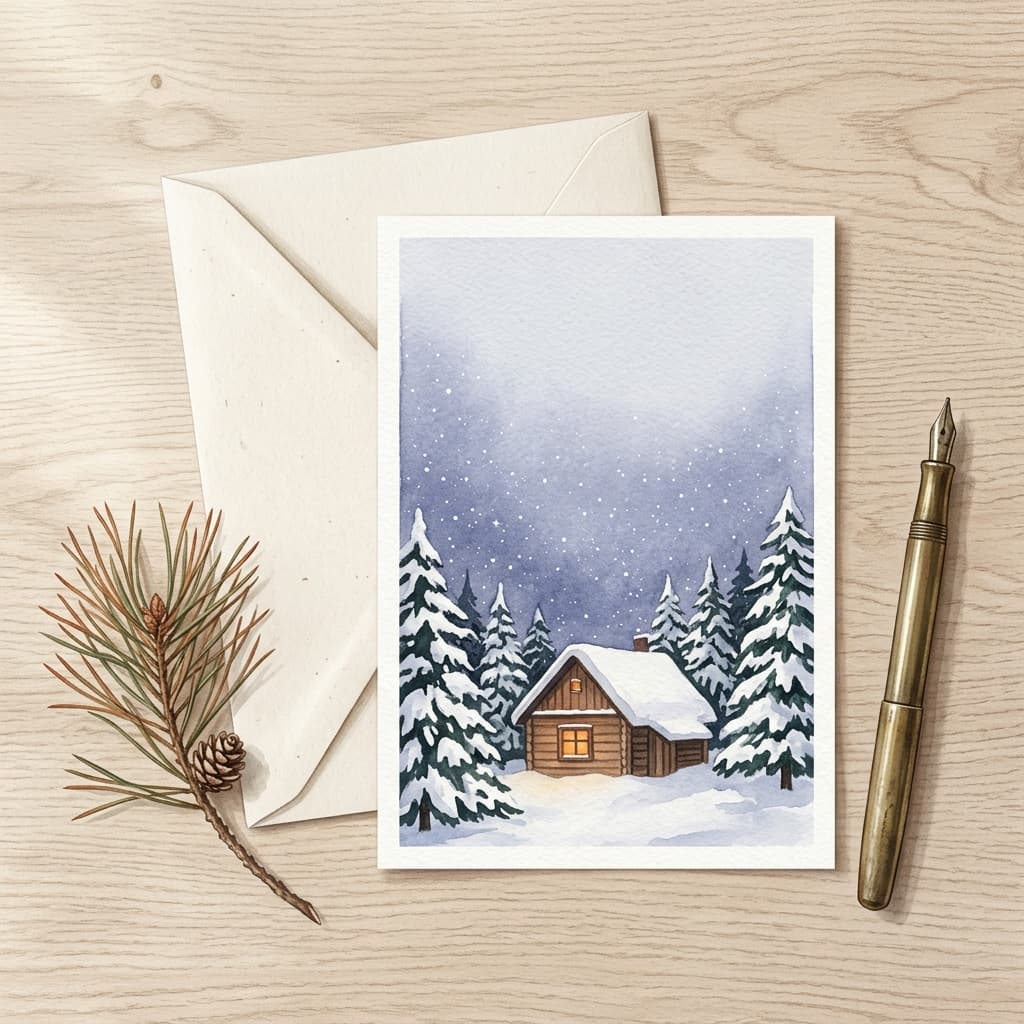
1. Snowy Cabin Watercolor Scene
A lit cabin in a snowy pine valley is the classic hand-painted card, and the soft wash edges give it a stationery feel.
A vertical 5:7 Christmas card front painted in loose watercolor on cold-press paper, showing a small timber cabin with a glowing amber window and a snow-covered roof at the bottom third of the frame, surrounded by layered blue-green pine trees dusted with white gouache snow, a thin trail of chimney smoke curling into a pale indigo twilight sky with a few hand-dotted stars. Visible paper grain, soft bleeding pigment edges and a faint pencil underdrawing, warm window glow against cool blues. The top third of the sky stays calm and nearly empty for adding a greeting later, with a narrow unpainted white border around the artwork.
2. Woodland Animals Around a Lantern
Small animals gathered around a single light give the card warmth and a story without needing any people in it.
A vertical Christmas card illustration in gouache and colored pencil of a fox, a rabbit and a small owl gathered in a snowy clearing around a glowing brass lantern placed on a tree stump, with a tiny red scarf on the fox and a sprig of holly beside the lantern. Soft falling snow dots, tall dark green fir trees fading into a lavender background, warm yellow lantern light spreading across the snow in a gentle circle. Rich painterly texture with visible brush strokes and paper grain, a restrained palette of forest green, cream, dusty red and warm gold, and a quiet empty patch of sky at the top for a handwritten-style greeting.
3. Botanical Holiday Wreath Border
A wreath doubles as a frame, which means the center is already reserved for names and a message.
A square holiday card design in delicate watercolor showing a circular wreath of eucalyptus, cedar, holly with red berries, pale pinecones and tiny gold-dotted twigs, tied with a loose dusty-red ribbon at the bottom, with a large clean cream-colored empty space inside the wreath. Fine pen-and-ink outlines on the leaves, soft translucent washes, gentle shadow where the leaves overlap, textured off-white paper background. Muted sage, burgundy, cream and soft gold palette, evenly lit like a scanned painting, with the center of the wreath intentionally blank.
4. Gingerbread Village Under Snow
A tiny village lets you pack in detail and color for families who want a cheerful, kid-friendly card.
A horizontal Christmas card illustration of a gingerbread village on a snowy hillside, with five little houses decorated with white icing trim, gumdrop roof tiles and candy-cane fence posts, a peppermint-swirl lamppost glowing warm yellow, and a winding path of powdered-sugar snow leading to the biggest house. Detailed storybook gouache style with soft shading, a pastel peach and mint sky filling the upper half with big round snowflakes, tidy composition with a calm area of sky left clear for a greeting.
A note on the watercolor prompts: the phrases "paper grain", "soft bleeding pigment edges" and "visible brush strokes" are what push a result away from the glossy digital look. If the result looks too clean, add "slightly uneven hand-painted edges". If it looks muddy, reduce the number of colors in the palette line.
2) Vintage and Retro Christmas Postcard Prompts
Vintage-inspired designs keep showing up in holiday card trend roundups, and they are easy to prompt because the look is built from recognizable printing quirks: limited ink colors, slight misregistration and aged paper.
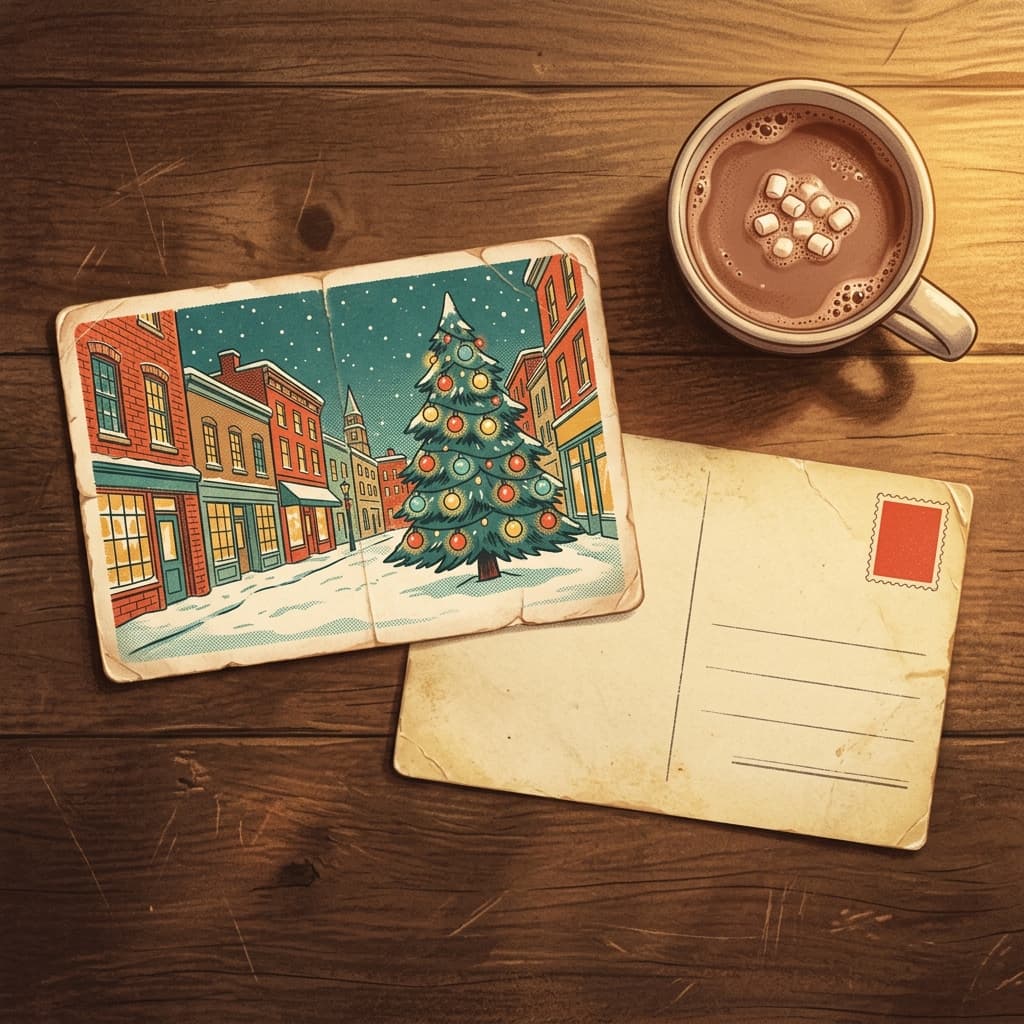
5. 1950s Postcard Village
A mid-century village scene with a limited ink palette feels like a keepsake from a flea market.
A vintage 1950s Christmas postcard illustration of a small snowy town street at night, with a row of brick shops with glowing shop windows, a tall decorated fir tree in the center square strung with big round colored bulbs, a horse-drawn sleigh far in the distance and a few bundled townspeople as tiny figures, painted in a limited ink palette of tomato red, teal, cream and mustard yellow. Slightly off-register printing, visible halftone dots, faded warm paper tone with soft creases at the corners, a thin rounded border, and a clear banner area across the top left blank for lettering.
6. Mid-Century Starburst Ornaments
Atomic starbursts and teardrop ornaments are a cheerful modern twist on retro, great for stylish couples and design-minded brands.
A mid-century modern Christmas card design with a clean field of mustard yellow and deep teal, showing a stylized abstract fir tree built from layered triangles in olive, rust and cream, surrounded by atomic starburst ornaments and slim teardrop baubles with tiny gold lines radiating from them. Flat screen-print look with subtle grain, slightly imperfect overlapping ink edges, balanced geometric layout, and a solid cream strip along the bottom reserved for text.
7. Retro Glass Ornament Still Life
Old glass ornaments in a box have a nostalgic glow that photographs beautifully in a still life.
A nostalgic tabletop photo-style still life of a vintage cardboard ornament box filled with shiny mercury glass baubles in champagne, forest green and ruby red, a few hand-painted pink and silver ones with frosted stripes, nestled in crinkled tissue paper on a worn wooden table. Warm tungsten bulb glow from the left reflected in the glass, soft film grain, faded Kodachrome-style colors, shallow depth of field with strands of twinkling lights blurred in the background, and a quiet dark area at the top of the frame for text.
The same vintage look can be applied to a family photo. After generating a retro background, upload a portrait to the image-to-image tools in Miraflow and ask for the same faded color grade, film grain and soft vignette. The grain also hides small resolution flaws, which helps when you print.
3) Minimalist Modern Typography-Space Layout Prompts
Minimalist cards are the most flexible for names, long messages and photo inserts. The trick is to describe the empty space as part of the design so the model does not fill it with decoration.
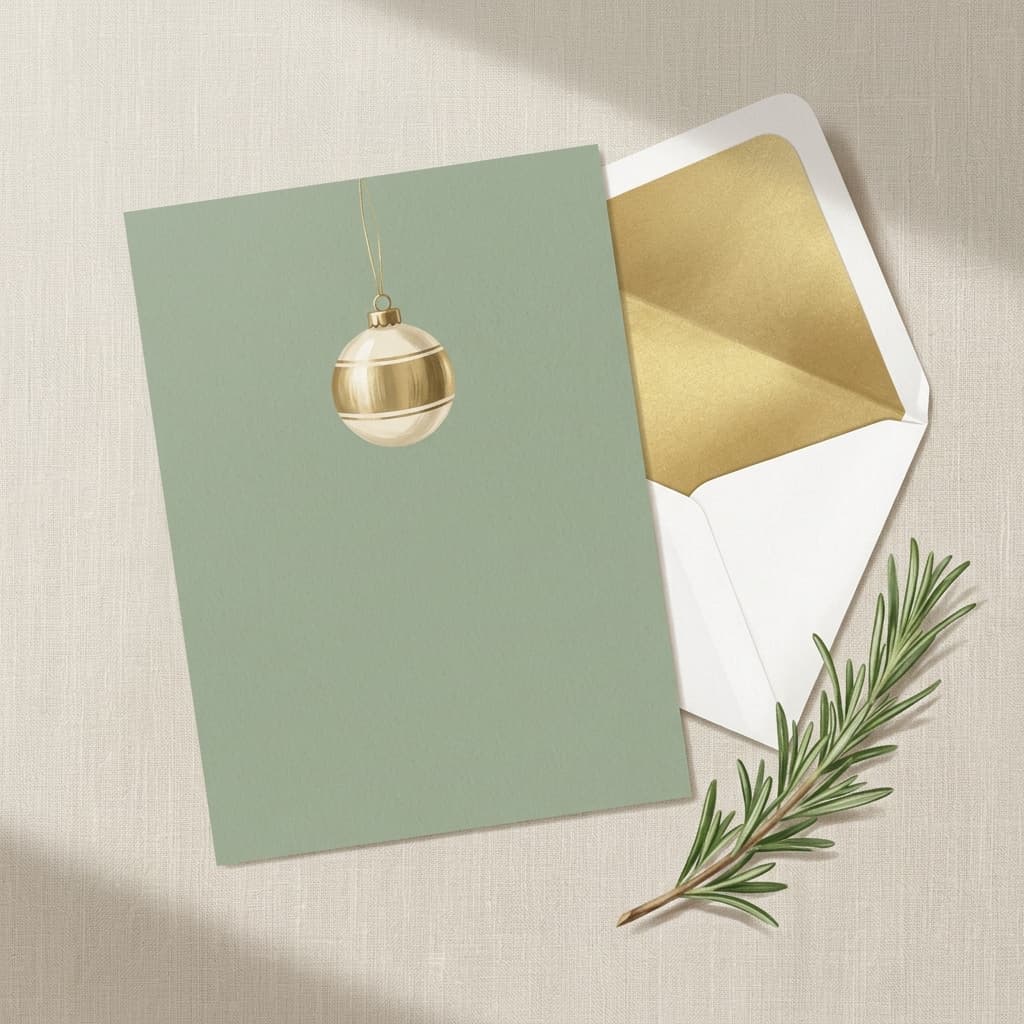
8. Single Ornament, Huge Margin
One object in a wide field of color reads as confident and modern, and it prints crisply.
A minimalist vertical Christmas card background in a flat matte sage green, with a single handblown glass ornament in soft cream and brushed brass hanging from a thin gold thread near the top center, casting a delicate soft shadow on the green surface. Natural window light from the upper left, ultra-clean composition with at least sixty percent of the frame left as plain empty color, subtle paper texture, no other decoration.
9. Scandinavian Paper Tree
Cut-paper trees and muted tones match the Scandinavian look that holiday card retailers keep highlighting.
A Scandinavian-style Christmas card image showing a simple tree made of layered cut paper in white, light grey and a single accent of deep red, mounted slightly raised on an off-white textured background so the paper edges throw small soft shadows. A thin hand-drawn star above the tree in pencil line, cool northern daylight from the left, restrained palette, and a wide quiet band of empty space along the bottom for a greeting and signature.
10. Gold Foil Geometry on Midnight Blue
Foil-style geometry gives an elegant look for formal cards and works well with serif type added afterward.
A sophisticated holiday card background in deep midnight navy with a delicate pattern of gold foil line-art stars, crescent moons and tiny dots arranged in a loose diagonal band across the upper corner, thin brushed gold lines with a subtle metallic sheen, a slight embossed paper texture, soft vignette, and a large calm navy area on the lower two thirds left completely empty for a message.
Minimalist designs are also where text placement matters most. Decide before you generate whether the greeting goes above, below or beside the image, then say so in the prompt. A card whose text sits in a clean band prints well on both matte and glossy stock. For more on color and composition, the fall aesthetic photo prompts show how a few named colors can pull a whole image together.
4) Pet Christmas Card Prompts
Pet cards are among the most shared holiday cards, and pets are easy to feature without any privacy concerns. For a card of your own animal, use image-to-image with a clear photo, and see the AI pet Halloween costume prompt pack for tips on keeping fur color and markings accurate. The prompts below work as text-to-image concepts and as image-to-image instructions.
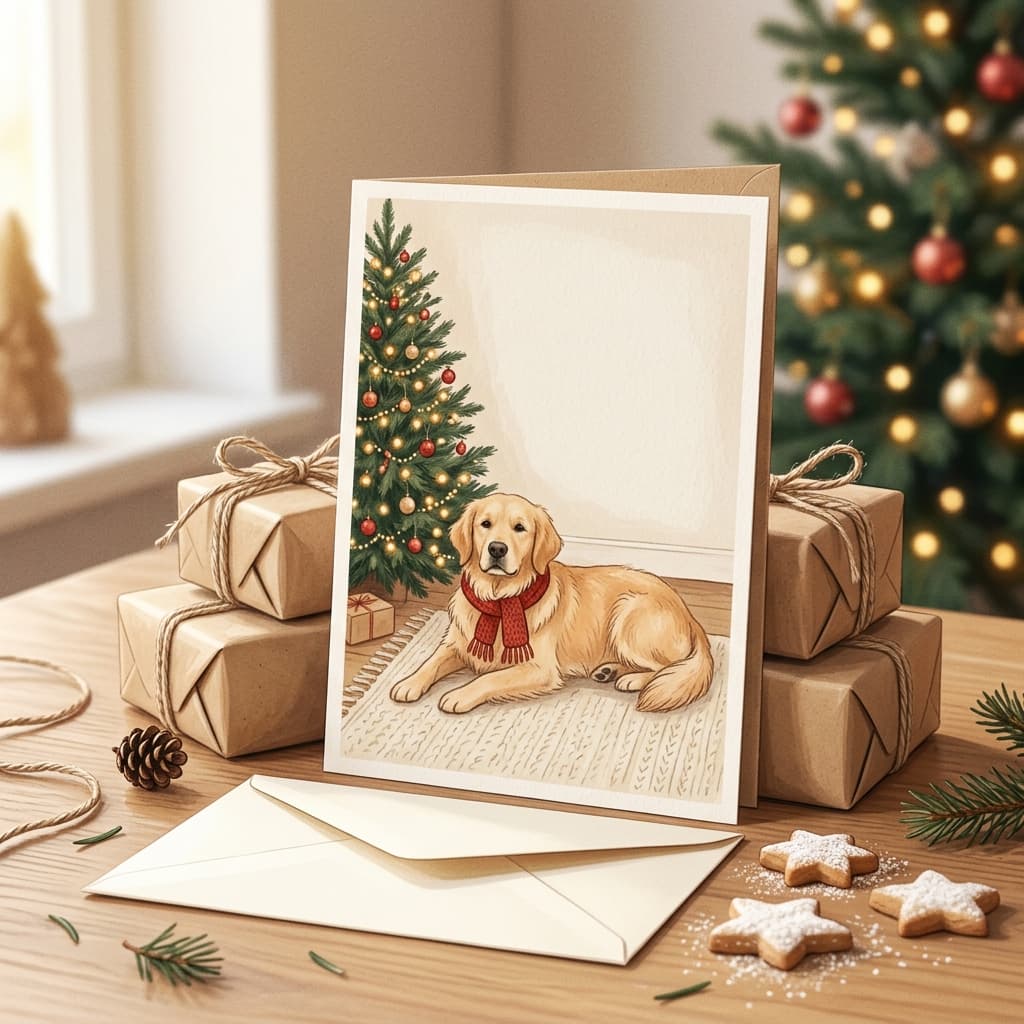
11. Dog by the Christmas Tree
A dog beside a tree with warm lights is the default pet card, and the light direction does the heavy lifting.
A cozy Christmas card portrait of a golden retriever lying on a cream wool rug beside a lit fir tree decorated with warm white lights, red glass ornaments and wooden stars, a few wrapped gifts in kraft paper with twine nearby, wearing a small knit red scarf. Soft golden tree light from the right and a gentle fireplace glow from the left, eye-level shot with the dog sharp and the tree lights as soft bokeh circles. Natural fur texture, calm relaxed expression, and a plain wall at the top third of the frame for a greeting. If a photo is uploaded, keep my pet's exact fur color, markings, ear shape and eye color.
12. Cat in the Ornament Box
Cats and ornament boxes are an inevitable pairing, and the playful scene suits a funny-but-sweet card.
A charming photo-style Christmas card of a gray tabby cat sitting inside an open cardboard box of shiny ornaments on a living room floor, one paw gently resting on a red glass bauble, with a half-decorated tree and strings of twinkling lights behind. Warm lamp light from the left, shallow depth of field with the cat's face and whiskers sharp, soft reflections of the lights in the ornaments. Clean wooden floor in the foreground and an empty strip of wall at the top for a short message. If a photo is uploaded, keep my pet's exact fur pattern and eye color.
13. Pet in a Knit Sweater on a Sofa
A small knit sweater and a mug of cocoa in the corner gives a pet card the feel of a family portrait.
A warm holiday card scene of a small fluffy dog in a chunky cream and red Fair Isle knit sweater sitting on a green velvet sofa under a cream blanket, with a steaming mug of cocoa and a plate of star-shaped cookies on a side table, a garland of pine and dried orange slices draped above. Soft late-afternoon window light from the left, shallow depth of field, rich fabric textures, and a plain upper wall area left blank for a greeting. If a photo is uploaded, keep my pet's exact markings and proportions.
If you also make video content, the cat and dog scenes become strong thumbnails and cover frames, and Miraflow's thumbnail maker lets you add big bold text over the empty area of the same image.
5) Family-Photo-Style Holiday Card Scene Prompts
A family card usually uses your own photo, so these prompts are meant for two situations: generating a stand-in scene with fictional, generic people for a template or a concept, or using image-to-image to place your own photo into a styled setting. Keep the group small, because every added face increases the chance of drift. For tricks on making people look believable, the guide to making AI images look like real photos covers skin texture and candid framing.
14. Matching Pajamas by the Fireplace
Matching pajamas are the biggest family card trend for a reason, and the fireplace gives the scene an automatic focal point.
A candid lifestyle holiday card photo of a fictional family of four, two adults and two children, in matching red and cream plaid flannel pajamas sitting together on a thick rug in front of a stone fireplace with stockings hung, a lit tree decorated with warm lights in the background, everyone laughing and looking toward the camera. Natural diverse faces with realistic skin texture, soft warm firelight from the left and cool window light from the right, medium shot with shallow depth of field, an unposed moment, and a calm area of wall above the group left clear for a greeting. No extra fingers, no distorted hands.
15. Snowy Walk Under String Lights
An outdoor walk gives a more adventurous card and looks great with a blurred lights background.
A candid photo-style holiday card of a fictional couple in wool coats and knit hats walking down a snowy tree-lined path holding hands, laughing, with strings of warm white lights glowing in the trees behind them and gentle snow falling. Golden hour light mixed with the warm glow of the string lights, shallow depth of field with sparkling bokeh circles, natural realistic faces, steam from their breath visible, and a wide area of soft snowy sky above reserved for a greeting. No distorted hands, no extra people.
16. Porch at Dusk With Wreath
A front-porch group shot reads as welcoming and works for neighbors and relatives who live far away.
A holiday card photo of a fictional multigenerational family of five, including a grandparent, two adults and a child, standing on a front porch decorated with a big evergreen wreath with a red ribbon, a lit garland on the railing and lanterns on the steps, wearing cozy sweaters in cream, forest green and burgundy. Blue-hour dusk sky with warm porch light spilling across the group, realistic relaxed smiles, natural skin and fabric texture, full-length shot with the door and wreath sharp, and the roofline plus sky at the top kept uncluttered for text.
When you use your own family photo, the faces matter more than any style word. Use a sharp, evenly lit photo, keep the group to four people or fewer for the first attempt, and compare the result to the original before you commit to print. If one face is slightly off, mask just that region with inpainting instead of regenerating the whole card.
6) Funny Christmas Card Prompts
Funny cards get opened first. Humor works best when the picture carries the joke on its own, so avoid putting a punchline inside the image and add it as text afterward.
17. Tangled in Lights
A holiday lights disaster is relatable for anyone who has ever fought a knot in a string of bulbs.
A humorous Christmas card photo of a fictional person in a red sweater lying on a living room floor entirely wrapped in a huge tangle of multicolored string lights, with a deadpan, tired expression looking at the camera, a half-decorated tree in the background and a cardboard box of ornaments tipped over beside them. Bright flat flash-style lighting like a candid snapshot, saturated colors, wide-angle shot, realistic skin and hands, and a clean cream wall behind them for a caption added later.
18. Santa's Cookie Plate Crime Scene
An empty plate with crumbs and a half-drunk glass of milk tells a whole story with no people at all.
A funny overhead photo of a small plate with only crumbs and a single bitten star cookie left on it, a glass with a milk mustache ring at the bottom, a few reindeer carrots chewed down to stubs, and a pair of muddy boot prints leading across a snowy hearth rug toward a fireplace. A tiny magnifying glass lies next to the plate like evidence, warm firelight from the left, textured knit rug, crisp detail, and a plain dark top margin for text.
Add the punchline as text afterward, in a simple font, below or beside the image. A caption such as "Merry Everything" or "This year I am fully tangled in the holidays" works best when the picture already sets up the joke.
7) Hanukkah, New Year and Non-Denominational Season's Greetings Prompts
A good card collection includes designs that welcome everyone. These prompts cover Hanukkah, winter, and New Year looks you can send to mixed families, coworkers and clients without leaning on any single tradition. Keep any cultural symbols accurate and ask someone who celebrates if you are unsure.
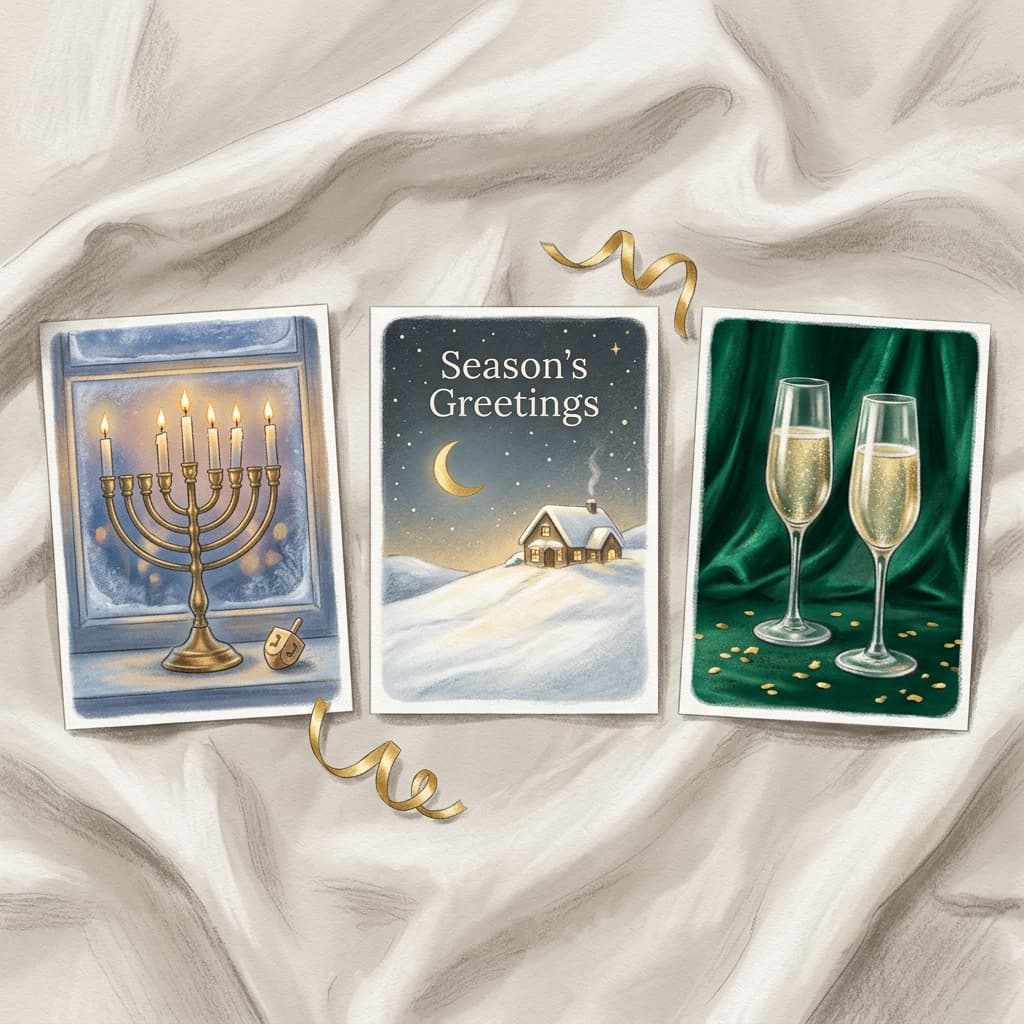
19. Hanukkah Menorah in a Window
A lit hanukkiah in a frosted window is warm, specific and visually simple.
A warm Hanukkah card illustration of a brass hanukkiah with nine candles, the shamash raised in the center and the other eight in a row, with five candles lit and soft flames glowing, placed on a wooden window ledge with frosted panes and snow outside at twilight. A small dreidel and a few gold coins on the ledge, a deep blue sky with silver stars, painterly gouache style, warm candle light reflected in the glass, symmetrical composition with a quiet area at the top for the words Happy Hanukkah added later.
20. Winter Solstice Season's Greetings
A neutral winter scene works for any greeting and for anyone on your list.
A calm non-denominational Season's Greetings card illustration of a snowy hill at dusk with a single glowing cottage, a frozen lake reflecting a pale gold moon, and a line of small evergreen trees with soft snow on their branches. Soft watercolor and ink, a palette of dusty blue, lilac, cream and a touch of gold, lightly textured paper, large open sky across the upper half for a greeting that reads Season's Greetings, added later in text.
21. New Year's Eve Gold Confetti
A New Year card gives you a reason to send a card after Christmas, when mailboxes are quieter.
A festive New Year card background with two crystal champagne flutes clinking in the center, spraying tiny golden bubbles and confetti, set against a deep emerald green velvet backdrop with softly blurred gold string lights behind. Shiny gold and silver confetti pieces and curling ribbons scattered in the air, shallow depth of field, warm sparkling highlights on the glass, elegant and slightly glamorous mood, with a calm dark band at the bottom for a message.
8) Business and Client Holiday Card Prompts
Business cards have different priorities: brand colors, a polished tone and room for a signature. If you are generating on-brand art for a team, the approach in AI prompts for skincare and beauty brand content for keeping a consistent look across a set applies here as well.
22. Desk Thank-You Scene for Clients
A tidy desk scene says thank you without shouting, and it is easy to recolor to match a brand.
A refined holiday card image of a tidy wooden desk seen from above, with a notebook, a brass pen, a small potted evergreen sprig, a cup of black coffee and a handful of tiny gold ornaments arranged in a gentle diagonal line, all in a calm palette of deep forest green, warm cream and brass. Soft overhead daylight with gentle shadows, ultra-clean composition, subtle paper texture, and a broad empty area on one side reserved for a thank-you message and signature.
23. Storefront at Winter Dusk
A shop window glowing at dusk fits a local business that wants a card that feels personal.
A charming illustrated holiday card of a small neighborhood shop with a blank awning, large display windows glowing warm yellow and filled with wrapped gifts, a garland of pine and white lights along the door frame, and snow on the sidewalk with a couple of footprints leading in. Soft gouache style, dusk sky in deep blue with a few stars, warm light spilling onto the snow, simple composition with a quiet area at the top for a greeting and the business name added later.
24. Brand-Colored Abstract Ornaments
An abstract design lets you match a palette exactly and avoid religious symbols for a broad client list.
A modern abstract holiday card design made of overlapping circles and soft gradient ornaments hanging from thin vertical lines, in a palette of [primary brand color], [secondary brand color] and warm cream, with a faint gold accent circle. Clean vector-style shapes with subtle paper grain, plenty of negative space on the lower half for a message, balanced and professional, no text, no logos.
For business cards, keep one signature block in a consistent spot across the whole send, and generate two or three art options so the team can vote. If your company also posts on video, the same art can become a branded greeting clip, as shown in the next sections.
Print Specs: Sizes, Bleed, Safe Zone and Resolution
The best AI card art can still look off if it does not match the print file. The numbers below are standard for 300 DPI printing, where pixels equal inches multiplied by 300. Printers publish their own templates, so always check the exact size on the service you choose, but the math below is a reliable starting point.
| Card format | Trim size (inches) | Trim pixels at 300 DPI | With 0.125 in bleed (inches) | Bleed pixels at 300 DPI |
|---|---|---|---|---|
| Flat 4x6 card | 4 x 6 | 1200 x 1800 | 4.25 x 6.25 | 1275 x 1875 |
| Flat 5x7 card | 5 x 7 | 1500 x 2100 | 5.25 x 7.25 | 1575 x 2175 |
| Square 5x5 card | 5 x 5 | 1500 x 1500 | 5.25 x 5.25 | 1575 x 1575 |
| Folded 5x7 card, full spread | 10 x 7 | 3000 x 2100 | 10.25 x 7.25 | 3075 x 2175 |
Here is what each term means in practice:
- Trim size: the final size of the card after it is cut. A flat 5x7 card is 1500 by 2100 pixels at 300 DPI.
- Bleed: extra artwork that extends beyond the trim line so there is no white sliver if the cut is slightly off. Many printers ask for 0.125 inches (about 3 mm) on each side, which turns 5x7 into 5.25x7.25 inches, or 1575 by 2175 pixels. Some template providers use a larger margin, so check before you export.
- Safe zone: the interior area where all text, faces and important details should sit. One printer suggests keeping text at least 0.125 inches inside the trim line. Keeping text about 0.25 inches inside the trim is a comfortable habit that survives small cutting shifts.
- Resolution: 300 DPI is the standard for sharp print. A file that looks fine on a phone screen can look soft on paper if it is much smaller than the pixel dimensions above.
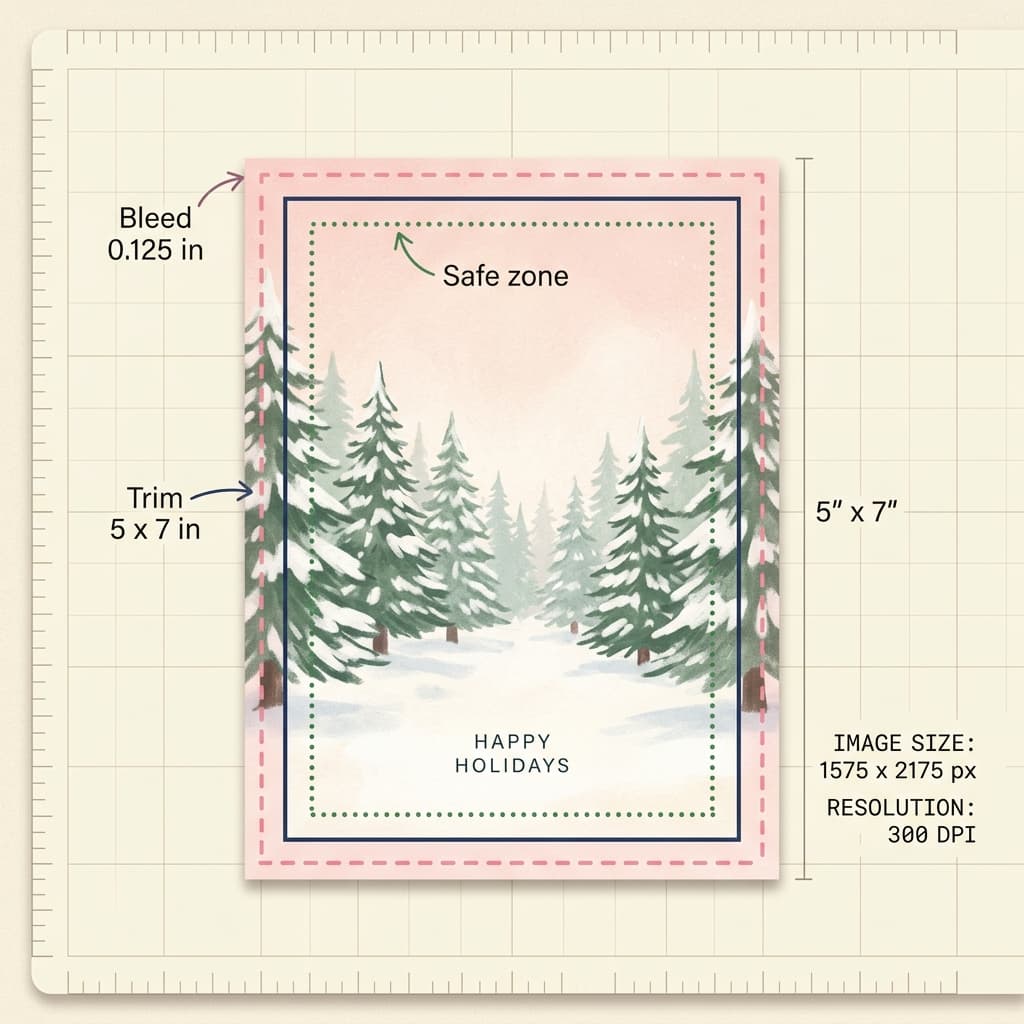
Most AI image generators output images smaller than a print-ready 1575 by 2175 file, particularly in a 5:7 portrait shape. The practical workflow is to generate at the closest portrait aspect ratio, extend or crop the canvas to the exact proportions, run the final choice through an upscaler to reach the target pixel size, and then check the edges at 100 percent zoom. Because the bleed area is trimmed away, you can safely fill it by extending the background color or texture. This is another reason the prompts above describe simple, extendable backgrounds such as sky, snow or solid color.
Text in the prompt or text added afterward
You can ask an image model to include a short greeting, and short phrases such as "Merry Christmas" or "Season's Greetings" often render correctly. Longer lines, names and handwriting are much riskier, and a single wrong letter makes a printed card look careless. For that reason every prompt in this post leaves a blank area, and the greeting is added in a layout or design editor with a real font. This also lets you change the message later, for example to swap a family name or reuse the same art for a different year, without regenerating the art.
Color and paper
Screens show brighter colors than paper prints, especially saturated blues and neon greens. If you want colors to survive printing, describe them as soft or muted and avoid pure black backgrounds with fine detail, which can print muddy on uncoated stock. Order a single proof card if the stakes are high, such as a business send to hundreds of clients.
Turning Your Christmas Card Into a Reel or Short
A finished card can have a second life as a 10 to 15 second vertical video, which is useful for sharing with relatives who live far away or posting from a brand account. There are three straightforward routes:
- Text2Shorts for a story card. Enter a topic such as "our family holiday card in 15 seconds", pick an animation or realistic style, and Text2Shorts generates a script, scene visuals and a voice, which you can edit before the final render. Paste in a description of your card art for the scene visuals.
- Cinematic video for a gentle animation. Upload the finished card art to the cinematic video generator and describe one small movement, such as snow drifting past the cabin window, the candle flames flickering, or the tree lights twinkling. Small movements look more natural than large ones.
- Music for the mood. A short seasonal track makes a card video feel finished. Miraflow's AI music generator can create an instrumental from a description such as "warm acoustic guitar and soft sleigh bells, gentle, 90 BPM, cozy and nostalgic, instrumental". Use Custom Mode if you want to set the duration, tempo or key.
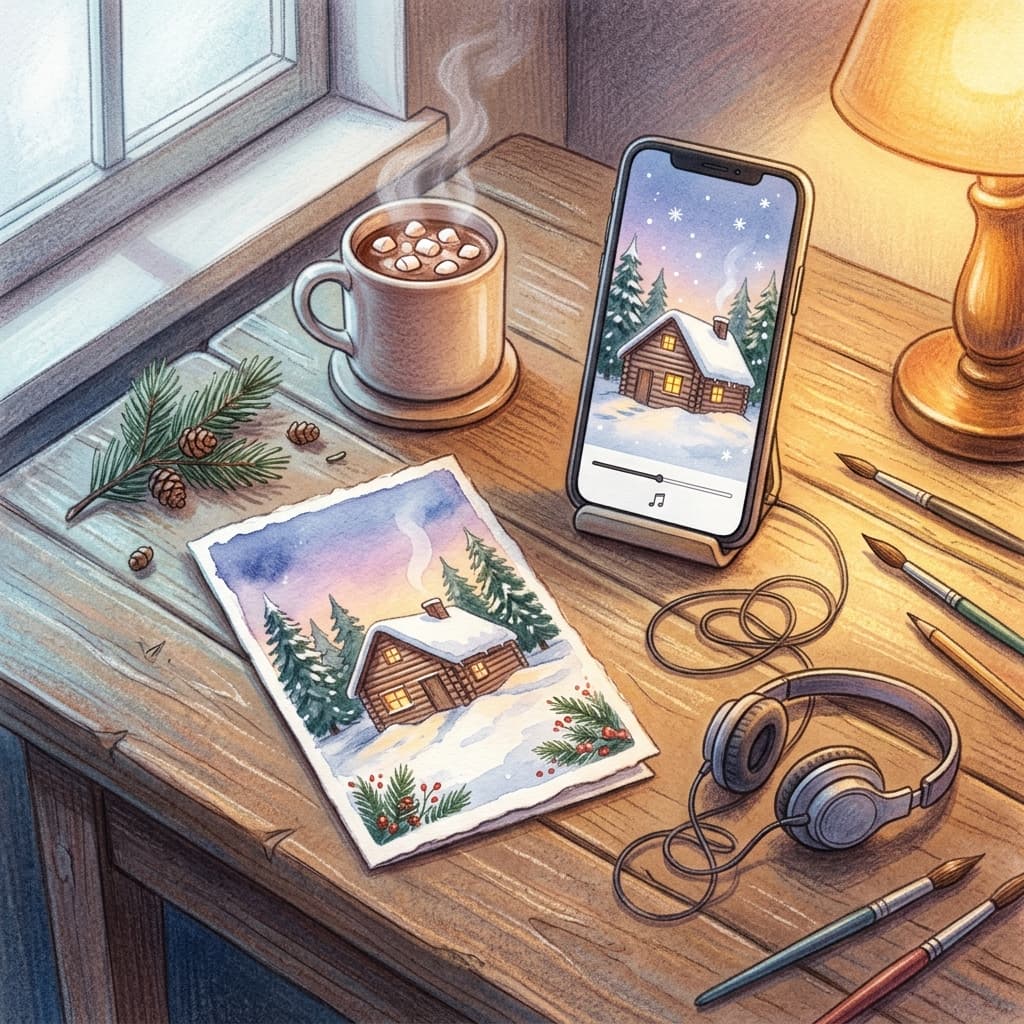
A simple 15-second structure works well: open on the card art with a slow push-in, cut to a close detail such as the lantern or the pet's face, then end on the finished card with the greeting. For a wide holiday banner or a video cover, the YouTube Thumbnail Maker adds big text over the empty area of the image in the same place. If you like poster-style layouts, the AI movie poster prompts show how to build a design with title space, and the double exposure travel poster prompts are a good source of graphic ideas that adapt well to a New Year card.
If you are building a whole run of seasonal content, the Halloween wallpaper prompt pack shows how one consistent palette can carry across wallpapers, covers and cards.
How to Customize These Christmas Card Prompts
Because every prompt uses the same skeleton, small swaps change the whole card without breaking it:
- Change the palette. Replace the color names. Sage, cream and brass feels calm, while tomato red, teal and mustard feels retro. Three to four named colors are enough.
- Change the medium. Swap watercolor for linocut, gouache, paper cut-out or colored pencil. The subject stays the same, and the card looks like a different designer made it.
- Change the light. Candlelight reads cozy, blue-hour dusk reads quiet, and morning snow light reads fresh.
- Change the format. Turn "vertical 5:7" into "square" or "horizontal" and say where the empty space goes. Square cards suit a photo inset, and horizontal cards suit a family group.
- Make a matching set. Reuse the palette and medium across the card front, the envelope liner, a gift tag and a social post. Matching pieces look professionally designed even if each was generated separately.
- Localize it. Swap a cabin for a beach hut, a pine for a palm, or snow for fireflies if your holiday is warm. Describing your own climate makes the card feel personal.
For a card with a photo, a good pattern is to place a rectangle of clean color in the prompt, such as "a cream rectangle in the lower center for a photo", and drop your picture into it in an editor. That avoids asking the model to recreate real faces at all.
Common Mistakes With AI Christmas Cards
Letting the model write the message. Long text in the prompt often comes back with misspellings or invented letters. Keep the in-image text to one short phrase at most, or none.
Forgetting bleed. Art that stops exactly at the trim edge can leave a thin white line on a printed card. Extend the background by at least 0.125 inches.
Putting text in the danger zone. Names or greetings near the edge risk being cut. Keep text about 0.25 inches inside the trim.
Sending a low-resolution file. A small image stretched to 1500 by 2100 pixels will print soft. Upscale and check at 100 percent zoom.
Too much going on. A card with a tree, a wreath, a village and a sleigh competes with its own message. One subject and a large calm area is the layout that looks professional.
Skipping a proof. Colors can shift between screen and paper. A single proof copy before a large order is cheap insurance.
Mixing too many styles across a set. A watercolor front paired with a neon envelope looks accidental. Pick one medium and one palette for the whole send.
Ignoring who the card is for. A card for colleagues and clients should welcome everyone, and the Season's Greetings and abstract ornament prompts above are the safer choices there. Save the explicitly religious designs for people who celebrate.
Make Your Holiday Cards With Miraflow
The whole workflow fits in one browser session. The AI Image Generator on Miraflow handles text-to-image card fronts, image-to-image restyling of family and pet photos, and inpainting touch-ups when a face or a paw needs fixing. Text2Shorts and the cinematic video tool turn the card into a short clip, the music generator adds a seasonal track, and the YouTube Thumbnail Maker gives you a clean place to add large text over the art. You can find every tool from the Miraflow home page, so card art, a Reel and a matching soundtrack can all be finished in an evening.
Frequently Asked Questions
What is the best AI Christmas card prompt?
A good one names the format, the medium, the subject, the light and a palette, and then says which part of the frame stays empty for text. The 24 prompts above follow that structure so you can paste them directly.
What size should an AI-generated holiday card be?
A flat 5x7 card is 1500 by 2100 pixels at 300 DPI, and with 0.125 inches of bleed on each side it becomes 1575 by 2175 pixels. Confirm the exact size on your printer's template before exporting.
Should I put the text in the AI prompt or add it afterward?
Add it afterward for anything longer than a short phrase. A greeting such as Season's Greetings may render correctly, but names and longer lines are risky, and you want full control of the font for print.
Can I use my own family photo?
Yes. Use image-to-image with a sharp, evenly lit photo and a prompt for the setting or style. Compare the result with the original, and use inpainting to correct any single face or detail that drifted.
How do I make a pet Christmas card?
Upload a clear photo of your pet, describe the scene and add a line telling the model to keep the exact fur color, markings, ear shape and eye color. The pet section above has three prompts you can start from.
How do I make an AI card look hand-designed?
Use traditional medium words such as watercolor, gouache, linocut or paper cut-out, add paper grain and slight imperfections, and keep the composition simple with a calm area for type.
What is a safe card to send to a mixed group of clients?
Choose a Season's Greetings or abstract ornament design, use your brand colors, and keep the message general. The business and non-denominational sections above are written for this.
Can I turn the card into a video?
Yes. Use Text2Shorts to build a short story, or upload the card to a cinematic video generator and animate one small detail such as snow or candle flames, then add a music track.
Do I need to upscale before printing?
Usually yes. Many image outputs are smaller than the 1575 by 2175 pixels a bleed-included 5x7 card needs, so upscale the chosen image and check the edges at full zoom before uploading.
When should I order holiday cards?
Card services often start early-order deals in late October, and ordering early leaves time for a proof and for the post. Check each service's own shipping and mailing deadlines.
Conclusion
A great Christmas card comes from a clear idea, a calm area for your message and a print file that follows the basics. The 24 prompts above give you illustrated fronts, vintage postcards, minimalist layouts, pet and family scenes, funny cards, inclusive Hanukkah, New Year and Season's Greetings designs, and business cards that welcome everyone.
Pick one prompt from a category that fits your list, generate a few variations, add your own text in an editor, and check the bleed and resolution before you order. Then open Miraflow's AI Image Generator, paste your first prompt and start building this year's card, with a matching Reel and soundtrack as a bonus.