18 AI Ancestor Photo Prompts for TikTok's Viral Ancestor Prank Trend (Copy & Paste, 2026)

Written by
Aerin Kim
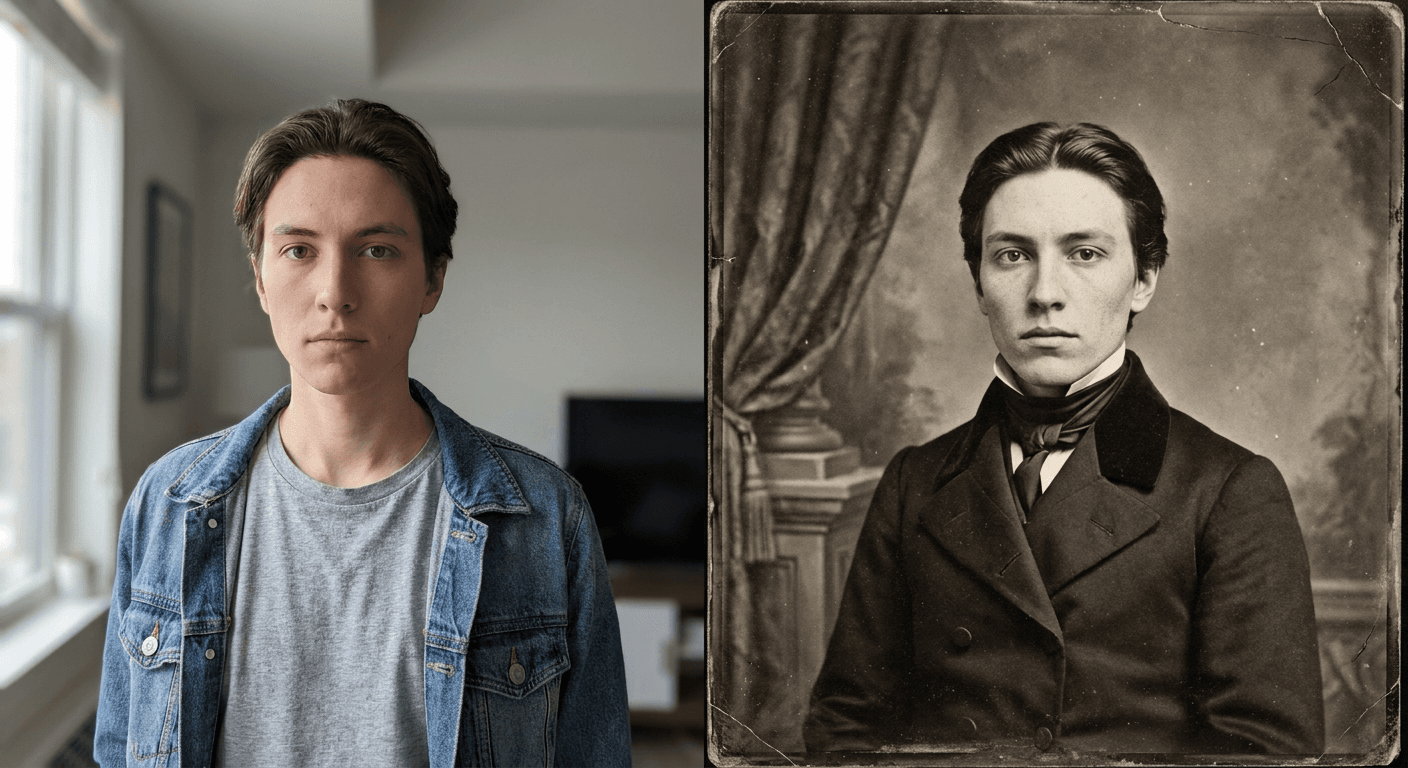
TikTok's Ancestor Photo Prank is turning real selfies into convincing 1800s portraits to fool parents and grandparents. Here are 18 copy-paste AI prompts for every era, prop, and reveal format.
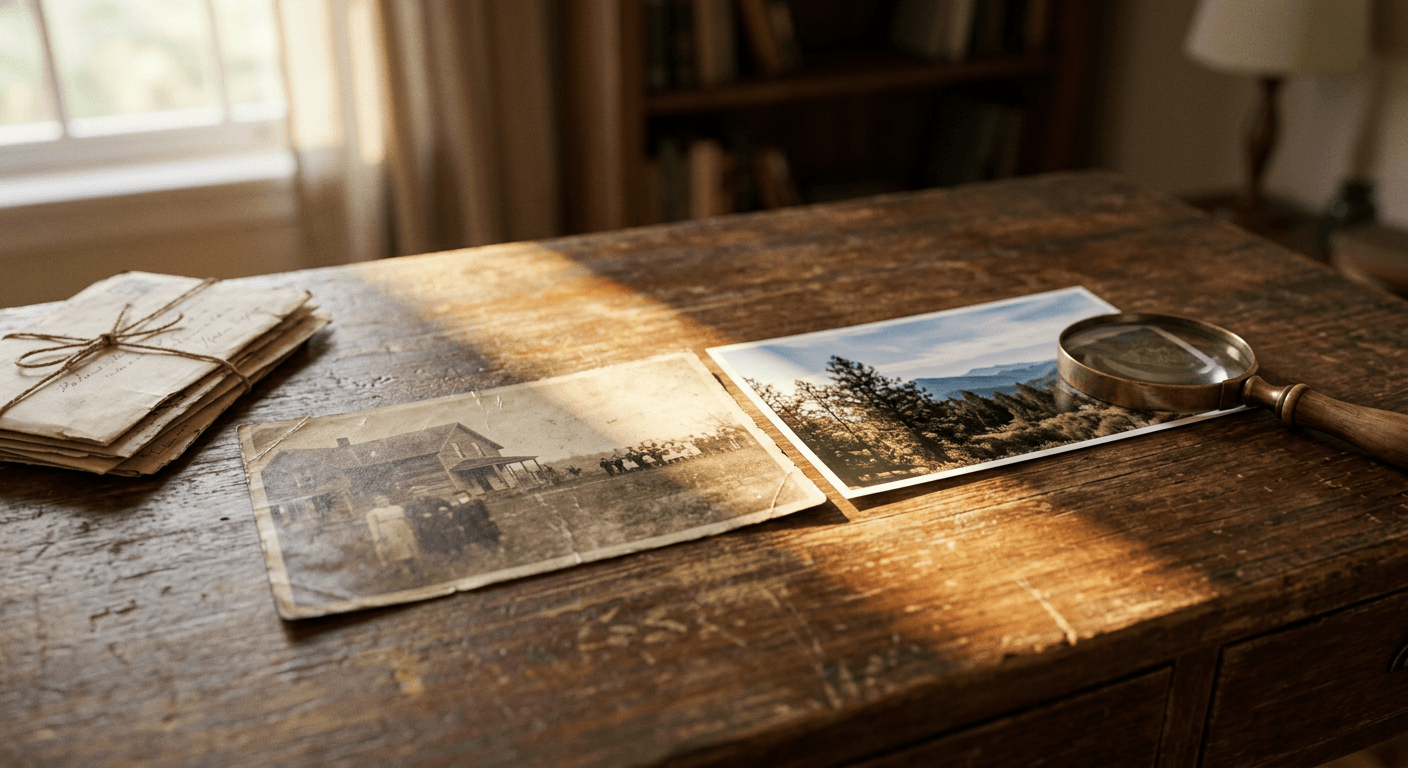
You have almost certainly seen the reaction video by now, even if you did not know the trend had a name. Someone texts their mom or grandmother a grainy, black-and-white photo of a stranger in Victorian dress, claims it is a great-great-grandmother pulled from an Ancestry.com search, and the family member takes the bait completely. They study the resemblance, name the woman, sometimes ask if they can print it and hang it up. Then the creator cuts to the caption reveal, the photo is not a real ancestor at all, it is an AI-generated portrait built from a selfie or a repurposed celebrity headshot, most often Kim Kardashian's bow-blouse editorial shot, run through a vintage-photo filter.
This is the Ancestor Photo Prank, and it has become one of the defining TikTok formats of September 2026, spreading under a cluster of related tags including ancestor picture prank, ancestry gibby photo, and distant ancestor trend. It works because it exploits something genuinely true about how people think today: DNA kits and Ancestry.com searches have spent the last decade normalizing the idea that a surprising, previously unknown relative could turn up at any moment, complete with an old photograph nobody in the family has seen before. A convincing sepia portrait of a stranger claiming to be your great-great-grandmother is not actually that far from something Ancestry.com's own hint system might legitimately surface, which is exactly why the prank lands.
This post is a prompt pack, not a trend explainer padded out with filler. Below are 18 copy-paste AI prompts, grouped by historical photography era and use case, built specifically for turning a real reference photo into a believable period portrait without turning the subject into an unrecognizable stranger. Every prompt is written for image-to-image editing, starting from a real photo rather than generating a face from scratch, which is what actually sells the prank when a parent studies the photo looking for a family resemblance.
Why This Works Inside Miraflow
The entire prank depends on one specific quality: the fake ancestor photo has to look like a real photograph from another era, not an obviously stylized filter. That is a harder problem than it sounds, because a generic sepia Instagram filter just tints an existing photo, it does not actually recreate the physical characteristics of period photography, the grain structure of a daguerreotype, the slightly soft focus of an early box camera lens, the stiff formal posing conventions of a Victorian studio sitting, the specific way period clothing drapes and fits.
The AI Image Generator in Miraflow AI handles this the same way it handles any convincing photo-to-photo transformation: through image-to-image editing rather than text-to-image generation from scratch. Starting from an actual reference photo and describing the target era's specific photographic and styling characteristics in detail produces a result that looks like a genuine period photograph of a real person, not a costume filter slapped over a modern selfie. That distinction is exactly what separates a prank photo that gets a genuine, sincere reaction from one that gets called out as obviously fake in the first three seconds.
Why the Ancestor Prank Is Spreading Right Now
Prank formats built around fooling a parent or grandparent are nothing new on TikTok, but this specific one is landing at a moment when the underlying premise, a surprising ancestor turning up in an old photo, has genuine cultural weight behind it. Consumer DNA testing and Ancestry.com's hint and record-matching system have spent years training people to expect exactly this kind of discovery: an unfamiliar name, an old photograph, a story about a relative nobody had mentioned before. The prank does not have to convince anyone that AI-generated portraits exist, it only has to be plausible enough to fit inside a framework the mark already believes in.
The format itself is deliberately low-effort to set up and high-payoff to film, which is exactly the shape that spreads fastest on TikTok right now. A creator either uploads a real selfie run through a vintage-portrait style, or in the laziest and often funniest version, simply screenshots an existing black-and-white celebrity editorial photo and claims it as a family photo with no editing at all. Both versions work because the actual comedy is not really about the image quality, it is about how quickly and sincerely the mark accepts a fabricated past with almost no evidence. The prank works on the target's willingness to believe, not on the technical sophistication of the fake.
Using a real, AI-generated portrait built from an actual selfie instead of a random celebrity photo raises the stakes in a way that tends to perform better on camera, because it introduces a genuine resemblance the mark has to reckon with. When someone insists your "ancestor" looks exactly like you, and the honest answer is that it is a period-styled AI version of your own face, the reveal moment lands harder than pranking with a random stranger's photo ever could.
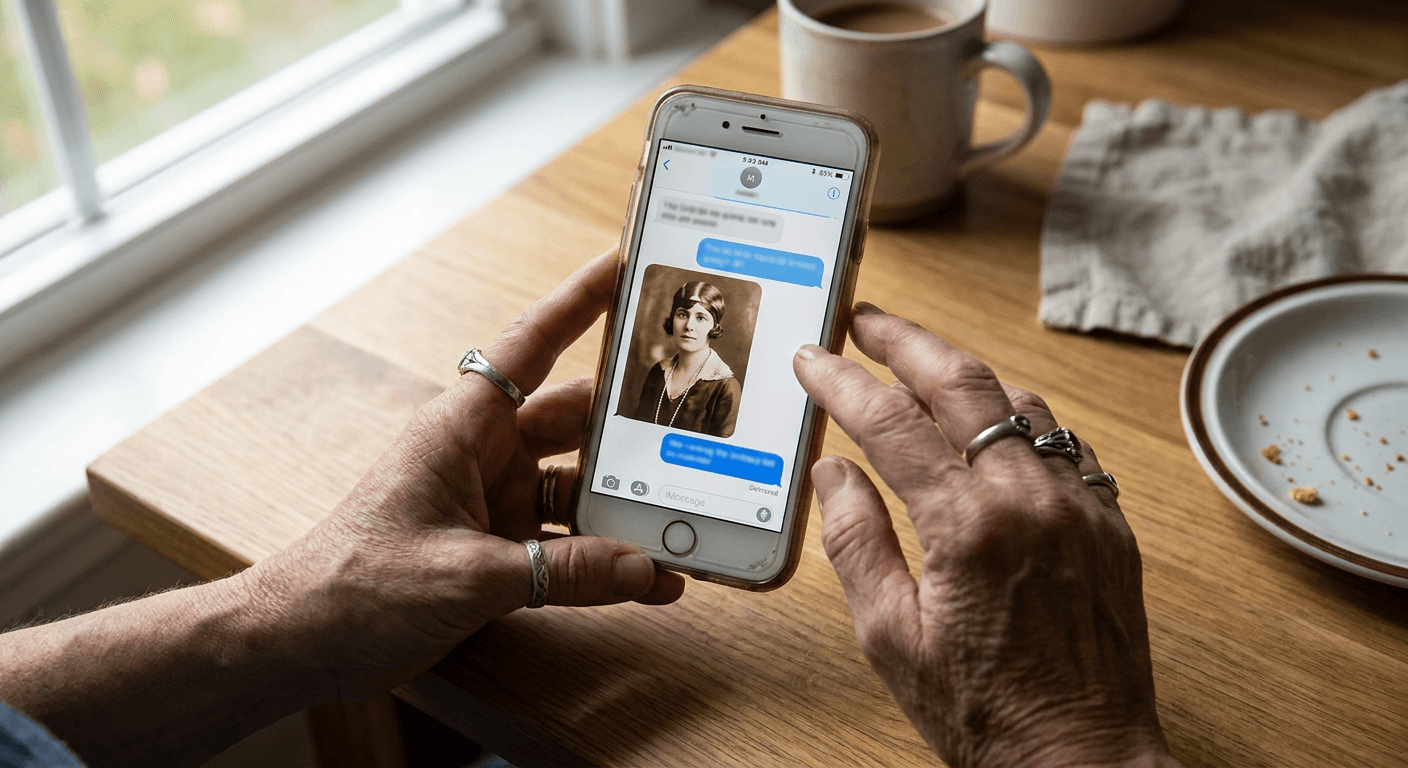
How to Actually Run the Prank, Step by Step
- Pick a clear, front-facing, well-lit reference photo, a recent selfie works best since the resemblance needs to read clearly once the mark starts comparing.
- Choose an era and prompt from the groups below based on how far back you want the fake ancestor to sit in the family tree, older eras read as more distant, more improbable relatives, which tends to make the prank funnier.
- Generate the portrait, and generate two or three variations before picking a favorite, since period clothing, posing, and photographic texture can shift meaningfully between attempts.
- Send it to the mark with a simple, low-key caption, something like "found this on Ancestry, this is apparently your great-great-grandmother," and let their own questions do the rest of the work.
- Record their reaction, screen record if the conversation happens over text, and save the actual reveal for the end of the clip rather than tipping your hand early.
One honest note before the prompts: run this only on people who will find it genuinely funny once revealed, and be ready to reveal it quickly if anyone seems to be taking it seriously enough to make a real decision, like actually printing the photo or telling other relatives it is real. The best version of this prank ends in a shared laugh, not a lingering misunderstanding.
1) Daguerreotype and Tintype Era Prompts (1840s to 1860s)
The earliest era of photography produces the most dramatic "distant ancestor" effect, since a photo styled this far back reads as genuinely improbable to have survived in a family album, which is exactly what makes the prank funnier. These three prompts recreate the stiff formal posing, narrow tonal range, and soft focus of the earliest studio photography.
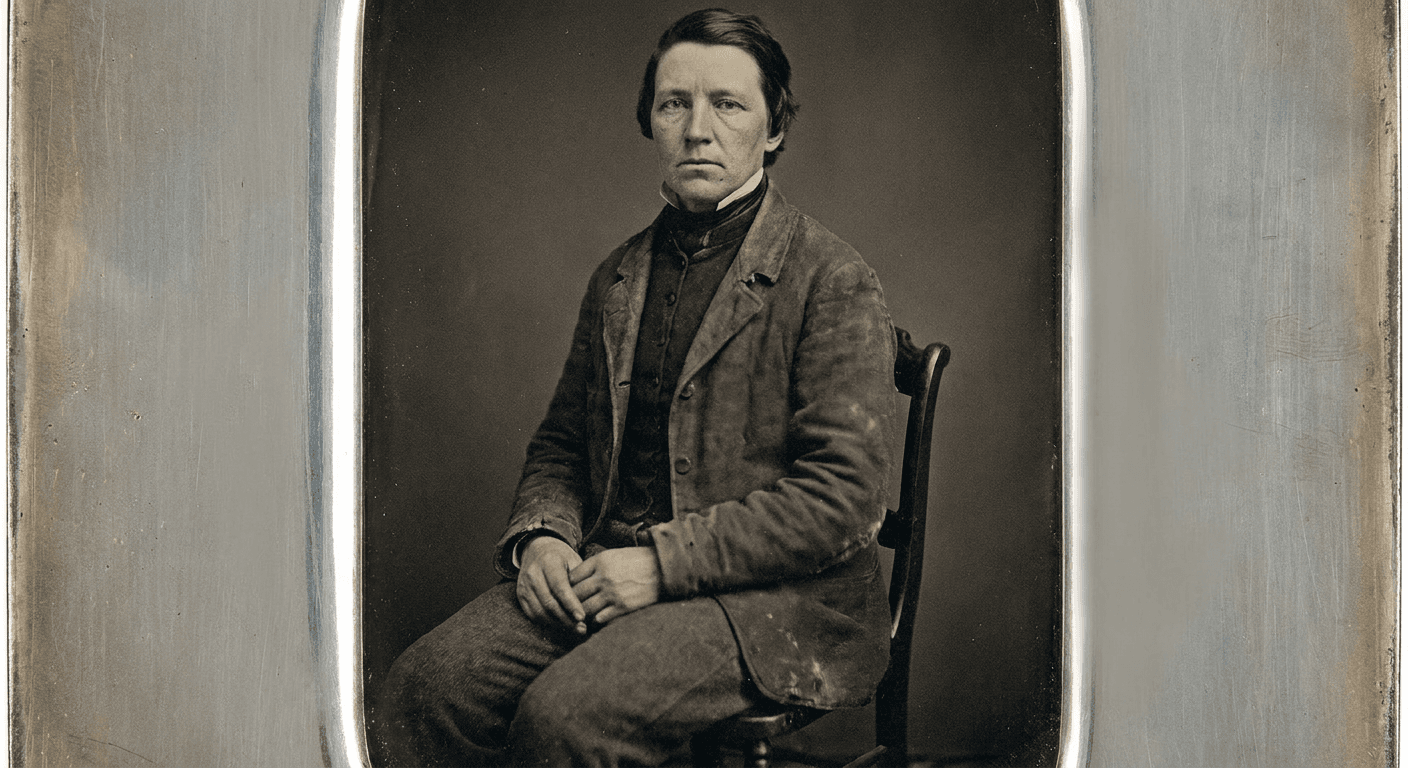
Prompt 1: Classic daguerreotype portrait
Using the reference photo, keep this person's face, bone structure, and expression recognizable, and transform the image into a classic 1850s daguerreotype-style portrait. Stiff formal seated pose, hands folded, plain dark studio backdrop, narrow tonal range with soft muted contrast, gentle soft focus typical of early camera lenses, faint metallic sheen and fine grain characteristic of an actual daguerreotype plate, period-appropriate high-collared clothing, no color, photorealistic detail.
Prompt 2: Tintype studio portrait, formal seated pose
Using the reference photo, keep this person's face and expression recognizable, and transform the image into a 1860s tintype studio portrait. Formal seated pose with one hand resting on a small side table, plain fabric backdrop, slightly darker and denser tonal range typical of a tin plate, subtle scratches and edge wear consistent with an aged physical tintype, period clothing appropriate to the decade, photorealistic detail, no color.
Prompt 3: Hand-tinted daguerreotype with period jewelry
Using the reference photo, keep this person's face and expression recognizable, and transform the image into a hand-tinted 1850s daguerreotype portrait. Formal seated pose, plain studio backdrop, base image in narrow-tonal-range black and white with soft focus, subtle hand-applied color tinting only on the cheeks and a small piece of period jewelry, consistent with how period photographers sometimes tinted daguerreotypes by hand, photorealistic detail.
2) Civil War and Frontier Era Prompts (1860s to 1880s)
This era leans into a rougher, more rugged aesthetic than a formal studio sitting, weathered clothing, outdoor or simple backdrop settings, and a slightly harder, more direct expression that period photography of this era tends to show. It works especially well for a "tough, no-nonsense ancestor" framing.
Prompt 4: Frontier-style portrait, plain backdrop
Using the reference photo, keep this person's face and expression recognizable, and transform the image into an 1870s frontier-style studio portrait. Plain rough-hewn wooden backdrop, simple sturdy period clothing rather than formal wear, a direct and slightly weathered expression, moderate film grain and slightly uneven lighting typical of a small-town traveling photographer's studio, black and white with a warm sepia cast, photorealistic detail.
Prompt 5: Civil War-era studio portrait with period military coat
Using the reference photo, keep this person's face and expression recognizable, and transform the image into an 1860s Civil War-era studio portrait wearing a period military-style coat with brass buttons, standing at a slight angle beside a simple studio column prop, plain backdrop, black-and-white with authentic film grain and a slightly faded, aged tonal range, formal serious expression typical of period military photography, photorealistic detail.
Prompt 6: Homestead-style outdoor portrait
Using the reference photo, keep this person's face and expression recognizable, and transform the image into an 1870s homestead-style outdoor portrait, standing in front of a simple wooden farmhouse porch, plain period work clothing, natural outdoor daylight rendered in period-accurate black and white with visible film grain and slightly overexposed sky, relaxed but composed posture, photorealistic detail.
3) Victorian Studio Portrait Prompts (1870s to 1890s)
The Victorian studio portrait is the single most recognizable "old family photo" aesthetic, ornate backdrops, formal posing with a hand resting on a chair or table, high-collared clothing, and a painted studio backdrop. This is the era most people picture immediately when they hear "old family photo," which makes it a safe, high-recognition default if you are unsure which era to start with.
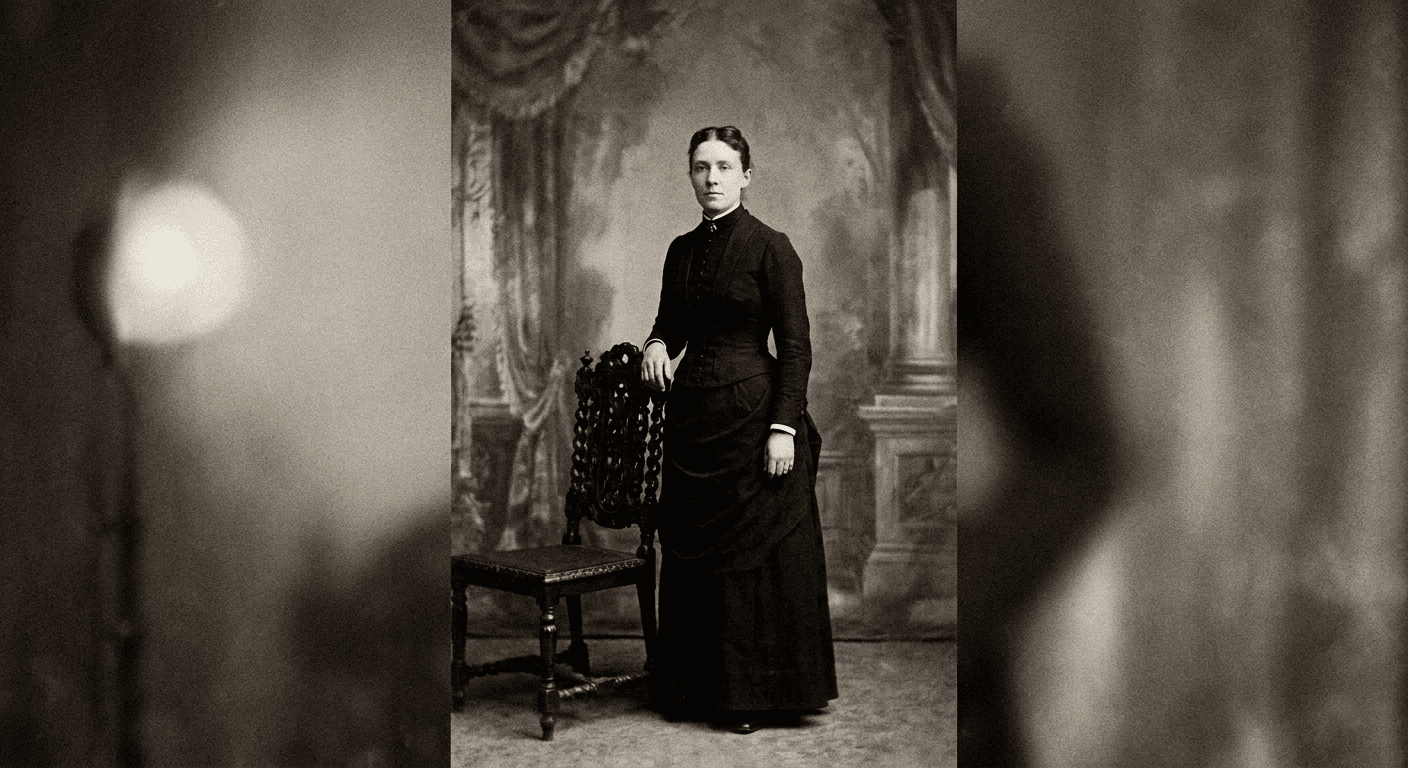
Prompt 7: Formal Victorian studio portrait, painted backdrop
Using the reference photo, keep this person's face and expression recognizable, and transform the image into an 1880s formal Victorian studio portrait. Standing pose beside an ornate carved wooden chair, elaborate painted studio backdrop with soft classical drapery, high-collared formal period clothing, sepia-toned black-and-white film texture with fine grain, single soft studio light source, photorealistic detail.
Prompt 8: Victorian portrait with ornate high collar and brooch
Using the reference photo, keep this person's face and expression recognizable, and transform the image into an 1880s Victorian studio portrait wearing an ornate high lace collar and a period cameo brooch, seated formally, plain velvet-textured backdrop, warm sepia tone with fine period-accurate film grain, composed neutral expression, photorealistic detail.
Prompt 9: Victorian portrait, hand resting on studio chair
Using the reference photo, keep this person's face and expression recognizable, and transform the image into an 1880s Victorian studio portrait, one hand resting on the back of an ornate carved studio chair, standing at a slight three-quarter angle, formal period clothing, soft painted backdrop, sepia-toned film grain, natural single-source studio lighting, photorealistic detail.
4) Edwardian and Turn-of-the-Century Prompts (1900s to 1910s)
The Edwardian era is close enough to look genuinely plausible as a great-grandparent rather than a distant relative, which some creators prefer because the mark is more likely to actually engage and ask real follow-up questions instead of dismissing it as implausibly old.
Prompt 10: Edwardian studio portrait, softer natural pose
Using the reference photo, keep this person's face and expression recognizable, and transform the image into a 1905 Edwardian-era studio portrait with a softer, more natural seated pose than earlier eras, simple elegant period clothing, soft focus typical of early 1900s portrait lenses, warm sepia-toned film texture with light grain, gentle natural expression, photorealistic detail.
Prompt 11: Turn-of-the-century portrait with period hat
Using the reference photo, keep this person's face and expression recognizable, and transform the image into a 1908 turn-of-the-century studio portrait wearing an elaborate period hat, three-quarter angle pose, simple plain studio backdrop, warm sepia tone with fine grain and slight edge vignette, composed confident expression, photorealistic detail.
Prompt 12: Edwardian family-style formal portrait
Using the reference photo, keep this person's face and expression recognizable, and transform the image into a 1910 Edwardian formal studio portrait, standing pose in fitted period formal wear, ornate studio backdrop with subtle floral drapery, warm sepia-toned film grain, soft natural studio lighting, photorealistic detail.
5) "Distinguished Ancestor" Prop and Occupation Prompts
Adding a specific occupation or notable detail gives the mark something concrete to latch onto and repeat back, which tends to produce the most quotable reaction clips. These three lean into a specific storyline rather than a generic old photo.
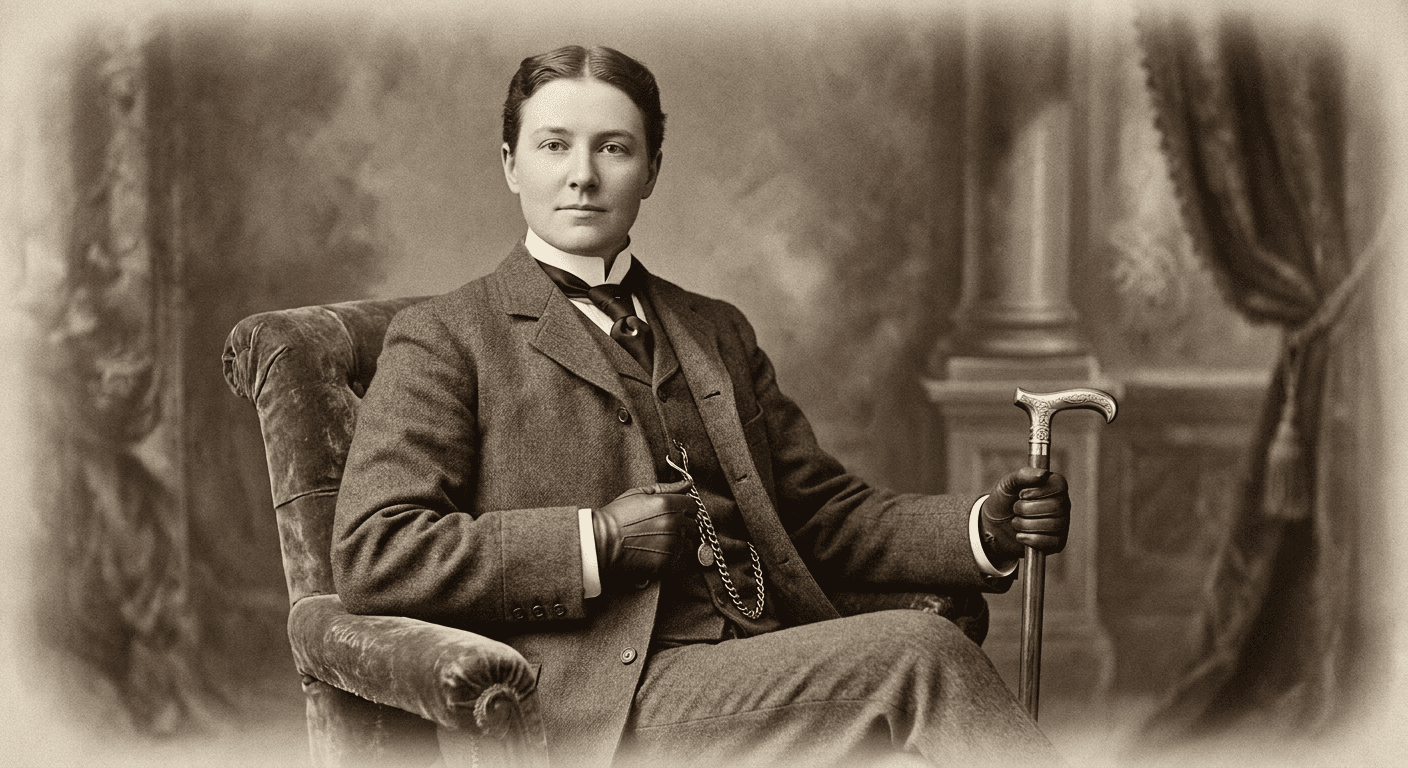
Prompt 13: "Wealthy landowner" portrait with pocket watch and cane
Using the reference photo, keep this person's face and expression recognizable, and transform the image into a late 1800s studio portrait styled as a wealthy landowner, holding an ornate pocket watch chain in one hand and a polished wooden cane in the other, seated in an upholstered studio chair, formal tailored period clothing, sepia-toned film grain, confident composed expression, photorealistic detail.
Prompt 14: "Ship captain" portrait with period naval coat
Using the reference photo, keep this person's face and expression recognizable, and transform the image into a late 1800s studio portrait styled as a ship captain, wearing a period naval-style coat with brass buttons, standing beside a small studio prop suggesting a ship's wheel or coiled rope, plain backdrop, black-and-white with period-accurate film grain, weathered confident expression, photorealistic detail.
Prompt 15: "Traveling performer" portrait with theatrical period costume
Using the reference photo, keep this person's face and expression recognizable, and transform the image into a late 1800s studio portrait styled as a traveling performer, wearing an ornate theatrical period costume with decorative trim, dramatic three-quarter pose, plain studio backdrop, sepia-toned film grain, expressive theatrical expression, photorealistic detail.
6) Prank-Ready Reveal and Caption-Bait Prompts
These last three prompts are built specifically for the reveal moment and the caption-bait framing rather than a single portrait style, since a large part of what makes this trend spread is the format of the reveal itself, not just the photo.
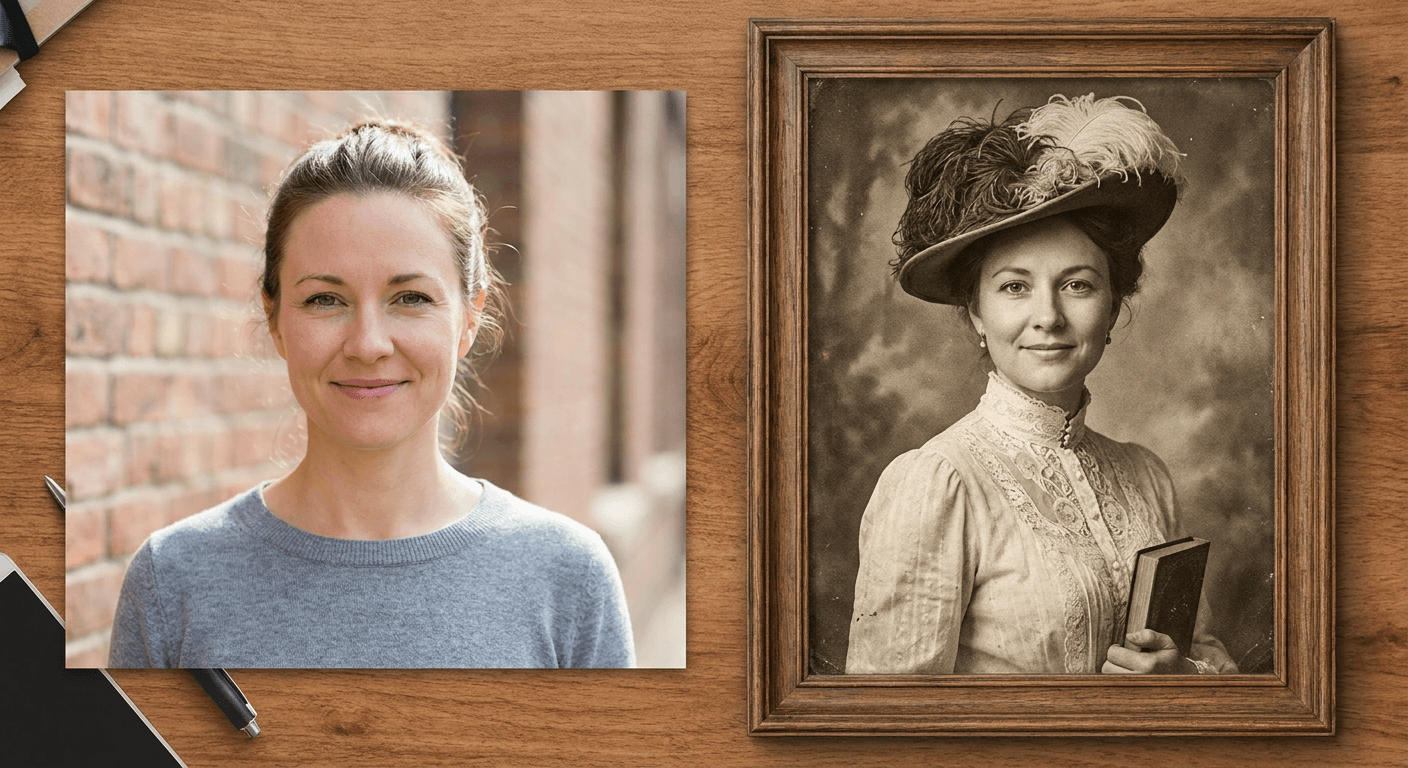
Prompt 16: Side-by-side "then and now" resemblance comparison
Using the reference photo, generate a side-by-side comparison image. The left panel shows this person exactly as in the original modern reference photo. The right panel shows the same person transformed into an 1890s sepia-toned studio portrait with period clothing and authentic vintage film grain. Keep the facial features and bone structure clearly matching across both panels so the resemblance reads immediately, photorealistic detail, no added text.
Prompt 17: Aged, worn photograph texture with visible creases and foxing
Using the reference photo, keep this person's face and expression recognizable, and transform the image into an aged, physically worn late 1800s photograph. Sepia-toned formal studio portrait with period clothing, add visible creases, soft corner wear, faint foxing spots, and a slightly yellowed paper tone consistent with a genuine 130-year-old physical print, photorealistic detail.
Prompt 18: Family portrait group shot, multiple generations styled to one era
Using the reference photo as the basis for one central figure, generate a formal 1880s family-style group studio portrait, the reference person standing centrally among several other period-styled family members in matching Victorian formal clothing, ornate painted studio backdrop, sepia-toned black-and-white film grain, composed formal expressions throughout, photorealistic detail, no added text.
For more single-photo transformation formats that use this exact reference-photo technique, the decade progression prompt pack applies the same idea to places instead of people, aging a single location across 40 years, and the meet your younger self trend covers keeping a consistent likeness across a big age gap, which is directly useful for troubleshooting identity drift on an ancestor portrait too.
How to Customize These Prompts for a Better Prank
Every prompt above shares the same underlying structure on purpose, preserve the person's actual face and proportions, describe the era's photographic and styling characteristics in real detail, and add period-accurate grain, tone, and texture. A few adjustments make a real difference in how convincing the final result actually is.
Match the era to the claimed relationship. A daguerreotype-era portrait reads as a great-great-great-grandparent, four or five generations back, while an Edwardian portrait reads more like a great-grandparent. Claiming a daguerreotype-era photo is your grandmother will not survive basic math, and a sharp-eyed mark will catch it immediately, which can kill the bit before the reveal even happens.
Add a specific, mundane family name rather than a dramatic one. "This is Mildred" lands better than "This is Duchess Evangeline," because ordinary, period-appropriate names read as more believable than anything that sounds invented. A quick search for common names from the target decade adds real credibility with almost no extra effort.
Keep the framing tight and slightly imperfect. Real period photographs were rarely perfectly centered or evenly lit by modern standards. A prompt that specifies a slightly off-center composition or a faint vignette reads as more authentic than a perfectly symmetrical, evenly lit modern portrait wearing old clothes.
Reuse the same generated ancestor across a text thread for consistency. If the prank runs over several messages, generate the portrait once and reuse that exact image rather than generating a new variation each time, since a mark who notices the "same ancestor" looking slightly different in a follow-up photo will start asking harder questions.
Common Mistakes Creators Make With This Trend
A handful of mistakes show up repeatedly in attempts at this prank that fall flat or get caught immediately.
- Skipping the face-preservation instruction entirely. If the tool regenerates the whole photo instead of keeping the person's actual bone structure and features, the result looks like a random stranger in old clothes, not a plausible relative, which removes the entire resemblance hook the prank depends on.
- Using modern lighting and a modern photo aspect ratio. A crisp, evenly lit, high-resolution modern photo styled with old clothing but shot like a 2026 phone camera reads as obviously fake at a glance. Every prompt in this pack specifies period-accurate grain, tonal range, and softness for exactly this reason.
- Choosing an implausible era for the claimed relationship. As covered above, a daguerreotype-era photo claiming to be a grandmother rather than a great-great-great-grandmother is an easy tell that breaks the illusion before the reveal.
- Over-explaining the backstory upfront. The funniest versions of this trend let the mark ask the questions and fill in their own details. A creator who front-loads too much invented detail, a specific town, a specific occupation, a specific year, gives the mark less room to genuinely engage and often makes the fabrication more obvious rather than less.
- Forgetting to actually record the reaction. The prank itself is not really the content, the reaction is. Screen record a text exchange from the start, or set up a camera before sending the photo in person, since a described reaction after the fact is a much weaker clip than a real one.
- Escalating past the point of a harmless joke. If a parent or grandparent starts making real plans around the fake photo, printing it, telling other relatives, adding it to a family tree, reveal the prank promptly rather than letting it run further than intended.
Generating These Inside Miraflow
Once a prompt from this pack matches the era or backstory you want, the AI Image Generator in Miraflow AI handles the actual generation directly in the browser. Upload the reference photo, paste in the prompt, and generate a few variations to compare before picking the one with the most convincing period texture and the clearest resemblance. Because the tool supports real image-to-image editing rather than only text-to-image generation from a blank prompt, the same real face carries through into the result, which is the entire point of a prank that depends on a mark recognizing a resemblance.
For creators turning the reveal into a short-form video rather than a single image or text screenshot, Text2Shorts can turn a script around the reveal moment into a narrated vertical video, and anyone repurposing a longer reaction video into individual clips can run it through AI Clipping to automatically pull out the funniest moments with captions already applied. If this kind of single-photo transformation format is working for an account, a few other prompt packs on the blog use the same underlying reference-photo technique with a different hook: the AI decade progression pack, the pet-to-human transformation pack, and the AI action figure and toy box prompts all start from one reference photo the same way this pack does.
For background on which image models currently handle this kind of face-preserving, style-heavy edit best, the Nano Banana Pro vs Seedream 5.0 Pro comparison breaks down how each one handles a full stylistic transformation like this differently than a simple regional edit.
Frequently Asked Questions
What is the Ancestor Photo Prank trend exactly? It is a TikTok prank format where a creator sends a parent or grandparent a black-and-white, vintage-styled photo, either an AI-generated portrait built from a real selfie or a repurposed celebrity photo, and claims it is a real ancestor discovered through an Ancestry.com search. The comedy comes from how sincerely the family member accepts the fabricated backstory before the reveal.
Do I need to use my own photo, or does a random old photo work too? Both versions of the trend exist. Using a random celebrity or stock photo is the lower-effort version and still works because the prank depends more on the mark's willingness to believe than on image quality. Using an AI-generated portrait built from your own selfie tends to land harder because it introduces a real resemblance the mark has to reckon with once they start comparing features.
How do I make the fake ancestor photo actually look convincing instead of like an obvious filter? Use an image-to-image editor rather than a simple sepia filter, and describe the target era's specific photographic characteristics directly in the prompt, grain structure, tonal range, posing conventions, and clothing details. A generic filter just tints an existing photo, while a proper generation actually recreates how period photography physically looked and worked.
Which era should I pick for the most believable result? Match the era to the claimed relationship. A daguerreotype or tintype era portrait, 1840s to 1860s, works for a distant great-great-great-grandparent. An Edwardian era portrait, 1900s to 1910s, reads more plausibly as a great-grandparent. Picking an era too far back for the claimed relationship is one of the easiest ways the prank gets caught immediately.
Is this trend only for pranking parents, or does it work for other formats too? The prank format is the version currently going viral, but the same prompts work equally well for a genuine, non-prank vintage-portrait post, a themed profile picture, or a family history-style content series. The prompts in this pack describe the photographic style, not the prank framing itself, so they adapt easily to either use.
How many variations should I generate before picking one? Generate at least two or three per prompt. Period clothing, posing, and the specific grain and lighting characteristics can shift meaningfully between attempts, and having a few options to compare usually surfaces one result that reads noticeably more convincing than the others.
Conclusion
The Ancestor Photo Prank works because it borrows real cultural weight from DNA testing and genealogy research and points it at a fabricated photo built in seconds, not because the technology behind it is especially novel. The 18 prompts above cover five distinct photographic eras plus three formats built specifically for the reveal moment itself, so there is a real starting point here whether the goal is a single prank text or a full reaction-video series testing multiple eras and props. Start with a clear reference photo, match the era to a plausible family relationship, and generate the AI Image Generator in Miraflow AI directly from the browser to see which version gets the most convincing reaction before you send it. You can browse more prompt packs like this one on the Miraflow AI blog, and every tool mentioned here lives at Miraflow.