
AI Avatar for Training Videos: Features, Benefits, and Implementation Guide

Written by
Sam Cho

Learn how AI avatars transform training video creation. Explore features, benefits, and best practices for using realistic AI presenters in employee training and L&D programs.
AI avatars for training videos are computer-generated virtual presenters that deliver training content with realistic facial expressions, natural gestures, and synchronized lip movements. L&D teams use AI avatars to create professional training videos without hiring on-camera talent, coordinating filming schedules, or managing video production crews. These digital presenters cost $0-500 to create compared to $500-5,000 per day for human presenters, while offering unlimited availability for updates and revisions.
Are AI avatars effective for training? Yes. Research shows training videos with AI avatars achieve 80-95% completion rates and 50-60% knowledge retention, matching or exceeding traditional instructor-led training effectiveness. Organizations report no significant difference in learning outcomes between AI avatar videos and videos with human presenters for instructional content, while achieving 60-80% cost savings.
What are AI Avatars for Training Videos?
AI avatars for training videos are digital human presenters generated using artificial intelligence that deliver training content through realistic video presentations. These virtual trainers look, sound, and move like real people, serving as consistent, scalable alternatives to human on-camera talent.
The technology combines several AI systems:
Visual Generation: Neural networks create photorealistic human faces and bodies that match diverse demographics, ages, and professional appearances. Modern AI avatars display natural skin texture, realistic hair movement, and subtle facial microexpressions that make them difficult to distinguish from real presenters.
Facial Animation: AI systems synchronize avatar facial movements with spoken words, creating accurate lip sync. The avatars' mouths, tongues, and jaws move precisely to match speech sounds, while eyebrows, eyes, and expressions respond naturally to content tone.
Gesture Generation: Advanced avatars include natural hand gestures, head movements, and body language that emphasize key points and maintain visual interest. These movements adapt to content context rather than repeating fixed patterns.
Voice Synchronization: Text-to-speech engines generate narration that avatars deliver with perfect synchronization. The audio and visual elements align precisely, creating natural-looking presentations.
How AI Avatars Work in Training
Creating training videos with AI avatars follows this process:
- Write your training script or upload existing documents
- Select an AI avatar from the platform's library (typically 50-700+ options)
- Choose voice characteristics (language, accent, gender, speaking pace)
- The AI generates a video with your chosen avatar speaking your script
- Download and distribute the finished training video
The entire process takes 30-60 minutes for a 10-minute training video, compared to days or weeks for traditional video production with human presenters.
Types of AI Avatars Available
Platforms offer different avatar categories:
Stock Avatars: Pre-created avatars representing various demographics, ages, and professional roles. These avatars are immediately available and included in platform subscriptions. Quality platforms offer 100-700+ stock avatars covering diverse representation needs.
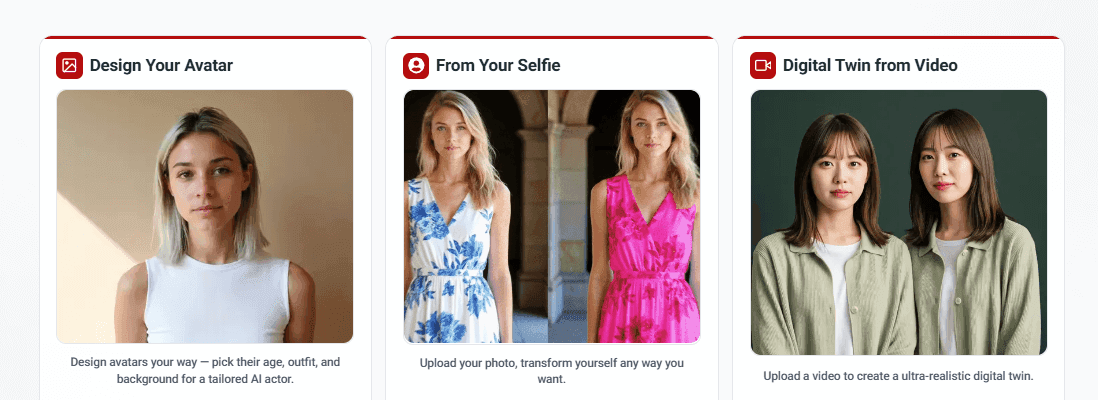
Photo Avatars: Generated from a single photo, these avatars create a digital version of a specific person's face. Useful for creating avatars of company executives or subject matter experts without video recording. Quality varies by platform, with better systems requiring higher-resolution source photos.
Video Avatars: Created from 2-5 minutes of recorded video footage, these avatars capture more nuanced facial features, expressions, and movements than photo avatars. The investment in recording footage produces higher-quality, more realistic results.
Studio Avatars: Premium custom avatars created through professional recording sessions with multiple camera angles, lighting setups, and expression captures. These represent the highest quality but cost $1,000-5,000 per avatar. Suited for organizations wanting branded virtual trainers across extensive training libraries.
Benefits of AI Avatars for Corporate Training
AI avatars deliver specific advantages for L&D teams creating training content.
Cost Savings on Presenter Talent
Human on-camera presenters charge $500-5,000 per day depending on experience and industry. A training video requiring 8 hours of filming costs $500-5,000 for talent alone, plus travel, lodging, and meals if talent isn't local.
AI avatars cost $0 for stock avatars included in platform subscriptions, or $100-500 one-time cost for custom avatars. Once created, avatars present unlimited training videos with no additional talent fees.
For organizations creating 20+ training videos annually, AI avatars save $10,000-100,000 in presenter costs alone.
Unlimited Availability and Consistency
Human presenters have scheduling constraints. Coordinating filming around their availability delays production by weeks. Talent might become unavailable for updates if they leave your organization or move to different roles.
AI avatars are available 24/7 with no scheduling conflicts. Generate videos instantly when training needs arise. Update content years later using the exact same presenter, ensuring visual consistency across your training library.
This reliability matters for compliance training videos requiring documented, consistent delivery to all employees.
Perfect Delivery Every Time
Human presenters make mistakes: stumbling over words, forgetting lines, displaying nervous habits, or struggling with technical terminology pronunciation. Each mistake requires another take, extending filming time and increasing costs.
AI avatars deliver scripted content perfectly on the first generation. Every technical term pronounced correctly. No verbal filler words. No retakes needed for presenter errors. This consistency reduces production time and ensures professional quality.
Scalability for Large Training Libraries
Creating 100+ training videos with human presenters means:
- Coordinating schedules with multiple presenters
- Managing different presentation styles and quality
- Budgeting for extensive talent costs
- Accepting visual inconsistency across content library
AI avatars scale effortlessly. The 100th video takes the same time and costs the same as the first video. One or two branded avatars can present your entire training library, creating cohesive visual identity.
Easy Updates and Revisions
When policies change or regulations update, videos with human presenters require:
- Rescheduling with original talent (if available)
- Re-filming affected sections
- Re-editing into existing footage
- Costs of $1,000-5,000 per update
AI avatar videos update by modifying the script and regenerating affected sections. Updates complete in 30-60 minutes at no additional cost beyond platform fees. This flexibility keeps training current instead of outdated.
Multilingual Training Without Multiple Presenters
Creating training in 10 languages with human presenters requires:
- Hiring native-speaking presenters for each language
- Filming identical content 10 times
- Managing 10 separate production schedules
- Total cost: 10x single-language production
AI avatars with multilingual capabilities generate versions in 40-175+ languages from a single script. The same avatar presents content in English, Spanish, Mandarin, or any supported language with appropriate native accents.
Cost for 10 languages: approximately 1.5x single-language cost (script translation plus generation time).
Reduced Production Complexity
Traditional video production with on-camera talent involves:
- Location scouting or studio rental
- Lighting and audio equipment setup
- Camera operators and technical crew
- Makeup and wardrobe
- Direction and multiple takes
- Extensive editing and post-production
AI avatar videos require:
- Writing a script
- Selecting an avatar
- Clicking generate
The reduced complexity means L&D professionals create training without video production expertise or equipment. Subject matter experts can produce their own training content instead of waiting for production teams.
Professional Appearance Without Presenter Anxiety
Many subject matter experts have valuable knowledge but freeze on camera. Presenter anxiety, self-consciousness, or lack of comfort with filming prevents talented trainers from creating video content.
AI avatars eliminate presenter anxiety. Experts write what they want to communicate, and the avatar delivers it professionally. This democratizes video creation, allowing anyone who can write to produce professional training videos.

AI Avatar Features That Enhance Learning Engagement
Modern AI avatars include specific features designed to improve training effectiveness.
Realistic Facial Expressions
High-quality AI avatars display natural facial expressions that match content tone. The avatar's face reflects appropriate emotion: serious for compliance warnings, friendly for welcome messages, concerned when discussing problems.
These expressions help learners process emotional context alongside information. A serious expression during safety warnings reinforces message importance. A warm smile during onboarding makes new hires feel welcome.
Research in emotional learning shows that facial expressions aid memory formation and recall. Learners better remember information delivered with appropriate emotional context than neutral presentations.
Natural Gestures and Body Language
Advanced avatars include hand gestures, head movements, and body language that emphasize key points. The avatar might:
- Gesture toward on-screen text when referencing it
- Use open hand movements when explaining broad concepts
- Nod when confirming important points
- Lean forward slightly when emphasizing critical information
These movements maintain visual interest and prevent the static appearance that causes viewer attention to drift. Movement attracts and holds attention more effectively than motionless presentations.
Eye Contact and Gaze Direction
Better AI avatars maintain appropriate eye contact with viewers, creating connection and engagement. The avatar looks directly at the camera (at the viewer) during most of the presentation, just as an effective human presenter would.
Some platforms allow gaze direction changes where avatars look at on-screen elements (slides, diagrams, graphics) before returning focus to viewers. This natural viewing behavior guides learner attention to important visual information.
Multiple Avatar Conversation
Advanced features support multiple avatars in one video, enabling conversational training formats. Two avatars can:
- Demonstrate workplace conversations (manager and employee)
- Model customer interactions (employee and customer)
- Show conflict resolution (two colleagues)
- Present different perspectives on topics
Conversational formats engage learners more than single-presenter lectures. The dialogue format breaks up information delivery and demonstrates practical applications through realistic scenarios.
Customizable Avatar Appearance
Platforms offer customization options:
Clothing and Style: Select professional business attire, casual clothing, healthcare scrubs, safety gear, or industry-specific uniforms. Matching avatar clothing to your workplace culture improves relatability.
Background Environments: Choose from office settings, classrooms, neutral backgrounds, or upload custom branded backgrounds. Environment selection sets appropriate context for training content.
Multiple Poses and Framings: Full body standing, sitting at desk, head-and-shoulders framing, or side profiles. Different framings suit different content types and visual variety across training library.
Avatar Diversity
Quality platforms provide avatars representing:
- Multiple ethnicities and skin tones
- Various ages from early 20s to 60+
- Different genders and gender presentations
- Various professional appearances and styles
- Regional features reflecting global workforces
Diverse representation ensures all employees see themselves reflected in training content. This inclusion improves engagement and demonstrates organizational values.
Voice and Language Flexibility
AI avatars speak in 40-175+ languages depending on platform. Voice options include:
- Male, female, and gender-neutral voices
- Various age presentations (younger vs older voice characteristics)
- Regional accents (American, British, Australian English; Mexican, Colombian, or Castilian Spanish)
- Speaking pace adjustments for technical content or non-native speakers
- Tone variations (professional, friendly, authoritative)
Voice flexibility lets you match avatar voice to avatar appearance and target audience needs.
Creating Training Videos with AI Avatars: Step-by-Step
Here's the detailed process for creating training videos with AI avatars:
Step 1: Define Training Objectives (15-30 minutes)
Before opening AI platforms, clarify what you're training:
- What should employees be able to do after watching?
- What knowledge or skills are you teaching?
- How will you measure whether training worked?
Clear objectives guide script development and ensure focused content.
Step 2: Write Your Training Script (1-2 hours)
Draft exactly what you want the AI avatar to say. Write conversationally as if speaking directly to one employee:
- Use "you" and "your" (not "employees should")
- Keep sentences under 20 words
- Break complex ideas into multiple short sentences
- Include specific examples from your workplace
- Define technical terms when first mentioned
Aim for 130-150 words per minute of video. A 10-minute video needs approximately 1,300-1,500 words.
Step 3: Select Your AI Platform (one-time setup)
Choose an AI video generation platform based on your needs:
- Avatar quality and variety
- Languages required
- Budget constraints
- Integration with your LMS
- Team collaboration features
Step 4: Choose Your AI Avatar (10-15 minutes)
Browse the platform's avatar library and select based on:
Training Context: Professional business avatar for corporate training, casual avatar for creative content, uniformed avatar for industry-specific training.
Audience Match: Avatar should reflect your employee demographics. Rotate different avatars across training library rather than using one avatar for everything.
Consistency Strategy: Decide whether you'll use consistent avatars for related content (same avatar for all onboarding videos) or vary avatars by topic.
Preview avatars with sample text to see how they look and sound before committing to your full script.
Step 5: Configure Voice Settings (5 minutes)
Select voice characteristics:
- Language matching your target audience
- Accent appropriate for region (British English for UK employees, etc.)
- Gender matching your avatar
- Speaking pace (slower for complex technical content)
- Tone fitting your content (professional, friendly, authoritative)
Test voice options with a few sentences of your actual script to ensure it sounds natural.
Step 6: Upload Script and Add Visual Elements (15-30 minutes)
Input your script into the platform. Most accept:
- Direct text paste
- Document upload (Word, PDF)
- Scene-by-scene text entry
Add supporting visual elements:
- Key points as on-screen text
- Screenshots of software or systems
- Diagrams explaining concepts
- Your company logo
- Relevant images or graphics
Don't overload videos with visuals. Use them to clarify and emphasize, not decorate every moment.
Step 7: Generate Your Video (30-60 minutes)
Click generate and the platform creates your training video. Processing time depends on:
- Video length (10 minutes typically processes in 30-60 minutes)
- Platform capacity and your subscription tier
- Complexity of visual elements
You can work on other tasks while videos process. Most platforms email when generation completes.
Step 8: Review for Quality and Accuracy (20-30 minutes)
Watch the complete video checking:
Content Accuracy: Does the avatar say exactly what your script says? Are technical terms pronounced correctly?
Visual Quality: Does the avatar look realistic? Are facial expressions appropriate? Do gestures look natural?
Technical Quality: Is audio clear? Does lip sync look accurate? Are visual elements readable and properly timed?
Learning Effectiveness: Would this make sense to someone new to the topic? Are examples clear? Does pacing allow time to absorb information?
Step 9: Revise and Regenerate (15-30 minutes if needed)
Make script adjustments based on review:
- Clarify confusing explanations
- Add examples where needed
- Fix any pronunciation issues by respelling words
- Adjust pacing by adding or removing content
Regenerate with your updated script. Second generation is typically faster since you're only changing content, not rebuilding from scratch.
Step 10: Export and Distribute (10-15 minutes)
Download your finished video in appropriate format:
- MP4 for general use
- SCORM package for LMS integration
- Multiple formats if distributing through various channels
Upload to your learning management system or training platform. Add:
- Clear title describing content
- Brief description of what learners will learn
- Estimated completion time
- Any prerequisites
- Tags for searchability
Total Time Investment: 2-4 hours for first AI avatar video including script writing. Subsequent videos take 1-2 hours as you become familiar with the process.
Customizing AI Avatars for Brand Consistency
Custom AI avatars create consistent brand identity across your training library.
When to Create Custom Avatars
Invest in custom avatars when:
High Training Volume: Organizations producing 50+ training videos annually benefit from branded avatar consistency. The one-time custom avatar cost ($100-500) spreads across many videos.
Brand Recognition: Companies wanting training to feel distinctly "from us" rather than generic. Custom avatars representing your organization create stronger brand association.
Executive Presence: Videos featuring company leaders benefit from their actual appearance. Custom avatars of your CEO or executives add gravitas to important communications.
Subject Matter Expert Identity: When specific experts are known across your organization, their avatar creates authenticity. Employees recognize "this is training from [expert name]."
Custom Avatar Creation Process
Photo-Based Avatars ($100-300):
- Provide high-resolution headshot (ideally professional photo)
- Platform generates avatar from the photo
- Quality varies significantly by platform
- Best for simple talking-head presentations
- Turnaround time: 24-48 hours
Video-Based Avatars ($300-800):
- Record 2-5 minutes of video footage of your subject
- Follow platform guidelines for lighting, framing, and expressions
- Platform analyzes footage and creates avatar
- Higher quality than photo avatars, capturing more expressions
- Turnaround time: 3-7 days
Studio Avatars ($1,000-5,000):
- Professional recording session with multiple camera angles
- Extensive expression and gesture capture
- Highest quality, most realistic results
- Suitable for premium training or executive communications
- Turnaround time: 2-4 weeks
Brand Identity Elements
Beyond custom avatars, maintain brand consistency through:
Visual Branding:
- Company logo placement (corner, intro/outro)
- Brand color schemes for graphics and backgrounds
- Consistent fonts matching brand guidelines
- Branded intro and outro sequences
- Custom background environments featuring your workplace
Voice Branding:
- Consistent voice characteristics across training library
- Custom voice cloning of actual trainers or executives ($200-800)
- Standardized speaking pace and tone
- Pronunciation dictionary for company terms
Content Branding:
- Standard opening and closing scripts
- Consistent call-to-action phrasing
- Branded knowledge check templates
- Standardized resource references
Managing Multiple Custom Avatars
Organizations often create several custom avatars:
Role-Based Avatars:
- HR avatar for policy and benefits training
- Safety avatar for OSHA and workplace safety
- IT avatar for technology and systems training
- Sales avatar for product and customer training
Different avatars signal different training types while maintaining professional quality.
Leadership Avatars:
- CEO for company announcements and culture messages
- Department heads for their respective areas
- Training managers for instructional content
Leadership avatars add authority and organizational buy-in to training initiatives.
Avatar Management Strategy:
- Document which avatars present which content types
- Maintain consistency (don't randomly switch avatars)
- Update avatars every 2-3 years to prevent dated appearance
- Rotate diverse avatars across library to represent workforce
AI Avatar Training Videos vs Traditional On-Camera Presenters
Understanding the trade-offs helps you choose the right approach for specific training needs.
Quality and Realism Comparison
AI Avatars in 2025:
- Photorealistic appearance indistinguishable from video in many cases
- Natural facial expressions matching content tone
- Accurate lip sync with minimal artifacts
- Appropriate gestures and body language
- Occasional subtle indicators of synthetic generation
Human Presenters:
- Authentic human presence and warmth
- Genuine emotional connection and personality
- Perfect realism (because they're real)
- Variable quality depending on presenter skill
- Can appear less polished without professional talent
Quality assessment: For instructional training content, AI avatar quality is sufficient for effective learning. For high-stakes communications requiring authentic emotional connection, human presenters may be preferred.
Do AI avatars look realistic enough for training? Yes. Learners report no significant difference in engagement or learning outcomes between AI avatar and human presenter videos for instructional content. The photorealism of 2025 AI avatars exceeds the threshold needed for effective training delivery.
Cost Comparison
AI Avatar Videos:
- Stock avatars: $0 (included in platform subscription)
- Custom avatars: $100-500 one-time cost
- Platform subscription: $20-150/month for unlimited videos
- Staff time: 2-4 hours per video
- Total per video (after initial): $50-200
Human Presenter Videos:
- Talent fees: $500-5,000 per shoot day
- Video production crew: $1,500-5,000 per day
- Equipment rental: $500-2,000
- Location/studio: $500-2,000 per day
- Editing and post-production: $1,000-5,000
- Total per video: $5,000-25,000
Cost advantage: AI avatars cost 95-98% less than professional video production with human talent.
Timeline Comparison
AI Avatar Videos:
- Script writing: 1-2 hours
- Video generation: 30-60 minutes
- Review and revision: 30 minutes
- Total timeline: 2-4 hours
Human Presenter Videos:
- Pre-production planning: 1-2 weeks
- Scheduling talent and crew: 1-2 weeks
- Filming: 1-2 days
- Editing: 1-2 weeks
- Revision rounds: 3-7 days
- Total timeline: 3-6 weeks
Speed advantage: AI avatars produce training 60-80x faster than traditional video production.
Flexibility Comparison
AI Avatar Videos:
- Updates regenerate in minutes from script changes
- Create role-specific versions easily
- Generate multilingual versions from single script
- Consistent presenter available indefinitely
- No scheduling constraints
Human Presenter Videos:
- Updates require re-filming ($1,000-5,000)
- Role-specific versions multiply production costs
- Multilingual versions need native-speaking talent for each language
- Presenter may become unavailable
- Scheduling delays production by weeks
Flexibility advantage: AI avatars adapt to changing needs. Human video locks you into filmed content.
Learning Effectiveness Comparison
Research on AI avatar training effectiveness:
Completion Rates:
- AI avatar videos: 80-95%
- Human presenter videos: 75-90%
- No significant difference
Knowledge Retention:
- AI avatar videos: 50-60% at 30 days
- Human presenter videos: 50-65% at 30 days
- No significant difference for instructional content
Engagement:
- AI avatar videos: 4.0-4.5/5.0 satisfaction
- Human presenter videos: 4.2-4.7/5.0 satisfaction
- Slight advantage to human presenters for high-production videos
Application:
- AI avatar videos: 70-85% demonstrate skills within 30 days
- Human presenter videos: 70-85% demonstrate skills within 30 days
- No significant difference
Conclusion: For instructional training content (compliance, onboarding, product training, procedures), AI avatars deliver equivalent learning outcomes at a fraction of the cost and time.
When to Use Human Presenters
Traditional video with human presenters remains appropriate for:
- Executive communications where personal connection matters
- Testimonials requiring authentic human stories
- Content needing genuine emotional impact
- Videos where your actual product needs demonstration in real settings
- High-visibility marketing content with large budgets
Most L&D training falls outside these categories, making AI avatars the more practical choice.
Best Practices for AI Avatar Training Video Production
Follow these practices to create effective training with AI avatars:
Match Avatar to Content and Audience
Professional Training: Business attire, office setting, professional tone. Appropriate for corporate policy, compliance, professional development.
Technical Training: Smart casual clothing, neutral background, clear speaking pace. Works well for software tutorials, technical procedures.
Customer Service Training: Friendly, approachable avatar, service-oriented tone. Match to your customer-facing environment.
Safety Training: Appropriate safety gear if relevant, serious tone, industrial or field background.
Leadership Training: Executive presence, authoritative but approachable tone, professional setting.
Mismatched avatars distract from content. A casual, playful avatar undermines serious compliance training. An overly formal avatar feels wrong for creative industry training.
Use Consistent Avatars for Related Content
Create avatar consistency within training modules:
- Same avatar for all onboarding videos
- Consistent avatar for compliance training series
- Single avatar for product training library
Consistency builds familiarity. Employees come to recognize "this avatar presents safety training" or "this avatar handles HR topics." Recognition creates comfort and trust.
Rotate avatars between unrelated content types to prevent fatigue from seeing the same presenter for everything.
Write Scripts for Avatar Delivery
AI avatars work best with clear, conversational scripts:
Short sentences: Keep under 20 words. Long, complex sentences sound unnatural when spoken.
Active voice: "Complete the form" instead of "The form should be completed." Active voice sounds more direct and engaging.
Conversational tone: Write like you're talking to one person. Avoid formal, written language that sounds stiff when spoken aloud.
Clear pronunciation: Spell out acronyms the first time ("OSHA, the Occupational Safety and Health Administration"). Add phonetic spellings for unusual names or terms.
Natural pacing: Build in pauses by breaking up dense text. Give viewers time to process information before moving to the next point.
Test Avatar and Voice Combinations
Before producing your full training library:
- Test multiple avatars with your script
- Preview different voice options
- Watch several minutes of generated content
- Get feedback from colleagues or target learners
What works in preview may not work at scale. A voice that sounds good for 30 seconds might grate after 10 minutes. An avatar that looks great in screenshots might have distracting mannerisms in motion.
Add Supporting Visual Elements
Don't rely solely on the avatar. Reinforce learning with:
On-screen text for key points employees should remember Screenshots showing systems or software being discussed Diagrams illustrating processes or relationships Examples displayed visually alongside avatar explanation Progress indicators showing how much training remains
Visual variety maintains engagement better than an avatar talking for 10 minutes straight. Balance avatar screen time with supporting visuals.
Include Regular Knowledge Checks
Insert brief quizzes every 3-5 minutes:
- 1-2 questions testing just-covered content
- Immediate feedback on answers
- Option to review material if answered incorrectly
Knowledge checks serve two purposes: they test comprehension and break up passive watching with active engagement. This combination improves retention by 25-40% compared to passive viewing alone.
Keep Videos Under 10 Minutes
AI avatar quality is high enough for extended viewing, but attention spans aren't. Break training into 5-10 minute modules rather than creating 30-minute comprehensive videos.
Shorter videos:
- Achieve higher completion rates (80-95% vs 60-75% for long videos)
- Allow easier revision when updating specific topics
- Enable targeted assignment (employees watch only relevant modules)
- Reduce cognitive load and improve retention
Maintain Professional Production Standards
AI avatars don't excuse sloppy content:
- Proofread scripts thoroughly before generation
- Test technical accuracy with subject matter experts
- Review generated videos for quality before distributing
- Ensure visual elements are clear and readable
- Check that pacing allows time to absorb information
Professional content delivered by AI avatars works well. Poorly written or inaccurate content fails regardless of presenter type.
Plan for Ongoing Updates
AI avatars make updates practical:
- Review training quarterly for outdated information
- Update specific sections without regenerating entire videos
- Version control tracking what changed and when
- Maintain glossaries for consistent terminology
- Test updated sections before deploying
The ease of updates with AI avatars means training can stay current instead of gradually becoming irrelevant. Take advantage of this flexibility.
Ready to create professional training videos with realistic AI avatars? Miraflow AI offers 150+ diverse AI avatars at Team level, custom avatar creation from photos or video, and 60+ languages for global training programs. Create unlimited training videos with consistent, professional virtual presenters without the cost and complexity of on-camera talent.