25 AI Coloring Page Prompts for Kids, Adults and KDP Books (Copy & Paste 2026)

Written by
Aerin Kim
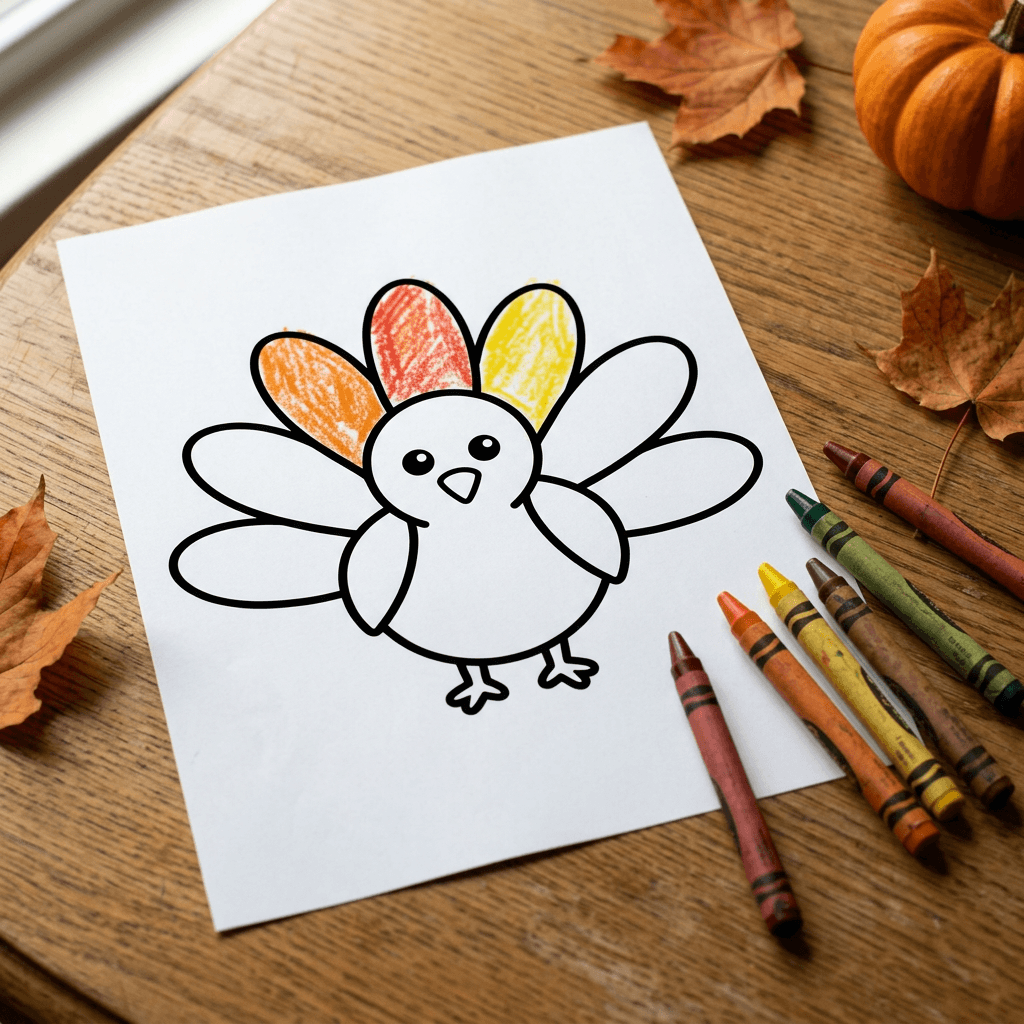
Copy 25 AI coloring page prompts for kids, adults and KDP books, plus how to get pure black line art, closed shapes, 300 DPI print files and clean fixes with inpainting.
If you have ever asked an AI image generator for a coloring page and received a soft gray drawing with shaded cheeks, blurry edges and a faint paper texture, you already know the problem. A coloring page has to be pure black lines on pure white, with every shape closed so a crayon cannot leak into the next one. Most prompts forget that, and the result looks pretty on a screen and useless on a printer.
This guide gives you 25 copy-and-paste AI coloring page prompts for 2026, grouped into kids pages, holiday and seasonal pages, adult mandalas and zentangle, animals, educational pages, photo-to-coloring-page conversions, and a set of prompts for building a consistent KDP coloring book. Along the way you will learn the technique behind them: how to ask for clean line art, how thick the lines should be for each age, which page ratio to request, how to print at 300 DPI, and how to repair a stray gray smudge without regenerating the whole page.
The timing is good. Searches for coloring pages, Thanksgiving coloring pages and Christmas coloring pages climb every year as families and teachers look for something printable for the holiday weeks, and many creators use the same weeks to prepare Etsy printables, Pinterest pins and Amazon KDP coloring books for the gift season. You can run every prompt in Miraflow's AI Image Generator, which also has image-to-image for turning photos into pages and inpainting for fixing individual lines.
TL;DR: How to Get Clean AI Coloring Pages
- Start every prompt with the output type: "black and white coloring page, clean line art". Then add the subject, then the line weight, then the exclusions.
- Ask for pure black outlines on a pure white background, and say plainly that there is no shading, no gray, no gradients and no solid black fills.
- Ask for closed shapes with no gaps, because a gap lets color flood across the whole drawing in a digital coloring app and makes crayon work frustrating.
- Match the line weight and detail level to the age: thick and simple for toddlers, medium for early readers, thin and dense for adults.
- Generate at a portrait ratio close to letter or A4, upscale if needed, and print at 300 DPI.
- Fix small flaws with inpainting. Keep a copy of your best prompt as a style anchor if you are making a series.
Why Coloring Pages Are a Good AI Project Right Now
A coloring page is one of the few image types where the AI's weaknesses are small and the payoff is easy to see. There is no photorealism to get wrong, no text to misspell and no skin to look plastic. The hard part is restraint: the model must draw less than it wants to. Once you learn to give it that instruction, you can produce a page in under a minute and print it the same day.
That makes the format useful for several different audiences. Parents and teachers want a themed page for tomorrow morning. Etsy sellers want bundles of printables that match a season. Pinterest creators want pins that link to a free printable. Self-publishers want dozens of consistent pages for a low-content KDP coloring book. The prompts below are written so each audience can reuse them, and the later sections cover what changes for each.
If you plan to sell, you will also want product photos and listing copy. Our guide to AI prompts for Etsy listing photos covers the photography side, and we cover pin design in AI prompts for Pinterest pins that drive saves.
The Anatomy of a Good Coloring Page Prompt
Every prompt in this guide follows the same five-part skeleton, and understanding it lets you write your own.
- Output type. "Black and white coloring page, clean vector-style line art." This single phrase steers the model away from paintings, sketches and photos.
- Subject and composition. One clear main subject, a short list of supporting elements, and where they sit on the page. A page with one hero and four supporting items is easier to color than a page with twenty equal items.
- Line weight. "Thick bold outlines about 4 mm wide" for little hands, "medium line weight" for ages 6 to 9, "fine delicate lines" for adult pages. Models do not measure millimeters, but they respond well to the relative words thick, medium and fine.
- Detail level. "Large simple shapes with lots of empty space to color" versus "dense intricate pattern filling the page". This is the real difficulty control.
- Exclusions. "Pure white background, no shading, no gray tones, no gradients, no solid black fills, no text, all shapes closed." Put this at the end so the model reads it last.
The exclusions matter more than people expect. Image models are trained on illustrations that include shading, so the default instinct is to add a little shadow under a character or a gray wash on a cheek. Naming those habits and ruling them out is how you get a page a printer can reproduce cleanly.
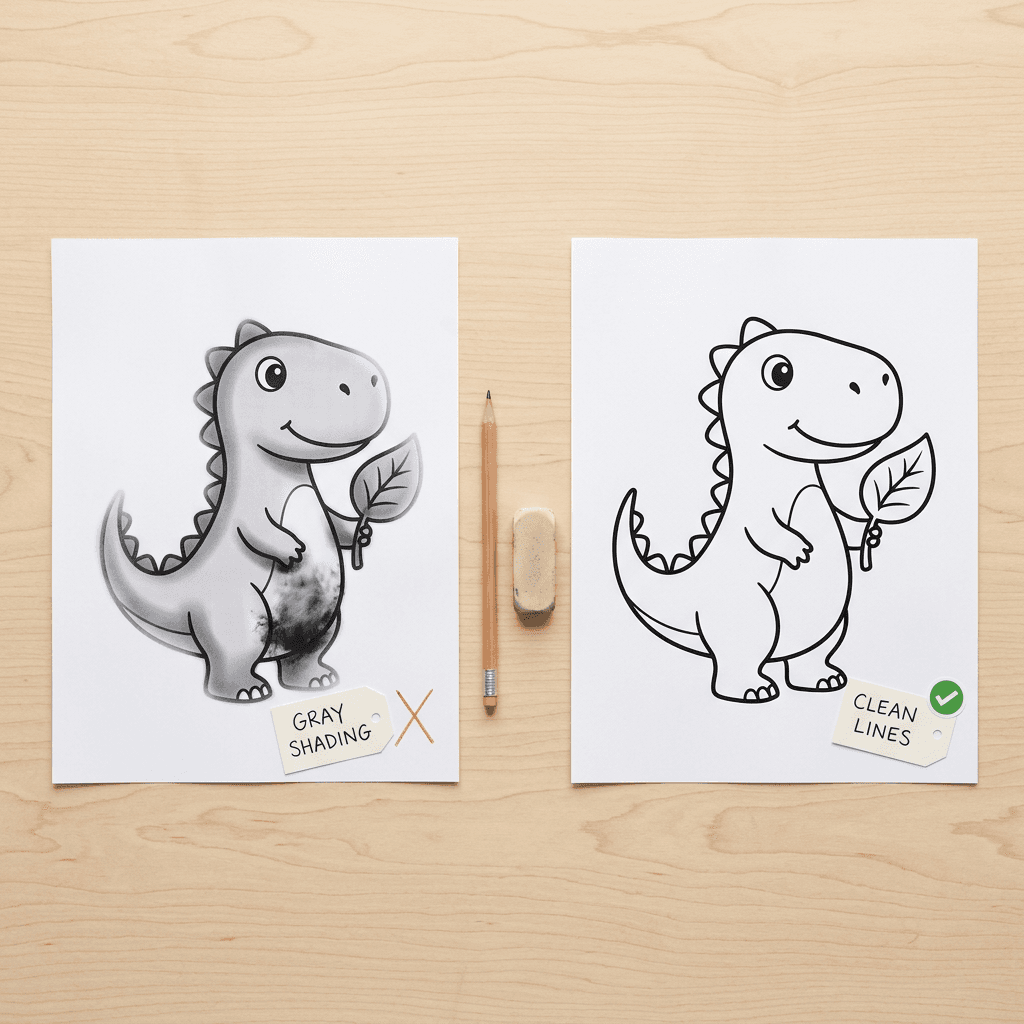
The photo above shows the difference that exclusions make. The left printout has soft gray shading and a few lines that fade into the page, which turns into muddy patches on a laser printer and gives a child nowhere clean to color. The right printout has uniform black outlines, closed shapes and empty white interiors. When you evaluate your own results, look for three things: any gray at all, any open gaps in an outline, and any interior area filled solid black. Reject or repair any page that has them.
Line Weight, Detail Level and Age: A Quick Guide
Line weight is the single biggest lever for matching a page to its audience. The table below is a practical starting point rather than a rule, and your own tests with a printer and a few real colorers will refine it.
| Audience | Line weight to request | Detail level to request | Example phrase |
|---|---|---|---|
| Toddlers, ages 2 to 4 | Very thick, bold outlines | One large subject, huge empty areas | very thick bold outlines, large simple shapes |
| Preschool, ages 4 to 6 | Thick outlines | One hero and two or three supporting items | thick clean outlines, generous white space |
| Early readers, ages 6 to 9 | Medium outlines | A scene with patterns inside some shapes | medium line weight, simple patterns inside shapes |
| Tweens and teens | Medium to fine outlines | Layered scenes, small repeated patterns | fine clean lines, detailed layered scene |
| Adults | Fine, delicate lines | Dense repeating patterns, concentric rings | fine delicate uniform lines, dense intricate pattern |
Two details are worth knowing. First, thick lines hold up better to printer variation, so if you are printing a bundle on a home inkjet, lean one step thicker than you think you need. Second, "more detail" is not the same as "more elements". Adult pages feel intricate because the same shapes are repeated at small scale, not because a hundred different objects were added, and models handle repeated pattern much better than crowded scenes.
Page Size, Aspect Ratio and 300 DPI
US letter is 8.5 x 11 inches and A4 is 210 x 297 mm. Both are portrait pages with a ratio close to 3:4, so request a portrait image and leave a little margin in the composition. the AI image generator on Miraflow offers several aspect ratios, and a 3:4 portrait is the closest match to either paper size. If your result is slightly off, crop or extend the white background in any editor rather than stretching the drawing, because stretching distorts circles and ruins the symmetry of mandalas.
For print, the common target is 300 pixels per inch. At that density, a letter page needs about 2550 x 3300 pixels and an A4 page needs about 2480 x 3508 pixels. Most generators output fewer pixels than that, so plan to upscale the finished page. Because line art is simple, upscaling usually works well, but check the edges afterward: lines should stay crisp and pure black, not fuzzy. If the lines look soft after upscaling, you can often fix this by raising the contrast or applying a threshold so every pixel becomes either black or white.
For a printable you share or sell, export a PDF at the exact page size and keep a PNG copy. Most home printers add their own margins, so keep the artwork about 0.25 inches (6 mm) inside the page edge.
1) Simple Kids Coloring Pages With Thick Outlines
For ages 2 to 6, the winning formula is one big subject, very thick lines and plenty of empty space. These four prompts follow it.
1. Friendly Turkey With Big Feather Shapes
A Thanksgiving classic with large feather sections that are easy to fill with crayons. Each feather is a separate closed shape so color stays where it is put.
Black and white coloring page for toddlers and preschoolers, a friendly cartoon turkey standing in the center of the page with a round body, a small beak, two big round eyes and seven large fan-shaped tail feathers, each feather a single large closed shape with one simple stripe inside it, very thick bold black outlines of uniform weight, large simple shapes with lots of empty white space to color, a small simple grass line under the feet, pure white background, no shading, no gray tones, no gradients, no solid black fills, no text, all outlines fully closed, portrait orientation.
2. Smiling Dinosaur Eating a Leaf
Animals doing something simple give kids a story to color. The leaf in the mouth adds one small detail and no clutter.
Black and white coloring page for young children, a big smiling cartoon dinosaur with a long neck standing on two chubby legs and holding a large leaf in its mouth, round spots along its back drawn as large separate closed circles, two simple trees and one small sun in the background, thick rounded black outlines about the same weight everywhere, generous empty areas inside every shape, pure white background, no shading, no gray, no crosshatching, no solid black areas, no text, closed shapes only, portrait orientation.
3. Ocean Friends: Fish, Octopus and Starfish
A three-character scene keeps variety high without making the page busy. The wave lines are deliberately thick so they read as part of the picture, not noise.
Black and white coloring page for kids, an underwater scene with a large smiling octopus in the middle, a round fish on the left, a big five-pointed starfish on the right and four simple bubbles floating up, three thick wavy lines along the top for the water surface and a few large rounded rocks at the bottom, very bold clean black outlines, simple shapes with big open spaces for coloring, pure white background, no shading, no gray tones, no gradients, no filled black shapes, no text, every outline closed, portrait orientation.
4. Big Truck and a Row of Simple Houses
A vehicle page is a reliable favorite and the large wheels and windows give clear targets for small hands.
Black and white coloring page for preschoolers, a big friendly cartoon dump truck driving along a flat road with a smiling driver window, chunky round wheels with large hubcaps, a load of three big rocks in the back, a row of three very simple houses with triangle roofs and square windows in the background and one round cloud, extra thick black outlines, large shapes and lots of empty white space, pure white background, no shading, no gray, no gradients, no solid black fills, no text, all lines closed, portrait orientation.
2) Holiday and Seasonal Coloring Pages: Thanksgiving, Christmas and Winter
Seasonal pages are the biggest traffic spike of the year, so it pays to make them early. They also work well at two difficulty levels: a simple version for children and a detailed version for adults, using the same subject.
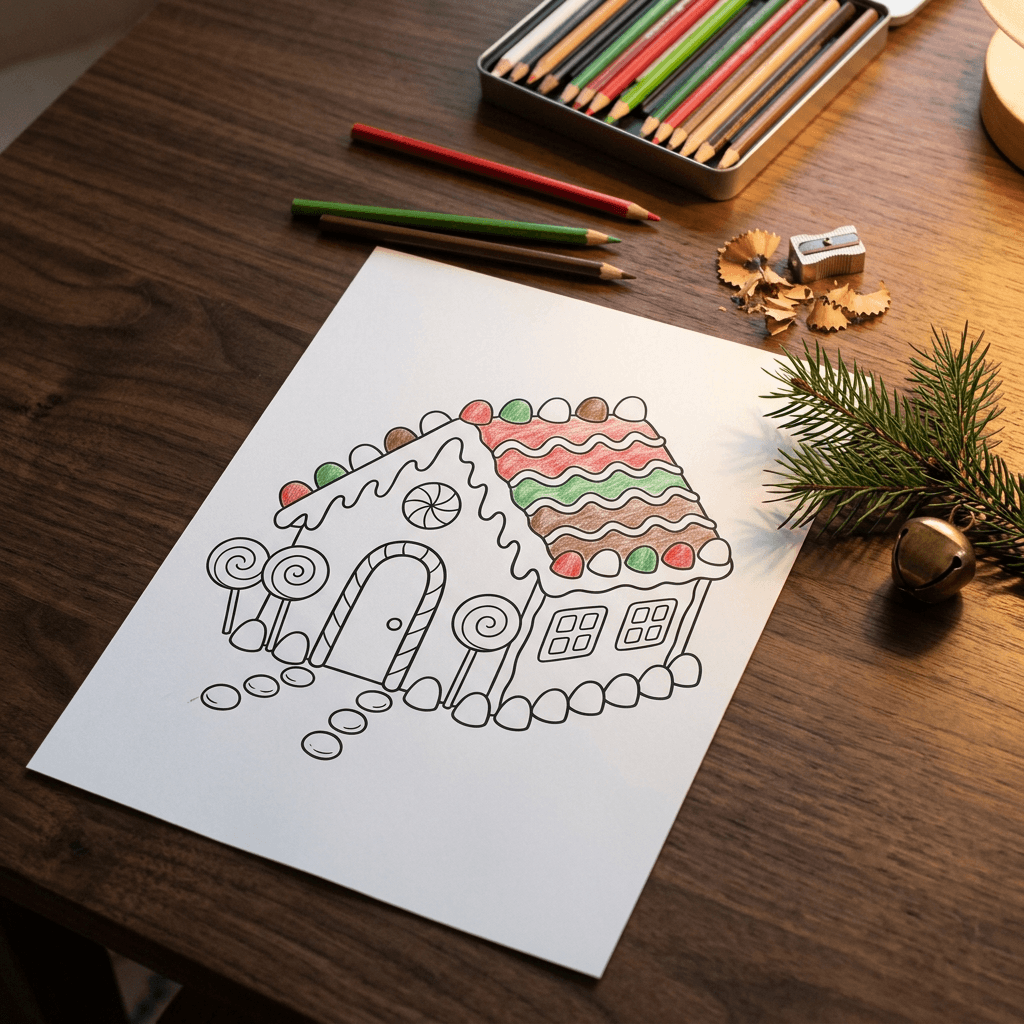
The photo above shows what to aim for with a holiday page: a clear central subject, a repeating decorative border or pattern that gives older colorers detail to work with, and generous white space. A gingerbread house with patterned trim is a good example because it works for ages 5 and up with the same prompt by changing only the line weight words.
5. Thanksgiving Cornucopia With Harvest Fruit
This is the page teachers ask for most in November. Each fruit is separate so children can choose their own colors. For more Thanksgiving ideas beyond coloring, see our guide to AI Thanksgiving prompts for photos, cards and Friendsgiving.
Black and white coloring page, a large woven cornucopia lying on its side and overflowing with apples, pears, grapes, a pumpkin, an ear of corn and a few autumn leaves, medium line weight with clean smooth outlines, each fruit drawn as its own clearly separated closed shape, a simple woven texture on the basket made from evenly spaced closed diamond shapes, a plain white background with a small row of falling leaves along the top, no shading, no gray tones, no gradients, no solid black fills, no text, all outlines closed, portrait orientation.
6. Christmas Tree With Big Ornaments
The ornaments are drawn large and flat, which keeps the page easy for younger children while the garland adds a little challenge.
Black and white coloring page, a tall decorated Christmas tree with a star on top, six large round ornaments with simple patterns of stripes, dots and zigzags inside them, a looping garland of large closed bead shapes, a small pile of wrapped presents with bows at the base, medium bold black line art, clean and uniform outlines, plenty of empty white space, pure white background, no shading, no gray, no gradients, no solid black areas, no snow texture, no text, every shape closed, portrait orientation.
7. Snowman in a Winter Scene
A winter scene that is not tied to a specific holiday stays usable from December through February, which helps if you are selling a printable.
Black and white coloring page, a cheerful snowman with a top hat, a striped scarf, two stick arms and round button details standing between two simple evergreen trees, a few large snowflakes with clear six-point shapes drifting around him and a gentle snowy hill line behind, medium thick clean black outlines, snowflakes drawn as closed outline shapes rather than texture, large open areas for coloring, pure white background, no shading, no gray tones, no gradients, no filled black areas, no text, all lines closed, portrait orientation.
8. Gingerbread House With Candy Details
A good page for the middle difficulty range, with separate candy shapes that invite lots of different colors.
Black and white coloring page, a gingerbread house with a wavy icing roof, round gumdrops along the roof edge, a candy cane door frame, lollipop trees on both sides, square cookie windows with icing trim and a small path of round candies leading to the door, medium line weight, crisp clean black outlines with every candy drawn as a closed shape, plenty of white space inside each shape, pure white background, no shading, no gray, no gradients, no solid black fills, no text, portrait orientation.
9. Autumn Leaves Frame
A frame page gives you a printable that doubles as a card or a bookmark template. You can leave the center blank for a child to draw in.
Black and white coloring page, a rectangular frame made of overlapping autumn leaves of oak, maple and birch, a few acorns and small mushrooms tucked into the corners, the large center of the page left completely empty white for drawing, medium line weight with smooth clean outlines, every leaf drawn with a closed outline and simple vein lines, pure white background, no shading, no gray tones, no gradients, no solid black fills, no text, portrait orientation.
If you want the Christmas pages to be part of a bigger holiday set, pair them with printable greeting cards from our AI Christmas card prompts, and for Halloween-style carving templates see the AI pumpkin carving stencil prompts, which use the same high-contrast, closed-shape logic.
3) Adult Coloring Pages: Mandalas, Zentangle and Intricate Patterns
Adult pages sell the feeling of focus. The aim is a dense, rhythmic pattern with fine lines that stays readable when printed. The key is to describe symmetry and repetition explicitly, because models drift when they are given a vague request for "intricate".
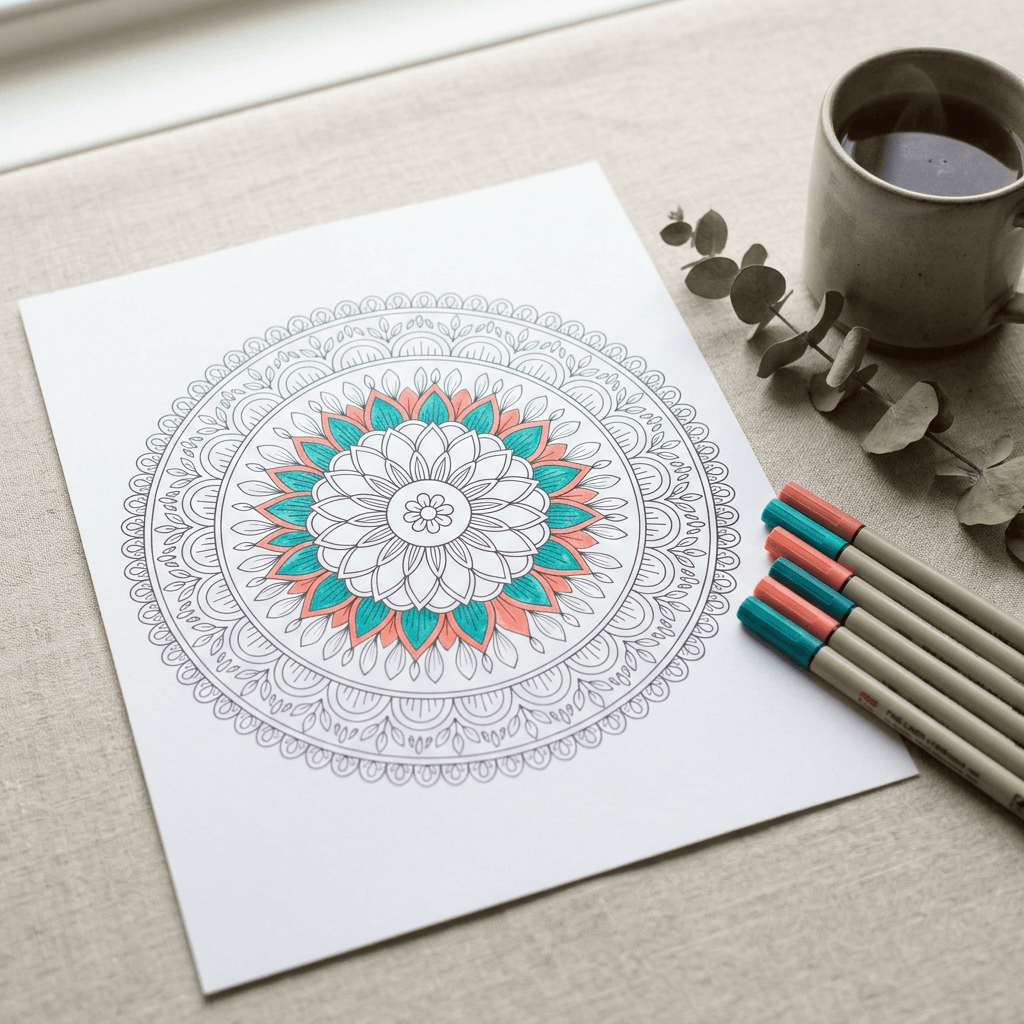
The mandala above is the kind of result you want: radial symmetry, fine uniform lines, and every petal and loop closed so the space can be colored with pens. Notice there is no gray and no filled black center. If you see either, add "no filled black areas" and try again.
10. Floral Mandala With Concentric Rings
The classic. Ask for the number of rings and the shapes in each ring so the model builds the structure on purpose.
Black and white adult coloring page, a perfectly symmetrical circular floral mandala centered on the page, a small flower in the center surrounded by five concentric rings, the first of pointed petals, the second of small teardrops, the third of scalloped arches, the fourth of leaves and the fifth of lacy outer loops, fine delicate uniform black line art, every shape fully closed, dense and balanced detail, pure white background, no shading, no gray, no gradients, no solid black fills, no text, square composition centered on a portrait page.
11. Zentangle Owl With Pattern-Filled Feathers
Zentangle style fills each section with a different pattern. Naming a few patterns guides the model toward variety without chaos.
Black and white adult coloring page in zentangle style, a front-facing owl perched on a branch with large round eyes, the body divided into sections filled with different repeating patterns such as scales, tiny circles, stripes, spirals and tiny leaves, each pattern section separated by a clear closed outline, thin elegant black pen line art, a few simple leaves around the branch, pure white background, no shading, no gray tones, no gradients, no solid black areas, no text, all shapes closed, portrait orientation.
12. Geometric Pattern Tile
Geometric pages are the easiest to produce at scale and a favorite for relaxation. They also tolerate tiling, which helps if you want to sell pattern bundles.
Black and white adult coloring page, a full-page geometric pattern of interlocking hexagons, triangles and diamonds forming a repeating star motif, thin precise uniform black lines, every shape closed with clean sharp corners, balanced symmetrical layout that fills the page edge to edge with a narrow plain white margin, pure white background, no shading, no gray tones, no gradients, no solid black fills, no text, portrait orientation.
13. Botanical Garden With Layered Flowers
A botanical scene gives the colorer natural variety and room for color blending, which is why this style is popular for colored pencils.
Black and white adult coloring page, a lush botanical garden arrangement of foxgloves, peonies, ferns and daisies layered in front of one another, fine detailed line art with petals, veins and leaf edges drawn as clean closed outlines, a few butterflies and a delicate arched border of vines, thin consistent black lines, balanced composition with small areas of empty white for breathing room, pure white background, no shading, no gray, no hatching, no gradients, no solid black fills, no text, portrait orientation.
4) Animal Coloring Pages
Animals are the evergreen category. They work for every age as long as the detail level is set deliberately.
14. Cat Sitting in a Window
A single pet in a cozy setting. The windowpane grid gives structure and the plant adds a small decorative element.
Black and white coloring page, a fluffy cat sitting on a windowsill looking out through a window with a four-pane grid, a potted plant with large leaves on the sill, a crescent moon and a few stars visible outside, medium thin line weight with simple fur marks drawn as short closed tufts along the edges, clean smooth outlines, pure white background, no shading, no gray tones, no gradients, no solid black fills, no text, portrait orientation.
15. Woodland Fox in a Forest Clearing
This page mixes a central animal with a forest of repeated tree shapes that are easy for the model to keep clean.
Black and white coloring page, a fox sitting upright in a forest clearing with a big bushy tail curled around its feet, tall pine trees with simple layered branches in the background, a few mushrooms, ferns and fallen leaves in the foreground, medium line weight with clear closed outlines and a simple pattern of leaf shapes on the ground, pure white background, no shading, no gray, no gradients, no solid black areas, no text, portrait orientation.
16. Butterfly With Symmetrical Wing Patterns
Butterflies are excellent for symmetry practice, and the wing sections are natural coloring zones for all ages.
Black and white coloring page, a large butterfly seen from above with wings spread, perfectly symmetrical left and right wings, each wing divided into large closed sections filled with circles, dots, scallops and curved lines, two curved antennae, a few small flowers at the bottom corners, medium clean black outlines, pure white background, no shading, no gray tones, no gradients, no solid black fills, no text, all shapes closed, portrait orientation.
5) Educational Coloring Pages: Alphabet, Numbers and Shapes
Teachers and parents search for these constantly, and they are a strong product for Etsy and KDP because a single set covers many pages. The challenge is that letters and numbers are text, which models can mangle. The prompts below keep it to one big character per page, which is far more reliable than words.
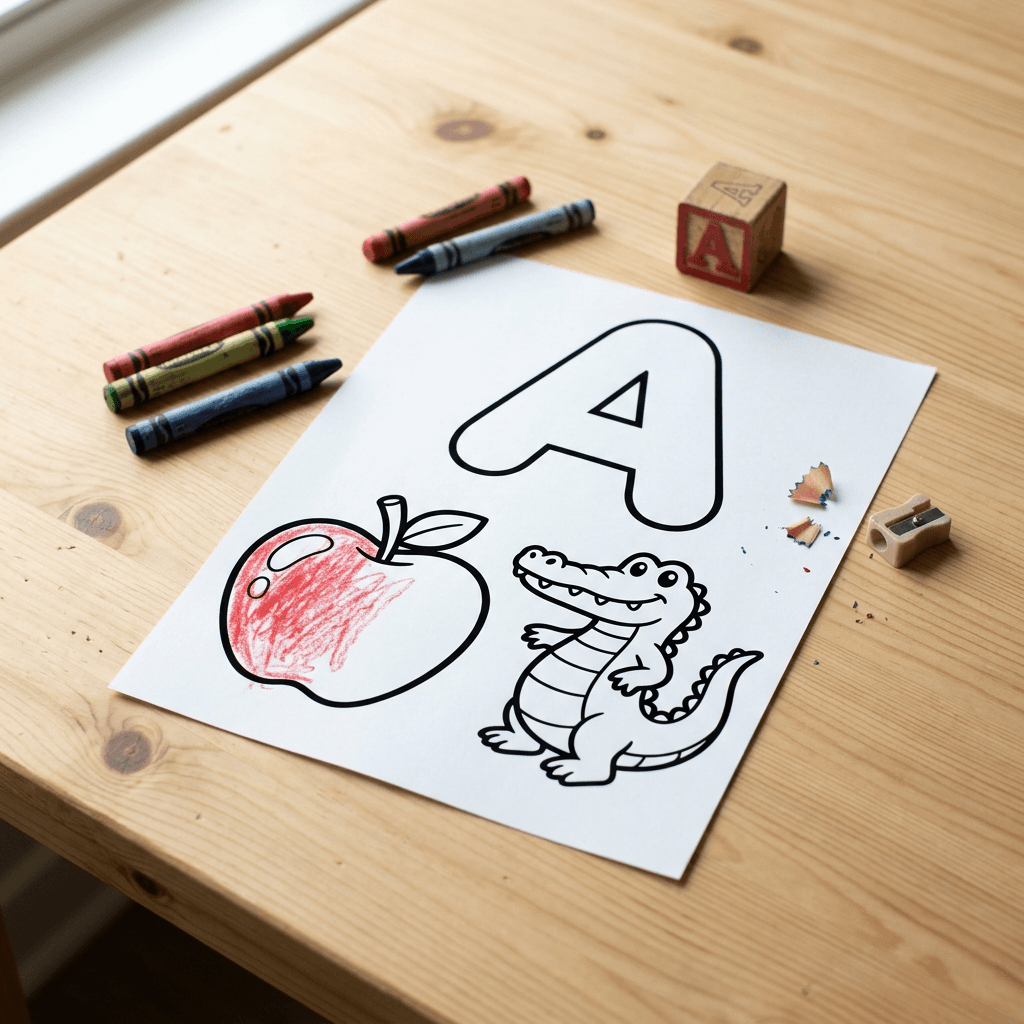
The alphabet page above shows the pattern: one large outlined letter, one matching picture, and plenty of room. Always check the letter shape closely before printing, because a model can produce a slightly wrong glyph that looks fine at a glance.
17. Bubble Letter With a Matching Picture
Repeat this prompt for each letter by swapping the letter and the object. Keep a list of 26 objects ahead of time so the set stays consistent.
Black and white educational coloring page for preschoolers, one giant outlined bubble capital letter A filling the upper half of the page with an empty white interior for coloring, below it a cartoon apple and an alligator drawn with thick simple outlines, both shapes large and fully closed, very bold uniform black lines, pure white background, no shading, no gray, no gradients, no solid black fills, no other text or words on the page, portrait orientation.
18. Counting Page With Numbered Groups
Counting pages combine color and math. Ask for a specific quantity of objects and verify the count afterward.
Black and white educational coloring page for kindergarten, the large outlined number 5 on the left side with an empty interior, and on the right exactly five identical cartoon ladybugs arranged in a loose column, each with a simple round body and a few large dots drawn as closed circles, thick clean black outlines, plenty of white space, pure white background, no shading, no gray tones, no gradients, no solid black fills, no other text, portrait orientation.
19. Shapes Scene Built From Basic Shapes
A scene made of shapes teaches recognition and gives a clear coloring task: color all the circles red, all the squares blue, and so on.
Black and white educational coloring page, a simple town scene built only from basic shapes, a square house with a triangle roof and a circle window, a rectangle door, a round sun, a diamond kite in the sky and a row of oval flowers, very thick uniform black outlines, every shape clearly separated and closed with empty interiors, pure white background, no shading, no gray, no gradients, no solid black fills, no text, portrait orientation.
For a classroom set, you can combine these with shorter reels about a topic using Miraflow's Text2Shorts, for example a 30 second video that shows a finished page being colored.
6) Photo-to-Coloring-Page Conversion
Turning a photo into a coloring page is one of the most requested uses, and it makes a meaningful gift: a child's pet, a family home, a favorite toy. In Miraflow's image-to-image mode you upload the photo for image-to-image, then describe the line art you want. The key is to tell the model to keep the composition and drop the colors, textures and shading.
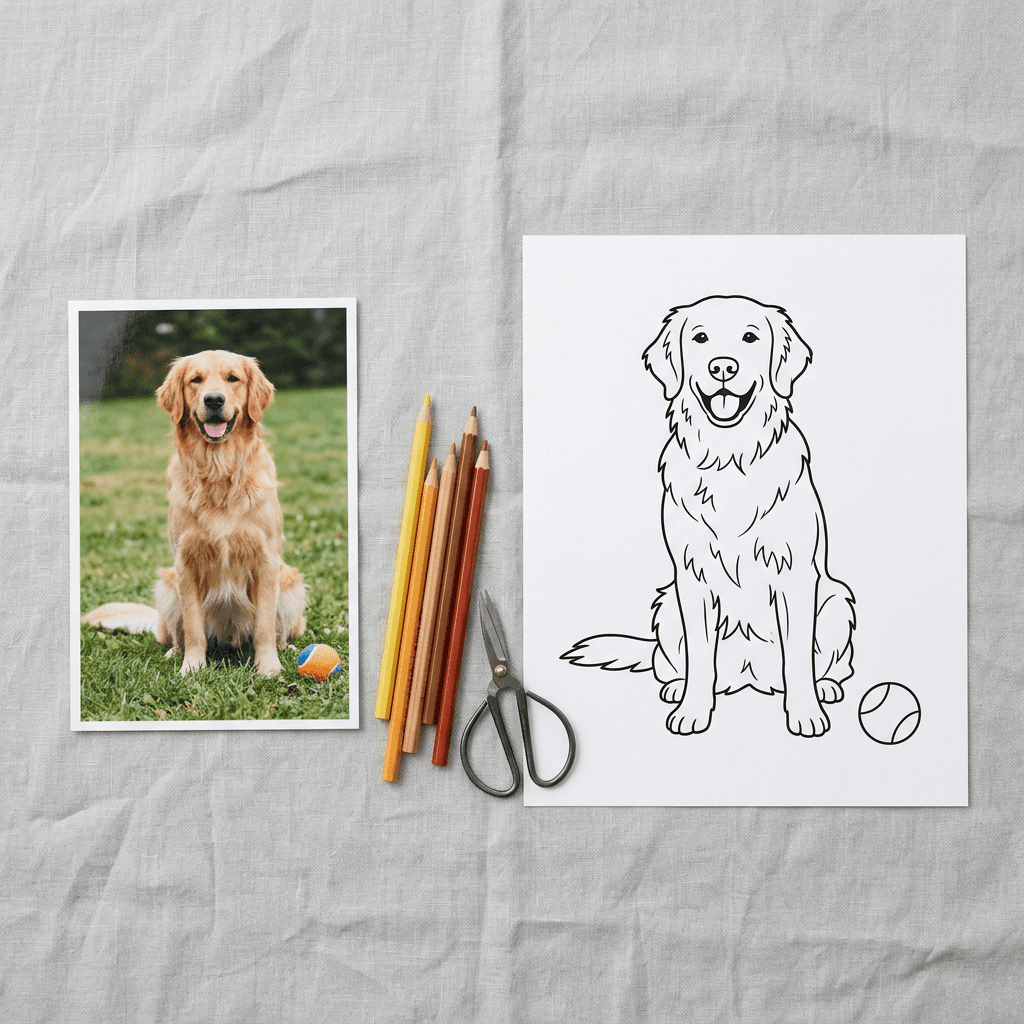
The photo above shows a printed dog snapshot beside the coloring page made from it. Notice that the outline follows the original pose and the background is simplified. Photos carry far more detail than a coloring page needs, so ask the model to simplify. Use a clear, well-lit photo with the subject separated from a busy background for the best results.
Only upload photos you own or have permission to use, and avoid converting photos of other people's children or identifiable faces without permission.
20. Pet Photo to Simple Coloring Page
The most popular conversion. The instruction to simplify the fur prevents hundreds of tiny strokes.
Convert this photo into a black and white coloring page, keep the pet's pose, proportions and expression, redraw it as clean thick-to-medium black outline art with simplified fur shown as a few short closed tufts, remove the original background and replace it with a plain white background and one or two simple props such as a ball or a bone, no shading, no gray tones, no gradients, no solid black fills, no text, all outlines closed.
21. House or Landmark Photo to Line Drawing
Useful for housewarming gifts and family keepsakes. The prompt keeps the architecture and drops the lighting.
Convert this photo of a house into a black and white coloring page, keep the building's shape, windows, door and roof lines, draw it as clean medium-weight black outline art with simplified bricks and shingles shown as repeated closed shapes, add a few simple flowers and a tree in matching outline style, remove the sky and replace it with a plain white background and a few outlined clouds, no shading, no gray, no gradients, no solid black fills, no text.
22. Child's Drawing to Polished Coloring Page
Parents love turning a child's sketch into a printable version. The prompt keeps the childlike charm but cleans the line.
Convert this child's drawing into a clean black and white coloring page, keep the characters, shapes and layout exactly as the child drew them, redraw the lines as smooth uniform thick black outlines, close any gaps in the shapes, remove the paper texture and any color, plain pure white background, no shading, no gray tones, no gradients, no solid black fills, no added text, keep the playful imperfect charm of the original drawing.
7) KDP Coloring Book and Series Consistency Prompts
A coloring book is not a pile of good pages. It is a set of pages that feel like they belong together, with the same line weight, the same level of detail and the same drawing style. The three prompts below help you lock a style and then reuse it.
23. The Style Anchor Prompt
Write this once, test it on three subjects, and paste it at the start of every later prompt in the book.
Style anchor for every page in this coloring book: black and white coloring page, clean vector-style line art, uniform medium-thick black outlines of the same weight on every page, rounded friendly shapes, simple cartoon proportions, a single main subject with two or three supporting elements, generous empty white interiors, pure white background, no shading, no gray tones, no gradients, no solid black fills, no text, all shapes fully closed, portrait orientation with a plain white margin around the artwork. Subject for this page:
24. Matching Page With Themed Border
Borders make a book look designed. Reuse the same border across all pages, or vary only the corner objects.
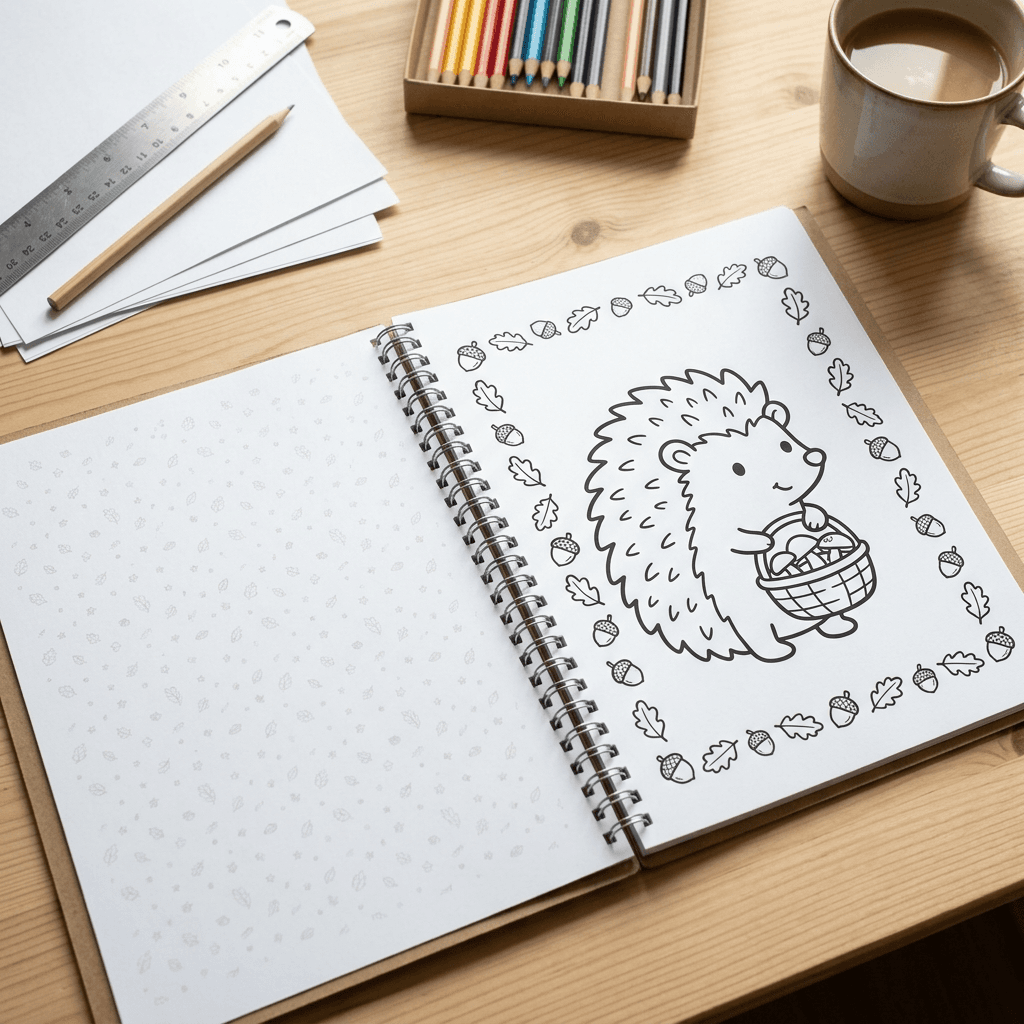
Black and white coloring page in the same medium-thick rounded cartoon style as the rest of the book, a hedgehog holding a basket of mushrooms in the center, a simple border of small leaves and acorns running along all four edges at the same line weight, plenty of empty white space inside each shape, pure white background, no shading, no gray, no gradients, no solid black fills, no text, all outlines closed, portrait orientation.
25. Buffer Pattern Page for Marker Bleed-Through
KDP paperback interiors print on both sides, and a coloring page can bleed through to the page behind it with markers. Many coloring book makers leave the reverse side blank or add a light pattern page behind each illustration so nothing important sits behind wet marker ink.
Black and white decorative pattern page, an evenly repeating small pattern of stars, dots and tiny leaves covering the whole page in thin light black lines with large open spacing between motifs, uniform line weight, no shading, no gray tones, no gradients, no solid black fills, no text, pure white background, portrait orientation, designed to sit behind a coloring page without distracting.
Building a KDP Coloring Book From These Prompts
Amazon KDP is the most common place self-publishers sell coloring books, so a few verified details are worth knowing, along with a few things to check yourself before you upload.
First, trim size. KDP allows custom paperback trim sizes, with a width between 4 and 8.5 inches and a height between 6 and 11.69 inches according to its help pages. That range includes the familiar 8.5 x 11 inch letter size, which is a popular choice for coloring books because it leaves room for large artwork. Check KDP's current trim size table before you commit, since it can change.
Second, bleed. KDP's help pages explain that bleed means printed content extends beyond the trim line, and that pages are trimmed by 0.125 inches (3.2 mm) on the top, bottom and outside edges, so the page must be sized 0.125 inches larger on those edges. Bleed is only needed if artwork reaches the page edge. KDP also states that if even one page needs bleed, the whole file should be set up with bleed. Most coloring books avoid the question by keeping artwork inside a white margin, so check your margins against KDP's minimums: at least 0.25 inches on the top, bottom and outside edges without bleed (0.375 inches with bleed), plus an inside margin that grows with page count.
Third, page count. KDP lists a 24 page minimum for black ink paperbacks, and standard color interiors need more. Coloring book interiors are normally black ink, so confirm that against KDP's current table for your paper choice.
Fourth, AI disclosure. KDP's content guidelines require you to tell them about AI-generated content, including images, when you publish a new book. Their definition is that if an AI tool created the content, it counts as AI-generated even if you edit it substantially. Read the exact rule on KDP's content guidelines page before publishing, answer the disclosure question honestly, and remember that you are responsible for making sure the content follows the guidelines.
Finally, quality. Review every page at full size. Look for open gaps, stray gray pixels, strange extra limbs and wrong counts. A book full of near-identical pages with errors earns poor reviews, and a smaller book with fifty carefully checked pages is a better product than a rushed one with two hundred. For the cover, our guide to AI prompts for book covers that sell on Amazon KDP covers genre-specific designs and the details that make a cover read well at thumbnail size.
How to Customize These Prompts
Once a prompt works in the Miraflow image generator, you can adapt it in a few predictable ways without breaking the clean-line effect.
- Change the subject, keep the skeleton. Swap the turkey for a unicorn and leave the line weight and exclusions untouched. This is the safest way to produce a series.
- Change difficulty with two words. Replace "very thick bold outlines" with "fine delicate lines" and "large simple shapes" with "dense intricate detail" to turn a kids page into an adult page.
- Add a theme to the border. One sentence such as "a border of small stars along all four edges" turns a single page into a themed set.
- Control the count. Say "exactly five" and verify, since models sometimes add or drop an object.
- Name the pen style. Phrases like "clean vector line art" and "brush-pen outline" subtly change line quality. Test both and pick one for the entire project.
- Request an empty center. For writing or drawing prompts, ask for a blank rectangle or circle in the middle.
If your final goal is to promote the printable, a short vertical clip of a page being colored can be made quickly with Text2Shorts, and a bold cover-style image for a YouTube tutorial fits Miraflow's YouTube Thumbnail Maker.
Fixing Pages: Inpainting, Cleanup and Printing
Even a good prompt sometimes returns one flawed area, such as a gap in a wing outline or a patch of gray under a chin. You do not need to regenerate the whole page. In the inpainting tool inside Miraflow you can mask just the flawed region and use inpainting to redraw it. A useful cleanup prompt is short and specific: "Redraw this area as clean black line art, close the gap in the outline, pure white interior, no gray." Keep the mask slightly larger than the flaw so the new lines blend with the old ones.
For global cleanup, convert the page to black and white with a threshold so every pixel is either black or white. That removes faint gray haze from the background and makes the printed result crisper. Then zoom to 200 percent and scan the page in sections for gaps. If a shape is open, fill the gap with a short line in any image editor or with inpainting.
Before printing a whole batch, print one page at 100 percent scale on the paper you plan to use and test it with the crayons, pencils or markers the page is meant for. Alcohol markers bleed through ordinary paper, so printable sellers often suggest marking the page as suited to pencils and crayons unless the buyer uses thick paper.
Common Mistakes With AI Coloring Pages
- Leaving out the exclusions. The most common cause of gray shading is a prompt that never says no shading. Always end with the full exclusion list.
- Asking for too many subjects. Seven equal characters produce muddy proportions and open shapes. One hero plus a few supporting items is easier to color and easier for the model to draw.
- Using the wrong line weight for the age. Thin lines on a toddler page frustrate small hands, while thick lines on an adult mandala remove the detail adults want.
- Accepting open shapes. A gap in an outline is a small flaw on paper and a big problem in a coloring app, where color floods the whole page.
- Letting the model write words. Titles and captions are likely to be misspelled. Add text in an editor, or keep to single letters and numbers and check them. Our guide to getting AI to spell text correctly in images explains why.
- Printing a low-resolution file. A page that looks sharp on a phone can print soft at letter size. Upscale before printing.
- Mixing styles in one book. Pages from different prompt styles look like different books. Use a style anchor, as in prompt 23.
- Skipping a review. Check counts, letters and gaps on every page before you sell or share it.
Using Miraflow's AI Image Generator for Coloring Pages
All of the workflows above run in one place. Open Miraflow's AI Image Generator, paste a prompt and generate a few variations in the portrait ratio. Choose the cleanest one, then use image-to-image if you are converting a photo, or inpainting if a line needs repair. This means you can go from an idea to a printable page without a drawing tablet or an illustration background.
If you also run a channel or a shop, the rest of the Miraflow platform covers the promotion side, from thumbnails to short videos, so your printables and your marketing can come from the same toolkit.
Frequently Asked Questions
What is the best AI prompt for coloring pages?
A good prompt names the output as a black and white coloring page with clean line art, describes one clear subject, sets the line weight, and ends with exclusions: pure white background, no shading, no gray, no gradients, no solid black fills and closed shapes. The prompts above all follow that pattern.
Why does my AI coloring page have gray shading?
Image models often add shading because most illustrations they learned from include it. Add "no shading, no gray tones, no gradients" to the end of the prompt, and if gray still appears, apply a black and white threshold in an editor so every pixel becomes pure black or white.
What size should I generate a coloring page at?
Request a portrait image close to a 3:4 ratio, which is near both US letter (8.5 x 11 inches) and A4 (210 x 297 mm). For print at 300 DPI, a letter page needs about 2550 x 3300 pixels, so upscale the image if your generator outputs less.
Can I sell AI-generated coloring pages on Etsy or Amazon KDP?
Many creators do, but you are responsible for following each platform's rules. KDP's content guidelines require you to disclose AI-generated content, including images, when you publish a new book, and Etsy has its own policies for digital items, so read both before listing. Do not copy existing characters or brands.
How do I turn a photo into a coloring page?
Upload the photo to an image-to-image tool, ask the AI to convert it into black and white coloring page line art, keep the pose and composition, simplify the background, and add the standard exclusions. Use a clear photo and only images you have permission to use.
How do I fix a gap or gray spot in a line?
Use inpainting. Mask the flawed area slightly larger than the problem, ask for clean black line art with the outline closed, and keep the interior pure white. This is faster than regenerating the whole page and keeps the parts you liked.
How do I keep a whole coloring book consistent?
Write one style anchor prompt that fixes line weight, shape style, detail level and exclusions, and paste it at the start of every page. Review the finished pages side by side and regenerate any that look heavier, lighter or more detailed than the others.
What line thickness is best for kids?
For toddlers and preschoolers, very thick bold outlines and large shapes work best. Early readers can handle medium lines and a few more details, and older children and adults enjoy fine lines and dense patterns.
Do coloring pages work for Pinterest?
Yes, free printables are a common Pinterest content type. Use a tall pin image that previews the page and links to the download, as described in our Pinterest pin prompts guide.
Conclusion
A great AI coloring page comes from restraint: pure black lines, white space, closed shapes and a line weight that fits the person holding the crayon. The 25 prompts in this guide cover simple kids pages, Thanksgiving and Christmas scenes, adult mandalas, animals, educational sets, photo conversions and a style anchor for building a consistent KDP book. Start with a page or two for your own table, check the lines closely, repair small flaws with inpainting and print at 300 DPI.
When you are ready to make your first batch, open Miraflow's AI Image Generator, paste a prompt from this list and generate a few versions. Once a style works, reuse it for every page and you have the start of a printable set, a pin board or a coloring book.