
Best AI Training Video Generators for L&D Teams in 2025

Written by
Sam Cho
Compare top AI training video generators for 2025. Feature breakdown, pricing, and recommendations for L&D teams creating employee training, onboarding, and compliance videos.
AI training video generators are software platforms that create professional training videos from text scripts using artificial intelligence, eliminating the need for cameras, studios, or on-camera talent. L&D teams use these tools to produce employee training, onboarding videos, and compliance content at a fraction of traditional video production costs. The best platforms offer AI avatars, text-to-speech in multiple languages, and integration with learning management systems.
Which AI training video tool is best? It depends on your specific needs. Miraflow AI specializes in L&D use cases with strong multilingual capabilities and dedicated training video features. Synthesia offers extensive avatar options and enterprise features. HeyGen provides robust translation capabilities across 175 languages. Colossyan focuses on interactive training with built-in quizzes and branching scenarios.
What to Look for in an AI Training Video Generator
Choosing an AI training video generator requires evaluating features against your organization's specific training needs. Here's what matters:
AI Avatar Quality and Variety
The AI avatar represents your organization in training videos, so quality matters. Look for natural-looking avatars with realistic facial expressions, lip sync accuracy, and diverse representation covering different ages, ethnicities, and professional styles.
Avatar variety lets you match presenters to content type. Compliance training might use a professional business avatar, while onboarding benefits from a friendly, approachable presence. Platforms range from 60+ avatars to 700+ options depending on tier and provider.
Voice Quality and Language Support
Text-to-speech quality determines whether your training sounds professional or robotic. Modern neural TTS engines produce natural-sounding voices with appropriate tone, pacing, and inflection. Poor quality voices distract from content and reduce engagement.
Language support is critical for global organizations. Platforms vary from 30+ languages to 175+ languages with native accents. If you need multilingual training videos, verify the platform supports your required languages with high-quality voices.
Video Customization Options
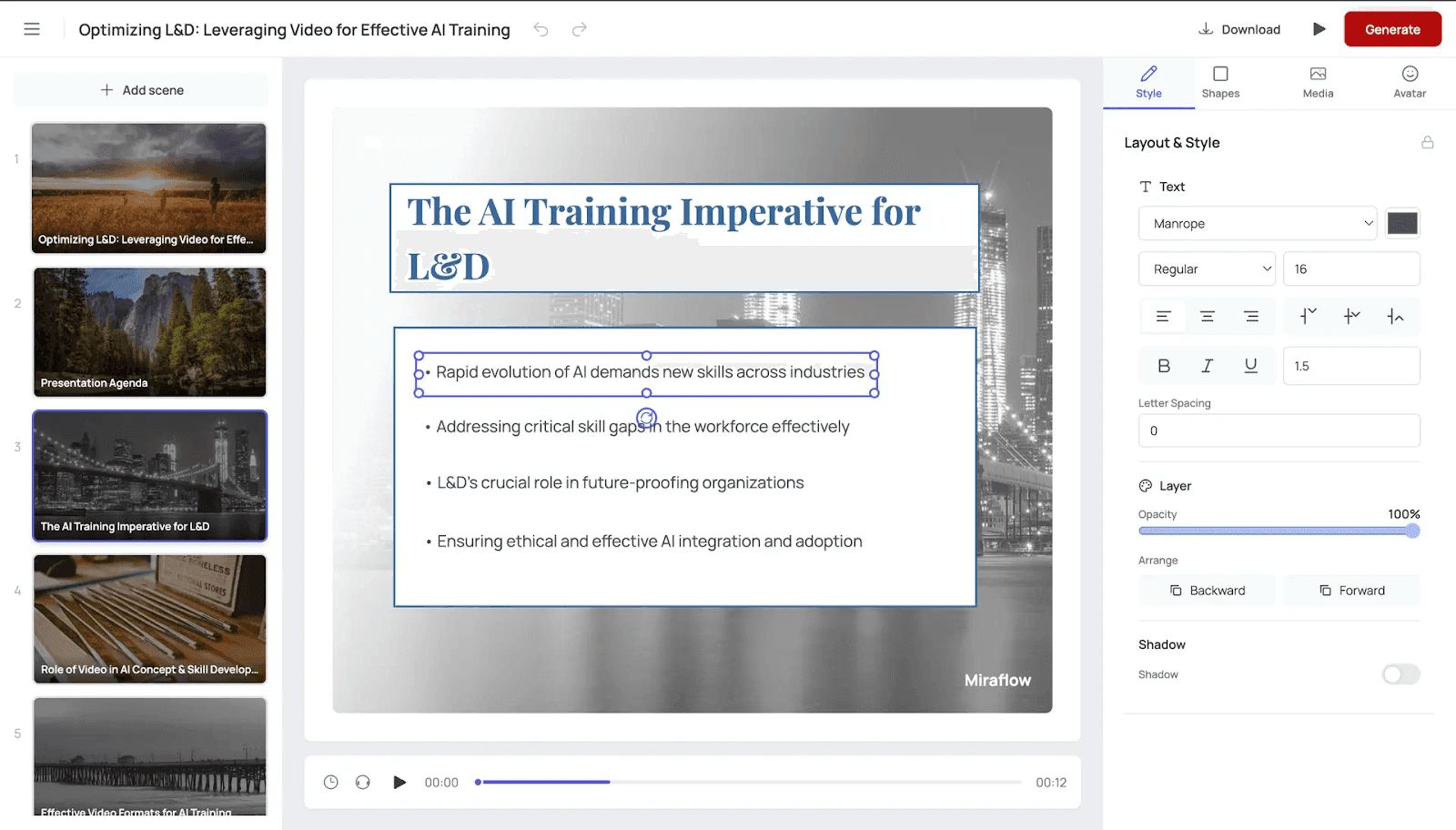
Basic platforms convert text to video with limited customization. Advanced tools let you add company branding, choose background scenes, adjust avatar positioning, include screen recordings or slides, add text overlays, insert images and graphics, and control pacing and timing.
More customization creates training that matches your brand standards and feels less generic.
Script-to-Video Workflow
The easiest platforms let you paste a script and generate video in one click. More complex tools require scene-by-scene setup, which gives you control but slows production.
Consider your team's technical skills and time constraints. Simple workflows speed up video creation but may limit creative control. Complex interfaces offer more options but require training and take longer per video.
Integration Capabilities
Training videos need to reach employees through your existing systems. Check for LMS integration (SCORM export), single sign-on support, API access for custom workflows, bulk export options, and analytics and tracking capabilities.
Platforms that integrate with your tech stack save time and improve adoption.
Content Security and Privacy
Enterprise L&D teams need platforms that protect proprietary training content. Look for SOC 2 compliance, GDPR compliance for EU employees, data encryption, user permission controls, and clear content retention policies.
Pricing Model and Scalability
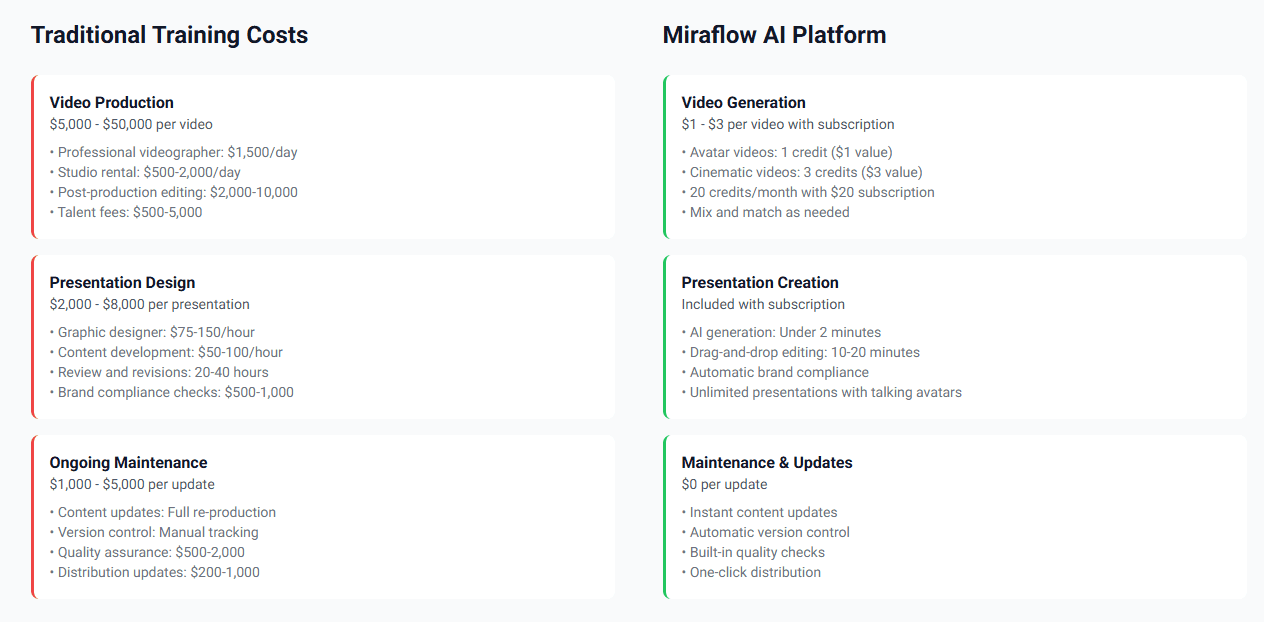
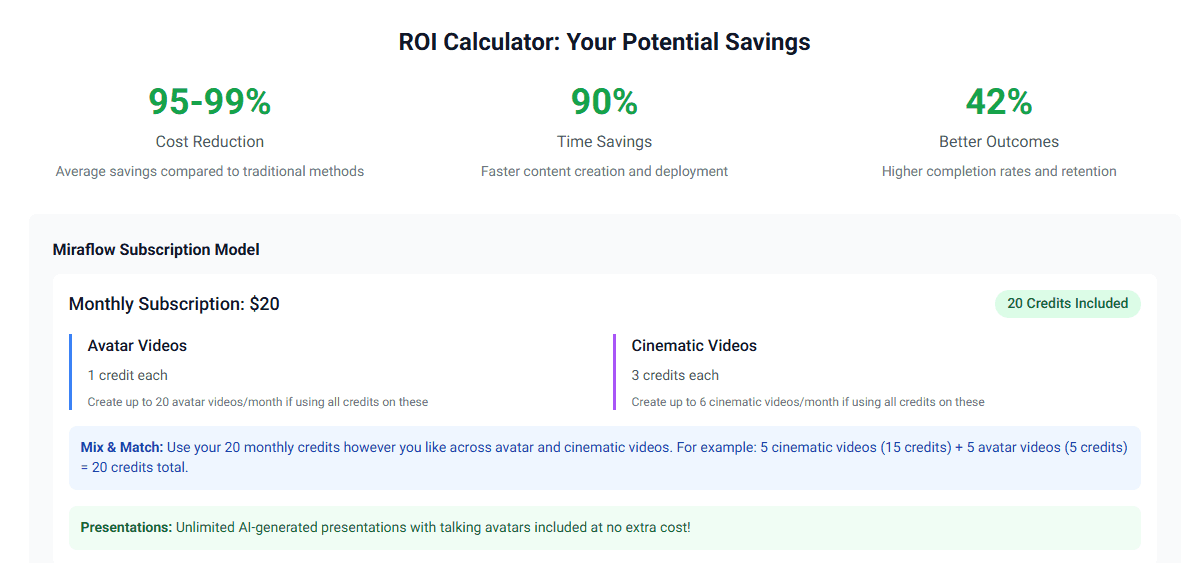
Platforms use different pricing approaches: per-video pricing, credit-based systems, monthly or annual subscriptions, user seat licenses, and tiered plans by features.
Calculate costs based on your actual usage. A platform charging per video works well if you create 10 videos per year but gets expensive at 100+ videos. Subscription models make sense for high-volume training production.
Top AI Training Video Generators Compared
Here's an objective comparison of leading AI training video generators based on real 2025 pricing and capabilities:
Key Comparison at Entry Level
| Platform | Starting Price | AI Avatars | Languages | Video Minutes | Best For |
|---|---|---|---|---|---|
| Miraflow AI | $10/month | 60+ | 30+ | Up to 10 min videos | L&D teams needing training-specific features |
| Synthesia | $18/month (annual) | 125+ | 120+ | 120 min/year | Teams wanting maximum avatar variety |
| HeyGen | $29/month | 700+ | 175+ | 30 min max per video | Organizations needing extensive language coverage |
| Colossyan | $19/month (annual) | 70+ | 70+ | 15 min/month | Interactive training with quizzes |
Detailed Feature Breakdown by Platform
Miraflow AI Capabilities
- AI Avatars: 60+ at Essential, 100+ at Pro, 150+ at Team level
- Languages: 30+ at Pro level, 60+ at Team level
- Custom avatars: Photo avatars at all levels, video avatars at Pro and above
- Video length: 10 minutes at Essential/Pro, 30 minutes at Team level
- Resolution: Full HD 1080p at Team level and above
- Special features: AI training video creation, company branding, team workspaces
- Enterprise features: API access, dedicated account manager, custom templates
Synthesia Capabilities
- AI Avatars: 9 at free tier, 125+ at Starter, 180+ at Creator, 230+ at Enterprise
- Languages: 120+ languages across all paid plans
- Custom avatars: 5 personal avatars at Creator level, unlimited at Enterprise
- Video minutes: 120/year at Starter, 360/year at Creator, unlimited at Enterprise
- Special features: AI video assistant, AI dubbing, interactive videos, multiple avatars per scene
- Enterprise features: SAML/SSO, brand kits, SCORM export, 1-click translations
HeyGen Capabilities
- AI Avatars: 500+ at free tier, 700+ at paid tiers
- Languages: 30+ at free tier, 175 languages and dialects at paid tiers
- Custom avatars: 1 custom video avatar included, additional as add-ons
- Video length: 3 minutes free, 30 minutes at paid tiers
- Resolution: 720p free, 1080p Creator, 4K at Team level
- Special features: PowerPoint and PDF imports, voice cloning, photo avatars, video translation
- Processing speed: Standard free, Fast at Creator, Fastest at Team
Colossyan Capabilities
- AI Avatars: 20+ free, 70+ Starter, 170+ Business, 200+ Enterprise
- Languages: 100+ languages across all tiers
- Custom avatars: 1 instant avatar free, 3 at Starter, 10 per editor at Business
- Video minutes: 3/month free, 15/month Starter, unlimited at Business
- Special features: Interactive quizzes, branching scenarios, auto-translation, conversational avatars
- Enterprise features: Brand kits, SAML/SSO, SCORM export, unlimited translations
Miraflow AI for Learning & Development
Miraflow AI is designed specifically for L&D teams creating employee training, onboarding videos, and compliance content. The platform focuses on use cases common in corporate training rather than trying to serve every video creation need.
Pricing Structure
Miraflow offers four tiers:
Essential ($10/month)
- 100 AI actor videos per month
- 10 cinematic videos per month
- Access to 60+ advanced avatar library
- Selfie avatar creation and customization
- AI script generation
- Videos up to 10 minutes
- Watermark removal
Pro ($20/month)
- Unlimited AI actor videos
- 20 cinematic videos per month
- 100+ avatar library
- Video avatar creation capability
- 30+ languages support
- Company branding support
- Multiple aspect ratios (16:9, 9:16, 1:1)
- Videos up to 10 minutes
Team ($40/month) - Most Popular
- Unlimited AI actor videos
- 40 cinematic videos per month
- AI training video creation
- Premium product video styles
- Team workspace with 2 seats
- Unlimited photo avatar creation
- 150+ premium avatar library
- 60+ languages support
- Full HD 1080p export
- Videos up to 30 minutes
Enterprise ($150/month)
- Everything in Team plan
- API access with volume discounts
- LessonLabs (research, scripting, A-roll, B-roll, delivery)
- Onboarding, compliance, and security video templates
- Agentic AI for instant script and video generation
- Custom template designs
- Dedicated account manager
- Enterprise security and privacy
- Fastest video processing speed
L&D-Specific Features
Miraflow focuses on training use cases with features like AI training video creation at the Team level, dedicated templates for onboarding and compliance at Enterprise, and the LessonLabs system that handles the entire production workflow from research to delivery.
The platform handles common L&D workflows like creating employee onboarding videos and compliance training content without requiring video production expertise.
Best Use Cases
Miraflow AI fits these scenarios particularly well:
- L&D teams creating training videos regularly (Team plan unlimited videos)
- Organizations needing multilingual training (60+ languages at Team level)
- Companies converting existing training documents to video
- Teams wanting dedicated L&D features like compliance templates
- Organizations needing API integration for automated workflows
Synthesia for Corporate Training
Synthesia is an established AI video platform focused on enterprise and corporate training use cases. The platform offers extensive avatar options and comprehensive language support.
Pricing Structure
Synthesia offers four tiers:
Basic (Free)
- 1 editor
- 9 AI avatars
- 360 credits per month (up to 3 minutes of video)
- Limited features
Starter ($18/month billed annually, $29 monthly)
- 1 editor plus 3 guests
- 125+ AI avatars
- 14,500 credits per year (120 minutes of video annually)
- 120 minutes of AI dubbing per year
- Download videos
- AI video assistant
- Remove Synthesia logo
- Chat and email support
Creator ($64/month billed annually, $89 monthly) - Most Popular
- 1 editor plus 5 guests
- 180+ AI avatars
- 44,000 credits per year (360 minutes of video annually)
- 360 minutes of AI dubbing per year
- 5 personal avatars
- Branded video pages
- API access
- Multiple avatars per scene
- Interactive videos
- Priority support
Enterprise (Custom Pricing)
- Unlimited video minutes
- 230+ stock AI avatars
- Unlimited personal avatars
- 1-click translations into 80+ languages
- SAML/SSO
- Live team collaboration
- Brand kits
- SCORM export
- Dedicated customer success manager
- Implementation services
- Enterprise community access
Enterprise Features
Synthesia targets enterprise customers with advanced team collaboration, custom avatar creation, single sign-on integration, API access, and dedicated customer success managers.
The platform includes 120+ languages across all paid plans, more than most competitors. Voice quality remains consistent across languages, a significant advantage over platforms where English sounds professional but other languages sound robotic.
Best Use Cases
Synthesia excels for:
- Large enterprises with dedicated L&D video production teams
- Organizations needing maximum avatar variety (180+ at Creator, 230+ at Enterprise)
- Companies requiring advanced security and compliance features
- Teams creating moderate to high volumes of training content
- Global companies needing the broadest language coverage (120+ languages)
HeyGen for Video Translation
HeyGen positions itself as a video creation and translation platform with extensive language support and avatar options.
Pricing Structure
HeyGen offers three tiers:
Free
- 3-minute max video duration
- 500+ stock video avatars
- 1 custom video avatar
- 30+ languages
- 720p export resolution
- Standard processing speed
- 75+ video templates
- Watermark included
Creator ($29/month)
- 30-minute max video duration
- 700+ stock video avatars
- 1+ custom video avatars
- 175 languages and dialects
- Up to 1080p export
- Fast processing speed
- Unlimited voice cloning
- Up to 10 photo avatars
- PowerPoint and PDF imports
- Watermark removal
Team ($39/month)
- 30-minute max video duration
- 700+ stock video avatars
- 1+ custom video avatar per seat
- 175 languages and dialects
- Up to 4K export
- Fastest processing speed
- Unlimited voice cloning
- Unlimited photo avatars
- Additional custom avatars available as add-ons
Key Differentiators
HeyGen's main advantage is language coverage. With 175 languages and dialects at paid tiers compared to 30-120+ at competitors, HeyGen serves organizations with truly global workforces needing less common languages.
The platform includes PowerPoint and PDF imports, making it easy to convert existing training materials into video format. Photo avatar capability lets you create avatars from still images without video recording.
Best Use Cases
HeyGen works well for:
- Organizations needing training in less common languages (175 language coverage)
- Teams converting PowerPoint presentations to videos
- Companies wanting high-resolution output (4K at Team level)
- Organizations with limited video creation needs (30-minute max per video is sufficient)
Colossyan for Interactive Training
Colossyan focuses on interactive training content with built-in quiz and branching scenario capabilities.
Pricing Structure
Colossyan offers three paid tiers:
Starter ($19/month billed annually)
- 1 editor
- 15 minutes of video per month
- 70+ AI avatars
- 3 custom avatars plus 1 voice
- 100+ languages
- 3 auto-translations
- Multiple avatars per scene
- Unlimited viewers
- 5-minute max video duration
Business ($70/month billed annually) - Most Popular
- 1-3 editors (pricing scales with seats)
- Unlimited video minutes
- 170+ AI avatars
- 10 custom avatars plus 2 voices per editor
- 100+ languages
- 10 auto-translations per month
- 4 interactive videos per month (quizzes and branching)
- 10-minute max video duration
Enterprise (Custom Pricing)
- Custom number of editors
- Unlimited features (quizzes, branching, translations)
- 200+ AI avatars
- Brand kits
- SAML/SSO
- SCORM export
- Custom max video duration
Interactive Training Features
Colossyan's differentiation comes from built-in interactivity. The platform supports quizzes and branching scenarios natively, letting you create training where learner responses determine what content they see next.
Auto-translation converts existing videos to new languages (10 per month at Business, unlimited at Enterprise). This differs from competitors where you typically regenerate videos for each language.
The platform supports conversational avatars in beta, allowing real-time conversations with AI presenters rather than just pre-recorded content.
Best Use Cases
Colossyan fits:
- Organizations prioritizing interactive training with quizzes
- Teams needing branching scenarios based on learner choices
- Companies wanting built-in translation workflows (10/month at Business level)
- L&D teams creating scenario-based compliance training
- Organizations requiring SCORM export for LMS integration
Pricing Comparison: Real Usage Scenarios
Here's how costs compare for typical L&D training needs:
Scenario 1: Small Team Creating 50 Videos Per Year (About 4 Per Month)
Miraflow AI:
- Pro plan: $20/month x 12 = $240/year
- Includes unlimited AI actor videos
- Cost per video: $4.80
Synthesia:
- Starter plan: $216/year ($18/month annual billing)
- Includes 120 minutes of video per year
- Assuming 3-minute average videos = 40 videos
- Need Creator plan for 50 videos: $768/year
- Cost per video: $15.36
HeyGen:
- Creator plan: $29/month x 12 = $348/year
- Unlimited videos up to 30 minutes each
- Cost per video: $6.96
Colossyan:
- Starter plan: $228/year ($19/month annual billing)
- Limited to 15 minutes per month = 180 minutes per year
- Assuming 3-minute videos = 60 videos possible
- Cost per video: $3.80
Scenario 2: Mid-Size Company Creating 200 Videos Per Year
Miraflow AI:
- Team plan: $40/month x 12 = $480/year
- Unlimited AI actor videos
- Cost per video: $2.40
Synthesia:
- Creator plan: $768/year
- 360 minutes per year = 120 three-minute videos
- Need Enterprise plan for 200 videos (custom pricing)
- Estimated $3,000-5,000/year
- Cost per video: $15-25
HeyGen:
- Team plan: $39/month x 12 = $468/year
- Unlimited videos
- Cost per video: $2.34
Colossyan:
- Business plan: $840/year ($70/month annual billing)
- Unlimited video minutes
- Cost per video: $4.20
Scenario 3: Enterprise Creating 1,000+ Videos Per Year
Miraflow AI:
- Enterprise plan: $150/month x 12 = $1,800/year
- Includes API access, dedicated support
- Cost per video: $1.80
Synthesia:
- Enterprise plan: Custom pricing
- Unlimited videos with enterprise features
- Estimated $5,000-10,000/year based on needs
- Cost per video: $5-10
HeyGen:
- Team plan: $468/year
- May need volume agreements for processing priority
- Cost per video: $0.47
Colossyan:
- Enterprise plan: Custom pricing
- Unlimited features
- Estimated $3,000-8,000/year
- Cost per video: $3-8
Choosing the Right AI Training Video Generator
Select the best AI training video generator based on your organization's specific requirements:
Choose Miraflow AI if you need:
- L&D-focused features and training video templates
- Unlimited video creation at reasonable monthly cost ($20-40/month)
- Dedicated training features (compliance, onboarding templates at Enterprise)
- API access for workflow automation (Enterprise level)
- Strong multilingual support (60+ languages at Team level)
- Team collaboration (2 seats at $40/month Team plan)
Best fit: L&D teams creating regular training content who want training-specific features without paying enterprise pricing. The Team plan at $40/month offers excellent value for unlimited videos with 60+ languages.
Choose Synthesia if you need:
- Maximum avatar variety (180+ at Creator level)
- Extensive language support (120+ languages)
- Enterprise-grade security and compliance (SAML/SSO, brand kits)
- Interactive videos with multiple avatars per scene
- Established platform with proven enterprise track record
Best fit: Enterprise organizations with bigger budgets ($768+/year minimum for meaningful usage) needing advanced security features and extensive avatar libraries.
Choose HeyGen if you need:
- Broadest language coverage (175 languages and dialects)
- High-resolution output (4K at Team level)
- PowerPoint and PDF conversion to video
- Photo avatar creation from still images
- Unlimited video creation at competitive pricing ($29-39/month)
Best fit: Global organizations needing training in less common languages or teams regularly converting presentations to videos. Good value for high-volume production.
Choose Colossyan if you need:
- Built-in interactive quizzes and branching scenarios
- Auto-translation workflow (10/month at Business level)
- Conversational AI avatars (beta feature)
- SCORM export for LMS integration
- Scenario-based training content
Best fit: Organizations prioritizing interactive training where learner responses determine content paths. The built-in quiz and branching features justify higher pricing if interactivity is critical.
Decision Framework
Answer these questions to narrow your choice:
How many videos will you create monthly?
- Under 10: Any platform works, choose by features needed
- 10-50: Miraflow Pro ($20/month) or HeyGen Creator ($29/month) for unlimited
- 50+: Miraflow Team ($40/month) or HeyGen Team ($39/month) for best value
How many languages do you need?
- 1-5: Any platform works
- 5-30: Miraflow (60+ languages at $40/month)
- 30+: HeyGen (175 languages) or Synthesia (120+ languages)
Do you need interactive training?
- Yes, critical: Colossyan (built-in quizzes and branching)
- Nice to have: Synthesia (interactive videos at Creator level)
- No: Miraflow or HeyGen (better value without interactivity features)
What's your monthly budget?
- Under $30: Miraflow Pro ($20) or HeyGen Creator ($29)
- $30-100: Miraflow Team ($40), HeyGen Team ($39), Synthesia Creator ($64 annual)
- $100-200: Miraflow Enterprise ($150), Synthesia Creator ($89 monthly)
- $200+: Enterprise plans with custom features
Do you need API access?
- Yes: Miraflow Enterprise ($150/month) or Synthesia Creator ($64/month)
- No: Lower-tier plans sufficient
Ready to create professional training videos for your L&D programs? Miraflow AI specializes in employee training, onboarding, and compliance videos with 60+ languages and unlimited video creation starting at $20/month.