The Ultimate Duct Tape Prompt Guide: Viral Prompts That Actually Work

Written by
Jay Kim
Learn how to write Duct Tape (GPT Image 2) prompts that go viral. This guide shares 15 proven prompt templates optimized for text rendering, world knowledge, and photorealism — the three capabilities that separate Duct Tape from every other AI image model.
The "Duct Tape" model, the community nickname for OpenAI's leaked GPT Image 2 changes what is possible with a single prompt. Text rendering that actually works. The yellow filter problem from GPT-Image-1 appears to be fixed. Text sits inside scenes correctly instead of floating awkwardly on top of them.[1] World knowledge that shows. The model does not just know what things look like aesthetically. It knows what they look like specifically.[1]
If you have used Nano Banana or GPT Image 1.5, you already have a foundation. But the Duct Tape model rewards a completely different type of prompt. The prompts that went most viral from the Duct Tape leak are not the dreamy portraits or aesthetic film shots that dominated earlier models. They are screenshots that look indistinguishable from real software, product packaging with perfectly readable labels, and game worlds that contain accurate real-world geography.
This guide breaks down how the Duct Tape model interprets prompts differently, why certain styles consistently produce viral results, and — most importantly — shares 12+ proven prompt templates you can copy, tweak, and use immediately.
Why Duct Tape Prompts Feel Different From Nano Banana
The Nano Banana Prompt Guide (which you can read here) emphasized thinking like a photographer: describe what the camera sees, use lighting cues, and give the model room to interpret. That still applies. But the Duct Tape model adds an entirely new dimension: world knowledge and text accuracy.
This is where GPT Image 2 surprised people most. One tester prompted the model with "average engineer's screen" and got back a monitor setup that looked like it came from a real software developer's desk with realistic browser tabs, familiar UI patterns, and contextually appropriate content on the screen. That's not just artistic style. That's knowledge about what the world actually looks like.[4]
With Nano Banana, the best prompts described how things should look. With Duct Tape, the best prompts describe what specific real things are — and the model fills in the visual accuracy from its own training data.
This means two things for your prompts:
You can be more specific about real-world references. Name real platforms, real stores, real interfaces. If you want a store interior, name the type of store. If you want a UI screenshot, reference a real platform or pattern. GPT-Image-2 appears to have been trained on large volumes of real-world visual data, and outputs are strongest when prompts align with things that actually exist in that training data.[4]
You should explicitly request text when you want it. Text rendering is a headline strength of GPT-Image-2, but you still need to ask for it. If your image needs text labels, signage, or UI copy, include them explicitly in your prompt with positioning context. "Label on the left side reading 'Cardiopulmonary'" is more reliable than hoping the model figures out placement on its own.[4]
How Duct Tape Interprets Prompts
The Nano Banana guide taught you to think in visual blocks: subject, setting, camera, lighting, mood. That framework still works for Duct Tape, but it needs three additions.
Text block. If your image needs readable text — labels, signs, UI copy, headlines, handwriting — spell it out explicitly in your prompt. Use quotation marks around the exact words you want rendered. Include placement cues: "centered at the top," "on the left side," "inside the speech bubble."
Text inclusion requires highly specific instructions, including quotation marks or ALL CAPS for the text itself, along with font style, size, color, and placement. For brand names or uncommon words, spelling them out letter-by-letter ensures accuracy. For example: "Add the headline 'WEEKLY PLAN' in bold sans-serif, white, centered at the top, 72pt. No other text."[4]
Context block. Instead of describing a generic scene, reference a specific real-world thing. "A YouTube video page" is better than "a video streaming interface." "An IKEA store exterior" is better than "a blue-and-yellow furniture store." GPT Image 2 knows what IKEA looks like down to the font, the facade lighting, and the entrance sign. That's world knowledge, not guesswork.[2]
Format block. Early community testers found that including "Format: 16:9" in prompts reliably triggered widescreen output. GPT-Image-2 is expected to natively support higher resolutions and multiple aspect ratios. Experimenting with aspect ratio early in your workflow will save iteration time later.[4]
Your updated prompt formula for Duct Tape:
Subject → Context → Text → Action → Style → Camera → Lighting → Format → Constraints
You will see this pattern repeated in every prompt template below.
How to Write Duct Tape Prompts Efficiently
The workflow from the Nano Banana guide still applies: start with a proven template, change only what matters, and build a prompt library over time. But Duct Tape adds one important habit:
Always specify the text you want rendered. This is the single biggest difference between a good Duct Tape prompt and a bad one. The model can render text that is clean, correctly spelled, and positioned naturally within the scene. But it needs you to tell it exactly what to write, where to write it, and how it should look.
Use real-world anchors. Rather than describing a generic environment, name a specific brand, platform, or type of location. The model's world knowledge activates when it recognizes what you are referring to.
Include "Format: 16:9" for widescreen. This is a confirmed trigger for native widescreen output in the Duct Tape model, and it produces more cinematic, professional-looking results for many use cases.
Use quotation marks around all text. When you want specific words rendered in the image, always put them in quotes inside your prompt. This signals to the model that these words should appear exactly as written.
Prompt Formula That Works Consistently
Most viral Duct Tape prompts follow this order:
Subject → Context → Text Content → Style → Camera → Lighting → Format → Constraints
The key difference from Nano Banana: the Text Content and Context blocks are now critical components, not optional extras. The prompts below are optimized for the Duct Tape model's signature strengths.
1. Fake App Screenshot (UI Mockup)
Perfect for product designers, developers, and social media content about tech.
This was the category that made the AI community stop scrolling. The leaked models showed particular strength on interface screenshots and game UIs. A prompt for "top-down strategy game about optimizing an AI data center" reportedly made Nano Banana Pro look a full generation behind. This suggests the training data included a significant volume of screen recordings and UI captures which makes the model unusually capable for anyone building product mockups, app demos, or game assets.[4]
Example Duct Tape Prompt:
Generate a photorealistic screenshot of a mobile fitness tracking app displayed on an iPhone 16 Pro screen.
The app shows a dashboard with today's step count reading "12,847 steps", a circular progress ring at 85% completion, a heart rate graph with the label "Resting HR: 62 bpm", and a weekly activity summary bar chart.
The phone is held naturally in a person's right hand, with a gym background slightly blurred behind it.
Clean UI design with dark mode enabled. Realistic screen glow. Shallow depth of field.
Format: 9:16.
Why it works: Naming a specific device (iPhone 16 Pro), including exact numbers and labels, and specifying UI elements like "dark mode" and "circular progress ring" activates the model's world knowledge about what real fitness apps look like. The text block ensures all data renders correctly.
2. Product Packaging with Readable Labels
Perfect for e-commerce, brand mockups, and marketing teams.
Duct Tape AI is widely discussed for sharp text rendering, steadier hands and objects, and a stronger grasp of retail packaging, transit ads, and editorial compositions.[1]
Example Duct Tape Prompt:
Create a photorealistic product photo of a premium skincare bottle on a marble countertop.
The label reads "LUMIÈRE — Vitamin C Brightening Serum" in elegant serif typography, with "30ml / 1.0 fl oz" below the brand name and "Dermatologist Tested" in small text near the bottom of the label.
The bottle is frosted glass with a gold dropper cap. Soft key light from the upper left with a subtle warm glow. Clean white studio background with soft shadow.
Photorealistic. Commercial photography style.
Format: 16:9.
Why it works: The leaked models produced text that testers described as "near-perfect" and "finally usable." Text appeared naturally on signs, product labels, code snippets, UI mockups, and even handwritten medical notes with convincing penmanship.[6] Product-style language combined with exact label copy gives the model everything it needs to render clean, believable packaging.
3. Branded Storefront at Night (World Knowledge)
Perfect for proving the model's contextual accuracy and creating viral "is this real?" posts.
Where GPT-Image-1 often defaulted to generic aesthetics, GPT-Image-2 demonstrates what early testers described as genuine world knowledge: IKEA storefronts at night rendered with architectural accuracy, YouTube and Windows interfaces reproduced closely enough to pass as real screenshots, and Minecraft scenes with correct in-game UI and art style.[3]
Example Duct Tape Prompt:
A photorealistic street-level photograph of a Trader Joe's grocery store exterior at twilight.
The storefront shows the hand-painted wooden sign reading "Trader Joe's" in the brand's signature red lettering, string lights along the awning, a chalkboard sidewalk sign reading "New! Spicy Mango Salsa — $3.99", and shoppers walking in with reusable bags.
Warm golden light from inside the store contrasting with cool blue-hour sky. Wet sidewalk reflecting the storefront lights. Shot from across the street with a 35mm lens.
Photorealistic, cinematic. Format: 16:9.
Why it works: This is a world knowledge stress test. The model needs to know what a specific store's signage, architectural style, and visual character look like — not just generate a "generic grocery store." Adding the chalkboard sign tests text rendering on a non-standard surface. The wet sidewalk reflection tests spatial reasoning.
4. Game UI Screenshot (League of Legends)
Perfect for gaming content, esports coverage, and demonstrating pixel-perfect UI accuracy.
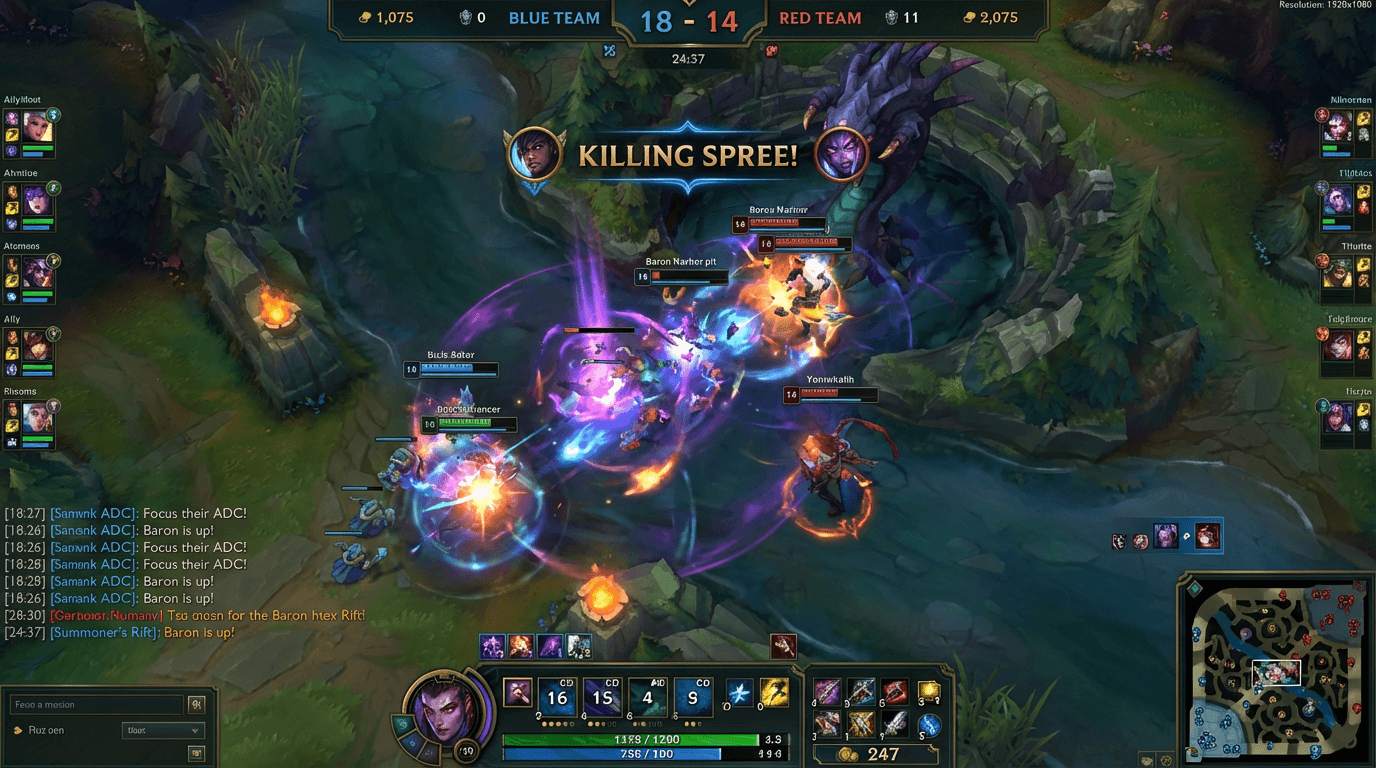
We asked the model to generate a full League of Legends ranked match screenshot — complete with HUD, minimap, kill score, cooldown timers, and chat box. Every single text element came back legible. Every icon sat in the right place. This is a pixel-perfect recreation of a UI that would have been unreadable gibberish six months ago.
This was not a loose interpretation or a "vaguely game-like" image. It was an exact recreation of a specific game's interface — one that millions of players would recognize and scrutinize immediately. That is the Duct Tape difference: the model does not approximate. It knows.
Example Duct Tape Prompt:
Generate a photorealistic in-game screenshot of a League of Legends ranked match on Summoner's Rift.
The player's champion is Jinx, positioned in the bot lane mid-teamfight, with ability VFX visible.
Include the complete HUD: ability icons (Q/W/E/R) with cooldown timers at the bottom center, a minimap in the bottom right showing allied and enemy champion positions, a kill scoreboard at the top center reading "14 – 9", item slots showing completed items, health and mana bars below the champion, and a level indicator reading "Lv. 13".
The chat box in the bottom left shows three messages:
"[All] DarkViper99: gg wp"
"JungleGap42: baron in 30"
"xMidDiff: nice ult jinx"
Gold count reads "12,450 g". Game timer reads "27:14".
Correct League of Legends art style, UI layout, and color scheme. Sharp, vibrant, gameplay screenshot aesthetic.
Format: 16:9.
Why it works: League of Legends is one of the most visually documented games in existence — the model's training data almost certainly includes millions of screenshots, streams, and esports broadcasts. The prompt leverages this by naming exact HUD elements (minimap, cooldown timers, kill scoreboard, chat box) with specific values. This is not "make a game screenshot." This is "reconstruct a specific game's entire visual system from memory." The chat box text, gold count, and game timer are pure text-rendering stress tests layered on top of the UI accuracy test.
5. Action Figure in Blister Pack (Text-Enhanced)
The action figure trend went massively viral in 2025-2026. ChatGPT's image generation feature has sparked a new wave of personalised digital creations, with LinkedIn users leading a trend of turning themselves into action figures. The craze began picking up momentum after the viral Studio Ghibli-style portraits sees users sharing images of themselves as boxed dolls — complete with accessories and job-themed packaging.[1] But previous models struggled with the packaging text. Duct Tape solves this.
Example Duct Tape Prompt:
Create a hyper-realistic premium collectible action figure inside a sealed plastic blister pack.
The figure is a female software engineer wearing a dark hoodie, glasses, and sneakers, posed standing with a laptop tucked under one arm and a coffee mug in the other hand.
The blister pack header reads "TECH TITAN — Senior Developer Edition" in bold white letters on a dark blue background, with a small yellow sticker reading "INCLUDES: Laptop, Coffee, Debugging Powers" in the bottom right corner of the packaging.
Accessories displayed in separate compartments on the right side: a miniature monitor, a rubber duck, and a stack of Post-it notes.
Product display lighting. Glossy vinyl texture. Photorealistic finish.
Format: 4:5.
Why it works: The action figure format already proved viral, but Duct Tape's text rendering transforms it. The packaging header, sticker text, and accessory labels all render cleanly — turning what was previously a fun novelty into something that genuinely looks like a real product photo. The specificity of the accessories and job details makes it personal and shareable.
6. Studio Ghibli–Style Movie Poster (Artistic Style)
Perfect for testing whether the model understands visual language, not just visual accuracy.
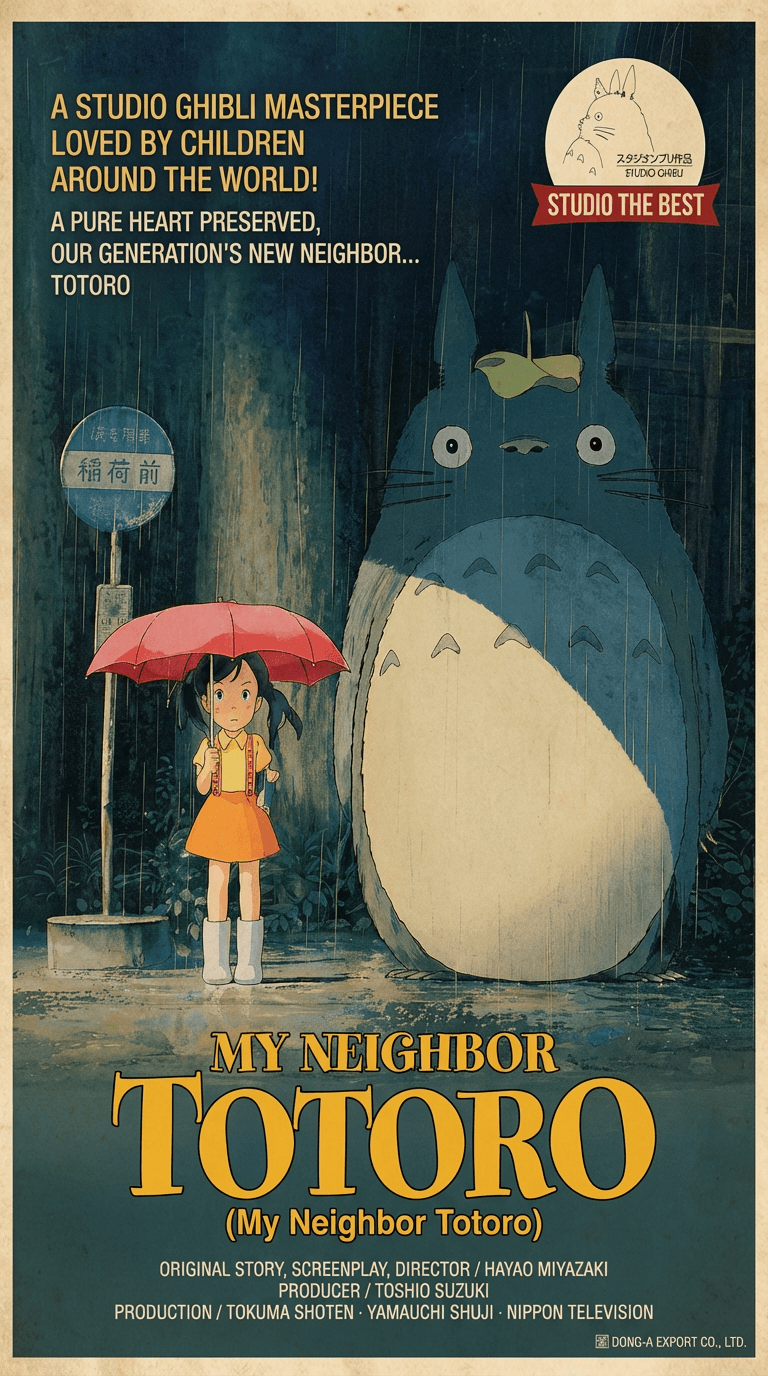
We shifted to artistic style for this test, prompting a Totoro-inspired movie poster to see if the model understood the hand-painted warmth and compositional balance of Studio Ghibli's visual language — and it nailed it. GPT Image 2 doesn't just have technical skill. It has genuine stylistic comprehension.
This is what separates "artistic style" from "filter." Nano Banana can apply a Ghibli-like color palette. Duct Tape understands the principles underneath: the way Ghibli compositions balance a large, gentle creature against small human figures; the way background foliage is layered with atmospheric perspective; the way title text integrates into the poster as part of the visual design rather than sitting on top of it.
Example Duct Tape Prompt:
Create a hand-painted movie poster in the visual style of a classic Studio Ghibli film.
The central figure is a large, gentle forest spirit — round and soft, with gray fur, a wide peaceful expression, and small pointed ears — standing in a lush green meadow at the edge of an ancient forest.
Two children stand at its feet looking up in wonder: a girl in a yellow raincoat and a younger boy clutching a small cloth bag.
The background shows layered hills, towering camphor trees, and soft atmospheric haze fading into a pale blue sky with scattered cumulus clouds.
The movie title "MY NEIGHBOR TOTORO" is rendered vertically in hand-brushed calligraphy on the right side of the poster. Below the title, smaller horizontal text reads "(My Neighbor Totoro)" in elegant serif English lettering.
Warm, nostalgic watercolor palette with soft greens, earthy browns, and golden afternoon light filtering through the canopy.
Hand-painted texture throughout — visible brushstrokes, soft edges, and the luminous quality of gouache and watercolor on paper. No digital sharpness.
Format: 9:16.
Why it works: This prompt does not say "make it look like Ghibli." It describes the compositional principles that define Ghibli's poster art: the scale relationship between a large gentle creature and small human figures, the layered atmospheric background, the integration of calligraphic title text into the composition, and the hand-painted warmth of gouache and watercolor. The dual-language title (Japanese calligraphy and English serif) is a text rendering challenge wrapped inside an artistic style challenge. The model must render hand-brushed Japanese characters that look painted — not typed — while maintaining the visual harmony of the overall poster.
7. Restaurant Menu Board / Cafe Scene
A food-focused setup used to inspect menu text, price blocks, lighting, and material detail in a commercial composition.[1]
Example Duct Tape Prompt:
A photorealistic close-up of a hand-lettered chalkboard menu inside a cozy artisan coffee shop.
The menu reads:
"ESPRESSO — $3.50"
"CORTADO — $4.00"
"LAVENDER LATTE — $5.50"
"MATCHA COLD BREW — $5.00"
Below the drinks: "All drinks made with locally roasted beans"
The text is written in white and pastel chalk with clean, decorative hand-lettering style.
Background shows warm bokeh lights, exposed brick, and a wooden counter with a stacked ceramic mug display.
Soft warm lighting. Shallow depth of field focusing on the chalkboard.
Photorealistic, editorial food photography style.
Format: 4:5.
Why it works: Duct Tape AI is especially useful when you need headlines, labels, menus, or packaging copy that stays closer to the requested wording.[1] Menu boards combine text rendering (prices, drink names) with world knowledge (what a real artisan coffee shop looks like). The handwritten chalk lettering style is a particularly challenging text rendering task that Duct Tape handles well.
8. Medical Illustration with Anatomical Labels
A full body medical illustration came out with musculature, vascular detail, and anatomical labels that sat exactly where they should.[4]
Example Duct Tape Prompt:
A detailed medical illustration of the human heart, viewed from the anterior aspect.
Include clear anatomical labels with thin leader lines pointing to:
"Right Atrium", "Left Atrium", "Right Ventricle", "Left Ventricle", "Aorta", "Pulmonary Artery", "Superior Vena Cava", and "Inferior Vena Cava."
The heart is rendered in realistic color with visible vascular detail, clean muscle texture, and accurate proportions.
Background: clean white with a subtle gradient.
Labels in clean sans-serif font, black text, with consistent font size and spacing.
Medical textbook illustration style. No watermark.
Format: 1:1.
Why it works: Medical illustrations are one of the hardest tests for any image model because the text must be precisely positioned, the anatomy must be correct, and the labels must connect to the right structures. Its breakthroughs in text rendering and world knowledge mean that AI-generated images will become significantly more practical for commercial use cases like product photography, posters, and UI design.[4] This prompt produces results that are genuinely usable for educational materials.
9. Fake Website Landing Page (UI Accuracy)
Perfect for demonstrating that AI-generated interfaces have crossed the uncanny valley.
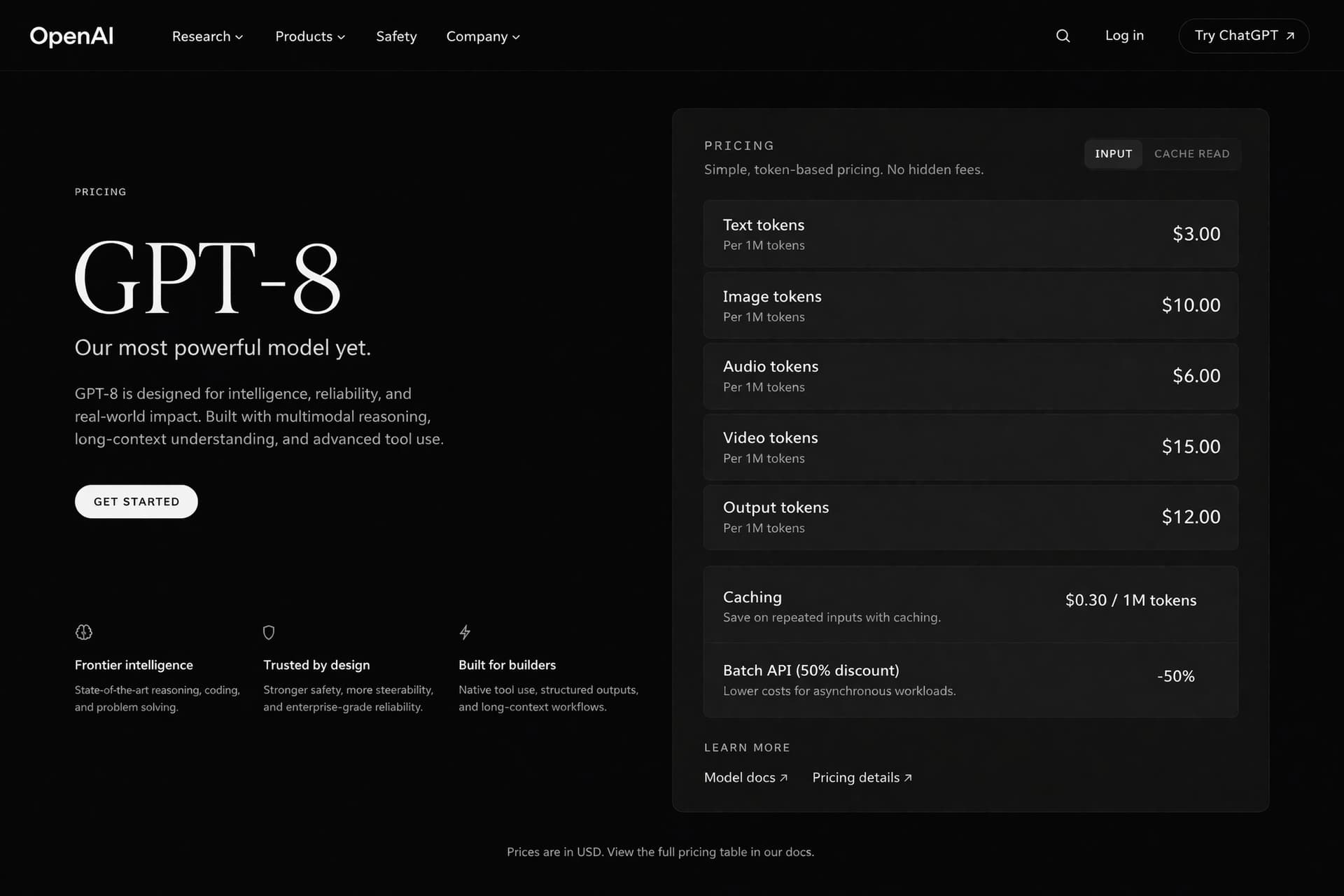
For this test, we generated a fake OpenAI landing page inside a browser frame — headline, trusted-by logos, the whole homepage formula. The result is unsettling precisely because it looks completely ordinary, like a real website with correctly spelled text and a functional-looking layout.
This is not "an artistic interpretation of a website." This is "a screenshot that you would scroll past on Twitter without questioning whether it was real." The model understands not just what a landing page looks like, but what makes a landing page look legitimate — the spacing, the hierarchy, the trust signals, the way a navigation bar sits at the top and a CTA button draws your eye.
Example Duct Tape Prompt:
Generate a photorealistic desktop browser screenshot showing a modern AI company's landing page.
The browser is Google Chrome with three tabs open. The active tab title reads "OpenAI — Pioneering Safe AI".
The page layout from top to bottom:
A clean white navigation bar with the OpenAI logo on the left and menu items "Research", "Products", "Safety", "Company" on the right, with a black "Try ChatGPT" button at the far right.
A large hero section with a centered headline reading "Building safe AGI that benefits all of humanity" in bold black sans-serif on a white background, with a subheadline reading "Our mission is to ensure that artificial general intelligence benefits all of humanity." below in gray text.
A "Trusted by" logo bar showing six grayscale company logos in a horizontal row.
A three-column feature section below with icon cards for "ChatGPT", "API Platform", and "Research".
Clean modern SaaS design. Correct browser chrome including address bar showing "openai.com", back/forward buttons, and bookmark bar.
Realistic LCD screen rendering with subtle antialiased text. Natural desk environment slightly visible around the monitor edges.
Format: 16:9.
Why it works: This prompt is a pure UI accuracy test. It requires the model to reconstruct not just a website, but a specific type of website — the modern SaaS landing page — with every visual convention in the right place: navigation hierarchy, hero section layout, trust-signal logo bar, feature card grid. The browser chrome frame adds another layer: the model must render a Chrome interface with correct tab styling, address bar, and window controls. The reason this result is so unsettling is that there is nothing "AI-looking" about it. It looks mundane. That's the point — and that's the capability leap.
10. Watch with Correct Time
This one went viral for a very specific reason. One user found that packingtape-alpha correctly rendered the time on a watch, something Nano Banana Pro botched.[7]
Duct Tape Prompt:
A photorealistic close-up of a luxury wristwatch on a person's wrist.
The watch face shows the time as 10:10 with both hour and minute hands positioned correctly.
The watch is a stainless steel chronograph with a dark blue dial, three subdials, date window reading "16", and the brand name "MERIDIAN" at the 12 o'clock position.
The person's wrist rests on a dark wooden desk next to a leather-bound notebook.
Macro photography style. Soft directional light from the upper left with visible reflections on the crystal and case. Shallow depth of field.
Photorealistic, product photography. No watermark.
Format: 1:1.
Why it works: Clock and watch faces are a legendary failure point for AI image generators. The hands almost never point to the correct time, and subdial positions are usually random. Watch faces showed correctly positioned hands matching the time described in the prompt.[6] This prompt is a flex — it demonstrates the model's spatial reasoning and attention to physical detail.
11. Comic Book Panel with Speech Bubbles
Comic book panels had readable speech bubbles.[6]
Duct Tape Prompt:
Generate a four-panel comic strip in classic American comic book style.
Panel 1: A hero in a red cape stands on a rooftop at night, looking over a city skyline. No text.
Panel 2: A villain appears behind them. Speech bubble from the villain reads: "You're too late, Beacon."
Panel 3: Close-up of the hero's face turning, determined expression. Thought bubble reads: "Not this time."
Panel 4: Wide shot of both characters facing each other with energy crackling between them. Sound effect text: "KRAKOOM" in large, jagged yellow letters above them.
Bold linework, vivid colors, dramatic shadows, classic superhero comic style.
Keep characters, lighting, and color palette consistent across all panels.
Format: 16:9.
Why it works: Comic panels require multiple types of text rendering in a single image: speech bubbles with quotation-style dialogue, thought bubbles with inner monologue, and sound effect text with stylized lettering. Earlier models garbled at least one of these. Duct Tape's ability to handle all three simultaneously makes comic-style content genuinely usable.
12. Photorealistic Beach Selfie
Portraits generated by the leaked models were described as "indistinguishable from real photographs." Complex beach scenes showed accurate hand anatomy (historically a weak point for AI image generators) and realistic sunglass reflections.[6]
Duct Tape Prompt:
A photorealistic beach selfie taken at golden hour.
Two friends in their 20s are taking the photo — the person on the left holds the camera at arm's length, the person on the right leans in with their arm around the other's shoulder.
Both are wearing sunglasses that show realistic reflections of the beach and ocean in the lenses.
Correct hand anatomy on both subjects. Natural, relaxed smiles.
Warm golden-hour lighting with the sun low on the horizon behind them. Ocean and sandy beach in the background. Slight lens flare from the sun.
Casual summer outfits. Natural skin tones with no yellow color cast.
Selfie camera perspective with slight wide-angle distortion.
Photorealistic. Format: 4:5.
Why it works: Some of the generated images are getting hard to distinguish from photographs. The poster admitted they couldn't always tell whether users were uploading real camera photos to troll, or whether the generations had simply gotten that good.[7] This prompt specifically targets three historical AI failure points: hand anatomy, sunglass reflections, and natural multi-person composition. The "no yellow color cast" constraint addresses Duct Tape's fix of GPT Image 1's signature flaw.
13. Handwritten Notes / Journal Page
A handwritten notes. A Bath & Body Works storefront. A YouTube subscriptions page. Three completely different scenes. All AI generated by GPT Image 2. None of them look like it.[2]
Duct Tape Prompt:
A photorealistic overhead photograph of a handwritten journal page on a wooden desk.
The journal is open to a page with neat handwriting in blue ink that reads:
"April 16, 2026
Things I'm grateful for today:
- Morning coffee with nobody else awake
- The way the light hit the kitchen at 7am
- A long walk with no destination
- Music that understands what I can't say"
A few words are lightly underlined. The handwriting has natural imperfections and slight variations in letter size.
Next to the journal: a half-empty coffee cup, a pen with the cap off, and a small succulent plant.
Soft morning light from a window on the left side. Shallow depth of field with the journal in focus.
Warm, cozy, editorial lifestyle photography style.
Format: 4:5.
Why it works: Handwritten text is arguably the hardest text rendering challenge. It requires not just correct spelling but believable penmanship — natural letter spacing, slight imperfections, and a style that looks human. The fact that Duct Tape testers confirmed convincing handwriting output makes this a category that was previously impossible with AI image generators.
14. Anime-to-Live-Action Cinematic Still (Demon Slayer)
Perfect for anime fan communities, film concept art, and demonstrating photorealistic VFX generation.
We pushed the model into cinematic territory for this test: a live-action reimagining of Demon Slayer, with real skin textures, real fabric wrinkles, and Tanjiro's Water Breathing technique rendered as a photorealistic VFX effect swirling around the blade. The result looks like a leaked still from a Hollywood adaptation, not an AI output.
This is the prompt that convinced us Duct Tape handles photorealism differently from every model before it. Nano Banana can make something look photorealistic. Duct Tape makes something look like it was photographed on a film set. There is a difference — and it comes down to how the model renders physical materials under real lighting conditions.
Duct Tape Prompt:
Generate a photorealistic cinematic film still of a live-action Demon Slayer adaptation.
The subject is Tanjiro Kamado, portrayed as a real human actor — a young Japanese man with a subtle forehead scar, wearing Tanjiro's signature green-and-black checkered haori over a dark uniform. The fabric shows realistic wrinkles, weave texture, and weight. Hanafuda flower earrings catch the light with a small metallic glint.
He is mid-swing with his Nichirin blade, and the Water Breathing First Form technique is visualized as a photorealistic VFX effect: translucent, spiraling water trails wrapping around the blade and extending into the air, with caustic light refractions, subtle mist particles, and a faint blue glow illuminating his face from below.
Setting: a dark forest clearing at night, lit by moonlight filtering through the canopy and the blue luminescence of the water VFX. Volumetric fog drifts at ground level.
Real skin texture with visible pores, natural sweat on the forehead, and determined expression. Natural eye reflections.
Shot on anamorphic lens with subtle lens flare from the VFX light source. Shallow depth of field with the forest background softly blurred. Cinematic color grading with cool blue shadows and warm highlights on skin.
Photorealistic. Looks like a behind-the-scenes still from a $200M film production.
Format: 16:9.
Why it works: This prompt forces the model to do four things simultaneously: render a recognizable anime character as a real human (world knowledge), produce physically convincing fabric and skin textures (photorealism), generate a complex VFX effect with correct light interaction (technical accuracy), and compose everything like a professional film still (cinematic knowledge). The phrase "looks like a behind-the-scenes still from a $200M film production" is not a vague vibe — it is a reference to a specific type of image the model has seen thousands of times in its training data. The result feels real because the prompt references reality at every level.
15. Cross-IP Collaboration Landing Page (JJK × LoL)
Perfect for demonstrating the ultimate Duct Tape capability: creative synthesis across multiple intellectual properties.
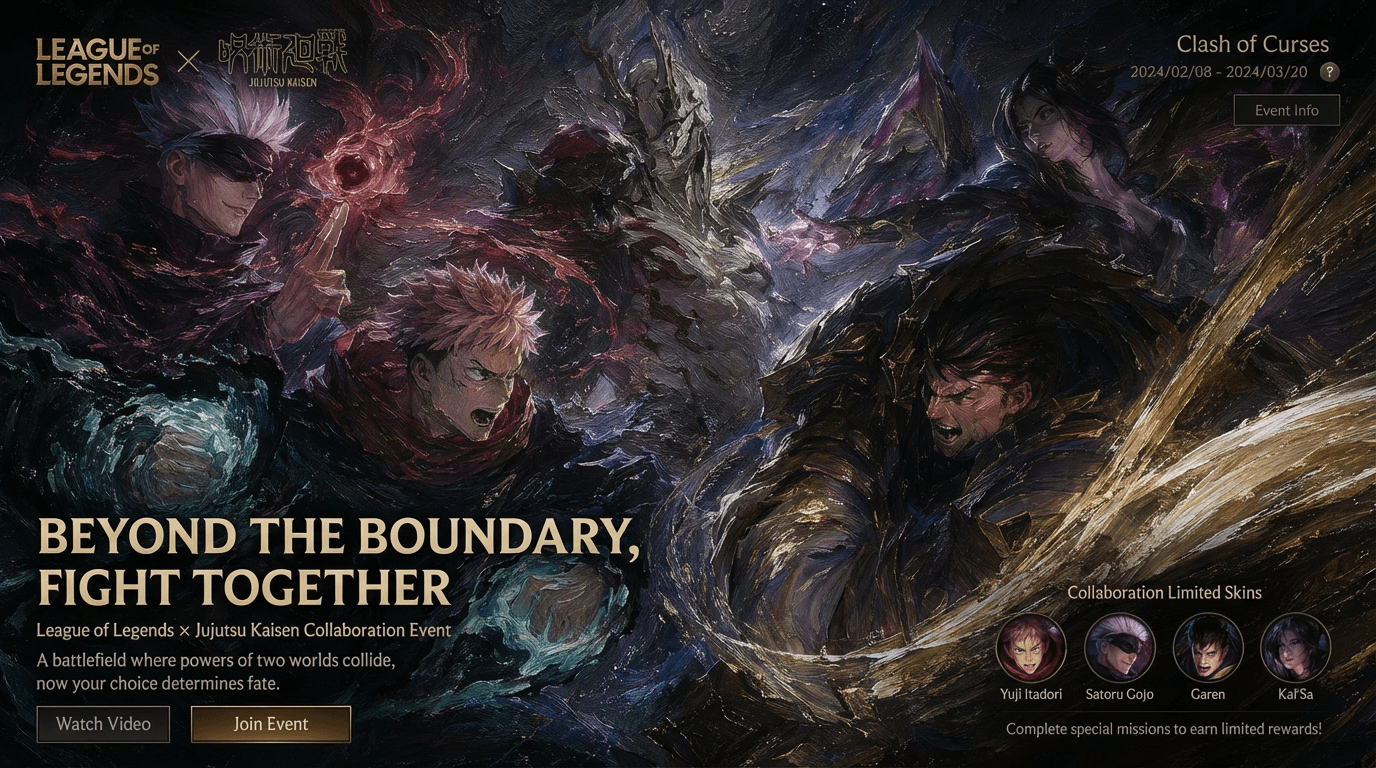
For our final test, we gave the model something that has never existed in the real world: a Jujutsu Kaisen × League of Legends collaboration landing page. This forced the model to know both IPs, understand how a game collaboration webpage is structured, and blend two completely different visual identities into one cohesive design. It produced character splash art, event branding, navigation elements, and promotional copy — arranged in a layout that looks like it was shipped by a Riot Games marketing team.
This is the test that no other model passes. It is not enough to know what League of Legends looks like. It is not enough to know what Jujutsu Kaisen looks like. The model must understand both — and then invent something new that feels authentic to both. That is cross-IP creative synthesis, and it is the capability that makes Duct Tape a fundamentally different tool.
Duct Tape Prompt:
Generate a photorealistic desktop browser screenshot of a League of Legends × Jujutsu Kaisen collaboration event landing page.
The browser is Google Chrome. The active tab reads "LOL × JJK — Cursed Rift Event".
The page layout from top to bottom:
A dark navigation bar in League of Legends' visual style with the Riot Games logo on the left, menu items "Overview", "Skins", "Missions", "Rewards" centered, and a "PLAY FREE" gold button on the right.
A full-width hero banner showing a dramatic composite splash art: Gojo Satoru in his blindfold, rendered in League of Legends splash art style, standing back-to-back with Yasuo. Gojo's Infinity technique is visualized as a swirling purple-blue energy sphere in his raised hand. Yasuo's wind trail interweaves with the cursed energy. The background blends Summoner's Rift terrain with the Jujutsu High school building.
Event logo "CURSED RIFT" centered over the splash art in a stylized font that merges League's angular aesthetic with JJK's dark cursed-energy visual motifs. Below the logo: "Limited Event — April 15 to May 12, 2026" in clean white text.
Below the hero: a horizontal character skin showcase row with four cards showing "Cursed Sovereign Gojo", "Domain Expansion Lux", "Sukuna Thresh", and "Zenin Yasuo" — each card with a small splash art preview, champion name, and skin name in League's standard card format.
A promotional text block reads: "Two worlds collide. Unlock exclusive JJK skins, cursed-energy chromas, and a limited Jujutsu Ward skin through in-game missions."
A "WATCH TRAILER" button with a play icon, and a footer with Riot Games copyright and Jujutsu Kaisen © Gege Akutami / Shueisha.
The entire page follows League of Legends' web design system: dark background, gold accent colors, hexagonal UI elements, with Jujutsu Kaisen's purple cursed-energy glow integrated into borders and hover states.
Realistic browser chrome. LCD screen rendering with subtle antialiasing. Format: 16:9.
Why it works: This is the hardest prompt in this entire guide. The model must simultaneously demonstrate five capabilities: (1) knowledge of League of Legends' visual identity, web design system, and character roster; (2) knowledge of Jujutsu Kaisen's characters, techniques, and visual motifs; (3) text rendering across multiple formats — navigation, headlines, card labels, body copy, legal text; (4) UI accuracy in recreating a real game platform's web design patterns; and (5) creative synthesis in inventing something new that feels authentic to both IPs. Every other prompt in this guide tests one or two capabilities. This one tests all five at once. If the model can produce a result that looks like it came from Riot's marketing team, it can produce almost anything.
Common Duct Tape Prompt Mistakes
Based on community testing during the Duct Tape leak, these are the most common errors that produce weak results:
Not specifying the text you want. The model can render text beautifully, but only if you tell it what to write. "A product label" will produce generic filler. "A label reading 'Organic Cold-Pressed Juice — Mango + Turmeric — 12 fl oz'" will produce something you can actually use.
Being vague when you should be specific. "A tech company website" produces generic results. "A Notion-style productivity dashboard with a task list, calendar widget, and project tracker" activates the model's world knowledge and produces something recognizable.
Forgetting aspect ratio. Include "Format: 16:9" for widescreen, "Format: 4:5" for Instagram, or "Format: 9:16" for TikTok/Reels. Select your aspect ratio (1:1, 2:3, or 3:2) in the settings menu; do not mention dimensions in your prompt.[2] However, community testers have confirmed that adding "Format: 16:9" inside the prompt text itself can trigger native widescreen output even when no settings menu is available.
Overloading text in a single image. Even though Duct Tape is dramatically better at text, packing too much copy into a single image still increases the chance of errors. Keep text elements focused. A magazine cover with 4-5 text blocks is fine. A newspaper front page with 20 headlines will strain any model.
Mixing incompatible styles. Asking for "photorealistic Minecraft" or "anime-style product photography" sends contradictory signals. The game mashup prompts above work because they commit to one visual system (Minecraft's blocky aesthetic) while adding real-world geography. Pick one style per prompt.
Skipping the "no yellow color cast" constraint for portraits. The persistent warm yellow color cast that had become a signature flaw of GPT-Image-1 appears to have been eliminated.[3] But if you are being A/B tested and might receive GPT Image 1.5 instead of Duct Tape, adding "neutral color grading, no warm yellow tint" helps ensure clean output regardless of which model you get.
Duct Tape vs. Nano Banana: When to Use Which
Both models are powerful, but they excel at different things.
Use Duct Tape when your image needs:
Readable text (labels, signs, UI, menus, packaging)
Specific real-world references (branded stores, real platforms, game UIs)
Photorealistic screenshots or interface mockups
Multiple types of content in one image (text + illustration + layout)
Widescreen (16:9) output
Use Nano Banana when your image needs:
Stylistic transformation (film looks, retro aesthetics, art styles)
Identity-preserving edits with uploaded reference photos
Fashion makeovers and cultural styling
Emotional, nostalgic imagery (hugging younger self, vintage portraits)
Quick, clean edits with image-to-image workflows
The two models complement each other. Use Nano Banana for style-driven and emotion-driven content. Use Duct Tape for text-driven and knowledge-driven content.
You can generate images for free on Miraflow AI — compare outputs side by side and build your prompt library across both models from a single dashboard.
Try Image Prompts on Miraflow AI
Once you understand how to write effective Duct Tape prompts, the next step is seeing how they actually perform. Small changes in wording, text placement, or context specificity can completely change the result — and the fastest way to learn is by generating and comparing outputs.
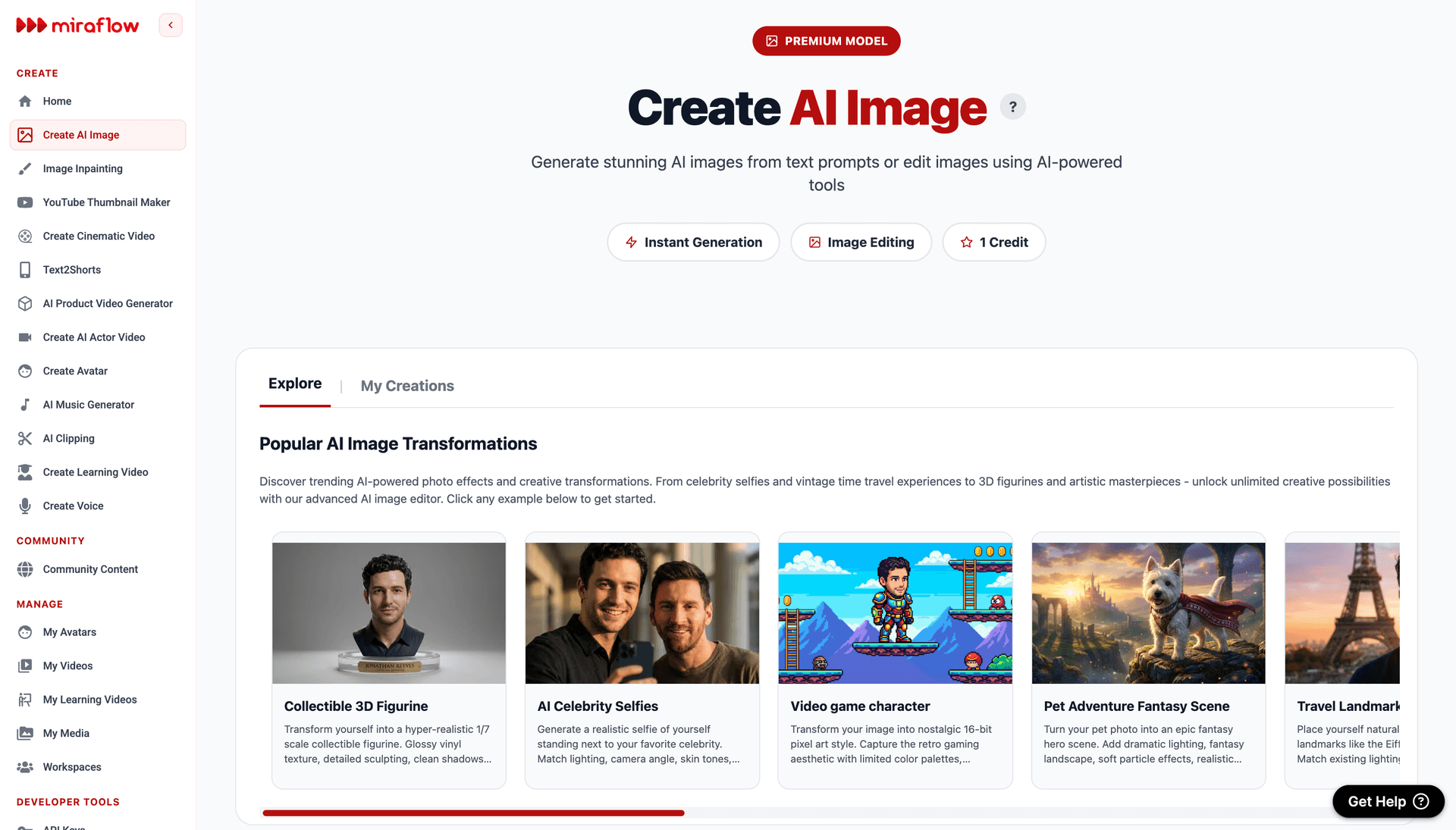
You can generate AI images for free directly on 👉 Miraflow AI
Miraflow AI lets you generate images straight from your browser, with no setup, downloads, or local installation. Just paste your prompt, upload a reference image if needed, and generate. Free credits allow you to experiment without upfront cost, making it easy to test ideas before refining them further.
With Miraflow AI, you can:
- Generate AI images directly in your browser at no cost
- Upload reference images to preserve facial features or identity
- Try different prompt styles, including the UI mockups, product packaging, editorial covers, and game mashups from this guide
- Refine prompts by adjusting text content, lighting, camera angle, or format
Start with one of the viral prompt templates above, generate an image, then make small changes to see how the model responds. Swap the brand name, change the UI layout, adjust the text, regenerate. This iterative workflow is how you build prompt intuition fast.
For creators building visual content at scale, Miraflow AI also offers cinematic video generation, AI actor videos, and a YouTube Thumbnail Maker — everything you need to go from prompt to published content in one platform.
Conclusions
The Duct Tape model responds best to prompts that are specific, text-aware, and grounded in real-world references. The prompts that went most viral during the leak were not abstract artistic prompts — they were prompts that referenced specific things the model understood deeply: real software interfaces, real storefronts, real game UIs, and real product packaging.
Use the 15 templates in this guide as starting points. Swap the subject, change the text content, adjust the context — but keep the overall structure. The Text block and Context block are the new tools in your prompt toolkit that Nano Banana prompts did not require.
The model is coming. The prompts above are designed to work the moment it arrives. And if you want to start testing them today, head to Miraflow AI and start generating. Experimenting directly with your own prompts is the fastest way to understand what Duct Tape does best — and where your creative edge comes from.
Frequently Asked Questions
What is the Duct Tape AI model?
"Duct Tape" is the community nickname for three anonymous AI image models that appeared on LM Arena on April 4, 2026, under adhesive-tape-themed codenames. Duct Tape AI is the community nickname most often linked to the duct-tape image variants spotted in blind Arena testing and discussed as a next-wave image model.[1] They are widely believed to be OpenAI's upcoming GPT Image 2.
Can I use these prompts with Nano Banana or Midjourney?
Yes, the prompt structures work across models. However, the text rendering and world knowledge prompts (UI mockups, product labels, magazine covers) will produce their best results with the Duct Tape / GPT Image 2 model. Nano Banana and Midjourney may not render text as accurately.
What is the best aspect ratio to use with Duct Tape prompts?
It depends on the platform: 16:9 for widescreen/desktop/YouTube thumbnails, 4:5 for Instagram feed posts, 9:16 for TikTok/Reels/Stories, 1:1 for profile pictures and square posts, and 2:3 for Pinterest and trading cards.
How do I make text render correctly in AI-generated images?
Always put the exact text in quotation marks. Include placement instructions ("centered at the top," "on the left side"). Specify font style and size when possible. Keep the total amount of text reasonable — 4-5 text blocks per image is a good maximum.
Are Duct Tape prompts different from Nano Banana prompts?
Yes. Nano Banana prompts focus on visual instructions: lighting, camera, mood. Duct Tape prompts add two critical blocks: Text (what specific words to render) and Context (what real-world thing to reference). Both use visual blocks, but Duct Tape rewards specificity about the world, not just about aesthetics.
Where can I try these prompts for free?
You can generate AI images for free on Miraflow AI. The platform supports image model and lets you iterate quickly with no setup required.
Related Articles:
- The Ultimate Nano Banana Prompt Guide: Viral Prompts That Actually Work
- OpenAI's "Duct Tape" Model Explained: GPT Image 2 Is Already Here and It's Terrifying
- How to Use the "Duct Tape" AI Image Model: A Complete Guide to Arena and Triggering GPT Image 2
- 10 AI Prompts for YouTube Thumbnails That Stop the Scroll
References
- GPT Image 2 Leaked: Prompts and Workflow Guide 2026
- Trending 1000 of the best duct tape Images | AI duct tape Generator
- DuctTapeAI: Free #1 Duct Tape AI Image Generator Online
- ChatGPT got another viral moment with ‘AI action figure’ trend
- ChatGPT AI Foto: The Complete Guide to GPT Image Generation and Photo Editing in 2026 - AI Journal
- 7 Best ChatGPT Image Prompts in 2026: How to Get Better AI Photos
- All Rumors About GPT Image 2 | Eachlabs
- GPT Image 2 – Online AI Image Generator | 4K & Text Rendering
- ChatGPT Action Figure Trend Goes Viral on Social Media | EasternEye
- Duct-taped (Duct Tape Style) - SeaArt AI Model
- I Did the ChatGPT Action Figure Trend
- GPT-Image-2 Leaked: OpenAI's Unreleased Model Briefly Appeared Online — Here's What We Know - Frontierbeat
- ChatGPT Caricature Trend 2026 – Complete Guide With Prompts and Examples
- CHOI on X: "🚨 Holy shxt… The rules of AI image generation just completely changed. A GPT-based model currently testing in the arena under the bizarre name 'duct-tape' is turning the global AI community upside down. What exactly did they feed this thing? → Native-level text generation https://t.co/xyNT4IvKH5" / X
- GPT Image 2 Just Leaked! | Eachlabs
- Full Interpretation of GPT Image 2 Grayscale Leak: 3 Codename Models Appear in Arena, 5 Major Capability Upgrades, and Trigger Verification Techniques - Apiyi.com Blog
- ChatGPT's New Image Generation | StartupHub.ai
- The Best ChatGPT Prompts for 2026 | by The PyCoach | Artificial Corner | Medium
- Duct Tape AI
- How I created beautiful UI with ChatGPT 4o - AI First Designer
- How to Create Viral AI Action Figure Images Using ChatGPT (Step-by-Step Guide) - Tech2Geek
- Fake ChatGPT Conversation Generator - Create screenshots
- The new ChatGPT Images is here | OpenAI
- ChatGPT Image Prompts: Viral AI Prompts Trending in 2026
- Anthro Duct Tape Gag - SeaArt AI Model
- Best AI Models for Product Mockups in 2026: What Actually Works for Realistic, Branded Results
- I regret jumping on the ChatGPT action figure trend — here's why | Tom's Guide
- GPT Image 2 Just Leaked: Everything We Know (April 2026)
- ChatGPT Caricature Trend: Make a Caricature of Yourself and Your Job + 20 Prompt Examples
- duct tape - SeaArt AI Model
- GPT Image 2 — Turn Words into Stunning Images
- Aihola
- ChatGPT hits 1.2m daily users in Korea amid Ghibli-style AI-generated image trend - The Korea Herald
- ChatGPT New Year Photo Prompts 2026 – Create AI New Year Photos with Nano Banana Pro | Media.io
- The 24 Trending ChatGPT Photo Prompt Ideas in 2026 (Easy Copy-Paste)
- Duct Tape Mockup
- GPT Image 2: Rumours, Leaks & Release Date (2026) | Summary | getimg.ai
- ChatGPT Action Figure Prompt: Here's Everything To Know About Viral Portrait Trend - Blavity
- Jin.B on X: "I’m checking out this new image model on the Arena AI site—people are calling it 'Duct Tape' and thinking it’s GPT-Image 2. The way it handles text, design, and prompts is actually insane. It took me less than a minute to realize how scary good it is #image #arenaai https://t.co/vBWn84sW2y" / X
- What Is GPT Image 2? Everything We Know About OpenAI's Next Image Model | MindStudio
- Why is everyone suddenly a doll? Newest AI trend is more than harmless fun | CBC News
- Fake Screenshot Generator | Free AI Prompt for ChatGPT & ...
- ChatGPT Image Generation in 2025: A Complete Guide | Superhuman AI
- 120+ Viral ChatGPT Image Prompts That Work (2026 Guide)
- 10+ ChatGPT Aesthetic AI Photo Editing Prompts for Viral Social Media Photos 2026 - Atlabs AI
- duct tape bondage - SeaArt AI Model
- Barbie Box Trend: How to Turn Photos Into Viral Action Figures by Using ChatGPT - Newsweek
- Fake ChatGPT Content Generator Online