How Long Should YouTube Shorts Be in 2026?

Written by
Jay Kim

Wondering how long your YouTube Shorts should be in 2026? This guide breaks down ideal lengths by content type, explains how retention really works, and shows you how to test different runtimes without burning out.
A lot has changed with YouTube Shorts in the last two years, regarding maximum length, view counting, and how the algorithm evaluates engagement. What hasn’t changed is the core question every creator asks:
“How long should my YouTube Shorts be if I want people to actually watch to the end?”
There isn’t a single magic number that works for everyone, but there are very consistent patterns across recent data. Studies from 2024–2026, along with YouTube’s own guidance, point to clear sweet spots for different types of content and show why retention matters more than raw length.
This guide breaks down:
- The current rules for YouTube Shorts length
- Why relative watch time (retention) is more important than duration
- The best-performing length ranges in 2026
- Recommended lengths by content type
- How to read your retention graph and adjust
- A practical workflow for testing different lengths without burning out
The Official Rules: How Long Can a YouTube Short Be in 2026?
First, the technical limits.
- YouTube originally capped Shorts at 60 seconds.
- In 2024, YouTube announced that Shorts could go up to 3 minutes in length in order to give more storytelling room and stay competitive with TikTok and Reels.
- Official help pages now state you can create Shorts up to three minutes, as long as the video is vertical or square and meets Shorts criteria.
However, most analytics, tooling blogs, and case studies still focus on the 15–60 second range, because that’s where the majority of successful Shorts live in practice.
So technically:
- Maximum length: up to 3 minutes (depending on region / rollout)
- Practical playground: roughly 15–60 seconds, with many hits in the 20–45 second band
Why Retention Matters More Than Length
YouTube’s recommendation systems aren’t looking for a perfect runtime. They’re watching how people behave:
- Do viewers choose to watch instead of swiping away?
- How much of the Short do they actually watch (average view duration & percentage viewed)?
- Do they rewatch, like, comment, or tap “Not interested”?
For short videos, YouTube explicitly says relative watch time (the percentage watched) is more important than raw minutes.
Some key points from recent data and guides:
- A good average view duration (AVD) on Shorts is often 60–100% of the video length, especially for videos under a minute.
- After YouTube’s March 31, 2025 update, a “view” is counted as soon as a Short starts playing or replaying, but “engaged views” (people who actually stay past the initial seconds) are what matter for monetization and meaningful retention metrics.
Translation:
- Length gives you a container
- Retention is what the algorithm cares about inside that container
A tight 25-second Short that most people watch to the end will usually outperform a 55-second Short that half your audience abandons in the middle.
What the Data Says: The Length Sweet Spots in 2024–2026
Different sources slice the numbers slightly differently, but they converge on a similar pattern:
- Many successful Shorts cluster around 15–30 seconds, where it’s easier to hit very high completion rates.
- Several 2025–2026 analyses show a strong performance band in the 20–45 second range, which is long enough to tell a story, short enough to avoid fatigue.
- One statistics roundup notes that videos under 25 seconds account for a majority of Shorts views, which suggests viewers often gravitate toward shorter, snappier content.
At the same time, not all hits are ultra-short:
- One engagement report found that 50–60 second Shorts can attract very high average view counts when they’re tightly paced and narrative-driven.
Putting that together, you can think of 2026 like this:
- 15–20 seconds: Great for single ideas, quick tips, visual gags
- 20–35 seconds: Versatile sweet spot for many niches
- 35–60 seconds: Best used for tutorials, stories, or transformations with strong pacing
- 60–180 seconds: Advanced territory; treat this more like mini long-form and only use it if your data justifies it
Recommended Lengths by Content Type
The ideal length depends a lot on what you’re doing in the Short. Here’s a practical breakdown based on recurring patterns across multiple guides and stats.

1. Quick Tips & Hacks
Recommended: 15–20 seconds
Perfect for:
- One prompt that fixes X
- Single productivity tip
- One “do this, not that” comparison
These Shorts usually perform best when:
- They focus on one clear idea
- The hook states the payoff immediately (“Here’s one shortcut to…”)
- There’s no intro, just straight into the tip
Because there’s no filler, it’s common to see 85–100%+ completion on well-executed Shorts in this range.
2. Tutorials & How-To Shorts
Recommended: 25–40 seconds
Use this range when you need 2–4 steps:
- “3 steps to clean up your audio”
- “How to remove a background in 30 seconds”
- “Simple workflow for X”
Best practices:
- Limit yourself to 3 main steps
- Use text overlays to compress explanations instead of long spoken lines
- Cut silences and speed up repetitive actions slightly
Guides aimed at creators consistently suggest that simple concepts work best at 15–30 seconds, while more involved how-tos can justify pushing closer to 40–60 seconds if pacing stays tight.
3. Entertainment & Comedy
Recommended: 18–28 seconds
Short sketches, memes, and punchline-driven Shorts tend to work best when they:
- Set up quickly
- Land the joke clearly
- End before the viewer feels the rhythm slow down
This range gives you enough room for:
- Setup (5–10 seconds)
- Build-up (5–10 seconds)
- Punchline or twist (3–5 seconds)
Because comedy is so sensitive to pacing, trying to stretch a 20-second bit into 50 seconds usually hurts retention.
4. Storytelling, Mini Vlogs
Recommended: 30–45 seconds
For day-in-the-life, behind-the-scenes, or mini story arcs:
- You need space for a clear beginning, middle, and end
- Viewers tolerate longer runtimes when beats change frequently (new visual every few seconds)
Here, the key is:
- New visual or story beat every 3–7 seconds
- No long dead zones where nothing changes
- Very clear payoff at the end (reveal, transformation, or emotional moment)
5. Repurposed Long-Form Clips
Recommended: 20–40 seconds
If you’re cutting highlights from longer videos:
- Don’t just slice out a random 55-second section
- Extract a self-contained moment with its own hook and payoff
Clip-repurposing guides often recommend 20–40 second highlights as a strong balance between context and speed, especially once you add captions and tighten gaps.
The First 3 Seconds: More Important Than Your Total Length
All of the length talk is irrelevant if your Short dies in the first three seconds.
Recent retention analyses and YouTube creator guidance both point to the same pattern:
- A huge chunk of drop-offs happen immediately if the opening frame doesn’t make sense or doesn’t promise anything interesting.
Your first 1–3 seconds need to:
- Make it obvious what this video is about
- Show something happening on screen (not just a static talking head)
- Ideally hint at the payoff (“Here’s what we’re building”, “Here’s the result”, “Here’s the mistake”)
Think of it this way:
- The first frame is your thumbnail inside the feed
- The first second decides whether someone even gives you a view that counts as “stayed to watch”
If your retention graph drops like a cliff right at the start, length isn’t the main problem, the hook is.
Loops, Replays, and Why Some Shorts Overperform
One quirk of Shorts is that retention can go over 100% when viewers replay or scrub back to rewatch certain moments. YouTube has noted that segment view counts can exceed total views because a single viewer may watch parts more than once.
This is especially common when:
- The ending circles back to the beginning (loop-like structure)
- There’s a satisfying reveal people want to see again
- Or a moment that’s slightly confusing, causing replays
From a length perspective, this means:
- Shorter videos with strong loop potential (15–25 seconds) can rack up more effective watch time than longer but less rewatchable ones.
Format Choices That Affect How Long You Can Go
Length doesn’t exist in a vacuum. A few format decisions heavily influence what length you can get away with, while keeping retention high.
1. Vertical First (9:16) Is Non-Negotiable
Guides on Shorts best practices consistently emphasize:
- True 9:16 vertical
- No black bars
- Framing designed for mobile from the start
If your visual doesn’t fill the screen or important details are too small, viewers are less likely to stay, no matter the length.
2. Captions and On-Screen Text
Multiple social video studies (YouTube, TikTok, Reels) and creator tools all converge on the same finding: captions reliably boost watch time, especially on mobile where many people watch silently.
For Shorts:
- Burned-in, high-contrast captions
- Phrase-by-phrase pacing
- Text that matches your spoken rhythm
The more readable the story is without sound, the more you can afford to go slightly longer without losing people.
3. Cut Frequency & Visual Variety
High-performing Shorts typically:
- Change shots, angles, or visual elements every 2–4 seconds
- Alternate between A-roll (you talking) and B-roll (what you’re talking about)
- Use subtle zooms, crops, or movements to keep the frame alive
If your shots stay static for too long, even a 20-second Short can feel slow. If you keep visuals changing with intent, you can go to 40–60 seconds without a massive retention penalty.
How to Use Your Retention Graph to Decide Length
YouTube Studio gives you a retention graph for each Short. This is your best coach for deciding how long your future videos should be.
Here’s what to look for:
1. The Opening Drop
- If you lose 30–50% in the first 3 seconds:
- Your hook isn’t clear or compelling enough
- Try starting later in the clip or rewriting the first line
2. Mid-Video Cliffs
- If the graph is stable and then suddenly plunges at a specific time:
- Something changed there: pacing, topic, or visual interest
- Trim or rethink that beat in future videos
3. End-Game Performance
For Shorts under ~30 seconds:
- Completion rates above 60–70% are generally strong
- Anything over 80% is excellent, especially if your Stayed to watch is also high
Rather than chasing global benchmarks, compare:
- Your own videos against each other
- Videos of similar length in your niche (YouTube provides typical retention comparisons for similar-length content).
If your 24-second tips consistently do better than your 45-second tutorials, that’s your signal, even if some blog says 45 seconds is okay.

A Practical Workflow for Testing Length
The best way to find your ideal length in 2026 is to experiment on purpose instead of guessing.
A simple system:
- Pick one format (e.g., “3 quick tips”, “one micro-tutorial”, or “POV story”).
- Choose a topic and create two versions:
- A shorter version (15–25s)
- A longer version (30–45s)
- Post both over a few days, then compare:
- Stayed to watch / “view vs swipe”
- Average percentage viewed
- Subscriber or click-through impact
If you’re using AI tools (like Miraflow AI’s Text2Shorts in your workflow), you can:
- Generate multiple script variants for the same idea at different lengths
- Let the tool structure the intro, body, and outro for a target duration
- Publish and let real audience behavior tell you which length range works best for your niche
The point isn’t to find one perfect number forever; it’s to narrow your personal sweet spot based on real data.
A simple system:
- Pick one format (for example, a 3 quick tips Short or a 30-second mini tutorial).
- Choose a topic and create two versions: A shorter version (around 15–25 seconds), A longer version (around 30–45 seconds)
- Publish them on different days and compare retention, completion rate, and engagement.
If you don’t want to manually rewrite multiple versions, this is where AI tools like Miraflow AI can speed things up.
Using Miraflow AI Text2Shorts to Test Length in Minutes
Manually scripting multiple versions of the same idea gets exhausting fast.
With Miraflow AI’s Text2Shorts, you can do the same experiment in a few minutes.
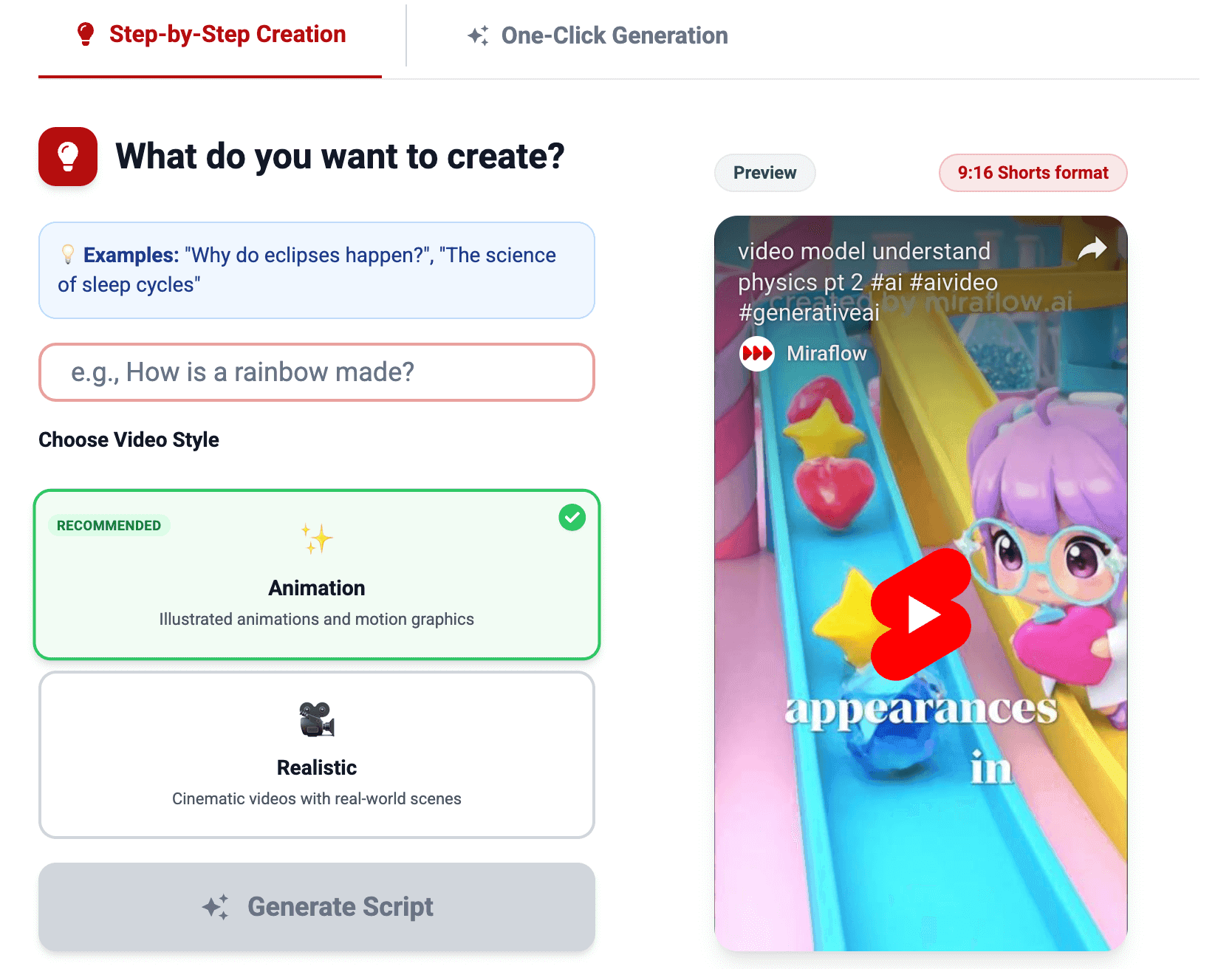
Here’s how it fits into this workflow:
1. Start with a single topic
Type your idea into Text2Shorts (for example: “Why most YouTube Shorts lose viewers in the first 3 seconds”).
2. Choose your video style and target length
Select whether you want the short to feel more realistic or animation style.
3. Generate a structured script automatically
Text2Shorts breaks your idea into a hook, core beats, and an ending that fits the length you chose. You don’t have to think about timing line-by-line, the structure is handled for you.
4. Create multiple length variants from the same idea
You can quickly generate:
- A short version (around 15–20 seconds) focused on the punchline or key insight
- A medium version (around 30–40 seconds) with extra context or examples
Because Text2Shorts is prompt-based, you’re just adjusting the brief instead of rewriting from scratch.
5. Generate visuals and finalize the Short
Once the script feels right, you can let Miraflow handle visuals as well, using AI video generation to produce vertical clips that match the script, and Nano Banana for thumbnails or supporting images.
6. Publish and let the data decide
Upload both versions to YouTube Shorts, then watch the retention graphs in YouTube Studio. You’ll quickly see whether your audience prefers the tighter or slightly longer format for that topic.
Instead of guessing the perfect length in advance, you use Miraflow to spin up multiple length variations and let real viewer behavior show you what works.
If you want a detailed walkthrough of the Text2Shorts workflow, you can read this guide too:
👉 From Prompt to Reel: Text2Shorts AI Shorts
Quick FAQs About YouTube Shorts Length in 2026
What’s the maximum length of a YouTube Short right now?
- You can create Shorts up to 3 minutes in many regions, as long as they’re vertical or square and meet Shorts criteria.
So what’s the best length?
- For most creators, a practical target is 15–45 seconds, with lots of strong performers around 20–30 seconds.
Do shorter Shorts always perform better?
- No. Very short videos can get high percentages, but if they feel thin or unsatisfying, they may not earn replays, shares, or subs. A tight 35-second Short often beats a rushed 8-second clip.
What retention rate should I shoot for?
- For Shorts under ~30 seconds:
- 60%+ average percentage viewed = solid
- 70–80%+ = strong
- Over 100% can happen when people rewatch
- Focus on improving your own baseline and comparing against similar-length content.
How often should I post?
- Consistency matters more than sheer volume.
- For most creators, 3–5 focused Shorts per week is a sustainable pace that still gives you enough data to see what lengths and formats perform best.

Key Takeaways
If you want a simple way to think about YouTube Shorts length in 2026:
- You can go up to 3 minutes, but most winning Shorts stay in the 15–60 second zone
- 15–30 seconds is ideal for quick tips, hooks, and simple ideas
- 25–40 seconds works well for mini tutorials and structured teaching
- 30–45 seconds can support story-style content if your pacing is strong
- Retention is a system, not a single number:
- Stop the scroll (first 3 seconds)
- Hold attention (flat retention curve)
- Deliver a clear payoff at the end
Make your Shorts as long as they need to be, but no longer, then let your analytics tell you what’s actually working.
If you want to experiment with different lengths without rewriting every script by hand, tools like Miraflow AI make that process much faster. You can start with a single idea, generate multiple Shorts at different runtimes using Text2Shorts, and let your retention graphs tell you which length range your audience actually prefers.
Master the principles, watch your own data carefully, and use tools that reduce the friction of testing, your Shorts length strategy will improve much faster than guessing one magic number and hoping it works.