Hy-Nomas Explained: How Tencent's Open World Model Runs Steerable Video on an RTX 4090

Written by
Aerin Kim
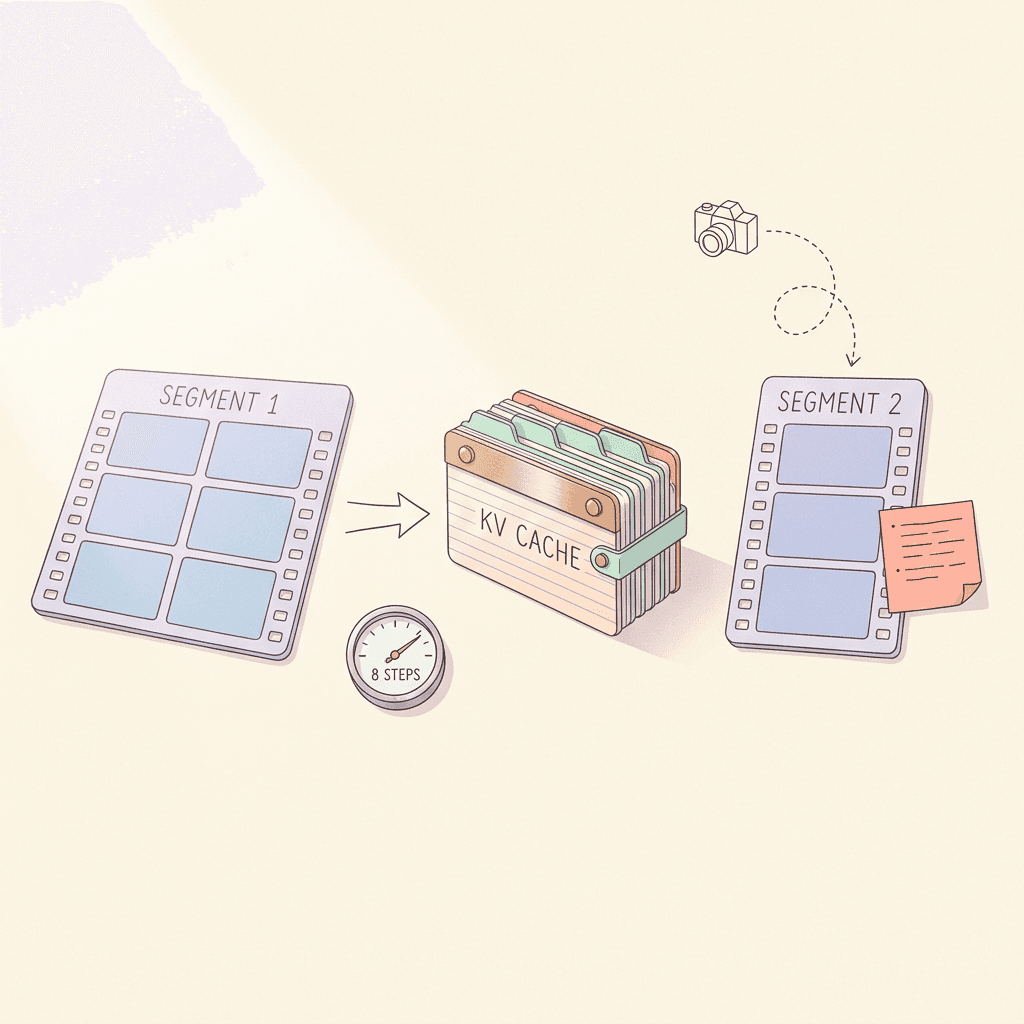
Tencent open-sourced Hy-Nomas, an interactive video world model with segment prompts, camera control and a KV cache. Here is the architecture, the latent math, and how to run it on one RTX 4090.
If you have ever generated an AI video clip, watched it end after five seconds, and then tried to continue the same scene by feeding the last frame into another prompt, you know the problem with clip-based video models: the world forgets itself. The fox changes color, the path bends the wrong way, and the camera does whatever the model feels like. Tencent Hunyuan's Hy-Nomas, released as open source under Apache 2.0 in the week of October 21, 2026, attacks that problem directly. It generates a world one video segment at a time, keeps a persistent key/value (KV) cache between segments, accepts a new text instruction and a camera path at every turn, and ships with a configuration that runs on a single NVIDIA GeForce RTX 4090 [1][2].
This post is the engineering read of that release. It walks through what Hy-Nomas is, how its segment-autoregressive diffusion transformer is put together, the latent and decoder arithmetic behind the 720p, 24 FPS output, how to write the JSON segment prompts, how to build a camera trajectory file with numpy, how the standard eight-GPU setup differs from the single-4090 setup, and how to budget the KV cache so you know before you launch whether your hardware will cope. Tencent has not yet published the technical report, so there are no official benchmark scores or official speed numbers; everything below comes from the Hugging Face model card, the GitHub repository, the project site and community ports, and the numbers I derive myself are labeled as estimates [1][2][4].
Quick summary before the depth:
- What it is: an open-source interactive video world model that generates video in segments, with a text instruction and optional camera trajectory per segment, and a KV cache carrying the history forward [1][2].
- Architecture: 54 double-stream MMDiT blocks with hidden size 2,048, 16 attention heads of 128 dimensions, 3D RoPE, a Qwen2.5-VL-7B language model as text encoder, and camera cross-attention in every block [1].
- Output: 720 x 1280 at 24 FPS, 8 distilled denoising steps, DCAE-V latents with 32x spatial and 4x temporal compression, decoded by a fine-tuned PixelUMM decoder [1].
- Hardware: the standard configuration uses 8-way sequence parallelism across eight GPUs. A separate low-memory configuration targets one RTX 4090 with INT8 weights and cache, an FP8 decoder, and CPU offload [1].
- Extras: Cinematic and Robotics LoRA adapters, a prompt enhancer called Nomas-PE for the web demo, and Hy-Nomas-Bench with 280 test cases [1][3].
Step 1: What Hy-Nomas Is and Why It Is Different From a Text-to-Video Model
A conventional text-to-video model takes one prompt and returns one clip. Everything the model will ever know about that clip is fixed at the moment you press generate. If you want ten more seconds you either run a second job conditioned on a frame or two from the first (and lose most of the context), or you pay for a much longer single generation. Hy-Nomas changes the unit of work. The unit is a segment, and a world is a sequence of segments that share memory [1].
Tencent's model card describes it as a video world generation model that supports free-form, multi-turn interaction through text instructions and camera control. At each turn you can introduce an object, change the style or scene, describe an action, or move the camera, and the next segment continues from everything generated so far [1]. The GitHub README names the mechanism plainly: autoregressive segment-wise generation with what it calls a lifelong KV cache for consistency [2].
That makes Hy-Nomas a member of the world model family rather than the video model family, and it is worth being precise about what that label means here. The model does not learn an explicit 3D scene or a physics engine. It learns to predict the next chunk of video given the history, a text instruction and a camera pose, which is the same recipe that Google DeepMind's Genie line popularized for learned interactive environments [18][27]. The user-facing difference from a clip generator is that the model is conditioned on a stream of controls instead of a single prompt.
The three control channels
Hy-Nomas gives you three ways to steer a world, and they can be mixed within the same session [1][3].
- Text per segment: each segment carries its own description, so a prompt like "glowing blue flowers open beside the path" can arrive in segment two without restarting the scene.
- Camera trajectory: a file of camera-to-world matrices and intrinsics, aligned with the video duration and frame rate, that tells the model where the viewpoint goes.
- Interleaved text plus camera: both at once, which is what most real use looks like, and which is one of the four benchmark categories in Hy-Nomas-Bench.
The official web demo adds a layer on top: a separate service called Nomas-PE converts loose user instructions into the structured JSON the model expects. Offline inference skips that service and reads prepared prompt files directly, which is the workflow this post focuses on [1].
Why now: the competitive context
Hy-Nomas arrived into a crowded month for world models. Miraflow has already covered World Labs Atlas, which targets 3D worlds and spatial intelligence, Runway Solaris, which generates whole interfaces frame by frame, and Helix World, which pairs explorable video with stereo sound. What sets Hy-Nomas apart is the combination of open weights under Apache 2.0, a published single-consumer-GPU configuration, and a benchmark released alongside the model [1][3]. Coverage from outlets such as Gigazine noted the release in the same week [8].
Tencent has also been releasing open models at a steady pace this year, including the large language model covered in our Tencent Hy4 Preview breakdown. The Hy-Nomas acknowledgements thank the DC-AE and MagiAttention projects, which tells you where two of its core components come from: the video autoencoder lineage and the attention kernels [10][11].
Step 2: The Architecture Walk-Through
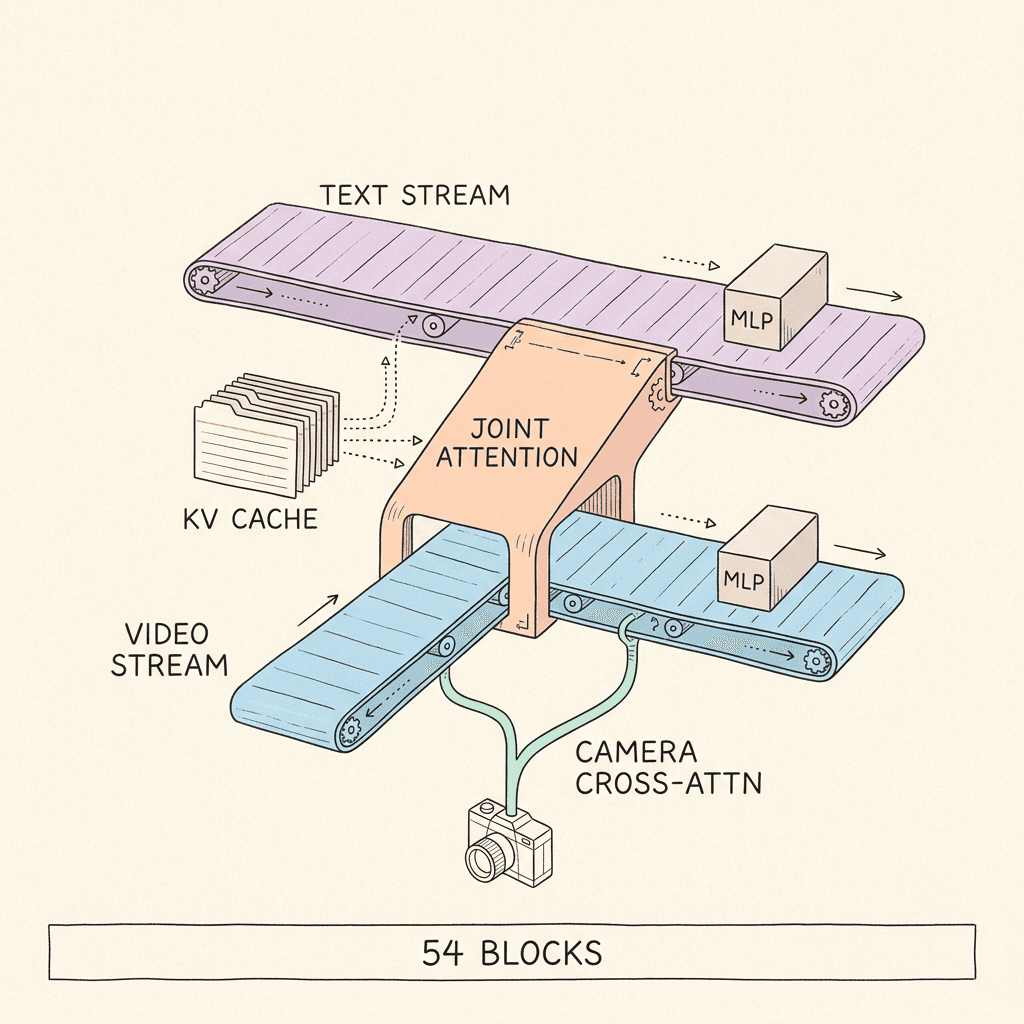
Hy-Nomas performs diffusion in a compressed video latent space and autoregression across video segments. Text, camera motion and cached history condition each new segment [1]. To keep the pieces straight, here is the full specification from the model card in one place.
| Property | Hy-Nomas configuration |
|---|---|
| Transformer blocks | 54 double-stream MMDiT blocks, 0 single-stream |
| Hidden size | 2,048 |
| Attention | 16 heads x 128 dimensions |
| Feed-forward | 4x expansion, intermediate size 8,192 |
| Latent channels in / out | 32 / 32 |
| Latent patch size (T x H x W) | 1 x 1 x 1 |
| Position encoding | 3D RoPE, dims [16, 56, 56], theta 256 |
| Text encoder | Qwen2.5-VL-7B-Instruct language model, 3,584-d states, 2-layer token refiner to 2,048-d |
| Camera conditioning | 4x4 extrinsics grouped over 4 frames into 64-d, cross-attention after the video MLP in each block |
| Prediction and sampler | Flow velocity, Euler ODE, 8 distilled steps |
| Output | 720 x 1280 at 24 FPS |
| Latents | DCAE-V f32t4c32: 32x spatial, 4x temporal, 32 channels |
| Decoder | Fine-tuned PixelUMM: 36 layers, 4,096 hidden, 32 query heads, 8 KV heads, 4x16x16 tubelets, 1 decode step, windows of 10 latent frames with 5 overlap |
Dual-stream MMDiT with no single-stream blocks
The backbone is a dense multimodal diffusion transformer. If you have read about Stable Diffusion 3, the pattern is familiar: text tokens and image (here, video) tokens live in two separate streams with their own weights, and they meet inside a joint attention operation [15]. Hy-Nomas uses 54 of these double-stream blocks and zero single-stream blocks, so text and video never merge into one shared set of weights anywhere in the network [1]. The lineage goes back to the Diffusion Transformer paper, which showed that plain transformers over latent patches scale well as image generators [14].
The dimensions are modest by frontier standards: a hidden size of 2,048, 16 heads of 128 dimensions each, and a feed-forward expansion of 4x for an intermediate size of 8,192 [1]. Tencent has not published a parameter count. As a sanity check, the community ComfyUI port lists the BF16 DiT file at 17.1 GB and the INT8 file at 9.0 GB [7]. At two bytes per weight, 17.1 GB implies roughly 8.5 billion parameters, so the model sits in the high single-digit billions. Treat that as my estimate from file sizes, not an official figure.
Segment-wise causal joint attention
Inside each block, text and video interact through what the model card calls segment-wise causal joint attention. Video positions are encoded with 3D rotary position embeddings (RoPE) over time, height and width, using dimension split [16, 56, 56] and theta 256 [1]. RoPE encodes relative position by rotating query and key vectors, which is why it extends gracefully across a growing sequence [16].
The word "causal" applies across segments. Tokens in the current segment can attend to the current segment and to everything cached from earlier segments, but never to later ones, so future segments are not required to generate the current one [1]. After the attention step, the two streams go through separate MLPs. A timestep embedding modulates both streams with learned shifts, scales and residual gates, which is the same adaptive normalization recipe used in DiT and SD3 [14][15].
Because the cached keys and values from earlier segments are reused when generation advances, the model never recomputes the past. That is the design idea behind CausVid and Self Forcing as well, which convert bidirectional video diffusion into causal, KV-cached generation [20][21]. Hy-Nomas applies it at segment granularity instead of frame granularity, and carries it in every one of its 54 layers.
Text encoder: Qwen2.5-VL-7B language model
For text, Hy-Nomas uses the language-model component of Qwen2.5-VL-7B-Instruct [9]. Its 3,584-dimensional hidden states pass through a two-layer token refiner and are projected into the DiT's 2,048-dimensional space [1]. Using a large language model as text encoder rather than a CLIP-style encoder is why descriptions like "the fox passes the flowers and looks around" can be followed: the encoder actually parses sentence structure. It also explains the first-run download: the code pulls Qwen/Qwen2.5-VL-7B-Instruct from Hugging Face automatically and reuses it from the local cache [1].
Camera conditioning
Camera control enters through a separate path. The inference configuration (extrinsics_attn) takes normalized 4 x 4 camera extrinsic matrices, groups them over four video frames, and flattens them to 64-dimensional inputs (4 frames x 16 matrix entries = 64). That grouping matches the 4x temporal compression of the latents, so one camera token corresponds to one latent frame [1]. Learned pose embeddings and projections feed a cross-attention in every double-stream block, after the video MLP, where video tokens query the camera features. With per_chunk_camera_attn=true and camera_chunk_size=1, camera attention is aligned to individual latent frames [1].
This is a different design from the plucker-ray embeddings used by CameraCtrl, which injects per-pixel ray directions into a video diffusion model [23]. Hy-Nomas compresses the pose into a small vector per latent frame and lets the video tokens look it up with cross-attention. Without published ablations I cannot say which design is better, only that this one is cheap: 64 numbers per latent frame is a tiny conditioning signal compared with a per-pixel ray map.
Flow-velocity prediction and 8-step distillation
The output head uses only the video stream and predicts latent-space flow velocity. The sampler integrates those predictions with an Euler ODE solver [1]. Flow matching and rectified flow, the two papers behind this style of training, define a straight-line path between noise and data and train the network to predict the velocity along it [12][13]. With a straight path, a coarse Euler solver is accurate enough that very few steps work, and Tencent's distilled checkpoint uses 8 of them per segment [1].
The base autoregressive checkpoint is the non-distilled model, and the model card is explicit that the 8-step examples require the distilled DiT [1]. The GitHub README also says the distilled checkpoint supports 4, 6 or 8 steps [2]. Tencent has not published how the distillation was done, so I will not guess at the method; for background on the general idea, see our explainer on knowledge distillation.
Step 3: The Video Latent and PixelUMM Decoder Math
This is the step where most people get surprised, because the numbers on the card (720 x 1280, 24 FPS) hide a much smaller representation. Let us do the arithmetic explicitly.
From pixels to latent grid
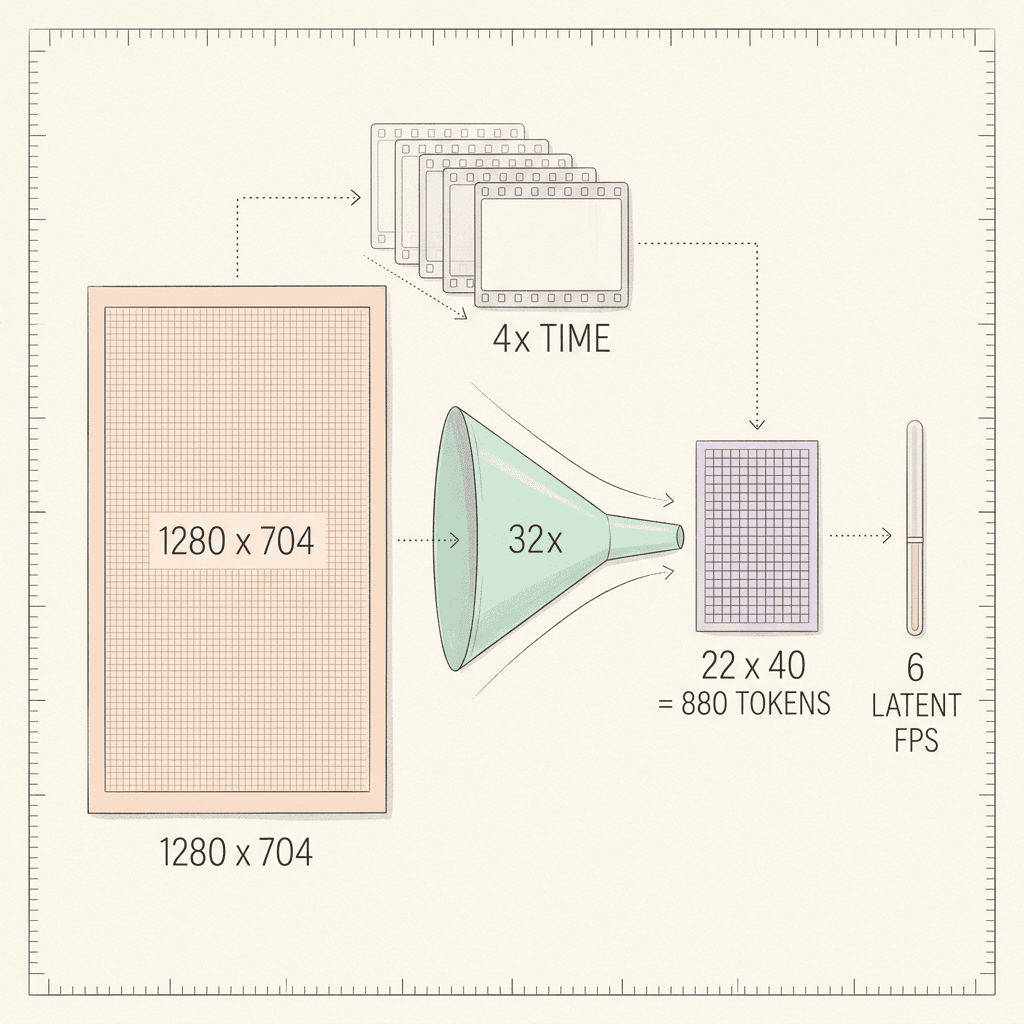
Hy-Nomas uses DCAE-V f32t4c32 latents: 32 channels, 32x spatial compression in each dimension, and 4x temporal compression [1]. This is the video extension of the deep-compression autoencoder family, whose whole point is aggressive spatial compression (32x rather than the usual 8x) without losing reconstruction quality [24][10]. The DiT uses a 1 x 1 x 1 patch size, so every latent position is exactly one token [1].
Spatial grid for the default 720 x 1280 output:
- Width: 1280 / 32 = 40 latent columns.
- Height: 720 / 32 = 22.5 latent rows.
That 22.5 is a flag. A latent grid has to be a whole number, and 720 is not divisible by 32, so the pipeline must pad or resize internally before encoding or after generation. The model card does not say which. The diffusers example in the GitHub README uses height=704, width=1280, and 704 / 32 = 22 divides cleanly, as does the 1280 x 704 resolution reported by the community ComfyUI port [2][6]. For planning memory, I use 704 x 1280, which gives a 22 x 40 grid. If your run pads 720 up to 736, the grid is 23 x 40 and every number below grows by about 4.5 percent.
Tokens per latent frame:
- At 704 x 1280: 22 x 40 = 880 tokens.
- At 736 x 1280 (padded): 23 x 40 = 920 tokens.
Temporal rate
At 24 FPS output with 4x temporal compression, each latent frame covers 4 video frames:
- 24 / 4 = 6 latent frames per second.
- One 5-second segment (the example in the model card) = 5 x 6 = 30 latent frames = 120 video frames.
- The diffusers example in the README uses
num_frames=240andsegment_latent_lengths=[30, 30], which is 60 latent frames x 4 = 240 video frames, consistent with two 5-second segments [2].
A segment of 30 latent frames at 880 tokens each is 26,400 video tokens per segment. That is the sequence length the DiT denoises at every one of its 8 steps. The hidden latent is also tiny compared with pixels: one latent frame carries 880 x 32 = 28,160 numbers, covering 4 video frames of 704 x 1280 x 3 = 2,703,360 values each, a ratio of roughly 384 to 1 (10,813,440 / 28,160). That ratio is why a 54-layer transformer can attend over tens of thousands of tokens at all.
| Quantity | Calculation | Result |
|---|---|---|
| Latent grid at 704 x 1280 | 704/32 by 1280/32 | 22 x 40 = 880 tokens per latent frame |
| Latent grid at 720 x 1280 | 720/32 = 22.5 (needs padding or resizing) | 23 x 40 = 920 if padded to 736 |
| Latent frames per second | 24 FPS / 4 | 6 |
| 5-second segment | 5 x 6 | 30 latent frames = 120 video frames = 26,400 tokens at 704 x 1280 |
| 18-frame GPU history | 18 / 6 | 3 seconds |
| Decoder window | 10 latent frames x 4 | 40 video frames = 1.67 seconds |
| Decoder stride | 10 - 5 overlap | 5 latent frames = 0.83 seconds |
| Windows per 30-frame segment | (30 - 10) / 5 + 1 | 5 windows, about 1.67x redundant decoding |
| Decoder tokens per window at 704 x 1280 | (704/16) x (1280/16) x 10 | 44 x 80 x 10 = 35,200 |
The PixelUMM decoder
The default decoder is a fine-tuned PixelUMM: a transformer with 36 layers, 4,096 hidden size, 32 query heads and 8 KV heads, working on RGB video in 4 x 16 x 16 tubelets [1]. Grouped-query attention (the 32 query heads sharing 8 KV heads) cuts decoder KV memory by 4x compared with full multi-head attention [17]. It conditions pixel reconstruction on the generated DCAE-V latents and uses a single decoding step, separate from the DiT's 8 denoising steps [1].
Decoder arithmetic, again for 704 x 1280:
- Tubelet grid: 704 / 16 = 44 by 1280 / 16 = 80, so 3,520 spatial tubelets per time slice. (At 720, 720 / 16 = 45 divides evenly, giving 3,600.)
- A tubelet spans 4 frames, which matches the 4x temporal compression, so each latent frame corresponds to exactly one time slice of tubelets.
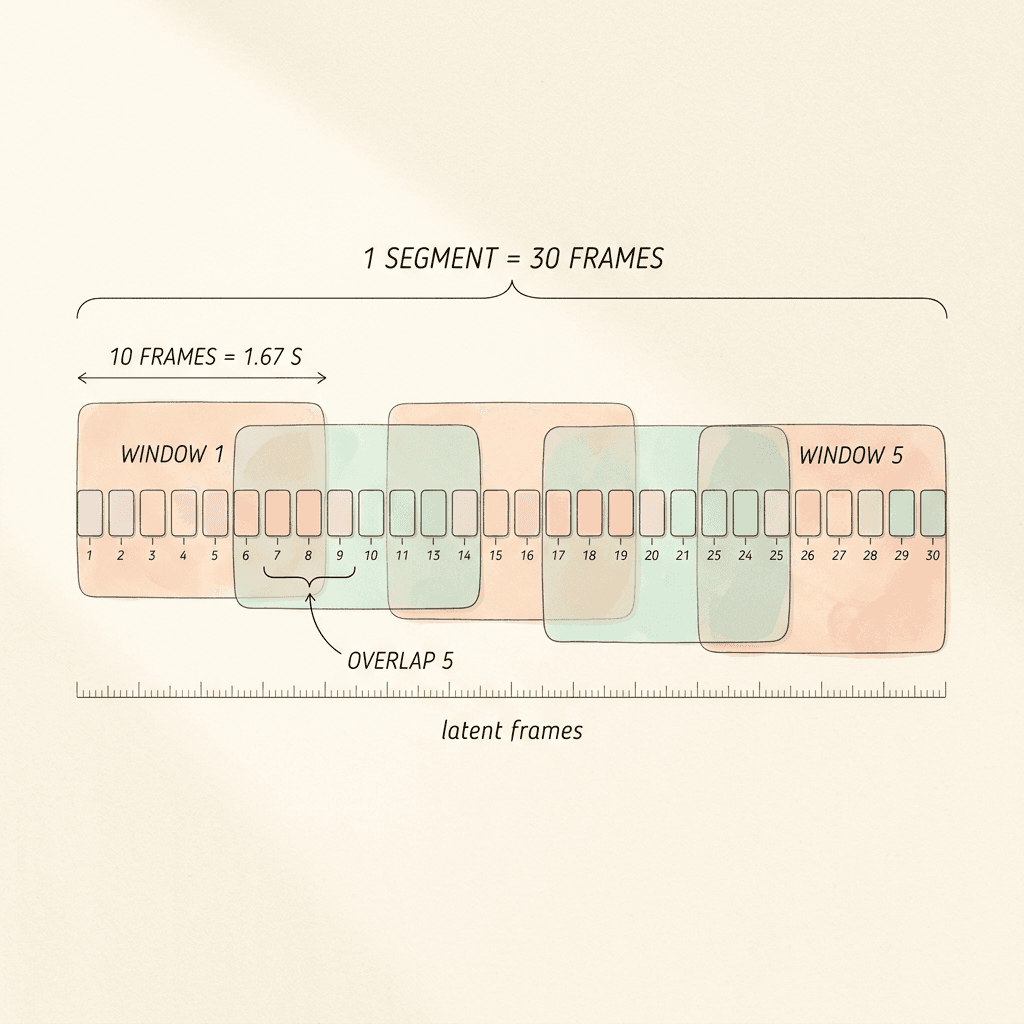
- Decoder windows hold 10 latent frames with an overlap of 5. A 10-latent-frame window spans 10 x 4 = 40 video frames, or 40 / 24 = 1.67 seconds, and is 10 x 3,520 = 35,200 decoder tokens at 704 x 1280.
- The stride between windows is 10 - 5 = 5 latent frames (20 video frames, 0.83 seconds). A 30-latent-frame segment therefore needs (30 - 10) / 5 + 1 = 5 windows, covering 50 latent frames of decoder work for 30 frames of output, a redundancy factor of about 1.67.
That redundancy is the price of seamless decoding. Overlapping windows let the decoder blend neighboring chunks so you do not see seams every 1.67 seconds. It also explains why the model card says the web demo enables streaming decoding at segment boundaries: you can begin decoding once a segment's latents exist, rather than waiting for the whole session [1].
The decoder checkpoint matters for memory. The community port lists the PixelUMM VAE at 15.8 GB in BF16 [7], which is bigger than the INT8 DiT at 9.0 GB. That is why the single-4090 configuration swaps in an FP8 PixelUMM checkpoint run through CUTLASS kernels, and why CPU offload moves each model onto the GPU only for its own stage [1].
Step 4: Writing Segment Prompts in JSON
Offline inference accepts a JSON list of requests. Each request has global fields (style, perspective, a subject list) and an ordered list of segments with start_time and end_time in MM:SS.mmm format. The first segment describes the initial world with visual_description_long; later segments use description_change to say how the world evolves. Each segment can contain contained_actions with their own timestamps [1].
The configuration derives segment lengths from the event timestamps (inference.video_length=event), which means your timestamps are the schedule: a segment from 00:00.000 to 00:05.000 is five seconds, or 30 latent frames at 24 FPS [1]. Here is the model card's example extended with a third segment so you can see the pattern of a world that evolves.
json/code
[
  {
    "test_id": "forest_world",
    "Style": "Cinematic fantasy",
    "perspective_view": "Third-person view",
    "subject_list": [
      {
        "subject_id": "fox",
        "display_name": "a small orange fox",
        "subject_attribute": "Orange fur, white chest, and a fluffy tail."
      }
    ],
    "segments": [
      {
        "start_time": "00:00.000",
        "end_time": "00:05.000",
        "visual_description_long": "A small orange fox stands on a stone path in a luminous forest. Blue fireflies drift between the trees.",
        "contained_actions": [
          {"start_time": "00:00.000", "end_time": "00:05.000", "action_description": "The fox walks slowly along the path."}
        ]
      },
      {
        "start_time": "00:05.000",
        "end_time": "00:10.000",
        "description_change": "Glowing blue flowers open beside the path as the fox continues forward.",
        "contained_actions": [
          {"start_time": "00:05.000", "end_time": "00:10.000", "action_description": "The fox passes the flowers and looks around."}
        ]
      },
      {
        "start_time": "00:10.000",
        "end_time": "00:15.000",
        "description_change": "The forest opens onto a still lake, and the fireflies gather above the water.",
        "contained_actions": [
          {"start_time": "00:10.000", "end_time": "00:12.500", "action_description": "The fox slows and stops at the edge of the lake."},
          {"start_time": "00:12.500", "end_time": "00:15.000", "action_description": "The fox lowers its head to drink."}
        ]
      }
    ]
  }
]
A few things worth knowing before you write your own:
- Describe the world once, then describe change. Segment one carries the full scene. Later segments carry only the delta. If you restate the whole scene in every segment you are fighting the KV cache, which already remembers it.
- Keep subjects stable. The
subject_listgives each character or object an id, a display name and an attribute string. Reusing the same display name in later actions is how you keep reference consistent. - Align actions to segments. The model card notes that action timestamps use the same video timeline and are normalized to each segment internally [1]. Keep each action inside its segment's start and end.
- Think in 5-second chunks. The example segments are 5 seconds. Shorter segments give you more steering points; longer ones give the model more room to drift.
Structured prompts of this kind are a growing pattern. If you want to see the same idea applied to images, our guide to JSON prompting with Nano Banana covers how schema-shaped prompts reduce ambiguity, and the Hy-Nomas JSON is the video-world version of that discipline.
A small validator before you spend GPU time
Timestamps are strings, so typos are easy: 00:5.000 instead of 00:05.000, or a segment that starts before the previous one ends. A broken schedule wastes a long load of 9 GB of weights before it fails, so check the file first.
python/code
# Check a Hy-Nomas prompt file before loading any weights.
import json
import re
import sys

TS = re.compile(r"^\d{2}:\d{2}\.\d{3}$")


def to_s(ts):
    m, s = ts.split(":")
    return int(m) * 60 + float(s)


def check(path):
    problems = []
    for req in json.load(open(path)):
        tid = req.get("test_id", "?")
        prev_end = 0.0
        for i, seg in enumerate(req.get("segments", [])):
            a, b = seg.get("start_time", ""), seg.get("end_time", "")
            if not (TS.match(a) and TS.match(b)):
                problems.append(f"{tid} seg {i}: bad timestamp format {a!r} {b!r}")
                continue
            s, e = to_s(a), to_s(b)
            if abs(s - prev_end) > 1e-3:
                problems.append(f"{tid} seg {i}: starts at {s} but previous ended at {prev_end}")
            if e <= s:
                problems.append(f"{tid} seg {i}: end <= start")
            if i == 0 and "visual_description_long" not in seg:
                problems.append(f"{tid} seg 0: missing visual_description_long")
            if i > 0 and "description_change" not in seg:
                problems.append(f"{tid} seg {i}: missing description_change")
            for act in seg.get("contained_actions", []):
                x, y = to_s(act["start_time"]), to_s(act["end_time"])
                if x < s - 1e-3 or y > e + 1e-3:
                    problems.append(f"{tid} seg {i}: action {x}-{y} outside segment {s}-{e}")
            prev_end = e
        latent = round(prev_end * 24 / 4)
        print(f"{tid}: {prev_end:.1f}s = {latent} latent frames at 24 FPS")
    return problems


if __name__ == "__main__":
    issues = check(sys.argv[1])
    print("\n".join(issues) or "OK")
    sys.exit(1 if issues else 0)
Step 5: Camera Trajectories With numpy
Camera control takes an .npz file with two arrays: c2ws, camera-to-world matrices of shape [N, 4, 4], and intrinsics, of shape [N, 3, 3]. The model card tells you to align the trajectory with the requested video duration and frame rate, and passes it with inference.camera_trajectory=/path/to/camera.npz [1]. For a 5-second segment at 24 FPS, N = 120. The repository includes its own utilities in hymm/models/camera/geometry/generate_npz_trajectories.py, which is the reference for coordinate conventions [1][2].
I have to be explicit about one thing: the model card does not spell out the axis convention (OpenCV versus OpenGL) or whether intrinsics are in pixels or normalized units. The script below makes both choices configurable and writes a sensible default. Before relying on it for a production shot, generate one trajectory with the repository's own utility, compare the matrices numerically against mine, and adopt whichever convention it uses.
python/code
# Build a camera trajectory .npz for Hy-Nomas: a slow dolly forward plus a gentle yaw sweep.
# Output arrays: c2ws [N,4,4] and intrinsics [N,3,3]. N = seconds * fps (24 FPS in the default config).
# Axis convention and intrinsics units are assumptions: compare with the repo's
# hymm/models/camera/geometry/generate_npz_trajectories.py before production use.
import numpy as np

FPS = 24
SECONDS = 5.0
WIDTH, HEIGHT = 1280, 704        # use the resolution you will actually run
FOV_X_DEG = 70.0                 # assumed horizontal field of view
DOLLY_METERS = 1.5               # total forward travel over the clip
YAW_DEG = 12.0                   # peak yaw to each side, kept small (rotation scale defaults to 2.5)
PIXEL_INTRINSICS = True          # set False if the repo utility uses normalized intrinsics


def yaw_matrix(theta):
    c, s = np.cos(theta), np.sin(theta)
    return np.array([[c, 0, s], [0, 1, 0], [-s, 0, c]])


def smoothstep(t):
    return t * t * (3 - 2 * t)   # ease in and out so 4-frame groups see smooth motion


def build(n):
    c2ws = np.tile(np.eye(4), (n, 1, 1))
    for i in range(n):
        t = i / max(n - 1, 1)
        yaw = np.deg2rad(YAW_DEG) * np.sin(2 * np.pi * t)       # sweep left, then right
        c2ws[i, :3, :3] = yaw_matrix(yaw)
        c2ws[i, :3, 3] = [0.0, 0.0, DOLLY_METERS * smoothstep(t)]  # forward along +z (OpenCV style)
    fx = (WIDTH / 2) / np.tan(np.deg2rad(FOV_X_DEG) / 2)
    K = np.array([[fx, 0, WIDTH / 2], [0, fx, HEIGHT / 2], [0, 0, 1.0]])
    if not PIXEL_INTRINSICS:
        K = K.copy()
        K[0] /= WIDTH
        K[1] /= HEIGHT
    return c2ws.astype(np.float32), np.tile(K, (n, 1, 1)).astype(np.float32)


if __name__ == "__main__":
    n = int(round(SECONDS * FPS))
    c2ws, intrinsics = build(n)
    assert c2ws.shape == (n, 4, 4) and intrinsics.shape == (n, 3, 3)
    assert n % 4 == 0, "frame count should be a multiple of 4 (4 frames per latent frame)"
    np.savez("camera.npz", c2ws=c2ws, intrinsics=intrinsics)
    print(f"saved camera.npz: {n} poses = {n // 4} latent frames, {SECONDS}s at {FPS} FPS")
The script builds a slow dolly forward combined with a gentle yaw sweep. Two defaults deserve attention. The model card lists a translation scale of 1.0 and a rotation scale of 2.5 as inference defaults (trajectory_translation_scale and trajectory_rotation_scale), meaning rotation in your file is amplified by 2.5 before it reaches the model [1]. If your camera swings farther than you expected, that multiplier is the first place to look, so author small angles and tune up from there.
The second default is temporal. Because the model groups four frames of extrinsics into one 64-dimensional camera token, a trajectory only has real resolution at 6 camera tokens per second. Keep motion smooth over 4-frame spans; a one-frame jitter in your file is averaged away by the grouping [1].
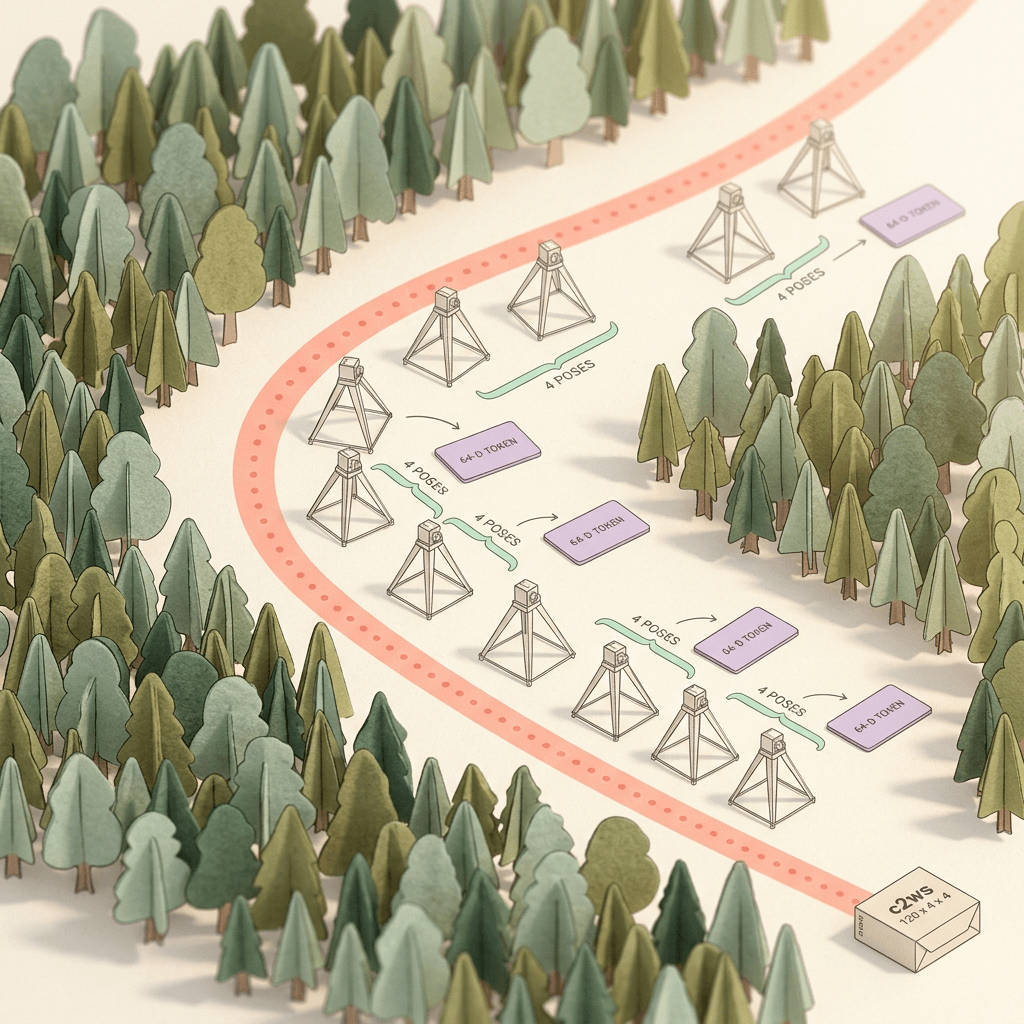
If you are curious how camera control was done before world models, CameraCtrl is the standard reference for adding controllable camera trajectories to video diffusion [23]. Hy-Nomas differs in that the camera signal is a continuous stream across segments rather than a fixed property of one clip.
Step 6: Running the Standard Setup Versus the Single RTX 4090 Setup
Tencent ships two inference configurations. They share the architecture, prompt processing, resolution, frame rate and 8-step schedule, and differ in how they manage memory and parallelism [1].
| Setting | Standard configuration | Single RTX 4090 configuration |
|---|---|---|
| Config file | configs/experiment/inference.yaml | configs/experiment/single_gpu_low_mem_inference.yaml |
| GPUs | 8 (sp_size=8, distributed decoding) | 1 (sp_size=1) |
| DiT checkpoint | Distilled DiT, BF16 compute | Quantized distilled DiT, INT8 weights, BF16 compute |
| Decoder checkpoint | Fine-tuned PixelUMM | PixelUMM FP8 via CUTLASS |
| KV cache | Full history kept (max_cache_segments=null) | INT8, 18 latent frames on GPU, rest archived on CPU |
| Attention kernel | FlashAttention and MagiAttention | FlexAttention |
| Offload | None | Text encoder, DiT and decoder move to GPU per stage |
| LoRA at inference | Merge into a floating-point DiT | Separate LoRA not supported by the INT8 loader |
| Shared defaults | 720 x 1280, 24 FPS, 8 steps, Euler, guidance 1.0 / 1.0, seed 42, translation 1.0, rotation 2.5 | Same |
Environment setup
The repository strongly recommends its pre-packaged Docker image, which bundles the Python environment, PyTorch and the CUDA attention kernels. The manual path needs Linux, Python 3.12 or newer, uv, a compatible NVIDIA driver, the CUDA 13.0 toolkit and a C++ compiler; the all extra installs PyTorch 2.10.0 for CUDA 13.0, FlashAttention 2 and 3, and MagiAttention, and kernel compilation can take a while [1][2][11]. Unless you have a reason not to, use Docker.
bash/code
# 1) Get the code and the weights
git clone https://github.com/Tencent-Hunyuan/Hy-Nomas.git
cd Hy-Nomas
export HY_NOMAS_MODEL_DIR="/path/to/Hy-Nomas-models"
hf download tencent/Hy-Nomas --local-dir "$HY_NOMAS_MODEL_DIR"

# 2) Recommended: the pre-packaged Docker image
export HY_NOMAS_IMAGE="hynomasoss/hynomasoss:cu130"
docker pull "$HY_NOMAS_IMAGE"
docker run --rm -it --gpus all --ipc=host --network=host \
  -v "$PWD:/workspace/Hy-Nomas" -v "$HY_NOMAS_MODEL_DIR:/models" \
  -w /workspace/Hy-Nomas "$HY_NOMAS_IMAGE" bash

# 3) Inside the container: standard 8-GPU run with a camera trajectory
export HY_NOMAS_MODEL_DIR=/models
bash scripts/inference/inference_from_config.sh configs/experiment/inference.yaml \
  dit_weight="$HY_NOMAS_MODEL_DIR/DiT/distilled/diffusion_pytorch_model_ema_0_995.safetensors" \
  model.vae.checkpoint="$HY_NOMAS_MODEL_DIR/VAE/PixelUMM_FT/diffusion_pytorch_model.safetensors" \
  inference.prompt=/workspace/Hy-Nomas/segments.json \
  inference.camera_trajectory=/workspace/Hy-Nomas/camera.npz \
  inference.save_path=./outputs/distill
Single-GPU low-memory run
The 4090 configuration is configs/experiment/single_gpu_low_mem_inference.yaml. It does four things at once: it stores DiT weights and cached keys and values in INT8 while keeping BF16 compute for linear and attention operations, selects up to 18 historical latent frames for GPU attention with the rest archived on CPU, moves the text encoder, DiT and decoder to the GPU only during their own stage, and uses FlexAttention and CUTLASS FP8 kernels with sequence parallelism disabled (sp_size=1) [1].
You need the INT8 DiT and the FP8 PixelUMM as a matched pair, and the host (or container) must expose exactly one GPU to nvidia-smi, because the launcher uses it to count GPUs [1].
bash/code
# Single RTX 4090: expose exactly one GPU so the launcher counts one device
export CUDA_VISIBLE_DEVICES=0
export HY_NOMAS_MODEL_DIR="/path/to/Hy-Nomas-models"

bash scripts/inference/inference_from_config.sh configs/experiment/single_gpu_low_mem_inference.yaml \
  dit_weight="$HY_NOMAS_MODEL_DIR/DiT/distilled_int8/diffusion_pytorch_model_ema_0_995_int8.safetensors" \
  model.vae.checkpoint="$HY_NOMAS_MODEL_DIR/VAE/PixelUMM_FT_FP8/diffusion_pytorch_model_fp8.safetensors" \
  inference.prompt=./segments.json \
  inference.camera_trajectory=./camera.npz \
  inference.save_path=./outputs/single_gpu

# If you run out of GPU memory, shorten segments first, then try a smaller size override:
#   'inference.video_size=[480,832]'
The model card warns about two limits you should plan around. System RAM must hold the offloaded models and the growing history archive, and CPU to GPU transfers add latency. And peak GPU memory also depends on resolution and the length of the current segment: the 18-frame history budget does not cap the memory used by the segment being generated [1]. Step 7 turns that second warning into numbers.
What speed to expect
Tencent has not published official speed numbers, and the model card says generation speed depends on hardware, resolution, segment length, history and configuration [1]. The only measurement I found is a single community report relayed by ComfyUI Wiki: about 21 seconds per 3-second turn on an RTX 5090 at 1280 x 704, plus roughly 4 seconds of decode per window [6]. That is one anecdotal data point on a different GPU, and I would treat it as a rough indication that generation is several times slower than real time on consumer hardware rather than as a benchmark. A 3-second turn is 18 latent frames, which needs (18 - 10) / 5 + 1 = 2.6, so three decoder windows when the last window is padded or shifted; the exact windowing at segment ends is an implementation detail I could not confirm.
Step 7: Memory Budgeting for the KV Cache
The reason a world model needs a bounded history is simple: attention keys and values for every past token, in every layer, add up quickly. Let us build the estimate step by step. These are my own calculations under stated assumptions, not Tencent numbers.
Assumptions:
- The DiT uses full multi-head attention for video tokens with 16 heads x 128 = 2,048 dimensions for K and 2,048 for V (the model card lists 16 heads and does not mention grouped-query attention for the DiT, unlike the decoder) [1].
- Cached video tokens use INT8 storage, 1 byte per value, as in the single-GPU configuration [1].
- Text and camera tokens are small next to 880 video tokens per frame, so I ignore them.
- Resolution 704 x 1280, giving 880 tokens per latent frame.
Per token, per layer: K plus V = 2 x 2,048 = 4,096 bytes in INT8.
Per token, all 54 layers: 4,096 x 54 = 221,184 bytes, about 216 KiB.
Per latent frame (880 tokens): 221,184 x 880 = 194,641,920 bytes, about 195 MB (186 MiB).
| Item (704 x 1280, INT8, estimates) | Arithmetic | Result |
|---|---|---|
| KV bytes per token per layer | 2 (K and V) x 2,048 x 1 byte | 4,096 B |
| KV bytes per token, 54 layers | 4,096 x 54 | 221,184 B (about 216 KiB) |
| KV per latent frame | 221,184 x 880 tokens | 194,641,920 B (about 195 MB) |
| 18-frame GPU history | 195 MB x 18 | about 3.5 GB (3 seconds of world) |
| 30-frame current segment | 195 MB x 30 | about 5.8 GB |
| One minute of full history | 195 MB x 360 | about 70 GB INT8, about 140 GB BF16 |
| INT8 DiT weights (community file) | reported size | 9.0 GB |
| Worst-case 4090 subtotal | 9.0 + 3.5 + 5.8 | about 18.3 GB of 24 GB before activations |
Three conclusions follow from the table.
First, the 18-frame GPU history budget is a deliberate fit. 18 latent frames at 195 MB each is about 3.5 GB of INT8 cache, which is 3 seconds of world (18 / 6 = 3 s). Against a 24 GB card that leaves room for the weights and the current segment.
Second, a full-history cache is a nonstarter on one GPU. One minute of world is 360 latent frames, which is about 70 GB of INT8 cache, or about 140 GB in BF16. That is why the standard configuration shards a full history across eight GPUs with sequence parallelism, and why the single-GPU configuration archives older history on CPU [1].
Third, the current segment is not free. A 30-latent-frame segment being generated holds about 5.8 GB of INT8 keys and values for itself while it is denoised (30 x 195 MB). Adding the pieces for a worst-case 5-second turn on a 4090:
- INT8 DiT weights: 9.0 GB (community file size) [7]
- Bounded history cache: about 3.5 GB
- Current-segment cache: about 5.8 GB
- Subtotal: about 18.3 GB, leaving roughly 5.7 GB of a 24 GB card for activations, the attention workspace and CUDA overhead
That is tight but plausible, and it lines up with the model card's statement that peak GPU memory depends on the current segment length [1]. If you hit an out-of-memory error, the levers are the ones the config exposes: shorten the segments, lower inference.video_size (the model card shows [480,832] as an example override), or reduce the history budget. I would shorten segments first, because that attacks the term the history budget cannot touch.
You can compute all of this for your own resolution and segment plan with a few lines of Python.
python/code
# Estimate Hy-Nomas KV cache memory. All inputs are assumptions based on the model card.
# Assumes full multi-head attention in the DiT (16 heads x 128 = 2,048 for K and for V).
LAYERS = 54
HIDDEN = 2048
SPATIAL_COMPRESSION = 32
FPS = 24
TEMPORAL_COMPRESSION = 4


def kv_report(height=704, width=1280, segment_seconds=5.0, history_frames=18, bytes_per_value=1):
    rows = height // SPATIAL_COMPRESSION           # use a multiple of 32; 720 needs padding to 736
    cols = width // SPATIAL_COMPRESSION
    tokens_per_frame = rows * cols
    latent_fps = FPS / TEMPORAL_COMPRESSION        # 6 latent frames per second
    bytes_per_token = 2 * HIDDEN * LAYERS * bytes_per_value   # K plus V, all layers
    per_frame = tokens_per_frame * bytes_per_token
    segment_frames = int(segment_seconds * latent_fps)
    gb = lambda b: b / 1e9
    print(f"grid {rows}x{cols} = {tokens_per_frame} tokens per latent frame, {latent_fps:g} latent fps")
    print(f"KV per latent frame: {gb(per_frame):.3f} GB")
    print(f"GPU history ({history_frames} frames = {history_frames / latent_fps:.1f} s): {gb(history_frames * per_frame):.2f} GB")
    print(f"current segment ({segment_frames} frames): {gb(segment_frames * per_frame):.2f} GB")
    print(f"one minute of world ({int(60 * latent_fps)} frames): {gb(60 * latent_fps * per_frame):.1f} GB")


if __name__ == "__main__":
    kv_report()
    kv_report(bytes_per_value=2)   # BF16 comparison
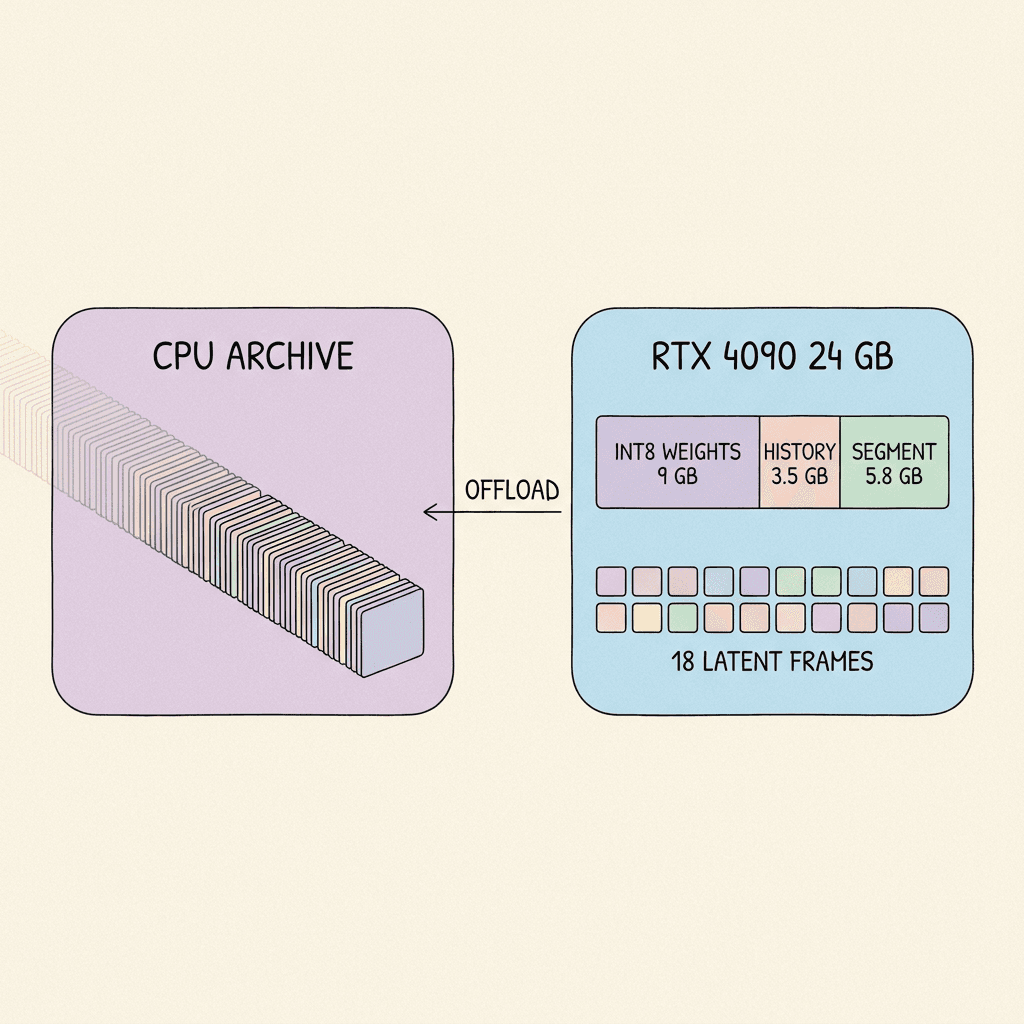
A caution on CPU RAM. If the CPU archive stores history in the same INT8 format, a one-minute session adds up to about 70 GB, on top of the offloaded models: the Qwen2.5-VL language model, the INT8 DiT at 9.0 GB, and the decoder. The model card says only that system RAM must accommodate the offloaded models and the growing archive, so size your machine for the length of session you want rather than assuming the archive is small [1].
Step 8: LoRAs, Fine-Tuning and the Robotics Adapter
Hy-Nomas ships two LoRA adapters. LoRA, from the Low-Rank Adaptation paper, trains small low-rank matrices added to frozen weights, which makes fine-tuning a large model affordable [26].
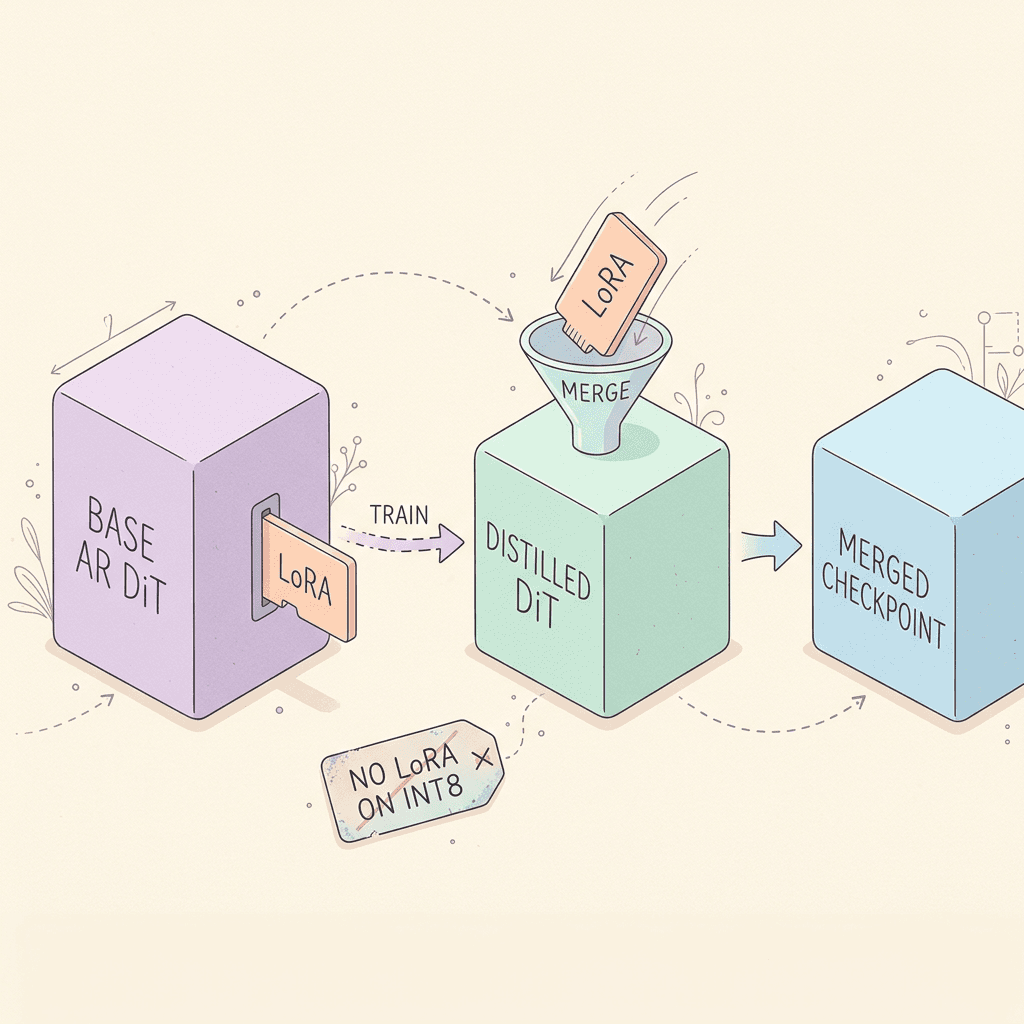
- Cinematic LoRA: trained on cinematic data, merged into the distilled DiT to improve the visual quality of generated worlds [2].
- Robotics LoRA: trained on the RealSource-World real-world robotic-arm dataset from RealmanRobot, merged into the distilled DiT to enhance the robotics simulation capability of generated worlds [1][25].
Two practical constraints from the model card. The adapters are for a compatible floating-point DiT, and the INT8 loader does not support loading a separate LoRA adapter at inference time [1]. That means a single-4090 user cannot simply flip on the Cinematic LoRA. You need a merged checkpoint (the LoRA weights folded into the distilled weights ahead of time), and the model card does not list a pre-merged INT8 checkpoint with the adapter included. Quantizing your own merged checkpoint is outside what the repository documents, so plan on running a LoRA at full precision on multi-GPU hardware for now.
The training recipe
The GitHub README documents the fine-tuning path. You start from the non-distilled base autoregressive checkpoint and train with a segment forcing pipeline, then merge the learned LoRA into the matching distilled checkpoint to produce a merged model for inference. The default sft.yaml uses LoRA rank and alpha of 256, zero dropout, the Muon optimizer at a constant learning rate of 1e-4 for 2,000 steps, with only LoRA parameters trained [2]. Data preparation uses a captioning harness that annotates each segment, encodes frames with DCAE-V, and packages the result as Arrow or Parquet, with an offline sequence packing step (--max-seq-len 360000 in the example) [2].
bash/code
# Fine-tune a LoRA on the NON-distilled base checkpoint, then merge into the distilled one.
export HY_NOMAS_MODEL_DIR="/path/to/Hy-Nomas-models"

python scripts/data_processing/build_sft_packing_plan.py \
  --input /path/to/train.arrow --output /path/to/train_packing.json \
  --max-seq-len 360000 --num-groups 16 --seed 42

bash scripts/train/train_from_config.sh configs/experiment/sft.yaml \
  dit_weight="$HY_NOMAS_MODEL_DIR/DiT/base_ar/diffusion_pytorch_model_fp32.safetensors" \
  model.vae.checkpoint="$HY_NOMAS_MODEL_DIR/VAE/DCAE-V/dc-ae-v-1.0-f32t4c32-bf16.pt" \
  dataset.data_file=/path/to/train.arrow \
  dataset.token_packing_sorted_groups_path=/path/to/train_packing.json \
  output_dir=./outputs/segment_lora

python -m scripts.train.export_lora_checkpoint \
  ./outputs/segment_lora/checkpoints/global_step-2000 ./outputs/segment_lora/adapter

python -m scripts.train.merge_lora \
  --base "$HY_NOMAS_MODEL_DIR/DiT/distilled/diffusion_pytorch_model_ema_0_995.safetensors" \
  --adapter ./outputs/segment_lora/adapter \
  --output ./outputs/merged_model.safetensors
The scale of the reference run deserves honesty: the README's example is a data-parallel 16 by sequence-parallel 8 layout, which is 128 GPUs [2]. Fine-tuning this model is a cluster job, not a weekend experiment on one card. Inference is where individual creators and small teams will spend their time.
Why the robotics adapter is interesting
A world model that follows a robot arm's motion and object interactions, conditioned on text and camera, is a small step toward using video generation as a simulator for robot policies. The RealSource-World dataset is real-world dual-arm footage, and the adapter path is named dual_arm_robotics in the repository [1][25]. Tencent has not published a robotics evaluation, so the claim is the adapter's purpose, not demonstrated performance. If you work in this area, the open Apache 2.0 license and the fine-tuning recipe are the useful parts.
Step 9: Hy-Nomas-Bench and How to Evaluate a World Model
Along with the model, Tencent released Hy-Nomas-Bench: four benchmarks with 280 test cases covering multi-turn free-form text interaction, camera navigation, interleaved text and camera control, and spatial memory. The suite evaluates interactive controllability and consistency during continuous world generation, and it provides structured prompts, interaction sequences, keyboard timelines and reference camera trajectories [1][3].
The categories map to the things that make a world model hard:
- Multi-turn text interaction tests whether a second or third instruction is followed without destroying what came before.
- Camera navigation tests whether the viewpoint actually follows the supplied trajectory.
- Interleaved text and camera tests both at once, which is the realistic usage.
- Spatial memory tests whether the world remains the same when the camera returns to a place it has already seen, the property the KV cache exists to provide.
Tencent has not released benchmark scores for Hy-Nomas on its own benchmark yet (the technical report is listed as coming soon), so you cannot compare against a published number. What you can do today is use the dataset as a ready-made evaluation harness for your own runs.
bash/code
# Download Hy-Nomas-Bench (4 benchmarks, 280 test cases) and inspect its layout
hf download tencent/Hy-Nomas-Bench --repo-type dataset --local-dir ./Hy-Nomas-Bench
ls ./Hy-Nomas-Bench
# Read the dataset card for the exact data formats and inference instructions, then point
# inference.prompt (and inference.camera_trajectory for the camera cases) at the files.
A practical evaluation loop
If you are evaluating Hy-Nomas for a project, a three-part loop gives you honest results without needing a public leaderboard.
- Reproduce the reference case. Run the bundled example prompt file first, with the default seed (42) and guidance scales (1.0 for both text and camera). If your fox world looks nothing like the project site's gallery, fix the environment before testing anything creative [1][4].
- Run the memory test. Generate a trajectory that leaves a landmark, travels away for several segments, and returns. On the single-4090 configuration, the landmark falls outside the 18-frame GPU history after about 3 seconds, so you are measuring how well the CPU archive and frame selection preserve it. On the 8-GPU configuration with full history, you are measuring the model itself.
- Change one control at a time. Run the same prompts with and without the camera trajectory, then with and without the INT8 configuration, and keep the seed fixed. That isolates the cost of quantization and bounded history from the cost of the model.
For visual comparison, review work in the way other video models are reviewed: look at identity drift of the main subject, geometry that bends when the camera turns, and brightness or color shifts at segment boundaries. Segment boundaries are the new failure location this architecture introduces, and they are where I would look first.
How Hy-Nomas Compares: Genie 3, Atlas, Solaris and Autoregressive Video
Comparisons between world models are hard right now because the others are mostly closed products and Hy-Nomas has no published scores. The honest comparison is about design choices, not leaderboards.
| Model | Open weights | Control inputs | Notable design choice |
|---|---|---|---|
| Hy-Nomas (Tencent) | Yes, Apache 2.0 | Text per segment, camera trajectory | Segment-autoregressive MMDiT, persistent KV cache, single-4090 config |
| Genie 3 (Google DeepMind) | No, limited research preview | Text and navigation actions | Real-time 720p at 24 FPS, minutes of consistency per DeepMind |
| World Labs Atlas | See our Atlas post | Photos and 3D scene edits | Explicit 3D worlds and spatial reasoning |
| Runway Solaris | See our Solaris post | User interface events | Interface world model, frames instead of code |
| Self Forcing / CausVid (research) | Research code | Text prompt | Few-step causal video diffusion with KV caching |
Versus Genie 3
Google DeepMind's Genie 3 is the best-known interactive world model, generating navigable environments in real time at 720p and 24 FPS, with consistency lasting a few minutes according to DeepMind [27]. It is a closed research preview. Hy-Nomas matches the headline resolution and frame rate, adds a downloadable model and training recipe, and adds a published single-GPU path. What it does not match, on current evidence, is real-time interaction: the only speed data point I found suggests generation takes multiple seconds per few seconds of video [6]. Genie's original research paper is still worth reading for the idea of learning controllable environments from video alone [18].
Versus Atlas, Solaris and Helix World
These models make different bets. World Labs Atlas focuses on 3D worlds you can reconstruct and simulate from photos, which is an explicit-geometry approach. Runway Solaris generates interfaces, a world model for software rather than scenery. Helix World emphasizes real-time audio and video together on a single GPU. Hy-Nomas is closest to Helix World in spirit (explorable, camera-controlled video) but differs in being text-and-camera driven across turns, open-weight, and optimized for long-horizon memory through the cache.
Versus autoregressive video diffusion
Under the hood, the closest research relatives are the causal video diffusion papers. Diffusion Forcing trains a sequence model with independent noise levels per token, unifying next-token prediction with full-sequence diffusion [19]. CausVid turns a bidirectional video diffusion model into a fast autoregressive one by distillation, with KV caching [20]. Self Forcing trains the model on its own rollouts to close the gap between training and inference, which reduces error accumulation in autoregressive video [21]. GameNGen showed the same family can run a real game, DOOM, as a neural engine conditioned on player actions [22].
Hy-Nomas sits in this family with two distinctive choices: segment-level rather than frame-level autoregression, and a dual-stream MMDiT with a camera cross-attention path in every block [1]. Its fine-tuning recipe is named segment forcing, which echoes the training-on-own-rollouts idea from Self Forcing, though the model card does not document the details so I will not claim they are the same [2][21].
Versus clip-based open video models
If your goal is a single polished clip, a clip model is still the better tool. Our breakdowns of Wan 2.7, Kandinsky 6.0 Video and FLUX.3 Video cover models optimized for exactly that. Hy-Nomas is the better tool when you need the world to persist across instructions: a continuing scene with a stable subject, a camera that moves where you tell it to, and the ability to inject a change mid-scene.
Common Mistakes When Running Hy-Nomas
- Using the base checkpoint with the 8-step examples. The model card is explicit that the 8-step configurations require the distilled DiT and a compatible decoder; the non-distilled base is for LoRA fine-tuning [1].
- Mixing mismatched quantized files. The single-GPU configuration needs the INT8 DiT and FP8 PixelUMM as a pair. Pointing
model.vae.checkpointat the BF16 decoder defeats the memory plan. - Expecting a LoRA to load on the INT8 path. The INT8 loader does not support loading a separate LoRA adapter at inference time [1].
- Assuming the 18-frame budget caps memory. It caps historical context only; the current segment is on top of it. Shorten segments before you cut history [1].
- Restating the whole scene in every segment. The KV cache already holds the scene. Use
description_changefor later segments and keep the delta small. - Camera files that do not match the duration. The trajectory has to be aligned to the video duration and frame rate. A 10-second plan at 24 FPS needs N = 240 poses.
- Ignoring the rotation multiplier. Rotation strength defaults to 2.5, so a modest yaw in your file becomes a large one in the video [1].
- Running a multi-GPU box in single-GPU mode by accident. The launcher counts GPUs through
nvidia-smi, so restrict visibility to one device if you want the single-GPU path [1]. - Skipping Nomas-PE and expecting demo-quality prompts. The web demo's convenience comes from a separate prompt enhancer service. Offline you write the structured JSON yourself [1].
- Treating the community speed report as a benchmark. One user's timing on a different GPU, relayed second hand, is a rough indication only [6].
Production Best Practices
Plan the world as a script. Because the segment schedule is defined by timestamps, treat the prompt JSON like a shot list. Decide the subject list, the style and the perspective up front, then write one short change per segment.
Pin everything that can drift. Fix the seed (42 is the default), the guidance scales, the resolution and the checkpoint pair, and log them with each run. Reproducibility is the only way to tell a model problem from a configuration problem.
Budget memory before you launch. Use the estimator from Step 7 for your resolution and segment length. A run that fails at minute three after loading 30 GB of weights across offloaded stages is expensive in wall-clock time.
Archive latents. The configuration saves generated latents and prompt text next to the video [1]. Keep them. If you later improve the decoder, you can re-decode without regenerating.
Use the right serving path. For interactive use, the repository includes a web demo (gateway, GPU workers, single-GPU mode) and a Reactor Runtime integration with a streaming service and browser demo that supports live prompt updates and WASD/arrow camera control; the tested profile there uses eight B200 GPUs [2]. For batch generation, the offline script is simpler and cheaper to operate.
Respect the license boundaries. Hy-Nomas is Apache 2.0, but the model card states that third-party models and components remain under their own licenses, which includes the Qwen2.5-VL text encoder you download separately [1][9]. Check them before commercial deployment.
Expect segment-boundary artifacts and review for them. Make a habit of scrubbing frame by frame around each segment boundary and around the 1.67-second decoder window edges, since those are where this architecture is most likely to show seams.
How Creators Can Use This Today
Most creators will not run an eight-GPU cluster, and a 4090 at several times slower than real time is a research and prototyping setup rather than a daily production tool. Still, the ideas in Hy-Nomas map directly onto how people already make short-form video.
Treat each segment as a beat. A Short is a sequence of 3 to 5 second beats. Writing a Hy-Nomas prompt file forces you to define the subject once and the change per beat, which is also the discipline behind a good storyboard. You can rehearse the same structure with Miraflow's Text2Shorts, which turns a topic into a script, scene visuals and a finished vertical video you can edit before you generate.
Use stills to design the world first. Before you spend GPU hours on a world, settle on the look. The AI image generator on Miraflow is a quick way to explore character and environment concepts, and the same subject attributes you settle on can be reused as the subject_attribute text in your JSON.
Generate clips where a clip is enough. For a finished 8-second cinematic shot, Miraflow's cinematic video generator is quicker than standing up a local world model. Our comparisons of Seedance 2.5 and Veo 3.1 show how clip models trade off, and the lesson from OpenAI's Sora shutdown is a reminder that depending on a single closed vendor is a risk, which is part of the appeal of open weights.
Cut long outputs into Shorts. Once you have a few minutes of generated world, Miraflow AI Clipping can find the strongest moments and turn them into captioned vertical clips, and the YouTube Thumbnail Maker can build the cover frame for the upload.
Run models locally when it helps. If the 4090 workflow appeals to you, our walkthrough of running an open model locally, Qwen3.8-27B, covers the same questions of memory, quantization and offloading for a language model, and the intuition transfers.
Frequently Asked Questions
What is Hy-Nomas?
Hy-Nomas is an open-source, Apache 2.0 interactive video world model from Tencent Hunyuan, released in the week of October 21, 2026. It generates video one segment at a time, with a text instruction and optional camera trajectory per segment and a persistent KV cache that carries context forward [1][2].
Can Hy-Nomas really run on one RTX 4090?
Yes, with a dedicated configuration. single_gpu_low_mem_inference.yaml stores the DiT and its KV cache in INT8, uses an FP8 PixelUMM decoder, bounds the GPU history to 18 latent frames, and offloads models to CPU between stages. It needs substantial system RAM, and CPU to GPU transfers add latency [1].
How fast is it?
Tencent has not published official speed numbers. One community report relayed by ComfyUI Wiki measured about 21 seconds per 3-second turn on an RTX 5090 at 1280 x 704, plus roughly 4 seconds of decoding per window. That is a single anecdotal measurement [6].
What resolution and frame rate does it produce?
The default output is 720 x 1280 at 24 FPS. The model card shows a lower-resolution override of 480 x 832, and the diffusers example in the README uses 704 x 1280 [1][2].
Does it need the Qwen model?
Yes. The text encoder is the language-model part of Qwen2.5-VL-7B-Instruct, downloaded automatically from Hugging Face on first use. You can point to a local copy with model.text_encoder.model_name=/path/to/Qwen2.5-VL-7B-Instruct [1][9].
What is Nomas-PE?
Nomas-PE is a separate prompt enhancement service that converts user instructions into structured generation prompts. The web demo requires it. Offline inference reads prepared JSON prompt files directly [1].
Can I use the LoRAs on a 4090?
Not directly. The INT8 loader does not support loading a separate LoRA at inference time, so a LoRA has to be merged into a floating-point distilled checkpoint first [1].
How long can a session be?
The standard configuration keeps the full history and its cache grows with every segment. The single-GPU configuration keeps 18 latent frames (about 3 seconds) on the GPU and archives the rest on CPU, so session length is limited by system RAM rather than GPU memory [1].
Where are the benchmark scores?
The technical report is listed as coming soon, and Tencent has not published scores. Hy-Nomas-Bench, with 280 test cases in four categories, is available now so you can run your own evaluations [1][3].
Is it free for commercial use?
The model is released under Apache 2.0, and third-party components such as the Qwen text encoder remain under their own licenses, so check each one for your use case [1].
What else should I read?
Start with the model card and the GitHub README, then the project site for the gallery and demo [1][2][4].
Conclusion
Hy-Nomas matters because it turns a world model from a hosted demo into something you can download, read and run. The architecture is a clean combination of ideas the field already trusts: a dual-stream MMDiT, flow-matching training with an 8-step distilled sampler, a Qwen language model as text encoder, a camera cross-attention path, and a KV cache that carries memory from segment to segment. The arithmetic around it explains the engineering: a 22 x 40 latent grid of 880 tokens per frame, 6 latent frames per second, roughly 195 MB of INT8 cache per latent frame, and an 18-frame GPU budget that fits a 4090 only because older history is archived on CPU.
The caveats are equally clear. There is no technical report and no official benchmark or speed numbers yet, the only timing is a single community anecdote, and the LoRA adapters do not load on the INT8 single-GPU path. For now it is best treated as a strong open research platform and a prototyping tool for creators and developers who want to understand where interactive video is heading. Download the weights, validate your prompts, build a camera file, budget your memory, and run your own evaluation with Hy-Nomas-Bench. When you need finished clips and Shorts today, pair that exploration with Miraflow for the production side.
References
- [1] Hy-Nomas model card, Tencent on Hugging Face. https://huggingface.co/tencent/Hy-Nomas
- [2] Hy-Nomas code repository, Tencent-Hunyuan on GitHub. https://github.com/Tencent-Hunyuan/Hy-Nomas
- [3] Hy-Nomas-Bench dataset, Tencent on Hugging Face. https://huggingface.co/datasets/tencent/Hy-Nomas-Bench
- [4] Hy-Nomas project website and interactive demo. https://hy-nomas.hy.tencent.com/
- [5] Tencent Hunyuan announcement post on X. https://x.com/TencentHunyuan/status/2113676827114053892
- [6] ComfyUI Wiki, Hy-Nomas news item (October 21, 2026). https://comfyui-wiki.com/en/news/2026-10-21-hy-nomas
- [7] ComfyUI-HyNomas community port, Nynxz on GitHub. https://github.com/Nynxz/ComfyUI-HyNomas
- [8] Gigazine, Hy-Nomas interactive world model coverage. https://gigazine.net/gsc_news/en/20261026-hy-nomas-interactive-world-model/
- [9] Qwen2.5-VL-7B-Instruct, Qwen on Hugging Face. https://huggingface.co/Qwen/Qwen2.5-VL-7B-Instruct
- [10] DC-Gen and DC-AE project, dc-ai-projects on GitHub. https://github.com/dc-ai-projects/DC-Gen
- [11] MagiAttention, SandAI on GitHub. https://github.com/SandAI-org/MagiAttention
- [12] Flow Matching for Generative Modeling (Lipman et al.). https://arxiv.org/abs/2210.02747
- [13] Flow Straight and Fast: Rectified Flow (Liu et al.). https://arxiv.org/abs/2209.03003
- [14] Scalable Diffusion Models with Transformers, DiT (Peebles and Xie). https://arxiv.org/abs/2212.09748
- [15] Scaling Rectified Flow Transformers for High-Resolution Image Synthesis, Stable Diffusion 3 (Esser et al.). https://arxiv.org/abs/2403.03206
- [16] RoFormer: Enhanced Transformer with Rotary Position Embedding (Su et al.). https://arxiv.org/abs/2104.09864
- [17] GQA: Training Generalized Multi-Query Transformer Models from Multi-Head Checkpoints (Ainslie et al.). https://arxiv.org/abs/2305.13245
- [18] Genie: Generative Interactive Environments (Bruce et al.). https://arxiv.org/abs/2402.15391
- [19] Diffusion Forcing: Next-token Prediction Meets Full-Sequence Diffusion (Chen et al.). https://arxiv.org/abs/2407.01392
- [20] From Slow Bidirectional to Fast Autoregressive Video Diffusion Models, CausVid (Yin et al.). https://arxiv.org/abs/2412.07772
- [21] Self Forcing: Bridging the Train-Test Gap in Autoregressive Video Diffusion (Huang et al.). https://arxiv.org/abs/2506.08009
- [22] Diffusion Models Are Real-Time Game Engines, GameNGen (Valevski et al.). https://arxiv.org/abs/2408.14837
- [23] CameraCtrl: Enabling Camera Control for Text-to-Video Generation (He et al.). https://arxiv.org/abs/2404.02101
- [24] Deep Compression Autoencoder for Efficient High-Resolution Diffusion Models, DC-AE (Chen et al.). https://arxiv.org/abs/2410.10733
- [25] RealSource-World dataset, RealmanRobot on Hugging Face. https://huggingface.co/datasets/RealmanRobot/RealSource-World
- [26] LoRA: Low-Rank Adaptation of Large Language Models (Hu et al.). https://arxiv.org/abs/2106.09685
- [27] Genie 3: A new frontier for world models, Google DeepMind. https://deepmind.google/discover/blog/genie-3-a-new-frontier-for-world-models/