Helix World Explained: How Noiz AI's Real-Time Audio-Visual World Model Generates Video and Stereo Sound Together

Written by
Aerin Kim

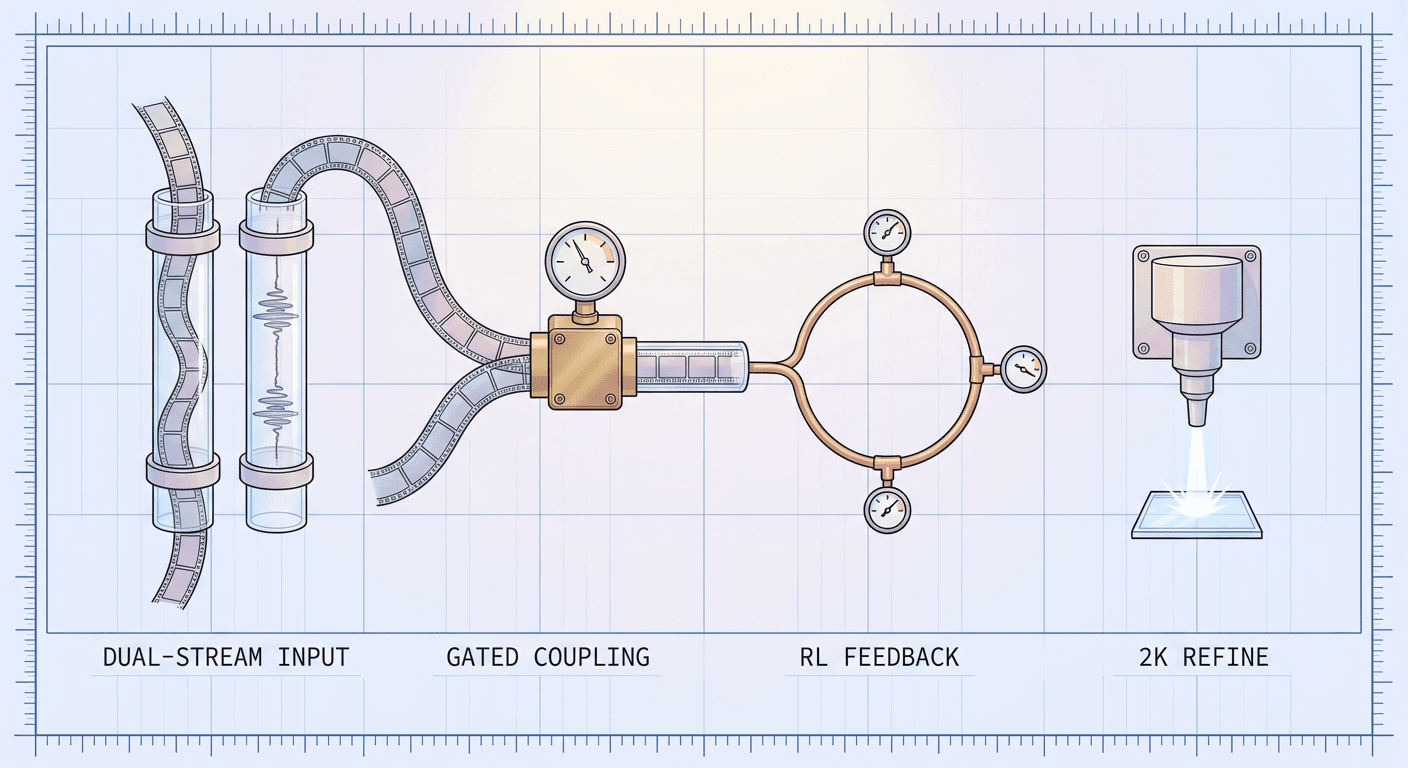
Helix World from Noiz AI and HKUST turns one image into explorable video with stereo sound that follows the camera, running at 24 fps on one H800. Here is how it works.
If you have ever watched an AI-generated walkthrough of a forest, a street, or a game level and noticed that the world looks convincing while the soundtrack is either missing or pasted on afterward, you have run into the central gap in interactive world models. Systems like Genie 3 can render a navigable scene at 24 frames per second, but the announcement material for it describes video, not sound [12], and the usual workaround is to generate a silent clip first and run a separate video-to-audio model over it. That workaround cannot know where the camera is pointing, so when you turn your head the sound stays put. On October 12, 2026, Noiz AI and the Hong Kong University of Science and Technology published Helix World, a model that generates the picture and a camera-aligned stereo soundtrack together from a single starting image, controlled live with WASD and the arrow keys [1].
The timing is specific. The paper, titled "HelixWorld: A Real-time Interactive Audio-Visual World Model", was submitted to arXiv on September 29, 2026 as arXiv:2609.38123 [2], the official blog post followed on October 12, and the code, a preview checkpoint, and a browser demo are all public [4][5][6]. One practical warning before we go further: a few aggregator pages list a paper number of 2608.23189 next to the Helix World name, but that identifier belongs to a different paper, EchoWM [8], which is one of Helix World's main baselines. The correct Helix World paper is 2609.38123, and every number in this post was checked against that paper's HTML version [3] and the official announcement.
This post walks through the whole system: what problem the authors set out to solve, how a video model and an audio model are fused into one backbone, how a slow bidirectional teacher is distilled into a fast causal student, how the stereo field is tied to the camera, how the benchmark scores are computed (including a metric that you can reimplement in about thirty lines), how Helix World compares with Genie 3, Matrix-Game, EchoWM and other systems, and how to run the preview checkpoint using only the commands from the official README. If your interest is more on the creator side, Miraflow's Cinematic AI Video Generator is where you can make finished clips in the browser today, and the later sections explain what a model like this could change for people who make video and games.
TL;DR: What Helix World Is and What the Numbers Say
- Helix World is a world model that takes one image and produces explorable video plus spatial stereo sound at the same time, conditioned on camera motion and keyboard actions. WASD moves the camera and the arrow keys turn the view [1].
- It runs at 24 frames per second on a single NVIDIA H800 GPU, with a real-time factor (RTF) of 0.77 at 768x512, including video and audio decoding [3].
- It is built on the open-source LTX-2.3 audio-visual model, adds 6-DoF camera conditioning through PRoPE and keyboard action conditioning through AdaLN-Zero, and distills a bidirectional teacher into a few-step causal student [1].
- On the WBench navigation average it scores 79.9, and on the new HelixBench spatial-acoustic consistency score it reaches 41.8 against 12.6 for EchoWM, the other model in the comparison that generates sound natively [1].
- The public checkpoint is a preview, the output resolution is 768x512, and the README recommends an 80 GB GPU, so this is a research release rather than something that runs on a gaming laptop [4].
| Fact | Value | Source |
|---|---|---|
| Developers | Noiz AI and HKUST | [1] |
| Paper | arXiv:2609.38123, submitted September 29, 2026 | [2] |
| Input | One image, optional text prompt, keyboard actions | [1] |
| Speed | 24 fps on one H800, RTF 0.77 | [1][3] |
| Output | 768x512 video with stereo audio | [1] |
| Base model | LTX-2.3 | [1] |
| Training corpus after filtering | 3,000 hours, 2.1 million clips | [1] |
Why Sound Is the Missing Piece in World Models
Interactive world models have improved quickly over the last year. Genie 3 demonstrated 720p worlds at 24 frames per second that stay consistent for a few minutes [12], the Matrix-Game line targets controllable game worlds, and Matrix-Game 3.0 reports up to 40 FPS at 720p for its 5B model [14]. Almost all of these systems are silent. The Helix World authors argue that this matters more than it looks, because sound carries information that pictures cannot: the material of a surface, the force of an impact, and events that happen outside the frame, such as a car approaching from behind the viewer [1].
The obvious fix is to bolt a video-to-audio model onto a silent world model, and the authors explain why that fails. Cascaded video-to-audio systems do not see the camera trajectory or the keyboard actions, so they cannot account for ego-motion, and they add latency because the audio model has to wait for generated frames. The other obvious fix, taking an existing joint audio-visual generator, runs into the opposite problem: those models are bidirectional, meaning they look at the whole clip at once, so they have no control interface, and naively converting them to causal generation lets errors accumulate over time [1].
From those observations the authors name three problems that Helix World has to solve together. The first is missing training data, because almost no public dataset pairs stereo audio recordings with metric camera poses. The second is missing control, since a model has to respond to both continuous camera motion and discrete key presses. The third is long-horizon drift, the tendency of autoregressive generators to degrade as they feed on their own output [1]. The rest of the system maps one-to-one onto these three problems, and it is useful to keep that structure in mind while reading the architecture sections.
For creators, the same gap shows up as a workflow cost. Anyone who has generated a silent clip and then hunted for matching ambience, as in the workflow behind DreamX-Creator's joint audio and video approach, knows that sound design is where AI video still feels pasted together. Helix World pushes that idea from fixed clips to a world that you steer in real time.

How Helix World Works: The Architecture Step by Step
Step 1: Start From an Existing Joint Audio-Visual Model
Helix World does not train a world model from scratch. It starts from LTX-2.3, an open-source model that already generates video and audio together [1]. The LTX-2 technical report describes the family's design as an asymmetric dual-stream transformer with a 14B-parameter video stream and a 5B-parameter audio stream, linked by bidirectional audio-video cross-attention and cross-modality AdaLN for shared timestep conditioning [9]. The Helix World paper does not state its own parameter counts in the parts I could read, so I will not repeat the LTX-2 figures as if they described the final model; they are useful context for why starting from LTX was attractive, because the hard part of joint generation, getting two modalities to share a denoising process, was already solved. For a creator-oriented walkthrough of that base model, the earlier LTX 2.3 explainer on this blog covers its features.
The base model is also the baseline in the benchmark. In the WBench table, plain LTX-2.3 scores 74.2 with an RTF of 14.61, which means it needs roughly fourteen and a half seconds of compute for each second of video [1]. Everything Helix World adds, controls, distillation, and streaming, has to close that gap from 14.61 down to 0.77 while raising the score from 74.2 to 79.9.
Step 2: Inject Camera and Keyboard Control
The model takes two kinds of control, and they enter the network in two different ways. Continuous 6-DoF camera trajectories (three translation axes and three rotation axes) go into the visual attention layers through PRoPE, a relative positional encoding for cameras [1]. PRoPE comes from the paper "Cameras as Relative Positional Encoding", which compares ways of feeding camera geometry into multiview transformers and proposes an encoding that handles both intrinsics and extrinsics inside self-attention [11]. In the Helix World paper, the attention queries and keys are transformed with a 4x4 matrix built from the camera intrinsics and the camera pose at each time step [3].
Discrete keyboard actions take a different route. The paper defines an 81-class action vocabulary over a 9x9 grid of translation and view-rotation bins, adds the action embedding to the diffusion noise embedding, and applies it through AdaLN-Zero, the zero-initialized adaptive layer norm introduced for diffusion transformers [3]. The vocabulary design is credited to earlier work on keyboard-controlled game video, GameCraft and WorldPlay [3].
Why two paths? Continuous poses are geometric quantities that attention can reason about directly, while key presses are discrete commands that behave more like a global condition on the denoising step. In practice, the README exposes the keyboard path as the way you drive the model, with keys W, A, S, D, left, right, up, and down plus a stop command, which we will use in the hands-on section [4].
Step 3: Let Audio Listen to Geometry Through Cross-Modal Attention
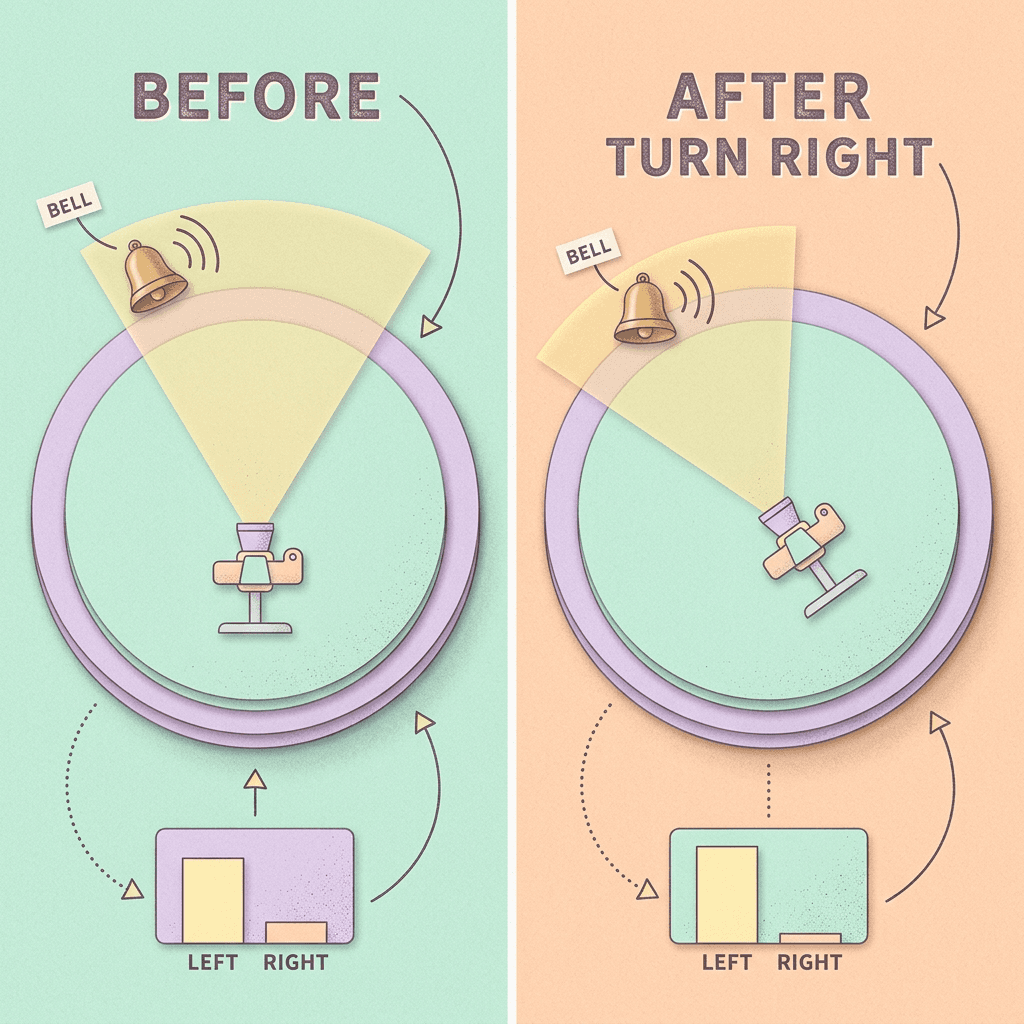
The key sentence in the paper for the audio side is that control signals "enter the video branch and propagate to the audio branch through cross-modal attention" [3]. In other words, the audio branch never receives the camera pose directly. It sees the video branch's features, which already encode where things are relative to the viewpoint, and cross-modal attention binds that visual geometry to acoustic features. The official blog describes the consequence in plain terms: camera motion becomes stereo panning, and the sound field rotates with the camera [1].
This design has a useful property. Because the audio branch learns the relationship between where an emitter appears on screen and how its energy is split between the left and right channels, it can generalize to emitters the training data never paired with a specific camera move. It also explains the failure of cascaded baselines in the benchmark: a video-to-audio model that only sees pixels has no signal telling it that the viewer is turning, so it has nothing to base a pan on. The numbers later in this post show how large that difference is.
Step 4: Train a Bidirectional Teacher in Three Progressive Stages
The first trained model is a bidirectional teacher, which looks at an entire clip at once and therefore produces the best quality, though it cannot respond to live input. The authors train it progressively in three stages: first the new control modules, then the video branch, and finally the full audio-visual backbone [1].
The ablation behind this choice is one of the cleaner numbers in the release. Compared with fine-tuning everything at once, the progressive schedule lowers camera rotation error from 0.1237 to 0.1144 and translation error from 0.0957 to 0.0823 while keeping visual quality [1]. That is a reduction of roughly 7.5 percent in rotation error and 14 percent in translation error (calculated from the two published pairs), a meaningful gain for a change that costs nothing at inference time. The intuition is that freshly initialized control modules produce noisy gradients, and letting them settle before the large pretrained backbone starts adapting prevents the backbone from bending to compensate for them.
Step 5: Distill the Teacher Into a Causal, Few-Step Student
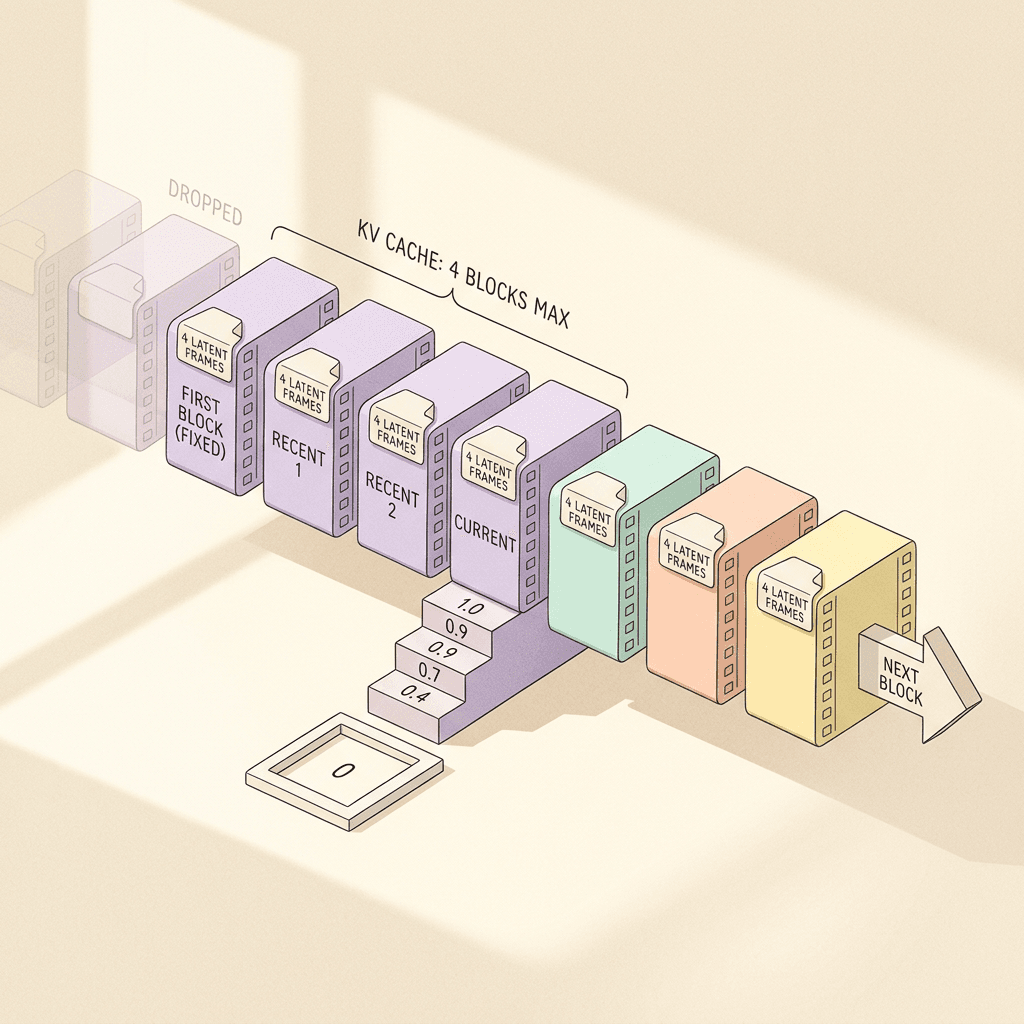
The teacher is the quality ceiling and the student is what you actually interact with. The student is a few-step causal model that generates block by block, with a sliding key-value cache so that each new block attends only to a bounded amount of history [1]. The implementation details in the paper's appendix are specific: each block contains four video latent frames, a self-forcing training window contains 16 latent frames in four blocks, and the student uses four stochastic denoising steps per block following the schedule 1.0, 0.9, 0.7, 0.4, 0 [3].
The official blog says generation runs in chunks of about 1.3 seconds, and the appendix numbers agree with that: 121 frames at 24 fps is 5.04 seconds, and the README states that 121 frames correspond to 15 latent transitions [4], so a block of four latent frames covers roughly 1.3 seconds of video (my derivation from those figures). The cache holds at most four blocks: the fixed first block, which contains the conditioning-image latent, the two most recent completed blocks, and the current target block [3]. The blog post describes this as "fixed sink frames", while the paper's appendix says it does not use that term and that the fixed first block plays a similar role, so I will refer to it as the anchor block here.
Student training has three ingredients. It is initialized by regressing the teacher's ODE outputs, a technique the paper credits to the Causal Forcing line of work. It then trains with self-forcing on its own rollouts, which is the method from Huang et al. that conditions each frame on the model's own previous outputs rather than ground truth to close the train-test gap and enable a rolling KV cache [10]. Finally, an online trajectory distillation loss mixes two supervision sources: with probability p, the student's velocity at an intermediate rollout state is supervised by the teacher's probability-flow ODE target, and otherwise the standard distribution matching distillation (DMD) loss is used [1]. A long-horizon streaming stage on extended windows follows, and the combined effect reported in the blog is that the WBench average rises from 77.9 to 79.1 while 30-second rollouts stay stable [1].
Step 6: What "Real Time" Means Here
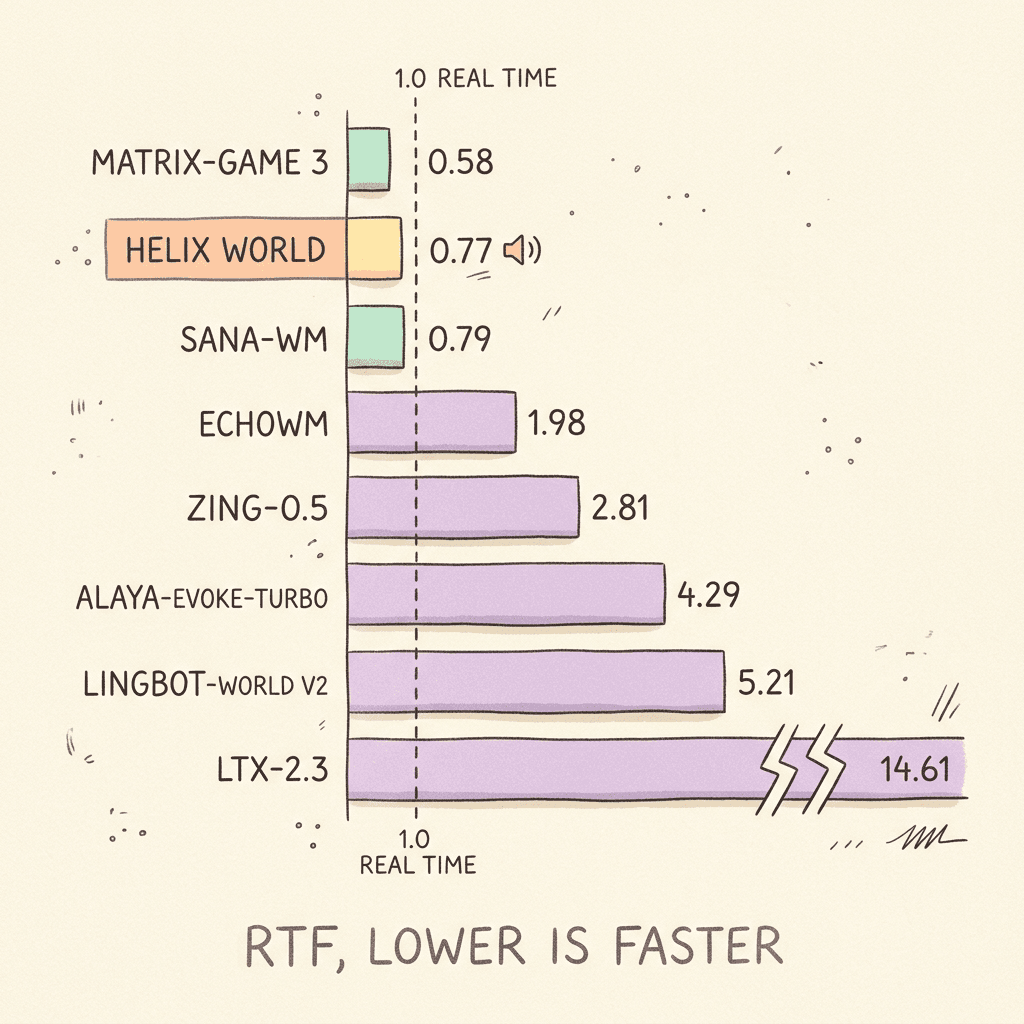
The headline claim is 24 fps on one H800, and the benchmark defines the measurement carefully: RTF is the seconds of compute spent per second of output video on a single H800, including video and audio decoding, so values below 1.0 are faster than real time [1]. Helix World's 0.77 means one second of video and sound costs about 0.77 seconds to produce, and for a 1.3-second block the compute works out to roughly a second (calculated from the paper's figures), which leaves headroom for the next key press to take effect at the next block boundary.
That last point is the real interactivity story. The demo documentation says keyboard input and new text prompts take effect from the next chunk [1], so the control latency is bounded by the block length rather than by a per-frame loop. If you hold W and then tap the right arrow, the world responds within about a block, not instantly, which is worth knowing before you compare the feel of this model with a game engine.
Two caveats belong next to the speed claim. The measurement is on an H800 data-center GPU and the paper does not report consumer GPUs, and the GitHub README says a BF16 single-GPU run uses about 70 GB of VRAM [4]. Real time on a data-center card is a legitimate research result, though it says nothing about how the model would behave on a typical desktop GPU.

The Data: How 4,100 Hours Became 3,000
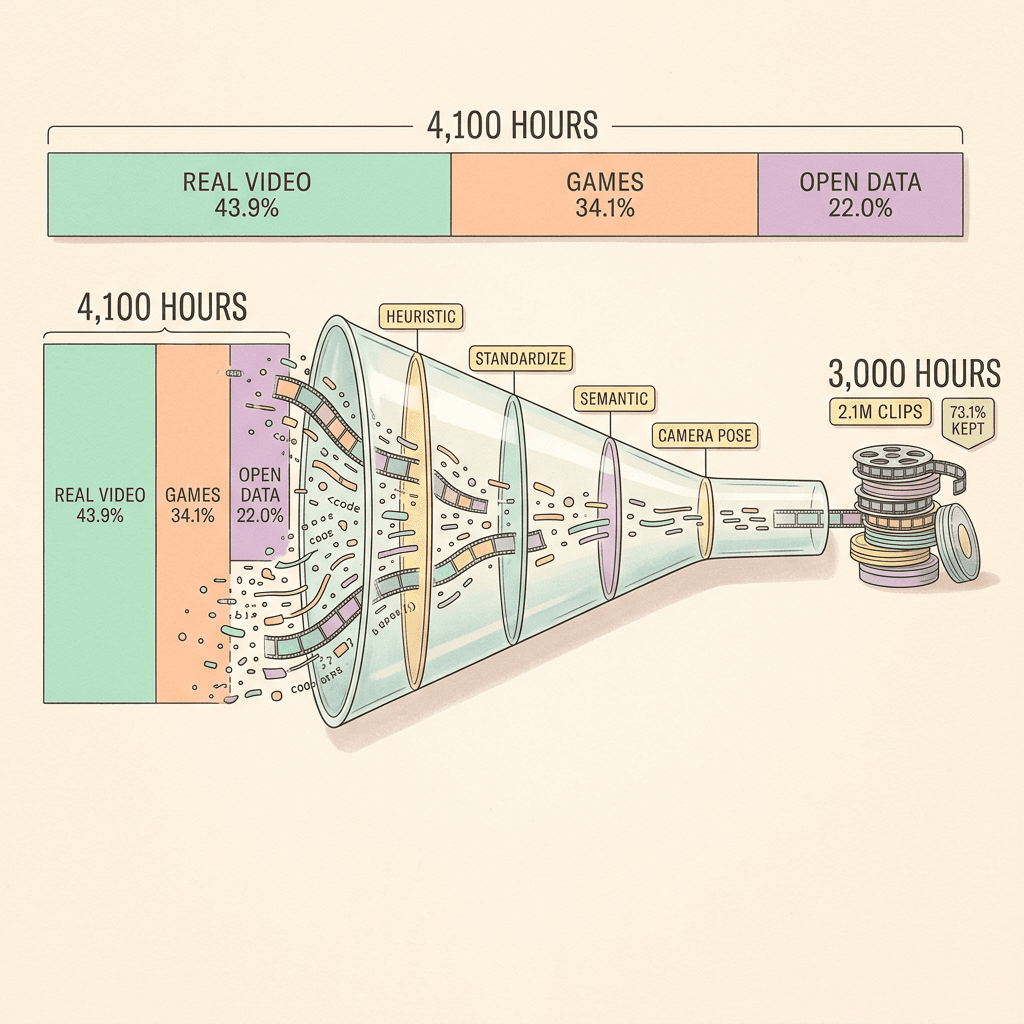
Training data is the first of the three problems, and the data pipeline is one of the most reusable parts of the paper. The raw corpus is 4,100 hours, of which 43.9 percent is real-world video, 34.1 percent is game recordings, and 22.0 percent comes from open-source datasets [1]. The paper's appendix expresses the same split in hours as 1.8k web video, 1.4k game recordings, and 0.9k open-source footage [3].
Four filtering stages run in order from cheapest to most expensive, which is a good pattern for any large video pipeline:
- Heuristic filtering removes dual-mono audio, shot cuts, low quality, text overlays, and static scenes. The appendix gives thresholds, for example shot cuts are flagged above a histogram difference of 0.35 and static scenes are rejected below a median absolute difference of 1.5 [3].
- Clip standardization cuts everything into 121-frame clips at 24 fps, 768x512, with 48 kHz stereo audio [1].
- Semantic filtering uses a multimodal LLM to remove background music, narration, UI overlays, picture-in-picture, and talking heads, keeping only diegetic sound, meaning sound that comes from inside the scene [1].
- Camera and captioning recovers metric camera poses for every frame and writes three captions per clip: video-only, audio-only, and audio-visual [1].
The output is 3,000 hours in 2.1 million clips, a 73.1 percent yield from the raw footage [1]. An ablation in the blog reports that training with all three caption tracks gave the best audio-visual alignment, which suggests that separating "what it looks like", "what it sounds like", and "what is happening" gives the model cleaner supervision than a single mixed caption [1].
The semantic filter deserves attention because it is the quiet reason the model works as a world model. Removing music and narration means the audio the model learns is the sound a listener would hear if standing inside the scene. A world model trained on trailers with scoring would learn to add a soundtrack, which is the opposite of a spatial soundscape that rotates with the viewer. For creators, this also explains why the output sounds like ambience and foley rather than a produced track, and why you would still add music from the Miraflow AI music generator on top for a finished piece.
Benchmarks and Methodology
WBench Navigation: Quality and Speed
The first benchmark is the WBench navigation split, which measures how well a world model follows navigation commands while keeping visual quality, reported as an average score, alongside the RTF defined above [1]. The table below reproduces the official comparison.
| Model | Native audio | RTF (lower is faster) | WBench average |
|---|---|---|---|
| Alaya-EVOKE-Turbo | No | 4.29 | 82.0 |
| EchoWM | Yes | 1.98 | 81.0 |
| Zing-0.5 | No | 2.81 | 81.0 |
| Helix World | Yes | 0.77 | 79.9 |
| LingBot-World v2 | No | 5.21 | 79.4 |
| SANA-WM | No | 0.79 | 76.0 |
| LTX-2.3 (base) | Yes | 14.61 | 74.2 |
| Matrix-Game 3 | No | 0.58 | 71.3 |
Three readings of the table matter. First, the top silent models, Alaya-EVOKE-Turbo at 82.0 and Zing-0.5 at 81.0, are better on the quality average but run at RTF 4.29 and 2.81, which means neither is real time on this hardware. Second, among models that are faster than real time, Helix World's 79.9 is the highest, with SANA-WM at 76.0 (RTF 0.79) and Matrix-Game 3 at 71.3 (RTF 0.58) behind it. Third, Helix World is the only real-time model in the table that also generates sound [1]. EchoWM also has native audio and scores 81.0, but at RTF 1.98 it is not real time.
It is worth being careful about what this table does not show. The visual-quality gap to the best silent model is 2.1 points (82.0 versus 79.9), which the authors acknowledge, and the comparison is entirely within the authors' own evaluation on their hardware. The numbers are company-reported and not yet independently reproduced, which is normal for a release this new but worth keeping in mind.
HelixBench: Does the Sound Follow the Camera?
Existing audio benchmarks measure sound quality or sync, but none checks whether the stereo field tracks the viewpoint, so the authors built HelixBench. It contains 1,015 human-verified cases across six domains, split into four subsets named Navigation, Perspective, Event, and Subject. Each case includes a starting frame, an audio-visual prompt, continuous camera poses, and a stereo reference [1].
The baselines are chosen to isolate the value of joint generation. Alongside EchoWM, the authors take Helix World's own video, mute it, and re-dub it with three video-to-audio models, AudioX, ThinkSound, and PrismAudio, so the picture is held fixed and only the audio pipeline differs [1]. The full table follows.
| Model | KL (lower) | FAD (lower) | DeSync s (lower) | ImageBind (higher) | CLAP (higher) | Spatial (higher) |
|---|---|---|---|---|---|---|
| Helix World (causal student) | 1.39 | 2.39 | 0.59 | 0.299 | 0.302 | 41.8 |
| Helix World (bidirectional teacher) | 1.54 | 3.08 | 0.50 | 0.270 | 0.268 | 33.2 |
| EchoWM | 1.95 | 7.75 | 0.67 | 0.204 | 0.235 | 12.6 |
| Helix World + ThinkSound | 2.23 | 6.19 | 0.42 | 0.208 | 0.289 | 14.8 |
| Helix World + AudioX | 2.02 | 3.92 | 1.18 | 0.257 | 0.309 | -5.7 |
| Helix World + PrismAudio | 2.24 | 6.39 | 0.46 | 0.215 | 0.272 | -9.5 |
| LTX-2.3 (base) | 1.80 | 7.64 | 0.40 | 0.278 | 0.258 | 1.0 |
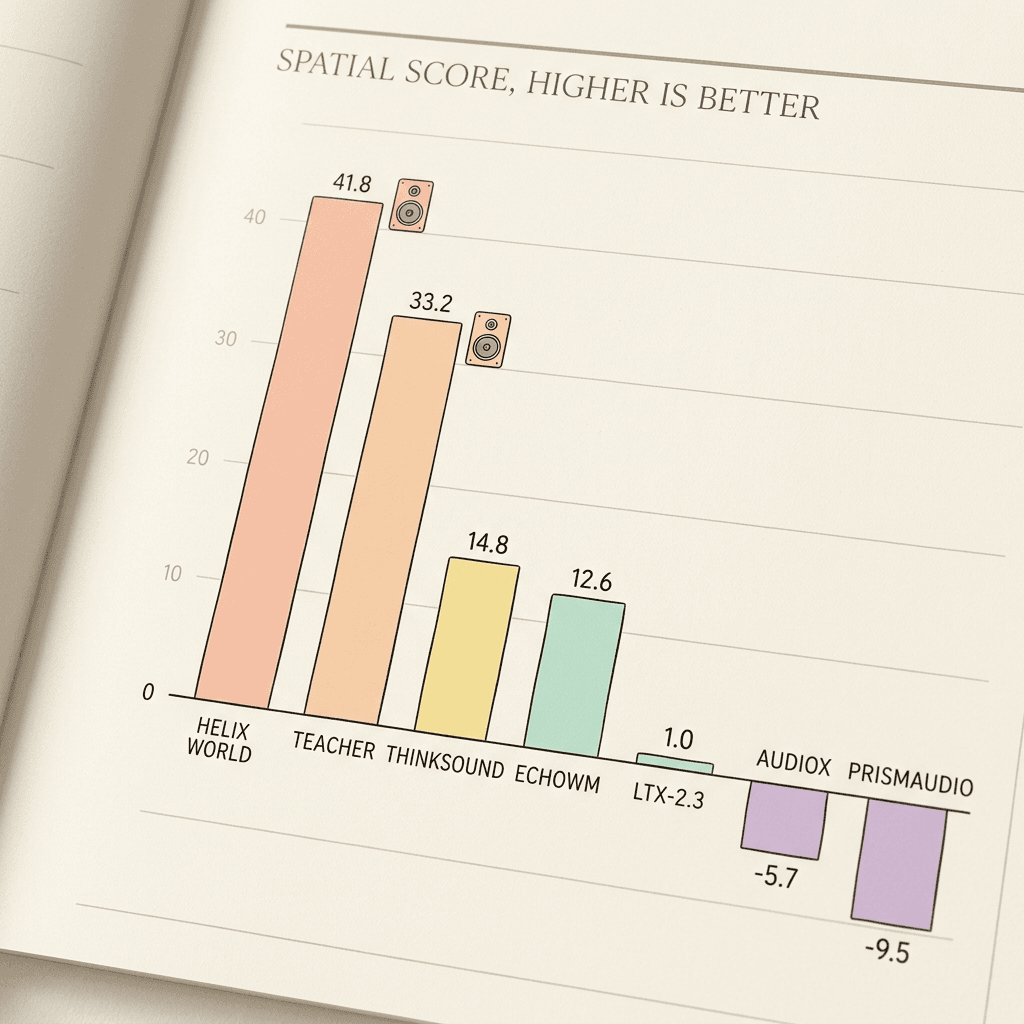
The headline result is the Spatial column: the causal student scores 41.8, the bidirectional teacher 33.2, and EchoWM about 12.6 (the paper's Table 4 reports 12.6476, and some summaries round it to 12.7) [3]. The re-dubbing pipelines are far lower, with ThinkSound at 14.8, AudioX at -5.7, and PrismAudio at -9.5. Negative values mean the generated sound is more often on the opposite side of the screen from its source than on the same side, which is what you would expect from a model that has no idea where the emitter is relative to the camera [1].
Two details in that table are easy to miss. The causal student beats the bidirectional teacher on four columns (KL 1.39 versus 1.54, FAD 2.39 versus 3.08, ImageBind 0.299 versus 0.270, Spatial 41.8 versus 33.2) even though the teacher is the model it was distilled from, which suggests the self-forcing and trajectory-distillation stages improve audio-visual alignment rather than merely preserving it. And the model does not win everything: the teacher has a lower DeSync (0.50 versus 0.59 seconds), plain LTX-2.3 and ThinkSound are lower still at 0.40 and 0.42, and AudioX has a higher CLAP score at 0.309 [1]. The authors say as much, noting that tight onset timing can still improve.
How the Spatial Score Is Computed
The spatial metric is the part most worth understanding, because the claim "sound follows the camera" is only as good as the way it is measured. According to the paper's appendix, the visual side takes the horizontal center of each sound emitter's bounding box (found with a grounding detector), maps it to a value d = 2x/W - 1 so the left edge is -1 and the right edge is +1, and samples it at 10 Hz. The audio side computes a stereo pan p = (E_R - E_L) / (E_R + E_L) over 100 ms windows with a 50 ms hop, where E_L and E_R are the energies of the left and right channels [3].
Both values are then bucketed: left if below minus tau, right if above plus tau, center otherwise, with tau equal to 0.2 for the visual position and 0.1 for the audio pan. A sample scores +1 when audio and visual are on the same side, 0 when the audio is centered, and -1 when they are on opposite sides, and samples where the visual emitter is in the center are excluded. Valid samples are averaged within a clip and multiplied by 100, so the scale runs from -100 to 100, and a clip needs at least four consecutive valid samples to count [3].
A worked example makes this concrete. Suppose a clip has eight valid samples where five have audio on the same side as the emitter, one has centered audio, and two have audio on the opposite side. The clip score is (5 + 0 - 2) / 8 x 100 = 37.5, which is close to Helix World's average of 41.8. A model with random panning would hover near zero, which is why the 1.0 for plain LTX-2.3 makes sense, and a model that consistently pans the wrong way would go negative.
The code block below is my own simplified reimplementation of the scoring rule for samples that are already time-aligned. It is not from the Helix World repository, and it skips the detector, the 10 Hz versus 50 ms alignment, and the four-consecutive-sample eligibility rule, so treat it as a teaching aid for the formula rather than a way to reproduce the paper's numbers.
python/code
# Simplified teaching sketch of the spatial score (Appendix D.4 of the Helix World paper).
# Not from the official repo. Assumes visual and audio samples are already time-aligned.
TAU_V, TAU_A = 0.2, 0.1

def side(value, tau):
    if value < -tau:
        return "left"
    if value > tau:
        return "right"
    return "center"

def visual_position(box_center_x, frame_width):
    return 2 * box_center_x / frame_width - 1   # -1 = left edge, +1 = right edge

def audio_pan(energy_left, energy_right):
    total = energy_left + energy_right
    return 0.0 if total == 0 else (energy_right - energy_left) / total

def clip_score(samples):
    """samples: list of (box_center_x, frame_width, energy_left, energy_right)"""
    scores = []
    for cx, w, el, er in samples:
        v = side(visual_position(cx, w), TAU_V)
        if v == "center":          # visual-center samples are excluded
            continue
        a = side(audio_pan(el, er), TAU_A)
        if a == "center":
            scores.append(0)
        elif a == v:
            scores.append(1)
        else:
            scores.append(-1)
    return 100 * sum(scores) / len(scores) if scores else None

# Worked example from the post: 5 same-side, 1 centered, 2 opposite -> 37.5
demo = ([(100, 768, 0.9, 0.1)] * 5) + [(100, 768, 0.5, 0.5)] + ([(100, 768, 0.1, 0.9)] * 2)
print(clip_score(demo))
The User Studies
Automatic metrics are paired with human preference tests. In the full audio-visual comparison, raters preferred Helix World over EchoWM 67.9 percent to 20.8 percent, with the remainder tied. Against re-dubbed versions of Helix World's own video, it was preferred 67.9 percent to 24.5 percent over AudioX, 80.8 percent to 9.6 percent over ThinkSound, and 77.8 percent to 16.7 percent over PrismAudio [1].
The muted-video study is the most revealing for honest comparison. With the sound removed, viewers preferred Helix World over SANA-WM, Alaya, and HY-WorldPlay 1.5, tied with LingBot-World v2 at 39.5 percent each, and preferred EchoWM over Helix World 44.7 percent to 26.3 percent [1]. The authors attribute Helix World's advantage mainly to the audio, which is a candid admission that on pictures alone it is competitive rather than best. The study sizes are not given in the official post, so treat the percentages as indicative.
Helix World Compared With Other World Models
Comparing world models is awkward because they differ on resolution, hardware, audio, and openness. The table below keeps to facts available in the cited sources and marks where a source is silent.
| Model | Native audio | Speed or resolution (as reported) | Availability |
|---|---|---|---|
| Helix World | Yes, stereo that follows the camera | 24 fps on one H800, RTF 0.77, 768x512 | Code, preview checkpoint, web demo |
| Genie 3 | Announcement page does not mention audio | 24 fps at 720p, consistent for a few minutes | Limited research preview at announcement |
| Matrix-Game 3.0 | No (per Helix World's table) | Up to 40 FPS at 720p for the 5B model, per its abstract | See the paper |
| EchoWM | Yes (sound, music, speech) | 720p video, RTF 1.98 in Helix World's table | Paper on arXiv |
| WorldSonus | Audio layer only, 48 kHz stereo | 41.2 ms per 100 ms chunk on one H100 | Code and weights, CC BY-NC 4.0 |
Genie 3. Google DeepMind's model is the reference point for general-purpose interactive worlds: 24 frames per second at 720p, with consistency for a few minutes and visual memory reaching back about a minute, announced on August 5, 2025 as a limited research preview [12]. Genie 3's announcement page does not mention audio, so the comparison with Helix World is about the sound dimension and openness more than raw visual fidelity: Helix World is smaller in resolution (768x512) but ships code and a preview checkpoint, whereas Genie 3 was available only to a small group.
Matrix-Game. The original Matrix-Game is a 17B-plus-parameter interactive world foundation model for controllable Minecraft-style game worlds, trained with a dataset of over 2,700 hours of unlabeled clips and over 1,000 hours of action-labeled clips [13]. Its successor, Matrix-Game 3.0, targets memory-augmented 720p real-time generation, with a 5B model reaching up to 40 FPS [14]. In Helix World's own table, Matrix-Game 3 is the fastest entry at RTF 0.58 but scores 71.3 on WBench and has no native audio [1], so it sits at the speed-first end of the trade-off.
EchoWM. This is the closest relative, since it is the other world model that generates sound. The EchoWM paper describes an omnimodal world model that generates 720p video together with environmental sound, music, and speech, organizes interaction around camera intent, and maps discrete commands and continuous poses into a shared metric-scale 6-DoF trajectory [8]. It has the higher WBench score (81.0 versus 79.9) and was preferred in the muted-video study, but it runs at RTF 1.98 and scores about 12.6 on spatial consistency, so its strength is breadth of audio types and visual quality while Helix World's is speed and camera-aligned stereo [1].
WorldSonus. Noiz's own sibling release, dated October 6, 2026, takes a different route: instead of generating audio and video jointly, it adds real-time stereo sound to an existing world model's video, writing 48 kHz stereo in 100 ms chunks at 41.2 ms per chunk on an H100 [7]. Its code and weights are licensed CC BY-NC 4.0 [7]. The two approaches answer different needs. WorldSonus is a drop-in sound layer for a video model you already have, while Helix World is the end-to-end option in which the audio and the picture influence each other.
Models in the creator-facing world-model wave. Several recent systems frame the same direction from different angles, and rather than repeat those arguments I will point to the existing deep dives: World Labs Atlas for spatial intelligence, Runway Solaris for the interface world model idea, and Kandinsky 6.0 Video for an open audio-video model that generates fixed clips with synchronized audio. The distinction that matters for Helix World is that those systems either generate a bounded clip or focus on spatial scenes, whereas Helix World streams an unbounded rollout under live control with sound included. For fixed-length clips with native audio, the comparisons in Seedance 2.5 versus Veo 3.1 and FLUX 3 Video are the better references, and MiniMax H3 covers the closed-clip omni-modal side.
Run the Preview Checkpoint Yourself
Everything in this section comes from the official README and Hugging Face card [4][5]. The requirements listed there are Linux, Python 3.11, CUDA 12.x, an NVIDIA GPU (80 GB of VRAM recommended), and system ffmpeg and ffprobe, with a BF16 single-GPU run using about 70 GB. If you do not have such a GPU, the browser demo at helixworld.org is the way to try it without installing anything [6].
Install and Download Weights
The README's setup is a conda environment, a requirements install, and a download script that fetches both the checkpoint and the Gemma 3 12B text encoder into a models directory.
bash/code
# From the official HelixWorld README: Linux, Python 3.11, CUDA 12.x, ffmpeg and ffprobe installed
git clone https://github.com/NoizAI/HelixWorld.git
cd HelixWorld

conda create -n helixworld-preview python=3.11 -y
conda activate helixworld-preview
python -m pip install -r requirements.txt
python download_models.py
After the download, the README says to expect models/text_encoder/gemma-3-12b/ and models/weights/model.safetensors [4]. The Hugging Face card lists a single file, weights/model.safetensors, containing the transformer, the audio and video autoencoder, the vocoder, and the embeddings processor, and it notes that access to the repository does not replace acceptance of the applicable model license [5]. If you only want to inspect the checkpoint file, the generic huggingface_hub call below works for any public repository, though the README's download_models.py is the supported path because it also fetches the text encoder.
python/code
# Generic huggingface_hub download of the single checkpoint file listed on the model card.
# The README's download_models.py is the supported path because it also fetches the text encoder.
# You may need to log in or accept the license on the model page first.
from huggingface_hub import hf_hub_download

path = hf_hub_download(
    repo_id="NoizAI/HelixWorld-preview",
    filename="weights/model.safetensors",
)
print(path)
Run Inference
The README's inference command takes a first frame, a prompt file, an action string, a perspective, and a frame count.
bash/code
# From the official HelixWorld README
CUDA_VISIBLE_DEVICES=0 ./run.sh \
  --image /path/to/first_frame.png \
  --prompt-file examples/prompt.json \
  --actions "W:5,right:5,stop:5" \
  --perspective first_person \
  --num-frames 121 \
  --output-dir outputs/demo
# The MP4 is written to outputs/demo/release/native/
The README adds several details that are easy to miss. Prompts live in examples/prompt.json, or you can pass --video-prompt, --audio-prompt, and --av-prompt separately, and the finished MP4 is written to <output-dir>/release/native/. The action keys are W, A, S, D, left, right, up, down, and stop, keys can be combined with a plus sign as in W+D:8, and the number after the colon is the count of latent transitions, where 121 frames equal 15. The last segment may omit its duration [4].
Because the unit is latent transitions rather than seconds, a small helper saves arithmetic. The snippet below is my own convenience function built on the README's statement that 121 frames equal 15 latent transitions (eight frames per transition); it is not part of the repository.
python/code
# Convenience helper (not part of the repo). The README says 121 frames equal 15 latent
# transitions, so one transition is 8 frames, or 1/3 of a second at 24 fps.
def seconds_to_transitions(seconds, fps=24, frames_per_transition=8):
    return max(1, round(seconds * fps / frames_per_transition))

def build_actions(plan):
    """plan: list of (keys, seconds), e.g. [("W", 1.7), ("right", 1.7), ("stop", 1.7)]"""
    return ",".join(f"{keys}:{seconds_to_transitions(s)}" for keys, s in plan)

print(build_actions([("W", 1.7), ("right", 1.7), ("stop", 1.7)]))  # W:5,right:5,stop:5
Practical Tips for a Good First Run
Choose a first frame that has a clear sound emitter near one side of the frame, such as a stream, a street musician, or a machine, because the spatial behavior is easiest to hear when something audible sits off-center and you then turn toward or away from it. The model encodes the input image at 768x512, so supplying a frame with that aspect ratio avoids surprising crops [1].
If you do not write a prompt, the demo describes the scene automatically from the frame, which is a useful default for a first test [1]. For repeatable experiments, give each prompt channel distinct jobs: describe appearance in the video prompt, name the sounds in the audio prompt, and describe the action in the audio-visual prompt, which mirrors the three caption tracks used in training. That matching is my inference from the training setup rather than documented guidance, so test it against the single-prompt default.
For a quick first frame, you can generate one with an image model. A prompt such as the following gives the model a scene with an obvious off-center sound source.
A wide photograph of a narrow mountain stream running along the left side of a pine forest path at golden hour, wet stones in the foreground, mist between the trunks, a wooden footbridge in the distance on the right, natural soft light, sharp focus across the frame, 3:2 composition, no people, no text, no watermark.
You can generate this kind of starting frame with the AI image generator on Miraflow, then crop it to the 768x512 proportion before feeding it to the checkpoint.
Limitations You Should Know About
The official post lists several limits in plain language, and a few more follow from the sources.
- Resolution. Output is 768x512, below the 720p of Genie 3 and EchoWM [1][12].
- Hardware. Real-time speed was measured on an H800, the paper does not report consumer GPUs, and the README recommends 80 GB of VRAM [1][4].
- Preview status. The public checkpoint is Preview v1, so results may differ from the paper's reported numbers [1].
- Visual quality. On the visual average it is behind the best silent models (79.9 versus 82.0), and in the muted comparison viewers preferred EchoWM [1].
- Timing precision. It does not have the lowest DeSync on HelixBench, so tight sound-onset timing can improve [1].
- Licensing ambiguity. The paper is under CC BY-NC-SA 4.0 on arXiv [2], the code is Apache 2.0, and the Hugging Face card lists apache-2.0 for the weights while pointing to a separate LICENSE file for the full terms [4][5]. Read that file before any commercial use.
- Self-reported benchmarks. HelixBench was created by the same team that built the model, and the baselines were run by the authors. Independent replication will matter.
There is also a conceptual limit. HelixBench measures whether sound moves with the camera relative to a visible emitter, which is exactly what the model was built to do, so it says little about off-screen sources, reverberation, occlusion, or distance attenuation. The spatial score also uses coarse left, center, and right buckets, so a model could score well while rendering a physically implausible soundstage. These are limits of the evaluation, not a criticism of the release, and they are the natural next questions for follow-up work.
What Helix World Means for Creators, Game Developers, and Video Teams
Game prototyping. The first direct use is rapid prototyping. A designer can drop in a concept frame and walk through it with sound to test mood before any engine work. The 768x512 resolution and the non-commercial-versus-commercial licensing questions mean it is a sketching tool today, not a shipping renderer. If you stream or make gaming content, the visual setups in AI prompts for gaming setups and streamer content pair well with a world model for concept shots.
Video and Shorts. For short-form creators, the relevant shift is that the sound is generated to match camera motion, which removes one of the more tedious post-production steps. A walkthrough Short built from a world model rollout could get a believable ambience bed straight from generation. Today you can build the equivalent with Text2Shorts for scripted vertical videos, and the argument for faceless formats in why Shorts work without a face cam applies even more strongly to generated worlds, since there is no on-camera person to carry the audio.
Audio and music. Because the training data excludes music and narration, the output is ambience, which leaves room for a composed layer. The workflow in how to generate no-copyright background music with AI is a natural complement, and the AI music generator can score a rollout once you have captured it.
Repurposing long recordings. If you record an interactive session, a rollout, or a gameplay capture, AI Clipping can find the strongest moments and cut them into captioned vertical clips, and the guide to turning long videos into Shorts walks through that process. For the cover image, the YouTube Thumbnail Maker handles the packaging side.
Research and accessibility. For researchers, the release of HelixBench and a spatial metric gives the field a shared way to test whether audio follows the viewpoint, and the data pipeline is a reusable recipe. A longer-term possibility, which the sources do not claim, is that camera-aligned stereo could support sound-first experiences for listeners who rely on audio cues; I flag that as speculation, not a stated goal of the project.
Common Mistakes When Evaluating Audio-Visual World Models
- Comparing RTFs across different hardware. The 0.77 figure is for one H800 including decoding. A claim measured on an H100 or a different resolution is not comparable, which is why the WorldSonus figure of 41.2 ms per chunk on an H100 belongs to a different measurement [7].
- Treating the spatial score as a general audio quality score. It checks left-right placement against on-screen emitters only. FAD and KL carry the quality story, and DeSync carries timing.
- Reading the muted-video study as a loss. The authors report that it shows the visual gap against EchoWM, and the audio-visual study shows where Helix World wins. Both facts are true at once.
- Assuming the preview matches the paper. The checkpoint is explicitly Preview v1, so reproduce before you rely on any number [1].
- Mixing up the arXiv numbers. As noted at the start, 2609.38123 is Helix World and 2608.23189 is EchoWM.
- Ignoring licenses. Code, weights, and the paper are listed under different terms, so check the LICENSE file on Hugging Face before shipping anything.
Where This Is Heading
Three trends are visible in the sources. Streaming audio is becoming its own research thread, with WorldSonus and Helix World approaching it from opposite ends [7]. Few-step causal distillation, with self-forcing as the central technique [10], is what turns big diffusion backbones into interactive systems. And evaluation is catching up, with HelixBench as an early attempt at measuring something that silent world models never had to.
The open question is whether a joint model can hold both quality and speed at higher resolution. The WBench table shows the current frontier: the quality leaders are 4 to 5 times slower than real time, and the real-time models give up visual points, with Helix World sitting in the middle at 79.9 and RTF 0.77. If the next release raises the resolution while keeping the stereo behavior, interactive worlds with sound will move from demo to tool. Until then, the practical way to use the idea is to treat it as a concept and ambience generator and to finish the piece with the tools you already trust, such as the Cinematic AI Video Generator for polished clips and Miraflow as the place to combine video, thumbnails, and music in one workflow.
Frequently Asked Questions
What is Helix World?
Helix World is a real-time interactive audio-visual world model from Noiz AI and HKUST. From one starting image it generates explorable video and spatial stereo audio together, controlled with WASD and the arrow keys [1].
Is Helix World really real time?
Its reported RTF is 0.77 on a single NVIDIA H800 at 768x512, including video and audio decoding, and values below 1.0 are faster than real time. The paper does not report consumer GPUs [1].
What are WBench and HelixBench?
WBench is the navigation benchmark where Helix World averages 79.9. HelixBench is the new benchmark released with the model, with 1,015 human-verified cases across six domains and a spatial score that correlates on-screen emitter positions with stereo panning [1].
How much better is its spatial audio than EchoWM?
On the HelixBench spatial score, Helix World's causal student gets 41.8 against about 12.6 for EchoWM, though EchoWM scores higher on the WBench visual average (81.0 versus 79.9) [1][3].
Can I run it on my own GPU?
The README recommends an 80 GB NVIDIA GPU on Linux with Python 3.11 and CUDA 12.x, and a BF16 run uses about 70 GB. Smaller cards are not documented [4].
Where do I get the code and weights?
The code is at github.com/NoizAI/HelixWorld and the preview checkpoint is at huggingface.co/NoizAI/HelixWorld-preview [4][5].
Is it free for commercial use?
The code is Apache 2.0 and the Hugging Face card lists apache-2.0 for the weights while referring to a LICENSE file for the full terms, and the arXiv paper is CC BY-NC-SA 4.0. Read the LICENSE file before commercial use [2][5].
What base model does it use?
It builds on the open-source LTX-2.3 audio-visual model [1], and the LTX-2 report describes that family as a dual-stream audio-video transformer [9].
Does it replace tools like Veo or Kling for making videos?
No. It targets interactive exploration at 768x512 on data-center hardware, whereas finished clip generators focus on polished fixed-length output. For finished clips, a browser tool such as Miraflow's Cinematic AI Video Generator is the practical choice.
Conclusion
Helix World is a clear demonstration that sound can be part of a world model rather than an afterthought. By starting from LTX-2.3, injecting camera control through PRoPE and keyboard control through AdaLN-Zero, and distilling a bidirectional teacher into a four-step causal student, the authors reach 24 fps on one H800 with a stereo field that follows the camera, scoring 41.8 on spatial-acoustic consistency against roughly 12.6 for the nearest sound-generating baseline [1][3]. The costs are real: 768x512 output, an 80 GB GPU recommendation, a preview checkpoint, and a visual score a couple of points behind the best silent models.
For researchers and tinkerers, the paper, the code, and the HelixBench metric are worth reading closely, especially the data pipeline and the spatial score definition. For creators, the sensible move today is to watch the demo at helixworld.org, use world-model rollouts as concept and ambience material, and finish your work with browser tools such as Miraflow, where video, images, thumbnails, and music live in one place.
References
- Noiz AI, "Meet Helix World: A Real-Time Audio-Visual World Model", October 12, 2026. https://noiz.ai/lp/blog/meet-helix-world [1]
- Ke et al., "HelixWorld: A Real-time Interactive Audio-Visual World Model", arXiv:2609.38123. https://arxiv.org/abs/2609.38123 [2]
- HelixWorld paper, HTML version. https://arxiv.org/html/2609.38123v1 [3]
- NoizAI/HelixWorld, GitHub repository and README. https://github.com/NoizAI/HelixWorld [4]
- NoizAI/HelixWorld-preview, Hugging Face model card. https://huggingface.co/NoizAI/HelixWorld-preview [5]
- Helix World interactive demo. https://helixworld.org/ [6]
- Noiz AI, "WorldSonus", October 6, 2026. https://noiz.ai/lp/blog/worldsonus [7]
- Zhang et al., "EchoWM: Open and Enterable Omnimodal World Models", arXiv:2608.23189. https://arxiv.org/abs/2608.23189 [8]
- HaCohen et al., "LTX-2: Efficient Joint Audio-Visual Foundation Model", arXiv:2601.03233. https://arxiv.org/abs/2601.03233 [9]
- Huang et al., "Self Forcing: Bridging the Train-Test Gap in Autoregressive Video Diffusion", arXiv:2506.08009. https://arxiv.org/abs/2506.08009 [10]
- Li et al., "Cameras as Relative Positional Encoding", arXiv:2507.10496. https://arxiv.org/abs/2507.10496 [11]
- Google DeepMind, "Genie 3: A new frontier for world models". https://deepmind.google/discover/blog/genie-3-a-new-frontier-for-world-models/ [12]
- Zhang et al., "Matrix-Game: Interactive World Foundation Model", arXiv:2506.18701. https://arxiv.org/abs/2506.18701 [13]
- "Matrix-Game 3.0: Real-Time and Streaming Interactive World Model with Long-Horizon Memory", arXiv:2604.08995. https://arxiv.org/abs/2604.08995 [14]