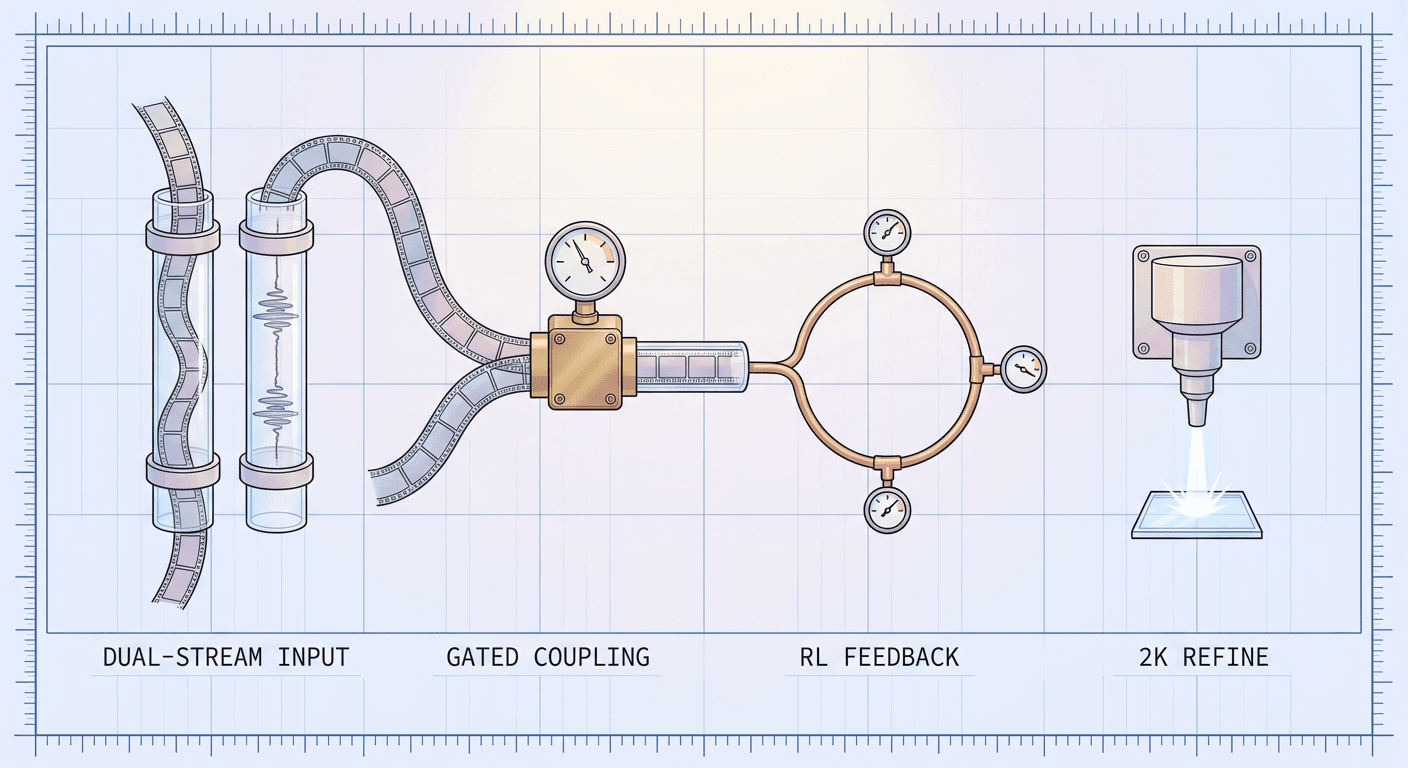
Kandinsky 6.0 Video Explained: How This Open-Source Model Generates Video and 44 kHz Audio Together

Written by
Aerin Kim
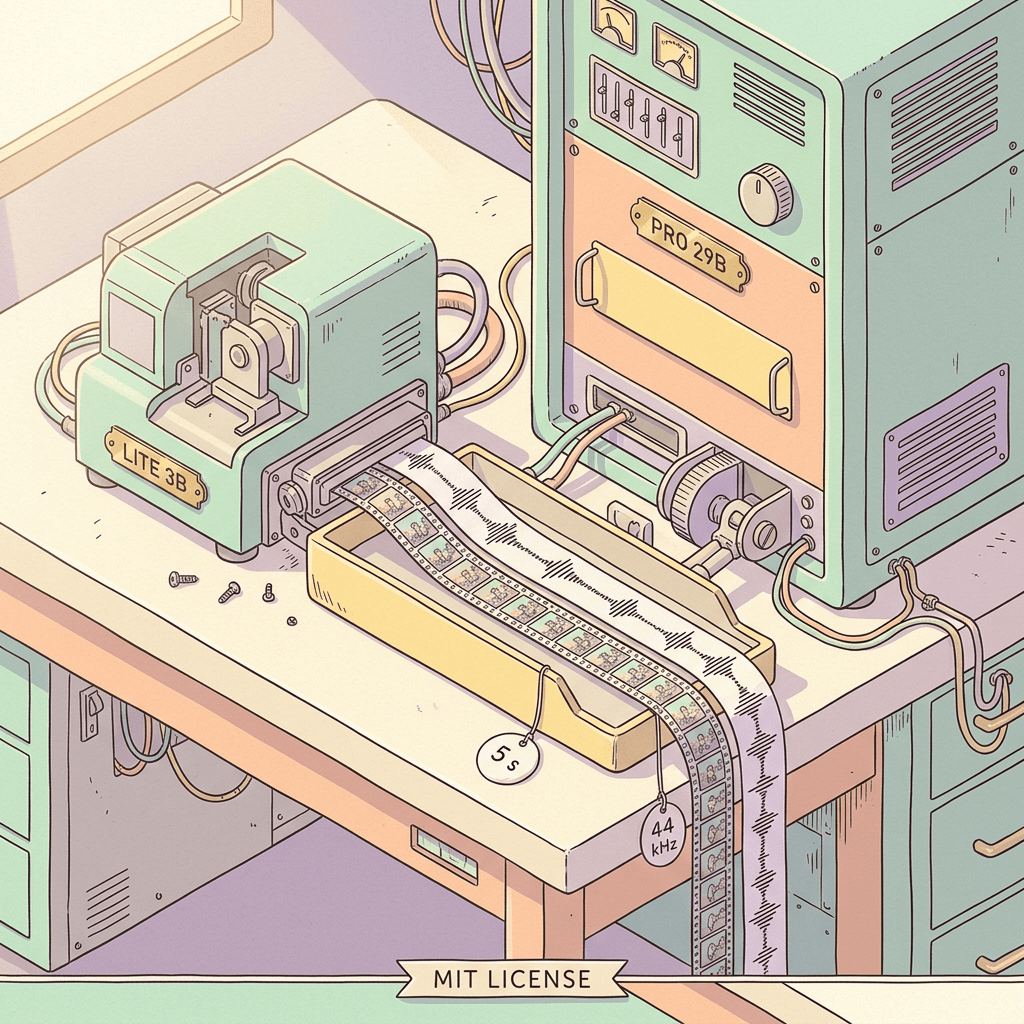
Kandinsky 6.0 Video is an MIT-licensed pair of 3B and 29B models that generate 5-second clips with lip-synced 44 kHz audio in one pass. Here is how it works and how it compares.
If you have ever generated a silent AI clip and then spent an evening dubbing it, you already know the problem: the mouth finishes a word two frames before the voice starts, a door slams on screen while the sound effect lands late, and every fix is another manual nudge on a timeline. Models that generate picture and sound together are the structural answer, but until this month the open ones were either a generation behind the closed systems or too heavy to run at home. On October 6, 2026, Kandinsky Lab, the team behind Sber's Kandinsky model family [35], released Kandinsky 6.0 Video, two open models that generate a 5-second clip with synchronized 44 kHz audio and lip-sync in a single pass, published with code, weights, and Diffusers integration under the MIT license [1][3].
The timing matters for a practical reason. The technical report appeared on arXiv on October 4 and was ranked the number one paper of the day on Hugging Face on October 6, the same day the repository and the checkpoints went public [1][9]. That means this model is eight days old as of this writing, and most of what has been written about it so far summarizes the announcement. This post goes through the full technical report instead: the dual-stream architecture, how audio and video are fused, the training data with its real counts, the reinforcement learning stage aimed at speech, the benchmark tables including the rows where it loses, the hardware numbers per GPU, and the official commands to run it. It also pulls in an independent RTX 5090 lip-sync test and compares Kandinsky 6.0 against MiniMax H3, Veo 3.1, LTX 2.5, and Tencent's Prism paper.
The short version of the verdict, so you can decide whether to keep reading: in the authors' own human evaluation, the 29B Pro model beats LTX 2.5 on visual quality and speech quality, trades blows with Veo 3.1 Fast, and trails MiniMax H3 and Seedance 2.0 on visuals [2]. It is arguably the strongest case so far for an MIT-licensed audio-video model that a hobbyist with a 16 GB graphics card can actually run, slowly. If you would rather skip the GPU box and make finished clips in the browser, Miraflow's Cinematic AI Video Generator covers that side, and the rest of this post explains what is happening under the hood of a native audio-video model either way.
TL;DR: Kandinsky 6.0 Video in One Table
- Kandinsky 6.0 Video is a family of two diffusion models, Lite (3B parameters) and Pro (29B), that denoise video and audio together and output 5-second clips with 44 kHz audio, including lip-sync, from a text prompt or from a text prompt plus a first frame [1].
- The base model generates at SD resolution (864x480 for landscape), and a separate plug-in super-resolution model brings it to Full HD (1920x1080) [2][3].
- The code and weights are MIT licensed, with weights under the kandinskylab organization on Hugging Face, and it runs through Diffusers, ComfyUI, vLLM-Omni, SGLang, and FastVideo [3][31].
- Its strongest results are speech quality, lip-sync, and desynchronization; its weakest are visual quality against the top proprietary models and the 5-second ceiling [2].
- Both sizes run on 16, 24, and 32 GB NVIDIA cards through block offloading, but the Pro model needs roughly 58 GiB of system RAM at the 16 GB preset [2].
| Property | Kandinsky 6.0 Video Lite | Kandinsky 6.0 Video Pro |
|---|---|---|
| Total parameters | 3B | 29B |
| Video stream | 2B | 19B |
| Audio stream | 0.6B | 5B |
| Cross-attention layers | 0.4B | 5B |
| Transformer blocks per stream | 32 | 60 |
| Output per clip | 5 s, 121 frames at 24 fps, 44 kHz audio | 5 s, 121 frames at 24 fps, 44 kHz audio |
| Base resolution | 864x480 (landscape SD) | 864x480 (landscape SD) |
| Full HD (1920x1080) | Separate super-resolution model, 2.25x route | Separate super-resolution model, 2.25x route |
| Input modes | Text-to-audio-video, image-to-audio-video | Text-to-audio-video, image-to-audio-video |
| Sampling | 50 steps (regular), 10 steps (distilled) | 50 steps (regular), 10 steps (distilled) |
| Peak VRAM at the 32/24 GB preset (SD) | 21.7 GiB | 21.7 GiB |
| License | MIT | MIT |
Step 1: What Kandinsky Lab Actually Released on October 6
The release is easy to misread as a single model, so it helps to list what is actually on Hugging Face. Each size ships in three training flavors plus a separate super-resolution pair. The regular checkpoints are the supervised fine-tuned and reinforcement-learned models (50 sampling steps, guidance scale 5.0), the distilled checkpoints sample in 10 steps with a PiFlow scheduler and must run at guidance scale 1.0, and the pretrain checkpoints are the raw jointly pretrained models intended for further fine-tuning and research [7][8]. The official quick start downloads the Pro distilled checkpoint by default, which is the sensible first download because it is the one with the 10-step sampler [4].
| Checkpoint | Hugging Face repository | Sampling | Intended use |
|---|---|---|---|
| Pro | kandinskylab/Kandinsky-6.0-Pro-5s-Diffusers | 50 steps, guidance 5.0 | Regular SFT and RL model for generation |
| Pro distill | kandinskylab/Kandinsky-6.0-Pro-distill-5s-Diffusers | 10 steps, guidance 1.0 | Fast generation, default in the quick start |
| Pro pretrain | kandinskylab/Kandinsky-6.0-Pro-pretrain-5s-Diffusers | 50 steps, guidance 5.0 | Research and further fine-tuning |
| Lite | kandinskylab/Kandinsky-6.0-Lite-5s-Diffusers | 50 steps, guidance 5.0 | Regular SFT and RL model for generation |
| Lite distill | kandinskylab/Kandinsky-6.0-Lite-distill-5s-Diffusers | 10 steps, guidance 1.0 | Fast generation |
| Lite pretrain | kandinskylab/Kandinsky-6.0-Lite-pretrain-5s-Diffusers | 50 steps, guidance 5.0 | Research and further fine-tuning |
| VSR | kandinskylab/Kandinsky-6.0-VSR-5s-Diffusers | 4 steps per tile | Flow-matching super-resolution |
| VSR distilled | kandinskylab/Kandinsky-6.0-VSR-distilled2steps-5s-Diffusers | 2 steps per tile | Distilled super-resolution |
The lineage explains the parameter counts. Kandinsky 5.0, released in November 2025, shipped a 2B Video Lite and a 19B Video Pro [12]. Kandinsky 6.0's video streams are exactly those sizes, 2B for Lite and 19B for Pro, so the new family is best read as Kandinsky 5.0 plus a newly trained audio stream plus the cross-attention layers that connect the two [2]. The report states that the video stream is initialized from the matching Kandinsky 5.0 Video pretraining checkpoint, a point that comes back when we look at training cost.
The ecosystem arrived on day one, which is unusual for a research release. The repository's own update note lists Diffusers, ComfyUI, vLLM-Omni, SGLang, and FastVideo, and adds a Hugging Face Space for the Pro distilled model and a separate open-sourced super-resolution repository [3][34]. In ComfyUI the integration is two nodes on the registry, kandinsky6 for generation and kandinsky6-sr for upscaling, with built-in Text to Video+Audio and Image to Video+Audio workflow templates that default to the Pro distilled checkpoint [29][30].
One wording trap is worth flagging early. The product page describes Pro as generating at Full HD, but the technical report, the repository, and independent coverage all describe the base generation as SD with Full HD obtained through the super-resolution model [8][2][28]. Both statements describe the same pipeline, but if you are planning GPU time you should budget for two stages, which is why Step 6 spends real space on the upscaler.
Step 2: Inside the Dual-Stream CrossDiT: 19B of Video, 5B of Audio, 5B of Glue
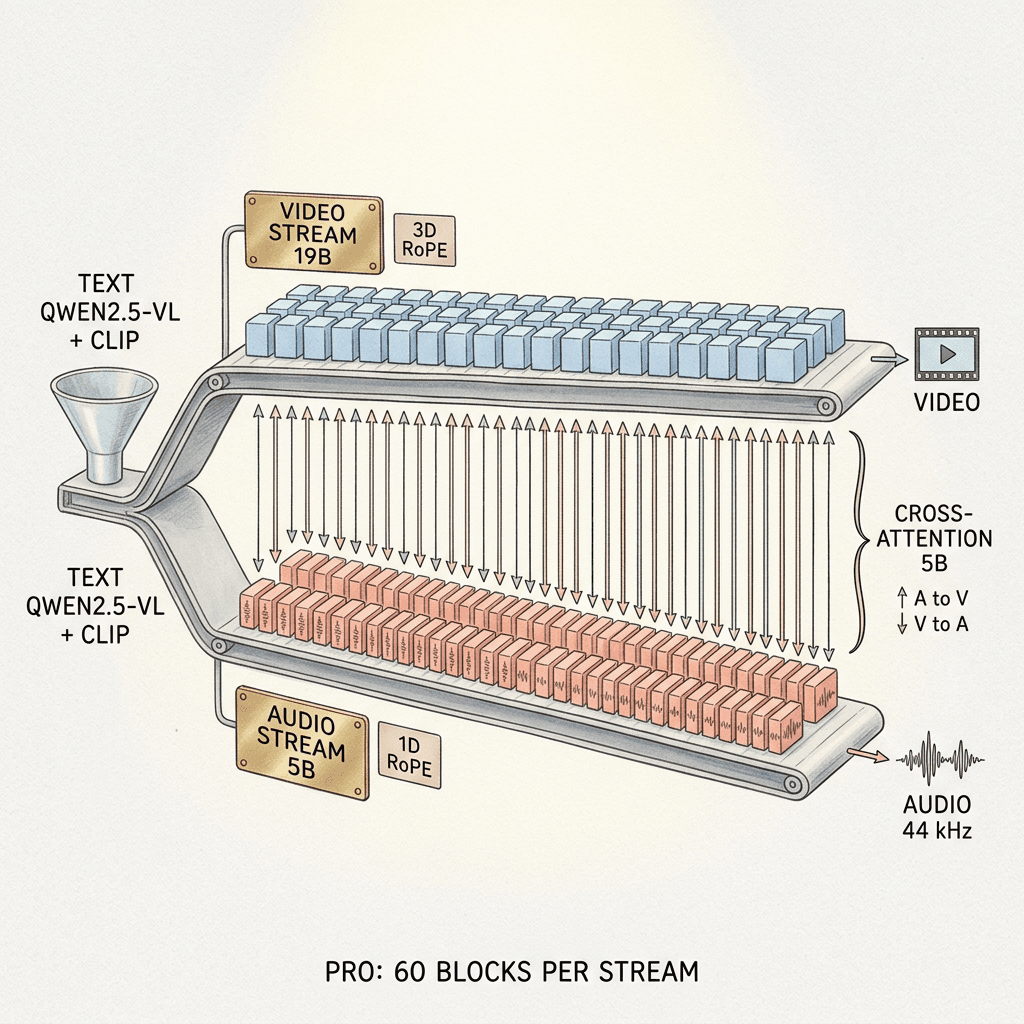
The core of the model is a dual-stream CrossDiT, an architecture that inherits Kandinsky 5.0's design and extends it from one modality to two. It has asymmetric diffusion transformer backbones for video and audio, with the same number of transformer blocks in each stream but different hidden and feed-forward widths, connected block by block with bidirectional cross-attention [2]. The same general pattern appears in Ovi, which pairs twin backbones with cross-modal fusion, and in LTX-2, which uses an asymmetric dual-stream transformer with 14B video and 5B audio parameters [27][16].
The parameter split is the first thing worth reading closely. In Lite, the video stream has 2B parameters, the audio stream 0.6B, and the cross-attention layers 0.4B, for 3B in total. In Pro the split is 19B video, 5B audio, and 5B cross-attention, for 29B in total [2]. By my arithmetic that means roughly 17% of Pro's weights (5B of 29B) exist only to let the two modalities talk to each other, and the cross-attention budget equals the entire audio stream. For Lite the same share is about 13%. Pro's 5B audio stream also matches the 5B audio stream in LTX-2 exactly, while its 19B video stream is considerably larger than LTX-2's 14B [16].
| Hyperparameter | Lite | Pro |
|---|---|---|
| Video stream parameters | 2B | 19B |
| Audio stream parameters | 0.6B | 5B |
| Cross-attention parameters | 0.4B | 5B |
| Video blocks / audio blocks | 32 / 32 | 60 / 60 |
| Video model dimension | 1792 | 4096 |
| Audio model dimension | 896 | 2048 |
| Video feed-forward dimension | 7168 | 16384 |
| Audio feed-forward dimension | 3584 | 7168 |
| Text blocks | 2 | 4 |
| Time embedding dimension | 512 | 1024 |
| Video head dimensions (time, height, width) | (16, 24, 24) | (32, 48, 48) |
| Audio head dimension | 64 | 128 |
| Patch size | (1, 2, 2) | (1, 2, 2) |
| Latent channels in and out | 16 video, 40 audio in | 16 video, 40 audio in |
| Text encoders | Qwen2.5-VL-7B-Instruct (1024 tokens) plus CLIP ViT-L/14 (77 tokens) | Qwen2.5-VL-7B-Instruct (1024 tokens) plus CLIP ViT-L/14 (77 tokens) |
Each transformer block applies, to each stream, self-attention, cross-attention to the text embeddings, a cross-modal attention layer, and a feed-forward network. In the video-to-audio (V2A) block the video queries attend to audio keys and values, and in the audio-to-video (A2V) block the audio queries attend to video keys and values. Each stream has its own small text encoder block and timestep embedding, and the timestep embedding modulates every sub-layer through scale, shift, and gate parameters [2]. Positions are encoded with rotary embeddings, but with different geometry per modality: video tokens use 3D RoPE over time, height, and width, audio tokens use 1D RoPE over time, and for video the frame index is normalized by the frame rate relative to 24 fps so that clips at 23 to 25 fps share one temporal scale [2].
The surrounding components are all borrowed. Video is encoded and decoded with the Hunyuan VAE, audio with the MMAudio autoencoder, which supports a 44 kHz sampling rate, and text goes through Qwen2.5-VL-7B-Instruct plus CLIP ViT-L/14 [2][32]. The Diffusers model card adds the practical detail that the audio path is an audio VAE plus a BigVGAN-style vocoder that turns the mel spectrogram into a waveform [6]. Using the Diffusers configuration (a spatial compression of 8 and a (1, 2, 2) patch size), a 864x480 clip of 121 frames becomes 31 latent frames of 54 by 30 patches, which works out to about 50,000 video tokens that the audio tokens must stay aligned with [7][2]. That token count is my own calculation from the documented settings, but it shows why the fusion layers are expensive and helps explain the 5-second ceiling.
Step 3: How Audio and Video Learn to Agree
Two directions of attention, one shared clock
A common shortcut in earlier systems was to generate video first and then run a video-to-audio model over it, which is how MMAudio-style foley models work [32]. That pipeline cannot let the sound influence the picture, so a character cannot start moving the mouth because the speech track says a word begins at frame 40. Kandinsky 6.0 avoids it by making attention flow in both directions inside every block, so audio tokens read the video and video tokens read the audio during the same denoising step [2]. The DreamX-Creator paper we covered in our DreamX-Creator explainer reached a similar conclusion from a different direction, adding learned gates on the cross-modal path, whereas Kandinsky routes the fusion through blockwise cross-attention and relies on its training recipe to tune it.
Independent noise levels per modality
The detail that makes cross-modal tasks possible is the independent_time training mode. During joint training the diffusion time is sampled independently for video and audio, so in a single training step the video may be at 80% noise while the audio is nearly clean, or the reverse. The report states that this is required for audio-to-video and video-to-audio generation, where the model must lean on the cleaner modality to repair the noisier one [2]. Batches also mix audio only, video only, images only, and video with audio, so the audio stream and the video stream both keep their stand-alone quality while the fusion layers learn to pass information between them.
How a first frame gets in
For image-to-audio-video (I2AV), the latent of the reference image is concatenated with the noisy video latents along the temporal axis and receives its own temporal RoPE position. A binary channel mask marks the reference frame with a one and the frames to be generated with a zero, and two learnable Token Role Embeddings tell the network whether a token is noise or conditioning [2]. The ablations are unusually candid about which part does the work. Setting the mask to one for every token almost completely blocked denoising, an all-zero mask still denoised but produced artifacts mainly in the first latent frame, and moving the reference frame's RoPE position made the model use it at that position, so a reference placed at a later latent index acted as a condition for the corresponding later part of the video. The Token Role Embeddings had only a weak effect when disabled. The authors conclude that RoPE is the primary mechanism that binds the reference to a position in the sequence, with the mask and the embeddings as supporting signals [2].
For creators the I2AV mode is the more controllable one, because the first frame fixes character identity, wardrobe, and setting, and the prompt then only has to describe what happens next. Generating a clean first frame with Miraflow's AI Image Generator and animating it is a natural pairing, and the logic is the same one explained in our guide to start and end frame prompts for Google Flow.
The native prompt format
The captions the model was trained on follow a fixed structure, and the official docs use the same markers at inference time. Spoken words go inside <S> and <E>, and a description of the soundscape goes inside <AUDCAP> and <ENDAUDCAP> after the visual description [5][2]. During training, the prompt detail level is sampled as long 70%, medium 15%, short 10%, and shortest 5%, which means long, structured prompts are the most in-distribution input [2]. The Diffusers pipeline also exposes expand_prompts=True, which reuses the already-loaded Qwen2.5-VL text encoder to rewrite a short prompt into a detailed one before denoising, at the cost of extra latency but no extra weights [7]. Step 12 turns this into copy-paste prompts.
Step 4: The Training Data, and Why Only 7 Million Clips Teach Lip-Sync
Audio-video generation has a data problem that image and video generation do not: most large video collections have missing, corrupted, or irrelevant soundtracks, and the clips that do have clean audio rarely have audio that matches what is on screen. The Kandinsky 6.0 report is explicit about how much it had to throw away. The pretraining datasets below were derived from the Kandinsky 5.0 collection and then filtered further [2].
| Dataset | Size | Purpose | Key filter or detail |
|---|---|---|---|
| T2I (text-to-image) | 50M images | Image data mixed into joint training | Subset of the Kandinsky 5.0 collection, recaptioned with Qwen3-235B-A22B |
| T2V (text-to-video) | 20M video scenes | Video stream pretraining | No scene transitions (TransNetV2), standard frame rates, stricter temporal filtering |
| T2A (text-to-audio) | 40M audio tracks, 5 to 20 s | Audio stream pretraining from scratch | Silent or corrupted tracks removed, captions by Qwen3-30B-A3B |
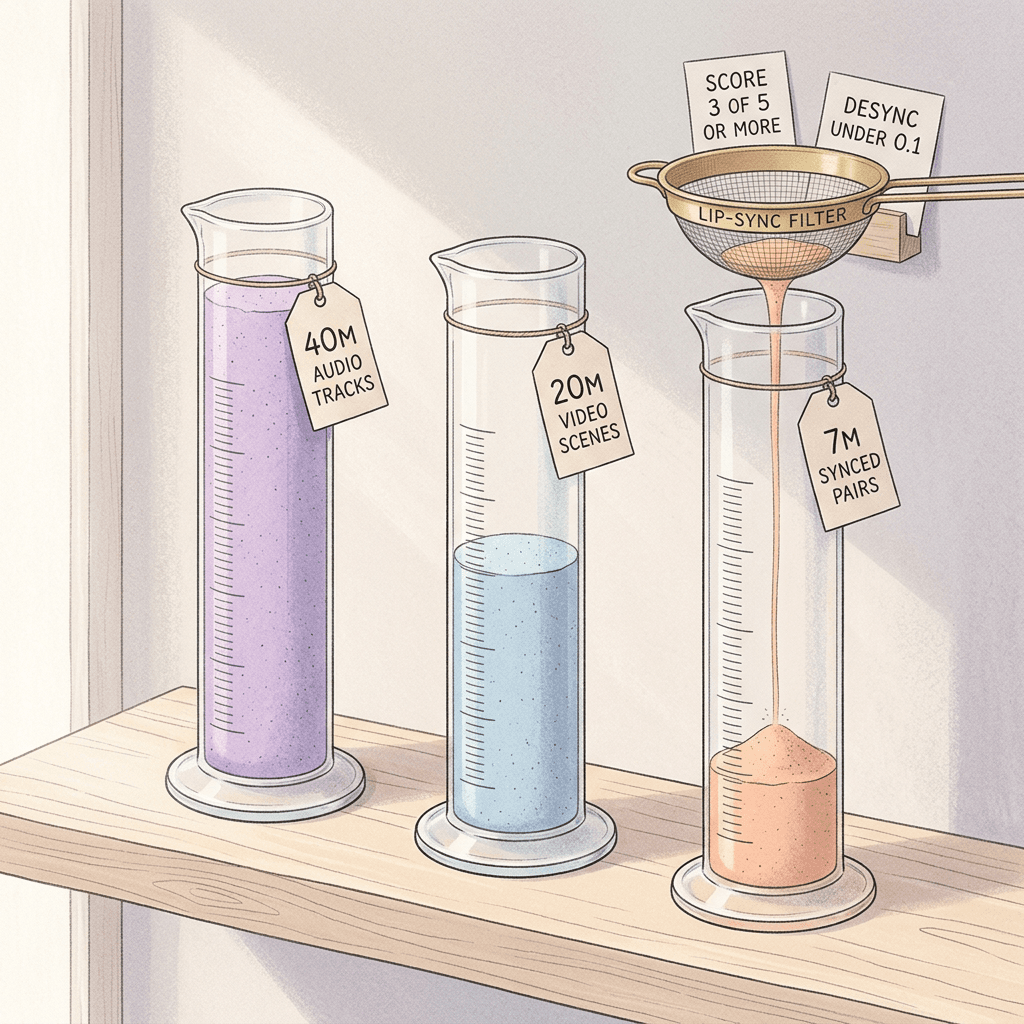
| T2AV (audio-video) | 7M segments | Joint audio-video training | Lip-sync score at least 3 of 5 and Desync below 0.1, about 25% face-free clips |
| I2AV (image-conditioned) | 116,000 samples | First-frame mode | Start frame must show the beginning or a pause of an action |
| SFT stage 1 | 4,663 scenes | Visual quality | 11 domains, expert screened |
| SFT stage 2 | 7,686 scenes | Synchronization and lip-sync | Adds more speech and music, 11 domains |
| RL | 2,984 clips | Online reinforcement learning | Every sample has an audio caption, English and Russian |
| Super-resolution | 150,000 clips | Latent upscaler and SR-DiT training | 100,000 4K clips, about 35,000 Kandinsky 5.0 clips, 15,000 synthetic camera-motion clips |
| Russian Cultural Code | 1.2M images and 530K video scenes | Cultural grounding | English and Russian captions |
The T2AV dataset is where lip-sync is really decided. The team applied two metrics from the VABench benchmark, a lip-sync alignment score (LSA) and a desynchronization score (Desync), as hard filters: clips with detected people were kept only if LSA was at least 3 on a scale from 0 to 5, and clips with audio-visual events were kept only if Desync was below 0.1 on a scale from 0 to 1. Clips without visible faces were kept without a lip-sync requirement and make up about 25% of the dataset [2][19]. A useful consequence is that the model's speech behavior was shaped by a dataset in which every talking face already lip-synced well by an automated judge, which is a cleaner supervision signal than raw web video. It also means the sync ceiling is bounded by what those judge models can see.
Captions are a second hidden cost. For paired data the pipeline first extracts speech transcripts with Gemma-4-E4B-it and wraps them in the <S> and <E> markers, then describes the audio with Qwen3-30B-A3B inside <AUDCAP> markers, then asks Qwen3.5-35B-A3B to merge both into one unified caption of the scene and its sound [2]. Image-to-video start frames went through an even stricter screen: embedding quality scores, a battery of no-reference image quality metrics, a blur detector, and a vision-language check that the frame shows the beginning or a pause of an action rather than mid-action, because a start frame caught at the peak of a jump gives the model nowhere to go [2].
The supervised fine-tuning data is tiny by comparison and carefully balanced. Stage 1 uses 4,663 scenes and stage 2 uses 7,686 scenes across 11 domains: people action, animals, cartoons, people speech, music, food, nature, art, architecture, interiors, and tech. The largest single stage 2 domains are people action (1,460 scenes) and people speech (1,069), and cartoons grow from 550 to 998 scenes between stages, with scenes screened by technical filters and then by cinematography experts who scored aesthetics, audio clarity, and lip-sync accuracy [2]. The data section also includes a Russian Cultural Code dataset of 1.2M images and 530K video scenes with English and Russian captions, which the official product page describes as native Russian-language and cultural-concept understanding [2][8]. The report describes Russian and English captions throughout and does not describe any Chinese data, which becomes relevant in the hands-on test in Step 11.
Step 5: Training Recipe: Joint Pretraining, an SFT Model Soup, and RL Aimed at Speech
Continuous pretraining in three phases
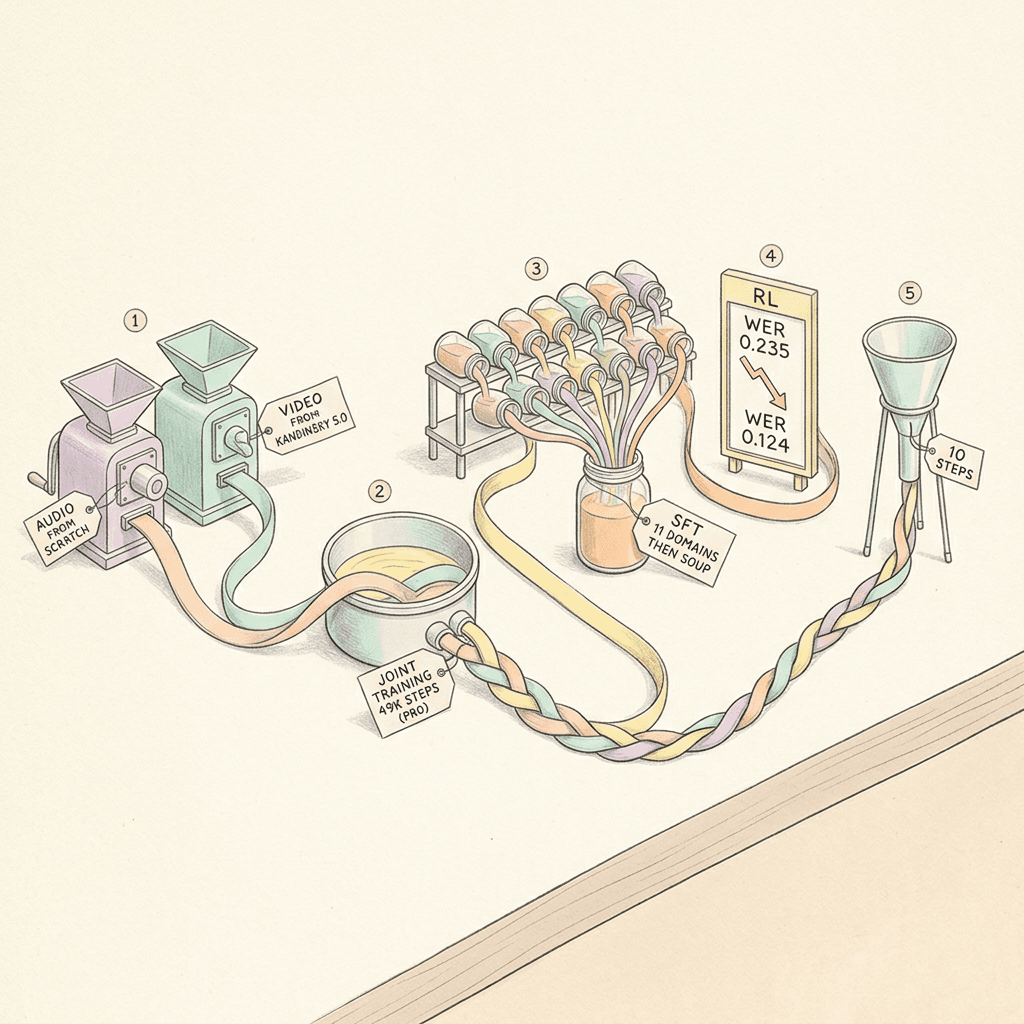
Pretraining runs in three phases that the report calls continuous pretraining. The audio stream is trained from scratch on text-to-audio data (30k steps for Pro, 40k for Lite), then continued for a few thousand steps on the audio-video captions. In parallel, the video stream is trained further from the Kandinsky 5.0 checkpoint, which was itself pretrained for 45k steps at SD resolution, for 14k steps (Pro) or 20k steps (Lite) on the new captions. Finally the two are joined through newly initialized cross-attention layers and trained together for 49k steps for Pro (46k at a learning rate of 5e-5, then 3k at 2.5e-5) or 57.5k steps for Lite, followed by 5k or 4k steps in which 25% of samples are I2AV [2]. Training runs in bfloat16, with clips of up to 121 frames at 23 to 25 fps. Starting the video side from an existing model means the joint stage mainly has to teach the audio stream and the fusion layers to agree with a video prior that already works, which plausibly explains how a 29B joint model is trained on 7M paired clips.
Supervised fine-tuning as eleven models averaged into one
The post-training design avoids a single large fine-tuning run. A separate model is fine-tuned for each of the 11 domains through two stages, and the domain models are merged by uniform weight averaging only at the end of stage 2, an approach known as a model soup. Stage 1 targets visual quality for 7,000 steps at a learning rate of 1e-5 with the audio stream, fusion modules, and audio-text modules frozen and only the video loss optimized. Stage 2 targets synchronization for 5,000 steps with everything unfrozen, a learning rate of 1e-5 for video and shared modules and 1e-6 for audio components, and a weighted loss: video 0.85, audio 0.15, and a new face loss with weight 1.0 that is the video loss restricted to the facial region in latent space [2]. The face loss is the most direct lip-sync mechanism in the paper, because the objective puts extra weight on the facial region on top of the whole-frame video loss.
Reinforcement learning with eight rewards
For reinforcement learning the team adapted OmniNFT, a method originally developed for LTX-2 that combines modality-wise advantage routing, layer-wise gradient surgery, and region-wise loss reweighting [14][2]. Each prompt produces a group of rollouts (K=10 for Pro, K=8 for Lite) generated at 512x768 with a deterministic sampler, so the seed is the only source of diversity, and each rollout is scored by eight reward models grouped into three branches.
| Reward | Branch (branch weight) | Reward weight | What it scores |
|---|---|---|---|
| HPSv3 | Video (2.5) | 1.5 | Visual preference score |
| VideoAlign | Video (2.5) | 1.0 | Video quality and alignment |
| AudioBox Aesthetics | Audio (2.0) | 0.5 | Audio production quality and enjoyment |
| CLAP | Audio (2.0) | 1.0 | Agreement between the audio and the text description |
| Whisper-ASR | Audio (2.0) | 0.5 | Speech intelligibility, 1 minus word error rate |
| AV-desync | Sync (2.75) | 0.5 | Audio-video synchronization error |
| AV-align | Sync (2.75) | 0.75 | Audio-video alignment |
| LatentSync-gated | Sync (2.75) | 1.5 | Lip-sync score times (0.5 + 0.5 x ASR score) |
Two details here deserve attention. The lip-sync reward is gated by speech intelligibility, computed as the lip-sync score times (0.5 + 0.5 times the ASR score), so a rollout that moves its mouth in perfect time while mumbling does not collect the full lip-sync reward, which presumably discourages the model from gaming sync at the expense of words [2]. The second is the gradient surgery schedule. To stop video-branch gradients from disrupting audio representations, the team scales down gradients on the key and value path of the V2A cross-attention, with a data-driven per-block schedule for Pro: 0.0 for block 0, 0.1 for blocks 1 to 10, 0.3 for blocks 50 to 59 (a deep audio-video sync zone found through key-value ablation), and 1.0 for the blocks in between. The authors note that the zones reported for LTX-2 did not transfer to their models, so they calibrated their own with probes [2]. The policy update touches only a LoRA (rank 16, alpha 32) that adds 199M parameters, 0.69% of the model, for Pro and 47M, 1.57%, for Lite, on top of the frozen SFT model, and attention weights from the A2V cross-attention raise the loss weight on faces, hands, and instruments by up to 1.5 times [2].
The headline result is about words. On a held-out speech benchmark of 64 prompts with 3 seeds each, the word error rate of Pro's generated speech, measured with Whisper-large-v3, fell from 0.235 after SFT to 0.124 after RL, a relative reduction of 47% [2]. The human ablation agrees: the RL checkpoint was preferred over the SFT checkpoint by a clear margin in speech-focused T2AV, general T2AV, and general I2AV tests, with the biggest gains in speech quality, sound-prompt following, and synchronization on the speech-focused set [2].
Step 6: Distillation to 10 Steps and the Super-Resolution Plugin
Why the distilled model is the one most people will run
The full model needs 50 sampling steps with classifier-free guidance, which means up to 100 network evaluations per clip. The team compressed that to 10 function evaluations in two stages. First, trajectory distillation with pi-Flow, an on-policy imitation method in which the student predicts a network-free policy and learns from its own rollouts, which also absorbs the guided teacher trajectory and removes the need for a separate CFG distillation step [15][2]. Second, adversarial refinement with Sim-LADD, a variant of latent adversarial diffusion distillation in which the discriminator sees states from the student's own backward denoising rollout, with gradients propagated through the final five solver steps [2].
The report is open about the methods that lost. Distribution-matching distillation (DMD, DMD2, SID) was prone to mode collapse and mode dropping and needed substantially more GPUs, and CFG distillation and consistency-based methods altered the teacher's motion dynamics. pi-Flow showed the most reliable convergence and the best preservation of the teacher trajectory. The check that matters to users is the I2AV comparison of the distilled Pro against the full Pro: preference was 51% for the distilled model and 49% for the full model, with no individual criterion reaching statistical significance, so distillation preserved quality while cutting the step count [2].
The super-resolution model is a separate system
The upscaler works in the latent space of K-VAE, a video autoencoder with 64 latent channels and 16x spatial and 4x temporal compression. It has two parts trained separately: a Latent Upscaler, a convolutional network that deterministically upsamples the low-quality latent by 2x or 4x, and SR-DiT, a flow-matching diffusion transformer of about 1.41B parameters that restores detail [2]. SR-DiT is text-free, so it needs no prompt, and it processes overlapping spatial tiles of 512x768 pixels that are blended back with Hann windows. It was initialized from a text-free Kandinsky 5.0 Video Lite checkpoint, fine-tuned with NABLA sparse attention, and then distilled with pi-Flow to two network evaluations per tile [2][13].
The Full HD route is slightly unusual. The base output is bilinearly pre-upscaled by 1.125x, processed by the 2x path to 1952x1088, and finally resized down to exactly 1920x1080, so the pipeline's effective upscale is 2.25x [2]. The timings below are for one 5-second clip on a single H100.
| Target | Source size | Scale | SR output | Final size | Tiles | H100 time |
|---|---|---|---|---|---|---|
| HD | 768x432 | x2 | 1536x864 | 1280x720 | 6 | 26.2 s |
| HD | 512x512 | x2 | 1024x1024 | 720x720 | 9 | 24.7 s |
| Full HD | 864x480 | x2.25 | 1952x1088 | 1920x1080 | 9 | 39.6 s |
| Full HD | 512x512 | x2.25 | 1152x1152 | 1080x1080 | 9 | 24.7 s |
| 2K | 864x480 | x4 | 3456x1920 | 2560x1440 | 30 | 130.8 s |
| 2K | 768x432 | x4 | 3072x1728 | 2560x1440 | 25 | 108.8 s |
| 2K | 512x512 | x4 | 2048x2048 | 1440x1440 | 25 | 68.7 s |
Two practical points follow from that table. The 2K and 4x routes exist in the code but cost more than three times the Full HD route on the same H100, and the official quick start exposes super-resolution as an optional flag (--sr) or a separate recipe (just generate-sr) that operates on an existing clip, so you can iterate on cheap SD drafts and upscale only the keepers [4][10]. On an RTX 5090 the report puts the SR stage at around 64 seconds at HD and around 96 seconds at Full HD, independent of whether the base model was Lite or Pro [2].
Step 7: The Benchmark Numbers: VABench and Human Side-by-Side
VABench against LTX 2.5
The only open model the team compares numerically is LTX 2.5, using VABench, a benchmark for text-to-audio-video generation that covers audio quality, cross-modal alignment, synchronization, realism, and expressiveness across seven content categories and two evaluation modules with 15 dimensions in total [19]. Kandinsky models were evaluated at 512x768 after RL post-training, and LTX 2.5 in its two-stage Full HD configuration, so the output resolutions are not matched [2]. Higher is better except for desync and word error rate.
| Metric | LTX 2.5 | Kandinsky 6.0 Lite | Kandinsky 6.0 Pro | Best |
|---|---|---|---|---|
| Speech quality | 1.427 | 1.477 | 1.496 | Pro |
| Audio aesthetics | 3.307 | 3.323 | 3.345 | Pro |
| Text-video alignment | 0.185 | 0.227 | 0.229 | Pro |
| Text-audio alignment | 0.307 | 0.374 | 0.367 | Lite |
| Audio-video alignment | 0.258 | 0.245 | 0.268 | Pro |
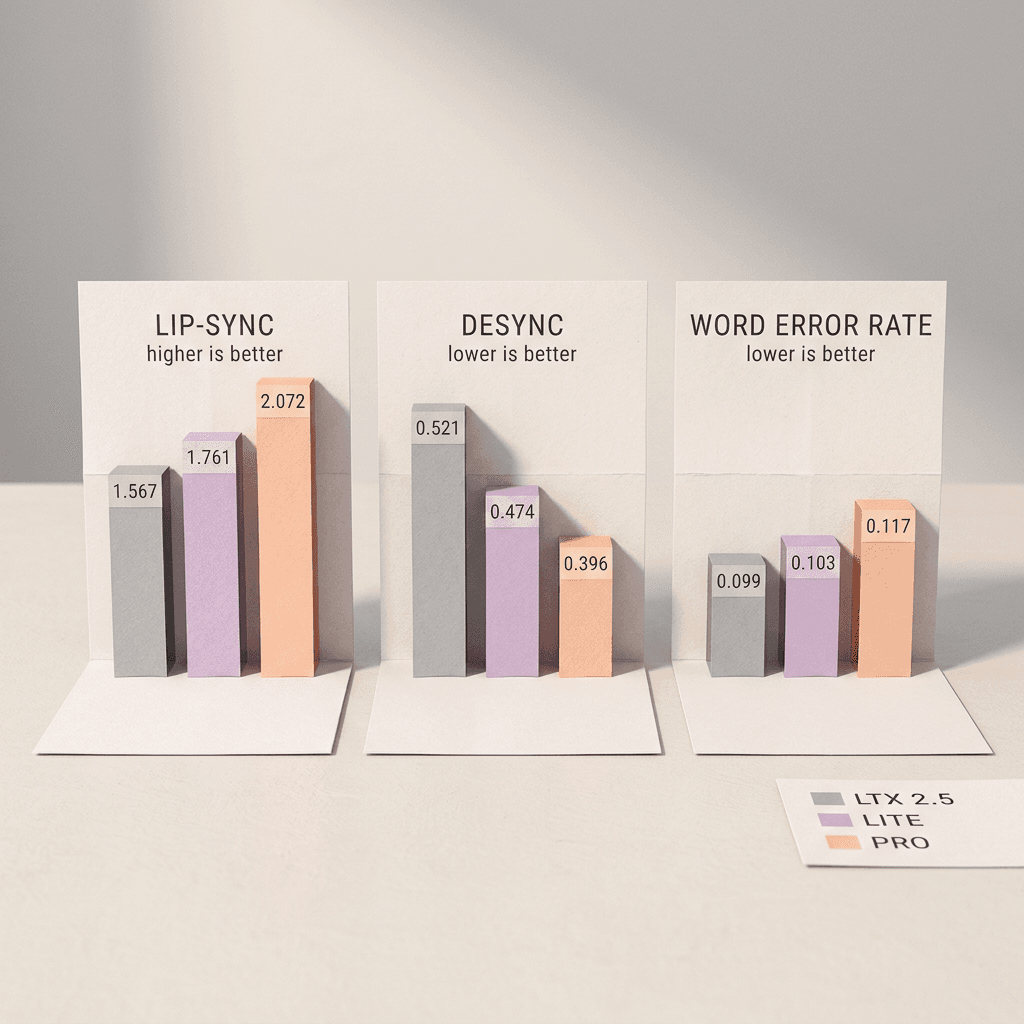
| Lip-sync | 1.567 | 1.761 | 2.072 | Pro |
| Desync (lower is better) | 0.521 | 0.474 | 0.396 | Pro |
| Alignment (VLM-judged) | 4.527 | 4.351 | 4.329 | LTX 2.5 |
| Expressiveness (VLM-judged) | 4.360 | 4.334 | 4.312 | LTX 2.5 |
| Visual realism | 4.366 | 4.459 | 4.485 | Pro |
| Audio realism | 3.663 | 3.900 | 3.893 | Lite |
| Audio QA | 0.688 | 0.697 | 0.630 | Lite |
| Visual QA | 0.617 | 0.691 | 0.652 | Lite |
| Word error rate (lower is better) | 0.099 | 0.103 | 0.117 | LTX 2.5 |
Counting the rows, Pro wins 7 of 14, Lite wins 4, and LTX 2.5 wins 3. The pattern tells a more useful story than the count. Pro leads on most of what touches speech and synchronization: speech quality, lip-sync (2.072 against 1.567 for LTX 2.5, a relative gain of about 32%), and desync (0.396 against 0.521), plus visual realism and text-video alignment [2]. LTX 2.5 keeps the VLM-judged alignment and expressiveness scores, and the lowest word error rate. Three observations from the table are easy to miss. First, the smaller Lite model beats Pro on four metrics, including audio realism and both QA scores, so bigger is not uniformly better here. Second, Pro's word error rate on VABench (0.117) is worse than LTX 2.5's (0.099), even though human raters prefer Pro's speech, which suggests that automatic transcription error and human perception of speech quality capture different things. Third, the report notes that this WER is computed separately with Qwen3-ASR-1.7B, while the RL result in Step 5 used Whisper-large-v3, so the two numbers are not comparable and are not in conflict [2].
A caution on the lip-sync row: the same Desync metric the team used to filter training clips (keep only below 0.1) averages 0.396 for Pro on VABench prompts. The two numbers come from different prompt mixes, so they are not a strict like-for-like comparison, but they point the same direction as the human evaluation: generated sync is better than the previous open state of the art and still looser than curated real footage.
Human side-by-side against five other systems
The human evaluation compares pairs of videos from the same prompt, with anonymized and position-randomized clips, annotators who can replay and scrub, and roughly 200 or more pairwise comparisons per criterion with majority-vote aggregation. Visual questions are answered with audio muted, then sound is enabled for the speech, sync, audio quality, and sound-prompt questions [2]. The report gives the outcomes in figures and prose with no table of percentages, so the summary below paraphrases the prose and keeps its significance language.
| Opponent | Kandinsky 6.0 Pro leads or is competitive on | Opponent leads on | Net reading |
|---|---|---|---|
| Kandinsky 5.0 Video Pro | Visual quality, artifacts, motion realism, prompt following, camera motion, reference-image match (audio ignored) | Nothing reported | Clear generational improvement |
| Kling 2.6 | Sound-prompt following, camera motion in image-to-audio-video | Overall visual quality, overall audio quality, synchronization (moderate) | Competitive and mixed, speech and task solving near parity |
| LTX 2.5 | Visual quality, artifacts, motion realism, prompt following, task solving, speech quality (significant on visual quality, task solving, and speech) | Synchronization, overall audio quality, sound-prompt following (slight, not significant) | Pro preferred overall |
| Veo 3.1 Fast | Artifacts and camera motion in both modes, plus overall visual quality and reference-image match in image-to-audio-video (significant) | Prompt following, synchronization, overall audio quality, sound-prompt following, task solving (mostly significant) | A clear split: cleaner visuals against stronger prompt following and audio |
| MiniMax H3 | Speech quality, camera motion, synchronization (many ties, not significant) | Visual quality, artifacts, motion realism, prompt following, audio quality, sound-prompt following, task solving (significant) | H3 is stronger |
| Seedance 2.0 | Speech quality, synchronization near parity | Visual quality, artifacts, motion realism, prompt following (significant) | Seedance is stronger visually, Kandinsky competitive on sync and speech |
The honest reading is that Kandinsky 6.0 Pro is the best open model in this comparison on visual and speech quality, a credible alternative to Kling 2.6 and Veo 3.1 Fast on specific axes, and not yet in the same class as MiniMax H3 or Seedance 2.0 for pure visual fidelity. The authors say as much in their conclusion: a gap remains to the strongest proprietary systems in visual quality and overall audio quality [2]. Note also that the opponents are single model snapshots chosen by the authors, that Veo 3.1 Fast was the Google model tested (not full Veo 3.1), and that the Seedance entry is version 2.0, not the newer release covered in our Seedance 2.5 vs Veo 3.1 comparison.
Step 8: Kandinsky 6.0 vs MiniMax H3, Veo 3.1, LTX 2.5, and Tencent Prism
Putting the specs next to each other makes the trade-offs visible. The table mixes sources, so each cell reflects the cited documentation rather than a controlled test.
| Attribute | Kandinsky 6.0 Video Pro | MiniMax H3 | Veo 3.1 | LTX-2.5 |
|---|---|---|---|---|
| Developer | Kandinsky Lab | MiniMax | Google DeepMind | Lightricks |
| Parameters | 29B (19B video, 5B audio, 5B cross-attention) | 33B dense, single-stream, about 13B in AdaLN branches | Not disclosed | 22B per ComfyUI Wiki (LTX-2 paper: 14B video plus 5B audio) |
| Clip length | 5 s (121 frames at 24 fps) | 4 to 15 s at 24 fps | 4, 6, or 8 s, extendable up to 148 s | Auto duration and native multishot per ComfyUI Wiki |
| Audio | 44 kHz, speech with lip-sync, effects, music | 32 kHz stereo, stable dialogue in 11 languages | Native and always on | Joint speech, background sound, and foley |
| Resolution | 864x480 base, Full HD via SR plugin, 2K route supported | 768 short side base, 2K via H3-Regenerate-2K | 720p default, 1080p and 4K at 8 s | 4K HDR target per ComfyUI Wiki |
| License and access | MIT, weights on Hugging Face | H3 Community License, US, UK, EU, and Korea excluded, no distilling from outputs | Proprietary API, Fast tier from $0.10 per second at 720p | LTX 2.x community license, gated weights |
Against MiniMax H3
MiniMax H3 is the model Kandinsky 6.0 loses to most clearly in the report, and it takes a different architectural route: a single-stream transformer instead of two coupled streams. H3 is a 33B dense, single-stream transformer with roughly 13B parameters in AdaLN-related branches, 4 to 15 second outputs at 24 fps, and 32 kHz stereo audio with stable dialogue in 11 languages [20]. We covered its internals in our MiniMax H3 architecture breakdown and its creator-facing trade-offs in MiniMax H3 vs Veo 3.1. Both H3 and Kandinsky generate a lower-resolution base and then upscale to 2K or Full HD with a dedicated stage, H3-Regenerate-2K in H3's case [20].
The licensing contrast is as important as the benchmark gap. H3's community license lists the United States, the United Kingdom, the European Union, and the Republic of Korea as excluded territories, requires a model-name display on commercial products, and forbids using H3 outputs to distill another model [21]. Kandinsky 6.0 is MIT, which allows commercial use, modification, redistribution, and distilling, with no territory carve-outs [6]. In the human evaluation H3 was preferred on most criteria, while Kandinsky stayed competitive on speech quality, camera motion, and synchronization, where many comparisons ended in ties [2]. If a team in the US or EU needs a legally clean self-hosted audio-video model, that single fact can outweigh the quality gap.
Against Veo 3.1
Veo 3.1 is the closed reference point. Google documents native audio that is always on, clips of 4, 6, or 8 seconds (8 seconds is required for 1080p, 4K, extension, and reference images), 24 fps, SynthID watermarking, and extension in 7-second steps up to 148 seconds [23][22]. Pricing on the Gemini API is per second: Veo 3.1 Fast costs $0.10 at 720p, $0.12 at 1080p, and $0.30 at 4K, while standard Veo 3.1 costs $0.40 at 720p and 1080p and $0.60 at 4K [24].
A worked example makes the comparison concrete. One hundred seconds of finished footage, 20 clips of 5 seconds each, costs $12.00 on Veo 3.1 Fast at 1080p by list price and $40.00 on standard Veo 3.1. The same 20 Full HD clips on an RTX 5090 with the non-distilled models take about 4.7 hours for Pro (20 x 854 s) or 2.3 hours for Lite (20 x 406 s), using the repository's own timings, and about 2.2 hours for Pro on a single H100 (20 x 402 s) [3]. Local generation costs electricity and hardware you may already own, while Veo costs money and returns a result in minutes. On quality the report describes a clear split with no overall winner: Kandinsky Pro produces cleaner visuals and holds onto a reference image better in image-to-audio-video, while Veo 3.1 Fast follows the prompt more faithfully and delivers stronger audio and synchronization [2]. Our Veo 3 and Veo 3.1 prompting guide and the overview of using Veo 3 and Veo 3.1 for free cover the proprietary side of that choice.
Against LTX 2.5
LTX 2.5 is the open competitor that matters most, and the answer depends on what you are making. It is a 22B model according to ComfyUI Wiki's release coverage, with a Gemma 4 12B text encoder, native multishot generation, auto duration, and a 4K HDR target, and its weights are gated on Hugging Face under the LTX 2.x community license agreement, which is not a standard permissive license [18][17]. In the human evaluation Kandinsky 6.0 Pro was clearly preferred on the visual side and by a significant margin on speech quality, while LTX 2.5 kept a small, non-significant edge on synchronization, overall audio quality, and sound-prompt following [2]. If you need longer or multi-shot clips, LTX's multishot and auto-duration features speak to a limit Kandinsky lists directly, since clip length is one of the authors' stated limitations. For earlier context on the LTX line, see our LTX 2.3 explainer.
Tencent Prism: a different bet on resolution
Tencent's Prism paper (arXiv 2610.05416) was submitted the same day as the Kandinsky report and is a natural point of comparison, so it helps to be precise about what it is. Prism is not a model release comparable to Kandinsky 6.0. It is a dynamic sparse attention framework from the Tencent Hunyuan Foundation Model Team and collaborators for natively training joint video-audio models at 2K, reporting a 2.5x training speedup over full attention while surpassing it in generation quality [25][26].
| Question | Kandinsky 6.0 Video | Tencent Prism |
|---|---|---|
| What it is | Open model family with released weights (3B and 29B) | Dynamic sparse attention training framework, not a model family comparable to Kandinsky 6.0 |
| Main idea | Dual-stream CrossDiT, SD generation, then latent super-resolution | Content-adaptive block shapes for native 2K joint video-audio training |
| Resolution strategy | Generate at SD, upscale 2.25x with a 2-step SR-DiT | Train and generate natively at 2K in one pass |
| Training data | 7M paired segments, SFT stages of 4,663 and 7,686 scenes | 100k 2K clips from UltraVideo and collected videos |
| Evaluation | VABench plus human side-by-side against LTX 2.5, Kling 2.6, Veo 3.1 Fast, MiniMax H3, Seedance 2.0 | VABench, MOVA-Bench, and a 300-video 2K-Bench against open baselines, 2.5x training speedup over full attention |
| Self-reported gap to commercial models | Visual quality and overall audio quality | Visual realism and audio aesthetics |
The two papers disagree productively about the same problem. A 12-second 2K clip at 24 fps yields over one million tokens, which makes native 2K training expensive, and Prism's answer is to spend attention only on informative blocks, grouping tokens into spatiotemporal macro-zones and assigning finer blocks where visuals change quickly and where audio-to-video cross-attention is strong [26]. Kandinsky's answer is to train at SD, keep sequences short, and add a purpose-built latent super-resolution stage. Prism's authors argue, in the context of LTX-2.3's 720p-then-upscale pipeline, that super-resolution only amplifies existing artifacts [26]. That claim is about a different model and a different upscaler, and Kandinsky's SR-DiT was trained with Real-ESRGAN-style and temporal degradations and validated on clips generated by Kandinsky 5.0 Video Lite, but it is the right question to ask of any two-stage design. The two approaches may well combine in future systems.
Step 9: Hardware Requirements and Running It Yourself
What the report says about memory
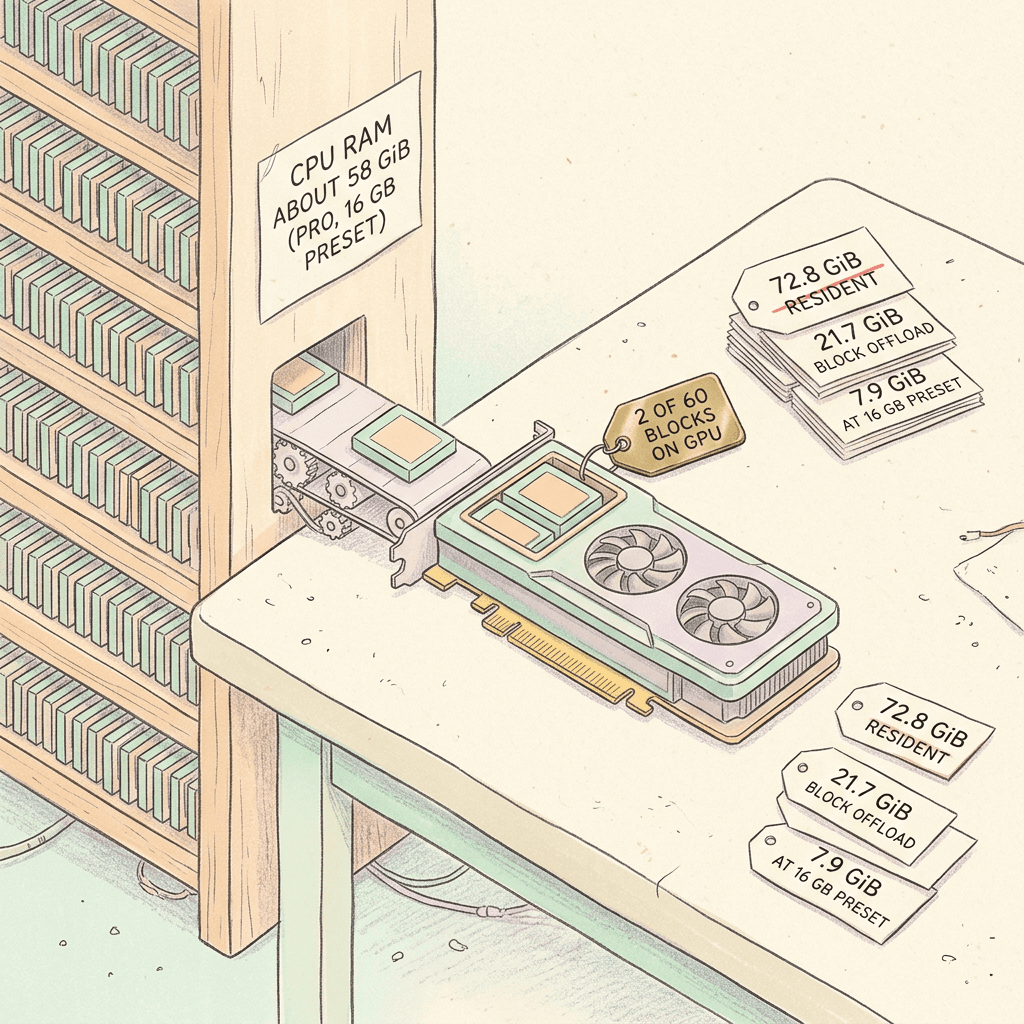
The report's most useful hardware sentence is that peak allocated memory during a Pro SD run reaches 72.8 GiB, which fits no consumer GPU, and that both Lite and Pro still run on 32, 24, and 16 GB cards through weight offloading in which only two transformer blocks reside on the GPU at a time while the rest stream from CPU memory, overlapped with computation on a separate CUDA stream [2]. Because only two blocks stay resident, peak memory at the presets is the same for Lite and Pro, and total generation time on the reference H100 changes by only a few percent.
| Configuration (peak allocated memory, GiB) | SD | HD | Full HD |
|---|---|---|---|
| Pro, resident weights, H100 | 72.8 | 72.8 | 72.8 |
| Pro, block offload, H100 | 21.7 | 39.6 to 39.8 | 39.6 to 39.8 |
| Lite, resident weights, H100 | 43.5 | 44.5 to 44.8 | 44.5 to 44.8 |
| Lite, block offload, H100 | 21.7 | 39.5 to 39.8 | 39.5 to 39.8 |
| 32 / 24 GB preset (same for Lite and Pro) | 21.7 | 17.7 | 21.7 |
| 16 GB preset (same for Lite and Pro) | 7.9 | 13.7 | 12.3 |
Three caveats come with those numbers. First, host RAM becomes the constraint: the Pro model needs about 58 GiB of process memory at the 16 GB preset, and if weights page out to disk, block streaming becomes disk-bound and generation time degrades sharply. Second, block offloading requires PyTorch 2.13 (with PyTorch 2.10 it breaks the compiled forward pass) and is not compatible with CUDA graphs or whole-model compilation. Third, the 16 GB preset quantizes the text encoder to NF4, and that is the only preset setting that changes the generated clip itself, because a different text representation produces a different video; the same prompt run on CPU with full weights takes about 10 seconds and reproduces the 32 GB output [2]. The repository adds that you need an NVIDIA GPU, Python 3.13 or 3.14, uv and just, and that Ampere, Ada, and consumer Blackwell cards compile SageAttention, so nvcc must be on the path [4].
Seconds per clip on seven GPUs
The repository's table gives generation time for a 5-second clip with the non-distilled model after warmup, excluding weight loading and MP4 encoding. The RTX 4090, 5060 Ti, 5080, and 5090 use block offload, while the RTX PRO 6000, A100 80 GB, and H100 use module offload, and all except the H100 use SageAttention2++ (the H100 uses FlashAttention 3), so the report warns that the table compares hardware configurations with their own software stacks [3][2].
| Seconds per 5 s clip | RTX 4090 | RTX 5060 Ti | RTX 5080 | RTX 5090 | RTX PRO 6000 | A100 80 GB | H100 |
|---|---|---|---|---|---|---|---|
| Lite SD | 437 | 1310 | 577 | 309 | 242 | 532 | 239 |
| Lite HD | 422 | 1328 | 579 | 296 | 274 | 472 | 203 |
| Lite Full HD | 578 | 1774 | 770 | 406 | 387 | 664 | 284 |
| Pro SD | 936 | 3080 | 1336 | 754 | 621 | 972 | 356 |
| Pro HD | 1194 | 2716 | 1189 | 638 | 561 | 791 | 292 |
| Pro Full HD | 1247 | 3530 | 1546 | 854 | 765 | 1106 | 402 |
A few readings of this table are not obvious. For Pro, HD mode is faster than SD mode on six of the seven cards, for example 638 seconds versus 754 seconds on the RTX 5090, because HD mode uses a smaller 768x432 base geometry while SD uses 864x480. On the 5090, SD and Full HD agree to within 0.5% on the base stage because they share the same base geometry, so the Full HD premium is almost entirely the super-resolution stage, which the report puts at roughly 96 seconds [2]. The RTX 5060 Ti at 16 GB works, but at 1,310 seconds for Lite SD and 3,530 seconds for Pro Full HD it is a patience exercise. Converted to throughput, the 5090 does about 11.7 Lite SD clips per hour and 4.2 Pro Full HD clips per hour, and the H100 does about 15.1 Lite SD and 9.0 Pro Full HD clips per hour. These are non-distilled numbers, and distilled checkpoints use 10 sampling steps instead of 50 steps with guidance, but the report does not publish a matching distilled table for consumer cards.
Step 10: Running It, From the Official CLI to Diffusers
Everything in this step comes from the official repository documentation and the Diffusers model card, not from guesswork. The primary path is the repository's own pipeline, driven by uv and just. The commands below are the README and quick start verbatim in structure, with the optional flags that matter most. The default config is the H100 preset, and device presets live in kandinsky/configs/devices/.
bash/code
# Official Kandinsky 6.0 quick start. Needs an NVIDIA GPU, uv, and just.
git clone https://github.com/kandinskylab/kandinsky-6.git
cd kandinsky-6
just setup

# Download checkpoints into $KANDINSKY_HOME/weights (default ~/.cache/kandinsky).
# Catalog names: pro, pro-distill, pro-pretrain, lite, lite-distill, lite-pretrain
just download pro-distill
just download lite pro

# Text-to-audio-video. Spoken words go inside <S>...<E>.
just generate 'A cat is lying on a mat, turns toward the camera, opens its mouth and says <S>Hello<E>'

# Use a device preset and choose the output file
just generate 'A cat is lying on a mat, turns toward the camera, opens its mouth and says <S>Hello<E>' --config kandinsky/configs/devices/rtx-5090.yaml --out clip.mp4

# Image-to-audio-video with the shipped reference frame
just generate 'A cat is lying on a mat, turns toward the camera, opens its mouth and says <S>Hello<E>' --image assets/i2va_input.jpg

# Video only, or run super-resolution after the clip
just generate 'A cat is lying on a mat, turns toward the camera, opens its mouth and says <S>Hello<E>' --no-audio
just generate 'A cat is lying on a mat, turns toward the camera, opens its mouth and says <S>Hello<E>' --sr

# Upscale an existing clip with the separate super-resolution CLI
just generate-sr from-video --input clip.mp4 --output-dir outputs
The other frameworks each get an isolated environment under .venvs/ so they never replace the main .venv. The vLLM-Omni recipe defaults to the non-distilled Pro checkpoint because vLLM-Omni samples with Euler and has no PiFlow sampler, so distilled checkpoints are not its default, while the SGLang and FastVideo recipes default to Pro distill [5].
bash/code
# Each framework gets its own isolated environment under .venvs/ (recipes from docs/just.md).
# vLLM-Omni defaults to the non-distilled Pro checkpoint (Euler sampling, no PiFlow sampler).
just setup-vllm
just generate-vllm 'A cat is lying on a mat, turns toward the camera, opens its mouth and says <S>Hello<E>'
just serve-vllm

# SGLang defaults to the Pro distilled checkpoint; the server listens on 127.0.0.1:30000.
just setup-sglang
just generate-sglang 'A cat is lying on a mat, turns toward the camera, opens its mouth and says <S>Hello<E>'
just serve-sglang

# FastVideo defaults to the Pro distilled checkpoint (864x480, 121 frames, 10 steps, guidance 1).
just setup-fastvideo
just generate-fastvideo 'A cat is lying on a mat, turns toward the camera, opens its mouth and says <S>Hello<E>'

# Twelve native text-to-video timings on one GPU, JSON written to profiles/ in the run folder
just bench
For scripting, the Diffusers integration is the easiest route. The class is Kandinsky6TI2VAPipeline, the call mirrors the model card, and the audio comes back as a separate array that you pass to encode_video along with the pipeline's audio_sample_rate. The distilled checkpoint needs 10 steps and guidance scale 1.0, and the model card states that the 50-step guidance 5.0 settings of the other checkpoints do not apply to it [6][7].
python/code
# Text-to-audio-video with the Pro distilled checkpoint through Diffusers.
# Distilled checkpoints need num_inference_steps=10 and guidance_scale=1.0.
import torch
from diffusers import Kandinsky6TI2VAPipeline
from diffusers.utils import encode_video

prompt = (
    "A cat is lying on a mat, turns toward the camera, opens its mouth and says <S>Hello<E>. "
    "<AUDCAP>A soft purr, quiet room tone, and a clear friendly voice.<ENDAUDCAP>"
)

pipe = Kandinsky6TI2VAPipeline.from_pretrained(
    "kandinskylab/Kandinsky-6.0-Pro-distill-5s-Diffusers", torch_dtype=torch.bfloat16
)
pipe.enable_model_cpu_offload()
# Smaller footprint at the cost of speed: pipe.enable_sequential_cpu_offload()
# Tiled VAE decoding for high resolutions: pipe.vae.enable_tiling()

output = pipe(
    prompt=prompt,
    height=480,
    width=864,
    num_frames=121,
    num_inference_steps=10,
    guidance_scale=1.0,
    # sample_audio=False,    # video only
    # expand_prompts=True,   # let Qwen2.5-VL rewrite a short prompt first
)
encode_video(
    output.frames[0],
    fps=24,
    output_path="output.mp4",
    audio=output.audio[0][None],
    audio_sample_rate=pipe.audio_sample_rate,
)
Image-to-audio-video reuses the same pipeline object. The reference image conditions the first frame, and the pipeline resizes and center-crops it to the requested height and width, so the prompt should describe what happens next and skip re-describing the picture [6].
python/code
# Image-to-audio-video. Reuses `pipe` and the imports from the text-to-audio-video snippet.
# The image conditions the first frame and is resized and center-cropped to height x width.
from diffusers.utils import load_image

image = load_image(
    "https://huggingface.co/kandinskylab/Kandinsky-6.0-Pro-distill-5s-Diffusers/resolve/main/assets/i2va_input.jpg"
)
image_prompt = (
    "The dragon slowly unfolds its wings and lowers its head toward the glowing stream below. "
    "<AUDCAP>Deep rumbling breath, leathery wing flaps, clinking coins, trickling water.<ENDAUDCAP>"
)

output = pipe(
    prompt=image_prompt,
    image=image,
    height=480,
    width=864,
    num_frames=121,
    num_inference_steps=10,
    guidance_scale=1.0,
)
encode_video(
    output.frames[0],
    fps=24,
    output_path="output_ti2av.mp4",
    audio=output.audio[0][None],
    audio_sample_rate=pipe.audio_sample_rate,
)
Upscaling is a second pipeline, Kandinsky6SRPipeline, that takes frames from the first pipeline and upscales them by 2, 4, or 2.25. Two details from the docs are easy to miss: the input video must have 1 + k x 4 frames, so 121 frames works but 120 does not, and torch._inductor.config.max_autotune must be enabled so that Inductor can pick flex-attention tiles that fit the SR block mask [7][6].
python/code
# Super-resolution to Full HD with Kandinsky6SRPipeline. Continues from the generation snippet:
# `output` holds the generated frames and audio. The input needs 1 + 4k frames (121 works, 120 does not).
import torch
from diffusers import Kandinsky6SRPipeline
from diffusers.utils import encode_video

# Required: lets Inductor pick flex-attention tiles that fit the SR block mask
torch._inductor.config.max_autotune = True

sr_pipe = Kandinsky6SRPipeline.from_pretrained(
    "kandinskylab/Kandinsky-6.0-VSR-distilled2steps-5s-Diffusers", torch_dtype=torch.bfloat16
)
# The SR transformer always runs NABLA sparse attention on the flex backend; compile it,
# otherwise flex falls back to an eager implementation that needs far more memory.
sr_pipe.enable_model_cpu_offload()
sr_pipe.transformer.set_attention_backend("flex")
sr_pipe.transformer.compile_repeated_blocks(fullgraph=True)

upscaled = sr_pipe(
    video=output.frames[0],
    resolution_scale=2.25,   # 2, 2.25 (default after Kandinsky 6 generation), or 4
    num_inference_steps=2,   # 4 with the flow-matching Kandinsky-6.0-VSR-5s-Diffusers checkpoint
).frames[0]

encode_video(
    upscaled,
    fps=24,
    output_path="output_sr.mp4",
    audio=output.audio[0][None],
    audio_sample_rate=pipe.audio_sample_rate,
)
Finally, here is a small helper of my own, not from the repository, that encodes the two geometry rules from the Diffusers docs (height and width divisible by 16, and 1 + 4k frames for SR) and converts the official timing table into clips per hour so you can plan a batch before you rent a GPU.
python/code
# Helper written for this post (not from the official repository).
# 1) Checks the geometry rules documented for the Diffusers pipelines.
# 2) Converts the official README timings (non-distilled, seconds per 5 s clip) into clips per hour.
def check_geometry(height: int, width: int, frames: int) -> list:
    problems = []
    if height % 16 or width % 16:
        problems.append("height and width must be divisible by 16 (VAE compression 8 x patch size 2)")
    if (frames - 1) % 4:
        problems.append("super-resolution needs 1 + 4k frames (121 works, 120 does not)")
    return problems

TIMINGS = {
    "RTX 4090": {"Lite SD": 437, "Pro Full HD": 1247},
    "RTX 5060 Ti": {"Lite SD": 1310, "Pro Full HD": 3530},
    "RTX 5080": {"Lite SD": 577, "Pro Full HD": 1546},
    "RTX 5090": {"Lite SD": 309, "Pro Full HD": 854},
    "H100": {"Lite SD": 239, "Pro Full HD": 402},
}

print(check_geometry(480, 864, 121))  # an empty list means the settings are valid
for gpu, modes in TIMINGS.items():
    for mode, seconds in modes.items():
        print(f"{gpu:12s} {mode:12s} {3600 / seconds:5.1f} clips/hour, 20 clips = {20 * seconds / 3600:4.1f} h")
Step 11: What a Third-Party RTX 5090 Test Actually Found
Vendor benchmarks are only half the picture, so it is worth reading what an independent user ran on consumer hardware. The ai-muninn blog published a hands-on test on October 8, two days after release, running Kandinsky 6.0 Pro on an RTX 5090 with 32 GB of VRAM and 61.6 GB of system RAM under Windows, using the official ComfyUI nodes, PyTorch 2.13.0, and SageAttention 2.2.0, at 864x480 and 121 frames [11]. The author's headline finding is that English dialogue came out word for word correct in Whisper large-v3-turbo transcripts, with natural lip timing judged by eye, while Chinese was understandable but had an accent and a few wrong words.
| Setup (RTX 5090, 864x480, 5 s clip) | Wall-clock time or size |
|---|---|
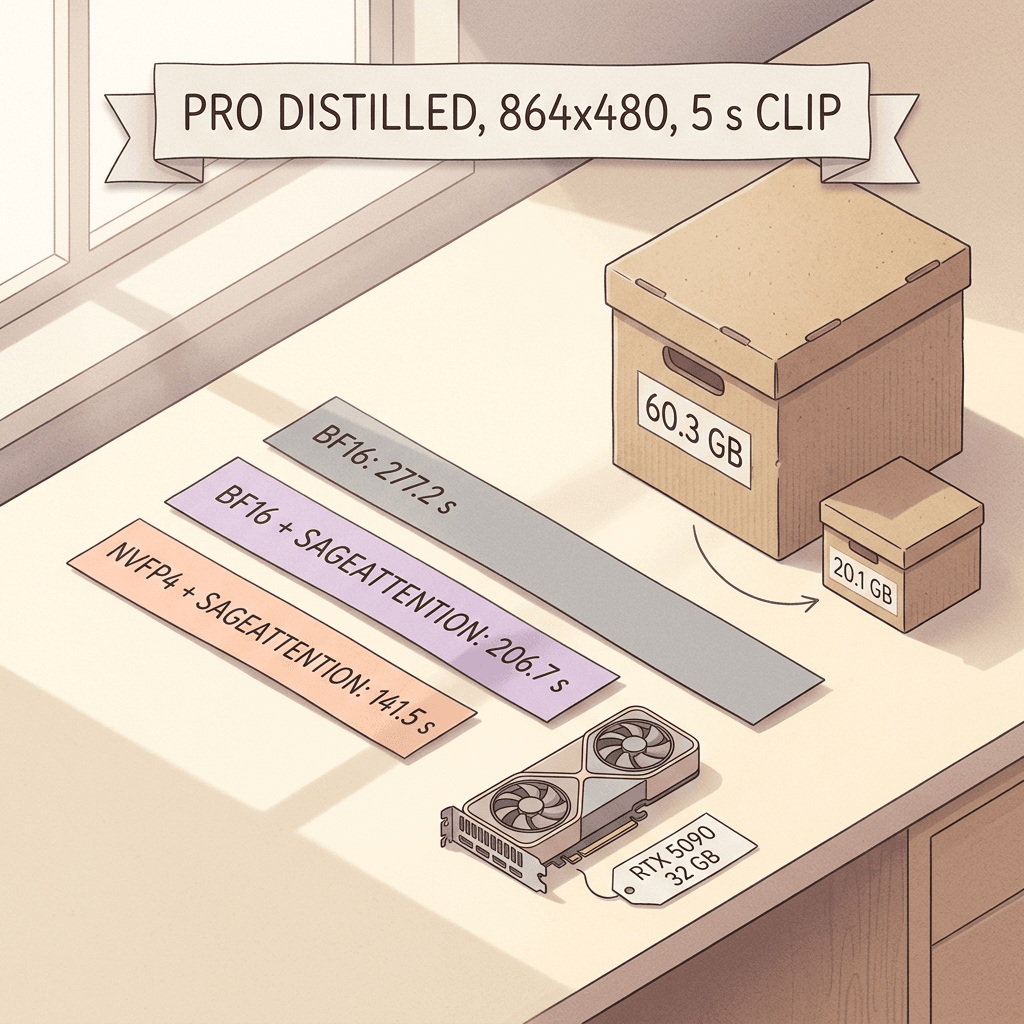
| Pro distilled, bf16, no SageAttention | 277.2 s and 277.0 s (two runs) |
| Pro distilled, bf16 plus SageAttention | 206.7 s |
| Pro distilled, NVFP4 plus SageAttention | 141.5 s (English, seed 42), 131.4 s (Chinese, seed 42), 151.5 s (English, seed 7) |
| Lite, regular 50 steps, no SageAttention | 488.7 to 498.7 s |
| Pro distilled checkpoint size | 60.3 GB in bf16, 20.1 GB in NVFP4 |
The numbers are wall-clock times from submit to saved file, including model load, so they are not directly comparable to the repository's warm-run table. The Pro distilled checkpoint in bf16 is 60.3 GB and does not fit in 32 GB of VRAM, so ComfyUI stages weights in and out during sampling, which the author names as the main slowdown. The author's own NVFP4 conversion of the checkpoint, made with Comfy-Org's comfy-quants tool with the first two and last two visual blocks left in bf16, shrank it from 60.3 GB to 20.1 GB, and at the same seed the composition, costume, background, and mouth timing were nearly identical to the bf16 output [11]. The smoke test also confirmed 121 frames and 44,100 Hz audio, which independently verifies the 44 kHz claim.
Several caveats in that post are as useful as the headline. Most results are single runs per setting, so the author avoids strong quality claims. Whisper checks the words, not the lip-sync, which was judged by eye. The Lite model handled English but produced unrecognizable Chinese, and the official ComfyUI nodes at the time blocked the Lite distilled checkpoint with the message that distilled K6 Lite checkpoints are not supported, so Lite ran only in regular 50-step mode at roughly 489 to 499 seconds without SageAttention [11]. The author's hypothesis for the weaker Chinese is the training captions, which the report describes as Russian and English. As of October 8 that was the state of the nodes, and these integrations are changing quickly, so check the registry before assuming it still holds.
Step 12: Writing Prompts for a Model That Hears Them
Native audio-video models change how a prompt should be written, because the sound is now generated together with the picture. The Diffusers model card's own example prompts follow a consistent shape: a cinematic description of the shot, then an Audio: sentence naming specific sounds, then a closing constraint such as no dialogue, text, or logos [6]. The paper and the vLLM-Omni docs show the native marker format, with speech in <S> and <E> and sound design in <AUDCAP> and <ENDAUDCAP> [2][5]. The three prompts below use the native format and are written for Kandinsky 6.0 at 864x480 and 121 frames, though the same separation of picture, speech, and sound transfers to other audio-video models.
The first prompt tests lip-sync with a single spoken line, which is the case the RL stage was optimized for.
A lighthouse keeper in a yellow rain jacket stands on a windy stone balcony at golden hour, raises a small brass lantern toward the camera, then smiles and says <S>The storm has passed, come up for tea.<E> Medium close-up with a slow push-in, photorealistic, warm low sun, fine sea mist drifting across the frame. <AUDCAP>Steady sea wind, distant gulls, soft waves breaking on rock, a calm warm unhurried voice, the faint creak of a metal railing, and a gentle acoustic guitar underscore.<ENDAUDCAP>
The second prompt tests impact synchronization with no dialogue, where the benchmark question is whether each sound lands on the right frame. The paper's own example set includes a hammer-and-nail scene for the same reason.
A gloved hand drives a brass nail into an oak plank with a steel hammer in a sunlit workshop, exactly three strikes, a small puff of sawdust jumping off the board at each hit, locked-off camera, shallow depth of field, photorealistic. <AUDCAP>Three sharp metallic taps landing on the exact frame of each strike, a dull wooden thud underneath each one, quiet workshop ambience, and a faint radio hum far in the background.<ENDAUDCAP>
The third prompt is for image-to-audio-video, to be used with a reference frame of a bakery storefront at dawn, so the text only describes what happens next.
The shop door opens inward and a baker in a flour-dusted apron steps out, turns the hanging sign from closed to open, then looks at the camera and says <S>We are open, come on in.<E> Slow dolly-in at eye level, soft blue morning light turning warm, steam rising from a tray in the window. <AUDCAP>A small door bell jingle, early-morning street ambience with a few birds, the soft scrape of the sign flipping, and a friendly clear voice.<ENDAUDCAP>
A few prompt habits follow from the training recipe rather than from folklore. Put spoken text inside the speech markers and keep each line short enough to say comfortably within five seconds, because the speech has to fit the clip length. Write the sound design as concrete nouns (gulls, a metal railing, a door bell) because the audio captions in training were descriptions of specific sounds. Describe one shot, since the video dataset was filtered to remove clips containing scene transitions and the model produces single-scene generations. And use long prompts, because 70% of training captions were the long variant. For prompting the other leading models, the same structure appears in our guide to writing prompts for Veo 3, Veo 3.1, and Sora 2, and 20 Gemini Omni Flash prompts for YouTube Shorts shows the same idea applied to short-form video.
Step 13: Limitations the Authors State and the Ones You Will Hit
The report's own limitations are short and specific. The models generate clips of up to 5 seconds, the base generation runs at SD resolution with Full HD obtained through super-resolution, and a gap remains to the strongest proprietary systems in visual quality and overall audio quality [2]. The developers have said they plan to lengthen clips over time, which is a plan and not yet a shipped feature [28].
The limitations you will meet in practice are more mundane. Language coverage is uneven, since the data description centers on Russian and English and the independent test found Chinese weaker, with Lite garbling it entirely [2][11]. The 16 GB path trades speed and some fidelity of the text embedding for access. Kandinsky's integrations are young: the vLLM-Omni recipe defaults to the non-distilled Pro checkpoint because vLLM-Omni has no PiFlow sampler, and the ComfyUI Lite distilled case was blocked in the early test. And all of the headline quality comparisons come from the developers' own evaluation, so a few hundred pairwise votes on their prompt set is useful evidence but not an independent leaderboard.
Realistic speech with accurate lip movement carries a misuse risk that the authors discuss directly. Their ethical considerations section says the models should not be used to depict real people without consent, to imitate a person's voice or appearance for deceptive purposes, to generate sexualized content involving minors or non-consensual intimate imagery, or to infringe intellectual property, and it encourages labeling generated content as synthetic and applying moderation in public-facing products [2]. An MIT license does not remove those obligations from anyone deploying the model. If you publish clips on YouTube, our guide to YouTube's auto-label system and AI disclosure covers how disclosure works there, and YouTube's face likeness detection explains the likeness protections creators now have. Several of the same authors have also published a paper on adding reference-based voice cloning to text-to-audio-video models with a single zero-initialized layer, a line of work that makes the consent question more pressing rather than less [33].
Common Mistakes When Reading or Running Kandinsky 6.0
- Comparing the two word error rates. The 0.124 (Whisper-large-v3, RL ablation) and the VABench 0.117 (Qwen3-ASR-1.7B, speech subset) come from different transcribers and prompt sets, and the report says they are not comparable.
- Assuming native Full HD. Budget for an SD base pass plus a separate super-resolution pass, and decide whether you need the SR stage before you start generating.
- Using the wrong sampler settings. The distilled checkpoints need 10 steps and guidance 1.0, and the regular checkpoints need 50 steps and guidance 5.0, so copying settings between them degrades results.
- Expecting H100 timings on a consumer card. The report explicitly says H100 numbers do not transfer because the CPU-GPU bus and the attention kernels differ.
- Underestimating system RAM. The Pro model needs about 58 GiB of process memory at the 16 GB preset, and paging to disk makes generation degrade sharply.
- Passing invalid geometry. Height and width must be divisible by 16, and the SR pipeline needs a frame count of 1 + 4k, so trimming a 121-frame clip to 120 frames breaks upscaling.
- Treating Lite as a proxy for Pro. Lite wins four VABench rows, but in the independent test it handled English only, and it sits well below Pro on lip-sync (1.761 versus 2.072).
- Putting dialogue in the plain description. Use the speech markers so the model knows which words to speak, and keep the line short enough for a 5-second clip.
What This Means If You Make Short-Form Video
For creators, the practical value of a model like this is workflow, not benchmark placement. A sensible local pipeline looks like this: draft with the distilled checkpoint at SD, pick the best seed (the CLI takes a --seed flag and the vLLM-Omni recipe defaults to 42), upscale only the keepers with the separate super-resolution step, then cut several 5-second shots together, which fits how most Shorts, Reels, and TikToks are edited anyway [4][5]. The report's inference modes include portrait 480x864 and square 512x512 bases that upscale to 1080x1920 and 1080x1080, so vertical formats are supported natively [2].
Not everyone wants to manage Python 3.13, a 60 GB checkpoint, and an offloading preset. Miraflow does not run Kandinsky 6.0, and this post is a technical explainer that says nothing about Miraflow's own stack, but the creative workflow around a native audio-video clip is the same wherever the clip comes from. Miraflow's Cinematic AI Video Generator turns a prompt into a finished clip in the browser, Text2Shorts takes a topic through script, scene visuals, and a vertical short in one pass, and AI Clipping cuts the best moments out of long footage with captions applied. When a 5-second clip needs a longer soundtrack, Miraflow's AI Music Generator can produce a full-length track, and the YouTube Thumbnail Maker finishes the package. For more on what is possible with generated video in 2026, see our guides to making AI videos that go viral on TikTok and YouTube Shorts and the video model migration guide after the Sora API shutdown. Everything starts from the Miraflow home page.
What to Watch Next
Three things will decide how much this release matters. The first is clip length, since the 5-second limit is the single biggest practical gap and the authors list longer clips, higher native resolution, and additional reference-based conditioning as future work [2]. The second is community tooling, particularly quantized checkpoints, since in a single-seed comparison the independent test found NVFP4 cut the Pro checkpoint from 60.3 GB to 20.1 GB with little visible change, and as of October 8 that tester found no other NVFP4, fp8, or GGUF versions besides an int8 release [11]. The third is whether native-resolution approaches such as Prism change the economics of the SD-plus-upscaler design that Kandinsky and MiniMax H3 both use [26]. Another strong open competitor is the Wan 2.7 line, and the next open release will have to answer both the MIT-license precedent and the audio-sync numbers set here.
Frequently Asked Questions
What is Kandinsky 6.0 Video in simple terms? It is a pair of open diffusion models from Kandinsky Lab, a 3B Lite and a 29B Pro, that generate a 5-second video clip together with synchronized 44 kHz audio, including lip-synced speech, from text or from text plus a first frame, released on October 6, 2026 [1][3].
Is it really open source and can I use it commercially? The code and checkpoints are released under the MIT license, which the model cards and repository state, so commercial use is permitted without territory restrictions. The authors still discourage deceptive impersonation, non-consensual likeness, and other misuse, and you remain responsible for local laws on disclosure and likeness [6][2].
What GPU do I need to run Kandinsky 6.0? You need an NVIDIA GPU. The report provides presets for 32, 24, and 16 GB cards using block offloading, with the 16 GB preset needing about 58 GiB of system RAM for Pro. On an RTX 5090 the non-distilled Lite SD clip takes about 309 seconds and Pro Full HD about 854 seconds [3][2].
Does it generate audio and video in a single pass? Yes. A dual-stream CrossDiT denoises video and audio latents together with bidirectional cross-attention in every block, instead of generating video first and adding sound afterward, and you can turn audio off with a flag in the CLI or sample_audio=False in Diffusers [2][7].
Is Kandinsky 6.0 better than LTX 2.5? In the authors' evaluation, Pro leads LTX 2.5 on visual quality and speech quality in human side-by-side tests and on 7 of 14 VABench rows, while LTX 2.5 keeps a small non-significant edge on general audio fidelity, the VLM-judged alignment and expressiveness scores, and VABench word error rate [2].
How does it compare with Veo 3.1 and MiniMax H3? Against Veo 3.1 Fast the results split, with Kandinsky cleaner on artifacts and camera motion and Veo stronger on prompt following and audio. MiniMax H3 was preferred on most criteria, while Kandinsky stayed competitive on speech quality and synchronization. H3's license also excludes the US, UK, EU, and Korea [2][21].
Can it make 1080p or longer clips? Full HD (1920x1080) is available through the separate super-resolution model, with HD and 2K routes also supported. Clips are limited to 5 seconds, and longer clips are listed as future work [2].
What is Tencent Prism and is it the same kind of model? Prism (arXiv 2610.05416) is a dynamic sparse attention training framework for native 2K joint video-audio generation from the Tencent Hunyuan Foundation Model Team and collaborators, with a reported 2.5x training speedup over full attention. It is a training method, which makes it a different kind of artifact from the released Kandinsky 6.0 model family [25].
Does Miraflow use Kandinsky 6.0? No. This post is a technical explainer. Miraflow's Cinematic AI Video Generator and Text2Shorts are separate browser tools that need no GPU setup.
Conclusion
Kandinsky 6.0 Video is the most complete open release of a native audio-video model so far, and its value comes from the combination of three things more than from any single benchmark row: a dual-stream design that lets audio and video attend to each other in every block, a training recipe built around lip-sync (a speech-gated sync reward, a face loss, and a 47% word error rate reduction from reinforcement learning), and an MIT license with a working path to 16 GB consumer cards [1][2]. The honest limits are equally clear. Clips stop at 5 seconds, the base resolution is SD, and in the authors' own human evaluation MiniMax H3 and Seedance 2.0 remain ahead on visual quality while Veo 3.1 Fast leads on prompt following and audio [2]. For researchers it is a reproducible baseline, for developers it is a legally simple self-hosted option compared with licenses that carve out entire regions, and for creators it is a preview of where every video tool is heading: sound and picture generated as one object. Whether you run it yourself or make clips with Miraflow's Cinematic AI Video Generator, the practical lesson is the same: describe the sound as carefully as the shot.
References
[1] arXiv. "Kandinsky 6.0 Video: Foundation Models for Synchronized Video and Audio Generation" (2610.05608).
[2] arXiv. "Kandinsky 6.0 Video: Foundation Models for Synchronized Video and Audio Generation," full HTML (v1).
[3] GitHub. "kandinskylab/kandinsky-6 README."
[4] GitHub. "Kandinsky 6 Quick start (docs/quick_start.md)."
[5] GitHub. "Kandinsky 6 Quick start: vLLM-Omni (docs/quick_start_vllm.md)."
[6] Hugging Face. "kandinskylab/Kandinsky-6.0-Pro-distill-5s-Diffusers Model Card."
[7] Hugging Face. "Kandinsky 6 (Diffusers documentation)."
[8] Kandinsky Lab. "Kandinsky 6.0 Video."
[9] Hugging Face. "Paper Page: Kandinsky 6.0 Video (2610.05608)."
[10] GitHub. "kandinskylab/kandinsky-6-sr: Kandinsky 6.0 Video Super-Resolution."
[11] ai-muninn. "Kandinsky 6.0 Pro on an RTX 5090: lip-synced English dialogue works, Chinese isn't quite there yet."
[12] arXiv. "Kandinsky 5.0: A Family of Foundation Models for Image and Video Generation" (2511.14993).
[13] arXiv. "NABLA: Neighborhood Adaptive Block-Level Attention for Efficient Video Generation" (2507.13546).
[14] arXiv. "OmniNFT: Modality-wise Omni Diffusion Reinforcement for Joint Audio-Video Generation" (2605.12480).
[15] arXiv. "pi-Flow: Policy-Based Few-Step Generation via Imitation Distillation" (2510.14974).
[16] arXiv. "LTX-2: Efficient Joint Audio-Visual Foundation Model" (2601.03233).
[17] Hugging Face. "Lightricks/LTX-2.5 Model Card."
[18] ComfyUI Wiki. "LTX-2.5: Lightricks Launches 22B Open Video Model for ComfyUI."
[19] arXiv. "VABench: A Comprehensive Benchmark for Audio-Video Generation" (2512.09299).
[20] GitHub. "MiniMax-AI/MiniMax-H3 README."
[21] DeepLearning.AI, The Batch. "MiniMax's State-of-the-Art Video Model Is Only Minimally Open."
[23] Google AI for Developers. "Generate videos with Veo 3.1 in the Gemini API."
[24] Google AI for Developers. "Gemini API pricing."
[25] arXiv. "Prism: Dynamic Sparse Attention for Native 2K Joint Video-Audio Generation Model Training" (2610.05416).
[26] arXiv. "Prism: Dynamic Sparse Attention for Native 2K Joint Video-Audio Generation Model Training," full HTML (v1).
[27] arXiv. "Ovi: Twin Backbone Cross-Modal Fusion for Audio-Video Generation" (2510.01284).
[28] Gearbrain. "Kandinsky 6.0 Video: Open-Source AI With Synchronized Sound."
[29] ComfyUI Wiki. "Kandinsky 6.0: ComfyUI Setup and Model Guide."
[30] ComfyUI Registry. "kandinsky6 node package."
[31] Hugging Face. "kandinskylab organization."
[32] arXiv. "MMAudio: Taming Multimodal Joint Training for High-Quality Video-to-Audio Synthesis" (2412.15322).
[33] arXiv. "Adding Voice Cloning to Text-to-Audio-Video Models with a Single Zero-Initialised Layer" (2608.15690).
[34] Hugging Face Spaces. "Kandinsky 6.0 Pro Distill 5s demo."
[35] TechNetBooks. "Sber Releases Kandinsky 6.0 Video with Synchronized Audio Generation."