
From Text to Training Video: Complete AI Transformation Guide

Written by
Sam Cho

Transform text documents, presentations, and PDFs into professional training videos with AI. Convert existing content to engaging video in hours, not weeks. Complete guide for L&D teams.
Text-to-video AI for training is technology that converts written documents, presentations, and text-based content into professional video format using artificial intelligence to generate narration, avatars, and visual elements automatically. L&D teams use text-to-video platforms to repurpose existing training materials (employee handbooks, policy documents, PowerPoint presentations, procedures) into engaging video content without filming or video editing. A 20-page training document becomes a 10-minute professional training video in 2-3 hours.
Can AI turn text into training videos? Yes. Modern AI platforms accept Word documents, PDFs, PowerPoint presentations, or plain text and generate training videos complete with AI presenters, voiceovers, visual elements, and proper pacing. Organizations report converting existing training libraries into video format 80x faster than traditional video production while maintaining or improving learning effectiveness.
Why Transform Text Documents into Training Videos
Converting text-based training into video format delivers measurable improvements in learning outcomes and training efficiency.
Higher Engagement and Completion Rates
Text-based training shows consistently lower engagement than video:
- Text-only e-learning: 40-60% completion rates
- PDF training manuals: 25-40% completion rates
- Video training: 80-95% completion rates
Employees avoid reading 50-page policy documents but will watch a 10-minute video covering the same content. Video format reduces the perceived effort required, increasing the likelihood employees actually complete training.
Research from the Brandon Hall Group found that video training achieves 75% higher completion rates than text-based training covering identical content. When compliance depends on training completion, format matters.
Improved Knowledge Retention
Video training improves retention compared to text:
- Text-based training: 30-40% retention at 30 days
- Video training: 50-60% retention at 30 days
- Video with interactive elements: 60-75% retention at 30 days
The combination of visual, audio, and text elements in video creates multiple memory pathways. Employees who see a procedure demonstrated, hear it explained, and read supporting text remember better than those who only read about it.
Accessibility for Different Learning Styles
Text-based training favors reading-focused learners. Video accommodates multiple learning styles:
- Visual learners benefit from demonstrations and graphics
- Auditory learners process spoken explanations
- Kinesthetic learners see procedures in action
- Reading-focused learners can use captions and transcripts
Diverse learning style support means more employees learn effectively from the same content.
Reduced Training Time
Reading 20 pages of training content takes 60-90 minutes for average readers. A video covering the same content runs 10-15 minutes. Employees consume information faster through well-designed video than lengthy documents.
This time savings multiplies across your workforce. Training 500 employees saves 375-625 hours of total employee time by converting a 20-page document to a 15-minute video.
Leverage Existing Content Investments
Most organizations have extensive written training materials:
- Employee handbooks
- Standard operating procedures
- Policy documents
- Training presentations
- Technical documentation
- Compliance manuals
These documents represent significant investment in content development. Converting them to video leverages that investment, creating new training formats from existing intellectual property rather than starting from scratch.
Easier Updates and Distribution
Text documents require:
- Employees to find the current version
- Reading to identify what changed
- Remembering to apply new information
Video training provides:
- Automatic distribution through LMS
- Clear explanation of changes
- Visual demonstration of new procedures
- Tracked completion for accountability
When policies update, regenerating video from revised text takes minutes. Distributing updated training and tracking completion happens automatically.
Mobile and Remote Accessibility
Employees increasingly work remotely or need training access on mobile devices. PDFs and lengthy documents work poorly on small screens. Video adapts naturally to any screen size and allows training during commutes or between tasks.
The flexibility supports modern work arrangements and increases training accessibility.
How Text-to-Video AI Works for Training Content
Understanding the technology helps you use it effectively and set appropriate expectations.
Content Analysis and Structure Recognition
AI systems analyze input documents to identify:
Structural Elements: Headings, subheadings, bullet points, numbered lists, tables, and sections. The AI recognizes document hierarchy and content organization.
Content Types: Definitions, procedures, examples, warnings, policies, and explanations. Different content types require different video treatment.
Visual Elements: Images, diagrams, charts, and tables embedded in documents. The system extracts these for inclusion in video.
Key Information: Important points, critical procedures, and emphasis indicators (bold, italics, highlighting) that deserve special attention in video format.
Logical Flow: How sections connect and build on each other. The AI maintains instructional sequencing in video output.
This analysis allows intelligent conversion rather than just reading text word-for-word on screen.
Script Generation and Adaptation
The platform transforms written content into spoken scripts:
Conversational Rewriting: Text written for reading converts to spoken language. "Personnel must complete documentation prior to equipment operation" becomes "Complete your paperwork before using the equipment."
Pacing Adjustments: Dense text breaks into shorter sentences with pauses. Technical content slows down. Simple concepts move faster.
Clarification Addition: The AI adds verbal signposts not needed in text. "Let's look at the three main types" or "Now let's move to the second step."
Example Enhancement: Brief text examples expand with verbal context. A bulleted list becomes "Here's an example of how this works..."
Redundancy Removal: Content that works in text but sounds repetitive when spoken gets consolidated. The AI eliminates redundant phrasing while preserving meaning.
Scripts maintain the source content's accuracy and intent while optimizing for audio delivery.
Visual Element Creation
The platform generates supporting visuals:
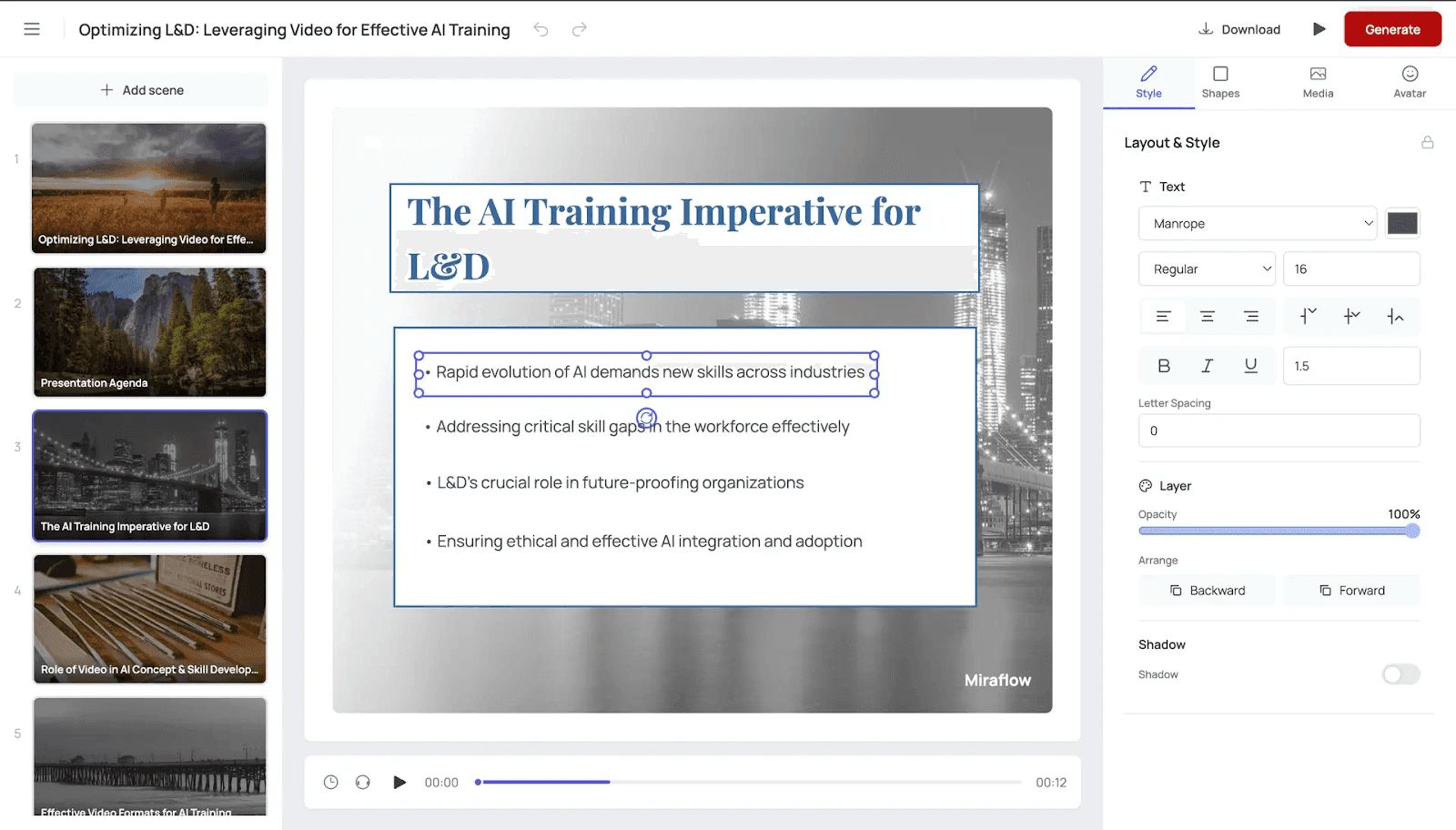
Text Extraction: Key points from documents become on-screen text overlays, reinforcing important information visually.
Image Integration: Photos, diagrams, and charts from source documents integrate into video at relevant points.
Slide Generation: Document sections convert to visual slides displayed behind the avatar presenter, similar to presentation formats employees already understand.
Graphic Creation: For documents without visuals, some platforms generate relevant graphics, icons, or diagrams based on content.
Layout Design: Visual elements receive professional layouts with proper sizing, positioning, and timing to support narration.
Avatar and Voice Selection
AI avatars present the content:
Automatic Selection: Platforms may auto-select avatars and voices based on content type and target audience.
Manual Override: You can choose specific avatars and voice characteristics matching your brand and content tone.
Voice Characteristics: Professional tone for policies, friendly for onboarding, authoritative for compliance, instructional for procedures.
The avatar delivers the generated script with appropriate pacing, emphasis, and expression.
Video Assembly and Synchronization
The AI assembles components into coherent training:
Scene Creation: Content sections become video scenes with appropriate length (30-90 seconds typical).
Transition Addition: Smooth transitions between topics prevent jarring cuts.
Timing Optimization: Narration syncs with visual elements, allowing time for viewers to read on-screen text or study graphics.
Pacing Variation: Important points get extra time. Simple concepts move faster to maintain engagement.
Knowledge Check Integration: The platform can insert quiz questions at logical breaks, testing comprehension of just-covered material.
Output Generation
The platform produces finished video files:
Format Selection: MP4, MOV, or other formats compatible with your distribution method.
Quality Settings: Resolution (720p, 1080p, 4K) based on requirements and file size constraints.
Accessibility Features: Automatic caption generation and transcript creation for compliance and accessibility needs.
SCORM Packaging: For LMS distribution, content packages with tracking capabilities.
Processing time varies by content length and complexity but typically runs 30-60 minutes for a 10-minute training video.

Types of Text Content You Can Convert to Training Videos
Different document types work well for video conversion with varying levels of preparation needed.
Employee Handbooks
Employee handbooks contain policies, benefits, and workplace guidelines that convert well to video:
What Works: Policy explanations, benefits overviews, workplace guidelines, code of conduct, attendance policies, time-off procedures.
Preparation Needed: Extract relevant sections rather than converting entire 100+ page handbooks. One policy per video works better than comprehensive handbook videos.
Typical Output: 5-10 minute videos per major handbook section. A complete handbook might become 15-20 focused training videos.
Learning Impact: Video policy training achieves 70-85% comprehension versus 40-60% for employees who just receive handbook PDFs.
Compliance Training Documents
Compliance training materials including sexual harassment policies, safety procedures, and data privacy requirements convert effectively:
What Works: Legal requirements, prohibited behaviors, reporting procedures, consequences of violations, employee responsibilities.
Preparation Needed: Simplify legal language to conversational tone. Add specific examples not typically in legal documents.
Typical Output: 8-15 minute videos per compliance topic. Sexual harassment training might be 60-90 minutes split into 6-8 modules.
Learning Impact: Video compliance training shows 82% completion rates versus 55% for PDF-based training, critical for documentation requirements.
Standard Operating Procedures (SOPs)
Procedure documents detailing how to perform specific tasks convert to instructional videos:
What Works: Step-by-step instructions, safety precautions, quality standards, troubleshooting guides, equipment operation.
Preparation Needed: Break complex procedures into smaller videos. One procedure per video rather than comprehensive SOP manuals.
Typical Output: 3-8 minute videos per procedure. Complex procedures might split into multiple videos covering preparation, execution, and quality checks.
Learning Impact: Video procedure training reduces errors by 30-40% compared to text-only SOPs according to manufacturing training studies.
PowerPoint Presentations
Existing training presentations convert directly to video:
What Works: Any presentation used for live training. Slides provide visual structure already organized for learning.
Preparation Needed: Minimal. Review speaker notes and add narration script if notes are abbreviated. Some platforms read slide text automatically.
Typical Output: 30-60 seconds per slide typically. A 20-slide presentation becomes a 10-20 minute video.
Learning Impact: Video versions of presentations allow on-demand access and replay, improving knowledge retention by 25-40% versus one-time live presentations.
Training Manuals and Guides
Comprehensive training documentation covering products, systems, or job responsibilities:
What Works: Product overviews, feature explanations, use cases, best practices, troubleshooting, FAQs.
Preparation Needed: Chunk content into logical modules. A 50-page manual shouldn't become one video but rather 10-15 focused videos.
Typical Output: 5-12 minutes per major section. Complete manual coverage might require 20-30 videos in an organized training library.
Learning Impact: Video training manuals achieve 40% faster time-to-competency versus text-only manuals in software training studies.
Policy and Procedure Updates
Announcements and explanations of policy changes:
What Works: What changed, why it changed, new procedures, effective dates, who is affected.
Preparation Needed: Focus on changes only. Compare old versus new policies. Include specific examples of how changes affect daily work.
Typical Output: 3-7 minute videos per policy update. Short, focused videos get watched more than lengthy change documentation.
Learning Impact: Video policy updates achieve 88% view rates versus 35% read rates for email policy announcements.
Technical Documentation
Software guides, system documentation, and technical specifications:
What Works: Feature descriptions, configuration procedures, integration guides, API documentation, troubleshooting.
Preparation Needed: Add screen recordings showing actual system use. Supplement text with visual demonstrations.
Typical Output: 5-15 minutes per major feature or procedure. Technical content often requires longer videos for adequate explanation.
Learning Impact: Video technical training reduces support tickets by 25-35% as employees better understand systems and self-solve issues.
New hire documentation covering company information, role responsibilities, and first-week logistics:
What Works: Company history, mission and values, organizational structure, benefits overview, first-day logistics, role expectations.
Preparation Needed: Organize chronologically by when new hires need information. Day one topics separate from week one topics.
Typical Output: 5-10 minutes per onboarding topic. Complete onboarding might include 15-25 videos covering various aspects.
Learning Impact: Video onboarding reduces time-to-productivity by 25-35% versus text-only onboarding materials.
FAQ Documents
Frequently asked questions compiled from customer support, HR inquiries, or technical support:
What Works: Common questions with clear answers, troubleshooting steps, policy clarifications, "how do I" procedures.
Preparation Needed: Group related questions. Create scenario-based videos rather than rapid-fire Q&A format.
Typical Output: 2-5 minutes per FAQ cluster. Group 3-5 related questions per video.
Learning Impact: Video FAQ content reduces redundant questions to support teams by 40-50% as employees self-serve answers.
Step-by-Step: Transforming Documents into Training Videos with AI
Here's the detailed process for converting text into training videos:
Step 1: Select and Prepare Source Content (30-60 minutes)
Choose which documents to convert based on:
- Training priority and impact
- Employee need and demand
- Compliance requirements
- Current format ineffectiveness (low engagement with text version)
Review source documents for:
- Accuracy and currency (update outdated information before converting)
- Completeness (fill gaps in content)
- Clarity (simplify confusing sections)
- Organization (logical flow and structure)
Make a clean copy of source content with:
- Current information only
- Clear section headings
- Removed formatting artifacts
- Corrected typos and errors
Step 2: Chunk Content into Video-Sized Segments (30-45 minutes)
Break lengthy documents into logical modules:
- Aim for 10-15 minutes of video per segment
- Each video should cover one complete topic or procedure
- Related subtopics can be separate videos within a series
Chunking a 30-page employee handbook might create:
- Video 1: Welcome and company overview (pages 1-5)
- Video 2: Benefits and time off (pages 6-12)
- Video 3: Workplace policies (pages 13-20)
- Video 4: Code of conduct (pages 21-25)
- Video 5: Resources and contacts (pages 26-30)
Smaller segments improve completion rates and allow targeted assignment.
Step 3: Convert Text to Conversational Scripts (1-2 hours per video)
Rewrite text content for spoken delivery:
Before (written for reading): "Employees must submit timesheets by 5pm on the final Friday of each pay period. Failure to submit timesheets on time may result in payment delays. Supervisors will review and approve timesheets within 48 hours of submission."
After (written for speaking): "Let's talk about submitting your timesheet. You need to submit it by 5pm on the last Friday of the pay period. If you submit late, your payment might be delayed. Your supervisor will review and approve your timesheet within two business days."
Conversion guidelines:
- Use "you" and "your" instead of "employees" and "personnel"
- Break long sentences into multiple short sentences
- Replace formal vocabulary with everyday words
- Add transitions and signposts ("first," "next," "finally")
- Include examples that work verbally
Some AI video platforms automatically convert text to conversational scripts. Review AI-generated scripts for accuracy and natural flow.
Step 4: Identify Visual Support Needs (15-30 minutes)
Determine what visual elements will support each section:
On-screen text: Key points, definitions, important dates or numbers, contact information.
Existing graphics: Diagrams, charts, organizational charts, process flows from source documents.
Needed additions: Screenshots of systems being discussed, photos of equipment or locations, icons representing key concepts.
Slides or backgrounds: Will content display as presentation-style slides or with an avatar on a plain background?
Create a visual plan noting what appears on screen during each narration section.
Step 5: Upload Content to AI Platform (10-15 minutes)
Access your text-to-video AI platform:
Document upload: Most platforms accept Word docs, PDFs, PowerPoint files, or plain text paste.
Format selection: Choose whether to:
- Let AI automatically structure content
- Manually organize into scenes
- Upload pre-prepared script
Initial settings: Select:
- Video length target
- Style preferences (formal, conversational, instructional)
- Primary language
The platform analyzes uploaded content and suggests video structure.
Step 6: Select Avatar and Voice (10 minutes)
Choose presentation style:
Avatar selection: Pick an AI presenter matching:
- Content formality (professional business, smart casual, industry-specific)
- Target audience demographics
- Brand consistency across training library
Voice characteristics: Configure:
- Language and accent (American English, British English, etc.)
- Gender matching avatar
- Speaking pace (slower for complex content, standard for most training)
- Tone (professional, friendly, authoritative)
Preview avatar and voice with sample text before proceeding.
Step 7: Add and Arrange Visual Elements (20-40 minutes)
Enhance the video with supporting visuals:
Import graphics: Upload images, charts, and diagrams from source documents.
Create text overlays: Add key points as on-screen text appearing at relevant moments.
Position elements: Arrange where visuals appear relative to the avatar (behind, beside, full-screen).
Set timing: Specify when each visual element appears and how long it displays.
Add transitions: Choose transition styles between scenes (cut, fade, slide).
Platforms vary in visual customization options. Simpler tools automate this process; advanced tools provide detailed control.
Step 8: Generate Initial Video (30-60 minutes)
Click generate and the platform creates your training video:
Processing time: Depends on video length, visual complexity, and platform capacity. Typical 10-minute videos process in 30-60 minutes.
What happens: AI generates narration from script, syncs avatar lip movements, assembles visual elements, applies transitions, and renders final video file.
Notification: Most platforms email when processing completes so you can work on other tasks during generation.
Step 9: Review and Refine (30-45 minutes)
Watch the complete video critically:
Content accuracy: Does narration match your script? Are all key points covered? Is information correct and current?
Visual quality: Are graphics readable? Do visuals appear at the right moments? Is avatar quality acceptable?
Pacing and flow: Does the video move too fast or too slowly? Are pauses appropriate? Do transitions work smoothly?
Learning effectiveness: Would this make sense to your target audience? Are explanations clear? Would you learn from this?
Technical issues: Audio clarity, video resolution, syncing problems, visual glitches.
Create a revision list noting timestamps and needed changes.
Step 10: Revise and Regenerate (20-40 minutes)
Make improvements based on review:
Script edits: Clarify confusing sections, adjust pacing by adding/removing content, fix any errors.
Visual adjustments: Add missing graphics, reposition elements for better readability, extend display time for complex visuals.
Pacing changes: Modify script to slow down dense sections or speed through simple content.
Regenerate the video with changes. Second generation typically processes faster than initial creation.
Step 11: Add Interactive Elements (15-30 minutes if needed)
Enhance learning effectiveness:
Knowledge checks: Insert 3-5 questions throughout video testing comprehension of covered content.
Branching: For advanced platforms, create paths where learner responses determine what content they see next.
Resources: Add downloadable job aids, checklists, or reference materials linked from the video.
Certificates: Configure completion certificates if required for compliance documentation.
Step 12: Export and Distribute (15-20 minutes)
Finalize and deploy:
Export format: Download in appropriate format (MP4 for general use, SCORM for LMS tracking).
Upload to LMS: Add to learning management system with proper categorization and metadata.
Assign to learners: Configure who should complete training and any deadlines.
Communication: Notify employees about new training availability and expectations.
Total Time Investment: 4-6 hours for first text-to-video conversion including learning curve. Subsequent conversions take 2-3 hours as process becomes familiar.
This investment compares to 3-6 weeks for traditional video production covering the same content.

Optimizing Text Content for AI Video Conversion
Preparing source content properly improves video quality and reduces revision cycles.
Write in Clear, Simple Language
AI converts what you provide. Clear source content produces clear training videos.
Use short sentences: Keep under 20 words. Long, complex sentences sound awkward when spoken.
Choose common words: Replace specialized vocabulary with everyday language unless technical terms are necessary.
Active voice: "Complete the form" instead of "The form should be completed by employees."
Specific examples: "Submit expenses by the 15th" instead of "Submit expenses in a timely manner."
Organize with Clear Structure
Hierarchical organization converts well to video:
Use descriptive headings: Headings become section titles or scene breaks in videos.
Logical sequence: Present information in the order learners need it. Prerequisites first, then main content, then next steps.
Bullet points and lists: These convert to on-screen lists or verbal enumeration ("first," "second," "third").
Consistent formatting: Use heading styles, bold for emphasis, and formatting that indicates information hierarchy.
Remove Unnecessary Content
Video works better when focused:
Eliminate redundancy: Text can be skimmed; video is linear. Remove repetitive information that works in documents but feels tedious in video.
Cut tangential information: Stay focused on core learning objectives. Interesting but non-essential content distracts from key messages.
Remove outdated sections: Don't convert content that's no longer relevant. Update documents before conversion.
Reduce legalese: Legal language protects organizations in documents. Training videos need clear explanations, not legal precision. Simplify complex legal language while preserving meaning.
Add Context and Signposting
Help viewers follow along:
Intro context: Begin sections with "Now let's look at..." or "The next topic is..." to orient learners.
Transitions: Connect ideas with "Because of this..." or "This leads us to..." instead of abrupt topic changes.
Progress indicators: "We've covered X, next we'll discuss Y, then finish with Z" helps learners understand structure.
Summaries: "The key point here is..." or "Remember, the main idea is..." reinforces learning.
Enhance with Examples
Abstract concepts need concrete examples:
Real scenarios: Use actual workplace situations rather than generic examples.
Specific details: "When a customer requests a refund within 30 days" instead of "When handling customer issues."
Before and after: Show what happens when procedures are followed correctly and incorrectly.
Visual description: If describing something visual, provide enough detail for viewers to picture it or plan to add images.
Plan for Visual Support
Text documents rarely include enough visual elements for effective video:
Identify visualization opportunities: Where would diagrams, screenshots, or images clarify concepts?
Gather supporting visuals: Collect relevant images before conversion rather than hunting for them mid-production.
Create simple graphics: For complex concepts, sketch diagrams even if rough. These guide visual element creation.
Note visual timing: Mark in your script when visuals should appear: [SHOW ORGANIZATIONAL CHART], [SCREEN CAPTURE: EXPENSE FORM].
Test Readability Aloud
Before converting to video, read your content aloud:
Listen for awkward phrasing: Text that reads fine may sound stiff or unnatural when spoken.
Check pace: If you're running out of breath, sentences are too long.
Identify confusion: Sections that make you stumble probably need clarification.
Verify timing: Reading at conversational pace gives accurate video length estimates (130-150 words per minute).
Reading aloud catches issues that silent reading misses.
Text-to-Video vs Traditional Video Production for Training
Understanding the trade-offs helps you choose the right approach for different content.
Quality and Production Value
Text-to-Video AI:
- Professional AI avatars with realistic appearance and movement
- High-quality synthetic voices rated as natural by 95%+ of listeners
- Consistent visual style across all videos
- Automated assembly reduces human error
- Quality ceiling: very good but not cinematic
Traditional Video Production:
- Real human presenters with authentic presence
- Genuine emotion and personality
- Custom filming of actual products, locations, workspaces
- Artistic cinematography and creative direction
- Quality ceiling: can achieve premium, cinematic results
Quality assessment: For instructional training content, text-to-video AI delivers sufficient quality for effective learning at a fraction of the cost and time. For high-stakes external marketing or executive communications requiring premium production value, traditional video may justify the investment.
Cost Comparison
Text-to-Video AI:
- Platform subscription: $20-150/month
- Staff time: 4-6 hours per video (first video), 2-3 hours (subsequent)
- Total per 10-minute video: $100-300
- Updates: $50-100 to regenerate with changes
Traditional Video Production:
- Scriptwriting: $500-1,500
- Talent fees: $500-5,000
- Production crew and equipment: $2,000-8,000
- Editing and post-production: $1,500-5,000
- Total per 10-minute video: $5,000-25,000
- Updates: $1,000-5,000 for reshoots and re-editing
Cost advantage: Text-to-video costs 95-98% less than professional video production.
Timeline Comparison
Text-to-Video AI:
- Content preparation: 1-2 hours
- Platform setup and generation: 1-2 hours
- Review and revisions: 1 hour
- Total timeline: 4-6 hours
Traditional Video Production:
- Pre-production planning: 1-2 weeks
- Scheduling and coordination: 1-2 weeks
- Production day: 1-2 days
- Post-production: 1-3 weeks
- Review and revisions: 3-7 days
- Total timeline: 4-7 weeks
Speed advantage: Text-to-video produces training 60-80x faster than traditional production.
Flexibility and Updates
Text-to-Video AI:
- Updates regenerate in minutes to hours
- Easy to create role-specific versions from same base content
- Multilingual versions generate automatically
- Consistent presenter always available
- No scheduling constraints
Traditional Video Production:
- Updates require reshooting: $1,000-5,000 and 2-4 weeks
- Role-specific versions multiply production costs
- Multilingual versions need native-speaking talent
- Presenter may become unavailable over time
- Scheduling delays production by weeks
Flexibility advantage: Text-to-video adapts instantly. Traditional video locks content after filming.
Scalability
Text-to-Video AI:
- First video and hundredth video take similar time
- Platform costs scale minimally
- Small teams produce large training libraries
- Consistent quality across all content
Traditional Video Production:
- Each video requires full production cycle
- Costs scale linearly with video count
- Team size limits production capacity
- Quality varies by budget and available talent
Scalability advantage: Text-to-video scales to hundreds of videos economically. Traditional production doesn't scale for most training budgets.
When to Use Traditional Production
Traditional video remains appropriate for:
- Executive communications where authentic leader presence matters
- Marketing videos requiring emotional impact and brand storytelling
- Product demonstrations needing real product footage in actual use settings
- Customer testimonials requiring genuine human stories
- High-budget flagship training where premium production value is worth the investment
Most corporate training content (policies, procedures, compliance, onboarding, product knowledge) doesn't require traditional production's advantages and benefits dramatically from text-to-video's speed and cost efficiency.
Scaling Training Content Creation with Text-to-Video AI
Organizations with extensive text-based training materials can systematically convert content libraries to video format.
Audit Your Training Content Library
Inventory existing text-based training:
Document types: Employee handbooks, SOPs, policy documents, training presentations, technical documentation, onboarding materials.
Content volume: How many pages or documents exist? Estimate video count (typically 10-15 pages per 10-minute video).
Currency and accuracy: Which documents need updating before conversion? What's already current?
Training priority: Which content has highest impact on performance, compliance, or onboarding?
Current effectiveness: Which text training shows low engagement or poor comprehension? These are prime conversion candidates.
Create a prioritized conversion list based on impact, volume, and readiness.
Establish Content Conversion Workflows
Systematize the transformation process:
Roles and responsibilities: Who prepares source content? Who reviews scripts? Who operates the AI platform? Who performs quality checks?
Templates and standards: Create script templates, visual style guides, and quality checklists ensuring consistency across converted content.
Review processes: Define how many reviews each video requires and who must approve before publishing.
Batch scheduling: Group similar content for efficient conversion. Convert all policy videos in one batch, all procedures in another.
Progress tracking: Monitor conversion progress against plans. Identify bottlenecks and adjust processes.
Build a Conversion Team
Scale content creation by distributing work:
Subject matter experts: Prepare source content, review scripts for accuracy, verify technical correctness.
Instructional designers: Transform text into effective learning scripts, add knowledge checks, ensure pedagogical quality.
Video production specialists: Operate AI platforms, manage visual elements, ensure technical quality.
Reviewers: Verify content accuracy, test learning effectiveness, catch errors before publishing.
Small organizations might have one person playing multiple roles. Larger organizations benefit from specialized roles.
Create Content Production Goals
Set realistic targets:
Initial pace: 2-3 videos per week per person while learning processes and tools.
Steady state: 5-10 videos per week per person once processes are established.
Library size target: "Convert 100 training documents to video format within 6 months" gives clear goals.
Quality standards: Define acceptable quality thresholds that balance speed with effectiveness.
Track progress weekly and adjust processes when falling behind or encountering quality issues.
Implement Quality Control
Maintain standards across high-volume production:
Pre-production checks: Verify source content accuracy, completeness, and currency before conversion.
Script review: Subject matter experts verify converted scripts match original content intent.
Visual quality checks: Ensure graphics are readable, properly positioned, and support learning.
Learning effectiveness testing: Sample videos with target learners before full library deployment.
Post-launch monitoring: Track completion rates, assessment scores, and learner feedback to catch quality issues.
Plan for Ongoing Maintenance
Converted videos require updates as content changes:
Review schedules: Audit training videos quarterly or annually for outdated information.
Update processes: When source documents change, regenerate affected videos within days rather than waiting for major refresh cycles.
Version control: Track which document version corresponds to each video version.
Archive management: Retire outdated videos and maintain historical records for compliance purposes.
Calculate ROI and Communicate Value
Demonstrate the business impact of systematic conversion:
Cost savings: Compare text-to-video costs against traditional video production or foregone training improvement.
Time savings: Quantify hours saved by employees consuming video versus reading lengthy documents.
Completion improvements: Track increased completion rates for video versus previous text format.
Learning outcomes: Measure knowledge retention, assessment performance, and skills application.
Compliance benefits: Document training completion for audits and regulatory requirements.
Share ROI data with stakeholders to justify continued investment and potentially expand the initiative.
Integration with Existing Training Systems
Connect converted videos to your training infrastructure:
LMS upload: Automate video uploads to learning management systems with proper metadata and categorization.
Assignment automation: Trigger video assignments based on hire date, role, or required training schedules.
Completion tracking: Ensure SCORM packaging captures completion and assessment data.
Search and discovery: Tag videos properly so employees find relevant training through search.
Mobile access: Verify videos play properly on mobile devices for on-the-go training access.
Ready to transform your text-based training content into engaging video format? Miraflow AI accepts Word documents, PDFs, and PowerPoint presentations, converting them into professional training videos with AI avatars, multilingual support, and automated visual elements. Turn your existing training library into video format 80x faster than traditional production while improving engagement and learning outcomes.