25 AI Christmas Photoshoot Prompts to Turn Your Photo Into a Holiday Portrait (2026)

Written by
Aerin Kim
Copy and paste 25 AI Christmas photoshoot prompts that turn your own photo into a studio-quality holiday portrait with the same face, covering solo, couples, families, pets, retro film and creator covers.
If you uploaded a casual selfie to an AI editor, typed "make this a Christmas photoshoot," and got back a stranger with glossy skin standing in front of a generic tree, you have met the main problem with the AI Christmas photoshoot trend. The scene usually looks great, but the face drifts, the skin turns to plastic, and the lighting does not match the person you actually are. This guide gives you 25 copy-and-paste AI Christmas photoshoot prompts for 2026 that turn your own photo into a studio-quality holiday portrait while keeping your face recognizable.
The trend returns every November and December. People upload a photo into an image editor such as Gemini's Nano Banana models or the image-to-image tools on Miraflow, ask for a festive portrait, and share the result as a holiday card, a profile picture, or a Reel. Prompt templates circulating for this trend almost all open the same way: refer to the attached photo, maintain the consistency of the main subject, keep facial features, hairstyle and hair color unchanged, and only then describe the new outfit and scene. That ordering is the core technique, and the prompts below build on it with real photography language so the output reads as a photograph rather than a filter.
The prompts are grouped into eight categories: solo studio portraits, couples, families and kids, pets with their owner, cozy pajama scenes at home, outdoor snow, retro film looks, and luxury editorial and creator content. After the prompts you will find a section on customizing them, the mistakes that most often ruin a result, and a workflow for turning finished portraits into Shorts, thumbnails and profile pictures.
TL;DR: How to Use These AI Christmas Photoshoot Prompts
- Upload one sharp, front-facing photo with even light, then paste a prompt. Every prompt below starts with an identity-lock sentence, so keep that sentence and swap only the scene.
- Use Miraflow's AI Image Generator in image-to-image mode for the full portrait, then use inpainting to fix only the region that went wrong, such as a hand, a sweater, or a background ornament.
- Generate three or four variations per prompt and pick the one where your eyes, nose and jawline match the original, not the one with the prettiest decorations.
- Only edit photos of people who have agreed to it, and never ask for a real celebrity or a recognizable public figure in the scene.
Why the AI Christmas Photoshoot Trend Works (and Why Most Results Look Fake)
A Christmas photoshoot is a good fit for image editing because the visual ingredients are well defined: warm tungsten light, red and green color accents, glowing bokeh, knit textures and snow. Image models have seen millions of holiday photos, so they reproduce the mood easily. What they do not do automatically is protect your identity. When you give a model a long scene description with no instruction about the face, the face becomes just another element of the scene, and it gets restyled to match.
The fix is to separate the prompt into two jobs. The first job is identity, which is a short instruction that tells the editor what must not change. The second job is photography, which describes the camera, the lens, the light and the setting in the way a studio photographer would brief an assistant. Prompts that mix both into one long list of adjectives tend to produce the over-smoothed look people complain about, because words like "perfect," "flawless," "stunning" and "ultra detailed" push the model toward a retouched beauty-filter finish.
Another reason results look fake is lighting mismatch. If your source selfie was taken under cool overhead office light and the prompt asks for a candlelit fireplace, the editor has to reconcile two light sources on one face. Choosing a source photo with soft, neutral, even light gives the model the most freedom, and describing a single clear light source in the prompt keeps the result coherent. If you want to go deeper on this, the techniques in how to make AI images look like real photos apply directly to every prompt in this pack.
The Identity-Lock Formula Behind Every Prompt
Every template in this guide follows the same four-part structure, and once you understand it you can write your own variations in under a minute.
- Identity lock: "Use the attached photo as the reference. Keep the same face, facial structure, skin tone, eye color, hairstyle and hair color exactly as in the photo."
- Wardrobe and styling: a specific garment and material, such as a cream cable-knit sweater or a deep green velvet blazer.
- Scene and light: one location and one main light source, such as a red velvet backdrop lit by a large softbox from the left.
- Camera and finish: lens, aperture, and a skin-texture instruction such as natural visible skin texture with pores and fine lines, no airbrushing.
Naming a lens does real work here. An 85mm portrait lens at f/1.8 tells the model to compress the background and keep the face as the sharpest element, which is exactly what you want when the background is full of fairy lights. A 35mm lens at f/2.8 suggests a documentary, candid framing that suits family scenes and pajama mornings. You do not need to understand optics to use these terms, you only need to know that each one pushes the output toward a particular, familiar photographic look.
1) Solo Studio Christmas Portrait Prompts
Solo portraits are the safest place to start because there is only one identity to preserve. Use a clean, front-facing selfie or a headshot as the source photo. These five templates cover the most searched looks.
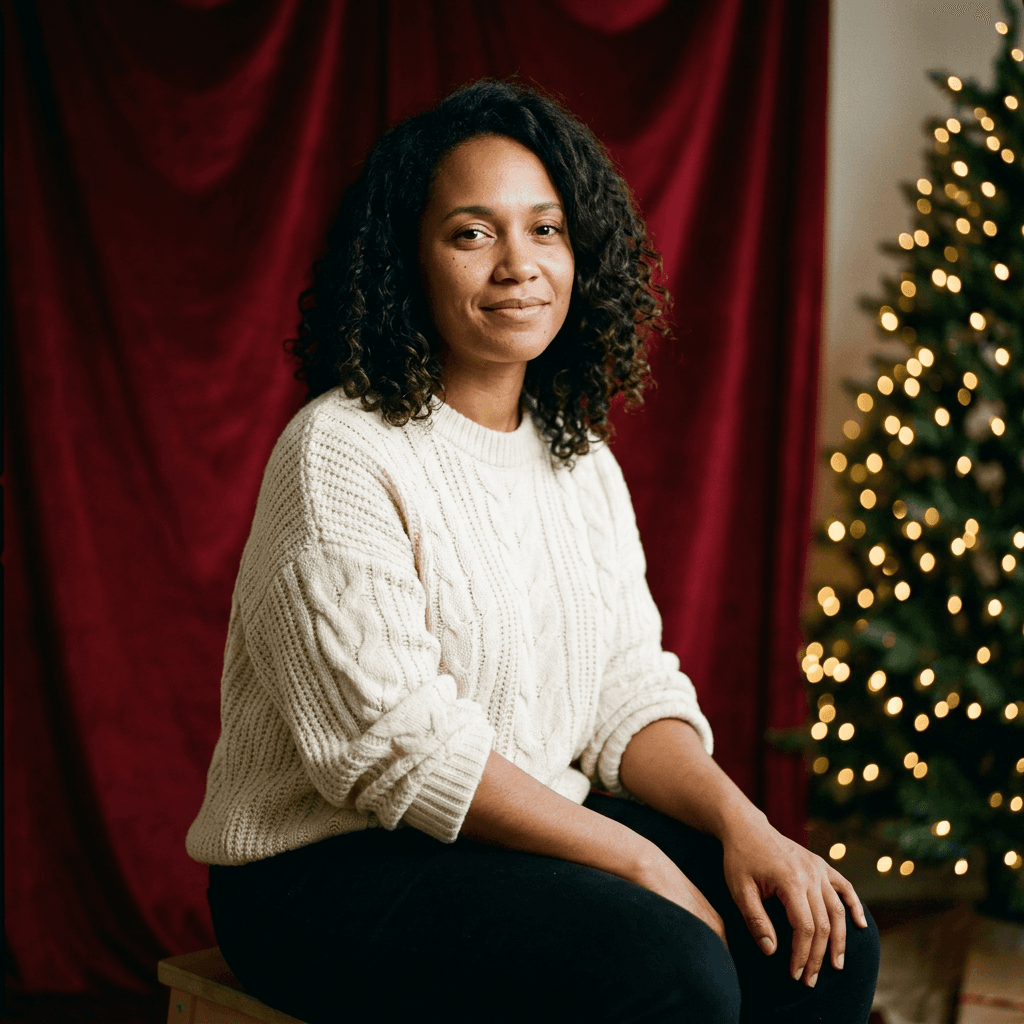
1. Red Velvet Backdrop With Tree Bokeh
The classic studio Christmas portrait. A saturated red velvet backdrop, a soft key light and a blur of golden tree lights behind the subject gives you the look of a paid mini-session.
Use the attached photo as the reference and keep the same face, facial structure, skin tone, eye color, hairstyle and hair color exactly as in the photo. Create a studio Christmas portrait of this person seated on a low stool in front of a deep red velvet backdrop with soft folds, wearing a cream cable-knit sweater with the sleeves slightly pushed up. A large softbox from camera left provides soft key light with a gentle fill from the right, and a blurred Christmas tree with warm golden fairy lights glows as round bokeh in the background at one side. Shot on an 85mm lens at f/1.8, waist-up framing, eyes sharp, natural skin texture with visible pores and fine lines, subtle film grain, no airbrushing, no plastic skin, no extra people, no text.
2. Window Light Cream Knit Portrait
Natural window light is more forgiving than studio flash and makes skin look like skin. This is the best prompt for a profile picture that still looks like you.
Use the attached photo as the reference and keep the same face, facial structure, skin tone, eye color, hairstyle and hair color exactly as in the photo. Create a quiet holiday portrait of this person standing beside a tall window on a snowy morning, wearing an oatmeal chunky knit sweater and holding a ceramic mug in both hands, with a small decorated tree softly blurred in the room behind. Soft cool window light from camera left wraps across the face with a warm lamp glow in the far background, shot on a 50mm lens at f/2, chest-up framing, natural skin texture, slightly imperfect flyaway hair, realistic color, no beauty filter, no text.
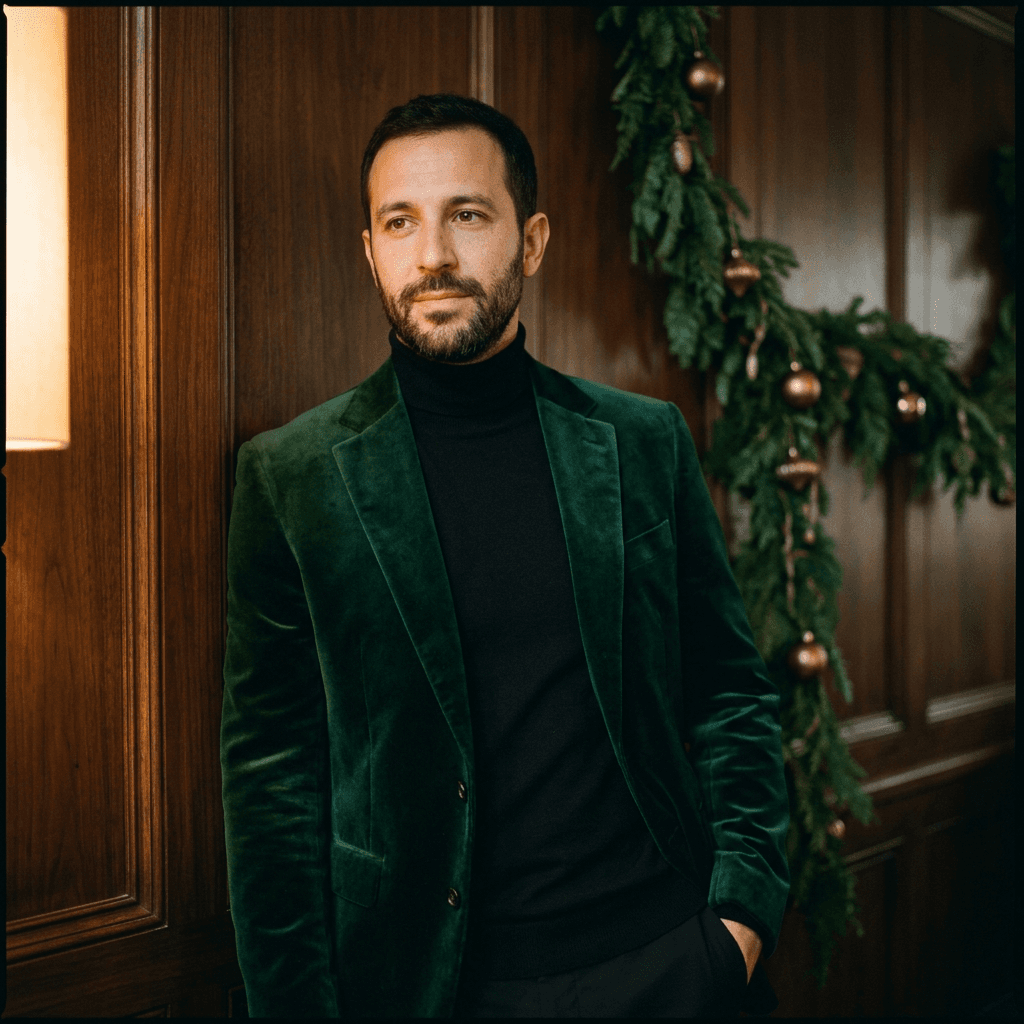
3. Deep Green Velvet Blazer Editorial
For anyone who wants a dressier Christmas photo without the sweater cliché.
Use the attached photo as the reference and keep the same face, facial structure, skin tone, eye color, hairstyle and hair color exactly as in the photo. Create an editorial holiday portrait of this person wearing a tailored deep emerald velvet blazer over a black turtleneck, leaning one shoulder against a dark walnut paneled wall decorated with a single evergreen garland and small brass ornaments. A single warm tungsten practical lamp from the left creates a soft pool of light with deep shadows on the right, shot on an 85mm lens at f/2.2, three-quarter body framing, calm confident expression, natural skin texture, visible fabric texture in the velvet, subtle film grain, no extra people, no text.
4. Gold Ornament Reflection Close-Up
A tight beauty-style frame where festive color comes from reflections rather than props, which keeps the face dominant.
Use the attached photo as the reference and keep the same face, facial structure, skin tone, eye color, hairstyle and hair color exactly as in the photo. Create a close-up holiday beauty portrait of this person with a warm red lip tone only if it fits the original makeup, wearing a simple black off-shoulder top, with a large blurred cluster of gold and red glass ornaments in the foreground at the edge of the frame and glowing white fairy lights far behind. A ring light close to the lens adds a soft catchlight in both eyes, shot on a 100mm macro portrait lens at f/2.8, natural skin texture with fine pores, no heavy retouching, no distortion, no text.
5. Playful Santa Hat Candid
Not every holiday portrait needs to be elegant. This one aims for the friend-took-this-at-a-party feel and works well for Instagram Stories.
Use the attached photo as the reference and keep the same face, facial structure, skin tone, eye color, hairstyle and hair color exactly as in the photo. Create a candid holiday party photo of this person laughing mid-sentence, wearing a red Santa hat slightly off-center and a green knit sweater, standing in a warm living room with string lights across the wall and a blurred tree behind. On-camera flash with a soft warm fill from the room lamps, shot on a 35mm lens at f/2.8, slightly off-center framing, natural expression, real skin texture, a small amount of motion softness in the hand, no staged pose, no text.
2) Couple AI Christmas Photoshoot Prompts
Couple prompts are harder because the model has to hold two faces at once. Upload one photo that shows both people clearly, or if you only have separate photos, say so in the prompt and tell the editor which person is which. If you want more ideas for two-person photos, the AI couple selfie prompts guide covers the framing in more detail.
6. Forehead-to-Forehead by the Tree
An intimate, tightly cropped frame that keeps both faces large, which gives the model more pixels to preserve each identity.
Use the attached photo as the reference for both people and keep each person's face, facial structure, skin tone, hairstyle and hair color exactly as in the photo, with no blending of features between them. Create a warm Christmas portrait of the couple standing close with their foreheads almost touching, both wearing coordinated cream and burgundy knitwear, in front of a softly blurred Christmas tree with warm white lights. Soft key light from camera right with warm fill from the tree lights, shot on an 85mm lens at f/2, chest-up framing, both faces sharp, natural skin texture on both people, relaxed genuine smiles, no extra people, no text.
7. Matching Plaid Pajamas on the Sofa
Matching pajamas are the most shared couple holiday look, and the sofa setup keeps their hands and bodies in a simple, easy pose.
Use the attached photo as the reference for both people and keep each person's face, hairstyle and hair color exactly as in the photo. Create a cozy Christmas morning photo of the couple on a gray linen sofa wearing matching red and black buffalo plaid pajamas, sharing a chunky knit blanket, with a decorated tree and wrapped gifts softly blurred behind them. Soft daylight from a window on the left mixed with the warm glow of the tree, shot on a 35mm lens at f/2.8, wide enough to show both people from the knees up, natural hands with correct fingers, real skin texture, no extra people, no text.
8. Rooftop Snow Kiss at Dusk
A cinematic city-winter shot for couples who want something less cozy and more romantic.
Use the attached photo as the reference for both people and keep each person's face, hairstyle and hair color exactly as in the photo. Create a cinematic winter dusk photo of the couple on a city rooftop terrace, both in long wool coats and scarves, sharing a quick kiss as light snow falls, with the glow of Christmas lights strung along the railing and the blurred skyline behind. Cool blue twilight ambient light with warm bulb light on their faces, shot on a 50mm lens at f/1.8, medium shot, visible falling snowflakes at varied depths, natural skin texture, subtle film grain, no extra people, no text.
3) Family and Kids Christmas Photoshoot Prompts
Family photos have the highest failure rate, because every extra face is another chance for the model to change someone. The most reliable approach is to upload one group photo where everyone is facing the camera at a similar size, and to describe each person by their position so the editor can keep track.
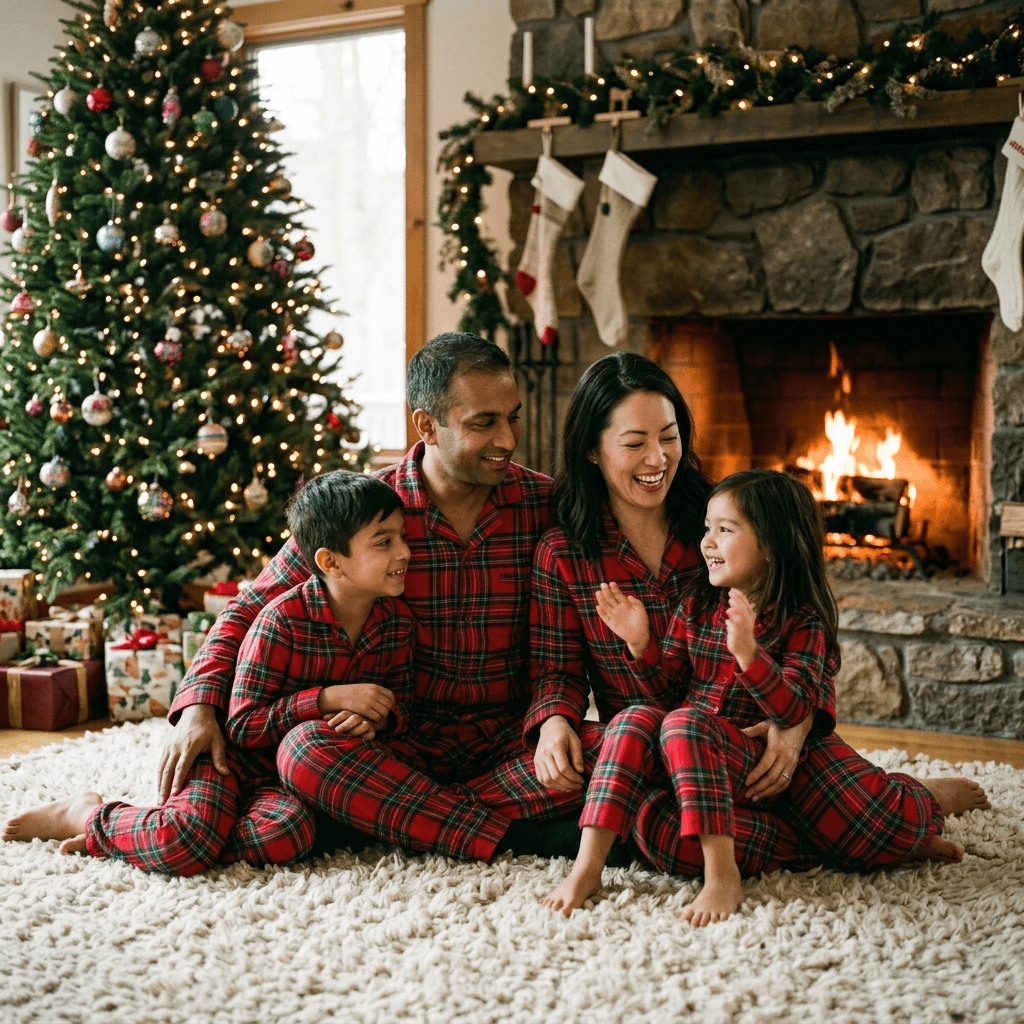
9. Matching Pajamas by the Fireplace
The signature family holiday image, built around a single warm light source so every face is lit consistently.
Use the attached group photo as the reference and keep every person's face, age, skin tone, hairstyle and hair color exactly as in the photo, with the same number of people in the same left-to-right order. Create a cozy Christmas Eve family portrait of everyone sitting together on a thick cream rug in front of a stone fireplace with a warm fire, all wearing matching red and green plaid pajamas, with stockings hung on the mantel and a decorated tree to one side. Warm firelight from camera right as the main light with soft fill from the tree lights, shot on a 35mm lens at f/2.8, wide group framing with every face sharp, natural skin texture and real smiles, no extra people, no text.
10. Formal Family Portrait on a Staircase
For the relatives who want the traditional portrait for the mantel or the card.
Use the attached group photo as the reference and keep every person's face, age, skin tone, hairstyle and hair color exactly as in the photo, with the same number of people in the same order. Create a formal Christmas family portrait on a wide wooden staircase wrapped in evergreen garland with white lights, everyone in coordinated winter formal wear in deep green, ivory and navy, adults standing behind and children seated on the lower steps. Soft even light from a large diffused source in front and slightly above camera, shot on a 50mm lens at f/4 so every face stays sharp, full-body framing, natural skin texture, natural hands, no extra people, no text.
11. Kids Opening Gifts at Dawn
Candid moments look better than posed ones for children, and this prompt asks for motion and imperfection on purpose.
Use the attached photo of the child as the reference and keep the same face, age, skin tone, hairstyle and hair color exactly as in the photo. Create a candid Christmas morning photo of this child sitting on the floor in red flannel pajamas, mid-laugh while pulling wrapping paper off a large gift, with scattered paper and ribbons around them and a glowing tree in the background. Soft early morning window light from the left plus warm tree glow, shot on a 35mm lens at f/2, slight motion in the hands, eyes sharp, natural skin texture, a believable amount of room mess, no extra people, no text.
12. Grandparents and Grandkids Storytime
A warm multi-generation scene that places people close together and gives the editor a simple seated layout.
Use the attached photo as the reference and keep every person's face, age, skin tone, hairstyle and hair color exactly as in the photo, with the same number of people. Create a warm Christmas storytelling photo of a grandparent seated in an armchair reading a picture book aloud with two grandchildren leaning in on either side, all in soft winter sweaters, with a lit tree and a side table lamp in the background. Warm lamplight from camera left as the main source, shot on a 50mm lens at f/2.2, medium framing with all faces sharp, natural skin texture and visible age lines on the grandparent, no smoothing, no extra people, no text.
4) Pet and Owner Christmas Photo Prompts
Pet photos need two kinds of identity lock: the person's face and the animal's markings. Mention the fur color, coat pattern and any distinctive marks, because those are the details the editor changes first. For a prompt pack focused on animals, see AI pet Halloween costume prompts, which uses the same markings-first approach.
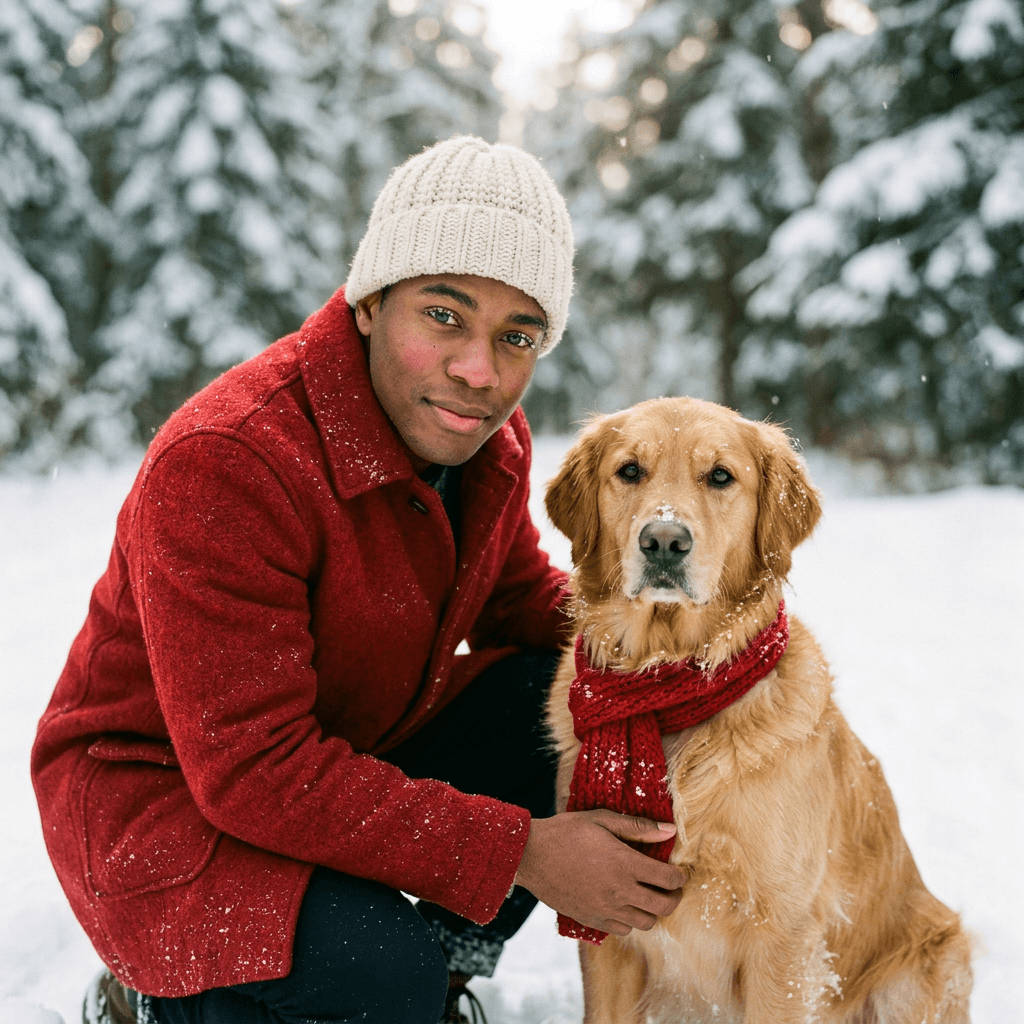
13. Golden Retriever in the Snow
An outdoor shot where the dog is the co-star, with a bright winter light that keeps both faces readable.
Use the attached photos as the references and keep the person's face, hairstyle and hair color exactly as in the photo, and keep the dog's breed, fur color, face markings, ear shape and size exactly as in the photo. Create a winter portrait of the person kneeling in fresh snow beside the dog, both looking toward the camera, the person wearing a red wool coat and a cream beanie and the dog wearing a simple red knit scarf, with snow-dusted evergreen trees softly blurred behind. Soft overcast daylight with a faint warm backlight, shot on an 85mm lens at f/2, eye-level with the dog, sharp eyes on both, visible fur texture and small snowflakes in the fur, natural skin texture, no extra animals, no text.
14. Cat on the Lap Under the Tree
A calm indoor frame for cat owners, with the cat's face kept sharp and the tree used as a soft background.
Use the attached photos as the references and keep the person's face, hairstyle and hair color exactly as in the photo, and keep the cat's fur color, pattern, eye color and face markings exactly as in the photo. Create a cozy Christmas photo of the person sitting on the floor in a green knit sweater with the cat curled on their lap, gift boxes and a lit tree behind them, a few loose ornaments on the rug. Warm tree-light glow from the right with a soft lamp fill from the left, shot on a 50mm lens at f/2, medium framing, sharp whiskers and eyes, real fur texture, natural skin texture, correct paws and hands, no extra animals, no text.
5) Cozy At-Home Pajama and Hot Cocoa Prompts
These are the most believable AI Christmas photos because the setting is ordinary. If your goal is to make a post that feels like a real moment rather than a shoot, start here.
15. Hot Cocoa on the Kitchen Counter
A bright, everyday scene that reads as a candid photo from a phone, which is useful when you want the least edited look.
Use the attached photo as the reference and keep the same face, facial structure, skin tone, hairstyle and hair color exactly as in the photo. Create a casual Christmas morning photo of this person leaning on a kitchen counter in soft gray flannel pajamas and a red robe, holding a mug of hot cocoa with whipped cream and a candy cane, with a plate of cookies and a small tabletop tree in the background. Natural morning light from a window on the left, shot on a 35mm lens at f/2, slightly tousled hair, relaxed sleepy smile, natural skin texture without makeup, real phone-photo look, no text.
16. Reading by the Tree With a Blanket
A quiet, slow image that works well as a Reel cover or a profile photo during the holidays.
Use the attached photo as the reference and keep the same face, facial structure, skin tone, hairstyle and hair color exactly as in the photo. Create a calm holiday photo of this person curled in an armchair under a chunky knit blanket, reading a paperback, in warm striped socks, with the decorated tree glowing beside them and a candle on the side table. The only light is warm tree lights and one candle, giving soft low-key shadows, shot on a 50mm lens at f/1.8, medium shot, visible blanket texture, natural skin with warm highlights, subtle grain, no text.
17. Baking Cookies With Flour on the Apron
A movement-based scene that suits kids, couples and solo creators equally well.
Use the attached photo as the reference and keep the same face, facial structure, skin tone, hairstyle and hair color exactly as in the photo. Create a candid baking photo of this person rolling out gingerbread dough in a red apron with flour on their forearms and one cheek, with cookie cutters, icing bowls and a cooling rack on a wooden counter, and a string of warm lights over the window behind. Soft window light from the right plus warm overhead pendant light, shot on a 35mm lens at f/2.2, mid-action framing, natural hands with correct fingers, genuine laugh, natural skin texture, no text.
6) Outdoor Snow Christmas Photoshoot Prompts
Snow is flattering light that you can ask for by name. Overcast winter daylight is a giant softbox, and the prompts below take advantage of it. For wider cold-weather looks that are not specific to Christmas, the AI winter aesthetic photo prompts guide is a good companion.
18. Red Coat in a Snowy Pine Forest
A strong single color against a quiet backdrop, which is why it shows up on so many holiday cards.
Use the attached photo as the reference and keep the same face, facial structure, skin tone, hairstyle and hair color exactly as in the photo. Create an outdoor winter portrait of this person walking on a snowy forest path wearing a long red wool coat, a cream scarf and dark gloves, looking back over the shoulder toward the camera, with tall snow-covered pines fading into soft mist. Diffused overcast light, shot on an 85mm lens at f/2, medium shot, gentle snowfall at varied depths, rosy cheeks from the cold, natural skin texture, muted natural color, no extra people, no text.
19. Christmas Market at Blue Hour
A city setting with plenty of glowing detail and a natural reason for blurred lights.
Use the attached photo as the reference and keep the same face, facial structure, skin tone, hairstyle and hair color exactly as in the photo. Create an evening photo of this person standing in a European-style Christmas market at blue hour, holding a paper cup of mulled drink in gloved hands, wearing a camel wool coat and a knit hat, with wooden stalls, string lights and warm lantern glow blurred behind. Mixed light with cool blue sky ambient and warm stall lights on the face, shot on a 50mm lens at f/1.8, chest-up framing, breath visible in the cold air, natural skin texture, subtle film grain, no readable signs, no extra people in focus.
7) Retro and Film-Look Christmas Photo Prompts
Film looks are the best answer to AI skin that looks too clean, because grain, flash falloff and slightly imperfect color hide plastic textures. The same reasoning drives the AI 90s yearbook photo prompts guide, and these prompts borrow its approach.
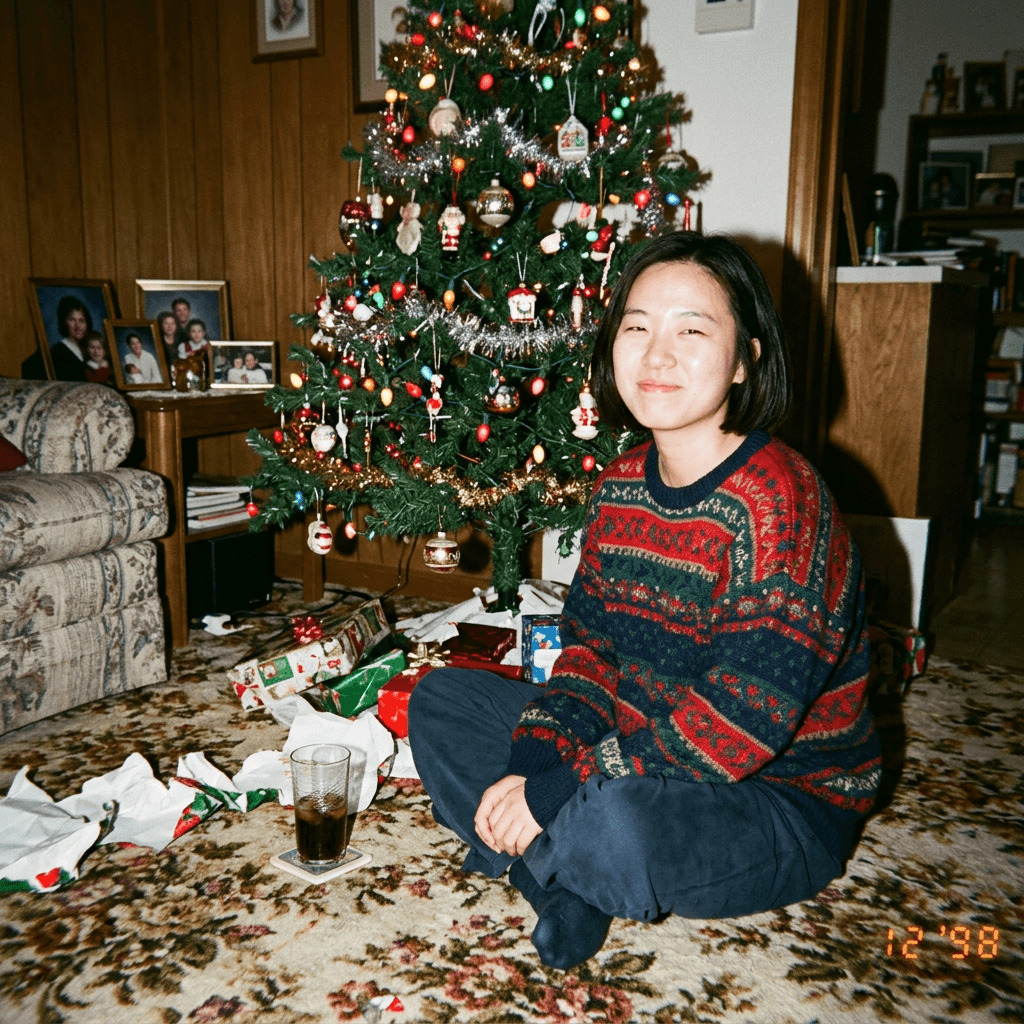
20. 90s Disposable Camera Flash Christmas
The nostalgic favorite. Harsh on-camera flash, red-eye avoidance and a slightly crooked frame make it feel like a scanned family print.
Use the attached photo as the reference and keep the same face, facial structure, skin tone, hairstyle and hair color exactly as in the photo. Create a 1990s disposable camera photo of this person sitting on a floral living room carpet in front of a slightly overdecorated artificial tree with colorful bulbs and tinsel, wearing an oversized holiday sweater, smiling at the camera. Direct on-camera flash with hard shadows on the wall behind and a faint warm glow from the tree lights, shot on a 35mm point-and-shoot, visible film grain, slightly faded warm color, soft edges, a slightly tilted frame, natural skin with a little flash shine, no digital sharpening, no text.
21. 1970s Warm Kodak Family Print
Warm oranges and soft contrast turn an ordinary photo into something that looks like it came out of a family album.
Use the attached photo as the reference and keep the same face, facial structure, skin tone, hairstyle and hair color exactly as in the photo. Create a 1970s-style Christmas photo of this person in a brown corduroy jacket and a patterned knit vest beside a real tree decorated with large colorful bulbs, with wood-paneled walls and a shag rug in the room. Warm tungsten room light plus soft fill flash, shot on a medium-format film look with warm orange-leaning color, soft grain, slightly low contrast, gentle vignette, natural skin texture, no modern objects, no text.
22. Black and White Polaroid on a Fridge
A format twist: the portrait is a small instant print, which is easy to turn into a social post or a caption image.
Use the attached photo as the reference and keep the same face, facial structure, skin tone, hairstyle and hair color exactly as in the photo. Create an instant-print Polaroid style photo of this person in a dark winter sweater beside a small tree with a few lights, with the white border visible and slight chemical color shift at the edges. Soft on-camera flash, shot on an instant film look, shallow depth, gentle fade in the shadows, subtle grain, natural skin texture, centered subject, no text on the border.
8) Luxury Editorial and Creator Content Prompts
The last three prompts are written for people who will use the result on a channel: a refined brand-style portrait, a profile picture, and a cover frame for Shorts, Reels or a YouTube thumbnail.
23. Luxury Magazine Cover Portrait
A high-end fashion look with controlled lighting and a restrained palette of black, gold and white.
Use the attached photo as the reference and keep the same face, facial structure, skin tone, hairstyle and hair color exactly as in the photo. Create a luxury holiday editorial portrait of this person in a black satin evening outfit with a long white faux-fur stole, standing in a minimalist marble room with a single tall white tree covered in gold lights and glass ornaments behind. Large beauty dish light from above and slightly in front with a silver reflector below for gentle fill, shot on an 85mm lens at f/2.8, three-quarter framing with clean space above the head, elegant relaxed posture, natural skin texture with subtle retouching only, visible fabric sheen, no text.
24. Holiday Profile Picture With a Clean Background
A square-safe portrait with a simple background so it survives cropping into a circle.
Use the attached photo as the reference and keep the same face, facial structure, skin tone, hairstyle and hair color exactly as in the photo. Create a seasonal profile picture of this person from the shoulders up, wearing a red knit sweater with a small cream collar, centered on a plain soft cream background with a few warm bokeh lights out of focus on one side. Even soft key light from the front, shot on an 85mm lens at f/2.5, eyes at the upper third, direct friendly expression, natural skin texture, safe margin around the head for a circular crop, no text.
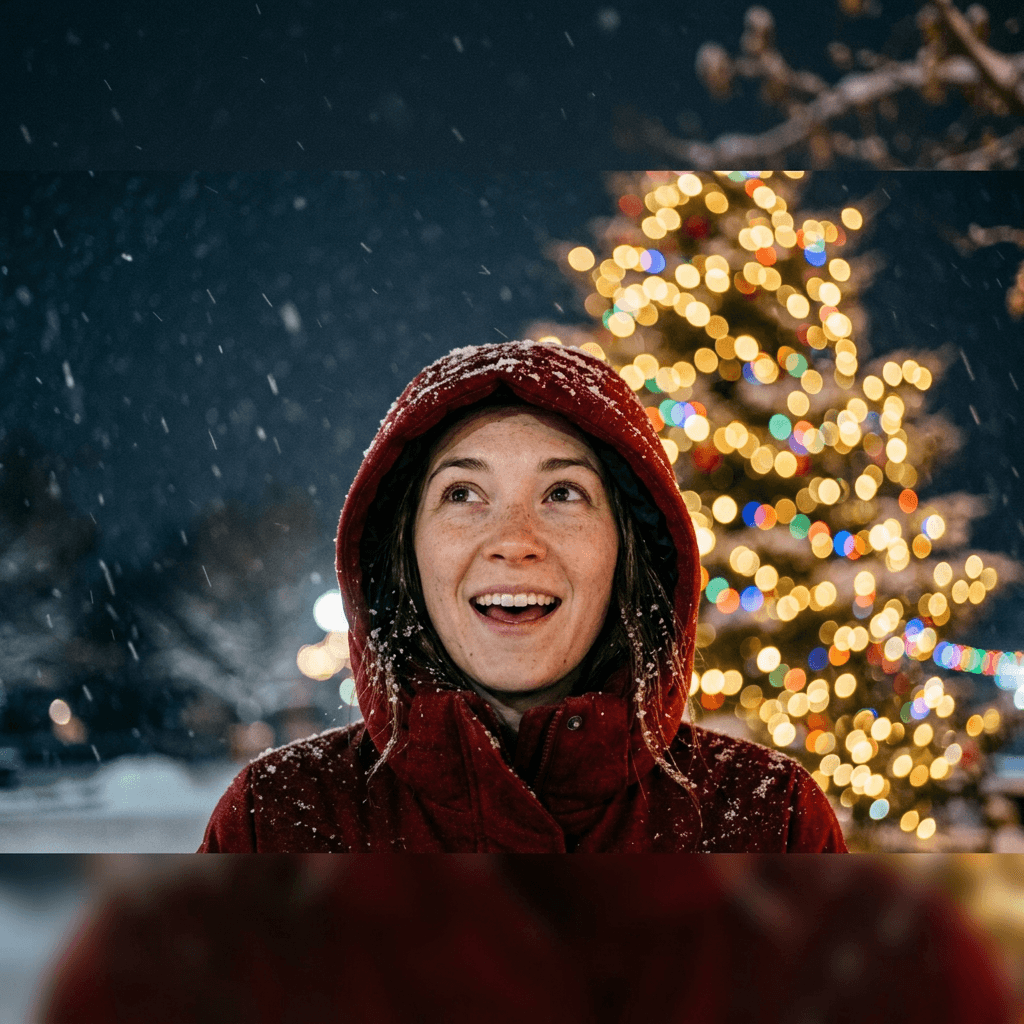
25. Reel Cover and Thumbnail Frame
A tall frame designed around the places where text and interface elements usually cover the picture. It also converts well into a thumbnail crop.
Use the attached photo as the reference and keep the same face, facial structure, skin tone, hairstyle and hair color exactly as in the photo. Create a vertical 9:16 holiday cover image of this person in a red hooded coat looking up with an excited expression, positioned in the center of the frame, with a glowing Christmas tree and snowfall behind, leaving calm empty space in the top fifth and the bottom third of the frame for titles and captions. High-contrast soft key light from the front with warm rim light from behind, shot on a 35mm lens at f/2, face large and sharp, saturated but natural color, natural skin texture, no text.
Before and After: What a Good Identity Lock Looks Like
The easiest way to judge a result is a two-panel comparison. Put the original selfie on the left and the edited portrait on the right, then check four things in order: the distance between the eyes, the shape of the nose and nostrils, the jawline and chin, and the hairline. If any of these moved, regenerate. Do not accept a result because the outfit is perfect, since you can always fix an outfit later with inpainting, but you cannot easily fix a changed face.
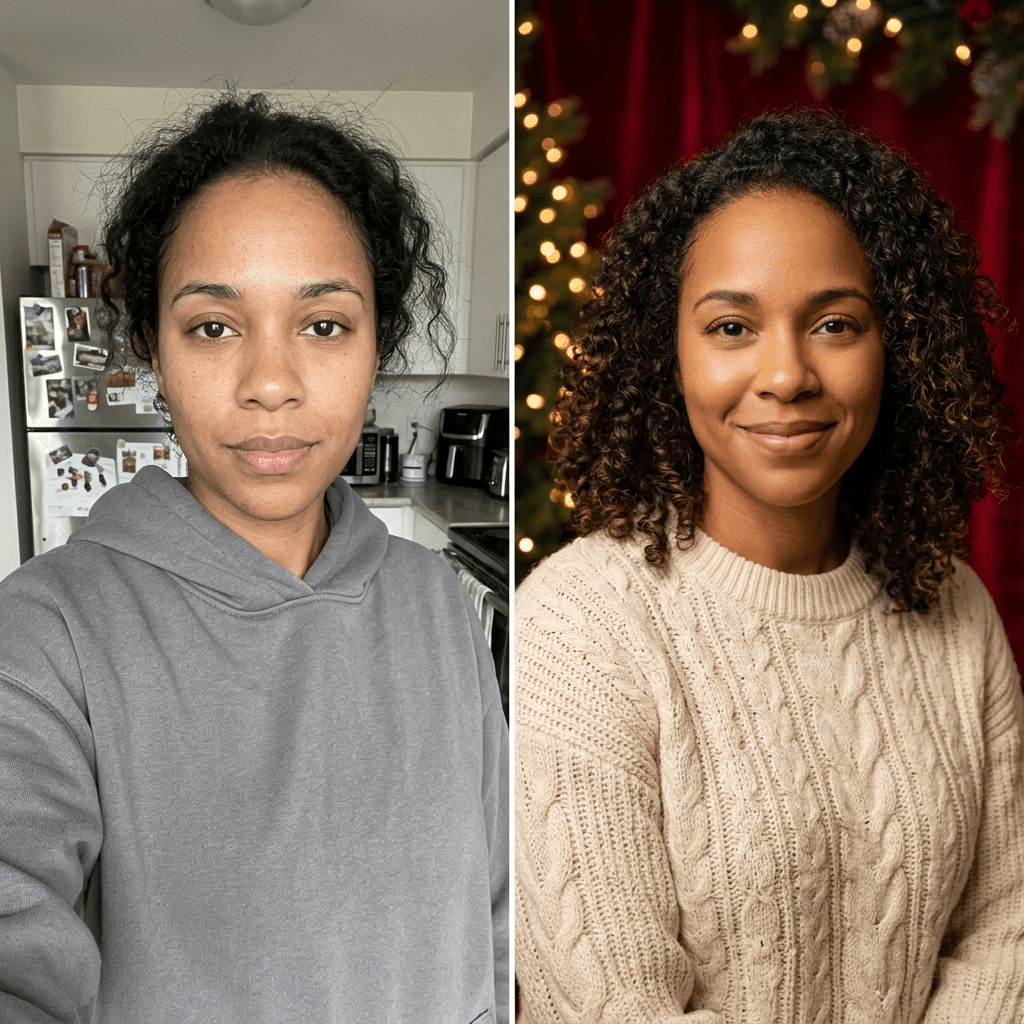
Two habits make a large difference. The first is giving the editor a source photo with a neutral expression or a mild smile, since extreme expressions are harder to carry into a new scene. The second is keeping the new expression close to the original in the prompt. If you ask a serious face to laugh, the editor has to invent new teeth, cheeks and eye creases, and that is where identity usually breaks.
How to Customize These AI Christmas Photoshoot Prompts
Once a template works for you, small edits let you reuse it for different people and occasions. The same four-part structure holds for every change.
Keep the identity sentence fixed. Treat the first sentence as read-only. If a result drifts, make it stronger by adding the features that matter most for your face, such as "keep the same freckles," "keep the same glasses," or "keep the same beard length."
Change one variable at a time. Swap the sweater, then the light, then the lens, not all three. If you change everything at once you cannot tell which change caused the drift.
Use lens and light terms as controls. An 85mm lens at f/1.8 gives a flattering, blurred-background portrait. A 35mm lens at f/2.8 gives a candid, environmental feel. A large softbox gives smooth, forgiving light, while a bare on-camera flash gives a harsher, film-like look.
Avoid plastic skin with explicit texture words. Add natural skin texture with visible pores and fine lines, slight asymmetry, no airbrushing, no beauty filter. Avoid words like flawless, perfect, glowing or porcelain, which tend to pull the result toward a retouched filter.
Match group photos carefully. For families, describe the number of people and their order from left to right, and ask for the same ages. If one person keeps changing, crop the source to that person, generate their portrait separately, then use inpainting to bring the best version back into the group image.
Adapt the framing for the platform. A square crop with the eyes in the upper third suits a profile picture, a 16:9 frame suits a thumbnail, and a 9:16 frame with empty space at the top and bottom suits Shorts and Reels.
Pick the right source photo. Choose one with the face fully visible, no heavy filters, no sunglasses, and no strong shadows across the eyes. A well-lit selfie taken near a window is usually better than a high-resolution photo with harsh overhead light.
Common Mistakes With AI Christmas Photoshoots
- Asking for too many changes at once. A prompt that changes the outfit, hair, age, makeup and room at the same time gives the editor permission to change the face too.
- Skipping the identity sentence. Without an explicit instruction to keep the face, a scene-heavy prompt will restyle it.
- Using beauty words. Flawless, perfect and ultra smooth produce the glossy, over-retouched look that makes a portrait read as AI.
- Mismatched lighting. A source photo with cool hard light and a prompt for soft candlelight leaves the model to guess, and the face often pays for it.
- Overloading the background. Fifteen ornaments, six gifts and a fireplace compete with the subject and tend to produce odd objects, so pick two or three props.
- Ignoring hands. Hands holding mugs, pets and other people are the most common failure. Describe the hands plainly, and fix any bad ones with inpainting.
- Group photos with inconsistent faces. When people in the source are different sizes or angled away, the model has less to work with, so use a photo where everyone is facing the camera.
- Editing people without consent. Only edit photos of yourself or people who have agreed, be careful with images of children, and never place a real celebrity or public figure into your scenes.
Make Your Holiday Portraits With Miraflow
You can run every prompt above in Miraflow's AI Image Generator. Upload your source photo for image-to-image generation, paste a prompt, and generate a few variations. When the face is right but a detail is off, use the inpainting tool in the AI image generator to mask only that region, such as a hand, a sweater pattern, or a stray ornament, and describe the replacement. That keeps the parts you like untouched, which is much more reliable than regenerating the whole image.
Once you have a portrait you like, it can do more than sit in your camera roll. Use the YouTube Thumbnail Maker to upload your face and turn the holiday frame into a clean 16:9 thumbnail with bold text, which is useful for a holiday vlog, a gift guide or a year-end recap. For short-form, Text2Shorts can build a vertical holiday Short from a topic with a generated script, scene visuals and voiceover, which suits a holiday look reveal or a prompt breakdown built around your portraits. You can find the full set of tools from the Miraflow home page.
If you plan to print the result as a card, the AI Christmas card prompts guide covers card layouts, bleed and print sizes, and these portraits drop in as the photo on the front. For a similar workflow in another season, the AI birthday photoshoot prompts and AI Thanksgiving prompts guides use the same identity-first method, and the AI profile picture prompts guide goes deeper on avatars for YouTube, Instagram and TikTok.
A Simple Workflow: From One Selfie to a Week of Holiday Content
Here is how a single afternoon can turn into a week of posts.
- Take two or three source photos near a window: a neutral face, a smile, and a three-quarter angle.
- Run prompts 1, 2 and 24 for a profile picture, a Stories portrait and a clean avatar.
- Run prompt 20 or 21 for a retro version, which tends to get the most engagement because it looks like an old family print.
- Run prompt 25 for a vertical cover, then crop a 16:9 version for a thumbnail.
- Build a 20-second Short with the portraits as the story: your holiday look this year, the behind-the-scenes prompt, and the final result.
Posting the prompt along with the result tends to perform well in holiday trends, since viewers want to copy the look. If your face is the main subject on a channel, keep your edits believable, because viewers notice when a portrait no longer matches your regular videos. Platforms are also developing likeness-related rules, so keeping your edits to yourself and consenting people keeps you on the safe side.
Frequently Asked Questions
What is the best AI Christmas photoshoot prompt?
The best prompt starts with an identity lock, then describes wardrobe, a single clear light source and a lens, and ends with a skin-texture instruction. Prompt 1 (red velvet backdrop with tree bokeh) is the most reliable starting point for a solo portrait.
How do I keep my face the same in an AI Christmas photo?
Tell the editor to use the attached photo as the reference and to keep the face, facial structure, skin tone, eye color, hairstyle and hair color unchanged. Use a sharp front-facing source photo, change one variable at a time, and compare the result to your original before accepting it.
Can I turn my selfie into a Christmas photoshoot for free?
Several general AI editors offer limited free image edits, and Miraflow runs image-to-image generation directly in the browser. Free allowances change often, so check the current plan on the tool you use.
Why does my AI Christmas portrait look plastic?
Usually because the prompt includes beauty words or has no skin-texture instruction. Add natural skin texture with visible pores and fine lines, no airbrushing, and avoid words such as flawless or perfect. A film grain or flash look also hides smoothness.
How do I make a family Christmas photo with AI without changing faces?
Upload one group photo where everyone faces the camera, specify the number of people and their left-to-right order, and keep the scene simple. If one face drifts, generate that person separately and use inpainting to merge the best version back in.
Can I include my dog or cat?
Yes. Upload a clear photo of the pet, describe its breed, fur color and markings in the identity sentence, and keep the pet and person in a simple pose. Prompts 13 and 14 are written for this.
What size should my Christmas portrait be for Instagram, YouTube and Shorts?
Use square or 4:5 for feed posts, 16:9 for YouTube thumbnails, and 9:16 for Stories, Reels and Shorts. Leave empty space at the top and bottom of vertical images for captions and interface elements.
Can I use a photo of a child?
Only if you are the parent or guardian or have clear permission, and think carefully about where the result is posted. Keep the edits simple and realistic.
Can I add a celebrity or public figure to my Christmas photo?
No. Only edit photos of people who agreed, and do not generate real celebrities or public figures. It is unfair to them and can break platform rules.
How do I fix one bad detail without redoing the whole image?
Use inpainting. Mask only the hand, sweater or background object, describe the fix, and regenerate that region. The face and the rest of the scene stay untouched.
Can I turn the portraits into video?
Yes. Use the portraits as visuals in a vertical story, then build the Short in Text2Shorts with a script and voiceover. A holiday look reveal, a before and after, or a prompt breakdown each work well in 15 to 30 seconds.
Conclusion
An AI Christmas photoshoot works when the prompt protects your identity first and describes the photography second. Keep the identity-lock sentence, choose one clear light source, name a lens, ask for real skin texture, and change one thing at a time. With these 25 prompts you can produce a solo studio portrait, a couple shot, a full family scene, a pet portrait, a retro film print and a creator-ready cover from the same source photo.
Start with prompt 1 in Miraflow's AI Image Generator, compare the result with your original, and adjust from there. Then turn your favorite portrait into a holiday thumbnail or a Short, and share the prompt with the people who asked how you did it. Happy holidays.