24 AI Winter Aesthetic Photo Prompts: Snow, Cabin and Cozy (2026)

Written by
Aerin Kim
Get 24 copy-paste AI winter aesthetic photo prompts grouped by use case, plus five realism fixes for snow physics, breath fog and cold skin so your AI snow stops looking like plastic.
Every year around the end of October the same search spike shows up: winter aesthetic, snowy photo ideas, cozy cabin pictures, winter profile pictures. And every year the same problem follows. You live somewhere it will not snow until January, or it snows on the one weekend you are sick, or the snow you do get is gray slush on a parking lot. Meanwhile your feed needs a cold, quiet, glowing winter set right now, and the AI snow scenes you have tried so far look like a cotton ball diorama with a blue filter on top.
Winter is one of the hardest seasons for an image model to get right, because the things that make a winter photo feel real are subtle physics: how snow scatters light, why shadows on snow turn blue, how breath hangs in the air, how cold skin goes pink at the nose and cheeks while everything else stays pale. Skip those and the picture reads as synthetic in half a second. Include them in the brief and the same model produces pictures that people save and ask where you shot.
This guide is organized by what you are actually making, not by scenery. You get 24 copy-and-paste AI winter aesthetic photo prompts grouped into six use cases: Instagram feed posts, profile pictures, couple and friends photos, flat lays and still life, phone wallpapers, and brand and cabin content. Before the prompts there is a short winter realism section that explains the five things that stop AI snow from looking like plastic. It is deliberately not Christmas-specific, so everything here works from the first frost in November through the last gray week of February. If you need red-and-green cards, use the AI Christmas card prompts. If you want warm leaves and pumpkins, the fall aesthetic photo prompts cover that season.
TL;DR
- Open Miraflow's AI Image Generator, paste a prompt, and generate three or four versions. Use image-to-image when you want your own face or product in the scene.
- Winter looks real when the prompt names five things: overcast or low-sun light, blue shade on the snow, a small amount of visible texture in the snow itself, breath or steam where it belongs, and cold-toned skin with pink only on the nose and cheeks.
- Each prompt below is grouped by use case and ends with a short note on what to tweak.
- Keep one palette across a whole post or carousel: snow white, slate blue, charcoal, and one warm accent such as amber window light or a rust scarf.
- Turn your best stills into motion with Text2Shorts or the Cinematic Video generator.
Why AI Snow Looks Like Plastic (and the Five Fixes)
Most failed winter images fail in the same five ways. Once you can name them you can write them out of your prompts, and that is most of the skill. If you want the general version of this for every season, how to make AI images look like real photos goes deeper, and the realistic photo prompt pack has more copy-paste examples. The winter-specific version is below.
Fix 1: Describe the snow surface, not just the word snow
The word snow on its own gets you smooth white icing. Real snow has a surface that depends on its age and the weather. Fresh powder is soft and slightly lumpy with tiny sparkling facets where it catches low sun. Old snow is crusted, with a faint rippled texture and dirt along the edges. Snow right after a thaw and refreeze is glassy and uneven. Pick one and say it: "fresh powder with a soft uneven surface and a few tiny sparkles where the low sun catches it", or "wind-packed snow with fine ripples and a thin crust". One clause like that changes the entire texture of the ground.
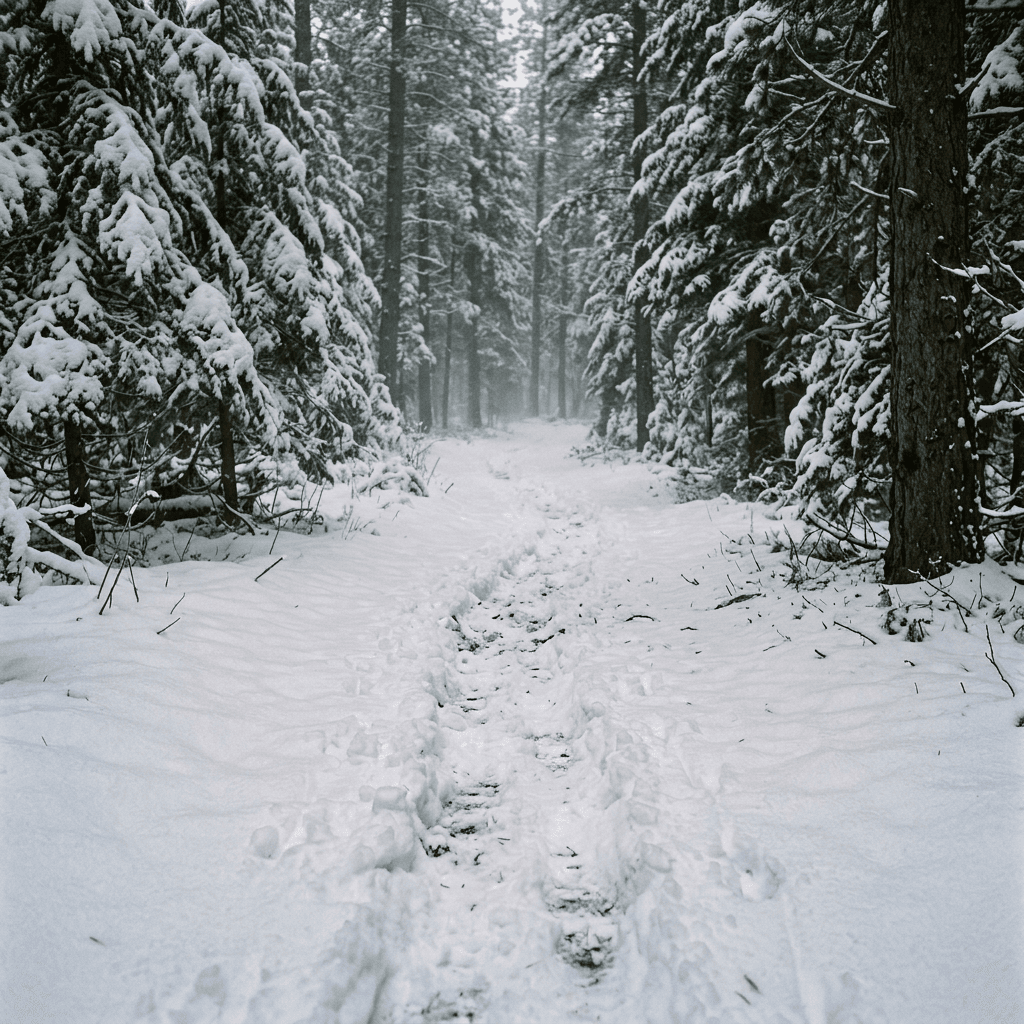
The same goes for footprints and tracks. A single clean line of boot prints with crumbled edges is far more believable than a smooth trench, so ask for "a single line of boot prints with crumbled edges, snow thrown slightly to the sides".
Fix 2: Shade on snow is blue, not gray
Snow reflects whatever light is above it. In open shade, the light is mostly cool skylight, so shadows on snow take on a soft blue. In direct low sun, the lit side goes warm cream and the shadow side goes blue, and that warm-and-cool split is the single biggest reason real winter photos feel cinematic. Models know this when you tell them. Write "long soft blue shadows across the snow, lit areas a warm cream" and you get depth. Leave it out and you get a flat white sheet where the only contrast is a gray smudge.
Overcast days are the opposite case. Under a thick cloud layer there are no hard shadows at all, and the snow has an even, slightly bright pale-gray quality, which is the most flattering light for faces. If you want that look, say "flat overcast light, no hard shadows, snow bright and pale gray-white, soft and even on the face".
Fix 3: Falling snow needs a depth plan
AI falling snow often turns into uniform white dots of the same size, like a pattern overlay. Real falling snow has depth: a few large soft flakes close to the lens, many small sharp flakes at mid distance, and a haze of tiny ones far away. Ask for exactly that: "a few large out-of-focus flakes in the foreground, sharp small flakes at mid distance, a soft haze of flakes in the background". Also keep the density modest. Heavy snowfall hides the subject, and a handful of well-placed flakes reads as real much faster than a blizzard.
Fix 4: Breath fog and steam must be physical
On a cold, still day your breath is visible because the warm moist air you exhale cools quickly and condenses. It appears as a soft white cloud right at the mouth that drifts and fades within a second or two, usually thicker in profile than head on. In a prompt, specify "a small soft cloud of visible breath just in front of the mouth, fading quickly". Without a location and a size, models either skip it or paint a smoke plume. The same goes for steam over a mug of cocoa: ask for "thin steam curling upward and dissolving a few inches above the rim".
Fix 5: Cold skin has its own color
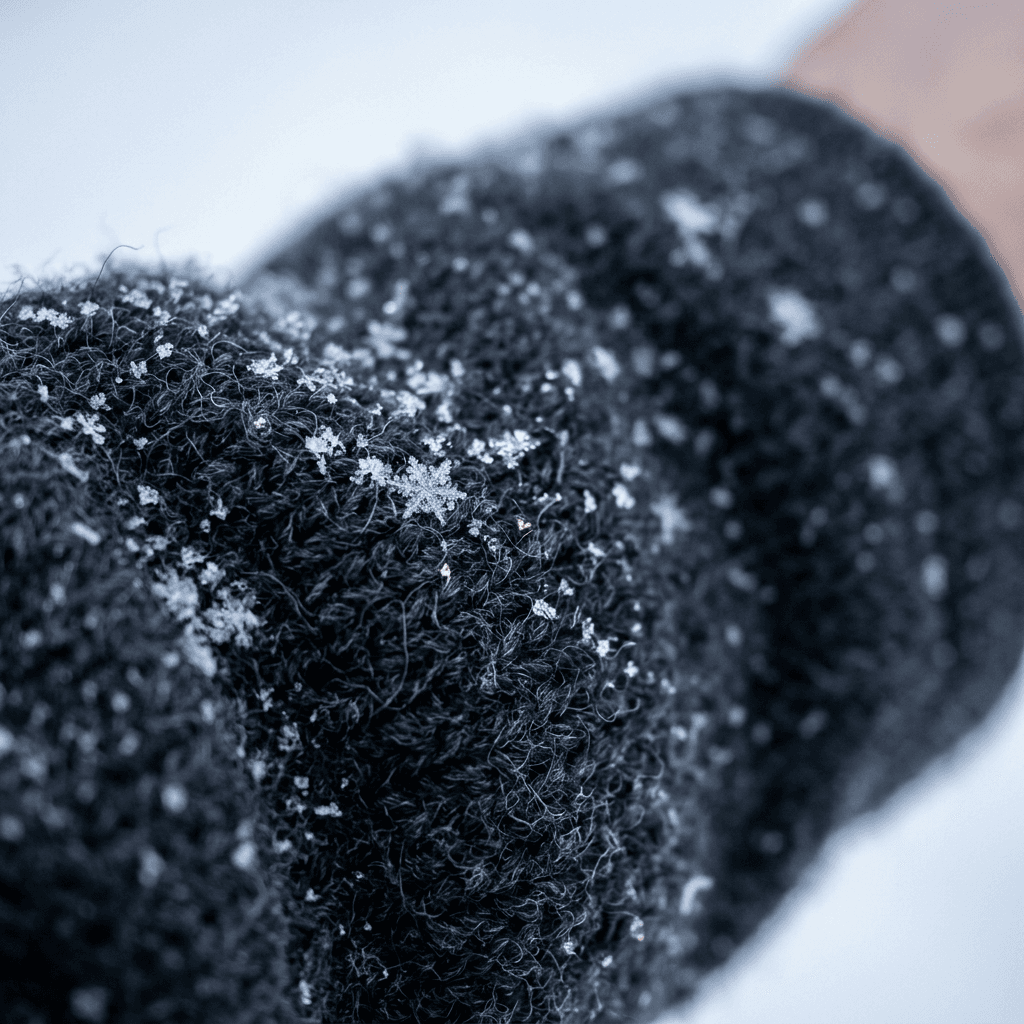
In real cold, the nose, cheeks and ears go pink or slightly red, lips look a little paler or deeper, and the rest of the face stays cooler and paler than it would in summer. Eyes can look slightly watery. Hair gets small ice crystals or a dusting of snow, and wool and fleece pick up flakes that sit on the surface instead of melting instantly. Put it in the prompt: "pink cheeks and nose from the cold, natural skin texture with visible pores, a few snowflakes resting on the shoulders of the coat". For the broader problem of plastic-looking skin, see film grain and imperfect photo prompts, which cover how to add the little flaws that make a face read as a photograph.
A quick sixth point: keep the palette narrow. Winter pictures that go viral on Pinterest and Instagram almost always use snow white, slate or steel blue, charcoal or black wool, and exactly one warm accent. When a scene mixes three accent colors it stops looking like winter and starts looking like a catalog.
How to Use These Prompts
Every prompt below is written as a single paragraph you can paste directly into Miraflow. Text-to-image prompts work with no upload. Prompts marked image-to-image start with an instruction to preserve the face in a reference photo, so upload one clear, front-facing photo in even light before pasting. After each prompt there is a short note on why it works and what to change.
Three habits make the whole set work better. Generate three or four variants and pick the one with the best snow surface, not the best composition, because composition is easy to fix with a crop and snow texture is not. Keep the wording but swap the nouns, for example a different coat color or a different city. And when you build a series, copy the same lighting and palette sentence into every prompt so the set matches.
1) Instagram Feed Prompts
Feed posts need a clear focal point at thumbnail size, because most people meet your image as a small square in a grid. For the vertical 4:5 shape that takes up the most screen space, pick the portrait aspect ratio before you generate. If you are building a multi-slide set, the Instagram carousel cover prompts show how to make slide one earn the swipe.
Prompt 1: Cabin Porch at Blue Hour
A winter cabin shot that works as a feed opener because the warm window is a built-in focal point against a cold blue scene.
A small dark wood cabin porch at blue hour after a fresh snowfall, a lit amber lantern hanging by the door, warm yellow light spilling from a window onto the porch boards, two folded wool blankets on a wooden bench, a pair of leather boots by the door dusted with snow, fresh powder on the railing with a soft uneven surface and tiny sparkles, deep blue sky fading to charcoal pine trees behind, a few small sharp snowflakes drifting at mid distance, 35mm lens at eye level, warm window light against cool blue shadows. No plastic smooth snow, no distorted wood grain, no garbled text, no watermark.
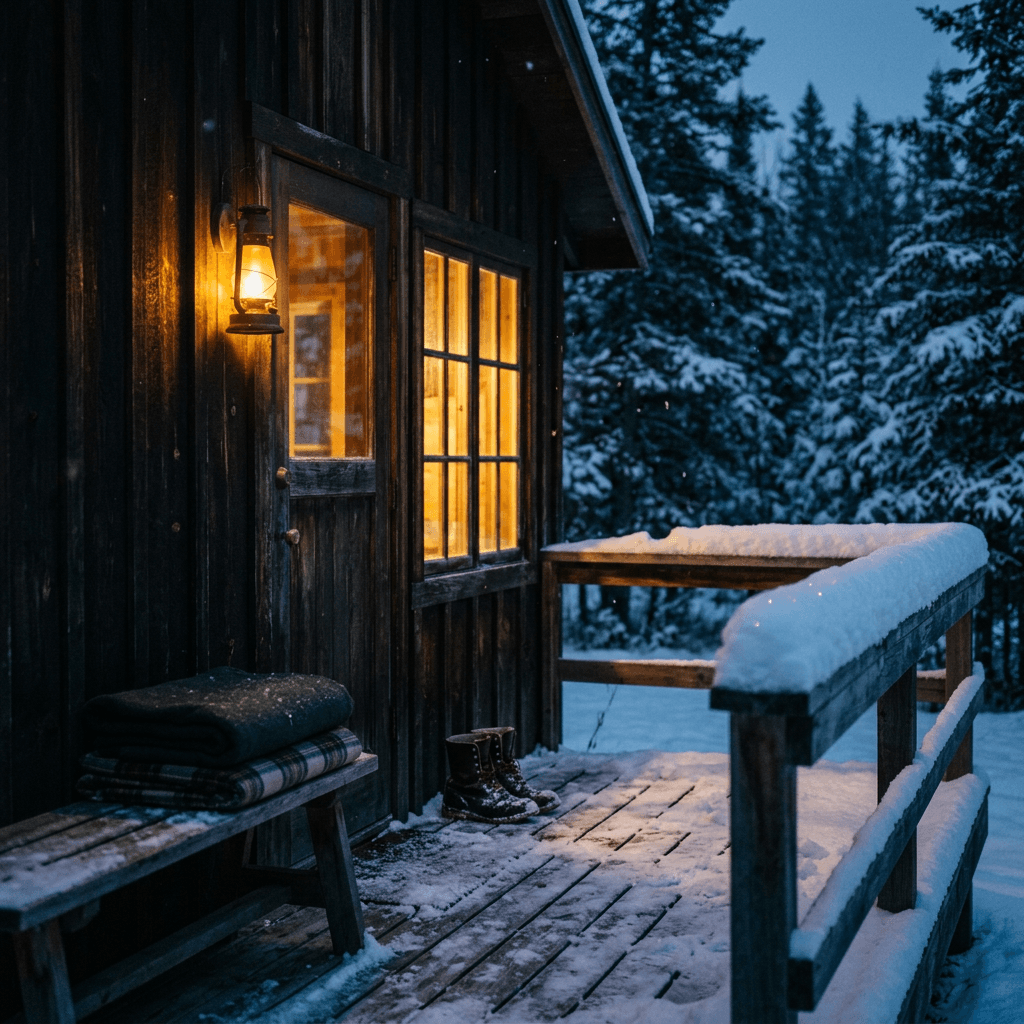
Why it works: the warm amber window against blue shade gives the image its mood in one glance. To tweak it, swap the lantern for string lights or change the time of day to late afternoon for a gold-and-blue split.
Prompt 2: Snowy Forest Walk with Boot Prints
A narrow snowy forest path in the early morning, a single line of boot prints with crumbled edges leading away from the camera toward a bend, tall pine trees heavy with snow on both sides, soft flat overcast light, snow bright pale gray-white with faint blue shadows under the branches, a thin mist hanging between the trees, shot from low and behind at 35mm with a deep depth of field, quiet and still mood. No smooth cotton snow, no plastic trees, no watermark.
Why it works: leading lines and a single set of footprints give the viewer somewhere to go. Change the path to a frozen lakeshore or a city park for a different setting.
Prompt 3: Cafe Window on a Snowy Street
A cozy cafe window seen from the snowy sidewalk at dusk, steamy glass with a few fingertip smudges, a warm glowing interior with a ceramic mug and a paper bag on the counter, small flakes falling in front of the camera and a soft blur of a street lamp, wet dark pavement beside a shoveled strip, footprints in the snow by the door, 50mm lens at f/2 with the window in focus and the street lamp melted into soft bokeh, amber glow against slate blue evening light. No readable text on the window, no distorted mug, no watermark.
Why it works: glass and glow are two things models render well, and the contrast sells the cold outside. It pairs nicely with the coffee shop branding prompts if the cafe is a real client.
Prompt 4: Mug of Cocoa on a Frosted Windowsill
A close shot of a handmade ceramic mug of hot cocoa on a wooden windowsill, thin steam curling up and dissolving a few inches above the rim, a small cluster of mini marshmallows, frost crystals forming on the corners of the window glass, a soft out-of-focus snowy garden outside under flat overcast light, a knit cuff of a cream sweater resting beside the mug, 85mm lens at f/2 with the mug rim in crisp focus. Natural ceramic glaze with tiny imperfections, no glossy plastic look, no distorted handle, no watermark.
Why it works: frost on the glass edges is a small detail that announces real cold. Replace cocoa with tea or coffee to match your niche.
Prompt 5: Snowy Rooftop City Skyline
A city skyline at dusk after snowfall seen from a rooftop, a thin layer of untouched snow on the parapet in the foreground with a soft uneven surface, warm lit windows across distant buildings, a pale violet and peach sky, small flakes drifting, a faint haze over the streets, 35mm lens with the foreground snow in focus and the skyline slightly soft, cool blue shadows with warm window highlights. No impossible architecture, no garbled signs, no watermark.
Why it works: foreground snow texture gives the scene scale. Change the skyline to a coastal town or a mountain village for a travel angle.
2) Winter Profile Picture Prompts
A profile picture lives at a tiny circle size, so winter scenes need one strong subject and a simple background. The full rules for this are in the AI profile picture prompts guide. These four are the winter versions, all written for image-to-image so your real face stays in the picture.
Prompt 6: Breath Fog Portrait in Overcast Light
Upload a clear front-facing photo, then use this prompt.
Preserve the facial features, skin tone, hair texture and proportions of the person in the reference image exactly. Place them outdoors on a cold overcast morning in a charcoal wool coat with the collar up, a small soft cloud of visible breath just in front of the mouth fading quickly, pink cheeks and nose from the cold, a few snowflakes resting on the shoulders, blurred snowy pines in the background, flat overcast light with no hard shadows, 85mm lens at f/2.2 with both eyes sharp, natural skin texture with visible pores. No beautifying, no plastic skin, no face distortion, no watermark.
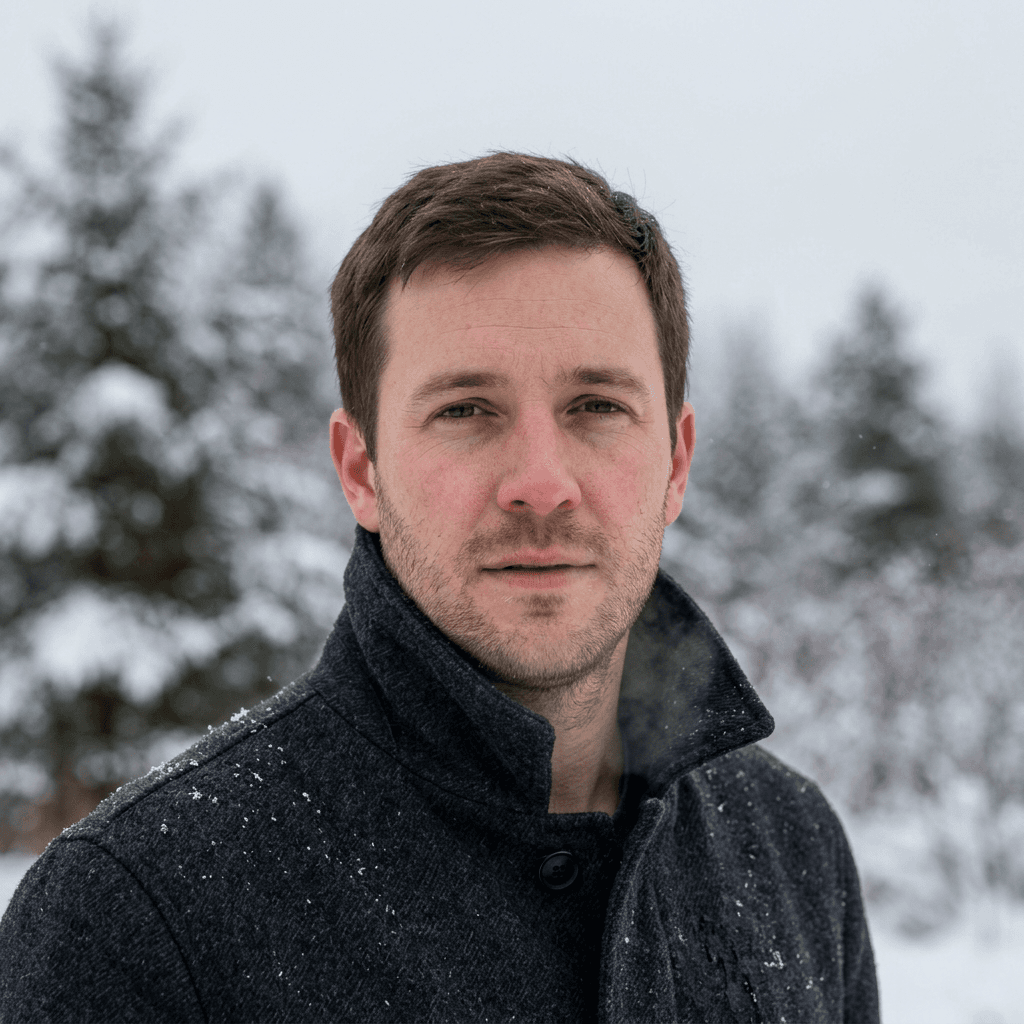
Why it works: overcast light is the most flattering for faces and the breath cloud is a believable cold-weather cue. Move the person slightly off center if you plan to crop to a circle.
Prompt 7: Beanie and Scarf Avatar
Preserve the face, skin tone and hairstyle of the person in the reference image exactly. A tight head-and-shoulders square portrait wearing a slate blue knit beanie pulled over the ears and a thick cream scarf, a light dusting of snow on the beanie, rosy cheeks, a soft smile looking at the camera, a plain pale blue-gray snowy background kept very simple, soft overcast light from the front, 85mm lens at f/2.8, face centered with comfortable margin around the beanie for a circular crop. No extra accessories, no heavy filters, no watermark.

Why it works: one dominant color and one clear shape survive a 98 pixel circle. Swap the beanie color for your brand color so the avatar matches your banner.
Prompt 8: Golden Low Sun Snow Portrait
Preserve the facial features, skin tone and hair texture of the person in the reference image exactly. Place them standing in a snowy field at sunrise facing the camera, low gold sun from behind and to the right creating a warm rim light along the hair and the edge of a camel wool coat, the lit snow glowing warm cream and the shadows soft blue, a few tiny sparkles in the air, shot at 85mm with a shallow depth of field and the eyes sharp, natural skin texture, slight warm film grain. No plastic skin, no face distortion, no watermark.
Why it works: the warm rim and blue shade are the cinematic winter signature. If the face looks too dark against the sun, add "a large soft reflector filling light on the face from the front".
Prompt 9: Cozy Indoor Fireplace Avatar
Preserve the face and features of the person in the reference image exactly. A close head-and-shoulders portrait indoors in a chunky oatmeal knit sweater, warm flickering firelight from the lower left on the cheek and jaw, a soft dark blurred room behind with one small glowing lamp, relaxed expression, natural skin with fine texture, 85mm lens at f/1.8 with both eyes sharp, warm amber palette, centered for a circular crop. No orange skin cast, no plastic skin, no watermark.
Why it works: warm indoor light contrasts nicely with the cold palettes on the rest of your feed. If skin turns too orange, change the instruction to "firelight on one side only, the other side softly lit by cool window light".
3) Couple and Friends Photo Prompts
Winter couples and group photos are an easy shared-content hit. They also depend on both faces staying recognizable, so use image-to-image with a photo of each person where the tool allows. The AI couple selfie prompts cover that workflow in detail.
Prompt 10: Couple Walking Under Street Lamps
Preserve the faces and proportions of both people in the reference images. They walk side by side on a snowy city street at night holding hands, wearing long wool coats and scarves, one in forest green and one in charcoal, soft flakes falling in layers with a few large blurred ones in the foreground, warm street lamps casting amber pools on the snow with blue shadows between them, footprints behind them, shot at 50mm from slightly behind at f/2, shallow depth of field with warm bokeh. Natural skin tones, no distorted hands, no extra people, no watermark.
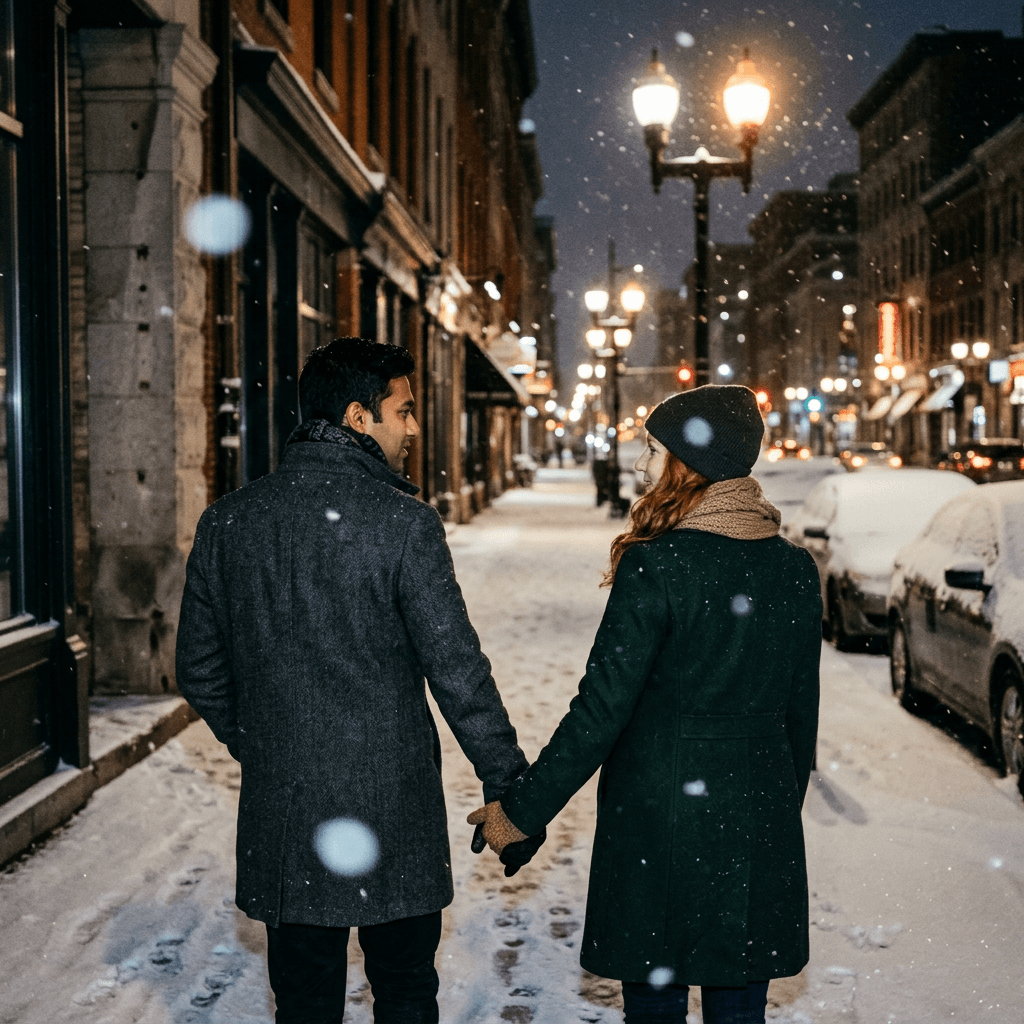
Why it works: the lamp pools give a rhythm of warm and cool, and the layered flakes give depth. Move them to a bridge or a park path for variety.
Prompt 11: Couple Sharing a Blanket by a Window
Preserve both faces from the reference images. Two people sitting close on a window seat under one thick gray wool blanket with mugs in their hands, heavy snow falling softly outside the large window behind them, soft overcast daylight from the window lighting their faces evenly, warm lamp glow at the edge of the frame, relaxed candid laughing expression, 35mm lens at f/2.8 with both faces in focus, natural skin texture. No distorted hands, no fused fingers, no watermark.
Why it works: the window provides soft light and an excuse for snow without having to render a whole outdoor scene. Replace the blanket with matching sweaters for a cozy anniversary post.
Prompt 12: Friends Snowball Moment
Preserve the faces of the people in the reference images. Four friends of mixed genders laughing in a snowy park in bright winter daylight, one mid-throw with a loose snowball and a small burst of snow dust in the air, bright puffer jackets in teal, mustard, red and navy, knit hats, cheeks pink from the cold, long soft blue shadows on the snow, trees dusted with snow behind, shot at 35mm at 1/1000 second with crisp motion, candid energy. No distorted hands, no extra fingers, no watermark.
Why it works: a freeze-frame verb like mid-throw plus a shutter speed gives crisp motion. For a calmer group picture, change the action to walking in a line with mugs.
Prompt 13: Group Cabin Weekend Candid
Preserve the faces from the reference images. Five friends crowded around a long wooden table in a cabin, a board game mid-play, mugs and a pot of stew, string lights over the beams, warm lamplight on faces with the snowy dark window behind them, a few people laughing and one looking at the camera, wool socks and oversized sweaters, shot on a 28mm lens at f/2 as a casual candid, warm tungsten palette with a slight film grain. No distorted hands, no waxy skin, no watermark.
Why it works: tungsten light, clutter and board games read as candid. Change the activity to cooking or reading to fit your story.
4) Flat Lay and Still Life Prompts
Winter flat lays photograph better than almost any other season because texture does the work: knits, wood, candle wax, ceramic and frost. If you want more styled layouts, the flat lay photography prompts go much deeper.
Prompt 14: Knit Sweater, Cocoa and Book Flat Lay
Top-down flat lay on a pale gray wool blanket, a chunky cream cable-knit sweater loosely folded, a ceramic mug of cocoa with thin steam, an open paperback book with a dried orange slice as a bookmark, a pair of gray wool socks and a small brass candle holder with a lit candle, soft window daylight from the top left, subtle shadows, shot straight down at 50mm, restrained palette of cream, gray, brass and one orange accent. Visible wool texture, no distorted book pages, no garbled text, no watermark.

Why it works: one accent color keeps the picture feeling expensive. Swap the orange slice for a sprig of rosemary or a red berry for variety.
Prompt 15: Frosted Pinecones and Evergreen Sprigs
A close tabletop shot of three pinecones and a few evergreen sprigs on a dark slate surface with a light dusting of frost and tiny ice crystals along the edges of the needles, a small glass jar with a tea light glowing softly beside them, soft cool side light from the left, shallow depth of field with the front pinecone sharp, muted palette of slate, deep green and warm candle glow. No plastic needles, no impossible scale, no watermark.
Why it works: frost on needles is a texture models handle well in macro. This is also a non-Christmas way to use greenery, since there are no ornaments or red and green pairing.
Prompt 16: Winter Skincare and Hand Cream Still Life
A minimal winter skincare still life on a pale stone shelf, a frosted glass jar of cream and a tube of hand balm, a folded oatmeal knit glove beside them, a small bowl of coarse salt, a sprig of pine, and a window behind in soft focus showing falling snow, soft cool daylight with a warm highlight on the jar lid, 85mm lens at f/2.8 with the jar sharp, pale blue-gray palette. Blank unbranded packaging, no garbled labels, no watermark.
Why it works: cool light plus blank packaging gives a clean, premium look. For a real product campaign, see the skincare brand content prompts.
Prompt 17: Candle and Frosted Window Still Life
A lit cream candle in a stoneware jar on a wooden table in front of a window with frost patterns along the glass edges, snowy blue dusk outside, a folded wool throw and a small stack of books, soft warm candle glow on the wood and cool blue light from the window, 50mm lens at f/2 with the candle flame in focus and the frost softly blurred. Natural wax texture, no distorted flame, no garbled text, no watermark.
Why it works: the warm flame against the cool window is the whole image. Change the stoneware to amber glass for a more rustic feel. For product shoots, the candle photography prompts have more angles.
5) Phone Wallpaper Prompts
A wallpaper needs space for clocks and icons, a calm focal area, and a vertical shape. Generate in the 9:16 portrait ratio, and keep the top third and the lower third quiet. For the full approach to lock screens and widgets, the iPhone lock screen wallpaper prompts cover layout rules in depth.
Prompt 18: Snowy Pines at Blue Hour
A vertical phone wallpaper of a snowy pine forest at blue hour, tall dark evergreens on both sides with snow on their branches, a calm open sky in the upper third fading from deep indigo to pale blue, a smooth quiet area of untouched snow in the lower third, a single tiny warm light from a distant cabin window in the middle distance, a few soft flakes, 35mm vertical composition, muted blue and charcoal palette with one warm point of light. No text, no clutter, no watermark.
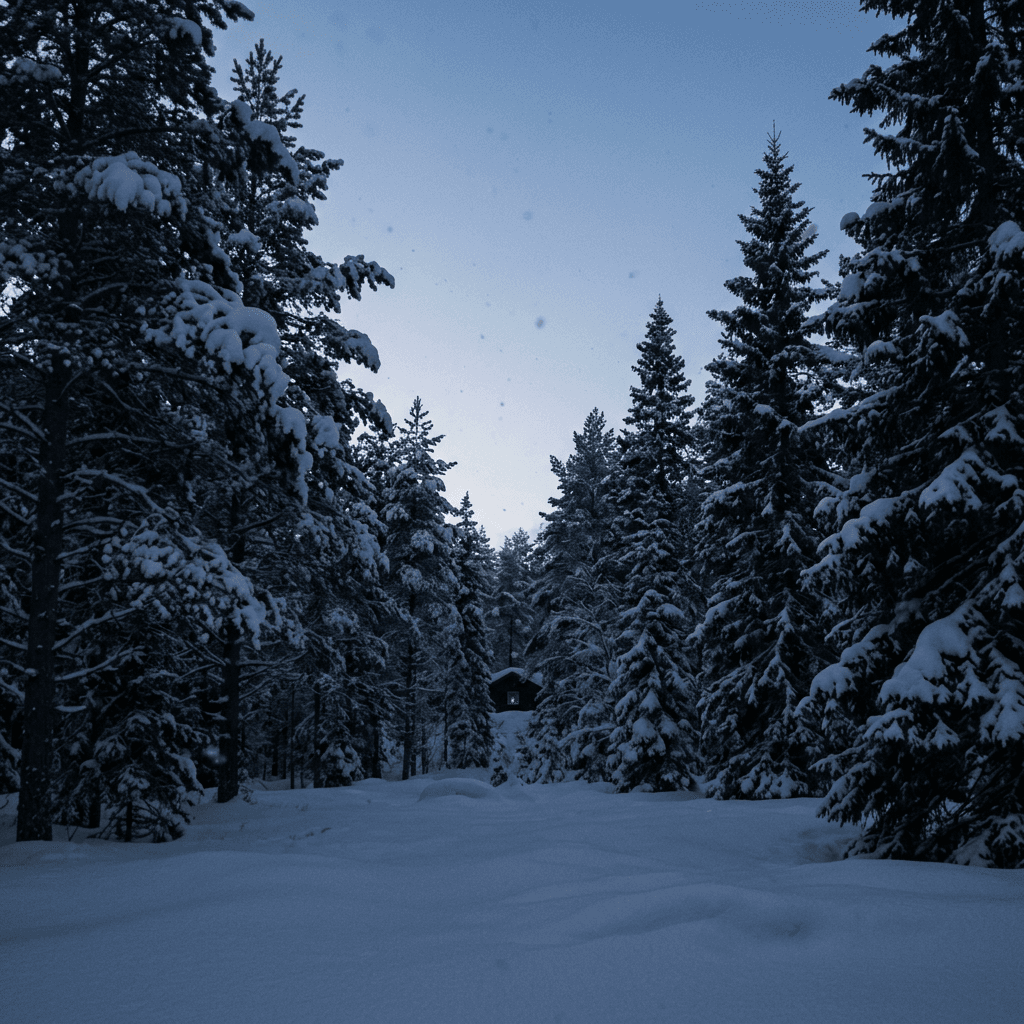
Why it works: the empty sky leaves room for the clock, and the cabin window gives the eye a rest point. Move the warm light to the right edge if your icons sit on the left.
Prompt 19: Frosted Window with Blurred Lights
A vertical close shot of a frosted window pane with delicate ice crystals along the edges, behind it soft out-of-focus warm street lights and a dusk blue sky, a clear center area in the glass where the lights are visible, macro 85mm look with shallow depth of field, cool blue and warm amber palette, calm and uncluttered. No text, no distorted frost patterns, no watermark.
Why it works: frost patterns frame the screen and the blurred lights stay out of the way of widgets. Try a pink dusk for a softer feel.
Prompt 20: Mountain Cabin in Morning Mist
A vertical image of a small wooden cabin in the far distance on a snowy mountainside in morning mist, pale peach light on the ridge line, layers of misty pines fading into the background, a wide empty sky above and smooth snow below, thin smoke curling from the chimney, 50mm vertical composition, soft pastel winter palette. No people, no text, no watermark.
Why it works: atmospheric layers make a screen feel deep without adding detail where icons sit. Swap the cabin for a lone tree for a minimalist version.
Prompt 21: Dark Mode Winter Night Sky
A vertical image of a clear winter night sky over a snowy field, a deep navy sky with soft stars and a thin cold glow near the horizon, a few bare dark trees as silhouettes at the bottom, a smooth snow surface with faint blue light, long exposure look with calm quiet detail, very dark top two thirds for contrast with white clock text. No text, no moon halo artifacts, no watermark.
Why it works: a mostly dark image saves battery on OLED screens and keeps white text readable. Add a faint aurora band if you want more drama.
6) Brand, Cabin and Travel Content Prompts
Winter is a major selling season for candles, skincare, coffee, knitwear and short-stay rentals. These three prompts are meant for brand and listing content, and they keep the image honest, so it still looks like a place a guest could actually book. For the lodging angle, see the Airbnb listing photo prompts, and for destination content the travel brand content prompts.
Prompt 22: Cabin Living Room with Snow Outside
A cozy cabin living room, a stone fireplace with a low fire, a deep leather sofa with a chunky gray knit throw, a wooden coffee table with two mugs and a book, a large window showing snow-covered pines under soft overcast light, warm firelight on the wood and cool daylight on the window side, wide-angle 24mm interior photograph with straight vertical lines, natural wood grain and wool texture. No distorted furniture, no impossible window geometry, no watermark.
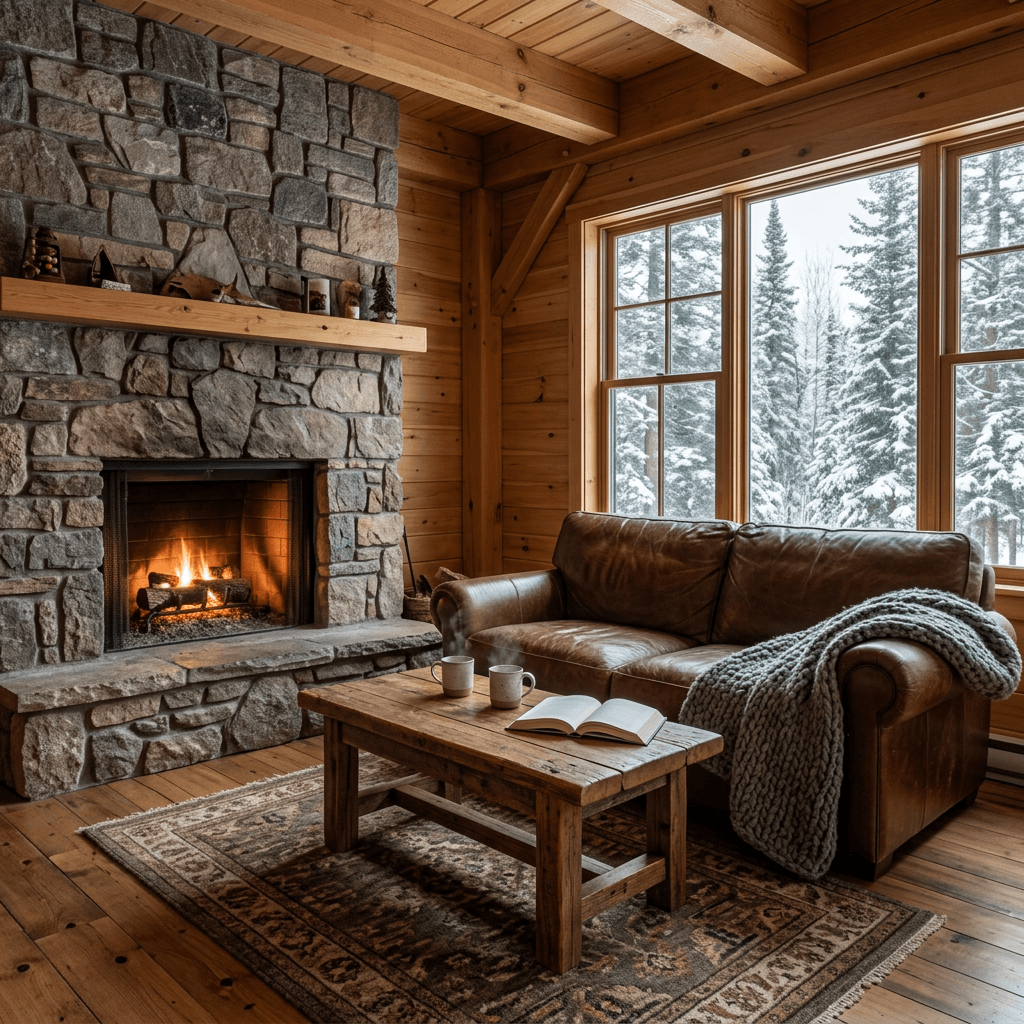
Why it works: two light sources, warm fire and cool window, make the room feel real. Add a pair of snowshoes by the door for an adventure angle.
Prompt 23: Knitwear Brand Lifestyle Shot
A lifestyle photo of a model in a charcoal chunky knit sweater with a mustard scarf holding a paper coffee cup outdoors on a snowy sidewalk, small cloud of breath, soft flat overcast light, shallow depth of field with a blurred snowy street behind, visible knit texture and a few snowflakes on the wool, 85mm lens at f/2. Generic non-identifiable model, blank unbranded cup, no garbled text, no watermark.
Why it works: visible stitch texture and flakes on the wool prove the fabric is the hero. Swap the sweater for outerwear, boots or a hat for a different catalog.
Prompt 24: Winter Sale Product Banner Background
A clean wide banner background of a pale snowy surface with a light dusting of powder, soft blue shadows, a small cluster of frosted pinecones and a few pine sprigs at the far left, a large empty smooth area on the right for product and text, soft cool daylight from the upper left, 35mm wide shot. No text, no ornaments, no watermark.
Why it works: the empty right side leaves room for a product cutout or a headline. If you run offers, the Black Friday product photo prompts show how to lay out sale visuals.
How to Keep a Winter Set Consistent
A set of winter images only feels like a set when the lighting and palette repeat. Write one sentence you reuse verbatim: for example, "soft overcast light, snow pale gray-white with blue shadows, slate and charcoal palette with one amber accent." Paste it into every prompt in the series. Then change only the subject and the setting. It works especially well in winter because the palette is naturally narrow.
Also pick one lens language and stick to it. If the first image is shot at 35mm with a deep depth of field, use 35mm for the next few as well. Mixing a wide 24mm scene with a tight 85mm portrait is fine when the lighting matches, but switching between a sunny scene and an overcast one inside a single carousel is the most common reason a set looks fake.
Turn a Summer or Fall Photo into a Winter One
You do not always need to start from nothing. If you already have a good photo of a street, a garden or a porch, upload it to the AI Image Generator, use the edit or inpainting tools, and mask only the ground, the trees or the roofs. Then describe the replacement: "cover the ground and roofs in fresh snow with a soft uneven surface, bare branches with a light dusting of snow, overcast winter sky, keep everything else unchanged." Matching the original light direction matters most. If the shadows in your photo fall to the right, tell the model that the snow shadows fall to the right too.
Turn Your Winter Stills into Reels and Shorts
A winter still can become a short clip in a couple of minutes. Open Text2Shorts for a narrated vertical video, or use the Cinematic Video generator to give a single scene slow motion, like drifting snow or steam rising from a mug. If you already record long videos, AI Clipping can cut the best winter vlog moments into captioned Shorts. For music, a soft piano or ambient track from the AI Music Generator matches the mood. Creators who want a cover that stands out can build one with the YouTube Thumbnail Maker.
Common Mistakes with Winter AI Photos
Plastic snow
Smooth white fill with no texture. Fix it by naming the snow surface, such as fresh powder or wind-packed crust, and by asking for tiny sparkles only where low sun hits.
Gray or yellow snow
White balance drifts in snow scenes because the camera tries to average everything to gray. If your snow comes out gray, add "bright clean snow". If it turns yellow indoors, specify the color of the light source.
Breath in summer clothes
A visible breath cloud next to a bare-armed person looks wrong. Match the clothing to the weather and add coats, hats and scarves.
Warm skin in a cold scene
Orange skin under blue snow looks pasted in. Ask for pink cheeks and nose only, and keep the rest of the skin pale and natural.
Wrong footprint physics
Perfect smooth trenches or footprints that appear in front of the person. Ask for crumbled edges and keep the tracks behind the subject.
Too many accent colors
Winter is the season of restraint. One warm accent is enough.
Unreadable signs and labels
Snow scenes love storefronts and cafe windows, which invite garbled text. Say no readable text, or keep signs blank.
Using Miraflow for Your Winter Content
Everything in this guide can be done in one place. Use the AI Image Generator on Miraflow for text-to-image, image-to-image with your own face or product, and inpainting. Make your best stills move with the Cinematic Video generator, build narrated Shorts with Text2Shorts, and keep everything in one workflow from the Miraflow home page. If you prefer a steady stream of winter ideas for other styles, the bright and airy lifestyle prompts and the dark and moody product prompts make good companions, since winter sits between the two. For Pinterest, the Pinterest pin prompts show how to turn a winter image into a saveable pin.
Frequently Asked Questions
What is the best AI prompt for a winter aesthetic picture?
The best prompts name five things: the light (overcast or low sun), the shade color (blue on snow), the snow surface (fresh powder or crust), a believable cold cue such as breath or frost, and a narrow palette with one warm accent. Prompt 1 and Prompt 6 above are good starting points.
How do I make AI snow look real?
Describe the surface instead of just writing snow, use blue shadows, keep falling snow layered at three depths, and avoid heavy blizzards that hide the subject. Add small imperfections like crumbled footprints and flakes resting on wool.
Can I use my own face in these winter prompts?
Yes. Use image-to-image in Miraflow, upload a clear front-facing photo, and begin the prompt with an instruction to preserve the face, skin tone and hair. Prompts 6 to 13 are written that way.
How do I make a winter photo look cold instead of just white?
Use cool blue shadows, pink cheeks and nose, visible breath, frost on glass, and winter clothing such as wool and scarves. A cool overall color temperature with one warm light source does more than adding more snow.
What aspect ratio should I use for winter Instagram posts and wallpapers?
For feed posts, a vertical 4:5 shape fills the most screen space, while a square also works for a grid. For phone wallpapers and Stories, use 9:16. Check each platform's current upload screen, since display sizes change.
Is this guide only for Christmas?
No. Nothing here depends on holiday decorations. These prompts work from the first snow through late winter, and they pair with the Christmas card prompts if you want a holiday layer on top.
Can I use these images for a brand or product campaign?
Yes, check your tool's current usage terms, keep packaging unbranded in the prompt unless you add your real label afterward, and avoid claiming a generated cabin is a real rental. The honest approach for lodging is described in the Airbnb listing prompts linked above.
When should I post winter content?
Search interest for winter aesthetics tends to build from late October into December, so posting a set in early November gives pins and posts time to gather saves before the peak. Evergreen items like wallpapers keep working into February.
Conclusion
Winter aesthetic photos reward the same discipline as real winter photography: know where the light comes from, let the shade go blue, give the snow a surface, keep the palette narrow, and add one believable cold cue. The 24 prompts above apply those rules to the things people actually post, from feed images and profile pictures to couples, flat lays, wallpapers and brand content. Start with the use case you need this week, paste the prompt into Miraflow's AI Image Generator, generate a few versions, and keep the one with the best snow. Then reuse the same lighting and palette sentence for the rest of your set so everything matches.