Fibo 2.0 Explained: Bria's 8B Open Model for Image Generation and Editing (2026)

Written by
Aerin Kim

Bria's Fibo 2.0 generates and edits images with one 8B set of weights and reads JSON prompts. See the architecture, 50 versus 4 steps, rankings, license and runnable code.
You ask an image editor to replace a jacket with a red leather one, and it also shifts the lighting, softens the face and quietly moves the background. Then you rerun the same prompt with one word changed and the whole scene rewrites itself. Fibo 2.0, which Bria uploaded to Hugging Face on October 18 (Dev) and October 19 (Edit Turbo), 2026 [3][29], is built around a different answer to that problem: the model reads a structured JSON document instead of a sentence, and an edit becomes a small diff applied to that document [1].
This post is the engineering read of the release. It covers what the two checkpoints are, what the model card says about the architecture (an 8B flow-matching model with a 44-block single-stream transformer), how the VGL JSON format works, how to run generation, masked edits and four-image reference edits from the card's own code, how Dev and Edit Turbo differ at 50 steps versus 4 steps, and how to read the Artificial Analysis rankings without over-reading them. Every Step below has something you can run or check, and the sources are numbered so you can follow each claim back.
Quick summary before the depth:
- What it is: an 8B open-weights model that generates and edits images with one set of weights, trained on long structured captions and exclusively on licensed data, according to Bria [1].
- Two checkpoints: Fibo 2.0 Dev (50 steps, guidance 5.0, generation and editing, the one to fine-tune) and Fibo 2.0 Edit Turbo (4 steps, guidance 1.0, editing only) [1][2].
- Edit modes: plain instruction edits, masked edits, and up to 4 reference images addressed as
<image_1>,<image_2>and so on [1]. - Ranking: first among open-weights models on Artificial Analysis image editing with an Elo of 1088 when I read the live board, ahead of Qwen-Image-2.1 at 1081 and FLUX 3 Image Klein at 1072, while closed models such as GPT Image 2.5 lead the whole board at 1199 [8].
- License: the weights are gated and released for non-commercial use under CC BY-NC 4.0, and commercial use needs a separate agreement with Bria [1].
What Bria Released and When
Fibo 2.0 is the next generation of Bria's FIBO family, which started with the FIBO text-to-image model described in the paper "Generating an Image From 1,000 Words" in November 2025 [5]. The new part is that image editing and image generation now share one model. Bria's card describes it as the first time editing and generation live in a single unified model in this family, and it lists unified editing and generation, better text rendering, texture and anatomy, and optional photographic style modes as the headline changes [1].
The Hugging Face metadata shows the Dev repository was created on October 18, 2026 and the Edit Turbo repository on October 19, 2026, and both are marked as gated with automatic approval after a short form [3][29]. The gating form asks for company, intended use and agreement that commercial use requires a separate commercial agreement with Bria, which fits the CC BY-NC 4.0 license named on the card [1].
The 2.0 release builds on Bria's earlier Fibo Edit, an open 8B editing model with native masking and VGL-structured JSON inputs [7].
| Item | Fibo 2.0 Dev | Fibo 2.0 Edit Turbo | Source |
|---|---|---|---|
| Created on Hugging Face | October 18, 2026 | October 19, 2026 | Hugging Face API metadata |
| Tasks | Text-to-image, instruction edit, masked edit, up to 4 reference images, Inspire | Editing only: instruction edit, masked edit, up to 4 reference images | Model cards |
| Sampling | 50 steps, guidance scale 5.0 | 4 steps, guidance scale 1.0 | Model cards |
| Negative prompt | Used (structured caption) | No effect | Model cards |
| Intended use | Full quality, research, fine-tuning base | Low-latency editing, not intended for fine-tuning | Model cards |
| Repository files | 16.25 GB transformer, 8.88 GB text encoder, 0.34 GB VAE | Same footprint | ComfyUI Wiki |
| License and access | CC BY-NC 4.0, gated, commercial use needs a Bria agreement | Same | Model cards |
The table above comes from the two model cards and from the ComfyUI Wiki's write-up, which also lists the repository footprint as a 16.25 GB transformer, an 8.88 GB text encoder and a 0.34 GB VAE [1][2][4]. Adding those three files gives roughly 25.5 GB of weights, which matters if you were hoping to fit everything on a single 24 GB card without offloading or the INT8 repack that the same write-up says the Comfy-Org team published [4].
Step 1: Understand VGL, the JSON Blueprint the Model Reads
Most image models are trained to turn a short prompt into a detailed image, which leaves the model to invent everything the prompt left out. The FIBO paper frames this as a mismatch between sparse text input and rich visual output, and it argues that the missing details get filled in arbitrarily, biased toward average user preferences [5]. Bria's answer is to train on captions where every sample is annotated with the same set of fine-grained attributes, so nothing important is ever missing from the text the model learns from.
Those captions are JSON. The paper's appendix lists the schema: a short_description, an objects array where each object has fields such as location, relative size, shape and color, texture, appearance details, relationship and orientation, then background_setting, lighting (conditions, direction, shadows), aesthetics (composition, color scheme, mood), photographic_characteristics (depth of field, focus, camera angle, lens focal length), style_medium, artistic_style, context and a text_render array [6]. Humans get extra fields for pose, expression, clothing and action. The captions average about 1,160 tokens with a maximum of 1,800 in the paper's statistics table, which is why the card talks about captions of 1,000+ words [6][1].
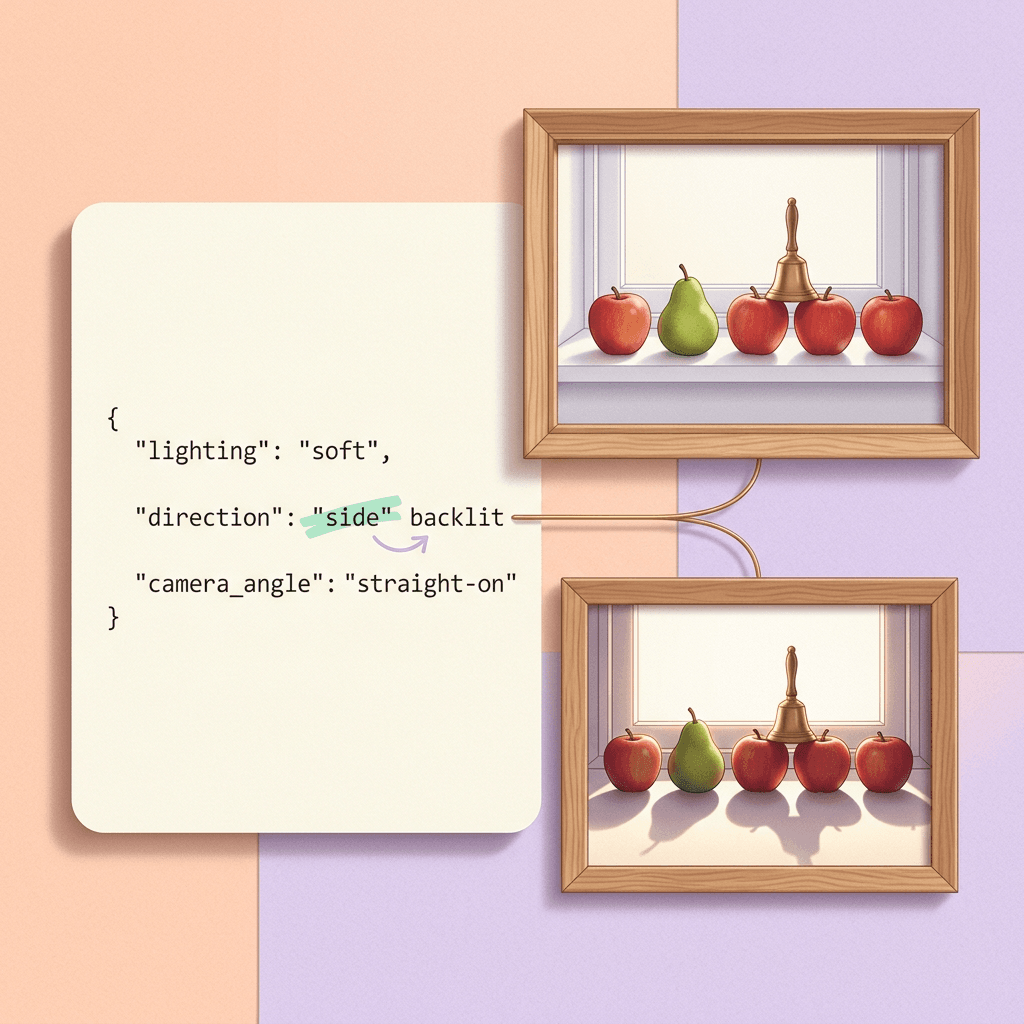
Fibo 2.0 calls this format VGL, short for Visual GenAI Language. The card puts the idea in one line: generation becomes "render this blueprint" and editing becomes "apply this diff to the blueprint" [1]. The practical effect is that lighting, composition, camera parameters and every object are separate, addressable fields, so changing the time of day touches the lighting fields while the object descriptions stay as they were.
Nobody is expected to type a 1,000-word JSON document by hand. The paper describes a companion vision-language model that supports three operations: Generate (expand a short prompt into a structured prompt), Refine (modify an existing structured caption given an editing instruction) and Inspire (extract a structured caption from an input image and optionally edit it) [6]. The Fibo 2.0 card exposes the same ideas through the open-source bria-vgl package, with create() for generation, modify() for edits and an Inspire mode that borrows a reference image's subject, style or composition without the generator ever seeing the image [1]. PyPI lists bria-vgl as a tool that turns a prompt, or images plus a prompt, into a structured JSON scene description for models like FIBO [13].
What a hand-written VGL scene looks like
The card's own prompt-alignment example is a windowsill with exactly five red apples and one green pear, the pear in the second position from the left, and a small brass bell on the third apple from the right [1]. Counts and positions are exactly the facts a structured caption can state explicitly. Here is that scene written out as a VGL-style document using the field names from the paper's schema. The Fibo 2.0 pipeline reads the bria-vgl Thales dialect, which the card links to a separate caption guide, so treat this as a readable starting point and compare it with the guide before relying on any single field name.
json/code
{
  "short_description": "A minimal still life on a white windowsill: a row of exactly five red apples and one green pear, with a small brass bell resting on the third apple from the right.",
  "objects": [
    {
      "description": "A row of five glossy red apples along the sill, evenly spaced.",
      "location": "center, along the windowsill",
      "relative_size": "medium within frame",
      "shape_and_color": "round, deep red",
      "texture": "smooth, waxy skin with faint speckles",
      "appearance_details": "small highlights from the window, short brown stems",
      "relationship": "the green pear stands second from the left in the same row",
      "orientation": "upright",
      "number_of_objects": 5
    },
    {
      "description": "One green pear with a slight yellow blush.",
      "location": "second position from the left",
      "relative_size": "medium within frame",
      "shape_and_color": "pear-shaped, light green",
      "texture": "matte, finely dotted skin",
      "appearance_details": "short curved stem",
      "relationship": "sits between the first and third fruit in the row",
      "orientation": "upright"
    },
    {
      "description": "A small brass bell with a rounded rim.",
      "location": "on top of the third apple from the right",
      "relative_size": "small",
      "shape_and_color": "bell-shaped, warm brass",
      "texture": "polished metal",
      "appearance_details": "tiny reflection of the window",
      "relationship": "balanced on the apple",
      "orientation": "upright"
    }
  ],
  "background_setting": "A white painted windowsill in front of a pale, softly lit wall.",
  "lighting": {
    "conditions": "soft morning daylight",
    "direction": "side-lit from the left",
    "shadows": "gentle, short shadows falling to the right"
  },
  "aesthetics": {
    "composition": "horizontal row, centered",
    "color_scheme": "white with red and green accents",
    "mood_atmosphere": "calm, minimal"
  },
  "photographic_characteristics": {
    "depth_of_field": "deep",
    "focus": "sharp focus on the whole row",
    "camera_angle": "eye-level",
    "lens_focal_length": "standard 50mm"
  },
  "style_medium": "photograph",
  "artistic_style": "minimal still life",
  "context": "A product-style still life photograph used to test counting and position."
}
Notice how the counting constraint lives in two places: number_of_objects on the apple row and the location of the pear and bell. A short natural-language prompt would have to hope the model infers both, whereas the JSON states them. The paper credits this kind of explicit spatial encoding for a pronounced gain in positional understanding on GenEval, which it describes as a known weakness for most models [6].
Step 2: Read the Architecture, 44 Blocks, Gist Tokens and a Borrowed VAE
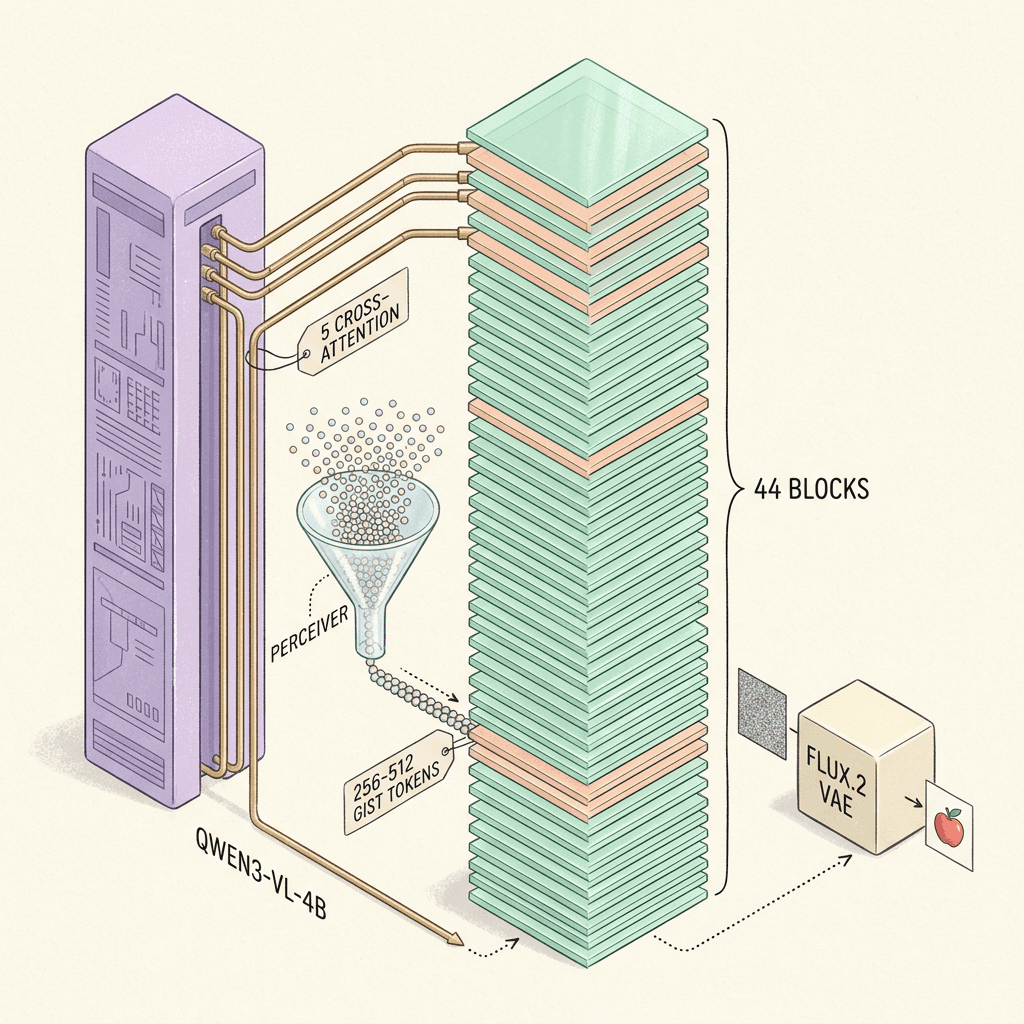
The card's Training and Architecture section is short and dense, so it is worth unpacking one clause at a time. Fibo 2.0 is an 8B-parameter flow-matching model operating in the latent space of the FLUX.2 VAE. Prompts are encoded by Qwen3-VL-4B-Instruct, and for editing the context images are encoded by both the VLM and the VAE. A two-layer Perceiver resampler compresses the VLM output into 256 to 512 gist tokens, with more tokens for longer prompts. Those tokens are prepended to the image tokens and processed by a single-stream DiT with 44 blocks, and internal VLM layers also feed five of those blocks directly through cross-attention [1].
Flow matching and the DiT backbone
Flow matching trains a model to predict a velocity field that carries noise toward data along a path, and it is the objective behind most current open image models [20]. Rectified flow is the closely related variant that encourages straight paths between noise and data, which is what makes few-step sampling plausible [21]. A DiT replaces the convolutional U-Net with a transformer that operates on patches of the latent [22]. Single-stream means text-side and image-side tokens go through the same transformer weights in one sequence, instead of two parallel streams that mix only at attention. The Fibo 2.0 card lists exactly that: gist tokens followed by the noisy latent, and for edits the clean context latents, all in one sequence [1].
Qwen3-VL and the Perceiver resampler
Using a vision-language model as the text encoder is a deliberate choice. Qwen3-VL is a multimodal model family with a published technical report [25], and the card says the model encodes context images through the VLM as well as the VAE, so the transformer receives a semantic reading of the source image alongside its pixel-level latent. The Perceiver resampler is the compression step. The Perceiver line of work introduced attending from a small learned set of latents to a large input [23], and Flamingo popularized the same idea as a resampler that turns variable-length visual features into a fixed number of tokens [24]. In Fibo 2.0 it compresses long VLM output into 256 to 512 tokens, which keeps the sequence manageable when the caption is 1,000 words long.
The first FIBO paper solved a related cost problem differently. Its DimFusion mechanism concatenates intermediate LLM layers along the embedding dimension so the token count stays fixed, and the paper reports a step time of 0.5 seconds versus 0.8 seconds for the token-concatenation alternative, about a 1.6x reduction, in its 11B ablation with SmolLM3-3B [6]. The Fibo 2.0 card does not mention DimFusion by name, so I read the Perceiver plus the five cross-attention blocks as the 2.0 answer to the same long-caption cost question rather than a rename of DimFusion.
| Item | FIBO (November 2025 paper) | Fibo 2.0 (October 2026 cards) |
|---|---|---|
| Task | Text-to-image | Generation and editing in one set of weights |
| Size | 8B parameters | 8B-parameter flow-matching model |
| Text side | SmolLM3-3B fused with DimFusion | Qwen3-VL-4B-Instruct, Perceiver resampler to 256 to 512 gist tokens |
| VAE | Wan 2.2 VAE | FLUX.2 VAE |
| Backbone | Dual- and single-stream blocks | Single-stream DiT with 44 blocks, 5 with VLM cross-attention |
| Training data | 120M licensed image-caption pairs, Gemini 2.5 JSON captions | Licensed data curated from Bria's roughly 1B-image dataset, long structured captions |
Some coverage of the 2.0 release repeats the original FIBO encoder and VAE details, SmolLM3-3B and the Wan 2.2 VAE [10]. Those belong to the first model in the paper [6]. For Fibo 2.0 the model card names Qwen3-VL-4B-Instruct and the FLUX.2 VAE, and I follow the card throughout [1]. Borrowing the FLUX.2 VAE also means the latent space is the one Black Forest Labs describes as retrained from scratch for FLUX.2, released under Apache 2.0 [15].
What the 8B number includes
Dividing the 16.25 GB transformer file by two bytes per bf16 parameter gives about 8.1 billion parameters, so the 8B figure appears to describe the DiT alone, while the Qwen3-VL-4B encoder ships as a separate 8.88 GB file [4]. That is my arithmetic from the published file sizes. Models that quote a combined number are therefore not directly comparable, because the total held in memory for Fibo 2.0 is closer to 12B parameters than 8B.
Step 3: Install and Set Up the Pipeline
Both cards give the same installation recipe: a recent diffusers, the usual PyTorch stack, and bria-vgl for writing structured prompts. The card also states that bria-vgl runs on Gemini and expects a GEMINI_API_KEY environment variable, so the prompt-expansion step is a call to an external LLM unless you supply your own VGL JSON [1]. PyPI shows bria-vgl depending on litellm and openai among others, which is consistent with a provider-agnostic wrapper, though the card only documents the Gemini route [13].
bash/code
# Install steps from the Fibo 2.0 model cards
pip install -U "diffusers>=0.42.0" torch torchvision transformers accelerate
pip install bria-vgl

# bria-vgl expands short prompts with Gemini. Put your own key in your shell, never in a file you commit.
export GEMINI_API_KEY="<your Gemini API key>"

# Both repositories are gated: accept the terms on the model page, then log in.
huggingface-cli login

# Confirm the pipeline class exists in your diffusers build before downloading the weights.
python -c "from diffusers import BriaFibo2Pipeline; print('BriaFibo2Pipeline import ok')"
On the diffusers side there is something to check. When the ComfyUI Wiki published its report on October 20, BriaFibo2Pipeline was not merged into diffusers and the card pointed to a branch build [4]. The cards now say diffusers>=0.42.0, and PyPI lists 0.42.1 as the latest release [1][14]. I could not confirm from the release notes which version first shipped the pipeline class, so after installing, run from diffusers import BriaFibo2Pipeline once to confirm the import works before you download 25 GB of weights.
You also need to be signed in to Hugging Face with access granted to the gated repository. The card's setup code downloads two fonts from a fonts subfolder and passes them to the pipeline, because Fibo 2.0 "sees each text in the caption drawn as a small image" [1]. In other words, in-image text is rendered from the font files to give the model a visual reference for the glyphs, which is a clever way to attack the garbled-text problem that I covered in a different context in the guide to getting AI to spell text correctly in images.
Step 4: Generate With Fibo 2.0 Dev
Dev is the full, non-distilled model. The card says to run it with num_inference_steps=50 and guidance_scale=5.0, and it supplies two negative prompts: a long structured one for text-to-image that steers away from featureless, plastic, artifact-laden images, and an almost empty one for editing that matches the empty caption the model was trained with [1]. The next block is the card's text-to-image flow assembled in one place, with the long negative prompt copied exactly. I have not been able to run the gated weights myself, so it is the card's code and not something I executed.
python/code
# Text-to-image with Fibo 2.0 Dev, assembled from the model card's setup and Generate examples.
import json
import torch
from huggingface_hub import hf_hub_download
from diffusers import BriaFibo2Pipeline
from bria_vgl import create
from bria_vgl.dialects.thales import Generate

pipe = BriaFibo2Pipeline.from_pretrained("briaai/Fibo-2.0-dev", dtype=torch.bfloat16).to("cuda")
# On Hopper GPUs (H100), the card says FlashAttention-3 is faster:
# pipe.transformer.set_attention_backend("_flash_3_varlen_hub")

# Fibo 2.0 sees each text in the caption drawn as a small image, so the card passes two font files.
fonts = [hf_hub_download("briaai/Fibo-2.0-dev", name, subfolder="fonts") for name in ("Aileron-Regular.otf", "DejaVuSans.ttf")]

# Text-to-image negative prompt from the card: a structured caption describing what to steer away from.
NEGATIVE_T2I = '{"short_description":"","objects":[{"description":"the main subject","texture":"smooth, featureless, plastic-like, airbrushed, no fine surface detail","appearance_details":"soft blurred edges, simplified shapes, no fine detail","skin_tone_and_texture":"waxy airbrushed skin, poreless, plastic smooth"}],"background_setting":"a plain seamless studio backdrop, perfectly smooth gradient, blurred and featureless, no visible texture","lighting":{},"aesthetics":{"artifacts":["oversaturated colours","neon colour cast","overexposed highlights","lens flare","slight blur","motion blur","haze"]},"photographic_characteristics":{"depth_of_field":"shallow, heavy bokeh obscuring most of the frame","focus":"soft, slightly out of focus, lacking fine texture"},"style_medium":"","context":"","artistic_style":""}'

def vgl(scene) -> str:
    return json.dumps(scene.model_dump(exclude_none=True), ensure_ascii=False)

scene = create(Generate(prompt="An origami whale swimming through paper clouds"), seed=0)
image = pipe(prompt=vgl(scene), negative_prompt=NEGATIVE_T2I, width=1424, height=800,
             num_inference_steps=50, guidance_scale=5.0, fonts=fonts).images[0]
image.save("generate.png")
print(scene.model_dump_json(exclude_none=True, indent=2)[:600])  # inspect the structured caption that was rendered
Three details are easy to miss. First, the card says to use multiples of 16 at about one megapixel, the area Fibo 2.0 was trained at, with 1024 by 1024 as the default, 1424 by 800 for 16:9 and 1248 by 832 for 3:2 [1]. Asking for much larger sizes goes outside the training area, so upscale afterwards instead. Second, create() returns the full structured caption, which you can inspect, edit and render again, and that returned scene is the most valuable output because it documents exactly what the model was told. Third, the card passes a seed to create(), so keep that seed alongside the saved JSON if you want to reproduce a result.
The card also describes five optional photographic styles for text-to-image: Boring Reality, Kodak Film, Hard Flash, Hazy / Dreamy and Lens Distortion. Each style is a system prompt and a user prompt for bria-vgl plus its own negative prompt, and the card warns not to reuse the default negative prompt with the film and hazy styles because it treats blur and haze as defects and would erase the look [1]. That warning generalizes: with a model trained on structured captions, the negative prompt is also a structured caption, so it should describe the opposite of what you want in the same vocabulary.
Step 5: Edit, Mask and Combine Up to Four References
The card lists three editing inputs. A plain edit takes a source image and an instruction, a masked edit adds a mask where white marks the region to regenerate while everything else is kept, and a multi-reference edit takes up to 4 reference images referred to in order as <image_1>, <image_2> and so on [1]. The target uses for multi-reference are reference-guided composition, virtual try-on, product integration and style or appearance transfer [1].

Here is the flow with Edit Turbo, using the card's own examples for the jacket edit, the suitcase mask and the person-and-dress combination. The Turbo cards swap in num_inference_steps=4 and guidance_scale=1.0, and they drop the negative prompt because it has no effect on that checkpoint [2].
python/code
# Editing with Fibo 2.0 Edit Turbo: 4 steps, guidance 1.0, no negative prompt (it has no effect on this checkpoint).
import json
import torch
from PIL import Image
from huggingface_hub import hf_hub_download
from diffusers import BriaFibo2Pipeline
from bria_vgl import modify
from bria_vgl.dialects.thales import EditImages, EditImageWithMask

pipe = BriaFibo2Pipeline.from_pretrained("briaai/Fibo-2.0-edit-turbo", dtype=torch.bfloat16).to("cuda")
fonts = [hf_hub_download("briaai/Fibo-2.0-edit-turbo", name, subfolder="fonts") for name in ("Aileron-Regular.otf", "DejaVuSans.ttf")]

def vgl(scene) -> str:
    return json.dumps(scene.model_dump(exclude_none=True), ensure_ascii=False)

# 1) Plain instruction edit
source = Image.open("photo.jpg").convert("RGB")
scene = modify(EditImages(prompt="replace the jacket with a red leather one", images=[source]), seed=0)
print(scene.edit_instruction)  # the instruction rewritten in the form Fibo 2.0 was trained on; read it before trusting the render
edited = pipe(prompt=vgl(scene), image=source, num_inference_steps=4, guidance_scale=1.0, fonts=fonts).images[0]
edited.save("edited.png")

# 2) Masked edit: white marks the region to regenerate, everything else is kept
source = Image.open("suitcase.png").convert("RGB")
mask = Image.open("suitcase_mask.png").convert("L")  # same size as the source
scene = modify(EditImageWithMask(prompt="replace the suitcase with a vintage brown leather one", image=source, mask=mask), seed=0)
masked = pipe(prompt=vgl(scene), image=source, mask=mask, num_inference_steps=4, guidance_scale=1.0, fonts=fonts).images[0]
masked.save("masked.png")

# 3) Multiple references: up to 4 images, addressed in order as <image_1>, <image_2>, ...
references = [Image.open("person.png").convert("RGB"), Image.open("dress.png").convert("RGB")]
scene = modify(EditImages(prompt="dress the person in <image_1> in the dress from <image_2>", images=references), seed=0)
result = pipe(prompt=vgl(scene), image=references, num_inference_steps=4, guidance_scale=1.0, fonts=fonts).images[0]
result.save("multi_reference.png")
A worked masked-edit scenario
Suppose you have a product photo of a suitcase on a hotel luggage cart and you want a vintage brown leather version for a second colorway. With a mask, the card says the edit is confined to the masked region and the rest of the image is left untouched [1]. Create the mask at exactly the source resolution and paint white only over the suitcase body, since the same mask goes to both bria-vgl and the pipeline. The same pattern is what Miraflow's own image editing and inpainting workflow uses on the product side: mask the region, describe the replacement, leave everything else alone.
Reference images are numbered, so name them
Multi-reference edits depend on the instruction saying which reference plays which role. "Dress the person in <image_1> in the dress from <image_2>" works because the numbered placeholders match the order of the list passed to the pipeline [1]. The ComfyUI Wiki's report notes that Bria publishes a multi-image request with three reference images (a logo, a perfume bottle and a background) merged into one result, which is a product-integration use that maps directly onto catalog work [4].
Step 6: Write and Diff VGL Yourself
Because the blueprint is plain JSON, you can treat prompts like source code: keep them in version control, review changes as diffs and run checks before rendering. The AlphaSignal write-up makes the same point, noting that machine-readable prompts can be stored in version control, compared as diffs and modified one key at a time, and that reproducibility also needs the model revision, seed, scheduler and settings recorded [10].
The script below is a small standard-library tool I wrote and ran against the apples scene above. It flattens a VGL-style document into path/value pairs, checks the top-level keys against the schema in the FIBO paper's appendix, applies edits given as path=value arguments (including list indexes like objects[1].shape_and_color), and prints exactly which leaf fields changed [6].
python/code
# vgl_diff.py: run as  python vgl_diff.py scene.json "lighting.direction=backlit from the right"
import copy
import json
import sys

# Top-level keys of the structured caption schema in the FIBO paper (Appendix A).
KNOWN_KEYS = {
    "short_description", "objects", "background_setting", "lighting",
    "aesthetics", "photographic_characteristics", "style_medium",
    "artistic_style", "context", "text_render",
}


def flatten(node, path=""):
    """Turn nested JSON into {path: leaf_value} so two scenes can be compared."""
    out = {}
    if isinstance(node, dict):
        for key, value in node.items():
            out.update(flatten(value, f"{path}.{key}" if path else key))
    elif isinstance(node, list):
        for i, value in enumerate(node):
            out.update(flatten(value, f"{path}[{i}]"))
    else:
        out[path] = node
    return out


def set_path(doc, path, value):
    """Set a dotted path such as lighting.direction or objects[2].location."""
    parts = path.replace("[", ".[").split(".")
    node = doc
    for part in parts[:-1]:
        node = node[int(part[1:-1])] if part.startswith("[") else node[part]
    last = parts[-1]
    if last.startswith("["):
        node[int(last[1:-1])] = value
    else:
        node[last] = value


def diff(before, after):
    a, b = flatten(before), flatten(after)
    changes = []
    for path in sorted(set(a) | set(b)):
        if a.get(path) != b.get(path):
            changes.append((path, a.get(path), b.get(path)))
    return changes


if __name__ == "__main__":
    # usage: python vgl_diff.py scene.json "lighting.direction=backlit from the right"
    with open(sys.argv[1], encoding="utf-8") as f:
        before = json.load(f)
    unknown = set(before) - KNOWN_KEYS
    print("unknown top-level keys:", sorted(unknown) or "none")
    after = copy.deepcopy(before)
    for assignment in sys.argv[2:]:
        path, value = assignment.split("=", 1)
        set_path(after, path, value)
    for path, old, new in diff(before, after):
        print(f"{path}\n  - {old}\n  + {new}")
    print(f"{len(diff(before, after))} field(s) changed, {len(flatten(before))} fields total")
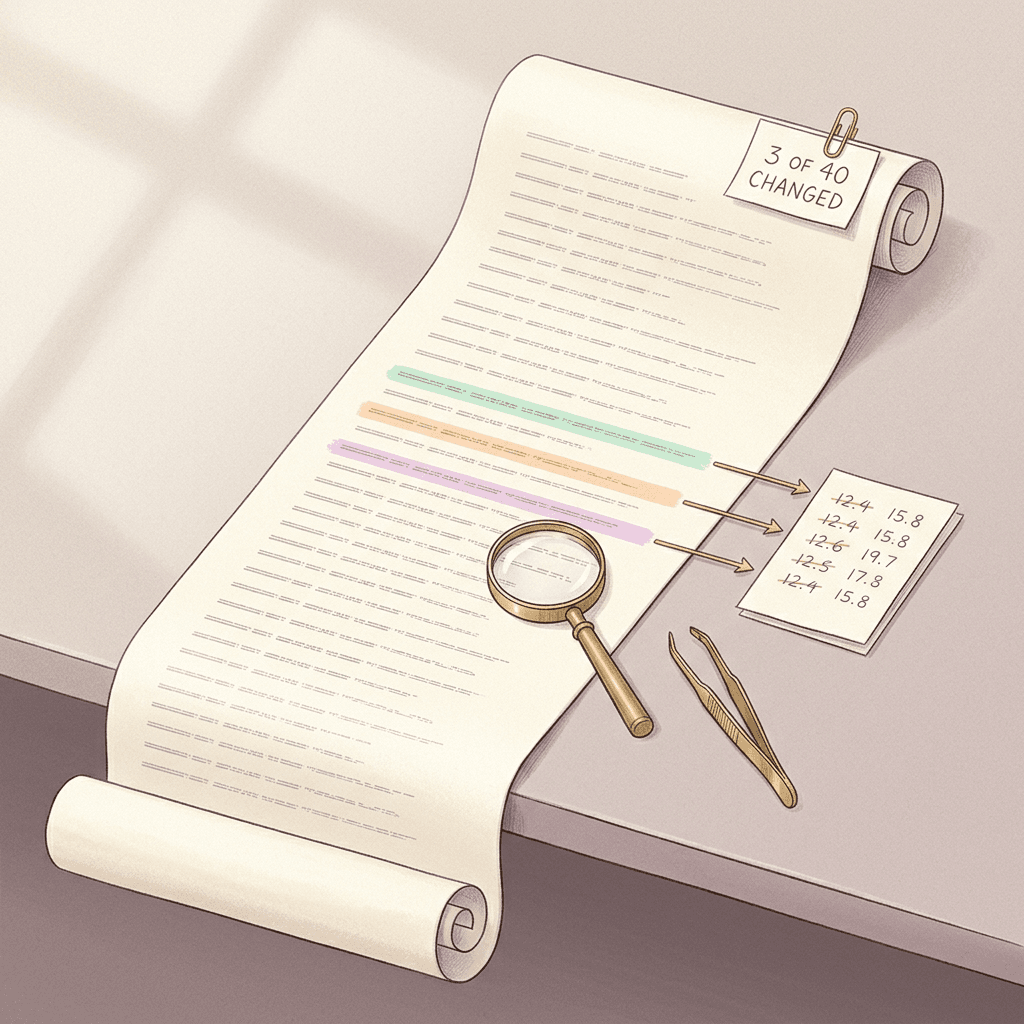
Running it with three edits (lighting.direction=backlit from the right, lighting.conditions=warm late-afternoon sun and objects[1].shape_and_color=pear-shaped, golden yellow) reports no unknown top-level keys, lists the three changed paths with their old and new values, and ends with "3 field(s) changed, 40 fields total". That last line is the point of the exercise: a disentangled edit should touch a handful of fields, and if a rewritten scene from modify() changes thirty fields when you asked for one, you know the instruction was over-interpreted before you render anything.
You can render a hand-edited document without calling an LLM at all. The ComfyUI Wiki notes that hand-written VGL documents skip the Gemini expansion step [4], and the card's pipeline call takes the JSON string as prompt, so the file contents go straight in. This is a small variation on the card's example, so check the output for schema complaints on the first run.
python/code
# Render a VGL document you wrote or edited yourself, with no Gemini call.
# Run it in the same session as the Dev text-to-image block (it reuses pipe, fonts and NEGATIVE_T2I).
# This is the card's pipeline call with the JSON string read from a file, so check the first run for schema complaints.
import json

with open("scene.json", encoding="utf-8") as f:
    prompt = json.dumps(json.load(f), ensure_ascii=False)  # compact JSON string, same type the card passes as prompt

image = pipe(prompt=prompt, negative_prompt=NEGATIVE_T2I, width=1424, height=800,
             num_inference_steps=50, guidance_scale=5.0, fonts=fonts).images[0]
image.save("handwritten.png")
Step 7: Dev Versus Edit Turbo, 50 Steps Versus 4
The sampling difference between the two checkpoints is the biggest practical fact in the release. Dev uses 50 steps and classifier-free guidance at 5.0, while Edit Turbo uses 4 steps with guidance 1.0 and ignores negative prompts, and it is distilled from Dev with the same architecture [1][2].
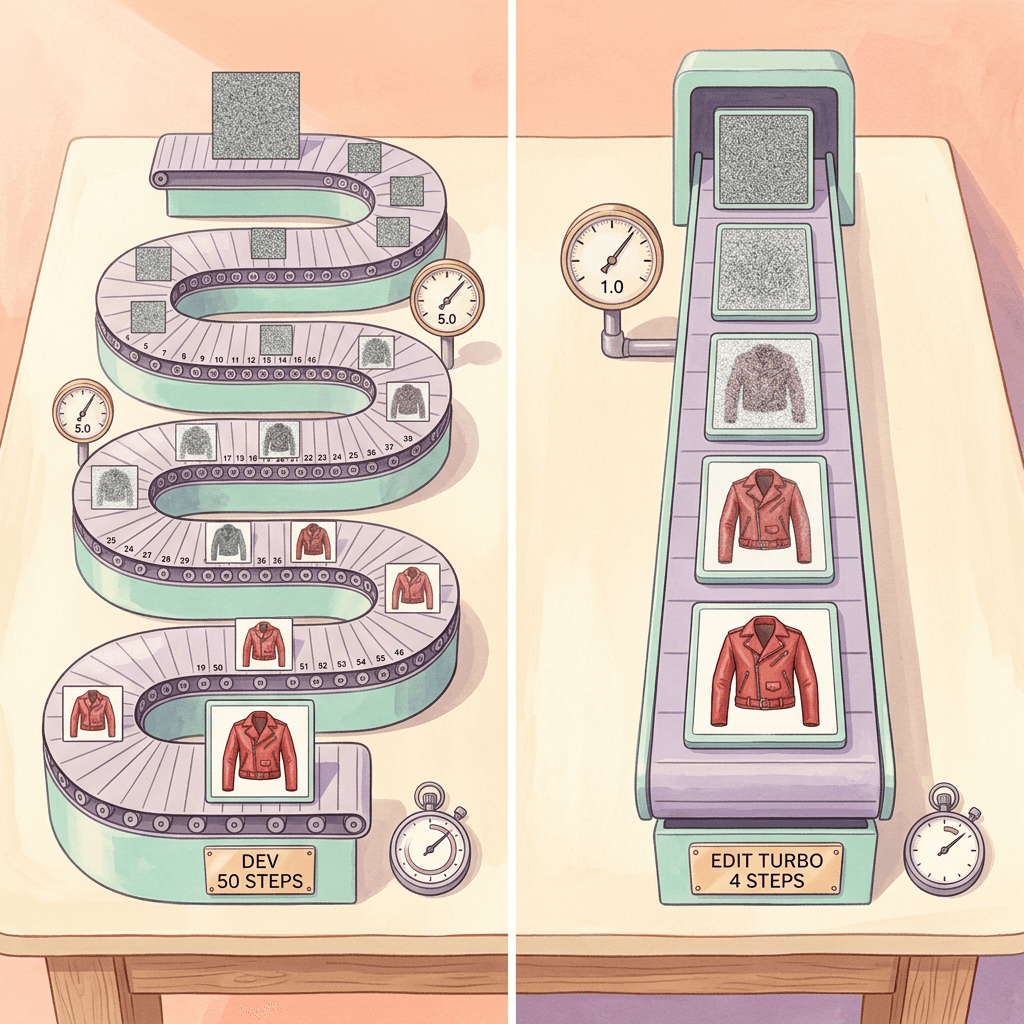
Classifier-free guidance, introduced as a way to trade diversity for fidelity without a separate classifier, normally evaluates a conditional and an unconditional prediction at each step [26]. The guidance-distillation paper describes the cost directly: guided models require evaluating two diffusion models tens to hundreds of times, and it distills them first into a single model that matches the combined output and then progressively into a model needing far fewer sampling steps, as few as 4 on its ImageNet experiments [27]. Fibo 2.0 Edit Turbo matches that pattern in its description: few steps, no classifier-free guidance, distilled from the base [2].
If the Dev pipeline runs both passes at every step (the card does not document pipeline internals, so this is the common implementation and not a confirmed detail), 50 guided steps would cost about 100 transformer evaluations against 4 for Turbo, a gap of roughly 25x per image before accounting for the VLM and VAE. Treat that as an upper bound on the speedup. Bria itself only says Turbo delivers Fibo 2.0 editing quality at a fraction of the latency and cost [2], and I have not seen published timings for either checkpoint.
Which checkpoint for which job
Use Edit Turbo for interactive and high-volume editing: catalog recolors, background swaps, social variants, anything where a human is waiting or a queue has thousands of images. Use Dev when you need text-to-image, when you want the best editing quality regardless of cost, or when you plan to train on top of it, since the Turbo card says that checkpoint is not intended for fine-tuning and tells you to start from Dev [2].
Step 8: Read the Benchmark Without Fooling Yourself
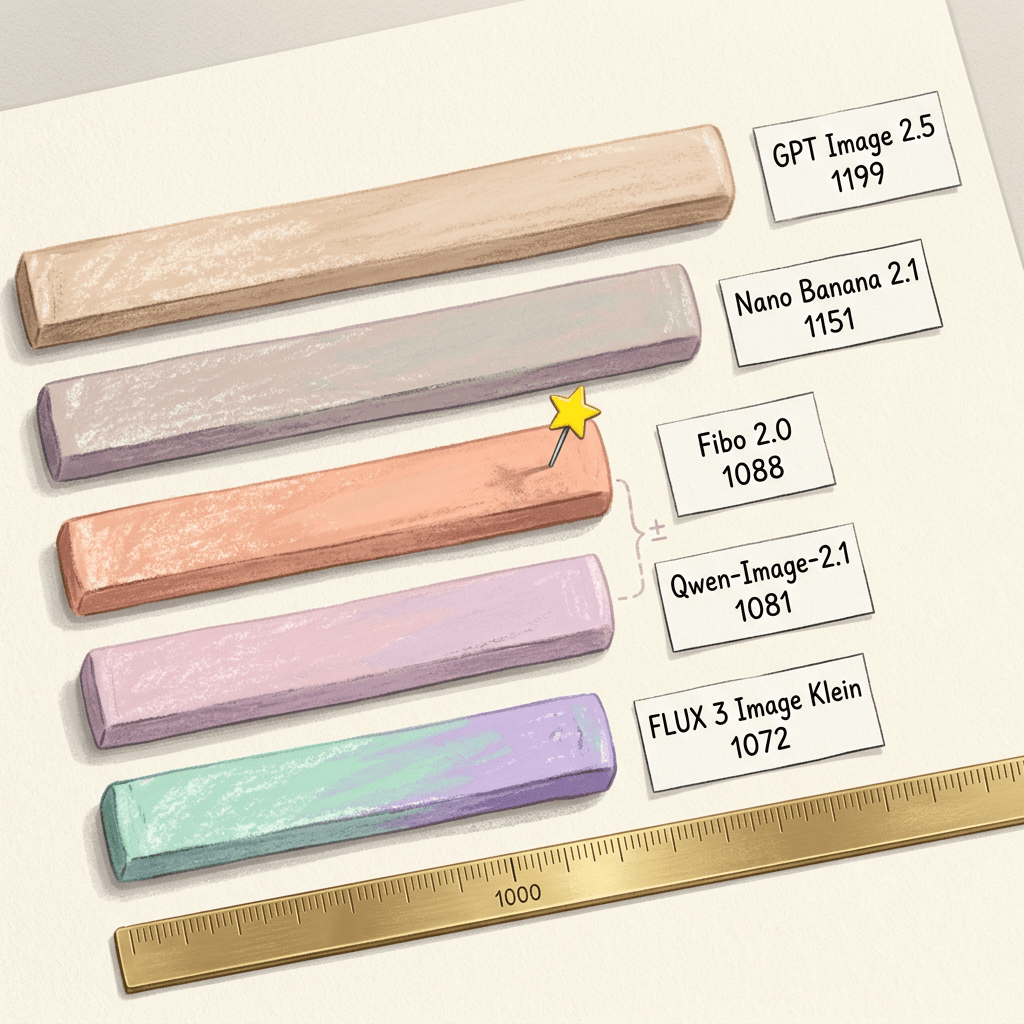
The model card opens with a claim: number one in image editing and number two in text-to-image among open-weights models on Artificial Analysis, as of October 20, 2026 [1]. The ComfyUI Wiki gives the editing Elo as 1087 for that snapshot [4]. When I read the live editing board for this post, it showed Fibo 2.0 at 1088 with a 95% interval of 1074 to 1102 over 5,009 samples, and its own summary line says Fibo 2.0 leads open-weights models on AA-Image-Editing v2.1, followed by Qwen-Image-2.1 at 1081 and FLUX 3 Image Klein at 1072 [8].
| Model | Elo | 95% interval | Hosted API price per 1,000 images |
|---|---|---|---|
| GPT Image 2.5 Sunburst (max) | 1199 | 1188 to 1210 | $210.7 |
| Nano Banana 2.1 | 1151 | 1138 to 1164 | $33.6 |
| Fibo 2.0 | 1088 | 1074 to 1102 | $32.0 |
| Qwen-Image-2.1 | 1081 | 1068 to 1094 | No API listed |
| FLUX 3 Image Klein | 1072 | 1058 to 1086 | $9.0 |
| FLUX.2 [dev] (anchor) | 1000 | Fixed reference | $24.0 |
Two cautions apply. First, the editing intervals overlap: Fibo 2.0 is 1088 plus or minus 14, and Qwen-Image-2.1 is 1081 plus or minus 13, so the 7-point gap sits well inside the noise, which is why AlphaSignal describes Fibo 2.0 as statistically tied with Qwen-Image-2.1 for the open-weights lead [8][10]. Second, the text-to-image board has moved since the card's snapshot. The live text-to-image page now lists FLUX 3 Image Klein at 1043, Qwen-Image-2.1 at 1042 and Fibo 2.0 at 1039 among open-weights models, so the second-place text-to-image claim has slipped within a few points [9]. For the October 20 snapshot, explainx lists text-to-image scores of 1038 for Fibo 2.0 and 1041 for Qwen-Image-2.1, a three-point gap that was already inside the noise [11].
How far behind are the closed models
Artificial Analysis ranks the whole field together. GPT Image 2.5 Sunburst leads the editing board at 1199, and Nano Banana 2.1 sits at 1151, which is 111 and 63 points above Fibo 2.0 respectively [8]. Assuming the board follows the usual 400-point logistic Elo convention (I am assuming this, the page does not spell it out in the section I read), a 111-point gap implies the leader wins about 65% of pairwise votes and a 63-point gap about 59%. That is a real but modest preference gap, and Fibo's hosted price on the same board is $32 per 1,000 images versus $33.6 for Nano Banana 2.1 and $210.7 for GPT Image 2.5 Sunburst [8]. The price is for Bria's hosted API, so it says nothing about the cost of running the non-commercial weights yourself [10].
Where the model is strong and weak
AlphaSignal's category breakdown, which it attributes to Artificial Analysis, puts Fibo 2.0 sixth in Enhancement and Restoration, and around fourteenth in scene and style edits, consumer edits and the frontier hard-prompt set. It also says the model is weakest at composition, framing and multi-step reasoning edits, and that text rendering and layout still lag even though they posted the biggest gains over the first FIBO [10]. That sits a little awkwardly with the card's claim of a leap in text rendering, and both can be true: a large gain over FIBO 1 can still leave a model behind the text-rendering leaders. If your job is poster typography, test it against a text specialist such as MOSS-Image or the layout-first approach in Canva Craft before committing.
Step 9: Compare With FLUX.2, Qwen-Image-Edit and Kontext
Fibo 2.0 is not the first model to unify generation and editing, and the comparison is worth making concrete. The table below uses only fields I could read on the primary pages.
| Model | Size | License | Reference images | Notes from primary pages |
|---|---|---|---|---|
| Fibo 2.0 Dev / Edit Turbo | 8B transformer plus Qwen3-VL-4B encoder | CC BY-NC 4.0, gated | Up to 4 | Structured JSON (VGL) captions, 50 steps (Dev) or 4 steps (Turbo) |
| FLUX.2 [dev] | 32B | FLUX non-commercial license, gated | Up to 10 (FLUX.2 family) | Mistral-3 24B VLM with a rectified flow transformer, up to 4MP output |
| Qwen-Image-Edit-2511 | About 20.4B in Hugging Face metadata | Apache 2.0 | See model card | Improved consistency, reduced image drift, integrated LoRA capabilities |
FLUX.2 is the closest architectural cousin. Black Forest Labs describes a latent flow-matching architecture that combines generation and editing in a single architecture, couples a Mistral-3 24B vision-language model with a rectified flow transformer, supports up to 10 reference images and outputs up to 4MP [15]. The FLUX.2 [dev] card calls it a 32 billion parameter model, gated with a non-commercial license [16]. Fibo 2.0 therefore trades scale and reference count (4 versus 10) for a smaller footprint and for the structured-caption control surface, and both tie their text encoder to a VLM and share the same family of VAE.
FLUX.1 Kontext is the older reference for the unified idea. Its abstract describes a flow matching model that unifies image generation and editing through simple sequence concatenation, with an emphasis on character consistency across multiple turns [19]. Fibo 2.0's card describes prepending context latents to the noisy latent in one sequence, which sits in the same family of in-context editing designs, although I have not seen Bria describe it as a Kontext-style recipe. The roadmap item that matters here is multi-turn editing: the card lists a multi-turn local editing LoRA as coming soon, which means multi-turn pixel stability is a promise and not a shipped capability [1].
Qwen-Image-Edit-2511 is the permissively licensed alternative. Its Hugging Face card is Apache 2.0, lists improvements in consistency, image drift, character consistency, integrated LoRA capabilities and geometric reasoning, and the repository's metadata shows about 20.4 billion parameters [17]. It builds on the Qwen-Image family described in a technical report [18]. If your project needs a permissive commercial license on the weights, that difference can outweigh a few Elo points [1].
The closed-model baselines
On hosted tools, Nano Banana 2.1 and the latest GPT Image models sit above every open-weights entry on the Artificial Analysis editing board [8]. ## Fine-Tuning, Licensing and the Commercial Question
Dev is the model to train on. The card describes a single-GPU LoRA trainer for editing and text-to-image in a fine_tuning/ folder, with a guide to preparing data, and notes that generation and editing share one set of weights so one fine-tune can teach a new style or domain and how to edit within it [1]. LoRA keeps the base weights frozen and trains small low-rank update matrices, which is what makes single-GPU training of an 8B model realistic [28]. The use cases the card names are brand and style LoRAs, domain specialists for product photography, fashion, interiors or food, and task-specific editors for narrow, reliable edit operations.
The licensing picture needs reading carefully. The weights are CC BY-NC 4.0, and the gate form states that commercial use requires a separate commercial agreement while academic access is limited to non-commercial research and teaching [1]. Separately, Bria markets the training data as 100% licensed, with governance, attribution traceability and legal clarity for commercial use, and the fal endpoint for Fibo 2.0 Edit advertises clear commercial rights for hosted use [1][12]. So the practical split is simple: experimenting and research on downloaded weights are fine, while anything commercial should go through Bria's API, the fal endpoints (bria/fibo-2/generate and bria/fibo-2/edit) or a commercial agreement [1][12].

On local tooling, the ComfyUI Wiki reports that native support landed in ComfyUI core on October 21 through PR 17240, for both Dev and Edit Turbo, with a fibo2 text-encoder type and a TextEncodeFibo2 node for VGL prompts and reference images [4]. The same page lists a Comfy-Org repack with bf16 and INT8 ConvRot variants of both checkpoints. If you prefer nodes to scripts, that is the shortest path from the gated download to a canvas.
Common Mistakes When Working With Structured-Prompt Editors
- Skipping the gate. Both repositories are gated, so a script that works on a colleague's machine fails on a fresh one until the account has accepted the terms and the token is configured [1].
- Using Dev settings on Turbo. Edit Turbo wants 4 steps and guidance 1.0, and a negative prompt does nothing there, so copying the Dev call with 50 steps wastes time without helping quality [2].
- Reusing the text-to-image negative prompt for edits. The card gives edits an almost empty structured caption, matching the empty caption the model trained with, and a plain-language negative prompt is not what the model was trained to read [1].
- Never reading the rewritten instruction.
scene.edit_instructionshows howmodify()interpreted your request. A wrong object or a broad rewrite there becomes a wrong render later. - Asking for far more than one megapixel. The model was trained at about one megapixel, so generate near that area and upscale in a separate step [1].
- Treating the leaderboard as a verdict. The editing lead over Qwen-Image-2.1 is inside the confidence interval, and the text-to-image standing changed within a week of the card's snapshot [8][9].
- Assuming roadmap items exist. Multi-turn editing, background removal, product shot and eraser LoRAs, and image expansion are listed as coming soon, not released [1].
Where This Fits in a Creator and Marketing Pipeline
Most creators will not run an 8B model locally, and the non-commercial license rules out the open weights for client work anyway, so the useful takeaways are about method. Structured prompts make a good checklist even when your tool accepts plain text: write down the subject, location, lighting direction, camera angle and style as separate lines, change one at a time and keep the winning version. Miraflow's AI image generator supports text-to-image, image-to-image, editing and mask-based inpainting in the browser, and the same discipline applies there: a precise region, a short instruction naming the replacement, and a note of what must stay the same.
For thumbnails, the multi-reference idea (a face, a product and a background combined into one frame) is the pattern behind most high-click designs, and the YouTube Thumbnail Maker lets you upload a face or an existing thumbnail and edit it from a prompt. For short-form video, consistent visuals across scenes matter, and Text2Shorts lets you edit the generated scene prompts before rendering, which is the same instinct as editing the JSON before you render. If you want to compare how other labs approach planning before pixels, the Canva Craft explainer and the Qwen Image 3.0 Pro prompt guide are good companions, and the Miraflow home page lists the rest of the toolkit.
What to Watch Next
The roadmap on the card (multi-turn local editing, background removal, product shot and eraser LoRAs, image expansion) is the thing to watch, along with independent text-rendering tests and the diffusers and ComfyUI tooling settling [1][10].
Frequently Asked Questions
What is Fibo 2.0?
Fibo 2.0 is Bria's 8B open-weights flow-matching model that generates and edits images with one set of weights. It reads structured JSON prompts in a format called VGL and was trained exclusively on licensed data, according to the model card [1].
What is the difference between Fibo 2.0 Dev and Edit Turbo?
Dev is the full non-distilled model that does text-to-image and editing at 50 steps with guidance 5.0 and is the one to fine-tune. Edit Turbo is distilled from Dev for editing only at 4 steps with guidance 1.0, and negative prompts have no effect on it [1][2].
Can I use Fibo 2.0 commercially?
The downloadable weights are released under CC BY-NC 4.0 and commercial use needs a separate agreement with Bria. Hosted access through Bria's API and the fal endpoints is the route for commercial work, and you should confirm current terms with the provider [1][12].
How many reference images can Fibo 2.0 combine?
Up to 4 reference images, referred to in the instruction as <image_1>, <image_2> and so on in the order they are passed to the pipeline [1]. FLUX.2, by comparison, advertises up to 10 [15].
Do I need a Gemini key to run it?
The card says bria-vgl runs on Gemini and asks you to set a GEMINI_API_KEY, which covers the step that turns a short prompt or edit instruction into the structured JSON. If you write the VGL JSON yourself, you skip that expansion step [1][4].
What architecture does Fibo 2.0 use?
A single-stream DiT with 44 blocks, flow matching in the FLUX.2 VAE latent space, a Qwen3-VL-4B-Instruct encoder, a two-layer Perceiver resampler that compresses VLM output into 256 to 512 gist tokens, and five blocks that take cross-attention from internal VLM layers [1].
Is Fibo 2.0 really the best open image editing model?
It leads open-weights models on the Artificial Analysis editing board at an Elo of 1088 when I read it, but its interval overlaps Qwen-Image-2.1 at 1081, so the honest reading is a tie at the top of the open-weights group, with closed models ahead overall [8].
Which hardware do I need?
The repository holds about 25.5 GB of weights across the transformer, text encoder and VAE, and the card suggests FlashAttention-3 on Hopper GPUs for speed [4][1]. Bria does not publish a minimum VRAM figure on the cards, so test with offloading or the INT8 repack on smaller cards.
How is Fibo 2.0 different from the first FIBO?
FIBO 1 was a text-to-image model with SmolLM3-3B and the Wan 2.2 VAE, trained on 120M licensed image-caption pairs [6]. Fibo 2.0 adds editing, moves to Qwen3-VL-4B and the FLUX.2 VAE, and adds the Perceiver gist tokens [1].
Conclusion
Fibo 2.0 is interesting less for its leaderboard position than for what it asks you to do differently: write images as structured documents, edit them as diffs, and keep the documents. Its architecture is compact for what it does (an 8B transformer with 44 single-stream blocks, a Qwen3-VL-4B encoder compressed into 256 to 512 gist tokens, the FLUX.2 VAE), the Dev and Edit Turbo split gives a clear quality-versus-latency choice at 50 steps versus 4, and masked and four-reference editing cover most catalog and compositing jobs. The caveats are equally clear: gated, non-commercial weights, an LLM call for prompt expansion, a text-to-image standing that has already drifted from the card's snapshot, and a roadmap of promised LoRAs that have not shipped.
If you work with images for a living, the habit worth borrowing is the diff. Describe subject, light, camera and style as separate fields, change one at a time, and record what changed. You can practice that today with Miraflow's AI image generator and the YouTube Thumbnail Maker, and then bring the same discipline to Fibo 2.0 when you are ready to run the weights.
References
- briaai/Fibo-2.0-dev model card, Hugging Face - https://huggingface.co/briaai/Fibo-2.0-dev
- briaai/Fibo-2.0-edit-turbo model card, Hugging Face - https://huggingface.co/briaai/Fibo-2.0-edit-turbo
- Hugging Face API metadata for briaai/Fibo-2.0-dev - https://huggingface.co/api/models/briaai/Fibo-2.0-dev
- ComfyUI Wiki: Fibo 2.0, Bria's 8B open-weights model edits and generates images - https://comfyui-wiki.com/en/news/2026-10-20-fibo-2-0
- Generating an Image From 1,000 Words: Enhancing Text-to-Image With Structured Captions (arXiv 2511.06876) - https://arxiv.org/abs/2511.06876
- Generating an Image From 1,000 Words, HTML version - https://arxiv.org/html/2511.06876
- Bria: FIBO Edit, High Quality AI Image Editing with Maximum Controllability - https://bria.ai/blog/fibo-edit
- Artificial Analysis: AA-Image-Editing v2.1 leaderboard - https://artificialanalysis.ai/image/leaderboard/editing
- Artificial Analysis: AA-Image-T2I v2.1 leaderboard - https://artificialanalysis.ai/image/leaderboard/text-to-image
- AlphaSignal: Bria's FIBO 2.0 Matches Qwen on Open-Weights Image Benchmarks at Half the Price - https://alphasignal.ai/news/bria-s-fibo-2-0-matches-qwen-on-open-weights-image-benchmarks-at-half-the-price
- explainx.ai: Bria Fibo 2.0, Open-Weights 8B Image Model Ties for the Lead - https://explainx.ai/blog/bria-fibo-2-0-open-weights-image-editing-text-to-image-8b-non-commercial-32-per-1k-claimed-vs-verified-2026
- fal: bria/fibo-2/edit - https://fal.ai/models/bria/fibo-2/edit
- bria-vgl on PyPI - https://pypi.org/project/bria-vgl/
- diffusers on PyPI - https://pypi.org/project/diffusers/
- Black Forest Labs: FLUX.2 - https://bfl.ai/blog/flux-2
- black-forest-labs/FLUX.2-dev model card, Hugging Face - https://huggingface.co/black-forest-labs/FLUX.2-dev
- Qwen/Qwen-Image-Edit-2511 model card, Hugging Face - https://huggingface.co/Qwen/Qwen-Image-Edit-2511
- Qwen-Image Technical Report (arXiv 2508.02324) - https://arxiv.org/abs/2508.02324
- FLUX.1 Kontext: Flow Matching for In-Context Image Generation and Editing in Latent Space (arXiv 2506.15742) - https://arxiv.org/abs/2506.15742
- Flow Matching for Generative Modeling (arXiv 2210.02747) - https://arxiv.org/abs/2210.02747
- Flow Straight and Fast: Learning to Generate and Transfer Data with Rectified Flow (arXiv 2209.03003) - https://arxiv.org/abs/2209.03003
- Scalable Diffusion Models with Transformers (arXiv 2212.09748) - https://arxiv.org/abs/2212.09748
- Perceiver: General Perception with Iterative Attention (arXiv 2103.03206) - https://arxiv.org/abs/2103.03206
- Flamingo: a Visual Language Model for Few-Shot Learning (arXiv 2204.14198) - https://arxiv.org/abs/2204.14198
- Qwen3-VL Technical Report (arXiv 2511.21631) - https://arxiv.org/abs/2511.21631
- Classifier-Free Diffusion Guidance (arXiv 2207.12598) - https://arxiv.org/abs/2207.12598
- On Distillation of Guided Diffusion Models (arXiv 2210.03142) - https://arxiv.org/abs/2210.03142
- LoRA: Low-Rank Adaptation of Large Language Models (arXiv 2106.09685) - https://arxiv.org/abs/2106.09685
- Hugging Face API metadata for briaai/Fibo-2.0-edit-turbo - https://huggingface.co/api/models/briaai/Fibo-2.0-edit-turbo