MOSS-Image Explained: Open 5B Text Rendering and Layout Model, Benchmarks and Code (2026)

Written by
Aerin Kim
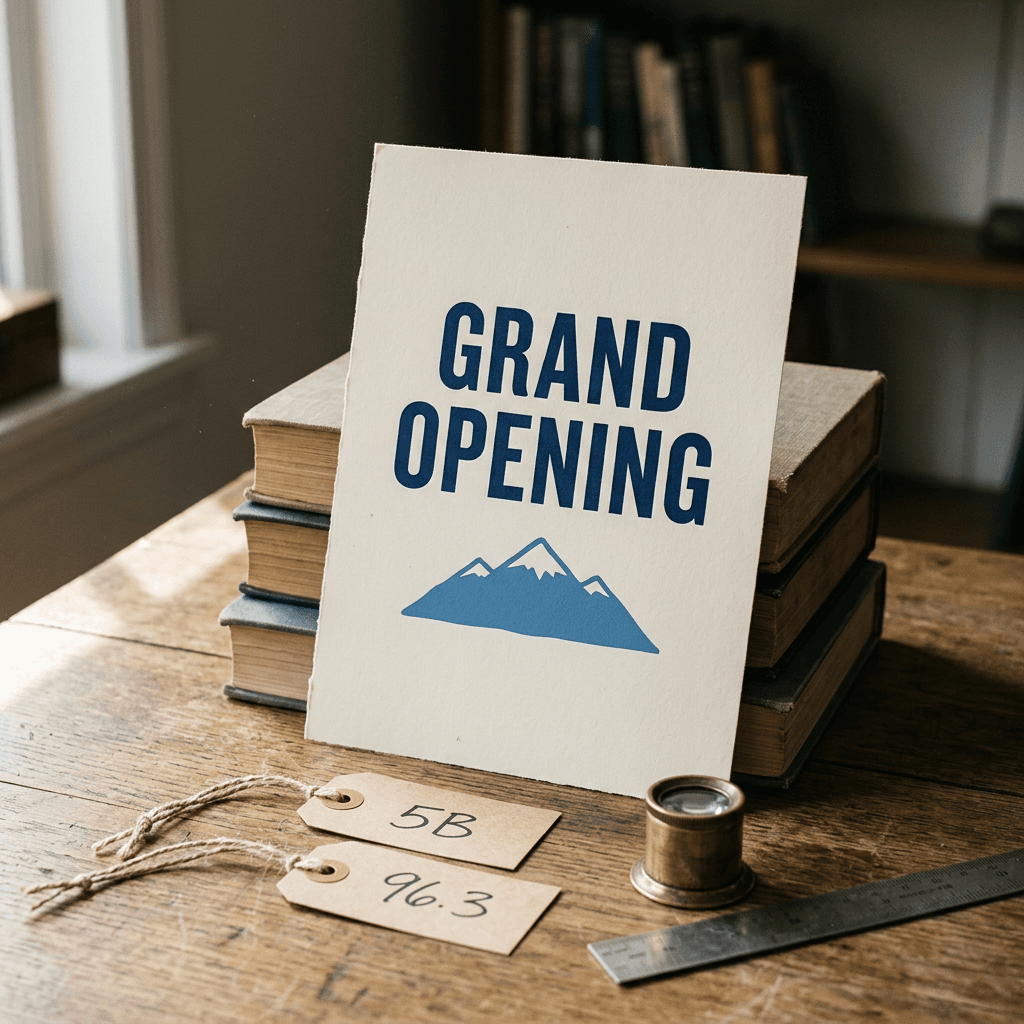
MOSS-Image is an Apache-2.0 5B model for dense text and JSON layouts. See why text rendering is hard, what its 96.3 score really measures, how it compares, and runnable code.
If you have ever asked an open-weight image model for a poster headline and received a word that looks as if it was typeset during an earthquake, you have met the dense text rendering problem. MOSS-Image, which OpenMOSS released on October 16, 2026 under the Apache-2.0 license, is one of the most ambitious open attempts to fix it: a 5 billion parameter diffusion transformer that uses a Qwen3.5-9B language model as its text encoder and accepts an optional JSON layout that pins every line of text and every object to a bounding box [1][2][3]. Its technical report claims a 96.3 average text coverage score on LongLongTextBench, against 64.9 for Qwen Image 2512 on the same test [1].
This post is the engineering read of that release. It explains why text is hard for diffusion models in the first place, walks through the architecture and training recipe described in the report, shows what the layout JSON actually does, separates the open weights from the GPT-6 powered prompt enhancer behind the headline arena result, and compares MOSS-Image with Qwen-Image, Ideogram 4.0, GPT Image 2, FLUX.2 and ERNIE-Image using only numbers I could trace to a source. It ends with runnable Python and bash, most of which I executed locally because it does not need a GPU, and with a plain account of what I could not verify.
One caveat shapes everything below. LongLongTextBench and RealLayoutArena, the two benchmarks behind the headline numbers, were built by the MOSS-Image authors, and the authors also ran the competing models themselves [1]. They are self-reported results from a vendor-built evaluation, not independent audits. I also found no third-party text-rendering benchmark that includes the model yet, and Artificial Analysis's text-to-image leaderboard did not list it when I checked on October 22, 2026 [4].
Quick summary before the depth:
- What it is: a 5B single-stream diffusion transformer working in the FLUX.2 latent space, conditioned by a frozen Qwen3.5-9B text encoder, released as a Base checkpoint and an SFT checkpoint under Apache-2.0, with a technical report on arXiv (2610.23374) [1][2][5].
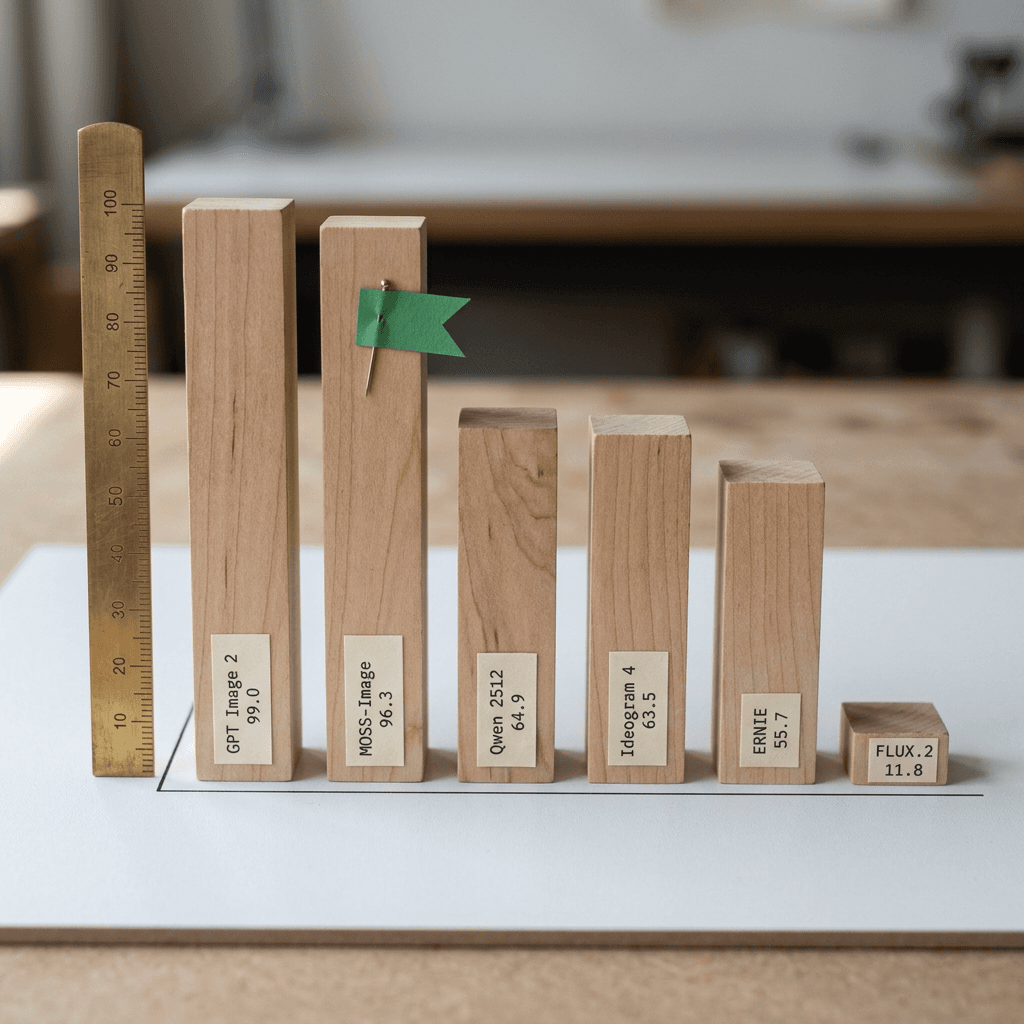
- Text rendering claim: 96.3 Mean-6 coverage on LongLongTextBench (LLTB), versus 99.0 for GPT Image 2, 96.6 for Nano Banana Pro, 64.9 for Qwen Image 2512 and 11.8 for FLUX.2 in the authors' own runs [1].
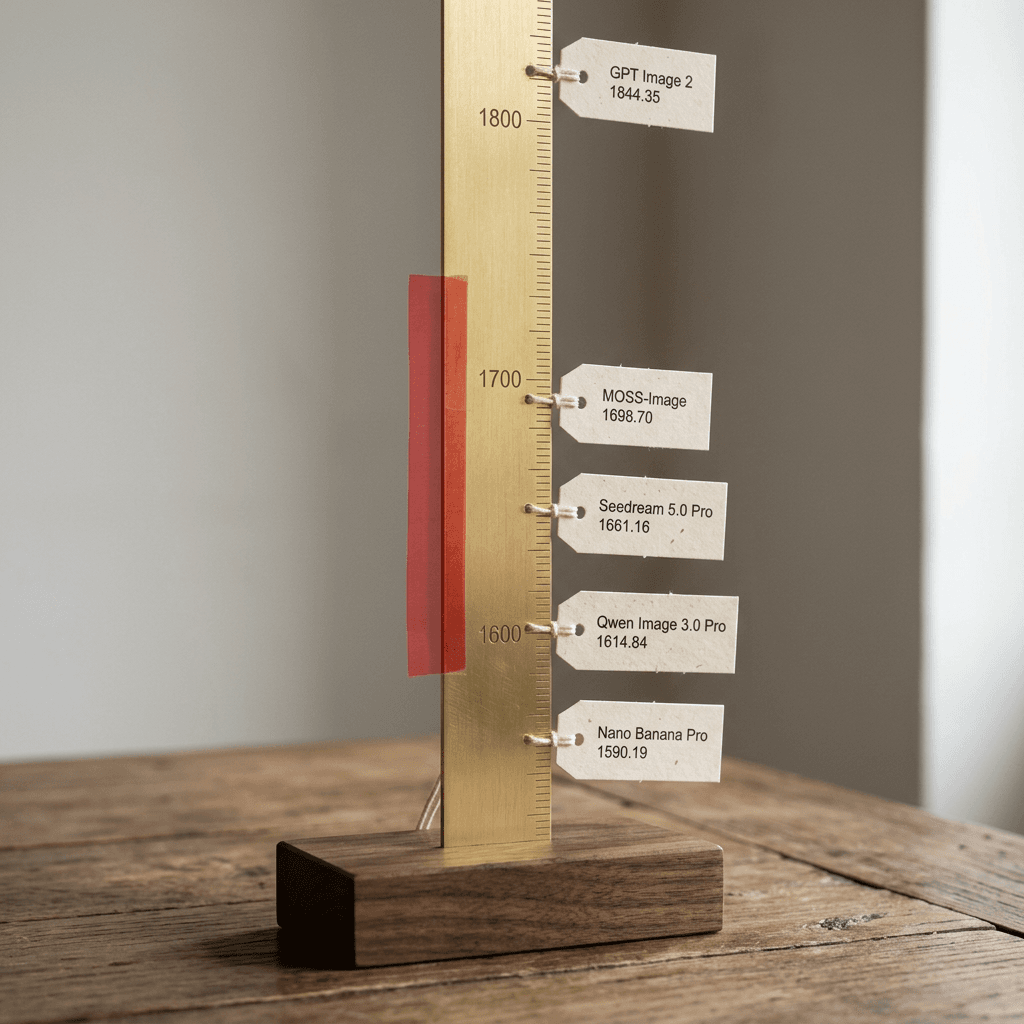
- Layout claim: JSON bounding-box prompts, with a mean IoU over detected objects of 0.88 on 7Bench against 0.44 for Ideogram 4.0 in the authors' evaluation, and an end-to-end RealLayoutArena rating of 1698.70 Elo, second behind GPT Image 2 at 1844.35 [1].
- The catch on that rating: the end-to-end system includes a layout planner that runs on GPT-6, which is an external model and not part of the open weights [1].
- Stated limitations: no reference-image conditioning and no image editing, and a prompt enhancer that depends on external language models [1].
- Who should care: anyone making posters, infographics, slides, UI mockups or thumbnail layouts where the wording must be correct and where self-hosting an open model is acceptable.
What OpenMOSS Released on October 16, 2026
The GitHub README dates the launch to October 16, 2026 and says that code and model weights for MOSS-Image-Base and MOSS-Image-SFT are publicly available [3]. The technical report, authored as MOSI.AI with affiliations to MOSI Intelligence, SII, Fudan University and Shanghai Jiao Tong University, was submitted to arXiv the same day [1]. Both Hugging Face repositories carry the Apache-2.0 license tag, and the model card states that the weights and bundled inference code are released under Apache-2.0 [2][5].
The two checkpoints are meant for different jobs. The user guide is blunt that the Base model has had no post-training or distillation of inference parameters such as classifier-free guidance, which preserves the training information for LoRA work and also means you must pick sensible sampling settings yourself [6]. The SFT checkpoint is supervised fine-tuned from Base on curated data, and the model card's own comparison shows it producing clearer text grouping and a more organized whiteboard layout on one example [2]. For generating images, start with SFT. For training your own LoRA or full fine-tune, start with Base.
The ecosystem moved quickly. Core ComfyUI support was merged on October 16 through pull request 17095 [7], and ComfyUI Wiki describes a new Layout Prompt node that converts boxes drawn with the Create Bounding Boxes node into the model's layout JSON [8]. The README also lists day-0 support in SGLang and vLLM-Omni, although OrcaRouter reported at the time that the vLLM-Omni pull request was still open and not part of any released version, so treat that serving path as unsettled [3][9]. The README further lists a hosted API on the MOSI platform from October 20, community LoRA training tools such as KohakuMossTrainer (which it says can train adapters with as little as 6GB of VRAM), a community 8-step distillation, FP16-compatible weights, and community LoRAs that reduce vertical color banding in SFT outputs [3]. The Hugging Face download counter for the ComfyUI repackage read about 1.46 million on October 22, though a counter measures file fetches and not unique users [10].
What "5B" Does and Does Not Include
The report is explicit that the 5B designation covers the diffusion generator only and excludes the frozen text encoder and the VAE [1]. File sizes show how much that matters in practice. In the SFT Diffusers repository the transformer shards total about 10.16 GB, the Qwen3.5-9B text encoder shards about 16.79 GB and the VAE about 0.25 GB, roughly 27.2 GB in all, so the encoder is about 1.65 times the size of the model it conditions [2]. The ComfyUI repackage offers smaller options, including a 5.41 GB int8 diffusion checkpoint and a 7.34 GB w4a8 text encoder, which together with the 0.34 GB VAE come to about 13.1 GB of weight files [10].
I could not find an official VRAM figure, and ComfyUI Wiki gives none either, so the file sizes above are the honest planning numbers and not memory requirements [8]. The README offers three memory modes in its Gradio app (GPU resident, component offload between CPU and GPU, and a slower sequential fallback), which is a hint that many consumer cards will need offload or quantization [3].
Why Text Rendering Is Hard for Diffusion Models
A diffusion model that draws a convincing dog has an easy job in one respect: any dog-shaped result is acceptable. Text offers no such tolerance, because a single wrong stroke turns a letter into a different letter and a single wrong letter breaks a word. Four separate bottlenecks make this hard, and each one is addressed by a different part of the MOSS-Image design.
Bottleneck 1: The Text Encoder Sees Pieces of Words, Not Letters
Most text-to-image systems turn a prompt into subword tokens before any model sees it. Liu and colleagues at Google Research argued that popular text-to-image models lack character-level input features, which makes it much harder for them to predict a word's visual makeup as a series of glyphs [11]. Their experiments found that character-blind encoders can learn near-perfect spelling from web pretraining, but only at scales above 100B parameters, while character-aware encoders reach robust spelling at far smaller scale [11]. That finding sits next to an earlier discovery from the Imagen paper, that large frozen language models trained only on text are surprisingly effective text encoders and that scaling the encoder improved fidelity and alignment more than scaling the image model [12].
Encoders matter specifically for written text. In the Stable Diffusion 3 paper's ablation, a version without the T5-XXL encoder at inference had a 50 percent win rate on aesthetics, 46 percent on prompt adherence and only 38 percent on the ability to generate written text [13].
You can see the problem directly in the tokenizer that ships with MOSS-Image. The repository includes a Qwen2 tokenizer, and running it on the exact strings a poster might use produces the following splits, which I generated with the script further down:
- EXPLORE becomes three pieces: EXP, LO, RE.
- GRAND OPENING SALE becomes five tokens, while Grand Opening Sale becomes three.
- Strawberry becomes Str, aw, berry.

The DiT does not receive token ids, though. It receives the final-layer hidden states of the 9B encoder, a 4096-dimensional vector per token, and the pipeline code wraps your prompt in the Qwen chat template before encoding it [1][14]. Those hidden states carry far more than the identity of a chunk, which is why a 9B model can still help, but the knowledge of how EXP, LO and RE are spelled must come from the language model's pretraining and from the image-text training that follows. My reading of this evidence (an inference, not a claim from the report) is that all-caps headlines are a harder case than ordinary mixed-case words for a subword tokenizer, so it is worth rendering both variants of a headline and keeping whichever spells correctly. The report's training recipe attacks the same problem from the data side by transcribing visible text verbatim, line breaks included, which I return to below.
python/code
from huggingface_hub import hf_hub_download
from tokenizers import Tokenizer

# The tokenizer folder ships inside the MOSS-Image-SFT repo (a Qwen2 tokenizer).
path = hf_hub_download("OpenMOSS-Team/MOSS-Image-SFT", "tokenizer/tokenizer.json")
tok = Tokenizer.from_file(path)

for text in ["EXPLORE", "GRAND OPENING SALE", "Grand Opening Sale", "Strawberry", "SUMMER SALE 50% OFF"]:
    pieces = tok.encode(text).tokens
    # "Ġ" is the byte-level marker for a leading space.
    print(f"{text!r:<24} {len(pieces)} tokens: {pieces}")
Bottleneck 2: The Latent Grid Is Coarse for Small Glyphs
Latent diffusion does not paint pixels. It generates a compressed latent representation that a VAE decodes into pixels, and the quality of that decode caps the quality of every glyph. MOSS-Image uses the frozen FLUX.2 VAE, which downsamples each spatial dimension by 8 and produces 32 latent channels. The DiT then groups each 2 by 2 block of latent cells into one token, so every image token covers a 16 by 16 pixel square and carries 128 numbers, and a 1024 by 1024 image becomes 4,096 image tokens [1].
Some arithmetic shows what that means for lettering. A 16 by 16 pixel cell holds 768 raw color values (16 x 16 x 3), compressed to 128 numbers, a ratio of 6 to 1. Capital letters set 24 pixels tall span about one and a half token rows, and at typical letter proportions that is roughly one token per letter across a line, so a word like EXPLORE occupies about seven token columns. Footnote-sized text at 12 pixels tall fits entirely inside one token row, and one token must then describe parts of two neighboring letters at once. These are my illustrative numbers under assumed letter proportions, not figures from the report, but they explain why small print is where models break first.

Published numbers confirm that the VAE sets a ceiling. In the Stable Diffusion 3 paper, moving the autoencoder from 4 to 8 to 16 latent channels at the same 8x downsampling raised PSNR from 25.12 to 26.40 to 28.62 and lowered FID from 2.41 to 1.56 to 1.06 [13]. The Qwen-Image report goes further for text specifically: it fine-tuned only the decoder on a corpus of documents, slides, posters and synthetic paragraphs, and measured PSNR on text-rich 256 by 256 images of 36.63 dB for its VAE, against 32.65 for the FLUX.1 VAE, 29.93 for the SD-3.5 VAE and 26.77 for the Wan2.1 VAE [15]. A spread of roughly ten decibels between public VAEs on text images is large, and it shows that choosing and training the autoencoder is a text-rendering decision.
MOSS-Image takes a different route: it keeps the FLUX.2 VAE frozen and loaded from the FLUX.2-klein-4B release, and the model card notes that the bundled VAE uses the FLUX.2 small decoder [1][2]. I could not find a published text-reconstruction score for the FLUX.2 VAE (the Qwen table covers the older FLUX.1 VAE), and I have not seen the small decoder measured for text fidelity, so I treat the VAE as an open question for anyone planning very small print.
Bottleneck 3: Data Rarely Contains the Text You Want, and Filtering Can Delete It
Web image-text pairs usually have alt text that describes a scene and ignores the words inside the picture. MOSS-Image addresses this by re-captioning with Gemma 4 at three granularities (short, medium and long, with mean lengths of 21, 77 and 235 tokens), transcribing visible text without translation and preserving line breaks, order, position, font and color [1]. During training, original captions and recaptions are sampled at a 20 to 80 ratio, and a subset of images also gets structured layout annotations with bounding boxes and transcribed text [1].
The most instructive result in the report is a data ablation. The authors compared a deduplicated, recaptioned ReLAION baseline against a version filtered on width and height, aspect ratio, entropy, brightness, saturation, watermark area and a "natural score," which kept 43.35 percent of the 1.18 billion source records. On an early 24-layer model trained for 1.6 million steps, the filter left DPG-Bench almost unchanged (82.420 versus 82.411), yet the OneIG text score fell from 0.5243 to 0.1180 [1]. A filter that looks harmless on a general benchmark nearly erased text ability. The report concludes with a rule worth remembering, "annotate rather than filter," so blurry or watermarked images stay in the corpus and the caption says what is wrong with them [1]. My guess is that filters on entropy and saturation penalize flat graphic designs and posters, which are the images that teach lettering, though the report does not test that explanation.
The final corpus is also instructive for what it lacks. Summing Table 8 of the report, the three sources that look text-oriented by name (TextAtlas5M, TextRecap and Poster100K) retain about 4.3 million records out of roughly 3.2 billion, around 0.13 percent [1]. Most of the text ability therefore seems to come from recaptioning general web images (my inference), which contrasts with Qwen-Image's approach of a data pipeline that includes synthesis and a curriculum that starts with non-text images and progresses to paragraph-level text [15]. The report also notes that training captions are predominantly English, without dedicated Chinese caption annotation, even though the model scores well on Chinese passages [1].
Bottleneck 4: Long Text Multiplies Every Failure
If a model renders each word correctly 99 percent of the time and the words fail independently, a 50-word block comes out fully correct about 60 percent of the time (0.99 to the 50th power) and a 250-word block about 8 percent. Real errors are not independent, but the compounding intuition is why benchmarks built on short strings stop discriminating between strong models. LongText-Bench, introduced in the X-Omni paper and covering 8 scenarios, averages only 120.3 characters per target in the MOSS-Image report's count [16][1]. The MOSS-Image report notes that scores collected for that benchmark cluster between 96.05 and 98.85, which they treat as near saturation, and builds LLTB with targets averaging 1,339.8 characters, about 11.1 times longer [1].
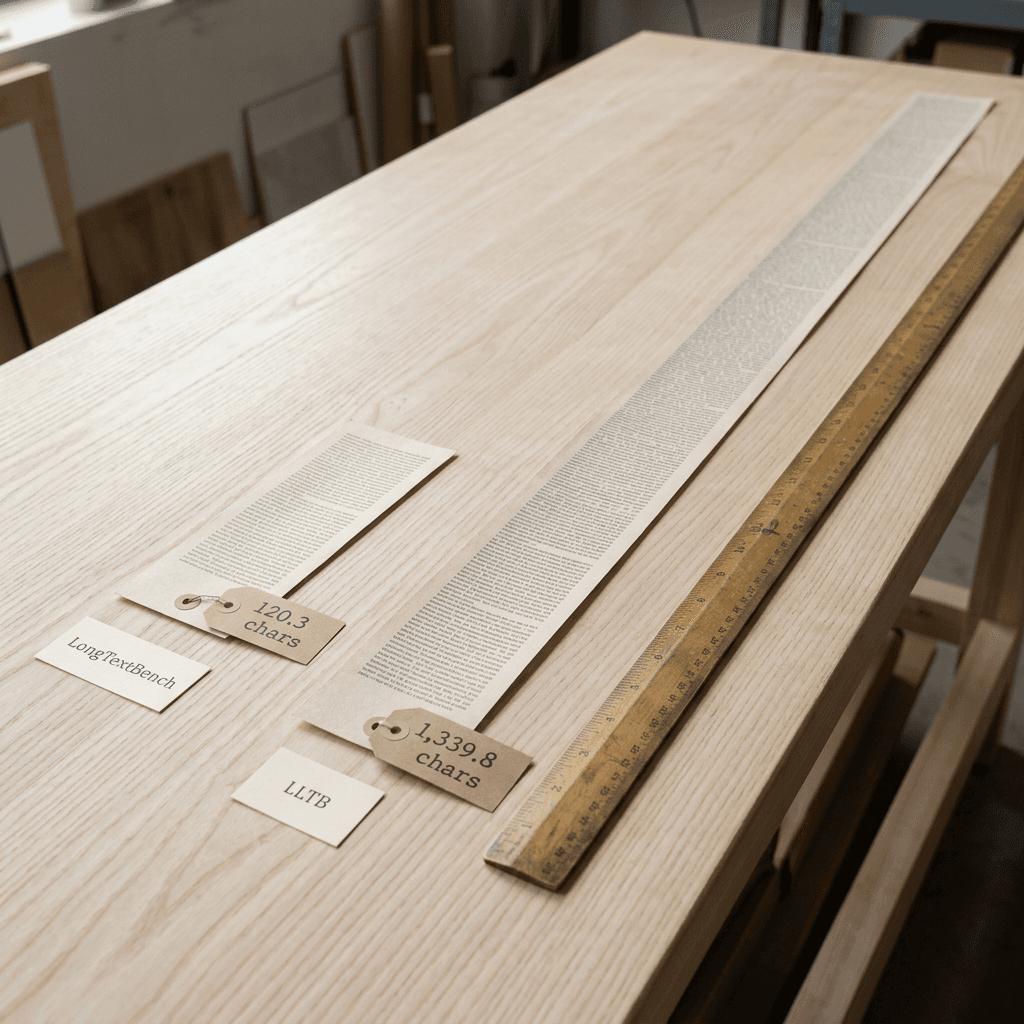
The two benchmarks give very different pictures of the same models. Qwen Image 2512 scores 96.05 on LongText-Bench in the report's collected table but 64.9 on LLTB, and ERNIE-Image with prompt enhancement scores 97.30 on the former while the plain ERNIE Image row on LLTB is 55.7 (the configurations differ, so this pair is suggestive and not exact) [1]. ERNIE's own report gives 0.973 overall on LongText-Bench [17]. The practical lesson for a creator is that a model's short-headline reliability tells you little about how it will do on a paragraph, a menu or an infographic panel.
Inside MOSS-Image: Architecture and Training Recipe
The report's configuration table gives the generator's exact shape, and the Hugging Face config files agree with it: 42 blocks, hidden size 3072, 24 attention heads of 128 dimensions, an FFN width of 8192 and 128 latent channels per token [1][2].
| Component | Configuration (technical report, Table 5, plus Section 3) |
|---|---|
| Diffusion generator | 5B single-stream transformer, 42 blocks, hidden size 3072, 24 heads of 128 dimensions, FFN width 8192 |
| Text encoder | Qwen3.5-9B, frozen, final-layer hidden states of dimension 4096 |
| Text adapter | Linear projection 4096 to 3072 plus two text-only transformer blocks |
| Image latents | FLUX.2 VAE, frozen, 32 channels, 8x spatial downsampling |
| Image tokens | 2 x 2 latent patches, 128 values per token, effective stride of 16 pixels (1024 x 1024 gives 4,096 tokens) |
| Text length | Up to 4,096 tokens in the final training stage and in the pipeline |
| Position encoding | 4D RoPE over reference index, sequence position, width and height (reference axis unused today) |
| Feed-forward and norms | SiTU-GLU gated feed-forward with shared modulation |
| Optimizer | Muon for eligible weight matrices, AdamW for the rest |
The block design follows the single-stream pattern popularized by the diffusion transformer line of work [18]: text tokens and noised image tokens share one sequence and one set of joint self-attention weights, rather than living in separate streams. The report lists shared modulation, a gated feed-forward layer it calls SiTU-GLU, and a 4D rotary position embedding over reference index, sequence position, width and height [1]. The reference-index axis is set to zero for every token in the current model, which leaves it unrotated, and the report says it was retained to allow future extension to reference-conditioned generation [1]. That detail lines up with the stated limitation that the current model has no image conditioning.
One Text Pathway for Prose, Tags and Layouts
The most consequential design decision is a negative one: the architecture the report describes has no box encoder, no ControlNet-style side branch and no extra conditioning module for layouts. The report says natural-language descriptions and explicit layout specifications are learned through a single text-conditioning pathway [1]. A layout is simply more text that the Qwen encoder reads, serialized as JSON, and the DiT learns during training that bounding-box numbers in that text correspond to where things appear. This contrasts with the related work the report cites, such as ControlNet, GLIGEN and LayoutDiffusion, which add spatial control through auxiliary modules or inference-time constraints [1].
To make that work, the training data has to teach the format. Structured annotations come in two schema families, a scene and elements format and the summary and items format that the public model card documents, and the report randomizes how coordinates are written: normalized 0 to 1000 boxes, absolute pixel boxes or center-relative pixel boxes, sampled with probabilities of 0.4, 0.3 and 0.3 in one branch [1]. Optional fields are randomly dropped and element order is shuffled, so the model sees many partial layouts and does not depend on any one field [1].
Two small findings from the report's case studies are directly useful when you write prompts. First, explicit line breaks help: in a denoising comparison over 30 steps, the character content of many lines was already distinguishable at step 8 when the prompt included line breaks, while without them several rows stayed ambiguous and malformed characters persisted at the end [1]. The report sums it up as "text line breaks are also a form of layout." Second, zero-centered absolute coordinates generalized better to a resolution not seen in training than coordinates normalized to a 0 to 1000 range, which is why the public format uses absolute pixels measured from the canvas center [1][6].
Training Schedule and Optimizer
Training progressed through stages of rising resolution and text length: 256-pixel and 512-pixel stages of 2.1 million steps each, then stages at mixed resolutions up to roughly 1024 by 1024 and beyond, with the text-token cap climbing from 320 to 4,096 [1]. (The report's prose says three stages while its Table 1 lists four, so I quote only the figures that agree.) The optimizer is a hybrid of Muon for eligible weight matrices and AdamW for the rest, chosen because in a 1B-parameter ablation Muon reached a denoising loss of 0.41 in 257K steps against 385K for AdamW, which is 33.2 percent fewer [1]. The report cautions that its ablations do not isolate the causal contribution of individual choices, and that 1B result was not run at 5B scale [1].
At inference the model uses flow matching with an Euler sampler. The default guidance is classifier-free guidance at 3.0 with a negative branch replaced by a pass that skips block 22, so each step costs two transformer forwards, as the pipeline code documents [14]. Prompts can run to 4,096 tokens, which leaves room for a layout JSON with many items [14].
Layout Control: What the JSON Does and Does Not Do
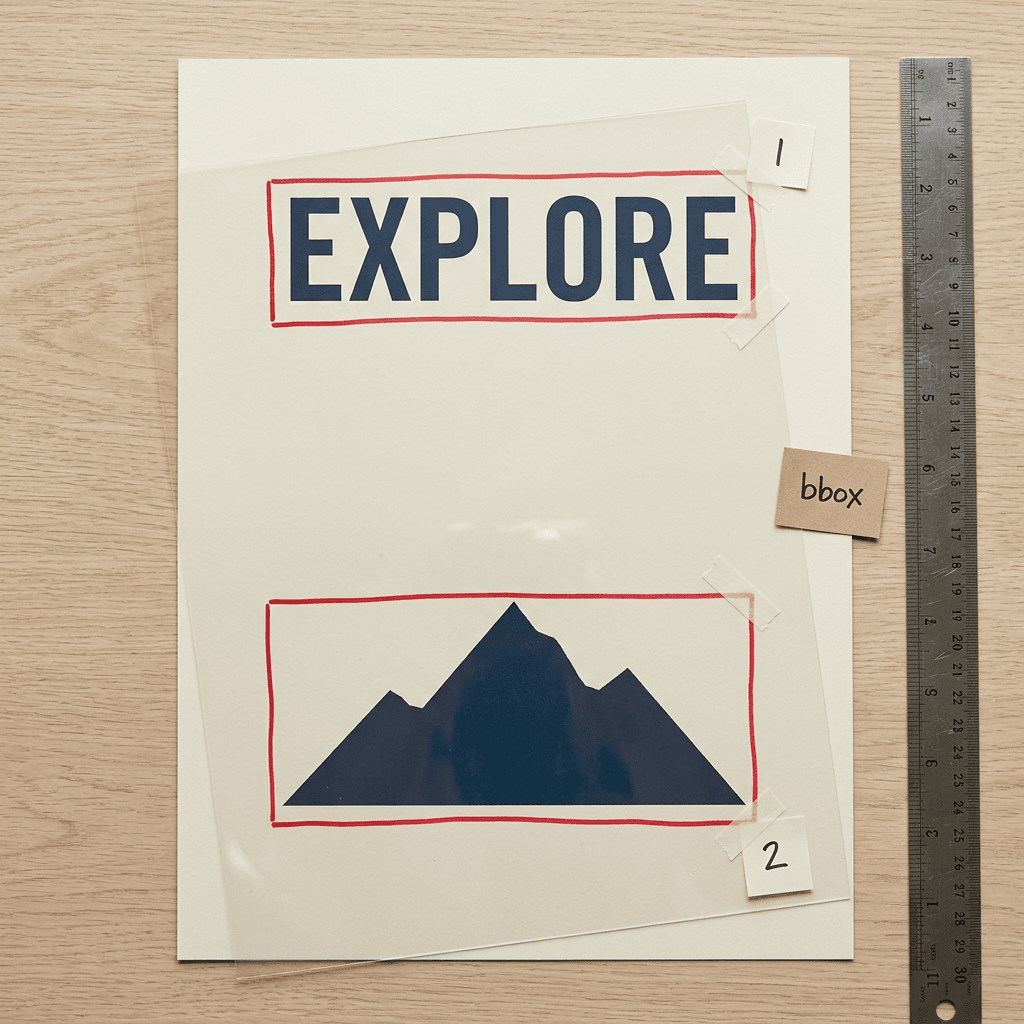
The public layout format is short enough to read in a minute. A summary describes the whole scene, and a flat list of items gives each element a label (text or object), a caption, optional literal text and a box. Boxes are listed as [y_min, x_min, y_max, x_max] in absolute pixels measured from the canvas center, so a 1024 by 1024 canvas runs from -512 to 512 on both axes, with x growing to the right and y growing downward [6]. The coordinates must match the width and height you generate at, and the Python API requires both sides to be multiples of 16 [6][14].
json/code
{
  "summary": {
    "meta": [
      "poster"
    ],
    "canvas": "single",
    "caption": "A minimalist travel poster with a cream background, a blue mountain illustration, and the title EXPLORE at the top."
  },
  "items": [
    {
      "label": "text",
      "caption": "Large dark-blue uppercase title centered at the top.",
      "text": "EXPLORE",
      "bbox": [
        -416,
        -384,
        -288,
        384
      ]
    },
    {
      "label": "object",
      "caption": "A flat blue mountain illustration in the lower center.",
      "bbox": [
        -192,
        -288,
        384,
        288
      ]
    }
  ],
  "bbox_coord_space": "abs_centralized",
  "bbox_format": "yxyx"
}
The user guide still labels layout prompts "experimental," and it says the model can also combine natural language with structured input [6]. A box is a placement annotation and not a drawing instruction, a point the prompt enhancer skill stresses by telling its agent that a box is not an instruction to draw a border, panel or sticker [19].
Does the Layout Control Actually Work?
On 7Bench, a benchmark of 224 prompt and layout pairs covering seven categories and 576 target objects, the authors report MOSS-Image at a mean IoU over detected objects (mIoUdet) of 0.8786 and a Layout AUC of 0.7031, with a positive-overlap detection for 445 of the 576 objects [1].
| Model (authors evaluation) | mIoU over detected objects | Layout AUC | Objects detected (of 576) |
|---|---|---|---|
| MOSS-Image | 0.88 | 0.70 | 445 (77.3%) |
| Ideogram 4.0 (public FP8 checkpoint) | 0.44 | 0.20 | 315 (54.7%) |
| Seedream 5.0 Pro | 0.33 | 0.18 | 294 (51.0%) |
| Nano Banana Pro | 0.33 | 0.16 | 261 (45.3%) |
| Qwen Image 3.0 Pro | 0.31 | 0.18 | 310 (53.8%) |
| GPT Image 2 | 0.30 | 0.16 | 271 (47.1%) |
Treat the comparison with some care. The closed models received the original 7Bench JSON-style prompts, Ideogram received prompts converted into its own JSON schema by a fixed rule, and in a clear example of why vendor numbers disagree, Ideogram's own report lists a 7Bench mIoU of about 0.69 while the MOSS authors measured 0.2433 (0.4449 over detected objects) on the public FP8 checkpoint, a gap they attribute to differences in model variant, prompt conversion and evaluation implementation [1][20]. For GPT Image 2, 22 of the 224 requests were safety-blocked and counted as zero [1]. Some of these models were never trained on box-conditioned prompts, so the table shows chiefly that MOSS-Image follows its own layout interface well, and the Ideogram gap is entangled with the evaluation differences just described. It does not show that MOSS-Image beats every other model at every kind of placement.
OpenAI's documentation is consistent with the direction of the finding: its image generation guide lists composition control as a limitation, saying the model may have difficulty placing elements precisely in structured or layout-sensitive compositions [21]. That same guide now documents GPT Image 2.5 models named Sunburst and Flare, so the report's GPT Image 2 baseline is one version behind what OpenAI currently documents [21].
Layout-Guided Modification Is Regeneration, Not Editing
The report includes two qualitative cases that look like editing: swapping the second and third panels of a seven-panel typhoon infographic, and replacing a three-line poster title (KRASNOYARSK became CALIFORNIA) while keeping the photograph-filled lettering style [1]. The authors state that these changes are achieved through text-to-image regeneration without conditioning on the original image, and the figure caption warns that local visual details vary [1]. If you edit a layout and rerun, you get a new image that resembles the old one. You do not get a pixel-faithful edit of an existing file, which matters for anyone hoping to fix one word on a finished thumbnail.
Prompt Enhancement: The Part That Is Not in the Weights
Secondary summaries say that the prompt enhancement module uses an external language model, and the primary sources confirm it. The report describes an intention-aware agentic prompt enhancer that routes each request to task-specific guidance for posters, infographics or user interfaces, retrieves knowledge and visual references through web and image search, and emits an executable layout specification, and it states that the Layout PE uses GPT-6 with modular task instructions at inference time [1]. The limitations section repeats the point: the prompt enhancer relies on external language models, whose weaknesses in aesthetic judgment, reference interpretation and factual accuracy can reduce specification quality even when rendering is faithful [1].
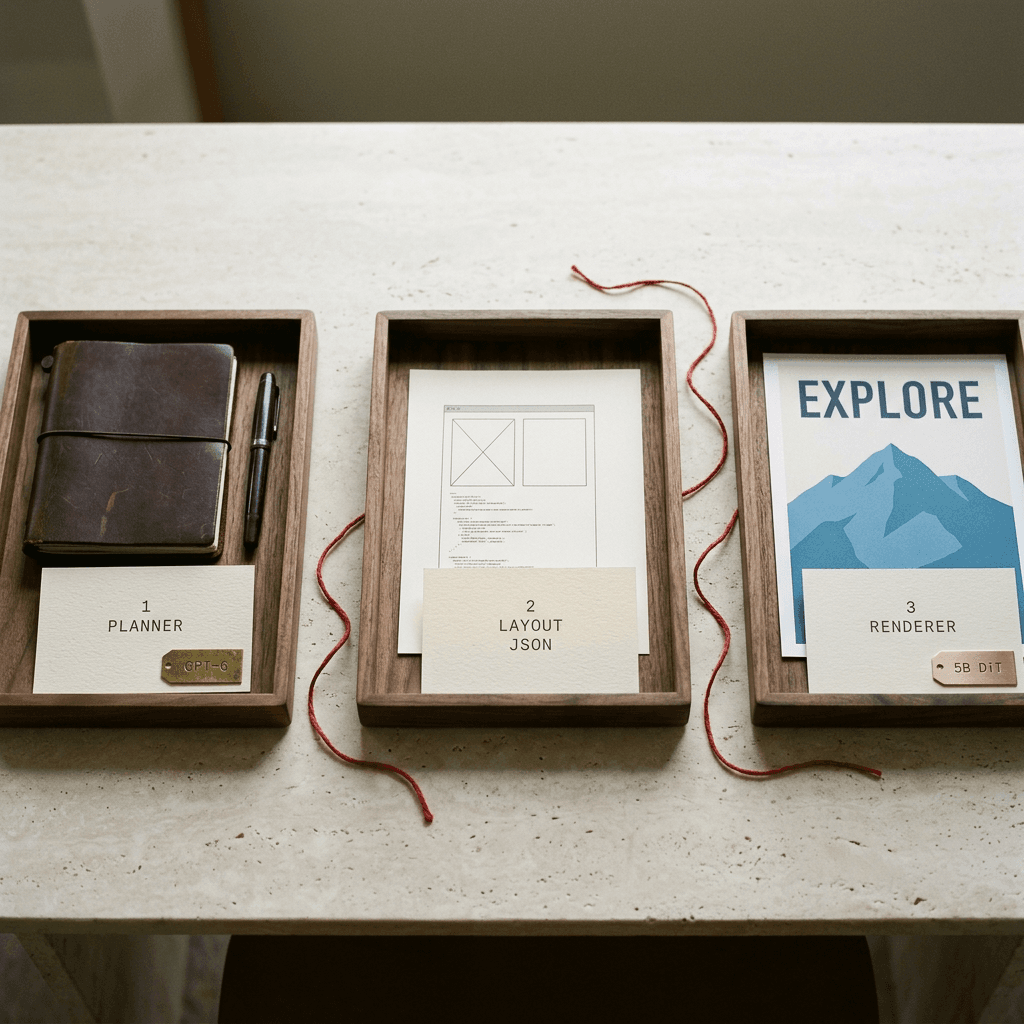
The planner returns a JSON object with eight root fields (scene_type, gen_brief, aspect_ratio, layout, elements, anchors, must_not and palette), checks text fit against the physical box dimensions, and for broad knowledge infographics its guidance suggests 6 to 9 modules, 22 to 36 knowledge units and roughly 300 to 500 visible English words on a 1024 by 1400 to 1600 canvas [1]. Those density targets are useful on their own as a brief for any infographic.
What the open release gives you is smaller. The repository ships a Prompt Enhancer skill, described as designed for GPT-6-family agents with local file and Python tools, which turns an image idea into a caption or a spatial layout and includes a script that converts pixel-coordinate drafts into the compact centered JSON, and the README states that it does not call an image-generation service [3][19]. The user guide adds that there are two planned approaches to layout enhancement, a training-free skill with an LLM and a fine-tuned open-source LLM as a layout enhancer, and the second is marked "stay tuned," meaning it had not been released at the time I read it [6]. Secondary coverage reaches the same conclusion, with AI Weekly noting that the editor questions how much of the second-place ranking comes from the GPT-6 enhancer [22]. The report does not say which GPT-6 variant it used, but our GPT-6 Sol and Luna explainer gives general context on the family and its pricing.
The implication is straightforward. The weights alone will not reproduce the 1698.70 rating, because that rating belongs to the pair of GPT-6 planner and MOSS-Image renderer. You can still write layouts by hand, ask a capable assistant to draft them with the skill's rules, or use the ComfyUI layout nodes, and the quality of your result will depend on how good the plan is.
Reading the Benchmarks Without Fooling Yourself
LongLongTextBench: What the 96.3 Measures
LLTB contains 240 literary text rendering tasks, 120 in English and 120 in Chinese, split across three length bins (short bodies of 180 to 420 characters, medium of 700 to 1,200 and long of 1,600 to 2,800). The English passages come from 40 Project Gutenberg works, the classical Chinese from Mencius, The Doctrine of the Mean and The Great Learning, and the modern Chinese from seven Lu Xun works [1]. Every model generates four images per task and all four are scored with no best-of-four selection, an OCR pass with Qwen2.5-VL-7B-Instruct reads each image, and the score is the share of target words (English) or characters (Chinese) that the OCR output contains, computed per language and length group and then averaged equally over the six groups to give Mean-6 [1].
The metric's definition deserves a slow read, because it is more lenient than the phrase "text accuracy" suggests. The report states that the metric does not check order or directly penalize extra OCR units, and that it is not edit distance or exact string accuracy [1]. A paragraph whose words are all present but scrambled would still score 100 percent, which my coverage script below demonstrates. So the 96.3 means roughly that the OCR reader found about 96 of every 100 target words or characters somewhere in the image, averaged across groups. That is a strong result for page-length text, and it is a different claim from "96 percent of paragraphs came out spelled and ordered correctly."
| Model (as grouped in the report) | Type | English long | Chinese long | Mean-6 |
|---|---|---|---|---|
| GPT Image 2 | Closed-source | 97.3 | 98.2 | 99.0 |
| Nano Banana Pro | Closed-source | 97.4 | 91.4 | 96.6 |
| MOSS-Image | Open-weight | 97.1 | 92.4 | 96.3 |
| Qwen Image 3.0 Pro | Closed-source | 96.2 | 88.5 | 94.3 |
| Qwen Image 2512 | Open-weight | 48.1 | 31.3 | 64.9 |
| Ideogram 4.0 | Open-weight | 97.5 | 31.8 | 63.5 |
| ERNIE Image | Open-weight | 48.1 | 30.2 | 55.7 |
| Seedream 5.0 Pro | Closed-source | 41.7 | 13.3 | 55.3 |
| FLUX.2 | Open-weight | 4.8 | 2.9 | 11.8 |
Here is how to read the table. MOSS-Image leads every open-weight model in it, sits just below Nano Banana Pro (96.6) and just above Qwen Image 3.0 Pro (94.3), and trails GPT Image 2 (99.0) by 2.7 points [1]. Its weakest group is long Chinese at 92.4, and the report itself notes that recall is lower for the longest Chinese texts [1]. The open models that look weak here mostly collapse on the long bins: Qwen Image 2512 drops from 88.8 on short English to 48.1 on long English, and ERNIE Image from 69.5 to 48.1 [1]. The Ideogram 4.0 row has a wrinkle the authors disclose: 61 of its 960 generations were safety refusals, all in the short English group, and scoring those as zero produces the 63.5 shown, while excluding them lifts the short English score from 44.9 to 72.4 and Mean-6 to 68.1 [1]. Even the generous convention leaves Ideogram behind on Chinese.
LongTextBench: Where MOSS-Image Is Not First
The report is candid that on the older LongTextBench, which averages just 120.3 characters per target, MOSS-Image scores 97.63 overall (98.08 English and 97.17 Chinese), which ranks fifth among the ten models in its table. SenseNova-U1.5-8B-MoT (98.85), Seedream 4.5 (98.80), HiDream-O1-Image-Pro (98.10) and HiDream-O1-Image (97.85) all score higher, while ERNIE-Image with prompt enhancement (97.30), Nano Banana 2.0 (97.25), Qwen-Image-2512 (96.05) and GPT Image 2 (96.05) score lower [1]. The authors collected those baseline scores from public reports instead of running them, so unlike LLTB they come from different evaluators [1]. The honest summary is that on short and medium text many models are close to the ceiling, and the case for MOSS-Image rests on long dense passages.
RealLayoutArena: What the 1698.70 Measures
RealLayoutArena (RLA) has 61 tasks built from manually screened design references: 20 posters, 20 infographics and 21 user interfaces, each expressed as a concise Chinese request. Raters see the short request and two anonymized images, then choose A, B, tie, both bad or skip, and the report fits Bradley-Terry ratings mapped to an Elo scale, with ties and both-bad votes counted as half wins [1][23]. In the main end-to-end group the report logs 1,420 votes, covering 31.1 percent of the possible task and pair combinations, and MOSS-Image with its layout planner collected 293 wins, 100 ties and 64 losses over 457 votes, a 75.1 percent preference score [1].
| Rank | End-to-end system (nine shown in the report) | Elo rating |
|---|---|---|
| 1 | GPT Image 2 | 1844.35 |
| 2 | MOSS-Image with Layout PE (GPT-6 planner) | 1698.70 (95% interval 1655.96 to 1741.43) |
| 3 | Seedream 5.0 Pro | 1661.16 |
| 4 | Qwen Image 3.0 Pro with PE | 1614.84 |
| 5 | Nano Banana Pro | 1590.19 |
| 6 | ERNIE Image with PE | 1461.6 |
| 7 | Boogu Image with PE | 1328.2 |
| 8 | Hunyuan Image 3 Instruct with PE | 1278.8 |
| 9 | Ideogram 4 with local PE | 1123.5 |
The Elo scale makes it easy to over-read small gaps, so I converted the reported gaps into single-vote win probabilities with the standard 400-point formula (code below). A 145.65 point gap to GPT Image 2 means MOSS-Image would be preferred in about 30 percent of blind single votes. The 37.54 point lead over Seedream 5.0 Pro is only about a 55 to 45 split, and it sits well inside MOSS-Image's own 95 percent interval of 1655.96 to 1741.43 (the report does not publish Seedream's interval), so second versus third is not a clean separation, whereas GPT Image 2's 1844.35 lies above the upper bound [1]. Three more caveats apply. The tasks are Chinese requests, so the arena does not measure English prompting. Several baselines were given their own prompt enhancers (Qwen Image 3.0 Pro, ERNIE, Boogu, Hunyuan and a local Qwen3VL-8B rewriter for Ideogram) while others used their native pipelines, so this is a system versus system contest in which MOSS-Image's system includes a GPT-6 agent with web and image search [1]. And ratings are fitted separately for each comparison group, so numbers from different groups cannot be placed on one axis [1].
Prompt Strategies: The Specification Matters More Than the Model
The most useful result in the paper for ordinary users is the prompt-strategy ablation. On a fixed MOSS-Image checkpoint, short requests scored 1081.70, natural-language plans 1506.20, detailed prompts 1509.21, direct expansion without agentic routing 1541.45, and JSON layout 1622.87 [1]. Going from a short request to a detailed one is worth 427.51 Elo, which by the same formula means a detailed prompt wins about 92 percent of blind comparisons, and JSON layout beats the same plan written as prose by 116.67 points, roughly a 66 percent win rate (my calculations from the reported ratings) [1]. One caution: the JSON and natural entries came from an earlier version of the planner that shared one context across all 61 tasks, so they are not directly comparable with the final system [1].
The report's supplementary GPT-6 rubric compresses those differences to a 0.52 point spread among the three strongest strategies, and because GPT-6 is both the planner and the automated judge there, the authors treat human preference as the primary evidence [1]. In the separate group where every generator receives the same enhanced natural-language prompt, MOSS-Image scored 1807.34 (interval 1727.44 to 1887.24) against 1748.51 for ERNIE Image and 1689.23 for SenseNova U1, so ERNIE's point estimate sits inside MOSS-Image's interval, and that group had only 576 votes covering 19.6 percent of task and pair combinations [1]. It is a reasonable sign that the backbone follows detailed instructions well, and it is thin evidence for a ranking.
What I Could Not Verify
Four things remain open as of October 22, 2026. First, I found no independent replication of LLTB, RLA or 7Bench numbers for this model, and the Artificial Analysis text-to-image board did not list MOSS-Image [4]. Second, OrcaRouter wrote that it could find no verifiable commercial API for the model, while the README announces a hosted API on the MOSI platform from October 20, so I leave that for you to check directly [9][3]. Third, the report promises to release the model, training recipe and evaluation framework, and I verified the weights and inference code but not that the evaluation framework is public [1]. Fourth, I did not run image generation myself, because the environment I worked in has no GPU, so every code snippet below that touches the pipeline is the model card's call pattern and not something I executed. For more on why self-reported benchmark numbers deserve this kind of skepticism, see our skeptical guide to benchmark contamination, which was written about coding benchmarks but asks the same questions, and our Grok Imagine Video 1.5 Lite explainer for another worked example of turning Elo gaps into win probabilities.
How MOSS-Image Compares With Qwen-Image, Ideogram 4.0, GPT Image 2, FLUX.2 and ERNIE-Image
The table below puts the five rivals next to MOSS-Image. Long-text numbers in the table are the MOSS authors' own LLTB runs (flagged in the text where a model also has its own report), and license information comes from each model's Hugging Face metadata, so read the full license text before any commercial use.
| Model | Weights and license | Size and text encoder | Long-text evidence | Layout and image input |
|---|---|---|---|---|
| MOSS-Image | Open weights, Apache-2.0 | 5B DiT, frozen Qwen3.5-9B, FLUX.2 VAE | LLTB 96.3 and LongTextBench 97.63 (authors) | Optional JSON boxes; no image input or editing |
| Qwen-Image 2512 | Open weights, Apache-2.0 | 20B MMDiT family with a frozen Qwen2.5-VL (original report) | LLTB 64.9 (MOSS authors); original Qwen-Image LongText-Bench 0.943 EN and 0.946 ZH (own report) | Image editing is part of the Qwen-Image family |
| Ideogram 4.0 | Open weights as FP8 and NF4; license tag ideogram-4-non-commercial | 9.3B DiT, Qwen3-VL-8B using 13 intermediate layers | X-Omni English OCR 0.97 (own); LLTB 63.5 (MOSS authors) | JSON-only prompts with bounding boxes |
| GPT Image 2 | Closed, API only | Not stated in OpenAI docs | LLTB 99.0 and RLA 1844.35 (MOSS authors) | Image inputs, edits and inpainting; docs flag precise placement as a limit |
| FLUX.2 [dev] | Open weights, non-commercial license; commercial license from Black Forest Labs | 32B, Mistral-3 24B vision-language model | LLTB 11.8 (MOSS authors); vendor claims legible fine text | Up to 10 reference images |
| ERNIE-Image | Open weights, Apache-2.0 | 8B DiT, Ministral-3 3B, FLUX.2 VAE | LongText-Bench 0.973 (own); LLTB 55.7 (MOSS authors) | Lightweight prompt enhancer |
The Shared Design Pattern
The open models released in 2026 have converged on a recipe. Ideogram 4.0 is a 9.3B single-stream DiT with 34 layers that conditions on 13 intermediate layers of Qwen3-VL-8B-Instruct and uses 32-channel latents with 2 by 2 patches, ERNIE-Image is an 8B single-stream DiT that pairs the FLUX.2 VAE with a 3B Ministral-3 text encoder, and MOSS-Image uses the FLUX.2 VAE with a frozen Qwen3.5-9B [20][17][1]. FLUX.2 couples a Mistral-3 24B vision-language model with a rectified flow transformer, and Qwen-Image uses a frozen Qwen2.5-VL as its condition encoder [24][15]. In every case a language model has replaced the T5 and CLIP pairing of the earlier generation, which is consistent with what Imagen and Stable Diffusion 3 found about encoder quality [12][13]. The models differ mainly in how they expose layout, how large they are, and what their licenses allow.
Qwen-Image
Qwen-Image (August 2025) attacked text rendering through data and curriculum: a pipeline spanning collection, filtering, annotation, synthesis and balancing, a training progression from non-text images to paragraph-level text, and a decoder fine-tuned on text-rich images, on a 20B MMDiT with a frozen Qwen2.5-VL encoder [15]. Its own report gives LongText-Bench scores of 0.943 in English and 0.946 in Chinese [15]. The later Qwen-Image-2512 checkpoint, which is Apache-2.0 on Hugging Face, scores 64.9 on LLTB in the MOSS authors' run, which tells you that strong short-text results do not guarantee page-length reliability [25][1]. If your work is infographics and dense layouts without JSON boxes, our Qwen Image 3.0 Pro prompts guide covers that family's behavior.
Ideogram 4.0
Ideogram 4.0 is the closest architectural cousin, because it is trained only on structured JSON captions, parses every prompt as JSON, and supports bounding boxes in a [y_min, x_min, y_max, x_max] format on a 0 to 1000 normalized scale [20]. Its blog reports 0.97 on X-Omni English OCR accuracy, a 7Bench mIoU of 0.69 and a designer-preference Elo of 1062 from 4,366 votes, second to GPT Image 2 at 1141, and says the nf4 build fits on a single 24 GB GPU [20]. Those are Ideogram's own numbers, and as noted above the MOSS authors measured a much lower 7Bench result on the public FP8 checkpoint [1]. The Hugging Face license metadata for the weights reads "ideogram-4-non-commercial" [26], which is the biggest practical difference from an Apache-2.0 model for anyone selling their output. Our Ideogram 4.0 JSON prompts for thumbnails post shows its format in practice.
GPT Image 2
GPT Image 2 is the benchmark leader in the MOSS report on both LLTB (99.0) and RLA (1844.35), and it is the only closed, API-only model in this comparison [1][27]. OpenAI's model page lists text and image inputs, a dedicated image edit endpoint and inpainting, which are exactly the capabilities MOSS-Image lacks [27]. The same OpenAI guide acknowledges that text rendering can still struggle with precise placement and clarity, and it now documents GPT Image 2.5 models, so the report's baseline is one version behind what OpenAI currently documents [21]. For how the newer family behaves, see our ChatGPT Images 2.5 prompt guide and the earlier GPT Image 2 versus Nano Banana comparison.
FLUX.2
FLUX.2, announced November 25, 2025, is the largest open-weight option here at 32B for the [dev] checkpoint, supports up to 10 reference images and outputs up to 4 megapixels, and Black Forest Labs says legible fine text now works reliably in production [24]. Its [flex] variant exposes a steps parameter that trades typography accuracy against latency, shown at 6, 20 and 50 steps, which echoes MOSS-Image's recommendation of 50 or more steps [24][6]. The MOSS authors' LLTB run scores FLUX.2 at 11.8 (the report does not say which FLUX.2 variant it ran), which suggests the model is not tuned for page-length passages, though I would not read that as a verdict on short headlines [1]. The [dev] weights carry a non-commercial license on Hugging Face, with commercial licenses available from Black Forest Labs [28][24].
ERNIE-Image
ERNIE-Image from Baidu is an 8B open model under Apache-2.0 with a lightweight prompt enhancer, and its report claims 0.973 overall on LongText-Bench [17][29]. In the MOSS authors' evaluation it scores 55.7 on LLTB but ranks second, behind MOSS-Image, when all generators receive the same enhanced natural-language prompts, which suggests its backbone responds well to detailed plans [1]. It is the strongest direct open competitor for creators who want Apache-2.0 weights, and our ERNIE-Image explainer covers its launch.
Step-by-Step: Run MOSS-Image Yourself
A note on provenance before the code. I ran the helper scripts below (layout conversion, box preview, tokenizer peek, benchmark math) and checked that the layout builder reproduces the example in the OpenMOSS README exactly. I could not run the diffusion pipeline itself, so the generation snippets follow the model card's call pattern and its argument names, which I also checked against the published pipeline source [14].
Step 1: Install
The model card asks for Python 3.10 or later, an NVIDIA GPU with CUDA and a PyTorch 2.9 or later build that matches your CUDA version, then a single pip line [2].
bash/code
# From the MOSS-Image-SFT model card: Python 3.10+, an NVIDIA GPU with CUDA, and a PyTorch 2.9+ build that matches it.
pip install "diffusers>=0.38" "transformers>=5.3" "accelerate>=1.10" "safetensors>=0.6" "Pillow>=10"
Step 2: Generate Your First Image
This snippet is the model card's quick start with the Chinese sticky-note prompt replaced by an English signage prompt. Note trust_remote_code=True: the repository's custom pipeline code runs on your machine, so pin revision= to a commit you have read when this matters [2]. The explicit line breaks inside the quoted sign text follow the user guide's advice to insert line breaks when you need control over how text wraps [6].
python/code
import torch
from diffusers import DiffusionPipeline

# Same loading pattern as the MOSS-Image-SFT model card: custom pipeline code is
# downloaded from the repo, so pin `revision=` to a commit you have reviewed.
pipe = DiffusionPipeline.from_pretrained(
    "OpenMOSS-Team/MOSS-Image-SFT",
    custom_pipeline="pipeline_moss_image",
    trust_remote_code=True,
    torch_dtype={"default": torch.bfloat16, "vae": torch.float32},
)
pipe.scheduler = type(pipe.scheduler).from_config(pipe.scheduler.config)
pipe.to("cuda")

# Explicit line breaks inside the quoted text help the model place each line.
prompt = '''A cream-colored cafe window poster, photographed straight on. The hand-painted sign reads:
"GRAND OPENING
Fresh bread daily
7 AM to 3 PM"'''

image = pipe(
    prompt,
    height=1024,
    width=1024,
    num_inference_steps=50,
    guidance_scale=3.0,
    uncond_skip_layers=[22],
    generator=torch.Generator("cpu").manual_seed(42),
).images[0]
image.save("cafe_poster.png")
Step 3: Set Sampling Parameters on Purpose
The Base model needs deliberate settings, and the SFT model uses the same defaults. The numbers below come from the user guide and the model card [6][2].
| Setting | Recommended value (user guide and model card) |
|---|---|
| Resolution | 1M, 1.5M or 2M total pixels; 0.25M to 4M supported; both sides multiples of 16 |
| Steps | 50 or more |
| Guidance scale (CFG) | 3.0 by default, range 3.0 to 6.0; raise it for short prompts |
| Shift | 5.0 |
| Sampler | Flow-matching Euler |
| Skip-layer guidance | Negative branch skips layer 22 (zero-based); layers 22, 24 and 26 can all help; turning it off looks more realistic but details may collapse |
| Negative prompt | Empty by default; the guide suggests nsfw, worst quality, bad anatomy, watermark, jpeg artifact |
| Prompt language | English recommended; Chinese and other languages supported |
| Line breaks | Insert \n or real line breaks to control text wrapping |
| Prompt length | Up to 4,096 tokens |
Step 4: Choose a Canvas That Fits the Model and the Platform
Because both sides must be multiples of 16, some familiar sizes do not work: 1920 by 1080 fails because 1080 divided by 16 is 67.5. The helper in the next step lists exact 16 by 9 canvases that are valid, which are 1280 by 720 (0.92 MP), 1536 by 864 (1.33 MP), 1792 by 1008 (1.81 MP) and 2048 by 1152 (2.36 MP), all inside the recommended 1M to 2M range or close to it. YouTube's help page recommends 3840 by 2160 for video thumbnails, with a 16:9 aspect ratio and a 640 pixel minimum width, and 3840 by 2160 is about 8.3 million pixels, beyond the 4M pixel range the user guide documents [30][6]. Generate near 2 MP and upscale. See our YouTube thumbnail size guide for the rest of the platform rules.
Step 5: Build a Layout From Pixel Boxes and Preview It
Writing centered yxyx coordinates by hand is error prone, so this helper converts ordinary top-left pixel boxes into the model's format, validates them against the canvas and reproduces the README's EXPLORE example with an assertion. The second script draws the boxes on a blank canvas so you can see the composition before spending GPU time.
python/code
import json


def check_canvas(width: int, height: int) -> None:
    """MOSS-Image's Python API wants positive multiples of 16 for both sides."""
    if width <= 0 or height <= 0 or width % 16 or height % 16:
        raise ValueError(f"{width}x{height} must be positive multiples of 16")


def canvas_options(aspect_w: int, aspect_h: int, min_mp: float = 0.9, max_mp: float = 2.5):
    """Exact-ratio canvases whose sides are both multiples of 16 (megapixels in range)."""
    out = []
    for k in range(1, 400):
        w, h = aspect_w * k, aspect_h * k
        if w % 16 == 0 and h % 16 == 0 and min_mp <= w * h / 1e6 <= max_mp:
            out.append((w, h, round(w * h / 1e6, 2)))
    return out


def to_centered_yxyx(box_xyxy, width, height):
    """[x_min, y_min, x_max, y_max] from the canvas top-left  ->  [y_min, x_min, y_max, x_max]
    with the origin at the canvas center (bbox_format yxyx, bbox_coord_space abs_centralized)."""
    check_canvas(width, height)
    x0, y0, x1, y1 = box_xyxy
    if not (0 <= x0 < x1 <= width and 0 <= y0 < y1 <= height):
        raise ValueError(f"box {box_xyxy} is empty or outside the {width}x{height} canvas")
    cx, cy = width // 2, height // 2
    return [y0 - cy, x0 - cx, y1 - cy, x1 - cx]


def build_layout(width, height, caption, items, meta=("poster",)):
    """items: dicts with label, caption, box (pixel xyxy from top-left) and optional text."""
    layout_items = []
    for it in items:
        entry = {"label": it["label"], "caption": it["caption"]}
        if "text" in it:
            entry["text"] = it["text"]
        entry["bbox"] = to_centered_yxyx(it["box"], width, height)
        layout_items.append(entry)
    return {
        "summary": {"meta": list(meta), "canvas": "single", "caption": caption},
        "items": layout_items,
        "bbox_coord_space": "abs_centralized",
        "bbox_format": "yxyx",
    }


if __name__ == "__main__":
    W, H = 1024, 1024
    layout = build_layout(
        W, H,
        "A minimalist travel poster with a cream background, a blue mountain illustration, "
        "and the title EXPLORE at the top.",
        [
            {"label": "text", "text": "EXPLORE", "box": (128, 96, 896, 224),
             "caption": "Large dark-blue uppercase title centered at the top."},
            {"label": "object", "box": (224, 320, 800, 896),
             "caption": "A flat blue mountain illustration in the lower center."},
        ],
    )
    # These boxes reproduce the example in the OpenMOSS README / user guide.
    assert layout["items"][0]["bbox"] == [-416, -384, -288, 384]
    assert layout["items"][1]["bbox"] == [-192, -288, 384, 288]
    # The skill's reference example: a 1536x1024 canvas, cup box [176, 224, 800, 864] in top-left xyxy.
    assert to_centered_yxyx((176, 224, 800, 864), 1536, 1024) == [-288, -592, 352, 32]

    prompt = json.dumps(layout, ensure_ascii=False)   # this string is the prompt
    print(prompt)
    print("16:9 canvases:", canvas_options(16, 9))
    # To render it, reuse the quickstart pipeline and pass: pipe(prompt, height=H, width=W, ...)
python/code
import json
import sys

from PIL import Image, ImageDraw

COLORS = {"text": (200, 40, 40), "object": (30, 90, 200)}


def preview(layout_path: str, width: int, height: int, out_path: str = "layout_preview.png") -> None:
    with open(layout_path, encoding="utf-8") as f:
        layout = json.load(f)
    assert layout["bbox_format"] == "yxyx" and layout["bbox_coord_space"] == "abs_centralized"
    canvas = Image.new("RGB", (width, height), (245, 240, 225))
    draw = ImageDraw.Draw(canvas)
    for i, item in enumerate(layout["items"], start=1):
        y0, x0, y1, x1 = item["bbox"]
        # centered coordinates -> top-left pixel coordinates
        box = (x0 + width // 2, y0 + height // 2, x1 + width // 2, y1 + height // 2)
        color = COLORS.get(item["label"], (60, 60, 60))
        draw.rectangle(box, outline=color, width=4)
        draw.text((box[0] + 8, box[1] + 8), f'{i}. {item["label"]}: {item.get("text", "")}', fill=color)
    canvas.save(out_path)
    print(f"wrote {out_path} with {len(layout['items'])} boxes")


if __name__ == "__main__":
    # usage: python preview_layout.py layout.json 1024 1024
    preview(sys.argv[1], int(sys.argv[2]), int(sys.argv[3]))
Step 6: Let an LLM Draft the Layout, Then Compile It
For complex designs, the project's approach is to have an agent plan the layout in plain pixel coordinates and then compile it with a bundled script. The skill specifies a draft with summary, a flat items array, concrete width and height, bbox_coord_space set to "abs" and bbox_format set to "xyxy", and its compile script converts that draft into the compact centered JSON, rejecting out-of-bounds boxes [19]. The skill targets GPT-6-family agents, and I have not tested other assistants with it, but the following prompt asks any capable assistant to produce a draft in that shape.
You are a layout planner for an open text-to-image model. Design a 1792 by 1008 pixel YouTube thumbnail for a video titled "I Tested a Free AI Image Model". Return only JSON with these keys: "summary" containing "meta" (a list such as ["thumbnail"]), "canvas" ("single") and "caption" (one sentence describing the overall scene and style), "width" and "height" as integers, "bbox_coord_space" set to "abs", "bbox_format" set to "xyxy", and a flat "items" list. Each item needs "label" ("text" or "object"), "caption" (appearance only, never instructions), "bbox" as [x_min, y_min, x_max, y_max] in pixels from the top-left corner, and for text items a "text" field with the exact words to render, using \n for line breaks. Keep the title to at most four words in two lines, place it in the left half, keep the lower-right 15 percent of the canvas empty, and make sure every box stays inside the canvas.
Save the reply as draft.json, then compile it with the script that ships next to the skill, replacing the path with your real one [19].
bash/code
# Clone the repo once, then compile the pixel-coordinate draft your assistant wrote into the model-ready prompt.
git clone https://github.com/OpenMOSS/MOSS-Image.git
python3 MOSS-Image/skills/moss-image-prompt-enhancer/scripts/compile_prompt.py draft.json --output prompt.txt
cat prompt.txt
Step 7: Re-Check the Benchmark Math Yourself
You do not need a GPU to audit the arithmetic in the report. The first script reimplements the LLTB-style coverage metric, recomputes Mean-6 from the group scores in Table 4 (it matches the published 96.3 and 64.9), and shows that a scrambled sentence still scores 1.0. The second converts the reported Elo gaps into win probabilities and checks whether rivals fall inside MOSS-Image's reported interval. To run the metric on real outputs, generate four images per prompt without cherry-picking, OCR them with any engine you trust and compare the OCR text with the target, noting that your OCR engine will not match the report's Qwen2.5-VL-7B-Instruct reader exactly.
python/code
import re
from collections import Counter

# LongLongTextBench-style text coverage: multiset recall of target units found in the OCR text.
# English units are lowercased words, Chinese units are single characters (see the MOSS-Image report).


def units(text: str, lang: str):
    if lang == "zh":
        return [c for c in text if "一" <= c <= "鿿"]
    return re.findall(r"[a-z0-9]+", text.lower())


def coverage(target: str, ocr: str, lang: str = "en") -> float:
    g, o = Counter(units(target, lang)), Counter(units(ocr, lang))
    matched = sum(min(n, o[u]) for u, n in g.items())
    return matched / max(1, sum(g.values()))


# Group scores from Table 4 of the MOSS-Image report: EN-S, EN-M, EN-L, ZH-S, ZH-M, ZH-L.
TABLE_4 = {
    "MOSS-Image": [98.0, 97.1, 97.1, 96.3, 96.7, 92.4],
    "GPT Image 2": [99.8, 99.8, 97.3, 99.4, 99.2, 98.2],
    "Nano Banana Pro": [98.8, 99.6, 97.4, 98.1, 94.2, 91.4],
    "Qwen Image 3.0 Pro": [89.8, 94.3, 96.2, 98.9, 97.9, 88.5],
    "Qwen Image 2512": [88.8, 86.7, 48.1, 89.9, 44.4, 31.3],
    "Ideogram 4.0": [44.9, 97.9, 97.5, 48.8, 59.9, 31.8],
    "ERNIE Image": [69.5, 63.7, 48.1, 79.6, 43.2, 30.2],
    "FLUX.2": [34.1, 19.6, 4.8, 6.1, 3.2, 2.9],
}

if __name__ == "__main__":
    for name, groups in TABLE_4.items():
        print(f"{name:<20} Mean-6 = {sum(groups) / 6:5.2f}")

    target = "the quick brown fox jumps over the lazy dog"
    scrambled = "dog lazy the over jumps fox brown quick the"
    # The metric ignores order, so a scrambled sentence still scores 100 percent.
    print("scrambled word order:", coverage(target, scrambled))
    # One missing word out of nine is 8/9.
    print("one word missing:", round(coverage(target, "the quick brown fox jumps over the lazy"), 3))
python/code
import math


def win_prob(r_a: float, r_b: float) -> float:
    """Bradley-Terry / Elo: chance that A is preferred to B in one blind vote (400-point scale)."""
    return 1.0 / (1.0 + 10 ** (-(r_a - r_b) / 400.0))


RLA_END_TO_END = {  # RealLayoutArena, end-to-end systems (MOSS-Image report, Figure 4c and text)
    "GPT Image 2": 1844.35,
    "MOSS-Image + Layout PE": 1698.70,
    "Seedream 5.0 Pro": 1661.16,
    "Qwen Image 3.0 Pro + PE": 1614.84,
    "Nano Banana Pro": 1590.19,
}
MOSS_CI = (1655.96, 1741.43)  # reported 95% interval for MOSS-Image in this group

if __name__ == "__main__":
    moss = RLA_END_TO_END["MOSS-Image + Layout PE"]
    for name, r in RLA_END_TO_END.items():
        if name != "MOSS-Image + Layout PE":
            inside = MOSS_CI[0] <= r <= MOSS_CI[1]
            print(f"MOSS vs {name:<24} gap {moss - r:+8.2f}  P(MOSS preferred) {win_prob(moss, r):5.1%}"
                  f"  inside MOSS 95% CI: {inside}")

    # Prompt-strategy ablation (Figure 4b): how much does the specification matter?
    short, detailed, natural, json_layout = 1081.70, 1509.21, 1506.20, 1622.87
    print(f"detailed vs short: {detailed - short:.2f} Elo -> {win_prob(detailed, short):.1%}")
    print(f"JSON layout vs natural prose: {json_layout - natural:.2f} Elo -> {win_prob(json_layout, natural):.1%}")
What This Means for Thumbnails, Posters and Infographics
MOSS-Image's strengths line up with three creator jobs, and its gaps line up with a fourth. Long, accurate, well-placed text matters most for posters, menus, slides, UI mockups and infographics, and it matters less for thumbnails, which usually carry only a few words. If your goal is click-through, our guides on how many words belong on a YouTube thumbnail and thumbnail text ideas will do more for you than a model that can render 400 words. What a layout-aware model adds for thumbnails is placement discipline: you can pin a title to the left half, keep the lower-right corner clear and check the composition with the preview script before generating.
Thumbnails: Placement Beats Paragraphs
The following natural-language prompt is written for MOSS-Image's own prompt style, with line breaks marked as a literal backslash n, which the user guide permits. Generate it at 1792 by 1008, then upscale.
A bold 16:9 YouTube thumbnail of a glowing retro computer monitor on the right third of the frame, deep teal background with soft orange rim light, shallow depth of field. On the left two thirds, huge white chunky sans-serif letters with a thick black outline read exactly:\nFREE\nAI MODEL\nKeep the lower-right corner empty, sharp edges, high contrast, no extra text, no watermark.
The model cannot take your face or an existing thumbnail as input, because it has no reference-image conditioning, so a thumbnail with a recognizable presenter needs a different tool. That gap is where Miraflow's YouTube Thumbnail Maker fits: you can optionally upload your face or an image, add thumbnail text, and paste a YouTube link to edit an existing thumbnail, so an open model becomes one input into a finished design and not the whole workflow.
Posters and Fixing the Last Typo
RLA includes 20 poster tasks and the report's showcase includes a city poster whose title was swapped through a layout edit, which is the kind of structured text-plus-image composition that layout planning is designed to help, and our AI movie poster prompts can supply style direction for the scene description. Even strong models can leave an occasional wrong letter, and because MOSS-Image regenerates rather than edits, a practical fix to try is masking the offending word and repainting it. The AI Image Generator on Miraflow supports image editing and inpainting, so a one-word error does not force you to re-roll a whole composition.
Infographics and the Fact-Checking Gap
For infographics, use the planner's own density targets as your brief: 6 to 9 modules, 22 to 36 knowledge units and about 300 to 500 visible English words on a 1024 by 1400 to 1600 canvas [1]. Keep in mind that an image model renders the words you give it. The report's agent checks authoritative sources for unfamiliar facts, and its Figure 1 example of a competing system shows a wrong birth-weight claim on a koala infographic, so if you write infographic copy yourself, verify the facts before you generate [1]. Our Facebook ad creative and email header image prompt packs show other text-in-image formats where short, correct copy is the whole point.
Animating a Finished Poster
Once a poster has correct lettering, a short loop is an easy way to reuse it for Reels or Shorts. Lettering is easy to distort when a video model adds motion, so keep the camera move small and tell the model to hold the text. The prompt below is written in the style of Wan-class image-to-video models, so paste it into any image-to-video tool that accepts a start frame and supply the finished poster as that frame. If you would rather generate a clip from a text description, Miraflow's cinematic video generator and Text2Shorts cover prompt-based clips and scripted vertical videos in the browser.
Image-to-video, 5 seconds, 24 fps, vertical 9:16. Start frame: a cream cafe poster with the headline GRAND OPENING in dark blue block letters and two smaller lines beneath it. Camera: a very slow, steady push-in of about 4 percent, no rotation. Motion: soft morning window light drifts across the paper from left to right, a few dust motes float in the beam, the paper edge flutters slightly. Keep every letter exactly as in the start frame, sharp and unwarped, no new text, no flicker, no color shift, no watermark.
Common Mistakes When Evaluating or Using MOSS-Image
Treating 96.3 as an overall quality score. It is a coverage score for long literary passages in English and Chinese, rendered from plain prompts by the backbone alone, and it says nothing about faces, photorealism, anatomy or aesthetics [1].
Comparing the 1698.70 and the 1807.34 as if they were one scale. They come from separately fitted comparison groups, and the first includes a GPT-6 planner [1].
Starting from Base for everyday generation. The user guide describes Base as having had no post-training or distillation of inference parameters, and the model card's own comparison shows SFT producing clearer text grouping on its example [6][2].
Mixing coordinate conventions. The layout format is [y_min, x_min, y_max, x_max] measured from the canvas center, which differs from the top-left [x_min, y_min, x_max, y_max] that most drawing tools use, and a swap produces boxes that land in the wrong place without any error message [6].
Changing canvas size without changing the layout. The coordinates are absolute pixels, so a layout written for 1024 by 1024 does not scale itself to 1792 by 1008, and the paper's own test found that relative coordinates generalized worse to unseen resolutions, which is why the format is absolute [1].
Leaving out line breaks. Both the report and the user guide recommend explicit line breaks for text accuracy [1][6].
Expecting image editing or a face reference. The report lists no image conditioning and no editing as a current limitation [1].
Switching guidance settings blindly. The user guide notes that turning off skip-layer guidance gives a very realistic look but may cause some details to collapse [6].
Ignoring the license on rivals when comparing. An Apache-2.0 model and a non-commercial model are not interchangeable if you sell the output [2][26][28].
Production Notes for Teams
Log the seed, revision, canvas size, steps, guidance scale and the full layout JSON next to every image you keep, because a layout is an artifact worth versioning in the same way as code. Pin the Hugging Face revision when using trust_remote_code=True, since the custom pipeline file executes on your machine [2]. Add an OCR gate: run any OCR engine over the output, compare it with the intended text using the coverage function above and send low scores to a retry queue with a new seed, remembering that coverage ignores order, so add an ordering check for headlines.
Budget for serving cost honestly. The default guidance runs two transformer forwards per step, so a 50-step image uses about 100 forwards before decoding [14]. The README lists a community 8-step distillation and the ComfyUI repackage offers quantized weights, both of which could cut that cost, and I have not measured their effect on text accuracy, which is the first thing to test before adopting them [3][10]. If you fine-tune, the user guide says to keep the text encoder frozen and not to fine-tune it, and it suggests Gemma 4 or Qwen 3.5 models as captioners that transcribe visible text [6]. Finally, plan a fallback: for long Chinese passages (the weakest LLTB group) or work that needs image editing, route the job to a model that supports it.
Frequently Asked Questions
Is MOSS-Image really open source?
The weights and the bundled inference code are released under Apache-2.0, which permits commercial use under that license's terms [2]. The report describes the training recipe and lists the public datasets it used, but the training data itself is not distributed, so the most precise label is open-weight with a documented recipe [1][9].
How much VRAM does it need?
I could not find an official figure. The Diffusers repository holds about 10.16 GB of transformer weights and 16.79 GB of text encoder weights, and the ComfyUI repackage offers int8 and w4a8 quantized files that total about 13.1 GB with the VAE [2][10]. Treat those as disk sizes and test your own card with the offload modes in the Gradio app [3].
Does it need GPT-6 to run?
No. The GPT-6 planner belongs to the paper's end-to-end system, not to the weights, and you can run the model with hand-written prompts or layouts [1]. The released skill is designed for GPT-6-family agents, and an open-source layout enhancer is promised but not released [19][6].
Can it edit an existing image or use a reference photo?
Not today. The report states that the backbone supports text-to-image generation and does not directly condition on reference images or support editing [1]. The user guide says simple SFT has enabled features such as reference-based generation in experiments and promises more later, so watch for community adapters [6].
Is 96.3 percent the accuracy of the text it renders?
The figure is mean OCR coverage across six language and length groups on a benchmark the authors built, and the metric ignores word order and extra words, so it is looser than exact-match accuracy [1].
Should I use the Base or SFT checkpoint?
Use SFT to generate images and Base to train adapters or full fine-tunes [6][2].
Does it handle Chinese?
Yes, and the report treats English and Chinese as co-equal targets, with 92.4 on long Chinese passages and 96.3 to 96.7 on short and medium Chinese passages in the authors' run, though the training captions are predominantly English [1].
Can I try it without installing anything?
The model card links an online demo on Hugging Face Spaces, the README lists a hosted API on the MOSI platform, and ComfyUI users can run it through the core support merged on October 16 [2][3][7].
How does it compare with GPT Image 2?
In the authors' own tests GPT Image 2 is ahead on long-text coverage (99.0 against 96.3) and on the end-to-end arena (1844.35 against 1698.70), and it also edits images and accepts image inputs, while MOSS-Image offers open weights under Apache-2.0 and explicit box-level layout control [1][27].
Is it good for YouTube thumbnails?
It is good at placing short, correct text, and it cannot take your face or an existing thumbnail as input. For finished thumbnails with a presenter, use Miraflow's YouTube Thumbnail Maker, and use an open model like this one for text-heavy graphics around it.
Conclusion
MOSS-Image is a genuinely interesting open release because it treats text rendering as a pipeline of problems and attacks each: a language model encoder in place of T5 and CLIP, a 32-channel FLUX.2 latent space, captions that transcribe visible text with line breaks, a data policy that annotates instead of filters, and a layout interface that reuses the single text pathway and needs no extra conditioning module [1]. The headline numbers are best read as follows. On the authors' own long-text benchmark the model scores 96.3 against 64.9 for Qwen Image 2512, and it is a few points behind GPT Image 2 at 99.0. On the authors' own arena it is second to GPT Image 2 as a system, with a GPT-6 planner doing the design work, and the statistical separation from third place is thin [1].
For creators, the practical recipe is to use the model where its strengths are real, which means dense bilingual text and explicit layouts for posters, infographics and UI-style graphics, to write or plan the layout with care since the report's own ablation shows the specification matters more than almost anything else, and to pair it with a tool that can edit, such as Miraflow's AI Image Generator for inpainting a stray letter or the YouTube Thumbnail Maker when your face and an existing thumbnail are part of the job. The code in this post gives you a starting point for installation, layout building and previewing, tokenizer inspection and benchmark auditing, and the rest of Miraflow's tools are at Miraflow's home page.
References
- [1] MOSS-Image Technical Report, MOSI.AI, arXiv 2610.23374
- [2] MOSS-Image-SFT model card and files, Hugging Face
- [3] OpenMOSS/MOSS-Image repository README, GitHub
- [4] Text to Image Leaderboard, Artificial Analysis
- [5] MOSS-Image-Base model card, Hugging Face
- [6] MOSS-Image user guide, GitHub
- [7] feat: Add MOSS-image support, ComfyUI pull request 17095
- [8] MOSS-Image: 5B DiT with Layout Control and ComfyUI Support, ComfyUI Wiki
- [9] MOSS-Image native layout control release, OrcaRouter
- [10] Comfy-Org/MOSS-Image repackaged weights, Hugging Face
- [11] Character-Aware Models Improve Visual Text Rendering, Liu et al., arXiv 2212.10562
- [12] Photorealistic Text-to-Image Diffusion Models with Deep Language Understanding (Imagen), Saharia et al., arXiv 2205.11487
- [13] Scaling Rectified Flow Transformers for High-Resolution Image Synthesis, Esser et al., arXiv 2403.03206
- [14] pipeline_moss_image.py, MOSS-Image-SFT, Hugging Face
- [15] Qwen-Image Technical Report, arXiv 2508.02324
- [16] X-Omni: Reinforcement Learning Makes Discrete Autoregressive Image Generative Models Great Again, arXiv 2507.22058 (LongText-Bench)
- [17] ERNIE-Image Technical Report, Baidu ERNIE Team, arXiv 2605.25347
- [18] Scalable Diffusion Models with Transformers, Peebles and Xie, arXiv 2212.09748
- [19] MOSS-Image Prompt Enhancer skill (SKILL.md), GitHub
- [20] Ideogram 4.0 Technical Details, Ideogram
- [21] Image generation guide, OpenAI API docs
- [22] MOSS-Image 5B tops open-weight long text rendering at 96.3, AI Weekly
- [23] Bradley-Terry model, Wikipedia
- [24] FLUX.2: Frontier Visual Intelligence, Black Forest Labs
- [25] Qwen/Qwen-Image-2512, Hugging Face (license metadata)
- [26] ideogram-ai/ideogram-4-fp8, Hugging Face (license metadata)
- [27] GPT Image 2 model page, OpenAI API docs
- [28] FLUX.2-dev, Hugging Face (license metadata)
- [29] baidu/ERNIE-Image, Hugging Face (license metadata)
- [30] Add or change thumbnails on your videos, YouTube Help