How to Generate No-Copyright Background Music for Any Video Length with AI

Written by
Jay Kim
Learn how to generate original, copyright-free background music for any video length using AI. Includes 15 copy-paste prompts for YouTube, Shorts, podcasts, and ads.
If you have ever uploaded a video to YouTube and received a Content ID claim within minutes of publishing, you already know how frustrating the background music problem is. You found a track that felt perfect for your video, layered it under your voiceover, spent hours editing, and then YouTube flagged it before a single viewer saw it.
Copyright claims usually happen because you have used something that someone else owns, even just a few seconds of it. The most common triggers are songs, TV or movie clips, or images that are under copyright. Even short background music can cause a claim if it is from a popular artist.[6]
This guide covers exactly how to use AI music generators to create original, no-copyright background music for any video length in 2026. It includes prompt templates you can copy and paste for YouTube videos, Shorts, podcasts, product ads, and more, along with a full walkthrough of how to use the AI Music Generator on Miraflow AI to generate tracks in under a minute.
Why Background Music Keeps Getting Creators in Trouble
The scale of the copyright detection system on YouTube is enormous. YouTube processed 2.2 billion Content ID copyright claims in 2024, with automated detection handling more than 99% of them.[1] Background music is one of the most common triggers.[2]
Here is what happens technically when you upload a video with copyrighted background music. Using a database of audio and visual files submitted by copyright owners, Content ID identifies matches of copyright-protected content. When a video is uploaded to YouTube, it is automatically scanned by Content ID. If Content ID finds a match, the matching video will get a Content ID claim. Depending on the copyright owner's Content ID settings, a Content ID claim results in one of the following actions.[4]
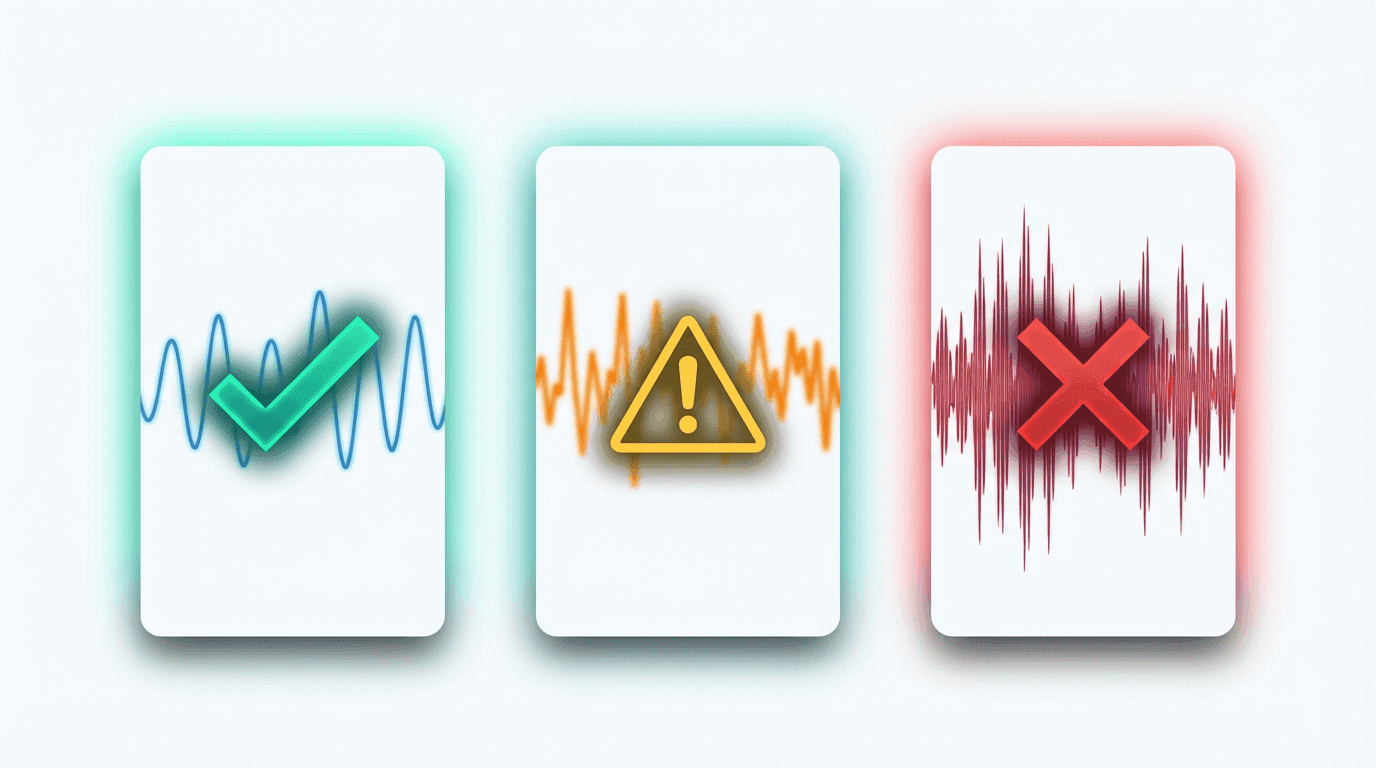
The consequences range from mildly annoying to channel-threatening. A single claim at the wrong moment can redirect your ad revenue, block your video in certain countries, or embarrass you in front of a client.[2] And while a Content ID claim alone does not put your channel at risk, three strikes in 90 days can terminate your account and all associated channels.[1]
Many creators try to avoid this by searching for "free background music" or "no copyright music" on YouTube and other platforms. The problem is that these labels are often misleading. Some tracks require attribution. Others have restrictions on commercial use. And some are registered in Content ID despite being labeled as free, which means you can still get claimed.
The YouTube CPM rates by niche 2026 guide explains how ad revenue works on YouTube, and losing that revenue to a background music claim is one of the most avoidable problems creators face.
Copyright-Free vs Royalty-Free: The Difference That Matters
Before diving into AI-generated music, it is important to understand a distinction that confuses many creators and can create real legal risk if misunderstood.
Copyright-free means the work is not protected by copyright at all. It is in the public domain, and anyone can use it for any purpose without permission, attribution, or payment. A work enters the public domain either because its copyright has expired, because the rights holder has explicitly dedicated it to the public domain, or because it was never eligible for copyright protection in the first place.[6]
Royalty-free does not mean free of copyright. It means the user has purchased or obtained a license that allows them to use the work without paying ongoing royalties each time it is used.[6] The copyright remains with the original owner. The user simply has a license that permits certain uses under specific conditions, which are defined in the platform's terms of service.[6]
Most AI music platforms that describe their output as "royalty-free" are using the term in the second sense. The user is receiving a license to use the generated track, not ownership of an unprotected work. The rights available under that license vary considerably across platforms and subscription tiers, and assuming broad usage rights without reading the terms is a common and avoidable mistake.[6]
This distinction is especially important for creators who monetize their content. When you use AI-generated music from a platform that grants you a commercial license, you are generally safe to monetize your videos without worrying about claims or revenue being redirected. But you should always confirm the specific terms of the platform you are using.
The can you monetize faceless YouTube channels made entirely with AI guide covers this topic in the broader context of AI-generated content monetization.
Why AI-Generated Music Solves the Background Music Problem
The fundamental advantage of AI-generated music is that every track is original. There is no existing reference file in YouTube's Content ID database for a song that was just created from your specific text prompt. This eliminates the most common trigger for copyright claims.
Since it is completely royalty-free and original music, you will not face copyright strikes or monetization issues. Many content creators use AI music generators for unique background music that helps content stand out.[7]
AI music generators work by taking your text description and producing a complete audio track that matches your specifications. You describe the genre, mood, instruments, tempo, and purpose, and the AI composes a track that has never existed before. Because the track is original and generated from your prompt, it will not match anything in Content ID's reference database.
This approach has several practical advantages over traditional stock music libraries. Every track is unique to your content, so your videos sound different from everyone else who uses the same library. You can customize the mood, energy, and instrumentation to match your specific video rather than settling for "close enough." You avoid Content ID claims entirely. And you can generate as many tracks as you need without per-track licensing fees from external providers.
The AI music for YouTube: copyright-free tracks in seconds guide goes deeper into how AI-generated music specifically fits into a YouTube content workflow.
How the AI Music Generator on Miraflow Works
The AI Music Generator on Miraflow AI lets you create background music from text descriptions directly in your browser. There is no software to install, no audio engineering knowledge required, and typical generation time is under one minute.
The generator offers two modes that serve different needs.
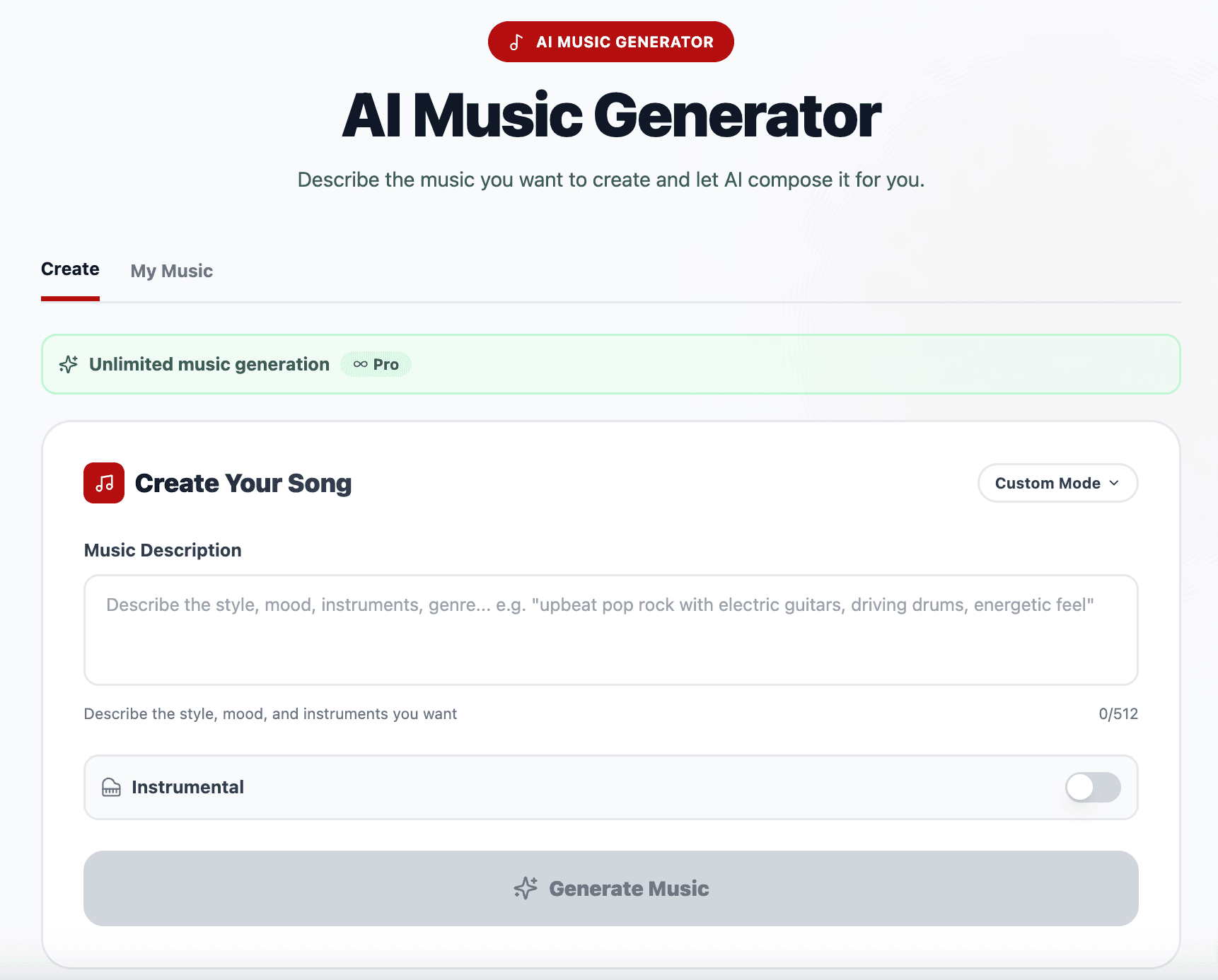
Simple Mode is designed for speed. You write a description of the music you want, optionally toggle the Instrumental switch if you want a track without vocals, and click Generate Music. The description field accepts up to 512 characters, which is more than enough to specify genre, mood, instruments, and energy level. This mode works well when you need a quick background track and have a general idea of what you want.
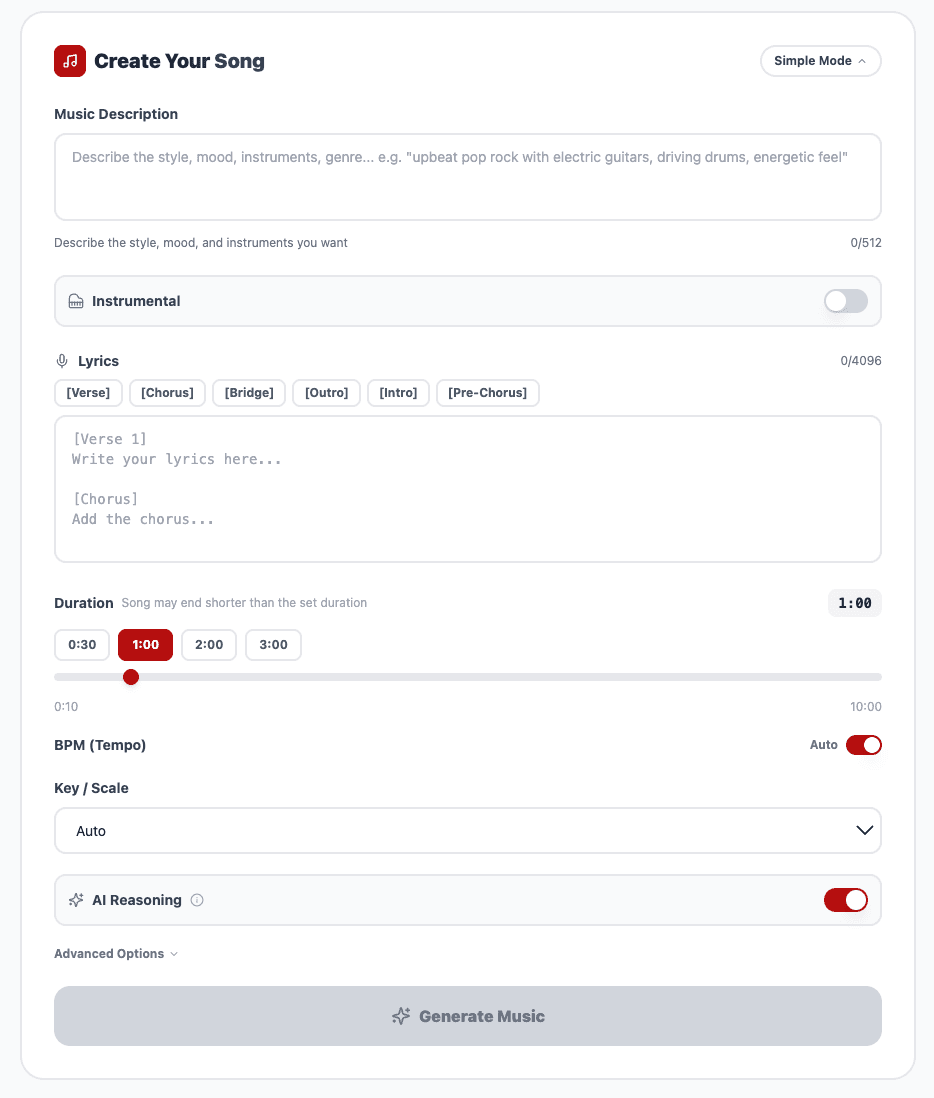
Custom Mode gives you significantly more control over the output. In addition to the music description, Custom Mode lets you define a lyrics structure using tags like [Verse], [Chorus], [Bridge], [Intro], and [Outro]. You can set the duration to match your video length, specify the BPM for precise tempo control, choose a key and scale, toggle AI reasoning for more nuanced compositions, and even set a seed value for reproducible results. This mode is ideal when you need a track that fits a specific video duration or when you want to create a series of tracks with a consistent sound.
Generated tracks appear in the My Music section where you can play them back, download them, and reuse them across multiple projects. Each song costs 1 credit to generate, and the platform includes 5 credits on the free tier with unlimited generation available on paid plans.
One of the most practical features for video creators is the Instrumental toggle. Since most creators need background music that sits behind a voiceover or narration, toggling Instrumental ensures the generated track does not include vocals that would compete with your voice. This is a common issue that creators encounter when using AI music generators for background purposes, and having a dedicated toggle simplifies the workflow considerably.
15 Copy-Paste AI Music Prompts for Every Video Type
The quality of AI-generated music depends heavily on how you describe what you want. The problem is rarely simplicity; it is the lack of information.[1] The more specific your prompt, the more likely the AI will produce results that match your vision.[2]
Each prompt should provide clear guidance on genre, mood, tempo, instruments, and vocal style, helping AI models generate more focused and usable results.[6]
Here are 15 ready-to-use prompts organized by video type. Copy any of these directly into the AI Music Generator and generate your track.
YouTube Long-Form Videos
Calm tech tutorial background
Prompt:
Soft ambient electronic background music with gentle piano chords, light synth pads, and subtle percussion. Calm, focused, and professional mood. 90 BPM. Perfect for tech tutorials and explainer videos. Warm and unobtrusive, designed to sit behind a speaking voice without distracting the viewer.
Upbeat lifestyle vlog energy
Prompt:
Upbeat indie pop instrumental with bright acoustic guitar, rhythmic hand claps, light electronic drums, and cheerful ukulele melody. Happy, optimistic, and energetic mood at 120 BPM. Clean modern production with warm tones, perfect for daily vlogs, travel content, and lifestyle videos.
Finance and business explainer

Prompt:
Professional corporate ambient music with soft piano, clean synth pads, subtle bass guitar, and gentle percussion. Confident, trustworthy, and modern mood at 100 BPM. Understated and polished production, designed for business presentations, finance explainers, and educational content.
YouTube Shorts and Reels
High-energy hook for Shorts
Prompt:
Punchy electronic beat with hard-hitting drums, rising synth riser, deep bass drop, and energetic hi-hats. Fast-paced and attention-grabbing at 140 BPM. Bold and intense energy designed for YouTube Shorts and Instagram Reels that need to hook viewers Reels that need to hook viewers in the first second.
Chill lo-fi Shorts vibe
Prompt:
Lo-fi hip-hop beat with dusty vinyl crackle, soft jazz piano chords, mellow bass, relaxed drums, and warm tape saturation. Nostalgic late-night study session mood at 85 BPM. Short and loopable, perfect for aesthetic Shorts and calming vertical content.
Trending sound-style beat
Prompt:
Catchy trap-pop beat with bouncy 808 bass, crisp snare rolls, melodic bell synth, and rhythmic hi-hat patterns. Fun, confident, and viral-ready mood at 130 BPM. Clean and punchy mix designed for reaction videos, comedy Shorts, and trending content formats.
If you are creating Shorts content regularly, the Text2Shorts generator on Miraflow AI lets you produce complete vertical videos from a single topic, with script generation, scene visuals, voice selection, and final assembly all in one workflow.
Podcasts and Talking Head Videos
Podcast intro theme
Prompt:
Warm acoustic guitar intro with fingerpicked melody, light tambourine, soft bass, and gentle string accents. Inviting, friendly, and professional mood at 110 BPM. Short musical phrase that establishes personality and transitions cleanly into spoken content. Podcast theme style.
Interview background bed
Prompt:
Minimal ambient background music with soft sustained synth pads, very gentle piano notes, and subtle atmospheric textures. Extremely calm and unobtrusive at 70 BPM. Designed to add warmth to interview and conversation-style videos without competing with voices.
Product and Brand Videos
Product demo showcase
Prompt:
Sleek electronic music with clean synth arpeggios, modern drum programming, smooth bass line, and polished production. Innovative, premium, and forward-thinking mood at 115 BPM. Designed for product demos, SaaS explainer videos, and tech showcase content with a minimalist aesthetic.
E-commerce lifestyle ad
Prompt:
Bright and airy pop instrumental with acoustic guitar, light electronic beats, warm piano accents, and uplifting string swells. Aspirational, fresh, and modern mood at 118 BPM. Perfect for product lifestyle videos, fashion lookbooks, and e-commerce advertising content.
Creators building product videos can also explore the AI Product Video Generator on Miraflow AI to produce full video content alongside their custom soundtrack.
Cinematic and Storytelling
Epic cinematic trailer
Prompt:
Cinematic orchestral music with building string ostinato, powerful brass hits, deep taiko drums, and sweeping choir textures. Heroic, intense, and emotionally escalating mood starting slow at 80 BPM and building to 120 BPM. Blockbuster trailer style with a massive climax and dramatic resolution.
Emotional documentary score
Prompt:
Emotional cinematic score with solo piano melody, delicate string quartet accompaniment, soft woodwind accents, and gentle atmospheric reverb. Reflective, poignant, and deeply moving mood at 75 BPM. Designed for documentary storytelling, memorial videos, and narrative-driven content.
Gaming and Entertainment
Gaming montage energy
Prompt:
High-energy electronic music with aggressive synth leads, pounding kick drums, fast hi-hats, wobble bass, and futuristic sound design. Intense, adrenaline-fueled, and competitive mood at 150 BPM. Designed for gaming montages, highlight reels, and esports content.
Relaxed gaming stream background
Prompt:
Chill synthwave instrumental with retro analog synths, smooth arpeggiated melodies, laid-back drum machine, and warm bass. Nostalgic, relaxing, and immersive 80s-inspired mood at 95 BPM. Perfect for gaming livestream backgrounds, cozy game content, and retro-themed videos.
Meditation and Wellness
Guided meditation ambient
Prompt:
Deep ambient soundscape with sustained drone pads, gentle bell tones, soft nature-inspired textures, and slowly evolving harmonic layers. Serene, peaceful, and meditative mood at 60 BPM. Spacious and minimal production designed for guided meditation, yoga sessions, and wellness content.
For more prompt ideas organized by platform, the AI prompts for TikTok content: 20 templates that get views guide includes music prompt templates specifically designed for short-form vertical video.
How to Match AI Music Length to Your Video Duration
One of the most common challenges with background music is getting the length right. A track that is too short requires awkward looping. A track that is too long creates editing headaches. AI music generators let you solve this by specifying duration as part of your generation settings.
In Custom Mode on Miraflow AI's music generator, you can set the exact duration you need. Here is how to think about duration for different content types.
YouTube Shorts (15 to 60 seconds): Keep the duration tight. A 30 to 45 second track works for most Shorts because it matches the typical attention span of vertical content. Use high-energy prompts with an immediate hook since there is no time for a slow build.
YouTube Long-Form (8 to 20 minutes): You have two strategies here. You can generate a longer track and let it loop naturally under your content, or you can create multiple shorter tracks for different sections of your video (intro music, main background bed, transition stings, and outro). The second approach creates more dynamic audio that keeps viewers engaged.
Podcast Episodes (30 to 60 minutes): Generate a short intro and outro theme (15 to 30 seconds each) and a separate, very minimal ambient bed for the conversation portion. The ambient bed should be almost unnoticeable because podcast listeners are focused on the voice.
Product Ads (15 to 60 seconds): Match the track duration precisely to your ad length. In Custom Mode, set the BPM and structure so the track builds to a natural peak at the moment your call to action appears. Use [Intro] and [Outro] tags in the lyrics structure field to create a clear arc within a short timeframe.
Cinematic Videos: For creators using the Cinematic Video Generator on Miraflow AI, which produces 8-second hyper-realistic clips, a 10 to 15 second track gives you room for a fade-in and fade-out. For longer cinematic pieces built from multiple clips, generate a 60 to 90 second track and use your video editor to align key moments with the music's natural dynamics.
5 Elements of an Effective AI Music Prompt
In real projects, the best approach is to break a prompt into five pieces. If one piece is missing, the output gets random fast. You do not have to know theory. You just need to point the AI in the right direction.[1]
Here are the five elements that consistently produce better results when included in your AI music prompts.
1. Genre and Style
Start with the specific genre or subgenre you want. Be specific rather than broad.[4] Saying "lo-fi hip-hop" produces dramatically better results than just "chill music." Adding a decade reference like "90s trip-hop" or "2020s bedroom pop" further narrows the sound and gives the AI a clearer creative direction.
2. Mood and Emotion
Describe the emotions or feelings the music should evoke. Use vivid, descriptive terms to help the AI capture the right vibe.[2] Words like "nostalgic," "triumphant," "bittersweet," or "energizing" communicate the feeling far more effectively than generic terms like "good" or "nice."
3. Instruments and Sonic Palette
The instruments you choose define the track's texture and tone. Include the key instruments you want featured prominently.[2] Specifying "acoustic guitar, light tambourine, and warm piano" gives the AI a concrete palette to work with instead of improvising random instrumentation.
4. Tempo and Energy
Include a BPM if you know what you need, or describe the energy level with words like "laid-back," "driving," or "explosive." The tempo sets the physical feeling of the track and determines whether it matches the pacing of your video content.
5. Purpose and Context
AI music needs a job description. Is this track supposed to carry emotion, or quietly support something more important?[1] Telling the AI that the track is "designed to sit behind a speaking voice" produces a very different result than "designed as a standalone listening experience." Always include how the music will be used.
When you combine all five elements, the AI has enough context to produce a track that matches your vision on the first or second generation. The AI music prompts for YouTube, Reels, and TikTok guide includes dozens more templates organized by these five elements.
Common Mistakes Creators Make with AI Background Music
After working through hundreds of AI music prompts, certain patterns emerge that consistently lead to poor results or wasted generations. Avoiding these mistakes will save you credits and time.
Writing prompts that are too vague.
A prompt like "make something cool" gives the AI almost nothing to work with. If you only say "epic" or "chill," the model has too much room to improvise. Narrow the lane so it does not wander into genres you would never use.[1]
Contradicting yourself in the prompt.
Asking for "calm and relaxing but also energetic and exciting" puts the AI in an impossible position. Pick one dominant mood and commit to it. If you need a track that transitions between moods, describe the progression clearly: "starts calm and meditative, gradually builds energy, climaxes at the midpoint."
Forgetting to specify instrumental.
A lot of creators generate full songs with vocals, then discover the vocals fight with their voiceover.[1] If the music is going behind spoken content, always toggle the Instrumental option or include "instrumental, no vocals" in your prompt. If you do not specify, do not be surprised when the AI decides to drop a surprise choir under your product demo.[1]
Overloading the prompt with too many details.
Too much information confuses the AI. The sweet spot is 4 to 7 descriptors. Too few gives generic output, too many leads to confused results.[4]
Rewriting the entire prompt after each attempt.
One hard rule: do not rewrite the entire prompt every time. If you do, you will never know what actually improved the output.[1] Instead, change one or two elements per generation and compare results.
Using music with vocals in YouTube Shorts.
For Shorts creators specifically, using music with vocals in your Shorts reduces your ad revenue because of the music licensing deduction from the Shorts revenue pool. The YouTube Shorts revenue calculator 2026 explains exactly how music licensing affects your Shorts earnings.
How to Use AI Music Across the Full Content Pipeline
One of the biggest advantages of creating your own background music with AI is that it fits naturally into a complete content creation workflow. Instead of sourcing music separately from a stock library, you can generate everything in the same place where you build your videos, images, and thumbnails.
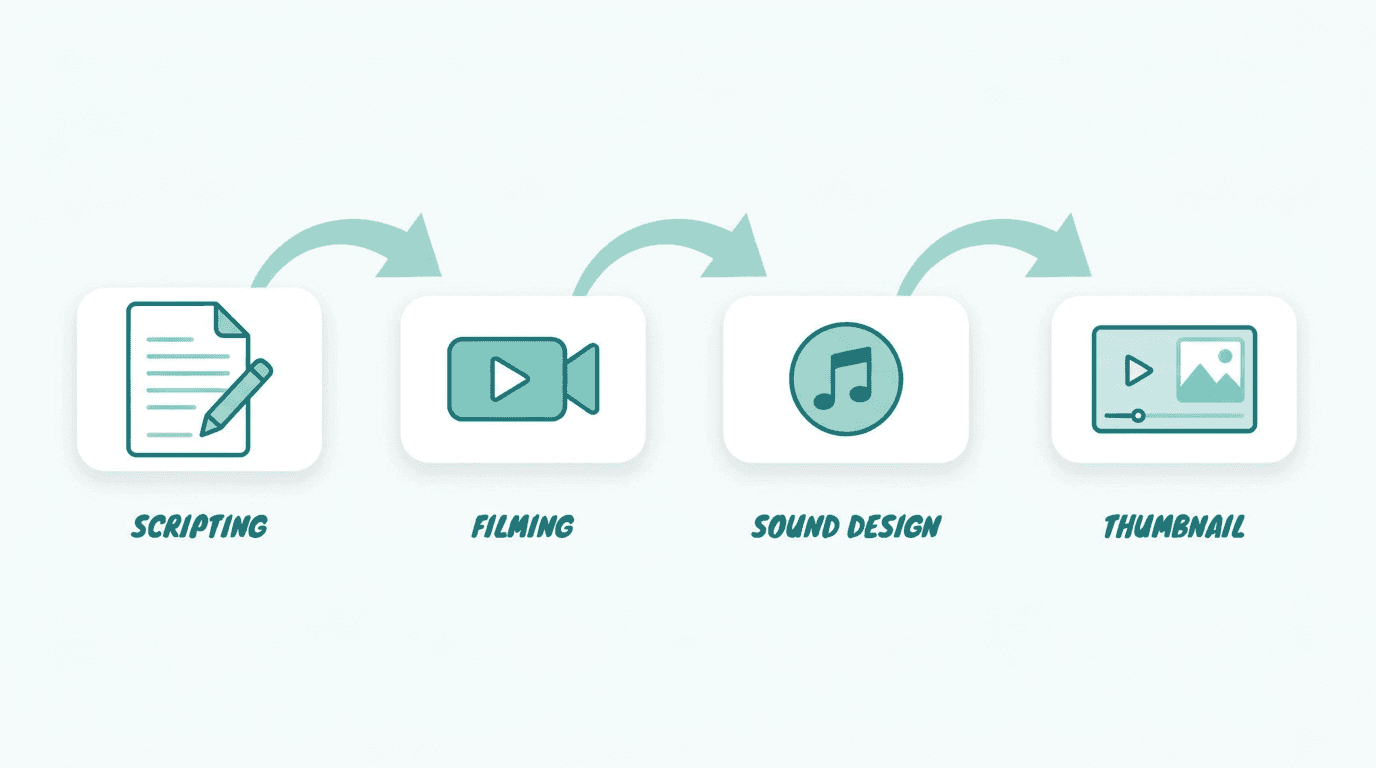
Here is how the full pipeline works when you use Miraflow AI as your central creation platform.
For a YouTube video, you might start by generating your video content using the Text2Shorts generator for a vertical Short or the Cinematic Video Generator for cinematic clips. Then you create your thumbnail using the YouTube Thumbnail Maker, which offers templates for both 16:9 video thumbnails and 9:16 Shorts thumbnails. Finally, you generate your background music in the AI Music Generator with a prompt tailored to your video's mood and duration.
The entire process, from idea to finished video with custom soundtrack and professional thumbnail, happens in one browser window. There is no switching between multiple platforms, no downloading from separate stock libraries, and no worrying about whether your music license covers your specific use case.
For creators who need visual assets alongside their music, the AI Image Generator supports multiple aspect ratios and can generate everything from YouTube thumbnail graphics to social media visuals. The AI prompts for before-after YouTube thumbnails guide includes thumbnail prompt templates that pair well with different content styles.
The Legal Landscape for AI-Generated Music in 2026
Understanding the legal context around AI-generated music helps you make informed decisions about how to use it in your content.
The short answer to whether AI-generated music is copyright-free is: it depends on the jurisdiction, the platform, and the degree of human involvement in creating the work.[6]
In the United States, copyright law is built on the concept of human authorship. The U.S. Copyright Act protects original works of authorship fixed in a tangible medium. The U.S. Copyright Office has consistently held that a work must have a human author to receive copyright protection.[6]
This means that in practical terms, for most content creators using AI music as background tracks, the AI-generated category is perfectly adequate.[10] You are using the music as a supporting element in your video, and the key concern is whether you have the right to use and monetize it on platforms like YouTube, not whether the music itself can be copyrighted.
As of 2026, several high-profile lawsuits between music labels and AI companies over training data remain in various stages of litigation and have not yet produced definitive rulings that establish clear legal standards.[6] These cases primarily concern the training process rather than end-user usage of generated output, but the outcomes will shape how the landscape evolves.
The practical recommendation for creators is straightforward. Before using any AI-generated track in a project, locate and read the platform's licensing terms for the specific subscription tier being used. Do not rely on general descriptions or marketing language such as "royalty-free" or "free to use" without confirming what those terms actually permit.[6]
Advanced Prompt Techniques for Specific Scenarios
Beyond the basic templates, here are advanced prompt strategies for creators with more specific needs.
Creating a Consistent Sound Across Multiple Videos
If you run a YouTube channel and want all your videos to have a recognizable sonic identity, use a base prompt template and keep the core elements consistent while varying the energy level for different video types.
Base template prompt:
Warm indie electronic with soft synth pads, clean electric guitar, gentle percussion, and ambient textures. Modern, approachable, and slightly nostalgic mood. Clean production with space and warmth.
Then add a modifier for each video type:
For tutorials, append: Calm and focused at 90 BPM, designed as subtle background behind a speaking voice.
For intros, append: Energetic and inviting at 115 BPM, short 15-second phrase with a clear ending.
For outros, append: Relaxing and reflective at 85 BPM, gentle fade-out feel, 20 seconds.
This approach gives you a consistent channel identity while adapting the energy to each content format. In Custom Mode on the AI Music Generator, you can also set the same key and scale across all generations to ensure harmonic consistency.
Building Musical Arcs for Longer Content
For videos longer than 5 minutes, a single background track can become monotonous. Instead, generate 3 to 4 tracks with the same genre and instruments but different energy levels, then layer them into your timeline at appropriate moments.
Opening energy (first 30 seconds):
Prompt:
Bright and engaging indie pop instrumental with acoustic guitar, light electronic drums, and uplifting piano melody. Optimistic and welcoming mood at 118 BPM. Clean and warm production for a video opening that establishes energy and invites the viewer in.
Main content bed (bulk of the video):
Prompt:
basic
Gentle ambient indie instrumental with soft synth pads, minimal acoustic guitar accents, and very subtle percussion. Calm and focused mood at 95 BPM. Extremely unobtrusive, designed to sit behind extended speaking segments without pulling attention.
Transition sting (between sections):
Prompt:
Short bright musical phrase with clean electric guitar and snappy electronic percussion. Upbeat and confident transition energy at 120 BPM. A brief 5-second musical moment designed to signal a topic change in a video.
Closing and call to action:
Prompt:
Warm and uplifting indie pop with acoustic guitar, piano, and building percussion leading to a satisfying resolution. Positive, grateful, and conclusive mood at 110 BPM. Designed for video endings and call-to-action moments.
Generating Music for Faceless YouTube Channels
Faceless channels, which are channels that use stock footage, screen recordings, or AI-generated visuals instead of a presenter on camera, have specific background music needs. The music carries more emotional weight because there is no human face to anchor the viewer's attention.
Faceless motivation channel:

Prompt:
Cinematic motivational instrumental with powerful piano chords, building orchestral strings, steady drumbeat, and atmospheric synth layers. Inspiring, determined, and emotionally uplifting mood at 105 BPM. Designed for motivational and self-improvement content where music drives the emotional narrative.
Faceless fact or list channel:
Prompt:
Curious and engaging electronic background with plucky synth melody, light rhythmic percussion, clean bass, and subtle atmospheric effects. Intriguing, playful, and educational mood at 110 BPM. Designed for list-style and fact-based content that needs subtle energy without overwhelming the narration.
The faceless YouTube Shorts AI niches 2026 guide covers 10 profitable niches for faceless channels, each of which benefits from custom AI-generated music.
How to Avoid Content ID Claims with AI Music (Checklist)
Even though AI-generated music is original and should not trigger Content ID claims, there are a few best practices that ensure you stay completely safe.

Always use the Instrumental toggle for background music.
Tracks with AI-generated vocals have a very small chance of producing a melody that resembles something in the Content ID database. Instrumentals eliminate this risk almost entirely.
Generate unique tracks for each video instead of reusing the same track.
If you upload the same AI-generated track across dozens of videos, and someone else generates a very similar track and registers it with Content ID, you could face claims. Unique tracks per video eliminate this edge case.
Download and save your generation metadata.
Keep a record of when you generated the track, what prompt you used, and which platform you used. If you ever need to dispute a claim, this documentation serves as evidence that you created the track.
Check your videos in YouTube Studio before publishing.
YouTube Studio has a built-in copyright check feature that scans your video before it goes live. The safest approach combines a proper license, Content ID clearance from the provider, a downloadable license certificate, and a pre-publish check inside YouTube Studio before your video goes live.[2]
Avoid prompts that explicitly reference copyrighted songs or artists.
Asking an AI to "make something that sounds exactly like a specific popular song" increases the risk of producing something too similar to a copyrighted work. Describe the style, mood, and instruments you want without referencing specific artists or track names.
Using AI Music in YouTube Shorts Without Losing Revenue
For Shorts creators specifically, there is a direct financial reason to use original AI-generated music instead of licensed tracks from the YouTube Shorts music library.
When you use a licensed music track in a YouTube Short, the revenue associated with that Short gets split between the Creator Pool and music licensing before you receive your share. A Short with one licensed music track sends only 50% of its associated revenue to the Creator Pool. If you use two tracks, only 33% goes to the Creator Pool.
Using original AI-generated background music means 100% of the revenue associated with your Shorts views goes into the Creator Pool, which directly increases your per-view earnings. For creators who publish Shorts consistently, this difference compounds over time into meaningful additional revenue.
The YouTube Shorts best practices 2026 guide covers the full list of optimization strategies for maximizing both reach and revenue from Shorts.
Prompt Templates for 10 Popular YouTube Niches
Here are niche-specific background music prompts that match the audience expectations and content style of popular YouTube categories. Each prompt is ready to paste into the AI Music Generator.

Cooking and Food:
Prompt:
Warm acoustic instrumental with fingerpicked nylon guitar, soft bossa nova rhythm, light shaker percussion, and gentle double bass. Cozy, appetizing, and homey mood at 105 BPM. Clean and warm production designed for cooking tutorials and recipe videos.
Travel and Adventure:
Prompt:
Uplifting world music-inspired instrumental with acoustic guitar, ethnic percussion, bright flute melody, and atmospheric pads. Wanderlust, freedom, and discovery mood at 115 BPM. Airy and spacious production that evokes open landscapes and new experiences.
Fitness and Workout:
Prompt:
High-energy EDM instrumental with pounding four-on-the-floor kick, aggressive synth bass, soaring lead synth, and driving hi-hats. Intense, powerful, and unstoppable mood at 140 BPM. Designed for workout montages, fitness transformation videos, and exercise content.
ASMR and Relaxation:
Prompt:
Ultra-minimal ambient soundscape with soft evolving drone pads, occasional gentle wind chimes, subtle water-like textures, and deep sub-bass warmth. Deeply calming, spacious, and hypnotic mood at 55 BPM. Extremely quiet and unobtrusive for ASMR and relaxation content.
Science and Education:
Prompt:
Curious electronic instrumental with clean plucked synth melody, steady light percussion, soft ambient pad background, and subtle bass pulses. Thoughtful, engaging, and intellectually stimulating mood at 100 BPM. Designed for science explainer videos and educational content.
Comedy and Entertainment:
Prompt:
Fun and quirky instrumental with bouncy bass line, playful pizzicato strings, comedic percussion hits, and bright xylophone accents. Lighthearted, silly, and smile-inducing mood at 125 BPM. Perfect for comedy sketches, funny compilations, and entertainment content.
Real Estate and Property:
Prompt:
Elegant and sophisticated instrumental with smooth piano melody, gentle string quartet, light brush drums, and warm acoustic bass. Luxurious, aspirational, and welcoming mood at 95 BPM. Polished production designed for property tour videos and real estate marketing content.
Personal Finance:
Prompt:
Modern corporate ambient with clean digital synth textures, confident piano chords, subtle electronic percussion, and polished bass. Professional, trustworthy, and empowering mood at 100 BPM. Designed for personal finance education, investing tutorials, and money management content.
Horror and Mystery:
Prompt:
Dark atmospheric instrumental with dissonant string drones, eerie reversed piano notes, low rumbling sub-bass, and unsettling textural effects. Tense, mysterious, and foreboding mood at 70 BPM. Designed for horror narration, true crime content, and mystery storytelling vieos.
Kids and Family:
Prompt:
Cheerful and colorful instrumental with bright ukulele melody, playful glockenspiel, bouncy hand claps, and friendly acoustic guitar. Happy, innocent, and fun mood at 120 BPM. Warm and clean production designed for kids content, family vlogs, and child-friendly educational videos.
For more prompt templates focused on product photography and e-commerce visuals, the 15 AI prompts for product photos that look like studio shots guide is a useful companion resource.
Conclusion
Background music copyright claims are one of the most avoidable problems in video creation, and AI music generators have made it possible for any creator to produce original, claim-free tracks in under a minute. The key is writing descriptive prompts that cover genre, mood, instruments, tempo, and purpose, and using a platform that grants you the commercial rights to monetize your content.
The AI Music Generator on Miraflow AI handles this entire workflow in Simple Mode for quick generation or Custom Mode for precise control over duration, BPM, key, and song structure. Combined with the platform's video creation, thumbnail generation, and image tools, it gives creators a complete pipeline from idea to published video without switching between multiple services.
The prompts in this guide are ready to copy and paste. Start with the template closest to your content style, adjust one or two elements to match your specific needs, and generate. If the first result is not perfect, tweak a single variable and try again. Within two or three generations, you will have a unique background track that sounds professional, fits your video perfectly, and will never trigger a copyright claim.
Frequently Asked Questions
Will AI-generated music trigger a Content ID claim on YouTube?
AI-generated music is original and does not exist in YouTube's Content ID reference database, so it should not trigger claims. To minimize any risk, use the Instrumental toggle, avoid prompting the AI to mimic specific copyrighted songs, and always check your video in YouTube Studio before publishing.
Can I monetize YouTube videos that use AI-generated background music?
Yes. Most AI music platforms, including the AI Music Generator on Miraflow AI, grant commercial usage rights that allow you to monetize videos using the generated tracks. Always confirm the specific licensing terms of the platform you use for your subscription tier.
How long does it take to generate a background music track with AI?
On the Miraflow AI Music Generator, typical generation time is under one minute. You enter your description, choose Simple or Custom Mode, and the track is ready to play and download within seconds to a minute depending on the complexity.
What is the best prompt length for AI music generation?
The sweet spot is 4 to 7 descriptors covering genre, mood, instruments, tempo, and purpose. Prompts that are too short produce generic output, while prompts that are overloaded with conflicting details confuse the AI and lead to inconsistent results.
Can I use the same AI-generated track in multiple videos?
Yes, you can reuse generated tracks across multiple videos. However, generating a unique track for each video gives your content a more distinctive feel and further reduces any theoretical risk of a Content ID match with another creator's similar generation.
Does using original AI music in YouTube Shorts increase my revenue?
Yes. When you use licensed music in a Short, the revenue associated with your views gets split with the music rights holder before you receive your 45% share. Using original AI-generated music means 100% of the revenue from your views goes into the Creator Pool, directly increasing your per-view earnings.
What music BPM should I use for different video types?
For calm tutorials and interviews, 70 to 95 BPM works well. For lifestyle vlogs and general content, 100 to 120 BPM provides upbeat energy. For fitness, gaming, and high-intensity content, 130 to 150 BPM matches the energy level. For meditation and ASMR, 55 to 70 BPM creates the right atmosphere.
Is AI-generated music copyright-free or royalty-free?
The legal classification depends on the jurisdiction and platform. In the United States, purely AI-generated works may not qualify for traditional copyright protection. Most AI music platforms grant users a royalty-free license to use and monetize the generated tracks. Read the specific terms of service for the platform you are using.
References
- Beatoven.ai: Royalty Free AI Music Generator
- Free Music for Youtube & Videos - No copyright claim
- YouTube Content ID For Music: 2026 Guide To Monetization - Foxi Blog
- Effective AI Music Prompts 2026: 5 Elements + Examples
- SOUNDRAW | AI Music Generator – Royalty Free Beats
- Free To Use — royalty free music, no copyright - YouTube
- Need Background Music That Won’t Trigger Content ID: 2026 - Foxi Blog
- Best Prompts for Music Generator AI
- Free AI Music Generator & AI Music Tools | OpenMusic AI
- Royalty Free Music for YouTube, Video & Podcast | Tunetank
- Guide to YouTube Content ID & Copyright Notices – Envato Support | Help Center