20 AI Dark Stage Effect Prompts for TikTok's Viral Dark Portrait Trend (Copy & Paste)

Written by
Aerin Kim
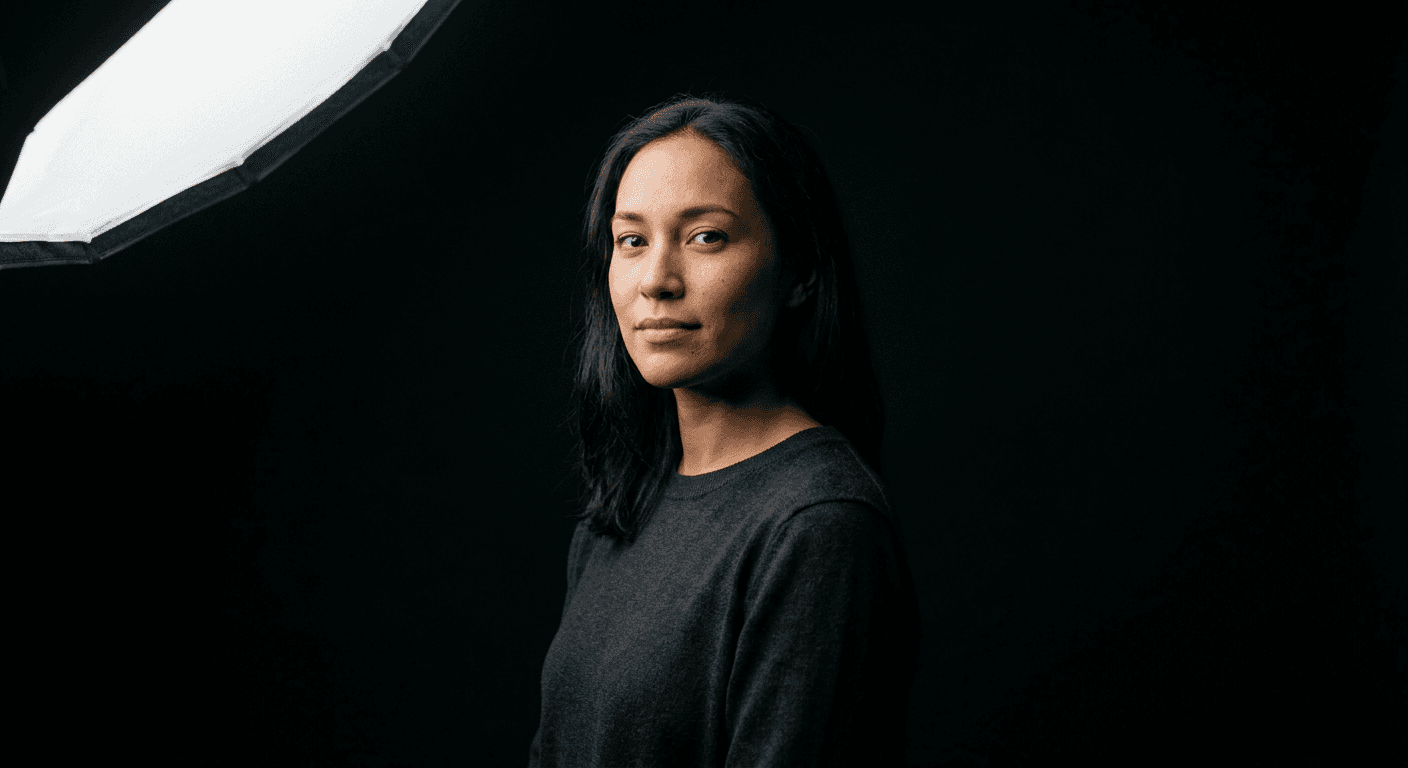
TikTok's dark stage effect turns ordinary selfies into moody single-light studio portraits. Here are 20 copy-paste AI prompts, real customization tips, and mistakes to avoid.
If your TikTok For You Page this week is suddenly full of moody, single-light portraits on a pitch-black background that look like they were shot in a real photography studio, you are looking at the dark stage effect. It is a fast-moving AI photo trend built on a simple idea: take an ordinary phone selfie, run it through an AI image tool, and get back a dramatic, near-black studio portrait with one clean light source, sharp shadow, and a premium, cinematic feel that most people could never light for real without professional gear. Creators are generating it with Gemini's Nano Banana models, ChatGPT, and Grok Imagine, then posting the results as profile pictures, carousel closers, and standalone posts, and it keeps spreading because the finished look happens to match TikTok's own black interface almost perfectly, so the portrait reads as an extension of the app rather than a photo pasted on top of it.
The appeal is not subtle. A convincing single-light studio portrait normally needs a real backdrop, a controlled room, and at least one strobe or continuous light, plus someone who knows where to point it. The dark stage effect skips all of that. You upload one selfie, describe the lighting setup in plain language, and an image model does the actual lighting math for you. That is exactly the kind of image-to-image and text-to-image workflow Miraflow's AI Image Generator is built for, and it is why this trend is worth a real prompt pack instead of a single copy-paste line. Below are 20 distinct, ready-to-use prompts grouped by the kind of shot you actually want, from solo headshots to duo portraits, fashion close-ups, motion shots, creator and brand portraits, and even pets, plus real guidance on customizing them, the mistakes that make the effect look cheap instead of premium, and answers to the questions creators keep asking about it.
Why the Dark Stage Effect Is Spreading Right Now
This is not a filter in the traditional sense. There is no slider or preset being applied on top of your existing photo. The AI model is regenerating the entire image from your likeness, building a new photorealistic scene around you that follows a real studio lighting brief. That distinction matters, because it is also why the results can look genuinely convincing instead of like an Instagram overlay from 2015. A search for the trend on TikTok turns up both real tutorial posts walking through the exact prompt structure and a growing stack of discover pages built around the phrase, the kind of split you typically see once a visual trend has moved past a handful of early adopters into broad, repeatable use. Creators like the ones behind tutorial posts titled around "how to create the dark stage effect" are teaching followers the specific wording that gets a clean true-black background instead of a muddy gray one, which tells you the trend has already reached the stage where technique, not just novelty, is the thing people are sharing.
Three things are driving it at once. First, it is genuinely low effort. You do not need editing skill, a ring light, or a black bedsheet taped to a wall, you need one working selfie and a well-written prompt. Second, it flatters almost everyone, because a single dramatic key light against total black is one of the most forgiving lighting setups in real photography, the same reason professional headshot photographers and album cover shoots lean on it constantly. Third, and this is the part that is easy to miss, the near-black backdrop visually disappears into TikTok's own dark-mode interface, Instagram's dark profile chrome, and most phone lock screens, so the portrait feels native to the platform instead of sitting on top of it like a busy, brightly lit photo would. That is a big part of why this format is outperforming a lot of the pastel, saturated AI photo trends that came before it this year.
If you have already read our breakdown of how to make AI images look like real photos, the dark stage effect is really that same photorealism discipline applied to one specific, repeatable lighting brief: name a real light source, a real angle, a real lens, and describe real skin and fabric texture, then let the near-black background do the heavy lifting instead of trying to describe an elaborate scene. That is also why the prompts below read like a photographer's shot brief rather than a mood board. Every one of them names an actual light source, a lens, an aperture, and a texture detail, because vague prompts are exactly what produces the flat, plasticky version of this trend instead of the premium one.
1) Solo Portrait and Headshot Dark Stage Prompts
Solo shots are the natural starting point, since there is only one face for the model to light and only one set of shadows to keep consistent. These five prompts cover the core lighting patterns real portrait photographers actually rotate between: a soft wraparound key light, a rim-lit silhouette edge, a top-down beauty light, a low power-stance angle, and hard split lighting. Learning the difference between them is also the fastest way to stop every generated portrait from looking identical.
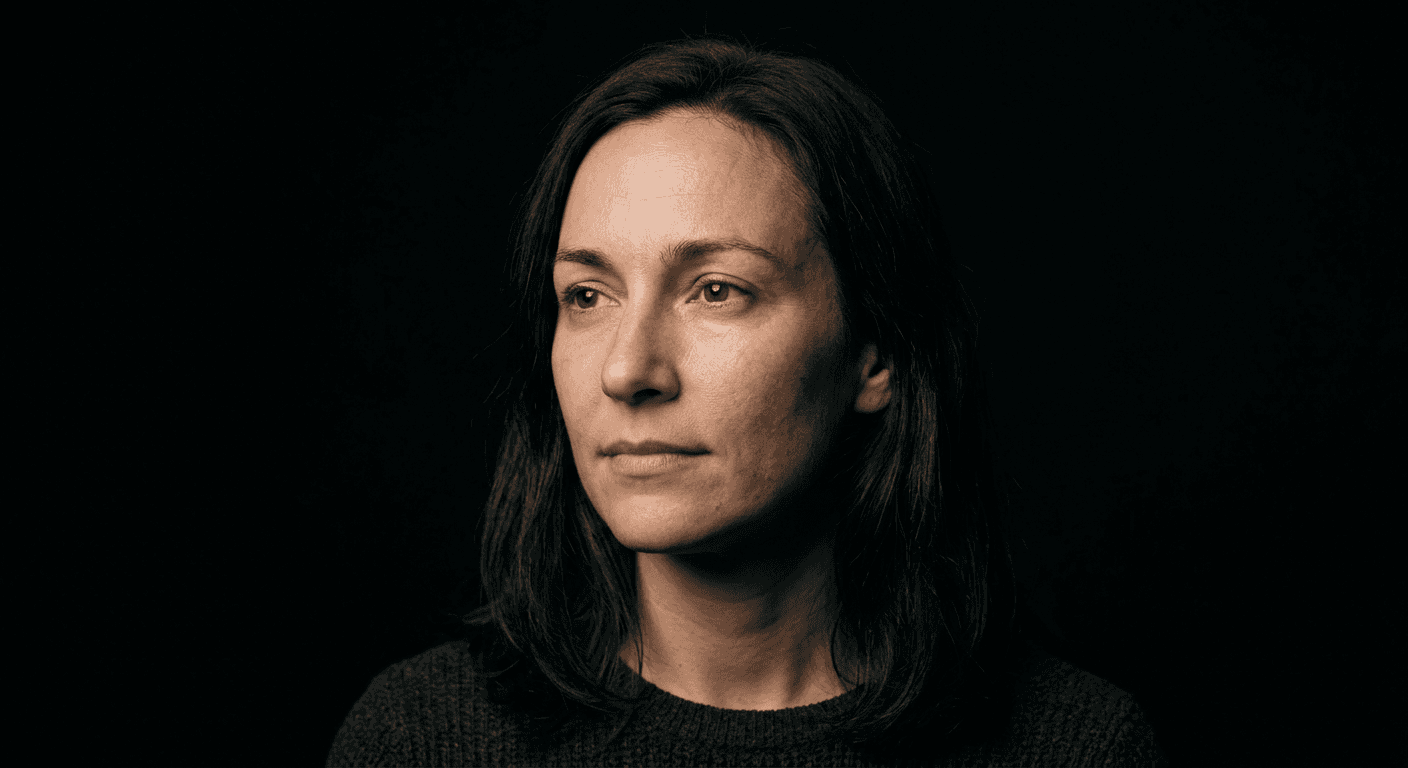
Prompt 1: Classic single key light, three-quarter portrait
This is the most reliable starting prompt in the whole set, a soft wraparound key light that flatters almost any face shape and works as a LinkedIn photo just as easily as a TikTok profile picture.
A close three-quarter portrait of a person standing against a seamless near-black studio backdrop, lit by a single large softbox key light positioned high and slightly to camera-left at roughly a 45 degree angle, the light wrapping softly across the cheekbone and falling into deep, controlled shadow on the opposite side of the face, shot on a full-frame camera with an 85mm portrait lens at f/2 for a naturally soft falloff, realistic pore-level skin texture with minimal retouching, a subtle catchlight visible in both eyes, background dropping to true black just past the subject's shoulders with no visible seams or gradient bands, calm neutral expression looking just off-camera, no blown highlights, no plastic-looking skin smoothing, no warped features.
Best for: everyday profile pictures, a first test of the effect on a new selfie, and any use case where the photo needs to look approachable rather than intense.
Prompt 2: Rim-light silhouette edge
A moodier variation that leans almost entirely on edge light instead of front light. It reads as more cinematic and mysterious, closer to a movie poster crop than a headshot.
A moody solo portrait shot straight on against a pure black backdrop, lit primarily by a single thin rim light placed directly behind the subject and slightly above head height, tracing a crisp bright line along the hair, shoulder, and jaw while the front of the face stays mostly in soft shadow with only a faint fill bounce keeping the eyes visible, shot on a 50mm lens at f/1.8 for a shallow, cinematic depth of field, fine visible skin texture and natural fabric weave on the collar, a thin haze of atmosphere in the air catching the rim light, no overexposed hotspots on the hair, no muddy underexposed shadow blocking the eyes entirely, no text or watermark.
Best for: album art, a dramatic bio photo, or any post where you want the silhouette itself to be the hook rather than a clearly lit face.
Prompt 3: Top-down beauty light, close crop
Beauty lighting is the setup real magazine covers use because it minimizes shadow under the eyes while still keeping the image dramatic against black. This crop pushes in tight enough that skin texture becomes the whole story.
An extreme close crop beauty portrait from the collarbone up, lit by a single large octabox positioned directly overhead and slightly forward, producing soft butterfly-shaped shadow under the nose and chin against a near-black backdrop that fades to full black at the frame edges, shot on a 100mm macro-capable lens at f/4 to keep the entire face in crisp focus, hyper-realistic skin texture including visible pores, fine hair strands, and natural asymmetry, a single soft catchlight centered in each eye, neutral confident expression, no waxy skin retouching, no doubled catchlights, no visible studio equipment in frame.
Best for: close beauty or skincare-adjacent content, and any account that wants the dark stage look without losing fine detail in the face.
Prompt 4: Low-angle power stance
Shooting from slightly below eye level instantly reads as more confident and editorial. Paired with a hard key light and a structured jacket, this is the closest of the twenty to an actual fashion campaign shot.
A three-quarter-body portrait shot from a slightly low camera angle looking up at the subject, who stands with arms crossed in a confident stance against an absolute black seamless backdrop, lit by a single hard key light from camera-right that carves a defined shadow line down the center of the body and clothing, shot on a 35mm lens with the subject filling most of the frame, visible fabric texture and stitching detail on a structured jacket, realistic falloff where the light meets the black background so the edges of the body stay crisply separated from the void behind them, grounded and serious expression, no lens distortion warping the limbs, no halo artifact around the silhouette.
Best for: personal branding, founder or coach content, and any post meant to signal authority rather than approachability.
Prompt 5: Split lighting profile
Split lighting, where exactly half the face is lit and the other half disappears into shadow, is a classic technique used in noir photography and dramatic character portraits. It is the most intense look in this group and works best when you want the image to feel bold rather than friendly.
A profile-angled headshot using classic split lighting, one hard light source from directly camera-left lighting exactly half the face while the other half falls into pure, deep black shadow that blends seamlessly into the black backdrop behind, shot on an 85mm lens at f/2.8, the lit half of the face showing full realistic skin texture, individual eyebrow hairs, and natural skin tone variation, the unlit half reading as near-silhouette with only the faintest shadow detail in the eye socket, plain dark wardrobe so the clothing recedes into the background, no visible light source reflection in the eye on the shadowed side, no flat or double-lit look, no digitally added vignette.
Best for: a striking thumbnail or cover image, or a single standout post in an otherwise softer feed.
2) Duo and Group Dark Stage Prompts
The dark stage effect works just as well with two or three people in frame, but it is also where most of the visible AI mistakes show up, mismatched shadow direction, one person looking lit and the other looking flat. These three prompts are written specifically to keep the lighting consistent across every subject in the shot, which is the actual technical challenge of a multi-person version of this trend.
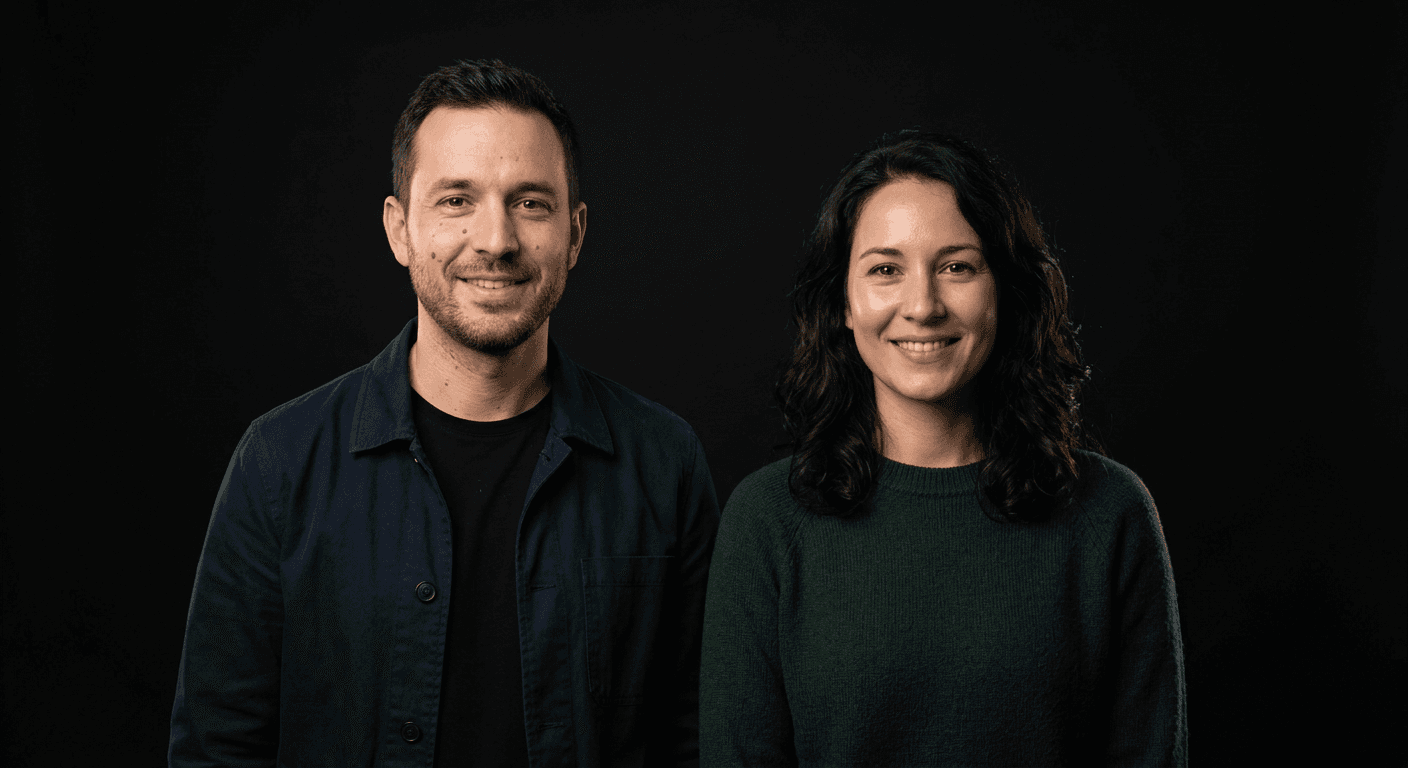
Prompt 6: Side-by-side duo portrait
The simplest multi-person version, built around one shared overhead key light so both faces get the same quality and direction of light instead of two separately lit portraits stitched together.
A side-by-side duo portrait of two people standing shoulder to shoulder against a seamless black studio backdrop, lit by a single large key light positioned high and centered between the camera and the subjects so both faces receive matching soft directional light from slightly above, shot on a 50mm lens at f/2.8 to keep both subjects in even focus, realistic and distinct skin tones and textures on each person, natural relaxed postures with a small gap of pure black visible between their shoulders, subtle rim separation where the black backdrop meets dark clothing, no mismatched lighting direction between the two subjects, no merged or blurred edge between the bodies.
Best for: couple posts, best-friend content, sibling or family duo shots, and business partner branding photos.
Prompt 7: Back-to-back duo composition
A more editorial pose using two matched rim lights instead of one shared key light, which reads as more deliberate and stylized than a simple side-by-side.
A back-to-back duo composition against a pure black backdrop, two subjects standing with shoulders touching and faces turned toward the camera at opposite three-quarter angles, lit by two matched rim lights placed behind each subject at roughly shoulder height, tracing a clean bright edge along both silhouettes while the front of both faces is lit by a soft low-level fill from camera position, shot on an 85mm lens at f/2.5, realistic fabric texture on matching dark outfits, distinct and natural skin texture on both faces, no crossed or tangled rim-light flare between the two people, no washed-out highlight where the rim lights overlap.
Best for: a launch post for a collaboration, a duo podcast or content team, or any pairing that wants a poster-style composition rather than a casual snapshot.
Prompt 8: Small friend group cluster
Once you go past two people, keeping everyone evenly lit gets genuinely harder, which is why this prompt adds a second, subtler fill light specifically to stop the farthest person in the group from disappearing into the black background.
A loose cluster portrait of three people standing at slightly different depths against an absolute black backdrop, lit by one broad key light from camera-left and a subtle secondary fill from camera-right to keep the farthest subject from disappearing into shadow, shot on a 35mm lens at f/4 for enough depth of field to keep all three faces sharp, natural varied heights and postures rather than a stiff lineup, individually realistic skin tones and expressions on each person, visible but soft falloff into black past the group's outer edges, no double shadows crossing on the backdrop, no flattened or overly even lighting that removes all depth cues.
Best for: friend group content, a small team photo, or a roommate or creator-collective post. If the shot is really headed for a video thumbnail rather than a feed post, our Nano Banana Pro multi-person thumbnail prompts cover the same group-lighting problem from a YouTube-specific angle.
3) Fashion, Outfit and Style Dark Stage Prompts
This is the category built for anyone posting outfit or product-adjacent content, since the same single-light, true-black setup that flatters a face is also one of the best ways to make fabric texture, jewelry, and accessories look genuinely premium instead of flat and overexposed the way a lot of phone-camera outfit photos end up.
Prompt 9: Outfit-of-the-day, full body
A full-length version of the effect, useful anytime the outfit itself, not just the face, is the point of the post.
A full-body fashion portrait shot straight on against a seamless black studio floor and backdrop, the subject standing in a relaxed contrapposto pose wearing a structured blazer over a plain top and tailored trousers, lit by one large softbox key light from camera-left at chest height plus a narrow rim light from behind to separate the silhouette from the black floor, shot on a 50mm lens at f/4 to hold focus from head to shoe, realistic fabric drape, stitching, and texture on every garment, a soft reflection of the key light visible on any polished shoe or accessory, no floating or cut-off feet, no fabric that reads as flat or plastic-like.
Best for: outfit-of-the-day posts, a small fashion or resale brand's product-on-model shots, and portfolio-style fashion content.
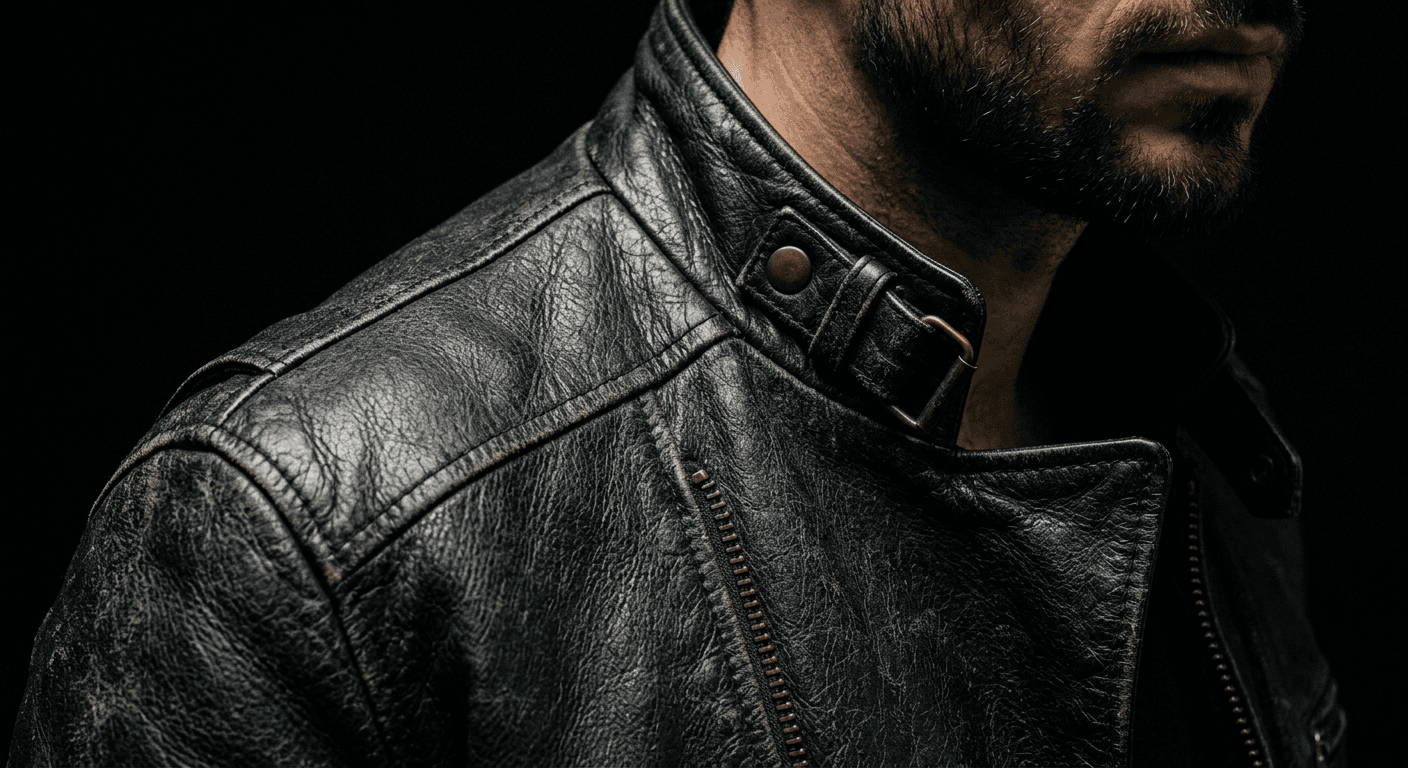
Prompt 10: Jacket or fabric texture close-up
A macro-style crop that treats the garment's material as the real subject. This is the prompt to reach for when the texture of a specific piece, leather, denim, suede, is the actual selling point.
A tight three-quarter crop from mid-chest up focused on a textured leather or denim jacket collar and shoulder, lit by a single raking side light from camera-right that skims across the jacket's surface to reveal every crease, seam, and grain of the material against a pure black backdrop, shot on a 100mm macro-capable lens at f/3.5, the subject's jawline and part of the face visible in soft shadow at the top of frame, hyper-realistic material texture as the clear focal point, no overly smooth or waxy leather rendering, no loss of texture detail in the lit highlight area.
Best for: a small clothing brand showing off material quality, or a thrifted or vintage-piece spotlight post.
Prompt 11: Jewelry or accessory spotlight
A tightly controlled spotlight beam that isolates one piece of jewelry against total black, a technique borrowed directly from real product photography for watches and fine jewelry.
A close portrait focused on the neck and collarbone area, showing a statement necklace or a pair of earrings catching a narrow spotlight against total black, lit by one small hard light source with a snoot or grid to keep the beam tight and controlled, the rest of the frame, including the subject's face, falling into soft dim shadow that still shows faint recognizable skin texture rather than pure silhouette, shot on an 85mm lens at f/2 for shallow depth of field, realistic metal reflections and gemstone sparkle on the jewelry, no lens flare artifact from the spotlight, no overexposed blown-out highlight on the metal.
Best for: handmade jewelry brands, a specific accessory drop, or any post where one small object needs to feel expensive.
Prompt 12: Seasonal knit or texture portrait
A slightly warmer version of the core lighting setup, useful for autumn and winter wardrobe content where you want the dark stage look without it reading as cold or clinical.
A confident three-quarter portrait showing a chunky knit sweater with visible cable-knit texture, lit by a single soft key light from camera-left set slightly warmer in color temperature than a typical studio light to read as an early autumn mood while the backdrop stays a true cool-toned black, shot on a 50mm lens at f/2.8, realistic yarn texture and natural static-frizz strands of hair catching the light, relaxed hands-in-pockets posture, subtle warm rim light on one shoulder for separation, no color cast bleeding onto the black backdrop itself, no flattened texture on the knit fabric.
Best for: seasonal wardrobe posts, cozy or lifestyle-adjacent brand content, and any account that wants warmth without losing the true-black backdrop. Beauty and skincare brands leaning into darker, more premium product visuals may also want our skincare and beauty brand content prompts as a companion pack for the product side of the shoot.
4) Movement and Dramatic Action Dark Stage Prompts
A completely static portrait is not the only version of this trend. Real studio photographers use fast strobes specifically to freeze motion cleanly against black, and the same brief works well in an AI prompt. These three add real energy without breaking the single-light, true-black formula that makes the trend recognizable in the first place.
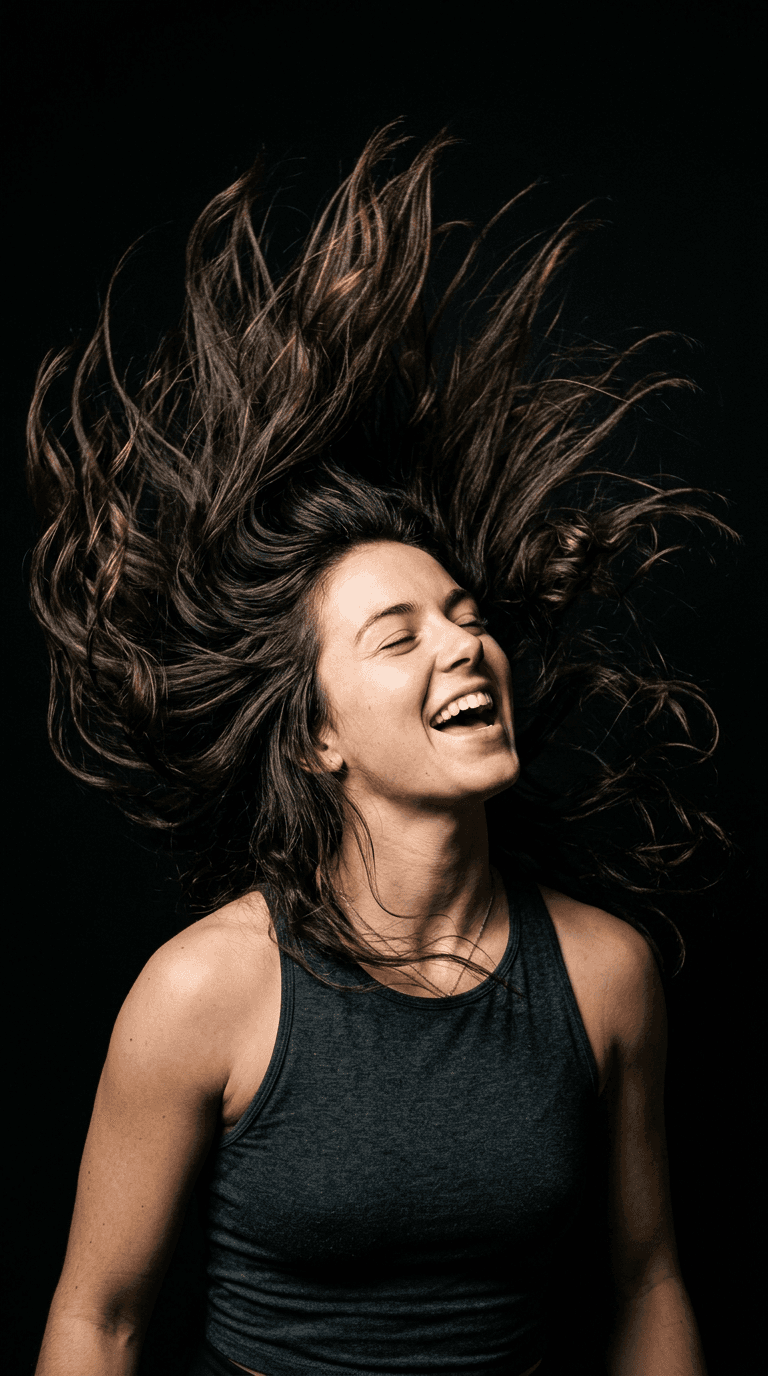
Prompt 13: Hair or fabric flip, frozen motion
The most popular motion variation of the trend, since a single frozen hair flip against black reads as both dynamic and clean at the same time, and works especially well as a vertical profile picture or Story.
An action-frozen portrait capturing a mid-motion hair or fabric flip against a pure black backdrop, lit by a fast-recycling strobe key light from camera-left set to freeze motion with a high flash duration, strands of hair or the edge of a loose scarf caught mid-arc and sharply frozen against the black void, shot on an 85mm lens at a fast equivalent shutter speed with f/2.8, realistic individual hair strands and fabric folds visible even mid-motion, the subject's expression energetic and natural rather than posed, no motion smear on the face itself, no strobe double-exposure ghosting.
Best for: a profile picture with more energy than a static portrait, a dance or fitness creator's cover photo, or a Story-format post. It also works well cropped as a vertical phone wallpaper, see our AI iPhone lockscreen wallpaper prompts for more of that specific format.
Prompt 14: Walking stride with controlled motion blur
A more advanced version that intentionally blurs the trailing edge of the body while keeping the face perfectly sharp, mimicking the flash-plus-slow-shutter technique real event photographers use.
A walking-stride portrait shot from slightly below eye level as the subject strides toward camera-left across a black studio floor, lit by a single key light tracking with the subject's path so the face and torso stay crisply lit while a controlled, intentional motion blur trails softly behind the back leg and trailing edge of the coat, shot on a 35mm lens with a deliberately extended shutter paired with a brief flash pop to keep the face sharp against the blurred trail, realistic fabric movement and natural stride mechanics, no distorted or extra limbs from the blur, no blur bleeding onto the face or hands.
Best for: a fashion-forward feed, a music artist's promotional image, or any post that wants motion without sacrificing a sharp, recognizable face.
Prompt 15: Dynamic head-and-shoulder turn
A mid-turn moment, hair still catching the motion, that feels candid and alive compared to a posed, static portrait, while staying within the same single-key-light brief as every other prompt in this pack.
A dynamic three-quarter portrait capturing the exact instant the subject turns their head and shoulders toward the camera, hair still mid-swing, against a pure black backdrop lit by a single strong key light from slightly above camera height that catches the turning motion with crisp directional shadow, shot on a 50mm lens at f/2.2, realistic frozen strands of hair and natural fabric twist in the clothing, genuine energetic expression rather than a static smile, no warped or duplicated facial features from the motion, no unnatural blur artifacts on the stationary parts of the body.
Best for: an energetic personal brand, a dance or performance creator, or breaking up a feed that has leaned too heavily on static portraits. Fans of high-energy AI photo trends may also enjoy our AI concert jumbotron and fan-cam prompts, which use a similar single-light-against-dark approach for a stadium setting.
5) Creator, Brand and Product-Adjacent Dark Stage Prompts
The dark stage effect is not just a personal portrait trend, it is also quietly becoming a go-to look for small creators and brand owners who want product photography that feels expensive without a real studio rental. These three adapt the same lighting brief to musicians, small business owners, and fitness creators.
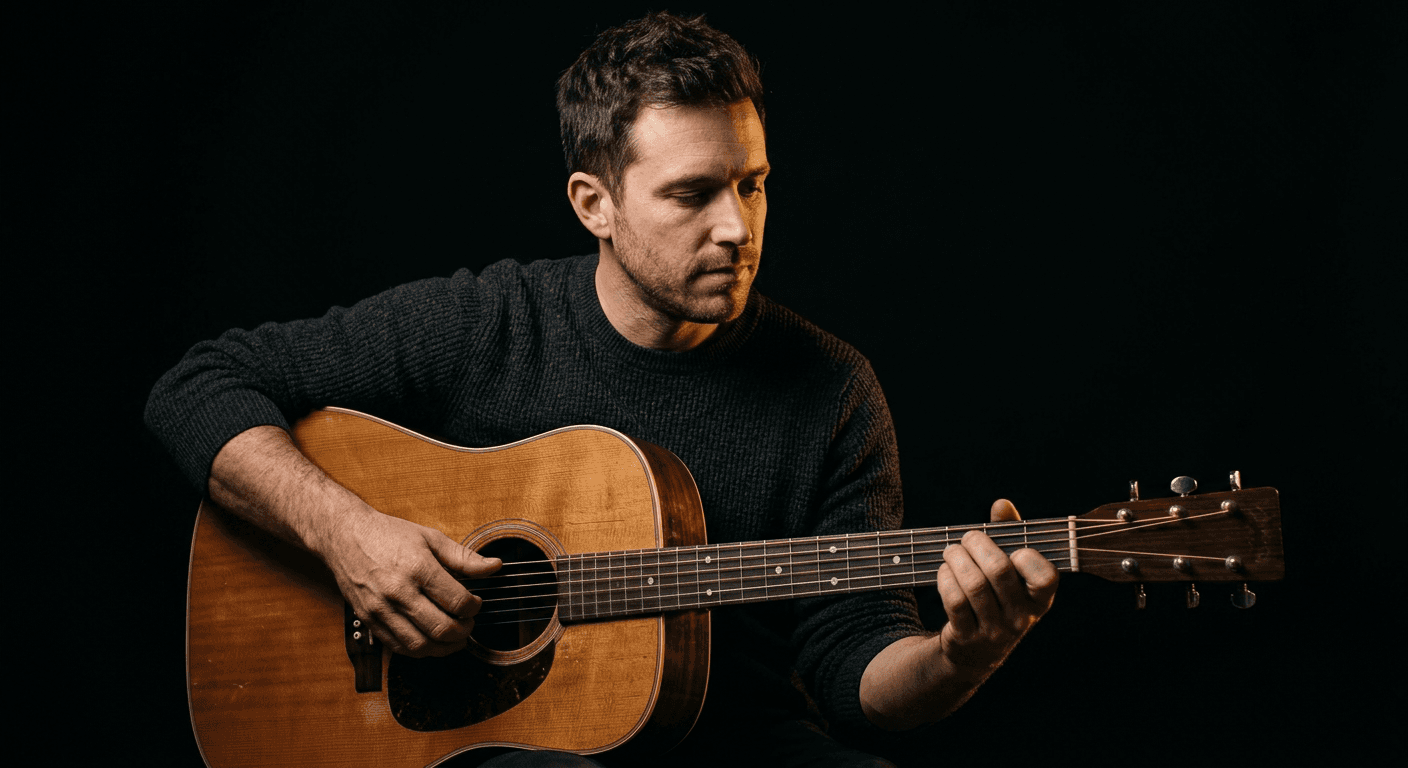
Prompt 16: Musician or creator with an instrument or mic
A warm single-light version built specifically to make an instrument's material, wood grain, metal strings, feel tactile and real, not just the face.
A half-body portrait of a musician holding an acoustic guitar or standing behind a vintage-style microphone, lit by a single warm-toned key light from camera-right that catches the wood grain of the instrument and the texture of the subject's hands, background falling to complete black so the instrument's silhouette reads clean and separated, shot on an 85mm lens at f/2 for a shallow, editorial depth of field, realistic metal string reflections and natural finger placement on the frets or keys, calm focused expression, no distorted hand anatomy, no reflective glare hiding the instrument's real texture.
Best for: musician press photos, album or single cover art, and podcast or streaming cover images.
Prompt 17: Small business owner holding a product
Built to solve the specific technical problem of keeping a held product and a face evenly lit at the same time, which is where a lot of casual product photos fall apart.
A three-quarter portrait of a small business owner holding their product, such as a ceramic mug, a skincare bottle, or a small textile item, at chest height toward the camera, lit by one soft key light from camera-left positioned to light both the face and the product evenly, black backdrop dropping to true black behind both, shot on a 50mm lens at f/3.2 to keep both the face and the held product in sharp focus, realistic material texture on the product itself, whether glass, ceramic, or fabric, genuine warm and approachable expression, no label text distortion on the product if any is visible, no mismatched lighting direction between the face and the product.
Best for: Etsy or small ecommerce sellers, a founder-led brand's about page photo, or a product launch post that needs a face attached to it.
Prompt 18: Athlete or fitness dark stage portrait
A harder, more sculptural version of the key light setup built to show real muscle definition and texture without resorting to an artificial glossy skin overlay.
An athletic portrait shot from a slightly low angle, the subject in workout gear mid-pause with visible muscle definition, lit by a hard single key light from camera-right that creates strong, sculptural shadow across the torso against a pure black backdrop, a faint rim light from behind outlining the shoulders, shot on an 85mm lens at f/2.8, realistic sweat sheen and skin texture without an artificial glossy overlay, natural controlled breathing posture rather than an exaggerated flex, no distorted muscle anatomy, no blown highlight washing out the skin detail on the shoulders.
Best for: fitness coaches, gym brand content, and athletic apparel product-on-model shots.
6) Pet and Everyday Dark Stage Prompts
Two more prompts round out the pack for the shots people actually ask for once they have tried the effect on themselves: their pet, and a more candid, unposed version of the look for everyday content.
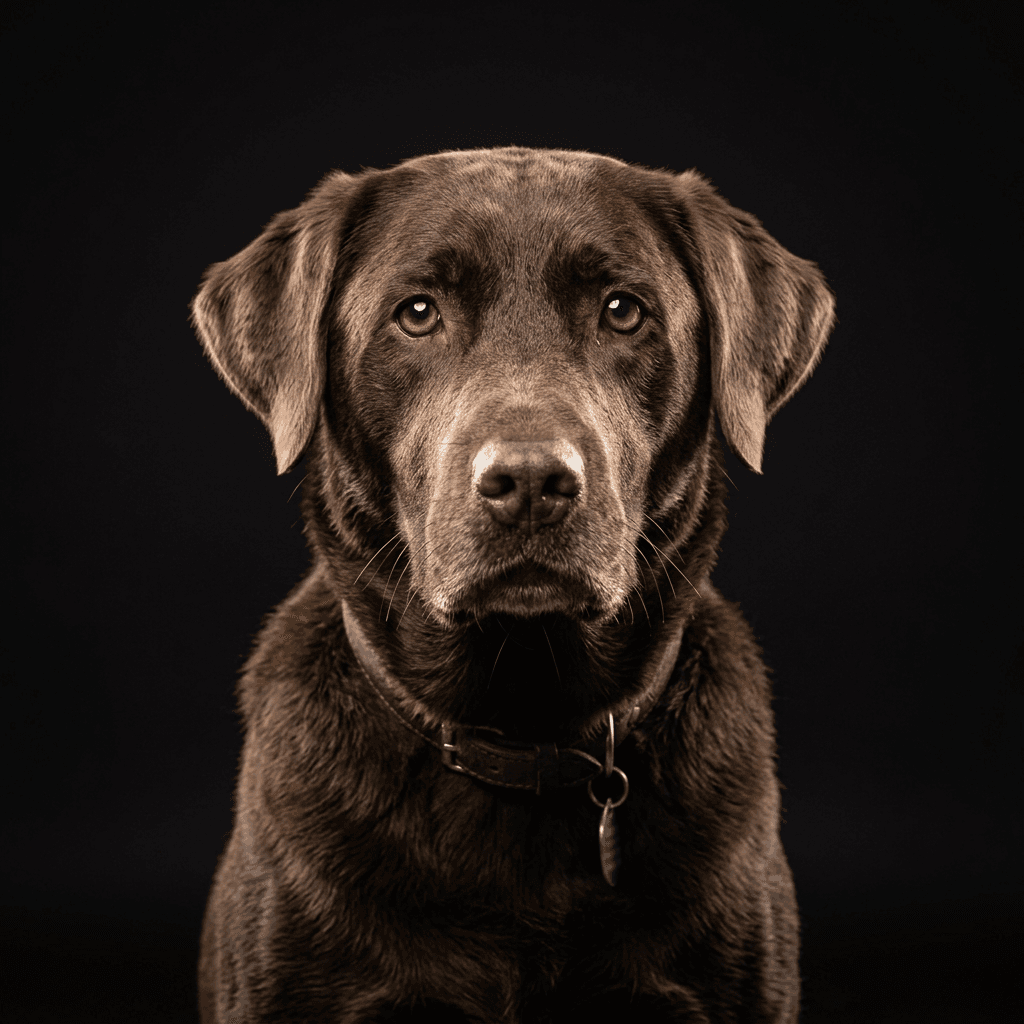
Prompt 19: Pet portrait, dark stage
Fur reacts to a single key light almost as well as skin does, which makes this one of the most consistently good results in the entire pack, and a reliable way to get engagement on a personal account.
A close studio portrait of a dog or cat sitting alert against a seamless black backdrop, lit by a single softbox key light from slightly above and in front to catch the individual texture of the fur and a clear catchlight in both eyes, shot on an 85mm lens at f/2.8 for a shallow background falloff into true black, realistic strand-by-strand fur texture and natural whisker detail, calm attentive expression, no overly smoothed or airbrushed fur texture, no double catchlight artifact in the eyes.
Best for: pet accounts, a dog or cat's own profile picture, or a pet brand's product-adjacent content. If your pet content leans more playful than moody, our AI pet-to-human transformation prompts are a fun companion trend to pair with this one.
Prompt 20: Candid getting-ready portrait
A softer, more relaxed version meant to look caught mid-moment rather than posed, useful for accounts that want the premium lighting without losing a candid, human feel.
A relaxed, candid-feeling portrait as if caught getting ready, the subject glancing toward the camera with one hand adjusting a collar or earring, lit by a single soft key light from camera-left mimicking a vanity mirror light source while the surrounding space falls into pure black as if the mirror and room have been removed, shot on a 50mm lens at f/2.2, realistic skin texture with natural minor imperfections left intact, genuine unposed half-smile, no artificial beauty-filter smoothing, no visible mirror frame or reflection artifact breaking the black backdrop illusion.
Best for: a get-ready-with-me style post, a more casual personal account, or a closing image at the end of a carousel.
How to Customize These Prompts
These 20 templates are a starting point, not a locked recipe. The fastest way to make the dark stage effect feel like your own instead of an obvious copy-paste is to change one variable at a time and see what actually shifts the result.
Swap the light angle to change the mood. A key light from directly above reads as editorial and slightly intense. The same light dropped to a 45 degree angle from the side reads as warmer and more approachable. Moving it behind the subject as a rim light reads as mysterious. You do not need to rewrite an entire prompt, changing one clause, from "lit by a soft key light from camera-left" to "lit by a single rim light from directly behind the subject," is usually enough to get a meaningfully different result from the same base photo.
Adjust color temperature deliberately. Every prompt above defaults to a neutral-to-cool studio light, which is the closest match to how the trend usually looks on TikTok. Adding a phrase like "slightly warm color temperature, like a 3200K tungsten light" shifts the mood toward something cozier, which works well for autumn content or a softer personal brand, while explicitly asking for a "cool 6500K daylight-balanced light" pushes it toward the harder, more clinical end of the look.
Match the framing to the platform. A tight vertical crop reads better as a TikTok profile picture or Instagram Story than a wide horizontal one. When you want the vertical version, add "vertical 3:4 or 9:16 composition, subject centered in the upper two-thirds of frame" to any of the prompts above rather than just cropping the square or landscape result afterward, since asking the model to compose for the crop up front avoids an awkwardly tight or off-center result.
Add props and wardrobe specific to your niche. The prompts above are deliberately generic about clothing so you can swap in your own details. Replace "structured blazer" or "plain top" with whatever you actually wear, a cardigan, a work uniform, a specific brand's jacket, and the lighting instructions will still apply correctly around whatever you put there.
Always specify true black, not just "dark." This is the single most important customization tip in this entire post. If a prompt only says "dark background" without the word black, or without "seamless" and "true," a lot of models will default to a dark charcoal gray or a dim, slightly visible room instead of the flat, seamless black the trend depends on. Every prompt in this pack says "seamless true black backdrop" or "pure black backdrop" for exactly that reason, keep that phrasing when you customize.
Match the virtual light to your actual selfie's face angle. When you are using image-to-image on a real photo of yourself rather than generating a person from scratch, the result looks far more convincing if the light direction you describe roughly matches the direction your face is already turned in the source photo. A face turned toward camera-left paired with a prompt asking for a key light from camera-right tends to look more natural than fighting the original photo's geometry.
Iterate two or three times instead of accepting the first result. Even a well-written prompt occasionally comes back with a slightly gray background or an odd extra shadow. Regenerating the same prompt once or twice, or nudging a single phrase, usually fixes it faster than starting over with a completely new prompt.
Common Mistakes Creators Make With the Dark Stage Effect
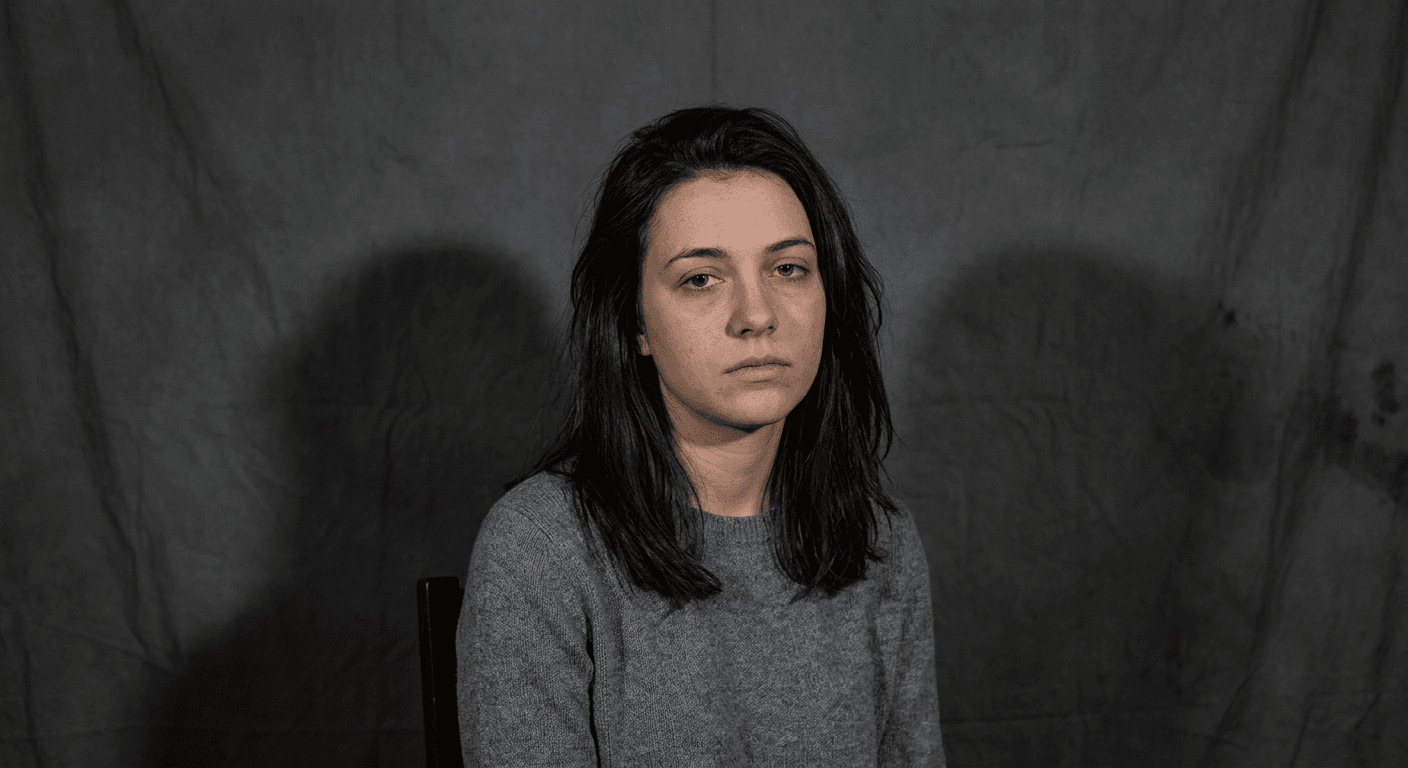
The background reads as gray or muddy instead of true black. This is the single most common failure, and it is almost always a prompt problem, not a model limitation. "Dark background" and "black background" produce noticeably different results. Always ask for a "seamless true black backdrop" explicitly, and avoid describing any real room, wall texture, or furniture behind the subject, since naming real objects gives the model something to render instead of pure black.
Using multiple competing light sources by accident. A prompt that lists two or three different lighting effects without specifying how they relate to each other, for example asking for both a strong key light and a separate strong fill light with no note about which one should dominate, often produces a flat, evenly-lit result with two visible shadow directions, which immediately kills the dramatic, sculpted look the trend is known for. Keep one light source clearly dominant in the prompt, the way every template above does.
Letting the AI over-smooth skin texture. A lot of AI image tools default to heavily retouched, waxy-looking skin unless you explicitly ask otherwise. Every prompt in this pack includes a texture cue like "realistic pore-level skin texture" or "visible pores, fine hair strands, natural asymmetry" for exactly this reason. Drop that phrase and you will likely get a flatter, more plastic-looking face.
Ignoring the original photo's face angle when using image-to-image. If your source selfie has your face turned one direction and the prompt describes a light source that would make no physical sense given that angle, the result can look subtly uncanny even when nothing is technically wrong with it. Glance at your source photo's face angle before writing the lighting direction into your prompt.
Running the effect on a busy, cluttered group photo without adjusting the prompt. A crowded original photo, several people, visible background clutter, multiple light sources in the original shot, gives an AI model a lot of conflicting information to reconcile. The multi-person prompts in this pack work best starting from a clean, front-facing photo of the actual people you want in the final shot, not a cropped screenshot from a busy party photo.
Chasing pure darkness at the expense of a natural-looking grain and texture. A completely noise-free, ultra-clean render can tip the image into looking synthetic even with correct lighting. If your results feel slightly too digital, pairing the true-black setup with a touch of real sensor grain, similar to the approach in our anti-AI film grain prompts, can push the result further toward looking like an unedited photo instead of an obvious render.
Publishing the wrong aspect ratio for the platform. A wide horizontal portrait posted as a TikTok profile picture gets cropped awkwardly by the app. A square Instagram grid post generated at 16:9 leaves black bars. Decide where the image is going before you generate it and add the matching aspect ratio language to the prompt, as covered in the customization section above.
Posting the exact same lighting setup on every single post. The effect is striking the first few times a follower sees it and starts to feel repetitive fast if every post uses the identical 45 degree key light and identical pose. Rotate between the different lighting patterns in this pack, wraparound key light, rim light, split lighting, top-down beauty light, the same way a real photographer would vary a shoot instead of using one setup for an entire portfolio.
Generating the Dark Stage Effect With Miraflow AI
You do not need a separate photography app, a black bedsheet, or any lighting gear to try this trend. Miraflow's AI Image Generator supports both text-to-image and image-to-image generation directly in the browser, which covers both ways creators are actually making the dark stage effect right now: describing a portrait from scratch, or uploading an existing selfie and having the model rebuild it around the single-light, true-black brief.
For most people, image-to-image is the more useful path, since it keeps your actual face and features intact while regenerating the lighting, background, and mood around you. Upload a clear, front-facing selfie with decent existing lighting, and pair it with one of the 20 prompts above. If you only want to change the background and lighting while keeping the rest of a photo exactly as it is, Miraflow's image editing and inpainting tools let you mask just the background region and regenerate that part alone, which is useful when you already like your pose and outfit and only want the backdrop and light quality to change.
Once you have a set of dark stage portraits you like, they hold up well as more than a single post. A strong single-light portrait doubles as a clean profile picture across every platform, a podcast or channel cover image, or even a starting frame for a short video intro. If you are already turning long-form content into short clips, the same dramatic portrait style pairs naturally with Miraflow's Text2Shorts tool for an opening frame, and creators repurposing a portrait as a video thumbnail can push it straight into the YouTube Thumbnail Maker to add title text on top of the same true-black backdrop. The full content pipeline, from a single generated portrait to a finished short or thumbnail, is one of the things Miraflow is actually built around.
Frequently Asked Questions
What is the dark stage effect trend, exactly?
It is an AI photo trend where creators use tools like Gemini's Nano Banana models, ChatGPT, and Grok Imagine to turn an ordinary selfie into a dramatic, single-light studio portrait against a seamless true-black background. The name comes from how closely the finished look resembles a real photography "stage," a controlled studio set, built entirely from a text prompt.
Do I need any real photography equipment to try this?
No. That is the entire appeal of the trend. You need one reasonably clear selfie and a well-written prompt, like the ones in this pack. The AI model is doing the equivalent of a professional studio lighting setup for you, which is exactly why it has spread so quickly among creators with no lighting or editing background.
Which AI tools can create the dark stage effect?
Creators are generating it across several current image models, most commonly Gemini's Nano Banana models, ChatGPT's image generation, and Grok Imagine, and it also works well with Miraflow's AI Image Generator, which supports both text-to-image and image-to-image generation from an uploaded selfie.
Why does my background sometimes come out gray instead of black?
This is the most common issue and it is almost always a wording problem, not a model limitation. Prompts that only say "dark background" often produce a dim gray or a barely-visible room instead of true black. Always specify "seamless true black backdrop" or "pure black backdrop" explicitly, the way every prompt in this pack does.
Can I use dark stage portraits for a professional headshot or LinkedIn photo?
Yes, the softer prompts in the solo portrait section, particularly the classic key light and top-down beauty light versions, work well as professional headshots. If LinkedIn and professional photos are your main use case, it is also worth reading our dedicated AI headshot prompts guide for more headshot-specific framing and wardrobe guidance.
Will this work on an old, low-quality, or low-light selfie?
It can, but results are more consistent from a clear, well-lit, front-facing source photo. Since the model is regenerating the entire scene rather than just adjusting an existing photo, a blurry or very dark original selfie gives it less reliable information about your actual features to work from, so expect to iterate a couple of extra times with a lower-quality source photo.
How is this different from just adding a black filter or vignette over an existing photo?
A filter or vignette darkens the existing background without changing how the subject is actually lit, so the face still shows the original photo's flat or mixed lighting underneath a dark overlay. The dark stage effect regenerates the entire lighting on the subject's face and body to match a real single-light studio setup, which is why it looks like an actual photograph rather than an edited one.
Is this trend likely to fade quickly like some AI photo trends do?
The core technique, single dramatic light against true black, is a real, decades-old photography fundamental rather than a gimmick tied to one specific app feature, so even as the exact "dark stage effect" name cycles out of TikTok's trending sounds and hashtags the way most trend names eventually do, the underlying look is likely to keep showing up in AI-generated portraits well after the current wave of tutorial posts slows down.
Conclusion
The dark stage effect works because it borrows a real, proven photography technique, one dramatic light against true black, and makes it accessible to anyone with a phone and a good prompt instead of a studio. The 20 prompts above cover the realistic range of what creators are actually posting right now, solo headshots, duo and group shots, fashion and product close-ups, motion, creator and brand portraits, and pets, and every one of them is written the way a real photographer would brief a shot: a named light source, a real lens and aperture, and an honest description of skin and fabric texture, not a vague mood word.
Start with Prompt 1 on a clear selfie to get a feel for how your face responds to the core lighting setup, then branch into the rim-light, split-lighting, and motion variations once you know what you are working with. Keep the customization notes on true-black wording and light-angle matching close by, since they are what separates a portrait that looks like a real studio shoot from one that looks like an obvious AI filter. You can generate every prompt in this pack directly with Miraflow's AI Image Generator, and once you have a set of portraits you like, they carry over naturally into a profile picture, a channel cover image, or a thumbnail built with Miraflow's wider toolset.