
AI Video Generation for Learning and Development: Complete Platform Guide

Written by
Sam Cho
Comprehensive guide to AI video generation for L&D teams. Learn how AI platforms transform training video creation, reduce costs by 60%, and improve learning outcomes.
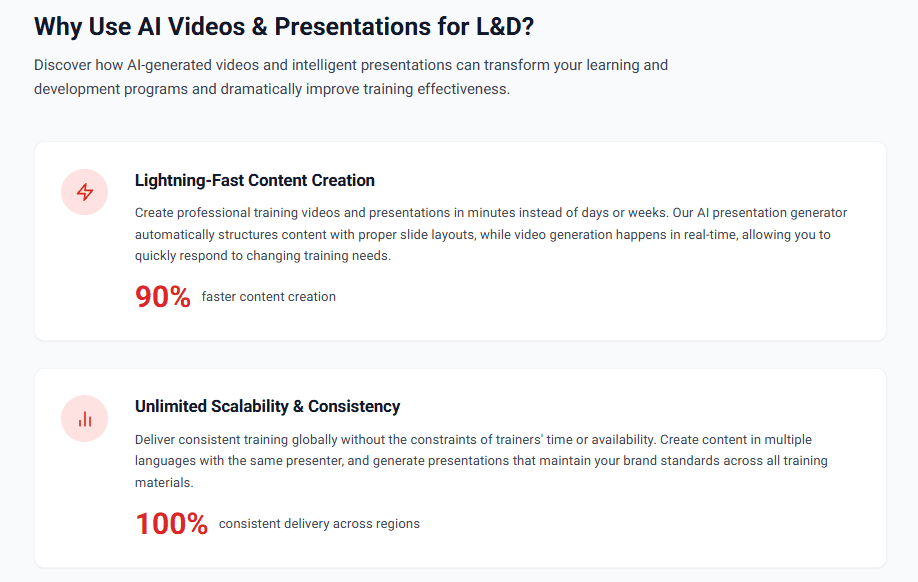
AI video generation for learning and development is technology that creates professional training videos from text scripts using artificial intelligence, eliminating the need for cameras, filming, or traditional video editing. L&D teams use these platforms to produce employee training, compliance videos, and onboarding content by uploading written scripts and selecting AI avatars and voices. The technology reduces training video production time from weeks to hours while cutting costs by 50-70% compared to traditional video production.
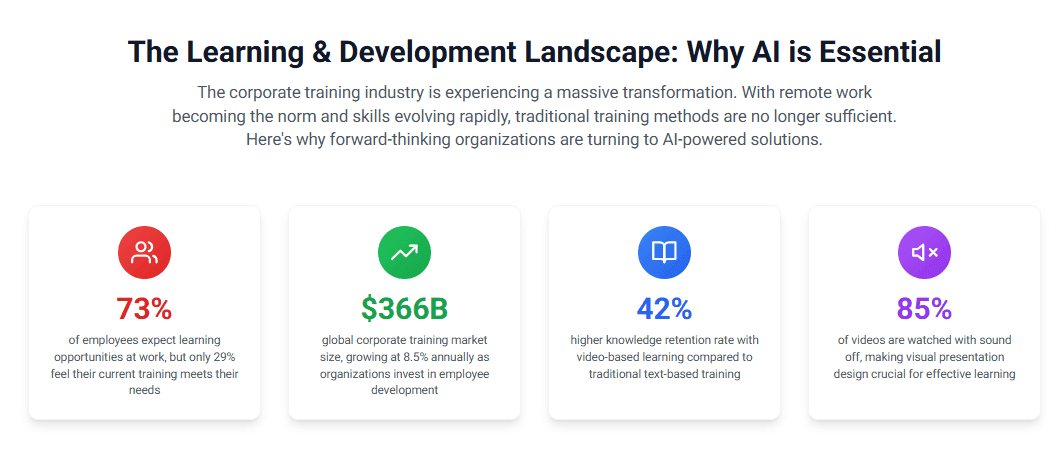
Does AI video work for training? Yes. Organizations using AI-generated training videos report 82% higher completion rates than text-based e-learning, 25-60% better knowledge retention than traditional methods, and 34% faster time-to-productivity for trained employees. Companies like Amazon, Siemens, and Accenture use AI video generation for corporate training at scale.
What is AI Video Generation for L&D?
AI video generation for learning and development combines several artificial intelligence technologies to transform written training content into video format automatically. The technology converts text scripts into spoken narration, generates realistic human avatars to present content, and assembles visual elements into professional training videos.
The core technologies include:
Text-to-Speech (TTS): Neural networks convert written scripts into natural-sounding speech in multiple languages and accents. Modern TTS achieves 95%+ naturalness ratings, making it difficult to distinguish from human recordings.
AI Avatars: Computer-generated presenters that look and move like real people. These avatars deliver training content with realistic facial expressions, natural gestures, and accurate lip synchronization to the generated speech.
Video Assembly: Automated systems combine narration, avatars, visual elements (slides, graphics, screenshots), and transitions into finished video files ready for distribution.
Language Translation: AI translation engines convert training content into multiple languages while maintaining meaning and context, enabling global training programs.
The practical impact for L&D teams is straightforward: you write what you want employees to learn, and AI generates the training video. No filming, no video editing skills required, no coordination with production crews or on-camera talent.
How the Technology Works
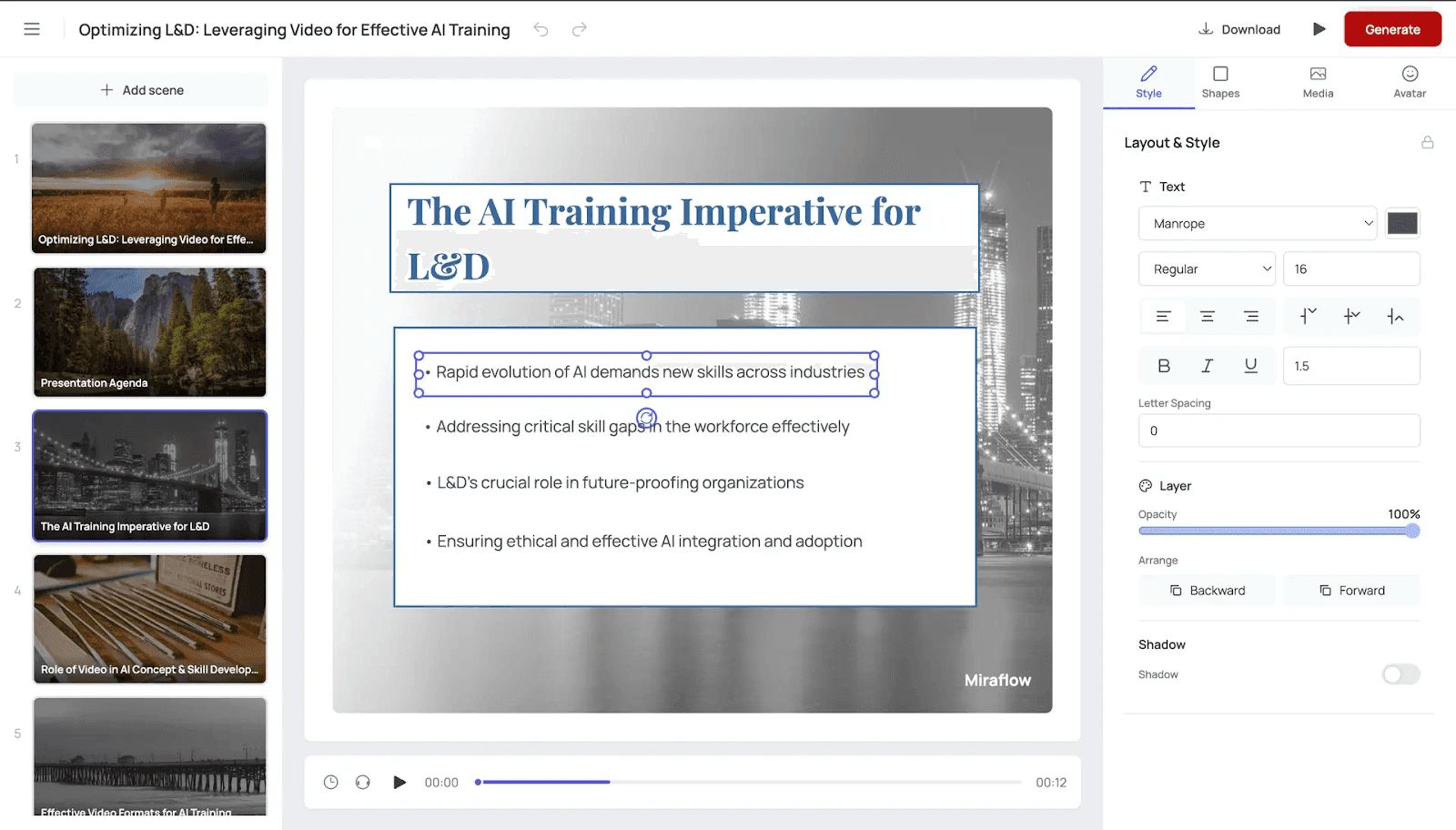
Here's what happens when you create training with AI video generation:
- You upload a training script or document (Word, PDF, PowerPoint)
- Select an AI avatar to present the material
- Choose a voice (language, accent, gender, tone)
- Add visual elements (slides, images, screenshots)
- The platform generates your video in 30-60 minutes
- Download and distribute through your LMS
The same script can generate versions in different languages, with different avatars, or with updated content by regenerating with modified text. This flexibility is impossible with traditional video production where changes require reshooting.
L&D Applications
AI video generation serves these common training needs:
New hire onboarding: Create consistent welcome messages, culture training, policy overviews, and role-specific orientation that every new employee receives regardless of when they start.
Compliance training: Produce mandatory training on sexual harassment, data privacy, safety procedures, and other regulatory requirements with documentation of consistent delivery to all employees.
Product training: Develop training on features, benefits, and positioning for sales teams, support staff, and customers as products evolve.
Software training: Record screen captures with AI narration walking users through procedures, reducing time employees spend figuring out systems.
Skills development: Build libraries of micro-learning videos teaching specific skills employees can access on demand.
Policy updates: Quickly create videos explaining new policies or procedures, ensuring all employees receive identical information simultaneously.
How AI Video Generation Transforms Corporate Training
AI video generation changes how L&D teams approach training content creation and delivery.
From Batch to Continuous Training Development
Traditional video production forces batch creation. You plan 10-20 videos, hire a production company, film everything in one or two intensive weeks, then don't create new content for months because of the cost and logistics.
AI video generation enables continuous training development. Create 2-3 videos this week addressing immediate needs. Create 5 more next month when new products launch. Update existing videos the day policies change. This continuous approach keeps training current instead of outdated.
From Generic to Personalized Content
Recording one version of training for all employees meant generic content that tried to work for everyone and perfectly fit no one. Role-specific examples got diluted so all roles could watch the same video.
AI video generation makes personalization economical. Generate sales-specific versions of product training with relevant examples. Create manager versions of policy training emphasizing their responsibilities. Produce department-specific onboarding highlighting workflows that matter to that team.
The same core content adapts to different audiences by modifying scripts and regenerating videos at minimal additional cost.
From Centralized to Distributed Content Creation
Traditional video production centralized creation with specialized teams. L&D departments became bottlenecks because subject matter experts couldn't create training themselves without video skills.
AI video generation distributes creation to subject matter experts. Engineers can create technical training. HR can produce policy videos. Sales leaders can develop product training. The barrier of video production expertise disappears.
This distribution accelerates content creation and improves quality because people closest to the subject matter create the training.
From Static to Dynamic Content Libraries
Video content historically stayed static because updates were expensive. Training became increasingly outdated between major refresh cycles, losing effectiveness.
AI video generation enables dynamic content management. Update individual videos when information changes rather than waiting for complete library refreshes. Employees always access current training instead of learning outdated procedures.
From Local to Global Training Programs
Expanding training globally traditionally meant hiring local production teams, finding local talent, and managing multiple vendors across regions. The cost and complexity limited many organizations to English-only or limited language training.
AI video generation removes language barriers. Create multilingual training videos in 40+ languages from a single English script. Global employees receive identical training quality in their native language, improving comprehension and retention.
From Weeks to Hours
Traditional video production measured in weeks. Script approval, production scheduling, filming, editing, and revisions stretched projects across 3-6 weeks per video.
AI video generation measures in hours. Creating training videos takes 2-4 hours from concept to completed video. When regulations change or products update, new training reaches employees within days instead of months.
This speed advantage is critical for compliance deadlines, product launches, and responding to business changes that require immediate training updates.
Key Features of AI Video Generation Platforms for L&D
When evaluating AI video generation platforms for training, these features determine effectiveness:
AI Avatar Library
Platforms offer 50-700+ AI avatars representing diverse demographics, ages, professions, and styles. Look for:
- Professional business attire for corporate training
- Casual styles for creative or tech company culture
- Healthcare scrubs for medical training
- Safety gear for industrial training
- Diverse representation across ethnicity, gender, and age
The best platforms let you create custom avatars from photos or videos, ensuring consistent brand presenters across your training library.
Voice Quality and Language Support
Neural text-to-speech engines generate natural-sounding narration. Key capabilities:
- 30-175+ languages depending on platform
- Multiple voice options within each language (gender, age, accent)
- Regional variations (Mexican vs Castilian Spanish, Brazilian vs European Portuguese)
- Natural tone, pacing, and inflection
- Pronunciation dictionaries for technical terms and company names
Voice quality determines whether training sounds professional or robotic. Test platforms with your actual scripts before committing.
Script-to-Video Workflow
The simplest platforms accept text and generate videos in one click. More complex tools offer scene-by-scene control. Consider:
- Can you paste documents directly or must you type scene by scene?
- Does the platform accept PowerPoint or PDF uploads?
- How easy is it to make changes and regenerate?
- Can you preview before final generation?
The workflow should match your team's technical comfort level. Simpler is better unless you need advanced customization.
Visual Customization
Training videos need more than talking avatars. Platforms should support:
- Custom backgrounds (office settings, branded environments, neutral backdrops)
- On-screen text overlays for key points
- Image and graphic insertion
- Screen recording integration for software training
- Video clip uploads for product demonstrations
- Slide presentations converted to video
Visual elements clarify concepts and maintain engagement better than avatar-only presentations.
Brand Customization
Corporate training needs consistent branding:
- Logo placement in video corners or intro/outro sequences
- Custom color schemes matching brand guidelines
- Font selection for on-screen text
- Intro and outro templates with company branding
- Branded player for video hosting
Some platforms offer full brand kits you configure once and apply to all videos.
Interactive Elements
Modern training requires engagement beyond passive watching:
- Embedded quizzes and knowledge checks
- Branching scenarios where viewer choices determine content paths
- Clickable hotspots for additional information
- Forms for learner responses
- Certificates upon completion
Platforms with built-in interactivity eliminate the need for separate quiz tools.
Multi-Language Support
Global training programs need:
- One-click translation to generate versions in new languages
- Automatic voice selection matching target language
- Text element translation (on-screen text, graphics)
- Cultural adaptation suggestions
- Glossary management for consistent terminology across languages
The best platforms handle all translation elements, not just narration.
LMS Integration
Training videos must integrate with learning management systems:
- SCORM package export for full tracking
- xAPI support for detailed analytics
- Direct integration with popular LMS platforms (Cornerstone, Workday, SAP SuccessFactors)
- Single sign-on compatibility
- Completion tracking and reporting
Integration determines whether you can track who watches training and measure completion rates.
Collaboration Features
L&D teams need workflow tools:
- Multiple user seats with role-based permissions
- Shared team workspaces
- Version control and history
- Review and approval workflows
- Comments and feedback tools
- Template sharing across team members
Collaboration features prevent bottlenecks and enable team-based content creation.
Analytics and Reporting
Measure training effectiveness with:
- Completion and engagement metrics
- Drop-off point identification
- Assessment score tracking
- Time-to-completion analysis
- Viewer feedback collection
- Detailed watch behavior (pauses, rewinds, skips)
Analytics reveal which training works and which needs improvement.
API Access
Organizations with custom workflows need:
- API for automated video generation
- Bulk processing capabilities
- Integration with content management systems
- Automated updates from external data sources
- Custom workflow triggers
APIs enable scaled video production integrated with existing L&D technology stacks.
Security and Compliance
Enterprise L&D requires:
- SOC 2 Type II certification
- GDPR compliance for EU employees
- HIPAA compliance for healthcare training
- Data encryption in transit and at rest
- Geographic data storage controls
- User permission management
- Content retention policies
Security features protect proprietary training content and employee data.
AI Video Generation vs Traditional Training Video Production
Understanding the differences helps you decide which approach fits your training needs.
Cost Comparison
Traditional Production:
- One 10-minute training video: $5,000-25,000
- Includes pre-production, filming, editing
- Costs repeat for each new video
- Updates require reshooting: $2,000-10,000
AI Video Generation:
- Platform subscription: $20-150/month
- Unlimited videos on most plans
- Updates regenerate in minutes: $0 additional cost
- First video takes 2-4 hours of staff time
- Subsequent videos take 1-2 hours each
Break-even analysis: After 3-5 videos, AI video generation costs less than traditional production even accounting for staff time.
Timeline Comparison
Traditional Production:
- Pre-production: 1-2 weeks (scripting, planning, scheduling)
- Production: 1-3 days (filming)
- Post-production: 1-2 weeks (editing, revisions)
- Total: 3-5 weeks per video
AI Video Generation:
- Planning and scripting: 1-2 hours
- Video generation: 30-60 minutes
- Review and revisions: 30 minutes
- Total: 2-4 hours per video
Speed advantage: AI video generation is 60-80x faster than traditional production.
Quality Comparison
Traditional Production Advantages:
- Authentic human emotion and connection
- Real product demonstrations in actual settings
- Cinematic quality for high-profile content
- Celebrity or executive presence adds gravitas
AI Video Generation Advantages:
- Consistent quality across all videos
- No bad takes or filming mistakes
- Perfect pronunciation of technical terms
- Unlimited retakes at no cost
- Professional polish without video expertise
Quality assessment: For instructional training content, AI video quality is sufficient and often preferred for its consistency. For high-stakes marketing or executive communications, traditional production may justify the cost.
Scalability Comparison
Traditional Production:
- Each video requires full production cycle
- Costs scale linearly with video count
- Team size limits production capacity
- Updates require re-production
AI Video Generation:
- First video and hundredth video take similar time
- Costs scale minimally beyond platform fees
- Small teams produce large video libraries
- Updates regenerate instantly
Scalability advantage: AI video generation scales to hundreds or thousands of videos. Traditional production doesn't.
Flexibility Comparison
Traditional Production:
- Changes require expensive reshoots
- Difficult to create role-specific versions
- Language versions need new filming with native speakers
- Outdated content stays outdated until next production cycle
AI Video Generation:
- Script changes regenerate video in minutes
- Easy to create multiple versions for different audiences
- Language versions generate from single script
- Updates deploy immediately
Flexibility advantage: AI video generation adapts to changing needs. Traditional production locks you into filmed content.
Use Case Decision Matrix
| Training Type | Best Approach | Reason |
|---|---|---|
| Compliance training | AI video | Needs frequent updates, consistency critical |
| Employee onboarding | AI video | High volume, personalization valuable |
| Product training | AI video | Changes with product updates |
| Software tutorials | AI video | Screen recordings with narration |
| Skills development | AI video | Build scalable libraries |
| Safety procedures | AI video | Consistent delivery, easy updates |
| Executive communications | Traditional | Human connection matters |
| Customer testimonials | Traditional | Authenticity is critical |
| Product demonstrations | Traditional | Physical product needs real footage |
| Brand marketing videos | Traditional | Emotional impact and cinematic quality justify cost |
Most corporate training falls into the AI video category. Traditional production makes sense for high-visibility, emotion-driven content where authenticity matters more than efficiency.
Implementing AI Video Generation in Your L&D Strategy
Successfully implementing AI video generation requires planning beyond just selecting a platform.
Start with High-Impact Content
Begin with training that delivers immediate value:
Compliance training videos: Mandatory training with regulatory deadlines creates urgency. Success here proves the technology works and builds organizational confidence.
Frequently updated training: Content that changes regularly (product features, policies, procedures) showcases AI video's advantage over traditional production. Every update demonstrates ROI through eliminated re-production costs.
High-volume training: Content delivered to large audiences (all-employee training, new hire onboarding) shows cost savings immediately. Calculate per-employee cost reduction to justify continued investment.
Avoid starting with complex, rarely-updated training that doesn't showcase the technology's benefits.
Build Internal Capabilities
Train your team on platform use:
Identify video creators: Who will write scripts and generate videos? Distribute creation across subject matter experts rather than centralizing with one person.
Establish style guides: Create templates for intro/outro sequences, brand elements, and script structures. Consistency across videos builds professional polish.
Create script libraries: Develop reusable script components (welcome messages, policy disclaimers, call-to-action closings) that accelerate new video creation.
Document workflows: Write step-by-step procedures for creating, reviewing, and publishing videos. Standardized processes prevent mistakes and improve efficiency.
Set quality standards: Define minimum requirements for scripts, visual elements, and review processes. Quality standards prevent rushed, subpar content.
Develop Content Production Processes
Establish systematic video creation:
Content intake: How do subject matter experts request new training videos? Create simple request forms capturing learning objectives, target audience, and content sources.
Script development: Who writes scripts? Subject matter experts draft, L&D edits for clarity and learning effectiveness. Set expected turnaround times.
Review and approval: Who must approve content before videos generate? Build review into timelines without creating bottlenecks. Consider parallel review where multiple stakeholders review simultaneously.
Generation and QA: Who generates videos and checks quality? Define quality check criteria (audio clarity, script accuracy, visual alignment, proper pacing).
Publishing and distribution: Who uploads to LMS and assigns to employees? Establish naming conventions, tagging standards, and assignment protocols.
Integrate with Existing L&D Technology
Connect AI video generation to your current tools:
Learning Management System: Export videos in SCORM format for full completion tracking. Test integration thoroughly before rolling out training company-wide.
Content Management System: Store video files and scripts in your content library. Organize by topic, audience, and format for easy retrieval.
Assessment Tools: Link videos to quiz platforms if your video tool lacks built-in assessments. Ensure seamless learner experience between watching and testing.
Survey Platforms: Collect feedback after training using satisfaction surveys. Connect survey data to specific videos for improvement insights.
HRIS and Onboarding Systems: Trigger automatic video assignment based on hire date, role change, or promotion. Automation ensures consistent training delivery.
Plan for Scale
Think beyond initial implementation:
Content roadmap: Identify all training that could become video format. Prioritize based on impact, effort, and current quality gaps.
Resource allocation: How much staff time will video creation consume? Budget realistic time for quality content development, not just rapid production.
Storage and hosting: Video files consume significant storage. Plan for growing libraries with appropriate hosting infrastructure.
Maintenance schedules: When will you review and update videos? Quarterly reviews prevent content from becoming outdated.
Expansion to new use cases: Beyond initial training types, where else could AI video help? Consider internal communications, manager resources, or customer education.
Change Management
Prepare your organization for new training formats:
Employee communication: Explain that training is moving to video format. Address concerns about screen time or preference for in-person training by emphasizing flexibility and engagement.
Manager buy-in: Train managers on assigning video training, monitoring completion, and reinforcing learned concepts. Manager support predicts training success better than content quality.
Subject matter expert engagement: Frame video creation as opportunity for experts to share knowledge at scale rather than additional work. Successful experts become champions influencing peers.
Stakeholder updates: Share early wins with executive sponsors. Metrics like cost per video, time savings, and completion rates demonstrate value and justify continued investment.
Measuring Success: AI Video Generation Impact on Learning Outcomes
Track these metrics to evaluate whether AI video generation improves training effectiveness:
Learning Effectiveness Metrics
Knowledge Retention Rates
Test employees 30, 60, and 90 days after training. Compare retention between AI video training and previous training methods.
Benchmark: AI video training should achieve 50-60% knowledge retention at 30 days compared to 30-40% for text-based e-learning.
Assessment Scores
Track quiz and test performance immediately after training. Compare AI video cohorts to previous training cohorts.
Benchmark: Video-trained employees typically score 10-15% higher on identical assessments than text-trained employees.
Skills Application
Survey managers 30 days post-training. Are employees applying learned skills in their work?
Benchmark: 70-85% of video-trained employees should demonstrate new skills within 30 days versus 50-65% for traditional training.
Time to Proficiency
How quickly do trained employees reach full productivity in their roles?
Benchmark: Employee onboarding with video reduces time-to-productivity by 25-35% compared to text-based or classroom-only onboarding.
Operational Efficiency Metrics
Training Completion Rates
What percentage of assigned employees complete training by deadline?
Benchmark: Video training achieves 80-95% completion rates versus 40-60% for text-based e-learning.
Time to Completion
How long does it take employees to finish training from assignment?
Benchmark: Video training completes 40-60% faster than classroom training covering identical content because employees control pacing and skip known material.
Training Creation Speed
How long does your team take to produce training videos?
Benchmark: After initial learning curve, L&D teams create 10-minute training videos in 2-4 hours including scripting, generation, and review.
Content Update Frequency
How often do you update training content?
Benchmark: Organizations using AI video update training 3-5x more frequently than those using traditional video because update costs drop by 90%.
Financial Metrics
Cost Per Video
Calculate total costs divided by videos produced. Include platform fees, staff time, and any additional resources.
Benchmark: AI video costs $50-150 per video including staff time after initial platform investment. Traditional production costs $5,000-25,000 per video.
Cost Per Employee Trained
Total training costs divided by number of trained employees. Include production costs, delivery costs, and employee time.
Benchmark: Video training costs $50-150 per employee for first cohort, $5-25 per employee for subsequent cohorts. Traditional instructor-led training costs $150-300 per employee each time.
(Benefits - Costs) / Costs × 100. Benefits include cost savings, productivity gains, and reduced turnover.
Benchmark: Organizations report 200-600% first-year ROI on AI video training investments, depending on training volume and organization size.
Time Savings
Calculate hours saved by not coordinating, traveling to, or attending in-person training. Multiply by average hourly productivity value.
Benchmark: Video training saves 3-5 hours per employee compared to full-day classroom training. For 100 employees at $50/hour productivity value, that's $15,000-25,000 in preserved productivity.
Engagement Metrics
Video Completion Rate
Percentage of viewers who finish videos once started. Different from training completion rate which measures assignment completion.
Benchmark: Well-designed training videos maintain 80-90% watch-through rates. Drop-offs indicate content pacing or relevance issues.
Replay and Review Rates
What percentage of employees rewatch videos or specific sections?
Benchmark: 15-25% of employees review at least one video section, indicating they're using training as reference material beyond initial completion.
Satisfaction Scores
Survey participants about training quality, relevance, and usefulness.
Benchmark: Video training should achieve 4.0+ out of 5.0 satisfaction scores. Lower scores indicate content or delivery problems requiring investigation.
Feedback and Improvement Rates
How much actionable feedback do you receive about training? Are you acting on it?
Benchmark: Review and act on feedback quarterly. Videos with below 3.5 satisfaction scores need immediate revision.
Choosing an AI Video Generation Platform for L&D
Select the right platform based on your organization's specific training needs and constraints.
Evaluate Based on Your Requirements
Training Volume
How many videos will you create annually?
- Under 20 videos/year: Entry-level plans ($20-40/month) provide sufficient capacity
- 20-100 videos/year: Mid-tier plans ($40-100/month) offer better value and features
- 100+ videos/year: Enterprise plans ($150+/month) with volume discounts and dedicated support
Language Requirements
Do you need multilingual training?
- Single language: Any platform works
- 2-10 languages: Choose platforms with 40+ language support
- 10+ languages: Prioritize platforms with 100+ languages and strong translation workflows
Miraflow AI supports 60+ languages at Team level, suitable for most global training needs.
Team Size
How many people will create videos?
- Solo L&D professional: Single-seat plans work fine
- Small team (2-5): Look for collaboration features and multiple seat options
- Large team (6+): Require platforms with role-based permissions and workflow management
Technical Expertise
What's your team's comfort with technology?
- Limited tech skills: Choose platforms with simple script-to-video workflows and strong support
- Moderate skills: Any platform works; balance simplicity with feature set
- High technical skills: Consider platforms with API access for custom integrations
Budget Constraints
What can you spend on video creation?
- Under $500/year: Miraflow Pro ($240/year) offers strong value
- $500-$2,000/year: Multiple platform options with good feature sets
- $2,000-$5,000/year: Access to enterprise features and dedicated support
- $5,000+/year: Full-service implementation with custom development
Remember to compare against traditional video production costs ($5,000-25,000 per video) when justifying budget.
Integration Needs
Must the platform connect to existing systems?
- LMS integration required: Verify SCORM export and specific LMS compatibility
- API access needed: Confirm API availability and documentation quality
- SSO required: Enterprise plans typically include single sign-on
- No integrations needed: More platform options available
Key Decision Factors
When comparing AI training video generators, prioritize:
For L&D-Focused Organizations:
- Training-specific features (compliance templates, onboarding structures)
- Strong multilingual capabilities for global teams
- SCORM export and LMS integration
- Reasonable pricing for high-volume production
- Consider: Miraflow AI with dedicated L&D features and competitive pricing
For Large Enterprises:
- Maximum security and compliance certifications
- Advanced collaboration and approval workflows
- Extensive avatar library (150+ options)
- Dedicated customer success support
- Consider: Synthesia Enterprise or Miraflow Enterprise
For Global Organizations:
- Broadest language coverage (100+ languages)
- Quality consistent across all languages
- Built-in translation workflows
- Regional accent variations
- Consider: Synthesia (120+ languages) or HeyGen (175 languages)
For Interactive Training:
- Built-in quiz and assessment tools
- Branching scenario support
- Learner response collection
- Certificate generation
- Consider: Colossyan with native interactivity features
Implementation Checklist
Before selecting a platform:
- Test with real content: Use free trials to create actual training videos, not just demos
- Verify LMS integration: Confirm SCORM packages work with your specific LMS
- Check language quality: Have native speakers review videos in your required languages
- Calculate true costs: Include platform fees, staff time, and storage in total cost estimates
- Assess learning curve: Have multiple team members test the platform to gauge ease of use
- Review support options: Understand response times, support channels, and escalation procedures
- Confirm security compliance: Verify certifications meet your organization's requirements
- Plan for scale: Ensure platform handles your projected growth over 2-3 years
Ready to transform your L&D training with AI video generation? Miraflow AI specializes in corporate training videos with 60+ languages, unlimited video creation, and L&D-specific features including compliance templates, onboarding structures, and dedicated training video workflows.