How to Turn Yourself Into a Pixar Character With AI (Free Methods)

Written by
Jay Kim
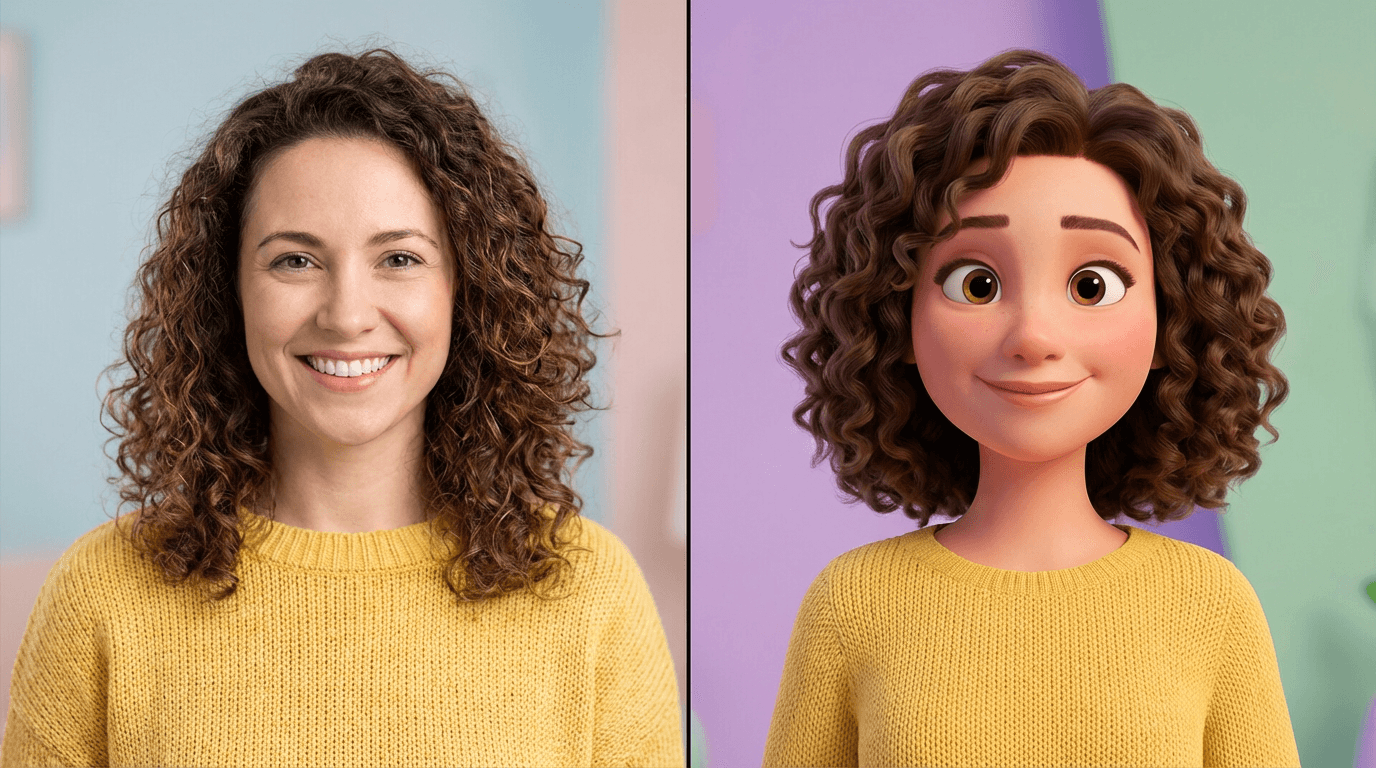
Learn how to turn yourself into a Pixar character with AI for free. Step-by-step methods, 15 copy-paste prompts, and tips to get cinematic 3D animated results every time.
Everyone has seen it on their feed. A friend posts a 3D animated version of themselves that looks like it belongs in a Pixar movie, and suddenly every comment is asking how they did it. The Pixar character trend has exploded across Instagram, TikTok, and X, and it shows no signs of slowing down in 2026.
The problem is that most people either pay for apps they do not need, use tools that produce low quality cartoon effects, or waste hours trying to get a prompt that actually works. What looks like a simple transformation actually requires the right prompt structure, the right model, and the right approach.
This guide walks you through every free method for turning yourself into a Pixar-style character using AI. You will get step-by-step instructions, copy-paste prompts that actually produce cinematic 3D results, and practical tips to avoid the most common mistakes that make AI-generated Pixar characters look cheap or distorted.
Why the Pixar Character AI Trend Took Over Social Media in 2026
The Pixar character trend is not just a passing filter. It taps into something deeper about how people engage with visual content online. Stylized 3D portraits feel personal, playful, and shareable in a way that standard photo filters do not. When someone sees a Pixar version of themselves, it triggers an emotional response. It feels like being cast in a movie.
This makes Pixar-style AI portraits one of the highest engagement content types on social media right now. Creators who post these transformations consistently see higher saves, shares, and comments compared to standard photo posts. For YouTube creators, these images work incredibly well as thumbnails that drive clicks because the 3D animated style immediately stands out in a feed full of flat photos.
The trend also overlaps heavily with the broader shift toward AI-generated visual content. Platforms reward novelty, and Pixar-style images still feel fresh enough to capture attention. Creators who combine this trend with strong content strategy, like pairing a Pixar thumbnail with a well-structured Short, are seeing real growth from it.
How AI Generates Pixar-Style Characters From Photos
Before jumping into methods and prompts, it helps to understand what is actually happening when AI turns your photo into a Pixar character. This knowledge will help you write better prompts and troubleshoot when results look off.
AI image models like Nano Banana, Flux, and DALL-E have been trained on massive datasets that include 3D rendered characters, animated film stills, and stylized portraits. When you describe a "Pixar-style 3D character" in a prompt, the model draws on its understanding of that visual language: smooth skin textures, large expressive eyes, exaggerated but proportionate features, soft studio lighting, and the particular material quality that makes characters look like they are made of a slightly glossy, soft material.
The key difference between a good Pixar AI result and a bad one comes down to how precisely you guide the model. Vague prompts like "make me look like a Pixar character" often produce generic cartoon effects. Specific prompts that describe the rendering style, lighting, material texture, and camera framing produce results that genuinely look like they belong in a Pixar film.
When you upload a reference photo alongside the prompt, the AI uses your facial features, hair, and overall appearance as a guide while applying the 3D animated style. This is why reference images are critical for personalized results. Without one, the model generates a generic character. With one, it generates you as a Pixar character.
5 Free Methods to Turn Yourself Into a Pixar Character
There are several approaches that work well in 2026, each with different strengths depending on what you are trying to achieve.
Method 1: AI Image Generator With Reference Photo Upload
This is the most reliable free method for generating high quality Pixar-style portraits. You upload your photo as a reference image and pair it with a detailed Pixar-style prompt. The AI uses your facial features as a base while applying the 3D animated aesthetic.
This approach works best when your reference photo has clear lighting, a visible face, and minimal obstruction from accessories like sunglasses. Front-facing photos with neutral expressions tend to produce the most accurate results because the model can clearly map your features onto the 3D character.
Creators can generate these directly inside Miraflow AI's image generator by uploading a reference photo and entering a Pixar-style prompt. The process takes seconds and costs one credit per generation, with free credits available on signup.
Method 2: Prompt-Only Generation Without a Photo
If you do not want to use your own photo, you can describe a character from scratch and generate a Pixar-style portrait purely from text. This method is useful for creating fictional characters, brand mascots, or illustrated personas for faceless content channels.
The trade-off is that the character will not look like you specifically. But for creators running faceless YouTube Shorts channels or building illustrated brand identities, prompt-only generation gives you full creative control over how the character looks.
To get the best results with this approach, describe physical features in detail: age range, skin tone, hair color and style, eye color, body type, clothing, and expression. The more specific you are, the more consistent the character will look across multiple generations.
Method 3: Image Inpainting for Partial Transformations
Sometimes you do not want to transform your entire photo. Maybe you want to keep the background realistic while only converting your face and body into Pixar style. Or maybe you want to change your outfit into something a Pixar character would wear while keeping everything else intact.
Image inpainting lets you mask specific areas of an image and regenerate only those regions. This gives you precise control over what gets transformed and what stays the same. You can learn more about how inpainting works in the Nano Banana image inpainting guide.
This method is especially useful for creating before-and-after content where half the image is your real photo and the other half is the Pixar transformation.
Method 4: Generating Pixar Characters for YouTube Thumbnails
One of the most practical applications of Pixar-style AI images is YouTube thumbnails. The 3D animated aesthetic grabs attention in search results and suggested feeds because it contrasts sharply with standard photo thumbnails.
Using the YouTube Thumbnail Maker, creators can upload their photo, enter a Pixar-style prompt, add bold thumbnail text, and generate a complete thumbnail in one step. The tool supports custom aspect ratios for both standard videos and Shorts, and includes template options that work well with the Pixar aesthetic.
For creators who want to maintain a consistent Pixar character across all their thumbnails, the key is to reuse the exact same character description prompt every time. This is the same principle behind building a consistent thumbnail style with AI.
Method 5: Turning Pixar Characters Into Animated Videos
Once you have a strong Pixar-style character image, you can take it further by using that image as the first frame of an AI-generated video. This lets you create short animated clips where your Pixar character appears to move, talk, or interact with a scene.
The cinematic video generator supports image-to-video generation, where you upload your Pixar character image and write a prompt describing what happens in the scene. The result is a short video clip that maintains the look of your character while adding motion and atmosphere.
For creators producing Shorts or Reels, this workflow pairs naturally with Text2Shorts, where you can build an entire vertical video around AI-generated Pixar-style visuals.
15 Copy-Paste Prompts for Pixar-Style AI Characters
These prompts are designed to produce high quality results. Each one includes the visual cues that AI models need to generate authentic Pixar-style 3D characters. Upload your reference photo alongside any of these prompts for personalized results.
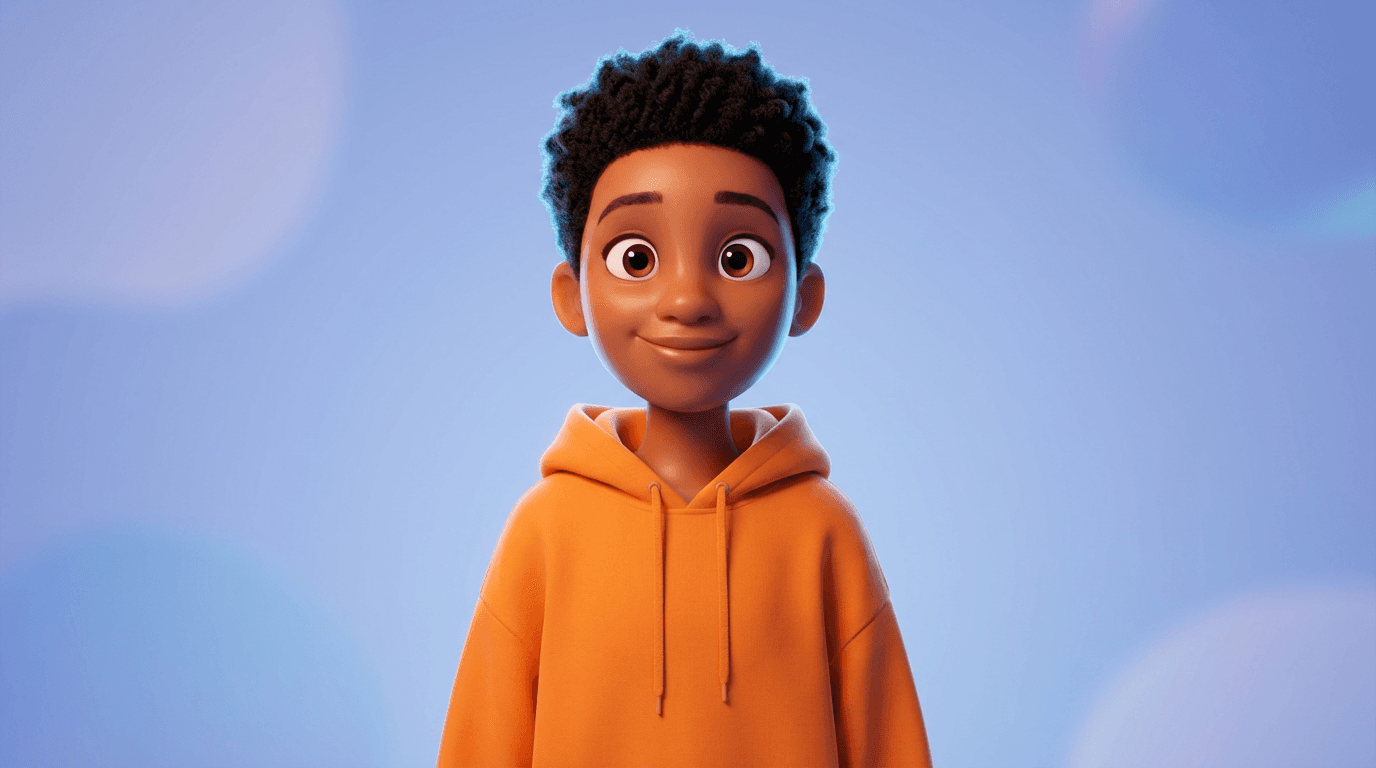
Classic Pixar Portrait
Clean, versatile, and works with almost any reference photo.
Prompt:
Transform the uploaded photo into a Pixar-style 3D animated character. Smooth, slightly glossy skin texture with soft subsurface scattering. Large, expressive eyes with detailed iris reflections. Slightly stylized facial proportions with a warm, friendly expression. Soft studio lighting with a gentle key light and subtle rim light. Clean, minimal background in soft pastel tones. The character should feel like a still frame from a Pixar feature film. Hyper-detailed 3D rendering, cinematic quality.
Pixar Character With Dramatic Lighting
For a more cinematic, moody result.
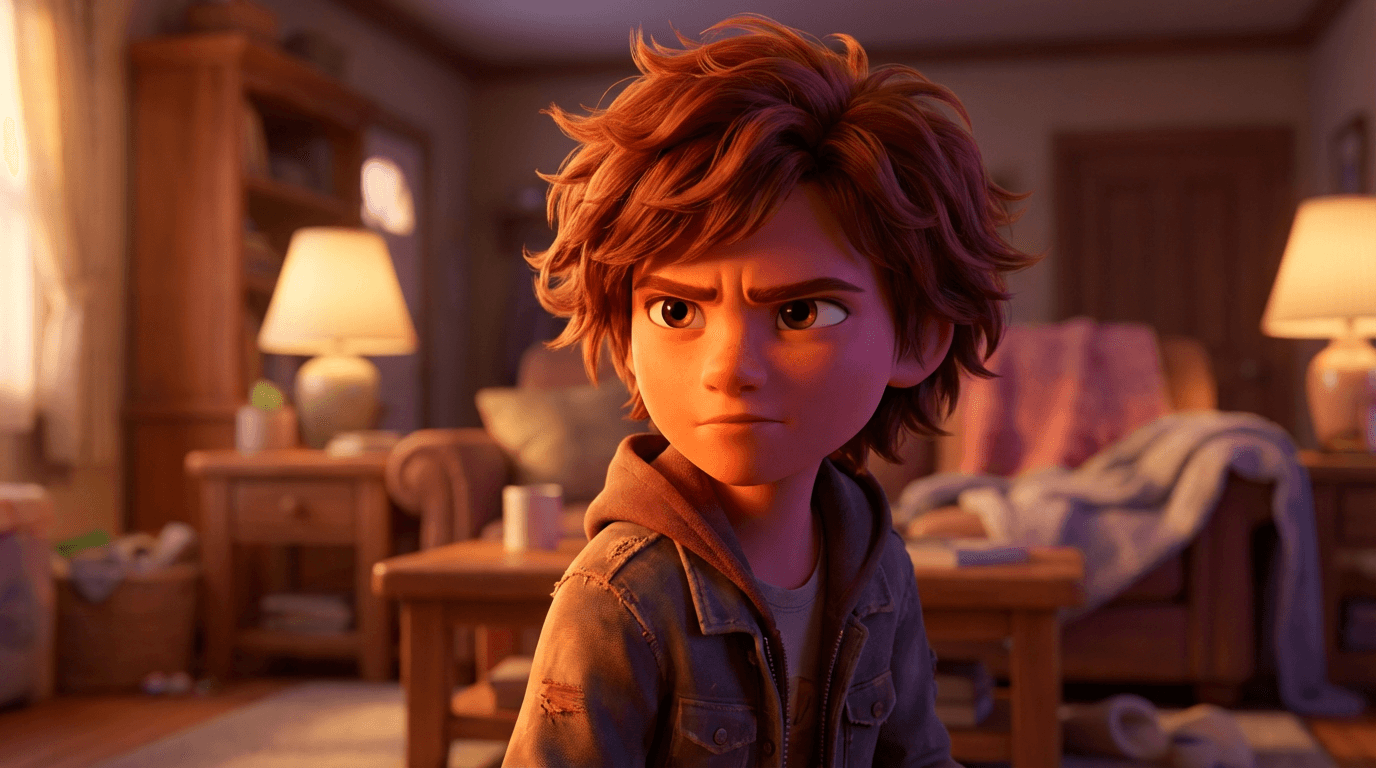
Prompt:
Convert the uploaded portrait into a high-quality Pixar-style 3D animated character with dramatic cinematic lighting. Soft volumetric light from the left side, deep but warm shadows on the right. The character has smooth 3D-rendered skin, large detailed eyes with catchlights, and a determined expression. Hair is stylized with individual strand detail. Background is a blurred, warm-toned environment suggesting a cozy interior. Feels like a key scene from a Pixar drama. Ultra-detailed 3D render, photorealistic textures applied to animated style.
Pixar Superhero Version
Fun for engagement posts and thumbnails.
Prompt:
Transform the uploaded photo into a Pixar-style 3D animated superhero character. The subject wears a sleek, colorful superhero suit with subtle metallic accents and a small emblem on the chest. Confident pose with hands on hips. Dynamic wind effect on hair and cape. Background is a city skyline at golden hour with soft bokeh. Smooth 3D skin texture, large expressive eyes, stylized but recognizable facial features. Cinematic Pixar rendering quality with vibrant, saturated colors and soft studio-style lighting.
Pixar Character as a Chef
Works well for food and lifestyle content creators.
Prompt:
Convert the uploaded portrait into a Pixar-style 3D animated character dressed as a professional chef. White chef coat with rolled sleeves, a small flour smudge on the cheek, and a warm smile. The character stands in a cozy, warmly lit kitchen with copper pots and hanging herbs in the soft background. Smooth 3D skin texture with gentle subsurface scattering. Large, lively eyes. Soft overhead lighting with warm color temperature. The scene feels like a still from a Pixar cooking movie. Ultra-detailed 3D render.
Pixar Character in a Fantasy Setting
For gaming, storytelling, or fantasy content.
Prompt:
Transform the uploaded photo into a Pixar-style 3D animated character in a magical fantasy setting. The character wears a flowing cloak with intricate embroidered edges and holds a glowing crystal staff. Background is a mystical forest with bioluminescent plants and soft floating particles. Warm side lighting with cool blue ambient fill. Smooth 3D skin, large expressive eyes with glowing reflections from the crystal. Stylized but detailed hair. Cinematic composition, Pixar animation quality, ultra-detailed rendering.
Pixar Character at a Desk
Ideal for tech, productivity, and education creators.
Prompt:
Convert the uploaded photo into a Pixar-style 3D animated character sitting at a clean modern desk. The character wears smart casual clothing and has a focused, thoughtful expression. A laptop and a coffee mug sit on the desk. Soft warm window light from the left. Background shows a minimalist room with a bookshelf slightly out of focus. Smooth 3D rendered skin, large eyes with screen reflections, slightly stylized proportions. Feels like a scene from a Pixar film about creativity. High quality 3D render with cinematic depth of field.
Pixar Character Holding a Camera
Great for photography and content creator audiences.
Prompt:
Transform the uploaded photo into a Pixar-style 3D animated character holding a professional camera up to one eye, mid-shot. The character has an excited, curious expression. Clothing is casual and creative, like a denim jacket with rolled sleeves. Background is a vibrant outdoor market with blurred colorful stalls and warm sunlight. Smooth glossy 3D skin, stylized proportions, detailed hands gripping the camera naturally. Soft golden hour lighting. Pixar feature film quality rendering with subtle lens flare.
Pixar Character in a Winter Scene
Seasonal content that performs well on social media.
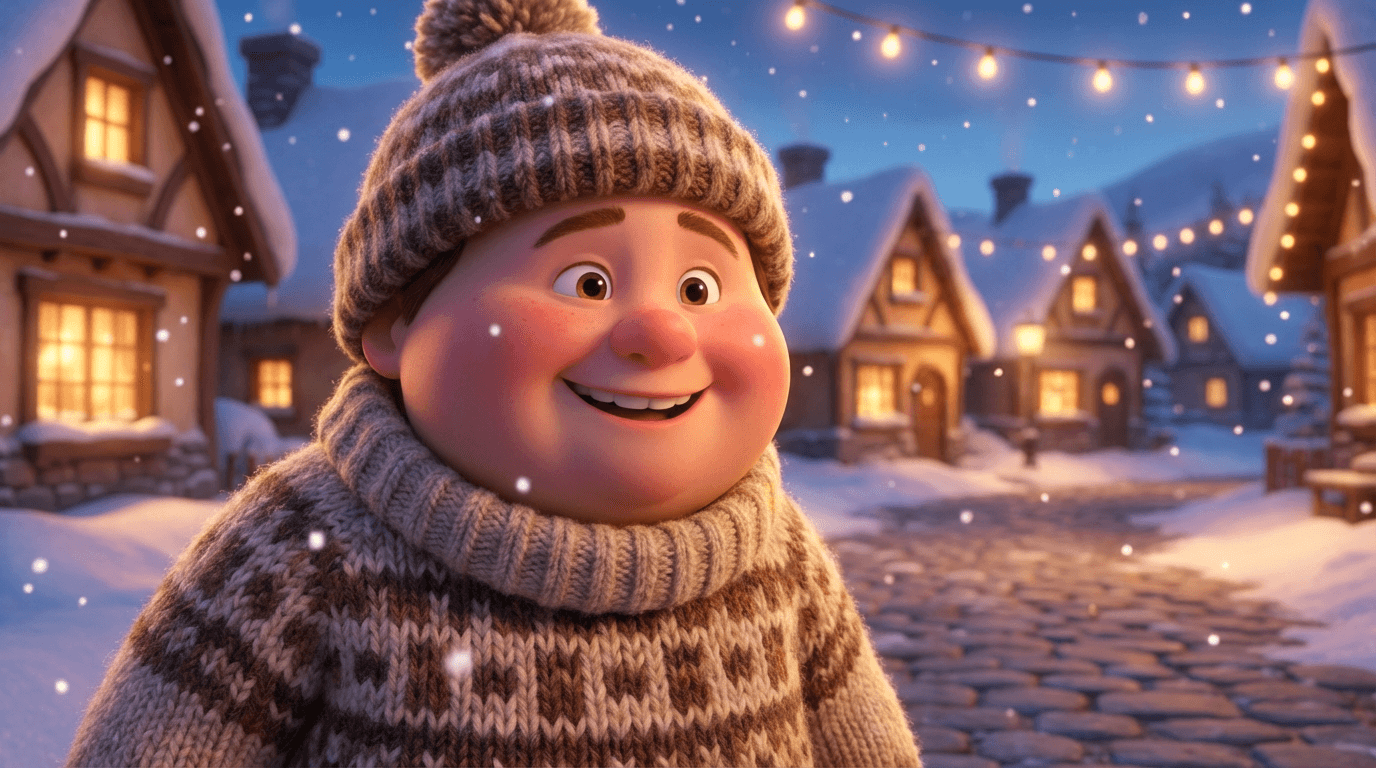
Prompt:
Convert the uploaded portrait into a Pixar-style 3D animated character in a cozy winter scene. The character wears a thick knit sweater, a scarf, and a beanie, with rosy cheeks and a cheerful smile. Soft snowflakes fall gently around them. Background is a snowy village street with warm glowing windows. Cool ambient light with warm accent lighting from nearby lamps. Smooth 3D skin texture, large sparkling eyes, slightly exaggerated facial features in Pixar style. Cinematic quality 3D rendering with soft depth of field.
Pixar Character as a Musician
Works well for music content, podcast thumbnails, and artist profiles.
Prompt:
Transform the uploaded photo into a Pixar-style 3D animated character playing an acoustic guitar on a small stage. Warm spotlight from above, soft purple and blue ambient lighting. The character has closed eyes and a peaceful, passionate expression. Casual clothing with rolled-up sleeves. Background is a dimly lit intimate venue with blurred audience silhouettes. Smooth 3D skin with warm light reflections, detailed fingers on guitar strings, stylized Pixar proportions. Cinematic rendering quality with rich color grading.
Pixar Character With a Pet
High engagement format for pet and lifestyle audiences.
Prompt:
Convert the uploaded portrait into a Pixar-style 3D animated character holding a small fluffy dog. The character has a big warm smile with slightly squinted happy eyes. The dog has exaggerated cute features with big round eyes and soft fur. Both are sitting on a park bench with green trees and soft sunlight in the background. Warm natural lighting with soft shadows. Smooth 3D textures on both the character and the pet. Pixar animation quality, ultra-detailed, cinematic composition with shallow depth of field.
Pixar Character in an Action Pose
Dynamic and eye-catching for thumbnails.
Prompt:
Transform the uploaded photo into a Pixar-style 3D animated character in a dynamic running pose. The character wears sporty athletic clothing with vibrant colors. Hair and clothing show motion blur and wind effect. Background is a futuristic city street with neon signs and wet reflective pavement. Dramatic low-angle camera. Strong rim lighting with cool blue tones and warm orange accent. Smooth 3D skin, large determined eyes, exaggerated athletic proportions. Pixar feature film quality with cinematic motion energy.
Pixar Character as a Scientist
Ideal for education and science content.
Prompt:
Convert the uploaded portrait into a Pixar-style 3D animated character wearing a white lab coat and safety goggles pushed up on their forehead. The character holds a bubbling beaker with a look of wonder and excitement. Background is a colorful, slightly messy laboratory with flasks, tubes, and a chalkboard with equations. Bright, clean lighting with soft shadows. Smooth 3D skin texture, oversized expressive eyes with curiosity, Pixar-style proportions. Ultra-detailed rendering with vibrant, saturated colors.
Pixar Character Reading a Book
Works well for bookish, cozy, and educational content.
Prompt:
Transform the uploaded photo into a Pixar-style 3D animated character sitting in a large armchair reading a thick book. The character wears cozy clothing like a cardigan and has round glasses. Warm fireplace glow from the side. Background is a tall bookshelf-lined room with soft ambient light. A cup of tea on a small side table. Smooth 3D skin, large focused eyes looking down at the book, relaxed expression. Soft cinematic lighting with warm color temperature. Pixar animation quality with ultra-detailed rendering and gentle depth of field.
Pixar Villain Version
Fun for contrast content and engagement posts.
Prompt:
Convert the uploaded portrait into a Pixar-style 3D animated villain character. Slightly sharpened facial features with an arched eyebrow and a sly, confident smirk. The character wears a dark elegant outfit with a high collar and subtle purple accents. Dramatic side lighting with deep shadows and cool blue tones. Background is a dark, moody interior with faint candlelight. Smooth 3D skin with dramatic highlights, piercing detailed eyes, stylized angular proportions. Pixar villain aesthetic, cinematic quality rendering with rich contrast.
Pixar Character Graduation Portrait
Perfect for milestone and celebration content.
Prompt:
Transform the uploaded photo into a Pixar-style 3D animated character wearing a graduation cap and gown. The character has a proud, beaming smile and is holding a rolled diploma. Confetti particles float gently in the air. Background is a soft-focus university building with warm afternoon light. Bright, cheerful lighting with soft shadows. Smooth 3D skin, large joyful eyes, slightly exaggerated celebratory expression. Warm color palette with gold and navy accents. Pixar animation film quality with ultra-detailed rendering.
Common Mistakes That Make Pixar AI Characters Look Bad
Most people who try this trend and get disappointing results are making one of these mistakes. Avoiding them will immediately improve your output quality.
The first and most common issue is using vague prompts. Writing "Pixar style" or "make it look animated" gives the AI almost nothing to work with. These models need specific visual direction. Describe the skin texture, the eye style, the lighting, the rendering quality, and the camera framing. The prompts above work because every visual element is defined.
The second mistake is uploading low quality reference photos. If your photo is dark, blurry, or taken from a strange angle, the AI will struggle to accurately map your features onto the 3D character. Use a well-lit, front-facing photo with a clean background whenever possible. Natural daylight photos work best.
The third mistake is asking for conflicting styles. Some people add terms like "photorealistic" and "cartoon" in the same prompt, or request "Pixar style" alongside "anime." These styles have fundamentally different visual languages, and mixing them confuses the model. Pick one aesthetic and commit to it.
The fourth mistake is ignoring lighting in the prompt. Lighting is what makes a Pixar-style render feel cinematic versus flat. Always include at least one lighting descriptor such as "soft studio lighting," "warm golden hour light," or "dramatic side lighting." This single addition makes a significant difference in output quality.
The fifth mistake is not iterating. The first generation is rarely perfect. Treat it as a starting point. Adjust the prompt, change one or two details, and regenerate. Most viral Pixar character images you see online went through several rounds of generation before the creator found the version they posted. If you want to understand how prompt iteration works at a deeper level, the Nano Banana prompt guide covers this in detail.
How to Use Pixar-Style Characters in Your Content Strategy
Generating a Pixar version of yourself is fun on its own, but the real value comes from using these images strategically across your content.
For YouTube thumbnails, Pixar-style portraits consistently outperform standard photos in click-through rate because they are visually unusual. A 3D animated face stands out in a grid of realistic photo thumbnails. Creators who adopt this as their thumbnail style and maintain it across their channel build stronger visual brand recognition.
For social media profiles, a Pixar-style avatar creates instant memorability. It becomes your visual signature. When followers see that style in their feed, they immediately associate it with you before reading the caption or username.
For Shorts, Reels, and TikTok content, Pixar transformations work as both the content itself and as a visual hook. The transformation reveal format, where the video starts with your real photo and transitions to the Pixar version, consistently performs well because it triggers curiosity in the first three seconds.
For faceless channels, a consistent Pixar character can serve as the recurring visual identity across all your content, giving viewers something to remember and connect with.
How to Keep Your Pixar Character Consistent Across Multiple Images
If you plan to use your Pixar character across thumbnails, social posts, and video content, consistency matters. A character that looks slightly different in every image breaks the visual brand you are trying to build.
The most effective approach is to create a character prompt template. Once you get a result you are happy with, save the exact prompt you used. Then for every future generation, paste that same character description and only change the scene, pose, and context around it.
For example, if your base character prompt describes "a 3D Pixar-style character with short brown curly hair, green eyes, warm skin tone, wearing a navy blue hoodie," keep that block identical every time. Change the background, the action, and the lighting to create variety without altering the character.
Uploading the same reference photo every time also helps. The combination of a consistent prompt and a consistent reference image gives the AI two anchoring points that significantly reduce visual drift between generations.
If you are producing content at scale and need strong character lock-in, training a custom model on your Pixar character design is the most reliable long-term solution. But for most creators, the prompt template approach works well enough to maintain recognizable consistency across dozens of images.
Frequently Asked Questions
Can I turn myself into a Pixar character with AI for free?
Yes. Several AI image generators offer free credits that let you create Pixar-style character transformations without paying. The process involves uploading your photo as a reference image and entering a detailed prompt that describes the Pixar 3D animated style, including skin texture, eye style, lighting, and rendering quality. Miraflow AI provides free credits on signup, and you can generate Pixar-style images directly in your browser without downloading any software.
What is the best AI tool for making Pixar-style characters in 2026?
The best results currently come from AI image generators that support both reference image uploads and detailed text prompts. Tools that let you control the visual style through prompt engineering tend to produce more authentic Pixar-quality renders than simple one-click filter apps. The key is using a model that understands 3D rendering aesthetics, subsurface scattering, and cinematic lighting when instructed through the prompt.
Why does my AI Pixar character look cartoonish instead of cinematic?
The most common reason is a prompt that lacks specificity. Terms like "Pixar style" alone are too vague. You need to describe the rendering quality, material properties, and lighting. Include phrases like "smooth 3D rendered skin with soft subsurface scattering," "large expressive eyes with detailed iris reflections," and "soft studio lighting with gentle shadows." These details push the model toward cinematic Pixar quality rather than generic cartoon output.
What kind of photo works best as a reference for Pixar AI transformation?
Front-facing photos with clear, even lighting produce the best results. Natural daylight is ideal. Avoid photos with heavy shadows across the face, sunglasses, or extreme angles. A clean background helps the AI focus on your facial features without distraction. High resolution photos are better than low resolution ones, but the lighting quality matters more than pixel count.
Can I use a Pixar AI character as my YouTube thumbnail?
Absolutely, and many creators are doing exactly this in 2026. Pixar-style thumbnails stand out because they look visually distinct from standard photo thumbnails. The 3D animated style draws the eye and increases the likelihood of a click. You can generate these directly with the YouTube Thumbnail Maker by uploading your photo, entering a Pixar-style prompt, and adding bold thumbnail text in one step.
How do I keep my Pixar character looking the same in every image?
Save the exact prompt that produced your best result and reuse it as a template for every future generation. Only change the scene, pose, and background while keeping the character description block identical. Always upload the same reference photo. This combination of a fixed prompt template and a consistent reference image minimizes visual drift between generations and keeps your character recognizable.
Can I animate my Pixar AI character into a video?
Yes. Once you generate a Pixar-style character image you are happy with, you can use it as the first frame in an AI video generator to create a short animated clip. The cinematic video tool supports image-to-video generation, so you upload your Pixar character image and write a prompt describing motion and scene context. This produces a short video clip that maintains your character's appearance while adding movement.
Is it legal to use AI-generated Pixar-style images?
AI-generated images in the style of Pixar are generally fine to use for personal and commercial content because you are generating an original image inspired by a visual style, not copying specific copyrighted characters. However, you should avoid replicating exact Pixar characters like Woody or Elsa. Generating an original character in a Pixar-inspired 3D animated style is a creative application, not a copyright issue. Always check the terms of service of the specific AI tool you are using for any commercial use restrictions.
What prompt keywords make the biggest difference for Pixar-style quality?
The keywords that have the most impact are related to rendering quality and material properties. Phrases like "subsurface scattering," "3D rendered skin," "catchlights in eyes," "cinematic studio lighting," and "Pixar feature film quality" consistently push outputs toward higher quality results. Lighting descriptors like "soft key light with rim light" and texture cues like "slightly glossy smooth skin" also make a significant difference compared to generic prompts.
Can I create a Pixar-style character without uploading my photo?
Yes. You can describe a character entirely through text without any reference image. This is useful for creating fictional characters, brand mascots, or personas for faceless content. The trade-off is that the character will not resemble you specifically. To get a distinct and consistent character through prompt-only generation, include detailed physical descriptions covering age, skin tone, hair style and color, eye color, facial features, body type, and clothing.