20 'Give Me Peanut Butter Please' AI Prompts to Try the Viral TikTok Trend (2026)

Written by
Aerin Kim
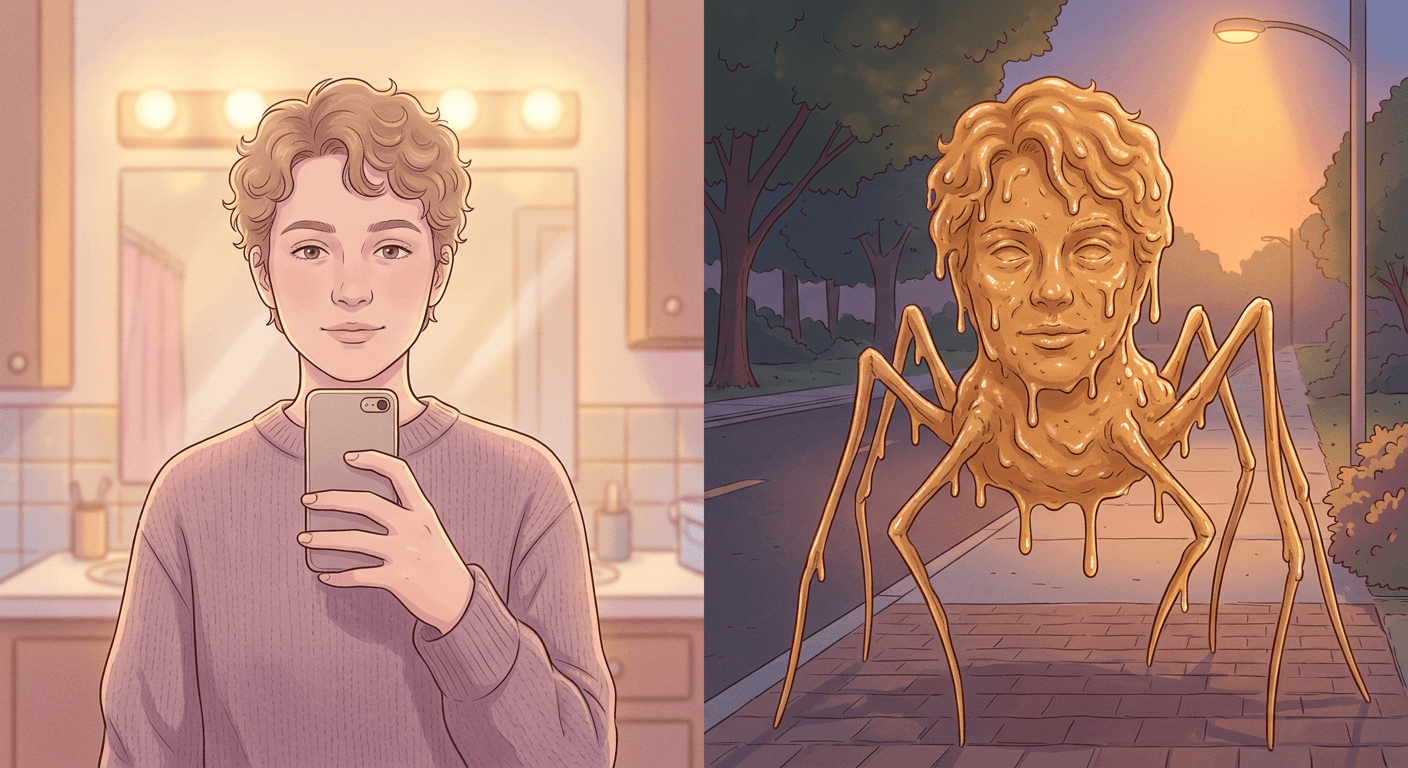
TikTok's peanut-butter-humanoid trend turns any selfie into a glistening, spindly-legged creature screaming for peanut butter. Here are 20 grouped prompts and the Miraflow workflow to make your own.
If your For You Page has suddenly filled up with a screaming, dripping, spindly-legged creature that somehow still has your friend's exact face, you have found the "Give Me Peanut Butter Please" trend. It exploded across TikTok through September 2026, and by now most people have either tried it, been tagged in someone else's version, or spent a confused few minutes wondering how a jar of peanut butter turned into one of the platform's biggest AI image formats of the month. The short version: you upload one clear, front-facing photo, run it through an AI image tool with a prompt describing a "peanut butter humanoid," and get back a photoreal creature that keeps your exact face while everything below the neck becomes glistening, dripping peanut butter on long spindly legs, usually shown skittering down a street or rampaging a grocery store while a screamed trend audio clip plays over the top.
This post is a full prompt pack for making your own version, grouped into the actual shot types people are posting rather than one generic template repeated twenty times. Every prompt below was written for Miraflow's AI Image Generator, which handles the exact skill this trend depends on: preserving your real face through image-to-image transformation while completely reinventing everything else in the frame. Once you have a still you like, Text2Shorts turns it into the vertical short-form clip people are actually posting, script, scene motion, voice and captions included, without needing the original CapCut workflow the trend started on.
Why This Trend Is Everywhere Right Now
The peanut butter format has a genuinely traceable origin, which is rarer than it sounds for a TikTok trend this absurd. It grew out of running jokes on streamer idksterling's livestreams, where viewers would ask him to rub peanut butter on his car during a stream, a bit that snowballed into peanut butter getting attached to nearly everything idksterling-related as a recurring in-joke. When creators started feeding idksterling clips and photos through Sora and similar AI video tools, the joke escalated into something new: instead of just mentioning peanut butter, the AI tools started rendering entire peanut-butter versions of people. Once CapCut's AI Image tool made that specific transformation easy to reproduce with a simple prompt template, "creamy peanut butter humanoid retaining original facial features," the format broke out of idksterling's fanbase entirely and became a general-purpose trend anyone could do with their own selfie.
It also landed at exactly the right moment to become the breakout entry in a wider trend TikTok has started calling "AI Cast," a genre of clips where an AI tool casts a real person as an impossible creature, made of peanut butter, spaghetti, or melting wax are the three most common versions, while keeping their actual face completely intact. The peanut butter version is the one that stuck hardest, and search TikTok today for phrases like "how to do the peanut butter trend AI" or "give me peanut butter please AI prompt" and you will find dozens of separate, independently filmed tutorial breakdowns, not just one viral original getting reposted. That spread across many creators making their own tutorial variants, rather than one clip just getting reshared, is usually the clearest sign a format has become an actual trend rather than a one-off viral clip.
The reason it works as comedy is worth understanding before you try to write your own prompt, because it explains exactly what a good result needs. The joke is entirely in the contrast: a completely calm, recognizable, photoreal human face sitting on top of a chaotic, dripping, non-human body, screaming a demand that makes no sense in context. If the face gets distorted or cartoonish along with the body, the joke collapses, because there is no longer anything calm to contrast against the chaos. Every prompt in this pack is written to protect that contrast deliberately, which is also why a genuinely clear reference photo matters more here than in almost any other AI image trend.
1) Street-Rampage and Skitter Shots
This is the trend's original core format: the creature caught mid-motion on an ordinary street, usually filmed like shaky found footage rather than a posed shot. The four prompts below cover the most common street variations people are actually posting, a night sidewalk skitter, a daytime crosswalk sprint, a cornered alley shot, and a car-hood drape, so you are not stuck making the same single composition four different ways.
Prompt 1: Night sidewalk skitter
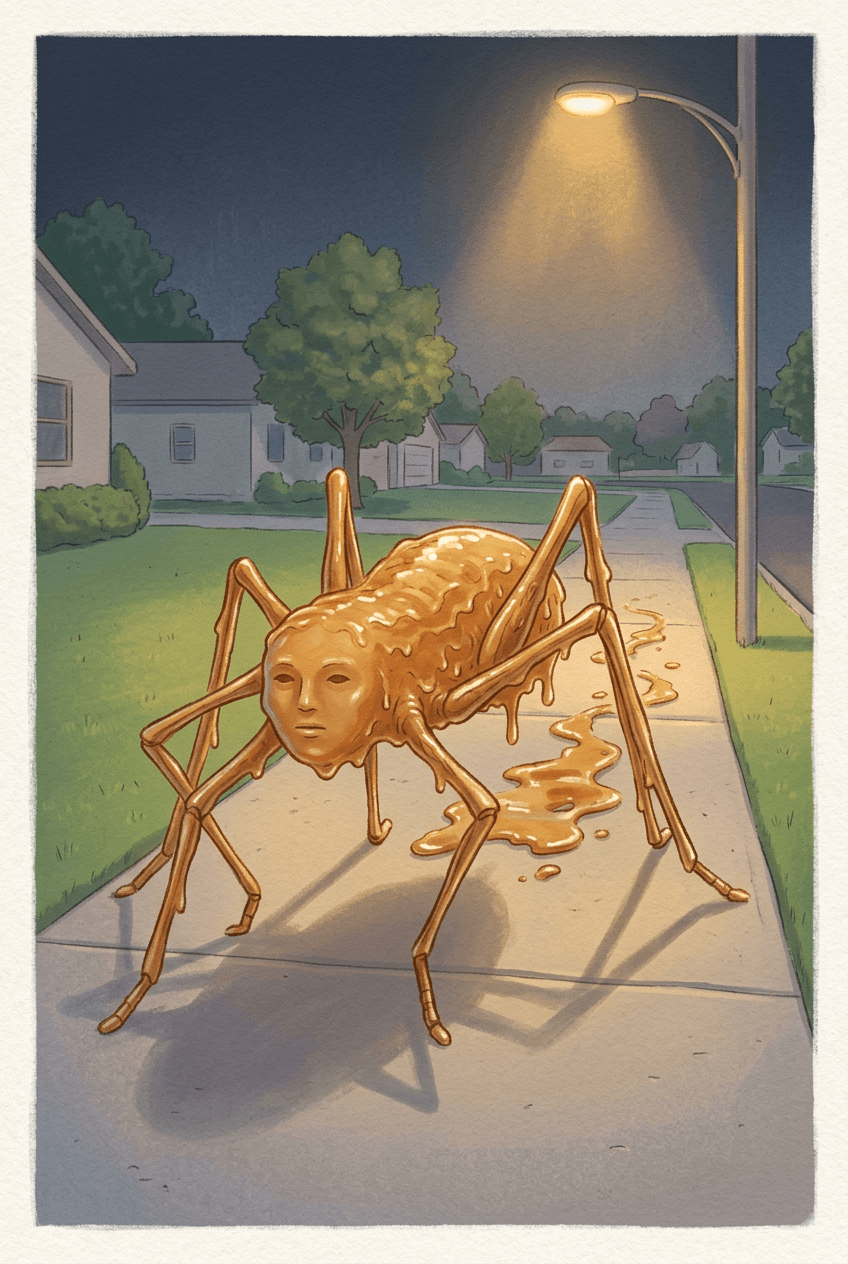
A wide, low-angle shot of the creature mid-skitter down an empty sidewalk under a streetlight, built as the trend's classic establishing shot.
Transform the person in the reference photo into a photoreal peanut-butter humanoid: a glistening, creamy peanut-butter body with long, spindly insect-like legs, keeping the exact facial features, skin tone, and expression from the reference photo completely unchanged. Show it mid-skitter down an empty suburban sidewalk at night, legs braced at odd angles against the concrete, thick amber drips trailing behind it and pooling on the pavement. Warm sodium streetlight glow from a lamppost overhead, shot from a low handheld angle like a phone camera pointed up at the creature, shallow depth of field blurring the dark houses behind it. No warped or extra limbs beyond the intended spindly legs, no blurry facial features, no garbled text, no watermark.
Prompt 2: Daytime crosswalk sprint
A faster, more chaotic daytime version with motion blur on the legs, useful when you want the clip to open with immediate action rather than a slow reveal.
Transform the subject in the reference photo into the same glistening peanut-butter humanoid, exact facial features preserved, sprinting across a daytime city crosswalk on its spindly legs while pedestrians scatter out of frame. Bright overcast daylight from directly above, motion blur trailing off the fastest-moving legs and drip strands while the face stays sharp and recognizable, wide street-level shot with the crosswalk lines and a stopped car's grille visible in the foreground. No warped proportions, no blurry or distorted face, no garbled text on any signage, no watermark.
Prompt 3: Cornered alley chase
A tighter, more claustrophobic composition with the creature backed into a narrow alley, good for a suspense beat before the audio's scream hits.
Transform the person in the reference photo into the glistening peanut-butter creature, face unchanged, backed into a narrow brick alley with its spindly legs pressed against both walls for balance, thick drips running down the brick where its body has brushed against it. A single overhead security light casts a harsh cone of warm light with deep shadow at the alley's edges, tight vertical phone-camera framing looking straight down the alley toward the creature. No blurry or distorted facial features, no extra legs, no garbled text, no watermark.
Prompt 4: Car-hood drape
A stationary variant with the creature draped across a parked car instead of mid-motion, useful as a calmer cutaway shot between two more chaotic clips.
Transform the subject in the reference photo into the peanut-butter humanoid, exact face preserved, draped across the hood of a parked sedan with its spindly legs hooked over the side mirrors and bumper, a thick amber puddle spreading across the hood's paint. Late-afternoon sunlight low on the horizon casting a warm orange glow across the scene, medium three-quarter shot from the sidewalk with the car's windshield reflecting a soft highlight, shallow depth of field on the background houses. No warped or melted proportions on the car itself, no blurry face, no garbled text on the license plate, no watermark.
Street shots are the easiest starting point because the background does most of the storytelling for you: an ordinary, recognizable location makes the creature look more out of place, which is the entire joke. Creators who already built a workflow around the AI action figure trend will recognize the same underlying idea here, the more mundane and specific the setting, the more convincing the transformation reads against it.
2) Grocery Store Rampage Shots
The grocery store variant is where most of the trend's actual comedy escalation happens, since it gives the creature a reason to exist in the scene: it is there for peanut butter, specifically, and the store's own peanut butter aisle becomes the punchline. The five prompts below cover the aisle knockdown, the checkout counter, the cart snatch, the peanut-butter-aisle self-pour, and a produce-section climb, each a distinct beat rather than the same aisle shot repeated.
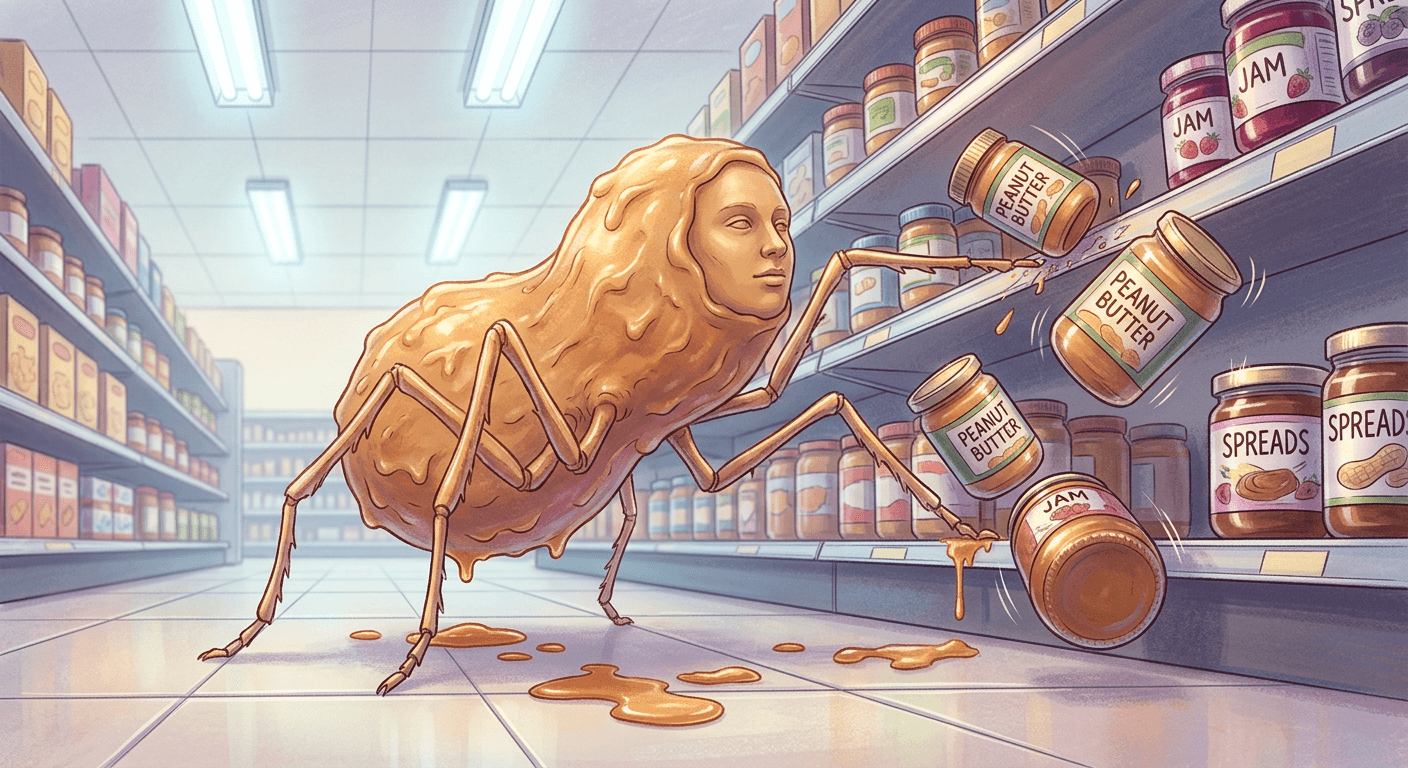
Prompt 5: Aisle knockdown
The creature rearing up and knocking jars off a shelf mid-fall, the trend's most reposted single beat.
Transform the person in the reference photo into the glistening peanut-butter humanoid, face unchanged, rearing up in a bright grocery store aisle with its spindly legs knocking jars off a shelf mid-fall, several jars frozen in the air as they tumble. Cool fluorescent overhead lighting mixed with a warm reflected glow off the creature's amber body, wide aisle-level shot with shelves receding into soft focus and a dropped shopping basket on the floor. No blurry or distorted shelving, no garbled labels on the jars, no warped limbs, no watermark.
Prompt 6: Checkout counter chaos
A calmer but more absurd variation with the creature looming over a checkout lane as if trying to buy something.
Transform the subject in the reference photo into the peanut-butter creature, exact face preserved, looming over a checkout conveyor belt with its spindly legs braced on either side of the register, a thick drip pooling onto the belt next to a scanned item. A stunned cashier's arm is visible at the edge of frame recoiling backward, warm checkout-lane overhead lighting with a soft blue glow from the register screen, medium shot at counter height. No blurry or distorted facial features, no garbled text on the register screen, no extra fingers on the visible arm, no watermark.
Prompt 7: Shopping cart jar-snatch
A close, fast-motion shot of the creature snatching a jar directly out of a stranger's shopping cart.
Transform the person in the reference photo into the glistening peanut-butter humanoid, face unchanged, mid-lunge toward a shopping cart to snatch a jar of peanut butter out of it with one long spindly leg, the cart tipping slightly from the impact. Bright even grocery-store lighting from overhead panels, close three-quarter shot capturing both the creature's face and the tipping cart in the same frame, shallow depth of field on the aisle behind. No warped cart geometry, no blurry face, no garbled text on the jar label, no watermark.
Prompt 8: Peanut butter aisle self-pour
The creature standing in the actual peanut butter aisle, pouring a jar over its own already-glistening body.
Transform the subject in the reference photo into the peanut-butter creature, exact face preserved, standing in the actual peanut butter aisle surrounded by shelves of jars, pouring an open jar over its own head so fresh peanut butter runs down over its already glistening body. Warm overhead aisle lighting reflecting off the wet surface, medium straight-on shot with the shelf's rows of jars sharp in the background. No blurry or distorted facial features, no garbled text on the shelf labels, no watermark.
Prompt 9: Produce section climb
A less obvious variant with the creature climbing a produce display, useful when you want a shot that does not repeat the peanut-butter-aisle joke a second time in the same clip.
Transform the person in the reference photo into the glistening peanut-butter humanoid, face unchanged, climbing up a produce display pyramid of oranges with its spindly legs gripping the crates, several oranges rolling loose down the display. Bright produce-section lighting with a cool misted-glass sheen on nearby refrigerated cases, low-angle shot from the aisle floor looking up at the climbing creature, shallow depth of field on the ceiling signage. No warped crate geometry, no blurry face, no garbled signage text, no watermark.
Grocery store shots benefit the most from a plain, well-lit reference photo, since store lighting is already bright and even and the model has an easier time matching your real skin tone and hair color to that lighting than it does to a moodier scene. If your source photo was shot somewhere darker, Miraflow's AI Image Generator can still carry the likeness through, but expect to iterate on the prompt's lighting description once or twice before the color balance between your face and the peanut-butter body actually matches.
3) Close-Up Portrait and Mid-Morph Transformation Shots
Not every version of this trend needs a full scene. A lot of the highest-performing posts are just a single tight close-up, either the finished creature's face or the transformation caught halfway through, because a close-up puts the entire joke, the calm face against the chaotic material, into one frame with nothing else competing for attention. The four prompts below cover a half-morphed macro shot, a finished portrait, the screamed catchphrase pose, and a mirror-selfie version of the transformation starting.
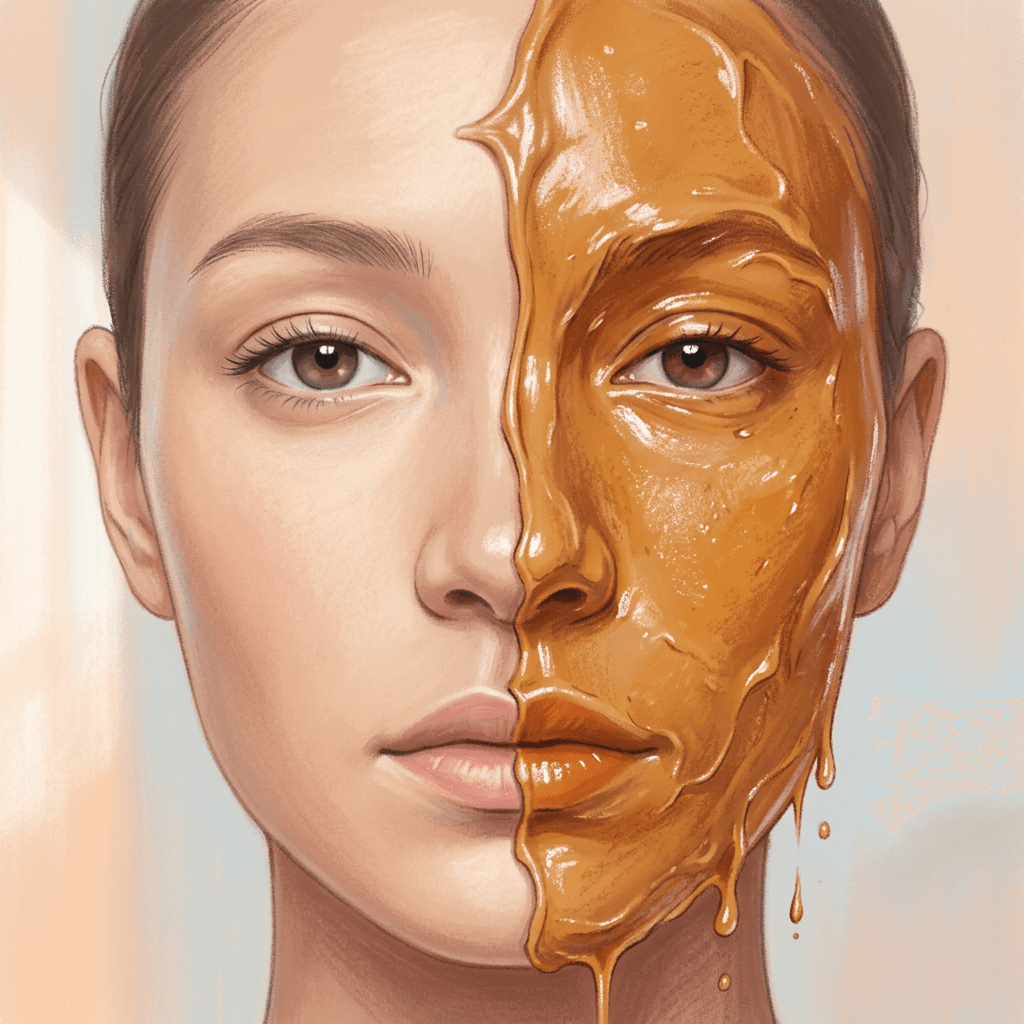
Prompt 10: Half-morph macro close-up
An extreme close-up frozen exactly at the halfway point, one side of the face still real skin and the other side already glistening peanut butter.
Transform the person in the reference photo into an extreme close-up mid-transformation portrait: one half of the face still smooth human skin exactly matching the reference photo, the other half already a glistening amber peanut-butter texture with fine drips just beginning to form along the seam and the jawline, the eyes and expression unchanged throughout. Soft window light from the left keeping the human half matte and the peanut-butter half glossy, tight macro framing filling the entire image with the face. No blurry or warped features, no garbled text, no watermark.
Prompt 11: Finished drip portrait
A clean, fully transformed head-and-shoulders portrait, useful as a thumbnail-style still or a clip's opening frame.
Transform the person in the reference photo into a finished close-up peanut-butter humanoid portrait, exact facial features and expression preserved, the skin now a fully glistening creamy amber texture with slow, heavy drips running from the hairline down past the cheekbones. Soft diffused studio light from directly in front, tight head-and-shoulders framing with a plain out-of-focus background, shallow depth of field. No blurry or distorted features, no garbled text, no watermark.
Prompt 12: Screaming catchphrase close-up
The creature mid-scream with a stretched peanut-butter strand between its open lips, built to sync directly with the trend audio's shouted line.
Transform the person in the reference photo into the peanut-butter humanoid mid-scream, exact facial structure preserved but mouth open wide as if shouting, a thick strand of peanut butter stretching between the open lips. Warm handheld-phone-flash lighting from slightly below, tight vertical close-up framing cropped just above the shoulders, shallow depth of field on a dark background. No warped jaw or teeth, no blurry features, no garbled text, no watermark.
Prompt 13: Mirror-selfie morph
A bathroom-mirror selfie framing with the transformation already spreading past the collarbones, meant to look like the moment right before someone notices what is happening to them.
Transform the person in the reference photo into the peanut-butter humanoid captured as if in a bathroom mirror selfie, exact face preserved above the neck, the transformation already spreading down past the collarbones into a glistening amber texture while the phone camera is faintly visible reflected in the mirror. Warm bathroom vanity lighting from above the mirror, medium mirror-selfie framing with a slightly tilted handheld angle. No blurry or distorted reflection, no garbled text on the phone screen, no watermark.
The half-morph macro shot in Prompt 10 is consistently the hardest of the four to get right, because it asks the model to render two completely different materials, real skin and glistening peanut butter, seamlessly meeting along one line without either half looking like a flat sticker pasted over the other. If your first attempt comes back with a harsh, cartoonish seam, try naming the exact transition detail in the prompt, "fine drips just beginning to form along the seam," rather than leaving the boundary undescribed and letting the model guess how the two textures should meet.
4) Group and Duo Versions
The duo and group versions took off once people started tagging friends into their own posts, since a single creature screaming for peanut butter is funny, but two or three friends all transformed into the same creature standing together is funnier, and it gives everyone tagged a reason to repost the same clip to their own following. The three prompts below cover a matching duo, a three-person huddle around a spilled jar, and a symmetrical aisle stand-off.
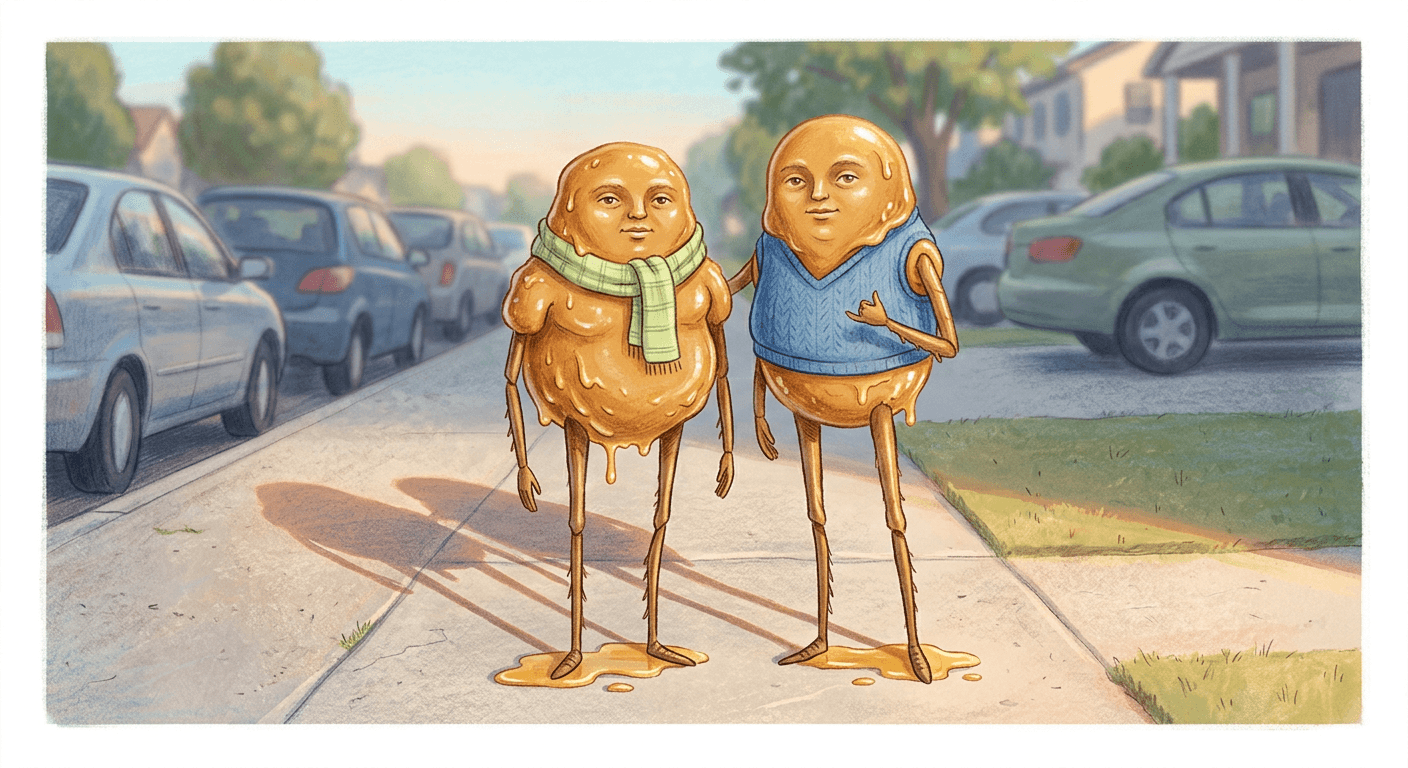
Prompt 14: Matching duo sidewalk pose
Two friends both transformed into matching creatures posing together like an ordinary friend photo, just made of peanut butter.
Transform the two people in the reference photo into matching glistening peanut-butter humanoids standing side by side on a quiet sidewalk like friends posing for a photo, both keeping their exact original facial features, long spindly legs and amber drips shared by both figures. Soft late-afternoon light from the right casting long warm shadows behind both figures, medium wide shot with a row of parked cars softly blurred behind them. No blurry or distorted limbs on either figure, no garbled text, no watermark.
Prompt 15: Trio huddle around a spilled jar
Three people transformed into creatures crowding around one dropped jar, built for a bigger friend-group post.
Transform the group of three people in the reference photo into peanut-butter humanoids huddled tightly around a single knocked-over jar on a sidewalk, all three keeping their original facial features, spindly legs overlapping as they crowd toward the spilled peanut butter. Warm streetlight glow from above, medium group shot capturing all three figures and the jar in one frame, shallow depth of field on the street behind them. No warped or tangled limbs beyond the intended crowding, no blurry faces, no garbled text, no watermark.
Prompt 16: Symmetrical aisle stand-off
Two creatures posed as mirror images of each other on opposite sides of a grocery aisle, a more staged, deliberately composed version of the format.
Transform the two people in the reference photo into peanut-butter humanoids posed as mirror images of each other on either side of a grocery store aisle, both keeping their original facial features, spindly legs bracing against opposite shelves as if about to charge toward the center. Bright even grocery-store lighting from overhead, wide symmetrical shot with the aisle's vanishing point centered between them. No blurry or distorted shelving, no garbled labels, no watermark.
Group shots need a clearer starting photo than solo ones, not a less clear one, since the model now has to preserve two or three separate likenesses in the same frame instead of just one. A reference photo where everyone's face is turned roughly toward the camera and evenly lit works far better here than a candid group photo shot from an angle, the same principle covered in our AI headshot prompt guide for keeping a result recognizable as the actual person rather than a generic stand-in.
5) Exaggerated Horror-Comedy Shots
Once the format had been through enough ordinary street and store variations, the natural next step for creators chasing something fresh was to push the scale and stakes further into horror-comedy territory, giant creatures, spider-like wall climbs, an exaggerated peanut butter waterfall, and a cornered showdown. These four prompts are the "next level" versions once the basic format feels overdone.
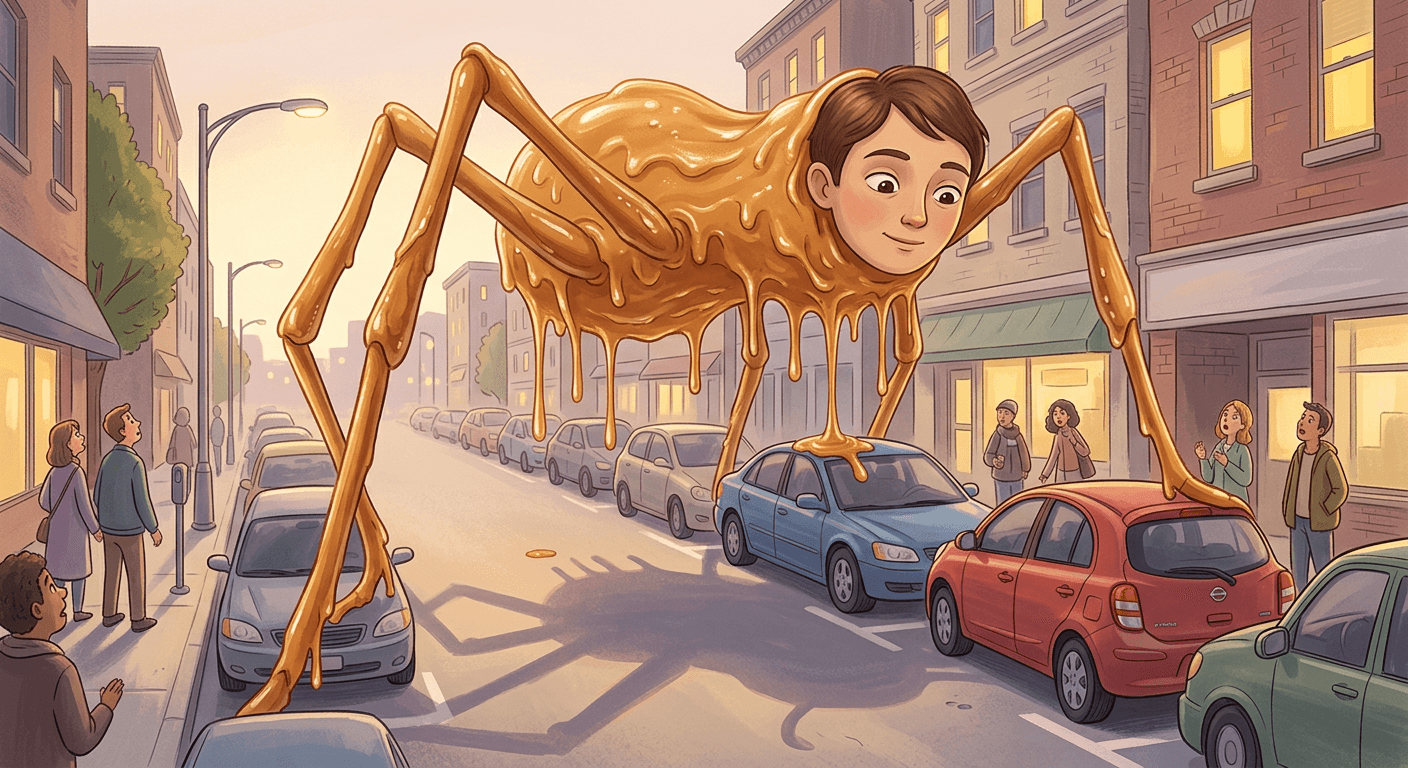
Prompt 17: Kaiju-scale street takeover
The creature scaled up to tower over parked cars, a deliberately over-the-top city-street version.
Transform the person in the reference photo into an exaggerated, oversized peanut-butter humanoid towering over a row of parked cars on a city street, keeping the exact original facial features scaled up comedically large, long spindly legs straddling two vehicles, thick amber strands dripping down onto the car roofs. Dramatic warm dusk light from behind casting a long shadow down the street, wide low-angle shot emphasizing the creature's exaggerated scale. No warped or distorted car geometry, no blurry face, no garbled text, no watermark.
Prompt 18: Spider-climb building wall
The creature using all of its spindly legs to climb a building wall like a spider, a more unsettling variant than the street or store shots.
Transform the person in the reference photo into the peanut-butter humanoid clinging to the side of a brick apartment building with all of its long spindly legs gripping the wall like a spider, exact original facial features preserved and turned to look down at the street below, thick drips running down the brick beneath it. Cool blue dusk light from the sky mixing with warm window light from the building, low-angle shot from street level looking up. No warped or distorted building geometry, no blurry face, no garbled text, no watermark.
Prompt 19: Peanut butter waterfall
An exaggerated pour effect with peanut butter continuously streaming from the creature's mouth, built for a slow-motion clip.
Transform the person in the reference photo into the peanut-butter humanoid with its head tilted back and mouth wide open, a continuous thick waterfall of peanut butter pouring from its mouth down over its own glistening body and onto the pavement below, exact original facial features preserved despite the exaggerated pour. Warm streetlight glow from one side creating a glossy highlight on the falling stream, medium shot with the pooling peanut butter visible at its feet. No warped jaw, no blurry facial features, no garbled text, no watermark.
Prompt 20: Cornered cart-barricade showdown
The creature backed against a wall by a wall of pushed-together shopping carts, a small comedic action-movie beat.
Transform the person in the reference photo into the peanut-butter humanoid cornered against a grocery store wall by a barricade of shopping carts pushed together, exact original facial features preserved with an exaggerated startled expression, spindly legs pressed flat against the wall behind it. Bright overhead fluorescent lighting with a warm reflected glow off its body, medium shot capturing the cart barricade and the cornered creature in the same frame. No warped cart geometry, no blurry facial features, no garbled text, no watermark.
These exaggerated versions are also where the trend crosses over most naturally with other absurdist AI formats already popular on the same platform. If you have already experimented with Italian Brainrot-style AI characters or the deliberately unsettling scenes in the Insane Asylum TikTok trend, the same escalating, increasingly-unhinged energy applies here. Push one exaggeration at a time, the scale, the material behavior, or the setting, rather than stacking all of them into a single prompt, since a request that is simultaneously giant, spider-climbing, and waterfall-pouring tends to confuse the model about which detail should actually dominate the frame.
How to Customize These Prompts
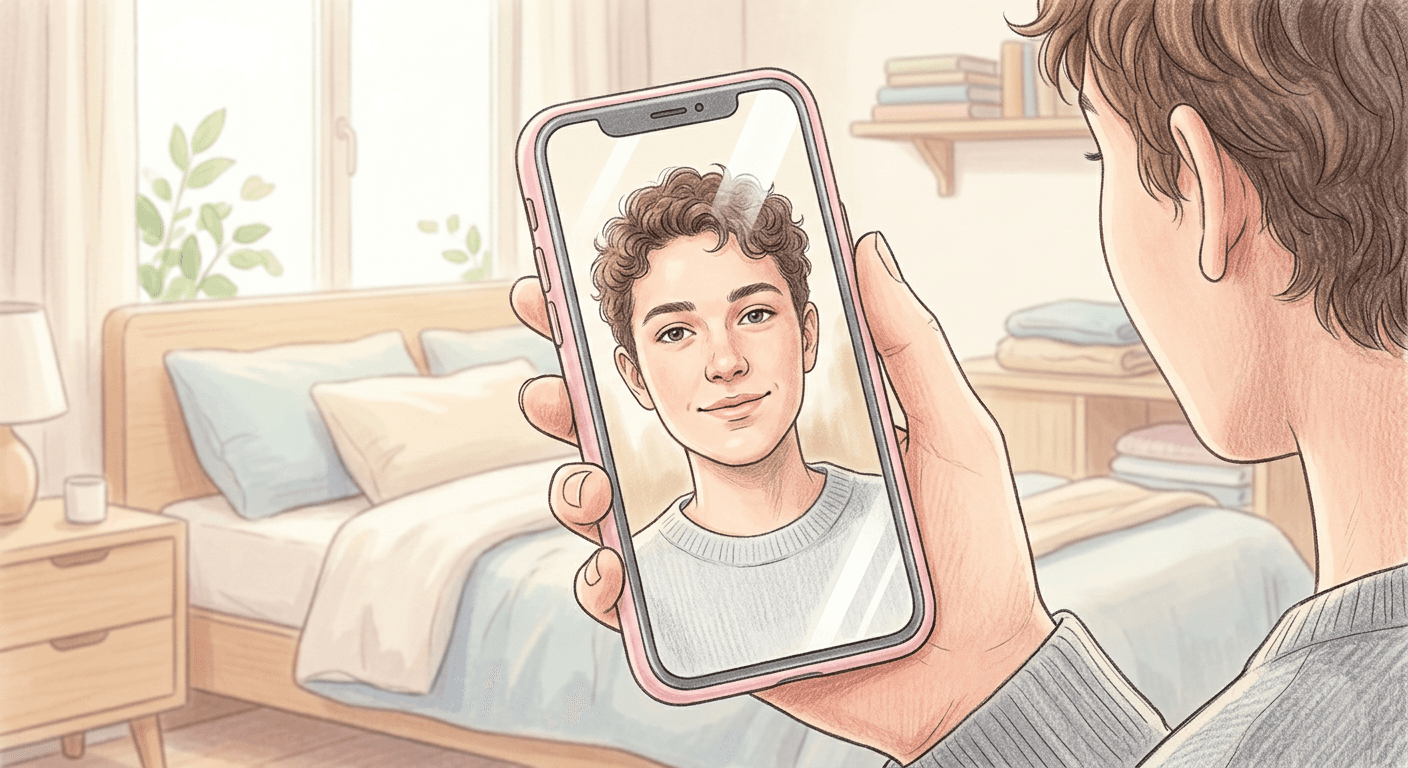
The single most important variable in every prompt above is the reference photo, not the prompt text itself. A clear, evenly lit, front-facing photo with your whole face visible and not obscured by hair, sunglasses, or a hand carries far more of the final likeness than any amount of extra prompt detail. If your first result does not look enough like you, the fastest fix is almost always a better source photo, not a longer prompt. Direct, soft daylight from a window works better than harsh overhead lighting or a flash, since flash tends to blow out the fine detail the model needs to lock in your actual bone structure and skin tone.
Location swaps are the easiest customization and the one that keeps a series of posts from feeling repetitive. Every prompt above names a specific setting, but the underlying creature description works in almost any location: a school hallway, an office breakroom, a beach boardwalk, a gym, a subway platform. Keep the specific material and lighting language intact when you swap locations, and just replace the setting description, the same way our AI miniature diorama prompts show how a consistent material treatment can be dropped into completely different scenes without losing the effect that makes the trend recognizable.
Material variation is the second-easiest lever, and one a lot of creators skip entirely by defaulting to smooth, glossy peanut butter every time. Try naming a chunky peanut butter texture with visible peanut pieces instead of smooth, or swap the base material for a close cousin like almond butter or Nutella for a genuinely different-looking creature that still reads as the same joke format. The material description is also where you control how unsettling versus how comedic the result feels: a thinner, more watery drip reads as gross-out horror, while a thicker, glossier, more food-photography-style drip reads as closer to a genuine dessert, which tends to land funnier than scarier for most audiences.
Scale and leg count are worth experimenting with once you have a version you like. The trend's original format uses long, thin, spindly legs, but a shorter, stockier leg count reads as more comedic and less unsettling, while adding more legs than a human body would normally have pushes it further into horror territory. If you are building toward the exaggerated shots in Group 5, changing the leg count and scale together, rather than one at a time, produces a more coherent result than scaling the body up while leaving the original leg proportions untouched.
If you plan to animate the still afterward, frame your reference photo and prompt with that follow-up shot in mind. A still generated in a tight square or 4:3 crop needs to be reframed before it works well in Text2Shorts, which is built around vertical 9:16 output for TikTok, Reels, and Shorts. Describing a vertical composition directly in the prompt, rather than generating a wide shot and cropping it down afterward, keeps the creature's full body and legs in frame instead of getting cut off at the edges once the format changes.
Group photos deserve one more customization note beyond what is covered in Group 4 above. If your friend group photo has people at noticeably different distances from the camera, closer faces will naturally read with more detail and further ones with less, which the peanut-butter transformation will carry over and can make one person's likeness read weaker than another's in the same frame. Cropping tighter around just the faces you actually need transformed, rather than using the entire original group photo including background people, usually produces a more even result across everyone in the shot.
Common Mistakes Creators Make With This Trend
A blurry, low-resolution, or angled reference photo is the single most common reason a result does not look enough like the actual person. This trend gets shared specifically because the face stays recognizable through an absurd transformation, so a source photo where the face is partially turned away, poorly lit, or compressed from being screenshotted out of another app almost always produces a creature whose face reads as a generic approximation rather than the actual creator. Screenshotting a photo from your camera roll's thumbnail view instead of opening the original full-resolution image is a specific, easy-to-miss version of this mistake worth checking for before you generate anything.
Over-editing the face itself is a subtler mistake but arguably a bigger one, since it breaks the exact contrast the joke depends on. Some creators, chasing a scarier or funnier result, ask the prompt to also distort the eyes, mouth, or skin tone along with the body transformation. Once the face itself starts looking altered, the video stops reading as "a real person's face on an impossible body" and starts reading as just another generic AI monster, which is a completely different, much less interesting joke than the one this trend is actually built on. Every prompt above deliberately keeps the face description as "exact original facial features unchanged" for this reason, and it is worth resisting the urge to push that boundary even when a result feels like it could be scarier or weirder with a little more face distortion.
A vague material description is the most common reason a result looks flat, cartoonish, or plastic instead of glistening and photoreal. "Turn the body into peanut butter" alone gives the model almost nothing to work with for how the material should actually behave: whether it drips, how glossy it is, whether it pools or clings, what a real jar of peanut butter actually looks like under real light. Every prompt above names the drip behavior, the gloss level, and a specific light source and direction for exactly this reason. If you shorten a prompt down to just "peanut butter creature" without any of that material detail, expect a result that looks more like a cartoon slime effect than the wet, heavy, photoreal texture that makes the trend's better posts stand out.
Inconsistent lighting or camera angle between a generated still and an animated clip is a mistake that only shows up once you move from the image step into video. If your still was generated with warm streetlight coming from the right and your animation prompt asks for a completely different lighting setup, the two clips will feel like they were shot in different places even if the location description is identical, which breaks the found-footage realism the trend depends on. Keep the lighting direction and camera height consistent between the still you generate and whatever motion or scene description you give it afterward.
Posting only the static image is the mistake that misses the format's actual payoff. The still image works as a strong standalone post, but the trend's real punchline is the screamed catchphrase over motion, the skitter, the aisle knockdown, the jar-snatch, all of it. A single still image of the creature standing calmly is a solid AI image experiment, but it is not really "doing the trend" the way the audio and motion make it. Running your still through Text2Shorts to add the motion, voice, and captions is the step that actually turns a good image into the kind of clip people are sharing.
Repeating the exact same shot type across multiple posts is the mistake that kills momentum fastest once you are posting more than one version. The sidewalk-skitter shot was novel the first hundred thousand times someone posted it, but audiences that have seen the format a dozen times respond much better to a shot they have not seen yet, the produce-section climb, the mirror-selfie morph, the symmetrical aisle stand-off, than to another near-identical night sidewalk clip. Rotating through the five groups above rather than defaulting back to Prompt 1 every time is a genuinely effective way to keep a peanut-butter-trend series from flattening out after the second or third post.
Generating Your Peanut Butter Creature on Miraflow
Everything in this pack runs through two Miraflow tools working together. Start with Miraflow's AI Image Generator, upload your clear reference photo, and drop in one of the 20 prompts above using the image-to-image mode so the tool has your actual face to preserve rather than generating a creature from scratch. The generator's inpainting and masking tools are useful here too, if a first pass gets your body right but garbles a background detail or a jar label, you can mask just that region and regenerate it without redoing the whole image.
Once you have a still you are happy with, move it into Text2Shorts to turn it into the vertical clip format the trend actually lives in. Text2Shorts builds the full pipeline around your still: enter the beat you want the clip to hit, the skitter, the scream, the jar-snatch, let it generate a script and scene motion around your image, choose a voice for the screamed catchphrase line, and export straight to the 1080x1920 format TikTok, Reels, and Shorts all expect. If you want a more deliberately cinematic version instead of a shaky found-footage clip, Miraflow's Cinematic AI Video Generator is the better fit for a slower, more composed camera move across the same still.
Both tools run entirely in the browser, so the whole path from a phone selfie to a posted clip stays inside one workspace without switching between separate apps. If this particular trend is not quite your speed, the Miraflow AI blog has prompt packs for a wide range of other current formats, from the Cakeify trend to the Squish Effect trend to straightforward pet-to-human transformation prompts, and every tool mentioned in this post lives at miraflow.ai.
Frequently Asked Questions
What is the "Give Me Peanut Butter Please" trend exactly? It is a viral 2026 AI image and video trend where a person's photo is transformed into a creature that keeps their exact face but has a body made of glistening, dripping peanut butter with long spindly legs, usually shown skittering down a street or rampaging a grocery store while a trend audio clip has it screaming for peanut butter.
Do I need CapCut's AI Image tool to do this trend? No. The trend started on CapCut's AI Image tool, but the prompts in this pack describe the technique itself rather than app-specific syntax, so they work in any capable image-to-image tool, including Miraflow's AI Image Generator.
Where did this trend actually come from? It grew out of running jokes on streamer idksterling's livestreams about rubbing peanut butter on his car, which escalated once fans started feeding his content through Sora and similar AI video tools. It became a general-purpose trend once CapCut's AI Image tool made the "peanut butter humanoid" transformation easy for anyone to reproduce with their own selfie, and it is now considered the breakout entry in the wider "AI Cast" trend of creatures, peanut butter, spaghetti, melting wax, that keep a real person's face.
Why does my result not look like me? This is almost always a reference photo problem rather than a prompt problem. A blurry, angled, poorly lit, or low-resolution source photo is the top cause, covered first in the common mistakes section above. Switching to a clear, evenly lit, front-facing photo fixes most of these results without changing the prompt at all.
Can I do this trend with a friend or a group photo? Yes. The duo and group prompts in Group 4 above cover matching pairs and small groups. Group photos need a clearer, more evenly lit source image than solo shots since the model has to preserve multiple faces in the same frame, and cropping tightly around just the faces you want transformed usually produces a more even result.
Is a still image enough, or do I need to animate it? The still works as a standalone AI image post, but the trend's actual payoff is the screamed catchphrase over motion. Posting only a static image is one of the common mistakes covered above, since it skips the beat that makes the format recognizable. Running your still through Text2Shorts is the fastest way to add that motion and audio.
Will this trend still be relevant by the time I post? Absurdist AI transformation trends like this one tend to have a shelf life measured in weeks rather than months, but the underlying skill, using a reference photo to keep a face recognizable through a wild transformation, carries directly into whatever the next version of this format turns out to be. The same image-to-image approach behind this trend is exactly what powers other prompt packs like the Roast Me caricature trend and the AI action figure trend, so the technique keeps paying off even after this specific format cools down.
Conclusion
The peanut butter trend works because it commits fully to one simple contrast: a completely calm, recognizable human face sitting on top of a chaotic, dripping, impossible body, screaming a demand that makes no sense in the moment. The 20 prompts above cover that idea across street rampages, grocery store chaos, tight close-up transformations, group versions, and the exaggerated horror-comedy escalations creators reach for once the basic format feels familiar. Generate your still with Miraflow's AI Image Generator, keep your reference photo clear and your face description untouched, and finish the clip with Text2Shorts so the motion and the screamed audio actually land the way the trend is meant to. Get those three things right, a clean source photo, a specific material description, and the motion step at the end, and your version will hold up against anything currently trending under the tag.