Nano Banana 2 vs Nano Banana: Which Prompts Work Better in 2026

Written by
Jay Kim
Trying to decide whether Nano Banana 2 or Nano Banana works better for your prompts? This guide breaks down where each model wins in 2026, with copy-paste prompt templates.
If you are getting decent images but still wasting too many generations, this is usually the real problem:
You are using the same prompt style for two different image models.
That is where a lot of creators lose time. A prompt that works fine on one model can feel underpowered, too generic, or too loose on another. In 2026, that matters more because image models are no longer all winning on the same things. Some are better at fast, high-volume image creation. Others handle structured instructions, text-in-image, subject consistency, or current-world details more reliably.
This guide is the practical version. It explains where Nano Banana 2 seems better, where the original Nano Banana still makes sense, and how to change your prompt format so you get better outputs with fewer retries. Public Google documentation positions the original Nano Banana as the Gemini 2.5 Flash Image model optimized for high-volume, low-latency visual creation and conversational editing, while Nano Banana 2 is the newer Gemini 3.1 Flash Image Preview model positioned as a high-efficiency counterpart to Pro with more production-oriented capabilities.
Why this comparison matters in 2026
This matters now because the newer model is not just a minor refresh. Google describes Nano Banana 2 as combining Flash speed with advanced world knowledge, subject consistency, precise instruction following, and production-ready specs. Google’s image-generation docs also describe it as optimized for speed and high-volume use cases, while the older Nano Banana remains the fast, efficient choice for high-volume generation and low-latency editing. In other words, both are fast, but Nano Banana 2 is being positioned for more complex and constrained image tasks than the original Flash Image model.
That means the real question is not “Which model is better overall?”
The better question is:
Which prompt types benefit most from the extra control in Nano Banana 2, and which prompt types are already good enough on Nano Banana?
Short answer
Here is the practical answer.
Nano Banana 2 tends to work better when your prompt needs:
- more specific instruction following
- legible text inside the image
- translation or localization
- real-world or current subject accuracy
- multi-reference control
- extreme aspect ratios
- cleaner production-style outputs
- more consistent subjects across edits and variations
Official Google materials say Nano Banana 2 adds real-time information and images from web search, emphasizes production-ready specs, and includes precision text rendering, translation, richer textures, and native support for more aspect ratios.
The original Nano Banana still makes sense when you want:
- fast, low-latency image generation
- high-volume iterations
- simple photorealistic or stylized image tasks
- quick conversational editing
- lower-complexity prompt flows that do not depend on current-world grounding
Google’s model docs still present Nano Banana as a strong speed-and-efficiency engine for high-volume visual creation and conversational image editing. Its API documentation also shows it lacks search grounding, which is one of the big practical differences from the newer model family.
What changed from Nano Banana to Nano Banana 2
A few differences matter most for prompt writing.
1. Nano Banana 2 is better positioned for grounded, current, and specific requests
The original Nano Banana documentation lists search grounding as not supported and shows a June 2025 knowledge cutoff. By contrast, Google’s Nano Banana 2 materials say the newer model is powered by real-time information and images from web search and is designed to render specific subjects more accurately.
That changes how you should prompt. If the image depends on recent references, current products, real places, seasonal relevance, or localized marketing details, Nano Banana 2 is the safer bet.
2. Nano Banana 2 is stronger for text-in-image prompts
Google’s official docs and blog posts explicitly call out precision text rendering and translation as strengths for Nano Banana 2, while the broader model family guidance says Nano Banana 2 and Pro excel at sharp, legible text and multilingual rendering.
So if your prompt includes poster copy, packaging labels, UI mockups, menus, signage, invitations, or infographic text, Nano Banana 2 is usually the better choice.
3. Nano Banana 2 gives you more flexibility for layout-heavy or unusual formats
Google Cloud’s prompting guide says Gemini 3.1 Flash Image adds 512px generation and extra aspect ratios such as 1:4, 4:1, 1:8, and 8:1, beyond the shared aspect ratios both models support. That matters for banners, strips, storyboard panels, ads, headers, and unusual design crops.
4. Nano Banana still remains strong for fast iteration
Google still frames the original Nano Banana as the best engine for high-velocity visual creation, high-volume generation, and low-latency creative workflows. That is why it still makes sense when you need lots of quick attempts, rough ideation, meme-style concepts, or simple composition tests.
Which prompts work better on Nano Banana 2
These prompt categories benefit most from the newer model.
A. Prompts with specific real-world entities or current details
Example use cases:
- travel visuals tied to current landmarks or real places
- product mockups with realistic category details
- local marketing visuals
- educational diagrams grounded in real subjects
Why: Google says Nano Banana 2 uses real-time information and images from web search, which is a meaningful upgrade for current or real-world grounded visuals.
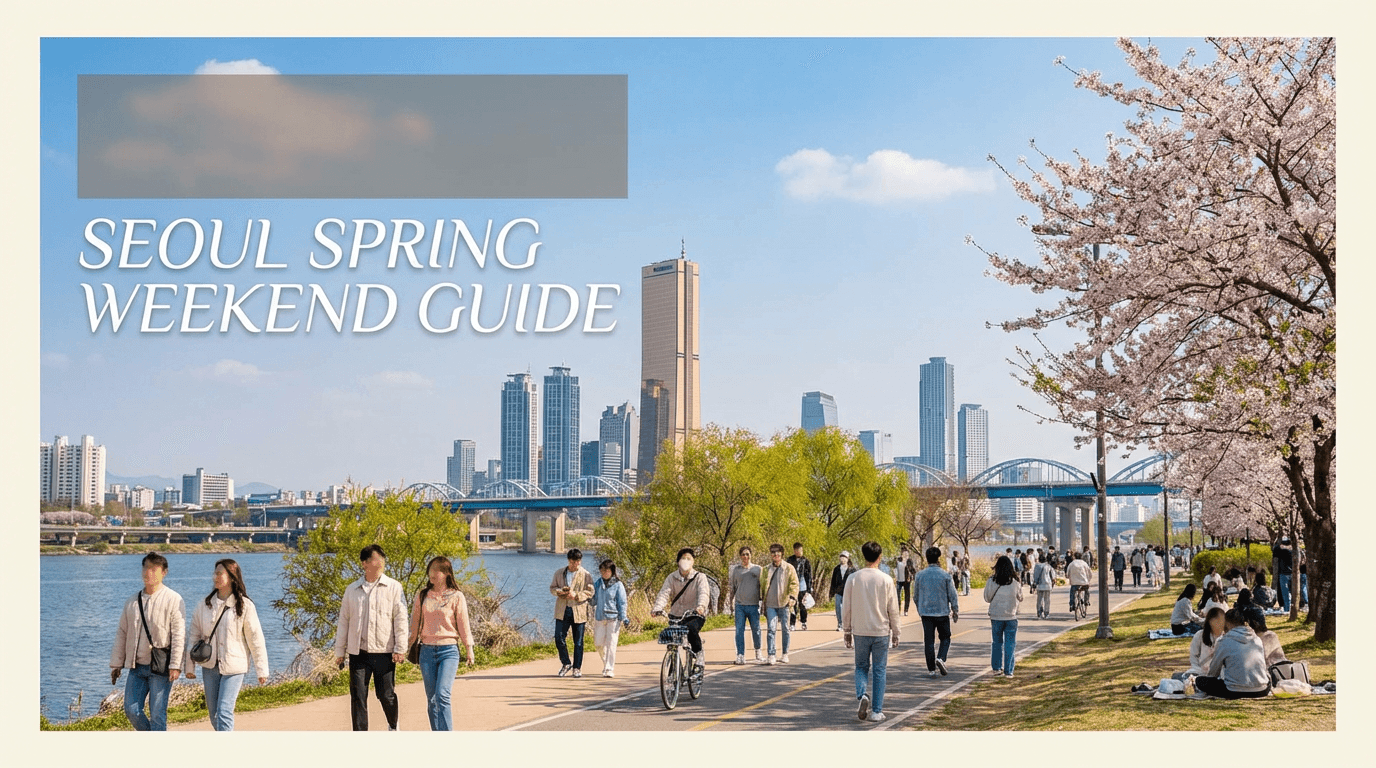
Prompt
Create a realistic travel poster-style image for a spring weekend guide to Seoul, showing a bright riverside park scene, modern skyline details, natural pedestrian activity, accurate seasonal clothing, clean editorial composition, realistic daylight, sharp but natural text area reserved at the top, premium magazine photography feel
B. Prompts with text that must be readable
Example use cases:
- YouTube thumbnail concepts
- ad mockups
- infographic covers
- packaging
- menus and signs
Why: Google explicitly highlights sharp text rendering and localization for Nano Banana 2.
Prompt
Generate a bright modern product poster on a clean cream background, one premium skincare bottle centered, realistic shadows, minimal studio lighting, elegant layout, with the exact headline "Glow Starts Here" in sharp readable serif text above the bottle and the exact subheading "Daily Vitamin C Serum" below it, premium beauty ad photography
C. Prompts that need multiple constraints at once
Example use cases:
- same character, different angles
- same product, different environments
- scene plus embedded design instructions
- subject consistency across edits
Why: Google’s public description of Nano Banana 2 emphasizes subject consistency, precision control, and strong instruction following.

Prompt
Create three consistent views of the same female founder in her early 30s wearing a beige blazer and white sneakers in the same bright startup office, one front-facing portrait, one side profile while walking, one seated at a desk with laptop, keep face identity, outfit, hair, and office environment consistent, realistic editorial business photography
D. Prompts for extreme crops, banners, and layout-specific assets
Why: Nano Banana 2 supports more unusual aspect ratios than the older model family docs list for the original model.
Prompt
Create a very wide horizontal website hero image for a modern AI creator tool, bright background, one creator working at a laptop on the left, clean visual space on the right for headline placement, premium lifestyle office photography, natural daylight, realistic desk details, balanced composition
E. Prompts for infographics, diagrams, and structured visuals
Google’s own examples for Nano Banana 2 include infographics and diagram-like outputs, and the company specifically points to note-to-diagram and data-visualization workflows.
Prompt
Create a clean flat-lay educational infographic about the water cycle on a light textured background, realistic paper cutout aesthetic, labeled stages, arrows that are neat and readable, balanced spacing, school-poster clarity, bright academic visual design
Which prompts still work very well on Nano Banana
The original Nano Banana still fits many creator workflows.
A. Quick visual ideation
If you need 20 fast attempts for a thumbnail concept, meme idea, figurine concept, or social post angle, Nano Banana is still well-positioned for that style of work because Google describes it as optimized for high-volume, low-latency creation and conversational editing.

Prompt
Create a bright funny thumbnail-style image of a shocked creator staring at a laptop with huge analytics graphs reflected in the screen, clean room background, expressive pose, high energy, realistic but slightly exaggerated social media composition, no logos
B. Simple photorealistic lifestyle prompts
If the task is straightforward and does not require readable text, exact localization, or current-world grounding, the original Nano Banana can still do the job well.
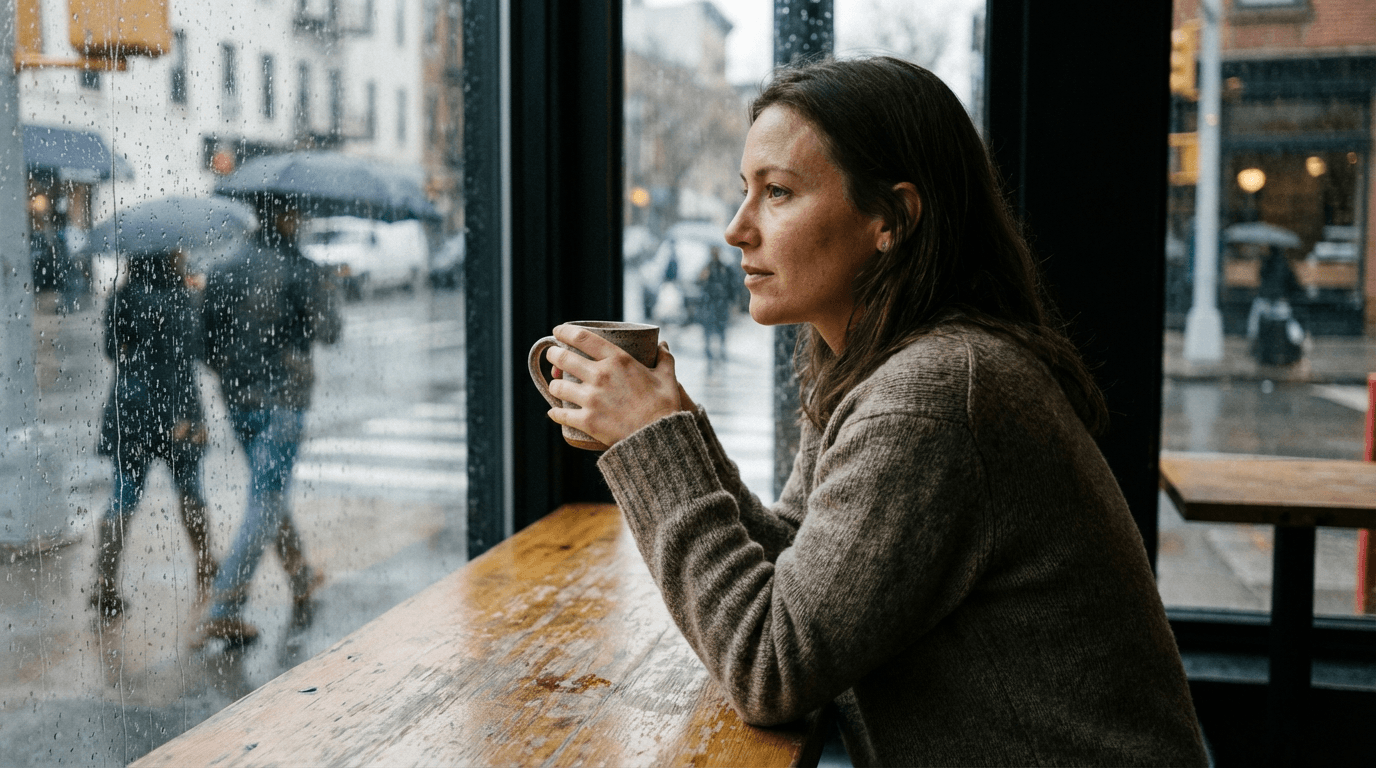
Prompt
Photorealistic image of a young woman sitting by a cafe window on a cloudy afternoon, soft natural side light, ceramic mug, realistic skin texture, blurred street background, candid lifestyle photography
C. Conversational image edits
Google’s documentation still emphasizes conversational editing as a core strength of the original Nano Banana.
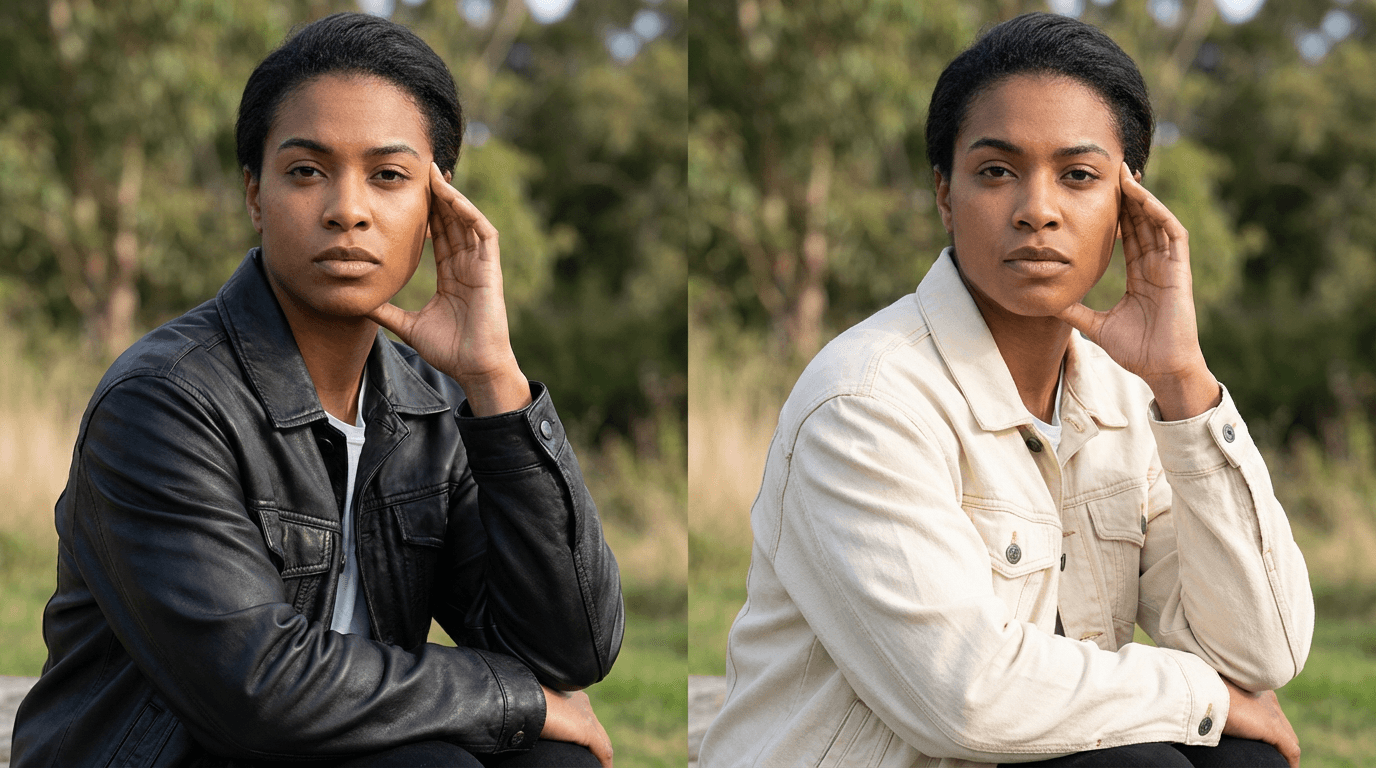
So prompts like this remain a good fit:
Prompt
Edit this image by changing the jacket from black leather to cream denim, keep the person’s face, pose, and background the same, keep lighting natural, preserve realistic fabric folds
Prompt writing rules that matter more on Nano Banana 2
Google’s image prompting guidance says detailed prompts improve control, and its Nano Banana prompting guide recommends specificity on subject, lighting, composition, positive framing, camera control, and iterative refinement.
For Nano Banana 2, these rules matter even more:
1. Add operational clarity first
Start with a direct verb:
- create
- generate
- edit
- replace
- transform
- localize
- redesign
2. Stack constraints in a logical order
A better order is:
- task
- subject
- setting
- composition
- lighting
- realism or style
- text instructions if needed
3. Be explicit with text
Google recommends using quotation marks for desired words when text rendering matters.
4. Use positive framing
Google’s own guide recommends describing what you want rather than leaning too heavily on negatives.
Prompt writing rules that matter more on the original Nano Banana
With Nano Banana, simpler often works better.
Because it is positioned around speed, efficiency, and high-volume iteration, the best prompts are often:
- shorter
- visually direct
- less overloaded with design constraints
- focused on one main scene or edit
That does not mean vague. It means focused.
A strong original Nano Banana prompt usually does this:
- states the subject clearly
- names the setting
- names the lighting
- gives the overall mood
- stops before turning into a design brief
Side-by-side prompt upgrades
Here are practical rewrites.
1. Basic lifestyle photo
Weak prompt
woman in cafe realistic
Better for Nano Banana
Photorealistic image of a woman sitting alone at a cafe window, cloudy daylight, ceramic mug, natural skin texture, blurred pedestrians outside, candid medium shot
Better for Nano Banana 2
Create a photorealistic editorial cafe scene of a woman sitting alone by a large street-facing window on a cloudy afternoon, soft natural side lighting, neutral knit sweater, ceramic mug with subtle reflections, realistic skin texture, blurred pedestrians outside, medium framing, premium magazine lifestyle photography
2. Thumbnail ad concept
Better for Nano Banana
Bright thumbnail-style image of a creator pointing at a laptop screen with exploding analytics, expressive face, clean room background, high energy, realistic lighting
Better for Nano Banana 2
Create a bright YouTube thumbnail-style visual of a surprised creator pointing at a laptop with rising analytics on screen, clean modern room, strong facial expression, premium lighting, leave clear space at top right for headline text, high CTR composition, realistic skin and fabric detail
3. Poster with readable words
Nano Banana 2 is the better fit
Generate a clean travel poster on a bright background showing a sunny coastal train station, modern editorial layout, premium realistic photography, include the exact headline "Summer Starts Here" in large readable text and the exact subheading "Weekend Escape Guide" beneath it
4. Edit with precision
Better for Nano Banana
Edit this photo by changing the background from office to cozy cafe, keep the same person and pose
Better for Nano Banana 2
Edit this image by moving the subject from a corporate office into a warm neighborhood cafe with window light, keep the same identity, facial features, hair, body position, and camera angle, preserve realistic shadows, adjust clothing reflections naturally to match the new environment
The biggest mistake creators make
They assume “more words” always means “better prompt.”
That is not really the right lesson.
Google’s prompt guides consistently point toward better structure, not just more length: subject, setting, style, action, composition, and then refinement.
So the real mistake is writing prompts like this:
beautiful amazing cinematic ultra detailed epic masterpiece high quality realistic viral trendy shot
That kind of prompt sounds impressive, but it gives weak control.
A better prompt says:
- who or what is in the image
- where it is
- how it is lit
- how the shot is framed
- what must stay consistent
- what text or layout matters
Which one should creators use in practice
Use Nano Banana 2 when:
- you need text to render correctly
- you need a layout, infographic, poster, or mockup
- you need a current or specific real-world subject
- you want stronger consistency across edits
- you want more control over aspect ratio and production constraints
Use Nano Banana when:
- you need fast iterations
- you are testing lots of visual angles
- your scene is simple
- your edits are conversational and lightweight
- your workflow benefits more from speed than from richer control
That is the cleanest mental model based on public documentation.
How this fits into a creator workflow
A practical content workflow often looks like this:
- generate fast concept directions
- choose the most promising scene
- refine into a cleaner production visual
- adapt into a thumbnail, blog image, or short-form creative
- turn the visual idea into a full content asset
That is why this guide connects naturally with AI Prompts for YouTube Thumbnails, Best AI Prompts for YouTube Thumbnails 2026, Consistent YouTube Thumbnail Style with AI, How to Generate Blog Thumbnails with AI for Free, and AI YouTube Thumbnail Styles for More Views in 2026.
You can also build those image workflows directly inside the AI image generator in Miraflow AI, then reuse the visuals across thumbnails, blog assets, and short-form content.
FAQ
Is Nano Banana 2 always better than Nano Banana?
No. Public documentation suggests Nano Banana 2 has more advanced capabilities for text, control, real-world grounding, and production-oriented tasks, but the original Nano Banana is still a strong fit for fast, high-volume generation and quick editing.
Which model is better for prompt-heavy poster or infographic work?
Nano Banana 2 is the safer choice because Google explicitly highlights precise text rendering, translation, diagrams, and production-ready outputs for the newer model.
Which model is better for quick ideation?
The original Nano Banana still looks better suited for rapid ideation and large numbers of fast attempts because Google describes it as a high-velocity, low-latency visual creation engine.
Do I need longer prompts for Nano Banana 2?
Not necessarily longer. Better structured. Google’s prompt guidance points to specificity and clear structure over vague adjective stacking.
Is current-world accuracy a real difference?
Yes, that appears to be one of the more meaningful differences. The original Nano Banana docs say search grounding is not supported, while Google’s Nano Banana 2 materials describe real-time information and images from web search as part of the newer model’s advantage.
Which one should I use for YouTube thumbnails?
For fast concept testing, Nano Banana can still be enough. For thumbnails that need controlled layout, more readable text, or cleaner ad-like polish, Nano Banana 2 is likely the better fit. That last point is an inference from Google’s public positioning of the models rather than a direct vendor quote.
Conclusion
If your prompt is simple, visual, and fast-moving, Nano Banana is still a very good option.
If your prompt needs more structure, more precision, more readable text, more consistency, or more real-world grounding, Nano Banana 2 is the better bet in 2026.
That is the easiest way to think about it:
- Nano Banana for speed-first creation
- Nano Banana 2 for control-first creation at Flash speed
Once you pick the right prompt style for the right model, the number of wasted generations usually drops a lot.