Grok Imagine Video 1.5 Lite Explained: $0.02 per Second Pricing, Benchmarks vs Veo 3.1, and API Code (2026)

Written by
Aerin Kim

xAI's Grok Imagine Video 1.5 Lite costs $0.02 per second at 480p. See the full pricing math, Elo benchmarks against Veo 3.1, its weak spots, and runnable OpenRouter and xAI API code.
If you make short videos at volume, the number that decides whether an AI video model fits your workflow is the price of a bad take, because every usable clip usually arrives after a few unusable ones. Grok Imagine Video 1.5 Lite, which xAI made available through its API and partners such as OpenRouter, fal and Vercel AI Gateway in early October 2026, attacks exactly that number with a rate card of $0.02 per second of output video [1][2]. A 10 second draft costs 20 cents, which changes how many ideas you can afford to test before you commit to a final render.
This post is the engineering read of that launch. It works through what xAI actually announced, the full per-second pricing arithmetic across resolutions, how to read the Artificial Analysis Elo numbers without overselling them, where Lite is weak, and then gives you runnable Python and curl for OpenRouter and the xAI API, a draft-then-finalize workflow, and video prompts you can paste straight into the model. Where sources disagree I say so, and where I am inferring something xAI did not disclose I label it as inference.
Quick summary before the depth:
- What it is: a faster, lower-cost video model that OpenRouter describes as distilled from Grok Imagine Video 1.5, supporting text-to-video and image-to-video, with 1 to 15 second clips and audio included by default [5][3].
- Price: $0.020 per second on xAI's models page, against $0.080 for grok-imagine-video-1.5 and $0.050 for the original grok-imagine-video [1]. Per-resolution rates relayed by Zeniteq and AlphaSignal put Lite at $0.02 (480p), $0.03 (720p) and $0.14 (1080p) per second [3][4].
- Quality: on Artificial Analysis' text-to-video board (with audio) Lite scores Elo 998, ahead of Veo 3.1 at 968 and behind the full Grok Imagine Video 1.5 at 1059 [7].
- Weak spots: AlphaSignal's reading of the Artificial Analysis category data puts dialogue and lip sync and human anatomy at the bottom for Lite [4].
- Best use: cheap drafts, background and B-roll shots, product and scene concepts, and high-volume Shorts where you can retake freely.
What xAI Shipped in Early October 2026
xAI added grok-imagine-video-1.5-lite next to grok-imagine-video-1.5 in its video lineup, and trade coverage of the Lite tier is dated October 8 and 9, 2026 [3][4]. The release date itself is murky. TypingMind lists October 1, OpenRouter's page points to October 6, and Artificial Analysis shows "Aug 2026" for the model, so the safest statement is that it became broadly available in early October 2026. Some outlets now describe xAI as operating under the SpaceXAI name, but the API, docs and model ids all still say xAI, so this post does too.
OpenRouter's one-line description is the most useful official wording: Lite is "a faster, lower-cost model distilled from Grok Imagine Video 1.5" [5]. The page lists text-to-video and image-to-video modes, integer durations from 1 to 15 seconds, three resolutions (480p, 720p and 1080p) and seven aspect ratios: 16:9, 9:16, 1:1, 4:3, 3:4, 3:2 and 2:3 [5]. The aspect ratio list matters for creators because vertical 9:16 and square 1:1 are both first-class, so a Shorts or Reels clip does not need a crop after generation.
xAI's own model page for Lite adds the operational facts: output priced at $0.020 per second, a rate limit of 10 requests per second, hosting in the us-east-1 and us-west-2 regions, and support for the Batch API [2]. OpenRouter separately notes that failed generations are not billed and that the model is not available through in-region EU routing [5].
Videos include audio by default on this model family, which is a quiet but important point for cost comparisons [3]. When a competitor sells silent video at one price and a with-audio tier at another, the like-for-like comparison is the audio tier. Artificial Analysis' board used for the Elo numbers below is also the with-audio board [7].
What "Distilled" Probably Means
xAI has not published a technical report for Lite, so the method is not public, and anything below about how it was built is general background rather than a claim about xAI. Knowledge distillation is the idea of training a smaller or cheaper student to imitate a stronger teacher, introduced for classifiers by Hinton, Vinyals and Dean [9]. For diffusion and flow style video generators, the most common way to get a faster student is to cut the number of sampling steps. Progressive distillation repeatedly halves the number of denoising steps a student needs to match its teacher [10], consistency models learn to jump from noise to a clean sample in one or a few steps [11], and adversarial diffusion distillation combines a distillation loss with a discriminator to keep few-step outputs sharp [12].
Whatever combination xAI used, the trade is predictable in shape: lower cost and latency in exchange for some loss of fidelity on the hardest prompts. That matches the pattern in the benchmark data, where Lite is cheap and fast but sits roughly 61 Elo points under its teacher, and it matches OpenRouter's wording that Lite is the lower-cost sibling rather than a replacement [5][7].
Pricing: Per-Second Math That Actually Predicts Your Bill
Video pricing is easy to misquote because the headline rate depends on the resolution and the model. xAI's models page lists base rates of $0.020 per second for grok-imagine-video-1.5-lite, $0.080 for grok-imagine-video-1.5 and $0.050 for the original grok-imagine-video, without a resolution attached [1]. The per-resolution schedule comes from two secondary sources, Zeniteq and AlphaSignal, which agree with each other and with the base rates [3][4].
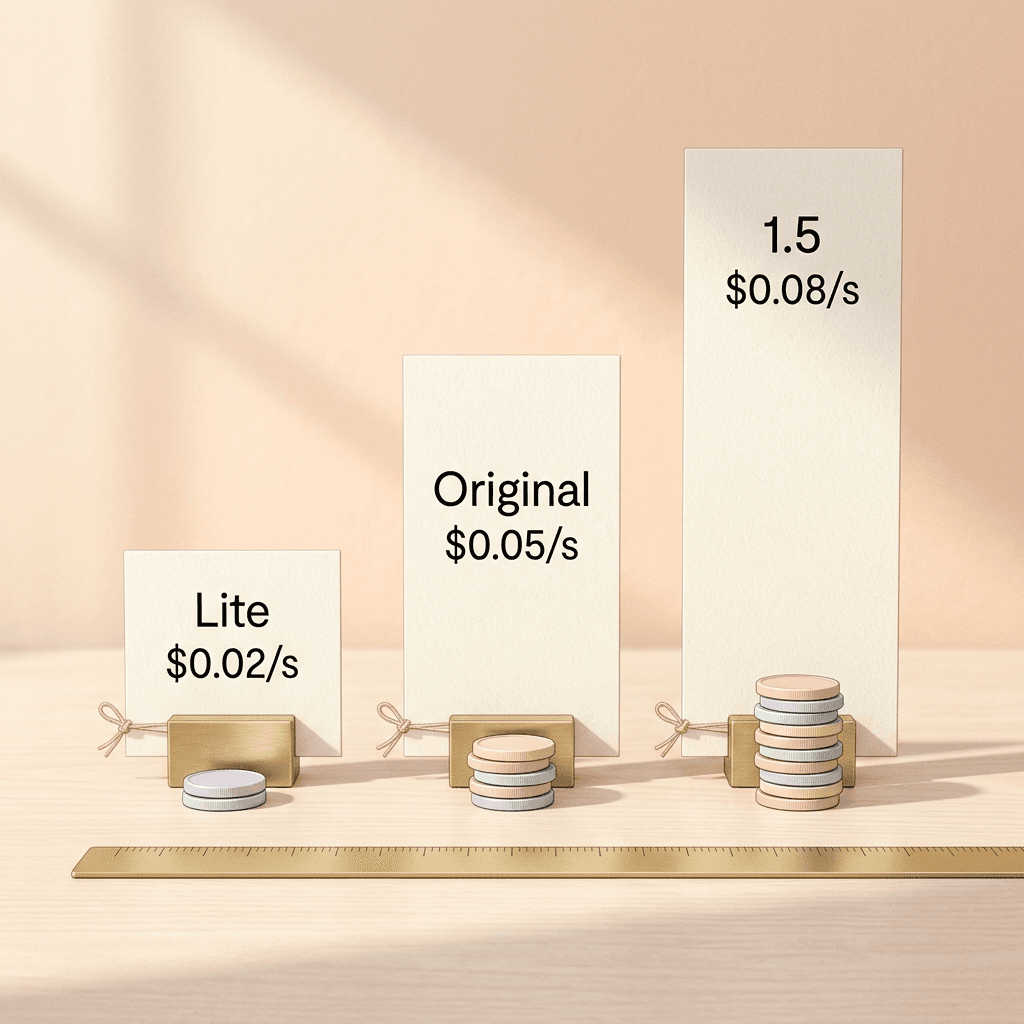
The three price cards in the desk scene above are drawn to scale: $0.02 for Lite, $0.05 for the original grok-imagine-video and $0.08 for grok-imagine-video-1.5, the base per-second rates on xAI's models page [1]. Lite is a quarter of the full model's base rate and 40 percent of the original's.
| Model | 480p | 720p | 1080p | Base rate (xAI models page) |
|---|---|---|---|---|
| grok-imagine-video-1.5-lite | $0.02/s | $0.03/s | $0.14/s (720p render, upscaled) | $0.020/s |
| grok-imagine-video-1.5 | $0.08/s | $0.14/s | $0.25/s (native) | $0.080/s |
| grok-imagine-video (original) | not listed here | not listed here | not listed here | $0.050/s |
Two details in that table deserve attention. First, the base rate on the models page lines up with the 480p rate, so the "$0.02 per second" headline is the cheapest tier rather than a flat price for every resolution. Second, Zeniteq also mentions a $0.01 charge for image input on image-to-video requests; I could not confirm that against xAI's own pages, so treat it as a line item to check on your first invoice rather than a settled fact [3].
The 1080p Tier Is a Different Product
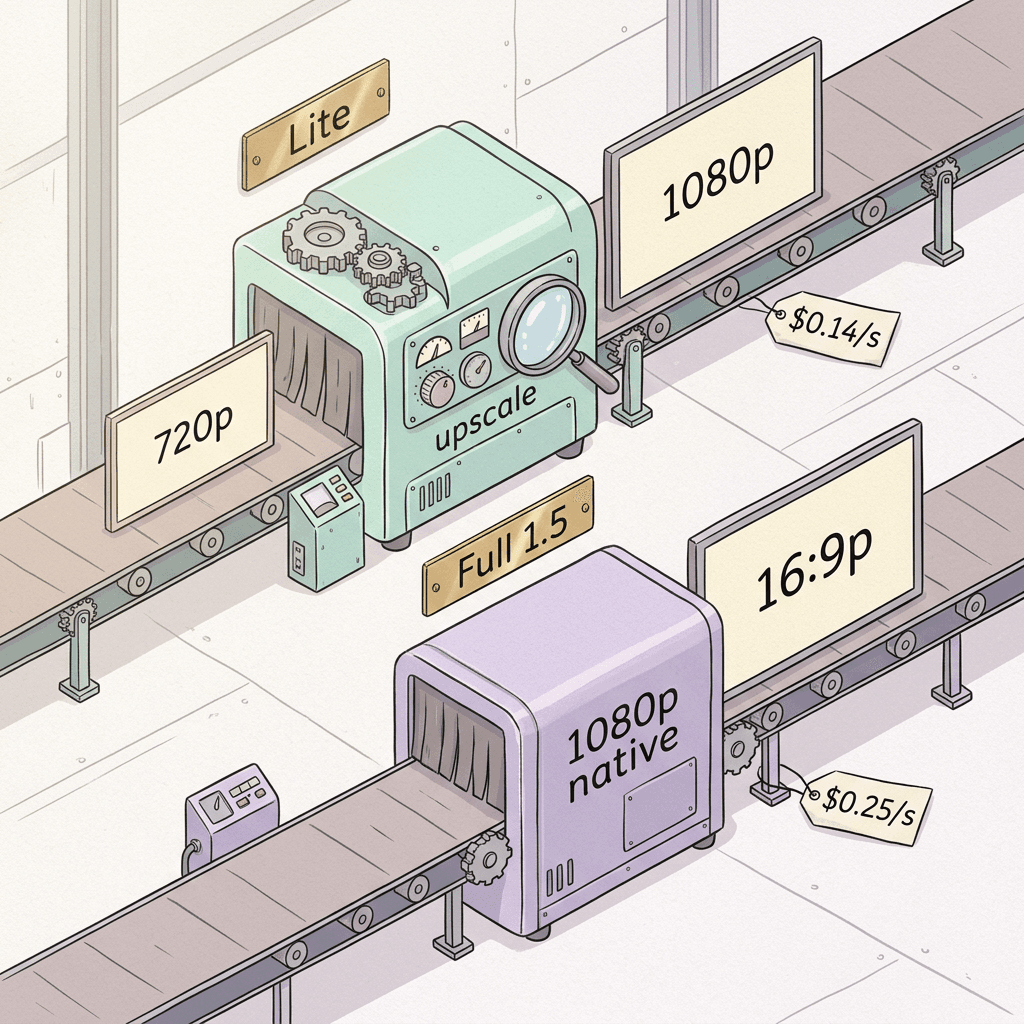
The jump from $0.03 at 720p to $0.14 at 1080p stands out, because it is a 4.7 times price increase for a 2.25 times increase in pixel count (1920x1080 is 2,073,600 pixels against 921,600 for 1280x720). The reason appears to be architectural. Sources describe Lite's 1080p output as rendered at 720p and then upscaled, while the full grok-imagine-video-1.5 renders 1080p natively [3][4]. If that is accurate, paying $0.14 per second for Lite at 1080p buys a 720p render plus an upscaler pass, and the same $0.14 per second buys native 720p from the full model.
Upscaling is a legitimate technique, and learned super-resolution networks such as Real-ESRGAN can add convincing texture to a lower resolution frame [15]. It still cannot recover detail that was never generated, so for fine text, thin lines and fabric weave, the honest test is to render the same prompt at Lite 720p, Lite 1080p and full 1.5 720p and compare the three at 100 percent zoom. That experiment costs about $0.31 for a one second probe of all three configurations (Lite 720p at $0.03, Lite 1080p at $0.14 and full 1.5 720p at $0.14), and it tells you whether the 1080p premium is worth paying on your content.
Cost of One 10 Second Clip
Multiplying the schedule by a 10 second clip makes the gaps concrete. The figures for the other models come from Artificial Analysis' list prices, which it quotes per minute, so I divided by 60 to get per-second numbers [7].
| Model and tier | Per second | 10 second clip | Per minute |
|---|---|---|---|
| Grok Imagine Video 1.5 Lite 480p | $0.020 | $0.20 | $1.20 |
| Grok Imagine Video 1.5 Lite 720p | $0.030 | $0.30 | $1.80 |
| Grok Imagine Video 1.5 Lite 1080p | $0.140 | $1.40 | $8.40 |
| Grok Imagine Video 1.5 480p | $0.080 | $0.80 | $4.80 |
| Grok Imagine Video 1.5 720p | $0.140 | $1.40 | $8.40 |
| Grok Imagine Video 1.5 1080p | $0.250 | $2.50 | $15.00 |
| FLUX 3 Max 720p (AA list) | $0.043 | $0.43 | $2.55 |
| Veo 3.1 Fast (AA list) | $0.120 | $1.20 | $7.20 |
| Gemini Omni Flash 1.1 (AA list) | $0.152 | $1.52 | $9.12 |
| Veo 3.1 (AA list) | $0.400 | $4.00 | $24.00 |
| Dreamina Seedance 2.5 (AA list) | $0.569 | $5.69 | $34.12 |
At 1080p, Lite's $0.14 per second equals $8.40 per minute, which is exactly the price Artificial Analysis lists for Lite on its board, and it is about 65 percent cheaper than Veo 3.1's $24.00 per minute (my arithmetic: 1 minus 8.40 divided by 24.00) [7]. That matches the framing in AlphaSignal's headline about beating Veo 3.1 at a 65 percent lower cost [4]. Veo 3.1 Fast at $7.20 per minute is actually slightly cheaper than Lite at 1080p, which is a useful reality check on the marketing: Lite's price advantage is largest at 480p and 720p, and it narrows or reverses at the 1080p tier [7].
A Monthly Budget for 30 Shorts
Consider a creator publishing 30 vertical Shorts a month, each 15 seconds long, with one generation per finished clip. That is 450 billed seconds. At Lite 480p the month costs $9.00, at Lite 720p $13.50, at Lite 1080p $63.00, at full 1.5 720p $63.00, at full 1.5 1080p $112.50, and at Veo 3.1's Artificial Analysis list price $180.00 [3][7]. Real workflows do not generate once per clip, so the calculator below takes an attempts multiplier. With three attempts per finished clip, Lite 720p lands at $40.50 a month, still cheaper than a single pass on Veo 3.1.
python/code
import argparse

# USD per second of output video. Sources: xAI pricing as relayed by Zeniteq and AlphaSignal
# (per resolution), Artificial Analysis (Veo 3.1 family, Seedance 2.5), as of October 2026.
# Re-check each vendor's pricing page before you budget.
RATES = {
    "Grok Imagine Video 1.5 Lite 480p": 0.02,
    "Grok Imagine Video 1.5 Lite 720p": 0.03,
    "Grok Imagine Video 1.5 Lite 1080p": 0.14,
    "Grok Imagine Video 1.5 480p": 0.08,
    "Grok Imagine Video 1.5 720p": 0.14,
    "Grok Imagine Video 1.5 1080p": 0.25,
    "Veo 3.1 Fast (AA list, $7.20/min)": 7.20 / 60,
    "Veo 3.1 (AA list, $24.00/min)": 24.00 / 60,
    "Seedance 2.5 (AA list, $34.12/min)": 34.12 / 60,
}


def main() -> None:
    ap = argparse.ArgumentParser(description="Monthly cost of short AI clips by model and tier.")
    ap.add_argument("--clips", type=int, default=30, help="finished clips per month")
    ap.add_argument("--seconds", type=float, default=15, help="seconds per finished clip")
    ap.add_argument("--attempts", type=float, default=1, help="generations per finished clip (retakes included)")
    args = ap.parse_args()

    billed = args.clips * args.seconds * args.attempts
    print(f"{args.clips} clips x {args.seconds:g}s x {args.attempts:g} attempts = {billed:g} billed seconds")
    print(f"{'model / tier':<40}{'per second':>11}{'one clip':>10}{'per month':>11}")
    for name, per_s in sorted(RATES.items(), key=lambda kv: kv[1]):
        clip = per_s * args.seconds * args.attempts
        print(f"{name:<40}{per_s:>11.4f}{clip:>10.2f}{clip * args.clips:>11.2f}")


if __name__ == "__main__":
    main()
Running it with the defaults prints the table of monthly totals, and passing --attempts 3 --seconds 10 shows how fast retakes dominate the bill on the expensive tiers. The practical lesson is that the cheapest model is the one that lets you retake without flinching, which is the argument for Lite as a drafting tool even if you finish elsewhere.
Benchmarks: What the Elo Numbers Say and What They Do Not
Artificial Analysis runs an arena where people compare two anonymous videos for the same prompt and pick the one they prefer, then converts the votes into an Elo-style rating. Elo itself comes from chess, where a rating gap predicts the expected score of a game [13], and the same approach was popularized for model evaluation by Chatbot Arena, which fits a Bradley-Terry style model to pairwise human preference votes [14]. Higher means preferred more often, and the gap between two ratings maps to a win probability.
The board in question is "AA-Video-T2V v2.1", text-to-video with audio [7].
| Model | Elo (with audio) | AA price per minute | Rank where listed |
|---|---|---|---|
| Wan 3.0 | 1173 | not listed here | not listed here |
| Dreamina Seedance 2.5 | 1159 | $34.12 | not listed here |
| FLUX 3 Max (720p) | 1159 | $2.55 | not listed here |
| MiniMax H3 (768p) | 1158 | not listed here | not listed here |
| Gemini Omni Flash 1.1 | 1132 | $9.12 | not listed here |
| Grok Imagine Video 1.5 | 1059 | $15.00 | 10 to 13 |
| Kling 3.0 (Pro, 1080p), the anchor | 1000 | not listed here | anchor |
| Grok Imagine Video 1.5 Lite | 998 | $8.40 (1080p) | 17 to 19 |
| Veo 3.1 | 968 | $24.00 | 20 to 23 |
| Veo 3.1 Fast | 964 | $7.20 | not listed here |
| Veo 3.1 Lite | 952 | not listed here | not listed here |
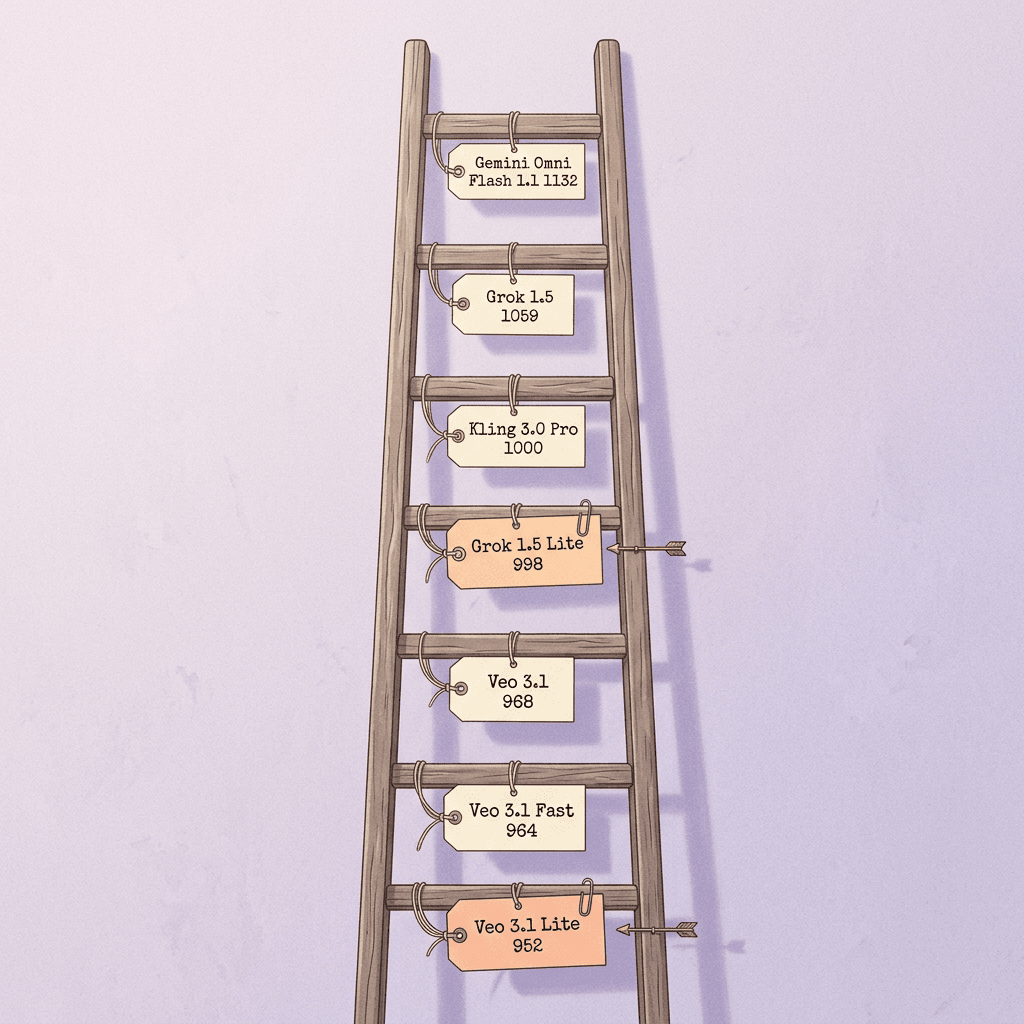
Kling 3.0 Pro (1080p) at 1000 is the anchor of the scale, which is why Lite's 998 reads as "level with the anchor" rather than as a low number [7]. Lite ranks 17 to 19 on the board with 5,957 samples, while the full model ranks 10 to 13 and Veo 3.1 sits at 20 to 23 [7]. Ranges rather than single ranks appear because ratings carry uncertainty, and models a few points apart are statistically hard to separate.
Turning Elo Gaps Into Win Probabilities
The standard Elo expectation for player A against player B is 1 / (1 + 10^(-d/400)), where d is the rating difference [13]. I am assuming Artificial Analysis uses the conventional 400 point scale, which its leaderboard does not state on the page I read, so treat the percentages as a reasoning aid and not as an official statistic.
python/code
def win_prob(rating_a: float, rating_b: float, scale: float = 400.0) -> float:
    """Chance that A is preferred over B in a single head-to-head vote, assuming the
    conventional Elo logistic with a 400-point scale."""
    return 1.0 / (1.0 + 10 ** (-(rating_a - rating_b) / scale))


BOARD = {  # Artificial Analysis text-to-video, with audio, AA-Video-T2V v2.1
    "Wan 3.0": 1173,
    "Gemini Omni Flash 1.1": 1132,
    "Grok Imagine Video 1.5": 1059,
    "Kling 3.0 Pro (anchor)": 1000,
    "Grok Imagine Video 1.5 Lite": 998,
    "Veo 3.1": 968,
    "Veo 3.1 Fast": 964,
    "Veo 3.1 Lite": 952,
}

if __name__ == "__main__":
    lite = BOARD["Grok Imagine Video 1.5 Lite"]
    for name, r in BOARD.items():
        print(f"Lite vs {name:<30} gap {lite - r:+5d}  Lite preferred {win_prob(lite, r):6.1%}")
The results are modest. Lite against Veo 3.1 is a 30 point gap, which implies Lite is preferred in about 54.3 percent of head-to-head votes. Full Grok Imagine Video 1.5 against Lite is a 61 point gap, about 58.7 percent. Full 1.5 against Veo 3.1 is 91 points, about 62.8 percent. Against the leaders the picture changes: Wan 3.0 at 1173 would beat Lite roughly 73.3 percent of the time, and Gemini Omni Flash 1.1 at 1132 would win about 68.4 percent of votes [7].
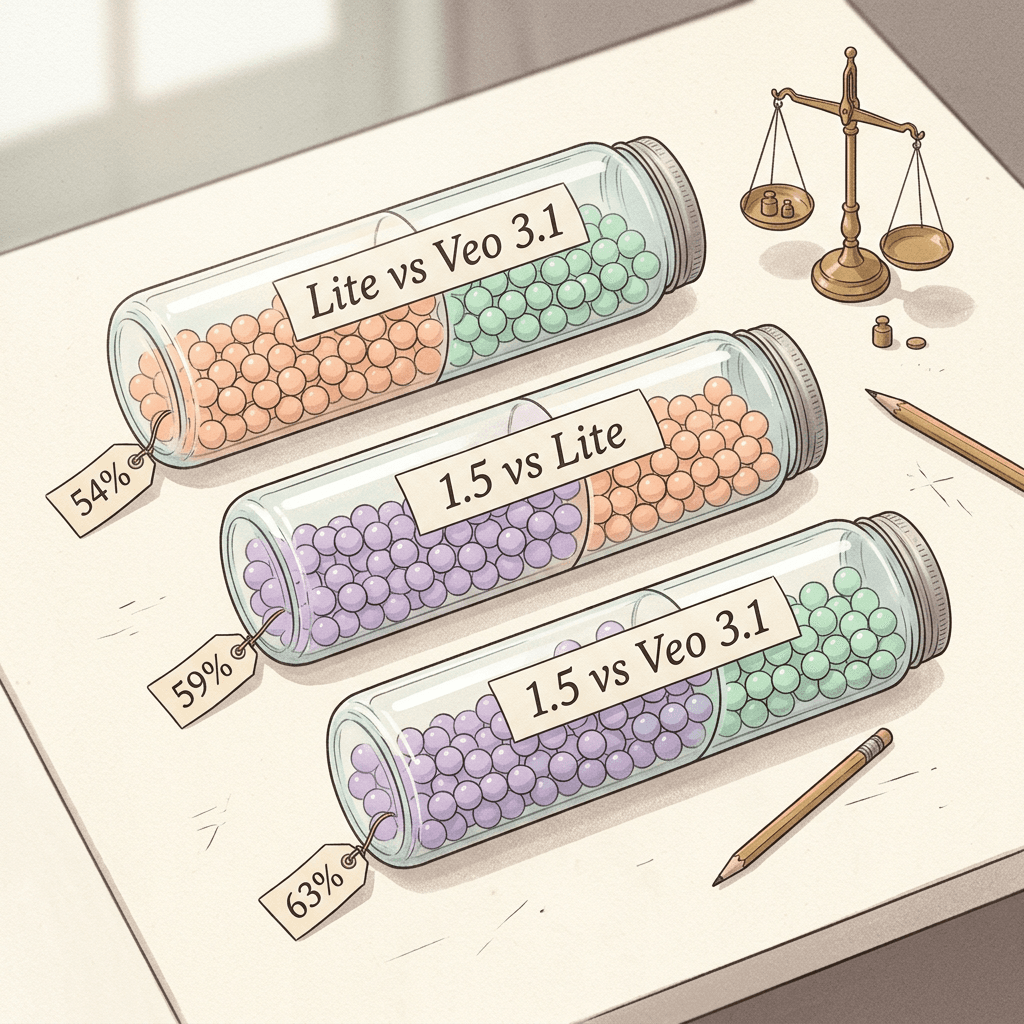
The honest summary is that Lite is a mid-table model on this board. It is a few points above the Veo 3.1 family and under the best models by a wide margin, and a viewer picking between a Lite clip and a Veo 3.1 clip for the same prompt would choose Lite slightly more than half the time, which is closer to a coin flip than a knockout.
Quality per Dollar Is More Nuanced Than the Headline
On Artificial Analysis' own price column, Lite at $8.40 per minute sits close to Gemini Omni Flash 1.1 at $9.12 per minute, yet Gemini Omni Flash scores 1132, which is 134 points higher [7]. FLUX 3 Max at 720p scores 1159 at $2.55 per minute, and MiniMax H3 at 768p scores 1158 [7]. If your only criterion is board Elo per dollar at the resolution Artificial Analysis prices, Lite is not the winner at 1080p.
Lite's argument gets stronger at the lower tiers. At 480p and 720p it costs $1.20 and $1.80 per minute, well under every price in that column, though the Elo figure on the board applies to the 1080p configuration and I have no published score for Lite at 480p or 720p [3][7]. For drafting, that gap is acceptable, since you are judging composition, motion and pacing rather than final polish.
For deeper comparisons of the leaders, Miraflow has separate breakdowns: MiniMax H3 vs Veo 3.1 and Seedance 2.5 vs Veo 3.1, and the open-weights angle is covered in the Kandinsky 6.0 Video explainer.
Image-to-Video Is a Different Story
Artificial Analysis keeps a separate image-to-video board, "AA-Video-I2V v1.1", where the full Grok Imagine Video 1.5 scores 1067 against Veo 3.1 at 1028, Veo 3.1 Fast at 1017, and Kling 3.0 Pro at 1000, with MiniMax H3 leading at 1140 [8]. Lite does not appear on the image-to-video board at the time of writing [8]. OpenRouter lists image-to-video as a supported Lite mode, so the feature exists, but there is no independent rating yet, and any claim that Lite animates a still as well as the full model would be a guess. Test it on your own images before building a pipeline around it.
Speed and the Category Breakdown
AlphaSignal, citing an earlier version of the Artificial Analysis board (v2.0, so do not mix its figures with the v2.1 Elo above), reports a median of 60.5 seconds to produce a 10 second 1080p Lite clip, against 94 seconds for a 5 second Kling 3.0 Pro clip, and places Lite on the speed and quality Pareto frontier among 12 models [4]. It also reports that Lite scored lower than the full 1.5 model in nine of ten capability categories while matching it on Physics [4].
Two caveats apply to those speed numbers. Latency in a hosted queue depends on load, so treat 60.5 seconds as one data point and not a promise, and the xAI video guide itself says generation typically takes up to several minutes [6]. That uncertainty is why the polling code later in this post uses backoff and a generous timeout.
Where Lite Is Weak, and What That Means for Your Content
AlphaSignal's category reading is the most actionable part of the benchmark coverage. The largest gaps between Lite and the full model appear in Live-Action Film and Frontier prompts, and Lite's weakest absolute categories are Dialogue and Lip Sync and Human Anatomy [4]. The categories where Lite comes closest to the frontier are Multi-Scene and Narrative, Lighting and Materials, and Text Rendering [4].
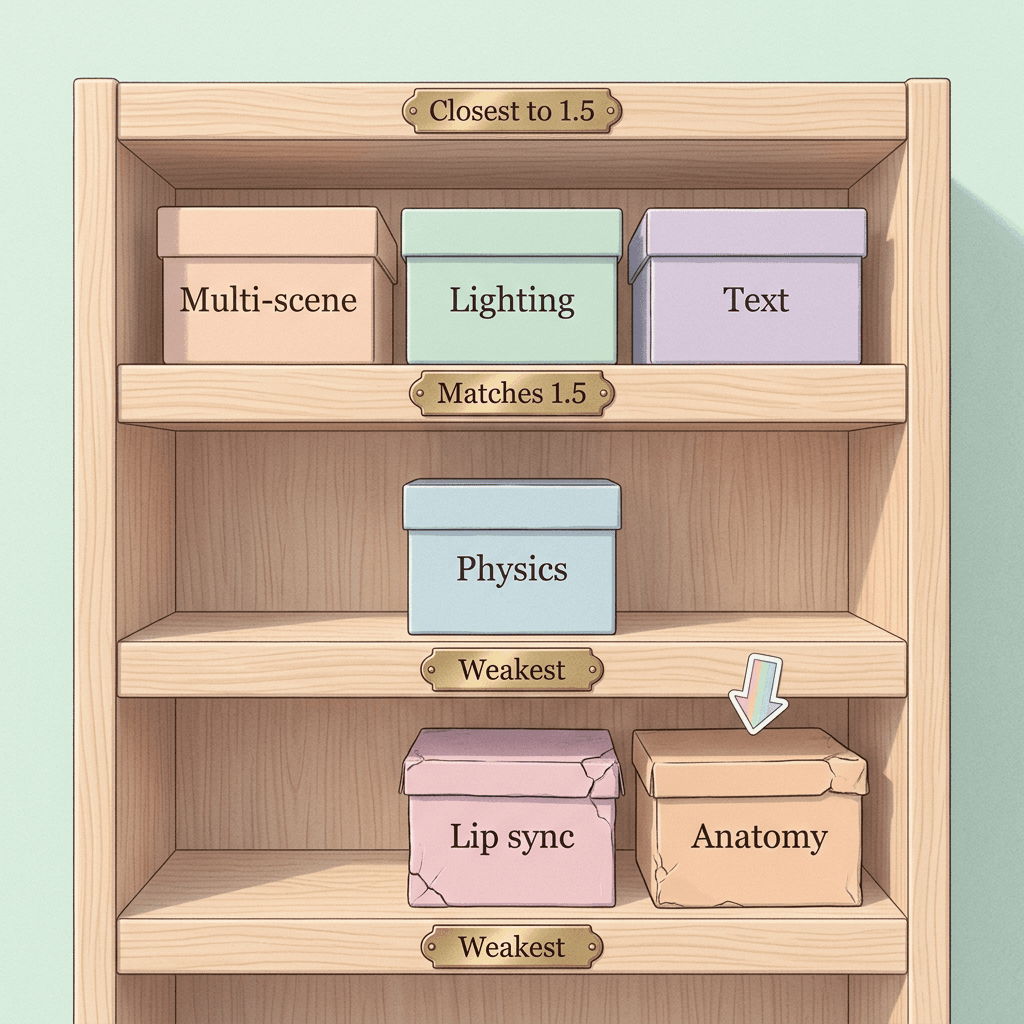
That pattern translates into content decisions without much guesswork.
- Strong fits: landscapes, product beauty shots, food and drink close-ups, abstract motion graphics, atmospheric B-roll, and stylized animation, where lighting and materials carry the shot and nobody has to speak.
- Use with caution: close-up hands and fingers, groups of people, athletic motion and any shot where limbs cross, since anatomy errors are the failure that viewers notice fastest.
- Poor fits for Lite alone: on-camera talking heads and any scene that depends on believable lip sync, where you would be better off recording real speech or choosing a model scored higher on dialogue.
The text rendering result deserves a practical note. Being close to the frontier on text rendering does not mean paragraphs of copy will be perfect, and short, high contrast words on a sign or a product label are the realistic target. Anything legal, a price or a phone number should be added in an editor afterward, not generated.
Step 1: Choose Your Access Path
There are three realistic ways to call the model, and they differ in billing, routing and which parameters are exposed.
| Path | Endpoint and model id | Good to know |
|---|---|---|
| OpenRouter | POST https://openrouter.ai/api/v1/videos with model x-ai/grok-imagine-video-1.5-lite | Returns 202 with id and polling_url, usage.cost in USD, failed generations not billed, no in-region EU routing |
| xAI API | POST https://api.x.ai/v1/videos/generations with model grok-imagine-video-1.5-lite | $0.020/s base rate, 10 requests per second, us-east-1 and us-west-2, Batch API supported, temporary result URLs |
| Partners (fal, Vercel AI Gateway) | Provider-specific | Listed as availability channels; check their own docs for parameter names and pricing |
OpenRouter is the easiest way to start because one key covers many models and the response includes the USD cost of each job [5]. The xAI API is the direct route and exposes xAI's request and polling shape, the Batch API, and the full-feature models such as reference-to-video on grok-imagine-video-1.5 [2][6]. Partners such as fal and Vercel AI Gateway are also listed as availability channels, and since I have not verified their parameter names here, check their docs before copying code from this post.
Step 2: Generate Your First Clip With OpenRouter in Python
The OpenRouter flow has three calls: submit, poll, download. A POST to https://openrouter.ai/api/v1/videos with your bearer token returns an HTTP 202 and a body containing an id, a generation_id, a polling_url and a status of "pending" [5]. You then poll until the status is completed, failed, cancelled or expired, and finally fetch the file from /api/v1/videos/{id}/content [5].
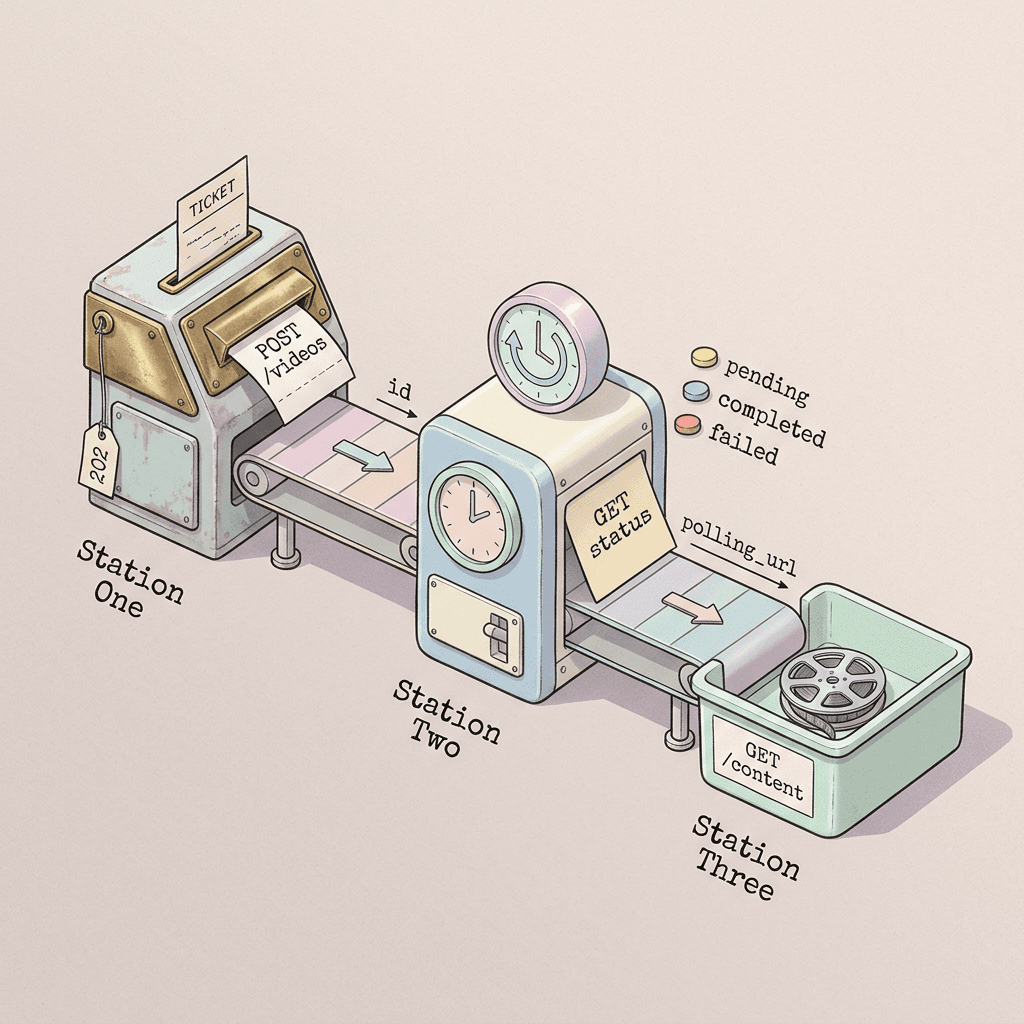
The script below implements that loop with exponential backoff, a timeout, streaming download, and a print of usage.cost so you can see exactly what each clip cost. Set OPENROUTER_API_KEY in your environment and install requests first. I have compiled the script and exercised the polling loop against a stubbed HTTP layer, but I have not run it against the live service, so check field names against OpenRouter's current docs on your first call.
python/code
import os
import sys
import time
from pathlib import Path

import requests

BASE = "https://openrouter.ai/api/v1"
MODEL = "x-ai/grok-imagine-video-1.5-lite"
HEADERS = {
    "Authorization": f"Bearer {os.environ['OPENROUTER_API_KEY']}",
    "Content-Type": "application/json",
}
TERMINAL = {"completed", "failed", "cancelled", "expired"}


def submit(prompt: str, duration: int = 8, resolution: str = "480p", aspect_ratio: str = "9:16", **extra) -> dict:
    """Start a generation. OpenRouter answers 202 with an id and a polling_url."""
    body = {
        "model": MODEL,
        "prompt": prompt,
        "duration": duration,          # integer seconds, 1 to 15
        "resolution": resolution,      # 480p, 720p or 1080p
        "aspect_ratio": aspect_ratio,  # 16:9, 9:16, 1:1, 4:3, 3:4, 3:2 or 2:3
        **extra,                       # frame_images, input_references, callback_url
    }
    r = requests.post(f"{BASE}/videos", headers=HEADERS, json=body, timeout=60)
    r.raise_for_status()
    return r.json()


def wait(job: dict, first_delay: float = 5.0, max_delay: float = 30.0, timeout: float = 900.0) -> dict:
    """Poll with a gentle exponential backoff until the job reaches a terminal status."""
    url = job.get("polling_url") or f"{BASE}/videos/{job['id']}"
    delay, started = first_delay, time.monotonic()
    while True:
        r = requests.get(url, headers=HEADERS, timeout=60)
        r.raise_for_status()
        data = r.json()
        status = data.get("status")
        print(f"[{time.monotonic() - started:5.0f}s] status={status}", file=sys.stderr)
        if status in TERMINAL:
            return data
        if time.monotonic() - started > timeout:
            raise TimeoutError(f"still {status} after {timeout:.0f}s, id={job['id']}")
        time.sleep(delay)
        delay = min(delay * 1.5, max_delay)


def download(job_id: str, path: str) -> Path:
    """Stream the finished file to disk."""
    out = Path(path)
    with requests.get(f"{BASE}/videos/{job_id}/content", headers=HEADERS, stream=True, timeout=120) as r:
        r.raise_for_status()
        with out.open("wb") as f:
            for chunk in r.iter_content(chunk_size=1 << 20):
                f.write(chunk)
    return out


if __name__ == "__main__":
    prompt = (
        "A ceramic teapot pours amber tea into a small glass cup on a wooden table, "
        "steam rising in soft morning window light, slow push-in, quiet kitchen ambience."
    )
    job = submit(prompt, duration=6, resolution="480p", aspect_ratio="9:16")
    print("submitted:", job["id"])
    final = wait(job)
    if final["status"] != "completed":
        raise SystemExit(f"generation ended as {final['status']}: {final.get('error')}")
    print("saved:", download(job["id"], "teapot_draft.mp4"))
    print("cost (USD):", (final.get("usage") or {}).get("cost"))
A few choices in that script come from how the API behaves. The submit call sets the duration as an integer between 1 and 15 and the resolution as one of three strings [5]. Because failed generations are not billed on OpenRouter, a raise on any status other than "completed" is safe from a cost perspective, though you should log the id so you can inspect the failure later [5]. Extra fields such as frame_images, input_references and callback_url pass straight through the **extra argument.
Image-to-Video With Pinned Frames
For image-to-video on OpenRouter, the frame_images field takes a list of objects with a type of "image_url", an image_url object holding the URL, and a frame_type such as "first_frame" [5]. Pinning the first frame to your product shot or character still is the most reliable way to keep identity stable, because the model starts from your pixels instead of inventing a subject. A call looks like this when added to the submit helper:
submit(prompt, duration=6, resolution="720p", aspect_ratio="9:16", frame_images=[{"type": "image_url", "image_url": {"url": "https://example.com/mug.png"}, "frame_type": "first_frame"}])
Because Lite has no image-to-video rating on the Artificial Analysis board, run a small A/B between Lite and the full model on a handful of your own stills before you commit [8]. You can create clean source stills for this in Miraflow's AI image generator, and the AI product video generator API tutorial walks through a related still-to-motion pipeline.
Step 3: Call the xAI API Directly
xAI's REST interface is slightly different. A POST to https://api.x.ai/v1/videos/generations returns a request_id, and you poll GET https://api.x.ai/v1/videos/{request_id} until the status moves from pending to done, failed or expired [6]. A finished job carries the output under video.url, and the guide states that the URL is temporary, so download the file immediately [6]. The same guide says generation typically takes up to several minutes [6].
The body for a Lite text-to-video request that Zeniteq published looks like this: model "grok-imagine-video-1.5-lite", a prompt, duration 10, aspect_ratio "16:9" and resolution "720p" [3]. The curl version:
bash/code
# xAI API: submit a Lite text-to-video job (body shape from Zeniteq's published example)
curl -s -X POST https://api.x.ai/v1/videos/generations \
  -H "Authorization: Bearer $XAI_API_KEY" \
  -H "Content-Type: application/json" \
  -d '{
    "model": "grok-imagine-video-1.5-lite",
    "prompt": "Lantern-lit night market in light rain, slow dolly forward between food stalls, crackling oil, soft chatter.",
    "duration": 10,
    "aspect_ratio": "16:9",
    "resolution": "720p"
  }'
# -> {"request_id": "..."}

# Poll until status is done, failed or expired; a finished job has video.url (temporary)
curl -s https://api.x.ai/v1/videos/$REQUEST_ID -H "Authorization: Bearer $XAI_API_KEY"

# Download immediately, before the temporary URL expires
curl -L -o clip.mp4 "$VIDEO_URL"

# OpenRouter: submit (returns 202 with id and polling_url), poll, then download
curl -s -X POST https://openrouter.ai/api/v1/videos \
  -H "Authorization: Bearer $OPENROUTER_API_KEY" \
  -H "Content-Type: application/json" \
  -d '{"model": "x-ai/grok-imagine-video-1.5-lite", "prompt": "A paper boat drifting down a rain gutter, macro low angle, soft grey light, trickling water sound", "duration": 5, "resolution": "480p", "aspect_ratio": "9:16"}'
curl -s https://openrouter.ai/api/v1/videos/$JOB_ID -H "Authorization: Bearer $OPENROUTER_API_KEY"
curl -s -o clip.mp4 https://openrouter.ai/api/v1/videos/$JOB_ID/content -H "Authorization: Bearer $OPENROUTER_API_KEY"
For image-to-video the REST body uses an "image" object holding a url [6]. xAI also ships a Python SDK. The example below is the official image-to-video snippet from the video guide, which targets the full model and uses a 12 second duration; swap the model string for grok-imagine-video-1.5-lite to try the same call at Lite prices [6].
python/code
import os
import xai_sdk

client = xai_sdk.Client(api_key=os.getenv("XAI_API_KEY"))

response = client.video.generate(
    prompt="Make the water crash down and slowly pan out the camera",
    model="grok-imagine-video-1.5",
    image_url="https://docs.x.ai/assets/api-examples/video/waterfall-still.png",
    duration=12,
)
print(response.url)
Finally, a requests-based client that mirrors the OpenRouter one, for teams that want to stay on xAI's API. It takes an optional image URL and downloads the temporary file as soon as the job is done. The REST field names for polling come from xAI's guide, and I have compiled this script but not run it against the live service.
python/code
import os
import time
from pathlib import Path

import requests

API = "https://api.x.ai/v1"
HEADERS = {"Authorization": f"Bearer {os.environ['XAI_API_KEY']}", "Content-Type": "application/json"}


def generate(model: str, prompt: str, out: str, duration: int = 8, image_url: str | None = None) -> Path:
    """Submit, poll and download one clip through the xAI REST API."""
    body = {"model": model, "prompt": prompt, "duration": duration}
    if image_url:
        body["image"] = {"url": image_url}  # image-to-video bodies use an "image" object
    r = requests.post(f"{API}/videos/generations", headers=HEADERS, json=body, timeout=60)
    r.raise_for_status()
    request_id = r.json()["request_id"]

    delay = 5.0
    while True:
        s = requests.get(f"{API}/videos/{request_id}", headers=HEADERS, timeout=60)
        s.raise_for_status()
        data = s.json()
        if data["status"] == "done":
            break
        if data["status"] in ("failed", "expired"):
            raise RuntimeError(f"{request_id} ended as {data['status']}")
        time.sleep(delay)
        delay = min(delay * 1.5, 30.0)

    # The returned URL is temporary, so save the file right away.
    path = Path(out)
    with requests.get(data["video"]["url"], stream=True, timeout=120) as v:
        v.raise_for_status()
        with path.open("wb") as f:
            for chunk in v.iter_content(chunk_size=1 << 20):
                f.write(chunk)
    return path


if __name__ == "__main__":
    prompt = "Lantern-lit night market in light rain, slow dolly forward between food stalls, crackling oil, soft chatter."
    # Draft cheaply on Lite, then re-render the winner on the full model.
    generate("grok-imagine-video-1.5-lite", prompt, "draft.mp4", duration=6)
    generate("grok-imagine-video-1.5", prompt, "final.mp4", duration=6)
Which Features Belong to Which Model
The full grok-imagine-video-1.5 model supports reference-to-video with up to 14 reference images and 3 voice references, plus pinned first, last and middle frames, and a default duration of 8 seconds [3][6]. The Lite model page does not establish feature parity, so do not assume that reference-to-video or voice references work on Lite until you have tried it [2]. The original grok-imagine-video model is the one documented for video editing, where an edit keeps the source duration up to a maximum of 8.7 seconds, and its reference-to-video mode tops out at 10 seconds [6]. If your pipeline depends on editing an existing clip, the model choice is partly made for you.
Step 4: Write Prompts That Play to Lite's Strengths
Short-clip models reward a prompt that reads like a shot list for one continuous take. Given the category pattern above, the strongest prompts for Lite name a single subject, one clear camera move, lighting with a direction and a mood, concrete materials, and the sound you want, since audio is generated by default [3][4]. The patterns below each target a category where Lite is comparatively strong. Paste them as written, then adjust the subject.
Product Beauty Shot (Lighting and Materials)
Use this for a commercial style close-up, which sits in one of Lite's closest-to-frontier categories [4].
A matte black ceramic coffee mug on a pale oak table, thin steam curling upward, a slow macro dolly-in from a low angle, soft window light from the left creating a long gentle highlight along the rim, shallow depth of field with a blurred kitchen background, quiet room tone with a faint ceramic clink at the start, 6 seconds, vertical 9:16, no people, no text, no warped shapes
Atmospheric B-Roll (Physics and Environment)
Physics is the category where Lite matched the full model, so water, smoke and cloth are good bets [4].
A narrow wooden fishing boat drifting on glassy water at dawn, small ripples spreading outward from the hull, low mist rolling across the surface, warm pink sunrise light from behind the boat, a slow lateral tracking shot at eye level with the water, distant gulls and gentle lapping sound, 8 seconds, 16:9, steady camera, no people, no logos
Multi-Scene Narrative (Multi-Scene and Narrative)
Narrative sequencing is another near-frontier category for Lite, so a three-beat structure inside a single clip is worth a try [4].
Beat one: a paper map unfolding on a desk under warm lamp light. Beat two: a hand-drawn route line gradually inking itself across the map, with a soft scratching pen sound. Beat three: the camera rises to reveal a small brass compass resting on the finished route, a gentle chime as it settles. Smooth continuous camera, soft tungsten light, 10 seconds, 16:9, no readable text, no extra objects
Food Close-Up for a Short (Materials)
Food is a dependable subject because it is mostly texture and light, with no lip sync and no limbs [4].
Thick maple syrup pouring in a slow golden ribbon onto a stack of fluffy pancakes with melting butter, overhead-to-45-degree slow arc, warm morning light from the right, tiny steam wisps, glossy highlights on the syrup, soft sizzle and pour sounds, 6 seconds, vertical 9:16, shallow depth of field, no hands, no text
Image-to-Video Animation of a Still
When you pin a first frame, describe only the motion, not the subject, because the image already defines the subject.
Starting from the supplied first frame, keep the composition and colors unchanged, let the leaves in the foreground sway gently in a light breeze, make the cloud shadows drift slowly across the hillside from left to right, add a very slow push-in, ambient wind and distant birdsong, 8 seconds, no new objects appearing, no camera shake
Two habits make these work better. First, close the prompt with what must not appear, such as extra objects, text or warped shapes, so you can judge a draft against a clear checklist. Second, keep the clip short for the first draft: 4 to 6 seconds is enough to judge motion, and it costs $0.08 to $0.12 at Lite 480p [3].
For creators who plan to cut these into Shorts, the Kling 4.0 prompt pack and the Flux 3 Video prompt guide show how prompt structure changes across models, and the Miraflow cinematic video generator is where you can generate full clips from a prompt without writing any code.
Step 5: The Draft-Then-Finalize Workflow
The cleanest way to use a cheap model is to let it absorb the retakes. Generate several drafts at Lite 480p, pick the one whose composition and motion you like, and then spend real money once on the final render. For a 10 second clip, three Lite 480p drafts cost 3 x $0.20 = $0.60, and a single final on the full model at 720p costs $1.40, so the whole job is $2.00 [3]. Doing four attempts directly on the full model at 720p costs $5.60 for the same 10 second target, and four attempts at Veo 3.1's Artificial Analysis list price would be $16.00 [7].
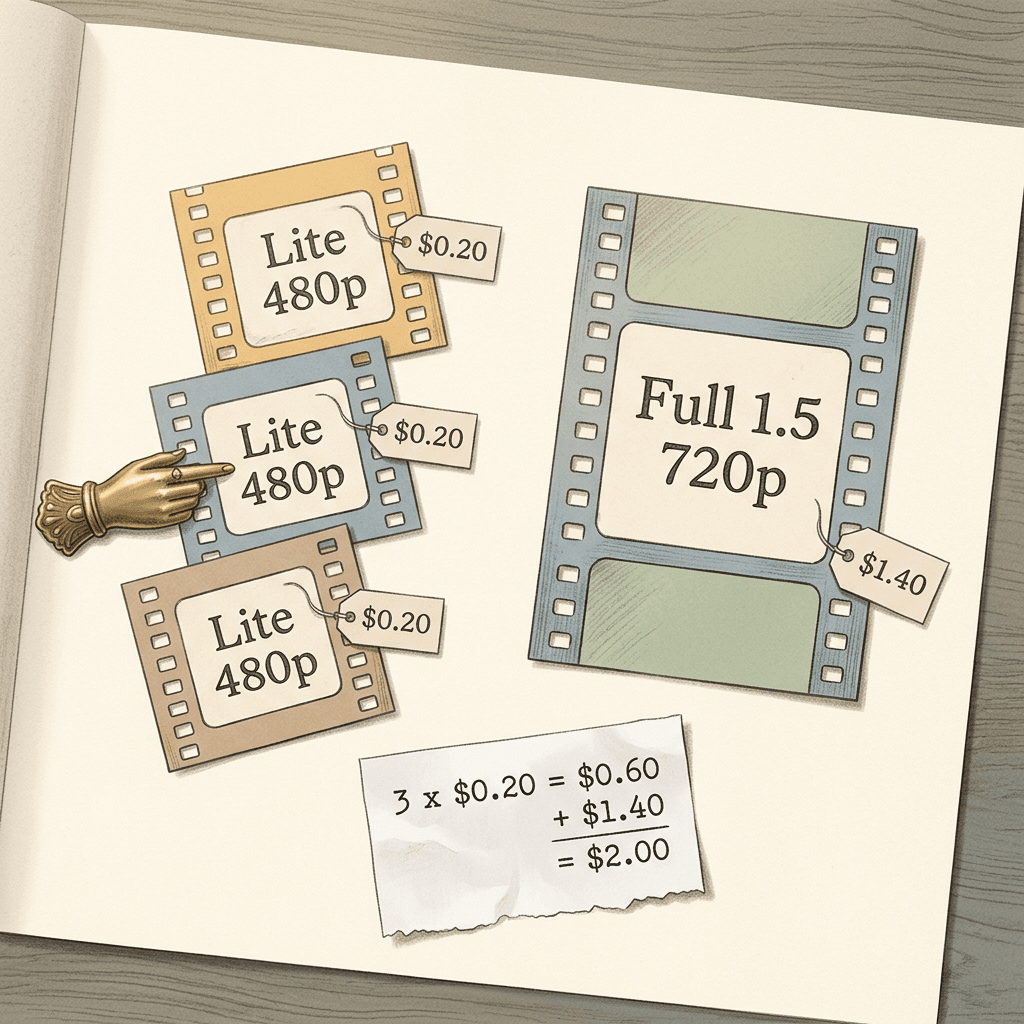
There is one genuine uncertainty in this workflow. Lite is distilled from the full model according to OpenRouter, so the two should respond to prompts in a related way, but a draft that looks right on Lite is not a guarantee of identical output on the full model, and xAI has not published a measure of how closely they agree [5]. In practice, treat the draft as a check on framing, motion direction and pacing, and expect some differences in fine detail. If you pin a first frame from an approved still, the final becomes more predictable because both models start from the same pixels.
The budget guard below is a small ledger that estimates each job's cost before it is submitted, refuses to go over a limit, and writes a CSV you can total later. It mirrors the arithmetic above, and running it with the default $2.00 limit logs three drafts and one final.
python/code
import csv
import sys
import time
from pathlib import Path

# USD per output second (Zeniteq and AlphaSignal per-resolution schedule, October 2026).
PRICE = {
    ("lite", "480p"): 0.02, ("lite", "720p"): 0.03, ("lite", "1080p"): 0.14,
    ("full", "480p"): 0.08, ("full", "720p"): 0.14, ("full", "1080p"): 0.25,
}
LEDGER = Path("video_ledger.csv")


def spent_so_far() -> float:
    if not LEDGER.exists():
        return 0.0
    with LEDGER.open(newline="") as f:
        return sum(float(row["est_usd"]) for row in csv.DictReader(f))


def estimate(tier: str, resolution: str, seconds: int) -> float:
    return PRICE[(tier, resolution)] * seconds


def check_and_log(tier: str, resolution: str, seconds: int, label: str, budget: float) -> float:
    """Refuse the job if it would push the running total over budget, else log the estimate."""
    cost = estimate(tier, resolution, seconds)
    total = spent_so_far()
    if total + cost > budget:
        raise RuntimeError(f"budget guard: {total:.2f} spent + {cost:.2f} would exceed {budget:.2f}")
    new_file = not LEDGER.exists()
    with LEDGER.open("a", newline="") as f:
        w = csv.writer(f)
        if new_file:
            w.writerow(["ts", "label", "tier", "resolution", "seconds", "est_usd"])
        w.writerow([int(time.time()), label, tier, resolution, seconds, f"{cost:.4f}"])
    return cost


if __name__ == "__main__":
    budget = float(sys.argv[1]) if len(sys.argv) > 1 else 2.00
    # Three 10 s drafts on Lite 480p, then one 10 s final on the full model at 720p.
    for i in range(3):
        print(f"draft {i + 1}: ${check_and_log('lite', '480p', 10, f'draft-{i + 1}', budget):.2f}")
    print(f"final:   ${check_and_log('full', '720p', 10, 'final', budget):.2f}")
    print(f"total:   ${spent_so_far():.2f} of ${budget:.2f}")
Estimates are not invoices. On OpenRouter the completed job returns usage.cost, which is the number to trust, and the ledger above is for planning and for stopping a runaway loop before it happens [5].
Choosing Where to Finish
Finishing on the full Grok model is only one of several reasonable endings. If the content needs strong lip sync, a model with a higher dialogue score is a better final than any Grok tier, and if you need the best overall preference score, the top of the Artificial Analysis board is occupied by Wan 3.0 at 1173, Dreamina Seedance 2.5 at 1159 and FLUX 3 Max at 1159 [7]. For a view of how those leaders compare in practice, see the FLUX 3 Video explainer and the Seedance 2.5 vs Veo 3.1 comparison. A draft on Lite still saves money in those cases, because it decides what to ask the expensive model for.
Step 6: Production Practices That Save Money and Pain
Poll With Backoff, Not a Tight Loop
The xAI guide says generation typically takes up to several minutes, and the AlphaSignal figure of 60.5 seconds for a 10 second 1080p Lite clip is a median on one board version, not a guarantee [4][6]. A fixed one second poll multiplies your request count by an order of magnitude for no benefit. Start at about 5 seconds, grow by roughly 1.5 times each round, and cap near 30 seconds, as the clients above do. Add a total timeout so a stuck job raises an error instead of hanging a worker forever.
Download Immediately
xAI's finished video URL is temporary [6]. Treat it like a signed upload link: fetch the file in the same process that saw the "done" status, store it in your own bucket, and save your own URL in your database. A pipeline that stores xAI's URL and renders it a day later will eventually show a broken player.
Respect the Rate Limit, Then Use Batch
xAI lists a rate limit of 10 requests per second for Lite and support for the Batch API [2]. Ten requests per second is generous for interactive use, but a bulk job that submits hundreds of clips in a loop can still hit it, so cap concurrency with a semaphore and retry 429 responses with jitter. For overnight bulk work such as generating a library of B-roll, the Batch API is the intended route, though I have not verified its pricing or turnaround, so check xAI's docs before assuming a discount.
Use a Callback Instead of Polling Where You Can
OpenRouter accepts a callback_url field on the submit call [5]. If your service already exposes a webhook endpoint, passing it lets your server be told when a job finishes, which removes the polling loop entirely. Keep polling as a fallback, because webhooks can fail, and make the receiving endpoint idempotent so a duplicate delivery does not download the same file twice.
Log Cost and Prompt Together
Store the model id, resolution, duration, the full prompt, the job id, the final status and usage.cost for every request. When a month of video spend looks odd, the most common cause is a single tier accidentally left on 1080p, which at $0.14 per second costs seven times the Lite 480p rate [3]. A row per job makes that visible in one query.
Mind Region and Compliance Constraints
Lite is hosted in the us-east-1 and us-west-2 regions on xAI, and OpenRouter notes it is not available through in-region EU routing [2][5]. If your organization has data residency requirements, confirm the processing location before sending customer images as inputs. Generated clips also count as AI content on most platforms, so check each platform's disclosure settings before publishing; the YouTube auto-label guide for AI video covers the YouTube side.
Keep a Provider Fallback
Video APIs get deprecated, renamed and capacity-limited. The shutdown of the Sora API is the clearest recent example, and a pipeline hardcoded to one provider had to be rewritten quickly; the Sora API shutdown migration guide lists the alternatives. A thin wrapper function with a provider argument, like the two clients in this post, makes the switch a configuration change. For a broader take on picking the right backend per request, see the model routing explainer.
Decision Guide: Which Model for Which Job
| Job | Pick | Reason |
|---|---|---|
| Storyboards, concept drafts, retakes | Lite 480p | $0.20 for 10 seconds, cheap enough to iterate |
| Shorts B-roll and atmosphere, no speech | Lite 720p | $0.30 for 10 seconds, strong categories include lighting, materials and physics |
| Deliverable needing native 1080p detail | Full 1.5 at 1080p | Renders 1080p natively at $0.25/s, Elo 1059 |
| Reference images or voice references | Full 1.5 | Documents up to 14 reference images and 3 voice references |
| Editing an existing clip | Original grok-imagine-video | Documented for video editing, source duration kept, up to 8.7 seconds |
| Dialogue, lip sync, talking heads | A model scored higher on dialogue, or real footage | Lite's weakest categories include Dialogue and Lip Sync |
| Highest preference score regardless of cost | Top of the AA board | Wan 3.0 at 1173, Seedance 2.5 and FLUX 3 Max at 1159 |
The table compresses a few rules of thumb. Use Lite when cost per attempt matters more than the last increment of quality, which means drafts, storyboards, background loops and high-volume formats. Use the full 1.5 when you need native 1080p, reference-to-video or the higher Elo, and use the original grok-imagine-video when editing an existing clip is the task [1][3][6]. Use a different vendor when your content depends on dialogue, or when you want the top of the leaderboard [7].
A simple routing function captures this: if the request mentions speech or lip sync, route away from Lite; if it is a draft, route to Lite 480p; if it needs native 1080p or references, route to the full model; otherwise default to Lite 720p. That is a three-line if statement, and it gives most of the savings that a more elaborate router would.
Common Mistakes When Adopting a Cheap Video Model
- Quoting $0.02 as the price of everything. That is the 480p rate. A 1080p Lite clip is $0.14 per second, seven times higher, and a team that budgets on the headline number will be surprised [3].
- Treating Elo as a quality guarantee. A 30 point gap over Veo 3.1 implies about a 54 percent preference rate, so you will still see individual prompts where Veo wins [7].
- Mixing board versions. AlphaSignal's category and speed figures come from v2.0 of the Artificial Analysis board, and the Elo numbers in this post come from v2.1, so combine them only as qualitative context [4][7].
- Using Lite for talking heads. Dialogue and lip sync is among the weakest categories, so record real speech or pick a model that scores higher there [4].
- Skipping the 1080p test. If Lite upscales from 720p, the extra $0.11 per second over the 720p tier may add little for your content, and native 720p from the full model costs the same $0.14 per second [3][4].
- Storing the temporary result URL. Download first, then store your own link [6].
- Assuming feature parity with the full model. Reference-to-video with up to 14 images and 3 voice references is documented for grok-imagine-video-1.5, and the Lite page does not establish that it carries over [2][3].
- Ignoring retakes in the budget. Real cost is clips x seconds x attempts, which is why the calculator has an attempts flag.
- Trusting generated text on screen. Short words are plausible and long strings are risky, so add prices, URLs and legal lines in an editor.
How This Fits a Creator Pipeline
A model like Lite matters most to creators who ship on a schedule. A weekly series of Shorts needs a steady supply of B-roll and establishing shots, and a cheap, fast model turns those from a budget line into a throwaway. A practical split is to generate scene concepts and B-roll with a Lite-class model, keep human speech and faces for real footage or a specialist model, and assemble everything in an editor.
Miraflow covers several parts of that chain without any code. The cinematic video generator produces clips from a text prompt in the browser, Text2Shorts turns a topic into a captioned vertical video with script, visuals and voice, and AI Clipping cuts a long video into scored vertical clips with captions. Once the video exists, the YouTube thumbnail maker builds the click-through image and the AI music generator makes a track without licensing worries. The whole set lives on the Miraflow home page. Miraflow does not claim to run Grok Imagine under the hood, and this post is about the API for developers who want to build their own pipeline; the same prompting lessons apply on any video model.
Developers who want more of the xAI side can read the Grok Imagine image prompts guide, and the Kling 4.0 explainer, which covers a model built around longer, keyframed clips. If you want a single-clip prompt that works across these systems, the habits are the same: one subject, one camera move, directional light, a stated sound, and an exclusion clause.
What to Watch Next
Four things would change the picture. First, an Artificial Analysis image-to-video entry for Lite would settle the open question about still animation [8]. Second, any xAI technical note on how Lite was distilled would turn the general background above into specifics. Third, price moves, since a Veo or Seedance price cut would shrink Lite's advantage at 1080p, where its list price is close to Veo 3.1 Fast [7]. Fourth, confirmation of whether the full feature set, including reference-to-video and voice references, comes to Lite, since that would make it a drop-in replacement for many workflows [2][3].
Frequently Asked Questions
What is Grok Imagine Video 1.5 Lite?
It is xAI's lower-cost, faster video model, described by OpenRouter as distilled from Grok Imagine Video 1.5. It supports text-to-video and image-to-video, clips of 1 to 15 seconds, and three resolutions, and the videos include audio by default [5][3].
How much does Grok Imagine Video 1.5 Lite cost per second?
xAI lists $0.020 per second as the base rate [1]. Per-resolution rates reported by Zeniteq and AlphaSignal are $0.02 at 480p, $0.03 at 720p and $0.14 at 1080p [3][4]. A 10 second clip therefore costs $0.20, $0.30 or $1.40 depending on the tier.
When was it released?
Sources disagree. TypingMind lists October 1, OpenRouter points to October 6, and Artificial Analysis shows "Aug 2026", while trade coverage is dated October 8 and 9, 2026. Early October 2026 is the safe description.
Is it better than Veo 3.1?
On Artificial Analysis' text-to-video board with audio, Lite scores 998 against 968 for Veo 3.1, which implies roughly a 54 percent preference rate under standard Elo scaling [7]. Lite is also much cheaper at 480p and 720p, and about 65 percent cheaper than Veo 3.1's listed price at 1080p. Veo 3.1 may still win on individual prompts.
How does Lite compare with the full Grok Imagine Video 1.5?
The full model scores 1059 against Lite's 998, a 61 point gap, and costs $0.08, $0.14 and $0.25 per second at 480p, 720p and 1080p [3][7]. It renders 1080p natively and documents reference-to-video with up to 14 reference images, while Lite upscales its 1080p output from 720p according to secondary sources [3][4].
Can Lite do image-to-video?
OpenRouter lists image-to-video as a supported mode [5]. Artificial Analysis does not currently list Lite on its image-to-video board, so there is no independent quality rating for that mode [8].
Does the video include sound?
Yes, videos include audio by default on this model family, so describe the sounds you want in the prompt [3].
Can I use it for talking-head or lip-synced videos?
It is not a good first choice. Dialogue and lip sync is one of Lite's weakest categories according to AlphaSignal's reading of the Artificial Analysis data [4].
Where can I call it?
Through xAI's API at api.x.ai, through OpenRouter with the model id x-ai/grok-imagine-video-1.5-lite, and through partners including fal and Vercel AI Gateway [2][5].
Are failed generations charged?
OpenRouter states that failed generations are not billed [5]. Check xAI's terms for the direct API.
Is the result URL permanent?
No. xAI's video guide describes the returned URL as temporary, so download the file as soon as the job is done [6].
Conclusion
Grok Imagine Video 1.5 Lite is a pricing and workflow story more than a leaderboard story. At $0.02 per second for 480p and $0.03 per second for 720p it makes retakes cheap enough to treat as a normal part of production, while its Elo of 998 puts it slightly above the Veo 3.1 family and well below the leaders on Artificial Analysis' text-to-video board [1][3][7]. The 1080p tier at $0.14 per second is where the story gets less clear, because the output reportedly starts as a 720p render and the same money buys native 720p from the full model [3][4].
The practical recipe is to draft on Lite at 480p, check your framing and motion, finalize on whichever model suits the job, and keep dialogue-heavy scenes away from it. The code in this post gives you the submit, poll and download loop for both OpenRouter and xAI, a cost calculator, an Elo probability helper and a budget ledger, and the prompts give you a starting point on products, landscapes, food and short narrative clips. If you would rather skip the code, Miraflow lets you generate and edit video, Shorts, thumbnails and music in the browser.
References
- [1] Models and Pricing, xAI Docs
- [2] grok-imagine-video-1.5-lite model page, xAI Docs
- [3] xAI adds Grok Imagine Video 1.5 and a $0.02 Lite tier, Zeniteq
- [4] xAI's Grok Imagine Video 1.5 Lite beats Veo 3.1 at 65% lower cost, AlphaSignal
- [5] Grok Imagine Video 1.5 Lite, OpenRouter
- [6] Video Generation guide, xAI Docs
- [7] Text to Video Leaderboard (AA-Video-T2V v2.1), Artificial Analysis
- [8] Image to Video Leaderboard (AA-Video-I2V v1.1), Artificial Analysis
- [9] Distilling the Knowledge in a Neural Network, Hinton, Vinyals and Dean, arXiv 1503.02531
- [10] Progressive Distillation for Fast Sampling of Diffusion Models, Salimans and Ho, arXiv 2202.00512
- [11] Consistency Models, Song et al., arXiv 2303.01469
- [12] Adversarial Diffusion Distillation, Sauer et al., arXiv 2311.17042
- [13] Elo rating system, Wikipedia
- [14] Chatbot Arena: An Open Platform for Evaluating LLMs by Human Preference, Chiang et al., arXiv 2403.04132
- [15] Real-ESRGAN: Training Real-World Blind Super-Resolution with Pure Synthetic Data, Wang et al., arXiv 2107.10833