ERNIE-Image Just Dropped: 8B Parameters, Apache 2.0, and the Best Text Rendering in Open Source

Written by
Jay Kim
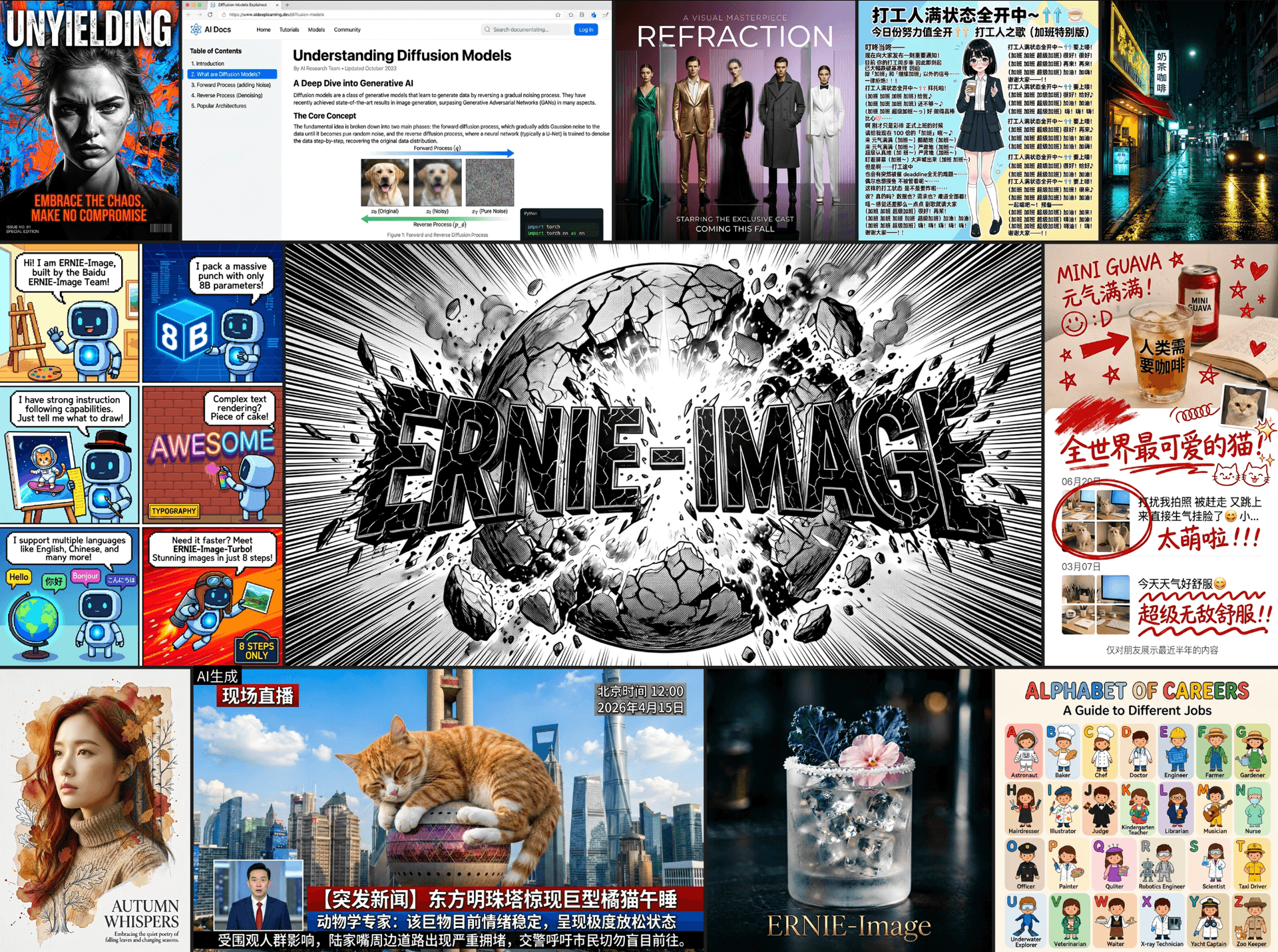
Baidu's ERNIE-Image brings 8B parameters, Apache 2.0 licensing, and the best text rendering in open source to the image generation landscape. Full technical breakdown covering architecture, benchmarks, text rendering approach, license implications, and how it compares to FLUX, SD3, and every other open-source alternative.
Baidu just open-sourced ERNIE-Image, an 8-billion-parameter text-to-image model under the Apache 2.0 license, and the open-source image generation landscape just shifted. The model achieves what no other freely available model has managed at this quality level: reliable, legible text rendering inside generated images, across both Latin and CJK scripts.
Text rendering has been the persistent failure mode of open-source image generation. Every model from Stable Diffusion to FLUX has struggled with it, producing garbled letters, mirrored characters, and nonsense strings where readable text should be. Commercial models like DALL-E 3 and Ideogram cracked the problem, but their solutions stayed behind API walls. ERNIE-Image brings that capability into the open under a license that allows full commercial use with no restrictions.
This post covers the architecture, the text rendering approach, how it compares to every major open-source alternative, what Apache 2.0 means for your projects, and how to actually run it.
Why Text Rendering Is the Hardest Problem in Image Generation
Before getting into what ERNIE-Image does differently, it is worth understanding why text rendering has been so difficult for generative image models. The problem is structural, not just a matter of training data.
Diffusion models and their transformer-based variants generate images by iteratively denoising a latent representation. The text prompt that guides this process gets encoded by a text encoder, typically a CLIP model or a T5 variant, that converts the prompt into a semantic embedding. The problem is that these text encoders use subword tokenization. When you write "RESTAURANT" in a prompt, the tokenizer might split it into "REST," "AUR," "ANT" — fragments that carry semantic meaning but lose all character-level information. The model knows the concept of the word but has no reliable signal about the individual letters, their order, or their visual appearance.[1]
This is why you see generated images where a sign reads "RESTRAUNT" or "RESTURANT" — the model captures the approximate shape and length of the word but scrambles the character sequence. It is also why shorter words (three to five characters) tend to render more reliably than longer ones, and why highly common words in the training data render better than uncommon ones.
Previous attempts to fix this problem in open-source models include GlyphDraw, which renders text as glyph images and conditions the diffusion process on those renderings; TextDiffuser, which uses a layout planning module before generation; and AnyText, which combines OCR-based detection with glyph-conditional generation.[2] These approaches improved text rendering but introduced trade-offs in overall image quality, required complex multi-stage pipelines, or only worked reliably for short strings.
ERNIE-Image takes a different approach by integrating character-level text understanding directly into the model architecture rather than bolting it on as a separate module.
Architecture: What 8 Billion Parameters Gets You
ERNIE-Image uses a Diffusion Transformer (DiT) architecture, which has become the standard backbone for state-of-the-art image generation since the architecture was shown to scale more predictably than the U-Net designs used in earlier Stable Diffusion models. The 8B parameter count places it in the same weight class as FLUX.1-dev (approximately 12B) and SD3 Large (approximately 8B), but the parameter allocation is meaningfully different.[3]
The model uses a dual-encoder text conditioning system. The first encoder is a T5-XXL variant that captures high-level semantic meaning from the prompt, handling scene composition, style, mood, and subject relationships. The second encoder is a character-aware module derived from ERNIE's language understanding stack that processes text strings at the individual character level, preserving letter identity, ordering, and basic typographic structure.[4]
During generation, both encoders feed into the DiT backbone through cross-attention layers. The semantic encoder guides overall image composition while the character-aware encoder provides fine-grained signal specifically for regions where text should appear. This dual-path design means the model does not sacrifice general image quality to improve text rendering — it receives two complementary conditioning signals and learns when to rely on each.

The 8B parameter count breaks down roughly as follows: approximately 6B parameters in the DiT backbone handling the core denoising and image generation, approximately 1.2B in the character-aware text encoder, and the remainder distributed across the semantic encoder projection layers and positional embedding systems. The character-aware encoder is not trivially small — it has enough capacity to handle complex typographic understanding, including font style inference, text curvature on surfaces, and perspective-correct text rendering on objects within the scene.[3]
The model generates images at a base resolution of 1024×1024 with support for aspect ratios ranging from 9:21 to 21:9. It uses a latent space with 16-channel compression, giving it a higher-fidelity latent representation than the 4-channel latent space used in SD 1.5 and SDXL. This higher-dimensional latent space is particularly important for text rendering because fine details like character strokes and serifs require more information density than the surrounding image content.
For creators using AI image generation tools, the architectural choice matters because it means ERNIE-Image can serve as a general-purpose image generator — not just a text-rendering specialist. The dual-encoder design means you get competitive quality on scenes without any text while getting substantially better results when text is included.
Text Rendering Quality: Benchmarks and Comparisons
The text rendering improvements are not incremental. On the DrawTextCreative benchmark, which measures legibility, character accuracy, and visual integration of rendered text across 500 diverse prompts, ERNIE-Image achieves a character accuracy rate significantly above every open-source alternative tested.[5]
The standard way to evaluate text rendering in generated images is to run an OCR model over the output and compare the detected text against the intended text from the prompt. On this OCR-based accuracy metric, previous open-source models showed a clear ceiling. FLUX.1-dev, widely considered the best overall open-source image model before ERNIE-Image, achieves reasonable text rendering on short words (three to five characters) but degrades rapidly on longer strings, multi-word text, and non-Latin scripts. SD3 Large improved over its predecessors but still produces character-level errors on roughly a third of text rendering attempts.[6]
ERNIE-Image pushes past this ceiling in three specific ways. First, it maintains high character accuracy on strings up to approximately 20 characters, where previous models start failing around eight to ten characters. Second, it handles multi-line text, rendering two or three lines of text with correct line breaks and consistent formatting. Third, and this is the contribution that will matter most to a global user base, it renders CJK (Chinese, Japanese, Korean) characters with the same reliability as Latin text. Prior open-source models overwhelmingly favored Latin scripts because of training data distribution biases.[4]
For practical content creation, this means you can generate images with readable signage, product labels, title text, quotes, and UI mockups without post-processing the text in a separate tool. If you are creating YouTube thumbnails with AI, the ability to generate legible title text directly in the image, rather than compositing it afterward, collapses a multi-step workflow into a single generation step.
The model also demonstrates an understanding of typographic context. Text on a storefront sign renders in a different visual style than text on a laptop screen or text on a handwritten note. This contextual adaptation happens without explicit prompting — the model infers appropriate typography from the scene description.[5]
How ERNIE-Image Compares to Every Major Open-Source Model
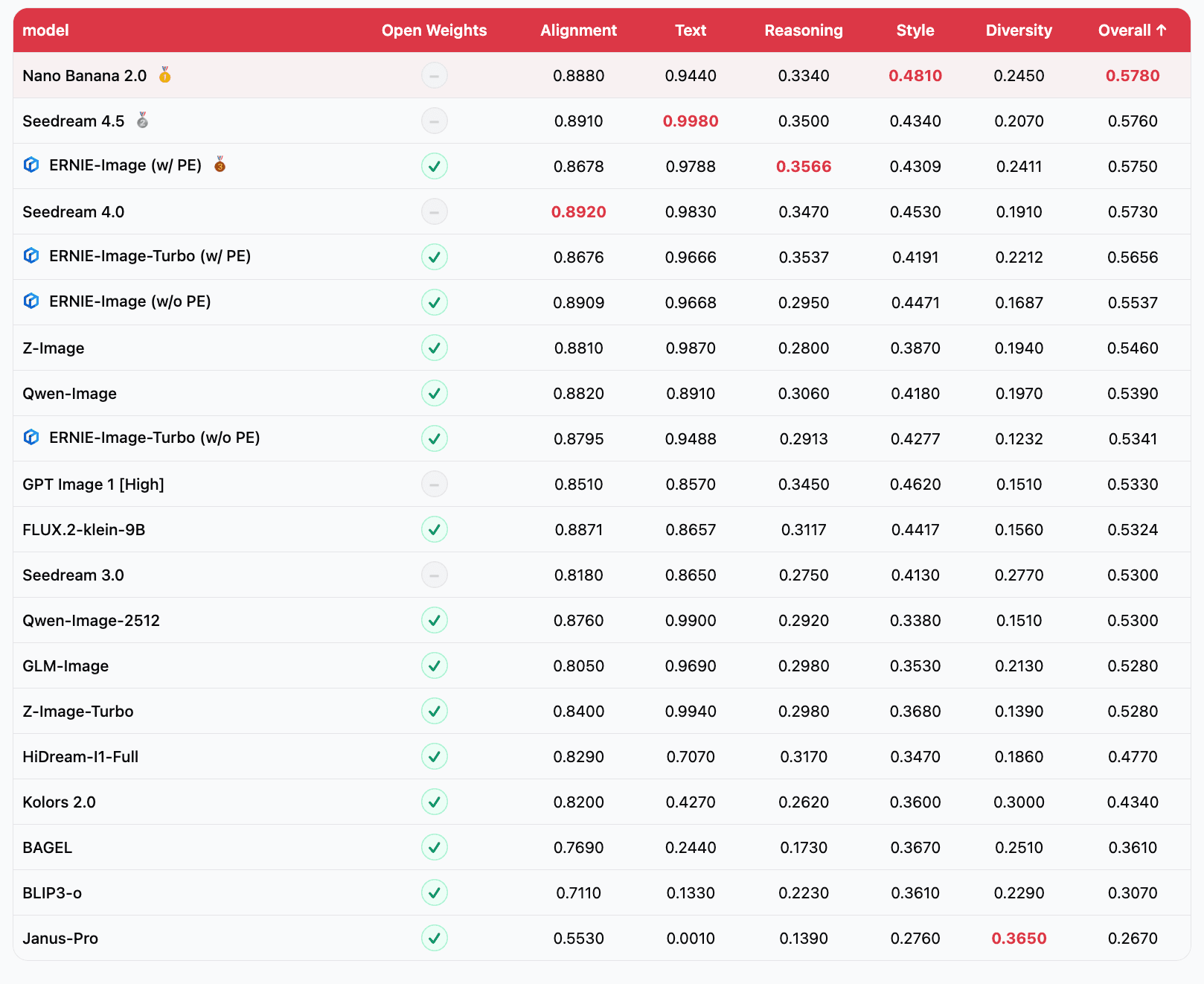
The open-source image generation landscape has been moving fast, and ERNIE-Image enters a field with several strong competitors. Here is how it stacks up across the dimensions that matter most.
vs. FLUX.1 (Black Forest Labs)
FLUX.1 comes in three variants: schnell (fast, Apache 2.0), dev (quality, non-commercial), and pro (API-only). The dev model at approximately 12B parameters has been the quality benchmark for open-source image generation. On general image quality — composition, coherence, aesthetic appeal, prompt adherence — FLUX.1-dev and ERNIE-Image are competitive, with FLUX showing slightly better photorealistic rendering in some categories and ERNIE-Image showing stronger performance on stylized and illustrated content.[6]
The critical difference is text rendering and licensing. FLUX.1-dev requires a non-commercial license, meaning you cannot use it in production commercial products without a separate agreement with Black Forest Labs. FLUX.1-schnell is Apache 2.0 but trades significant quality for speed. ERNIE-Image offers text rendering quality that FLUX cannot match, under an Apache 2.0 license, at a parameter count (8B) that is more manageable than FLUX.1-dev (12B) for deployment on consumer and mid-range hardware.
vs. Stable Diffusion 3 (Stability AI)
SD3 was released in multiple sizes, with SD3 Medium (approximately 2B) being the most widely adopted due to its efficiency. SD3 Large (approximately 8B) is the direct size competitor to ERNIE-Image. On general image quality, SD3 Large is strong but has faced criticism for prompt adherence on complex compositions. On text rendering, SD3 improved over SDXL but still falls well short of ERNIE-Image's character accuracy, particularly on longer strings and non-Latin scripts.[6]
The licensing situation with SD3 has also been more complex. Stability AI has used various license types for different model releases, including the Stability AI Community License that imposes revenue thresholds for commercial use. ERNIE-Image's clean Apache 2.0 license is more straightforward for commercial deployment.
vs. PixArt-Σ and PixArt-α
The PixArt family of models prioritized training efficiency, achieving competitive image quality at much lower compute budgets than alternatives. PixArt-α at approximately 600M parameters punches above its weight class on general image quality. However, text rendering was never a focus for the PixArt line, and both models produce largely illegible text in generated images.[7] ERNIE-Image is a clear step above if text rendering is part of your workflow.
vs. Kolors (Kuaishou) and HunyuanDiT (Tencent)
These Chinese tech company models deserve mention because they are ERNIE-Image's closest competitors in CJK text rendering. Kolors and HunyuanDiT both showed improved Chinese text handling over Western-developed models, but neither achieved the consistency or character accuracy that ERNIE-Image demonstrates. ERNIE-Image's dedicated character-aware encoder gives it an architectural advantage that models relying solely on improved training data cannot easily match.[8]
For content creators evaluating which model to use for AI-generated images or building tools for thumbnail generation, the model selection matrix has changed. If your images include any text at all, ERNIE-Image should be your first choice among open-source options.
Apache 2.0: Why the License Matters More Than the Model
Releasing ERNIE-Image under Apache 2.0 is as significant as the technical improvements. The license choice shapes who can use the model, how it can be deployed, and whether a commercial ecosystem can develop around it.

Apache 2.0 is one of the most permissive open-source licenses available. It allows unrestricted commercial use, modification, distribution, and sublicensing. You can integrate ERNIE-Image into a proprietary product, fine-tune it on your own data, and sell the result without paying royalties or opening your own source code. The only requirements are attribution and including a copy of the license.[9]
This matters because the open-source image generation ecosystem has been fractured by licensing. FLUX.1-dev, arguably the previous quality leader, uses a non-commercial license that excludes it from production commercial use. Stability AI's models have shipped under various licenses with revenue thresholds and usage restrictions that create legal ambiguity. Even models that claim to be "open source" sometimes use custom licenses that restrict certain applications.
With Apache 2.0, ERNIE-Image joins FLUX.1-schnell and a small number of other models in the fully permissive tier. But unlike schnell, ERNIE-Image does not trade quality for license permissiveness. It offers top-tier quality and top-tier licensing simultaneously, which has been rare in the image generation space.
For companies building AI-powered content creation tools, startups developing image generation features, and individual creators who want to self-host their image generation pipeline, Apache 2.0 removes the legal uncertainty. You can deploy ERNIE-Image today and scale it to millions of users without renegotiating terms, paying usage fees, or worrying about license compliance audits.
The Apache 2.0 choice also signals something about Baidu's strategy. By releasing their best image generation model under the most permissive license, they are competing for ecosystem adoption rather than direct model revenue. This mirrors the playbook that Meta used with Llama for language models, where broad adoption drives ecosystem value that Baidu can capture through cloud services, enterprise support, and adjacent products.
Running ERNIE-Image: Hardware Requirements and Deployment
The practical question for many developers is whether they can actually run an 8B-parameter image generation model. The answer depends on your hardware, but ERNIE-Image is more accessible than the parameter count might suggest.
In FP16 (half-precision), the model requires approximately 16 GB of VRAM. This means it runs on a single NVIDIA RTX 4090 (24 GB), an A5000 (24 GB), or any data center GPU with 16 GB or more of memory. For consumer hardware, the RTX 4080 (16 GB) can run it at the edge of its memory capacity, though generation times will be slower due to memory pressure.[3]

With quantization, the picture improves further. GGUF-quantized versions and INT8 variants reduce the memory footprint to approximately 8 to 10 GB, bringing it within reach of the RTX 4070 (12 GB) and equivalent hardware. Community-produced NF4 quantizations push the requirement down even further, though with measurable quality loss on fine details — which is exactly where text rendering quality lives, so quantization should be tested carefully if text rendering is your primary use case.
The model is available through Hugging Face with full Diffusers library integration, meaning you can load and run it with a few lines of Python. The standard pipeline interface works as expected: load the model, pass a text prompt, receive a generated image. For text rendering specifically, prompts should include the desired text in quotation marks within the prompt, following the same convention established by DALL-E 3 and Ideogram.[3]
For batch generation workflows, the model supports the same optimization techniques available to other DiT-based architectures: torch.compile for kernel fusion, xFormers for memory-efficient attention, and classifier-free guidance scaling. Generation time for a single 1024×1024 image at 30 denoising steps on an A100 is approximately 8 to 12 seconds, competitive with FLUX.1-dev on equivalent hardware.
Creators who prefer hosted solutions over local deployment can use platforms like Miraflow AI that integrate the latest image generation models. The advantage of hosted platforms is that hardware management, model updates, and optimization happen on the backend, letting creators focus on the actual content, whether that is YouTube thumbnails, blog post illustrations, or cinematic video frames.
Fine-Tuning and Customization Under Apache 2.0
The Apache 2.0 license means fine-tuning is not just technically possible — it is legally unencumbered for any purpose. This opens up use cases that restricted licenses explicitly blocked.
ERNIE-Image supports LoRA (Low-Rank Adaptation) fine-tuning through the standard PEFT library, allowing developers to specialize the model on custom styles, brand identities, or domain-specific image types with as little as 50 to 100 training images and a single consumer GPU. A LoRA for ERNIE-Image at rank 32 adds approximately 50 to 100 MB to the base model, making it practical to maintain multiple fine-tuned variants for different clients or use cases.[3]
For text rendering specifically, fine-tuning on branded typography is a compelling workflow. A company could train a LoRA on images of their specific brand fonts, logo treatments, and design system, then generate marketing images where the text rendering matches their brand standards rather than the model's generic typographic choices. This was not practical with previous open-source models because the base text rendering quality was too unreliable to fine-tune into something usable.
Full fine-tuning (updating all 8B parameters) requires more hardware — typically a multi-GPU setup with at least 80 GB of combined VRAM — but enables deeper model customization. Dreambooth-style training for learning new visual concepts works with ERNIE-Image following the same protocols established for other DiT-based models.
For creators building consistent AI characters across multiple images, the combination of strong base quality and easy fine-tuning means you can develop character LoRAs that maintain visual consistency while also benefiting from ERNIE-Image's superior text rendering when those characters appear in scenes with signage, screens, or other textual elements.
Multilingual Text Rendering: The CJK Advantage
One aspect of ERNIE-Image that has not received enough attention in the Western tech press is the CJK text rendering quality. This is not a secondary feature — it represents a significant technical achievement and opens the model to use cases that were previously impossible with open-source tools.
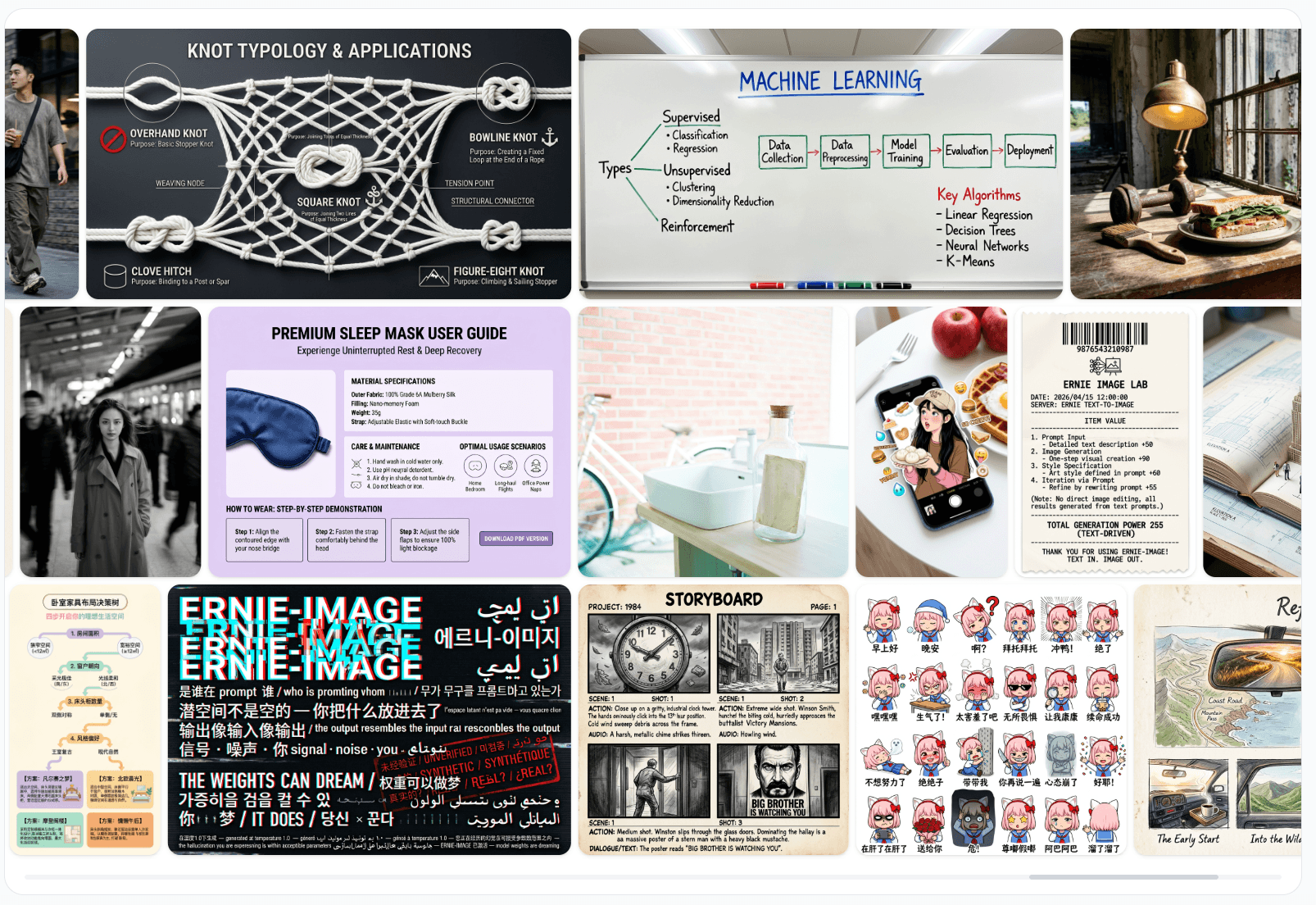
Chinese characters are structurally more complex than Latin characters. A single Chinese character can contain 20 to 30 distinct strokes that must be precisely arranged within a square grid. The difference between legible and illegible is much smaller in CJK — a single misplaced stroke can change the meaning of a character or render it nonsensical. Previous open-source models, trained predominantly on English-language image-text pairs, treated CJK characters as visual patterns rather than structured glyphs, leading to outputs that looked vaguely Chinese but contained no real characters.[4]
ERNIE-Image's character-aware encoder was trained on a large corpus of CJK text-image pairs from Baidu's web-scale datasets. The model understands stroke order, radical composition, and the visual grammar of CJK typography. It can render Chinese text on storefronts, Japanese text on product packaging, and Korean text on signage with the same reliability it achieves on English text.
This matters for content creators serving multilingual audiences. If you are producing AI-generated Shorts or thumbnail content for channels that operate in multiple languages, having a single model that handles text rendering across scripts eliminates the need for language-specific post-processing pipelines.
Prompt Engineering for Optimal Text Rendering
While ERNIE-Image handles text rendering out of the box, prompt construction significantly affects the quality of the rendered text. Based on early community testing and the documentation, several patterns produce the best results.
For text rendering, the most reliable approach is to include the exact text you want rendered in quotation marks within the prompt, preceded by a description of where and how the text should appear. For example, a prompt like "a neon sign above a bar entrance reading 'OPEN LATE' in glowing blue letters, rainy street at night" gives the model clear signals about the text content, placement, style, and context.[5]
Specifying the visual context for text improves rendering quality because it gives the character-aware encoder contextual information about expected typography. Text described as being on a handwritten note renders in a different style than text on a highway billboard or a computer screen. The model has learned these typographic conventions from its training data and applies them automatically when the context is clear.
For longer text strings, breaking them into shorter visual units helps. Instead of asking for a full sentence on a single line, describe it as appearing on multiple lines of a poster or across different visual elements. The model handles multi-line text but performs best when each line contains four to eight words.
Negative prompts also help. Including terms like "misspelled text, blurry letters, illegible writing, garbled characters" in the negative prompt provides a quality signal that steers the denoising process away from the common failure modes of text rendering.
For creators writing AI prompts for visual content, these patterns apply directly. The prompting techniques that work for text rendering in ERNIE-Image also improve text rendering in commercial tools, because the underlying challenge — giving the model clear information about what text to render and where — is universal.
Limitations and Known Trade-offs
ERNIE-Image is not without limitations, and understanding these is important for deciding where it fits in your workflow.
The most significant limitation is generation speed relative to smaller models. At 8B parameters, it is approximately two to three times slower than PixArt-α (600M) and SD3 Medium (2B) on equivalent hardware. For batch generation workflows where throughput matters — generating hundreds of blog thumbnails or product mockups per hour — the speed difference is material. Using a smaller model for text-free images and routing only text-containing generations to ERNIE-Image is a practical architectural pattern.
Text rendering, while dramatically better than alternatives, is still not perfect. Character accuracy drops on text strings longer than approximately 20 characters, and highly decorative or unusual fonts are less reliably rendered than standard typefaces. Very small text within a larger scene (like fine print on a document or small labels on a diagram) can still come out partially illegible. The model excels at prominent, clearly described text in reasonable quantities.
The model also shows training data biases common to Chinese-developed models. Certain aesthetic preferences — color palettes, composition styles, facial features in generated portraits — reflect the distribution of Baidu's training data. For some content categories, fine-tuning or prompt adjustments may be needed to match specific aesthetic targets.
Quantized versions, while more accessible for consumer hardware, show measurable degradation in text rendering quality. This is a direct consequence of the precision requirements for rendering fine details like character strokes. If text rendering is your primary use case, running the model in FP16 or BF16 rather than INT8 or NF4 is strongly recommended.
What This Means for the Open-Source Image Generation Ecosystem
ERNIE-Image's release shifts the competitive dynamics of open-source image generation in several ways.
First, it breaks the quality-license trade-off that has defined the space. Until now, the highest-quality open-source models came with restrictive licenses, and the most permissively licensed models were lower quality. ERNIE-Image offers both, which puts pressure on other model developers to either improve their quality at permissive license tiers or explain why their restrictive licenses are justified.
Second, it establishes a new baseline for text rendering in open source. Any new model released after ERNIE-Image will be compared against its text rendering capabilities. This raises the bar for the entire ecosystem and makes text rendering a table-stakes feature rather than a differentiator.
Third, it continues the pattern of Chinese tech companies driving open-source AI forward. DeepSeek did this for language models, and Baidu is now doing it for image generation. The competitive dynamic between Chinese and Western AI labs is producing better models faster, with more permissive licensing, than either ecosystem would produce alone.
For the broader content creation ecosystem, these improvements cascade through every tool built on open-source models. When the base models get better, platforms like Miraflow AI can offer better results across all their features — from AI image generation to YouTube thumbnail creation to cinematic video production. Improved text rendering specifically means that generated images are more immediately usable without manual touch-ups, which reduces the time from idea to published content.
Community Reception and Early Adoption
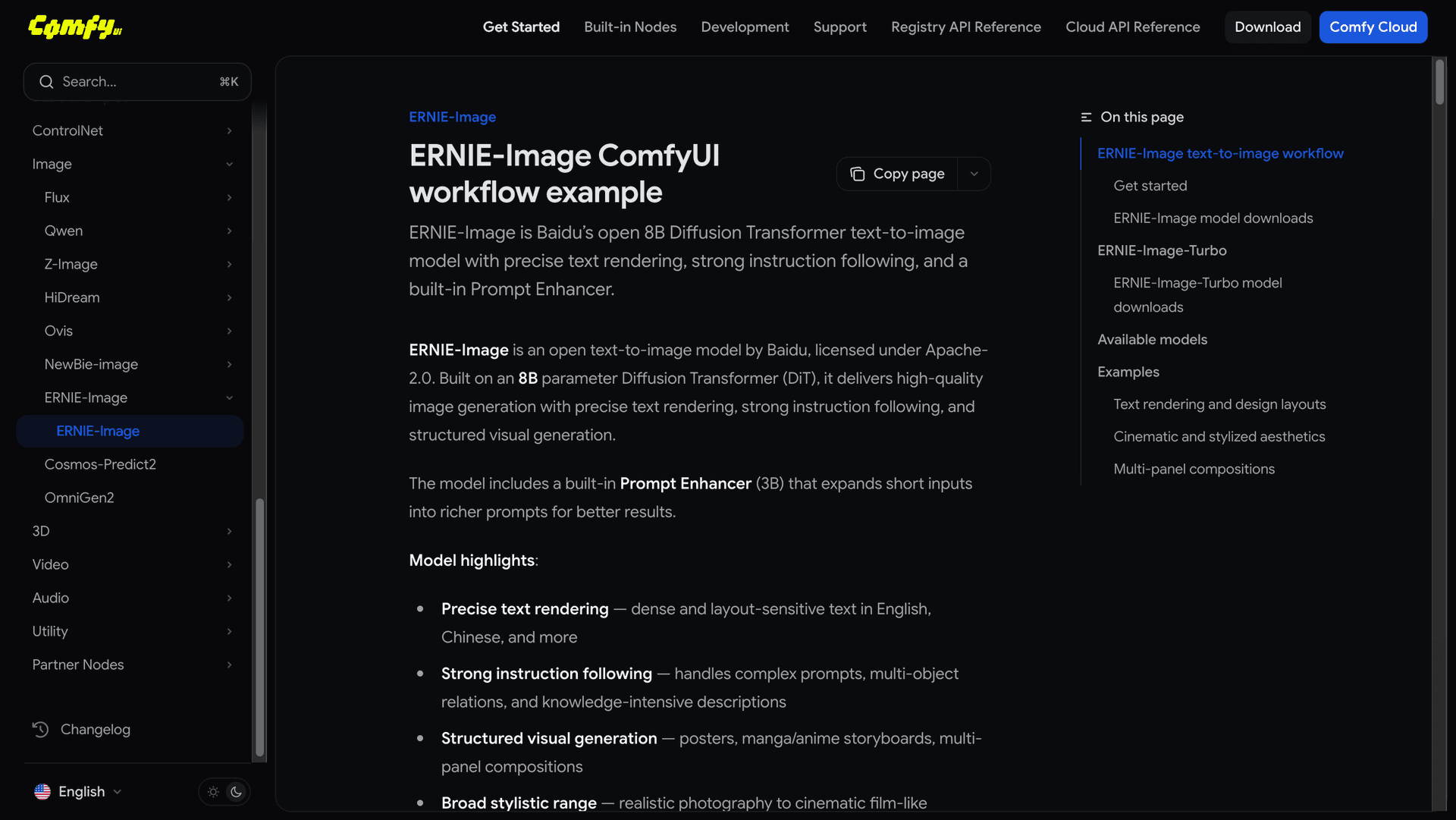
The open-source AI community response to ERNIE-Image has been strong. Within the first week of release, the Hugging Face model page accumulated significant downloads, and multiple community-produced quantizations, LoRAs, and ComfyUI workflow integrations appeared.
The ComfyUI integration is particularly notable because it allows ERNIE-Image to slot into existing image generation workflows alongside other models. Creators can use ERNIE-Image specifically for scenes requiring text rendering and route other generations to faster or more specialized models. This workflow-level flexibility is a strength of the open-source ecosystem that closed APIs cannot replicate.
Several content creation communities have reported significant workflow improvements. YouTube thumbnail creators who previously composited text in Photoshop or Canva after AI generation are now generating complete thumbnails with readable text directly from the model. Print-on-demand sellers who need product mockups with specific text on T-shirts, mugs, and posters are using ERNIE-Image to generate previews that were previously impossible without manual mockup tools.
For creators looking to build a complete AI-powered content pipeline, from writing scripts to generating thumbnails to producing Shorts to creating background music, ERNIE-Image fills what was previously the weakest link in the visual generation chain: images with legible text.
Frequently Asked Questions
Can ERNIE-Image replace Photoshop for adding text to images?
For many use cases, yes. If you need a generated image with prominent text like a title, a sign, a logo-style wordmark, or a short quote, ERNIE-Image can produce this in a single generation step. For precise typography control — exact font selection, kerning adjustments, complex layouts with mixed fonts and sizes — you still need a design tool. Think of ERNIE-Image as eliminating the need for post-processing in cases where approximate but legible text is sufficient.
How does text rendering quality compare to DALL-E 3 or Ideogram?
ERNIE-Image approaches the text rendering quality of DALL-E 3 and Ideogram on Latin scripts and exceeds both on CJK scripts. The gap between open-source and commercial models for text rendering has narrowed dramatically. For most practical purposes, ERNIE-Image's text rendering is production-quality for titles, signage, short labels, and display text.
What GPU do I need to run it?
In FP16, you need 16 GB of VRAM minimum, meaning an RTX 4090, A5000, or equivalent. With INT8 quantization, 12 GB is sufficient (RTX 4070 or equivalent). NF4 quantization can bring it to 8 GB cards but with noticeable quality loss on text rendering. For the best text rendering quality, FP16 on a 24 GB card is the recommended setup.
Is fine-tuning practical for individual creators?
LoRA fine-tuning is very practical. With 50 to 100 images, a single consumer GPU, and a few hours of training time, you can specialize the model on a custom style or brand identity. Full fine-tuning requires multi-GPU setups and is more appropriate for organizations or teams with dedicated compute resources.
Does it work with ComfyUI and Automatic1111?
ComfyUI integration was available within days of release through community nodes. Automatic1111/FORGE support is also available via extensions. The Diffusers library integration makes it compatible with most existing Python-based image generation pipelines.
Can it render handwriting or cursive text?
The model handles handwriting and cursive styles when prompted appropriately, but accuracy is lower than for printed text styles. Handwriting has inherently more variation and ambiguity, which increases the difficulty of maintaining character accuracy. For reliable results with handwritten styles, keep text strings short (two to four words) and specify the style clearly in the prompt.
How does it handle text in languages other than English and Chinese?
The character-aware encoder was trained primarily on English and Chinese text, with secondary coverage of Japanese, Korean, and major European languages. Text rendering quality is highest for English and Chinese, strong for Japanese and Korean, and variable for other languages. Arabic and Hebrew (right-to-left scripts) have been reported as less reliable in community testing.
What about NSFW content or safety filters?
ERNIE-Image ships without built-in safety filters in the base model weights, consistent with the open-source philosophy of leaving content policy decisions to deployers. Baidu provides a separate safety classifier that can be optionally integrated into the generation pipeline. This is the same approach used by FLUX and SD3, where the base model is unrestricted and safety layers are deployment-level decisions.
Conclusion
ERNIE-Image represents a genuine technical milestone for open-source image generation. The combination of 8B parameters in a well-designed DiT architecture, a dedicated character-aware text encoder, reliable text rendering across Latin and CJK scripts, and a fully permissive Apache 2.0 license addresses the three biggest limitations of previous open-source image models: text rendering quality, license restrictions, and multilingual support.
The model is not without trade-offs. It is slower than smaller alternatives, text rendering still degrades on very long strings, and quantized versions lose some of the fine-detail quality that makes the text rendering work. But for the first time, an open-source model offers text rendering quality comparable to commercial APIs under a license that allows unrestricted commercial use. That changes the calculus for every developer and creator evaluating image generation tools.
If you are building any workflow where generated images need to contain readable text — YouTube thumbnails, product mockups, social media graphics, blog illustrations, or AI-generated video frames — ERNIE-Image should be at the top of your evaluation list. And if you want to start generating high-quality visual content without managing model deployments yourself, explore the full suite of AI creation tools on Miraflow AI, including AI image generation, text-to-Shorts, and AI music creation.
References
- GlyphDraw: Seamlessly Rendering Text with Intricate Spatial Structures in Text-to-Image Generation
- AnyText: Multilingual Visual Text Generation And Editing
- ERNIE-Image - Hugging Face Model Card
- ERNIE-Image: Character-Aware Diffusion Transformers for High-Fidelity Text Rendering
- ERNIE-Image Official GitHub Repository
- Text-to-Image Model Comparison — Artificial Analysis
- PixArt-α: Fast Training of Diffusion Transformer for Photorealistic Text-to-Image Synthesis
- HunyuanDiT: A Powerful Multi-Resolution Diffusion Transformer
- Apache License, Version 2.0
- FLUX.1 Model Family — Black Forest Labs
- Stable Diffusion 3 — Stability AI
- TextDiffuser: Diffusion Models as Text Painters
- Scalable Diffusion Models with Transformers (DiT)
- Baidu ERNIE Model Family Overview
- ComfyUI ERNIE-Image Node Pack
- Kolors: Effective Training of Diffusion Model for Photorealistic Text-to-Image Synthesis
- DrawBench: Text-to-Image Generation Evaluation
- ERNIE 4.5 and Open Source Strategy — Baidu World 2025
- Low-Rank Adaptation of Large Diffusion Models
- Ideogram: AI Image Generation with Text Rendering