How to Increase YouTube CTR in 2026: 10 Practical Tips

Written by
Jay Kim
Learn 10 practical ways to increase your YouTube CTR in 2026. Covers thumbnail design, title strategies, analytics tips, and AI prompts you can use today.
Most creators focus on making better videos, but the real bottleneck is often something they barely spend time on. If your impressions are growing but your views stay flat, click-through rate is almost certainly the problem. YouTube can push your content to thousands or even millions of people through Browse, Suggested, and Search, but none of that matters if viewers scroll right past your video.
CTR measures the percentage of people who see your video's thumbnail and title and actually decide to click. Even a small improvement in CTR can dramatically change how many views your videos receive, because the algorithm uses early click behavior as a signal for whether to keep recommending a video or pull it back from circulation.
This guide covers 10 practical, specific ways to improve your YouTube CTR in 2026. Every tip is something you can apply immediately, and several include templates or prompts you can copy and use right away.
What Is a Good CTR on YouTube in 2026
Before optimizing your CTR, you need to understand what a reasonable benchmark looks like. CTR varies significantly depending on your niche, audience size, and the traffic source YouTube is using to show your content. A video surfaced through Browse features will typically have a different CTR than the same video appearing in Search results, because the viewer intent behind each traffic source is different.
For most channels in 2026, a CTR between 4 and 10 percent from Browse and Suggested traffic is considered healthy. Smaller channels with highly targeted audiences sometimes see CTR above 10 percent, while larger channels with broader reach may see lower numbers simply because the algorithm is testing the video against a wider and less targeted pool of viewers.
The number that matters most is your own channel average. If you know your typical CTR across recent uploads, any video that falls significantly below that average is a candidate for thumbnail and title optimization. For a deeper breakdown of what these numbers look like across different niches and traffic sources, the YouTube CTR benchmarks for 2026 guide covers the full picture.
The goal is consistent improvement over time rather than chasing a single magic number.
Tip 1: Redesign Your Thumbnail With a Single Clear Focal Point
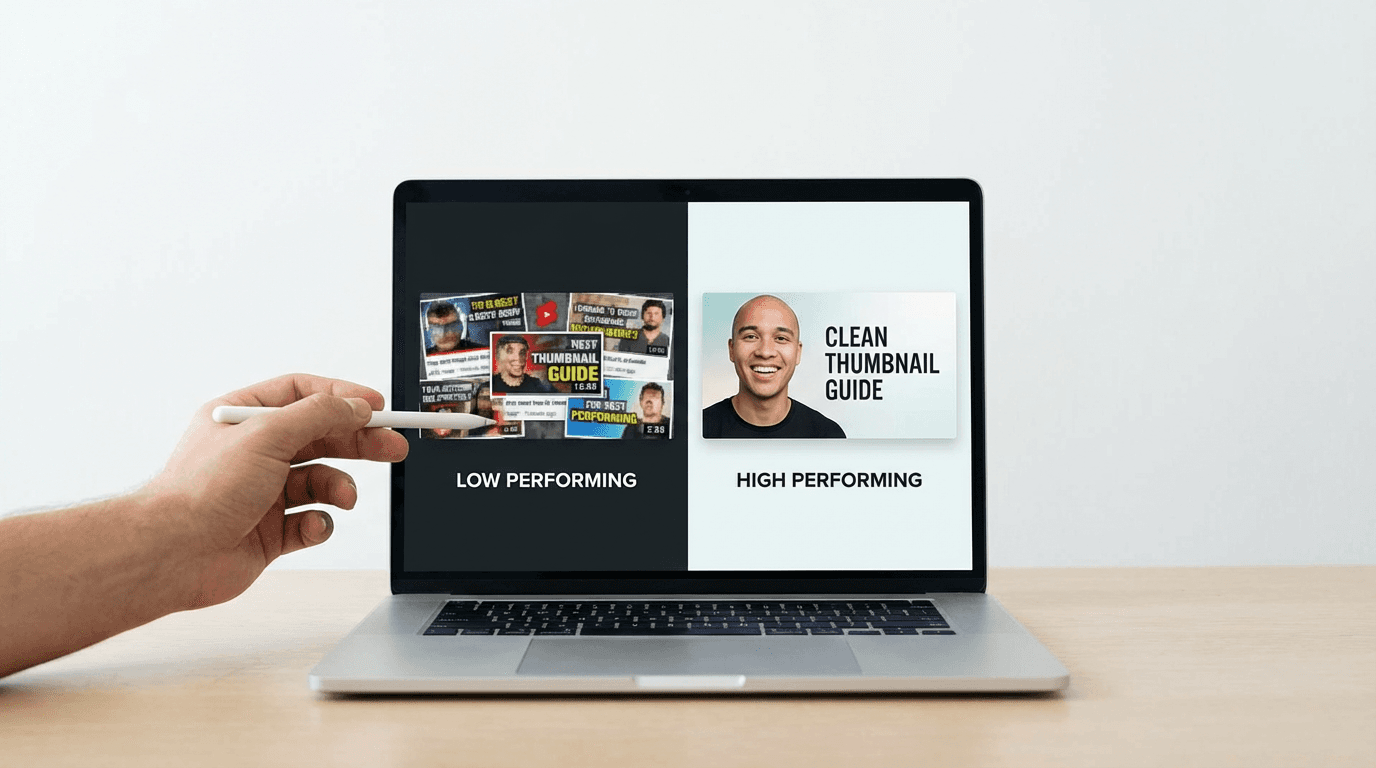
The most common reason for low CTR is a cluttered thumbnail. When there are too many elements competing for attention, the viewer's eye cannot land on anything meaningful in the fraction of a second they spend scanning the feed. The highest-performing thumbnails across YouTube almost always have one dominant visual element that immediately communicates what the video is about.
That focal point could be a face, a product, a dramatic visual contrast, or a bold piece of text. The specific element depends on your niche, but the principle stays the same. Everything else in the thumbnail should either support that focal point or be removed entirely.
A helpful test is to shrink your thumbnail down to the smallest size YouTube displays it, which is roughly 120 pixels wide. If your focal point is still clearly visible and the thumbnail still communicates the video topic at that size, the design is working. If the thumbnail looks like a blur of colors and shapes at small size, the composition needs simplification.
Creators using AI tools can generate multiple thumbnail variations quickly and compare them side by side. The YouTube Thumbnail Maker in Miraflow AI lets you enter a prompt describing your desired composition, upload a reference image of your face or product, and generate a professional thumbnail in seconds. This makes it easy to test different focal point approaches without spending hours in a design tool.
Tip 2: Write Titles That Create a Specific Curiosity Gap
Your thumbnail and title work together as a single unit. If the thumbnail catches attention, the title needs to give the viewer enough context to feel curious while leaving enough unanswered that they need to click. Titles that reveal too much reduce the incentive to watch, and titles that are too vague fail to create any specific curiosity at all.

The most effective YouTube titles in 2026 follow a pattern where they promise a specific outcome, mention a surprising number, or raise a question the viewer did not expect. Phrases like "I tested this for 30 days" or "The one thing nobody talks about" perform well because they create a gap between what the viewer currently knows and what the video promises to reveal.
Avoid generic titles that could describe any video in your niche. A title like "How to Edit Videos" creates almost no curiosity because it does not hint at anything specific, surprising, or valuable. A title like "The Editing Trick That Cut My Production Time in Half" creates a much stronger reason to click because the viewer wants to know what that specific trick is.
For creators who want ready-to-use title structures, the AI prompts for YouTube titles guide has dozens of copy-paste templates organized by content type.
Tip 3: Use Faces With Exaggerated Expressions in Thumbnails
Human faces are the most powerful visual element you can put in a YouTube thumbnail. The human brain is wired to notice and process faces faster than any other visual stimulus, and a face showing a strong emotion creates an immediate connection that pulls the viewer toward clicking.
The key detail that many creators miss is that the expression needs to be exaggerated well beyond what looks natural in person. What feels over-the-top when you are posing for the photo reads as completely natural at thumbnail size. Subtle, relaxed expressions disappear when shrunk down to a small square in a crowded feed.
Eyes are particularly important. Thumbnails where the subject's eyes are clearly visible, well-lit, and looking either directly at the viewer or toward a key element in the thumbnail consistently outperform thumbnails where the eyes are shadowed, squinting, or obscured. If you use your own face in thumbnails, invest a few extra seconds in making sure the lighting on your eyes is bright and even.
For channels that do not feature a face on camera, the thumbnail ideas for faceless YouTube channels guide covers alternative approaches that still achieve high CTR without showing a person.
Tip 4: Match Your Thumbnail Style to Your Traffic Source
Not all impressions are equal, and understanding where your impressions come from can help you design thumbnails that perform better for your specific situation. YouTube surfaces videos through several different systems including Browse features, Suggested videos, Search, and the Shorts shelf. Each of these traffic sources presents your thumbnail in a slightly different context, and the optimal thumbnail design varies depending on which source is driving most of your traffic.
For Browse traffic, your thumbnail is competing against dozens of other videos in a viewer's home feed. In this context, bold colors, strong contrast, and an immediately recognizable subject matter perform best because you need to stand out from a visually dense page.
For Suggested traffic, your thumbnail appears alongside or after a video the viewer is already watching. In this context, relevance to the current video matters more than raw visual impact. Thumbnails that clearly signal they cover a related or follow-up topic tend to get higher CTR from Suggested.
For Search traffic, your thumbnail appears alongside results for a specific query. In this context, clarity matters most. The viewer already knows what they are looking for, so a thumbnail that clearly shows you have the answer they need will outperform a flashy but ambiguous design.
You can check your traffic source breakdown in YouTube Studio under the Reach tab for each video. The YouTube traffic sources guide explains how each source works and how to optimize for it.
Tip 5: Test Multiple Thumbnail Variations Before Publishing
One of the biggest CTR improvements you can make comes from simply not committing to your first thumbnail design. Top creators routinely create two to four thumbnail variations for each video, compare them at small scale, and publish with their strongest option while keeping alternatives ready in case the first choice underperforms.
YouTube allows you to change your thumbnail at any time after upload. If your CTR is below your channel average after the first 24 to 48 hours, swapping in a different thumbnail can give the video a second chance. Some creators have reported significant jumps in views simply from changing a thumbnail on a video that was already days or weeks old.
The most efficient way to handle this is to generate multiple variations at the time of creation rather than going back to redesign from scratch later. AI thumbnail tools make this especially fast because you can adjust a few words in your prompt and regenerate a completely different composition in seconds. The before-and-after thumbnail makeover guide walks through real examples of how small thumbnail changes led to measurable CTR improvements.
Developing a habit of testing and iterating on thumbnails is one of the most reliable ways to improve CTR over time, because each test teaches you something about what your specific audience responds to.
Tip 6: Keep Thumbnail Text to Six Words or Fewer
Text on thumbnails can be extremely effective when used correctly, but the most common mistake creators make is using too many words. At the size YouTube displays thumbnails in most contexts, viewers are scanning quickly and do not have time to read a full sentence. If your thumbnail text requires more than a quick glance to process, most viewers will skip it entirely.
The most effective thumbnail text uses four to six bold, impactful words that reinforce the hook created by the title and visual composition. The text should add information that the image alone does not convey, rather than repeating what the title already says. Think of it as a second headline that works together with the title and image to create a triple hook.
Typography matters as much as the words themselves. Use thick, sans-serif fonts that are legible at small sizes. White or yellow text with a dark shadow or outline ensures readability against any background. Avoid thin fonts, script fonts, or any typeface that becomes difficult to read when shrunk down.
For creators who want to explore different text approaches on their thumbnails, the YouTube thumbnail text ideas guide covers effective text strategies organized by video type and niche.
Tip 7: Build a Consistent Visual Brand Across All Thumbnails
When viewers encounter your content multiple times in their feed, a consistent thumbnail style makes your videos instantly recognizable. That recognition builds trust over time, and trust increases the likelihood of a click. Channels that change their thumbnail style with every upload lose this advantage because returning viewers cannot quickly identify their content in a crowded feed.
Consistency does not mean every thumbnail looks identical. It means the foundational elements stay the same while the content-specific details change. Your background color range, font choice, composition structure, and overall aesthetic should remain stable across uploads. Only the subject, expression, and specific visual elements change from video to video.
Think about the channels you watch regularly. You can likely identify their thumbnails before reading the title or channel name. That instant pattern recognition is the result of disciplined template design maintained across dozens or hundreds of uploads.
The most practical way to maintain this consistency is to define a thumbnail template early and reuse it with minor adjustments for each new video. The guide to building a consistent YouTube thumbnail style with AI walks through how to create a reusable template system that keeps your channel looking professional without requiring design skills.
Tip 8: Align the Thumbnail and Title So They Complement Each Other
A mistake that quietly kills CTR on many channels is publishing a thumbnail and title that say the same thing. When both the visual and the text convey identical information, you are effectively wasting one of your two communication channels. The most clickable videos use the thumbnail to create a visual hook and the title to provide context, so together they tell a more compelling story than either could alone.
For example, if your video is about a surprising test result, the thumbnail might show your shocked face looking at a screen with a blurred number, while the title reveals the nature of the test and hints at the surprising outcome. The thumbnail provides the emotional hook, and the title provides the informational hook. Together they create a much stronger reason to click than either would independently.
To test whether your thumbnail and title work well together, look at them side by side and ask whether a viewer who sees both simultaneously gets a clear and compelling picture of what the video offers and why they should care. If removing the title would not change the message the thumbnail conveys, the pairing needs work.
Tip 9: Optimize Your First Impression for Mobile Viewers
More than 70 percent of YouTube watch time happens on mobile devices, and the mobile experience shapes how your thumbnail performs in ways many creators overlook. On mobile, thumbnails display at a smaller size than on desktop, the title gets truncated earlier, and the feed layout puts more competing content in a tighter visual space.
Designing for mobile means simplifying even further than you might for desktop. Elements that look clear and readable on a large monitor can become indistinguishable blobs on a phone screen. The focal point of your thumbnail needs to be obvious at extremely small sizes, and any text needs to be short and large enough to read without squinting.
A practical check is to pull up your thumbnail on your phone at the same size it would appear in the YouTube app feed. If you cannot immediately identify the subject, read any text, and understand the emotional tone within about one second, the thumbnail is too complex for mobile performance.
Color contrast becomes even more important on mobile because the smaller display size reduces the visual separation between elements. High contrast between your subject and background helps the thumbnail pop in a way that retains its impact across all screen sizes.
Tip 10: Study Your Analytics and Iterate Based on Real Data
Improving CTR is an ongoing process, and the most effective approach is to let your actual performance data guide your decisions. YouTube Studio provides CTR data for every video, and tracking this number across your recent uploads reveals clear patterns about what works and what does not for your specific audience.
Start by identifying your channel's average CTR across the last 20 to 30 uploads. This gives you a baseline. Then look at which videos performed significantly above or below that average. Compare the thumbnails, titles, and topics of your highest-CTR videos against your lowest-CTR videos and look for patterns.
Common patterns you might discover include certain color schemes performing better, certain facial expressions driving more clicks, specific title structures outperforming others, or particular topics resonating more strongly with your audience. These insights are far more valuable than any generic advice because they come directly from your actual viewers.
If a video has strong impressions but CTR below your average, consider creating a new thumbnail and testing it. YouTube often gives videos a second wave of impressions after a thumbnail change, especially if the new thumbnail performs better in the early testing phase.
For a detailed walkthrough of how to read and interpret your YouTube analytics dashboards, the YouTube Shorts analytics guide covers the key metrics and explains what each graph is actually telling you about your content performance.
5 AI Prompts for High-CTR YouTube Thumbnails
These prompts are designed to produce thumbnails that follow the CTR optimization principles covered in this guide. Each one can be used directly inside the YouTube Thumbnail Maker in Miraflow AI by entering the prompt and uploading a reference image if needed.
Reaction Face Thumbnail
Great for commentary, reviews, reaction videos, and any content where personal response is the hook.
Prompt:
Close-up portrait of a content creator with a wide-eyed shocked expression, mouth open in surprise, bright warm studio lighting with soft shadows, vivid gradient background shifting from deep purple to bright magenta, shallow depth of field, YouTube thumbnail composition with the face filling most of the frame, professional quality, vibrant saturated colors, no text
Clean Product Focus Thumbnail
Perfect for tech reviews, unboxing videos, product comparisons, and gadget channels.
Prompt:
A sleek modern smartphone centered on a clean white surface, soft professional studio lighting with subtle reflections on the glass screen, bright mint green to white gradient background, generous negative space around the product, sharp focus with gentle depth of field, product photography composition optimized for YouTube thumbnail, vibrant and polished, no text
Before and After Comparison Thumbnail
Works well for transformation content, tutorial results, makeover reveals, and progress updates.

Prompt:
Split-screen YouTube thumbnail composition showing a dull dimly lit room on the left side with muted colors and a vibrant brightly lit modern room on the right side with warm golden lighting and clean design, dramatic visual contrast between both halves, professional thumbnail layout, vivid colors, bright background, no text
Bold Curiosity Gap Thumbnail
Strong for storytelling videos, investigative content, mystery topics, and reveal-style formats.
Prompt:
A person on the left side of the frame with a shocked open-mouth expression pointing toward the right side which features a bright glowing blurred mysterious object, vibrant background with warm and cool color contrast, dramatic directional lighting highlighting the reaction, YouTube thumbnail composition, professional saturated colors, no text
Consistent Brand Template Thumbnail
Built for channels that want a repeatable visual identity across all uploads.
Prompt:
A YouTube thumbnail template layout with a confident person positioned on the right third of the frame with a friendly expression, solid bright electric blue background on the left two-thirds with a soft gradient, professional studio lighting creating clean shadows, minimal structured composition with clear space for recurring brand elements, sharp focus, vibrant energetic color palette, no text
Why CTR and Retention Work Together
Improving CTR is essential, but it only delivers lasting results when the video also retains viewers after the click. YouTube evaluates both the click and what happens after the click. A high CTR with poor retention tells the algorithm that the thumbnail and title may be misleading, which can actually hurt your video's performance over time.
The ideal combination is a thumbnail and title that accurately promise something compelling, followed by an opening that immediately delivers on that promise. When CTR and retention are both strong, YouTube has a clear signal that your content is worth recommending to more people.
The first few seconds of your video are especially critical because they determine whether the click translates into meaningful watch time. The guide on why the first 3 seconds of YouTube Shorts matter explains how early retention shapes the algorithm's decision to keep pushing your content.
If you notice a video with high CTR but rapidly declining retention, the issue is likely a disconnect between what the thumbnail and title promise and what the video actually delivers in the opening moments. Fixing that alignment will improve both your retention numbers and the long-term trust viewers place in your thumbnails.
How to Apply These Tips to YouTube Shorts
Everything in this guide applies to long-form videos, but most of these principles also carry over to Shorts with some adjustments. YouTube now allows custom thumbnails for Shorts, and using them gives you a significant advantage over creators who rely on auto-generated frames.

Shorts thumbnails display in a vertical 9:16 format, which changes the composition rules. Faces should be placed in the upper third of the frame, text placement shifts from horizontal to vertical positioning, and the overall design needs to be even simpler than a standard thumbnail because Shorts thumbnails display at very small sizes in the Shorts shelf.
The title of a Short still matters for CTR, especially when the Short appears in Search results or the Subscriptions feed. Short, specific, curiosity-driven titles work best in the Shorts format because there is less visual space for the title to occupy alongside the thumbnail.
For a full breakdown of Shorts-specific thumbnail strategies, the YouTube Shorts thumbnail strategy for 2026 covers formatting, sizing, and design approaches tailored specifically for vertical content.
If you are publishing Shorts consistently and want to build a production workflow that covers video creation, thumbnails, and music all in one place, the Miraflow AI content creation dashboard lets you handle the entire pipeline from topic to published Short without switching between multiple tools.
Frequently Asked Questions
What is CTR on YouTube and why does it matter?
CTR stands for click-through rate and it measures the percentage of people who see your thumbnail and title as an impression and then decide to click on your video. It matters because YouTube uses CTR as one of the signals for deciding whether to recommend your video to more people. A higher CTR means more of your impressions convert into actual views, which gives the algorithm confidence to keep showing your content. Even a one or two percent improvement in CTR can lead to significantly more views because the effect compounds as the algorithm increases your reach.
How do I check my CTR on YouTube?
You can check your CTR in YouTube Studio by going to the Analytics section for any individual video and looking under the Reach tab. YouTube shows your impressions, CTR percentage, and how those numbers change over time. You can also see your channel-wide average CTR by looking at the overview analytics for all your recent content. Comparing individual video CTR against your channel average is the most useful way to identify which thumbnails and titles are underperforming.
What is a good CTR for YouTube in 2026?
CTR varies widely depending on your niche, channel size, and the traffic source generating the impressions. For most channels, CTR between 4 and 10 percent from Browse and Suggested traffic is typical. Smaller channels with highly targeted audiences may see higher numbers, while larger channels reaching broader audiences often see lower percentages. The most useful benchmark is your own channel average. Focus on consistently improving your average rather than chasing a universal number.
Can I change my YouTube thumbnail after uploading?
Yes, YouTube allows you to swap your thumbnail at any time after a video is published. Many successful creators take advantage of this by monitoring CTR in the first 24 to 48 hours after upload and replacing the thumbnail if it underperforms their channel average. Preparing two or three thumbnail variations before publishing gives you ready alternatives to test without needing to create something from scratch later.
Does thumbnail text help or hurt CTR?
Thumbnail text can significantly improve CTR when used correctly, but it can also hurt performance if overused. The general guideline is to keep text to six words or fewer, use thick bold fonts that are readable at small sizes, and make sure the text adds information that the image and title do not already convey. If your text is too long, uses thin fonts, or simply repeats the title, it adds visual clutter without improving the click appeal.
How do thumbnails affect YouTube Shorts CTR?
YouTube now supports custom thumbnails for Shorts, and using them gives you control over how your content appears in the Shorts shelf and in Search results. Without a custom thumbnail, YouTube auto-selects a frame from your video which may not be the most visually compelling moment. A well-designed vertical thumbnail with a clear focal point and strong composition can measurably improve your Shorts CTR compared to relying on an auto-generated frame.
How many thumbnail variations should I create per video?
Creating two to four variations per video is a practical target for most creators. This gives you enough options to test different approaches without turning thumbnail design into a bottleneck in your publishing workflow. AI thumbnail tools make this process faster because you can adjust a few elements in your prompt and generate a completely new design in seconds rather than manually rebuilding each variation.
Does improving CTR guarantee more views?
Improving CTR increases the likelihood of more views because it tells YouTube that a larger percentage of people who see your content choose to watch it. However, CTR works in combination with other signals like watch time and retention. If viewers click but leave the video quickly, the algorithm may still reduce distribution. The strongest performance comes from combining high CTR with strong retention, which means your thumbnail and title need to accurately represent what the video delivers.
Conclusion
Improving your YouTube CTR is one of the highest-leverage things you can do for channel growth in 2026. Every percentage point of improvement means more of your existing impressions convert into views, which signals the algorithm to expand your reach further. The 10 tips in this guide cover every major factor that influences CTR, from thumbnail composition and title writing to analytics interpretation and iterative testing.
The most important habit to build is treating thumbnails as a testable, improvable part of your content strategy rather than a one-time design decision. Generate multiple variations, track your performance, swap underperformers, and learn from the patterns your analytics reveal. Over time, your instinct for what works will sharpen and your CTR will steadily climb.
If you want to start generating high-CTR thumbnails right away, the YouTube Thumbnail Maker in Miraflow AI lets you create professional thumbnails from prompts in seconds, with support for face uploads, custom text, and pre-built templates for popular thumbnail styles. For more prompt ideas, the AI prompts for YouTube thumbnails guide has a full library organized by niche and format.