Google Universal Cart in Search and Gemini: What Advertisers and Merchants Must Do Now (2026)

Written by
Aerin Kim
Google launched Universal Cart in the US on October 15. Here is what Shopping and Performance Max advertisers and Merchant Center merchants should fix now, and what Google has not said yet.
TL;DR
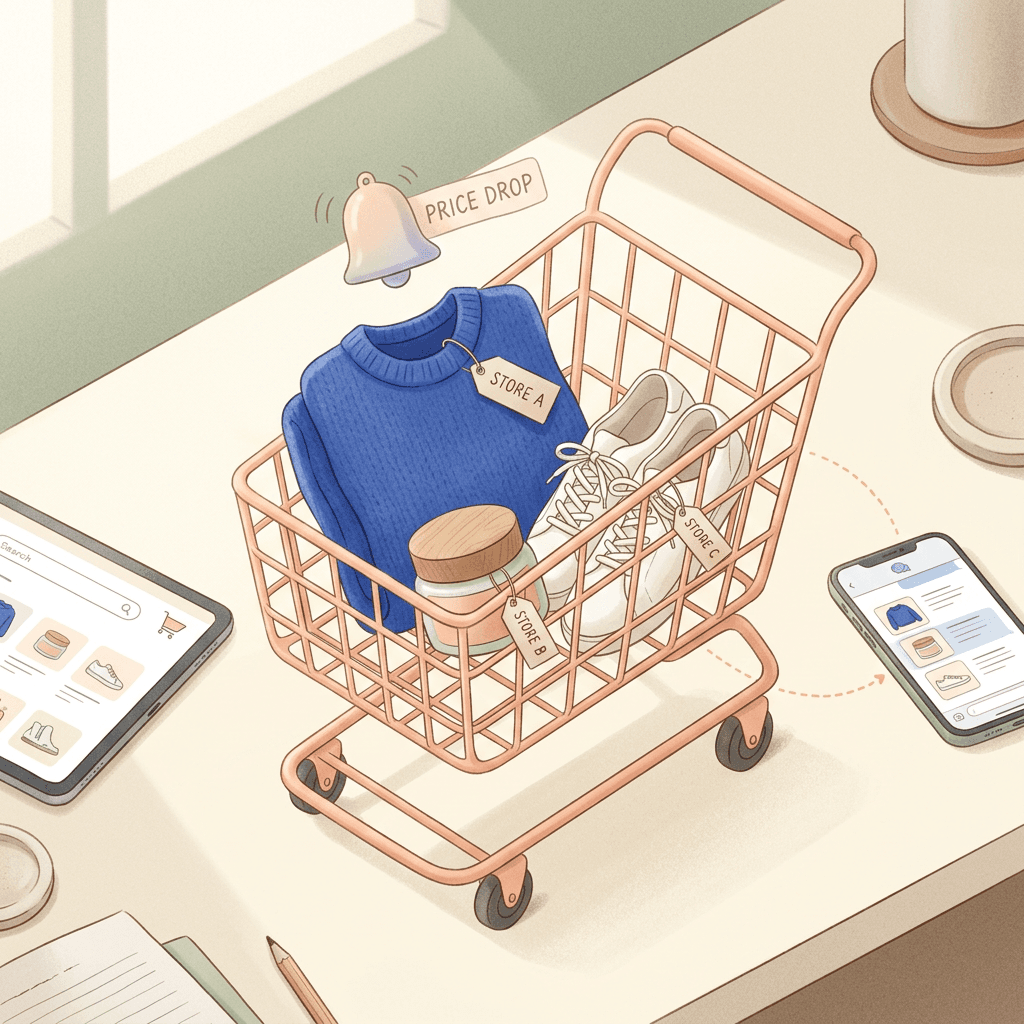
If you run Shopping or Performance Max campaigns, or you manage a Merchant Center account, there is a new shopping surface you do not control yet and cannot fully measure yet. On October 15, 2026, Google began rolling out Universal Cart in the US across Search (including AI Mode) and the Gemini app. Shoppers can save products from several retailers into one cart, get price-drop and back-in-stock alerts, see promo codes, pick the card with the best perks through Google Wallet, and then either pay with Google Pay at participating merchants or get handed off to the merchant's own site with a pre-filled cart. The merchant stays the seller of record either way. It runs on the Universal Commerce Protocol (UCP), the open standard Google has been building out all year.
This guide is written for advertisers and merchants, not for shoppers. It covers what actually shipped, what Google has and has not said (including the question everyone is asking, whether ads will appear in the cart), how a merchant gets in through Merchant Center, what to fix in your feed this week, how automated promotions and the direct offer asset interact with in-cart promo codes, and where your measurement will quietly go dark. Near the end you will find a checklist table, a common mistakes section, and an FAQ. If you also need fresh product imagery and short product videos before the holiday rush, Miraflow's AI image generator and cinematic video generator are covered in their own section below.
A note on sourcing: the facts below come from Google's UCP developer documentation, Search Engine Journal, 9to5Google, PYMNTS and PPC Land. Where a detail comes from one outlet's reading of the documentation rather than from Google directly, the text says so. Where nobody has answered a question yet, the text says that too instead of guessing.
What Google Actually Launched on October 15
Universal Cart was previewed at Google I/O on May 19, 2026, with a promise that it would reach Search and Gemini in the US over the summer. It arrived in mid October instead, and the launch post (announced by Google's Suresh Ganapathy on The Keyword, according to secondary coverage) describes it as an intelligent shopping cart and a hub for shopping on Google. The practical behavior, as reported by Search Engine Journal, 9to5Google and PYMNTS, looks like this:
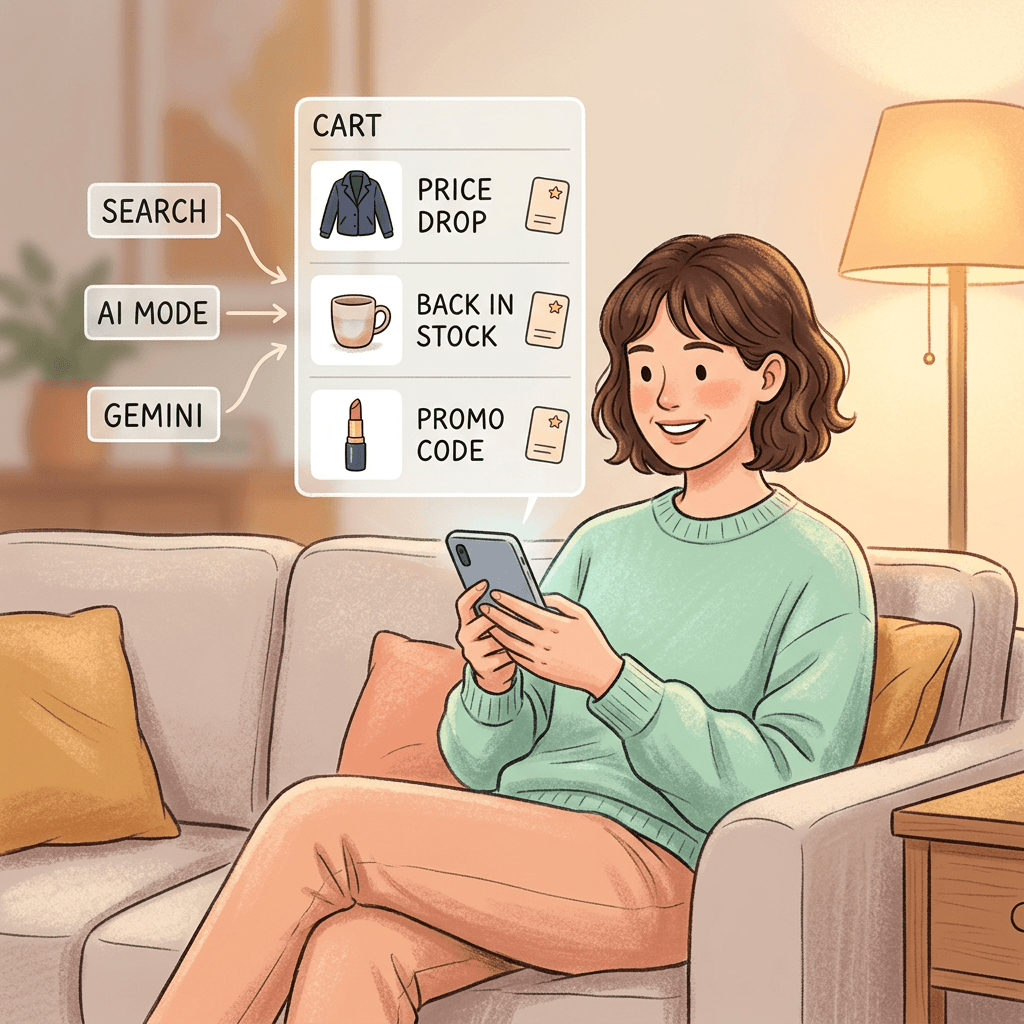
- Products from multiple retailers can sit in one cart, and the cart is shared between Google Search (including AI Mode) and the Gemini app.
- While items are saved, Google watches for price drops and sends alerts. It also sends alerts when a saved item returns to stock.
- The cart is built on Google Wallet and can suggest which of the shopper's cards to use based on card perks.
- Promo codes are shown in the cart, and 9to5Google notes it can surface other offers such as card cashback.
- At participating merchants the shopper can check out with Google Pay inside the cart. Other merchants receive the shopper through a handoff, where the items land in a pre-filled cart on the merchant's own site.
- Google says the merchant remains the seller of record.
Launch merchants reported by Search Engine Journal and others include Nike, Sephora, Target, Ulta Beauty, Walmart, Wayfair and many Shopify merchants. Amazon is not on that list. 9to5Google, for what it is worth, named no retailers at all, so treat the list as reported rather than as an official roster you can check anywhere.
What is missing compared with the May preview
The May preview was bigger than what shipped. According to PPC Land and Search Engine Journal, the I/O version talked about YouTube and Gmail, price history, compatibility warnings for products that do not work together, and loyalty program information tied to Google Wallet. The October launch post covers Search and Gemini only, and it does not mention YouTube or Gmail, price history, or loyalty. It also does not describe autonomous buying by an AI agent. The cart organizes, alerts and hands off, but the shopper still presses the button. Google appears to be drawing a line between agentic features that act for shoppers and tools that give shoppers "confidence and control," and it has placed the cart in the second group.
For an advertiser this matters because it tells you how much to plan around. Plan around Search, AI Mode and Gemini in the US this holiday season. Do not build a YouTube or Gmail cart strategy yet. Google said those were coming and has not said when.
Geography
The launch is US only. A Merchant Center help page dated October 6 reportedly pushed Canada and Australia into 2027, and the UK is later still, according to PPC Land. The Next Web adds that Google has not said whether the cart will reach the EU. If you sell internationally, this is a US feed and US checkout project, not a global one.
How the Plumbing Works: UCP, Cart Transfer and Native Checkout
You can run a good Shopping campaign without ever reading a protocol spec, but with Universal Cart a few technical details decide whether your products can even take part, so it is worth a few minutes here.
The Universal Commerce Protocol is an open standard that lets AI surfaces and merchants talk about shopping actions in a common format. Google's developer page describes it as open source, interoperable with AP2, A2A and MCP, and launched for AI Mode in Google Search and the Gemini app, "starting with direct buying." It uses your existing Merchant Center shopping feeds to reach shoppers, and it lets you keep the Merchant of Record role along with your customer data and post-purchase relationship.
There are two ways a merchant participates in Universal Cart today.
| Cart transfer | Native checkout | |
|---|---|---|
| Where the sale completes | On the merchant's own site, in a pre-filled cart | On Google, with Google Pay |
| What Google sends you | One CreateCart request with all items when the shopper presses transfer | Checkout calls and order lifecycle updates through your endpoints |
| Main technical needs (as reported) | UCP 2026-04-08 or later, profile at /.well-known/ucp, cart capability, matching product IDs | Checkout endpoints, order updates, Google Pay handler, a payment processor that accepts Google's tokens, program addendum |
| Product exclusions (per PPC Land's reading of the docs) | None reported | Subscriptions, personalized, final-sale, pre-order and age-restricted items |
| Tracking on your pages | Checkout stays on your site | Reported: Google Analytics and custom pixels do not fire |
| Merchant of record | You | You |
Cart transfer in plain language
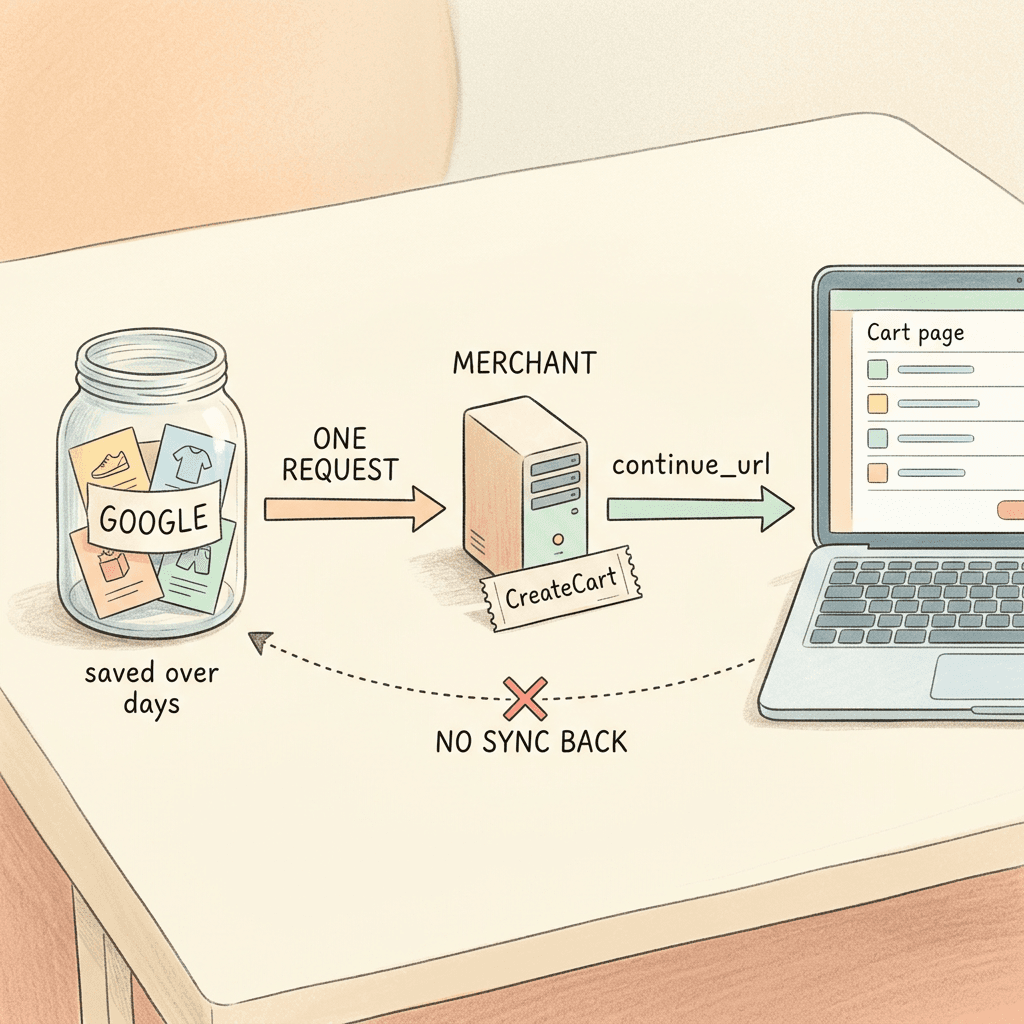
Cart transfer is the lighter path. According to Google's developer docs as summarized by Search Engine Journal and PPC Land, the shopper saves items inside Google, and Google holds those items itself. Your systems hear nothing while the shopper browses and saves. Only when the shopper presses the transfer button does Google send one CreateCart request with all of the items, and your server answers with a continue_url that points to a pre-filled cart on your own site. The first release is one way: creating and transferring a cart is supported, while updating, deleting or syncing cart contents afterward is not.
Two consequences follow, and both are easy to miss. First, price or stock changes that happen after the transfer do not flow back to Google, so the feed has to be right before the shopper ever gets there. Second, you never see saves. Merchant Center reporting for the cart reportedly starts at the transfer, and PPC Land reports the Merchant API alpha adds metrics such as cart transfers and average cart value, with nothing that counts products saved to a cart. Items that were saved and never transferred are invisible to you.
Native checkout in plain language
Native checkout is the heavier path. Google renders the checkout, the sale completes on Google, and the merchant must implement checkout endpoints, order lifecycle updates, and the Google Pay payment handler, with a payment processor that can accept Google's payment tokens. PPC Land's reading of the documentation adds that products only show the Buy button when a native_commerce attribute is set (it defaults to false) and that subscriptions, personalized items, final-sale items, pre-orders and age-restricted goods are excluded. Treat those product exclusions as a reported detail to confirm in Google's own guide, since I could not find them stated on the high-level UCP page.
Google's FAQ is clear on one point that worries many merchants: choosing the native integration does not affect product ranking. Integrated offers gain a direct purchase option, and that is the stated difference.
What Google Has Not Said (and Why You Should Not Guess)
The most useful thing a merchant can do with new Google surfaces is separate documented facts from plausible stories. Here is the list of questions that are still open as of October 19, 2026, based on the launch coverage and the UCP documentation.
Will ads appear in Universal Cart? The launch post says nothing about ads, and the UCP FAQ does not address ads. PPC Land reports that in late May, Google's Nick Fox declined to confirm any ad plans for the cart and called merchandising at the cart stage interesting but undecided. So the honest answer today is that nobody outside Google knows. Anyone telling you there are cart ads, or that there will never be cart ads, is guessing.
How do cart referrals show up in analytics? Not documented. Search Engine Journal could not find guidance on Google Analytics or pixel behavior for Universal Cart beyond a Shopify note covered in the measurement section below.
What do merchants pay? No fee or commercial terms have been disclosed for in-cart transactions, according to PPC Land, and the UCP FAQ lists no pricing.
How are the displayed promo codes sourced and ranked? Undisclosed. Documentation indicates Google sends discount codes into checkout only if you declare the discount capability, but where the codes shown in the cart come from is not explained.
What triggers a price-drop alert? Alerts draw on Google's Shopping Graph, and the threshold is unknown. One analyst speculates that stale sale prices in Google's data could trigger alerts, and he is clear that this is a suspicion and not a confirmed behavior. I raise it here because it affects what you should do with your feed, and we will come back to it.
How are merchants selected? The onboarding process includes joining a waitlist or submitting an interest form, and the UCP guide states that Google must approve your integration before you can go live. Selection criteria, timelines and the number of selected merchants are not published.
Keeping this list on a sticky note is a good habit. When a vendor pitch or a conference slide claims certainty on any of the six points, you now know it is not coming from Google's documentation.
Who Is Eligible and How a Merchant Gets In
Eligibility is the part where most merchants will feel behind, because it is not a checkbox. Here is the sequence as described by Google's UCP overview and the trade coverage.
- Prepare your Merchant Center account. Google's overview names shipping, returns and your product feed. Keep product feeds, brand assets, return policies and business contact details complete and current, which is the FAQ's own advice for Merchant Center.
- Build the technical side. Support UCP version 2026-04-08 or later, publish a UCP profile at /.well-known/ucp, and implement the cart capability for cart transfer. For native checkout, add the checkout endpoints, order updates, the Google Pay handler and the program addendum.
- Use the UCP integration hub in Merchant Center. Search Engine Journal reports that merchants meeting Google's onboarding requirements choose an option there (cart transfer, native checkout, identity linking), and that Google's help page says the hub is rolling out gradually in the US. It reportedly began reaching US merchants on October 6.
- Apply and wait to be selected. Google's overview says integration must be approved before going live. Once selected, merchants reportedly get a sandbox and alerts for feed, returns or account issues.
- Choose optional capabilities. Identity linking with OAuth 2.0 can replace guest checkout, and the discount capability controls whether Google can send promo codes into checkout.
If you sell on Shopify
Shopify merchants are in a different position. Search Engine Journal quotes Shopify's support page saying Direct Checkout is enabled by default for eligible US Shopify stores, and one report says some merchants were matched to their Merchant Center accounts and switched on automatically in September. You can check the setting in Shopify Admin under Sales channels, then Agentic. If you want transactions to stay on your own domain, you may need to turn it off manually. Decide on purpose rather than discovering it in a revenue report in November.
If you run a custom platform
You are in the "build, apply, get selected" order that one analysis describes. You carry development cost before knowing whether Google will select you. If your platform vendor handles checkout (BigCommerce, Adobe Commerce, Salesforce Commerce Cloud and similar), ask them directly what their UCP timeline is before you assign engineering time. I could not verify any vendor timelines, so I will not state them here.
A reality check on the launch roster
One analyst fetched the /.well-known/ucp file for eight named merchants on October 16. Two Shopify stores returned profiles, and Nike, Target, Ulta Beauty, Walmart, Wayfair and Quince returned 404s. That is a single, unverified spot check, and a missing file only means nothing sits at that path, which may simply reflect a different setup or timing. I mention it for one reason: do not assume that a long logo list means a long, easy line to join. Your own integration still has to pass Google's approval.
Feed Hygiene That Matters Most for Universal Cart
Whether or not you are selected for the integration, Universal Cart rests on the same data you already send to Merchant Center. Google's shopping data is the input for price tracking, stock alerts and the product pages the cart links to. A practical rule: anything a shopper can save in a cart for two weeks is a promise your feed makes for two weeks.
Price accuracy and sale price handling
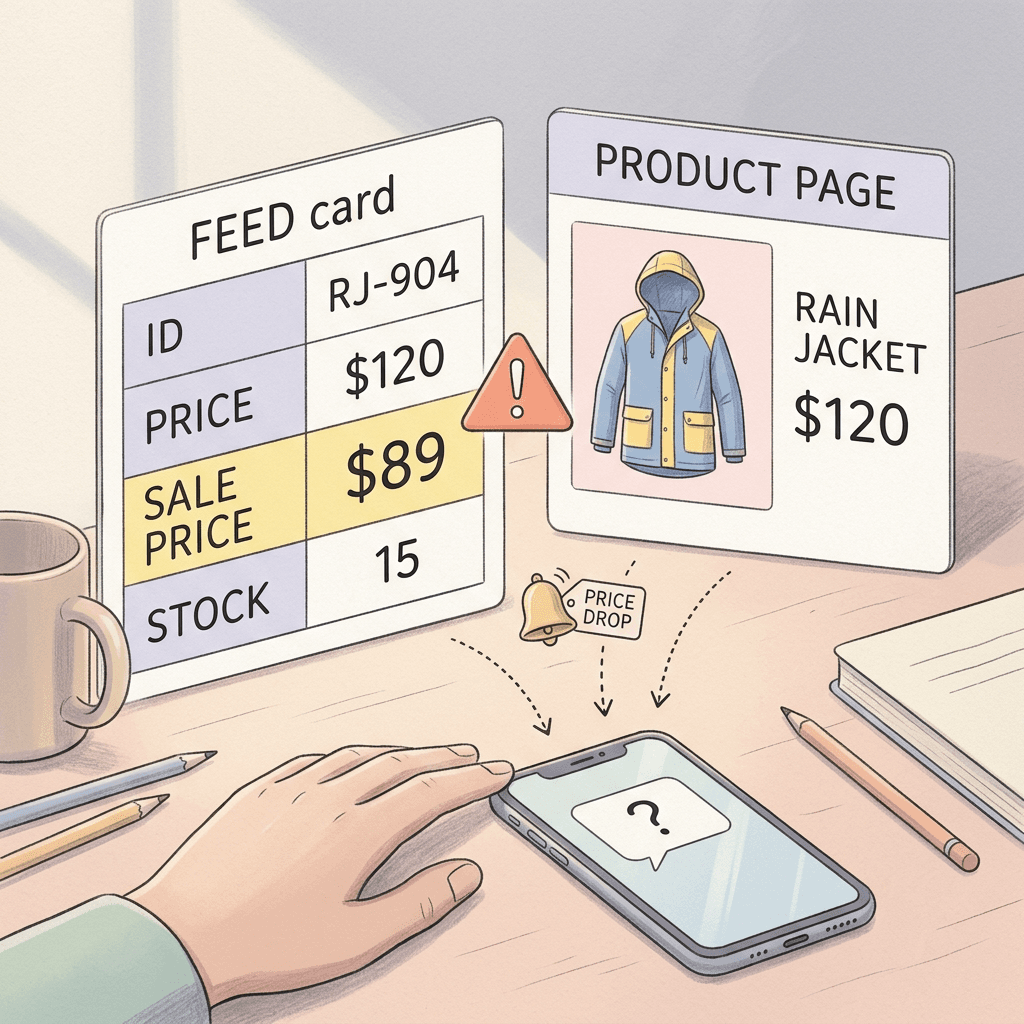
Price-drop alerts are the feature most likely to change shopper behavior. A shopper who saves a $120 jacket and is told it fell to $89 has a reason to act today. If the "drop" turns out to be a stale or wrong sale price in your feed, the shopper lands on a $120 jacket and feels misled, and you inherit the abandoned session plus a possible Merchant Center price mismatch issue.
Here is a hypothetical (numbers invented purely for illustration) of how it goes wrong. A merchant runs a weekend sale price of $89 on a $120 jacket and sets sale_price_effective_date, but the store's system ends the sale at 11 p.m. Sunday while the feed keeps showing $89 until 3 a.m. Monday. A shopper with that jacket in a Universal Cart sees an alert for $89 at 1 a.m. The transfer lands on the site at $120. Nothing in the cart is Google's fault, and nothing about it shows up in a campaign report.
Practical fixes: schedule sale prices with explicit start and end dates and time zones, refresh the feed on a frequency that matches how often prices actually change, and use the Merchant Center diagnostics to clear any price mismatch warnings before the holiday run. Automatic item updates can help with price and availability drift, so check that it is turned on and tested against your actual platform.
Availability and restock
Back-in-stock alerts are the mirror image. If an item is marked "in stock" while the warehouse is empty, the alert drives a wasted click. If an item is marked "out of stock" in the feed while available on the site, you lose the alert entirely. For native checkout, Google's FAQ is specific: as Merchant of Record you are responsible for real-time inventory checks, and out of stock should return the out_of_stock error code so Google can show the shopper a message.
For merchants with variants, make sure availability is variant level (size, color) and not only parent level. A shopper who saved the medium navy sweater cares about the medium navy sweater.
Shipping, returns and tax
Native checkout asks you to validate shipping addresses and recalculate shipping and taxes when a shopper changes the address. The FAQ names address_undeliverable and address_unverifiable for addresses outside your shipping zones. Even if you only plan cart transfer, shipping and returns data in Merchant Center are named in Google's overview as part of preparing your account, and they affect what shoppers see around your listing. Audit shipping speed claims, free shipping thresholds, and return windows so the numbers in Merchant Center match your checkout page character for character.
Identifiers, titles and attributes
The cart needs matching product identifiers between what Google holds and what your cart endpoint receives. PPC Land's reading of Google's docs says transfer to a merchant cart requires a cart endpoint and matching product identifiers. That makes clean, consistent IDs, GTINs and variant structure a precondition, not a nice-to-have. If your feed has duplicate IDs, retired SKUs reused for new products, or variant groups that differ from your site's structure, fix that first.
For holiday visibility more broadly, Google's agentic commerce holiday updates covered the conversational attributes and AI Performance Insights that sit next to this launch. And if you have not checked how September's Merchant Center policy consolidation affects your account, do it now, because a disapproved product cannot be saved by anyone.
Promotions: Automated Promotions, Direct Offer and In-Cart Codes
The cart is explicitly a promo surface. Search Engine Journal reports that it shows promo codes, 9to5Google says it can pull in credit card cashback and other offers, and PPC Land reports that auto-applied promotions come from Merchant Center feeds while shoppers can type up to 10 codes per checkout session. How the codes displayed in the cart are sourced is not documented, so build your promo setup so that it is right on every channel.
Three promotion layers can touch the same shopper, and they do not automatically coordinate.
Merchant Center promotions. The classic promotions feed attaches offers like "20% off" with a code or an automatic discount to eligible products. If you already run promotions, clean up the eligible product sets and the dates.
Automated promotions. Google's automatically generated promotions began auto-enrolling accounts in October, which our automated promotions guide breaks down. If automated promotions are on, Google may surface discounts derived from your pricing data. Combined with a price-drop alert, a shopper may see two different signals about the same product. Check how your pricing and promotions interact before Black Friday, not after.
Direct offer asset. If you are testing promo codes in AI Mode through ads, read the direct offer asset guide. That feature and the cart are separate products. The documentation I found does not say that a direct offer asset feeds the cart, and I will not claim it does. What it does mean is that shoppers in AI Mode are increasingly seeing discount information before they ever reach your site, so inconsistent offers across surfaces will cost you trust.
The discount capability and codes at checkout
For merchants on the integration path, Google's guide ties code delivery to an extension: according to Search Engine Journal's and PPC Land's summaries, Google sends discount codes only if you declare the discount capability as an extension of checkout. If you skip it, Google does not send codes into your checkout. Decide with your finance team whether you want codes passed from Google at all, how stackable they are, and how your code engine handles invalid or expired codes. A cart session where the code fails at your checkout is a poor experience that you own.
A promotion policy worth writing down
Create a single page that states for each channel (Merchant Center promotions, automated promotions, site banners, email codes, affiliate codes) who owns it, what the stack rules are, and the date range. For the next six weeks this is the document that prevents margin leaks when a shopper stacks a price-drop alert, an auto-applied promotion and a typed code. The same page is useful for Black Friday and Cyber Monday creative.

Measurement: Where the Data Goes Dark
This is the section that matters most for people who report to a CFO. Universal Cart introduces journeys where the shopper saves in Google, maybe returns days later, and buys on your site or on Google. Your standard tags were built for a different flow.
What is documented
Search Engine Journal reports the UCP Analytics Reporting dashboard in Merchant Center tracks the funnel from Buy button clicks through purchases and cancellations, and Google's Merchant API reference lists cart transfer metrics (number of transfers, average cart value at transfer), currently in alpha. The same article notes that no listed metric covers products saved to a cart, and that transfers and purchases are tracked separately. Google's UCP navigation also references BigQuery analytics, although the overview page gives no details.
What is not documented
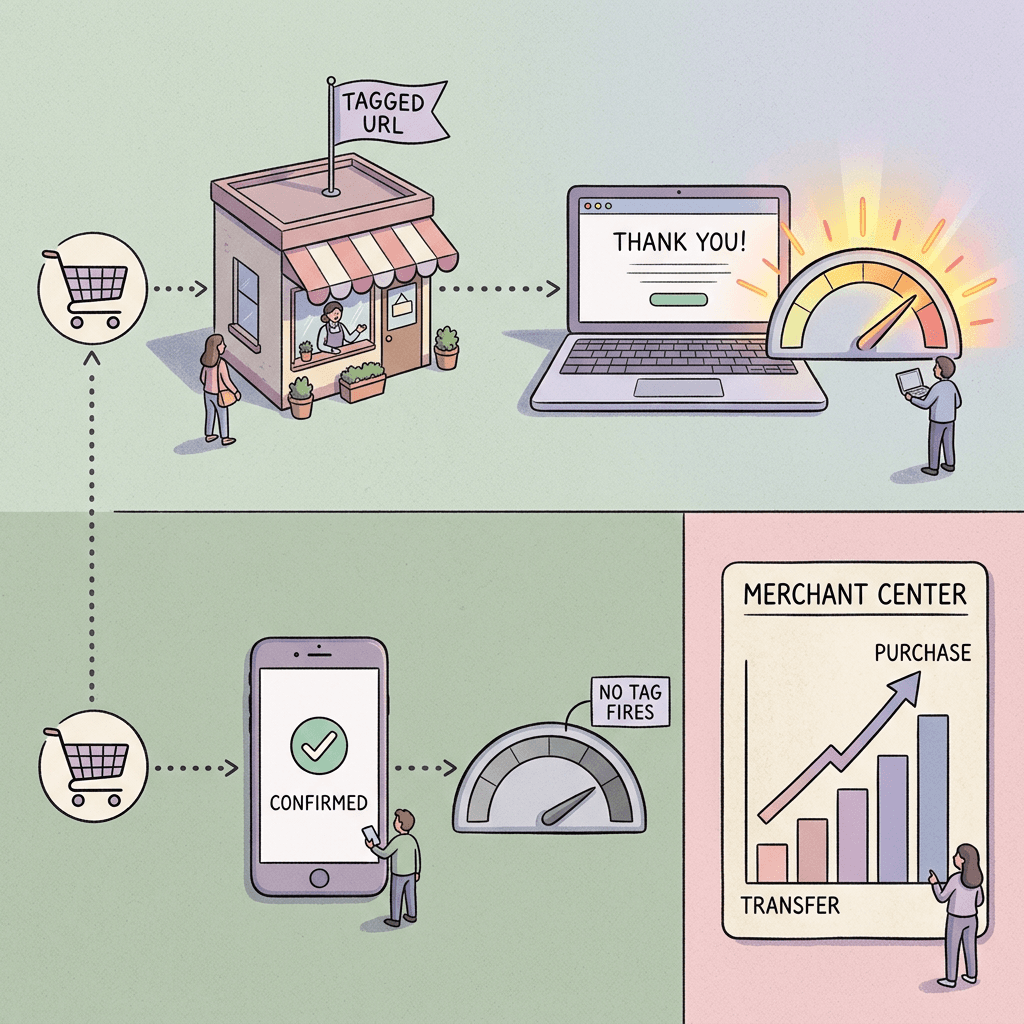
For native checkout, secondary coverage reports that Google Analytics and custom pixels do not fire. Search Engine Journal quotes Shopify's own support page saying this for Shopify's Direct Checkout, and says it could not find out how Universal Cart handles in-cart purchases from Shopify merchants or whether they follow the same flow. So the safe reading is that purchases completed on Google may not appear in your analytics tags, and you should verify with a test order before assuming either way.
Three practical measurement steps
- Tag the handoff. In cart transfer you write the continue_url, so you control the URL the shopper lands on. PPC Land's analysis recommends adding a parameter that marks Universal Cart transfers, since untagged visits look like ordinary Google or direct traffic and cannot be separated later. Pick a parameter name now, document it, and add it to your channel grouping rules.
- Reconcile revenue from three places. Compare Merchant Center UCP reporting, your platform's orders (Shopify, BigCommerce and so on), and Google Analytics weekly. A growing gap between platform revenue and analytics revenue during the holiday weeks is the signature of purchases that happened off your tags.
- Place a test order. Once your integration or Shopify Direct Checkout is live, buy something yourself through AI Mode or Gemini on a test product and check each system. Do not rely on a blog post, including this one, for what your stack records.
What this does to Google Ads reporting
I could not find any documentation on how Universal Cart purchases are attributed to Shopping or Performance Max campaigns, or whether cart-completed sales feed conversions in Google Ads at all. That is the question to ask your Google rep, and to ask before you evaluate any ROAS swings in November. Two behaviors are plausible, and neither is confirmed: sales appear in Google Ads conversions through existing conversion tracking, or they do not appear and your campaign ROAS looks lower than reality. If your tracking relies on a purchase tag firing on your own thank-you page, you already know which one worries you.
Meanwhile, keep your conversion setup healthy. The data strength uplift metric post explains the September measurement updates, and clean first-party data helps whatever the cart does next.
What This Means for Shopping and Performance Max Campaigns
Here is the careful part. Google has not documented any change to how Shopping or Performance Max campaigns bid, serve or report because of Universal Cart. Anything below is reasoning about likely effects, clearly labeled, and not a description of a documented feature.
The click may no longer be the finish line. A shopper sees your product in AI Mode or in a Shopping result, saves it, and later buys from the cart. The ad or free listing that introduced the product did its job at the first step. Whether campaigns get credit for the later sale depends on attribution that has not been explained.
Free listings and ads share the same feed. Shopping ads, free product listings and cart items all draw on the same Merchant Center data. Your feed work benefits every surface, which is why it is the most reliable place to spend time this month.
Margins matter more. If price-drop alerts bring shoppers back at a lower price, a campaign optimized for revenue may sell more at lower margin. Product value optimization lets you tell Google which products matter more, and it is worth reviewing for the holidays.
Impressions and CTR will keep moving. Our analysis of falling Shopping impressions and rising CTR already showed that AI surfaces change the shape of Shopping metrics. Add another surface, and week-over-week comparisons get noisier. Compare against last year only with caution, and annotate the launch date in your reports.
AI Max for Shopping and channel controls. If you use AI Max for Shopping, the AI Max for Shopping explainer has the preparation list, and the channel prioritization and budget controls post covers how to steer Performance Max spend. Neither article claims a link to Universal Cart, and neither should be read as one.
Local inventory. If you run local inventory ads, remember that they were switched on by default in August. A cart that sells an item for shipping while your store pickup data says otherwise is a data consistency problem worth checking for.
A Practical Plan by Merchant Type
Different merchants should do different things in the next two weeks.
Small Shopify store
Open Shopify Admin, go to Sales channels, then Agentic, and confirm whether Direct Checkout is on. Decide whether you want it. Run a test order. Clean your product titles, GTINs and availability. Confirm your Merchant Center connection has no price or availability warnings. Document which analytics will miss native checkout sales, and set up a weekly reconciliation against Shopify orders.
Mid-market merchant on a hosted platform
Ask your platform vendor for their UCP status and timeline, in writing. Fill out the interest form in Merchant Center if the hub is visible. Prepare shipping, returns and feed data. Appoint one owner for promotions across channels. Plan for the possibility that you are not selected before the holiday and make sure nothing in your plan depends on being selected.
Enterprise retailer with an engineering team
Read the UCP guides in full, including the cart capability and the discount extension. Check which UCP version you can support (2026-04-08 or later is required for the cart guide) and plan the cart endpoint for sub-second response, with 429 responses when over limits, which is Google's recommendation. Include your analytics team from day one, because a transfer-only integration raises new attribution questions even when checkout stays on your site.
Merchant selling excluded product types
If most of your revenue comes from subscriptions, bundles, personalized goods, final sale items, pre-orders or age-restricted products, secondary coverage says native checkout does not support them. Cart transfer is likely your only route for those items, and one outlet reports bundles and subscriptions are unsupported in native checkout. Verify in Google's guide before planning around either claim.
The Pre-Holiday Checklist
| Area | Action | Why it matters | Owner |
|---|---|---|---|
| Feed | Clear price mismatch and availability warnings in Merchant Center diagnostics | Alerts and cart links draw on this data | Feed manager |
| Feed | Set sale_price_effective_date with explicit start and end times | Prevents stale sale prices triggering false price drops | Feed manager |
| Feed | Make availability variant level and refresh it as often as stock changes | Back-in-stock alerts and cart transfers depend on it | Ecommerce ops |
| Feed | Match shipping speeds, thresholds and return windows to the checkout page | Shoppers compare what Google shows with what you charge | Ecommerce ops |
| Feed | Audit IDs, GTINs and variant structure for duplicates or reused SKUs | Transfer needs matching product identifiers | Feed manager |
| Eligibility | Check the UCP integration hub in Merchant Center and submit the interest form if shown | Google must approve integrations before go live | Merchant Center admin |
| Eligibility | Get your platform vendor's UCP timeline in writing | Hosted platforms may handle the build | Ecommerce lead |
| Shopify | Check Sales channels, then Agentic, for Direct Checkout and decide on purpose | It is on by default for eligible US stores | Shopify admin |
| Promotions | Write one stack rule page covering Merchant Center promotions, automated promotions, codes and affiliates | Prevents accidental margin leaks | Marketing lead |
| Promotions | Decide whether to declare the discount capability | Google sends codes into checkout only if you do | Marketing and finance |
| Measurement | Add a parameter to the continue_url for cart transfers | Untagged visits look like ordinary Google or direct traffic | Analytics lead |
| Measurement | Run a test order and check Merchant Center, platform orders and analytics | Native checkout may bypass your tags | Analytics lead |
| Measurement | Reconcile platform revenue against analytics every week | A widening gap signals off-tag purchases | Analytics lead |
| Reporting | Annotate October 15 in Google Ads and analytics reports | Year over year comparisons will be noisier | PPC manager |
| Questions to Google | Ask how cart purchases attribute in Google Ads and whether ads are planned | Both are undocumented today | PPC manager |
| Creative | Refresh main product images for thumbnail legibility and add lifestyle and video assets | Cart items appear as small thumbnails | Creative lead |
Common Mistakes Merchants and Advertisers Will Make
Treating Universal Cart as a campaign type. It is not something you create in Google Ads. As of today it is a shopping surface with a Merchant Center integration, and no documented campaign control, so searching Google Ads for a setting will waste time.
Assuming ads will be in the cart. Google has not said so. Do not pre-budget for it, do not promise it to a client, and do not build a deck that treats it as settled.
Waiting to be selected before fixing the feed. The feed work helps every surface and takes weeks to show up in diagnostics. Do it regardless of approval.
Leaving Shopify Direct Checkout on by default without a decision. Some purchases may complete without your analytics tags firing, according to Shopify's support page as quoted by Search Engine Journal. Make the choice deliberately and test.
Ignoring the handoff URL. For cart transfer, the continue_url is the only place you can label the traffic. If you leave it unmarked, you lose the source forever.
Letting sale prices drift. A stale sale price can create a price-drop alert that your site does not honor. The mismatch damages trust more than a missed sale does.
Stacking promotions by accident. Automated promotions, Merchant Center promotions, typed codes and card offers can pile up. Set stack rules and test them with real carts.
Judging performance on partial data. Merchant Center UCP reporting starts at the transfer or Buy click, not at saves. A flat cart number does not mean no interest.
Copying the logo list into your strategy. A named merchant roster tells you who was reported at launch, not how an application will go for you.
Neglecting creative. A cart is a list of thumbnails. Weak product images on a saved item are the easiest thing to lose to a competitor whose photo looks better, which brings us to the next section.
Product Visuals for a Cart-Shaped Shopping Journey
A shopper who saves five products from five retailers and returns a week later is comparing images, not copy. Your saved item shows up as a small thumbnail, so what matters is whether the main image still reads clearly at a small size: a single product on a clean background, correct color, consistent angle, no clutter. After that, the shopper may revisit a lifestyle or video asset, so you want the supporting images and short clips ready too.

This is where Miraflow's AI image generator fits naturally into the workflow. You can generate clean product shots, lifestyle scenes and seasonal variants from a text description or edit an existing photo, and then upload the results to your product feed or your Performance Max asset groups. For ecommerce product photography ideas, the guides on Shopify product photography without a studio and e-commerce product images without a photographer include ready-to-use templates. Here is an example prompt for a thumbnail-safe main product image:
A single ceramic pour-over coffee dripper in matte sage green, centered on a seamless pale warm-grey background, shot from a slight three-quarter angle at eye level, soft diffused studio lighting from the upper left with a faint natural shadow beneath, sharp focus across the whole product, true-to-life color, generous empty margin around the product so it stays readable when shrunk to a small thumbnail, no text, no props, no logos, no watermark.
For a seasonal lifestyle image to use as a secondary asset, try this:
A cozy kitchen counter in early morning light with the same sage green ceramic pour-over dripper set on a glass carafe, steam rising from a freshly brewed cup beside it, a folded linen napkin and a small wooden tray, warm window light from the left, shallow depth of field with the dripper in sharp focus, natural realistic materials, calm holiday morning mood, no text, no logos, no watermark.
Short product clips help the same shopper decide. The cinematic video generator can turn a prompt into a short product ad clip you can use in video campaigns, and Text2Shorts builds vertical videos for Shorts and Reels from a topic. For a prompt that targets a short product clip:
A slow tabletop dolly shot of a sage green ceramic pour-over coffee dripper on a walnut counter, hot water pouring in a thin steady stream, steam drifting upward, warm morning window light, shallow depth of field, smooth camera movement, realistic motion, no text, no logos.
If you want more templates for user-generated style product content, see the AI UGC ad prompts for product and lifestyle content. You can start from the Miraflow home page and move between the image, video and Shorts tools without leaving the browser.
One honest limit applies: AI visuals must represent the real product accurately. Generate backgrounds, settings and variations around real product photos rather than inventing features the item does not have.
Frequently Asked Questions
What is Google Universal Cart?
It is a shared shopping cart across Google Search (including AI Mode) and the Gemini app, launched in the US on October 15, 2026. Shoppers can save products from multiple retailers, get price-drop and restock alerts, see promo codes, and check out with Google Pay or move to the merchant's site.
Do ads appear in Universal Cart?
Google has not said. The launch post does not mention ads, the UCP FAQ does not address them, and PPC Land reports that Google's Nick Fox declined in May to confirm any ad plans for the cart.
Do I need to build a UCP integration to sell through it?
To take part in cart transfer or native checkout you need the integration and Google's approval. Whether products can be saved to the cart without an integration is not explained in the documentation I reviewed, so ask your Google contact.
Is the merchant still the seller of record?
Yes. Google says merchants remain the seller of record, and the UCP documentation says you keep customer data and the post-purchase relationship.
Which merchants are in at launch?
Reports name Nike, Sephora, Target, Ulta Beauty, Walmart, Wayfair and many Shopify merchants. Google has not published a full list that I could find, and one independent spot check of profile files raised questions, so treat the list as reported.
Will Google Analytics see purchases made in native checkout?
Secondary coverage says Google Analytics and custom pixels do not fire in native checkout, and Shopify says the same about its Direct Checkout. For cart transfer, checkout tracking stays on your own pages. Run a test order to confirm what your stack records.
Does choosing native checkout improve my rankings?
No, according to Google's UCP FAQ. Choosing the native integration does not affect product ranking, and integrated offers gain a direct purchase option.
What does it cost?
Fees and commercial terms for in-cart transactions have not been disclosed in the sources I reviewed.
Does it work outside the US?
Not yet. Canada and Australia are reportedly slated for 2027, the UK is later, and Google has not said whether it will reach the EU.
Will YouTube and Gmail get the cart?
Google mentioned both at I/O in May. The October launch post does not mention them and gives no timeline.
What is the single most useful thing to do this week?
Fix price and availability accuracy in your feed, then tag your cart handoff URL and run a test order. Those steps help regardless of how Google's other open questions turn out.
Conclusion
Universal Cart is a real shift in where shopping decisions are collected, but its first release is narrower than the May preview: US only, Search and Gemini only, alerts and organization rather than autonomous buying, and a one-way cart handoff for most merchants. For advertisers the right posture is steady preparation rather than speculation. The feed is the foundation, so make price, availability, shipping and returns accurate. Write down your promotion rules so automated promotions, Merchant Center offers and typed codes do not collide. Tag any handoff URL you control, reconcile revenue across Merchant Center, your platform and analytics, and test an order end to end.
Equally important, keep a running list of what Google has not said: ads in the cart, cart attribution in Google Ads, fees, promo code sourcing and selection criteria. When Google answers, update your plan. Until then, spend effort where the documentation is clear, and bring strong product imagery and short product videos, which you can produce with Miraflow, because in a cart full of thumbnails the image is what gets the second look.