22 AI Black Friday and Cyber Monday Prompts for Small Brands and Etsy Sellers (Copy & Paste)

Written by
Aerin Kim
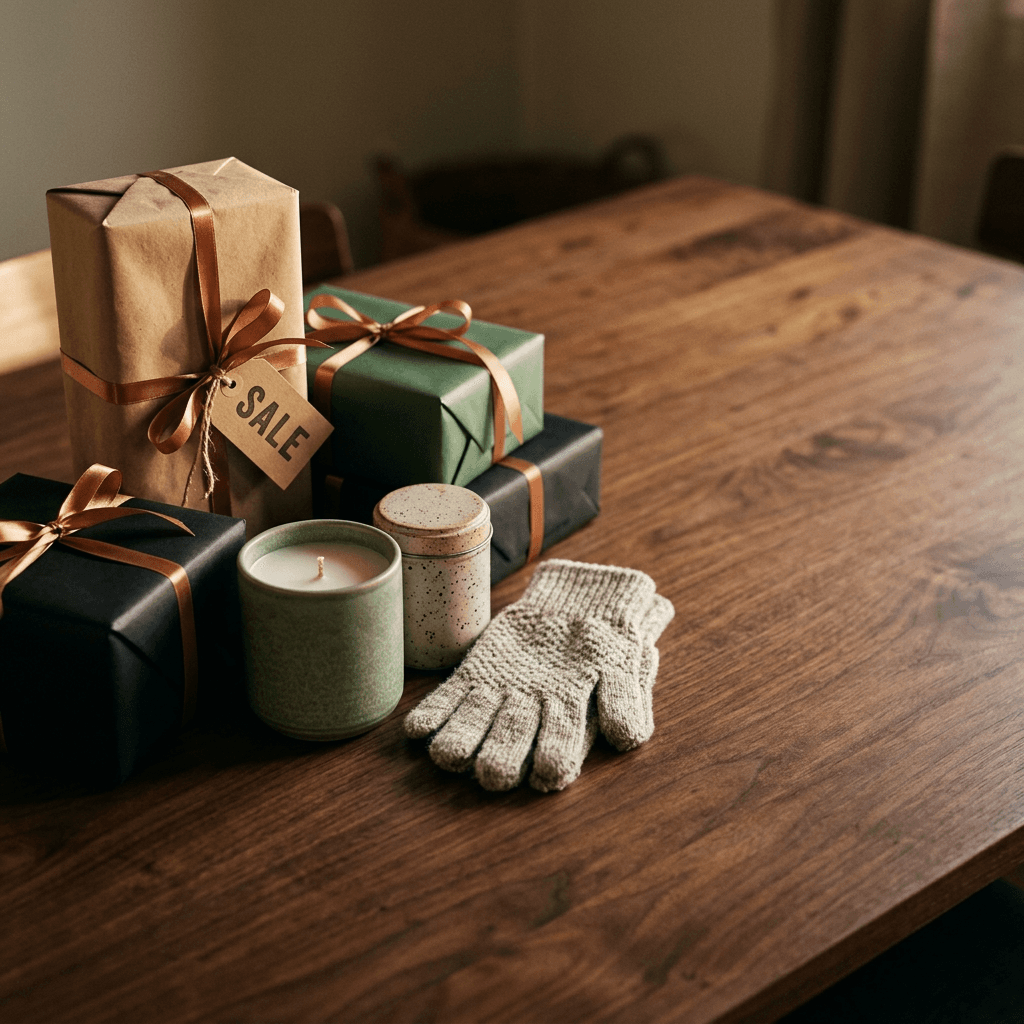
Copy and paste 22 AI prompts for Black Friday and Cyber Monday 2026: sale banners, gift guide product photos, Stories, countdown teasers, email headers, thumbnails, Reels ads and a sale jingle.
If you sell on Etsy or Shopify, or you run a small brand out of a spare room, you probably know the Black Friday scramble. You have a sale to announce, a gift guide to publish, a banner to swap on the homepage, three platforms that each want a different crop, and a budget that does not stretch to a photographer for a week of shoots. Black Friday 2026 lands on Friday, November 27, and Cyber Monday follows on Monday, November 30, which means the creative you want live on launch day needs to be finished in the next few weeks, not the night before.
This guide gives you 22 copy-and-paste AI prompts for Black Friday and Cyber Monday creative, grouped by where the image will actually be used: sale banners and hero images, holiday gift guide product photos, social posts and Stories, countdown and "doors open" teasers, email headers, YouTube thumbnails, and short video ads, plus one prompt for a sale jingle. Every prompt names the surface, the light, the camera distance, the composition, and the empty space you will need for copy, and the ones that include words on the image use short, exact text in quotes such as "BLACK FRIDAY" or "40% OFF", because current image models handle a handful of capital letters far better than a full sentence.

Timing matters here for a practical reason. Most sellers finalize BFCM creative in mid-October so that ads, email flows and Pinterest pins can be scheduled and indexed well before the sale starts. Google also launched Universal Cart in the US on October 15, 2026, across Search and the Gemini app, so shoppers can now save products from several retailers in one place and watch for price drops. If you want the ad side of that shift, our breakdown of Google Ads agentic commerce and holiday updates covers what changed for sellers. The short version for creative is that clean, accurate product images matter even more when a shopper compares your item against five others in a single cart.
You can run every prompt below in Miraflow's AI Image Generator, and the later sections show how to turn the best stills into vertical video and a sale jingle without leaving the browser.
TL;DR: How to Use These Prompts
- Paste a prompt into the text box of the AI Image Generator and choose the aspect ratio listed in the prompt.
- Replace the product, color and sale wording with your own. Keep the lighting, surface and camera details, because they are what make the picture look photographed.
- Keep any on-image text to one to three short capital words. Add longer copy, prices and legal wording in an editor afterward.
- Generate each placement in its own aspect ratio instead of cropping one image five ways, since cropping destroys the empty space you planned for text.
- Use your hero still as the opening frame for a short vertical clip, then add a jingle.
What Makes a Good BFCM Creative Prompt
Most Black Friday AI images look alike for the same three reasons: red and black confetti everywhere, a garbled banner full of fake words, and a product floating with no surface under it. Three habits fix almost all of that.
Ask for short, exact words and nothing else. Image models render "BLACK FRIDAY", "40% OFF" or "CYBER MONDAY" on a paper tag, a chalkboard or a wooden block reliably when you put the words in quotes and say where they sit. They stumble when you ask for a sentence, a date and a price in one image. Treat the on-image text as a label on a prop and add everything else yourself later.
Plan the empty space before you generate. A banner needs a calm area for a headline and a button, an email header needs room across the center, and a Story needs the top and bottom thirds clear of the platform interface. Say it in the prompt: "the left third of the frame is clean dark surface with no objects". Models follow that instruction surprisingly well.
Pick a physical surface and a light direction. Walnut, linen, slate, brushed steel, kraft paper, matte ceramic: a named material gives the model a texture to render. A named light, such as a softbox from the upper left or a single warm lamp, gives you believable shadows. Those two details separate a product photo from a floating render, and our floating product prompts guide is worth a look when you do want the weightless, ad-style look on purpose.
If you are new to staging objects for a flat lay, the flat lay photography prompt pack goes deeper on overhead composition, and the dark moody product photography prompts are a good match for the premium, low-key look that many Black Friday banners use.
1) Sale Banner and Hero Image Prompts
Banners are the first thing a visitor sees on launch day. Generate them wide, keep one side empty, and leave the actual headline and button to your store theme so you can change the offer without regenerating the image.
1. Black Friday Gift Box Flat Lay (Wide Hero)
Use this as the main homepage or Etsy shop banner for the sale. It has one clear subject, a wrapped gift, and a paper tag with the only words in the image.
A wide overhead flat lay on a dark charcoal linen surface, a matte black gift box with a thick copper satin ribbon tied in a neat bow in the right third of the frame, a small kraft paper gift tag attached to the ribbon with the exact words "BLACK FRIDAY" in clean block capitals, a few sprigs of dried eucalyptus and two small brass bells beside the box, the entire left half of the frame is clean empty linen with no objects for headline copy. Soft overhead softbox light with gentle shadows falling to the lower right, visible linen weave and ribbon sheen, 35mm lens look with everything sharp. 16:9 aspect ratio. Photoreal product photography, no extra text, no logos, no watermark, no blurry or distorted details.
Tip: if the tag text comes out wrong, shorten it to one word such as "SALE" or regenerate with the tag described as blank and add your wording in an editor.
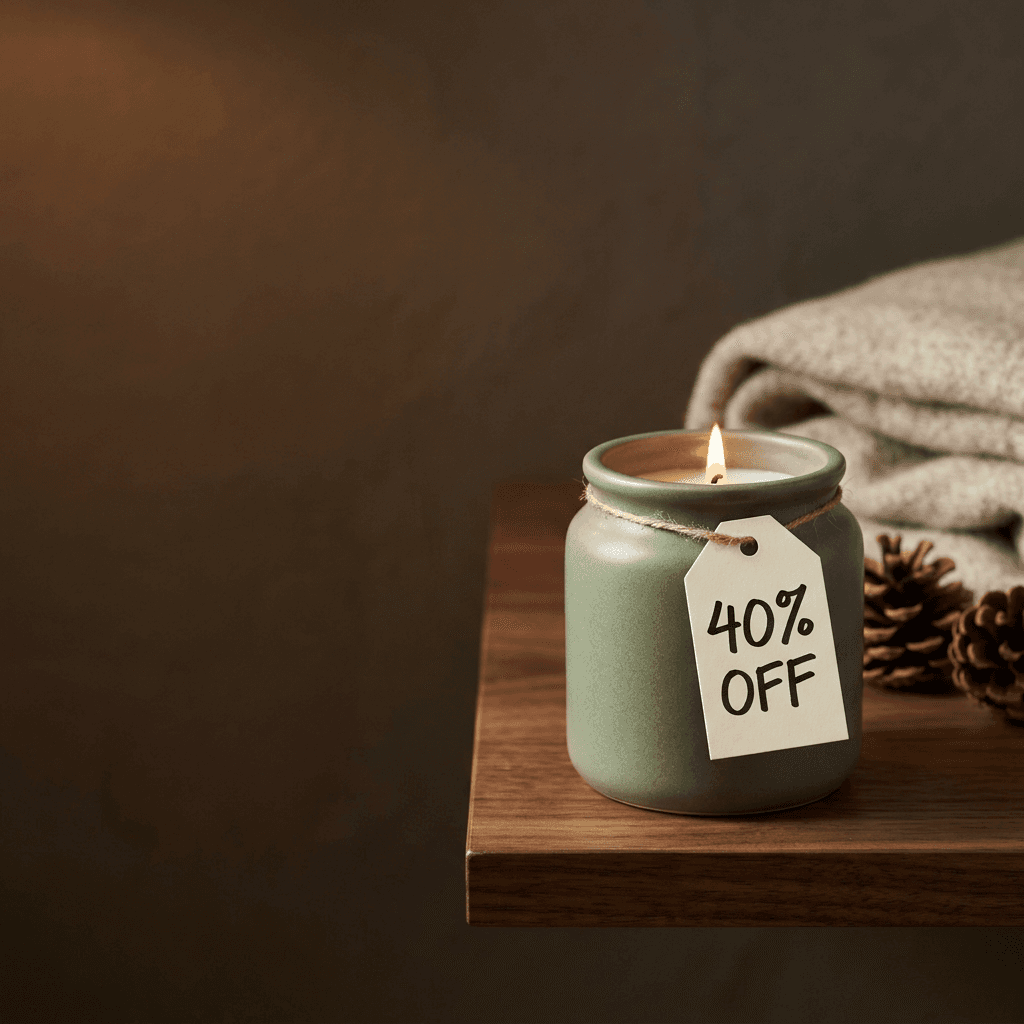
2. Product Hero With a Percent-Off Tag and Negative Space
Use this for a single hero product, such as a candle, a bottle or a mug, when the offer is one clear discount.
A single hand-poured soy candle in a matte sage green ceramic jar with a lit wick, standing on a dark walnut shelf on the right third of the frame, a small cream paper hang tag looped around the jar neck with the exact words "40% OFF" in bold black capitals, a folded oatmeal wool throw and two pinecones softly out of focus behind it, the left two thirds of the frame is calm dark warm brown wall with no objects for a headline. Single warm lamp light from the left creating a glowing candle halo and soft highlights on the ceramic glaze, 85mm lens at f/2 with a shallow depth of field. 16:9 aspect ratio. Photoreal product photography, no extra text, no logos, no watermark.
Tip: ask for the discount number to appear only once. Repeating it on a second prop is how you end up with "40% OFF" turning into "4O% OOF".
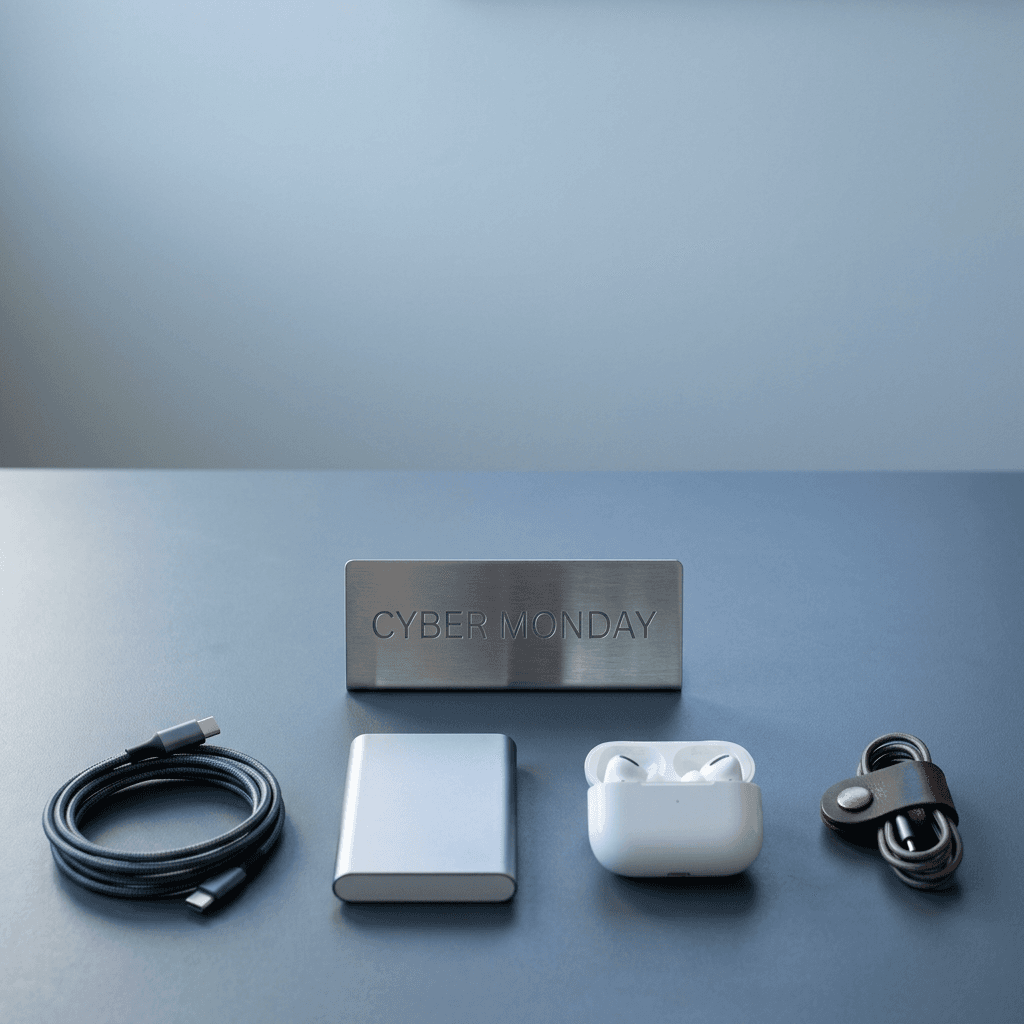
3. Cyber Monday Tech Accessories Banner
Cyber Monday leans toward tech and gadgets, so this prompt uses cool, clean light and a desk surface instead of the warm holiday look.
A wide shot of a tidy matte slate gray desk with a braided USB-C cable coiled in a neat circle, a slim aluminum power bank, a pair of matte white wireless earbuds in their open charging case and a small leather cable organizer, arranged along the bottom third of the frame, a small brushed steel sign standing at the center with the exact words "CYBER MONDAY" engraved in simple capitals, the upper half of the frame is a soft blue-gray gradient wall with generous empty space. Cool daylight from a window on the left with a subtle blue tint and crisp reflections on the aluminum, 50mm lens at f/4 with all products sharp. 16:9 aspect ratio. Photoreal product photography, no extra text, no brand names, no logos, no watermark.
Tip: keep device screens off or blank. Generated screens often show nonsense interface text, and a dark screen looks more premium anyway.
4. "Free Shipping" Bundle Banner for Etsy and Shopify Shops
Use this for a shop-wide offer like free shipping over a threshold, where no single product should be the star.
A wide, front-facing shot of a light oak shelf holding a mixed small-shop assortment: a stack of three folded cotton tea towels, two hand-glazed speckled mugs, a small potted succulent in terracotta, a bar of wrapped soap tied with twine and a kraft paper shipping box with the exact words "FREE SHIPPING" stamped in black ink on the lid, the objects arranged in the lower half of the frame, the upper half is a plain warm off-white wall with space for a headline. Soft diffused daylight from the left, gentle natural shadows, 50mm lens at f/5.6 with the whole shelf in focus. 16:9 aspect ratio. Photoreal lifestyle product photography, no extra text, no logos, no watermark, no distorted objects.
Tip: show products in rough proportion to what you actually sell. Customers notice when a banner promises a shop that looks different from the real one.
2) Holiday Gift Guide Product Photography Prompts
Gift guides are where AI product scenes earn their keep, because you need many products to look like they belong to the same shoot. Use one consistent surface and light across the whole guide, and swap only the product and the supporting props.
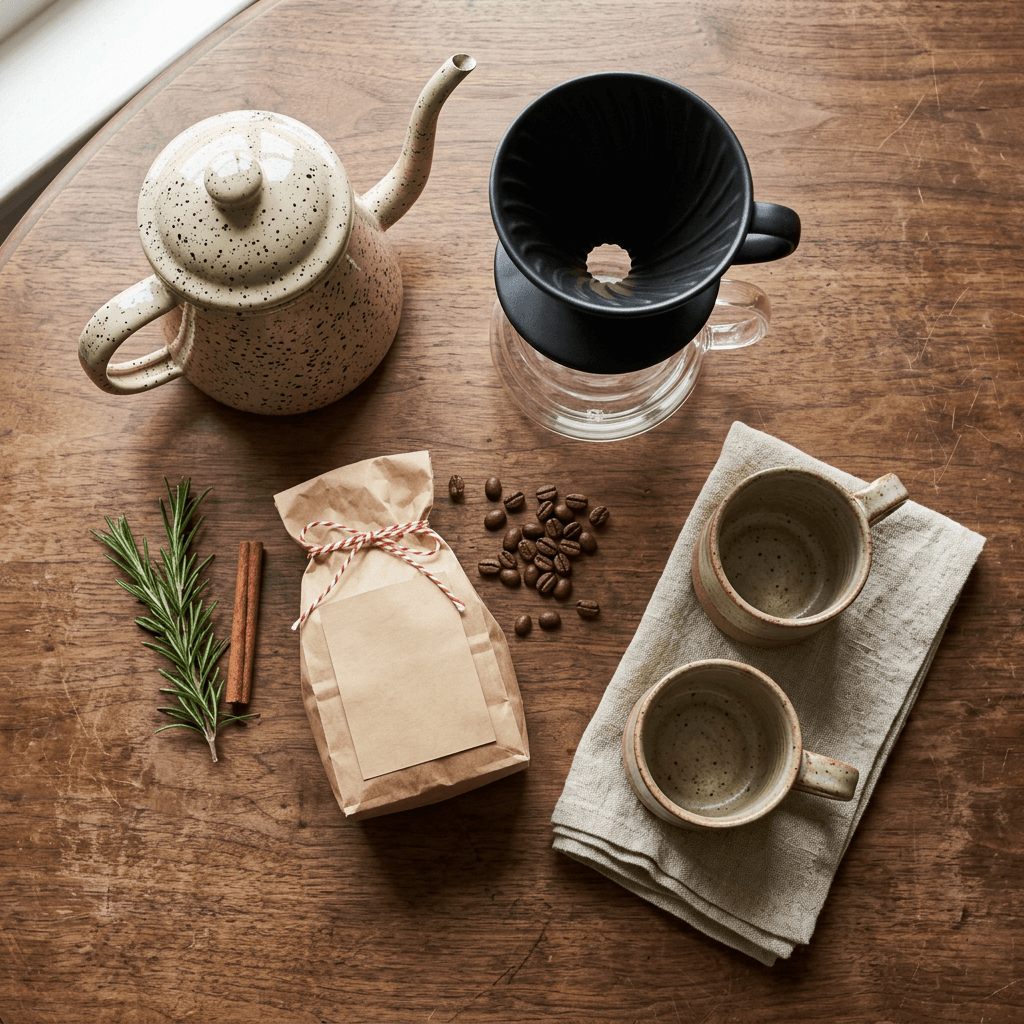
5. Coffee Lover Gift Set
A top-down flat lay on a worn walnut tabletop, a speckled enamel pour-over kettle, a matte black ceramic dripper on a glass server, a small kraft bag of whole coffee beans with a plain blank label, two stoneware mugs and a folded linen napkin, a few loose beans scattered naturally, a sprig of fresh rosemary and a cinnamon stick for a seasonal touch, a thin red and white baker's twine tied around the bag. Soft window light from the upper left with a faint warm tone, visible wood grain and enamel gloss, 35mm lens at f/5.6 with everything crisp. 4:5 aspect ratio. Photoreal editorial gift guide photography, no readable text, no logos, no watermark.
Tip: blank labels and "no readable text" avoid fake brand names. Add your real packaging in the edit step or use image-to-image with your actual product photo.
6. Skincare Trio Gift Set on Marble
Three frosted glass skincare bottles of different heights, a short squat jar and a tall dropper bottle and a mid-size pump bottle, in a matching muted terracotta and cream palette, standing on a pale gray marble slab, a folded cream ribbon draped across the front and a sprig of dried lavender beside them, the background is a plain soft taupe wall. Soft diffused light from a large window on the right, subtle reflections and soft shadows on the marble, 85mm lens at f/4 with all three bottles sharp. 4:5 aspect ratio. Photoreal luxury product photography, plain unlabeled packaging, no readable text, no logos, no watermark.
Tip: for beauty-specific scenes like ingredients and texture swatches, the skincare and beauty brand prompt pack has a longer set to mix in.
7. Cozy Apparel Stack (Beanie, Scarf and Gloves)
A neatly folded stack of knit winter accessories on a pale birch wood bench, a chunky oatmeal ribbed beanie on top, a charcoal wool scarf and a pair of tan leather gloves underneath, a small paper tag looped around the scarf with the exact words "GIFT IDEA" in simple capitals, a few pine needles and a single cinnamon stick as seasonal props, a softly blurred cabin window in the background. Warm diffused window light from the left, visible knit texture and leather grain, 50mm lens at f/2.8 with the top beanie sharp. 1:1 aspect ratio. Photoreal lifestyle product photography, no logos, no brand names, no watermark, no distorted stitching.
Tip: apparel is where AI can drift on stitching and proportions, so show folded items rather than worn ones and always use your real product photo as a reference if fit matters.
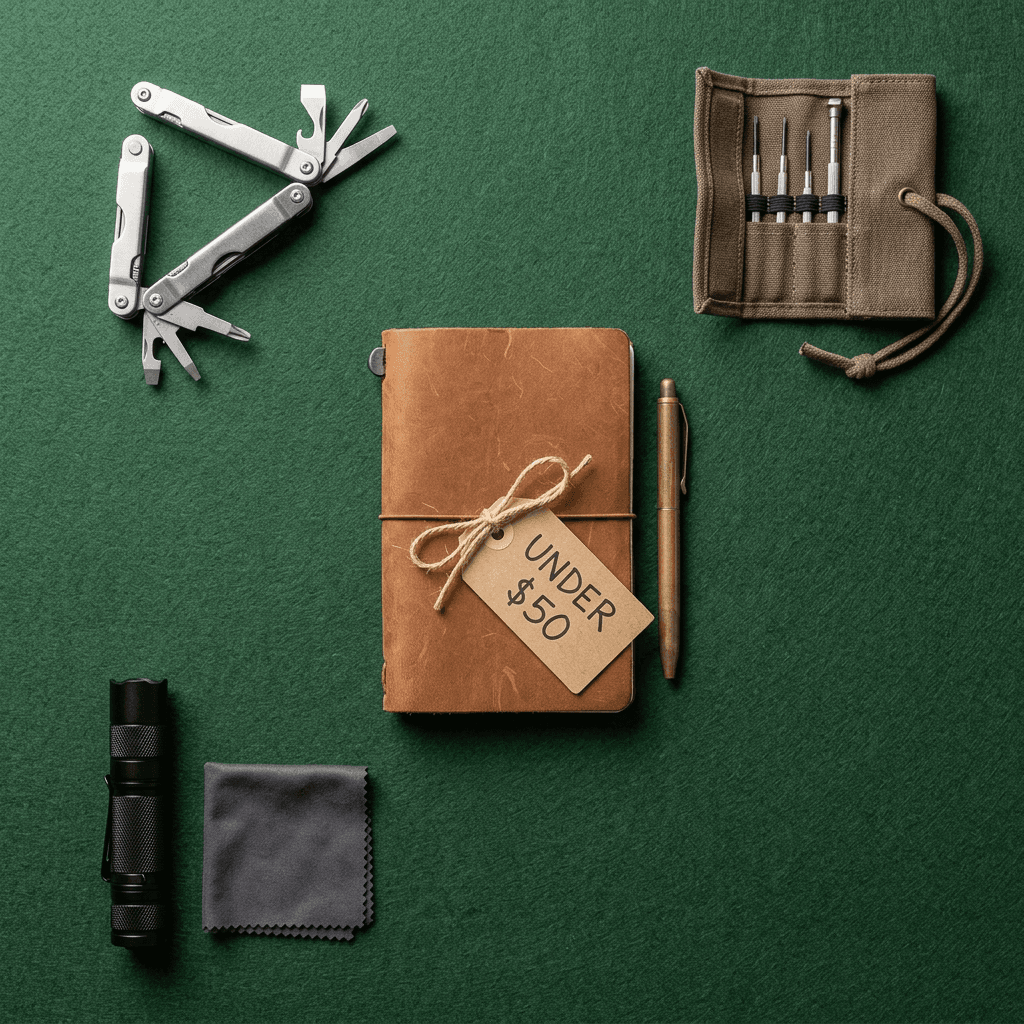
8. "Gifts Under $50" Tools and Gadgets Flat Lay
An overhead flat lay on a matte forest green felt surface of small useful gifts arranged in a tidy grid: a compact steel multitool, a leather-wrapped notebook with a brass pen, a small canvas roll of precision screwdrivers, a pocket flashlight and a folded microfiber cloth, a kraft tag tied to the notebook reading exactly "UNDER $50" in clean capitals, clear gaps between objects for easy cropping into separate shots. Soft overhead softbox light, crisp shadows directly below each object, 35mm lens at f/8 with every object sharp. 1:1 aspect ratio. Photoreal catalog-style photography, no other text, no logos, no watermark.
Tip: the grid layout lets you crop each object into its own product card, which gives you six gift guide tiles from one generation.
3) Social Post Prompts for Instagram, TikTok and Pinterest
Each platform wants a different shape. Instagram feed posts do well at 4:5, Stories, Reels and TikTok covers live at 9:16, and Pinterest pins are usually 2:3. Generate each shape natively and leave the safe zones empty.
9. Instagram Feed Post (4:5) With a Single Deal Callout
A close, slightly elevated shot of a matte black wireless speaker on a rust-colored velvet cloth, a small cream ceramic plate with a stack of three wrapped chocolates beside it, a thin gold ribbon curling across the front, a small paper tag leaning on the speaker with the exact words "DEAL" in bold capitals, the top fifth of the frame is soft empty velvet for a caption overlay. Warm directional lamp light from the right, soft gradient shadows, 85mm lens at f/2.2 with a shallow depth of field. 4:5 aspect ratio. Photoreal product photography, no other text, no brand names, no logos, no watermark.
Tip: post a carousel of three: the hero shot, a detail close-up and a lifestyle shot. The Instagram carousel cover prompts cover cover-slide design.
10. Pinterest Gift Guide Pin (2:3)
A tall vertical composition on a creamy white linen tablecloth, a small arrangement of three wrapped gifts in kraft paper with red twine, a sprig of fresh pine, a pair of brass candlesticks with unlit cream tapers and a ceramic mug of cocoa with a few marshmallows, all objects clustered in the lower two thirds, the top third is plain soft cream space for a large title overlay. Soft window light from the left, gentle shadows, 50mm lens at f/4 with all props sharp. 2:3 aspect ratio. Photoreal editorial style photography, no text, no logos, no watermark.
Tip: Pinterest users plan weeks ahead, so publish pins in early to mid-October instead of waiting for the sale week.
11. Instagram Stories "Sale Is Live" Frame (9:16)
A vertical flat lay on a deep burgundy paper background, a ring of small wrapped gifts in matte gold and black paper arranged around the edges of the frame, a clean empty center space left for a large text sticker, a single small kraft tag in the lower right corner with the exact words "LIVE NOW" in bold capitals, scattered gold foil confetti kept to the edges only. Soft overhead light with subtle paper texture and light shadows, 35mm lens look with everything sharp. 9:16 aspect ratio, keep the top 14 percent and the bottom 20 percent of the frame completely free of objects for the Stories interface. Photoreal product photography, no other text, no logos, no watermark.
Tip: Stories crops differ across phones, so keep anything important inside the central 60 percent of the frame.
12. TikTok and Reels Cover Frame (9:16)
A vertical close-up of a hand-poured ceramic mug of hot cocoa on a rustic wooden board, a small cinnamon stick and a stack of three round shortbread cookies beside it, a softly blurred glowing string of warm lights in the background, a small chalkboard tent card leaning against the mug with the exact words "GIFT IDEA" in white chalk capitals, the upper third of the frame is soft blurred dark background for a title overlay. Warm low lamp light from the left, bokeh highlights in the background, 85mm lens at f/1.8. 9:16 aspect ratio. Photoreal lifestyle product photography, no other text, no logos, no watermark.
Tip: for the ready-made video side of this workflow, the shoppable Reels guide explains how to tag products so a Reel can turn into sales.
4) Countdown and "Doors Open" Teaser Prompts
Teasers build anticipation in the week before launch. They work best as a short series, so keep the same background and change only the number or word.
13. "Doors Open" Teaser With a Closed Shop Sign
A close-up of a small wooden shop door painted deep navy with a brass handle and a round hanging sign on a leather cord with the exact words "OPENS FRIDAY" in white painted capitals, a string of warm fairy lights framing the door and a lantern glowing on the stone step, a few fallen leaves on the ground, the lower third of the frame is plain stone floor with empty space for a date overlay. Warm blue-hour dusk light with the glow of the lantern and string lights, 50mm lens at f/2.8 with the sign sharp. 4:5 aspect ratio. Photoreal tabletop miniature photography style, no other text, no logos, no watermark.
Tip: keep the sign to two words and add the full date in your own overlay, such as "November 27".
14. Countdown Number Blocks Series
Three painted wooden number blocks reading exactly "3", "2" and "1" lined up on a pale oak surface, the "3" block in the foreground sharp and in warm terracotta paint, the other two blocks softly blurred behind in cream and forest green, a few fresh pine sprigs and tiny copper bells between them, the upper left of the frame is clean off-white wall for a headline. Soft window light from the right with a gentle falloff, visible paint texture and wood grain, 85mm lens at f/2.4. 1:1 aspect ratio. Photoreal still life photography, no other text, no logos, no watermark.
Tip: generate the same scene with "2" then "1" sharp as the focus block for a 3-2-1 countdown series, using the same seed or reference image for consistency.

15. Early Access Ticket for Your VIP List
A flat lay on a navy blue felt surface of a stiff cream paper ticket with perforated edges and the exact words "EARLY ACCESS" printed in bold dark capitals, a small brass key lying across the ticket, a folded black satin ribbon beside it and three gold foil stars scattered nearby, the right side of the frame is clean empty felt for a headline. Soft overhead light with a small spotlight glow from the upper left, visible felt fibers and paper grain, 50mm lens at f/5.6. 16:9 aspect ratio. Photoreal still life photography, no other text, no logos, no watermark.
Tip: send an early access email and pin to your best customers first. It rewards your list and gives you a quick read on which offer gets clicks.
5) Email Header Image Prompts
Email headers need to be wide, light on detail in the middle and readable at small sizes. Many email templates display a header around 600 pixels wide, so keep the composition simple enough to survive being scaled down on a phone.
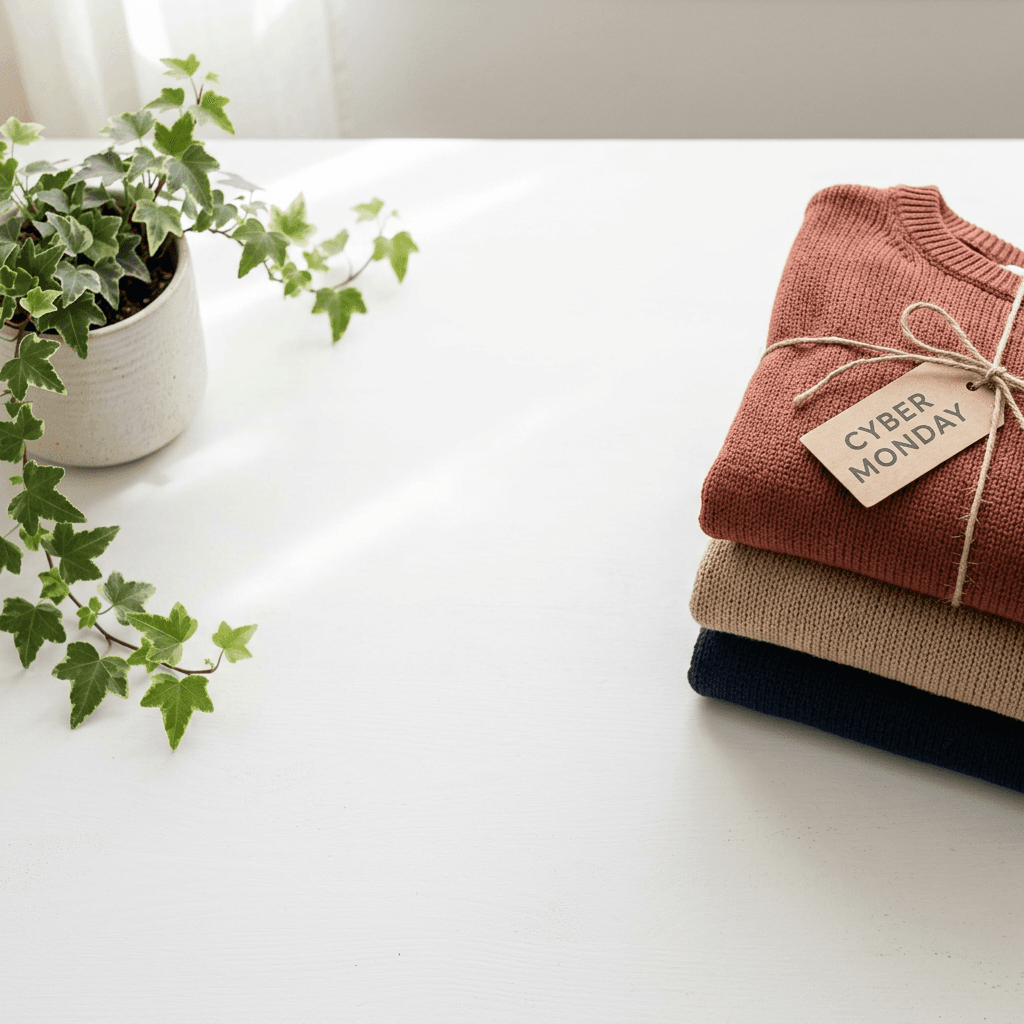
16. Cyber Monday Email Header With Room for a Headline
An ultra-wide panoramic product scene at a 3:1 ratio on a matte white tabletop, a folded stack of three soft cotton sweaters in muted rust, sand and navy on the far right, a small ceramic planter with a trailing ivy plant on the far left, the entire center is clean white space with soft shadows for a headline and a button, a small kraft tag on the top sweater with the exact words "CYBER MONDAY" in clean capitals. Soft diffused daylight from the upper left, gentle shadows, visible knit texture, 50mm lens at f/5.6. 16:9 aspect ratio to be cropped to a wide strip. Photoreal e-commerce photography, no other text, no logos, no watermark.
Tip: the model may not give you a true 3:1, so generate at 16:9 with the objects at the edges and crop the center strip in your email editor.
17. Gift Card Email Header
A flat lay on a soft sage green paper background of a plain cream gift card holder with a thin gold foil border and the exact words "GIFT CARD" in simple capitals, a small satin ribbon tied around it, three small wrapped chocolates and a sprig of dried wheat arranged along the bottom edge, the top two thirds is clean empty sage paper for a headline. Soft overhead light with a gentle warm glow, visible paper grain and foil sheen, 50mm lens at f/5.6. 16:9 aspect ratio. Photoreal still life photography, no other text, no logos, no watermark.
Tip: gift cards are an easy last-minute offer for sellers whose products ship slowly, so give them their own header in the final days before Christmas. The AI Christmas card prompts pair well with this.
6) YouTube Thumbnail Prompts for Gift Guide Videos
Gift guide and deal videos get their clicks from a clear object, high contrast and a short word. Generate the background and subject here, then add the thumbnail text in the YouTube Thumbnail Maker, where you can also upload a face or product image.
18. "Gift Guide" Thumbnail Background
A bold close-up of four brightly wrapped gift boxes in red, forest green, mustard and navy stacked at slight angles on a dark wood table, with a small ceramic mug, a pair of headphones and a candle placed in front, a clean empty dark area on the left half of the frame for large thumbnail text, strong rim light from the back right and a warm fill from the left for high contrast, 35mm lens at f/4 with the front objects sharp. 16:9 aspect ratio. Photoreal commercial photography, vibrant but natural colors, no text, no logos, no watermark.
Tip: keep the main objects large and the background simple, because thumbnails are viewed at a tiny size on phones. The YouTube Shorts custom thumbnails guide is useful if you publish your gift guide as a Short.
19. "Is It Worth It?" Deal Review Thumbnail
A dramatic tabletop shot of a single high-end looking pair of matte black over-ear headphones standing upright on a dark slate surface, a small paper price tag tied to the headband showing the exact words "-30%" in bold white capitals on a red tag, a thin beam of cool light from the upper left and a warm orange back light creating a glowing outline, the right third of the frame is clean dark space for a question overlay. 50mm lens at f/2.8 with a crisp subject. 16:9 aspect ratio. Photoreal commercial photography, no other text, no brand names, no logos, no watermark.
Tip: a thumbnail that asks a question tends to earn curiosity clicks, so pair this image with a title like "Are Black Friday deals worth it in 2026?".
7) Short Video Prompts and a Sale Jingle
A still image is a good start, but Reels, Shorts and TikTok reward movement. You can turn your hero still into a clip with Miraflow's cinematic video generator, or build a full vertical video from a topic with Text2Shorts. For product-ad style content with people using products, our AI UGC ad prompts cover the creator-style angle.
20. Candle Lighting Reveal for a Reels Product Ad
A vertical 9:16 cinematic close-up on a dark walnut shelf, a hand-poured soy candle in a matte sage ceramic jar, a match flares in from the right side of the frame and lights the wick, the flame grows into a steady glow that warms the ceramic and the wood grain, the camera slowly pushes in from medium close-up to a tight close-up of the flame, a small kraft tag on the jar reading "40% OFF" gently sways, soft ambient room sounds, no people visible except the match hand, warm low lamp light, shallow depth of field. 5 seconds, no text overlays beyond the tag, no logos.
Tip: end the clip on a still frame with space at the bottom, so you can add your call to action and the shop name.
21. Gift Unwrapping Price-Drop Reveal for Shorts
A vertical 9:16 overhead video of a pair of hands untying a copper satin ribbon from a matte black gift box on a dark linen surface, the lid lifts away to reveal a folded gray wool scarf, a small tag drops into the frame reading "SALE" in white capitals, the camera stays fixed overhead, soft overhead softbox light with gentle shadows, smooth natural hand motion with no extra fingers, no warped hands, 6 seconds, no logos.
Tip: add a quick text-to-speech line like "Black Friday starts tomorrow" in an editor, and keep the full clip under 10 seconds so it loops well.
22. Sale Jingle Prompt for AI Music
A short sonic hook gives your Reels and videos a recognizable identity. Use the AI music generator at Miraflow in Simple Mode with the instrumental toggle on, or Custom Mode if you want to set the duration, BPM and key.
An upbeat, warm 15 second instrumental sale jingle for a small shop's Black Friday ad, bright plucked acoustic guitar, light handclaps, soft sleigh-style bells and a simple glockenspiel melody in a major key at 112 BPM, a clear catchy four-note motif that repeats twice, a short cheerful ending flourish on the final beat, friendly and optimistic, no vocals, clean mix with room for a voiceover.
Tip: generate three versions and pick the one whose first two seconds are the most distinctive, since that is all a scroller will hear.
How to Customize These Prompts
Every prompt in this pack follows the same pattern, which makes it easy to adapt: a named subject, a named surface, a named light, a camera distance, a composition rule for empty space, and a closing list of things to avoid. When you swap in your own product, keep the rest of the pattern and change one thing at a time.
Matching Your Brand
Replace the colors with your own palette in plain words, such as "dusty rose and cream" or "forest green and brass". If your brand is dark and premium, move to slate, walnut and low-key lighting. If it is bright and friendly, move to white oak, pale linen and soft daylight. A consistent surface and light across banners, gift guide tiles and Stories is what makes a small shop look like a bigger one.
Using Your Real Product
Prompts that describe a generic product are useful for mood boards, gift guide backgrounds and teaser images. When a shopper is going to buy the exact item, upload your real product photo and use image-to-image editing so the product itself stays accurate while the scene changes. Misleading product imagery causes returns and complaints, and some marketplaces and ad platforms have rules about images that misrepresent an item, so check the policies of each place you publish. If you sell through Google, the direct offer asset and promo code update is relevant to how your sale price is shown.
Matching a Set Across Formats
Reuse the same two or three props across all of your placements: the same kraft tag, the same ribbon color, the same wood. If you are building mobile-focused products, the phone case product image prompts show how to keep a consistent catalog look across many SKUs.
Adding Text the Reliable Way
For anything longer than a few capital letters, generate the picture without text, and add the words in a design or editing tool. That includes prices, dates, terms and the legal line about when the sale ends. If you do want text inside the image, keep it to one or two words per image and always check it for typos before you post.
Common Mistakes With AI Black Friday Creative
Asking for too much text. A full sentence with a date, a price and a coupon code in one image is where garbled letters come from. Use one short word on a prop and put the rest in your editor.
Forgetting the safe zones. Stories and Reels cover the top and bottom of the frame with the interface. If your key product or wording sits there, it will be hidden behind buttons and captions.
Cropping one image into every format. A wide banner cropped to a square cuts away the empty space you left for text. Generate each format natively.
Mixing styles across a campaign. A bright flat lay on your banner and a dark moody still on your Stories makes the sale feel scattered. Choose one light and one palette for the whole campaign.
Showing a product that does not match what you ship. A generic candle looks great but if your real candle is a different shape, customers notice. Use your real photo for any product listing.
Waiting until the week of the sale. Generation is fast, but approvals, ad reviews and scheduling are not. Finish creative in October and early November so you have time to test, and so you can use the extra days for a teaser series.
Using red and black on everything. Black Friday does not require red and black. A calm, warm palette often stands out in a feed full of loud banners.
Skipping a mobile check. Preview every banner, header and thumbnail at phone size before you publish. If the text is hard to read at that size, make it bigger or cut it.
Build Your Black Friday Content With Miraflow
Miraflow is built so you can move from a sale idea to a finished set of assets in one browser tab. Use the AI Image Generator for banners, gift guide photos, email headers and social posts, including image-to-image when you want to keep a real product accurate. Use the YouTube Thumbnail Maker for gift guide and deal review thumbnails. Use Text2Shorts and the cinematic video generator for vertical product ads, and the music generator for a jingle to tie them together.
If you want to add a newsletter or a long-form gift guide to the mix, the newsletter cover image prompts are a helpful companion. And if you are also planning a Thanksgiving post for the week before the sale, the Thanksgiving prompt pack uses the same product-photography approach.
Frequently Asked Questions
When are Black Friday and Cyber Monday in 2026?
Black Friday is Friday, November 27, 2026, the day after US Thanksgiving on Thursday, November 26. Cyber Monday is Monday, November 30, 2026.
What is the best AI prompt for a Black Friday banner?
A good banner prompt names the product, the surface, the light and a clear empty area for your headline, plus one short word on a prop such as "BLACK FRIDAY" or "SALE". Prompts 1 to 4 above are ready to paste and adapt.
Can AI image generators spell words like "40% OFF"?
Short, capitalized words and numbers in quotes usually render well on a tag, a chalkboard or a sign. Long sentences, small print and prices often break. Keep on-image text to one to three short words and add everything else in an editor.
What aspect ratio should I use for each placement?
Use 16:9 for website and shop banners and YouTube thumbnails, 4:5 for Instagram feed posts, 9:16 for Stories, Reels, TikTok and Shorts, 2:3 for Pinterest pins, and a wide strip for email headers, around 600 pixels wide in many templates.
How do I make AI product photos for an Etsy or Shopify listing?
Use your real product photo with image-to-image editing so the product stays accurate, and let the AI change the surface, light and background. Use text-only prompts for gift guide backgrounds and mood images.
Is it okay to use AI images in Black Friday ads?
Generally yes, as long as the image does not misrepresent the product or the offer, and you follow the rules of each platform. Check the ad and marketplace policies where you publish, and disclose AI-generated imagery when a buyer might rely on it.
How early should I prepare Black Friday content?
Mid-October is a good target. That leaves time to schedule emails and pins, test ads and run a countdown teaser series in the week before the sale.
Can I turn these images into videos?
Yes. Use a hero still as a starting point for a short clip in the cinematic video generator, or build a vertical video from a topic with Text2Shorts, then add a jingle from the music generator.
How do I keep a whole campaign looking consistent?
Use the same surface, palette, props and light direction in every prompt, and generate each placement in its own aspect ratio.
Conclusion
Black Friday and Cyber Monday creative does not have to be a last-minute rush. With 22 prompts covering banners, gift guides, social posts, teasers, emails, thumbnails, videos and a jingle, you can build a full campaign kit well before November 27. Start with one hero image and one palette, generate each placement natively, keep the on-image text short, and add your real prices and dates in an editor. Then build the rest around that look, and you will have a consistent, professional sale presentation without a photo studio.
Open the Miraflow AI Image Generator, paste the first prompt with your own product, and you will have your hero banner in a few minutes.