22 AI Claymation Prompts for Clay Stop-Motion Images and Videos (Copy & Paste)

Written by
Aerin Kim
Copy 22 AI claymation prompts for clay mascots, pet conversions, products, dioramas, faceless Shorts, stop-motion video and thumbnails, plus the exact words that make AI clay look handmade.
If you have ever typed claymation into an AI image generator and received a glossy, perfectly smooth 3D character that looks like it came out of an animated feature, you have met the main problem with this style. Real claymation looks handmade. You can see thumbprints in the cheeks, a seam where the head meets the body, a soft matte surface that grabs the light like wax, and a tiny set built from foam board, wire and cotton wool. AI models default to clean, shiny, symmetrical renders unless you tell them exactly which physical imperfections to keep.
This guide gives you 22 copy-and-paste AI claymation prompts for 2026, grouped into clay mascots and characters, photo and pet to clay conversions, clay product and food shots for brands, miniature clay dioramas, clay explainer scenes for faceless channels, clay video prompts with stop-motion motion cues, and clay thumbnails. Along the way you will learn the real visual signatures of stop-motion clay, the exact words that make a model reproduce them, and how to fake the stuttery, on-twos rhythm of real stop-motion in AI video.
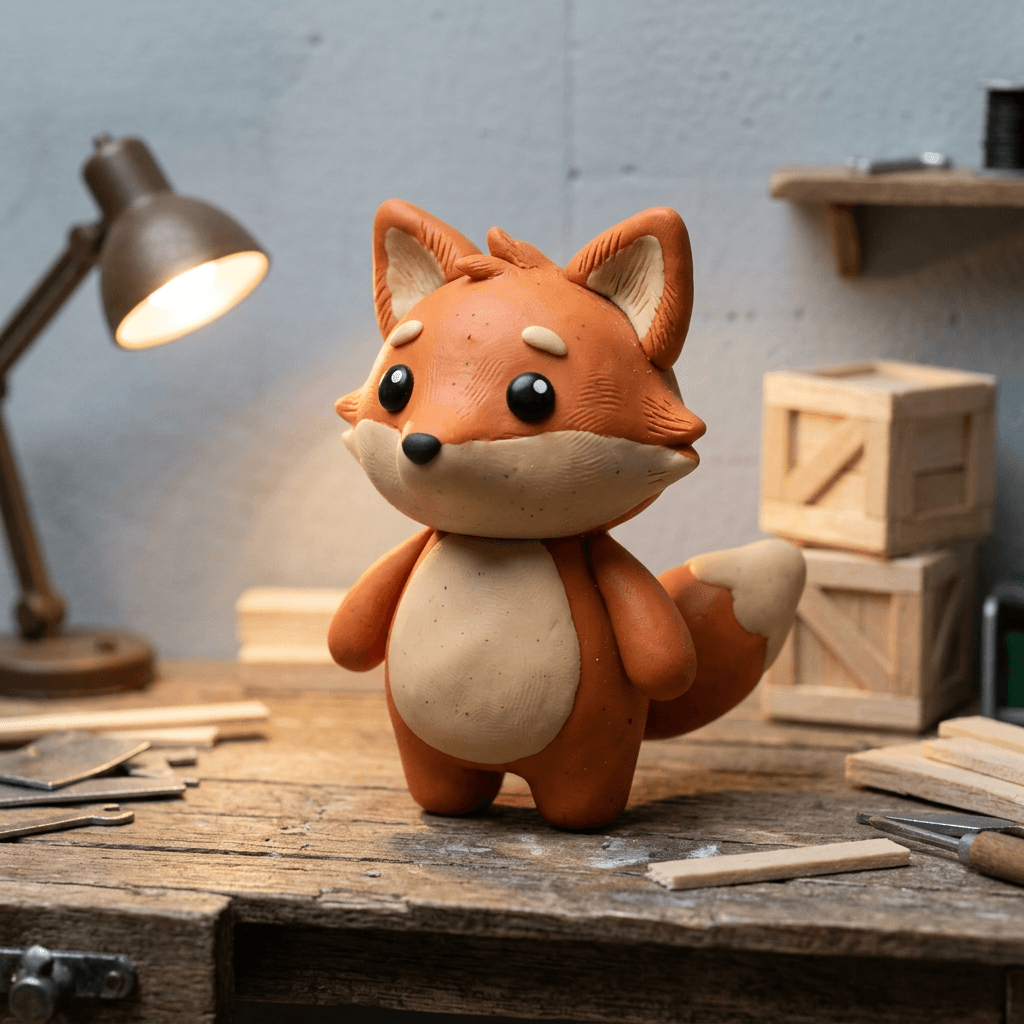
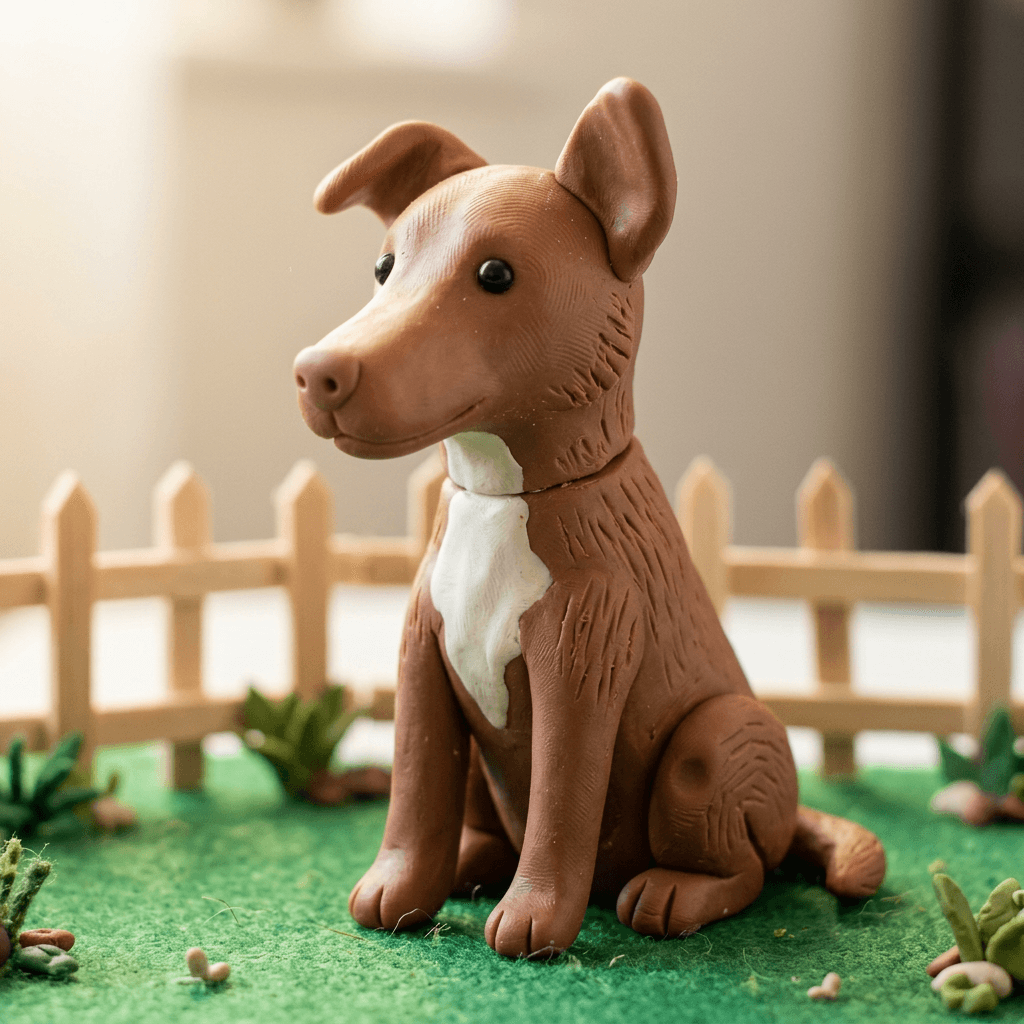
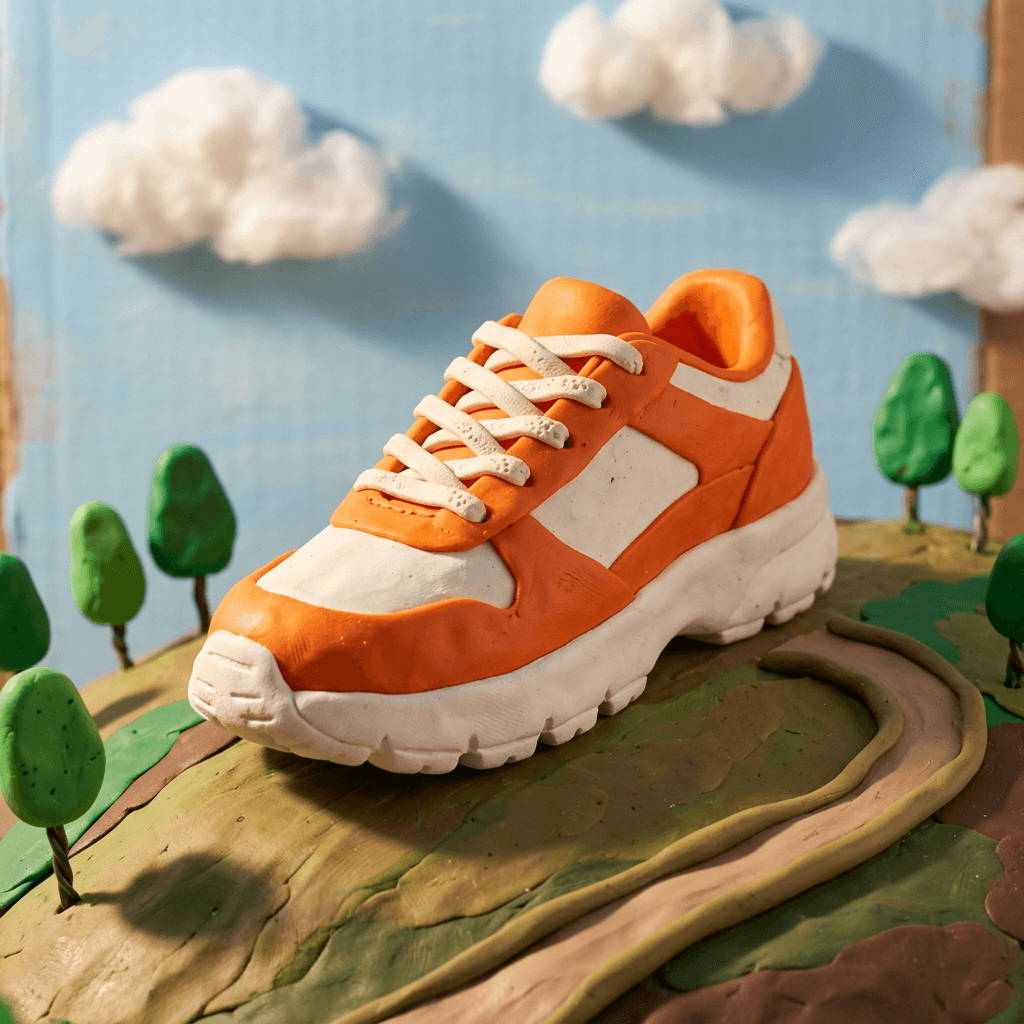
Every image in this post is an example output of the prompt printed next to it, rendered as a photograph of a real plasticine set. You can run all of the prompts in Miraflow's AI Image Generator, animate the stills or write video prompts directly in the Cinematic AI Video Generator, and turn the whole thing into a vertical clay explainer with Text2Shorts.
TL;DR: How to Get AI Images and Videos That Look Like Real Claymation
- Name the material first: handmade plasticine or polymer clay, not 3D render, not vinyl, not plastic toy.
- Ask for evidence of hands: fingerprint ridges, thumb dents, wire-loop tool marks, a visible seam, slightly uneven symmetry.
- Ask for a matte, waxy finish with no glossy plastic highlights, and for a miniature set made of real materials such as foam board, balsa wood, felt and cotton wool.
- Light it like a real tabletop shoot: one warm practical lamp or a small studio light, hard-edged shadows, shallow depth of field at macro distance.
- For video, ask for animation on twos at about 12 drawings per second, held poses, a slight boil in the surface texture and no motion blur, and keep the camera locked off or moving in small jumps.
- Reuse one character description word for word in every prompt so your clay hero stays the same across shots.
Why Claymation Prompts Are Worth Learning in 2026
Claymation sits in a useful spot for creators. It reads as warm, handmade and a little funny, which makes it a natural fit for children's stories, cozy explainers, food content, product launches for friendly brands and faceless Shorts channels that need a recognizable look without showing a human. Several AI video and image tools now advertise dedicated claymation styles or templates, and guides from vendors such as Luma, Opus Pro, Dreamina and Magic Hour all describe the same recipe: name the clay, add thumbprints and imperfections, light it warmly, and ask for a stuttery frame rate.
Searches around this topic tend to mix a few phrasings: claymation AI prompt, clay animation style, stop motion AI and plasticine style. They describe the same underlying wish, which is a handmade look that does not feel like a filter. That is also why the style travels well between formats. A clay character works as a profile picture, a thumbnail, a product mascot, a Short and an ad, as long as you keep the material cues consistent.
It also stands out in a feed full of smooth renders. If you have already explored the glossy side of character prompts in our Pixar-style AI portrait prompts, clay is the opposite end of the spectrum: imperfect, tactile and obviously made by hands. Other tactile trends use the same logic, as you can see in our AI knitted world prompts and the miniature diorama prompt pack.
One note on originals. Prompt for the technique, not for a famous studio. Naming a studio or its characters pushes the model toward copying a specific look and characters you do not own, and it usually produces worse results than describing the material, the lighting and the motion. Every prompt below describes the craft instead, so you end up with your own characters.
What Real Claymation Looks Like (and Why AI Gets It Wrong)
Before the prompts, it helps to know what you are imitating, because every one of these details can be turned into a prompt word.
Plasticine and polymer clay. Most classic clay animation uses plasticine, an oil-based modeling clay that never hardens, so animators can keep reshaping a character between frames. Polymer clay is also common for small parts. Plasticine has a soft, slightly waxy surface that is matte rather than shiny, and it picks up every touch.
Fingerprints and tool marks. Hands leave fingerprint ridges and thumb dents, and sculpting tools leave fine lines, such as the grooves from a wire-loop tool on fur or the dots left by a pressed point. Smooth AI renders have none of this, so the single biggest realism upgrade is asking for it by name.
Seams and joins. Clay is built from separate pieces: balls, coils and flattened pads pressed together. A thin crease where an ear meets a head or a coil of clay wraps a body is a strong visual clue.
Armatures. Characters that move are built on a posable skeleton of twisted wire or ball-and-socket metal joints, covered in clay. That is why real clay characters can lean forward, balance on one foot and hold a pose for many frames. When you prompt for a pose, ask for a pose a wire skeleton could hold, not a pose that needs a flying camera or impossible balance.
Miniature sets and practical lighting. The world is built at tabletop scale from foam board, balsa wood, felt, paper, fabric, sand, painted card and cotton wool for clouds or smoke. It is lit by small practical lamps, which creates hard shadows, warm pools of light and a shallow depth of field because the camera is only centimeters from the subject.
Boil and cadence. Because an animator reshapes the clay slightly between frames, surface texture shifts from one frame to the next. Fans call this boil or chatter. Many productions also animate on twos, which means each pose is held for two frames. At 24 frames per second that is 12 distinct poses per second, the stuttery rhythm people describe as stop-motion. Animating on ones gives 24 poses per second and looks smoother.
Replacement animation. For speech, animators often swap in pre-sculpted mouths or whole faces for each sound instead of reshaping one mouth. The result is slightly snappy, deliberate lip movement.
Here is a set of replacement mouths for one character, the same trick you can describe in a video prompt. Notice the thumbprints on every piece and the matte finish that does not reflect the lamp.
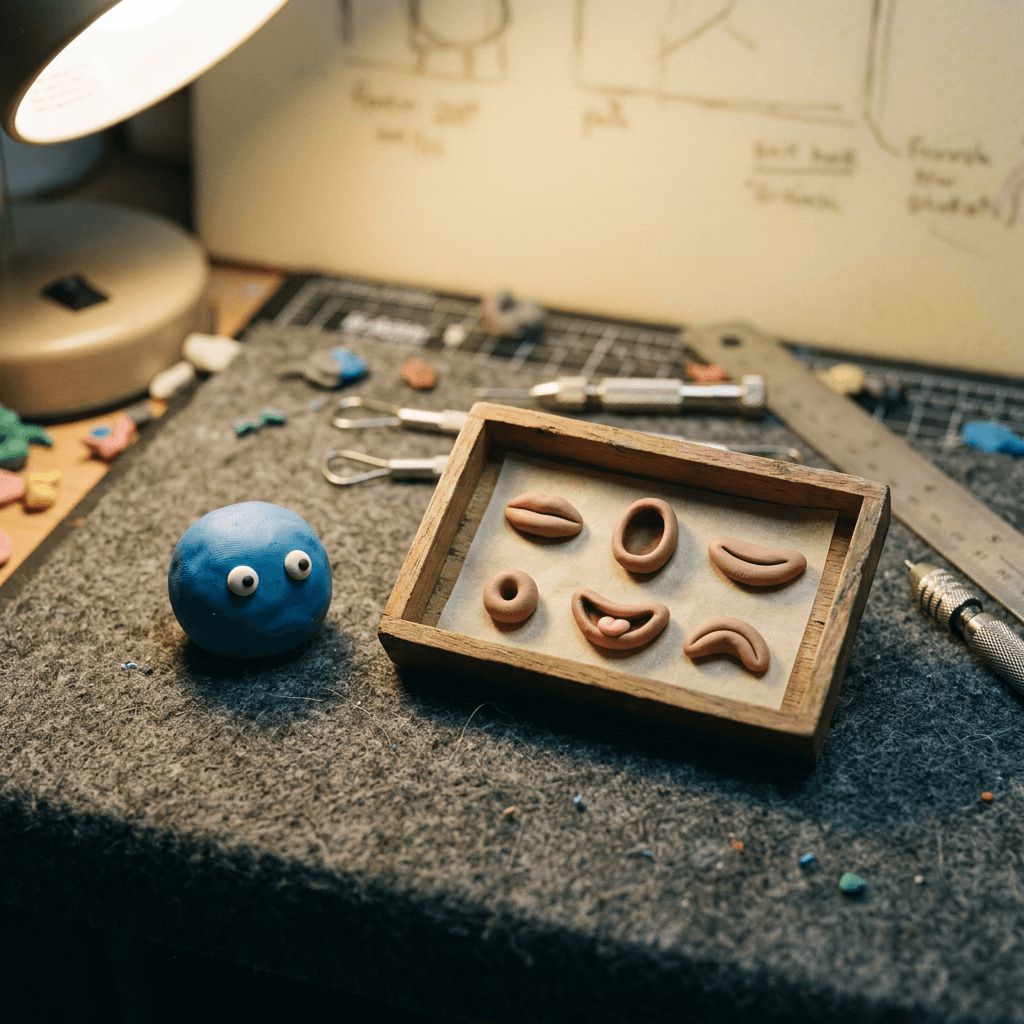
AI models get clay wrong for a simple reason. Their training data is full of smooth 3D renders and toy photography, so words like clay character, cute or 3D cartoon pull toward glossy plastic. Without physical cues, the model fills in the most common look. Your job as a prompter is to replace that default with specific physical evidence.
Words That Make Clay Look Like Clay
The table below pairs common prompt habits with what the model tends to produce and the wording that fixes it.
| If you type | What many models give you | Type this instead |
|---|---|---|
| clay style | Smooth, glossy 3D render | handmade plasticine, matte waxy finish, no glossy plastic highlights |
| cute 3D character | Symmetrical vinyl toy look | fingerprint ridges, thumb dents, slightly uneven symmetry |
| detailed fur | Digital fur strands | short wire-loop tool strokes in the clay fur |
| cozy background | Blurry generic room | miniature set of foam board, felt, balsa wood and cotton wool |
| nice lighting | Even studio glow | one warm practical desk lamp from the left, hard-edged soft shadow |
| stop motion video | Smooth interpolated motion | animated on twos at about 12 drawings per second, held poses, no motion blur |
A few combinations work especially well. Pair handmade plasticine with visible fingerprint ridges and tool marks. Pair matte waxy finish with no glossy highlights. Pair miniature set built from foam board, felt and cotton wool with a practical desk lamp. Finish with a short exclusion clause such as no smooth CGI render look, no perfect symmetry, no text, no logo. Models respond best to physical, concrete wording, so name the clay colors and the set materials instead of writing adjectives like cozy or cute.
The Claymation Prompt Formula Used in This Pack
Every prompt below follows the same order, which makes them easy to edit:
- Medium and style. Stop-motion claymation photograph, handmade plasticine.
- Subject. What the character or object is, with colors, proportions and a recognizable silhouette.
- Craft evidence. Fingerprints, thumb dents, tool marks, seams, matte sheen.
- Set. Miniature materials and props.
- Light. A specific practical source and the direction of the shadow.
- Camera. Distance, lens, depth of field.
- Exclusions. A short clause to block the usual failure modes.
Swap the subject and set, keep the rest, and you will get a consistent clay look across a whole project.
1) Clay Character and Mascot Prompts
These work for avatars, channel mascots, brand characters and story heroes. Animals, robots and creatures are used on purpose, because they keep the focus on the clay and give you a character that is easy to reuse. Note that these are non-human characters; if you want a human-like clay character, give it real clay facial features such as a pressed nose, rolled lips and sculpted eyelids, as shown in the photo prompts further down.
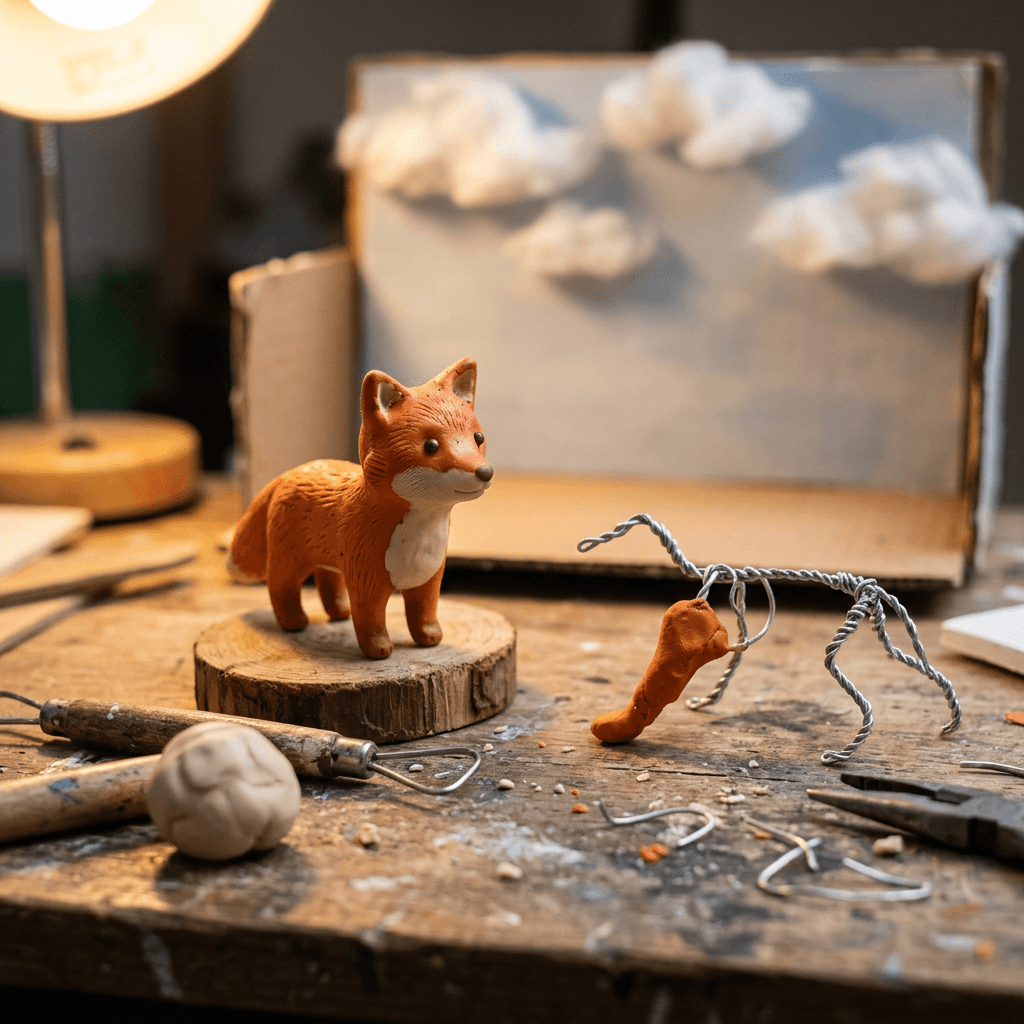
1. Clay Fox Mascot on a Miniature Workbench
A friendly fox is a good first test because the fur gives the model a place to put tool marks and thumbprints. Run this one first to check whether your generator understands the clay look before you spend credits on complex scenes.
Prompt
Stop-motion claymation photograph of a small fox mascot sculpted from orange and cream plasticine, standing upright on a miniature wooden workbench, round body, big black bead eyes with a tiny white highlight, short stubby tail with a visible thumb dent, fingerprint ridges across the cheeks and forehead, fine wire-loop tool marks on the fur tufts, a faint seam where the head joins the body, matte waxy clay finish with no glossy plastic highlights, one warm practical desk lamp from the left casting a soft-edged shadow to the right, painted foam board wall and a few balsa wood crates behind, eye-level macro shot with a 50mm lens at f/4 and shallow depth of field, real handmade miniature set, no smooth 3D render look, no perfect symmetry, no text, no logo.
Best for: channel mascots, profile pictures, intro cards.
2. Clay Robot Helper With Pressed Bolts
Robots are fun in clay because the model has to turn hard metal ideas into soft material. The bolts, dials and panel lines should look pressed in with a tool, not manufactured.
Prompt
Stop-motion claymation photograph of a small friendly robot sculpted from grey and teal plasticine, boxy head with two round eyes made of white clay balls with black clay pupils, a thin rolled clay coil antenna that leans slightly, panel lines and bolt dots pressed into the body with a sculpting tool, thumbprints and smudged fingerprint ridges visible on the arms, a visible seam at each joint, matte waxy finish with no metallic shine, standing on a miniature shelf with matchbox-sized clay props, warm tungsten lamp from the upper right with soft hard-edged shadows, macro shot with a 50mm lens at f/3.5 and shallow depth of field, handmade imperfect symmetry, no glossy CGI look, no text, no logo.
Best for: tech explainers, app mascots, kids science content.
3. Clay Character Turnaround for Consistency
Before you build a series, make a reference sheet. The same character in four views gives you a description you can paste into every later prompt and a reference image you can use for image-to-image.
Prompt
Stop-motion claymation photograph of the same small cream and brown bear sculpture shown in four poses side by side on a pale grey seamless card: front view, three-quarter view, side view and back view, each standing on a small round clay base, round ears, a tiny red clay scarf wrapped as a flat coil, black bead eyes, fingerprint ridges and thumb dents on every surface, matte waxy plasticine finish, a faint seam under each ear, soft overhead studio light with gentle shadows under each figure, evenly spaced and fully in frame, 50mm lens at f/5.6 with all four figures sharp, character reference sheet, no smooth 3D render look, no text, no logo.
Best for: series planning, comics, recurring Shorts characters.
4. Clay Expression Set With Swappable Faces
Real animators sculpt a handful of faces and swap them between frames. This prompt gives you the same effect for a mascot in stills, such as emoji packs, sticker sets or thumbnail reactions.
Prompt
Stop-motion claymation photograph of five identical round blue plasticine blob creatures in a row on a wooden tray, each with a different sculpted expression: happy, surprised, sleepy, grumpy and laughing, big white clay eyes with black pupils, simple pressed mouths in different shapes, visible fingerprint ridges and tool marks on each face, matte waxy finish, warm practical lamp from the left, shallow depth of field with the center creature sharpest, 50mm macro lens at f/4, handmade and slightly uneven, no glossy plastic look, no text, no logo.
Best for: sticker packs, reaction thumbnails, community emojis.
2) Turn Your Photo or Pet Into Clay
Use these with image-to-image: upload a photo and paste the prompt. The key is to keep the identifying features from the photo, such as coat patches, ear shape and hairstyle, while rebuilding every surface as clay. If you have tried similar conversions before, our Pixar-style tutorial shows the general upload workflow, and the clay version only changes the material words.
5. Your Dog as a Plasticine Sculpture
Pets convert better than people because there is no uncanny face to get wrong. List the exact markings you want preserved, such as a white blaze or one floppy ear, and the model will carry them over.
Prompt
Using the uploaded photo as reference, recreate my dog as a handmade stop-motion plasticine sculpture, keeping the exact coat color patches, ear shape, muzzle length and the white chest marking, body built from rolled clay coils and pressed pads, black bead eyes and a matte clay nose with a pressed nostril, fingerprint ridges across the head, thumb dents on the haunches, fur suggested with short tool strokes, a visible seam at the neck, matte waxy clay finish, sitting on a miniature felt grass lawn with a tiny balsa wood fence behind, soft warm window light from the left, close-up macro shot at eye level with a 50mm lens at f/3.2 and shallow depth of field, no smooth 3D render look, no text, no logo.
Best for: pet gifts, social posts, pet-brand content.
6. Your Cat in a Clay Living Room
Cats look great in clay because their simple shapes (round head, triangular ears, long tail) are easy to sculpt, and a miniature living room gives you lots of tiny props to make the scale feel real.
Prompt
Using the uploaded photo as reference, recreate my cat as a stop-motion plasticine sculpture lying on a tiny sofa made from felt and foam, keeping the exact fur colors, stripe pattern and ear shape from the photo, body made from soft clay coils with fine tool-scratched fur lines, green bead eyes with a black slit pupil, pressed pink clay nose, thumb dents in the cushions, fingerprint ridges visible on the cat's back, a miniature rug of woven thread and a paper picture frame on the wall, matte waxy finish, one warm lamp from the right with a hard-edged shadow, shallow depth of field, 50mm macro lens at f/3.5, handmade imperfect symmetry, no glossy plastic look, no text, no logo.
Best for: gifts, profile images, cozy pet content.
7. Yourself as a Clay Character With Real Clay Features
When a person is the subject, give the model real sculpted facial features so it does not fall back on a blank or doll-like face. Describe the pressed nose, rolled lips, eyelids and brow ridges explicitly.
Prompt
Using the uploaded selfie as reference, recreate the person as a handmade stop-motion plasticine character with a recognizable likeness, keeping the same hairstyle, hair color, skin tone, glasses and clothing colors, face sculpted from clay with a pressed nose, rolled lips, defined eyelids, brow ridges and small ears, bead eyes with painted pupils, fingerprint ridges across the forehead and cheeks, a thumb dent under the chin, hair built from many small clay strands with tool marks, a seam at the collar, matte waxy finish, standing in a miniature room with felt wallpaper and a tiny desk lamp, warm practical lamp from the upper left with a hard-edged shadow, waist-up macro shot with a 50mm lens at f/2.8 and shallow depth of field, no smooth 3D render look, no blank face, no text, no logo.
Best for: avatars, creator branding, personalized gifts.
8. A Group Photo as a Clay Family Portrait
Group conversions need distinct features for each person, otherwise the model clones one face. Add one sentence per person from the photo, then keep the setting simple.
Prompt
Using the uploaded group photo as reference, recreate everyone as a stop-motion plasticine family portrait on a miniature sofa, each figure with a distinct sculpted face, different hair color and style, different heights and the clothing from the photo, pressed noses, rolled lips, bead eyes, fingerprint ridges and thumb dents on each figure, small seams at the necks and wrists, matte waxy finish, a felt rug and a paper picture frame behind them, warm lamp from the left with soft hard-edged shadows, centered group shot with a 40mm lens at f/5.6 so all faces are sharp, handmade and slightly uneven, no identical faces, no glossy plastic look, no text, no logo.
Best for: holiday cards, gifts, family albums.
3) Clay Product Shots and Food for Brands
Friendly brands such as cafes, bakeries, children's products, craft shops and indie apparel can use clay to stand out from the usual studio packshot. Keep the product recognizable, put the clay in the scenery, and avoid putting real logos in the prompt. These prompts pair well with the product photography ideas in our guides to Etsy listing photos and e-commerce product images.
9. Clay Running Shoe on a Plasticine Hill
This is a hero shot for an apparel launch. The shoe is made of clay so the whole frame stays in the same handmade world, with a clay path and tiny trees behind it.
Prompt
Stop-motion claymation product photograph of a running shoe sculpted from bright orange and white plasticine, chunky sole made of rolled clay with pressed tread lines, laces as thin flattened clay coils with a crossing pattern, visible thumbprints and wire-loop tool marks on the upper, matte waxy finish with no glossy highlights, placed on a plasticine hill with a winding clay path, tiny green clay trees and cotton wool clouds against a pale blue painted foam board sky, warm practical light from the upper left with a soft hard-edged shadow, low three-quarter angle with a 50mm macro lens at f/4 and shallow depth of field, handmade miniature set, no smooth 3D render look, no text, no logo.
Best for: apparel launches, product ads, Shorts covers.
10. Clay Pancake Stack for Food Content
Food is where clay shines, because small round shapes are easy to sculpt and the colors read instantly. Ask for clay syrup that looks poured and thick, not shiny.
Prompt
Stop-motion claymation photograph of a stack of five fluffy pancakes sculpted from pale yellow and golden plasticine, edges slightly uneven with thumbprint dents, a pat of butter made of a pressed pale yellow clay block, thick amber clay syrup draped over the top in slow drips with a soft matte surface, six round blueberries made of dark blue clay balls with tiny pressed crowns, fingerprint ridges visible on the pancakes, on a small white ceramic plate on a miniature wooden table with a checkered felt napkin, warm window light from the left with a soft shadow, close macro shot with a 60mm lens at f/3.5 and shallow depth of field, handmade clay, no glossy syrup shine, no smooth 3D render look, no text, no logo.
Best for: cafe menus, recipe Shorts, food-channel thumbnails.
11. Clay Ice Cream Cones in a Row
A row of repeating shapes is a great test of consistency. The three scoops should differ in color but share the same tool marks and fingerprint texture.
Prompt
Stop-motion claymation photograph of three ice cream cones in a row, each with a single scoop sculpted from plasticine in strawberry pink, mint green and vanilla cream, scoops with rough textured tool marks and thumbprint dents, cones made of tan clay with a pressed waffle grid pattern, a tiny rolled clay sprinkle on each scoop, standing in holes in a wooden stand on a pale blue seamless backdrop, fingerprint ridges visible on the cones, matte waxy finish with no wet shine, soft warm studio light from the front left with gentle shadows, eye-level shot with a 50mm lens at f/4, handmade clay, no smooth 3D render look, no text, no logo.
Best for: summer promotions, dessert shops, social posts.
12. Clay Bakery Storefront With a Blank Sign
Local businesses can use a clay storefront as a banner or announcement image. Leave the sign blank and add the real name in your design tool, which is more reliable than asking a model to spell it.
Prompt
Stop-motion claymation photograph of a tiny bakery storefront built from plasticine and balsa wood, striped awning made of alternating pink and cream clay strips, a round window showing clay loaves and croissants, a blank wooden sign board above the door, a small clay chalkboard stand with no writing, a miniature clay bicycle leaning on the wall, fingerprint ridges and tool marks on the walls, matte waxy finish, a warm yellow lamp glow inside the window and soft daylight from the left outside, eye-level shot with a 35mm lens at f/4 and shallow depth of field, handmade miniature set, no smooth 3D render look, no readable text, no logo.
Best for: store announcements, opening-day banners, local ads.
4) Miniature Clay Dioramas and Sets
A diorama is the natural home of claymation: a small world, one lamp, and lots of tactile details. If you want to go beyond clay into other materials, our AI miniature diorama prompts have a wider set of scenes. These three focus on the set-building tricks real animators use.
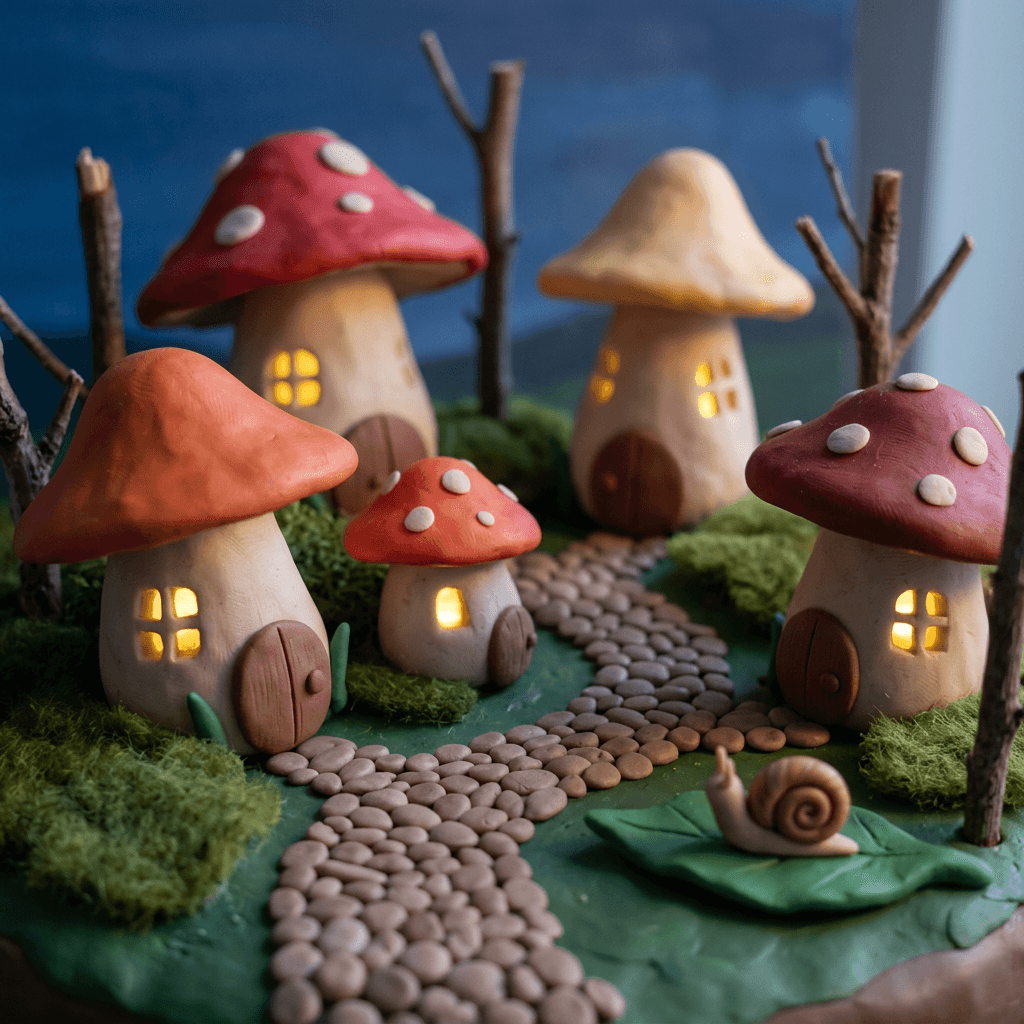
13. Clay Mushroom Village at Dusk
Rolled coils become roofs, flattened pads become doors and a tiny LED hidden inside each cap supplies the warm glow. The model understands this well, and the image reads as miniature at once.
Prompt
Stop-motion claymation photograph of a tiny mushroom village sculpted from plasticine, five mushroom houses with red, orange and cream caps and rolled clay stems, pressed round doors and small windows with a warm yellow glow as if lit by tiny LEDs inside, a winding clay path of pressed pebbles, moss made from green felt and tiny twigs as trees, a small clay snail on a leaf, thumbprints and tool marks on every cap, matte waxy finish, deep blue dusk backdrop painted on foam board, warm practical glow from the windows with a cool soft fill from the right, low angle macro shot with a 50mm lens at f/2.8 and shallow depth of field, handmade miniature set, no smooth 3D render look, no text, no logo.
Best for: story art, album covers, wallpapers.
14. Clay Ocean With Cellophane Waves
Real set builders use cellophane and plastic sheet for water, because it catches light in a way clay cannot. Asking for it by name gives the sea a believable sheen while the boats and fish stay matte.
Prompt
Stop-motion claymation photograph of a miniature ocean scene, a small yellow plasticine submarine with round portholes and a rolled clay periscope in the center, waves made of crinkled blue cellophane layered over blue clay with white clay foam tips, three round orange clay fish and a clay seaweed forest in green, fingerprint ridges and thumb dents on the submarine, fine tool marks on the fish scales, a painted foam board horizon at the back, matte waxy clay surfaces with only the cellophane catching highlights, warm lamp from the upper left and a cool fill from the right, shallow depth of field, 50mm macro lens at f/4, handmade miniature set, no smooth 3D render look, no text, no logo.
Best for: kids content, explainers, animated backgrounds.
15. Clay City Street at Night With Tiny Lights
Night scenes show off practical lighting. Small bulbs behind translucent windows make glowing pools that real animators build with fairy lights and paper.
Prompt
Stop-motion claymation photograph of a miniature city street at night, tall plasticine buildings in navy, brick red and mustard with pressed rectangular windows glowing warm yellow from tiny hidden lights, a curved clay street lamp with a soft glow, a small clay taxi with round wheels and thumb dents on the roof, a cardboard sky with cotton wool smoke rising from a chimney, fingerprint ridges and tool marks on the buildings, matte waxy finish, no lights other than the glowing windows and street lamp, shallow depth of field with the taxi sharpest, low street-level shot with a 35mm lens at f/2.8, handmade miniature set, no smooth 3D render look, no text, no logo.
Best for: story backdrops, album art, lock screens.
5) Clay Explainer Scenes for Faceless YouTube and Shorts Channels
Clay is a strong visual identity for a faceless channel, because the character is the brand and you never need to show a presenter. The prompts below are written as scene visual prompts for a vertical Short. In Text2Shorts you enter a topic, choose an animation style, edit the generated script and the scene visual prompts, pick a voice and generate the video, so you can paste a clay description in at the visual prompt step. Our Text2Shorts walkthrough shows the flow, and the faceless Shorts niche guide lists topics that fit a clay style.
16. Clay Water Cycle Scene for a Science Short
Science topics suit clay because the objects are simple and the cotton wool cloud is easy to recognize. Keep one sun, one cloud, one river and one hill, so each frame has a single clear idea.
Prompt
Vertical stop-motion claymation photograph of the water cycle on a miniature set, a yellow plasticine sun with rolled clay rays, a fluffy cloud made of cotton wool with a few blue clay raindrops falling on thin wire, a green clay hill with a small brown house, a river made of blue cellophane over clay running down the hill into a small clay lake, fingerprint ridges and thumb dents on the hill and sun, matte waxy finish, warm practical lamp from the upper left with a soft shadow, painted pale sky on foam board, full scene in frame with a 35mm lens at f/5.6 so every element is sharp, handmade miniature set, 9:16 vertical composition, no smooth 3D render look, no text, no logo.
Best for: science Shorts, school content, educational channels.
17. A Recurring Clay Owl Narrator at a Cardboard Desk
A recurring narrator character gives a faceless channel a face without showing a person. Keep the description identical in every scene and change only the pose and the prop on the desk.
Prompt
Vertical stop-motion claymation photograph of a small owl character sculpted from brown and cream plasticine, round body, large round white eyes with black clay pupils, tiny round glasses made from a thin wire loop, a small pressed beak and rolled clay wing tips holding a tiny rolled paper scroll, standing behind a cardboard desk with a miniature lamp and a stack of tiny clay books, fingerprint ridges and thumb dents on the owl's chest, fine tool-scratched feather lines, a visible seam under the head, matte waxy finish, warm practical lamp from the right, painted foam board bookshelf behind, medium macro shot with a 50mm lens at f/3.5, 9:16 vertical composition, handmade imperfect symmetry, no smooth 3D render look, no text, no logo.
Best for: narrator mascots, lesson series, recurring Shorts.
If you plan a whole channel around this look, our faceless YouTube channel guide covers the workflow and monetization questions, and the monetization article explains what to know before you scale.
6) Clay Video Prompts With Stop-Motion Motion Cues
Video is where AI claymation usually falls apart, because video models love smooth, interpolated motion and the whole charm of stop-motion is that it is choppy. The prompts below use the motion vocabulary real animators use, and they work best in the Cinematic AI Video Generator. Start each one from a still generated with the matching image prompt above, so the first frame already has the right clay look.
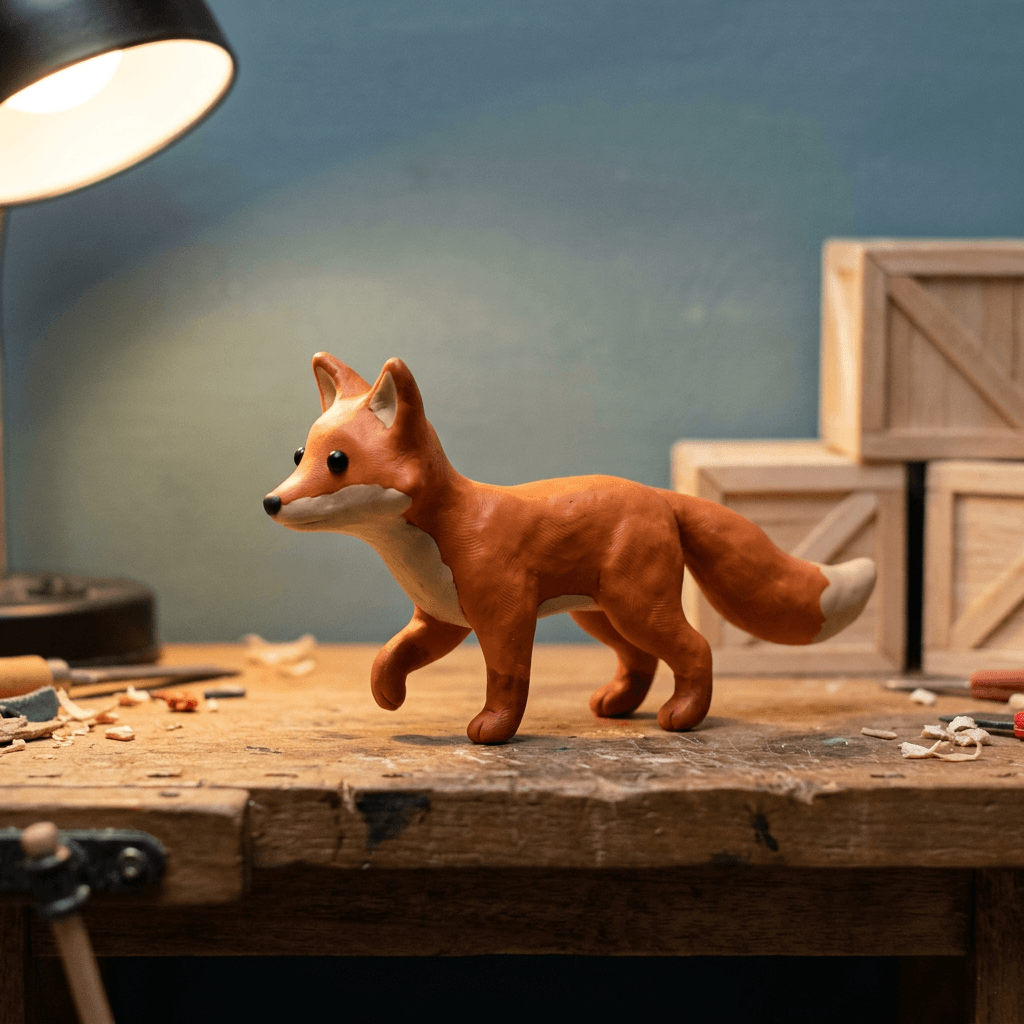
18. Clay Fox Walking on Twos
A walk cycle is the classic test. The prompt asks for a pose a wire armature can hold, a lifted foot with the body leaning forward, and a stuttery cadence.
Prompt
Stop-motion claymation video, a small orange and cream plasticine fox with black bead eyes walks across a miniature wooden workbench from left to right, animated on twos at about 12 drawings per second with each pose held for two frames, body leaning forward with one foot lifted and the tail swaying in small steps, slight clay boil with fingerprint ridges shifting subtly between frames, no motion blur, no smooth interpolation, locked-off camera at eye level with a 50mm lens and shallow depth of field, warm practical desk lamp from the left with a stable soft shadow, painted foam board wall and balsa crates behind, handmade miniature set, no smooth 3D render look, no morphing of the character, no text, no logo.
Best for: Shorts openers, mascot reveals, animated intros.
19. Clay Character Talking With Replacement Mouths
This prompt copies the replacement animation trick. Ask for a small set of mouth shapes swapped abruptly instead of one mouth morphing, which is how most AI video models would try to do it.
Prompt
Stop-motion claymation video, a round blue plasticine blob creature with big white eyes talks to the camera on a miniature wooden stage, speaking with replacement animation where the mouth swaps abruptly between a small closed mouth, a wide open oval and a flat smile every two frames, no smooth morphing between mouth shapes, body bobbing slightly on twos at about 12 poses per second, fingerprint ridges and thumb dents on the face shifting subtly between frames, matte waxy finish, warm practical lamp from the left, locked-off camera, medium close-up with a 50mm lens and shallow depth of field, felt curtain and cardboard spotlight behind, handmade miniature set, no smooth 3D render look, no text, no logo.
Best for: explainer narration, jokes, character intros.
20. Clay Village Push-In With Cotton Smoke
Camera moves in stop-motion are done in small increments, so the move itself looks a little stepped. Ask for a slow push in with small jumps and a flicker of the lamp, then add a single ambient motion such as smoke.
Prompt
Stop-motion claymation video, slow push-in toward a miniature plasticine village at dusk with glowing windows, camera moving forward in small visible steps on twos at about 12 frames per second, cotton wool smoke rising from a clay chimney in small stepped puffs, a warm practical lamp flickering very slightly between frames, fingerprint ridges and tool marks on the clay houses shifting subtly with a gentle boil, a clay cat on a rooftop turning its head in small jumps, matte waxy finish, painted dusk sky on foam board, shallow depth of field, no motion blur, no smooth glide, no smooth 3D render look, no text, no logo.
Best for: scene-setting openers, mood clips, ambient loops.
7) Clay Thumbnails
A clay thumbnail is a pattern interrupt. In a row of smooth faces and bright gradients, a tactile clay object with a big readable shape sticks out. The same rules as any thumbnail apply: one clear subject, high contrast, a very short text overlay if you need one. Our guides to Shorts thumbnails and consistent thumbnail styles explain the fundamentals, and the YouTube Thumbnail Maker is where you can add text and export at the right size.
21. Clay Loaf Thumbnail for a Baking Channel
A single oversized object, a hand-sculpted word and a warm background make the thumbnail readable at small size. Keep the word to one short word so the model can spell it.
Prompt
Stop-motion claymation thumbnail photograph, a large golden brown plasticine loaf of bread with pressed score lines and visible thumbprints on the crust in the left of the frame, a tiny clay oven mitt resting on it, the single word BAKED spelled in thick rolled clay letters in cream with fingerprint ridges standing on the right, bright warm orange foam board background, matte waxy finish, strong warm lamp from the upper left casting clean hard-edged shadows, shallow depth of field, close macro shot with a 35mm lens at f/4, 16:9 composition with empty margin around the subject, handmade miniature set, the only word is BAKED spelled correctly, no smooth 3D render look, no logo.
Best for: baking and food channels, recipe videos, cooking Shorts covers.

22. Clay Frog Reaction Thumbnail Without Text
When you want to add text later in your editor, ask for a clear empty area and an exaggerated reaction. A clay frog with huge eyes and a pressed open mouth gives you the shocked expression that works in tutorials, reviews and tech content.
Prompt
Stop-motion claymation thumbnail photograph, a green plasticine frog with huge white eyes and black clay pupils and a wide open pressed mouth showing a pink clay tongue, looking shocked, positioned on the left third of the frame, a large red clay arrow pointing toward a tiny yellow clay rocket on the right, fingerprint ridges and thumb dents across the frog's head, tool marks on the arrow, matte waxy finish, saturated teal foam board background with an empty area in the upper right for text, strong warm lamp from the left with clean hard-edged shadows, close macro shot with a 35mm lens at f/4 and shallow depth of field, 16:9 composition, handmade miniature set, no smooth 3D render look, no text, no logo.
Best for: tutorial thumbnails, product reviews, tech Shorts covers.
How to Fake Stop-Motion Cadence in AI Video
Most AI video models are trained on smooth footage, so they smooth everything. These tactics push them toward real stop-motion rhythm.
Name the frame rate and the cadence. Phrases such as animated on twos, about 12 drawings per second and each pose held for two frames carry the exact meaning of the technique. Add no motion blur and no smooth interpolation so the model does not blend poses together.
Describe small steps instead of flowing motion. Words like stepped puffs, small visible steps, abrupt swaps and held poses help. Avoid words like fluid, graceful and seamless, which push toward smooth results.
Limit what moves. Real stop-motion animates a few things at a time because every moved object costs the animator effort. In a prompt, choose one main action and one ambient motion. A long list of simultaneous movements encourages the model to blend and morph.
Lock the camera or move it in steps. A locked-off camera is the most reliable. If you want a push-in, ask for small steps. Handheld shake, rack focus and whip pans are more likely to look like regular CGI.
Add clay boil. Asking for fingerprint ridges shifting subtly between frames gives the surface texture a slight crawl. Use this sparingly. Too much boil makes the character look like it is melting.
Post-process if the model is too smooth. If a clip still plays too fluidly, you can drop the frame rate in your editor to 12 frames per second, which holds each frame for two, or use a stepped time-remap effect. Doing this after generation is often more reliable than prompting alone. The Kling multi-shot prompts show how to plan a sequence of shots, which is helpful when you cut several clay clips together.
Keeping the Same Clay Character Across Shots
Consistency is the hardest part of any AI series, and clay makes it harder, because texture changes can look like a different sculpture. A few habits help.
Write a character sentence and never edit it. Something like small orange and cream plasticine fox, black bead eyes, short stubby tail with a thumb dent, red scarf made of a flat clay coil. Paste the sentence unchanged at the start of each prompt, then vary only the action and the set.
Use a reference image. Generate the turnaround from prompt 3, then upload it as a reference for later image prompts, and use a chosen still as the first frame of each video clip. Image-to-image keeps proportions more stable than text alone.
Keep light and set vocabulary the same. If scene one has a warm lamp from the left and scene two has a cool overhead light, the clay will look like different materials. Pick one lighting sentence and one background material list for the whole project.
Fix small flaws instead of regenerating. If a hand has an extra finger or a scarf changed color, use inpainting to repair just that area. Our guide to inpainting on Miraflow shows how to mask and replace a region.
How to Customize These Prompts
Change the clay palette. Replace the colors with your brand colors, and keep the rest. Named colors work better than mood words: mustard yellow, brick red and navy, instead of warm and earthy.
Change the scale. For a macro look, ask for a 60mm macro lens at f/2.8. For a wider scene where the full set is visible, ask for a 35mm lens at f/5.6 and everything sharp.
Change the set material. Felt for grass and rugs, cotton wool for clouds and smoke, cellophane for water, crumpled paper for rocks, sand glued to card for beaches, balsa wood for furniture and fences. Each material adds its own visible texture and makes the world feel built rather than rendered.
Change the era or mood. A cool blue moonlit lamp with one warm window works for night scenes, and a bright overhead lamp with pale pastel clay works for children's content. Keep the craft evidence words unchanged.
Adapt the aspect ratio. Add 9:16 vertical composition for Shorts and Reels, 16:9 for YouTube and thumbnails and 1:1 for posts. Leave empty margins if you plan to add text.
Use it for different audiences. A children's channel can use thicker, rounder shapes and brighter colors, a food brand can use more macro detail and a tech channel can use more machine-like shapes in soft clay.
Common Mistakes With AI Claymation Prompts
Writing clay style without clay evidence. The words clay style alone leave the model free to return a smooth 3D render. Add fingerprints, seams, tool marks and matte finish.
Asking for glossy highlights. Real plasticine is matte with a waxy sheen. Words such as shiny, glossy, polished and glazed push toward plastic or ceramic. The exception is cellophane water or a glass bead eye, which can catch a highlight.
Asking for perfect symmetry. A handmade character has slightly uneven eyes and a head that tilts a little. Add handmade imperfect symmetry.
Naming a famous studio or character. It pulls the output toward someone else's look and characters, and it creates avoidable problems if you use the content commercially. Describe the craft instead.
Requesting smooth motion in video. Words like fluid, cinematic glide and seamless fight the stop-motion cadence. Use held poses, on twos and no motion blur.
Overloading the video prompt. A character walking, a camera orbit, rain, a talking mouth and a lighting change in one clip leads to melting. One main action and one ambient motion is a better budget.
Putting text in the image. Models misspell long words. Use one short word at most, or leave a blank sign and add the text in a design tool.
Changing the lamp and backdrop between shots. The clay looks like a different material under different light, so consistency in lighting is as important as consistency in the character.
Skipping variations. Clay texture quality varies between generations. Generate several versions of the same prompt and pick the one with the most convincing fingerprint detail.
Using clay where it does not fit. A warm handmade look suits friendly brands and stories. It is a weaker fit for serious finance, urgent ads or luxury products where a sleek look is expected.
Where to Use Your Clay Content
YouTube Shorts, Reels and TikTok. A recurring clay narrator and a consistent set give a Short a recognizable identity within the first second. Keep clips short, because clay motion reads best in small doses.
YouTube thumbnails. A hand-sculpted object with a short word works well in a crowded feed. Test it against your usual style and compare click-through rate in YouTube Studio over a few uploads.
Brand and product posts. A clay version of your product or storefront works for launches, seasonal campaigns and announcements. Keep your real product photos for the shop listing and use clay for attention.
Story and album art. A clay diorama makes distinctive cover art for a podcast, a children's story or a music release. If you want music that fits the visuals, the AI Music Generator can produce a playful track from a description.
How to Build the Whole Clay Workflow in Miraflow
You can run the full pipeline in one browser tab, with no software to install.
- Design the character. Open Miraflow's AI Image Generator, paste prompt 1 or prompt 3 and generate a few versions. Pick the one with the strongest fingerprint detail and save it as your reference.
- Build the scenes. Reuse your character sentence with the set prompts from the diorama and explainer groups. Use image-to-image with your reference to keep proportions stable, and inpainting to fix small mistakes.
- Animate. Take your best stills into the Cinematic AI Video Generator and use prompts 18 to 20 as your motion vocabulary. Generate more than one clip per shot.
- Assemble a Short. If you want a narrated vertical explainer, use Text2Shorts, paste your clay character description into the scene visual prompts and choose a voice. For a long video you already shot, AI Clipping can cut it into captioned vertical clips.
- Make the cover. Use the YouTube Thumbnail Maker with prompt 21 or 22, add a short text overlay and export.
The idea behind Miraflow is that idea, script, visual, video, thumbnail and music live in the same place, so your clay character can carry over from the first image to the final cover without exporting files between tools.
Frequently Asked Questions
What is the best AI prompt for claymation?
Start with stop-motion claymation photograph of a handmade plasticine character, add the subject and colors, then include fingerprint ridges, thumb dents, tool marks, a visible seam and a matte waxy finish. Finish with a practical light source, a lens and depth of field, and a short exclusion clause such as no smooth 3D render look. Prompt 1 in this post is a ready-made example.
How do I make AI look like clay and not a 3D render?
Replace the generic words with physical evidence. Ask for handmade plasticine instead of 3D, add fingerprint ridges and tool marks, request a matte waxy finish with no glossy highlights, and describe a miniature set made from real materials. Models default to smooth renders when they only see the word clay.
What frame rate is claymation?
Many stop-motion productions shoot at 24 frames per second and animate on twos, so each pose is held for two frames, which gives 12 distinct poses per second. Some shots are animated on ones for smoother motion. For AI video, asking for about 12 drawings per second and held poses is the closest prompt equivalent.
Can AI make stop-motion videos?
Yes, with limits. Video models can imitate the look of stop-motion, but they tend to smooth motion and may morph a character. Use short clips, one main action, a locked-off camera and wording such as on twos and no motion blur. You can also lower the frame rate in an editor after generating.
How do I turn my photo or pet into a claymation character?
Upload the photo to an image-to-image tool and paste a prompt such as prompts 5 to 8 above. List the features you want to keep, such as coat patches, hairstyle or glasses, and ask for them to be rebuilt as clay with fingerprints and tool marks. For people, request real sculpted facial features so the face does not come out blank.
How do I keep the same clay character across scenes?
Write one character sentence and paste it unchanged into every prompt, reuse the same lighting and set vocabulary, and use a reference image such as the turnaround from prompt 3. Repair small differences with inpainting instead of regenerating the full image.
Can I make a faceless YouTube channel with claymation?
Yes. A recurring clay narrator and a consistent set give a faceless channel a recognizable identity. Text2Shorts lets you generate a script and scene visuals from a topic, and you can replace the visual prompts with your clay character description. Check the platform policies on AI-generated content and disclose it where required.
Should I mention a studio or character name in my prompt?
It is better not to. Describe the technique instead, such as plasticine, fingerprints, miniature set and animation on twos. This gives you original characters and avoids borrowing another creator's trademarked designs.
Do these prompts work in other AI image tools?
The wording is built around physical details, so it transfers well to most modern image and video generators. Results vary by model, so generate several versions and adjust the material and lighting words.
Conclusion
Convincing AI claymation comes down to replacing the model's smooth 3D defaults with the physical evidence of real clay: fingerprints, tool marks, seams, a matte waxy surface, a handmade miniature set and one practical lamp. For motion, borrow the vocabulary of real animators, such as on twos, held poses, replacement mouths and a locked-off camera, and keep each clip simple.
Start with the fox mascot in prompt 1, build a turnaround for consistency, then move through photo conversions, product shots, dioramas, explainer scenes, video clips and thumbnails. When you are ready to put it all together, try the clay look in Miraflow's AI Image Generator, animate it in the Cinematic AI Video Generator and publish it as a Short with Text2Shorts.