30 AI Twitch Emote Prompts: Sub Badges and Stream Graphics (2026)

Written by
Aerin Kim
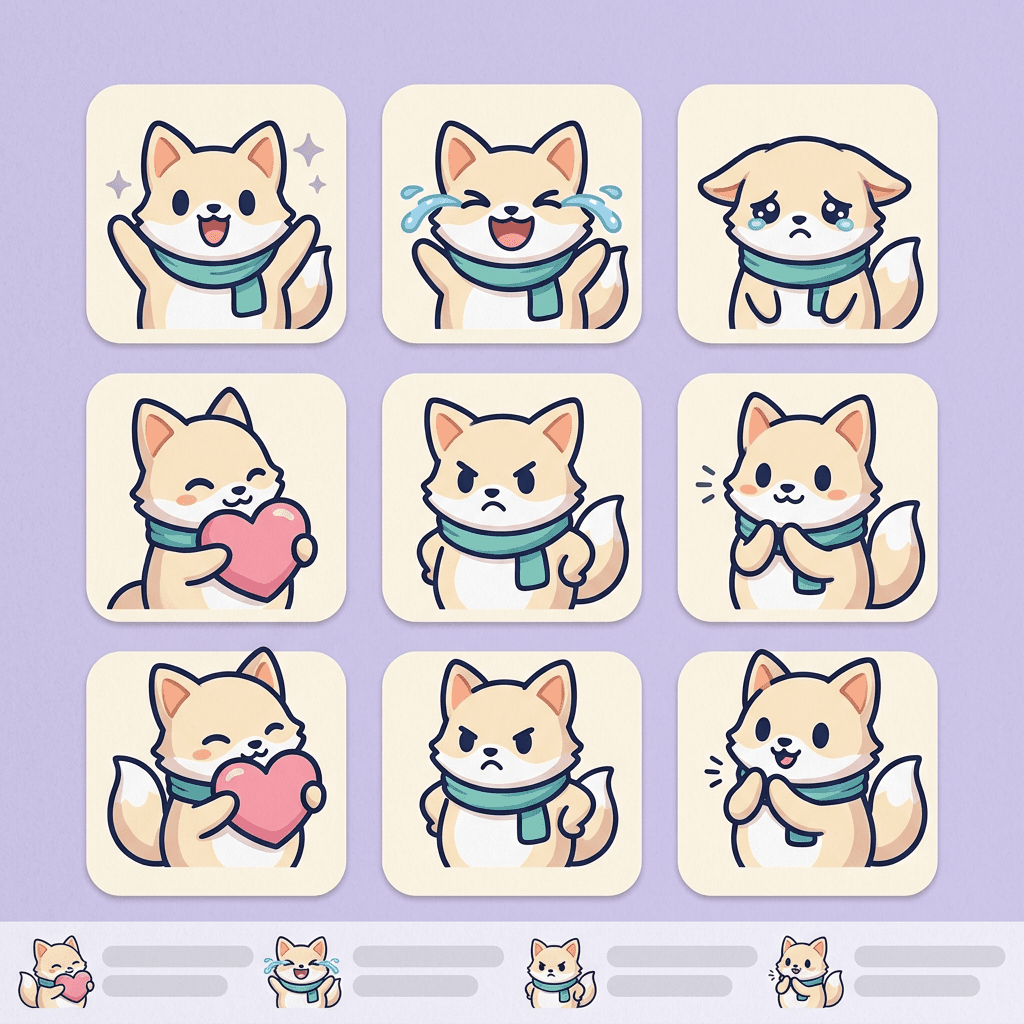
Emotes are judged at 28 pixels, so design for that. Get 30 copy-and-paste AI prompts for Twitch emotes, sub badge tiers, channel point icons and stream screens, with verified size specs.
You finish a gorgeous emote at 1024 pixels. The fox has fluffy fur, a tiny scarf with a stitched pattern, sparkles in its eyes and a cute little speech bubble. Then you shrink it to the size viewers actually see in chat, and it turns into a brown smudge that looks like every other smudge. That is the central problem with AI Twitch emotes: the model draws what looks good large, and your audience judges it at the size of a few letters of text.
This guide fixes that with prompts built for tiny sizes. You get 30 copy-and-paste prompts for Twitch emotes, sub badges, channel point icons, stream overlays, panels and starting soon or BRB screens, plus the same ideas for Discord and YouTube emoji. Everything is written for the way emotes are really used: thick outlines, one exaggerated expression, no fine text, a flat background you can cut out in seconds, and one mascot that stays recognizable across the whole set. Searches for "Twitch emote maker", "AI emote generator" and "sub badge ideas" keep climbing because every new Affiliate has slots to fill and no art budget, and AI image generation is now good enough to fill them if you brief it correctly.
If you are building the rest of your channel look at the same time, pair this with the AI prompts for YouTube channel banner art, the AI profile picture prompts and the AI prompts for gaming setup and streamer content.
TL;DR: How to Use These Prompts
- Open Miraflow's AI Image Generator, paste a prompt and generate three or four versions. Use image-to-image if you want to start from a sketch, a logo or an existing mascot.
- Start with Group 1 to lock one mascot design. Every later prompt repeats the same short character description so the set looks like one artist drew it.
- Every emote prompt asks for a thick dark outline, a single big expression, a centered subject with margin and a flat solid magenta background, so you can remove the background in one click and export clean edges.
- Export the final art at the sizes your platform asks for (see the size table below), then check it at actual size before you upload.
- Emotes are tested at 28 pixels. If you cannot read the emotion at that size, simplify the prompt and run it again.
Verified Size Specs for Twitch, Discord and YouTube
Sizes change over time and a lot of emote guides online copy each other, so every number below was checked against an official page I could actually read. Where I could not confirm something from Twitch itself, the table says so instead of guessing.
| Asset | Size | Format | File size | Verified from |
|---|---|---|---|---|
| Twitch emote | 112 x 112, 56 x 56 and 28 x 28 px | Static PNG, animated GIF where the emote has one | Not on pages I could read. Third-party guides quote 25 KB static and 1 MB animated, unconfirmed. Check the Creator Dashboard uploader | Twitch Developer API reference (Get Channel Emotes) |
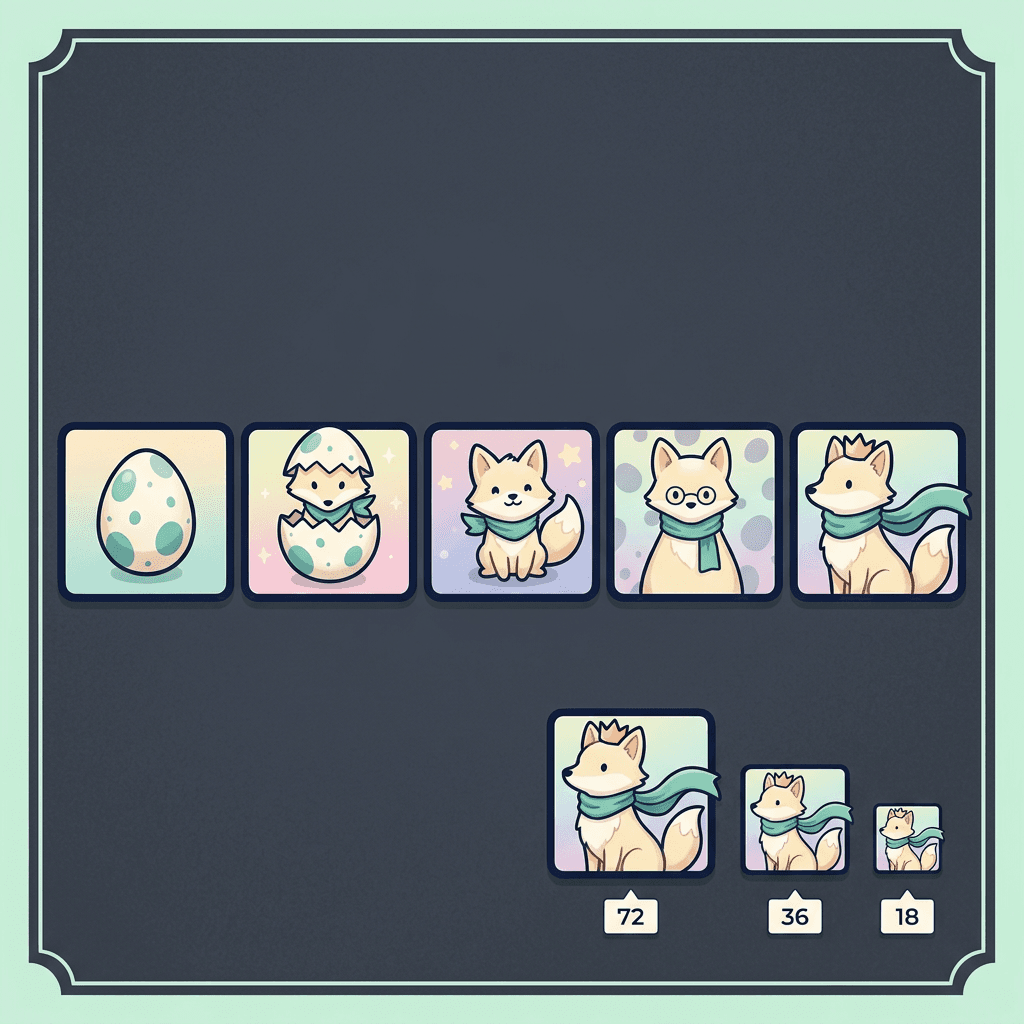
| Twitch sub or Bits badge | 72 x 72, 36 x 36 and 18 x 18 px | Square badge images in three sizes | Check the uploader | Twitch Developer API reference (Get Channel Chat Badges) |
| Twitch channel point reward image | Stored in 1x, 2x and 4x versions (Twitch's default icons are 28, 56 and 112 px). Title up to 45 characters, up to 50 custom rewards | Check the uploader | Check the uploader | Twitch Developer API reference (Custom Rewards) |
| Discord emoji | 128 x 128 px ideal, other sizes work | JPEG, PNG, GIF, WEBP or AVIF | 256 KB, larger files are compressed. Animated emoji need Nitro to use | Discord blog, beginner's guide to custom emojis |
| YouTube custom emoji | 48 x 48 px preferred up to 480 x 480 px | JPEG, PNG or GIF (GIF shows as a static image) | Less than 1 MB | YouTube Help, channel membership levels and perks |
| YouTube loyalty badge | 32 x 32 px minimum | JPEG or PNG | Less than 1 MB | YouTube Help, channel membership levels and perks |
| Kick and other platforms | Not verified in this post | Not verified | Not verified | Read the platform's own uploader or help page |
A few notes on that table. Twitch's developer reference describes each emote as available at 28, 56 and 112 pixels, as a static PNG and, when the emote has one, an animated GIF. It also lists subscriber and Bits badges as 18, 36 and 72 pixels. Those are the numbers the upload tool and chat use, so design for 112 and check 28.
Twitch's own help page for emote guidelines (the one most guides quote for file size limits, frame counts and animation rules) did not load in the tools I used, because it renders only in a browser. Many third-party guides quote about 25 KB for a static emote file and 1 MB for an animated one, and some add a frame limit, but those are not confirmed here. Check the limits in the upload form in your Creator Dashboard, which will reject a file that breaks them and tell you why.
Discord accepts several formats and, according to its own guide, says that if an emoji is a bit bigger than 256 KB it will compress it, so size is forgiving there. YouTube (per its membership help page) is stricter in one way that matters for AI art: a GIF uploaded as a custom emoji is displayed as a static image, so do not plan an animated YouTube emoji. Kick and other platforms publish their own requirements, which I did not verify for this post, so read the uploader before you export.
Two practical consequences. First, always make one master at 1024 pixels or larger and downscale from it, never upscale a small file. Second, because the same artwork can end up at 28, 48 or 128 pixels depending on the platform, the 28 pixel version is your hardest test and the others take care of themselves.
Why Emotes Must Read at 28 Pixels
In chat, an emote sits inline with text, usually the same height as a line of letters. At 28 pixels you have room for roughly one idea: a face shape, an expression and one color. Anything more becomes noise. There are four rules that fix most AI emote problems.
Thick outlines. A dark outline around the subject keeps the silhouette readable on both dark and light chat themes. Ask for an outline that is thick relative to the shape, about 4 to 6 percent of the canvas width. Thin outlines disappear after downscaling.
Exaggerated expressions. Subtle emotions vanish. Eyebrows, mouth shape and eye size carry the feeling, so ask for huge eyes, a wide open mouth, eyebrows at extreme angles and one clear emotion per emote. The best emotes in any channel are remembered by their face, not their detail.
No fine text. Letters under about 12 percent of the canvas height smear into unreadable noise at 28 pixels. If you want a word, make it one to three letters or a symbol, and add it afterwards in an editor with a heavy font. AI models also misspell often, as covered in how to get AI to spell text correctly in images.
Flat color, few shades. Gradients, textures and tiny highlights blur into mud. Three to five flat colors plus the outline survive downscaling best.
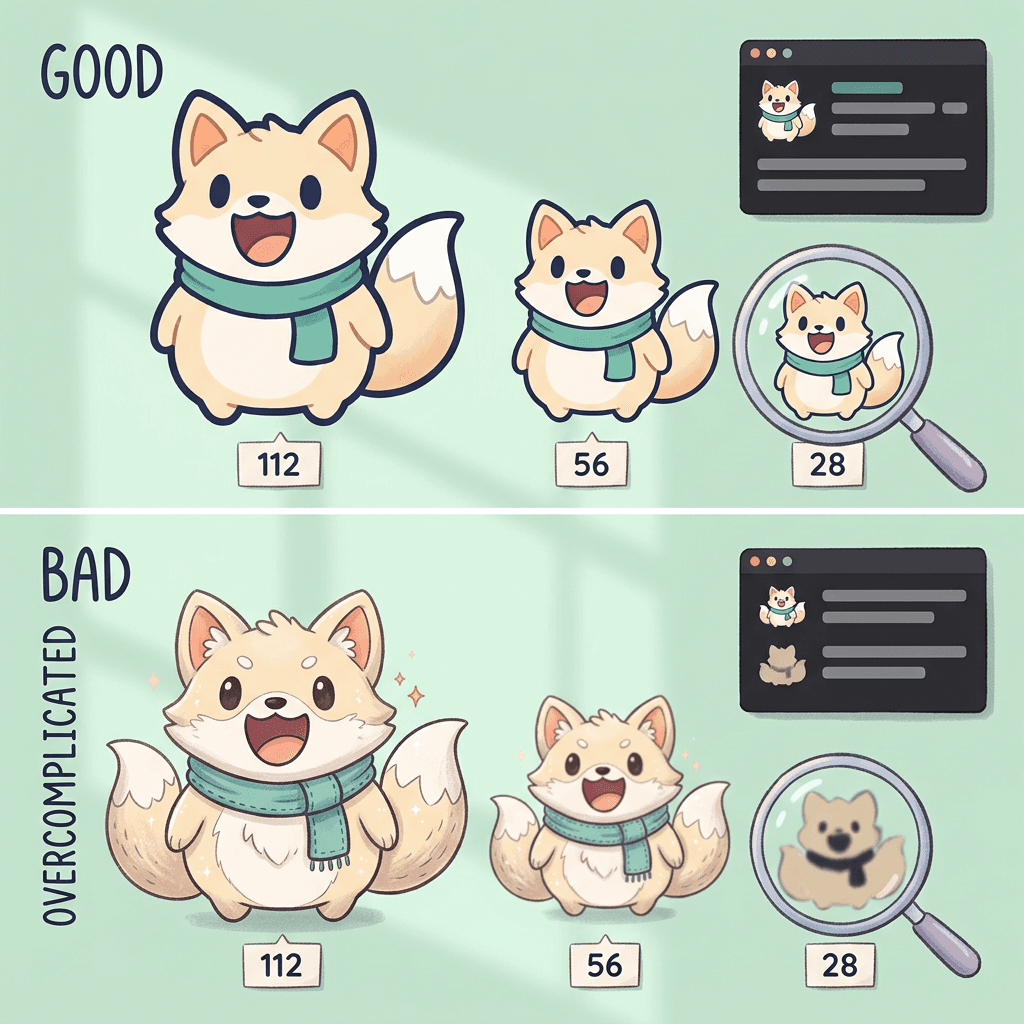
A fast way to check is the squint test from the profile picture guide: shrink the image to 28 pixels, put it next to a line of chat text and see whether you can name the emotion in one second. If you cannot, the cause is usually too much detail or too weak an expression rather than low resolution.
Group 1: Lock Your Mascot First
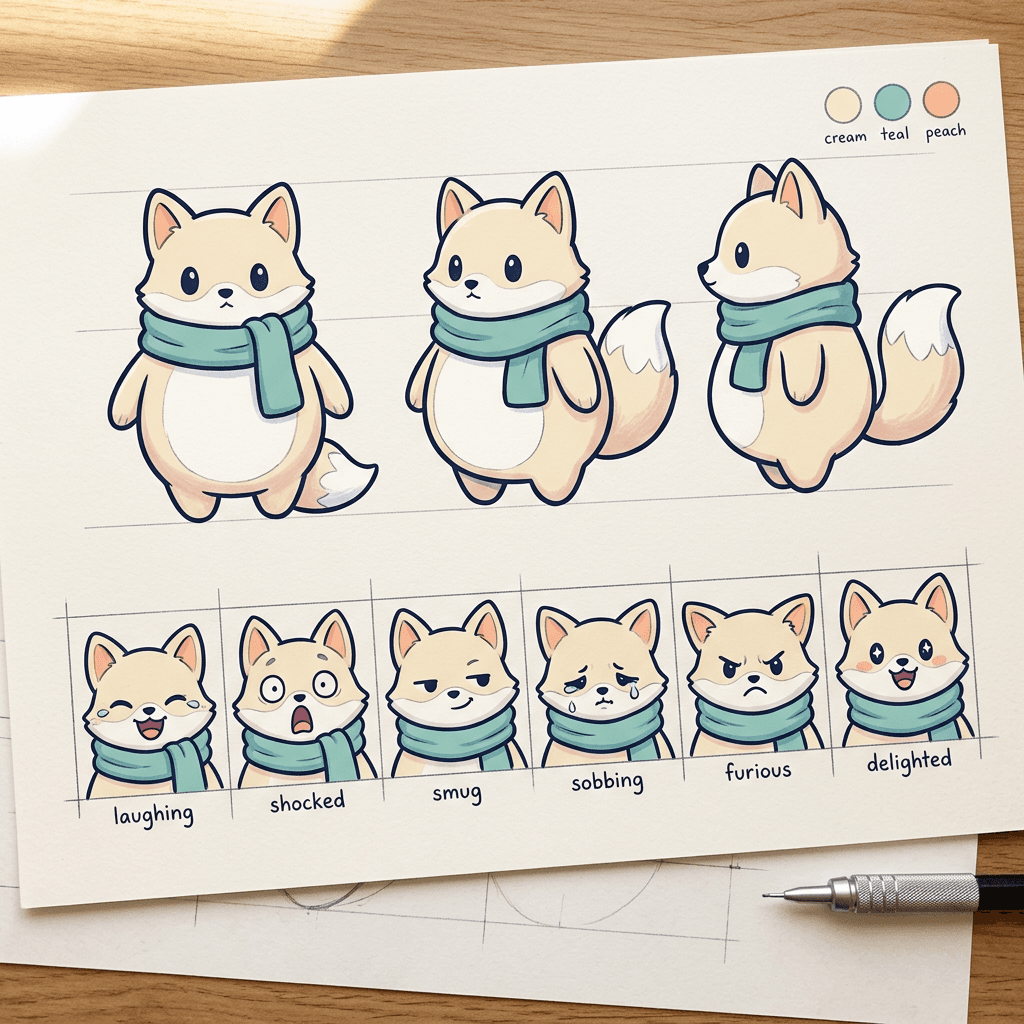
Most AI emote packs look unprofessional because each emote shows a slightly different character. A different ear shape here, a different scarf there. Fix that before generating a single emote by creating one character sheet and one expression lineup, then reusing the same short description in every later prompt.
Prompt 1: Mascot character sheet
Generate this first, pick your favorite result and write down the exact description of that character in one sentence. You will paste that sentence into every prompt below.
Character design sheet of an original mascot named Biscuit, a round chubby cream-colored fox with a teal scarf, big oval dark eyes, small triangle ears with peach inner ears, a fluffy white-tipped tail and tiny rounded paws, shown in three poses: front view, three-quarter view and side view, plus a small row of three color swatches for cream, teal and peach. Clean thick dark navy outline, flat pastel fills with one soft shadow tone, friendly and gender-neutral, simple shapes that stay readable when small. Flat solid white background, even lighting, no text, no watermark, no extra characters.
Why it works: three views give the model a consistent shape language, and the swatch row nails the palette so later prompts can reuse the same colors by name.
Prompt 2: Expression lineup
Use image-to-image with your chosen character sheet as the reference so the face stays identical, and read the lineup like a casting call. Keep the expressions that stay clear when you shrink the sheet.
A 3 by 2 grid of six expression sketches of the same cream fox mascot with a teal scarf, one head and shoulders portrait per cell: laughing with tears, shocked with a wide open mouth, smug half-lidded smile, crying with big tear streams, furious with angled eyebrows, delighted with sparkling eyes. Same character design, same thick dark navy outline, flat pastel fills, huge exaggerated expressions, each portrait centered with equal margin, thin light gray gridlines between cells. Flat solid white background, no text, no watermark.
Why it works: asking for six expressions in one image keeps the character locked, and it shows you in one glance which emotions read clearly before you commit to full-size art. For more consistency methods, see how to keep AI characters consistent across multiple images.
Group 2: Hype and Reaction Emotes
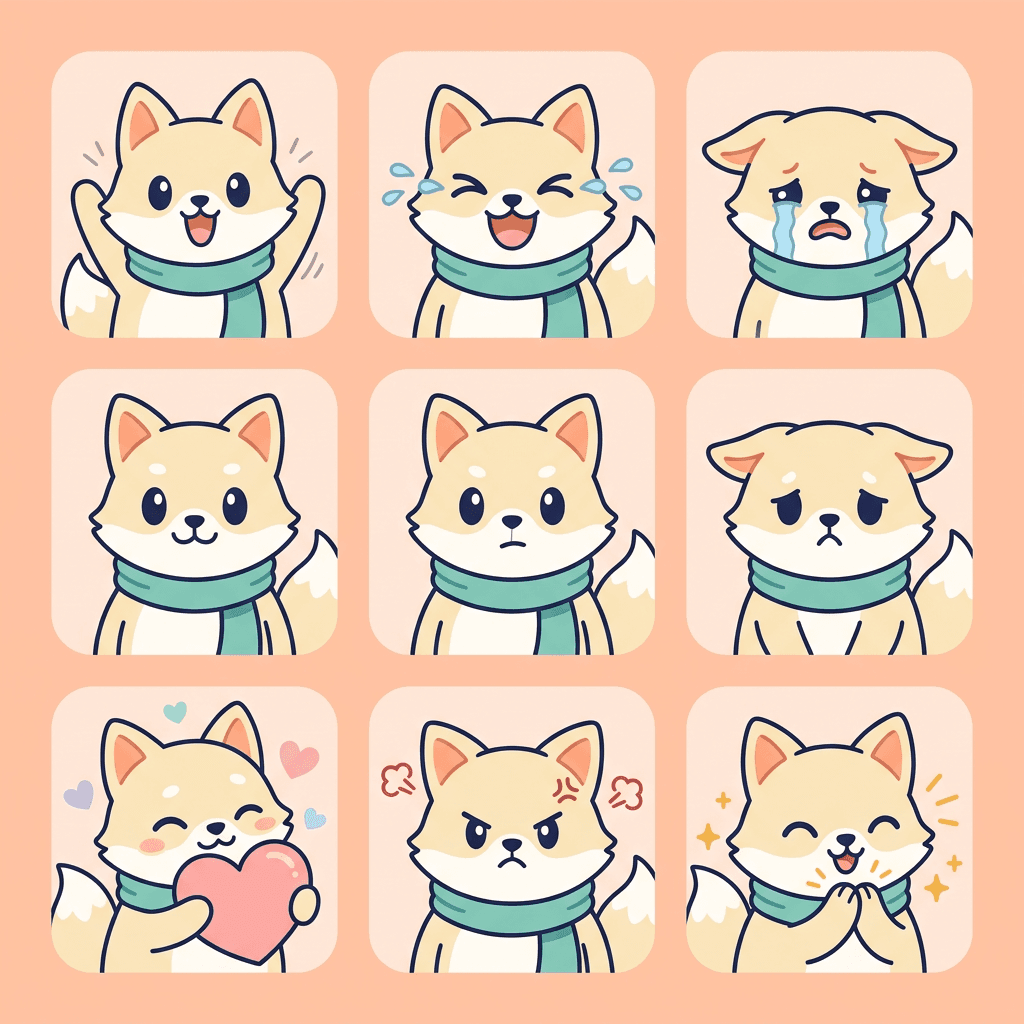
These are the six every channel needs first. The prompt template is the same each time: repeat the mascot sentence, name one emotion, add the outline and flat background lines, and ask for a head and shoulders crop.
Prompt 3: Hype
A single Twitch emote of a round cream-colored fox mascot with a teal scarf, big oval dark eyes and small triangle ears, arms thrown high in the air with a huge open mouth cheering, eyes shaped like happy arcs, three small motion lines on each side. Head and shoulders crop, centered with generous margin, thick dark navy outline, flat pastel fills with one soft shadow tone, bold exaggerated expression readable at 28 pixels. Flat solid magenta background, no text, no watermark.
Why it works: motion lines and open arms add energy without adding fine detail, and the arc eyes are a simple shape that survives downscaling.
Prompt 4: Laughing
A single Twitch emote of the same cream fox mascot with a teal scarf laughing so hard it is crying, head tilted back, mouth wide open, tears shooting out sideways in two blue streams, eyes squeezed shut in thick curves. Head and shoulders crop, centered with generous margin, thick dark navy outline, flat pastel fills, huge exaggerated expression. Flat solid magenta background, no text, no watermark.
Why it works: the tear streams are the readable signal, so the prompt makes them big and blue instead of small and subtle.
Prompt 5: Sad and crying
A single Twitch emote of the same cream fox mascot with a teal scarf sobbing, ears drooped flat, eyebrows tilted up in the middle, huge glossy eyes with two thick tear streams running down, wobbly frowning mouth. Head and shoulders crop, centered with generous margin, thick dark navy outline, flat pastel fills with one soft shadow tone, exaggerated and readable at tiny size. Flat solid magenta background, no text, no watermark.
Why it works: drooped ears, a steep eyebrow angle and big tear streams are the three biggest sadness cues in cartoon language, and each is a single large shape.
Prompt 6: Love
A single Twitch emote of the same cream fox mascot with a teal scarf hugging a big pink heart against its chest, eyes closed in a blissful curve, cheeks flushed with round peach blush circles, two small floating hearts above its head. Head and shoulders plus the heart, centered with generous margin, thick dark navy outline, flat pastel fills, simple shapes. Flat solid magenta background, no text, no watermark.
Why it works: the oversized heart does the storytelling, so the face can stay simple. It is also the shape viewers recognize first at 28 pixels.
Prompt 7: Rage
A single Twitch emote of the same cream fox mascot with a teal scarf furious, eyebrows slammed down into a sharp V, eyes narrowed to thin white slits with tiny dark pupils, teeth bared in a jagged grimace, a red steam puff blasting from each ear. Head and shoulders crop, centered with generous margin, thick dark navy outline, flat pastel fills with a stronger red accent, huge exaggerated expression. Flat solid magenta background, no text, no watermark.
Why it works: the sharp V eyebrows and jagged mouth give a pointy silhouette, which reads as anger even when the colors blur.
Prompt 8: GG clap
A single Twitch emote of the same cream fox mascot with a teal scarf applauding, both paws pressed together in front of its chest, a proud wide smile, eyes shaped like happy arcs, three small yellow spark lines radiating from the paws. Head and shoulders plus paws, centered with generous margin, thick dark navy outline, flat pastel fills, bold simple shapes. Flat solid magenta background, no text, no watermark.
Why it works: the spark lines make the clap visible at a glance, and you can reuse the pose for "good game", "nice", "congrats" and raid welcome emotes.
Group 3: Chibi Mascot Emotes
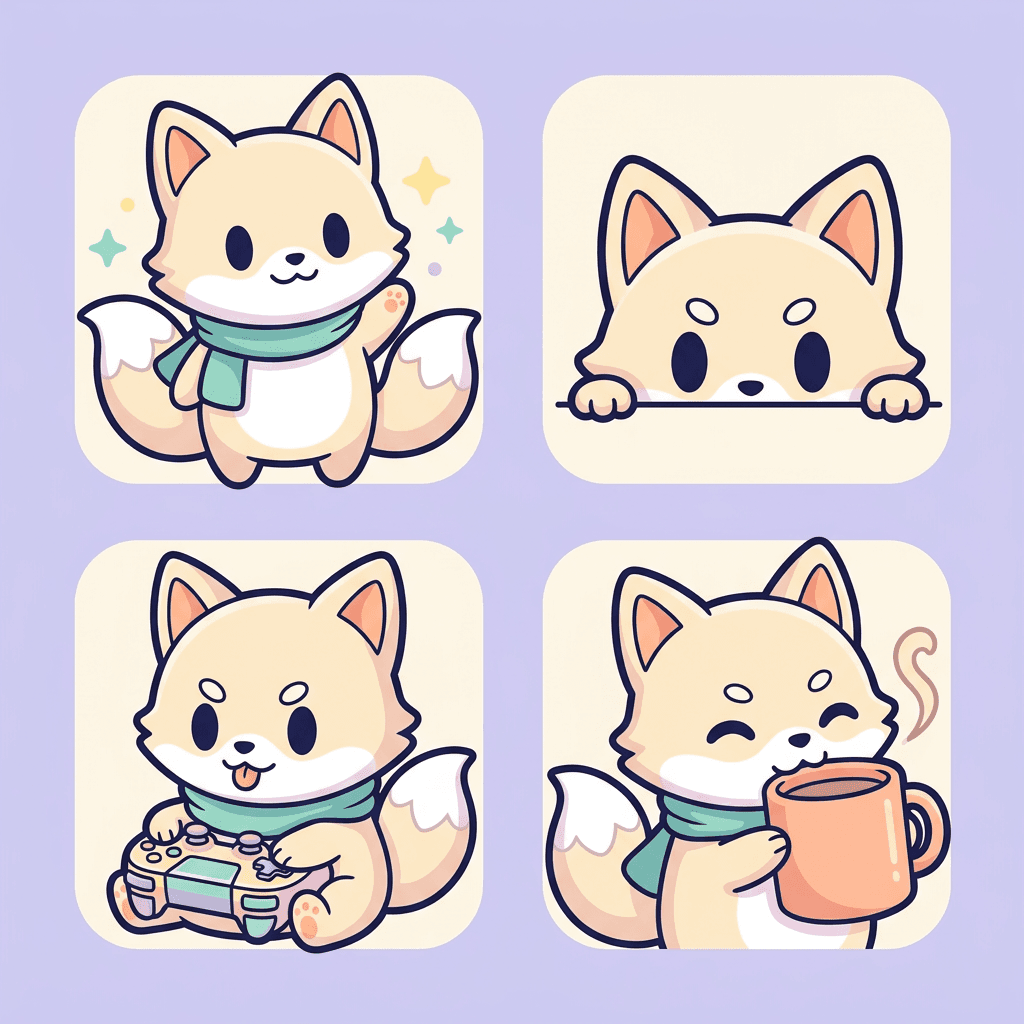
Chibi means oversized head, tiny body, and it is the most forgiving style for small sizes because the face takes up most of the canvas. These are for everyday chat moments rather than big reactions.
Prompt 9: Hello wave
A single Twitch emote of a chibi version of the same cream fox mascot with a teal scarf, oversized round head and tiny body, waving one paw with a cheerful open smile and sparkling eyes, small sparkle shapes near the paw. Full body but very compact, centered with generous margin, thick dark navy outline, flat pastel fills, adorable and simple. Flat solid magenta background, no text, no watermark.
Why it works: a single waving paw is an unmistakable greeting at any size, which is why a wave is usually the first emote worth making.
Prompt 10: Lurk
A single Twitch emote of a chibi cream fox mascot with a teal scarf peeking out from behind the bottom edge of the frame, only the top half of the face visible with big wary eyes looking sideways, two small paws gripping the edge, tiny triangle ears. Centered with generous margin, thick dark navy outline, flat pastel fills, simple shapes, funny and quiet. Flat solid magenta background, no text, no watermark.
Why it works: eyes peeking over an edge is a classic lurker silhouette that needs no text, and the half-hidden composition is easy to read small.
Prompt 11: Gaming focus
A single Twitch emote of a chibi cream fox mascot with a teal scarf gripping a chunky pastel game controller with both paws, tongue sticking out in concentration, eyebrows low and determined, eyes wide and locked forward. Compact full body, centered with generous margin, thick dark navy outline, flat pastel fills, controller drawn as a simple rounded shape with two buttons only. Flat solid magenta background, no text, no watermark.
Why it works: one prop, drawn with minimal parts, tells viewers what you do without adding unreadable detail. Ask for fewer buttons than a real controller has.
Prompt 12: Coffee break
A single Twitch emote of a chibi cream fox mascot with a teal scarf sipping from a large peach mug with both paws, eyes half closed in contentment, a single wavy steam curl rising from the mug, small rosy cheeks. Compact full body, centered with generous margin, thick dark navy outline, flat pastel fills, simple shapes. Flat solid magenta background, no text, no watermark.
Why it works: cozy emotes are popular in chat for good reason, and the steam curl is the one detail that tells you it is hot coffee instead of a plain cup.
Group 4: Text-Free Meme Reactions
Chat runs on reaction faces that are funnier than any word. These prompts reproduce the format of a reaction face without copying any specific existing emote, which matters both for originality and for the platform's rules on copying other people's work.
Prompt 13: Side-eye
A single Twitch emote of the same cream fox mascot with a teal scarf giving a suspicious sideways look, eyes pushed all the way to the right edge of the eye shape, one eyebrow raised high, mouth a flat straight line, head turned slightly to the left. Head and shoulders crop, centered with generous margin, thick dark navy outline, flat pastel fills, deadpan humor. Flat solid magenta background, no text, no watermark.
Why it works: the huge sideways pupils carry the joke even at 28 pixels, which is the point of a text-free reaction.
Prompt 14: Smug
A single Twitch emote of the same cream fox mascot with a teal scarf wearing a smug grin, heavy half-closed eyelids, one corner of the mouth pulled up high, chin raised, a tiny shine glint on one tooth. Head and shoulders crop, centered with generous margin, thick dark navy outline, flat pastel fills, confident and cheeky. Flat solid magenta background, no text, no watermark.
Why it works: half-lidded eyes plus an off-center smile read as smug in almost every cartoon tradition, so the model has plenty of reference for it.
Prompt 15: Jaw drop
A single Twitch emote of the same cream fox mascot with a teal scarf in total shock, jaw dropped down to the scarf, eyes shrunk to tiny white dots with small pupils, eyebrows flying up, three sweat drops on the forehead, ears standing straight up. Head and shoulders crop, centered with generous margin, thick dark navy outline, flat pastel fills, exaggerated and funny. Flat solid magenta background, no text, no watermark.
Why it works: shrinking the pupils while enlarging the mouth is the standard cartoon shock formula and gives you maximum contrast between features.
Prompt 16: Calm in chaos
A single Twitch emote of the same cream fox mascot with a teal scarf calmly sitting with a content smile and closed eyes while small orange flames and a few floating papers swirl around it, one paw holding a tiny mug, serene expression. Compact full body, centered with generous margin, thick dark navy outline, flat pastel fills with warm orange flame shapes, humorous contrast. Flat solid magenta background, no text, no watermark.
Why it works: the joke is the contrast between a calm face and a messy scene, and keeping the flames as flat shapes means it still reads when small. Avoid copying any specific famous meme layout, since original compositions are safer for upload approval and for your own brand.
Group 5: Sub Badge Tier Progressions
Badges appear next to a viewer's name and are tiny, 18 pixels in the smallest size according to Twitch's developer reference. A badge ladder rewards loyalty: the longer someone subscribes, the more elaborate their badge looks. The key is that each step changes the silhouette, not just the detail, because details disappear at 18 pixels.
Prompt 17: Gem ladder
A horizontal row of five square sub badge icons on a dark neutral strip, each a different gemstone shape growing in size and complexity from left to right: a small round teal bead, a faceted green diamond, a hexagonal blue crystal, a purple star-cut jewel and a golden crown-shaped gem with a tiny sparkle. Thick dark navy outline on each, flat pastel fills with one light highlight shape, each badge centered in its own square cell with equal margin, simple bold silhouettes readable at 18 pixels. Flat solid magenta background around the cells, no text, no numbers, no watermark.
Why it works: five clearly different silhouettes mean viewers can tell tier levels at a glance, and gems are a universal "rank up" language.
Prompt 18: Mascot evolution
A horizontal row of five square sub badge icons showing the same cream fox mascot evolving through loyalty tiers: a speckled egg, a hatching fox with half the shell on its head, a small fox with a teal scarf, a fox with the scarf and a tiny pair of round glasses, and a fox wearing a gold crown with the scarf flowing. Thick dark navy outline, flat pastel fills, face-only crops with the crown or shell silhouette as the main difference between steps, each centered in its own square cell with equal margin. Flat solid magenta background, no text, no numbers, no watermark.
Why it works: it tells a story viewers want to complete, and changing the headwear changes the silhouette at every tier.
Prompt 19: Shield ranks
A horizontal row of four square sub badge icons in the shape of shields with growing ornament: a plain teal shield with a thin white border, a shield with a bold white star, a shield with a star and two small wings, and a gold shield with star, wings and a small crown on top. Thick dark navy outline, flat colors, symmetrical simple shapes designed to stay readable at 18 pixels, each centered in its own square cell with equal margin. Flat solid magenta background, no text, no numbers, no watermark.
Why it works: ranks that add one big element per step stay legible at small sizes, and it works for a channel with no mascot at all, such as a faceless one (see the faceless YouTube channel guide).
Prompt 20: Single badge, three sizes check
A single square sub badge icon of a cream fox mascot face wearing a teal scarf inside a simple rounded hexagon, thick dark navy outline, flat pastel fills, centered with equal margin, designed so the eyes, scarf and ears are all large simple shapes. Also show the same badge as a tiny preview at one quarter size and one eighth size in the bottom right corner, to check readability. Flat solid magenta background, no text, no numbers, no watermark.
Why it works: asking for small previews inside the image makes the model simplify the design while it draws, and you can compare sizes directly without opening an editor.
Group 6: Channel Point Icons
Channel point rewards are a small icon plus a title, and Twitch's developer reference notes that each reward image is stored in three scales and that a reward title can be at most 45 characters, with a limit of 50 custom rewards per channel. Icons usually sit on a colored tile, so designing them as simple, bold glyphs with a flat colored background works best.
Prompt 21: Reward icon sheet
A 3 by 2 grid of six channel point reward icons, each a bold simple glyph inside a rounded square tile in a different pastel color: a water glass labeled only by a droplet shape, a stretching stick figure arms overhead, a music note on a disc, a chat bubble with an exclamation mark, a small trophy, and a sparkling star. Thick dark navy outline on every glyph, flat colors, each icon centered with generous margin, readable at very small size, consistent drawing style across all six. Flat solid white gutters between tiles, no letters, no watermark.
Why it works: one image gives you a consistent family of six icons, and symbols instead of words sidestep the AI spelling problem entirely.
Prompt 22: Highlight my message
A single channel point reward icon of a cream fox mascot with a teal scarf holding up a glowing speech bubble containing an exclamation mark, inside a rounded square tile in warm yellow, thick dark navy outline, flat pastel fills, centered with generous margin, simple shapes readable at 28 pixels. Flat solid magenta background outside the tile, no text other than the exclamation mark, no watermark.
Why it works: tying the reward to your mascot keeps viewers connected to the brand, and the exclamation mark is the only character in the image, so it renders correctly.
Prompt 23: Hydrate
A single channel point reward icon of a cream fox mascot with a teal scarf drinking from a big blue water bottle, eyes closed in relief, three small water droplets flying off, inside a rounded square tile in light blue, thick dark navy outline, flat pastel fills, centered with generous margin, simple bold shapes. Flat solid magenta background outside the tile, no text, no watermark.
Why it works: a viewer-triggered action like making you drink water is one of the most popular first rewards, and a single recognizable object (a bottle) makes the reward title obvious at a glance.
Group 7: Stream Overlay and Panel Graphics
Overlays and panels are large graphics, so you can use richer detail than in an emote. The rule that carries over is clarity: leave empty space for your webcam, game and alerts, because an overlay that covers the action is worse than no overlay. Twitch's own Creator Camp guidance makes the same point about overlays, saying that showing too much at once can lead to a cluttered look. Pair these with the AI prompts for YouTube intros, end screens and channel art, which cover the same layout logic for video.
Prompt 24: Webcam frame
A decorative webcam frame for a live stream, a 16:9 composition with a large empty rectangular opening in the center showing a flat solid magenta fill, surrounded by a thick rounded border in teal with a peach inner line, a small cream fox mascot peeking over the top left corner with one paw on the frame, tiny stars in the bottom right corner. Thick dark navy outline on the frame and mascot, flat pastel fills, calm and uncluttered, no text, no watermark.
Why it works: the solid magenta window makes it trivial to cut out, and a single mascot peeking over a corner gives personality without crowding the camera.
Prompt 25: Panel icon set
A row of four matching square panel header icons for a stream channel page, each drawn as a bold simple glyph in a pastel rounded tile: a calendar for schedule, a heart for support, a scroll for rules and a speech bubble for socials. Thick dark navy outline, flat colors in teal, peach, lavender and mint, even spacing, consistent line weight across all four, no letters or numbers, no watermark. Flat solid white background.
Why it works: icons carry meaning without text, and you can add crisp text with a real font in an editor, which is far more reliable than asking the model to spell.
Prompt 26: Alert background
A wide stream alert background, 16:9, showing a soft pastel burst of confetti shapes and small stars radiating from the center around a large empty rounded rectangle for text, a cream fox mascot with a teal scarf cheering at the lower left corner, mint and peach color blocks at the edges, thick dark navy outline on the mascot and flat pastel shapes elsewhere. Keep the center rectangle completely empty and flat light cream, no text, no watermark.
Why it works: naming the empty area tells the model to keep it clean, so you can add the viewer name and alert text in your streaming software.
Prompt 27: Offline banner
A wide offline screen banner, 16:9, with a cream fox mascot with a teal scarf sleeping curled up on a big pastel cushion at the left, a small crescent moon and three stars above, a warm lamp glow on the right, and a wide empty strip along the bottom third kept flat and clean for text. Thick dark navy outline, flat pastel fills with soft shadow tones, calm bedtime mood, no text, no watermark.
Why it works: a quiet scene reads as offline immediately, and the clean bottom third gives you room for a schedule line later.
Group 8: Starting Soon, BRB and Ending Screens
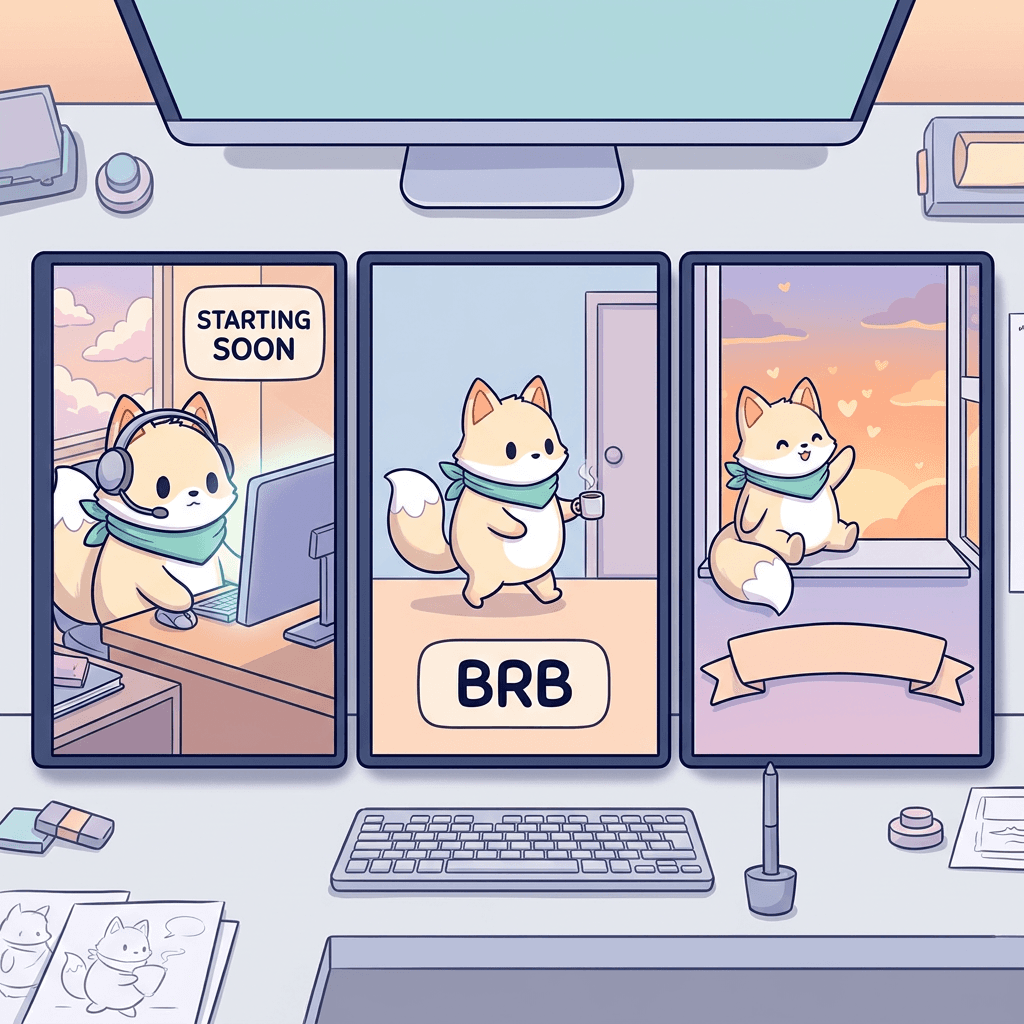
Twitch's Creator Camp page on scenes and overlays describes a starting soon scene as a way to build anticipation and give viewers a place to gather, and a BRB scene as a way to avoid showing an empty chair or frozen frame. These are full-screen graphics, so you can use the full 16:9 canvas, but keep a clear area for a countdown or timer.
Prompt 28: Starting soon
A full-screen starting soon background, 16:9, a cream fox mascot with a teal scarf sitting at a cozy desk with a glowing monitor and a headset, small sparkles and soft pastel clouds in the window behind it, warm lamp light from the left, and a large empty rounded panel in the upper right kept flat and clean for a countdown timer. Thick dark navy outline on the mascot and desk, flat pastel fills with soft shadows, calm and welcoming mood, no text, no watermark.
Why it works: the scene says the stream is about to begin, and the reserved panel means your timer sits on a clean area instead of fighting detail.
Prompt 29: Be right back
A full-screen be right back background, 16:9, a cream fox mascot with a teal scarf walking away toward a door on the right holding a mug, a small sign hanging on the door shaped like a clock with no numbers, pastel wallpaper and a few floating stars, and a large empty rounded panel at the bottom center kept flat and clean for text. Thick dark navy outline, flat pastel fills, playful and calm, no text, no watermark.
Why it works: a departing character explains the situation without words, and the clock without numbers avoids the AI scrambling digits.
Prompt 30: Stream ending
A full-screen thanks for watching background, 16:9, a cream fox mascot with a teal scarf waving goodbye from a window sill at sunset, orange and lavender sky with soft clouds, small hearts floating up, a wide empty rounded banner across the lower third kept flat and clean for text. Thick dark navy outline on the mascot, flat pastel fills, warm and grateful mood, no text, no watermark.
Why it works: a warm sunset closes the broadcast on a good feeling and gives viewers a reason to come back, and the empty banner is where your next stream time and social handles go.
How to Get Clean Backgrounds and Cut Out Your Emotes
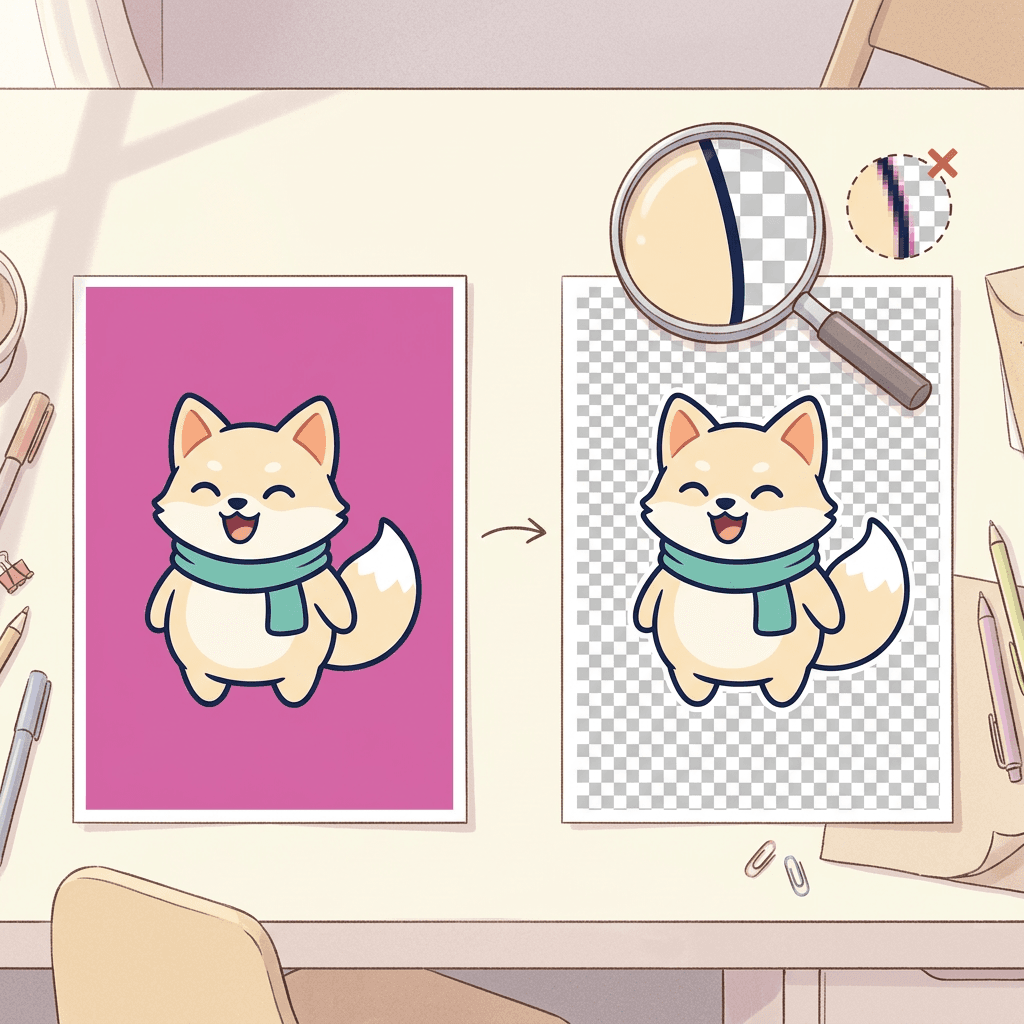
Most AI image tools return an opaque image, even if you write the word transparent in the prompt. A prompt that asks for a transparent background often gives you a painted checkerboard pattern baked into the pixels, which is worse than a plain color. The reliable method has three steps.
- Generate on a flat solid color that does not appear in your character. That is why the prompts above ask for magenta. A cream, teal and peach fox has no magenta in it, so the model has no reason to bleed it into the subject. If your character has pink, use bright green instead.
- Remove the background with any background remover or an editor's select by color tool. A flat color is the easiest case for these tools, so edges come out clean. Zoom in on the cutout at 400 percent and look for a thin magenta fringe around the outline.
- Fix the edges, then export. If a fringe remains, shrink the selection by one pixel, or use an image editor's defringe option. For small mistakes inside the art, you can inpaint a region with Miraflow and ask for just that one fix.
After cutting, export a PNG with transparency at 112 pixels square for Twitch, then 56 and 28. When you downscale, use a good resampling method and then sharpen very slightly. If the 28 version looks soft, add a little more contrast to the outline rather than more detail to the face. A thick outline plus slightly boosted contrast is the single most effective fix for muddy small emotes.
If you want an existing sticker sheet as your starting point instead, the AI face sticker sheet prompts cover grid layouts and transparent-background sticker styles that you can cut apart into individual emotes.
Keeping a Whole Emote Set Consistent
A set is only as good as its weakest emote, and consistency is what makes a channel look professionally designed. These are the practical habits that work.
Reuse the same character sentence. Copy the exact sentence from Prompt 1 into every prompt, word for word. Changing "round chubby cream-colored fox" to "cute fox" in one prompt is enough to change the face.
Use image-to-image with your chosen emote as the reference. In Miraflow's AI Image Generator, upload your best emote and ask for a new expression on the same character. This holds the face and palette better than text alone, and it is the same technique covered in the consistent AI characters guide.
Generate in batches of four to six. One prompt that creates a grid of expressions, like Prompt 2, keeps a single character per image. Then crop individual emotes out of the grid.
Lock the outline and palette. Keep the same outline color (dark navy here), the same outline thickness phrase and the same three or four named colors in every prompt. If you rebrand later, update the palette in one place.
Review the set at actual size. Put all your emotes in a row at 28 pixels. If one looks heavier, lighter or differently colored, regenerate only that one.
If your channel has no mascot, the logo prompts are a good starting point for a single symbol, which you can then adapt into badges and icons.
Does Twitch Allow AI-Generated Emotes?
I could not find a Twitch policy about AI-generated emotes on any page I could read. The Twitch help page for emote guidelines did not load in my tools, so I cannot say what it states, and I found no statement about generative AI emotes in the developer reference or in the search results I checked. That means I can neither say AI emotes are allowed nor that they are banned.
What I can say is practical. Twitch has described an approval step for new emotes, and any platform's rules on copyright and other people's work apply to generated art just as they do to hand-drawn art, so the safest path is the same either way. Make an original character, avoid copying other creators' emotes or any studio's characters, avoid real people's faces and logos, and read the current emote guidelines in your Creator Dashboard before you upload. Policies on AI content change quickly across platforms, so recheck before each new batch.
Two habits help with approval and with your community. Keep your original source files and prompts as a record of how the art was made, and be honest if viewers ask. Many communities react badly to AI art that was hidden from them, and much better to artwork that is clearly original and openly credited.
How to Customize These Prompts
- Swap the mascot. Replace the fox sentence with your own character, such as a robot, a slime, a frog, a plant or a bird, and keep everything else.
- Change the palette. Name three colors in the character sentence and reuse them everywhere. Warm palettes feel cozy, saturated neon palettes feel competitive.
- Change the style. Replace "flat pastel fills" with "pixel art", "sticker style with a white border" or "hand-drawn ink" for a different look. If you want a storybook feel, see the AI children's book illustration prompts.
- Make a pet or real-life version. Upload a photo of your pet or your own avatar with image-to-image, then ask for the cartoon version with the same outline and palette lines.
- Adjust for Discord. Discord's emoji are displayed small, so the same prompts work, and the recommended size is 128 pixels square, with a limit of 256 KB.
- Make a YouTube membership set. YouTube custom emoji run from 48 to 480 pixels square and under 1 MB, and an uploaded GIF shows as a static image, so use the static PNG version of every emote.
Common Mistakes With AI Twitch Emotes
Designing at full size. The most common mistake is judging an emote at 1024 pixels. Always check at 28 pixels beside real chat text before you approve anything.
Too many details. Fur texture, stitching, jewelry, background scenery and decorative sparkles all disappear or become noise. Cut every detail that does not carry the emotion.
Thin outlines. A thin line is fine on a poster and invisible on a dark chat theme. Ask for a thick outline in every prompt.
Asking for transparent backgrounds directly. Many tools return a painted checkerboard. Generate on a flat solid color and remove it, as described above.
Putting words in the art. Any word of more than a few letters gets misspelled or smudged. Add text in an editor with a heavy font, or skip it.
A different character in every emote. If ears, scarf or eye shape change from emote to emote, the set looks like a stock pack. Reuse the character sentence and use image-to-image.
A badge ladder with only detail changes. If tier one and tier five look the same at 18 pixels, nobody sees a reason to keep subscribing. Change the silhouette, not just the decoration.
Copying existing emotes or characters. Prompting for a famous meme face, a streamer's emote or a studio's character risks rejection and complaints. Make original designs.
Skipping the dark and light theme check. A cream or white character outline looks fine on one theme and vanishes on the other. A dark outline protects you on both.
Forgetting file size. A detailed 112 pixel PNG with soft gradients can exceed a platform's file limit. Flat colors compress far better, which is another reason to keep the art simple.
Make Your Whole Channel Look Match With Miraflow
Emotes are one piece of a brand. The same mascot can appear on your thumbnails, your banner, your profile picture and your clips. Inside Miraflow you can generate emotes and icons with the AI Image Generator, turn your mascot into video thumbnails with the YouTube Thumbnail Maker, and cut your streams into captioned vertical clips with AI Clipping, so the same character shows up everywhere your audience finds you. If you want short videos with the mascot as a narrator, Text2Shorts turns a topic into a vertical video. You can see everything Miraflow offers on the Miraflow home page.
For more prompt ideas using the same image tools, the Nano Banana prompt pack has dozens of copy-and-paste starting points.
Frequently Asked Questions
What size should a Twitch emote be?
Twitch's developer reference describes emotes at 28, 56 and 112 pixels square. Make one master at 1024 pixels or larger, then export the three sizes as PNG with a transparent background, and check the 28 pixel version against chat text. Confirm file size limits in the upload form in your Creator Dashboard.
What size are Twitch sub badges?
Twitch's developer reference lists subscriber badges at 18, 36 and 72 pixels square. Design for 72 pixels, then check the smallest size, because that is what most viewers see next to a name.
How big can a Twitch emote file be?
I could not read Twitch's official help page, so I cannot confirm it here. Many third-party guides quote about 25 KB for static emotes and 1 MB for animated ones, but treat those as unconfirmed and check the Creator Dashboard upload form, which tells you when a file is too large.
Can I use AI-generated images as Twitch emotes?
I did not find any Twitch policy on AI-generated emotes on pages I could read, so I cannot say it is allowed or banned. Read the current emote guidelines in your Creator Dashboard, use original characters and never copy other creators or studios.
Can AI make animated Twitch emotes?
Twitch lists an animated GIF as a possible format for an emote, but a still image generator makes static art. The practical route is to generate the static emote, then animate it with an animation tool or editor, and check the platform's animation limits in the uploader.
How do I get a transparent background on an AI emote?
Generate on a flat solid color that is not in your character, such as magenta, then remove that color with a background remover or a select by color tool and export a PNG. Asking the model for a transparent background directly often paints a fake checkerboard.
What are the Discord emoji size and limits?
Discord's own guide says 128 by 128 pixels is the ideal size, 256 KB is the file size target and larger files are compressed. It accepts JPEG, PNG, GIF, WEBP and AVIF, and animated emoji can be used by Nitro members.
What are the YouTube custom emoji requirements?
YouTube's membership help page lists JPEG, PNG and GIF files, less than 1 MB, from 48 by 48 pixels (preferred) up to 480 by 480 pixels. A GIF is shown as a static image. Emoji names must be 3 to 10 alphanumeric characters.
How many emotes do I need to start?
There is no magic number. A small, well-made starter set of hype, laugh, sad, love, rage and a greeting covers most chat moments, and Twitch's slot counts depend on your Affiliate or Partner progress. Check your Creator Dashboard for the slots you currently have.
How do I keep all my emotes looking like the same character?
Create a character sheet, write down one exact sentence describing the character, and paste it into every prompt. Use image-to-image with your best emote as a reference for new expressions, and generate in grids of six so one image keeps one character.
Why does my emote look good large and bad small?
Fine detail, thin lines and subtle expressions disappear when downscaled. Use a thick outline, one exaggerated expression and three to five flat colors, then test at 28 pixels against real chat text.
Can I use these prompts for Kick or other platforms?
Yes, the art approach is the same everywhere. I did not verify Kick's current size and file limits, so read the uploader or help page on each platform before exporting.
Conclusion
Good emotes come from respecting the size they are viewed at. A thick outline, one huge expression, a flat background and a single locked mascot beat any amount of fancy detail, and the 30 prompts above give you a full starting set: hype and reaction faces, chibi daily moments, text-free meme reactions, sub badge ladders that change silhouette at every tier, channel point icons, overlays and starting soon or BRB screens.
Start by generating your mascot sheet in Miraflow's AI Image Generator, pick your favorite character, lock the description and then work down the groups in order. Check every emote at 28 pixels next to real chat text, cut out the magenta, export the sizes your platform asks for and read the upload rules in your dashboard. Then carry the same mascot into your channel banner, your profile picture and your thumbnails, so every place a viewer meets you looks like the same channel.