20 AI Halloween Party Invitation and Flyer Prompts (Copy & Paste 2026)

Written by
Aerin Kim
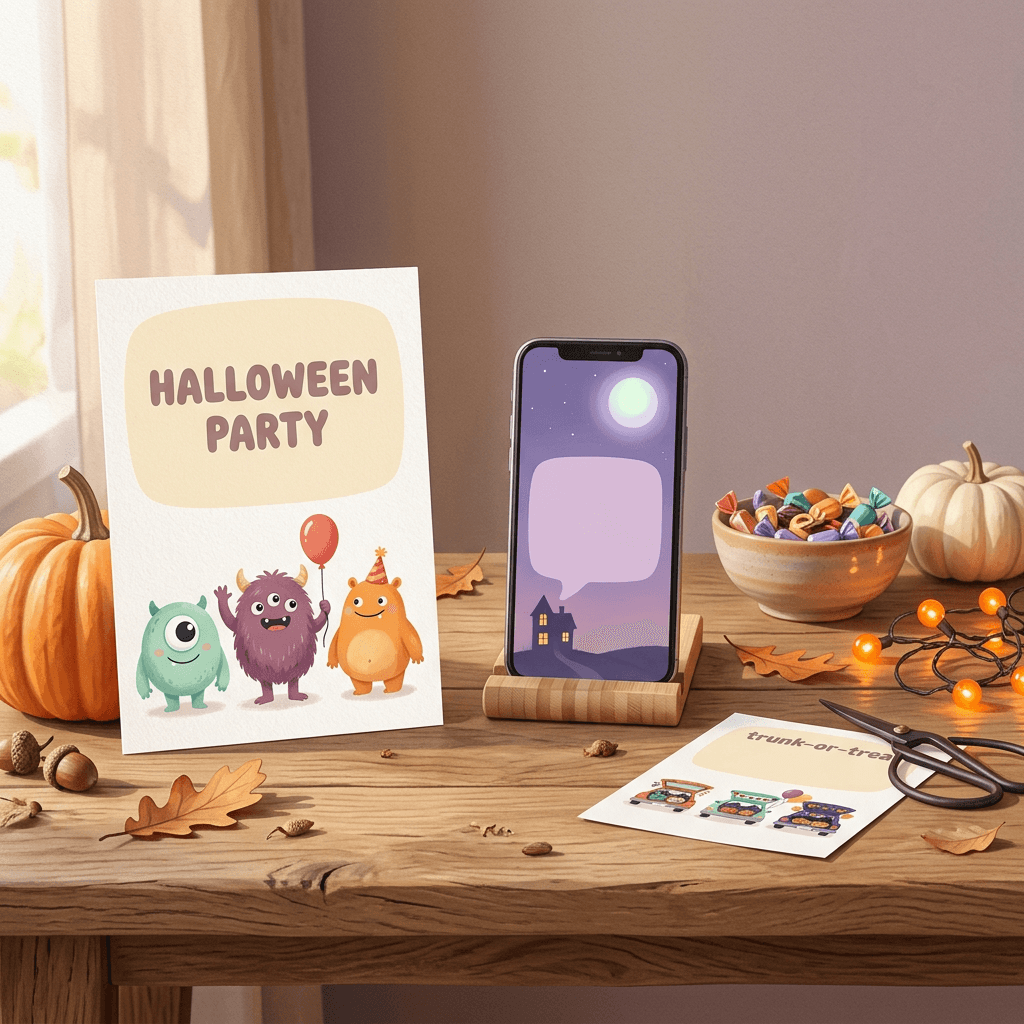
Copy 20 AI Halloween invitation and flyer prompts for kids' parties, costume nights, trunk-or-treat, offices, dinners, Stories and businesses, plus how to add exact text, size 5x7 cards and print.
If you searched for a Halloween party invitation or a Halloween flyer and found yourself scrolling through the same forty templates, all with the same cartoon pumpkin and a script font nobody can read, there is a faster way to get something that actually looks like your party. Describe the artwork you want, generate it with an empty space left for words, and then type the date, time and address yourself in any layout editor.
That second step is where most AI invitation attempts go wrong. Image models can now draw short words, but they have no idea when your party is, and a single swapped digit on a printed card sends guests to the wrong day. The technique in this guide keeps the AI doing what it is good at (atmosphere, characters, color, composition) and keeps you in control of every fact on the card.
The timing is good this year. Halloween 2026 falls on Saturday, October 31, so the party weekend runs from Friday, October 30 through Sunday, November 1, and there are a little over two weeks left to get invitations out. Below you will find 20 copy-and-paste prompts grouped into eight kinds of invitation and flyer, plus the practical parts that most prompt lists skip: which aspect ratio to pick, how to handle bleed and resolution for a 5x7 print, how to keep text readable, and how to turn the finished card into a short video invite with a spooky music bed.
TL;DR: How to Use These Halloween Invitation and Flyer Prompts
- Open Miraflow's AI Image Generator, choose the aspect ratio first (3:4 for 5x7 cards and letter flyers, 9:16 for Stories and WhatsApp Status, 16:9 for email and office banners), then paste a prompt.
- Every prompt reserves a blank panel on purpose. Add the event name, date, time and address afterward in an editor such as Canva, Google Slides, Keynote or Pages, so nothing on the card can be misspelled by the model.
- If you want text inside the art at all, limit it to one headline of one to three words, and check every letter.
- For print, a 5x7 card is 1500 by 2100 pixels at 300 DPI, or 1575 by 2175 pixels with the common 0.125 inch bleed on every side. Keep text about 0.25 inches inside the trim.
- Check contrast before you send: WCAG asks for at least 4.5:1 for normal text and 3:1 for large text.
- Animate the finished art with Text2Shorts or the cinematic video generator, and add a track from the AI Music Generator.
- This post is about invitations and flyers only. For phone backgrounds see the Halloween wallpaper prompts, for clips see the Halloween video prompts for Shorts and TikTok, and for costume photos see the Ghostface and costume portrait prompts.
Why Halloween 2026 Is a Weekend Event, and When to Send Invitations
When Halloween lands on a weekday, the party calendar sprawls across two or three weekends and nobody agrees on a night. When it lands on a Saturday, as it does on October 31, 2026, the choices collapse into a small set: Saturday, October 24 for an early party, Friday, October 30 for people who want to avoid the busiest night, and Saturday, October 31 itself for everyone else. Trick-or-treating, trunk-or-treat events, bar nights and house parties all compete for the same few hours on the 31st, which means your invitation has to win attention quickly and state the night clearly.
There is also a small calendar detail worth using. In the United States, daylight saving time ends at 2 a.m. on Sunday, November 1, 2026, so clocks fall back one hour in the early hours after a Saturday-night party. If you are hosting adults and plan a late finish, a line such as "ends whenever the last ghost leaves (we get an extra hour)" turns a boring end time into a joke guests remember. Hosts who also celebrate Día de Muertos on November 1 and 2 can find a separate set of prompts in the Día de los Muertos Catrina and ofrenda prompt pack.
As for timing, a practical rhythm works for most parties. Send the invitation as soon as the date is fixed, which for a Halloween 2026 party means this week. Send a short reminder Story or message three days before, and a day-of post with the final details on Saturday morning. Businesses running a Halloween event do better with a slightly longer runway: a first flyer about ten days out, a reminder at the three-day mark, and a "tonight" post on the day. Each of those posts can reuse the same art with a different text layer, which is exactly why generating art and text separately saves so much time.
The Technique That Makes AI Invitations Work: Art First, Text Second
Why AI Text Goes Wrong on Invitations
An image model does not type. It paints, and every letter is a small shape that has to land in the right place with the right number of strokes. A short word such as BOO has three shapes and very few ways to fail. A line such as "Saturday, October 31, 7 to 11 PM, 482 Maple Court" has dozens of shapes, commas and digits, and every extra character adds another chance for a swapped, doubled or invented glyph. Digits are the worst case because a 3 that looks like an 8 is still a perfectly plausible digit, so neither you nor the model notices until a guest turns up on the wrong night.
The second problem is that the model has no way to know your facts. If the prompt does not contain them it will invent plausible ones, and even when it does, it can transcribe them wrongly with complete confidence. When something is wrong, the only fix inside the image is to regenerate it, and regenerating changes the artwork too, so you lose the version you liked. A text layer in an editor takes ten seconds to correct and leaves the art untouched, which matters when the host calls at 5 p.m. to say the party now starts at 8.
The third problem shows up after you hit send. Words baked into pixels cannot be copied into a calendar, cannot be read aloud by a screen reader, cannot be translated, and print softer than real fonts because they are only as sharp as the image resolution. A text layer exported as a PDF stays crisp at any print size.
What Changed in 2026 and What Did Not
Text rendering is the area where image models improved most visibly this year. OpenAI launched gpt-image-2 (ChatGPT Images 2.0) in April 2026 with text rendering as a headline upgrade, and Ideogram released its open-weight Ideogram 4.0 on June 3, 2026 with improved text rendering as one of its main features. In practice, a headline of one to three common words in a clear style now comes out right on the first or second try far more often than it did two years ago. If you want to see how far a text-focused model can be pushed, the post on Ideogram 4.0 JSON prompts for text-heavy designs goes deep on layouts.
What did not change is the length problem and the facts problem. Independent comparisons still disagree about which model wins typography tests, and reviewers of every recent model describe the same pattern: short, large display text works, while small print, long lines, names, addresses and numbers are where mistakes still appear. The same rule applies in any generator, including Miraflow's: if you want a headline inside the art, keep it to one to three words, and read every letter before you save.
Here is a rule of thumb that works across models:
- Safe to let the model draw: one headline of one to three common words in capitals, such as BOO, MONSTER BASH or FRIGHT NIGHT, set large.
- Never let the model draw: dates, times, street addresses, phone numbers, URLs, names of guests, prices, RSVP deadlines and any line of small print.
- Always add yourself: everything in the second list, in a real font, in an editor.
The same short-headline instincts apply to thumbnails, so the guide to YouTube thumbnail text ideas is a useful reference for choosing punchy one-to-three-word phrases.
The Two-Pass Workflow
- Write the exact copy first, before you generate anything. Count the lines. Five lines of text need roughly a third of a 5x7 card, and knowing that tells you how big a blank panel to ask for.
- Generate at least four variations with the blank panel included. Models vary a lot from run to run, and the best composition is rarely the first.
- Pick the version where the empty area still looks intentional. A good test is to drop a plain rectangle where the text will go and see whether the art still feels balanced around it.
- Place your text in an editor. Use no more than two fonts: one display font for the event name and one plain, highly readable font for the details.
- Export a PDF for printing (so the text stays vector), a PNG for chat apps and Stories, and check the result at actual phone size before you send it.
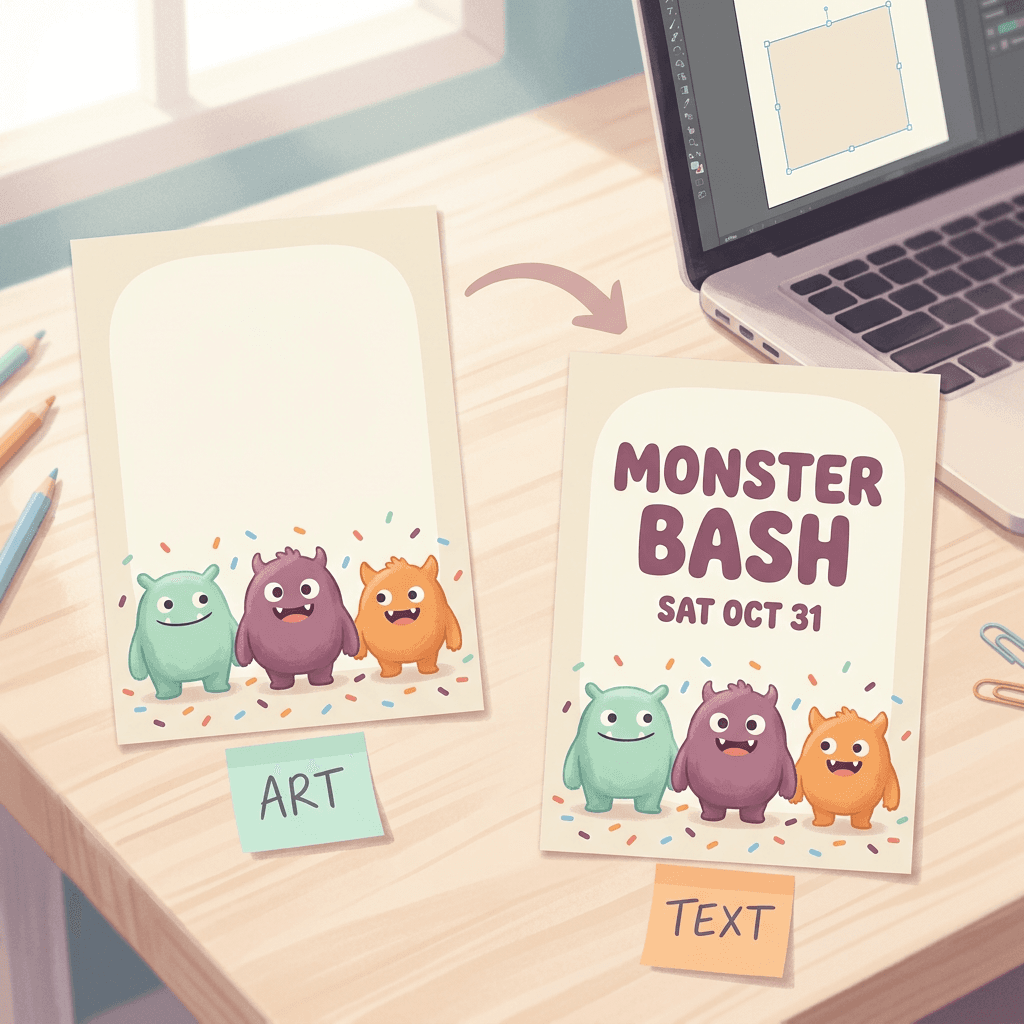
How to Ask for Blank Space So the Model Respects It
Models tend to fill empty areas with decoration or fake lettering unless the emptiness is something they recognize as an object. Name a physical thing that is naturally blank (a cream rectangle, a wooden sign with no markings, a slate board, a ribbon banner, a black plaque, a plain night sky), say how much of the frame it takes, and say that it stays smooth and unmarked. Keep the main subject on the opposite side of the frame from the blank area so a small crop never cuts into it. Here is a sentence you can paste into any prompt in this post:
Leave a large smooth cream rectangle with softly rounded corners filling the top half of the card, completely empty with no lettering, symbols, borders or texture inside it.
What Every Halloween Invitation Needs
Fun art gets a guest to read the card, but missing details are what generate the string of follow-up texts a host dreads. Whatever the party, check that your text layer covers these:
- The event name, large and short.
- The weekday and the date written out, such as "Saturday, October 31". Avoid numeric dates like 10/31, which read as the 10th of the 31st month to guests in much of the world.
- A start time and an end time. An end time is one of the most useful lines on a kids' invitation and on any invitation for a family with a babysitter.
- The place. For a public Story or a flyer pinned in a neighborhood, give the area and share the exact home address privately.
- How to RSVP and by when, with one contact method.
- The dress code or costume rules, including a line such as "no masks that cover the face" for kids' parties.
- Food and allergy notes, and whether guests should bring anything.
- For kids, whether parents stay or drop off.
Pick the Canvas First: Aspect Ratios and Sizes
Choosing the ratio before you generate matters more than most people expect. A prompt composed for a tall card will not crop gracefully into a landscape email header, because the blank panel and the focal subject end up in the wrong places. Miraflow's AI Image Generator offers 1:1, 16:9, 9:16, 4:3 and 3:4, so you can generate close to your final shape and crop only a few percent.
| Format | Generate at | Final size | Notes |
|---|---|---|---|
| Printed 5x7 invitation | 3:4 | 1500 x 2100 px trim at 300 DPI (1575 x 2175 px with 0.125 in bleed) | Crop about 5% of the width in total; keep text 0.25 in inside the trim |
| US Letter flyer (8.5 x 11 in) | 3:4 | 2550 x 3300 px at 300 DPI | Crop about 3% from the top and bottom |
| Landscape flyer or door hanger (11 x 8.5 in) | 4:3 | 3300 x 2550 px at 300 DPI | Crop about 3% of the width |
| Instagram Story or WhatsApp Status | 9:16 | 1080 x 1920 px | Keep text away from roughly the top 250 px and bottom 340 px or more |
| Group chat or feed square | 1:1 | 1080 x 1080 px | Safest shape when apps crop unpredictably |
| Email header, office screen or event cover | 16:9 | 1920 x 1080 px | Platforms crop covers differently, so keep text central |
The cropping math is straightforward: a 3:4 image turned into a 5x7 card keeps its full height and loses about 5 percent of its width in total (roughly 2.5 percent from each side), because 5:7 is slightly narrower than 3:4. A 3:4 image on US Letter paper loses about 3 percent from the top and bottom. Either way, keep important artwork at least a little away from every edge when you write the prompt, and the crop will never touch it. For ready-made size tables for printed cards, the AI Christmas card prompt pack lists more pixel dimensions.
How to Use the Prompts Below
Each prompt is a single paragraph you can paste straight into the image generator. Words in square brackets are placeholders for your own details. Under each prompt you will find an "Add afterward" line showing the exact text to type in your editor, so you can see how much copy the blank panel needs. All the sample dates assume the 2026 calendar: Friday, October 30, Saturday, October 31 and Sunday, November 1. Change the details to match your event.
1) Kids' Halloween Party Invitation Prompts
Children's invitations work best when they are cheerful rather than frightening, with large simple shapes that read from across a classroom and a generous empty area for the logistics parents actually need. These three cover a classic monster party, a daytime pumpkin patch event for little ones, and a sleepover for older kids. If you also want product-style visuals for a kids' brand, the kids brand content prompts use the same playful palette ideas.
1. Friendly Monster Bash Invitation
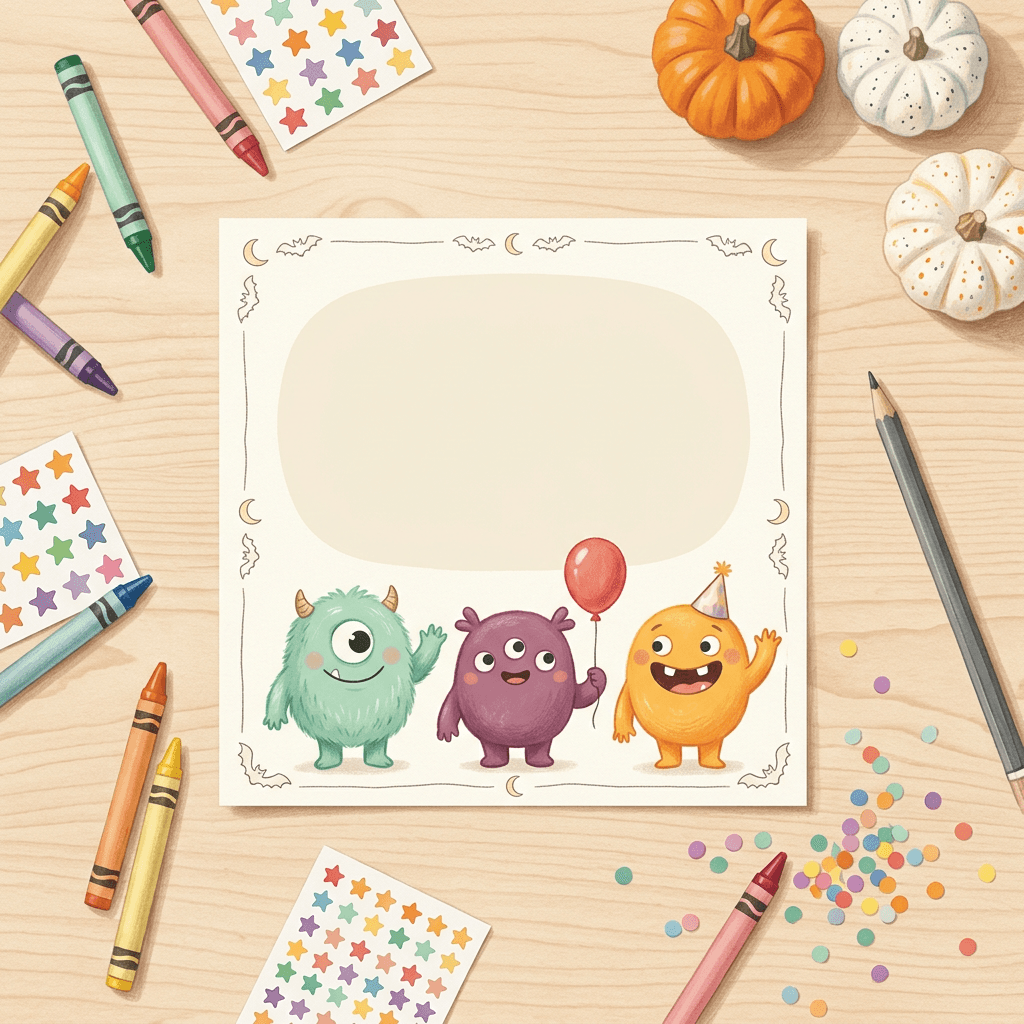
A friendly lineup of round monsters suits birthday-style Halloween parties for ages four to eight, and the big cream panel leaves room for pickup times and allergy notes. Generate in 3:4 for a 5x7 card.
A vertical children's Halloween party invitation illustration in soft gouache and colored pencil on cream paper, showing three friendly round monsters waving at the viewer in a row along the bottom of the card, a fuzzy mint-green one with one big eye and two tiny horns, a plum-purple one with three stubby arms holding a red balloon, and a sunny orange one with a gap-toothed grin wearing a paper party hat, with scattered confetti, small stars and a few smiling pumpkins around their feet. Above them leave a large smooth cream rectangle with softly rounded corners filling the top 55 percent of the card, completely empty with no lettering, framed by a thin hand-drawn border of tiny bats and moons. Even bright daylight, visible paper grain and pencil texture, a cheerful palette of mint, plum, orange and butter yellow, nothing scary, no garbled text, no watermark, no logos.
Add afterward: "Monster Bash" in a big rounded font, then Saturday, October 31 | 2 to 4 PM | address | "Costumes welcome, no scary masks please" | "Nut-free snacks" | RSVP by October 26.
2. Pumpkin Patch Party for Little Ones
A sunny daytime scene feels safe for toddlers and preschoolers, and a blank wooden sign is a natural place for text because everyone expects a sign to hold words. Generate it at 3:4 so it crops cleanly to a 5x7 card, and the sign stays well away from the edges.
A vertical illustrated invitation for a toddler pumpkin patch party in a naive storybook style with soft watercolor washes and visible pencil outlines, showing a sunny farm field with a friendly scarecrow with a stitched smile and a patched hat standing beside a red wooden wagon heaped with small orange and white pumpkins, hay bales stacked on the left, sunflowers along the fence and a bright blue sky with round white clouds. Hang a plain empty wooden plank sign from two ropes in the center of the frame, smooth and unmarked with no lettering, large enough to fill a third of the card. Warm morning sunlight from the upper right, soft grainy paper texture, a palette of pumpkin orange, sky blue, hay yellow and leaf green, gentle and cheerful, no scary elements, no garbled text, no watermark, no logos.
Add afterward: "Little Pumpkin Party" on the sign, then Saturday, October 31 | 10 to 11:30 AM | location | "Parents please stay" | "Wear a costume or just a cozy sweater".
3. Glow-in-the-Dark Ghost Sleepover
A deep navy night scene with a softly glowing ghost reads well on a phone and works as a square image in a parents' group chat, so generate it at 1:1 and it will look right in any app that crops.
A square illustrated invitation for a Halloween sleepover in a soft digital gouache style, showing a small friendly white ghost with big round dark eyes glowing gently against a deep navy night, three sleeping bags in mint, orange and lavender laid out on a wooden floor in the lower third, two flashlight beams crossing the dark and a scatter of small yellow stars and paper bats. In the lower center place a lighter navy rounded banner shape, empty and unmarked, wide enough for four short lines of text. The only light comes from the ghost's soft glow and the flashlight beams, creating gentle halos and a calm dreamy mood, matte painted texture, high contrast between the pale ghost and the dark sky, no lettering, no garbled text, no watermark, no logos.
Add afterward: "Ghost Sleepover" | Friday, October 30, 6 PM to Saturday, 9 AM | address | "Bring a sleeping bag and a flashlight" | RSVP by October 25 with allergies.
2) Adult Costume Party and Cocktail Invitation Prompts
Adult invitations can lean into mood: candlelight, texture, a little theater. These three cover a formal masquerade, a cocktail evening and a themed dinner party, and each is designed so that dark artwork still leaves a clean panel for high-contrast text.
4. Gothic Masquerade Invitation
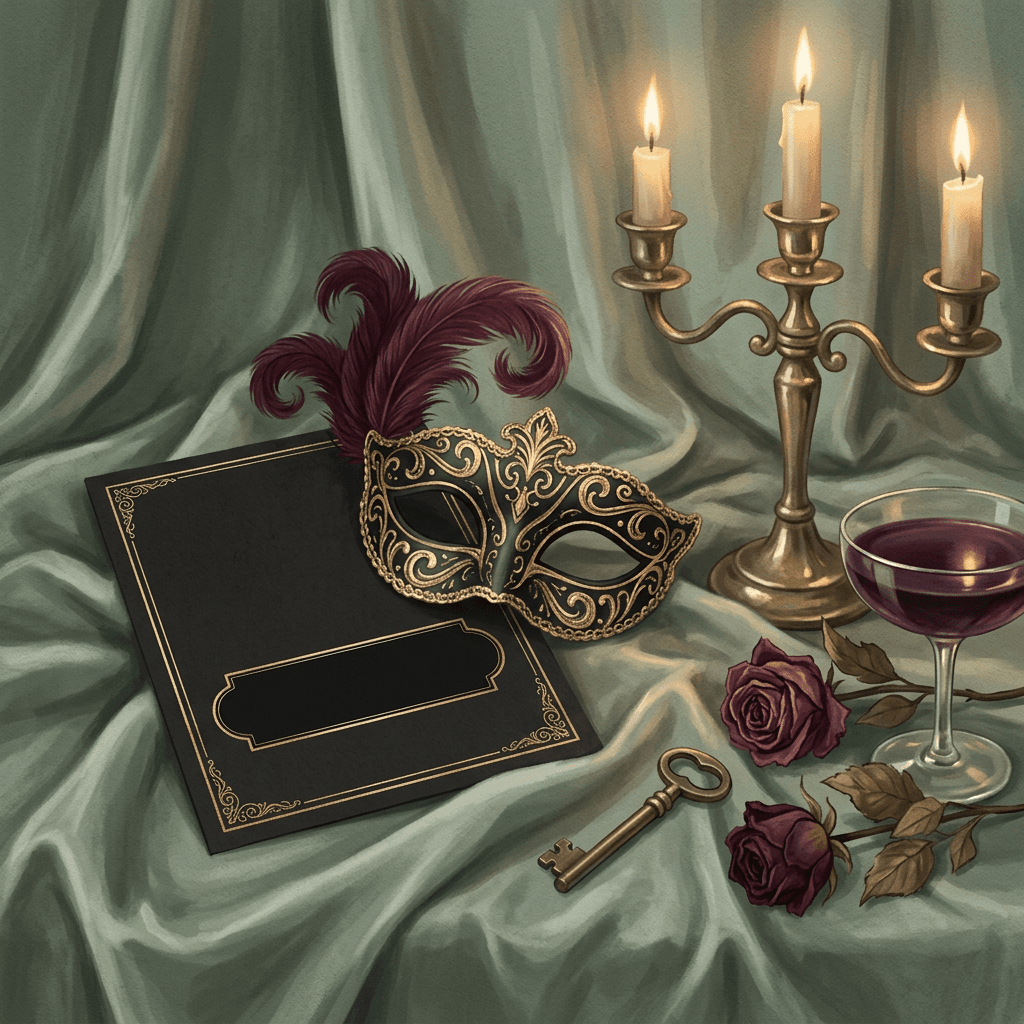
Black and gold reads as formal and mysterious without being gory, and works well for a costume party with a dress code, and 3:4 crops cleanly to a 5x7 card.
A vertical invitation illustration in a refined editorial style showing an ornate black half-mask with gold filigree and a curled burgundy feather lying on dark green velvet, beside a brass candelabra with three lit tapers, a few dried deep-red roses and a tarnished gold key, framed by a thin gold border with delicate corner flourishes. In the lower center place a plain black plaque with a thin gold outline, completely empty and smooth, taking about 35 percent of the card. Warm candlelight from the right with soft glowing highlights on the gold and gentle shadows in the velvet folds, rich dark palette of black, gold, burgundy and forest green, matte velvet and metal textures, elegant and mysterious rather than gory, no lettering, no garbled text, no watermark, no logos.
Add afterward: "Masquerade" in a high-contrast serif | Saturday, October 31 | 8 PM until late | address | "Black and gold, masks required" | RSVP by October 24.
5. Witch's Apothecary Cocktail Hour
An apothecary scene says "cocktails" without needing a glass of bright liquid, and the label-shaped panel in the foreground doubles as a natural text area. Generate it at 3:4 for a 5x7 card or a letter-size handout.
A vertical invitation illustration in moody botanical style showing a dark wooden apothecary shelf lined with amber and green glass bottles tied with twine and dried herbs, and in the foreground a crystal coupe glass holding a deep purple cocktail garnished with a blackberry and a rosemary sprig, next to a small mortar and pestle and a few dried lavender stems. Lean a blank cream paper label card with a deckled edge against the bottles in the lower center, empty and unmarked, large enough for five short lines. Low amber lamp light from the left, soft reflections on the glass, deep palette of forest green, amber, plum and cream, tactile glass, paper and wood textures, atmospheric and a little witchy, no lettering on the bottles, no garbled text, no watermark, no logos.
Add afterward: "Poison Apple Social" | Saturday, October 31 | 7 to 10 PM | address | "Signature cocktail and a zero-proof option, plus a ride-share reminder" | RSVP by October 27.
6. Midnight Séance Supper
A candlelit parlor table with tarot cards suits a smaller costume dinner, and a card-shaped blank panel is a built-in text area, and the tall 3:4 shape suits a card slipped into an envelope.
A vertical invitation illustration in a vintage storybook style showing a round parlor table with a lace tablecloth, a fan of tarot-style cards with abstract moon and star symbols (no lettering), three melted candles in brass holders, a glass crystal ball on a small stand and an old brass skeleton key, against faded floral wallpaper in deep teal with a few empty oval picture frames on the wall. Place one oversized blank card with rounded corners and a thin gold outline upright in the foreground, smooth and empty, filling about 40 percent of the frame. Flickering warm candlelight from the center of the table, soft glow on the ball, muted palette of teal, burgundy, gold and cream, visible paper grain and aged-print texture, mysterious but not frightening, no garbled text, no watermark, no logos.
Add afterward: "Séance Supper" | Friday, October 30 | 7:30 PM | address | "Dress as someone who has been dead a while" | "Dinner is served at 8".
3) Haunted House, Neighborhood and Trunk-or-Treat Flyers
Community events need flyers that work from a few feet away on a bulletin board or a school newsletter. These flyers rely on bold, readable scenes and a large blank area for times, locations and rules. Trunk-or-treat events, where families hand out candy from decorated car trunks in a parking lot, grew out of church-organized alternatives to going door to door in the 1990s, and they now run in neighborhoods and schools too, so the flyer usually needs to explain what the event is and where to park.
7. Trunk-or-Treat Parking Lot Flyer
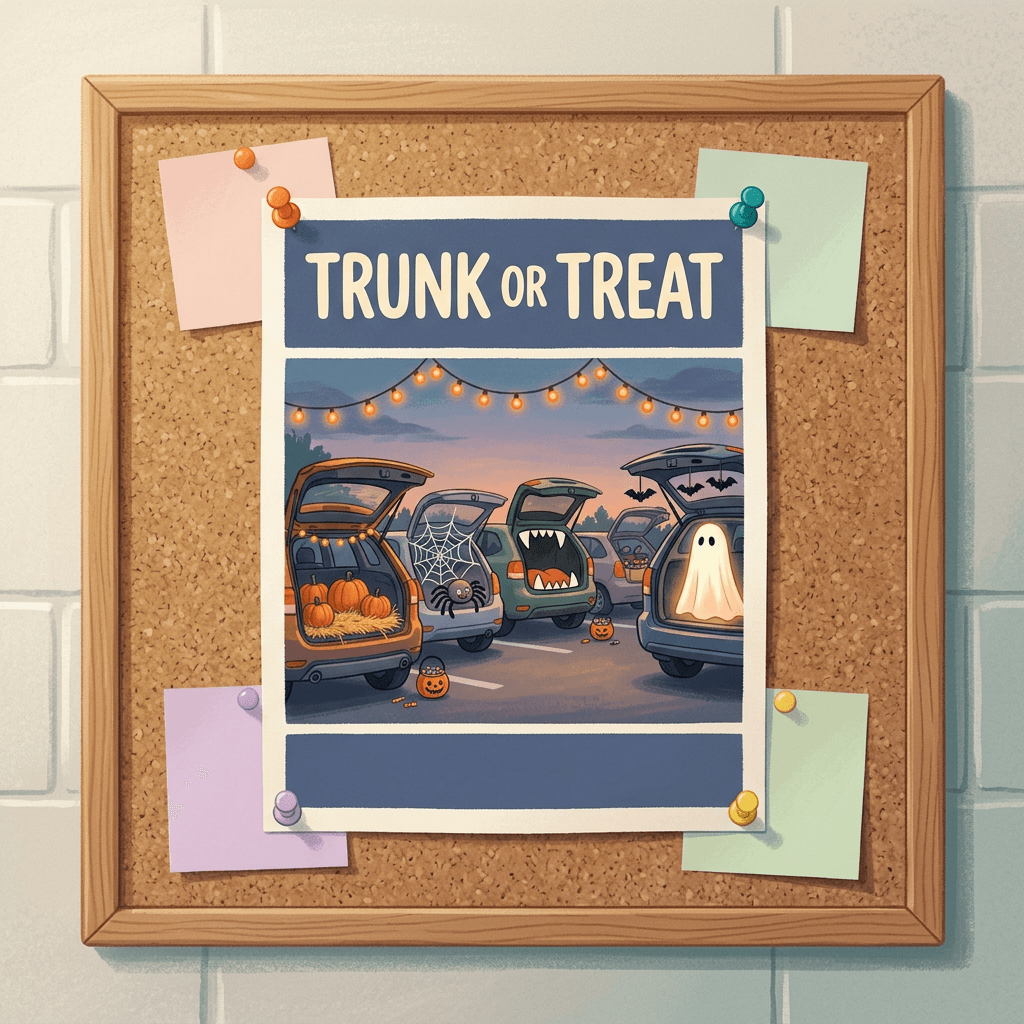
A row of decorated trunks tells people exactly what the event is without any words, so generate it at 3:4 for a letter-size flyer.
A vertical community flyer illustration in a cheerful flat gouache style showing a row of five cars parked nose to tail along an evening parking lot with their trunks open and decorated, one as a mini pumpkin patch with hay and tiny pumpkins, one with a spiderweb and a friendly plush spider, one as a monster mouth with felt teeth, one with paper bats hanging from the lid and one with a glowing ghost made from a white sheet, with strings of warm orange lights overhead and small children in simple costumes holding buckets in front of the cars. Reserve a wide empty dusk-blue band across the top 30 percent of the flyer and a smaller empty band across the bottom 15 percent, both completely unmarked. Warm string-light glow against a deep blue evening sky, matte painted texture, friendly and busy but nothing scary, no lettering, no garbled text, no watermark, no logos.
Add afterward: "Trunk-or-Treat" in the top band | Saturday, October 31 | 4 to 6 PM | "Church lot, 120 Main Street" | "Register your trunk by October 25" | "Please bring wrapped, nut-free candy" in the bottom band.
8. Spooky Street Block Party
A bird's-eye view of a decorated street works for a neighborhood where several houses take part, with the blank banner across the top acting as a title. Choose 4:3 for a landscape flyer or mailbox hanger.
A landscape isometric illustration of a quiet residential street at dusk in a soft editorial style, with six small houses on both sides decorated for Halloween, one with a giant paper spider on the roof, one with a row of jack-o'-lanterns on the steps, one with a ghost made of sheets hanging from a tree, one with glowing purple windows and one with cobwebs across the porch, a long folding table in the middle of the street with bowls of candy and a few children in costumes walking between the houses. Stretch an empty ribbon banner across the top of the image, smooth and unmarked, with plenty of clear sky above the rooftops. Warm porch lights and lanterns, soft lilac and orange twilight from the left, tidy rooflines and correct perspective, a palette of lilac, orange, teal and cream, no lettering, no garbled text, no watermark, no logos.
Add afterward: "Spooky Street" on the banner | Saturday, October 31 | 5 to 8 PM | "Porch light on means treats" | a short list of participating house numbers at the bottom.
9. Haunted House Retro Horror Flyer
A screen-print look gives a haunted attraction or fundraiser a vintage creature-feature feel, and keeping the palette to three colors helps it stay bold on a photocopy or a quick office print. Generate it at 3:4. For more vintage poster layouts, the double exposure travel poster prompts go further into the style.
A vertical retro horror poster illustration in a three-color screen-print style using only deep purple, orange and cream, showing a crooked Victorian mansion on a hill with a few glowing windows, a huge full moon behind it, bare twisted trees and a flock of bats crossing the sky, with halftone dots in the shadows and slightly misregistered color layers at the edges for a printed look. Place an empty rectangular marquee panel with a thin cream outline across the bottom 25 percent of the poster, smooth and unmarked, and leave the top 15 percent as plain purple sky. Flat graphic lighting, bold simple shapes, paper texture with small ink speckles, spooky but not gory, no lettering, no garbled text, no watermark, no logos.
Add afterward: "Haunted House" at the top | Fridays and Saturdays, October 23, 24, 30 and 31 | 7 to 10 PM | tickets and location in the marquee | "Recommended ages 10 and up" | "Step-free path available".
4) Office and Workplace Halloween Prompts
Workplace events deserve a little extra thought. Because Halloween falls on a Saturday this year, many offices will celebrate on Friday, October 30, so the flyer should say so clearly. Some colleagues do not celebrate Halloween for personal or religious reasons, and remote teammates need a way to join, so friendly wording ("optional, all welcome, join on video") matters as much as the art. Keep costume guidance simple: work-appropriate, nothing that stereotypes a culture, and nothing that makes it hard to do the job.
10. Desk Decorating Contest Flyer
A row of cubicles with different decorated desks communicates "contest" instantly and keeps the tone playful rather than spooky, and 3:4 fits a letter-size sheet for the break room wall.
A vertical flat-vector illustration with soft pastel shading showing a cutaway row of four tidy office cubicles seen from the front, each with a differently decorated desk: one with a small stack of pumpkins and a string of tiny orange lights, one with paper bats flying across the monitor, one with a coffee mug shaped like a cauldron and a spider plant, and one with a tiny graveyard made of desk accessories and a ghost made from tissue paper. Leave a large empty clean white card shape with soft rounded corners across the top 40 percent of the poster, smooth and unmarked. Even bright office lighting, crisp edges, a friendly modern palette of orange, teal, lavender and cream, correct perspective and proportions, no lettering, no garbled text, no watermark, no logos.
Add afterward: "Desk Decorating Contest" | Friday, October 30 | "Judging at 3 PM in the break room" | "Optional and work-appropriate, all welcome" | "Prizes for most creative, most spooky and best team theme".
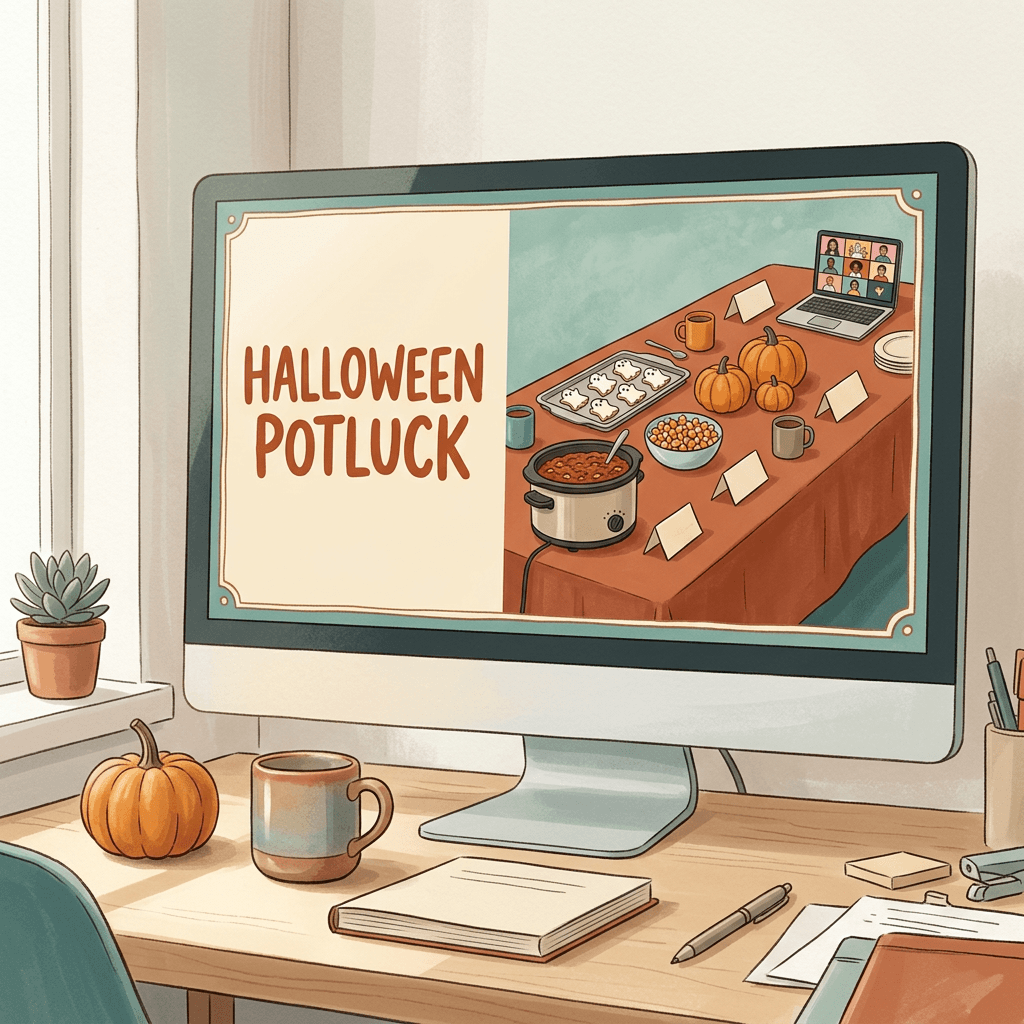
11. Team Potluck and Video Call Banner
A wide banner with an empty left third works as an email header, an intranet card or a Teams and Slack announcement, and 16:9 fits all of them.
A wide horizontal illustration in a soft editorial style showing a long table seen from a slightly raised angle, covered with a rust-colored tablecloth and a Halloween potluck spread, with a slow cooker of chili, a tray of ghost-shaped cookies, a bowl of candy corn, three small pumpkins, a bunch of mugs and small folded paper name cards, with a laptop at the far end showing a smiling video call grid of colorful circles. Keep the left third of the image as a smooth warm cream area with no objects, completely empty, and put all the props in the right two-thirds. Soft daylight from a window on the left, gentle shadows, a palette of rust, orange, teal and cream, crisp readable shapes, no lettering, no garbled text, no watermark, no logos.
Add afterward: "Halloween Potluck" | Friday, October 30 | 12:30 PM | "Kitchen and on video" | "Sign up for a dish in the team thread" | "Costumes optional".
5) Friendsgiving-Style "Fright Night" Dinner Invitations
The Friendsgiving format of a shared dinner with everyone bringing a dish translates neatly to Halloween, and the Fright Night version lets the table itself be the decoration. If you also want a matching Friendsgiving card in November, there is a full set in the AI Thanksgiving and Friendsgiving prompt pack.
12. Candlelit Fright Night Table
A long table with candles and ravens sets the scene for a sit-down dinner, and a 3:4 print tucks neatly into a place setting.
A vertical invitation illustration in a rich editorial style showing a long dark wooden dinner table seen from the head of the table, set with black plates, linen napkins, small white pumpkins as centerpieces, a cobweb lace runner, staggered taper candles in brass holders and two black ravens perched at the far end, with a dim stone dining room behind. In the foreground rest one small blank cream place card on a plate, smooth and unmarked, and leave the top 25 percent of the image as deep shadowed ceiling space. Warm candlelight from the table with a soft glow on the plates and a gentle blue tint in the shadows, shallow depth of field with the far end slightly soft, a palette of charcoal, cream, amber and deep plum, tactile linen and wood textures, no lettering, no garbled text, no watermark, no logos.
Add afterward: "Fright Night Dinner" | Saturday, October 31 | 6:30 PM | address | "Bring a dish to share" | "Tell us your dietary needs by October 26".
13. Potluck Menu-Card Invitation
A menu card is a clever invitation format because the sign-up list is the content, so the generous empty center matters most here. Generate it at 3:4.
A vertical illustration of a cream menu card with a deckled edge lying on a dark walnut table, framed by a hand-drawn border of autumn gourds, wheat stalks, mushrooms and tiny bats, with a small black raven perched in the top-right corner and two pumpkins nestled at the bottom corners. Leave the center of the card as a large empty cream space with faint ruled guide lines but no letters, taking about 65 percent of the card. Soft overhead window light, gentle shadows under the card edge, delicate ink and watercolor look with visible paper fiber, a palette of cream, black, burnt orange and sage, no lettering, no garbled text, no watermark, no logos.
Add afterward: "Fright Night Potluck" at the top, then headings Starters, Mains, Sides, Desserts and Drinks with a name written beside each, plus the date, time and address at the bottom.
6) Instagram Story and WhatsApp Vertical Invitations
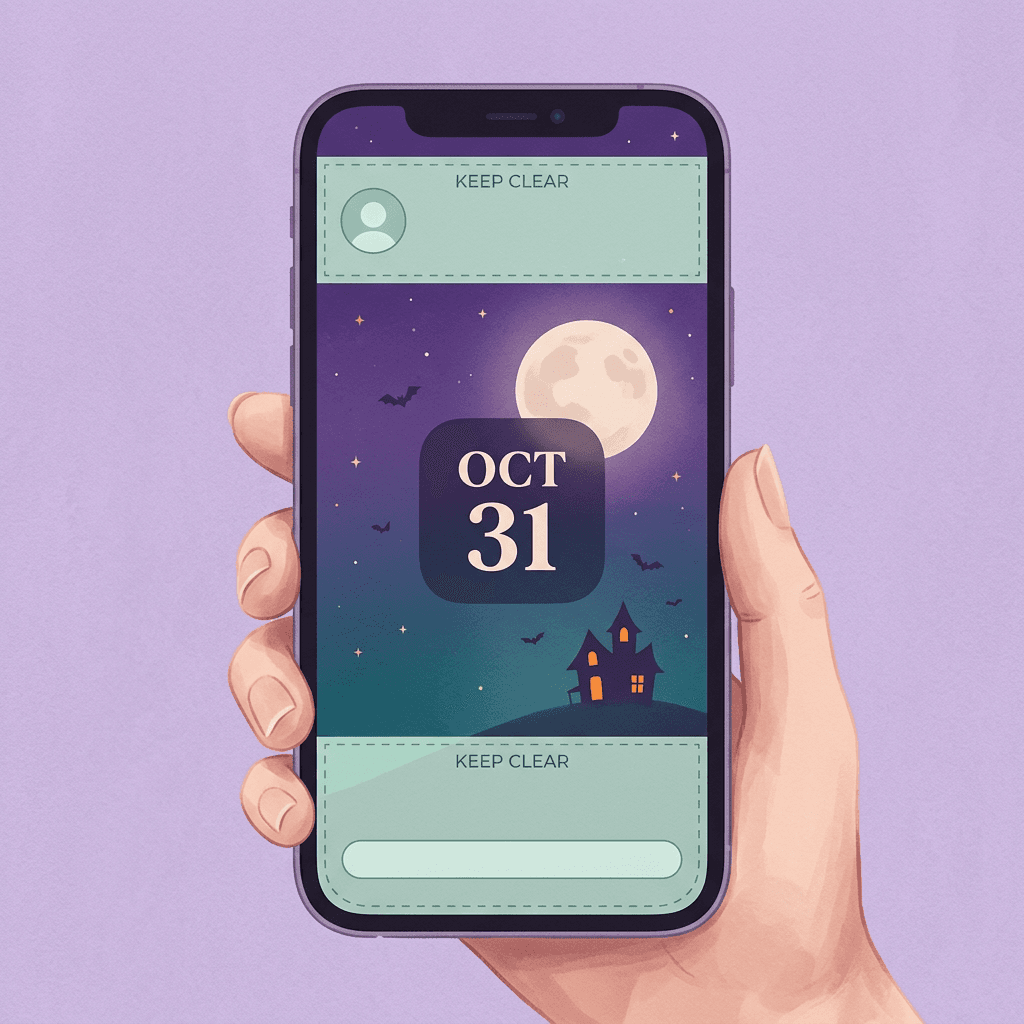
A vertical invitation lives inside an app that places buttons, a profile row and a reply bar on top of your art. Commonly cited Instagram Story guidance suggests keeping roughly the top 250 pixels and the bottom 340 pixels of the 1080 by 1920 frame free of text, and some newer guides recommend even more at the bottom, so push important words toward the middle. WhatsApp Status uses the same 9:16 vertical frame. These two prompts are built with calm top and bottom zones. For more on feed and Story visuals, see the Instagram post image prompt templates.
14. Twilight Story Invitation With Safe Zones
A moon and a lit house in the middle with quiet gradients above and below gives you room for text and sticker overlays, and the 9:16 shape fills a phone screen.
A tall vertical illustration for a phone Story in a soft digital painting style, showing a deep violet twilight sky fading to dark teal at the bottom, a large pale full moon in the upper middle, a single small haunted-looking house with two glowing orange windows and a crooked chimney on a gentle hill in the center of the frame, a few drifting bats and a trail of tiny stars. Keep the top 15 percent as a smooth plain gradient and the bottom 30 percent as a smooth dark ground with no objects, and place one empty rounded dark panel in the middle of the frame below the house, smooth and unmarked. Cool moonlight from above with warm window glow, soft painterly texture, a palette of violet, teal, orange and pale yellow, a calm quiet mood, no lettering, no garbled text, no watermark, no logos.
Add afterward: "Halloween at Our Place" in the middle panel | Saturday, October 31 | 7 PM | "DM for the address" | Sticker or link for RSVP placed above the bottom reply zone.
15. Door Teaser Series for a WhatsApp Group
A three-step teaser (a closed door, a door ajar, a door open on a lit party) builds anticipation across a week and gives you the first and last frames for an animated version later. Generate all three at 9:16 and keep the style sentence identical each time so the three images match. For a deeper look at keeping the same scene across images, see the guide to consistent AI characters and scenes across multiple images.
A tall vertical illustration in a soft painterly style showing a weathered dark blue front door with a brass knocker shaped like a bat, set in a stone wall with ivy and two jack-o'-lanterns on the step, [DOOR STATE], under a violet evening sky with a crescent moon. Keep the top 15 percent as plain sky and the bottom 30 percent as plain stone steps with no objects, and leave a smooth empty rounded panel on the wall to the left of the door. Warm lantern light from below, cool moonlight from above, matte painted texture, a palette of dark blue, violet, orange and gold, a mysterious and inviting mood, no lettering, no garbled text, no watermark, no logos.
Replace [DOOR STATE] with one of these three lines, one per day:
- Day 1: the door is firmly closed with a thin line of warm light glowing under it.
- Day 4: the door is open a few inches with a warm golden glow spilling out and a tiny silhouette of a cat on the step.
- Day 7: the door is wide open on a lit hallway full of orange string lights, paper bats and balloons.
Add afterward: Day 1 "Something is happening on October 31" | Day 4 "Save the date: Saturday, October 31" | Day 7 the full details with time, address and RSVP.
7) Event and Business Flyers for Bars, Cafés and Gyms
Local businesses benefit from Halloween more than almost anyone, and flyers for them need one thing the party invitations do not: a clear offer. Put the offer and the event time in the text layer, and use the art to set the mood. If you are building a wider seasonal plan, the social media strategy for small businesses covers how often to post around an event.
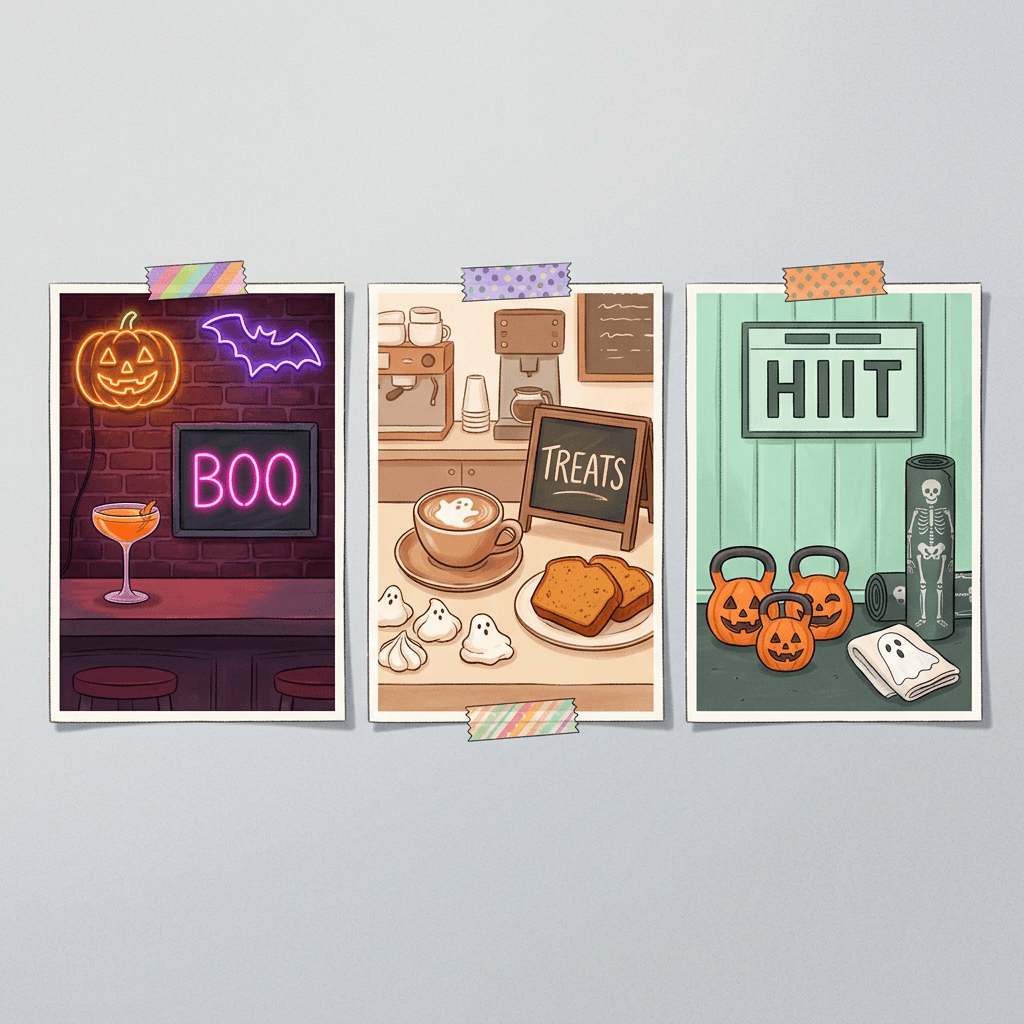
16. Neon Bar Night Flyer
A dark brick wall with neon line art is a classic bar look and keeps contrast high for text. Generate it at 3:4 for a poster or flyer. For more nightlife and drink visuals, see the craft brewery taproom prompts.
A vertical flyer illustration in a stylized night-scene style showing a dark red brick wall with two neon signs in thin glowing tubes, one shaped like a grinning pumpkin in orange and one like a bat with spread wings in violet, and below them a bar counter with a coupe glass holding an orange cocktail with a twist of peel and a small black candle burning beside it. Place a blank black slate rectangle with a thin neon-pink outline in the lower center, completely empty and smooth, taking about 30 percent of the flyer, and leave the top 15 percent as plain dark brick. Neon glow reflecting softly on the bar top, deep shadows, rich saturated palette of black, orange, violet and hot pink with clean edges, crisp glass reflections, no lettering on the signs, no garbled text, no watermark, no logos.
Add afterward: "Haunted Happy Hour" | Saturday, October 31 | Doors 8 PM | "Costume contest at 11 PM" | "21 and over with ID" (adjust to your local legal age) | drink specials on the slate.
17. Café Halloween Treats Flyer
A warm café counter with ghost latte art shows exactly what is being sold, which makes it a good Instagram feed square, so generate it at 1:1. For more café visuals, the coffee shop and café branding prompts go deeper.
A square illustration in a cozy warm editorial style showing a wooden café counter with a white ceramic cup of latte topped with ghost-shaped latte art, a plate of ghost-shaped meringue cookies, two slices of pumpkin loaf with a dusting of cinnamon, a small pot of dried flowers and rising steam, with a plain empty chalkboard-style slate menu board leaning against the wall at the right side taking a third of the frame, smooth and unmarked. Warm morning light from a window on the left, soft steam and gentle shadows, shallow depth with the slate slightly softer, a palette of cream, pumpkin orange, coffee brown and sage, tactile ceramic, wood and crumb textures, no lettering anywhere, no garbled text, no watermark, no logos.
Add afterward: "Halloween Treats" | Friday, October 30 and Saturday, October 31 | "Ghost latte, pumpkin loaf, meringue ghosts" | "Costumed kids get a free mini hot chocolate" (example offer, replace with yours).
18. Gym Halloween Class Flyer
Fitness equipment dressed as pumpkins is instantly readable and playful, and a scoreboard panel is a natural fit for class times, so generate it at 3:4 for the front desk or a letter-size flyer. For more studio visuals, see the fitness brand content prompts.
A vertical flyer illustration in a bright flat editorial style showing a gym floor with three kettlebells painted orange with carved jack-o'-lantern faces, a black yoga mat printed with a white skeleton rib pattern, a pair of dumbbells dressed in tiny ghost sheets, a jump rope and a white ghost-shaped towel hanging on a rail, with a clean mint-green wall behind. On the wall place an empty rectangular scoreboard panel with a thin white outline, smooth and unmarked, taking about 30 percent of the flyer. Bright even gym lighting, crisp edges, minimal shadows, an energetic palette of mint, orange, black and white, accurate equipment proportions, no lettering, no garbled text, no watermark, no logos.
Add afterward: "Monster Mash HIIT" | Saturday, October 31 | 9 AM | "Costumes encouraged, shoes required" | "Sign up at the front desk".
8) Printable 5x7 Card Layouts
These last two prompts are reusable templates rather than one-off scenes. The first is a full-bleed border with a quiet center that you can reuse every year, and the second is a matching card back and envelope liner pattern for a two-sided card.
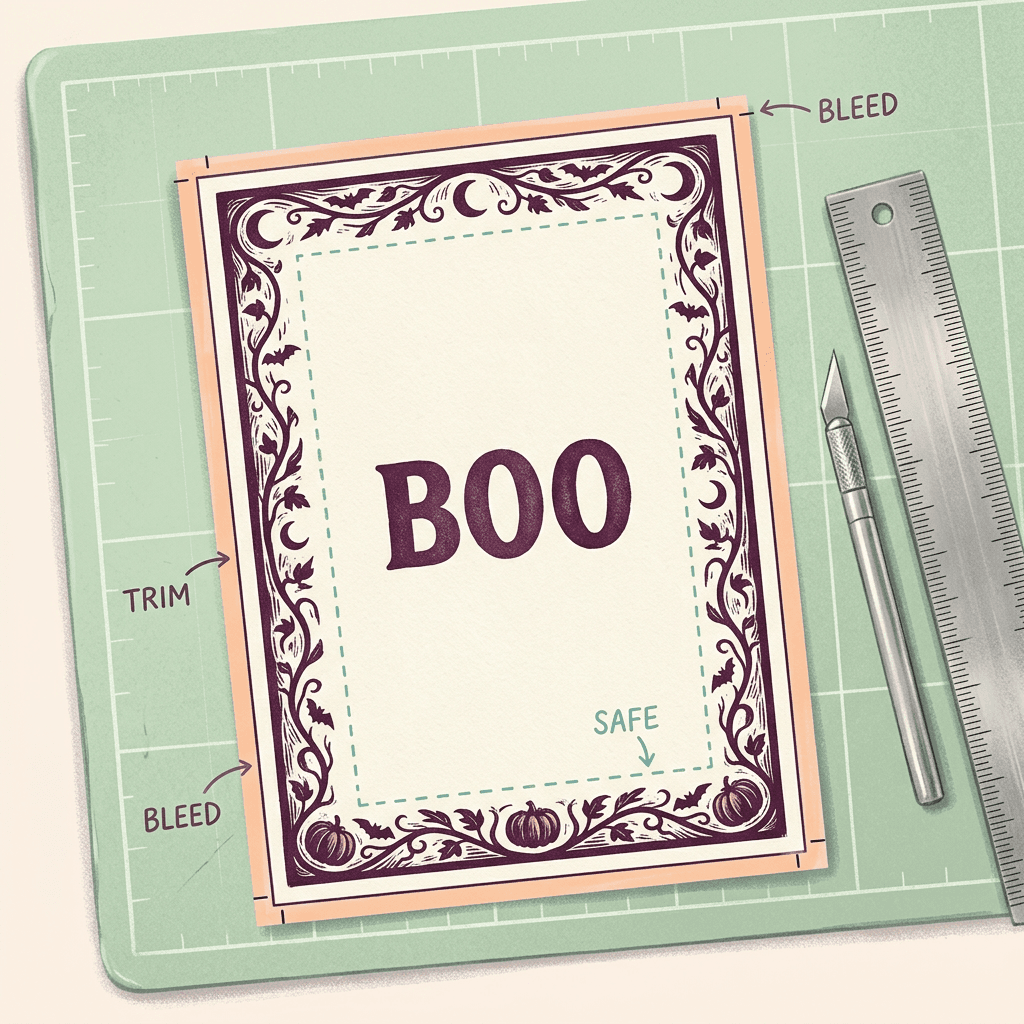
19. Full-Bleed Border With a Quiet Center
Because the pattern runs to the edge, it hides small cutting shifts, and because the center is empty, any amount of text fits. Generate it at 3:4.
A vertical printable invitation background in a refined woodcut style, with a decorative border of intertwined vines, bats, crescent moons and tiny pumpkins running right to the very edge of the canvas on all four sides and about 12 percent deep, in deep plum ink on warm cream paper with a few touches of orange. The center of the card is a large, plain, smooth cream area taking about 70 percent of the card, with no pattern or lettering. Even flat lighting, slight paper grain and tiny ink speckles, symmetrical and balanced, all important detail kept inside the border with nothing cut off at the edges, no lettering, no garbled text, no watermark, no logos.
Add afterward: whatever the event needs, centered, with the host name at the bottom. Save this version as a reusable template and swap only the text next year.
20. Matching Card Back and Envelope Liner Pattern
A patterned back makes the printed card feel finished, and the same pattern doubles as an envelope liner, and a 1:1 square can be cropped to any shape.
A square repeating-style pattern in a flat two-ink print style, showing evenly spaced tiny ghosts, crescent moons, stars and pumpkins in deep teal and orange on a warm cream background, arranged in a loose half-drop grid with plenty of breathing room between the motifs, each motif simple and clearly drawn. Leave a plain cream circle in the exact center of the square, smooth and empty, about 20 percent of the width. Even flat lighting, subtle paper grain, crisp clean edges, no lettering, no garbled text, no watermark, no logos.
Add afterward: an RSVP line or a small monogram in the center circle. AI-made patterns are not guaranteed to tile seamlessly, so use this as a card back or liner cut to size rather than as a repeating tile.
Print Setup for 5x7 Cards, Flyers and Home Printers
A card that looks perfect on screen can still come back from the print shop with a white sliver along one edge or soft text. Most of the problems come from four ideas: trim, bleed, safe zone and resolution.
- Trim size is the final size after cutting. A flat 5x7 card is 5 by 7 inches, which is 1500 by 2100 pixels at 300 DPI.
- Bleed is extra artwork that extends past the trim line so that a slightly off cut does not leave a white edge. The most common US specification is 0.125 inches (about 3 mm) on each side, which makes a 5x7 file 5.25 by 7.25 inches, or 1575 by 2175 pixels at 300 DPI. Printers publish their own templates, so check the one for your service.
- Safe zone is the interior area where all text, faces and important artwork should stay. Some guides say 0.125 inches inside the trim is enough, and others recommend 0.25 inches. Choosing 0.25 inches costs you almost nothing and survives a worse cut.
- Resolution is judged at print size. 300 DPI is the standard target for commercial print of cards and flyers, and about 150 DPI is generally treated as the floor for casual prints.
The practical question is whether your AI image has enough pixels. Divide the pixel height of your downloaded image by the printed height in inches to get its effective DPI. For example, an image 2048 pixels tall stretched across 7.25 inches (the bleed height) works out to about 282 DPI, which is close to ideal, while an image 1536 pixels tall works out to about 212 DPI, fine for a casual card but visibly softer on fine details. Check the actual pixel dimensions of your download rather than assuming, run the final pick through an upscaler if it falls well short, and look at the edges at 100 percent zoom before you order. Because the bleed area is trimmed away, you can safely extend a plain background color or texture to fill it, which is another reason the prompts above describe simple, extendable backgrounds.
Because your text is added afterward, the text itself is not limited by the image resolution. Export the finished card as a PDF so the type stays vector-sharp, and only the artwork depends on pixel count.
A few more details save money and frustration:
- Dark designs are the hardest to print. Deep purples and saturated oranges can look duller in print than on a bright screen because screens glow and ink does not. Order a single proof copy before you print fifty, especially for a business event.
- Home printers often cannot print to the very edge. Either choose a borderless setting where your printer supports it, or design the card with a deliberate cream margin like the border in prompt 19.
- Check the paper. Glossy stock shows fingerprints on dark artwork more than matte does, and thin office paper can show the print through to the back, so use a heavier card stock for 5x7 invitations if you can.
- Add a QR code only as a separate, generated element. AI cannot be trusted to draw a scannable code, so create one with a QR generator, place it on a plain light square, keep dark modules on a light background, leave a quiet margin around it and print it no smaller than about 0.8 to 1 inch square. Test it with two different phones at final size before you print the batch.
Accessibility: Contrast, Fonts and Information Everyone Can Use
Invitations are read in dim rooms, on small phones and by people with a wide range of vision, so readability deserves as much attention as the artwork. The WCAG guidelines for web content give a useful benchmark even for print and Stories: text should have a contrast ratio of at least 4.5:1 against its background, or 3:1 for large text, where large means at least 18 point or 14 point bold.
Dark Halloween palettes make this easy if you plan for it and hard if you do not. Cream or white text on a black or deep-plum panel is excellent. Orange text on purple is a classic failure, as is any text laid directly over detailed artwork, which is why every prompt in this post asks for a plain panel. A quick check is to desaturate the card to grayscale or view it from across the room: if the date fades into the background, the contrast is too low.
A few more habits make a real difference:
- Use a decorative spooky font for the event name only, and a plain, open font for the date, time and address.
- Avoid all-caps for long lines, because capital letters are slower to read in sentences.
- Do not use color alone to carry meaning, such as "red text means the rain date".
- Shrink the finished card to thumbnail size. If you can still read the event name and the date, the hierarchy works.
- Repeat the key details as plain text in the message or caption that carries the image, because text inside an image cannot be read by a screen reader or copied into a calendar.
- Add practical accessibility notes when they apply: step-free entrance, a quiet room, no strobe lights, allergen information and whether a haunted attraction uses fog, loud noises or flashing effects.
Turn the Invitation Into a Video Invite and Add a Spooky Music Loop
A short animated invitation travels well in group chats and Stories, and the best version animates the art, not the text. Video models tend to warp or morph lettering as a scene moves, so animate the blank-panel version of your image, then add the date, time and address as a clean text layer in a video editor over the last few seconds.
Animate the Art With Image to Video
Open the cinematic video generator, switch to Image to Video, and upload your invitation art as the starting frame or as a reference. Pick 9:16 for Stories and WhatsApp Status or 16:9 for email and screens. Clips are about eight seconds long, which is plenty for an invitation. Keep the movement slow and simple, and avoid fast flicker, because rapid flashing is uncomfortable for many viewers and accessibility guidance recommends no more than three flashes per second. For more clip ideas, the Halloween video prompt pack has twenty ready-made prompts.
Here are two prompts that match the invitations above. The first animates the Day 7 door from prompt 15.
Start from the uploaded image of the dark blue front door. Over eight seconds the door slowly swings fully open to reveal a warm hallway lit by orange string lights, paper bats and floating balloons, while the camera makes a slow gentle push-in toward the doorway. The two jack-o'-lanterns flicker softly, the lantern light gets slightly brighter, and a few bats drift across the violet sky. Keep the panel on the left wall smooth and empty, keep the door knocker and stone steps stable, smooth natural motion, no fast flashing, no text, no logos, no distortion.
The second animates the friendly monsters from prompt 1.
Start from the uploaded children's invitation illustration. The three round monsters gently bounce and wave, the confetti drifts slowly downward and the balloon sways, with the camera completely still. The large cream rectangle at the top stays perfectly empty and unchanged throughout, keep the soft gouache look and paper texture, smooth cheerful movement, no flashing, no text, no logos, no morphing of the characters.
Narrate It With Text2Shorts
If you would rather have a short spoken invitation, Text2Shorts builds a vertical video from a topic. Enter a short description, pick the animation style for an illustrated look, then read and edit the script it writes before you generate. This editing step is where you correct the facts, so check the date, the time and the address word for word, and listen to how the voice pronounces the street name before you share it. Here is a topic prompt to start from:
A 20-second friendly invitation to a Halloween costume party on Saturday, October 31 at 7 PM, hosted at a neighborhood home, with an upbeat spooky tone, a mention of the costume theme, a reminder to RSVP by October 26 and a final line that says see you there.
Add a Spooky Music Bed
Open the AI Music Generator, use Simple Mode, switch on the Instrumental toggle and paste a description. If you want more control, Custom Mode lets you set duration, BPM and key, and a duration of 20 to 30 seconds fits an invitation video well. Generated tracks are not guaranteed to loop seamlessly, so choose a steady, ambient piece and crossfade its end into its start in your video editor. For more ideas, the AI music prompts for Reels and TikTok post has a wide range of genre prompts.
A playful instrumental Halloween waltz for a children's party, light pizzicato strings, a celeste melody, soft glockenspiel and a gentle bouncy rhythm around 110 BPM, friendly and a little silly, no vocals, no sudden loud sounds.
A slow gothic cocktail lounge instrumental for an adult costume party, brushed drums, a warm upright bass, muted piano and a low cello drone, moody and elegant around 85 BPM, steady tempo that is easy to loop, no vocals.
Stories and WhatsApp Status updates disappear after 24 hours, so plan a short reminder video for the morning of the party rather than relying on a single post. After the night itself, the photos are a separate project: the Ghostface and costume portrait prompts and the AI pet Halloween costume prompts turn guest and pet photos into a recap, and the same invitation art can become a matching phone background using the Halloween wallpaper prompts.
How to Customize These Prompts for Your Party
Keep a shared style sentence. Choose three colors and one rendering style (for example "soft gouache, deep plum, orange and cream") and paste the same sentence into every prompt for the invitation, the reminder Story, the flyer and the thank-you post. A matching set looks professionally designed even when each piece was generated separately.
Use a photo of your real place. In the image-to-image mode of the AI Image Generator, upload a photo of your actual front door, porch, café window or gym entrance and ask for an illustrated Halloween version of that exact place. Guests recognize the building, and the invitation feels personal in a way a generic haunted house never does. Ask the model to keep the architecture and just add the decorations.
Use a scare ladder. The same scene can move from friendly to eerie to gothic by changing a few words. Friendly means round shapes, bright daylight and smiling faces. Cozy means warm lantern light and soft fog. Eerie means a cool blue night, long shadows and empty windows. Gothic means candlelight, velvet, ravens and cracked stone. State the level in the prompt and add "nothing scary" or "spooky but not gory" for mixed-age audiences.
Change the language freely. Because the text layer is yours, a bilingual invitation costs nothing extra: put English on one line and Spanish, French or Korean on the next in a real font. Accented characters and non-Latin scripts are still a common failure point in many tools, and even where a model handles them, you cannot proofread a language you do not read, which is another reason to type them yourself.
Control the blank panel. If a model keeps filling your empty area with decoration, name a physical blank object more precisely (a "plain unmarked wooden plank"), reduce competing detail around it, or regenerate. As a last resort, mask the garbled lettering and replace it with a plain background using the image inpainting guide, then type the real words yourself.
Match the season, not just the night. If your event runs into early November, pair the invitation with the autumn looks in the fall aesthetic photo prompts so the whole feed reads as one campaign.
Common Mistakes With AI Halloween Invitations and Flyers
Letting the model write the date or address. A confident, wrong address on a printed card cannot be fixed without reprinting. Put every fact in the text layer, and read the final file aloud once before you send it.
Putting text over busy art. Orange letters over a detailed pumpkin patch look great in the preview and unreadable on a phone in a dark room. A solid or softly darkened panel behind the words solves almost every readability complaint.
Generating in the wrong shape. A square image stretched into a Story, or a landscape image cropped into 5x7, usually cuts away the blank panel or the main subject. Pick the ratio from the size guide first and generate for that shape.
Ignoring the Story safe zones. Placing the RSVP link or the time in the bottom strip hides it behind the reply bar. Keep the important line in the middle and test the Story on a real phone before you post.
Forgetting bleed and margins on printed cards. Text close to the edge gets trimmed, and artwork that stops at the trim line shows a white sliver. Use 0.125 inches of bleed and keep text 0.25 inches inside the trim.
Setting the scare level for the wrong audience. A gothic skull card sent to a parents' group for a seven-year-old's party creates awkward replies. State the audience in the prompt and add the age range on the card.
Leaving out the details people ask about. A missing end time, RSVP deadline, costume rule or allergy note produces a stream of questions. The checklist earlier in this post covers them all.
Posting a home address publicly. A public Story or a neighborhood flyer is not the place for a full street address of a private home. Share the area publicly and send the exact address in a direct message.
Using trademarked characters or logos in prompts. Prompts that name a film monster or brand character can produce lookalikes you cannot use on a business flyer. Describe generic creatures (a friendly green monster, a pale ghost) instead, which also keeps your design more distinctive.
Trusting an AI-drawn QR code. It may look right and scan wrong, or not scan at all. Generate a real QR code separately and test it before printing.
Make Your Halloween Invitation Kit With Miraflow
The whole workflow fits in one browser session. Open the AI Image Generator on Miraflow, choose 3:4, 9:16, 16:9 or 1:1 to match your format, paste a prompt, and generate several variations. Use image-to-image when you want your own porch, storefront or pet in the scene, then keep the blank panel for your text layer.
For a wide invitation, an email header or a Zoom or Teams background, the YouTube Thumbnail Maker is a quick way to get a 16:9 image with a short headline. It has a text field for the words you want on the image, and because the model draws those words, keep them to one to three short words and check the spelling. Leave the exact date, time and address for your editor, the same as with any other generator.
When the invitation is ready, Text2Shorts and the cinematic video generator turn it into a vertical video, and the AI Music Generator supplies the soundtrack. If you record a haunted house walk-through or a party video, AI Clipping finds the best moments and makes captioned vertical clips from it. Every tool is reachable from the Miraflow home page, so one evening is enough to produce an invitation, a reminder, a flyer and a short video from the same art.
Frequently Asked Questions
What is the best size for a Halloween party invitation?
For a printed card, 5x7 inches is the most common size, which is 1500 by 2100 pixels at 300 DPI, or 1575 by 2175 pixels with 0.125 inches of bleed. For a digital invitation sent in a message or posted as a Story, use a 9:16 vertical image at 1080 by 1920 pixels. A square 1:1 image works anywhere that crops unpredictably, such as group chats and feed posts.
Can AI write the date and address inside the image?
It can try, but you should not rely on it. Recent models render short headlines well, yet digits, addresses and small lines are where errors still appear, and the model cannot know your real details. Generate the artwork with a blank panel and type the exact words in an editor, where fixing a change takes seconds and does not alter the art.
What aspect ratio should I generate for a 5x7 card?
Generate 3:4, which is the closest available portrait ratio, and crop about 5 percent of the width in total to reach 5:7. Keep important artwork a little away from the edges so the crop never touches it. A 3:4 image also fits US Letter flyers with about 3 percent cropped from the top and bottom.
How do I print a Halloween invitation at home?
Set the paper size to 5x7 or Letter, use a heavier card stock if your printer allows it, choose the highest quality setting and print a single test first. Many home printers cannot print to the very edge, so use a borderless option or design in a cream margin like the border in prompt 19. Export your final file as a PDF so the text stays sharp.
How far ahead should I send Halloween invitations?
Send them as soon as the date is fixed, which this year means right away, since Halloween falls on Saturday, October 31 and the weekend fills up quickly. Follow up with a short reminder about three days before and a day-of message with the final details. A multi-part teaser, like the door series in prompt 15, gives you natural reminder posts.
How do I keep text readable on a dark Halloween invitation?
Put the text on a plain panel with strong contrast, such as cream on deep plum, and aim for at least 4.5:1 for normal text and 3:1 for large text. Use a decorative font only for the event name and a plain font for details, and check the result at thumbnail size. If the date is hard to read there, increase the contrast or the size.
Where do I put text on an Instagram Story so buttons do not cover it?
Keep the key details in the middle of the frame. Commonly cited guidance suggests leaving roughly the top 250 pixels and the bottom 340 pixels of the 1080 by 1920 canvas clear, and some newer guides recommend even more at the bottom, so test on a real phone. WhatsApp Status uses the same vertical shape.
Can I use AI invitations for a business event, and do I need to label them?
An illustrated invitation or flyer is a normal marketing asset, but read the terms of the tool you use and avoid trademarked characters and logos in your prompts. A private invitation to friends does not need a label. If you run paid ads for a business event, check the ad platform's current policy on AI-generated content before you launch.
How do I turn the invitation into a video?
Generate the art with the blank panel, animate it in the cinematic video generator's Image to Video tab with a slow, simple movement, then add your text in a video editor for the last few seconds. Alternatively, use Text2Shorts to create a narrated vertical video from a short script, and check every fact in the script before you generate. Add an instrumental track from the music generator.
What if my guests are a mix of kids and adults?
Say so in the prompt and on the card. Ask for a friendly or cozy scene, use the phrase "spooky but not gory", and add the age range and the time window to the text layer. If part of the party is for adults, make a second version of the invitation with a different mood and send each audience its own.
Conclusion
A good Halloween invitation does two jobs at once: it sets a mood quickly and it delivers a handful of facts without error. AI is excellent at the first job and unreliable at the second, so the most dependable workflow is to give each job to the right tool. Generate the artwork with a clear blank panel, and type the date, time, address and RSVP yourself in an editor where every character is under your control.
The 20 prompts above cover the formats people actually search for in October: kids' party invitations, adult costume and cocktail invitations, trunk-or-treat and haunted house flyers, office events, Fright Night dinners, Story and WhatsApp invitations, bar, café and gym flyers, and printable 5x7 cards. Pair them with the right aspect ratio, 0.125 inches of bleed and 300 DPI for print, readable contrast for every guest, and a short animated version with a spooky music bed, and one evening of work gives you a complete invitation kit.
With Halloween on a Saturday this year, the best time to start is now. Open the AI Image Generator on Miraflow, pick the prompt that fits your party, generate a few versions, add your details, and send the invitation this week.