20 AI Halloween Video Prompts for YouTube Shorts and TikTok (Copy & Paste 2026)

Written by
Aerin Kim
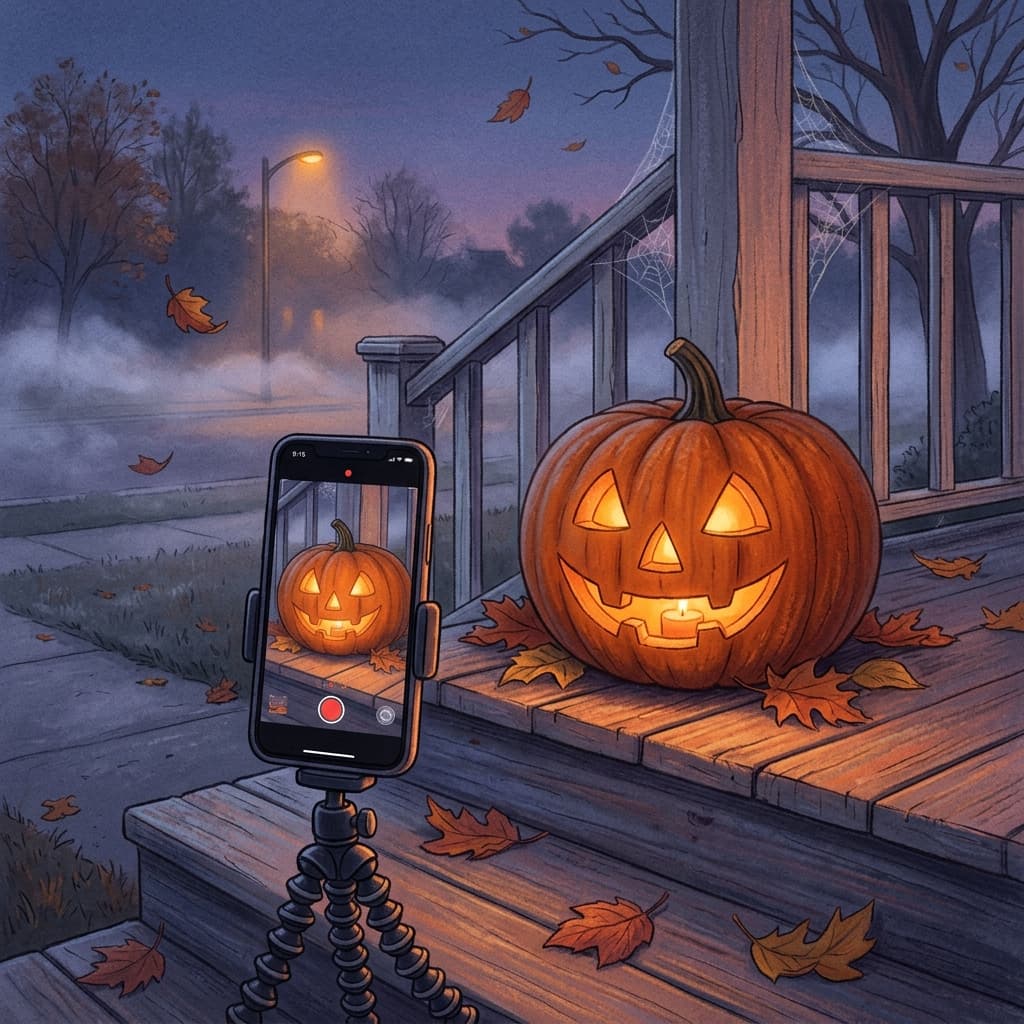
20 copy-paste AI Halloween video prompts for vertical Shorts, TikTok, and Reels, with camera moves, pacing, sound cues, loops, and a posting plan through October 31.
TL;DR
If you tried to make a spooky AI video last October, you probably hit the same wall: the clip looked great in the first second, then the camera wandered, the character's face changed, and the ending cut off mid-action so nothing could loop. Halloween video is a motion problem, and a portrait-style prompt does not solve it. This post gives you 20 copy-paste Halloween AI video prompts built for vertical 9:16 YouTube Shorts, TikTok, and Reels, with the camera move, shot length, lighting, sound cue, and ending frame spelled out in each one.
- Halloween search interest builds through October and peaks in the last week before October 31, so the posting window is open right now.
- Every prompt below is a single-shot, single-action clip of 5 to 8 seconds, which is the length most text-to-video and image-to-video tools handle most reliably.
- The prompts are grouped into five categories: cinematic atmosphere, slow-reveal suspense hooks, cozy and cute Halloween, costume reveals from a selfie, and loopable ambience or series ideas.
- You can generate all of them with the Cinematic AI Video Generator on Miraflow, then assemble a 30 to 45 second Short with Text2Shorts.
- If you want still images and costume portraits instead of motion, start with our companion pack of AI Halloween portrait prompts. This post covers only video.
Why Halloween Video Content Is Worth Making in October
Halloween is one of the few holidays where the whole feed changes at once. Costume, decor, and candy searches climb through the month and peak in the final week, and creators in nearly every niche (pets, cooking, beauty, gaming, home) switch to spooky themes. That makes it an unusually easy topic to catch: viewers are actively looking for it, and the visual language (fog, candlelight, jack-o'-lanterns, long shadows) is something AI video models render very well.
Video also has a practical edge over still images this season. A pumpkin glowing in the dark is nice as a photo, but a slow push toward it with flame flicker and a distant owl sound holds attention for the entire clip, and watch time is one of the signals YouTube uses to decide how widely to show a Short. If you want the longer reasoning behind that, our guide to why the first 3 seconds of a YouTube Short matter covers it in detail.
There is also a production reason. A fog-covered suburban street at dusk, a candlelit attic, or a haunted-house hallway would normally need a location, lighting, and a fog machine. A text-to-video prompt replaces all of that with a few sentences, which is why smaller creators can compete with brands on this theme.
One honest caveat before the prompts: AI video models vary a lot in how literally they follow camera instructions, and results change from one generation to the next. Treat each prompt as a strong starting point, generate two or three variations, and keep the best one. That habit alone separates most polished spooky Shorts from the rest.
The Anatomy of a Good AI Halloween Video Prompt
A still-image prompt describes a moment. A video prompt describes a short sequence, and models tend to drift when the sequence is vague. Every prompt in this post follows the same seven parts, in this order:
- Subject: one clear thing the camera cares about, such as a lit jack-o'-lantern, a black cat, or a person in a costume.
- Action: one motion only. A candle flame flickers. A door opens a few inches. A cat turns its head. Two or three actions in a single 6-second clip is the most common reason a generation falls apart.
- Camera move: name it plainly. Slow dolly in, handheld push, locked-off static shot, slow orbit, tilt up. If you do not name a move, the model picks one for you.
- Lighting and atmosphere: a motivated light source such as warm candle glow from below, cold moonlight through bare branches, or a single sodium streetlight through fog.
- Duration and pacing: say the clip length and whether the motion is slow, steady, or building. Slow reads as suspense, which is what you want for Halloween.
- Audio cue: if your tool generates sound, describe it (distant owl, creaking wood, wind). If it does not, use the cue as a reminder of what to add later in your edit or with an AI music track.
- Ending frame: describe the last frame on purpose. For a loop, end on the same composition you started with. For a hook, end on the reveal.
Here is a shorthand you can reuse for any idea:
[Subject] + [one action], [camera move], [lighting], [duration and pacing], [audio cue], ending on [final frame]. Vertical 9:16, cinematic, no on-screen text.
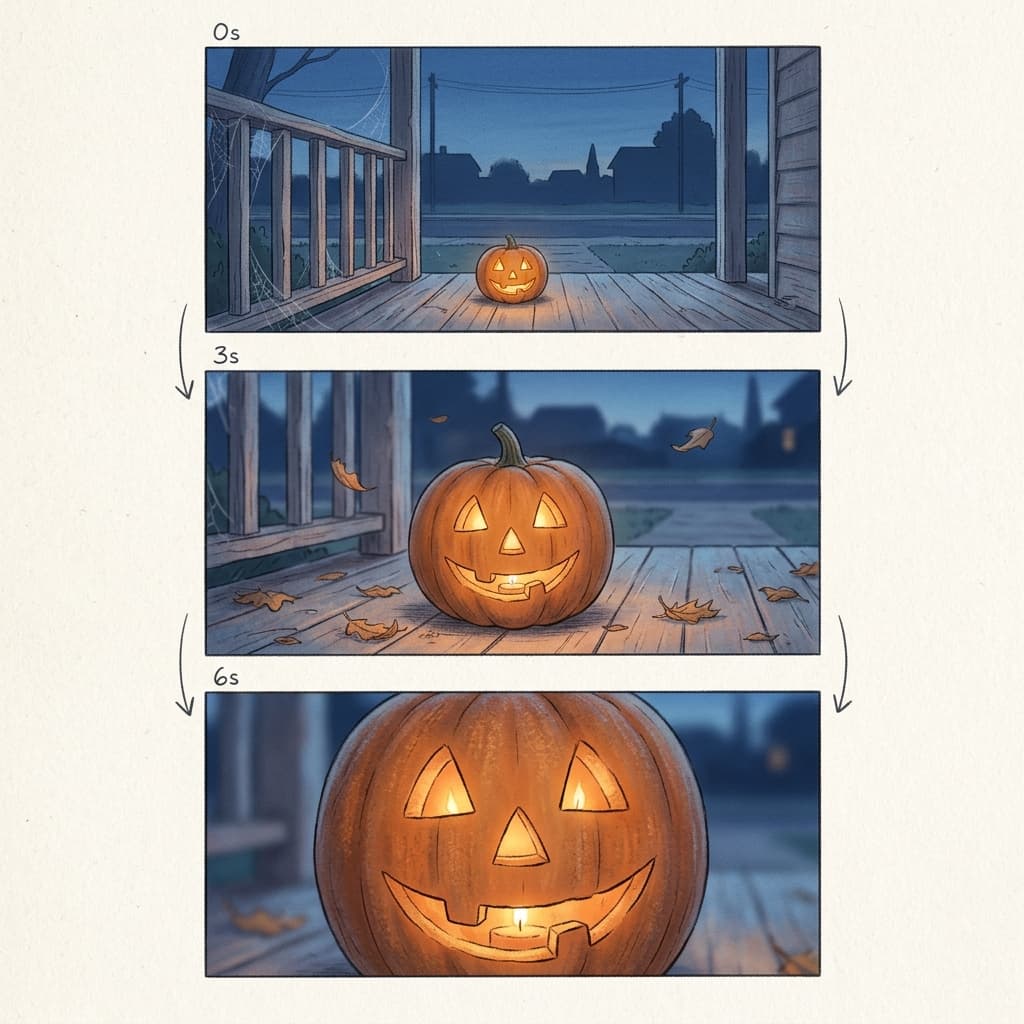
The image below shows how this plays out in the first example in the post: a slow dolly toward a lit jack-o'-lantern, planned as a storyboard of start, middle, and end frames before any video is generated.
Two format notes apply to every prompt. First, always ask for vertical 9:16 framing in the prompt itself (and set the aspect ratio in the tool), because cropping a 16:9 clip down to vertical cuts off most of the composition. Second, keep text out of the video. Models often misspell on-screen words, so add titles and captions in your editor instead.
1) Cinematic Spooky Atmosphere Establishing Shots
Establishing shots set the mood for a whole Short. They work well as the opening clip of a multi-clip video or as a standalone atmospheric post. Each of these holds one slow camera move and one environmental motion (fog, flame, leaves).
Prompt 1: Jack-o'-Lantern Porch Dolly
A carved jack-o'-lantern with a warm flickering candle inside sits on the top step of a wooden porch at dusk, cobwebs draped over the railing, a few dry leaves drifting across the boards. Slow steady dolly-in toward the pumpkin over 6 seconds, shallow depth of field so the background street softens into deep blue haze. The only light source is the candle flame, casting orange flicker across the porch posts. Distant wind and a faint creak of wood. Ending on a close shot of the glowing carved face. Vertical 9:16, cinematic, no on-screen text.
This is the best first prompt to try because it has one subject, one camera move, and one moving element (the flame). The tip is to ask for a flickering flame rather than a roaring one, since subtle flicker tends to render more convincingly than large fire.
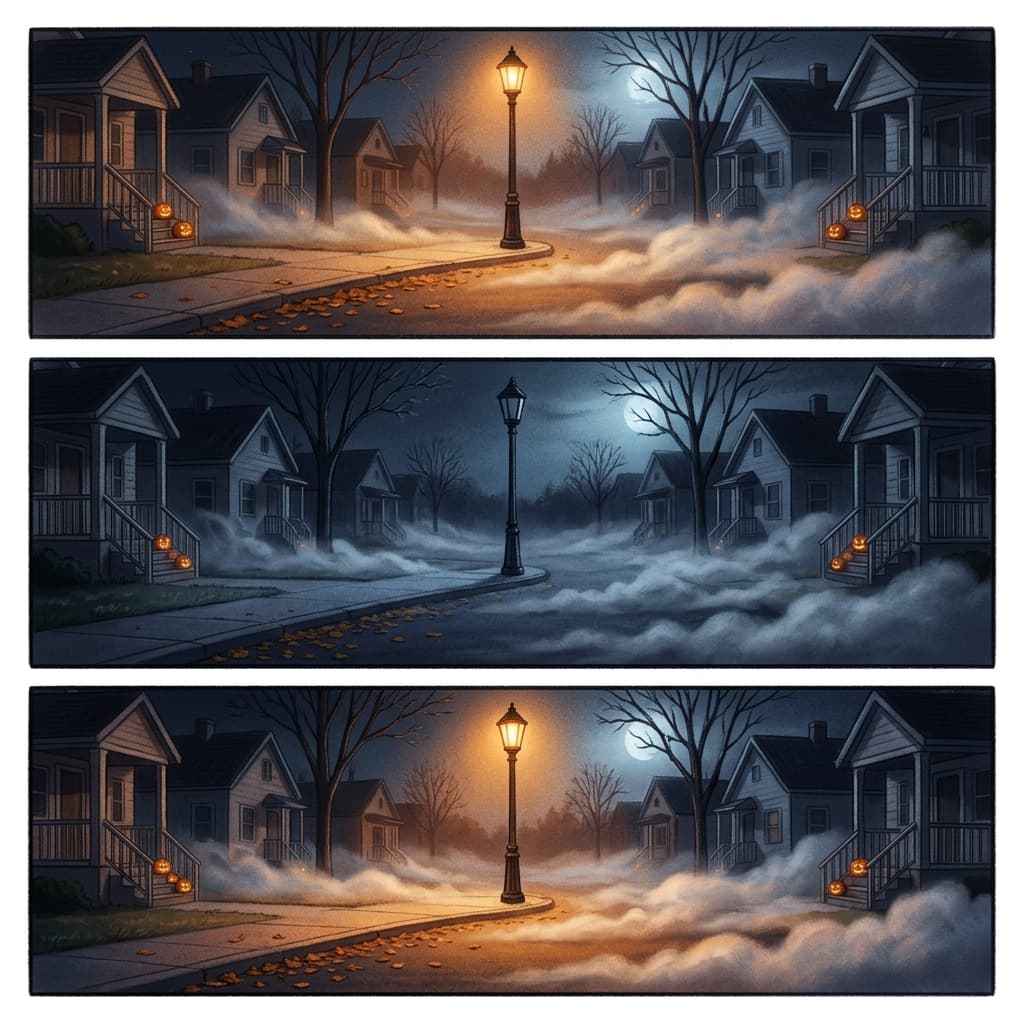
Prompt 2: Foggy Suburban Street With a Flickering Streetlight
A quiet suburban street at night, thick low fog rolling slowly across the asphalt, a single old streetlight at the center of the frame flickering between warm amber and off, autumn leaves skittering along the curb. Static locked-off wide shot from the middle of the street for 8 seconds, the fog slowly drifting left to right. Cold blue moonlight behind the houses, warm amber from the lamp. Low wind and a faint electrical buzz. Ending on the lamp holding steady for a beat before flickering again. Vertical 9:16, cinematic.
Locked-off shots are underrated for AI video. When the camera does not move, the model puts all its effort into the fog and the light, which is where the atmosphere lives. The next image shows this scene as a three-frame storyboard.
Prompt 3: Haunted Mansion Gate in Moonlight
A tall wrought-iron gate in front of an overgrown Victorian mansion under a full moon, bare tree branches swaying slightly, ground mist curling around the stone gateposts. Slow crane-up from gate level to reveal the dark upper windows over 7 seconds, with a single window glowing faint yellow. Cold silver moonlight with deep shadows, a distant owl call, and wind through branches. Ending on the glowing window centered in frame. Vertical 9:16, cinematic, painterly film look.
The single glowing window gives viewers something to look for, which is a cheap way to extend watch time on an otherwise quiet shot.
Prompt 4: Candlelit Attic Pan
The interior of an old attic filled with dusty trunks, a covered mirror, and hanging sheets, lit only by three candles on a wooden crate. Slow pan from left to right over 8 seconds, drifting dust motes visible in the candlelight, a faint shimmer on the mirror cloth. Warm low candlelight with long soft shadows, creaking floorboards and distant wind. Ending on the covered mirror, one corner of the sheet slightly lifted. Vertical 9:16, cinematic, moody.
Tip: the lifted corner of the sheet in the last frame is a quiet payoff that suggests something without showing it, which keeps the clip spooky without becoming graphic.
Prompt 5: Pumpkin Patch at Blue Hour
A wide pumpkin patch at blue hour with rows of orange pumpkins fading into mist, a weathered scarecrow standing at the far end of the field, a few crows lifting off a fence post. Slow low-angle tracking shot gliding forward between the rows for 8 seconds. Soft cool blue ambient light with warm orange pumpkins as the color accent, crows cawing in the distance. Ending with the scarecrow centered at the end of the rows. Vertical 9:16, cinematic.
A gliding low-angle move through repeated rows is a reliable way to show depth. If the scarecrow looks too detailed or unsettling in your tool, ask for a simple burlap and straw version.
2) Jump-Free Suspense and Slow-Reveal Hooks
These clips are built for the first second. Instead of a jump scare (which is hard to generate reliably and can feel jarring in a vertical feed), they use tension: a small detail the viewer wants to understand. They work best as the opening clip of a Short, where the hook decides whether anyone stays.
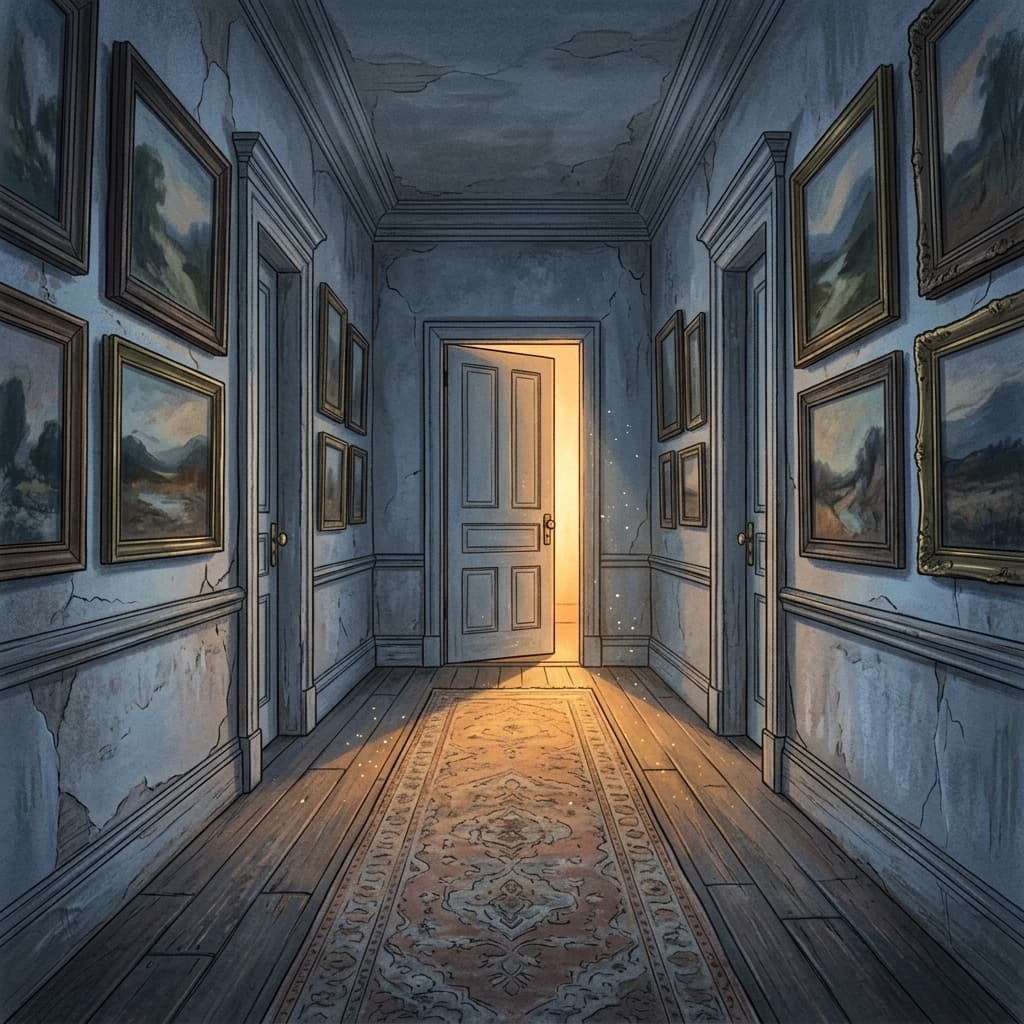
Prompt 6: The Door That Opens a Few Inches
A dim wooden hallway in an old house, a single closed door at the end with warm light leaking from underneath. The door slowly opens about six inches on its own, the light widening on the floor, dust drifting through the beam. Locked-off camera at the far end of the hallway for 6 seconds, symmetrical composition. Low warm light against a cold blue hallway, a slow creak and quiet room tone. Ending on the door frozen slightly open with the light spilling across the floorboards. Vertical 9:16, cinematic.
The key phrase is slowly opens about six inches. Specifying how far the door moves prevents the model from swinging it wide open or inventing a figure behind it.
Prompt 7: Footprints Appearing in Fog
A foggy cemetery path in the early morning, damp grass on either side, a row of old stone markers fading into mist. Footprints in the wet grass appear one at a time along the path, leading toward the camera. Slow dolly backward at walking pace for 7 seconds, soft diffused gray light, quiet crunch of leaves. Ending on the nearest footprint filling the lower third of the frame. Vertical 9:16, cinematic, muted color.
The footprints are a clever stand-in for a character. Because no person appears, you avoid face consistency problems entirely and keep the clip safe for broad audiences.
Prompt 8: Candle Blown Out, Eyes in the Dark
A single candle burning on a dark wooden table in an otherwise black room, flame steady. A soft breath of wind bends the flame and it goes out, leaving a thin curl of smoke. In the darkness behind it, two small amber points of light fade in, like a cat's eyes reflecting. Locked-off close shot for 6 seconds, shallow depth of field. Warm candle glow switching to near darkness, quiet exhale and a faint low hum. Ending on the two amber points holding in the dark. Vertical 9:16, cinematic.
Tip: describing the eyes as a cat's eyes reflecting keeps the tone playful-spooky, and a follow-up clip can reveal an actual cat for a satisfying punchline.
Prompt 9: Rocking Chair on a Porch
An old wooden rocking chair on a covered porch at night, rocking gently back and forth by itself, a porch light above it swinging slightly and casting moving shadows across the floorboards. Static medium shot for 8 seconds, mist hanging beyond the porch. Warm yellow porch light against cold blue night, rhythmic creak of the chair. Ending mid-rock with the chair at its forward position. Vertical 9:16, cinematic.
Rhythmic motion like rocking is easy for video models and ideal for loops. If you want a clean loop, end the clip at the same point in the rocking cycle where it began.
Prompt 10: The Lamp Flickers Out, Then Back On
A cozy living room at night with a vintage table lamp on a side table and an armchair beside it, a window showing bare branches against a moonlit sky. The lamp flickers twice, goes dark for a beat, then glows back on, revealing a black cat now sitting on the armchair that was not there before. Locked-off medium shot for 7 seconds. Warm lamp glow and cool window moonlight, soft electric hum. Ending on the cat looking directly at the camera. Vertical 9:16, cinematic.
This is a simple appearance gag that works as a hook. The reveal is a cat, so the tension resolves with a smile rather than a scare, a tone that suits a family audience.
3) Cozy and Cute Halloween Clips
Not every viewer wants horror. Cozy Halloween content (pets, baking, decorating, candy) tends to be shared more widely because it is comfortable to repost to a family chat. These prompts keep the spooky styling and drop the dread.
Prompt 11: Dog in a Pumpkin Costume
A small fluffy dog wearing a knitted orange pumpkin costume with a green stem hat, sitting on a sunlit hardwood floor among scattered autumn leaves and mini pumpkins. The dog tilts its head and then gives a small happy shake, ears flopping. Slow gentle push-in from a low angle over 6 seconds, warm late-afternoon window light from the left, shallow depth of field. Light cozy ambient music feel with a soft tail thump. Ending on the dog looking into the lens. Vertical 9:16, bright and warm.
Keep the costume simple. Pet costumes with many accessories (capes, tiny hats, props) tend to change between frames, while a single-piece costume stays consistent. For a related pet idea, see our pack of AI pet transformation prompts.
Prompt 12: Pumpkin Carving Timelapse
A top-down timelapse of a kitchen table covered in newspaper, a large orange pumpkin at the center. A carved face gradually appears: triangle eyes, a crooked smile, then pumpkin seeds scooped aside on a tray, finishing with a small candle lit inside. Locked-off overhead camera for 8 seconds, sped-up motion with soft shadows from a window on the left. Warm natural light then the candle glow at the end. Light scraping sounds with a cheerful tempo. Ending on the finished glowing pumpkin centered. Vertical 9:16, bright, clean.
The image below shows the four stages of this timelapse as a storyboard, which is a good habit before you generate anything with a sequence in it.
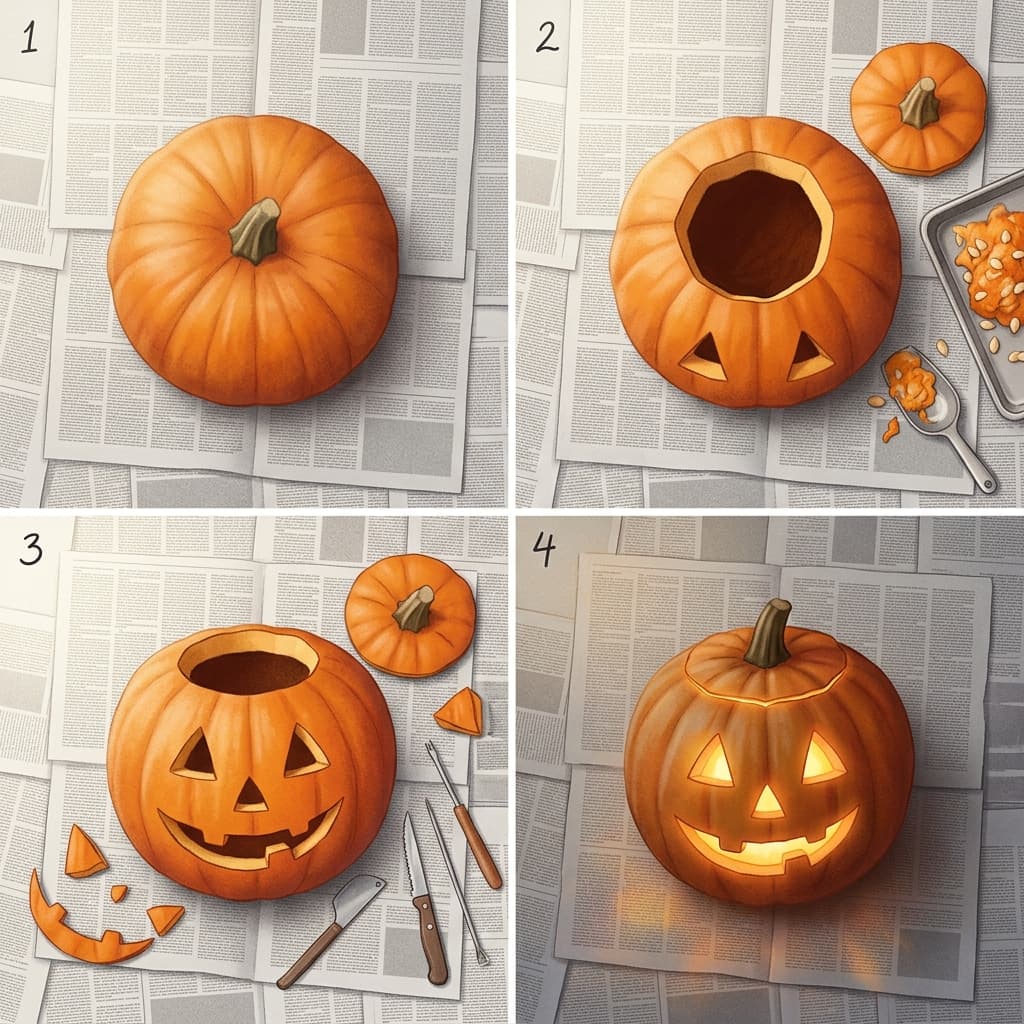
Tip: timelapse prompts work best when you list the stages in order. Models handle a sequence like blank pumpkin, eyes, mouth, candle better than a vague request to show carving.
Prompt 13: Candy Bowl That Slowly Empties
A wooden bowl filled with colorful wrapped candy on a porch bench next to a lit pumpkin, evening light fading to dusk. Wrapped candies disappear one by one from the top until the bowl is nearly empty, leaving a small handwritten sign leaning on the bowl that is blurred and unreadable. Locked-off medium close shot for 8 seconds, warm lantern glow with deep blue dusk behind. Distant children's laughter and rustling wrappers. Ending on the nearly empty bowl. Vertical 9:16, warm and playful.
Do not ask the tool to render legible words on the sign. Keep it blurred and add any text yourself in your editor.
Prompt 14: Black Cat on a Windowsill
A sleek black cat sitting on a deep windowsill with a small jack-o'-lantern beside it, a full moon visible through the window, paper bats taped to the glass. The cat slowly blinks, then flicks its tail twice. Slow push-in from medium to close shot over 6 seconds, soft moonlight from the window and warm glow from the pumpkin. Quiet room tone with a soft purr. Ending on the cat's face in profile. Vertical 9:16, cozy and cinematic.
Black cats reward patient lighting. A warm rim light from the pumpkin separates the cat from the dark background, so it is worth naming in the prompt.
Prompt 15: Hot Cocoa and a Haunted Movie Night
A cozy living room on a rainy autumn evening, a woven blanket on a couch, a mug of hot cocoa with steam rising beside a bowl of popcorn, a TV glowing softly with a flickering light and a small jack-o'-lantern on the coffee table. Slow dolly-in on the mug as the steam curls upward for 7 seconds. Warm lamp light and cool TV glow, soft rain on the window and a gentle fireplace crackle. Ending on the steam curling in front of the glowing TV. Vertical 9:16, warm and cinematic.
This clip is useful as an ambient background or as a calm closer after more intense clips in a longer Short.
4) Transformations and Costume Reveals
Costume reveals are one of the most repeated formats in Halloween short-form video. The structure is simple: the person appears in everyday clothes, there is a beat or a transition, and then they appear fully costumed. A walking-in costume reveal style, where the subject steps toward the camera and the outfit changes mid-stride, has become a recognizable format on TikTok and Reels, and you can recreate the concept without using anyone's audio. Pair your clip with an original track from the AI Music Generator or a licensed sound from the platform's own library.
These work best as image-to-video: generate or upload a clear photo of yourself (or a consenting friend), then animate it.
Prompt 16: Walking-In Costume Reveal From a Selfie
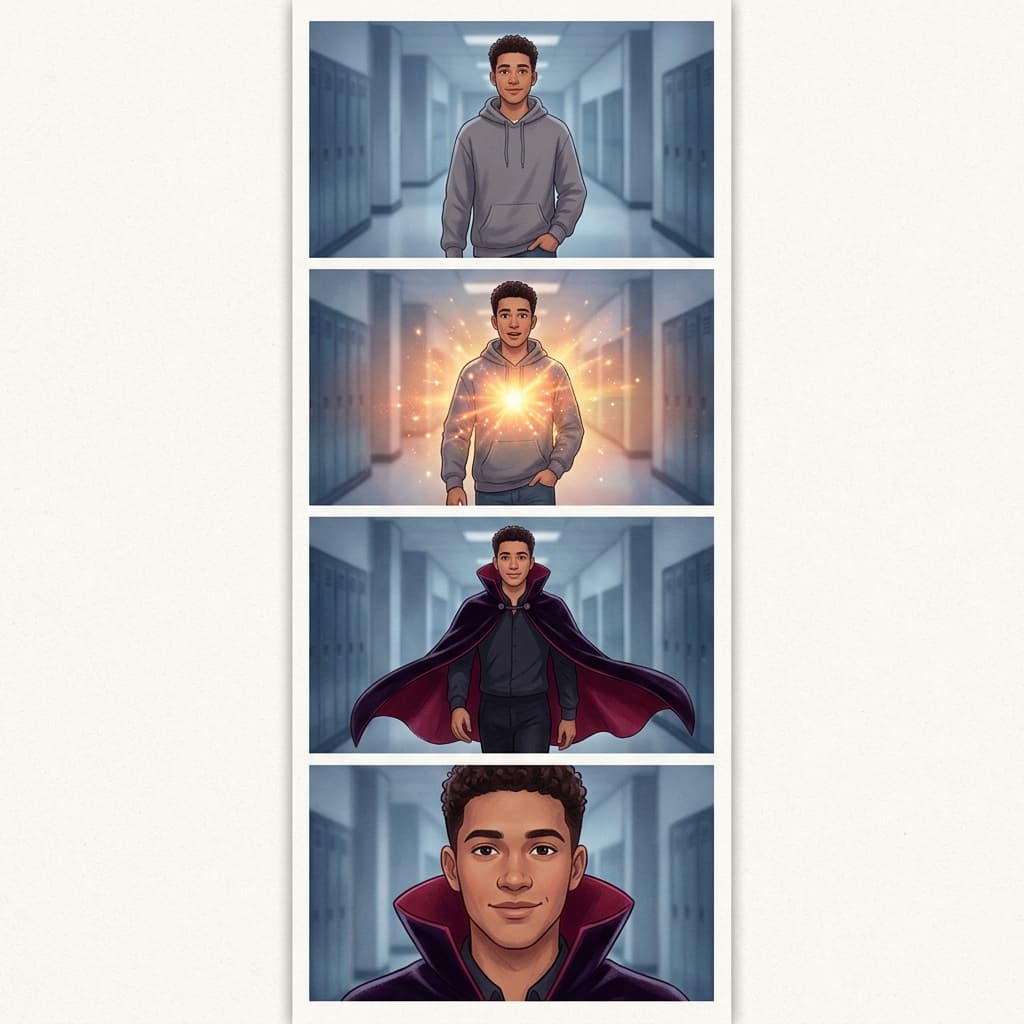
Using the uploaded photo as the reference, keep the same face, hairstyle, and proportions throughout. The person stands in a hallway in a plain gray hoodie, then walks two steps toward the camera and, as they pass through a flash of warm light, the outfit changes to a black velvet vampire cape with a high collar and a crimson lining. Smooth tracking shot moving backward at walking pace over 6 seconds, soft cool light then a brief warm flash at the transition. A soft whoosh sound at the flash. Ending on a confident close-up, direct eye contact with the camera. Vertical 9:16, cinematic, no on-screen text.
Identity drift is the main risk here. Keep the costume to one clearly described piece, ask the model to keep the same face, and generate two or three takes. The next image shows the four beats of this reveal.
Prompt 17: Witch Hat Appears With a Candle Flash
Using the uploaded photo as the reference, keep the same face and hairstyle. The person sits at a wooden table holding a lit candle, looks up at the camera, then a brief candle flare passes in front of the lens and a tall black pointed witch hat with a deep purple band is on their head when the flare clears. Static medium close-up for 5 seconds, warm candlelight, quiet shimmer sound at the flare. Ending on a small smile. Vertical 9:16, cinematic.
A flare, a flash, or a hand passing over the lens is the simplest way to hide the moment of change, which the model would otherwise struggle to render smoothly.
Prompt 18: Everyday Object Becomes a Jack-o'-Lantern
A plain orange pumpkin sits on a kitchen counter in soft morning light. A carved glowing face fades into the pumpkin's surface from the inside, warm candlelight swelling behind the cutouts, while the kitchen around it dims to dusk. Slow dolly-in over 6 seconds. Warm orange glow rising as the room cools to blue. A low whoosh and a soft flame sound. Ending on the fully lit carved pumpkin filling the center of the frame. Vertical 9:16.
Object transformations are easier for models than person transformations because there is no face to keep consistent. Try the same structure with a mug turning into a cauldron or a lamp turning into a lantern.
5) Loopable Ambience and POV Storytelling Series Ideas
Loops and series do something single clips cannot: they build return viewers. A loopable ambience clip keeps playing and replays, which can improve how long people stay, and a series gives viewers a reason to follow for part two.
Prompt 19: Seamless Loop of Drifting Fog and Falling Leaves
A moonlit stone bridge over a still pond, thin fog drifting slowly across the water, a few orange leaves falling steadily from the top of the frame. Locked-off wide shot, 8 seconds, with the first and last frames matching so the clip loops seamlessly: same fog position, same moon position, same leaf pattern. Cold silver moonlight, soft wind and distant crickets that fade in and out evenly. Vertical 9:16, cinematic, calm and looping.
Loops are easiest when the camera does not move and the motion is cyclical (falling leaves, drifting fog, flickering flame). If your tool does not guarantee a perfect loop, play the clip forward then reversed in your editor, a trick we also describe in the Earth Zoom Out video prompt pack.
Prompt 20: POV Trick-or-Treating Series Opener
First-person point of view walking up a front path toward a house glowing with orange string lights and rows of jack-o'-lanterns, a gloved hand holding a paper candy bag at the lower edge of the frame, the front door slightly open with warm light spilling out. Handheld, steady walking pace for 8 seconds, shallow depth of field, cool dusk sky above. Distant music from the neighborhood, crunching leaves, and a doorbell chime near the end. Ending with the door opening fully to reveal a bright, welcoming hallway. Vertical 9:16, cinematic.
POV clips work as episode one of a series. Use the ending frame of this clip as the first frame of the next one (image-to-video), and part two can step inside the house. Our article on Kling multi-shot video prompts covers a similar chaining approach for connected scenes.
Series ideas that reuse the same setup:
- One street, five houses: each house has a different decoration style, posted as five Shorts.
- Night in the attic: a new object in the attic is revealed each day until Halloween.
- The cat is always there: the same black cat appears in a different scene in every clip.
How to Chain Clips Into a 30 to 45 Second Short
Most AI video tools produce clips of 5 to 10 seconds, so a polished Short is almost always several clips stitched together. For Shorts, a total of 30 to 45 seconds is a practical sweet spot: long enough to tell a small story, short enough to hold attention. (For the current length limits and what works best, see our guide on how long YouTube Shorts should be.)
A reliable structure for a 36 second Short is six clips of about 6 seconds each:
- Hook (0 to 3 seconds): your strongest slow-reveal shot, such as the door opening or the eyes in the dark.
- Setup (clips 2 and 3): an establishing shot of the setting, then a closer shot of the subject.
- Escalation (clips 4 and 5): a bigger reveal or a transformation.
- Payoff and loop (clip 6): a closing frame that matches your opening shot, so the Short loops back to the hook.
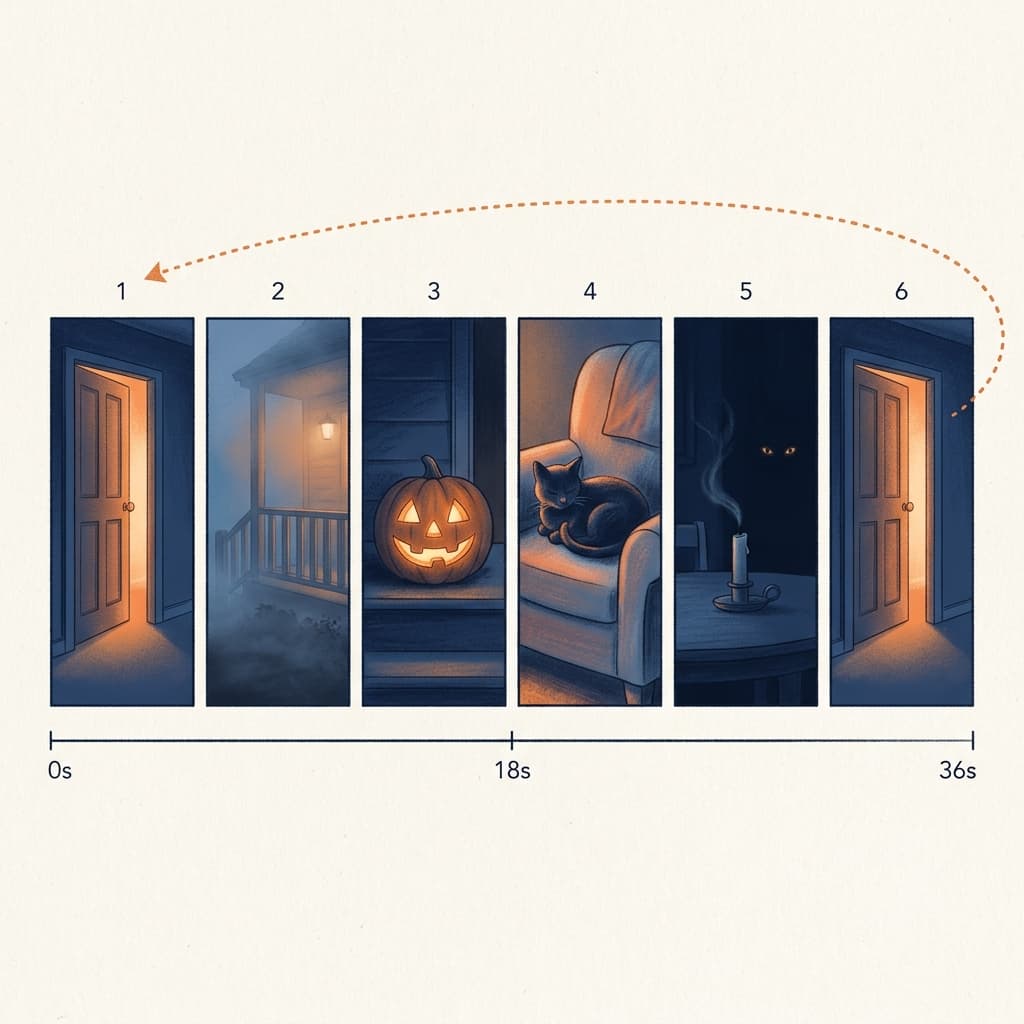
Practical rules for chaining:
- Match lighting across clips. If one clip is warm candlelight and the next is cold moonlight with no transition, the cut feels random. Keep a consistent color palette (for example orange and deep blue).
- Use the last frame of clip one as the first frame of clip two. Image-to-video from an exact frame is the best way to keep a location or character consistent.
- Cut on movement. If clip one ends with a push-in, start clip two with a similar push-in.
- Keep clip two to six under the same style language. Reuse the exact same descriptive phrases (for example painterly film look, soft fog) in each prompt.
You can build the whole thing inside Miraflow, generating clips with the Cinematic AI Video Generator and assembling them with Text2Shorts, which we cover in the next sections.
Writing the Voiceover or Script With Text2Shorts
Silent atmospheric clips can work, but a short narration often increases how long viewers stay, especially for storytelling and POV series. Keep the script to one sentence per clip. A six-clip Short needs about six lines, read at a slow, suspenseful pace.
A simple pattern for a spooky narration:
- Line 1 (hook): a question or an odd detail, such as: Nobody on this street has opened that door in years.
- Lines 2 to 4: one concrete observation per line, such as what the camera sees.
- Line 5: the turn, such as: Tonight, it opened by itself.
- Line 6: an invitation, such as: Follow for part two.
If you want the script drafted for you, Text2Shorts lets you enter a topic, choose an animation or realistic visual style, generate a script, edit or regenerate it, review the scene visual prompts it creates, choose a voice and speed, and generate the final vertical video. It is a fast way to produce a Halloween Short when you want narration and visuals together. For more script templates, see our AI prompts for YouTube Shorts scripts and the original walk-through of creating one-minute Shorts with Text2Shorts.
Covers and Thumbnails for Halloween Shorts
A Short can have a custom thumbnail on YouTube, and TikTok and Reels both let you choose a cover frame for your profile grid. For Halloween, use the same visual language as the video: one focal subject (a glowing pumpkin, a door ajar, a cat's eyes), high contrast between warm light and dark, and three words or fewer.
The YouTube Thumbnail Maker can generate a cover from a text prompt, with optional face upload and thumbnail text, which is handy when you want your own face in a costume reveal cover. For ideas on cover layouts, see our guides to YouTube Shorts thumbnail strategy and AI prompts for Shorts thumbnails.
Music and Sound: Three Spooky Music Prompts
Sound does a large share of the work in a spooky clip. Many video tools generate ambient audio, but a dedicated music bed gives you control over mood and avoids copyright claims from commercial tracks. In the AI Music Generator, use Simple Mode, switch on Instrumental, and paste one of these:
Slow ominous instrumental for a haunted porch scene, low sustained cello drone, sparse piano notes in a minor key, soft wind texture, distant music box melody, building very gradually, around 60 BPM, cinematic, no vocals.
Playful spooky cartoon instrumental for pets in costumes, pizzicato strings, light xylophone, cheerful bouncing bass, a small celesta twinkle, upbeat around 110 BPM, Halloween fun, no vocals.
Dark ambient loop for a foggy graveyard, deep low synth pad, faint choir hum, slow heartbeat-like pulse, subtle metallic scrapes, steady and seamless so it loops cleanly, around 70 BPM, no vocals.
If you want more options, see our 20 AI music prompts for YouTube, Reels, and TikTok and the full workflow for background music for TikTok with AI.
Repurposing a Long Halloween Video With AI Clipping
If you already have a long Halloween video, such as a haunted house walkthrough, a pumpkin carving stream, a costume contest recap, or a spooky story podcast, you do not need to generate new clips. AI Clipping analyzes a long video, finds the strongest moments, scores them, and crops them to vertical with captions. You paste a YouTube URL or upload a file, set the number of clips and the minimum and maximum clip length, choose whether to apply auto captions, and generate. Our guide to turning long videos into viral Shorts automatically walks through the settings.
A smart hybrid is to cut real moments with AI Clipping and open each one with a short AI-generated atmosphere clip from this post as a branded intro.
Posting Timeline Through October 31
Interest in Halloween content builds all month, so spread your uploads rather than posting everything at once.
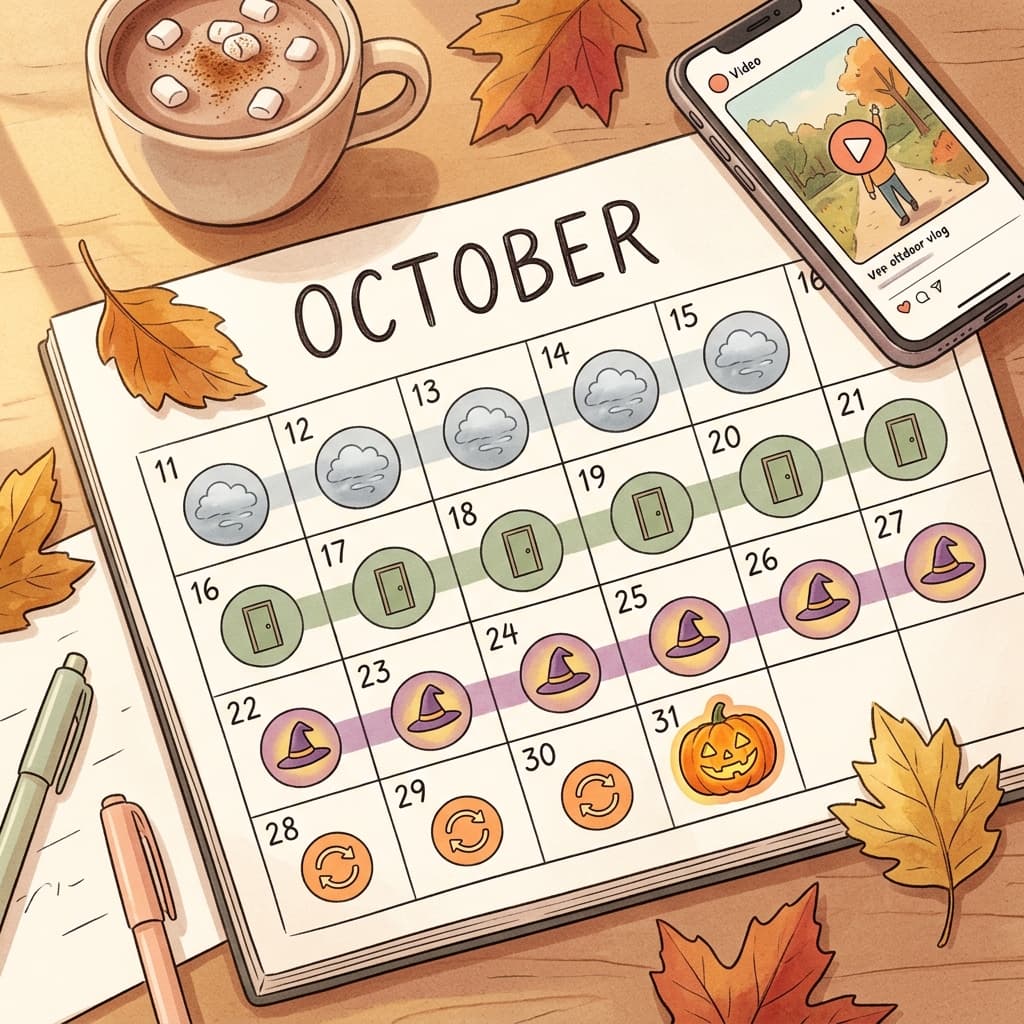
- October 11 to 15: post the atmosphere clips (prompts 1 to 5) and test which style gets the best response.
- October 16 to 21: post slow-reveal hooks and one series opener, so the series has time to build.
- October 22 to 27: post costume reveals and pet content, which people look for when finalizing costumes.
- October 28 to 30: post your best looping ambience clip and a recap compilation.
- October 31: post a last-minute cozy clip (candy bowl, cocoa and movie night) and reply to comments quickly.
If you are unsure about timing, our best time to post YouTube Shorts guide covers the practical windows by audience.
Platform Notes: Shorts vs TikTok vs Reels
- YouTube Shorts: vertical 9:16, up to 3 minutes for newer uploads, and a custom thumbnail option. Shorts favor clear first-second hooks and are strong for search, so use a descriptive title with Halloween in it.
- TikTok: vertical 9:16 with a stronger focus on sound and trending formats. TikTok has its own AI creation tools, which we compare in our guide to TikTok AI Create tools.
- Instagram Reels: vertical 9:16 with a strong cover frame for your profile grid. Keep important content away from the bottom and the edges, where interface elements sit.
AI disclosure: YouTube asks creators to label realistic altered or synthetic content, and TikTok and Instagram have their own AI labels. Clearly stylized or fantastical scenes (a talking pumpkin, a ghost) are generally different from realistic content that could be mistaken for real footage, such as a realistic person doing something they never did. Check the current platform policy for your case, and when in doubt, disclose. Our article on YouTube's auto-label system and AI disclosure explains how labels work in more detail.
Common Mistakes With Halloween AI Videos
- Going too gory. Graphic blood or violence can trigger age restrictions or limited reach on all three platforms. Spooky works better than gory: use suggestion, shadows, and silhouettes of objects rather than injuries.
- Putting too many actions in one clip. A door opens, a cat jumps, a candle goes out, and a ghost appears will not fit in 6 seconds. Use one action per clip and chain clips.
- Asking for text in the video. Signs, titles, and gravestone names often come out misspelled. Add text in your editor.
- Inconsistent characters. If the same person or pet appears in several clips, use image-to-video from the same reference photo, and describe the costume identically each time.
- Forgetting the first second. A slow fade-in from black wastes the only moment that decides whether someone keeps watching. Start on the interesting frame.
- Ignoring sound. A great clip with no audio often feels flat. Add a music bed or ambient layer.
- Ending on a dead frame. If you want a loop, plan the final frame to match the first.
- Posting once and leaving. Reply to comments and post a follow-up part, because series viewers return.
For more general pitfalls, see our list of YouTube Shorts mistakes to avoid in 2026.
How Miraflow Fits Into This Workflow
You can run the full workflow in one place:
- Generate each clip with the Cinematic AI Video Generator, either from text or from a reference image.
- Create a still reference image for a character or location with the AI Image Generator, then animate it.
- Build a narrated, captioned vertical video with Text2Shorts.
- Compose a spooky soundtrack in the AI Music Generator.
- Make a cover with the YouTube Thumbnail Maker.
- Turn long Halloween videos into Shorts with AI Clipping.
The idea is to go from topic to script to visuals to video to thumbnail to music without switching tools. For a wider look at what you can do, start at the Miraflow home page. If you want to try living photos before video, see AI Alive living photo prompts.
Frequently Asked Questions
What is the best length for an AI Halloween video clip?
Five to eight seconds per clip is the most reliable range for current text-to-video and image-to-video tools, and it is enough for one camera move and one action. Chain several clips for a 30 to 45 second Short.
Should I use text-to-video or image-to-video?
Use text-to-video for atmosphere and environments, where there is no specific person to keep consistent. Use image-to-video for costume reveals, pets, and any character that has to look the same across clips, because starting from a real reference image anchors the face and costume.
Can I make a Halloween video loop seamlessly?
Yes. Use a locked-off camera, cyclical motion such as falling leaves or flickering flame, and end the clip on the same composition it began with. If the tool does not match the frames, play the clip forward then in reverse in your editor.
How do I make a Halloween costume reveal from a selfie?
Upload a clear front-facing photo, describe one costume piece in detail, ask the model to keep the same face, and hide the change behind a flash, a flare, or a hand passing over the lens. Generate a few takes and pick the cleanest.
Can I use trending TikTok audio in an AI-generated video?
Trending sounds are licensed for use inside each platform's own tools, so use them there. For uploads to other platforms or for commercial content, generate an original track instead. Do not copy audio from other creators' videos.
Do I have to label my AI Halloween video?
Platforms ask you to disclose realistic content that could be mistaken for real footage. Obviously fantastical scenes are treated differently, but rules change, so check the current policy on each platform and disclose when unsure.
Will spooky content get my Short age-restricted?
Gore, graphic injury, and realistic violence are the usual triggers. Atmospheric, suspenseful, and cozy content generally is not, so keep scares implied rather than explicit.
When should I post Halloween videos?
Start in mid-October and keep posting through October 31. Search interest grows as the holiday approaches, so having a library ready early helps.
Can I turn my existing Halloween portraits into videos?
Yes. Take a portrait from our Halloween portrait prompt pack and animate it with image-to-video using a prompt like the costume reveal ones above.
Conclusion
Halloween video works when each clip does one thing well: one subject, one action, one camera move, and a deliberate first and last frame. The 20 prompts above give you that structure for atmosphere, suspense, cozy, costume reveal, and loop formats, and the chaining, script, music, and cover steps turn them into a full 30 to 45 second Short.
You still have time before October 31. Pick three prompts, generate a few takes of each, chain the best into a Short, and post the first one this week. Start with the Cinematic AI Video Generator and Text2Shorts on Miraflow, and keep the rest of your October calendar full with the series ideas above.