Claude Opus 4.7 Prompting Best Practices: 15 Techniques That Actually Change Your Output Quality (2026)

Written by
Jay Kim
15 tested prompting techniques for Claude Opus 4.7 covering effort levels, adaptive thinking, XML structuring, agentic workflows, and practical templates that improve output quality for creators and developers in 2026.
Claude Opus 4.7 is not just a version bump. It changes how prompting works at every level, from how the model interprets your instructions to how deeply it reasons before responding, to how it manages long autonomous tasks across multiple context windows. If you are still prompting Opus 4.7 the same way you prompted Sonnet or even Opus 4.6, you are leaving significant capability on the table.
The problem most creators and developers run into with Opus 4.7 is that it behaves differently from previous models in ways that are not always obvious. It follows instructions more literally. It adjusts its response length based on perceived task complexity rather than defaulting to a fixed verbosity. It spawns fewer subagents by default. It has strong opinions about frontend design aesthetics. And most importantly, it responds to effort level configuration more strictly than any previous Claude model, which means the gap between a well-configured prompt and a lazy one is wider than ever.
This guide covers every prompting technique that matters for Opus 4.7 in 2026, organized from foundational principles to advanced agentic workflows. Whether you are building content pipelines, writing code, creating AI-generated YouTube Shorts, or running autonomous agents, these practices will help you get consistently better results with fewer wasted tokens.
Why Opus 4.7 Prompting Is Different from Previous Models
Every new Claude model shifts the prompting landscape slightly, but Opus 4.7 introduces several behavioral changes that require active adjustment rather than passive adoption.
The most significant shift is that Opus 4.7 interprets prompts more literally and explicitly than Opus 4.6, particularly at lower effort levels. It will not silently generalize an instruction from one item to another, and it will not infer requests you did not make. This means that vague prompts that worked passably on older models will underperform on Opus 4.7, while precise prompts will produce dramatically better results.
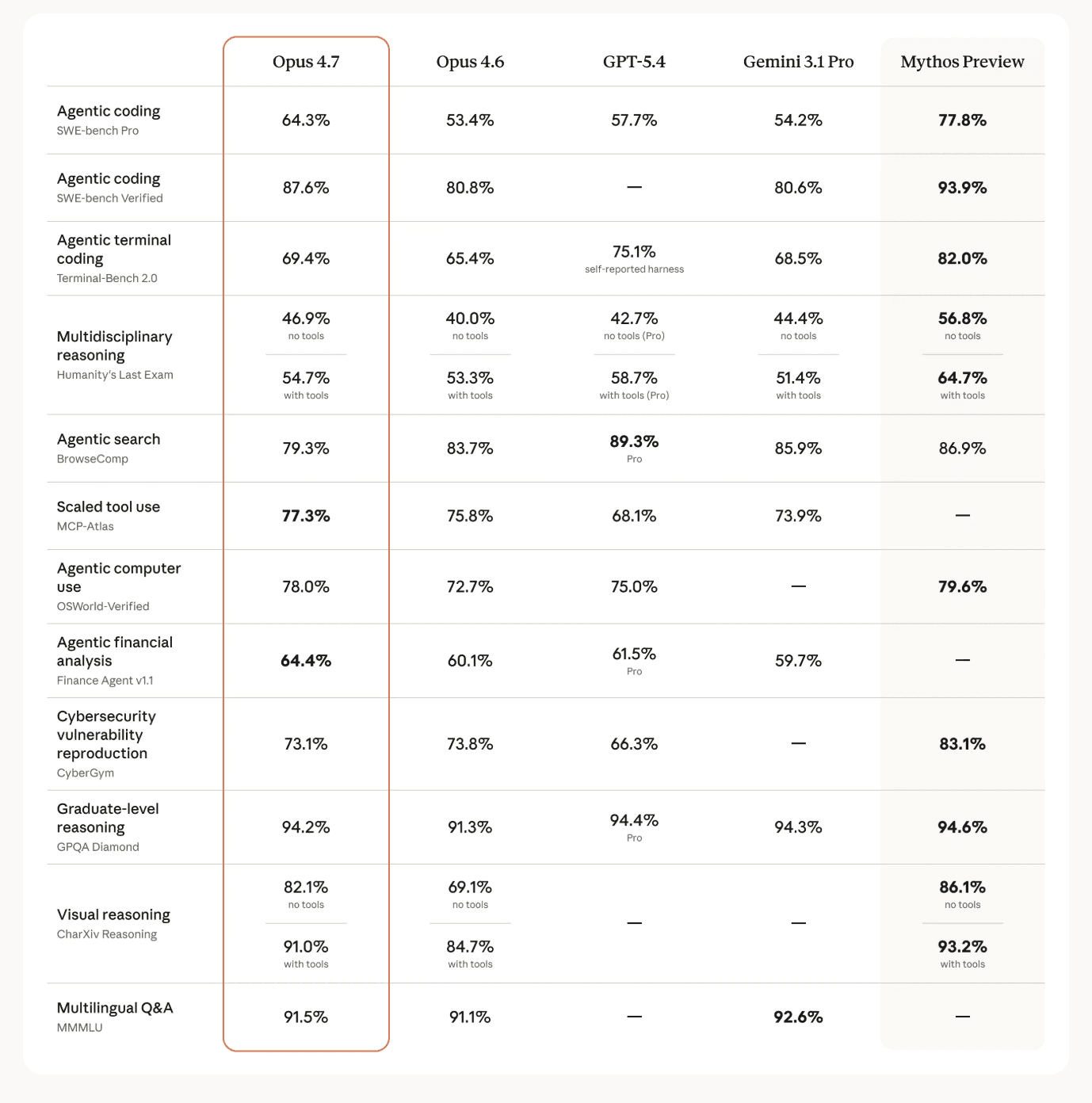
Opus 4.7 also calibrates response length to how complex it judges the task to be, rather than defaulting to a fixed verbosity. Simple questions get shorter answers. Complex analysis gets longer treatment. If your workflow depends on a specific output length or style, you need to specify that explicitly rather than relying on the model to match your unspoken expectations.
The effort parameter has become the primary lever for controlling model behavior. Opus 4.7 respects effort levels strictly, especially at the low end. At low and medium settings, the model scopes its work to exactly what was asked rather than going above and beyond. This is efficient for simple tasks but introduces a real risk of under-thinking on moderately complex problems if you have not configured effort appropriately.
These changes collectively mean that prompting Opus 4.7 well requires more upfront investment in clarity and configuration, but the payoff is substantially more precise, more capable, and more predictable output. The same principle applies to content creation workflows, where being specific about what you want from AI image generation tools or cinematic video prompts produces dramatically better results than vague descriptions.
Put Everything in the First Message
The single most impactful habit you can build with Opus 4.7 is front-loading your entire intent, conditions, criteria, and context into the first message. This matters more for Opus 4.7 than for any previous Claude model because of how the model handles autonomy and literal instruction following.
Opus 4.7 is designed to work autonomously across long task horizons. When you provide well-specified, clear, and accurate task descriptions upfront, the model can maximize both autonomy and intelligence while minimizing unnecessary token usage across subsequent turns. In contrast, ambiguous or underspecified prompts conveyed progressively over multiple user turns tend to reduce token efficiency and sometimes performance.
Here is what front-loading actually looks like in practice. Instead of starting a conversation with a vague request and then refining it across five follow-up messages, you structure your first message to include the task objective (what you want accomplished), the constraints and boundaries (what you do not want or what limits apply), the success criteria (how to evaluate whether the output is good), the format requirements (how the output should be structured), and any relevant context (background information the model needs to do the work well).
A poorly front-loaded prompt might look like this: "Write me a blog post about YouTube thumbnails." A well front-loaded prompt includes the topic, target audience, desired length, tone, specific sections you want covered, internal links to include, SEO keywords to target, and formatting preferences, all in a single message.
This approach works particularly well because Opus 4.7 is more autonomous than prior models. When it has everything it needs from the start, it can plan its approach, execute efficiently, and deliver a complete result without needing to pause and ask clarifying questions that break its flow.
The same principle applies when working with any AI content tool. When you use the Miraflow AI Text2Shorts generator, entering a clear, specific topic produces better scripts and visuals than entering something generic. When you write prompts for YouTube thumbnails, descriptive prompts with specific composition details outperform vague ones every time. The pattern is universal: specificity in, quality out.
Delegate the Full Task Without Interrupting
Opus 4.7 performs best when you let it work through an entire task without breaking the flow with mid-task corrections or partial redirections. This is a direct consequence of the model's improved long-horizon reasoning capabilities and its ability to maintain state across extended sessions.
The model maintains orientation across extended work by focusing on incremental progress, making steady advances on a few things at a time rather than attempting everything at once. When you interrupt this process with frequent corrections or new instructions, you fragment the model's planning and force it to re-orient repeatedly, which wastes tokens and often produces worse results than letting it complete its initial approach.
This does not mean you should accept bad output without feedback. It means you should invest more time in your initial prompt (as described in the previous section) so that mid-task interruptions become unnecessary. Think of it as the difference between micromanaging an employee who is halfway through a task versus giving clear instructions upfront and reviewing the completed work.
For agentic coding workflows, this principle is especially important. Opus 4.7 can work on a complex task, save its state, and continue with a fresh context window. If you set up the right framework in your first message (including test criteria, file structure expectations, and quality standards), the model can work through multi-step implementations autonomously and produce better results than it would with constant human intervention.
The practical implementation of this principle is to turn on auto-accept for tool calls and step away to do other work while the model executes. Opus 4.7 is designed to be genuinely autonomous in ways that previous models were not. When you enable auto-accept and let it run through file reads, searches, code execution, and iteration cycles without requiring approval at each step, you unlock the full potential of its agentic capabilities while freeing yourself to focus on other tasks.
If you are worried about safety, you can still add guardrails that protect against destructive actions without requiring approval for every step. A prompt like "take local, reversible actions freely, but confirm before any destructive operations like deleting files or force-pushing" gives the model autonomy on safe actions while preserving a safety net for risky ones.
Set Effort Level to xhigh as Your Default
The effort parameter is the most important configuration option for Opus 4.7, and getting it right has a bigger impact on output quality than almost any prompting technique. For most coding and agentic use cases, xhigh is the recommended starting point.
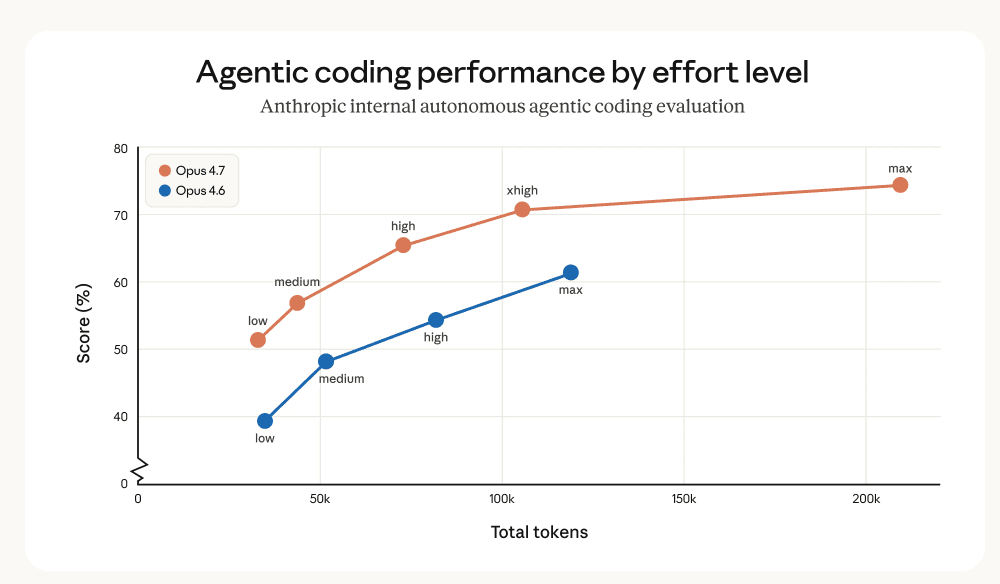
Here is how the effort levels break down for Opus 4.7:
max is the highest possible effort setting and can deliver performance gains in some use cases, but it may show diminishing returns from increased token usage and can sometimes be prone to overthinking. Test this setting for the most intelligence-demanding tasks, but do not assume it is always better than xhigh.
xhigh is the best setting for most coding and agentic use cases. This is where Opus 4.7 delivers the strongest balance of thoroughness and efficiency. If you are building content creation pipelines, writing complex code, or running autonomous research tasks, xhigh should be your default.
high balances token usage and intelligence effectively. For most intelligence-sensitive use cases where you need good performance without the full token expenditure of xhigh, high is the minimum recommended setting.
medium works for cost-sensitive use cases where you can accept reduced intelligence in exchange for lower token usage. This is appropriate for simpler tasks like classification, short responses, or structured extraction where deep reasoning is not needed.
low should be reserved for short, scoped tasks and latency-sensitive workloads that are not intelligence-sensitive. At low effort, Opus 4.7 scopes its work strictly to what was asked and will not go above and beyond, which means complex tasks run at low effort have a real risk of shallow reasoning.
When running Opus 4.7 at max or xhigh effort, set a large max output token budget so the model has room to think and act across its subagents and tool calls. Starting at 64k tokens and tuning from there is recommended. If the budget is too small, the model may truncate its reasoning or skip important steps simply because it runs out of space.
The effort parameter also directly affects how much the model uses tools. Higher effort settings show substantially more tool usage in agentic search and coding scenarios. If you find that Opus 4.7 is not using available tools enough (for example, not searching when it should), increasing the effort level is often the most effective fix before resorting to prompt changes.
Adaptive Thinking: Automatic Depth Adjustment Based on Difficulty
One of the most powerful features of Opus 4.7 is adaptive thinking, which allows the model to dynamically decide when and how much to think based on both the effort parameter and the actual complexity of each query. This replaces the older extended thinking approach where you had to manually set a fixed thinking budget.
With adaptive thinking enabled, the model calibrates its reasoning depth automatically. Simple questions that do not require deep analysis get fast, direct responses. Complex multi-step problems trigger deeper reasoning chains. This happens per-turn in a conversation, which means the model can handle a mix of easy and hard tasks without you needing to reconfigure anything between them.

To enable adaptive thinking, you set the thinking parameter to adaptive mode and control the depth through the effort parameter rather than through a fixed token budget. Higher effort encourages more thinking on complex problems, while lower effort keeps thinking minimal. The model makes the final call on whether thinking is needed for any given query.
This adaptive approach is particularly well suited to several workload patterns. Autonomous multi-step agents (coding agents, data analysis pipelines, bug finding) benefit because the model calibrates its reasoning per step, staying on path over longer trajectories. Bimodal workloads with a mix of easy and hard tasks benefit because adaptive thinking skips reasoning on simple queries and reasons deeply on complex ones.
If you find the model thinking more often than you want, which can happen with large or complex system prompts, you can steer this behavior with prompt guidance. Adding something like "Extended thinking adds latency and should only be used when it will meaningfully improve answer quality, typically for problems that require multi-step reasoning. When in doubt, respond directly." gives the model permission to skip thinking on straightforward tasks.
Conversely, if you are running hard workloads at medium effort and seeing shallow reasoning, the first lever to pull is raising the effort level. Only if you need finer control should you add explicit prompt instructions about thinking depth.
The concept of matching reasoning depth to task difficulty applies beyond model configuration. When creating content, simpler formats like quick YouTube Shorts need less planning than comprehensive video strategies. When writing AI prompts for thumbnails, a straightforward composition needs a shorter prompt while a complex multi-element scene benefits from more detailed description.
Structure Your Prompts with XML Tags
XML tags are one of the most reliable techniques for helping Opus 4.7 parse complex prompts correctly. When your prompt includes a mix of instructions, context, examples, and variable inputs, wrapping each type of content in descriptive tags eliminates ambiguity about what role each section plays.
Opus 4.7's more literal instruction following makes tag structure even more important than it was for previous models. Without clear boundaries between different sections of your prompt, the model might treat example text as instructions or interpret context as a direct request. Tags prevent this entirely.
Best practices for XML tag usage include using consistent, descriptive tag names across your prompts, nesting tags when content has a natural hierarchy, and matching tag names to the function of their content. For instance, wrapping instructions in <instructions> tags, context in <context> tags, and examples in <example> tags makes the prompt self-documenting.
Here is a practical example of how tags improve prompt clarity for a content creation task:
json<instructions>
Write a blog post about YouTube thumbnail optimization for 2026.
Target length: 2000 words.
Tone: practical and conversational.
Include 5 actionable tips with examples.
</instructions>

<context>
This post is for the Miraflow AI blog. The audience is YouTube creators
who want to improve their click-through rates. The post should reference
AI thumbnail generation as a tool but not force product mentions.
</context>

<examples>
<example>
A strong tip section starts with a specific, measurable claim,
followed by an explanation of why it works, then a concrete example
the reader can apply immediately.
</example>
</examples>

<formatting>
Use H2 headings for main sections.
Write in prose paragraphs, not bullet lists.
Include internal links naturally within the content.
</formatting>
This structure makes it unambiguous what the model should do, what context it has, what good output looks like, and how the output should be formatted. Opus 4.7 processes these tagged sections with high fidelity, producing output that matches each specification precisely.
Use Few-Shot Examples to Anchor Output Quality
Examples are one of the most reliable ways to steer Opus 4.7's output format, tone, and structure. Providing 3 to 5 well-crafted examples (known as few-shot or multishot prompting) can dramatically improve both accuracy and consistency across runs.
When building examples for Opus 4.7, make them relevant to your actual use case, diverse enough to cover edge cases without introducing unintended patterns, and structurally clear using <example> tags so the model can distinguish them from instructions.
For content creation workflows, examples are especially powerful. If you want blog posts written in a specific style, providing two or three paragraphs that demonstrate the target voice, sentence structure, and formatting gives Opus 4.7 a concrete reference point. The model generalizes from examples more reliably than it generalizes from abstract style descriptions.
Examples also work with thinking capabilities. You can include <thinking> tags inside your few-shot examples to show the model the reasoning pattern you want. Opus 4.7 will generalize that reasoning style to its own extended thinking blocks, which is useful for tasks where you want specific analytical approaches applied consistently.
This technique is directly applicable to AI content generation across platforms. When writing prompts for AI image generation, showing the model examples of prompts that produced good results teaches it the level of detail and specificity you expect. When creating scripts for YouTube Shorts, example scripts demonstrate the hook structure, pacing, and tone you want replicated.
Control Response Length and Verbosity Explicitly
Opus 4.7 dynamically adjusts its response length based on perceived task complexity, which is usually helpful but can be unpredictable if your application requires consistent output lengths. Simple lookups get shorter answers while open-ended analysis gets much longer treatment.
If your product or workflow depends on a certain style or verbosity of output, you need to tune your prompts explicitly. To decrease verbosity, adding something like "Provide concise, focused responses. Skip non-essential context, and keep examples minimal." is effective. To increase detail, being specific about what additional depth you want works better than generic instructions like "be more thorough."
Positive examples showing the appropriate level of concision tend to be more effective than negative examples or instructions that tell the model what not to do. Instead of saying "do not write long paragraphs," provide an example of the ideal paragraph length and say "match this style."
If you see specific patterns of unwanted verbosity (like over-explaining simple concepts or adding unnecessary caveats), address those patterns directly in your prompt. Opus 4.7's literal instruction following means specific corrections produce specific improvements.
For formatting control beyond length, telling Claude what to do instead of what not to do produces better results. Instead of "do not use markdown in your response," try "write your response as smoothly flowing prose paragraphs." Instead of "do not use bullet points," try "incorporate lists naturally into sentences rather than using formatted list elements."
Manage Tool Use Triggering Intentionally
Opus 4.7 has a tendency to use tools less often than Opus 4.6, preferring to rely on reasoning instead. This produces better results in most cases because the model avoids unnecessary tool calls, but it can be problematic when tools genuinely provide better answers than reasoning alone.
The most effective lever for increasing tool usage is the effort parameter. Higher effort settings (high and xhigh) show substantially more tool usage in agentic search and coding scenarios. Before adding prompt-level instructions about tool use, try increasing effort first.
If effort adjustment alone is not sufficient, you can explicitly instruct the model about when and how to use specific tools. For instance, if the model is not using web search tools when it should, describe clearly why search is important for the task: "This task requires current information that may have changed since your training data. Use web search to verify any facts about 2026 trends, pricing, or platform features before including them in your response."
For proactive tool use by default, you can add system-level guidance: "By default, implement changes rather than only suggesting them. If the user's intent is unclear, infer the most useful likely action and proceed, using tools to discover any missing details instead of guessing."
For conservative tool use where you want the model to be more hesitant about taking action: "Do not jump into implementation unless clearly instructed to make changes. When the user's intent is ambiguous, default to providing information and recommendations rather than taking action."
Opus 4.7 is also excellent at parallel tool execution. It will run multiple searches simultaneously during research, read several files at once, and execute independent operations in parallel. You can boost parallel calling reliability to near 100% by adding explicit guidance: "If you intend to call multiple tools and there are no dependencies between the calls, make all of the independent calls in parallel."
Optimize Long-Horizon Agentic Workflows
Opus 4.7 excels at long-horizon reasoning tasks with exceptional state tracking across extended sessions and even across multiple context windows. To take full advantage of this capability, you need to set up your workflows to support genuine autonomy.
For tasks that span multiple context windows, use a different prompt for the very first context window to set up framework elements like tests, setup scripts, and structured state files. Then use subsequent context windows to iterate on a structured task list. Having the model write tests in a structured format (like a tests.json file) before starting implementation work leads to better long-term iteration quality.
Encourage the model to create setup scripts (like an init.sh file) that gracefully start servers, run test suites, and execute linters. This prevents repeated work when continuing from a fresh context window. When a context window is cleared, consider starting with a brand new context window rather than using compaction, since Opus 4.7 is extremely effective at discovering state from the local filesystem.
For context management, if your agent harness supports automatic compaction as the context window approaches its limit, tell the model explicitly: "Your context window will be automatically compacted as it approaches its limit, allowing you to continue working indefinitely. Do not stop tasks early due to token budget concerns. As you approach your token budget limit, save your current progress and state to memory before the context window refreshes."
State tracking works best when you combine structured formats for state data (JSON for test results, task status) with unstructured text for progress notes. Git is particularly effective for state tracking because it provides a log of completed work and checkpoints that can be restored. Opus 4.7 performs especially well using git to track state across multiple sessions.
For content creators building production pipelines, the same principles of structured state management apply. Planning your YouTube Shorts content calendar with clear milestones and tracking progress systematically produces better results than ad-hoc posting. Using analytics to read your performance data provides the feedback loop you need to iterate effectively.
Handle Opus 4.7's Literal Instruction Following
The literal interpretation of prompts is one of Opus 4.7's most distinctive behavioral traits, and it cuts both ways. The upside is precision and predictability, especially for API use cases with carefully tuned prompts, structured extraction, and pipelines where you want consistent behavior. The downside is that the model will not generalize instructions you only stated for one specific case.
If you need an instruction to apply broadly, state the scope explicitly. For example, instead of "format the first section with H2 headings," say "apply H2 heading formatting to every section, not just the first one." Opus 4.7 will follow the literal instruction precisely, so making the scope clear in the instruction itself prevents unexpected inconsistencies.
This literalism is actually an advantage for most production workflows because it means fewer surprises and less need for post-processing corrections. When you tell Opus 4.7 exactly what you want, you get exactly that, consistently across runs. The investment is in writing precise prompts, but the payoff is reliable output.
For content creation, this precision means your AI thumbnail prompts should describe every element you want in the output rather than relying on the model to fill in aesthetic gaps. When writing video prompts for cinematic AI generation, describing camera angle, lighting, mood, color palette, and subject positioning explicitly produces dramatically more predictable results than hoping the model interprets a vague description the way you imagined it.
Control Subagent Spawning for Efficiency
Opus 4.7 tends to spawn fewer subagents by default compared to Opus 4.6, but this behavior is fully steerable through prompting. Understanding when subagents help versus when they add unnecessary overhead is important for optimizing both performance and cost.

Subagents are valuable when tasks can run in parallel, require isolated context, or involve independent workstreams that do not need to share state. Reading multiple files simultaneously, researching several topics at once, or testing different approaches in parallel are all good subagent use cases.
Subagents are unnecessary for simple tasks, sequential operations, single-file edits, or tasks where maintaining context across steps is important. Spawning a subagent to do a single grep search, for instance, adds overhead without benefit.
To increase subagent usage when your workflow benefits from parallelism: "Spawn multiple subagents in the same turn when fanning out across items or reading multiple files." To prevent unnecessary subagent spawning: "Do not spawn a subagent for work you can complete directly in a single response, such as refactoring a function you can already see."
The right balance depends entirely on your specific workflow. Agentic coding tasks with many independent files benefit from liberal subagent use. Interactive conversations with sequential dependencies benefit from minimal subagent use.
Prevent Overengineering and Scope Creep
Opus 4.7, like its predecessors, can sometimes overengineer solutions by creating extra files, adding unnecessary abstractions, or building in flexibility that was not requested. If you consistently see output that is more complex than what you asked for, add explicit constraints about solution scope.
Effective guidance for preventing overengineering includes being clear about scope boundaries: "Only make changes that are directly requested or clearly necessary. A bug fix does not need surrounding code cleaned up. A simple feature does not need extra configurability." For documentation, specify that the model should not add docstrings or comments to code it did not change. For defensive coding, specify that error handling should only be added at system boundaries like user input and external APIs, not for internal operations where the existing framework provides guarantees.
The underlying principle is to match solution complexity to problem complexity. Opus 4.7 is capable of building elaborate solutions, and sometimes that capability needs to be channeled rather than unleashed. Being explicit about "the right amount of complexity is the minimum needed for the current task" produces cleaner, more maintainable output.
Navigate the Default Design Aesthetic
Opus 4.7 has a distinctive default design style that shows up consistently in frontend work: warm cream or off-white backgrounds (around #F4F1EA), serif display typography like Georgia or Playfair, italic word accents, and terracotta or amber accent colors. This looks polished for editorial, portfolio, and hospitality contexts, but it clashes with dashboards, developer tools, fintech apps, and enterprise interfaces.
The default is persistent, and generic instructions like "do not use cream" or "make it clean and minimal" tend to shift the model to a different fixed palette rather than producing genuine variety. Two approaches work reliably for breaking out of the default.
The first approach is specifying a concrete alternative with explicit color hex codes, font names, spacing values, and design principles. When you provide detailed design specs, Opus 4.7 follows them precisely and produces output that matches your vision rather than its default aesthetic.
The second approach is having the model propose multiple options before building. Asking for 4 distinct visual directions (each defined by background hex, accent hex, typeface, and a one-line rationale) and then selecting one before implementation breaks the default pattern and gives you control over the creative direction.
For creators who want to skip the design configuration entirely and get professional-looking visual content directly, tools like the Miraflow AI YouTube Thumbnail Maker handle design decisions automatically based on your content description, letting you focus on the creative message rather than the technical specifications.
Minimize Hallucinations with Investigation-First Prompting
Opus 4.7 is less prone to hallucinations than previous models, but you can further reduce fabricated claims by establishing an investigation-first pattern in your prompts. The core principle is simple: never let the model speculate about information it has not verified.
For coding contexts, wrapping your anti-hallucination guidance in XML tags makes it unambiguous: instruct the model to never speculate about code it has not opened, to always read referenced files before answering questions about them, and to investigate relevant files before making claims about the codebase.
For content creation contexts, the same principle applies differently. When writing about current trends, platform features, or statistical claims, the model should ground its statements in verified information rather than generating plausible-sounding but potentially inaccurate claims. This is why the Miraflow AI blog writing guidelines emphasize using realistic statements rather than inventing fake statistics, and why every blog post should be based on verifiable facts rather than fabricated data points.
This investigation-first approach aligns with how Google evaluates content quality in 2026, where accuracy and trustworthiness are critical ranking factors regardless of whether content is AI-assisted or human-written.
Maximize Code Review Recall
If you use Opus 4.7 for code review, you may notice a counterintuitive dynamic: the model's improved bug-finding ability can actually show up as lower measured recall in existing review harnesses. This happens because Opus 4.7 follows filtering instructions more literally than previous models did.
When a review prompt includes instructions like "only report high-severity issues" or "be conservative," previous models often ignored these constraints and reported everything anyway. Opus 4.7 actually follows them, which means it may investigate the code just as thoroughly, identify bugs, and then not report findings it judges to be below your stated severity bar.
The fix is to separate finding from filtering. Instruct the model to report every issue it finds, including ones it considers low-severity or is uncertain about, and include its confidence level and estimated severity for each finding. A separate verification step (automated or manual) can then rank and filter the findings. This produces better coverage because the finding stage is optimized for recall while the filtering stage is optimized for precision.
If you want single-pass review with built-in filtering, be concrete about the severity threshold rather than using qualitative terms. Saying "report any bugs that could cause incorrect behavior, a test failure, or a misleading result; only omit pure style or naming preferences" gives the model a clear boundary to work with.
Prompt Templates for Common Opus 4.7 Workflows
Here are ready-to-use prompt structures optimized for Opus 4.7's behavioral characteristics that you can copy and adapt to your workflows.
Content Creation System Prompt
json<instructions>
You are a content specialist creating blog posts for a digital
marketing audience. Write in clear, conversational prose using
complete paragraphs. Do not use bullet point lists in the body
content. Incorporate relevant keywords naturally within sentences
rather than forcing them into headings.

Match your response length to the complexity of the request.
For simple topics, write concisely. For comprehensive guides,
write thoroughly with multiple sections and practical examples.

Ground all claims in verifiable information. Do not invent
statistics or fabricate data points. Use realistic qualitative
statements when quantitative data is not available.
</instructions>

<formatting>
Use H2 headings for main sections.
Write in prose paragraphs throughout.
Include actionable examples in each section.
End with a conclusion that summarizes key takeaways.
</formatting>
Agentic Coding System Prompt
json<task_approach>
Put intent, conditions, success criteria, and file locations
in your first analysis. Plan before coding. Execute the full
implementation without stopping for confirmation on reversible
actions. Confirm before any destructive operation.
</task_approach>

<quality_standards>
Write general-purpose solutions, not test-specific workarounds.
Do not hard-code values. Implement actual logic that solves
problems for all valid inputs. If tests are incorrect, report
that rather than working around them.
</quality_standards>

<investigation>
Never speculate about code you have not opened. Read referenced
files before answering questions about them. Give grounded,
hallucination-free answers based on actual code content.
</investigation>
Research and Analysis Prompt
json<research_approach>
Search for this information systematically. Develop competing
hypotheses as you gather data. Track confidence levels in your
progress notes. Regularly self-critique your approach and update
your findings. Break this research task into clear phases and
work through each one methodically.
</research_approach>

<output_requirements>
After completing research, provide a structured summary with:
- Key findings with source attribution
- Confidence level for each major claim
- Areas where information was contradictory or incomplete
- Recommended next steps for deeper investigation
</output_requirements>
These templates work as starting points. The most effective prompts are customized for your specific use case with concrete details about your domain, audience, and success criteria.
How This Connects to AI Content Creation in 2026
The prompting principles covered in this guide apply far beyond direct Claude API usage. Every AI content creation tool benefits from the same foundational approach: be specific, provide context, set clear expectations, and let the AI work through the full task with adequate configuration.

When you generate YouTube thumbnails with AI prompts, the difference between a vague prompt and a detailed one is the difference between a generic image and a scroll-stopping thumbnail. When you create AI music for your videos, describing the exact mood, instruments, tempo, and style you want produces tracks that match your content perfectly rather than generic background music. When you write scripts for YouTube Shorts, specifying the hook structure, pacing, and target audience creates content that holds attention and drives engagement.
The Miraflow AI platform applies these principles across its entire content pipeline. The Text2Shorts generator works best when you enter a clear, specific topic. The AI image generator produces its best work with descriptive, detailed prompts. The cinematic video generator responds to specificity in camera work descriptions, lighting notes, and scene compositions.
Understanding how to communicate effectively with AI models is becoming a core skill for content creators in 2026. The techniques in this guide, from front-loading context to using structured tags to setting appropriate effort levels, are transferable across every AI tool you use. Creators who master these prompting fundamentals will consistently produce better content faster, whether they are working directly with Claude's API, generating content through platforms like Miraflow AI, or using any other AI-powered creation tool.
For more on building effective content strategies with AI tools, explore the Miraflow AI blog posts on how to go viral on YouTube Shorts in 2026, YouTube algorithm behavior in 2026, and the complete YouTube Shorts best practices guide.
Conclusion
Claude Opus 4.7 rewards a specific prompting approach: put everything the model needs to know in the first message, delegate the full task without interrupting, set effort to xhigh for coding and agentic work, enable auto-accept to let the model work autonomously, and trust adaptive thinking to adjust reasoning depth based on actual task difficulty. These five core practices, combined with structured XML tags, concrete examples, explicit scope definitions, and investigation-first patterns, produce consistently superior output compared to the vague, iterative prompting habits that worked passably with older models.
The model is more literal, more autonomous, and more configurable than any previous Claude release. It follows your instructions precisely, which means precise instructions produce precise results. It respects effort levels strictly, which means choosing the right effort level matters more than ever. And it handles long-horizon tasks with exceptional state tracking, which means you can trust it with complex, multi-step workflows that would have required constant supervision with earlier models.
Whether you are building AI agents, creating content, reviewing code, or designing frontends, the investment in learning Opus 4.7's specific behavioral patterns pays for itself quickly in better output quality, lower token costs, and faster iteration cycles. The prompting techniques in this guide are not theoretical suggestions. They are practical patterns derived from how the model actually behaves, documented in Anthropic's own engineering guidance and validated across real-world usage. Apply them systematically, and you will see the difference immediately.
Frequently Asked Questions
What effort level should I use for Claude Opus 4.7?
For most coding and agentic use cases, xhigh is the recommended default effort level for Opus 4.7. High effort is the minimum recommended for intelligence-sensitive use cases. Medium works for cost-sensitive tasks with lower complexity requirements, and low should only be used for simple, scoped tasks where latency matters more than reasoning depth. Opus 4.7 respects effort levels more strictly than any previous Claude model, so this configuration has an outsized impact on output quality.
How is adaptive thinking different from extended thinking?
Adaptive thinking (set with thinking type "adaptive") lets Opus 4.7 dynamically decide when and how much to think based on the effort parameter and actual query complexity. Extended thinking (with budget_tokens) required you to set a fixed thinking budget manually. Adaptive thinking generally produces better performance because it allocates reasoning effort proportionally to problem difficulty rather than applying a fixed budget to every query regardless of complexity. Extended thinking with budget_tokens is still functional but deprecated.
Why does Opus 4.7 give shorter responses than expected?
Opus 4.7 calibrates response length to perceived task complexity rather than defaulting to a fixed verbosity. Simple questions get concise answers. If you need longer, more detailed responses, explicitly state your length expectations in the prompt or add instructions like "provide a thorough, comprehensive response with detailed explanations and examples for each point." Positive examples showing the desired level of detail tend to work better than simply asking for "more."
Should I still use prefilled assistant responses with Opus 4.7?
Prefilled responses on the last assistant turn are no longer supported starting with Claude 4.6 models. The model's instruction following has advanced enough that most use cases that previously required prefill (controlling output format, eliminating preambles, enforcing specific starting text) can now be handled through explicit prompt instructions instead. You can still add assistant messages elsewhere in the conversation for context, but the last turn should not be prefilled.
How do I prevent Opus 4.7 from overthinking?
If Opus 4.7 is spending too many tokens on reasoning, the first step is to lower the effort parameter. If you need to keep effort high for quality reasons, add explicit thinking guidance like "choose an approach and commit to it, avoid revisiting decisions unless you encounter new information that directly contradicts your reasoning." You can also add the instruction "thinking adds latency and should only be used when it will meaningfully improve answer quality" to reduce unnecessary thinking on simpler queries within a conversation.
How do I get Opus 4.7 to use tools more often?
Opus 4.7 tends to rely on reasoning more than tool calls compared to Opus 4.6. The most effective way to increase tool usage is raising the effort parameter to high or xhigh. If that is not sufficient, add explicit instructions about when and why specific tools should be used. Describing the tool's value proposition directly (for example, "use web search for any claims about current platform features or 2026 trends") is more effective than generic instructions like "always use tools when available."
Can I use the same prompts I used with Opus 4.6?
Opus 4.7 performs well on existing Opus 4.6 prompts, but some tuning may be needed. Key areas to check include removing any aggressive anti-laziness language (Opus 4.7 is more proactive and may overtrigger on instructions designed to combat underperformance in older models), updating thinking configuration from extended to adaptive, adjusting effort levels (xhigh is now available as a new option), and verifying that broad instructions are scoped explicitly since Opus 4.7 interprets prompts more literally.
What is the recommended max token budget for Opus 4.7?
When running Opus 4.7 at max or xhigh effort, start with a 64k max output token budget and tune from there. This gives the model enough room to think, spawn subagents, make tool calls, and produce complete output without hitting artificial limits. If your use case involves shorter responses, you can reduce this, but starting high and tuning down is better than starting low and getting truncated output.