AI Prompts for YouTube Thumbnail Faces & Emotions (2026)

Written by
Jay Kim

Discover AI prompts for YouTube thumbnail faces and emotions in 2026, with copy-paste examples that help creators improve CTR, clarity, and thumbnail consistency.
If your YouTube thumbnails look technically fine but still do not get clicked, the problem is often the face.
Not the color.
Not the font.
Not even the background.
It is the expression.
In 2026, creators are competing in one of the most crowded visual environments on the internet. A thumbnail has to communicate emotion, tension, curiosity, and topic fit in a split second. That is why face-based thumbnails still matter so much. YouTube continues to emphasize that thumbnails and titles are core factors in whether people choose to click, and current creator guidance still centers CTR, watch time, and retention as key growth signals. (support.google.com)
This guide gives you a practical prompt pack for one of the most important thumbnail elements in 2026:
- faces
- expressions
- gaze direction
- reaction intensity
- emotional framing
You will get:
- the most useful face and emotion prompt frameworks
- copy-paste AI prompts for different thumbnail situations
- guidance on when to use shocked, curious, serious, happy, confused, and intense expressions
- common mistakes creators make with AI-generated faces
- CTR-focused packaging advice so the thumbnail works with the title, not against it
If you make creator content, educational videos, reaction videos, challenge videos, product videos, or even blog thumbnails, this is one of the fastest ways to improve your packaging.
Why faces and emotions matter so much in 2026
People do not read a thumbnail first. They scan it.
Usually in this order:
- face or subject
- emotion
- contrast
- text, if any
- background context
That is why face-based thumbnails still outperform generic object shots in many creator niches. YouTube’s own help documentation keeps reinforcing that impressions click-through rate reflects how often people choose your video after seeing the thumbnail and title, which means the thumbnail has one job first: make the click feel worth it. (support.google.com)
A strong thumbnail face does three things quickly:
- Signals emotion
surprise, fear, confidence, skepticism, excitement - Creates tension
something happened, something changed, something is about to be revealed - Supports the title
the expression should match the promise in the title
If your title saysI tested 30 thumbnail prompts
and the face looks bored, flat, and unfocused, the packaging feels weak even if the rest of the thumbnail is clean.
This is one reason face direction, reaction intensity, and visual storytelling matter so much in posts about YouTube CTR in 2026, YouTube thumbnail makeovers in 2026, and best AI prompts for YouTube thumbnails in 2026.
What most creators get wrong with thumbnail faces
Before jumping into prompts, it helps to understand the usual mistakes.
1. The face is too small
A full-body shot might look cinematic, but it often performs badly in thumbnail context.
For most creator thumbnails, the face should be large enough to read instantly on mobile.
2. The expression is too weak
A slight smile or barely raised eyebrow often disappears at thumbnail size.
The emotion needs to be readable in a split second.
3. The face does not match the topic
If the title suggests urgency, the expression should not look casual.
If the title suggests curiosity, the face should not look angry.
4. The gaze goes nowhere
Eyes matter.
A face looking directly at camera feels different from a face looking at an object, graph, product, or comparison panel.
5. The AI face looks fake
This happens when prompts are too vague, too stylized, or overloaded with conflicting instructions.
That is why structured face prompts work better than random descriptive paragraphs.
The six thumbnail emotions that work best
Not every thumbnail needs an extreme shocked face.
In fact, a lot of creators overuse one emotion and end up making every video look the same.
These are the six most useful emotional categories for YouTube thumbnails in 2026.
1. Shock
Best for:
- unexpected results
- analytics spikes
- before-and-after videos
- experiments
- tool comparisons
Use when the title implies a surprise or major difference.
2. Curiosity
Best for:
- tutorials
- breakdowns
- behind-the-scenes videos
- idea lists
- prompt packs
This is usually a raised eyebrow, slight lean, focused eyes, interested but not theatrical.
3. Concern or frustration
Best for:
- problems
- mistakes
- low views
- channel struggles
- bad results
This works especially well with topics like Why are my videos getting 0 views or YouTube views dropping in 2026.
4. Confidence
Best for:
- step-by-step tutorials
- systems
- guides
- strategy videos
- authority-based educational content
This is useful when the title promises clarity or a repeatable system.
5. Excitement
Best for:
- launches
- growth milestones
- viral experiments
- product reveals
- wins
It works well in combination with upward graphs, big numbers, or celebratory composition.
6. Skepticism
Best for:
- myth busting
- comparing tools
- reviewing bold claims
- testing viral hacks
A skeptical expression can create intrigue without requiring exaggerated shock.
How to choose the right face expression for your thumbnail
A simple rule:
Match the thumbnail emotion to the emotional promise of the title.
Here is a quick mapping system.
If your title promises a result
Use:
- shock
- excitement
- confidence
Example title:
- I fixed my YouTube CTR with one thumbnail change
Best face style:
- surprised but controlled
- clear eye contact
- visible reaction to graph or thumbnail panel
If your title promises a solution
Use:
- confidence
- curiosity
- focus
Example title:
- How to write YouTube titles that rank and convert in 2026
Best face style:
- calm confidence
- direct eye contact
- slight intensity
If your title promises a warning
Use:
- concern
- frustration
- skepticism
Example title:
- Thumbnail mistakes that quietly kill your clicks
Best face style:
- slightly stressed
- looking at the bad example
- expressive but believable
If your title promises a comparison
Use:
- skepticism
- curiosity
- surprise
Example title:
- Nano Banana vs standard prompts what actually works better
Best face style:
- split attention
- looking between two sides
- expression that suggests evaluation
This kind of alignment helps both CTR and average position over time, because Google and YouTube reward titles and thumbnails that attract clicks and then satisfy the viewer.
25 AI prompts for YouTube thumbnail faces and emotions
These are designed to be practical, direct, and easy to adapt.
Use them as starting points for:
- YouTube thumbnails
- blog thumbnails
- social promo cards
- channel cover variations
1. Shocked creator reacting to analytics

Prompt
close-up of a creator at a desk looking shocked at a laptop showing a rising analytics graph, wide eyes, expressive face, bright studio lighting, clean background, high-contrast YouTube thumbnail composition, face on left side, laptop on right side, no text, no real logos
2. Curious creator studying a result
Prompt
close-up of a creator leaning slightly forward with a curious expression while looking at a glowing chart on screen, bright clean desk setup, soft studio lighting, modern thumbnail framing, strong eye detail, no text, no logos
3. Frustrated face for low-views thumbnail
Prompt
creator with frustrated expression, one hand partially covering face, laptop showing flat analytics graph, clean minimal desk, bright but tense composition, high thumbnail contrast, no text, no real logos
4. Confident tutorial host expression
Prompt
creator facing camera with confident focused expression, clean modern background, laptop and notebook on desk, bright lighting, tutorial-style thumbnail composition, centered face, no text, no logos
5. Skeptical creator looking at two options
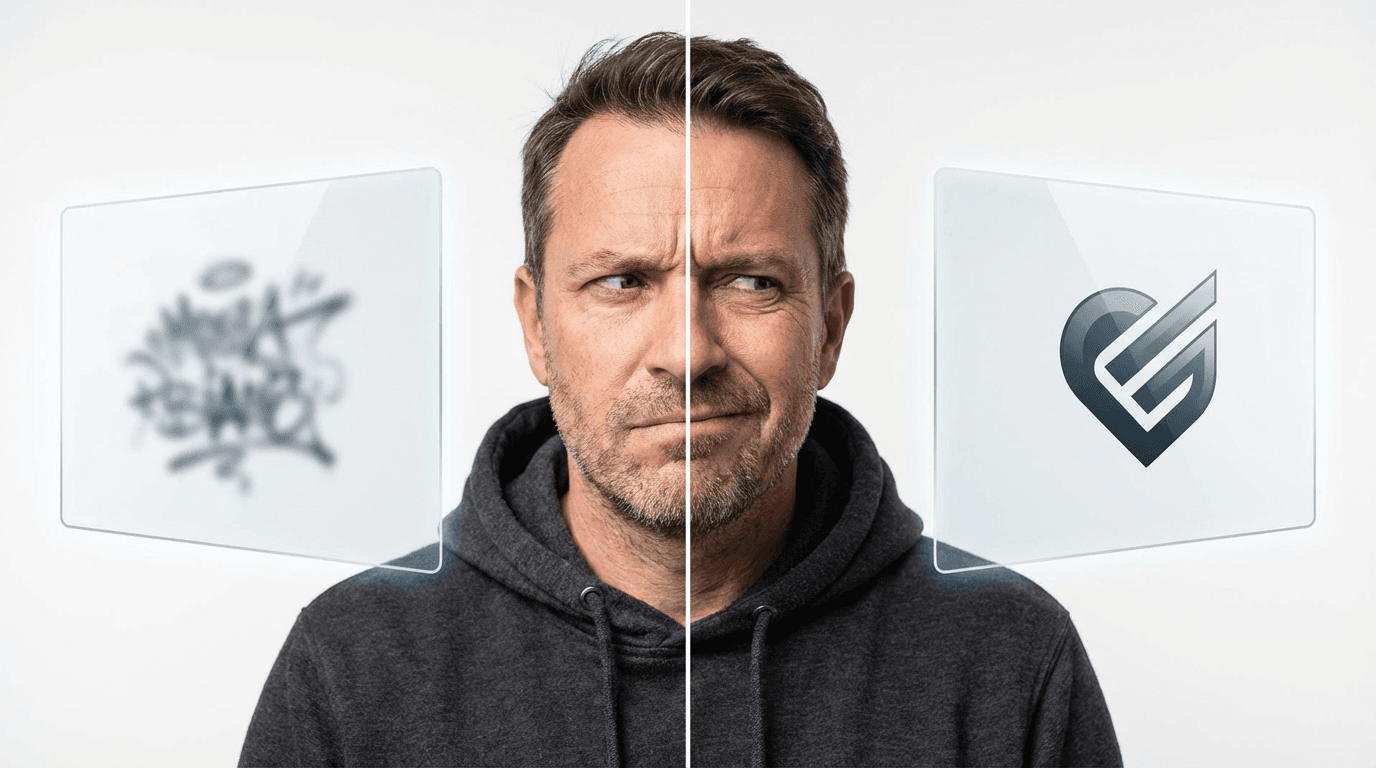
Prompt
creator with skeptical expression glancing between two floating panels, one on left and one on right, clean white background, comparison thumbnail layout, sharp facial detail, no text, no real logos
6. Excited creator celebrating growth
Prompt
creator smiling with excited wide-eyed expression, pointing toward rising graph on laptop, bright celebratory lighting, clean creator desk background, high-energy thumbnail composition, no text, no logos
7. Concerned creator for warning-style video

Prompt
close-up creator looking concerned while staring at a warning symbol on laptop screen, bright background with red accent light, clean composition, realistic face detail, no text, no logos
8. Focused expression for educational video
Prompt
creator with serious focused expression, looking directly at camera, minimal background, soft bright studio light, high clarity thumbnail shot, no text, no logos
9. Slightly amused skepticism for myth-busting video
Prompt
creator with one eyebrow raised and a subtle skeptical smile, clean bright background, modern thumbnail composition, face large in frame, no text, no logos
10. Shock and disbelief reaction
Prompt
creator leaning back slightly with disbelief expression, open mouth, wide eyes, bright desk and monitor setup, high contrast thumbnail style, no text, no logos
11. Side profile reacting to product
Prompt
creator in side profile with impressed expression looking at product on desk, bright studio scene, clear separation between face and object, thumbnail-ready composition, no text, no logos
12. Creator looking at before-and-after split
Prompt
creator with surprised expression looking toward side-by-side transformation panels, clean white background, dramatic but realistic facial emotion, thumbnail composition, no text, no logos
13. Calm but intense authority face
Prompt
creator looking directly at camera with calm but intense expression, bright minimal background, premium educational thumbnail look, face centered, no text, no logos
14. Confused reaction for testing video

Prompt
creator with confused expression, head tilted slightly, looking at floating interface panel, bright creator desk environment, clean composition, no text, no logos
15. Thumbnail face for productivity niche
Prompt
creator with focused and slightly determined expression at tidy desk, laptop, coffee cup, bright daylight, clean productivity thumbnail style, no text, no logos
16. Thumbnail face for finance niche
Prompt
creator with surprised but excited expression pointing toward upward chart, bright background, premium finance-style thumbnail composition, no text, no logos
17. Thumbnail face for AI tool review
Prompt
creator looking impressed and curious at futuristic interface on laptop, blue and white lighting accents, clean modern tech thumbnail composition, no text, no logos
18. Thumbnail face for study channel
Prompt
student creator with concentrated expression at organized study desk, warm lamp light, books and laptop, bright aesthetic thumbnail framing, no text, no logos
19. Thumbnail face for challenge video
Prompt
creator looking tired but determined, calendar and progress chart nearby, bright challenge-video thumbnail composition, clean background, no text, no logos
20. Thumbnail face for reaction video
Prompt
close-up creator reaction with exaggerated surprise, bright lighting, strong facial clarity, clean background, high energy thumbnail composition, no text, no logos
21. Thumbnail face for serious case study
Prompt
creator with serious analytical expression, looking at performance dashboard, modern office desk, bright and clean composition, realistic thumbnail framing, no text, no logos
22. Thumbnail face looking at graph drop

Prompt
creator with worried expression staring at a sharply dropping chart on screen, minimal desk background, bright lighting with red accent tones, no text, no logos
23. Thumbnail face for victory moment
Prompt
creator smiling with relieved and proud expression, upward growth chart in background, bright clean setup, modern YouTube thumbnail style, no text, no logos
24. Thumbnail face for tutorial mistake video
Prompt
creator with slightly frustrated expression pointing toward messy or broken interface on screen, clean background, tutorial warning thumbnail style, no text, no logos
25. Thumbnail face for ranking or SEO video
Prompt
creator with focused curious expression looking at search results and analytics on laptop, bright white background, strong educational thumbnail composition, no text, no logos
Face prompt formulas you can reuse
Instead of writing each prompt from scratch, use formulas.
Formula 1: Emotion + object
Prompt
close-up of a creator with [emotion] expression looking at [object], bright [environment], clean thumbnail composition, no text, no logos
Formula 2: Face + result
Prompt
creator reacting with [emotion] to [result], high-contrast lighting, face large in frame, clean background, thumbnail-ready composition, no text, no logos
Formula 3: Face + comparison
Prompt
creator with [emotion] expression looking between [option A] and [option B], clear split composition, bright background, no text, no logos
Formula 4: Face + warning
Prompt
creator showing [emotion] while looking at [problem], minimal creator setup, bright but tense composition, no text, no logos
These formulas are especially useful if you already create lots of thumbnails around AI prompts for YouTube titles, YouTube video hooks in 2026, or YouTube traffic sources in 2026.
How to make AI-generated faces look less fake
This is one of the biggest concerns creators have.
Here is how to reduce the artificial look.
Keep the composition simple
The more complicated the scene, the more likely the face loses realism.
Better:
- face
- one supporting object
- clean background
Worse:
- face
- multiple screens
- many props
- lots of tiny UI details
- dramatic overlays
Ask for realistic facial detail
Useful terms:
- realistic facial expression
- natural skin texture
- believable eye detail
- realistic creator desk setup
Avoid mixing too many styles
Do not combine:
- ultra-realistic portrait
- cartoon background
- cinematic sci-fi dashboard
- exaggerated meme face
Pick one style lane.
Use uploaded reference images when needed
If you want consistency with your own face, use a real uploaded image as the base and direct the tool around expression, framing, or background changes.
This approach also fits naturally with workflows in How to generate YouTube thumbnails with AI and How to generate blog thumbnails with AI for free.
How to increase clicks with face-based thumbnails
Since you specifically want stronger Google Search Console performance, this part matters.
Use search-friendly title and thumbnail alignment
Google and YouTube both reward packaging that matches intent.
If the article or video is about:
- CTR
- watch time
- hooks
- prompts
- thumbnails
- Shorts growth
then the face should express the emotional version of that topic.
Examples:
- CTR article → skeptical or analytical face
- growth experiment → shocked or excited face
- tutorial → confident and clear face
- warning article → concerned or frustrated face
Make the emotional contrast obvious
A half-expression rarely wins.
Better to choose:
- clearly curious
- clearly skeptical
- clearly shocked
- clearly focused
rather than something too neutral.
Leave room for title overlays if needed
For image generation, always reserve clean negative space when you know you may add text later.
Use niche-specific emotions
What works in one niche may fail in another.
- finance often responds to urgency, disbelief, excitement
- study and productivity often respond to focus, calm confidence, subtle curiosity
- AI tool content often responds to surprise, fascination, skepticism
- creator education often responds to frustration, realization, confidence
This is one reason niche-specific prompt articles like AI YouTube thumbnail styles for more views in 2026 tend to perform well.
A practical way to do this inside Miraflow AI
A good workflow is simple.
- choose the thumbnail emotion based on the title
- write or reuse a face prompt from the pack above
- generate 3 to 5 variations
- compare which face looks most readable at small size
- add text only if the image still feels clear and uncluttered
- use the best version as:
- YouTube thumbnail
- blog hero image
- promo card for Shorts or socials
This is especially useful if you are also using other creation tools in one workflow, such as scripting video ideas with From prompt to reel: Text2Shorts AI Shorts or planning visual systems with The new creator stack for AI Shorts, Reels, and TikTok.
Final thoughts
The best YouTube thumbnail face in 2026 is not the most dramatic face.
It is the one that makes the right promise instantly.
That usually means:
- clear emotion
- big readable face
- good contrast
- title alignment
- one clean visual idea
If your thumbnails already look polished but clicks still feel weak, testing face emotion prompts is one of the highest-leverage changes you can make.
Start with five emotions:
- shock
- curiosity
- frustration
- confidence
- skepticism
Then compare your CTR and keep the emotional styles that actually fit your niche.
FAQ: AI Prompts for YouTube Thumbnail Faces & Emotions in 2026
What facial expression works best for YouTube thumbnails in 2026?
There is no single best expression for every niche. The right choice depends on the video topic and title.
- shock works well for surprising results and experiments
- curiosity works well for tutorials and breakdowns
- frustration works well for problem-solving videos
- confidence works well for strategy and how-to content
- skepticism works well for comparisons and myth-busting
The best thumbnail face is the one that matches the emotional promise of the video.
Do faces still improve YouTube thumbnail CTR in 2026?
In many niches, yes.
Faces still help because viewers notice eyes, emotion, and direction of attention very quickly. A strong face can make the thumbnail feel more human, more urgent, and easier to understand at a glance. That said, faceless thumbnails can still work if the visual concept is extremely clear.
Should I use a shocked face in every YouTube thumbnail?
No. That usually hurts more than it helps.
If every thumbnail uses the same exaggerated reaction, your channel starts to look repetitive and less believable. Use different emotions depending on the topic, such as curiosity for tutorials, concern for warning-style videos, and excitement for big wins or reveals.
What makes an AI-generated thumbnail face look fake?
The most common reasons are:
- the face is too small
- the expression is too exaggerated
- the eyes are not aligned naturally
- the skin texture looks too smooth or plastic
- the background is too complex
- the prompt mixes too many styles at once
Cleaner prompts and simpler compositions usually create more believable results.
Is it better to use my real face or generate a face with AI?
If you are building a personal brand, your real face is often better because it builds recognition and consistency.
If you do not want to appear on camera, AI-generated faces can still work for certain niches, especially if the thumbnail is more concept-driven. A hybrid approach also works well, where you upload your own image and use AI to improve framing, lighting, or background.
How big should the face be in a YouTube thumbnail?
In most cases, the face should be large enough to read clearly on mobile.
A good rule is to make the face one of the biggest visual elements in the frame. If viewers cannot immediately recognize the expression when the thumbnail is small, the face is probably too small.
Should the person in the thumbnail look at the camera or at an object?
Both can work, but they create different effects.
- looking at the camera creates a more direct emotional connection
- looking at an object, graph, or product helps guide viewer attention to the key point
For comparison videos, reaction videos, and results-based videos, looking at the object often works very well.
What kind of videos benefit most from emotional face thumbnails?
They tend to work especially well for:
- YouTube growth videos
- reaction content
- challenge videos
- case studies
- before-and-after videos
- tool comparisons
- educational creator content
These formats benefit from emotional contrast and quick visual storytelling.
Can faceless channels still use face-style thumbnail prompts?
Yes, but indirectly.
Faceless creators can use emotion-driven visual prompts with characters, silhouettes, hands, or stylized subjects instead of their own face. The key idea is still the same: communicate emotion and tension clearly.
How many thumbnail face variations should I generate before choosing one?
A good starting point is 3 to 5 variations.
That gives you enough range to compare:
- stronger vs softer expressions
- direct eye contact vs looking at an object
- close-up vs medium close-up
- different emotional tones for the same topic
Usually one or two versions will stand out immediately when viewed at small size.
Related reads
If you want to build a stronger thumbnail and CTR system around this, read these next:
- AI prompts for YouTube thumbnails
- Best AI prompts for YouTube thumbnails in 2026
- YouTube thumbnail makeovers in 2026: before and after using AI
- YouTube CTR in 2026: what is a good click-through rate and how to improve it with AI thumbnails
- YouTube CTR benchmarks in 2026
- YouTube Shorts thumbnail strategy in 2026
- Consistent YouTube thumbnail style with AI
- Nano Banana prompt guide viral prompts
For current thumbnail and CTR references, YouTube’s help on impressions click-through rate and Google’s image generation docs on prompting strategies are useful reference points. (support.google.com)